

 ChatGPT
 Perplexity
 Claude
 Gemini
WatchMojo grew to more than 25 million YouTube subscribers with top 10 videos told by a narrator’s voice over clips. You can make the same kind of video with AI, and we tested it with a 75-second video about the mantis shrimp, a sea creature that punches faster than you can blink. If you want to know how to make faceless YouTube videos without filming anything, you can do most of the work in one Claude chat. Claude writes the script and edits the video, and OpenArt MCP makes the narrated clips in between.
Key takeaways
- Claude wrote a 9-scene, 75-second script and waited for approval before making anything.
- OpenArt MCP made each scene as a narrated clip with Seedance 2.5 Draft, and Claude kept one narrator voice across all 9 scenes.
- Music came from OpenArt's AI music generator on openart.ai, since OpenArt MCP makes images and videos only.
- Claude handled the edit: scene order, captions timed to each word, music and an upscale to 1080p.
- Claude showed the cost before every generation, including the thumbnail.
What Is a Faceless YouTube Video?
A faceless YouTube video tells a story or explains a topic without the creator appearing on camera. A narrator's voice carries the video, while generated footage fills the screen.
Common faceless formats include:
- Narrated explainers: one topic, a script and matching footage, like our mantis shrimp video.
- Fact and list videos: "5 strangest ocean animals" or "3 facts about octopuses," one scene per fact.
- Story videos: a history event or a short fictional story, told over generated scenes.
- Show-and-tell videos: product or app footage cut to music, with no narrator at all.
OpenArt's team has made faceless videos this way too. One 28-second real estate video used listing photos made with OpenArt MCP in Claude and a walkthrough made in OpenArt, with no presenter on screen.
What You Need
You need a paid Claude plan with the Claude desktop app, plus an OpenArt account with sufficient credits for AI video generation. Pick a folder on your computer to hold the files. Add OpenArt MCP to Claude as a connector once, and you can make videos in Claude from any chat.
We ran our test in Claude Cowork, with a folder named ‘Faceless test’. That guide also covers the connector setup step by step.
How to Make Faceless YouTube Videos in Claude, Step by Step
Here is how our 75-second mantis shrimp video came together, in the order we did it. Claude asked before each generation, so nothing was made until we approved it.
1. Pick a topic and write the script
We asked Claude for 3 video ideas for an ocean animal channel and a script for the first one. Claude returned a 75-second script of about 180 words, split into 9 scenes, with one narration line and one visual line per scene.
Claude also checked its own facts. It worded the claim that mantis shrimp can crack aquarium glass as "reportedly," because that story is anecdotal.
2. Make one test scene to set the look and the voice
We asked for scene 1 only, using Seedance 2.5 Draft at 16:9 and 8 seconds, with audio on. The narration was a calm, warm voice reading the line word for word, with soft ocean sound and no music.
Before generating, Claude showed the cost and the full prompt. It also warned that a 22-word line is tight for 8 seconds, and offered to shorten the line if the voice sounded rushed.
Claude saved "realistic nature documentary, natural sunlight" as the style line for every scene. That one line kept all 9 scenes looking like one film.
3. Make scenes 2 to 9 in the same voice
We asked Claude to use scene 1's narration as the voice reference for scenes 2 to 9. The narrator sounded like the same narrator. Note that, we didn’t add any voice reference but prompted Claude to generate similar narration as of scene 1 for scenes 2 to 9.
You can make each scene with text to video, as we did, straight from the script. For more control over a shot, make a still image first and animate it with image to video.
4. Add music
OpenArt MCP makes images and videos only, so we created an MP3 file for background music from OpenArt's AI music generator on openart.ai. We made the track there, saved it to the folder and gave the file to Claude.
5. Edit the video
We downloaded the 9 clips from our OpenArt library into the test folder. Claude then put them in order, added captions timed to each spoken word, and mixed in the music.
The clips were 480p drafts. Claude upscaled the final video to 1080p, so the finished file came out at 1920x1080 and 75 seconds long. To learn more about this step, see how to edit the video in Claude.
6. Make the thumbnail
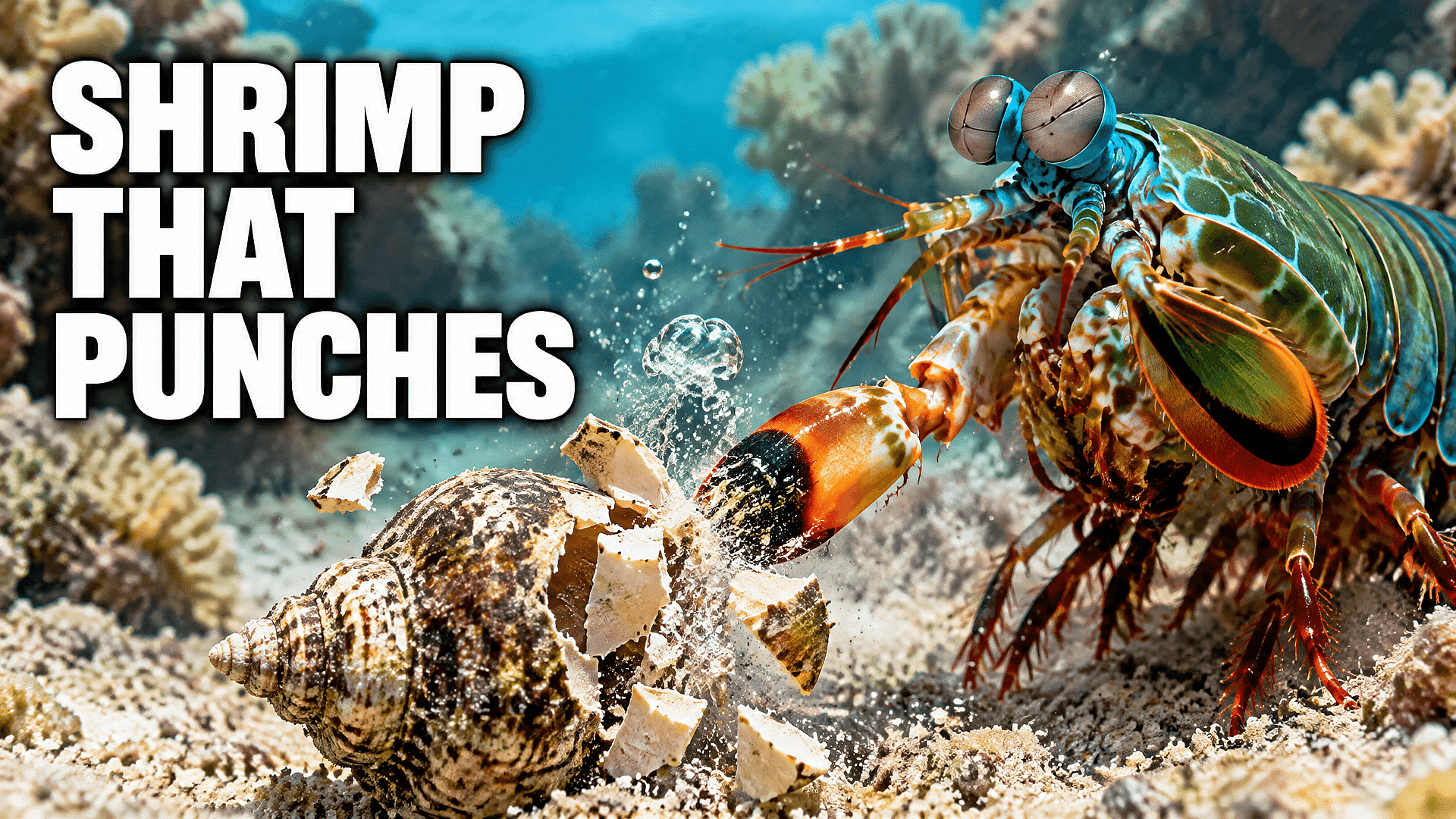
We asked for a 16:9 thumbnail with a 3-word title and no faces. Claude picked GPT Image 2.5 Sunburst because it renders text more accurately, and showed the cost first.
We picked the title "SHRIMP THAT PUNCHES."
Prompts You Can Copy
These are the prompts from our test, with square brackets as placeholders for you to add your own topic. Send them one at a time in the same chat.
Script
I'm starting a faceless YouTube channel about [your niche].
Give me 3 video ideas, then write a 70 to 80 second script for the first one.
Split it into 9 scenes of about 8 seconds each, with about 20 words of narration per scene and a one-line visual for each.
Show me the script before you generate anything.
First scene
Make scene 1 only, with Seedance 2.5 Draft, 16:9, 8 seconds, with audio.
The narration is a calm, warm adult voice reading the scene 1 line word for word, with soft background sound and no music.
Keep this visual style for every scene: [your style, e.g. realistic nature documentary, natural light].
Show me the cost first.
The other scenes
I like scene 1. Use its narration as the voice reference for scenes 2 to 9, so every scene has the same narrator.
Make them with the same model and style, each reading its line word for word.
Show me the total cost before you generate.
Edit
Put the 9 clips in order into one 16:9 video. Add captions timed to each spoken word, in a clean style.
Add [music file name] under the narration.
Save it as a new file named [video name].mp4, and don't overwrite any clip.
Thumbnail
Make a 16:9 YouTube thumbnail for this video with GPT Image 2.5, with a bold 3-word title and no faces.
Show me the cost first.
How to Repeat It Every Week With YouTube Automation AI
Once one video works, you can make the next one from the same pieces. Keep your style line, a clip of your narrator's voice, your music track, and your prompts in the folder, and start each new video from them.
That reuse is the base of faceless YouTube automation. Claude can also run jobs as a routine with OpenArt MCP: in a separate test, a Claude scheduled task made a video clip with nobody in the chat. To set that up, see how to automate it with Claude routines [link].
Tips From Our Test
- Keep one visual style line. Our line, "realistic nature documentary, natural sunlight," kept all 9 scenes looking like one film.
- Describe what the camera sees. Two of our planned shots, an animated spring diagram and a microscope zoom, came out as realistic close-ups of the shrimp and a shell. Write scenes as real footage when you want a realistic style.
- Keep narration short. About 20 words fits an 8-second scene. Claude warned us that a 22-word line might rush the voice.
- Ask for the cost first. Add "show me the cost first" to every generation prompt, then upgrade only the scenes you keep.
- Check your facts. Claude flagged one anecdotal claim in our script. Read every narration line before it becomes a clip.
- Plan for YouTube's rules. YouTube's monetization policy excludes mass-produced or repetitive content, and that includes AI videos, so give each video its own topic and script. YouTube also asks you to mark realistic AI-made scenes as altered or synthetic content when you upload in YouTube Studio. Our take on AI labels explains why disclosure matters.
Frequently Asked Questions
How do I make faceless YouTube videos with AI?
Write a script split into short scenes, make each scene as a narrated clip, then put the clips together with captions and music. In our test, Claude wrote the script and did the edit, and OpenArt MCP made the 9 clips with Seedance 2.5 Draft.
Can AI make the voiceover for a faceless video?
Yes. In our test, the video model generated the narration inside each clip, reading our script word for word. We used scene 1's narration as the voice reference for the other 8 scenes, so one narrator voice carried the whole video.
Can Claude add music to a faceless YouTube video?
Yes, if you give Claude the music file. We made our track with OpenArt's AI music generator on openart.ai, and Claude mixed it under the narration during the edit.
Can I make the thumbnail with AI too?
Yes. Claude made our thumbnail with GPT Image 2.5 Sunburst, with the title "SHRIMP THAT PUNCHES" on a realistic underwater scene. Check the title spelling at small sizes before you upload.
Can faceless YouTube channels with AI videos make money?
They can join the YouTube Partner Program, but YouTube excludes mass-produced or repetitive content, and that includes AI videos from monetization. Give every video its own topic and script, and check YouTube's current monetization policies before you apply.
Do I have to tell YouTube a video is made with AI?
YouTube asks you to disclose/mark realistic AI-made scenes, like our generated underwater footage, during upload in YouTube Studio. Using AI only for the script or captions doesn't need a disclosure.
What is faceless YouTube automation?
It means letting tools handle the repeat steps of a faceless channel. With Claude and OpenArt MCP, you reuse your style line, voice clip and prompts each week, and Claude can run generation jobs on a schedule. You still review each video before it goes live.