

Seedream 5.5 — AI Image Model
COMING SOON - Generate 4K images, edit one area round after round, write detailed text in different languages, and split images into up to 100 layers with Seedream 5.5 on OpenArt.

Key Features of Seedream 5.5
Edit one area, round after round
Seedream 5.5 changes only the part of an image you ask it to change. Ask for a new jacket color, a different product on the table, or an empty street behind your subject. The person, the product, and everything you did not mention stay exactly as they were. You can keep making changes round after round, and the image keeps its sharpness and quality the whole way.
Try it Now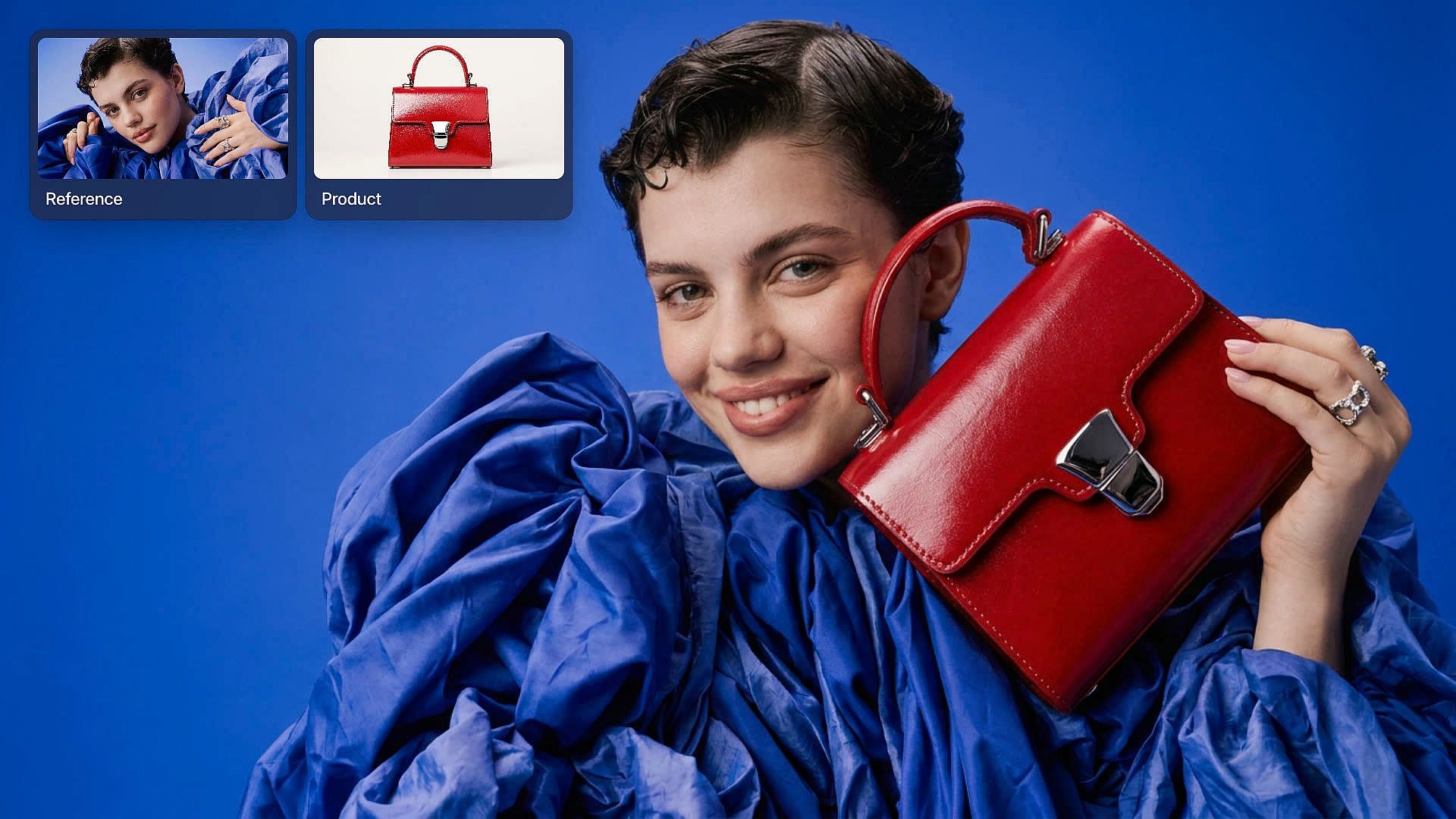
Make realistic people and place products
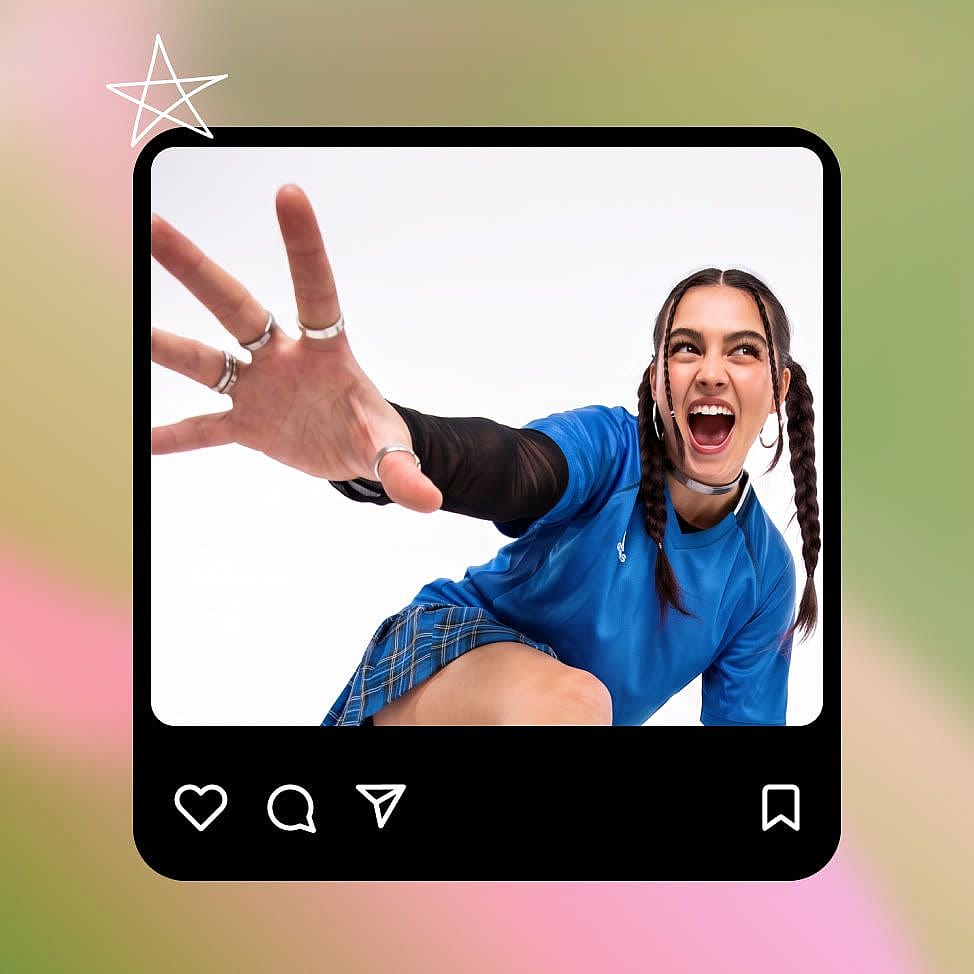
Seedream 5.5 gives faces, expressions, and body proportions a natural look, from a smiling model to an older craftsman with deep lines and visible pores. Materials like glass, leather, and linen show their real texture, and images come out sharper than Seedream 5.0 Pro at the same size. You can also give Seedream 5.5 one or more reference images, such as your product and a room, and ask it to put them together.
Try it Now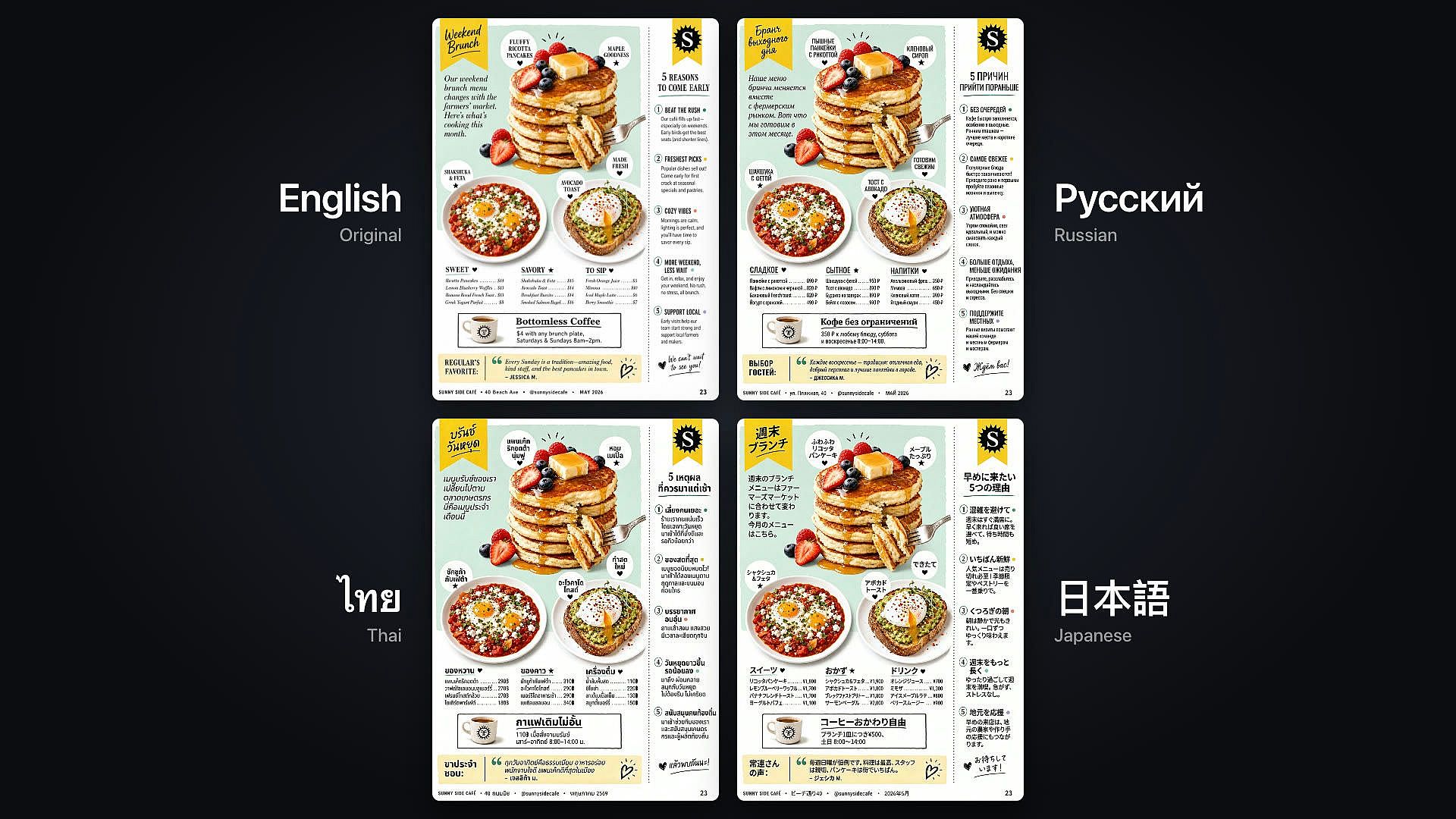
Write small text in many languages
Seedream 5.5 writes small, crowded text that stays correct and easy to read. Product labels, sticky notes, event posters, price lists, and building signs come out with the right letters, numbers, and dates. Seedream 5.5 handles many writing systems, including Russian, Thai with its tone marks, Japanese, and Filipino. One poster design can carry the same message in each market's own language.
Try it NowMake images with transparent backgrounds
Seedream 5.5 can make images with a fully or partly transparent background, from a prompt or from an image you upload. Ask for a logo, a sticker, a game character, an app button, or fancy title text for a slide. The file comes out with only your subject in it, ready to drop onto any color or into a larger design. Partly see-through areas, like a glass bottle or a soft shadow, stay partly see-through.
Try it NowSplit images into up to 100 layers
Seedream 5.5 can split a finished image into as many as 100 separate layers. The background, each object, and each block of text come out as their own files, ready to reuse in other designs. Seedream 5.5 also reads the words on each text layer, so you can change the copy, translate it, or turn the design into a template. Partly see-through pieces come out as their own layers too.
Try it NowHow to Use Seedream 5.5
Choose the model
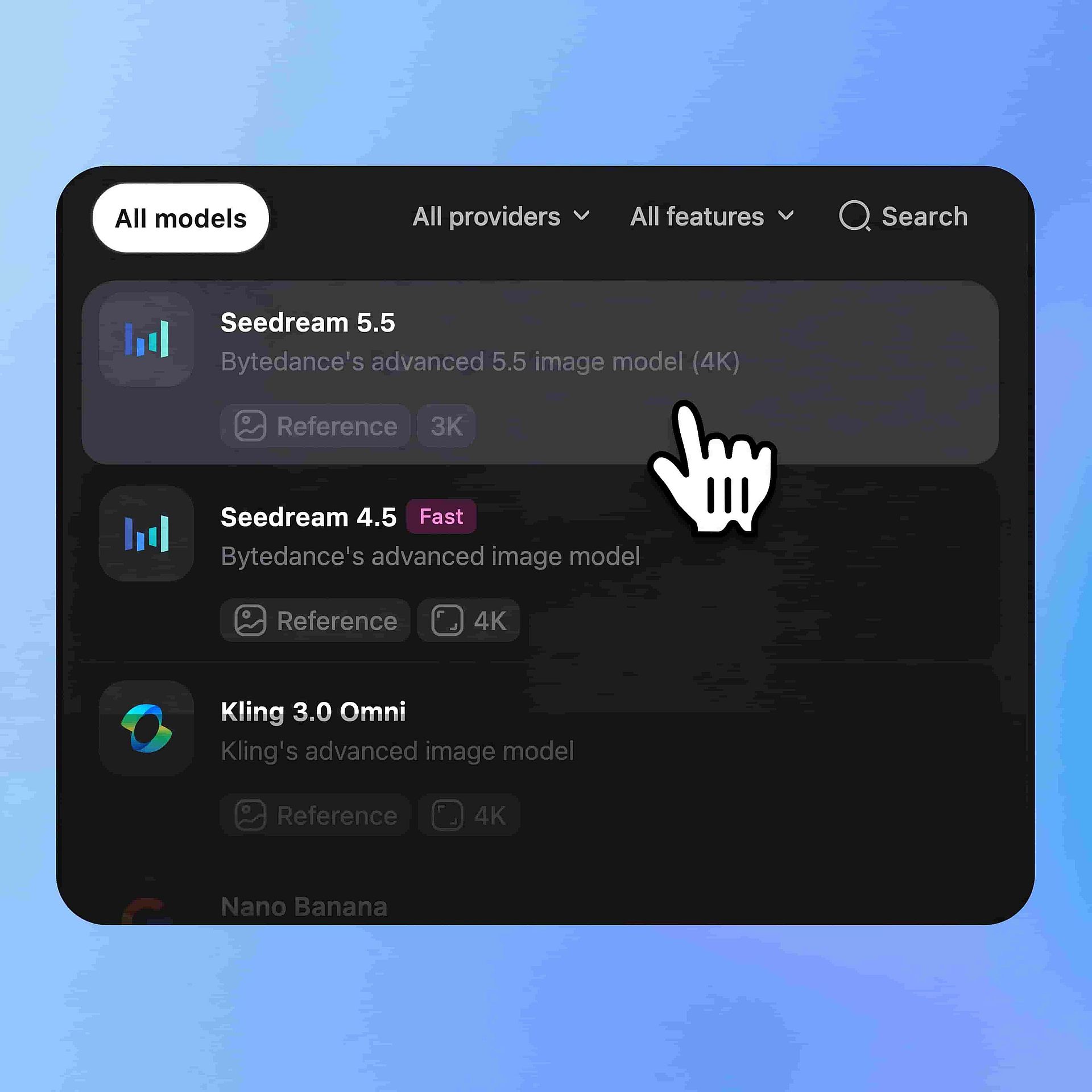
Go to OpenArt's image tools and select Seedream 5.5.
Prompt and add references
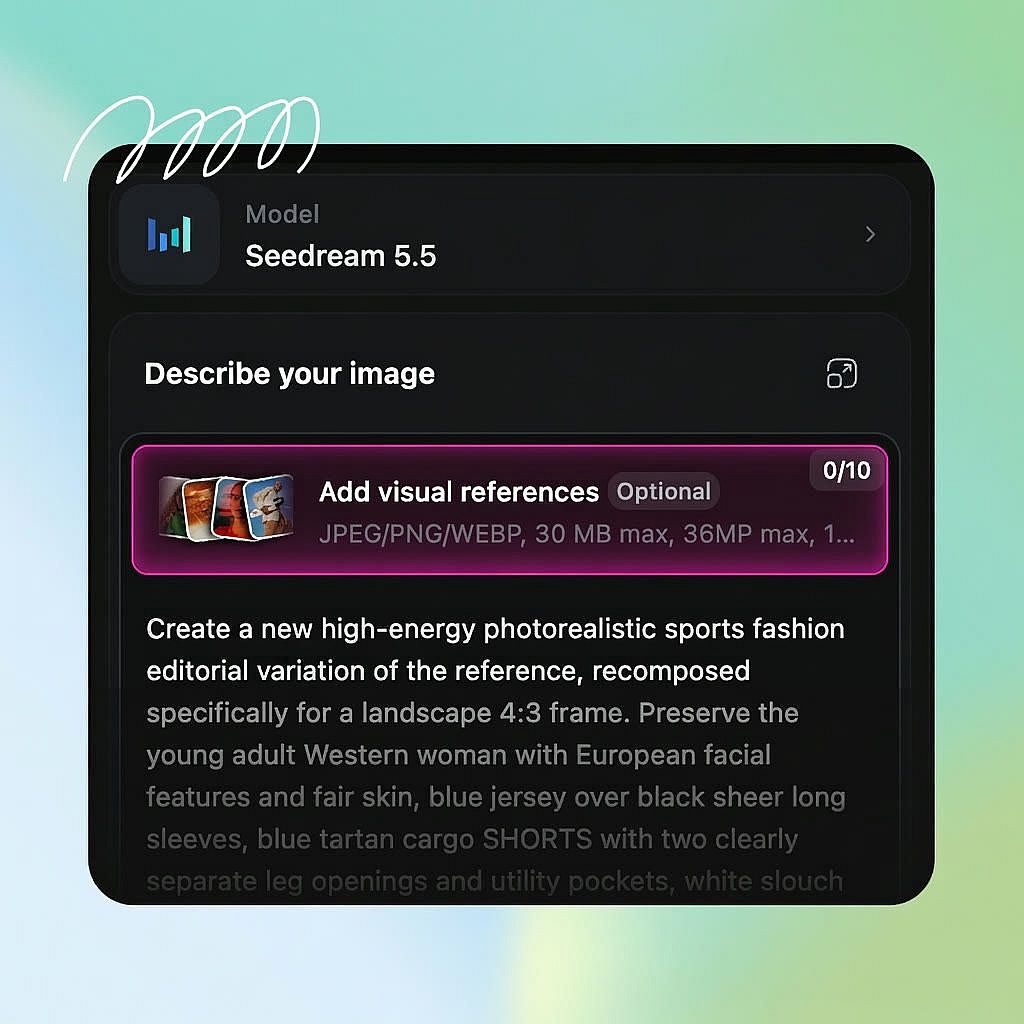
Describe your image, put any text you want in the picture, and add reference images.
Configure and generate
Set your number of outputs, aspect ratio, quality, and resolution, and then hit generate.
Best Uses for Seedream 5.5
Test ad versions from one approved image
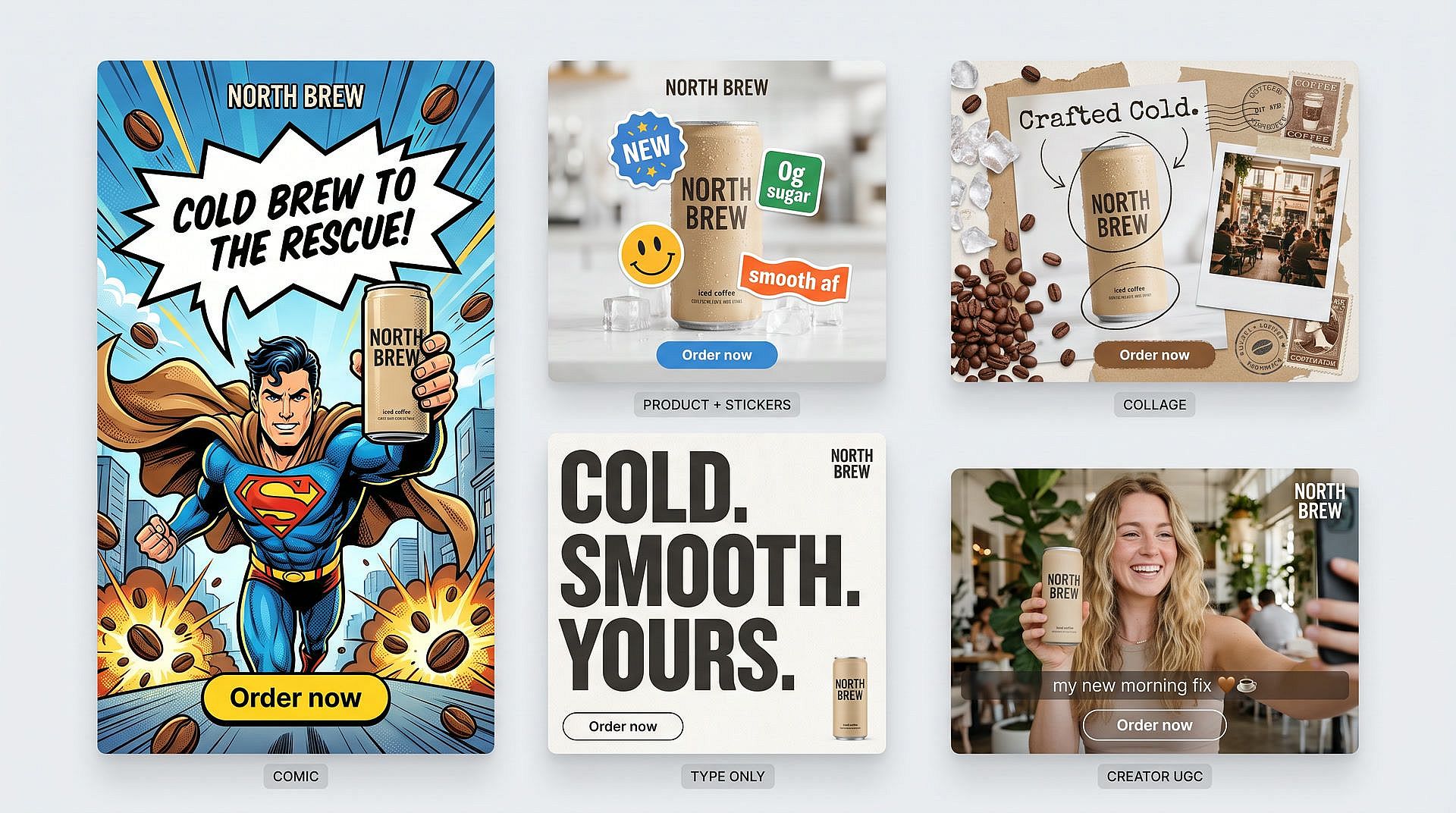
Seedream 5.5 helps performance marketers and ad designers build test versions of an ad that already works. Start with your best ad image and change one thing at a time: a new background, a new product color, then a new headline. The model, the product, and the layout stay the same in every version, so each test shows what that one change did. Split the final ad into layers, and the headline comes out as its own text layer you can rewrite for the next test.
Try it Now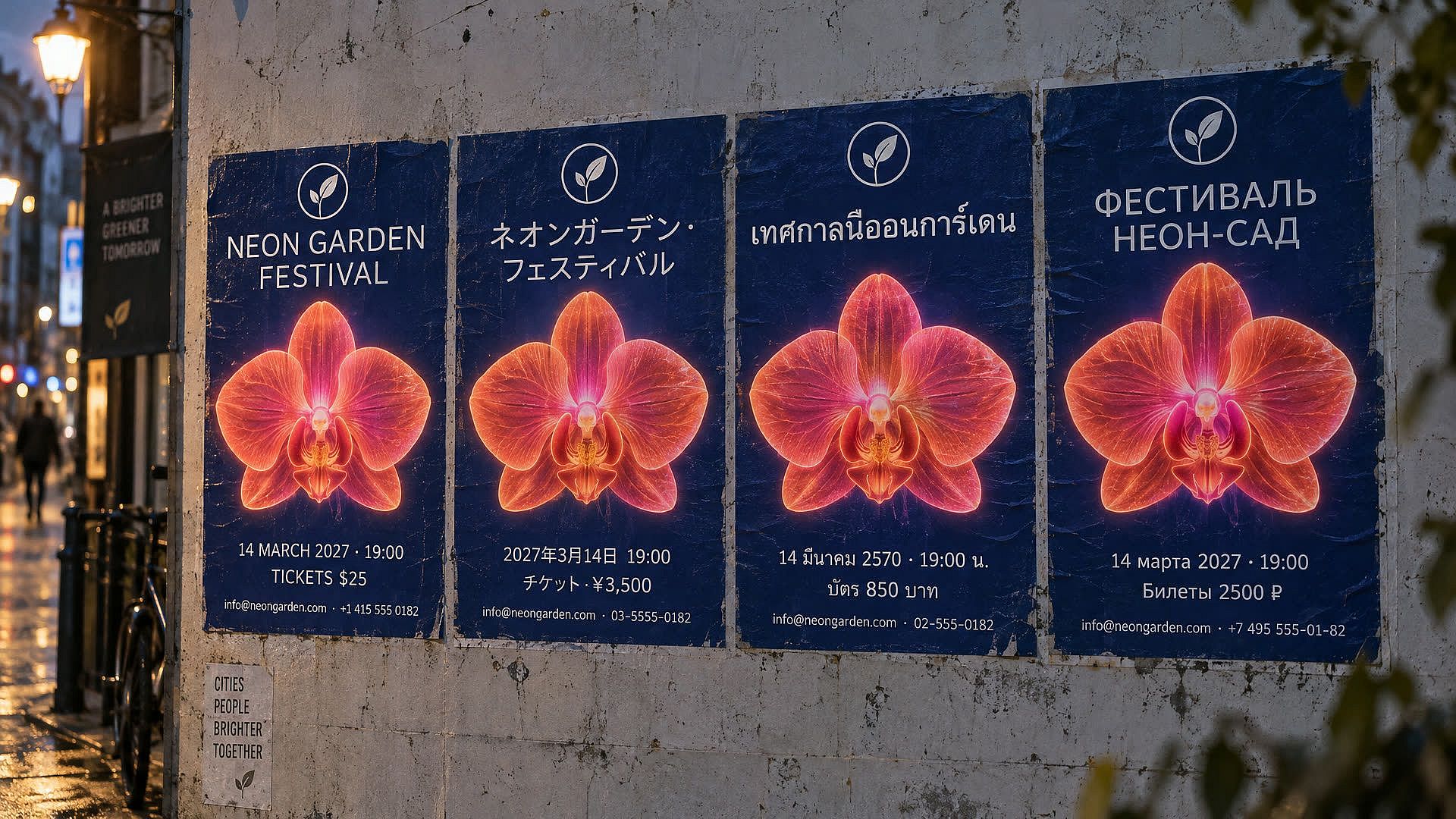
Take one campaign poster into every market
Seedream 5.5 helps brand designers and creative directors run one campaign across countries. Say your team approves an event poster in English with a date, a time, a price, and a small line of contact details. Give Seedream 5.5 the same copy in Japanese, Thai, or Russian, and the small print comes out correct and easy to read. Split the poster into layers, and the logo, the product, and the background stay ready to reuse in every version.
Try it Now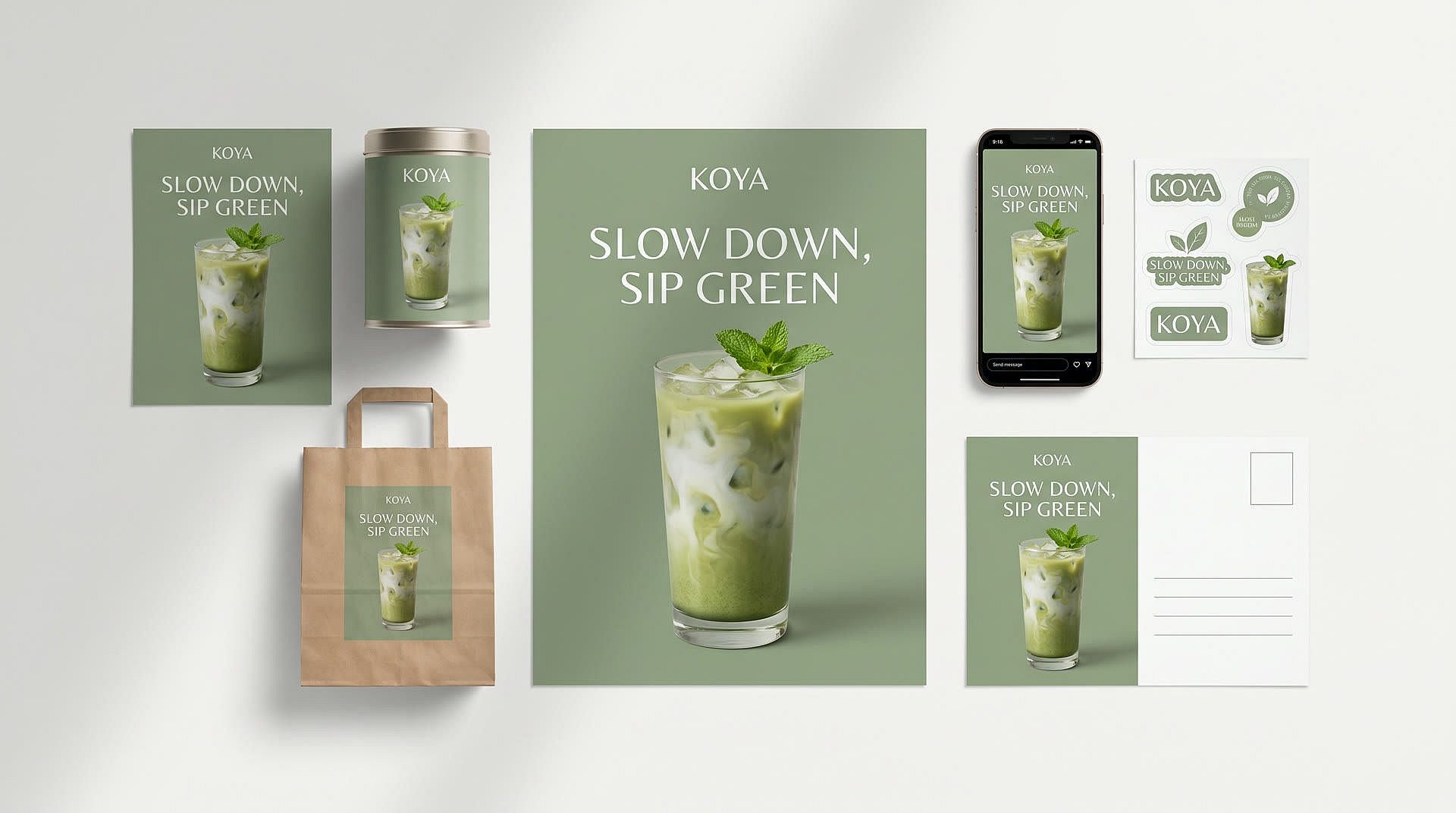
Roll one key visual out to every channel
Seedream 5.5 helps brand teams take an approved key visual everywhere it needs to go. Ask for the same visual as a poster, a 9:16 story, a shopping bag, a tea tin label, a postcard, and a sticker sheet with a transparent background. Every format is laid out for its own shape, and the logo, headline, and small print stay sharp. Split the key visual into layers, and your designers can rebuild any size by hand.
Try it Now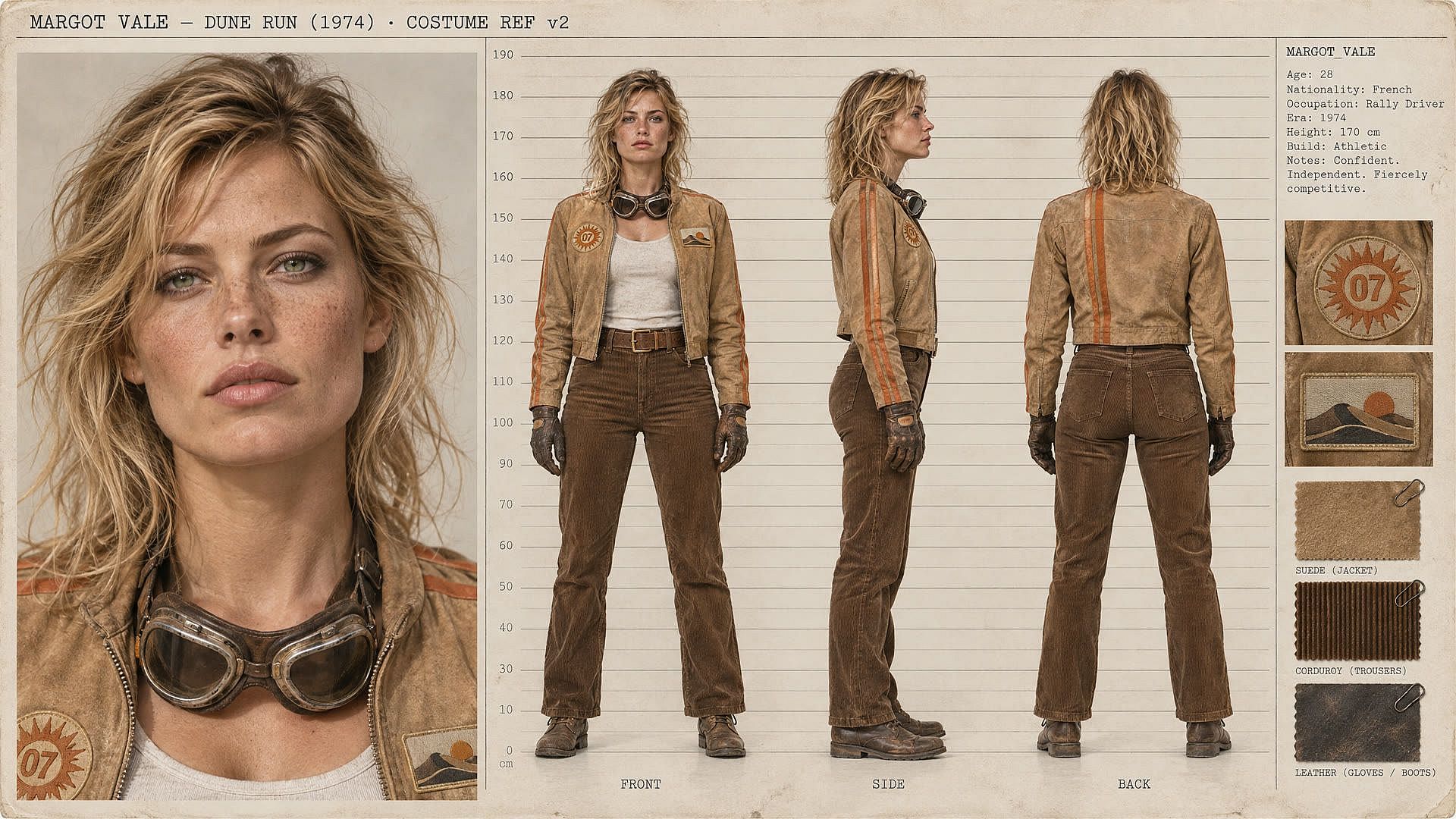
Plan characters and scenes before the shoot
Seedream 5.5 helps filmmakers and storyboard artists show the cast and the look of a film before anyone shoots. Upload a reference photo of a character and ask for a 16:9 sheet with a large face close-up next to front, side, and back views. Height, face, and clothing folds line up across every view, so the costume and makeup teams work from one clear picture.
Try it NowTips for Best Results
Frequently Asked Questions
Seedream 5.5 is ByteDance's newest Seedream model for making and editing images, and it makes images up to 4K on OpenArt. Seedream 5.5 edits one area across many rounds, makes realistic people and products, writes small text in many languages, makes transparent backgrounds, and splits images into up to 100 layers.
Yes. Seedream 5.5 makes 4K images at 3840 × 2160 in a wide 16:9 frame. You can also set your own width and height for other shapes, up to 8.29 megapixels.
Seedream 5.5 can split one image into up to 100 layers, such as the background, each object, and each block of text. Text layers come with the words read out, so you can change the copy, translate it, or reuse the design as a template.
Seedream 5.5 writes small and dense text in many languages, including Russian, Thai, Japanese, and Filipino. It suits product labels, posters, signs, and ads that need correct spelling, numbers, and dates in each market's language.
Every new OpenArt account starts with 40 free credits, so you can try the product right away. When you're ready to create more, paid plans add monthly credits and watermark-free downloads. See current plans on the OpenArt pricing page.
Seedream 5.5 adds transparent backgrounds, splits images into up to 100 layers, and reads the words on each text layer. Seedream 5.5 also keeps edits steady across many rounds, writes small text more accurately, makes sharper and more natural-looking people, and goes up to 4K.
Yes. Seedream 5.5 changes only the part you ask for and keeps the rest of the image the same, round after round, with no drop in quality. Ask for one change per round and look over the full image before you use it.
Yes. Seedream 5.5 makes images with fully or partly transparent backgrounds from a prompt or from an image you upload. Logos, stickers, product cutouts, game characters, and app buttons come out ready to place on any color or inside a larger design.
Yes. Upload your product and a scene, and Seedream 5.5 places the product in the scene with matching size, angle, and lighting while it keeps the label and details. You can also make the same product on a transparent background for your store page.
Commercial rights for Seedream 5.5 images apply on eligible paid plans, so check the OpenArt pricing page for the plan that fits your work. Make sure you hold the rights to any photo, logo, or person you upload.
Get Insights from Experts Blog
Get the insights you need. Our experts share actionable hacks, break down the hottest topics, and provide essential how-to guides to help you build, optimize, and scale.
Read More
Loved by Creators
I've tried many AI platforms... but OpenArt is still the best for character creation, image-to-video quality, and the variety of models available.
OpenArt offers an excellent array of AI tools... once you learn the features, the creative possibilities are amazing - and their support team is outstanding.
OpenArt is a very versatile AI platform with many image and video models, consistent character creation, and powerful editing tools.
Helpful AI tools all in one place - image and video generation, editing, and more... no need for multiple subscriptions.
Customer service is always quick and helpful... and the platform keeps getting better with new features and tools.
I've tried many AI platforms... but OpenArt is still the best for character creation, image-to-video quality, and the variety of models available.
OpenArt offers an excellent array of AI tools... once you learn the features, the creative possibilities are amazing - and their support team is outstanding.
OpenArt is a very versatile AI platform with many image and video models, consistent character creation, and powerful editing tools.
Helpful AI tools all in one place - image and video generation, editing, and more... no need for multiple subscriptions.
Customer service is always quick and helpful... and the platform keeps getting better with new features and tools.
I've tried many AI platforms... but OpenArt is still the best for character creation, image-to-video quality, and the variety of models available.
OpenArt offers an excellent array of AI tools... once you learn the features, the creative possibilities are amazing - and their support team is outstanding.
OpenArt is a very versatile AI platform with many image and video models, consistent character creation, and powerful editing tools.
Helpful AI tools all in one place - image and video generation, editing, and more... no need for multiple subscriptions.
Customer service is always quick and helpful... and the platform keeps getting better with new features and tools.
With so many AI platforms out there, OpenArt stood out as a stellar choice - I'd recommend it to any creator.
This platform includes everything you need for AI content creation - images, video, characters, audio, and multiple AI models in one place.
OpenArt is pushing the boundaries of AI video creation... and it's clear the team is committed to improving the creator experience.
I made my first AI music video with OpenArt... and their support team was the best help I've ever experienced.
I'm very happy with the support - my issue was resolved quickly and the team made the process easy.
With so many AI platforms out there, OpenArt stood out as a stellar choice - I'd recommend it to any creator.
This platform includes everything you need for AI content creation - images, video, characters, audio, and multiple AI models in one place.
OpenArt is pushing the boundaries of AI video creation... and it's clear the team is committed to improving the creator experience.
I made my first AI music video with OpenArt... and their support team was the best help I've ever experienced.
I'm very happy with the support - my issue was resolved quickly and the team made the process easy.
With so many AI platforms out there, OpenArt stood out as a stellar choice - I'd recommend it to any creator.
This platform includes everything you need for AI content creation - images, video, characters, audio, and multiple AI models in one place.
OpenArt is pushing the boundaries of AI video creation... and it's clear the team is committed to improving the creator experience.
I made my first AI music video with OpenArt... and their support team was the best help I've ever experienced.
I'm very happy with the support - my issue was resolved quickly and the team made the process easy.