


 ChatGPT
 Perplexity
 Claude
 Gemini
Seedream is the family of AI image models from ByteDance, the company behind TikTok. The Seedream family includes Seedream 5.5, Seedream 5.0 Pro, Seedream 5.0 Flash, Seedream 5.0 Lite, and Seedream 4.5, and each model suits a different job.
Seedream 5.5 is the newest Seedream model and the one to start with for most work. The Seedream 5.0 generation, often shortened to "Seedream 5", has three models: Seedream 5.0 Pro for design work, plus the lower-cost Seedream 5.0 Lite and Seedream 5.0 Flash.
All five Seedream models run in OpenArt's AI image generator. You can run one prompt on each model and keep the picture you like best.
Key takeaways
- Seedream 5.5 is the best Seedream model for editing one picture many times and for transparent backgrounds.
- Seedream 5.0 Pro is the design model for infographics, posters, and edits on one marked area.
- Seedream 5.0 Flash is the fast, low-cost Seedream 5.0 model for drafts and bold graphics.
- Seedream 5.0 Lite makes 2K and 3K pictures from up to 14 reference images on OpenArt.
- Seedream 4.5 is the Seedream model to pick for 4K pictures, anime, and 2D art.
What is Seedream, and what does "Seedream 5" mean?
Seedream is the image model family from ByteDance Seed, ByteDance's AI research team. Every Seedream model makes pictures from a prompt and edits pictures you upload.
"Seedream 5" and "Seedream 5.0" are two names for one generation of Seedream models. ByteDance released the Seedream 5.0 generation as three models: Seedream 5.0 Lite, Seedream 5.0 Pro, and Seedream 5.0 Flash. "Seedream 5 Pro" is a short name for Seedream 5.0 Pro.
"Seedream 5" with no other word usually points to Seedream 5.0 Lite, the first model of the generation. ByteDance's own model ID for Seedream 5.0 Lite starts with "seedream-5-0", with no "lite" in the name.
Six releases shaped the Seedream family:
- September 2025: Seedream 4.0 puts making and editing pictures into one model and raises the top size to 4K.
- December 2025: Seedream 4.5 improves reference matching, poster layouts, and small text.
- February 2026: Seedream 5.0 Lite arrives with stronger reasoning for short and tricky prompts.
- July 8, 2026: ByteDance launches Seedream 5.0 Pro, the design model with marked-area edits and layers.
- September 2026: Seedream 5.0 Flash arrives as the faster, lower-cost Seedream 5.0 model.
- November 9, 2026: ByteDance launches Seedream 5.5 with 100-round editing and transparent backgrounds.
How do the Seedream models compare at a glance?
The five Seedream models on OpenArt differ most in what each model does best and how big a picture each model makes.
| Model | Released | What the model does best | Sizes on OpenArt |
|---|---|---|---|
| Seedream 5.5 | November 2026 | Seedream 5.5 suits long editing sessions, transparent backgrounds, small text, and realistic people and products. | 1K, 1.5K, 2K |
| Seedream 5.0 Pro | July 2026 | Seedream 5.0 Pro suits infographics, posters, edits on one marked area, and layer work. | 1K, 2K |
| Seedream 5.0 Flash | September 2026 | Seedream 5.0 Flash suits fast, low-cost drafts and bright, bold graphics. | 1K, 1.5K, 2K |
| Seedream 5.0 Lite | February 2026 | Seedream 5.0 Lite suits low-cost 2K and 3K pictures built from many reference images. | 2K, 3K |
| Seedream 4.5 | December 2025 | Seedream 4.5 suits 4K pictures, anime and 2D art, and poster and logo layouts. | 2K, 4K |
What does Seedream 5.5 do best?
Seedream 5.5 is ByteDance's newest Seedream model, released on November 9, 2026. Seedream 5.5 is built for editing: you change one thing at a time, and the rest of the picture stays the same.
- Edits that hold for 100 rounds. ByteDance says Seedream 5.5 keeps a picture steady across 100 rounds of editing. You can change a jacket color while the face and the background stay exactly as they are.
- Transparent backgrounds from a prompt. Seedream 5.5 makes pictures with a fully or partly see-through background, from a prompt or from reference images. Logos, stickers, and product cutouts come out ready to drop onto any design.
- More natural light and skin. Seedream 5.5 shows light, materials, and skin with less shine and glare, so people and products look closer to real photos.
- Small text that stays readable. Seedream 5.5 writes small, crowded text on labels, menus, and posters. ByteDance reports a 0.4% rate of serious text errors and a 1.7% rate of small text errors in its Chinese and English tests.
- Up to 100 layers. Seedream 5.5 can split one picture into a base image plus up to 99 layers, and it reads the words on text layers. On OpenArt, the Extract Layers tool does this job with Seedream 5.0 Pro.
On OpenArt, Seedream 5.5 makes pictures at 1K, 1.5K, or 2K, takes up to 10 reference images, and costs fewer credits than Seedream 5.0 Pro. A Background setting lets you pick Auto, Transparent, or Opaque before you generate.
Seedream 5.5 is also the default model in OpenArt's AI photo editor. Upload a picture, type one change, and keep going round after round. The Seedream 5.5 prompt guide shows how to write each edit.
What does Seedream 5.0 Pro do best?
Seedream 5.0 Pro is the top model of the Seedream 5.0 generation, released by ByteDance on July 8, 2026. ByteDance built Seedream 5.0 Pro for design work, so the model plans the layout of a picture before it draws.
- Dense layouts in one go. Seedream 5.0 Pro turns data, ideas, and long text into infographics, charts, flowcharts, slides, and posters, and it keeps small labels readable.
- Edits on one marked area. Mark a point, draw a box, or sketch on the picture, describe the change, and Seedream 5.0 Pro changes only that part. You can also swap a color with a hex code like #7BA05B or swap one material for another.
- Layers you can move. Seedream 5.0 Pro splits a picture into a base image plus up to 16 layers, such as the headline, the person, the product, and the background.
- Realistic people and products. Seedream 5.0 Pro shows real skin texture, natural light, and reflections, so portraits and product pictures look like photos.
- Text in many languages. Seedream 5.0 Pro writes Chinese and English plus 14 more languages, including Arabic, Japanese, Korean, Spanish, French, German, and Thai.
On OpenArt, Seedream 5.0 Pro makes pictures at 1K or 2K and takes up to 10 reference images. OpenArt's Extract Layers tool runs on Seedream 5.0 Pro and turns one picture into transparent PNG layers, with a maximum you set from 2 to 16.
Check very small text before you publish a Seedream 5.0 Pro picture. ByteDance notes that tiny text and exact edits have room to improve in Seedream 5.0 Pro, and Seedream 5.5 improves both.
What is Seedream 5? Seedream 5.0 Lite and Seedream 5.0 Flash explained
Seedream 5.0 Lite and Seedream 5.0 Flash are the two lower-cost models of the Seedream 5.0 generation. Both models are available on OpenArt next to Seedream 5.0 Pro.
Seedream 5.0 Lite
Seedream 5.0 Lite is the first Seedream 5.0 model, released in February 2026. ByteDance built Seedream 5.0 Lite to think through a prompt before it draws, so the model handles short, vague, and multi-step instructions well.
- Bigger pictures: On OpenArt, Seedream 5.0 Lite makes pictures at 2K or 3K, and both sizes cost the same credits.
- More reference images: Seedream 5.0 Lite takes up to 14 reference images on OpenArt, the most of the three Seedream 5.0 models.
- Diagrams and explainers: Seedream 5.0 Lite uses its reasoning to draw diagrams, charts, and step-by-step explainers.
Seedream 5.0 Pro and Seedream 5.5 are the stronger picks for final pictures of people and products. ByteDance describes Seedream 5.0 Lite as a smaller model with room to grow in realism.
Seedream 5.0 Flash
Seedream 5.0 Flash is the fast, low-cost model of the Seedream 5.0 generation, released in September 2026. ByteDance describes Seedream 5.0 Flash as the faster, lower-cost sibling of Seedream 5.0 Pro, and Seedream 5.0 Pro as the model with higher picture quality.
- Speed and cost: Seedream 5.0 Flash finishes faster and uses fewer credits than Seedream 5.0 Pro, so you can make many versions of one idea.
- Bright, bold graphics: Seedream 5.0 Flash gives you brighter colors, more font variety, and strong layouts for posters, menus, and social graphics.
- Closer color matching: Seedream 5.0 Flash keeps colors closer to your reference images and adds less gray or yellow tint than Seedream 5.0 Pro.
- Three sizes: On OpenArt, Seedream 5.0 Flash makes pictures at 1K, 1.5K, or 2K and takes up to 10 reference images.
Seedream 5.0 Pro and Seedream 5.5 show skin, metal, glass, and dark scenes with more realism than Seedream 5.0 Flash. Draft on Seedream 5.0 Flash, then make the final picture on Seedream 5.5 or Seedream 5.0 Pro.
Is Seedream 4.5 still useful?
Yes. Seedream 4.5 is the only model of the five that makes 4K pictures on OpenArt, and a 4K picture costs the same credits as a 2K picture.
Seedream 4.5 takes up to 14 reference images and keeps faces, light, and colors close to those references. Seedream 4.5 also has a strong anime and 2D art look, and it handles poster layouts, logos, and small text well.
Seedream 4.5 is the right pick for three jobs:
- 4K files: Seedream 4.5 makes 4K pictures for print, large screens, and wide banners.
- Anime and 2D art: Seedream 4.5 suits anime, cartoon, and illustration styles.
- Many references: Seedream 4.5 blends up to 14 reference images into one picture.
Move up to Seedream 5.5 or Seedream 5.0 Pro for edits on one marked area, layers, transparent backgrounds, and text in 14 more languages. ByteDance released Seedream 4.5 in December 2025, and the Seedream 5.0 models and Seedream 5.5 follow prompts and edit instructions more closely.
Seedream 5.5 vs Seedream 5.0 Pro: what is different?
Seedream 5.5 and Seedream 5.0 Pro share the same reference limit and the same sizes in ByteDance's specs. Seedream 5.5 goes further on long editing sessions, transparent backgrounds, and layers, and Seedream 5.5 costs fewer credits on OpenArt.
| Seedream 5.5 | Seedream 5.0 Pro | |
|---|---|---|
| Editing | Seedream 5.5 edits one marked area and holds a picture steady across 100 rounds of edits, according to ByteDance. | Seedream 5.0 Pro edits one marked area and keeps the rest of the picture the same. |
| Transparent backgrounds | Seedream 5.5 makes a transparent background from a prompt or from reference images. | Seedream 5.0 Pro makes a transparent picture from one PNG reference that is already transparent. |
| Layers | Seedream 5.5 splits a picture into a base image plus up to 99 layers and reads the words on text layers. | Seedream 5.0 Pro splits a picture into a base image plus up to 16 layers. |
| Credits on OpenArt | Seedream 5.5 costs fewer credits per picture, and each reference image adds credits. | Seedream 5.0 Pro costs more credits per picture, and 2K costs twice as much as 1K. |
Start with Seedream 5.5 for most pictures. Run the same prompt on Seedream 5.0 Pro when a dense layout matters, and keep the result you like better.
What are the tech specs of each Seedream model?
ByteDance's developer documentation lists these specs for Seedream 5.5, Seedream 5.0 Pro, Seedream 5.0 Flash, Seedream 5.0 Lite, and Seedream 4.5, as checked on November 22, 2026.
| Spec | Seedream 5.5 | Seedream 5.0 Pro | Seedream 5.0 Flash | Seedream 5.0 Lite | Seedream 4.5 |
|---|---|---|---|---|---|
| Size options | 1K, 1.5K, 2K | 1K, 1.5K, 2K | 1K, 1.5K, 2K | 2K, 3K, 4K | 2K, 4K |
| Largest picture | About 4.6 megapixels, such as 2816 × 1584 at 16:9 | About 4.6 megapixels | About 4.6 megapixels | About 16.8 megapixels, such as 4096 × 4096 | About 16.8 megapixels |
| Reference images | Up to 10 | Up to 10 | Up to 10 | Up to 14 | Up to 14 |
| Transparent backgrounds | Yes, from a prompt or from references | Only from one transparent PNG reference | Only from one transparent PNG reference | No | No |
| Layer splitting | 1 base image plus up to 99 layers | 1 base image plus up to 16 layers | 1 base image plus up to 16 layers | No | No |
| Reads text on layers | Yes | No | No | No | No |
| Edits on a marked area | Yes | Yes | Yes | No | No |
| Sets of related pictures in one request | No | No | No | Yes, up to 15 pictures with reference images counted | Yes, up to 15 pictures with reference images counted |
| Web search | No | No | No | Yes | No |
| File type | PNG or JPEG | JPEG or PNG | JPEG or PNG | JPEG or PNG | JPEG |
| Prompt languages | Chinese, English, and 14 more | Chinese, English, and 14 more | Chinese, English, and 14 more | Chinese and English | Chinese and English |
Seedream 5.5, Seedream 5.0 Pro, and Seedream 5.0 Flash read prompts in Chinese and English plus Russian, Arabic, Filipino, Thai, Turkish, Korean, Malay, Spanish, Portuguese, Indonesian, French, German, Vietnamese, and Japanese. ByteDance suggests keeping a prompt to 600 English words or fewer on every Seedream model.
How do the Seedream models differ on OpenArt?
All five Seedream models run in OpenArt's AI image generator with the same eight aspect ratios, from 9:16 to 21:9, and up to 8 pictures per run. The five models differ in picture size, reference images, background settings, and credit cost.
| On OpenArt | Seedream 5.5 | Seedream 5.0 Pro | Seedream 5.0 Flash | Seedream 5.0 Lite | Seedream 4.5 |
|---|---|---|---|---|---|
| Picture sizes | 1K, 1.5K, 2K | 1K, 2K | 1K, 1.5K, 2K | 2K, 3K | 2K, 4K |
| Reference images | Up to 10, 30 MB each | Up to 10, 30 MB each | Up to 10, 30 MB each | Up to 14, 10 MB each | Up to 14, 10 MB each |
| Transparent background setting | Yes | No | No | No | No |
| Credit cost | Fewer credits than Seedream 5.0 Pro | The most credits of the five | Fewer credits than Seedream 5.0 Pro | Same credits at 2K and 3K | Same credits at 2K and 4K |
OpenArt's size options for a Seedream model can differ from ByteDance's full list. OpenArt settings checked on November 22, 2026.
Two OpenArt tools pick a Seedream model for you. The AI photo editor starts on Seedream 5.5, and Extract Layers runs on Seedream 5.0 Pro.
For a bigger file, run any Seedream picture through OpenArt's AI image upscaler.
How do the Seedream 5 models compare on the same prompt?
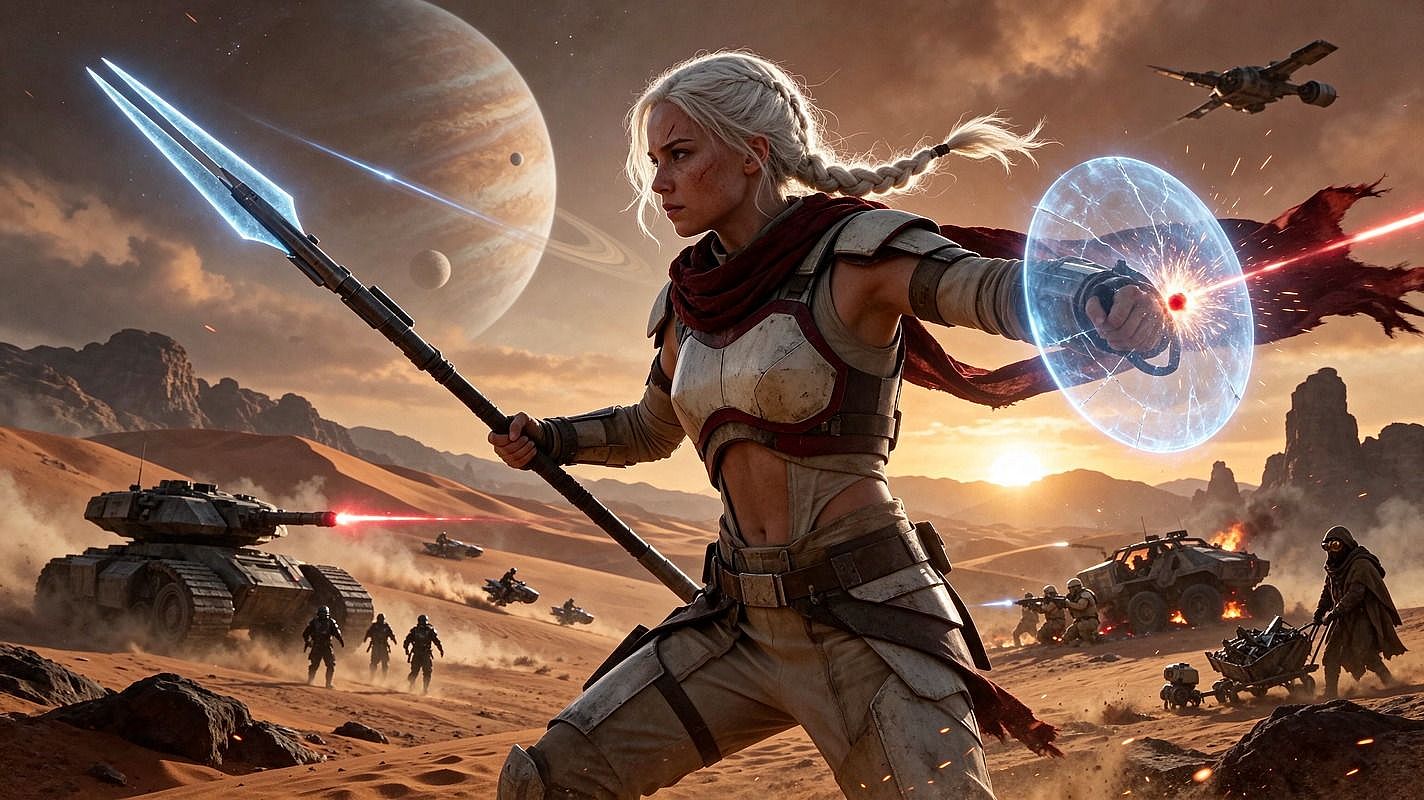
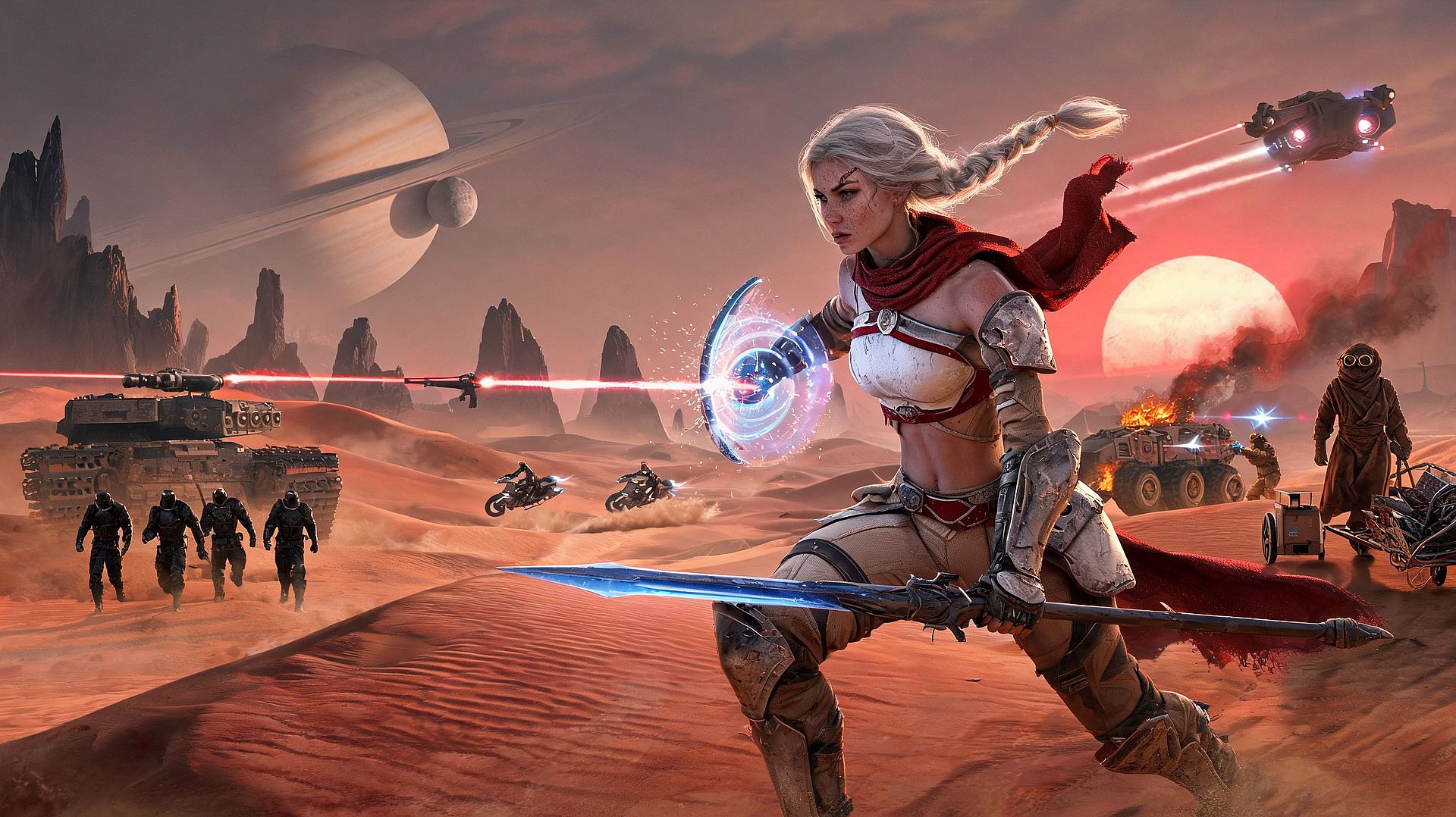
One prompt on all four models is the fastest way to see how Seedream 5.5, Seedream 5.0 Pro, Seedream 5.0 Flash, and Seedream 5.0 Lite differ. The desert battle prompt below asks for one detailed hero, five vehicles, ten smaller people, and one robot, each in a set place.
Run the prompt on each of the four Seedream models with the same settings: 16:9, 2K, Auto Polish off, and the first result with no edits. 2K is the one size all four models share on OpenArt.
SCENE: A battle on a desert planet at sunset. Rust-red sand dunes roll toward tall black rock spires on the horizon. One swollen red sun sits low on the right. A huge pale ringed planet fills the upper left of the sky, with one small moon beside it. Dust and smoke drift across the dunes, and blue and red energy bolts streak through the air.

SUBJECT: A woman warrior in the foreground, just right of center, shown from the thighs up in a low fighting stance and facing left. She is a Caucasian woman in her mid-twenties, with fair, sun-touched skin, light freckles across her nose, a thin scar through her left eyebrow, dust on her cheeks, and a long silver-white braid whipping in the wind. Her eyes are locked on a target to the left. She wears light, form-fitting armor: a cropped bone-white chest plate with crimson edges, small plated pauldrons, and armored bracers and greaves over a fitted sand-colored bodysuit cut away at the shoulders and upper arms. The armor is scratched and battle-worn but practical, built for speed. A torn dark red scarf blows behind her. Her right hand grips a long spear with a glowing blue blade. A round, see-through blue energy shield on her left forearm blocks a red bolt in a burst of sparks.

BACKGROUND: Left midground: a huge armored tank on tall treads fires a red beam from its cannon, and four soldiers in black armor walk in front of it. Center distance: two hover bikes race between the dunes, each with one rider, leaving long trails of sand. Right midground: three soldiers in tan armor crouch behind a burning six-wheeled rover and fire blue bolts to the left. Upper right sky: one dropship with two tilted engines flies low. Far right edge: a robed scavenger in brass goggles drags a sled of scrap metal away from the fight, followed by a small three-wheeled cargo robot.

ART STYLE: Photorealistic cinematic film still, like a big-budget science fiction movie. Wide 16:9 shot with the camera at chest height. The warrior is in sharp focus, and the background is slightly soft from dust and distance. Warm red-orange backlight from the low sun, a thin rim of light on her hair, bare shoulders, and arms, and a cool blue glow from the spear and shield on her face and armor. Visible skin texture, dents and scratches in the armor, and grains of sand in the air. Colors: rust red, amber, bone white, crimson, and electric blue.

CONSTRAINTS: Exactly one woman in the foreground. Exactly one tank, four soldiers in black armor, two hover bikes with one rider each, three soldiers in tan armor, one burning rover, one dropship, one scavenger, and one small robot. Exactly one sun, one ringed planet, and one moon. Every person has correct anatomy and five fingers on each hand. She holds the spear and shield naturally. No text, logos, or watermark.
Check four things in each picture: the hero character's skin and hands, the count of eleven people and five vehicles, the place of each vehicle, and the blue glow on her weapons.
Seedream 5.5 result
Seedream 5.0 Pro result
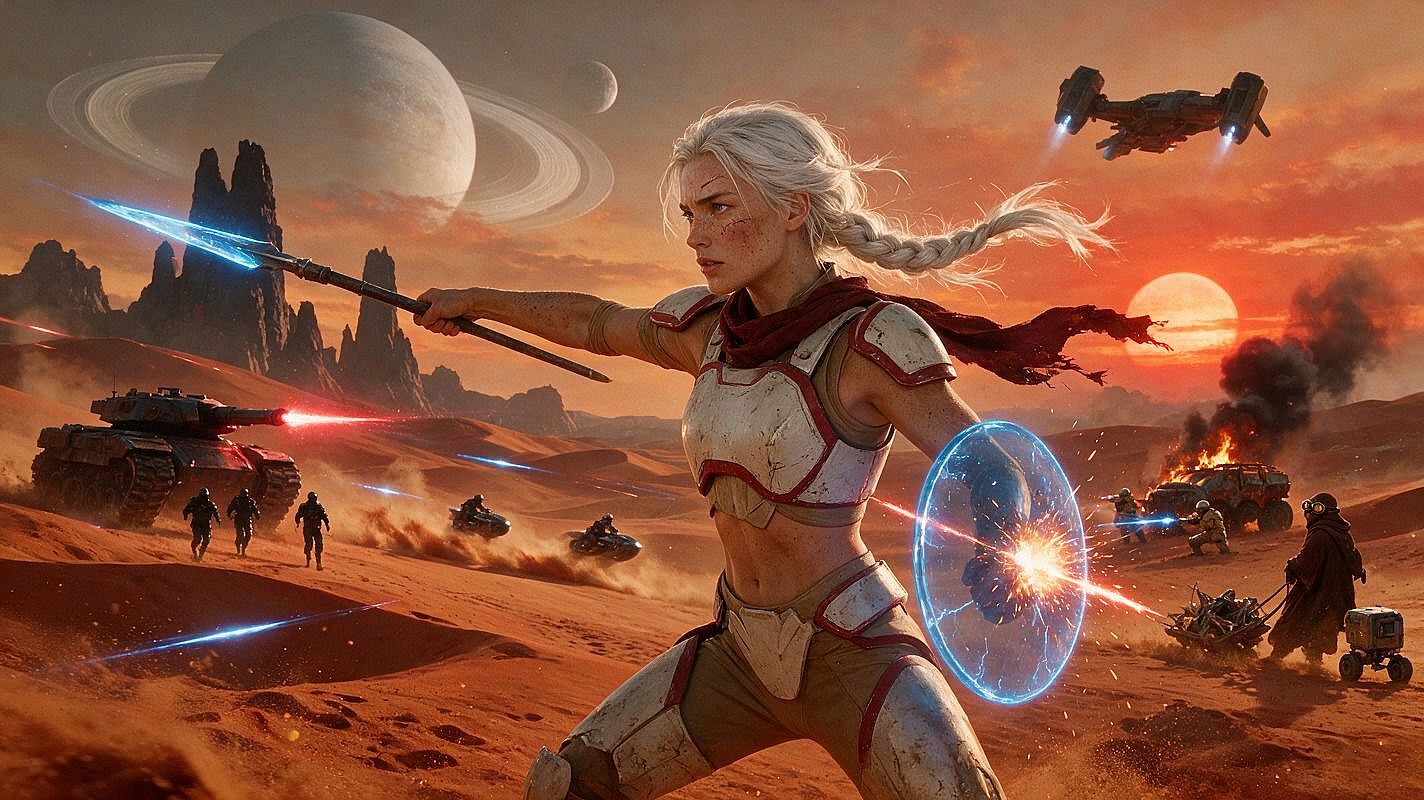
Seedream 5.0 Flash result

Seedream 5.0 Lite result
Which Seedream model fits your work?
Performance marketers and ad designers: Seedream 5.5 turns one approved ad into many versions to compare. Change the background, the product color, or the headline one at a time, and the person and the product stay the same. Seedream 5.0 Flash makes low-cost first drafts.
Brand and design teams: Seedream 5.0 Pro lays out dense posters and infographics, and Extract Layers splits a finished poster so you can move the headline or swap the background. Seedream 5.5 makes logos, stickers, and title text on a transparent background, and it writes poster text in Chinese, English, and 14 more languages.
Small business owners: Seedream 5.5 places your product photo in a new scene, then makes the same product as a cutout for your store page. Seedream 4.5 gives you a 4K file for a printed poster or flyer.
Filmmakers and storyboard artists: Seedream 5.5 makes realistic still frames and character sheets, and it changes the time of day or one prop while the set stays the same. Seedream 4.5 suits anime and 2D styles and makes 4K frames.
How to use Seedream models on OpenArt
- Pick a Seedream model. Open OpenArt's AI image generator and choose a Seedream model from the model menu. Select up to four models to compare them on one prompt using the "Multi-Select" feature.
- Write your prompt and add references. Describe the picture, and put any words that go in the picture in quotation marks. Upload reference images and say what each one is for, such as "Image 1 is the bottle."
- Set the size and shape. Open Output, then pick an aspect ratio and a size. On Seedream 5.5, set Background to Transparent when you want a cutout.
- Generate. Choose up to 8 pictures per run, then generate.
- Edit one change at a time. Open your favorite picture in the AI photo editor, type one change, and repeat until the picture is right.
Try every Seedream model on OpenArt
One OpenArt account runs Seedream 5.5, Seedream 5.0 Pro, Seedream 5.0 Flash, Seedream 5.0 Lite, and Seedream 4.5, next to GPT Image 2.6, Nano Banana 2.1, and other leading image models. Run one prompt on different models at once, and keep the picture you like best.
Start with Seedream 5.5 for edits, transparent backgrounds, and realistic pictures. Switch to Seedream 5.0 Flash for low-cost drafts, Seedream 5.0 Pro for layer work, and Seedream 4.5 for 4K.
For tips and techniques on how to write the best, detailed prompts for Seedream, check out the Seedream 5.5 Prompt Guide.
Frequently asked questions: Seedream models
What is the latest Seedream model?
Seedream 5.5 is the latest Seedream model. ByteDance released Seedream 5.5 on November 9, 2026, with steadier multi-round editing, transparent backgrounds, and more natural light and skin. Seedream 5.5 is available on OpenArt.
Is Seedream 5.5 better than Seedream 5.0 Pro?
Seedream 5.5 is the stronger pick for most work. Seedream 5.5 holds a picture steady across 100 rounds of edits and makes transparent backgrounds from a prompt. Seedream 5.5 also costs fewer credits on OpenArt. Seedream 5.0 Pro is the model behind OpenArt's Extract Layers tool.
What is the difference between Seedream 5 and Seedream 5 Pro?
"Seedream 5" usually means Seedream 5.0 Lite, the first and lower-cost model of the Seedream 5.0 generation. Seedream 5.0 Pro is the top model of that generation, with edits on one marked area, layer splitting, and text in 14 more languages. On OpenArt, Seedream 5.0 Lite makes 2K and 3K pictures from up to 14 reference images. Seedream 5.0 Pro makes 1K and 2K pictures from up to 10 reference images.
Is Seedream 5.0 Flash the same as Seedream 5.0 Lite?
Seedream 5.0 Flash and Seedream 5.0 Lite are two separate models. Seedream 5.0 Lite arrived in February 2026 and makes 2K and 3K pictures on OpenArt. Seedream 5.0 Flash arrived in September 2026 as the fast, low-cost sibling of Seedream 5.0 Pro and makes 1K, 1.5K, and 2K pictures.
What is the biggest picture each Seedream model makes on OpenArt?
Seedream 4.5 makes the biggest pictures of the five Seedream models on OpenArt, at 4K. Seedream 5.0 Lite goes up to 3K, and Seedream 5.5, Seedream 5.0 Pro, and Seedream 5.0 Flash go up to 2K. OpenArt's AI image upscaler makes a bigger file from any Seedream picture.
Can Seedream split an image into layers?
Yes. Seedream 5.5 splits a picture into a base image plus up to 99 layers. Seedream 5.0 Pro and Seedream 5.0 Flash split a picture into a base image plus up to 16 layers. On OpenArt, the Extract Layers tool runs on Seedream 5.0 Pro and saves each layer as a transparent PNG.
Is there a Seedream 5.5 Pro?
ByteDance says a Pro version of the Seedream 5.5 series will follow. ByteDance has shared no release date or specs for Seedream 5.5 Pro.
Can you use Seedream images for commercial work?
Seedream images you make on OpenArt follow OpenArt's plan terms. Content you make on OpenArt can be used in client campaigns, paid ads, and products you sell, and commercial rights apply on eligible paid plans. Check the OpenArt pricing page to see which plan fits your work.
Can I try Seedream models for free?
You can try some features for free. New accounts get 40 free credits, no credit card required. Every generation uses credits, and the exact cost shows before you click Generate. To keep creating, choose a paid plan. You can compare plans, prices and annual billing options on the pricing page. Commercial use requires the Plus plan or above. Plans renew automatically, monthly credits do not roll over, and extra credits are only sold as add-ons to a paid plan. You can cancel any time from Profile, then Subscriptions. Cancel at least 5 days before your renewal date to avoid the next charge, and you keep access until the end of the billing period. Completed generations and active subscription periods are generally not refundable. Full billing, cancellation and refund details are in the Help Center.