


 ChatGPT
 Perplexity
 Claude
 Gemini
The best Seedream 5.5 prompts read like a brief you would hand a designer. They say what is in the picture, how it is framed, what it should look like, and which words appear in it. Full sentences work well, so write the way you would explain the image to a person.
This guide covers the prompting habits that get the most out of Seedream 5.5 on OpenArt. You will see how to build a prompt in order, how to describe light, materials, and text, and how to edit one part of an image at a time. It also explains how to prompt for transparent backgrounds and layered designs, and it ends with two full example prompts you can copy.
Quick note: Seedream 5.5 on OpenArt has settings next to the prompt box for resolution, aspect ratio, background, and the number of images. Pick those in the settings, and keep your prompt for what the picture shows.
Build your prompt in four parts
A Seedream 5.5 prompt is easiest to write and fix when it covers four things in the same order every time. Each part answers one question.
- Subject: Who or what is the picture about?
- Framing: How close is the camera, and where does the subject sit in the frame?
- Look: Is it a photo, an illustration, or a 3D render, and what is the light like?
- Limits: What has to appear, and what has to stay out?
A short prompt like "ceramic mug on a desk, cozy vibe" leaves Seedream 5.5 to guess at most of those. Here is the same idea written in order:
"A handmade speckled ceramic mug of black coffee on an oak desk, next to an open notebook and a pencil. Close-up from a slight side angle, with the mug in the left third of the frame. Natural photo style, soft window light from the left, warm cream and brown colors. No text, no hands, no laptop."
Each sentence in the mug prompt answers one of the four questions. If the result is close but the framing is off, you change the framing sentence and run the prompt again.
Tell Seedream 5.5 where the image will be used
Seedream 5.5 lays out an image better when the prompt says where it will appear. An event poster needs room for a title. A 9:16 story needs the subject stacked in a tall frame, and a product label needs a clean area for small print.
Add the use in a short phrase at the start or end of your Seedream 5.5 prompt. A few that help: "for an event poster with space for a title at the top," "for a 9:16 phone story," "for a sticker sheet," or "for a product listing on a plain page."
Swap mood words for things a camera can see
A mood word like dreamy or premium means something different to every person, so Seedream 5.5 has to guess what you meant. Turn each mood word into two or three things a camera could capture.
| Mood word | What to write in a Seedream 5.5 prompt |
|---|---|
| Dreamy | Soft pink clouds, a thin layer of mist over a lake, pale light just after sunrise |
| Premium | A dark stone surface, brushed gold trim, one soft spotlight from the side |
| Playful | Paper confetti in the air, round shapes, bright yellow, pink, and sky blue |
| Moody | Wet pavement at night, one street lamp, deep blue shadows |
| Vintage | Faded colors, a 1970s film look, a printed photo with rounded corners |
People need the same treatment in a Seedream 5.5 prompt. Seedream 5.5 gives faces, expressions, and body proportions a natural look, so describe the person in plain detail: rough age, hair, clothing, expression, and what the hands are doing. Say whether you want a close-up, a waist-up shot, or the full body.
Spell out the light, the materials, and the colors
Light, surfaces, and color decide how a Seedream 5.5 image feels, so give each one its own phrase in your prompt.
- Light: Say where it comes from and how hard it is. "Low sun from behind the subject" and "flat white studio light from the front" make two very different pictures.
- Materials: Name the surface. Seedream 5.5 shows the real texture of materials like glass, leather, and linen, so "a frosted glass bottle on a raw linen cloth" gives it something to work with.
- Colors: List the two to four colors you want most, and name any color you want left out.
For a photo look in Seedream 5.5, add camera words like 50mm lens, shallow depth of field, or fine film grain. For an illustrated look, name the style, such as anime cel shading, gouache painting, or flat vector art.
Put the exact words you want in quotation marks
Quotation marks show Seedream 5.5 which words to print in the picture, letter for letter. Anything outside the quotes is a description.
A poster prompt for Seedream 5.5 might read: 'A night market event poster with "Lantern Night Market" in large gold letters at the top, "Every Saturday, 6 PM to 11 PM" in white letters underneath, and "Free entry" on a small red badge in the corner. No other text.'
Seedream 5.5 writes small, crowded text that stays easy to read, which suits product labels, price lists, menus, and signs. Say where each line goes, how big it is, and what style the letters take. Proofread the finished image before you publish, especially prices, dates, and phone numbers.
Type the text in the language it should appear in
Seedream 5.5 handles many writing systems, including Russian, Thai with its tone marks, Japanese, and Filipino. Type the words in the target language yourself, inside quotation marks.
One design can then carry the same message in each market's own language. Run the poster prompt once per language, and change only the quoted lines.
Tell Seedream 5.5 what each reference image is for
Seedream 5.5 can work from one or more reference images, so number them in your prompt and give each one a single job. A reference with no job may get blended into the picture in a way you did not expect.
A prompt with two references might say: "Image 1 is our candle in its amber glass jar. Image 2 is a bathroom shelf. Place the candle from image 1 on the shelf in image 2, next to the folded towel. Match the light in image 2, and keep the label on the jar exactly as it is."
References also help with characters in Seedream 5.5. Upload one photo of a character and ask for a 16:9 sheet with a large face close-up next to front, side, and back views.
Make one change per edit
Seedream 5.5 changes only the part of an image you ask it to change, and everything you leave unmentioned stays as it was. Name one thing per round, such as "make the jacket navy" or "clear the people from the street behind her."
Work through Seedream 5.5 edits as a short list, one round at a time, and check the full image after each round. Seedream 5.5 keeps the image sharp across many rounds, so each step builds on a version you already like.
Name what the edit should leave alone
A short keep list makes a Seedream 5.5 edit even steadier. Write the change first, then the parts that have to stay.
An ad edit might read: "Change the background to an empty beach at sunset. Keep the model, her pose, the white dress, and the bottle in her hand the same."
The keep list helps most when you test versions of one ad in Seedream 5.5. Change the background, then the product color, then the headline, and paste the same keep list into every round. Each version then shows what that one change did.
List what should stay out of the picture
A short leave-out list at the end of a Seedream 5.5 prompt clears up many common problems. Pick the ones that fit your image:
- No writing or watermarks
- No brand logos
- No extra people in the background
- No plastic-looking skin
- No extra fingers or limbs
Say "transparent background" when you want a cutout
Seedream 5.5 makes images with a fully or partly transparent background, from a prompt or from an image you upload. Ask for it by name in your prompt.
A sticker prompt for Seedream 5.5 might read: "A round sticker of a smiling orange slice with a thick white border, flat cartoon style, transparent background." The file comes out with only the subject in it, ready to drop onto any color or into a larger design.
Transparent backgrounds in Seedream 5.5 suit logos, stickers, game characters, app buttons, product cutouts, and title text for slides. Partly see-through areas, like a glass bottle or a soft shadow, stay partly see-through. Check the edges over a light color and a dark color before you use the file.
Plan a design you will split into layers
Seedream 5.5 can split a finished image into up to 100 separate layers. The background, each object, and each block of text come out as their own files, and Seedream 5.5 reads the words on each text layer.
A layered design is easier to reuse when the first prompt describes each part as its own item: the background, the product, the headline, and the small print. Put every line of text in quotation marks. You then know what each text layer should say when you change the copy, translate it, or turn the design into a template.
Write long prompts as labeled blocks
A long Seedream 5.5 prompt is easier to manage when you split it into labeled blocks like SCENE, SUBJECT, ART STYLE, and CONSTRAINTS. Each block holds one kind of detail. When you want a change, you edit one block and leave the rest alone.
Example 1: A jungle meetup of six pets
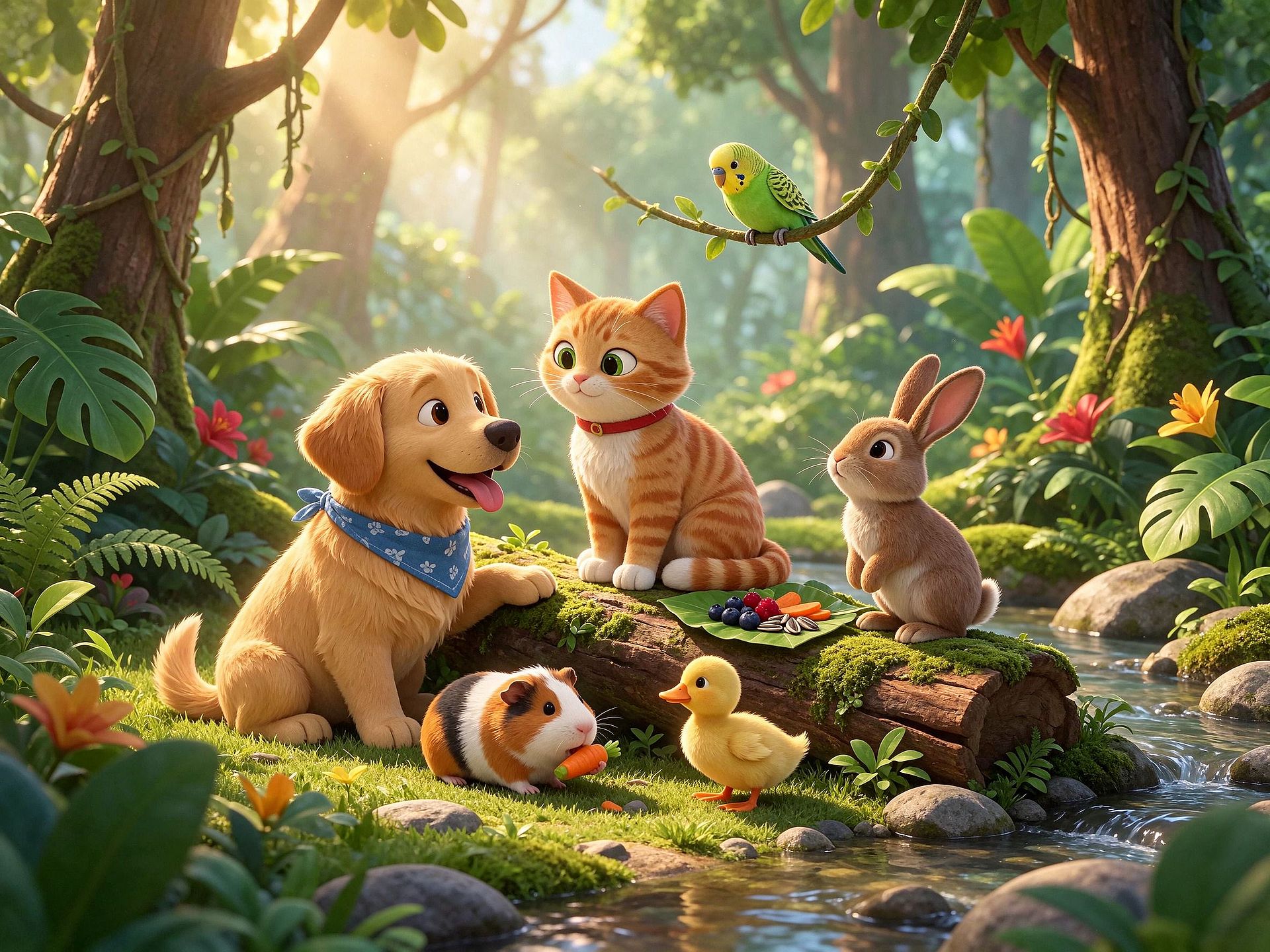
A group of small animals asks Seedream 5.5 to keep every species correct, each with its own fur or feathers, pose, and spot in the frame. This prompt lists the animals one by one and repeats the count in the constraints. Settings: Seedream 5.5, 2K, and 4:3.
SCENE: A small sunny clearing in a tropical jungle, early in the morning. Tall trees with thick trunks and hanging vines circle the clearing. Large monstera and banana leaves, ferns, and red and yellow tropical flowers fill the edges of the frame. A fallen log covered in green moss lies across the middle of the clearing. Soft beams of sunlight come down through the leaves and light up a thin mist. A narrow stream with smooth gray stones runs along the right edge.
SUBJECT: Six pets gathered around the mossy log like friends at a picnic. In the center, sitting on the log: a ginger tabby cat with white paws and a red collar, tail curled around its feet, looking at the puppy. On the left, sitting on the grass: a golden retriever puppy with floppy ears and a blue bandana, tongue out, with one front paw resting on the log. On the log to the right of the cat: a young brown hare with long upright ears, sitting up on its back legs with its nose lifted. On the ground in front of the log: a guinea pig with white, orange, and black patches, nibbling a slice of carrot. Beside the guinea pig: a fluffy yellow duckling, standing and looking up at the cat. On a low vine just above the cat: a small green budgie with its wings folded, head tilted down toward the group. On the log between the cat and the hare sits a big green leaf used as a plate, holding a few berries, carrot slices, and sunflower seeds.
ART STYLE: Soft 3D animated family film style. Rounded shapes, large bright eyes, and fluffy fur and feathers with visible strands. Camera low, at the animals' eye level, with the group filling the middle of the frame. Warm golden morning light from the upper left, soft shadows, and a gently blurred jungle behind the animals. Colors: fresh greens, warm gold light, and small touches of red, yellow, and blue.
CONSTRAINTS: Exactly six animals: one cat, one puppy, one hare, one guinea pig, one duckling, and one budgie. No people and no other animals. Every animal has the right number of legs, ears, and eyes, and one tail where it should have one. All six look calm and friendly. No clothing other than the collar and the bandana. No text, logos, or watermark.
The result made with Seedream 5.5:
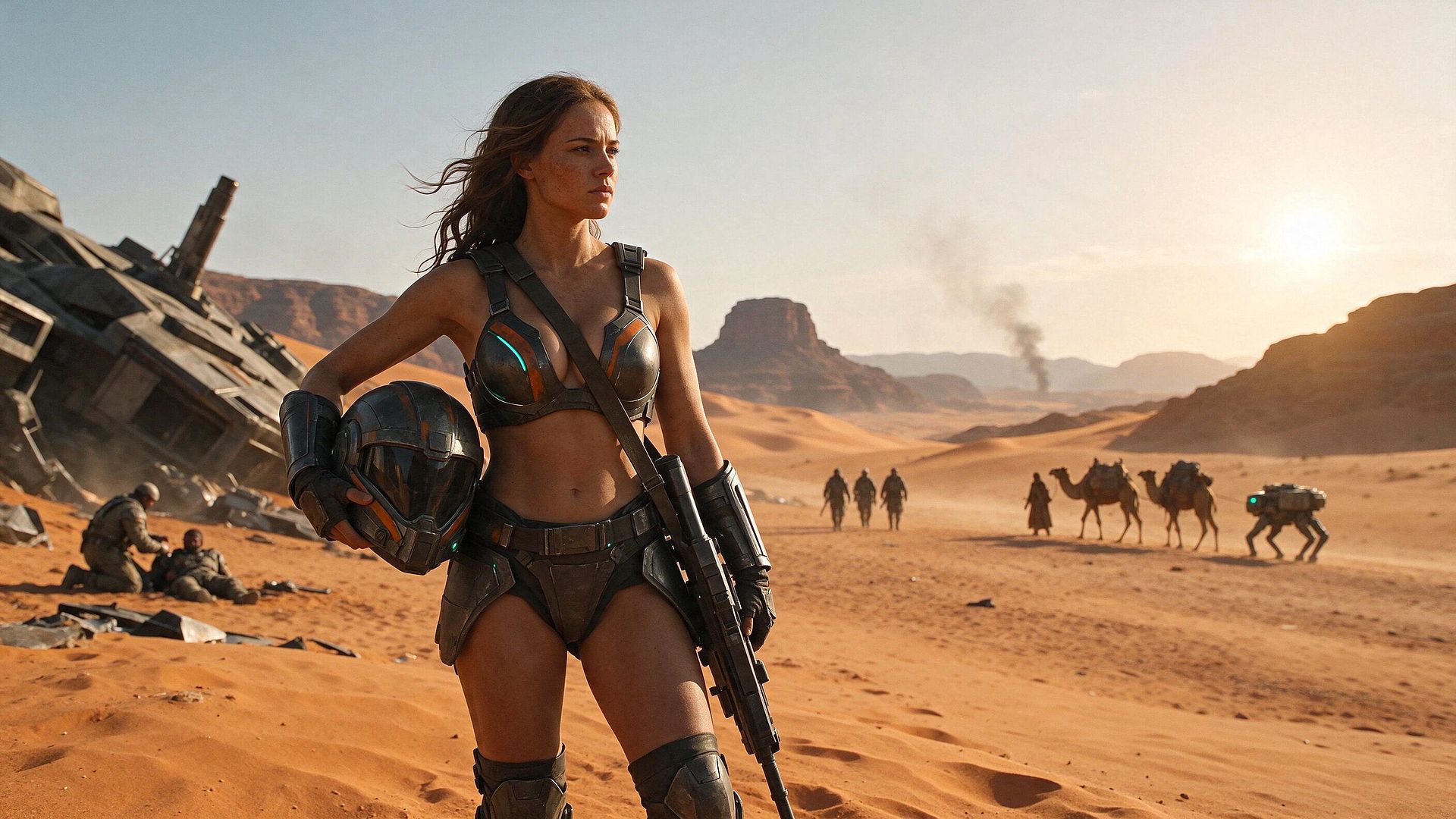
Example 2: A woman in futuristic battle armor in the desert
A desert battle scene asks Seedream 5.5 to hold one armored hero in sharp detail while smaller figures, a wrecked spaceship, and drifting dust fill the distance. This prompt gives the hero and the background characters their own places, and it sets a count for everyone in the frame. Settings: Seedream 5.5, 2K, and 16:9.
SCENE: A wide orange desert at golden hour, late in the afternoon. Rippled sand dunes stretch toward red sandstone mesas and cliffs, with a tall flat-topped butte in the center distance. On the left, a huge dark gray spaceship lies crashed and tilted in the sand, its armored hull plates cracked and a long broken cannon barrel pointing at the sky. Metal debris is scattered across the sand in front of the wreck. A thin column of black smoke rises from far behind the dunes. The sun sits low on the right, glowing through a pale, hazy sky, and fine dust drifts in the air.
SUBJECT: A young woman in the foreground, standing left of center and framed from the knees up. She has long, wavy, windswept brown hair, freckles, and a serious, focused expression, looking off to the left. She wears weathered dark metal armor: a fitted armored top with orange stripes and glowing teal accents, a wide utility belt, an armored brief with hip plates, forearm guards with fingerless gloves, and knee-high armored boots. A leather strap runs diagonally across her chest which holds the weapon. Her left arm holds a dark helmet with orange stripes and a black visor against her hip. Her right hand holds a long rifle pointed down at the sand. In the left midground, near the wreck: a soldier in tan fatigues and a helmet kneels beside a wounded soldier who is lying in the sand. In the right background: three armored soldiers walk in a line, followed by a robed figure leading two camels loaded with packs, and a four-legged robot walker with green lights.
ART STYLE: Photorealistic cinematic film still, like a big-budget sci-fi movie. Camera at waist height with a wide 16:9 frame. The woman is sharp, and the background is softly blurred by distance and dust. Warm golden backlight from the low sun on the right, with a soft rim light on her hair and skin. Visible skin texture, scratches and grime on the armor, and fine sand detail. Colors: burnt orange sand, warm gold light, dark gunmetal gray, and small touches of teal glow.
CONSTRAINTS: Exactly one woman in the foreground. Exactly two soldiers by the wreck, three walking soldiers, one robed figure, two camels, and one robot walker. No other people or animals. Every person has correct anatomy with five fingers on each hand. The rifle and helmet are held naturally. No text, logos, or watermark.
The result made with Seedream 5.5:
Test small, finish in 4K
Seedream 5.5 makes images up to 4K on OpenArt, at 3840 × 2160 in a wide 16:9 frame. Try your ideas at a smaller size first, then make the final image in 4K.
Keep the prompt and the references the same when you move up in Seedream 5.5, so the size is the only thing that changes. Large files suit print, big screens, and wide banners.
Mistakes that weaken a Seedream 5.5 prompt
- Stacking keywords with commas. A list like "4k, ultra detailed, masterpiece" tells Seedream 5.5 very little. Full sentences describe the picture.
- Asking for several changes in one edit. Name one change per round and check the image before the next one.
- Describing the text and leaving the wording open. "A Japanese welcome sign" leaves the wording to chance. Type the exact Japanese words in quotation marks.
- Giving a reference image no job. Number each reference and say what it is for.
- Leaving the transparent background unsaid. Ask for a cutout by name when you need one.
- Skipping the proofread. Read every word, price, and date in the image before it goes live.
A quick Seedream 5.5 prompt checklist
Run through these five questions before you hit generate in Seedream 5.5:
- Does the prompt name the subject, the framing, the look, and the limits?
- Does every mood word come with something you can see?
- Are the exact words in quotation marks, in the right language, with a note on where they go?
- If you are editing, does the prompt ask for one change and list what stays?
- If you need a cutout, does the prompt say "transparent background"?
Ready to try Seedream 5.5?
Open OpenArt's AI image generator, pick Seedream 5.5, and start with one of the example prompts above.
For more image prompting tips and samples, see the GPT Image 2.6 prompt guide.