

 ChatGPT
 Perplexity
 Claude
 Gemini
Best AI Image Generators in 2026: 10 Tools Compared
OpenArt is our pick for marketing teams comparing the best AI image generators for product images and recurring campaigns. You can choose among image models, work from references, edit the results, and reuse saved assets in the same account. That becomes useful when your brief calls for a complete set of images rather than one picture.
Other tools suit different jobs. Midjourney is worth exploring for a particular visual style. ChatGPT Images and Google Gemini suit conversational creation and edits. Ideogram belongs on the shortlist for text-led graphics, Recraft for vector assets, and Canva for finished layouts.
This guide compares what happens after you write the prompt: how you change an image, repeat a look, and pay for the work you can actually use.
Try your campaign brief in the AI Image Generator.
Disclosure: OpenArt publishes this guide and is included in the comparison. Recommendations reflect documented capabilities and workflow fit. This is not a controlled image-quality benchmark.
Which AI image generator is best for each use case?
| Your main task | Our recommended starting point | Why consider it? | What to check |
|---|---|---|---|
| Product images and recurring campaigns | OpenArt | Compare image models, edit selected results, and reuse brand or character assets in one account | Product accuracy, supported Brand Kit models, and credit cost across revisions |
| Reference-based photos and image changes | Google Gemini with Nano Banana | Image references, photo combinations, and natural-language changes | Exact model version and account limits |
| Illustration and visual exploration | Midjourney | A focused image-making workflow and style controls | Reference accuracy, text, and privacy requirements |
| Images and revisions through conversation | ChatGPT Images | Develop the brief and request changes in the same conversation | Unrequested changes and usage limits |
| Posters and graphics with prominent words | Ideogram | Text-oriented image creation and design tools | Spelling, layout, and export needs |
| Image work within Adobe apps | Adobe Firefly | Generation and editing within an established Adobe workflow | Credits and terms for Adobe versus partner models |
| Vector illustrations and graphic assets | Recraft | Image and vector generation, editing, and export workflows | Output format and free-plan commercial restrictions |
| Live visual exploration | Krea | Real-time generation as you type or draw | Compute usage and access to your preferred models |
| Social posts, presentations, and finished layouts | Canva | Generated visuals alongside editable layouts and templates | AI allowances and asset-specific terms |
| Generated images alongside stock assets | Magnific | Generation, editing, upscaling, and a stock library | Model costs and the assets included in your plan |
Use this table to narrow your shortlist. Then test the details your project depends on. An appealing portrait does not tell you whether the same tool can preserve a packaging label or make a precise revision.
Should you compare AI image models or platforms?
An image model generates or edits the picture. A platform provides access to models, settings, editing tools, and subscription terms. Nano Banana and FLUX are model families. OpenArt, Gemini, ChatGPT, and Krea are places where you can create images.
Two platforms can offer the same model but provide different reference controls, resolutions, credit costs, or editing workflows. Compare the model and the place you use it.
For Nano Banana, record the exact version. Google’s image page distinguishes Nano Banana 2 from Nano Banana 2.1 and describes different access through its free and paid plans. A review of one version should not automatically be applied to another.
For FLUX, distinguish hosted access from running model weights yourself. Black Forest Labs lists different licenses for different variants. For example, FLUX.2 [klein] 4B uses Apache 2.0, while local commercial use of FLUX.2 [dev] requires the relevant license. See the licensing information from Black Forest Labs.
The 10 AI image generators to consider
1. OpenArt: build a campaign across models
- Best for: Product images and recurring campaigns that need several image models, editing, and reusable brand assets
- Price (checked Oct 21, 2026): Starter $14/month (4,000 credits). Commercial use starts on Plus ($34/month)
- Check before you commit: Product accuracy, supported Brand Kit models, and credit cost across revisions
A product launch rarely needs just one picture. You may need a product scene, a portrait, and another version with room for a headline. OpenArt lets you try different image models for those jobs without buying a separate subscription to every provider.
The image lineup includes GPT Image 2.5, Nano Banana Pro, Seedream 5.0 Pro, and FLUX 3 Image. Give each model the same brief and supported references, then compare the details that matter to your project. A model that gets the lighting right may not be the one that best preserves the label.
Here is the same test run on OpenArt with a fictional serum bottle. Every model received the same reference photo and the product-image brief from the testing section below.
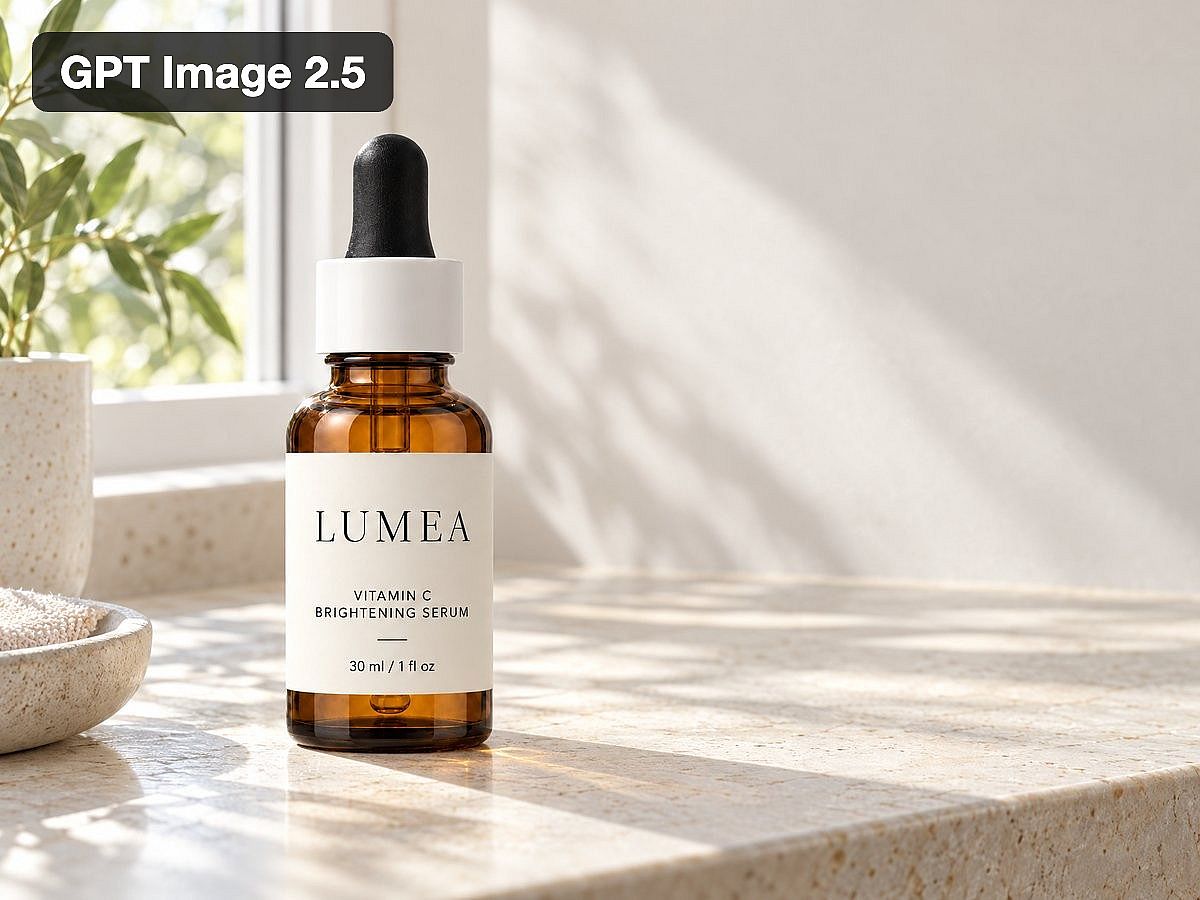
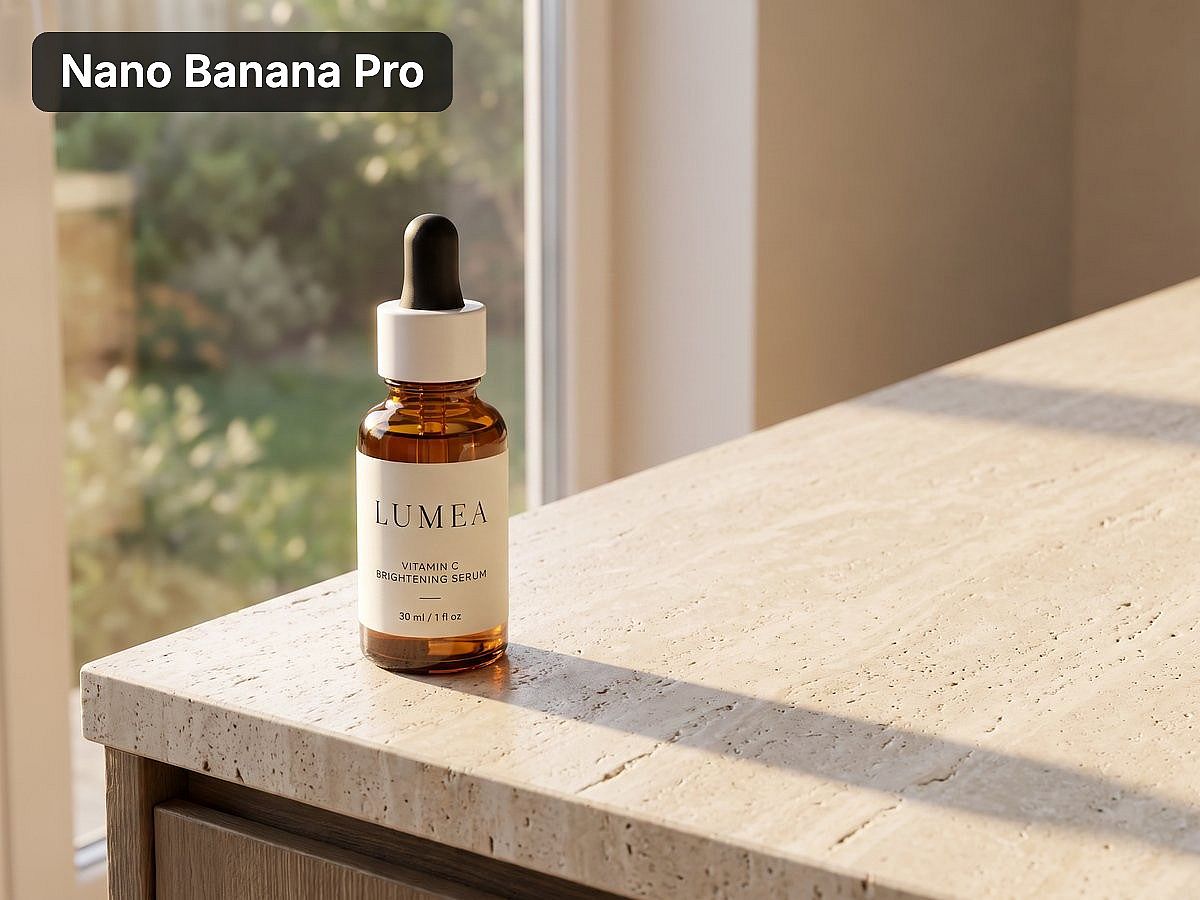
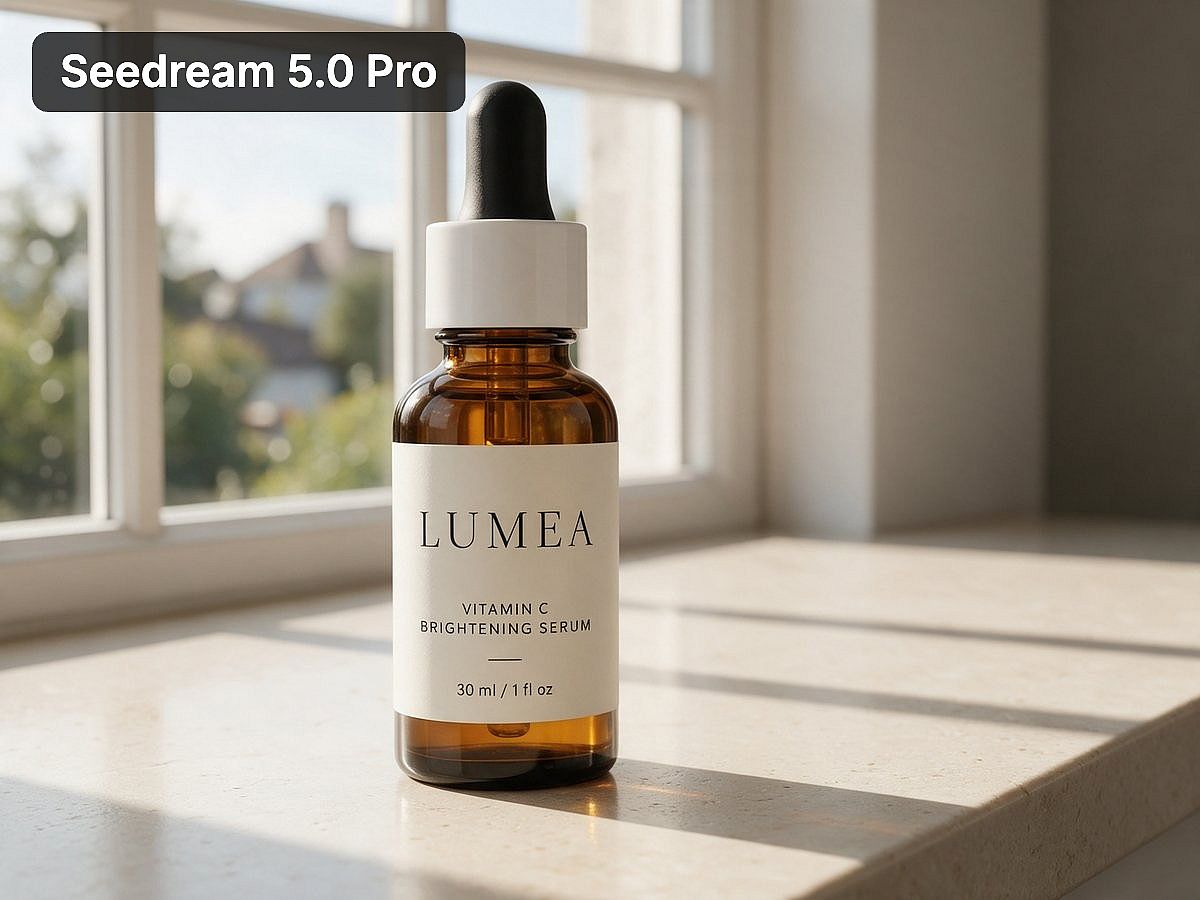
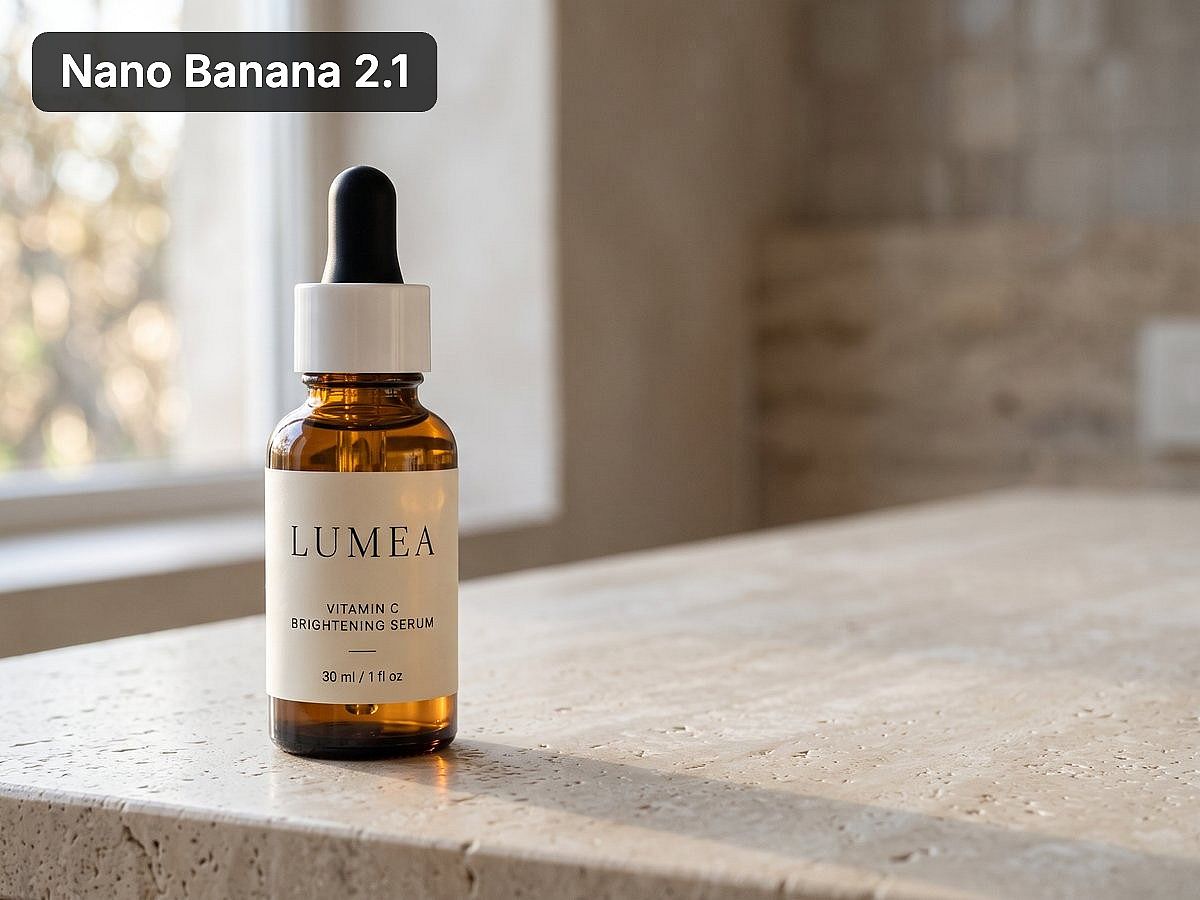
Generated on OpenArt on October 21, 2026. Single attempts, not a controlled benchmark. Your results will vary by product and settings.
For product-led work, the AI Product Image Generator is a useful starting point for exploring scenes around your product. Bring a clear reference photo and check the packaging, materials, colors, and label in each result.
Once you have an image you want to keep, use the separate editing tools to develop it. Edit Image changes an existing picture. Expand Image adds space around a composition. Image Upscale prepares a larger version. Choose the next tool based on the change you need.
For recurring brand work, Brand Kit saves your logo, exact colors, typography, assets, style references, and rules at the project level. For images, it works in Create Image with GPT Image 2 or GPT Image 2.5. OpenArt Characters helps you reuse a recognizable person or mascot in other scenes.
These capabilities are useful across a campaign: you can explore a direction, develop selected images, and bring saved assets into later work. OpenArt also covers images, video, and audio in one account when your campaign needs more than still pictures.
The cost depends on the model, settings, and revisions. Test a small set before producing a full campaign, and review labels, faces, and brand details in every final image.
Start with one product photo and two campaign ideas. Compare the results before choosing a plan for regular production.
2. Google Gemini: work from references with Nano Banana
- Best for: Reference-based photos and conversational image changes
- Price (checked Oct 21, 2026): Free image generation; Google AI Plus $4.99/month; Pro $19.99/month
- Check before you commit: The exact Nano Banana version and your account limits
Gemini gives you access to Google’s Nano Banana image tools within a conversational interface. Upload a photo, request a change, or combine references to describe the result you want.
Google’s image page lists reference-based editing, text rendering, and character consistency among Nano Banana’s capabilities. You can request changes to lighting, camera angles, or visual style, making it a useful starting point when you already have a picture to work from.
Gemini is worth trying if Google’s models cover your needs and you prefer describing changes in a conversation. Model access and limits depend on your account, so record the version used and check that revisions preserve the details you wanted to keep.
3. Midjourney: explore a visual direction
- Best for: Illustration, concept art, and visual exploration
- Price (checked Oct 21, 2026): Basic $10/month (3.3 hours of Fast GPU time, no Relax Mode). Stealth Mode needs Pro or Mega
- Check before you commit: Reference accuracy, text, and privacy requirements
Midjourney is worth considering when your main task is developing a look: an illustrated campaign, a fantasy environment, or a collection of visual concepts.
Bring references from your actual brief. Compare the mood, composition, and treatment of the subject before deciding whether the output fits your project. For product work, inspect packaging geometry and labels separately from the overall visual appeal.
Privacy can affect the subscription you need. Stealth Mode is available on Pro and Mega, while unlimited image generation through Relax Mode starts on Standard.
Midjourney is a useful shortlist choice for visual exploration. Allow for additional design work if your final deliverable needs editable text, precise product details, or several layout sizes.
4. ChatGPT Images: develop images through conversation
- Best for: Creating and revising images in the same conversation as your brief
- Price (checked Oct 21, 2026): Limited free access; Plus $20/month with expanded image access
- Check before you commit: Unrequested changes after revisions and usage limits
ChatGPT Images suits people who want to describe a picture, review it, and explain revisions in the same conversation. You can develop the accompanying headline or creative brief alongside the image.
For example, you can discuss a campaign idea, request an image, and explain what feels wrong about the result without moving to a separate briefing document.
Inspect the whole picture after a revision. An instruction to change one detail does not replace checking everything that should remain unchanged. Image-generation access and limits vary by plan.
If you already use ChatGPT every day, test its image workflow before adding another subscription. Compare another platform when you need models from different providers or a different way to manage reusable assets.
5. Ideogram: create graphics built around words
- Best for: Posters, signs, and graphics with prominent text
- Price (checked Oct 21, 2026): Plus $20/month (2,400 priority credits and an unlimited slow queue)
- Check before you commit: Spelling, layout, and which editing features need priority credits
Ideogram belongs on the shortlist for posters, signs, and other images where visible words carry the message. Its platform includes image models, editing apps, and an editable-text workflow.
Use your actual headline in the test. A tool can handle a short demonstration phrase and still struggle with a longer line, punctuation, or an unusual brand name. Check the result at the size people will see it.
Editing access matters as much as the initial generation. Ideogram says some editing features require priority credits and are unavailable in the slow queue. Include those steps when estimating how much campaign work a plan will cover.
6. Adobe Firefly: create within an Adobe workflow
- Best for: Teams that already design and deliver in Adobe apps
- Price (checked Oct 21, 2026): Standard $9.99/month (2,000 generative credits)
- Check before you commit: Credits and terms for Adobe models versus partner models
Firefly makes sense when your team already edits images and assembles deliverables in Adobe apps. The connection to existing design work may matter more than adding another standalone generator.
Firefly provides Adobe models and partner models. Its plans distinguish standard image features from premium features and partner-model usage.
Compare the features included in your existing Adobe subscription before buying additional access. Identify the model behind each generation, since credits and applicable terms can differ.
For an Adobe-based team, Firefly deserves a place in the trial. Test the complete path from generation to the final design file you need to deliver.
7. Recraft: generate vector and graphic assets
- Best for: Vector illustrations and graphic assets
- Price (checked Oct 21, 2026): Free plan (public, noncommercial images); Basic $12/month with private generation and commercial rights
- Check before you commit: The exported file format in the app where you finish the design
Recraft is a practical option when you need illustrations or vector output. Its tools cover image and vector generation, editing, and file conversion.
Start with the file requirement. A picture that resembles a vector illustration is different from an editable vector file. Check the exported result in the app where you will finish the design.
Recraft’s free images are public and are not licensed for commercial use. Paid plans provide private generation and commercial rights for images created while subscribed.
That makes the free plan useful for exploring the workflow, while professional projects need a plan whose terms cover the intended use.
8. Krea: explore images in real time
- Best for: Live visual exploration as you type or draw
- Price (checked Oct 21, 2026): Free plan with 100 compute units per day; Basic $9/month (5,000 compute units, commercial license)
- Check before you commit: How many finished images your compute allowance actually covers
In Krea, the image changes as you type or draw. You can move a shape or change a color and see how it affects the composition. That makes it useful for exploring an idea before you spend time polishing it.
Krea also offers other image models and editing tools. Its pricing uses compute units, with a monthly allowance on Basic and a daily allowance on the free plan.
Test the model and settings you expect to use regularly. A compute allowance alone does not tell you how many finished images you will get, particularly when the workflow includes upscaling and repeated changes.
9. Canva: finish the layout around the image
- Best for: Social posts, slides, and finished layouts with editable text
- Price (checked Oct 21, 2026): Pro $144/year (US, billed annually)
- Check before you commit: AI allowances by plan and AI add-ons that cost extra
Canva is worth considering when your deliverable is a social post, slide, flyer, or another designed layout. Its workspace combines image tools with templates, editable text, and brand features.
You may need to change a price, move a headline, or adapt a design for another placement. Keeping those elements editable can save you from regenerating a whole picture just to change a few words.
AI usage is limited by plan and feature. Canva’s pricing also lists additional AI options that can cost extra.
Canva is particularly relevant when the generated picture is one part of a larger design and your team already finishes that work there.
10. Magnific: combine generation with stock assets
- Best for: Projects that mix generated images with stock assets
- Price (checked Oct 21, 2026): Premium €16/month, or €12/month billed annually
- Check before you commit: Model costs and what your plan includes for stock versus AI generation
Magnific, formerly Freepik, combines AI creative tools with a stock-asset library. Its platform includes image generation, editing, and upscaling alongside existing photos, illustrations, and other assets.
That combination is useful when a project uses generated images and licensed material together. You might need an original product scene alongside stock backgrounds, design elements, or other supporting assets.
Distinguish what your plan includes for stock content, AI generation, and individual models. Those allowances serve different needs, and a large asset library does not tell you how many generations your preferred model will cover.
How much do AI image generators cost?
The following examples use monthly billing in US dollars, checked on October 21, 2026. They compare selected plans, not equivalent image allowances or the lowest available tier for every provider.
| Platform | Selected monthly plan | Included allowance or important condition |
|---|---|---|
| OpenArt | Starter: $14 | 4,000 monthly credits. Commercial use starts on Plus ($34/month, 12,000 credits) |
| Google Gemini | Google AI Plus: $4.99; Pro: $19.99 | Paid plans expand access; image limits and model availability depend on the plan |
| Midjourney | Basic: $10 | 3.3 hours of Fast GPU time; no Relax Mode on Basic |
| ChatGPT | Plus: $20 | Expanded image-generation access; usage limits apply |
| Adobe Firefly | Standard: $9.99 | 2,000 monthly generative credits and unlimited standard image features |
| Ideogram | Plus: $20 | 2,400 monthly priority credits and an unlimited slow queue, with feature restrictions |
| Recraft | Basic: $12 | 1,000 monthly credits, private generation, and commercial rights |
| Krea | Basic: $9 | 5,000 monthly compute units and a commercial license |
Canva’s US page displays Pro at $144 billed annually. The Magnific page reviewed displays Premium at €16 on monthly billing, or €12 per month billed annually. These figures are kept separate because the billing basis or currency differs.
Pricing sources: OpenArt, Google, Midjourney, OpenAI, Adobe, Ideogram, Recraft, Krea, Canva, and Magnific.
Compare the cost per usable image, including the attempts and edits needed to produce it. Credits from different platforms are not interchangeable.
For example, if a test session costs $6 and produces three images you can use, the generation cost is $2 per usable image. That is an illustrative calculation, not a measured result for any provider.
For recurring campaigns, record editing time too. A lower subscription price may be less useful if every product image needs extensive repairs before approval.
Which free AI image generator should you try?
Try OpenArt if you want to compare different models on your own brief. Gemini and ChatGPT suit conversational image creation, while Krea lets you explore ideas in real time. Free access helps you test the workflow before committing to a subscription.
New OpenArt accounts get 40 free credits to try it out, with no credit card required. Commercial use starts on the Plus plan.
Gemini provides free image generation and editing, with expanded access through paid Google AI plans. Krea lists 100 compute units per day on its free plan. ChatGPT also provides limited image creation on its free plan.
Use free access to test the task you would eventually pay for. For a product campaign, upload your actual product reference and request a revision. For a recurring character, try a second pose or setting.
Free generation and permission to publish commercially are separate questions. Before using a result in an ad or client deliverable, choose a plan whose terms cover that use.
Test your first product image in the AI Image Generator.
Which AI image generator is best for marketing teams and ad creatives?
Marketing teams should compare repeatability, revision control, and cost per usable image alongside image quality. A useful tool must help you produce the next ten assets, not only the first attractive picture.
A marketer discussing image tools on Reddit described the central problem as repeatedly matching an existing brand style, even when individual images looked good. That is a different requirement from general realism. Read the discussion.
Use these four checks:
| Requirement | What to test |
|---|---|
| Product accuracy | Keep the packaging shape, label, logo, and product color recognizable through revisions |
| Brand consistency | Produce several images that follow the same visual references and brand rules |
| Revision control | Change one requested detail and inspect the parts that should remain unchanged |
| Delivery cost | Record generation costs, rejected results, editing time, and final usable images |
For product photography, decide whether the product can be regenerated at all. If the original packaging must remain untouched, keep the original product photograph in the final composition and use AI for the surrounding scene.
A separate product-ad discussion makes that distinction explicit: the buyer wanted realistic environments while retaining the original product, sharp labels, and packaging geometry. Read the discussion.
OpenArt is worth testing when your campaign needs different image styles and assets you can reuse. You can compare models for the initial image, use editing tools for changes, and bring saved references into later work.
A project-level Brand Kit helps you provide brand references when using a supported image model. Use OpenArt Characters when a recurring person or mascot is part of the campaign.
Compare a product brief, one revision, and a second campaign image before committing to a larger batch. The results will show whether the workflow fits your team’s standards and deadlines.
How can you compare AI image generators yourself?
Run the same three tasks in each shortlisted tool. Keep the reference files and requested output size consistent, and record the exact model.
-
Make a reference-based product image. Upload a product photo. Ask for a realistic setting, clear product visibility, and space for a headline. Inspect the label and geometry.
-
Request one narrow revision. Ask to change only the background color. Compare the result against the original for unintended changes.
-
Create a second campaign asset. Request another composition using the same product and visual references. Check whether the two images look like one campaign.
Record the prompt, settings, date, generation cost, number of attempts, and final edits. Save unsuccessful results too. They reveal whether a workflow is reliable enough for your deadline.
For the product-image test, you can start with this brief. Adapt it to your product and use a model that accepts image references:
Create a realistic lifestyle image using the uploaded product photo as the reference. Place the product on a light stone counter beside a window, with soft morning light and natural shadows. Keep the product shape, packaging color, logo, and label as close to the reference as possible. Leave clear space on the right for a headline. Do not add text or extra products.
Then request a limited change:
Change only the background from light stone to pale blue. Keep the product, label, camera position, and lighting unchanged.
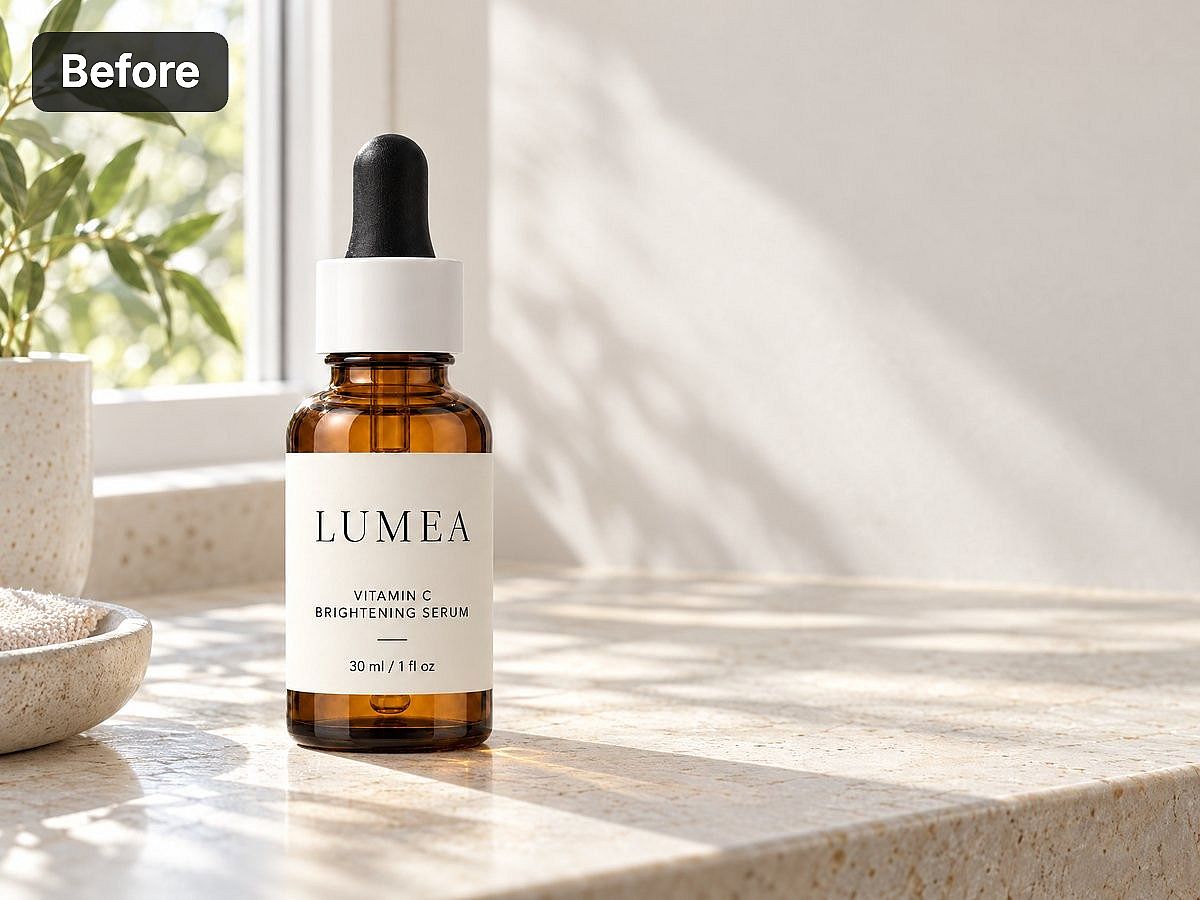
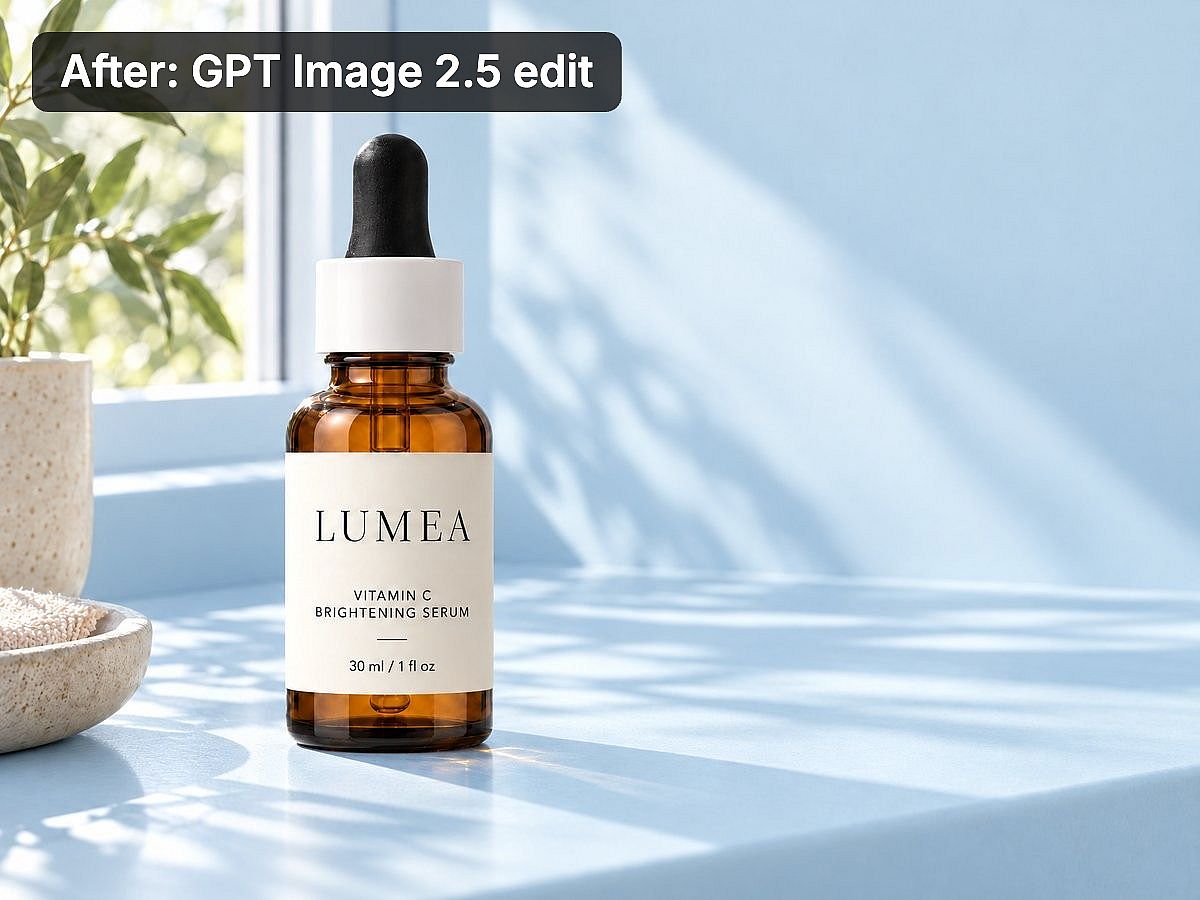
In this example, the label, bottle position, and lighting stayed close to the original. Always compare both versions before you use the edit.
These instructions are a test of the model’s behavior, not a guarantee that every detail will remain unchanged. Compare the output with your original reference before using it.
Frequently asked questions
What is the best AI image generator for realistic photos?
Start by comparing Nano Banana models, the image tools in ChatGPT, and relevant models available through OpenArt. Use your actual subject and references. Inspect anatomy, reflections, texture, and lighting before deciding which result is most convincing.
A model that handles portraits well may perform differently on jewelry, transparent packaging, or a room with mirrors. On OpenArt, you can compare different models for those subjects within the same account.
What is the best AI image generator for text?
Ideogram is a useful starting point for text-led graphics. Nano Banana and GPT image models are also worth testing with the exact words in your brief.
For prices, disclaimers, or copy that must be revised repeatedly, keep the final text editable in a design tool. Proofread every published version.
Which AI image generator is best for consistent characters?
OpenArt is worth considering when you want to save and reuse a recognizable person or mascot through OpenArt Characters. Reference-based models offer another way to guide appearance.
Test the character in a different pose, outfit, and setting before producing a series. One successful image does not establish consistency across all three changes.
Which AI image generator is best for product photography?
OpenArt is a useful starting point when you want to compare models, try different product scenes, and develop selected images with editing tools. Use your actual product photo as a reference wherever the model supports it.
If the original product must remain completely unchanged, retain that photograph in the final composition. Check labels, proportions, materials, and colors before publishing a product image.
Can I use AI-generated images commercially?
Commercial permissions depend on the provider, model, plan, and intended use. On OpenArt, commercial use is included on Plus and higher plans. Starter does not include commercial use.
Free access alone does not establish commercial permission. Recraft, for example, distinguishes its noncommercial free outputs from images generated on paid plans. Review the applicable terms before using an image in paid advertising, client work, or a product you sell.
Should I choose a multi-model platform or a single-provider tool?
Choose a multi-model platform when you need to compare different models or use different models for different tasks. Choose a focused tool when its workflow already covers your needs.
For recurring campaigns, include the cost of edits and asset reuse in the decision. OpenArt combines model choice with separate image tools and reusable brand or character assets, making it worth testing across a complete brief.
Which AI image generator is worth paying for?
If you produce campaign images regularly, OpenArt is worth testing for the work between the first prompt and the finished set. You can compare models, develop a selected image with editing tools, and reuse brand or character assets on the next project.
Start with a brief you already need to deliver. Make one image, request a specific change, and create a second composition. Track the credits and the time spent fixing details. That gives you a better basis for choosing a subscription than a gallery of someone else’s best results.
New OpenArt accounts get 40 free credits, with no credit card required. Use them to test your workflow. For published ads and client deliverables, commercial use starts on Plus ($34/month).
Create your first campaign image with the AI Image Generator, then compare plans for regular production.