


 ChatGPT
 Perplexity
 Claude
 Gemini
The best AI agent skills for video ads are ready-made workflows for one ad job, like a UGC ad or a product listing video. OpenArt's ad skills do this in Claude and ChatGPT: you name the job, and the skill plans the script and makes a draft ad video first.
We tested AI agent skills for video ads from each group in Claude on November 11, 2026, using a made-up racket brand called Courtline. This guide shows what each skill makes and how to install it, with our test results along the way.
Key takeaways
- An AI agent skill is a ready-made workflow for one job, like a UGC ad or a product listing video.
- OpenArt's ad skills run in Claude and ChatGPT and make a draft ad video before full quality.
- In our UGC test, the skill rewrote lines that would have made the AI creator sound like a real customer.
- Hook Variants made three new openings in one batch, as separate clips to join to your ad.
- The skills make the video with speech and sound, so add your logo and captions in your editor.
What Are AI Agent Skills for Video Ads?
AI agent skills for video ads are ready-made workflows that teach an AI agent how to make one kind of ad. The agent loads the skill when your request matches it, then follows its steps from your brief to an ad video.
Each skill holds the know-how for its job, like which inputs to ask for and how to plan the script. You describe the ad, and the skill picks the model and writes the prompts.
Lists of the best Claude skills often focus on writing and code. Ad skills bring video into the same chat, which makes them one of the simplest ways to use AI agents for video ad creation.
Skill vs Prompt vs Connector
These three work together, but each one does a different part of the job.
| What it is | Use it for | |
|---|---|---|
| Prompt | Instructions you type into one chat | A one-off request |
| Skill | Saved steps the agent loads when your request matches | A job you repeat, like UGC ads |
| Connector | A link that gives the agent another app's tools | Making images and videos with OpenArt |
OpenArt's ad skills use the OpenArt connector to make each video. To write your own skill instead, see how to build Claude marketing skills.
How an Ad Skill Runs in Claude and ChatGPT
Every one of the AI agent skills for video ads in our tests followed the same pattern, from request to draft. We ran our tests in Claude.
- Name the job. Describe the ad you want, or type the skill's name, like
/ugc. The agent picks the matching skill. - Answer any questions. The skill asks only for what's missing, like the language or the video's shape (its aspect ratio). Our UGC prompt already had both, so it went straight to the plan.
- Review the script plan. You get a timed table of lines and shots, plus notes on sound and on-screen text. The skill points out any change it made to your words.
- Upload your product photo to OpenArt. In our tests, Claude opened an OpenArt upload window for the photo, even though we had attached it in the chat.
- Check the draft. The skill makes a draft first, then a full-quality version when you ask. In our tests, the draft was 480p and the full-quality version was 1080p
The skills make the video with speech and sound. Add your logo and captions in your editor afterward, and see how to edit videos with ChatGPT and Claude for that step.
The Best AI Agent Skills for Video Ads, by Job
OpenArt groups its ad skills by the job they do. The table shows each one, and the sections below cover the four we tested.
| Skill | What it makes | Start with |
|---|---|---|
| UGC Ads | Casual, phone-style creator ads for social media | Product photos or a link, plus a brief or script |
| PGC Ads | Polished presenter videos for reviews and explainers | A script and product photos |
| Talking Head | One person talking straight to camera, with or without a product | A script |
| Product Listing | Product-page videos that show the item and its features | Product photos and verified specs |
| TV Commercial | A brand commercial with a brand idea and an ending | Brand and product materials, plus a brief or script |
| Performance Ads | Social media feed ads that pair a strong opening with product proof | A product, a brief or approved copy |
| Hook Variants | New openings for one ad | An existing ad |
| Ad Variants | Presenter-led ads remade, edited or varied | An existing ad |
| Ad Remake | Remake an existing ad remade with a new product, person or script, following ad-variation workflow | An existing ad |
Skills for People on Camera: UGC Ads, PGC Ads and Talking Head
These skills put a person on camera without booking anyone. UGC Ads makes casual creator ads that look filmed on a phone, in the style of user-generated content (UGC).
PGC Ads makes polished presenter videos with studio light, and it returns long scripts as separate takes. Talking Head covers one person speaking to camera, on any topic.
Our test: UGC Ads. We attached a photo of the Courtline racket and asked for a 15-second, 9:16 UGC ad with this script: "I switched to the Courtline racket last month, and people at the club keep asking about it. It feels light, and the grip is so comfortable."
The reference image we used:

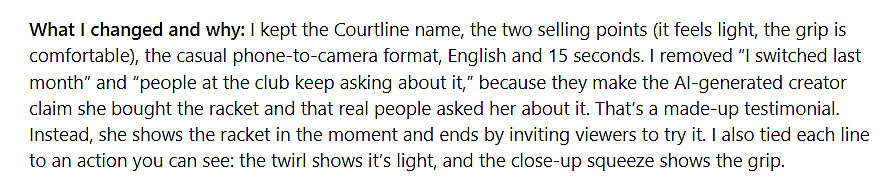
The skill rewrote two lines. It said "I switched last month" and "people keep asking" would make an AI creator sound like a real customer, which is a made-up testimonial.
Its version had her show the racket in the moment and invite viewers to try it. Each line also got an action, like a twirl for "light" and a close-up squeeze for the grip.
We could keep the new script or go back to ours, and we kept the new one. The draft used Seedance 2.5 with our photo as the reference.
The racket in the draft matched our photo, and she said "Courtline" clearly with the music under her voice. One thing to check: the model put a small logo on her shirt that we never asked for.
That care with claims matters for UGC ads with AI, since the FTC's 2024 rule bans fake reviews and testimonials. For UGC ads in the browser, try the AI UGC ad generator, and for presenter videos, the AI avatar video generator.
Skills for Product Videos: Product Listing and TV Commercial
Product Listing makes videos for product-page galleries, like an Amazon listing. It works from your product photos and specs, and you upload the video to your store yourself.
TV Commercial makes a brand commercial with a brand idea and an ending. It starts from your brand materials and a brief, a script or a reference film.
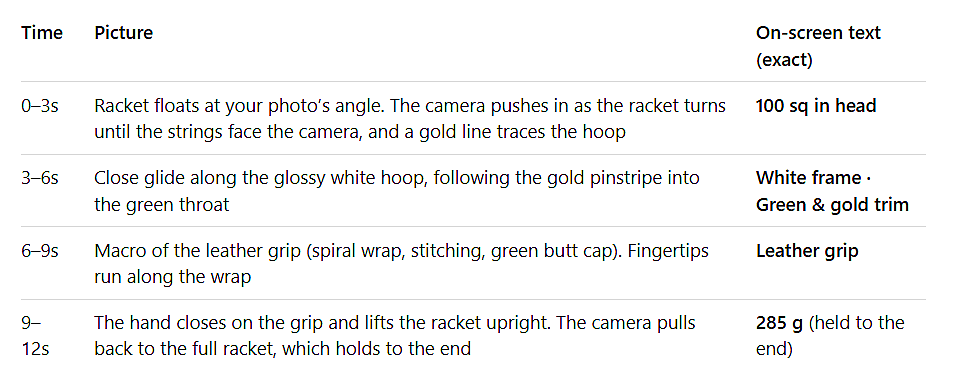
Our test: Product Listing. We sent the racket photo with four specs we made up for the test: 285 g, a 100 sq in head, a leather grip, and a white frame with green and gold trim.
The skill chose a 16:9 shape on its own, because that's the standard for Amazon-style gallery videos. It planned a 12-second video with no speech and a short label for each spec.
It kept "285 g" as a plain number and didn't call the racket lightweight. The draft spelled all four labels correctly, and the racket matched the photo down to the gold pinstripe.
For static product ads in Claude, see how to generate product ads from Claude.
Skills for Testing Ad Versions: Performance Ads, Hook Variants, Ad Variants and Ad Remake
These skills make versions to test. Performance Ads builds feed ads that pair a strong opening with proof the product works and a clear next step.
Hook Variants writes new openings, or hooks, for your ad, like an AI hook generator that also makes the clips.Ad Variants makes new versions of an ad with a person talking, with changes like a new opening or new product shots.
Ad Remake rebuilds a proven ad's structure and persuasion beats for your product, with your product or person in it
Our test: Hook Variants. In the UGC chat, we asked for three hook variants. The skill planned three openings, each with its own idea:
- A familiar problem: "Does your racket start feeling heavy by the end of a match?"
- Show it first: "Okay, watch how easy this is to spin."
- The design: "Can we talk about how pretty this racket is?"
Every opening ended with the racket beside her face, so the ad's next line followed on naturally. The "heavy" hook is a question, which keeps it clear of claims about feeling less tired.
The skill made all three openings in one batch, as 5-second clips. You get them as separate clips to join to the rest of the ad in your editor.
In our test, the skill kept every version music-free, so the sound matched where each opening met the body. Our base ad had music, so plan your base video without music if you want hooks later.
For a full creative testing plan, see how to scale creative testing with AI.
Tools for Videos You Already Have: Replace Background, Relight Video and Dub Video
These tools edit footage you already have, in the same chat. Replace Background puts your subject in a new scene and keeps the motion, and Relight Video changes the light or the mood.
Replace Background starts from 20 scene presets or your own image. Relight Video starts from 30 presets for lighting, mood and atmosphere, or a reference image.
Both work on clips up to 8 seconds and make 720p or 1080p video, with 1 to 8 versions per run. They're part of OpenArt VFX.
Dub Video translates the speech into another language and replaces the voice, with lip sync on by default. Captions and on-screen text stay as they are.
Dub Video takes clips up to 3 minutes long. It covers 22 languages, plus separate options for Brazilian Portuguese and Latin American Spanish.
Our test: Dub Video. We asked Claude to dub the UGC ad into Spanish. It asked a question about the Spanish dialect, and we picked Latin American Spanish.
It noticed our file was already in OpenArt and dubbed that copy. The Spanish sounded natural, and "Courtline" kept its pronunciation.
The dubbed video ran about a second longer than the original. Check the length before you swap it into an ad slot with a fixed time.

How to Install OpenArt's Claude Ad Skills
Install these AI agent skills for video ads once, and they work in every new chat. The OpenArt skills repo on GitHub lists every install option.
Claude Chat and Cowork Plugins
- Open the OpenArt plugin install link and confirm the install. Claude adds the OpenArt connector and the skills.
- Open the plugin's Connectors tab and sign in to OpenArt.
To install it by hand, open Customize, then Plugins, then Add, then Add marketplace. Enter OpenArt-AI/skills, install OpenArt, and turn on Sync automatically to get skill updates.
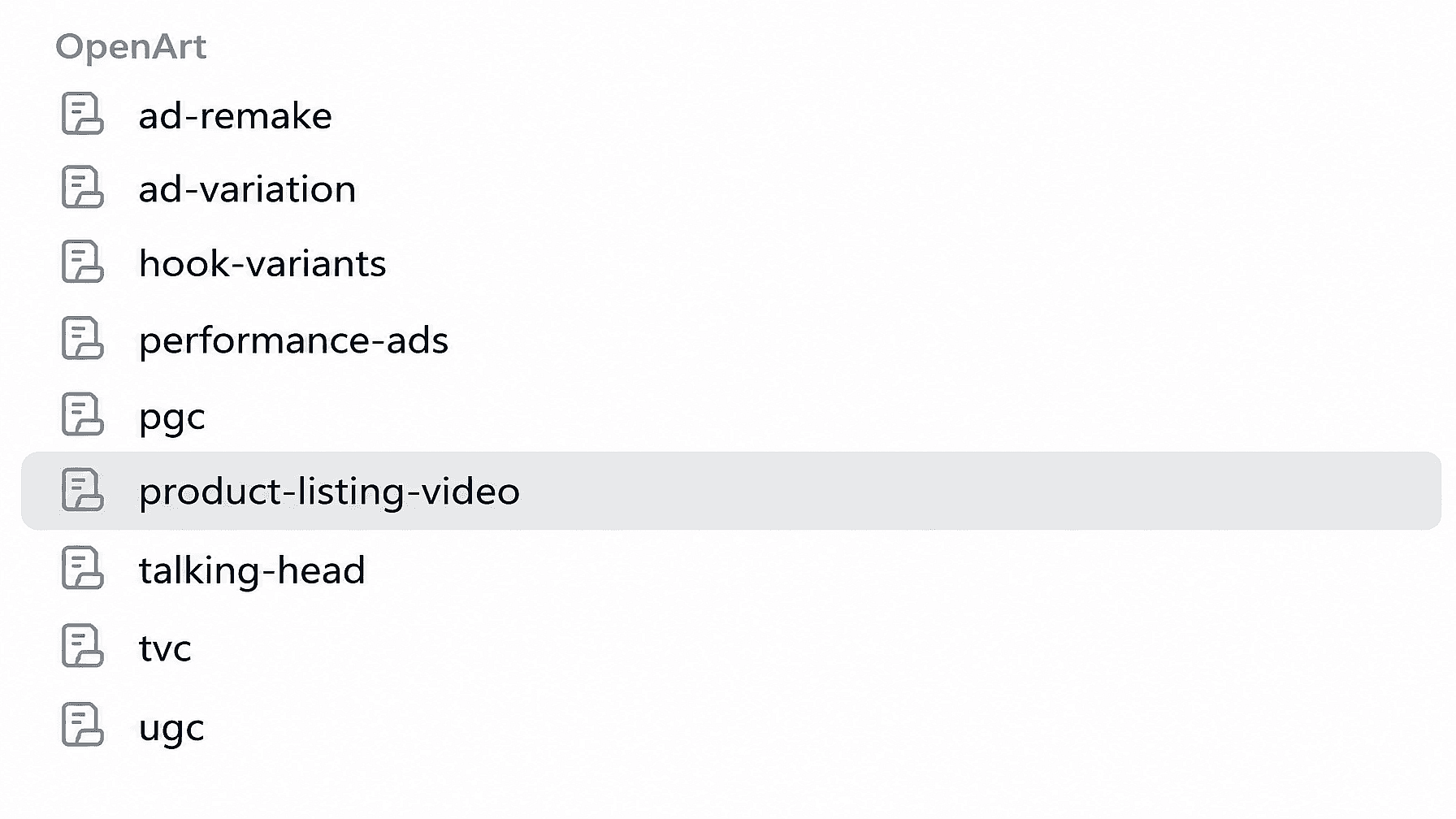
Like other Claude Cowork plugins, it adds its skills to your list once it's on. Type / in a chat to see skills like ugc, pgc and hook-variants.
Plugins work on paid Claude plans. On the Free plan, add https://mcp.openart.ai/mcp as a custom connector to make images and videos without the skills.
Claude Code
If you installed the plugin in Claude chat or Cowork with the same account, it's already there. Otherwise:
- In a Claude Code session, run:
/plugin marketplace add OpenArt-AI/skills
/plugin install openart@openart
- Run
/mcpand sign in to OpenArt. - For updates, open
/plugin, select openart on the Marketplaces tab and choose Enable auto-update.
ChatGPT and Codex
Add the OpenArt plugin in ChatGPT or Codex and sign in. The skills come with it.
Other AI Agents
- In your agent's connector settings, add
https://mcp.openart.ai/mcpand sign in to OpenArt. - In a terminal, run
npx skills add OpenArt-AI/skills. To install one skill, add--skill ugcor the name of the skill you want.
Ready-Made Claude Ad Skills vs Building Your Own
Use a ready-made skill when you need an ad video for a common job. Build your own when you want static image ads, or your own brand rules and approval steps.
OpenArt's ad skills make video. For banner or static ads, a custom skill can plan the images and make them with OpenArt in the same chat. For a single static ad without building a skill, try the OpenArt AI image generator.
How to Choose an AI Agent Skill for Ads
When you compare AI agent skills for video ads, check these points:
- It matches your ad job. A UGC skill and a product listing skill plan very different videos.
- It works from your own photos and script. The product in the ad should match the one you sell.
- It shows a plan before it generates. You should see the script and the shots before anything is made.
- It makes a draft first. A draft lets you check the product and the motion before full quality.
- It runs in the agent you already use. Check whether it supports Claude, ChatGPT or both.
- It's clear about what you add later. Know whether you'll add captions and logos yourself.
- You have the rights. Use people's faces and voices only with permission, and use your own product photos.
For tools that make the images and video, see our list of servers for AI image and video.
Tips for Using Claude Skills for Marketing Video Ads
These tips come from our test runs of AI agent skills for video ads. They apply to most of the best Claude skills for marketing that make video.
- Attach a clear product photo. Every test used one photo as the reference, and the racket matched it each time.
- Write the specs you want on screen. Product Listing turned our four specs into labels and spelled every one correctly.
- Expect edits to testimonial lines. The UGC skill rewrote lines that made an AI creator sound like a real customer.
- Make the base ad without music if you want hooks. In our test, Hook Variants kept every version music-free
- Check clothing and backgrounds. Our UGC creator wore a small logo nobody asked for.
- Approve the draft before you upgrade. Upgrade to full quality only the versions you’ll use. In our tests, that meant going from a 480p draft to 1080p
- Review every ad before it runs. Watch with sound and look closely at the product.
For more ways to use Claude across a campaign, see our Claude for marketing guide.
Make Video Ads With OpenArt's Agent Skills
Connect OpenArt in Claude and ChatGPT, install OpenArt's AI agent skills for video ads and ask for your first ad video. For one-off videos in your browser, use the AI video generator.
Frequently Asked Questions
What are the best AI agent skills for video ads?
The best AI agent skills for video ads match one ad job, like UGC ads or product listing videos. OpenArt's ad skills cover these jobs in Claude and ChatGPT, and each one plans the script before it makes a draft.
Can AI agent skills for video ads turn a campaign brief into an ad video?
Yes. Give the skill your brief and product photos, and it plans the ad and makes a draft video, which suits small agencies working from client briefs. Add your logo and captions in your editor before the ad runs.
Can I automate product ad creation with a skill inside Claude?
Yes. Install the OpenArt plugin in Claude, then ask for the ad you need, like a UGC ad or a product listing video. The skill plans it and makes the video through OpenArt.
Do AI agent skills for video ads add captions or logos?
OpenArt's skills make the video with speech and sound. Add your logo and captions afterward in your editor.
Product Listing can show short spec labels, which the model draws inside the video.
Is there an AI agent skill for static or banner ads?
OpenArt's ad skills make video. For static or banner ads, you can build your own Claude skill that plans the images and makes them with OpenArt, using the template in our Claude marketing skills guide.
How do I install OpenArt's skills in Claude Code?
Run /plugin marketplace add OpenArt-AI/skills, then /plugin install openart@openart. Then run /mcp and sign in to OpenArt.
What is an AI ad agent?
An AI ad agent is an AI assistant that plans and makes ads for you, using skills and connected tools. With OpenArt's skills, Claude or ChatGPT can act as an AI ad agent for video ads.
How much do OpenArt's ad skills cost?
The skills have no separate price. Each video uses OpenArt credits for the models and tools it runs