

 ChatGPT
 Perplexity
 Claude
 Gemini
Best Gemini AI Photo Prompts for Trending Portraits
Forty-one prompts. That is what this post is. If you came here to copy a Gemini AI photo prompt, paste it, and walk away with a finished portrait, skip straight to the library below. If you want to understand why some prompts produce a professional-looking edit and others hand you a plastic-faced stranger, the flagship breakdowns and holiday sections before the library will show you what each line in a prompt actually does.
The holiday sections cover the seasonal edits people search for most: Halloween costume selfies and the VHS horror trend, Thanksgiving family dinner photos, and AI Christmas photoshoots, from the gift-box portrait to the matching-pajama family shot.
Everything here runs on Google's Gemini image models, which OpenArt gives you under the Nano Banana name alongside GPT Image 2.5, Seedream, and a full photo editor in one workspace. Reading to finished photo, about two minutes.
What is a Gemini AI photo prompt?
A Gemini AI photo prompt is a plain-language instruction you give Google's Gemini image models to generate a new photo or edit one you already have. The image side of Gemini goes by a nickname you have probably seen: Nano Banana. Google uses that name openly now, and the most capable version, Nano Banana Pro, is the model people mean when they say "Gemini AI photo."
One of these prompts does one of two things. It can generate: make a brand-new photo from a text description, like a cinematic street portrait or an aura-farm aesthetic shot. Or it can edit: start with a real photo and change what you tell it to while keeping the rest, like "keep the face exactly, restyle into a 90s film portrait." Editing is what Gemini does best, and it is the reason the trending portrait wave took off on this model specifically.
Running Gemini-style prompts on OpenArt
Here is the honest part, because it matters. OpenArt is not Gemini, and it is not made by Google. What OpenArt gives you is access to the Gemini image models directly: Nano Banana 2.1, Nano Banana Pro, and Nano Banana 2 Lite all live in the workspace. Any prompt written for "Gemini AI photo" runs on those same models inside OpenArt.
Pick Nano Banana 2 Lite for fast drafts, Nano Banana 2.1 for stable everyday work with sharper in-image text, and Nano Banana Pro for the most polished, identity-stable results. GPT Image 2.5, Seedream 5.0 Pro, and a full AI photo editor sit alongside them.
Why Gemini photo prompts go viral
Most early coverage of Gemini's image models focused on generation: type a description, get a fresh image. But the formats that actually spread were built to be copied.
A viral Gemini photo prompt has a specific shape. It names the subject, the style, the lighting, the mood, and the aspect ratio, and it fences off what must stay the same. That recipe is complete enough that one person's prompt works for a thousand different photos uploaded by a thousand different people.
Editing wins over generation on personal feeds for a simple reason. A generated image of a stranger gets a scroll. An edited image of you as a soft-glam portrait, a café golden-hour shot, or a restored childhood photo gets a save and a share.
Editing is also the harder job. To edit believably, the model has to change the style, wardrobe, or setting completely while leaving your actual face untouched. Weaker tools fail the second half and hand you a lookalike. Gemini's image models hold identity through a heavy restyle, and the trending portraits depend on exactly that.
If you want the pure generation side, our best Nano Banana prompts guide covers making viral images from scratch. This post covers both, with a heavy lean on the trending portrait edits people are copying today.
How to run these on OpenArt
You do not need anything technical. Upload your photo, pick a Gemini model, paste a prompt, generate.
For editing prompts, open Image Generation or Create Image inside your workspace. Use the image upload button next to the prompt box to add your original photo. This upload step matters most: the model edits the picture you give it, so a clear, well-lit source gives a cleaner result.
Click the model name in the prompt box and choose Nano Banana 2.1 for everyday work or Nano Banana Pro for the most consistent results. Paste any prompt below and generate. From there you can fine-tune in the editor, upscale to 4K for print, or swap the background. New accounts start free with credits, so you can test a few before choosing a plan.
For pure generation, skip the upload and paste a generate-style prompt straight in.
The trending girl portrait
The single most copied Gemini photo format right now. It maps directly to the "copy paste trending girl" searches filling the feed: take an everyday selfie and restyle it into a polished, soft-glam portrait with gentle highlight, dewy skin, a warm butterfly glow, and aesthetic styling that reads like a professional shoot.
High-fidelity studio portrait of a young Asian woman with pastel pink
hair in a side braid. She wears a cream polka-dot lace top under a pink
knit cardigan, accessorized with layered gold necklaces. Soft rosy
makeup, glossy lips, direct gaze. Pure white background, high-key
diffuse lighting, hyper-realistic fashion photography, 8k resolution.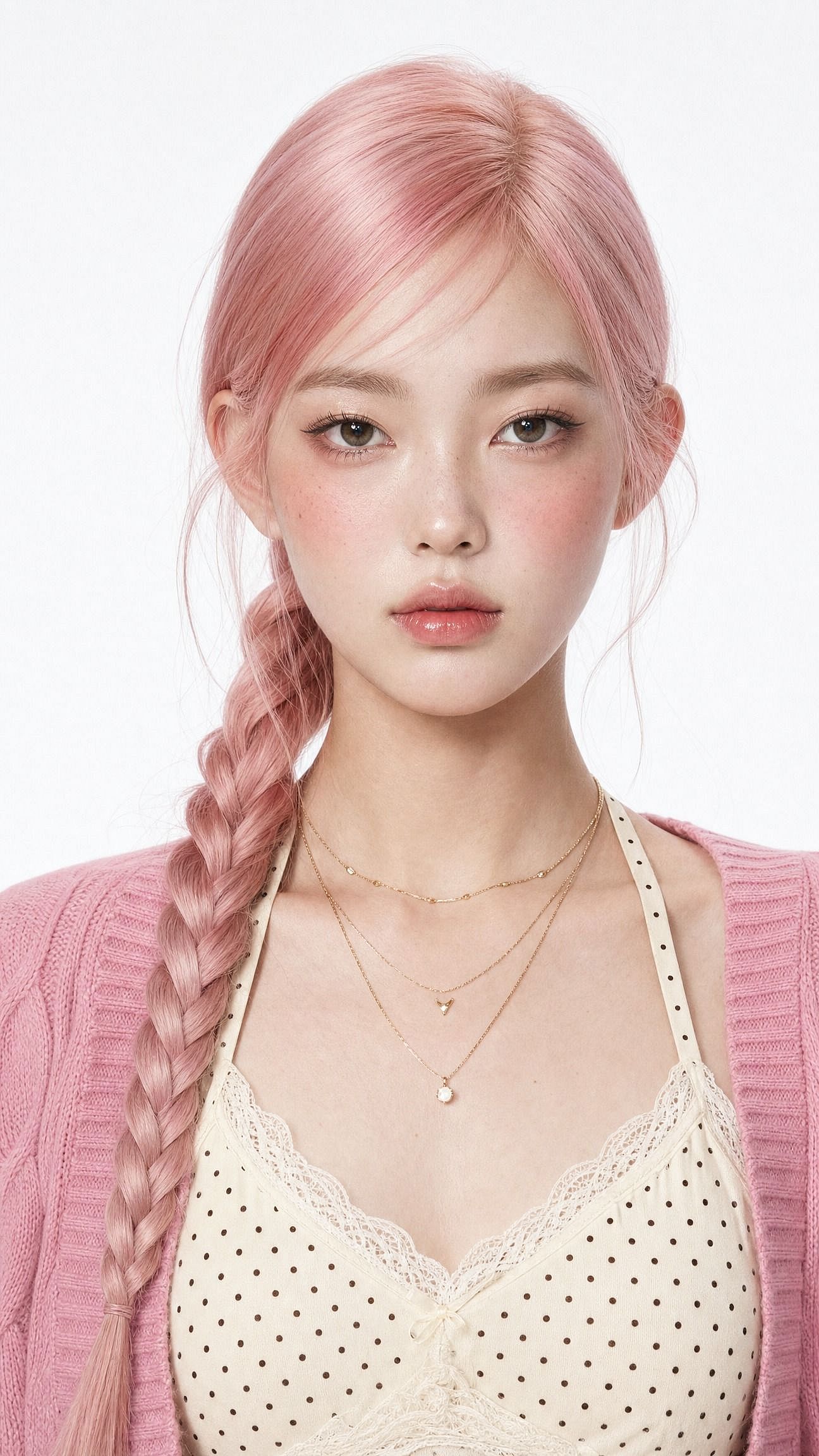
Change one word to shift the whole look. Swap "soft-glam" for "saree ethnic elegance" for a traditional set, or "clean Instagram DP, minimalist studio backdrop" for a profile picture.
The line doing the heavy lifting is the first one: keep the same face and preserve the original identity. Without it, the model restyles the face along with everything else, and you end up with a pretty stranger instead of a prettier you.
The cinematic boy portrait
The male side of the trend splits into two looks people copy over and over: cinematic street style and a café golden-hour shot with a Pinterest-fit vibe. This prompt does the street version.
Edit the uploaded photo. Keep the same face, features, and expression
exactly, preserve the original identity. Restyle into a cinematic urban
street portrait: moody overcast light, teal-and-orange color grade,
blurred city street background, confident casual streetwear, shallow
depth of field, film-still mood, vertical 4:5 frame. Keep skin texture
natural and true to life.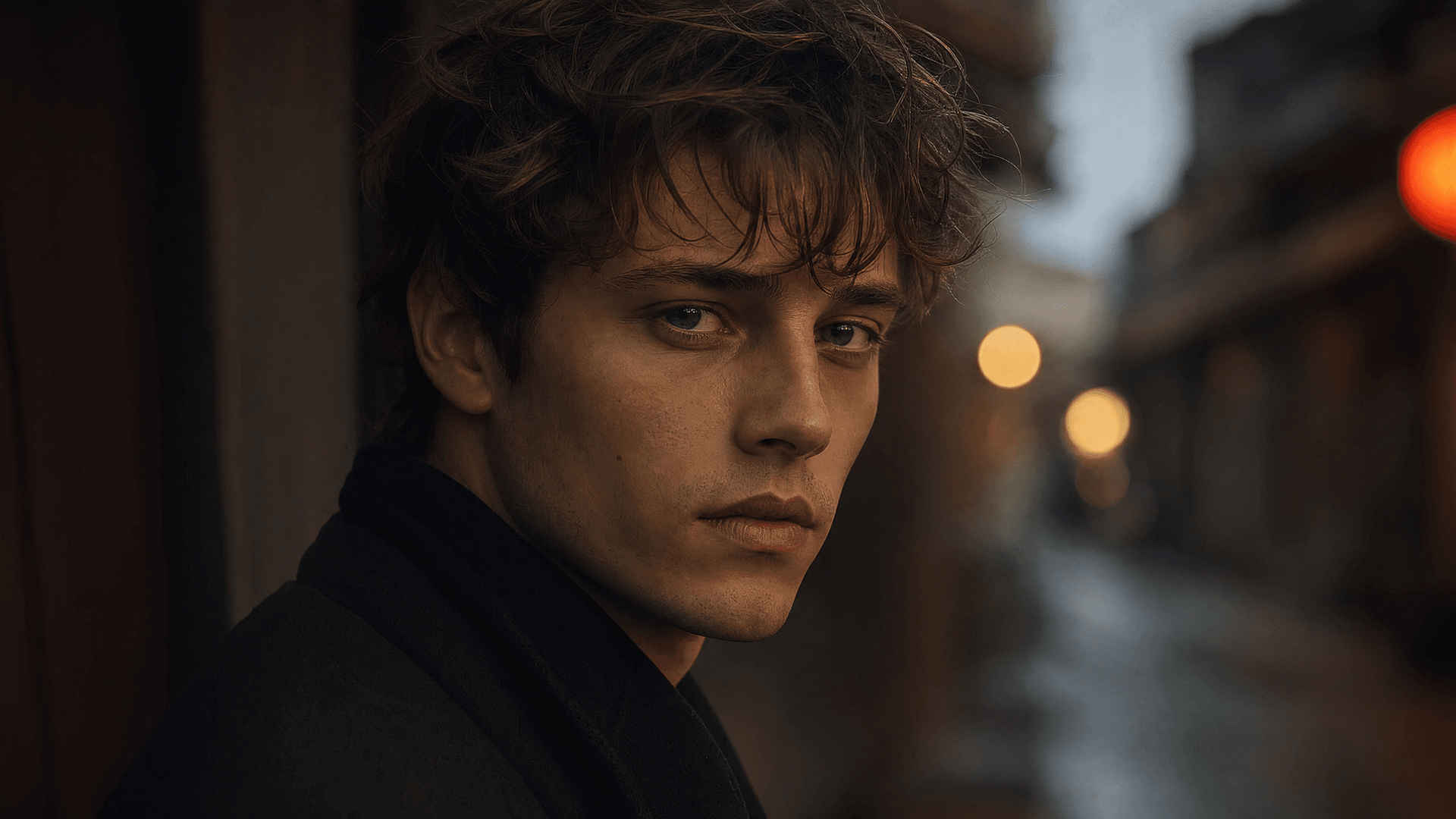
The cinematic couple
Couple edits are one of the biggest sub-trends, and they are the hard one. The model has to protect two faces at once.
Upload a normal phone photo of two people and you get a set that looks styled by a photographer:
Edit the uploaded photo of two people. Keep both faces, skin tones, and
expressions exactly as they are, preserve both identities. Do not merge
or alter their features. Restyle into a cinematic couple portrait:
coordinated neutral-tone outfits, soft directional lighting, a blurred
city-evening background, natural closeness, warm film color grade,
shallow depth of field, magazine-cover quality.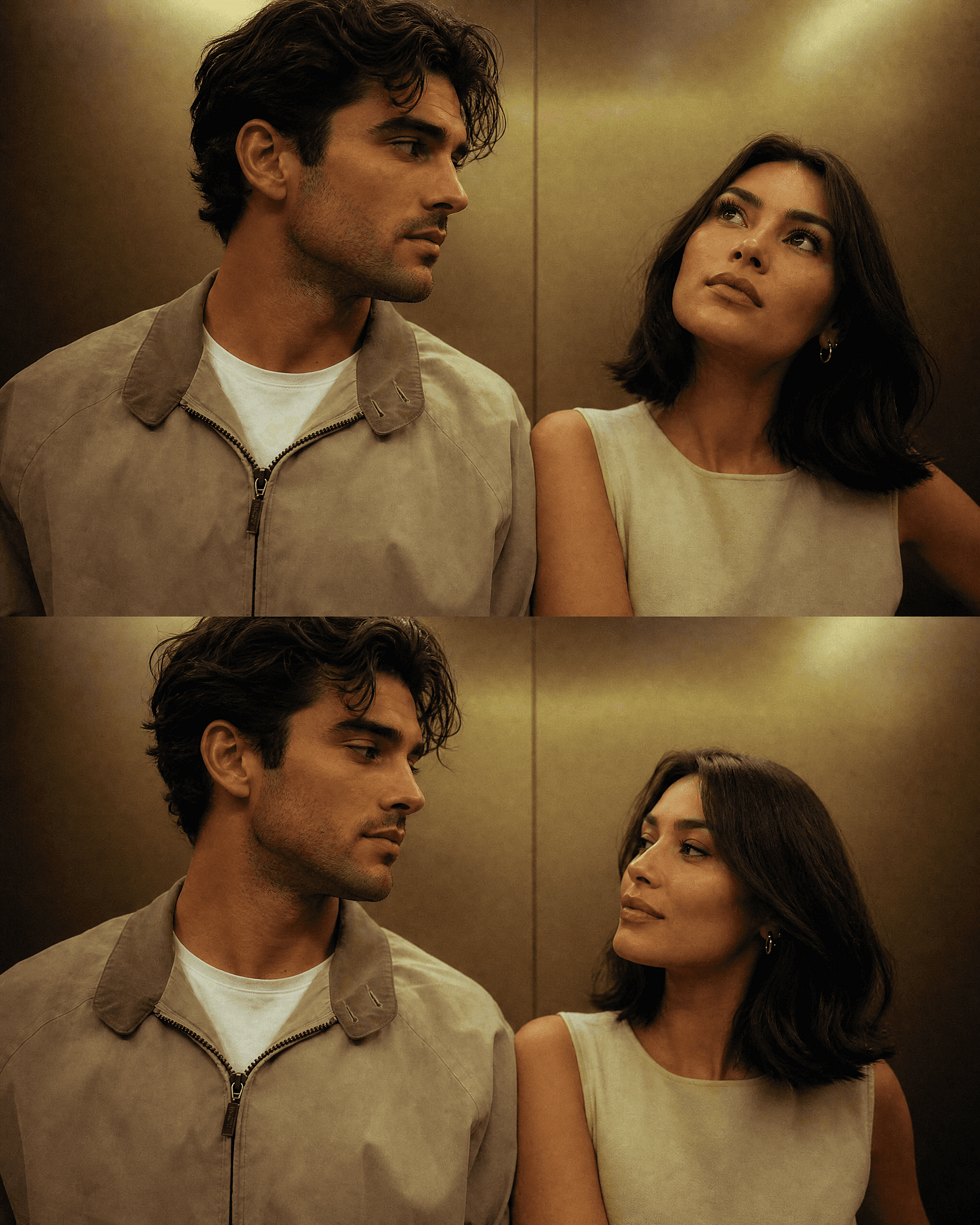
For a seasonal version, keep both faces and change only the setting. The Halloween and Christmas sections below include ready-made couple prompts, and both people stay recognizable across every setting you run from the same source photo.
The 3D figure
The format that pushed the whole trend into the mainstream, and it still performs. A real person becomes a small collectible figure on a desk or inside retail packaging. It reads instantly in a feed because the contrast between "person I know" and "toy on a shelf" is attention-grabbing on its own.
Edit the uploaded photo. Turn the person into a realistic 3D collectible
figure standing on a wooden desk next to a keyboard and a coffee mug for
scale. Keep their face, hairstyle, and outfit recognizable. Add a subtle
plastic-model texture, detailed base, soft desk lighting, shallow depth
of field, believable miniature scale, vertical 4:5 social frame.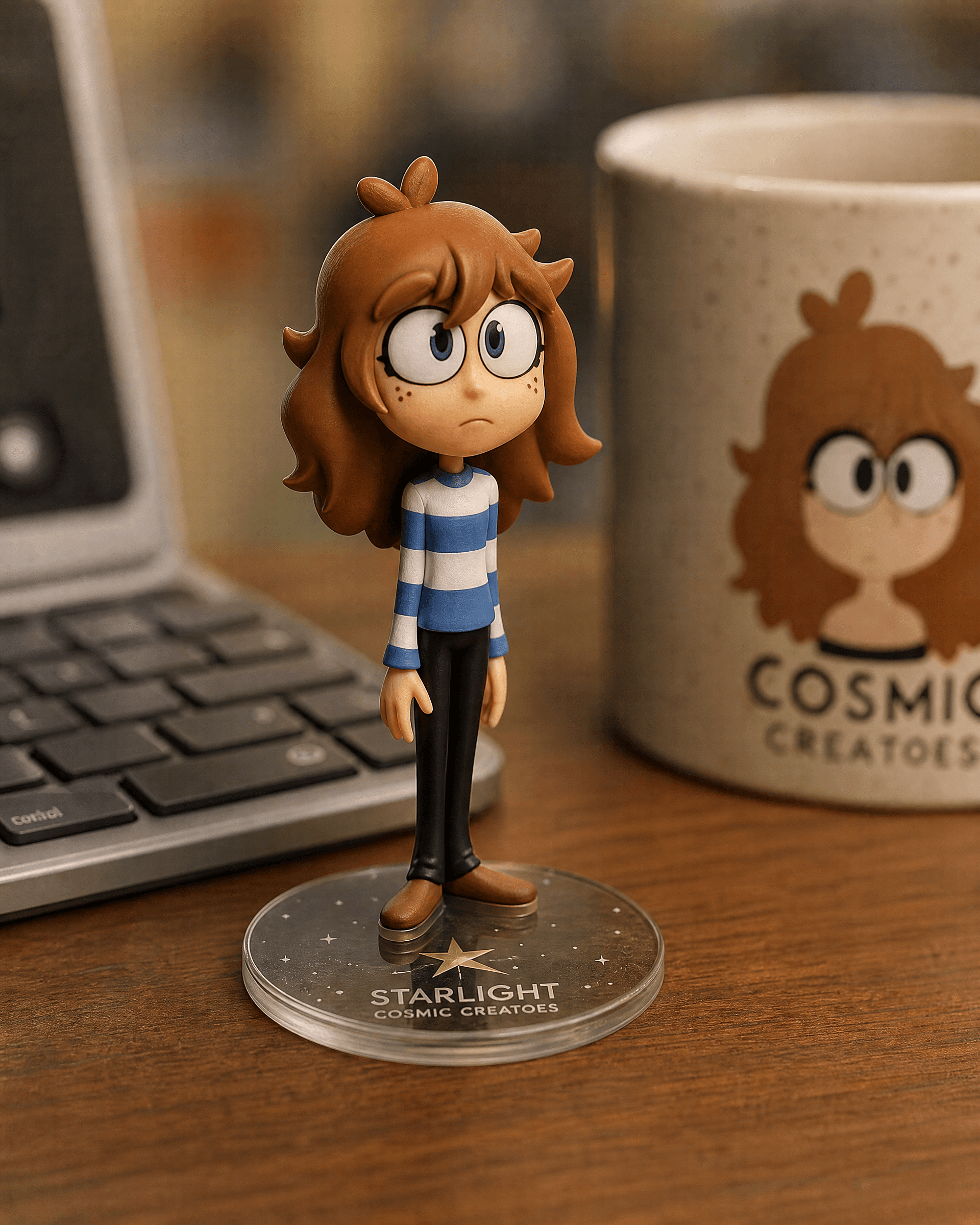
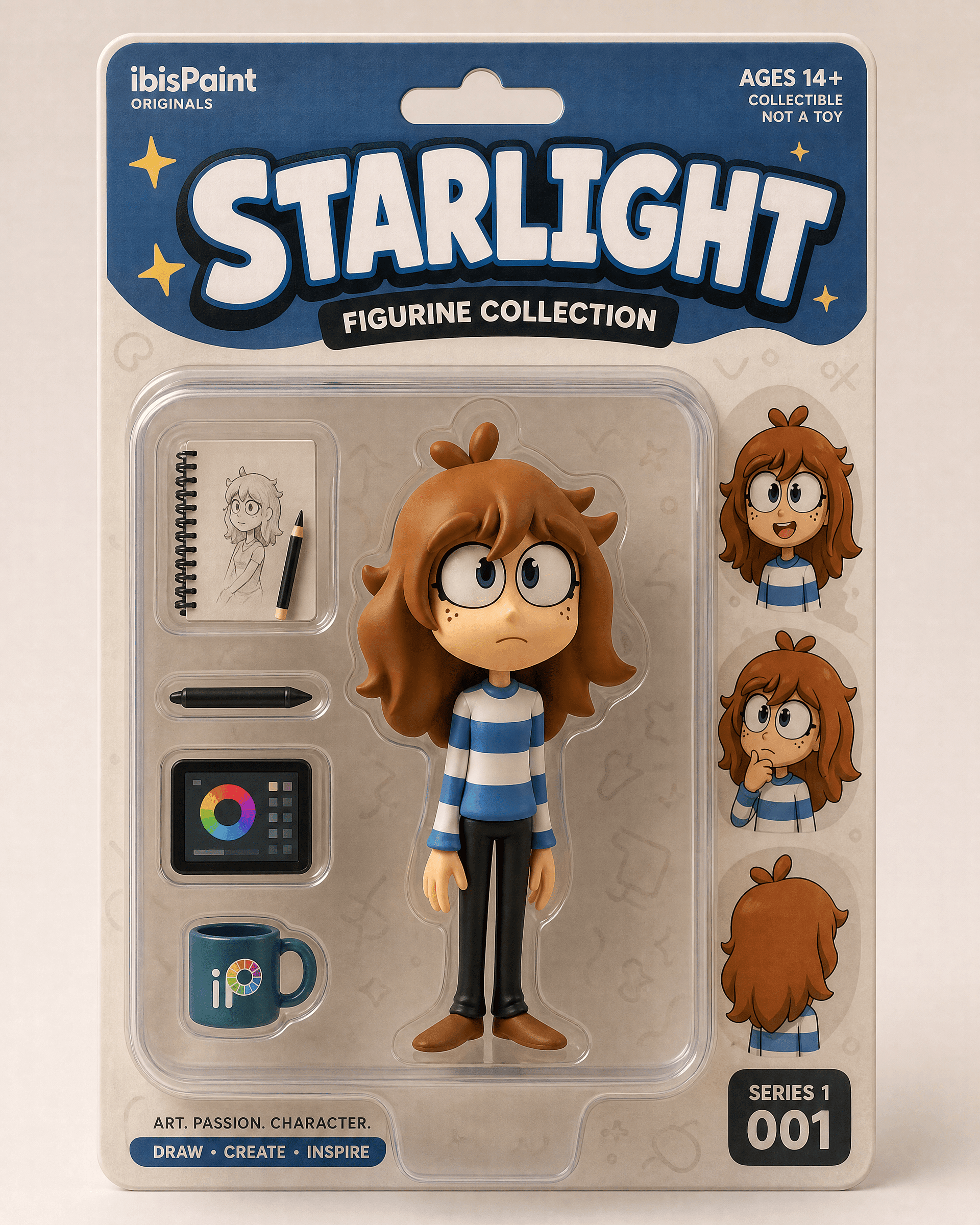
The boxed version for a retail-packaging reveal:
Edit the uploaded photo into a boxed action figure. Keep the person's
face and style recognizable. Place the figure inside a clear blister
package with a printed backing card, bold product name at the top, small
accessory icons, realistic toy photography, studio lighting, collectible
designer-toy aesthetic.
Start with a clear full-body or upper-body photo. The desk version reads as a quiet, believable edit. The boxed version reads as a reveal.
The old photo restoration and colorization edit
Restoration is one of the most useful, least gimmicky things these models do. It fixes scratches, sharpens a faded scan, and colorizes black-and-white photos. A lot of people first opened a Gemini editor for exactly this, usually for a family project or an anniversary gift.
Edit the uploaded old photo. Restore it: remove scratches, dust,
creases, and water damage, repair torn areas, sharpen soft details, and
correct fading. Keep every face and feature true to the original, no
reinvented details. Preserve the original composition and era-accurate
clothing. Natural, archival-quality restoration.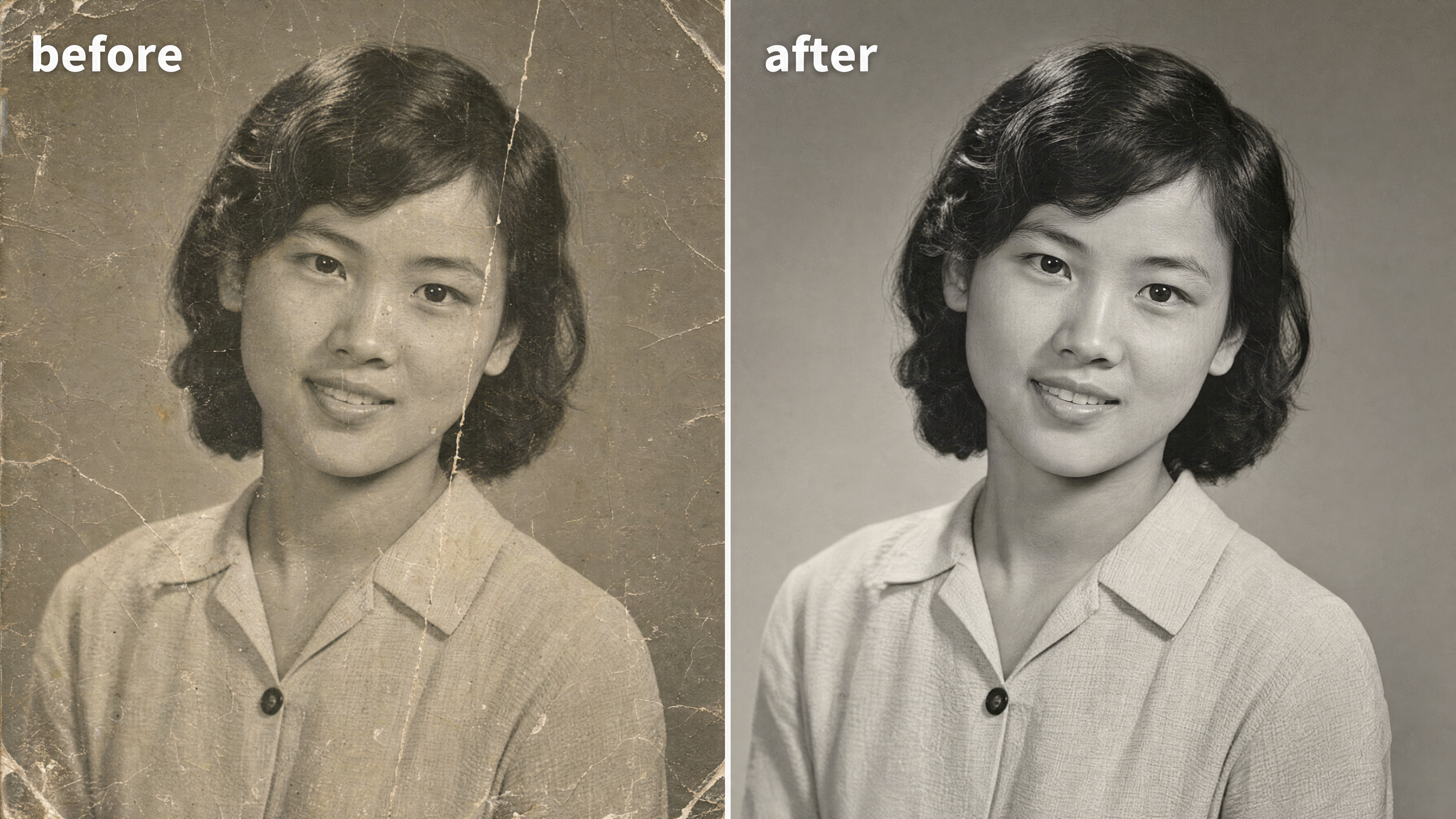
To colorize a black-and-white photo, add one line:
After restoring the photo, add realistic, natural color: era-accurate
skin tones, believable fabric colors, soft natural lighting. Keep it
subtle and true to life, not oversaturated. Do not change any faces or
features.
The phrase carrying this edit is "true to the original." Restoration goes wrong when a model invents a new face for a blurry relative. You can restore and clean up the result in the photo editor afterward, then upscale it to print resolution for framing.
The Y2K Style
The Y2K flash look is carrying the retro cluster this month: harsh direct flash, slightly washed color, early-2000s digital-camera grain, party-photo energy. Reads instantly as nostalgic. Works on a single portrait or a group.
Edit the uploaded photo. Keep the same face, features, and expression
exactly, preserve the original identity. Restyle into a Y2K early-2000s
digital-camera look: harsh direct on-camera flash, slightly washed cool
color, fine digital noise, candid party-photo framing, low-fi nostalgic
mood, authentic 2003 point-and-shoot aesthetic. Keep skin texture
natural.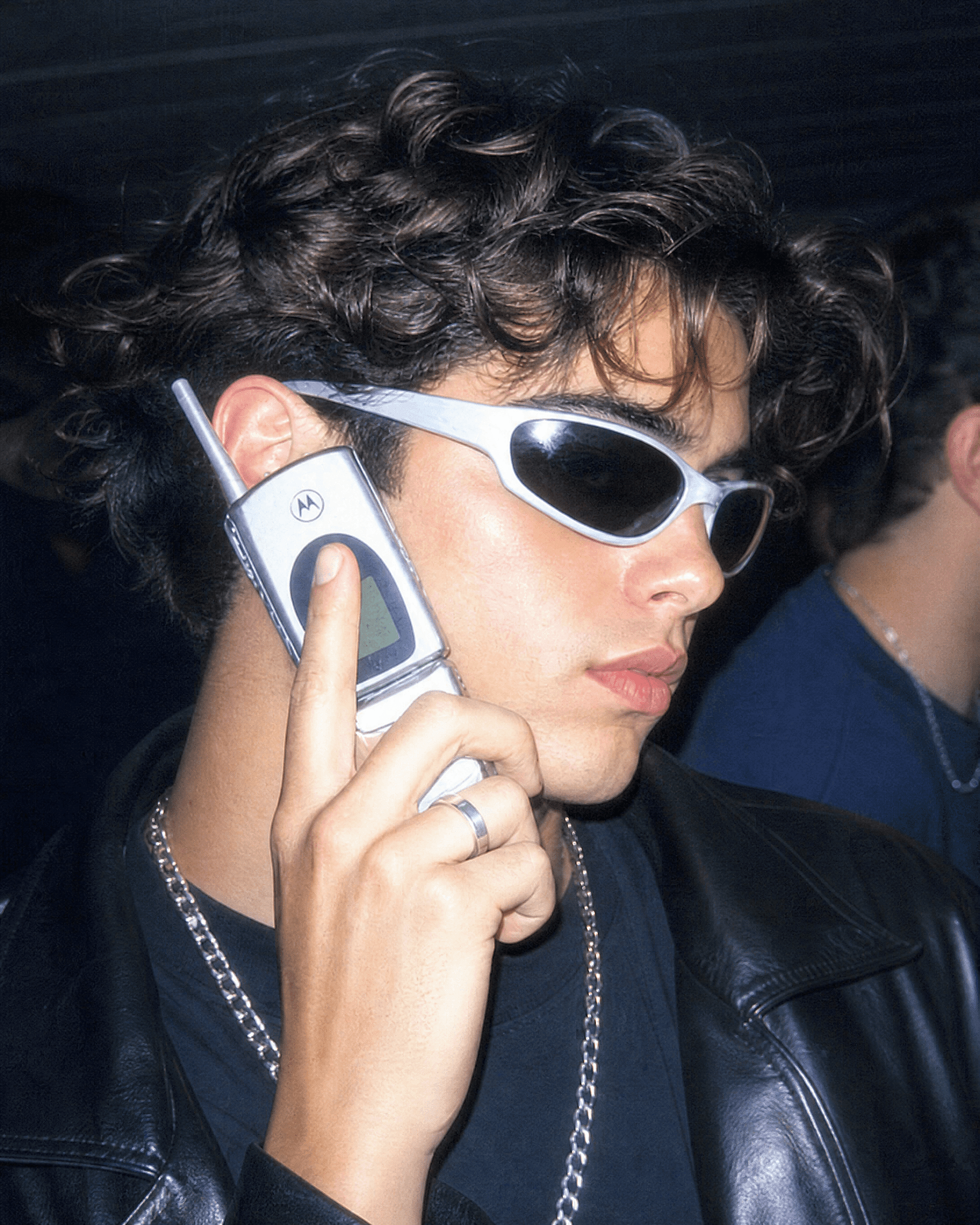
Push it further by naming the decade. "1990s film-camera portrait, warm grain, gentle flash" gives a softer retro. "90s sitcom poster, bright studio light, bold title text at the top" gives the group-photo version people frame like a TV cast shot.
The aura-farm aesthetic portrait
Aura-farming is the newest aesthetic in the cluster. Dramatic backlight, a glowing rim of colored light, a confident low-angle pose, a moody atmospheric background. The one people reach for when they want a portrait that feels cinematic and a little larger than life.
Edit the uploaded photo. Keep the same face and identity exactly.
Restyle into an aura-farm aesthetic portrait: dramatic colored rim light
glowing around the subject, moody dark atmospheric background, soft
volumetric haze, confident low-angle framing, rich cinematic color
grade, subtle particles in the air, high-detail vertical portrait. Keep
skin texture natural and true to life.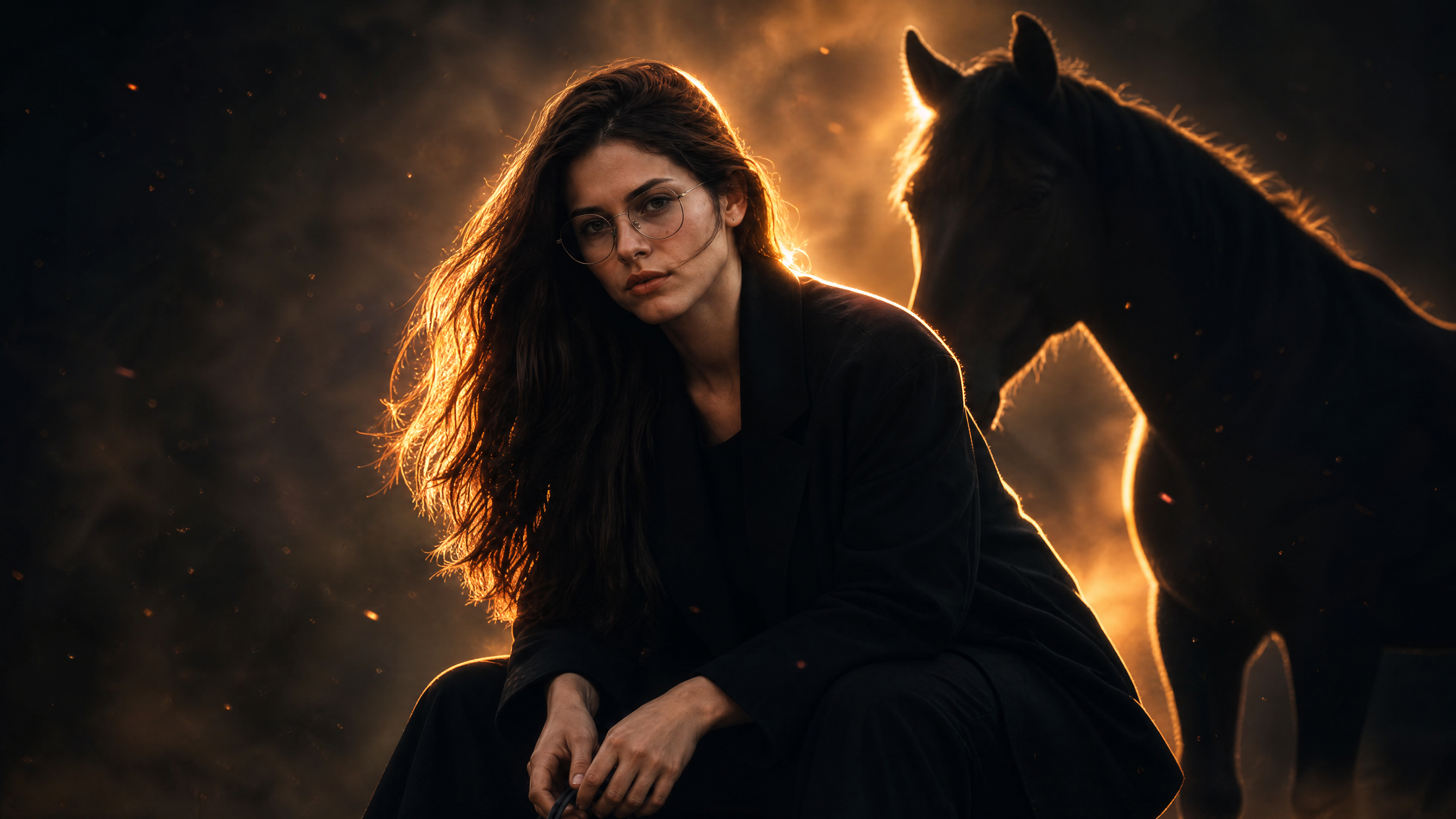
Change the rim-light color to change the mood. Cool blue for calm and mysterious, warm amber for heroic, magenta for high-fashion.
Halloween photo prompts
Every October the AI Halloween trend takes over the feed: people upload a selfie and get back a costume portrait, a couple photoshoot, or a found-footage horror still starring themselves. The idea is simple. Keep your real face, swap in the costume, makeup, and setting. It plays to exactly what Gemini's image models do well, because the outfit and scene can change completely while you stay recognizable.
The Halloween costume selfie
The base format of the trend, and the one most people search for first. Upload a selfie, name a costume, and get a portrait that looks like a styled Halloween photoshoot.
Edit the uploaded photo. Keep the same face, features, and expression
exactly, preserve the original identity. Restyle into an elegant vampire
Halloween portrait: deep burgundy velvet outfit with a high lace collar,
dark berry lips, subtle pale makeup, candlelit gothic interior, cool
moonlight from an arched window, faint mist, carved pumpkins softly
blurred in the background, cinematic color grade, vertical 4:5 frame.
Keep skin texture natural and true to life.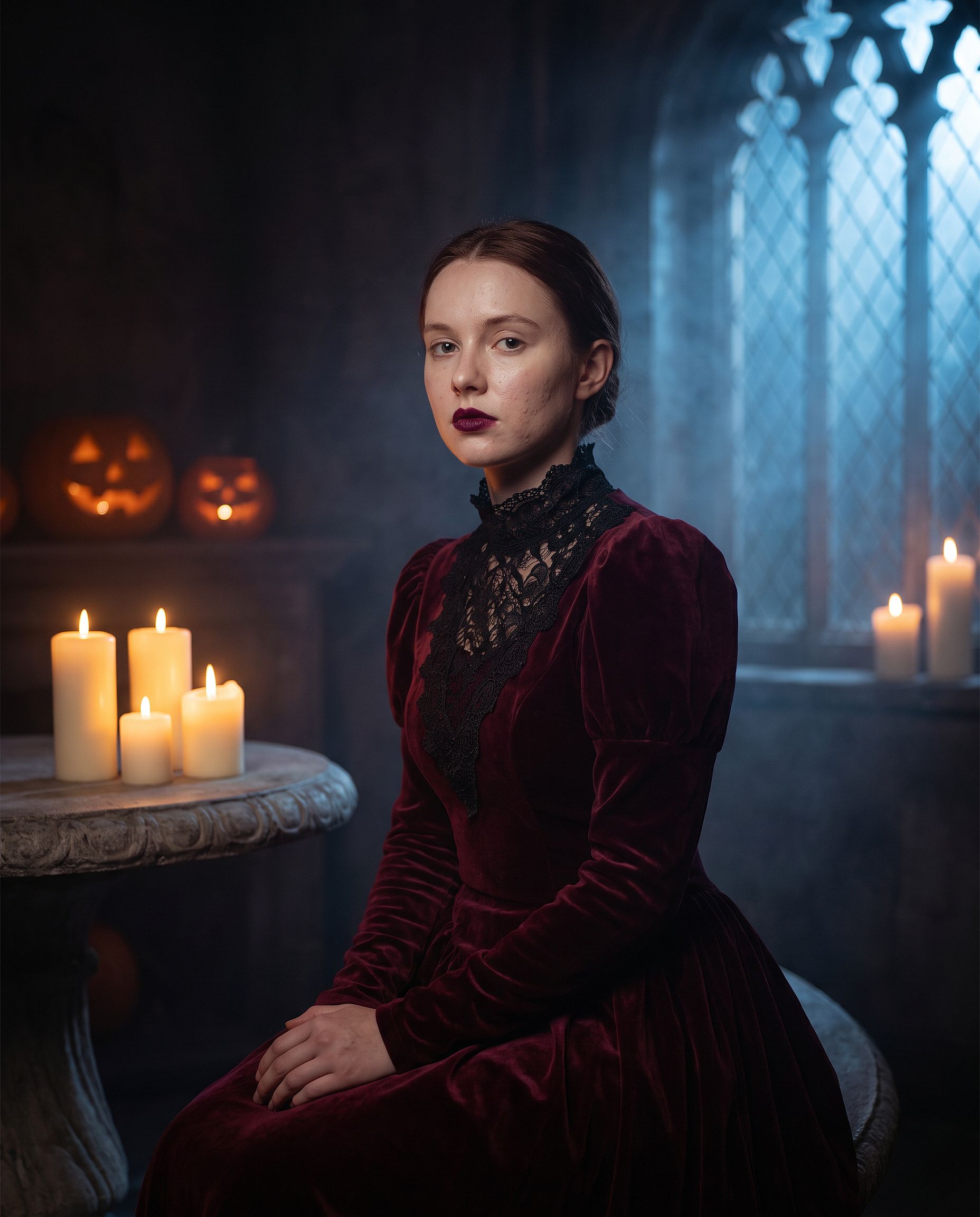
Swap "elegant vampire" for any costume: witch, zombie, ghost bride, skeleton, or a classic movie monster. Leave the first two lines untouched. Costume makeup is where a loose prompt lets the model redraw the whole face, so the identity line matters more here than in any other edit.
The VHS Halloween trend
The most copied Halloween AI trend format: your photo turned into a grainy 90s camcorder still from a slasher movie, with a shadowy figure lurking in the background. The tape artifacts and timestamp do most of the work.
Edit the uploaded photo. Keep the same face and identity exactly.
Restyle into a 1990s VHS camcorder still from a found-footage horror
movie: dim bedroom at night, harsh on-camera light, scan lines, chroma
bleed, slight tracking distortion, washed-out colors, a faint shadowy
hooded figure standing in the dark doorway behind the subject, timestamp
"OCT 31 1996 11:47 PM" in the bottom corner, 4:3 frame.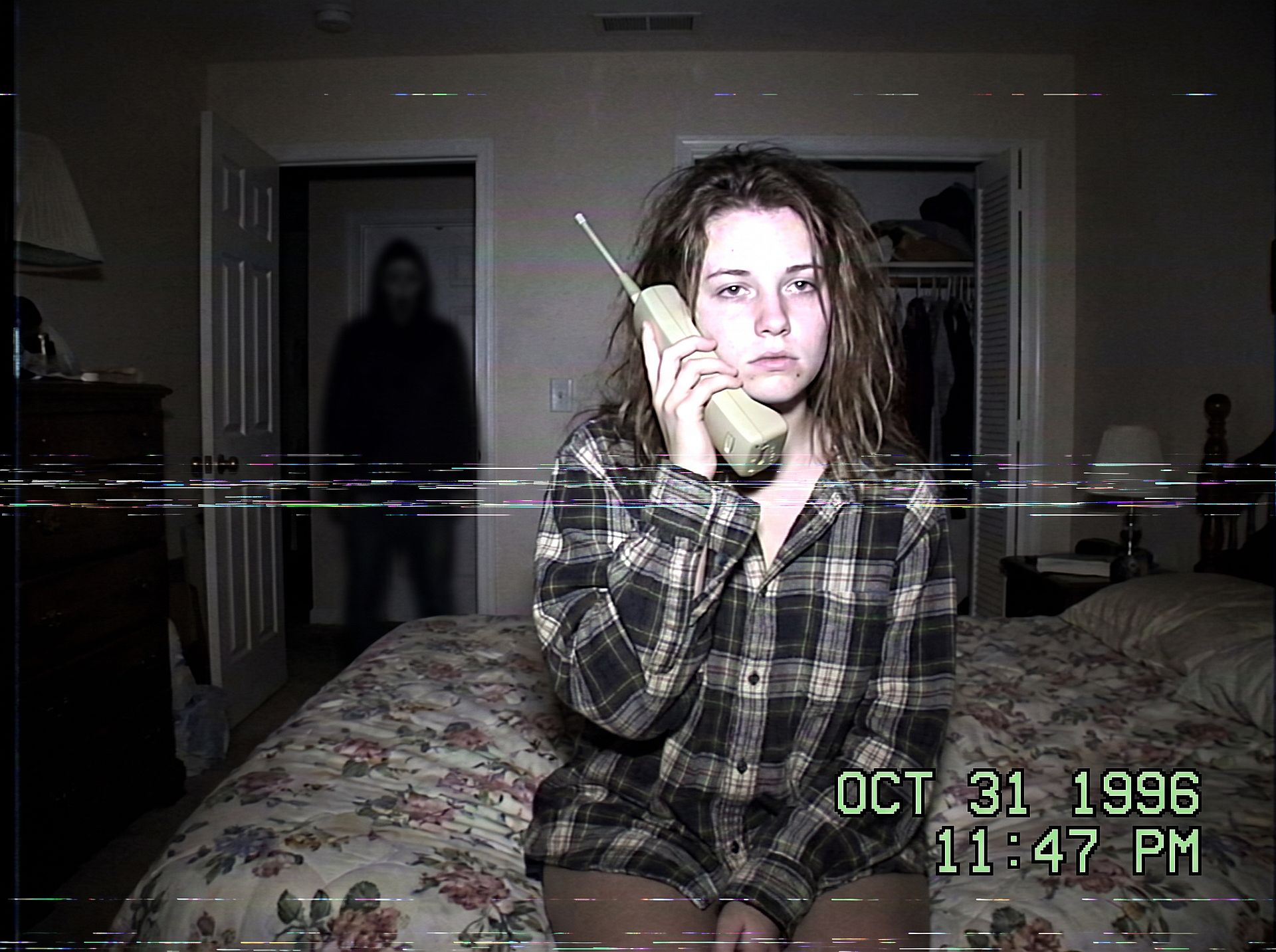
Change the setting to change the scare: a kitchen at midnight, a dark hallway, or a backseat with the figure in the rear window. Keep the figure small and in shadow so the photo stays creepy rather than gory.
The Halloween couple photoshoot
Couple costumes are the biggest share of Halloween photoshoot searches. Protect both faces and dress them as a pair:
Edit the uploaded couple photo. Keep both faces, skin tones, and
expressions exactly, do not merge or alter their features. Dress them in
coordinated Halloween costumes, a classic vampire and a witch, standing
close on an autumn porch at dusk: glowing jack-o'-lanterns, warm string
lights, fallen leaves, soft fog, warm film color grade, shallow depth of
field.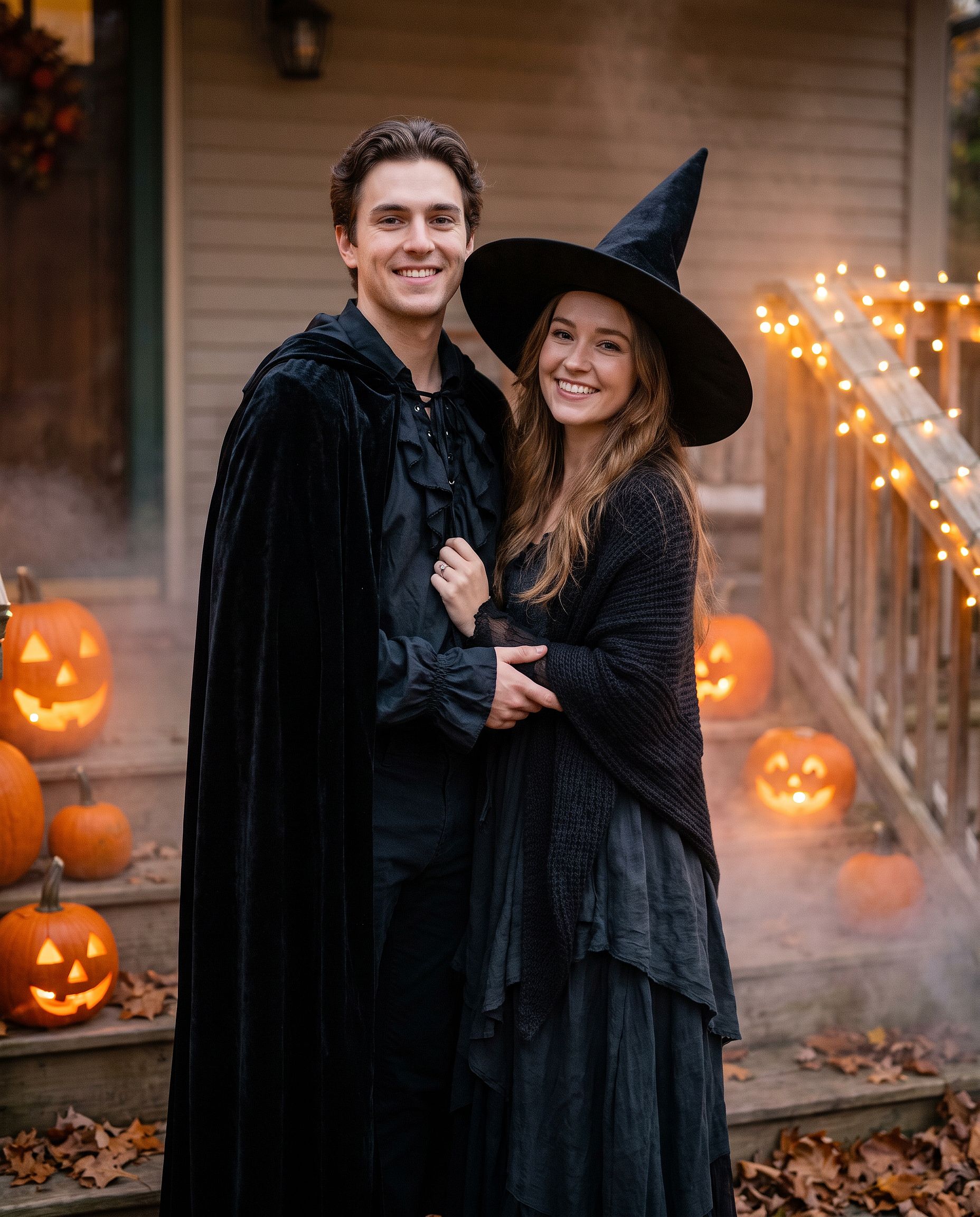
The same prompt works for best friends or a family photo. Change "couple" to "group of four" and list each costume in order, left to right.
The sugar-skull makeup look
For a makeup look instead of a full costume:
Edit the uploaded photo. Keep the face shape, eyes, and identity
recognizable. Add half-face sugar-skull makeup: white base, black eye
sockets, and delicate floral linework on one side, the other half left
natural. Dark suit with a marigold flower, candlelit background with
orange marigold petals, dramatic side lighting, rich cinematic color.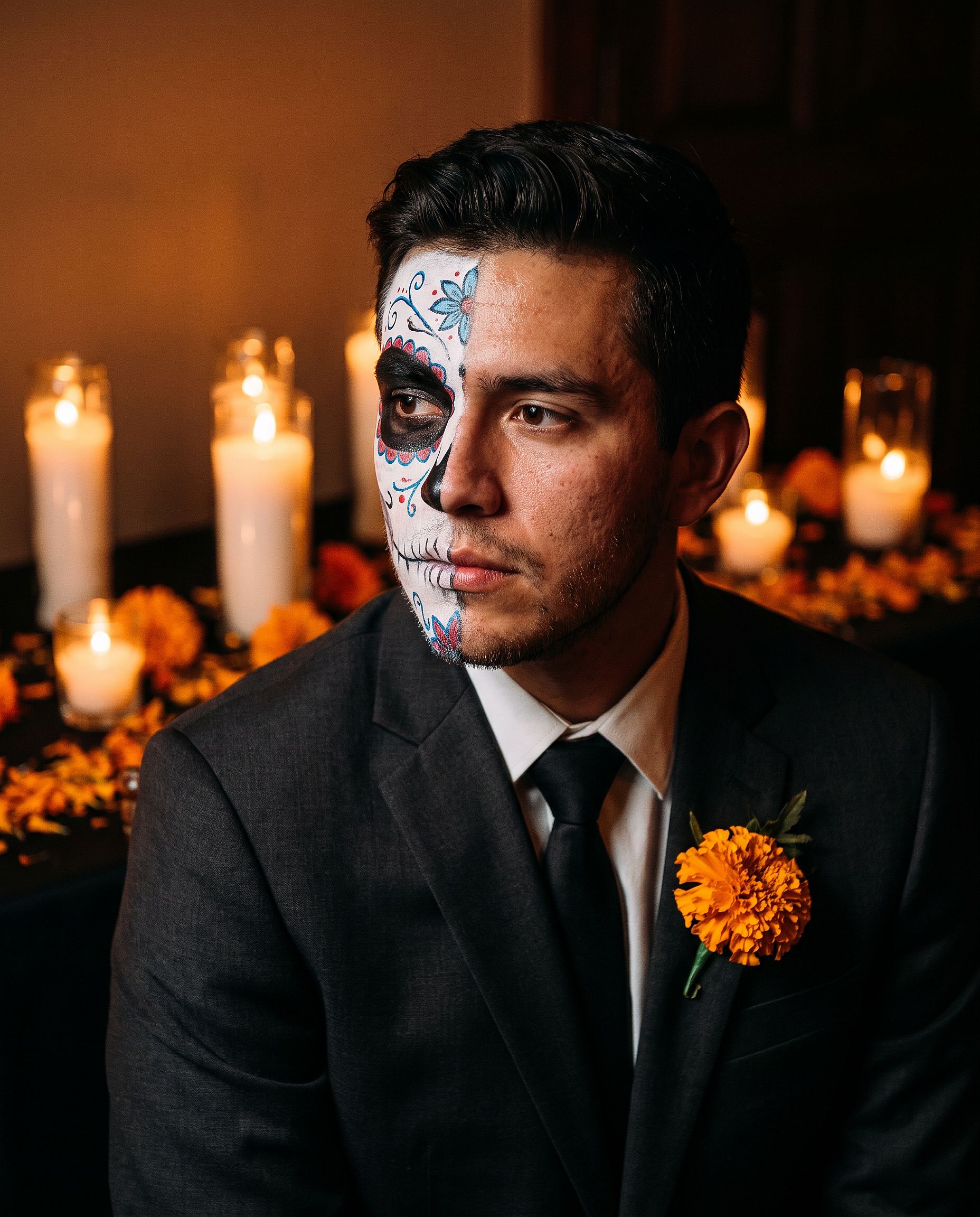
Half-face makeup keeps the person easy to recognize, which makes it a better profile picture than a full-face design.
The pet costume
Edit the uploaded pet photo. Keep the pet's face, fur pattern, and eye
color exactly. Add a small witch hat and a tiny black cape, seated next
to a glowing jack-o'-lantern, cozy autumn lighting, shallow depth of
field, playful but realistic.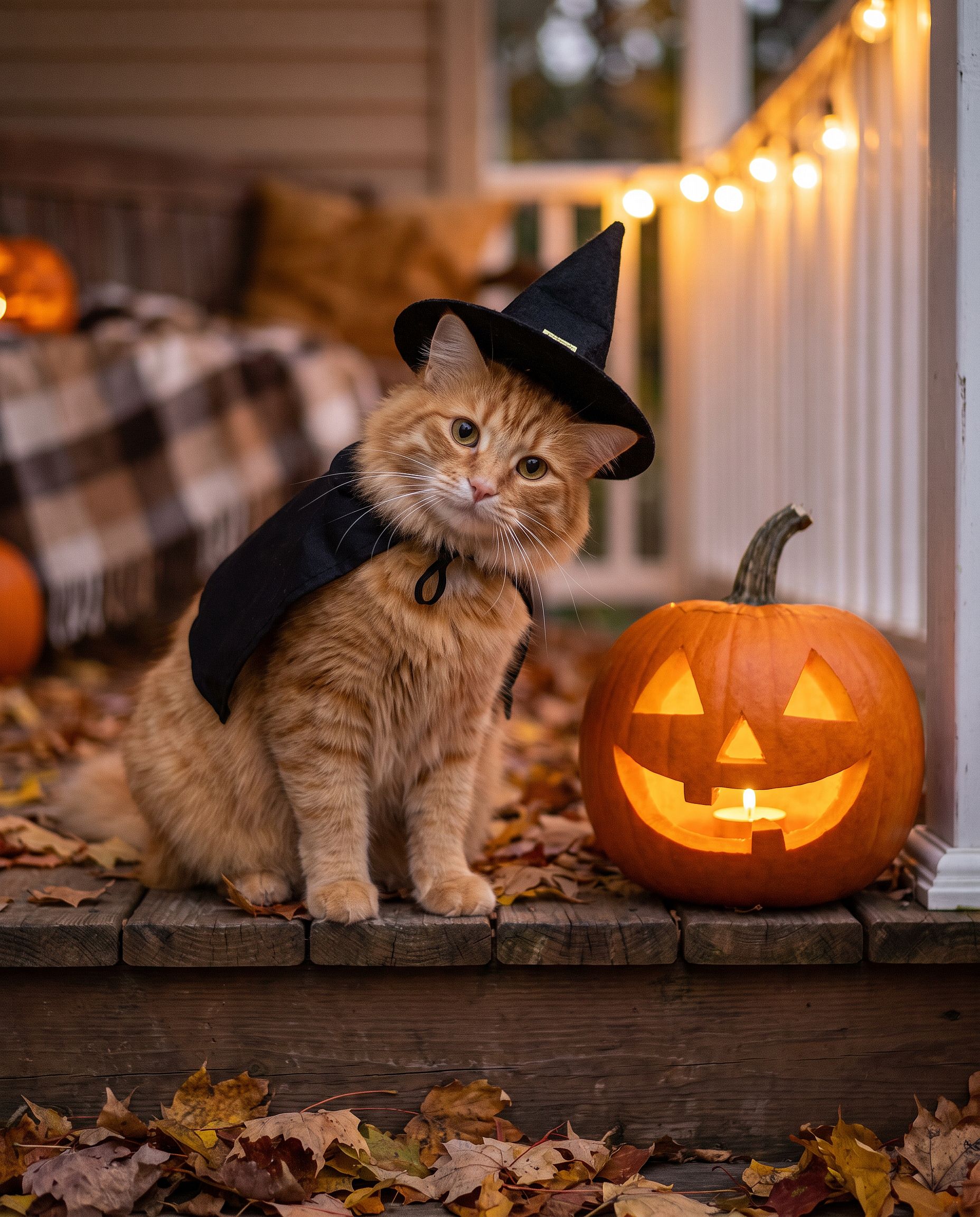
If you would rather skip writing prompts, the AI Halloween generator is built for this: upload a photo and turn it into a Halloween costume portrait.
Thanksgiving photo prompts
Thanksgiving photos are less about costumes and more about the table: the family dinner shot, the autumn portrait for a holiday card, the picture that ends up as everyone's cover photo for the week. The trick is the same as any group edit. Lock every face, then change the light, the wardrobe, and the setting.
The Thanksgiving family dinner photo
Most family dinner photos are taken in bad light by whoever is nearest the phone. This prompt turns that snapshot into the picture you would actually print.
Edit the uploaded family photo. Keep every face, skin tone, and
expression exactly, preserve all identities, do not merge features.
Restyle into a warm Thanksgiving dinner photo: long wooden table with a
roast turkey, pumpkin pie, candles, small pumpkins and autumn leaves,
golden late-afternoon window light, cozy knitwear in rust, cream, and
olive tones, natural candid closeness, vertical 4:5 frame.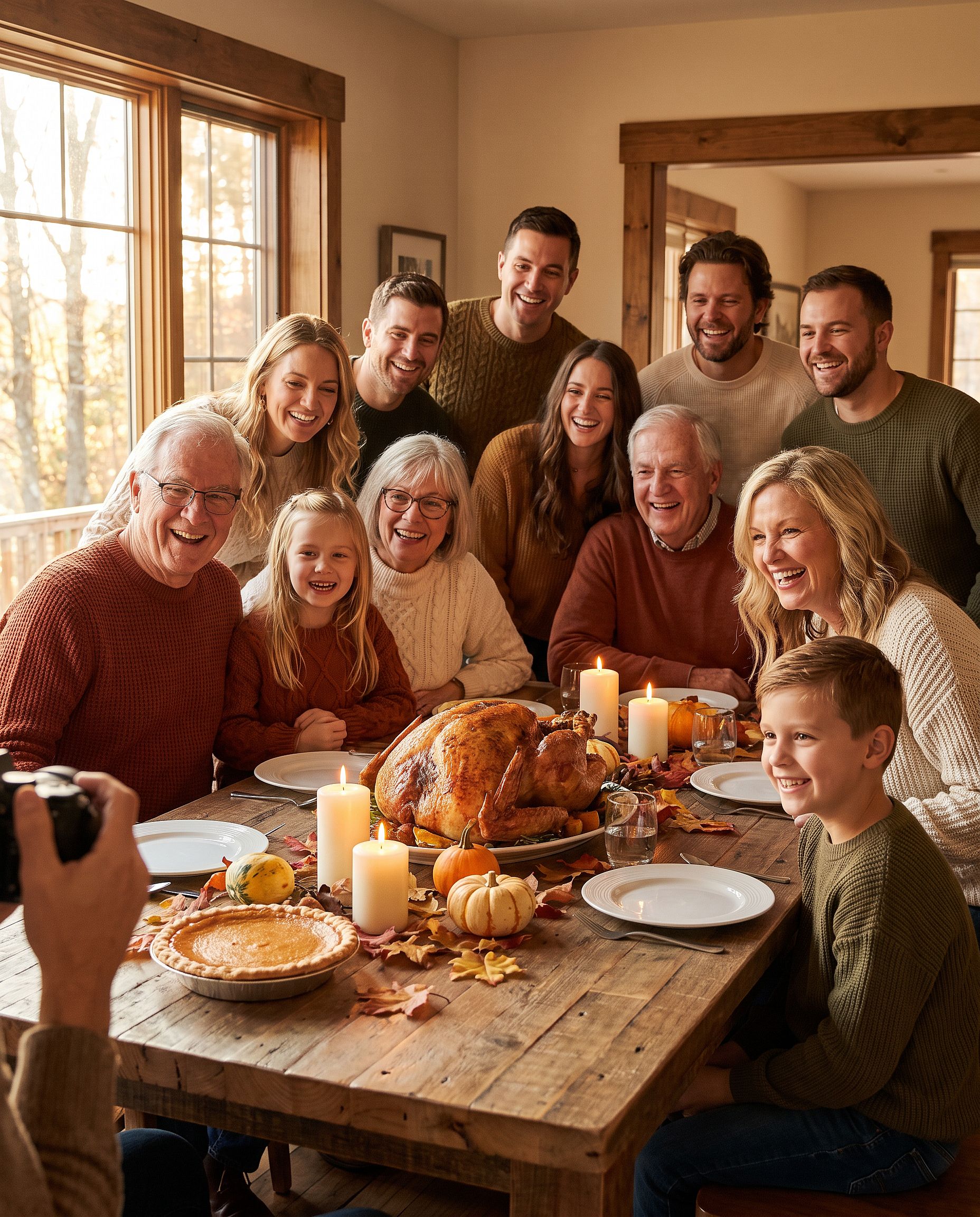
For more than four people, list how many are in the photo ("a family of six") so the model does not drop or add anyone.
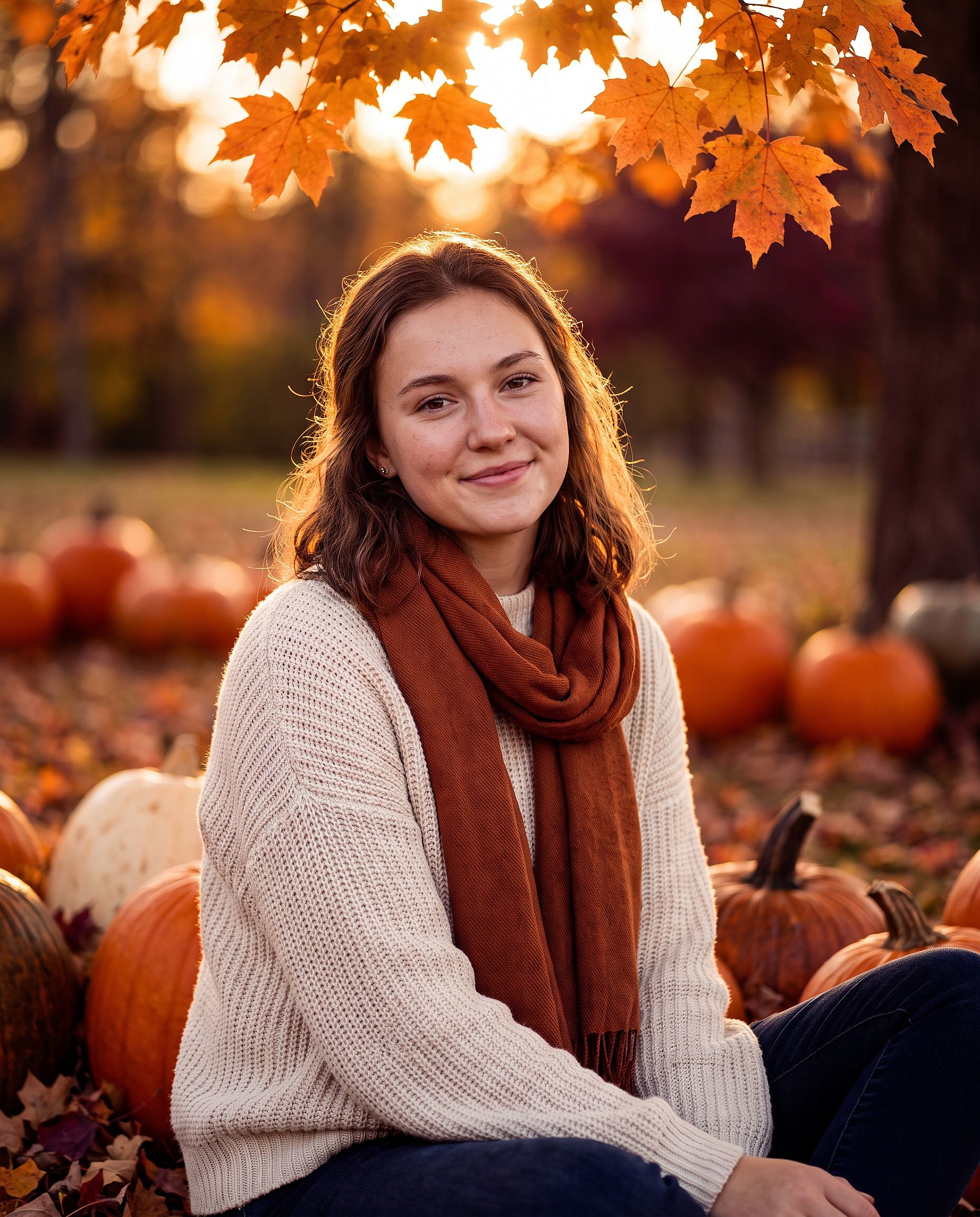
The autumn Thanksgiving portrait
For a single portrait, a couple shot, or a Thanksgiving photo card:
Edit the uploaded photo. Keep the same face and identity exactly.
Restyle into an autumn Thanksgiving portrait: outdoors in a pumpkin
patch at golden hour, chunky knit sweater and scarf, warm amber and
burgundy tones, soft backlight through orange leaves, shallow depth of
field, holiday photo card quality. Keep skin texture natural.
Add "leave clear space at the top for a greeting" if the photo is going on a card.
Christmas photo prompts
The AI Christmas photo is the biggest seasonal edit of the year. December is when people want a family photoshoot without booking a studio, a holiday card without a photographer, and a festive profile picture before every party. Each format below starts from an ordinary photo.
The Christmas box photoshoot
The studio trend where the subject sits inside a giant open gift box. It is hard to stage at home and easy to do as an edit.
Edit the uploaded photo. Keep the same face, features, and expression
exactly, preserve the original identity. Place the person sitting
inside a large open white gift box with a red satin ribbon, surrounded
by wrapped presents, warm fairy lights, and a softly blurred decorated
Christmas tree. Red knit sweater, bright clean studio lighting, cream
and red palette, professional holiday portrait, vertical 4:5 frame.
Swap the box color to match a brand or a card design. Gold and black reads luxe, pastel pink reads soft and playful.
The family Christmas photoshoot
Matching pajamas in front of the tree, the shot every family tries to get once a year. Pets count as family here too.
Edit the uploaded family photo. Keep every face, skin tone, and
expression exactly, preserve all identities, do not merge features.
Dress everyone, including the dog, in matching red plaid pajamas, the
dog in a small Santa hat. Seat them together on a rug in front of a
decorated Christmas tree and a lit fireplace with stockings, warm cozy
lighting, soft bokeh from the tree lights, holiday card quality.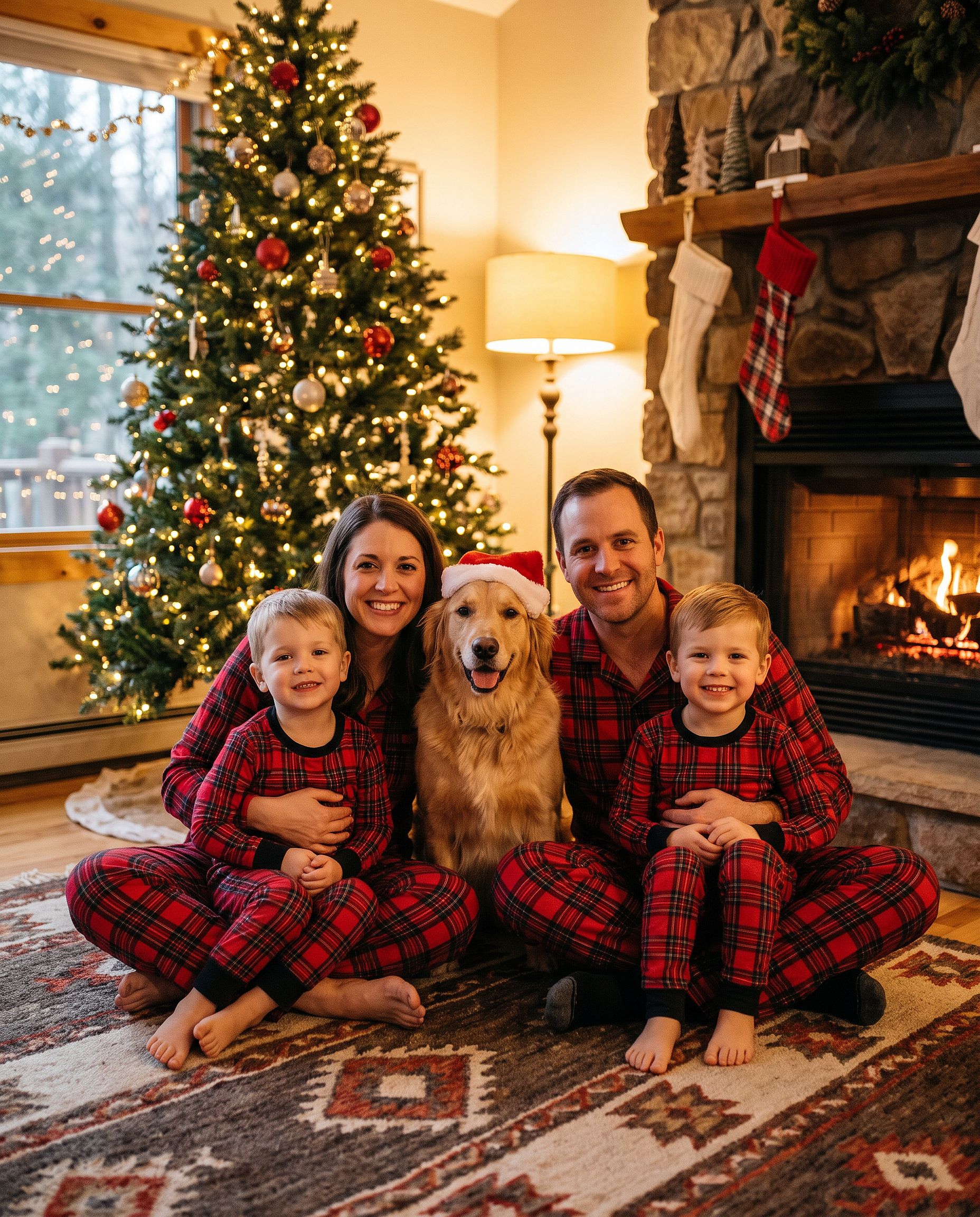
If you only want the hat, the add Santa hat to photo tool does just that, and the Christmas background tool swaps the setting while leaving people untouched.
The outdoor Christmas tree farm photo
Edit the uploaded photo. Keep the same face and identity exactly.
Restyle into an outdoor Christmas tree farm photo: rows of snowy pine
trees, light snowfall, a freshly cut tree on a sled, plaid coat and
knit hat, soft overcast winter light, warm breath in the cold air,
natural skin texture, vertical 4:5 frame.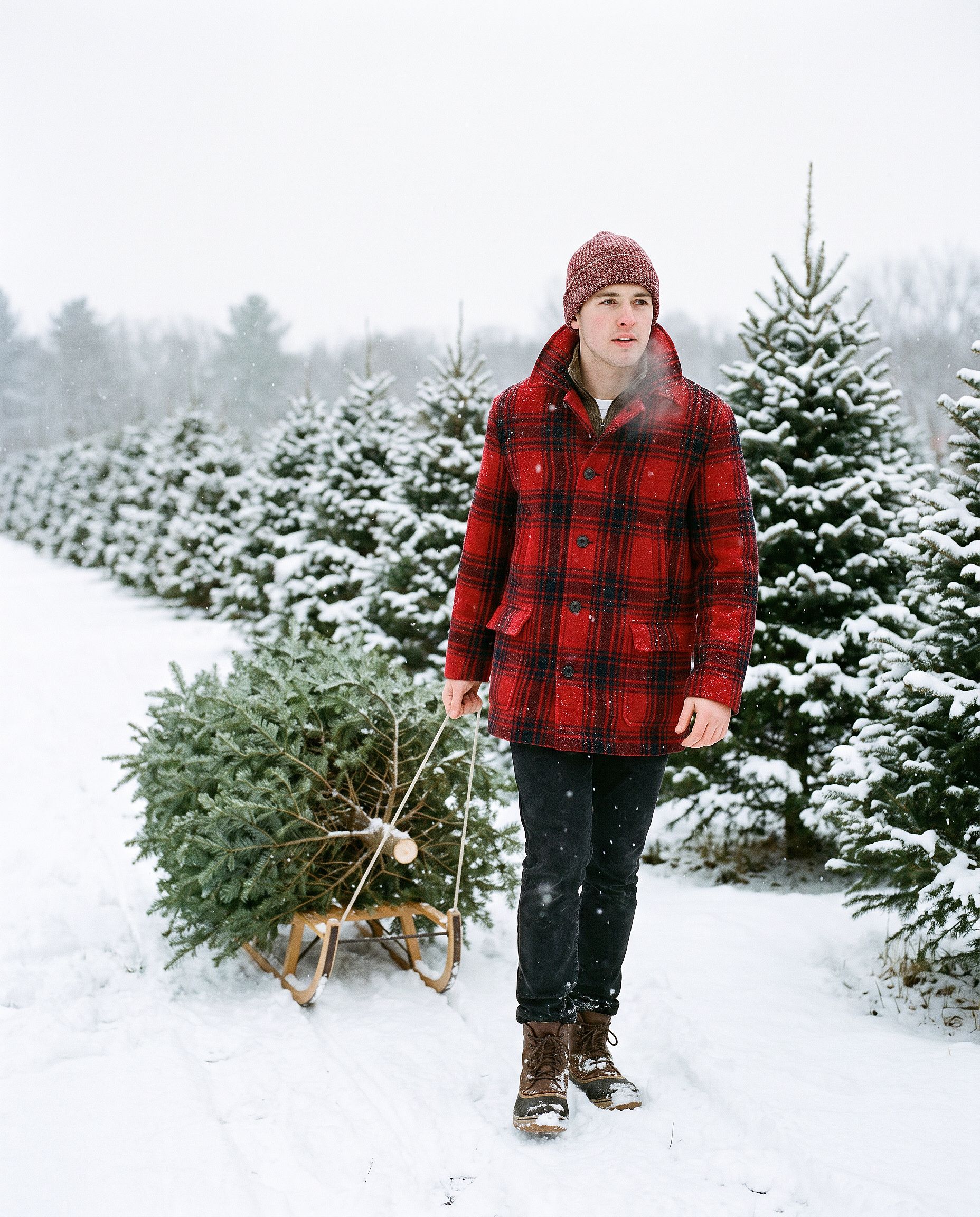
The AI Christmas card
Turn the uploaded photo into a luxury printed Christmas card. Keep every
face exactly. Place the people in a snowy cabin doorway with evergreen
garland and warm window light, set inside a thin gold foil border on
heavy cream cardstock. Add "Merry Christmas" in gold foil calligraphy
above the photo and "from the Parkers" in small serif capitals below,
embossed holly in the corners. Show the card flat on white linen with
pine sprigs, a red velvet ribbon, and a gold wax seal.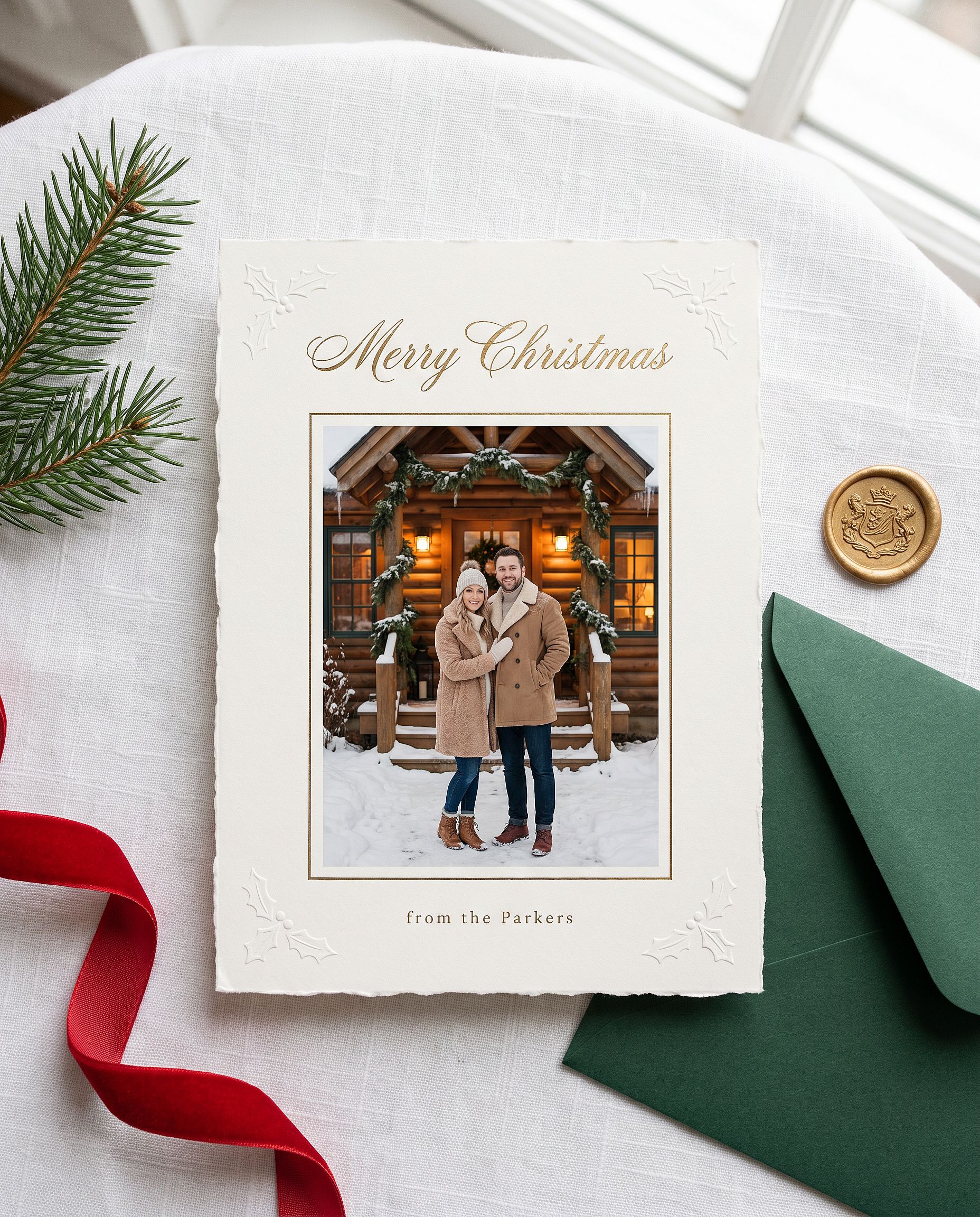
Replace the name in quotes with your own. Nano Banana Pro handles short in-image text well, so the greeting usually comes out spelled correctly on the first try.
The anime Christmas portrait
Restyle the uploaded photo into a Japanese anime film still on
Christmas Eve. Keep the person's hairstyle, outfit colors, and overall
look recognizable. Standing at a snowy railroad crossing in a quiet
residential town at blue hour, duffle coat and long red scarf, breath
visible in the cold, warm house windows, a lit Christmas tree outside a
corner shop, glowing vending machines, power lines overhead, soft
falling snow, hand-painted anime background art, delicate cel shading.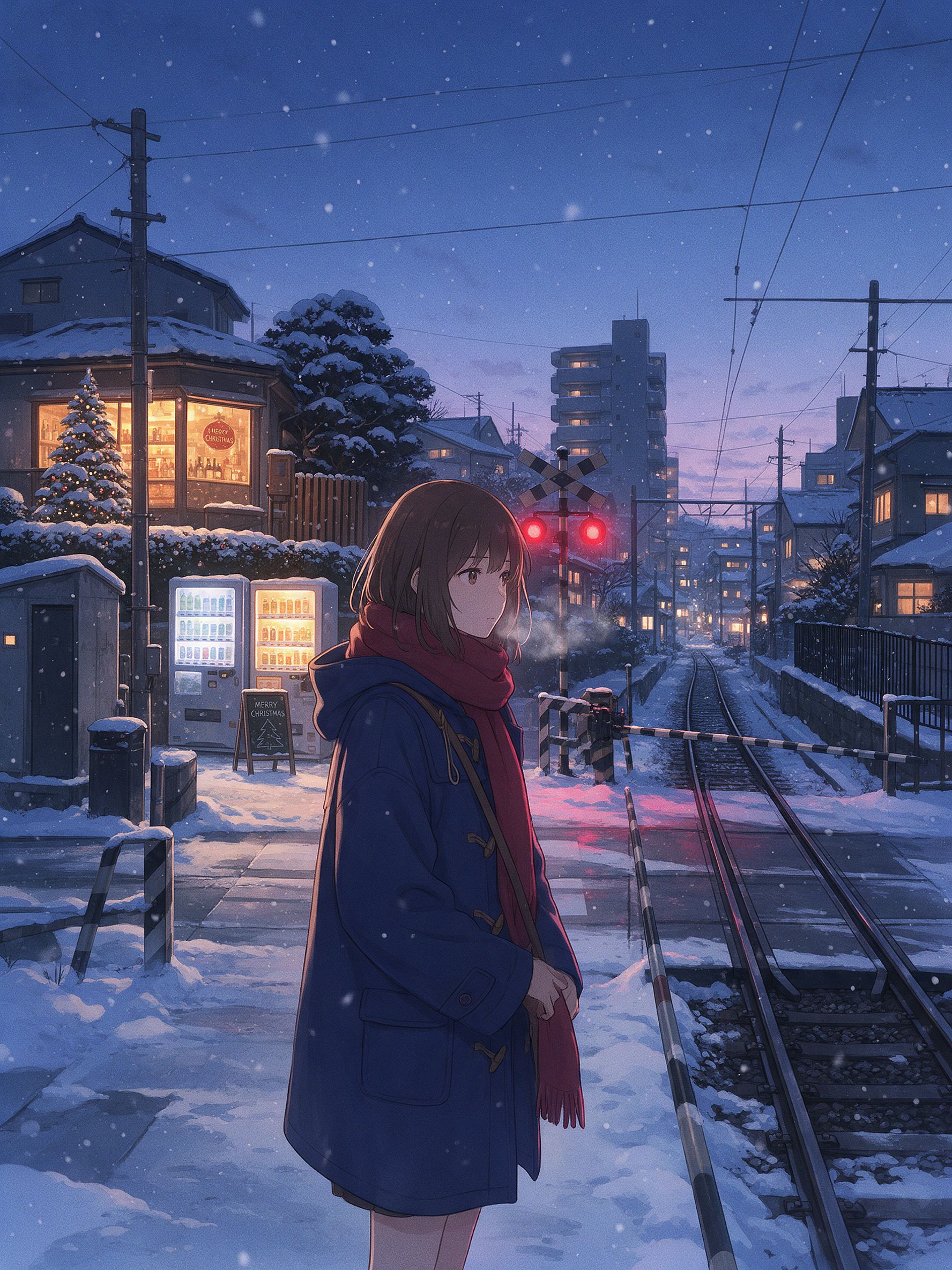
The small details are what make it read as a Japanese anime winter scene: the railroad crossing, vending machines, power lines, and the blue-hour light against warm windows. For this look, Seedream 5.0 Pro or Nano Banana 2 Lite often give a cleaner 2D style than Nano Banana Pro. Switch models and run the same prompt.
The full Gemini photo prompt library
The sections above are the deep dives. Below is the fast library: short, copy-paste prompts grouped by what you want to make. Most assume you upload a photo first. The aesthetic and cinematic group also works as pure generation. Pick a category, grab a line, paste it in.
Trending girl portraits
Edit the uploaded photo into a soft-glam aesthetic selfie: dewy glow,
warm highlight, subtle butterfly light, pastel background. Keep the same
face and identity exactly, natural skin texture.
Restyle the uploaded photo into an elegant saree ethnic portrait: rich
traditional outfit, soft gold jewelry, warm bokeh lighting, graceful
pose. Keep the face and identity unchanged.Edit the uploaded selfie into a clean Instagram DP: minimalist studio
backdrop, soft even light, tasteful modern styling, crisp detail. Keep
the same face exactly, no heavy smoothing.Restyle the uploaded photo into a dreamy pastel aesthetic portrait: airy
glow, muted soft colors, gentle wind in the hair, natural skin. Keep the
face recognizable and identity intact.Restyle the uploaded photo into a golden-hour outdoor girl portrait:
warm backlight, soft lens flare, blurred natural background, flowing
outfit. Keep the face and identity unchanged.Trending boy and couple portraits
Restyle the uploaded photo into a café golden-hour boy portrait: soft
window backlight, cozy neutral outfit, gentle flare, Pinterest fashion
mood. Keep the face unchanged.
Restyle the uploaded couple photo into a warm café date-night scene:
cozy lighting, soft bokeh, relaxed poses. Keep both faces unchanged.Edit the uploaded couple photo into a vintage 1970s film look: warm
faded tones, retro wardrobe, soft grain. Preserve both faces and
expressions exactly.Editing and restyle
Edit the uploaded photo. Keep the face and pose exactly. Replace the
outfit with a clean, well-fitted business-casual look and the background
with a softly blurred modern office, matched lighting, professional
headshot quality.
If you want a polished headshot without writing a prompt at all, the AI headshot generator is built for exactly that. It keeps your face consistent across a set of business looks.
Edit the uploaded photo into a black-and-white fine-art portrait:
dramatic side lighting, deep contrast, film grain, timeless studio look.
Keep the face exactly the same.
Edit the uploaded photo into a double-exposure portrait: the subject
blended with a soft city skyline, moody tones, artistic overlay. Keep
the primary face clear and recognizable.Edit the uploaded photo into an AI hairstyle try-on: keep the face and
identity exactly, change only the hairstyle to a modern layered cut,
natural color and texture, realistic result.Repair and quality boost
Edit the uploaded blurry photo: sharpen details, reduce noise, recover
texture in hair and skin. Keep the face identical, natural skin, no
plastic smoothing.
Edit the uploaded photo to a high-resolution 4K glow-up: sharpen fine
detail, reduce noise, improve color balance, recover hair and skin
texture. Keep the face and expression identical, no plastic smoothing.Seasonal and festival
Quick one-liners for the rest of the calendar. Halloween, Thanksgiving, and Christmas have full sections with examples above.
Edit the uploaded photo into a Diwali celebration: warm diya lamp light,
elegant traditional outfit, soft bokeh of string lights, rich jewel
tones. Keep the face unchanged.
Edit the uploaded photo into a spring cherry-blossom scene: soft pink
petals, gentle daylight, fresh pastel palette. Keep the person exactly
the same.Edit the uploaded couple photo into a Valentine's scene: soft warm
light, tasteful red accents, romantic bokeh. Keep both faces unchanged.Edit the uploaded photo into a New Year scene: elegant evening styling,
soft golden fireworks bokeh, celebratory mood. Keep the person
recognizable.Aesthetic and cinematic
Edit the uploaded photo into a burning-newspaper portrait: the subject
framed by a vintage newspaper with glowing burning edges, warm ember
light, dramatic dark background, cinematic mood. Keep the face exactly
the same.
Edit the uploaded photo into a moody neon-noir portrait: rain-slick city
street, pink and blue neon reflections, cinematic contrast, shallow
depth of field. Keep the face and identity unchanged.How to write your own Gemini photo prompt
Every prompt above follows the same skeleton:
Edit the uploaded photo.
Keep [the face / both faces / the pose / the composition] exactly the same and preserve the original identity.
Change only [outfit / background / era / color / scene].
Add [style, lighting, mood, aspect ratio].
Keep [skin texture / features] natural and true to life.
Line by line: "Edit the uploaded photo" tells the model to work from your image instead of inventing a new one. "Keep exactly the same and preserve the original identity" protects the parts that make it recognizable. "Change only" fences the edit. A closing line about natural skin or true-to-life detail stops the over-processed look that screams AI.
For pure generation, drop the "edit" and "keep the same" lines. Describe the subject, style, lighting, and mood directly.
Five-second check before you generate: photo uploaded, said what to keep, said what to change, named a style, asked for natural detail. Google's Gemini support docs cover the basic editing flow.
Gemini (Nano Banana) vs GPT Image 2 vs Seedream for photos
No single model wins every photo. Here is where each one leads and where it falls short:
| Nano Banana Pro | Nano Banana 2 Lite | GPT Image 2 | Seedream 5.0 Pro | |
|---|---|---|---|---|
| Identity preservation through heavy restyle | Strongest | Strong | Strong | Moderate |
| Readable text in image (headlines, labels, menus) | Strong | Strong | Best (micro-text and UI icon precision) | Moderate |
| Photorealism (skin, lighting, texture) | Best (native 4K, hyperrealistic) | Strong | Best (fashion-grade, hyperrealistic) | Moderate |
| Anime / Asian-style / 2D stylization | Limited | Best (top choice for anime and animation) | Moderate | Best (atmospheric anime environments) |
| Editing and layer separation | Iterative memory (edit without rewriting) | Iterative memory | No memory | Built-in layer separation and free editing |
| Multilingual text (comics, ads, posters) | Strong | Moderate | Best | Moderate |
| Best for | Trending portrait edits, identity-stable sets, 4K output | Fast drafts, anime restyles, e-commerce hero images | High-end fashion visuals, any image with text, posters and packaging | Character aesthetics, anime scenes, editing workflows with layers |
All four sit in one OpenArt workspace. Switching models to compare costs one click, not a new subscription. When keeping one face steady across a whole trend set is the goal, the AI Character feature locks identity so every prompt returns the same person.
FAQ
How do I use Gemini AI for photos?
Open a Gemini image tool, describe what you want, and generate. To edit an existing photo, upload it first and tell the model what to keep and what to change. On OpenArt you get the same Gemini models (Nano Banana 2.1 and Nano Banana Pro) next to a full editor. Open the AI image generator, pick a model, and paste a prompt.
How do I edit a photo in Gemini AI?
Upload your photo, then write an instruction that separates what stays from what changes: "keep the face and identity exactly the same, restyle into a soft-glam portrait." The upload matters because the model edits the image you give it rather than inventing a lookalike. Add a closing line asking for natural skin texture to avoid the over-smoothed look.
How do I make a Gemini AI photo prompt?
Follow the skeleton above: name the subject, say what to keep, say what to change, add the style and lighting and aspect ratio, finish with a natural-detail line. Copy any prompt in this post and swap the style words for your own.
What are the best Gemini AI photo prompts for girls?
The trending ones: soft-glam aesthetic selfies, saree and ethnic portraits, clean Instagram DP shots, golden-hour outdoor portraits. All four are in the Trending girl portraits section above, ready to paste.
What are the best Gemini AI prompts for Halloween photos?
Costume portraits that keep your real face: an elegant vampire or witch selfie, the VHS horror camcorder look, a coordinated couple costume, or half-face sugar-skull makeup. Start every Halloween prompt with a line that locks the face and identity, then describe the costume, makeup, and setting. All five are in the Halloween section above.
How do I do the AI Halloween trend?
Upload a clear selfie to a Gemini image model such as Nano Banana Pro, paste one of the Halloween prompts above, and generate. To skip the prompt entirely, the AI Halloween generator on OpenArt turns a photo into a costume portrait in one step.
How do I make an AI Christmas photo?
Upload a clear photo, choose Nano Banana Pro, and paste one of the Christmas prompts above, such as the Christmas box photoshoot or the family pajama shot. Always keep the line that locks every face. For a one-click version without a prompt, OpenArt's Christmas filter turns an ordinary photo into a festive one.
Can I make a Thanksgiving family photo with AI?
Yes. Upload the group photo, tell the model to keep every face and not merge features, then describe the dinner table, light, and outfits. State how many people are in the photo so nobody is dropped or added.
Is Nano Banana the same as Gemini?
Nano Banana is the nickname for Google's Gemini image models. When people say "Gemini AI photo," they usually mean Nano Banana 2.1 or Nano Banana Pro. OpenArt gives you direct access to those models.
Can Gemini restore and colorize old photos?
Yes. Tell it to remove damage and preserve every feature true to the original, then add a colorize line for black-and-white photos. Keep the color subtle for a believable result, and upscale afterward if you plan to print.
Are these Gemini photo prompts free?
The prompts are yours to copy. Running them on OpenArt starts free with credits.