Key Benefits of Text to Speech Online




Direct Every Line & Emotion
Type a short note like [cheerful] or [pause] right before the words, and the AI voice says the line in the way you want it.




Pick the Right Voice
Choose a preset voice by accent, gender, and age, or upload a recording of your own voice to clone it.

Voice, Video, and Music Together
One OpenArt subscription makes the voiceover, the video, and the background music for the same ad or film.
Key Features of AI Text to Speech Generator
Tell the AI Voice How to Say Each Line
OpenArt's AI text to speech follows short notes that you type in square brackets inside your script. Write [whispering] before a quiet line, [laughs] after a joke, or [pause] before a big reveal. With Fish Audio Drama 3, the mood can even change partway through a line, so a voice can start calm and end in a panic.
Choose a Voice or Clone Your Own
Create voice-over gives you a list of preset voices, and each one is labeled by accent, gender, and age, like "American, male, middle-aged." Pick the voice that fits your brand or your character, then pick the same voice for every new script so it always sounds like the same person. You can also upload a recording of your own voice and clone it, so the AI voice reads your scripts in your voice.
Powered by the Best AI Audio Models
OpenArt lets you switch voice models for each script. Fish Audio Drama 3 is built for close direction, so you can whisper, stress, or slow down just a few words and drop a sigh or a breath exactly where you want it. Eleven v4 and Eleven v4 Turbo read your whole script to work out the feeling behind each line, so a line that comes after bad news sounds sad on its own. Eleven v4 also keeps the voice steady when you rewrite one line and make it again.
Add Your Voiceover to an OpenArt Video
OpenArt makes the pictures, the video, and the sound for the same project. Make your clips in OpenArt's AI video generator, or plan a longer story up to 5 mins in Director mode. Download your voiceover and drop it onto the video in any video editor. One platform covers the visuals, the voice, and the music for the whole video.
How to Convert Text to Speech Online
You can turn a script into a voiceover on OpenArt in three steps.
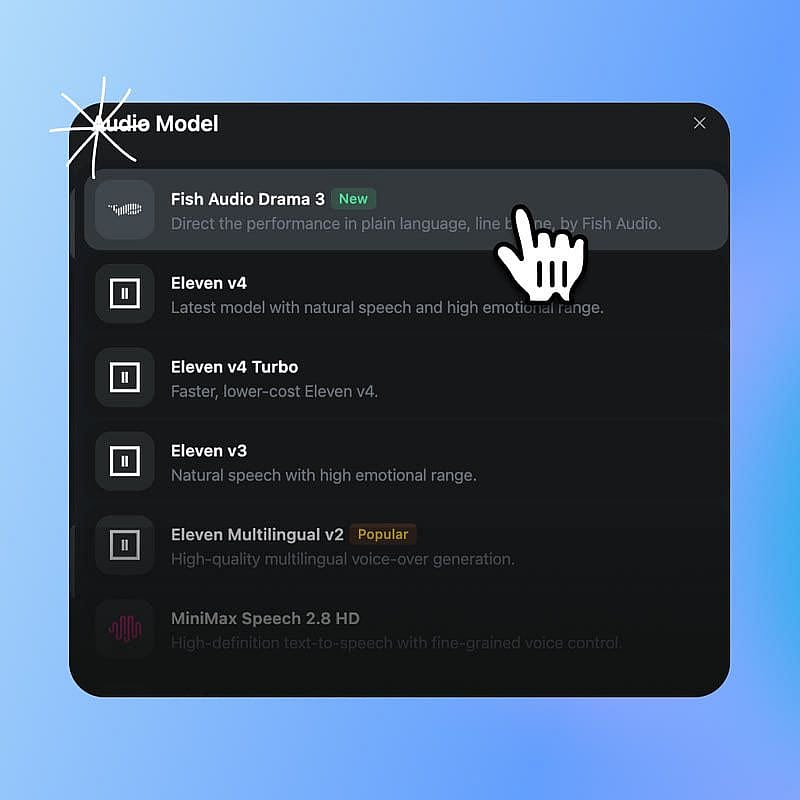
Choose your audio model
Go to the Audio tools, open ‘Create voice-over’, and choose Fish Audio Drama 3 or Eleven v4 under Audio Model.
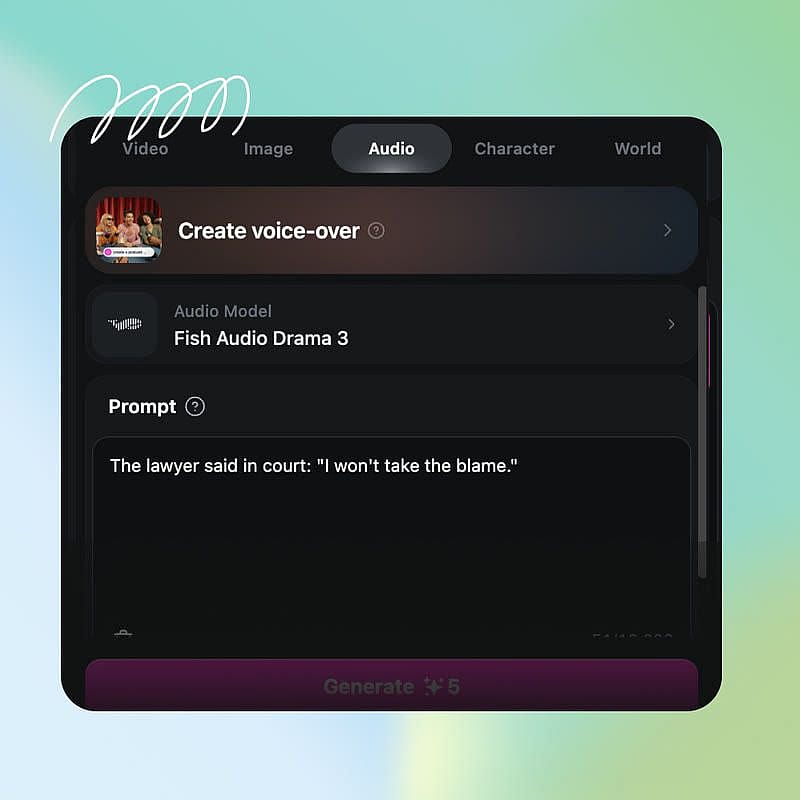
Write your script and notes
Type or paste up to 10,000 characters into the Prompt box. Add notes in square brackets, like [cheerful] or [pause], where you want the voice to change.
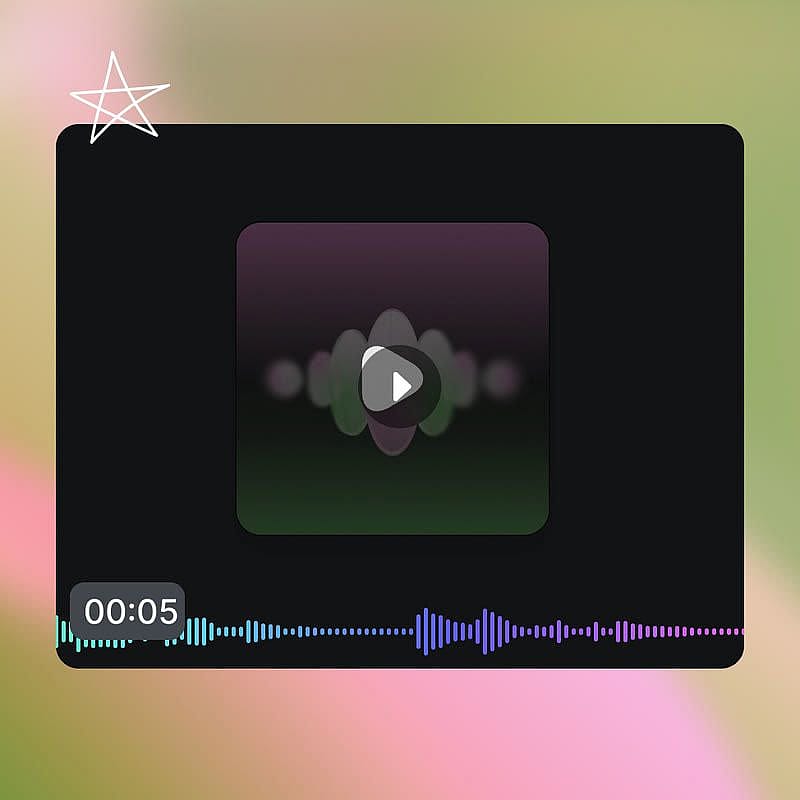
Pick a voice and generate
Pick a voice from the list, or upload your own voice to clone it. Generate the audio, listen to it, and download the audio file.
Best Uses for AI Text to Speech Maker
Performance Marketers Testing Ad Creatives
Performance marketers and creative strategists use OpenArt's AI text to speech to make many versions of the same ad read. Write one 15-second script, then change the opening line or the note at the top, like [excited] or [calm, friendly], and generate it again. You get several opening lines in one afternoon, ready to test against each other in a paid campaign. Keep the same voice in every version, so the words are the only thing that changes.
Try it NowBranded Product and Explainer Videos
Brand and video teams use OpenArt's AI text to speech to narrate product videos, how-it-works explainers, and social clips. Pick one voice from the Create voice-over list and use it on every video, so your brand sounds the same from one launch to the next. When the product changes, rewrite one paragraph of the script and make that part again in the same voice. Commercial rights apply on eligible paid plans, so you can run the narration in your campaigns.
Try it NowSmall Business Owners Voicing Promo Ads
Small business owners use OpenArt's AI text to speech to add a voiceover to nearly every promo video and social ad. Picture a 15-second ad for a weekend bakery sale that opens with [cheerful, upbeat] and puts extra stress on the words "half price." You can make that voiceover in a few minutes, without booking a studio or hiring a voice actor. Make the matching video on OpenArt too, so the visuals and the voice both come from one account.
Try it NowAI Filmmakers and Content Creators
Filmmakers and storyboard artists use OpenArt's AI text to speech to hear their characters speak while they are still planning the film. Write each character's lines with a note for how they feel, like [nervous] or [angry, shouting]. Generate each character's lines with their own voice from the voice list, then line up the clips in your editor. Build each character's look in OpenArt Characters, so the face and the voice both stay the same from scene to scene.
Try it NowFAQ
AI text to speech is a technology that turns written text into spoken audio that sounds like a real person talking. OpenArt's AI text to speech runs in the Create voice-over tool, where you type a script, pick a voice, and get an audio file back. Voice models on OpenArt, including Fish Audio Drama 3 and Eleven v4, read notes in square brackets, like [whispering], to decide how each line should sound.
Yes. Every new OpenArt account starts with 40 free credits, so you can try the product right away. When you're ready to create more, paid plans add monthly credits and watermark-free downloads. See current plans on the OpenArt pricing page.
Write short notes in square brackets right before the words they should change, like [worried] or [slow, serious]. Add a [pause] or a [sigh] where a real person would stop or take a breath. Keep a whole scene in one script, so each line fits the tone of the line before it.
Yes. Create voice-over labels every preset voice by accent, gender, and age, so you can pick an accent that fits your audience. Fish Audio Drama 3 and Eleven v4 both read scripts written in many languages, so write the script in the language you want to hear. To translate the speech in a video you already made, use OpenArt's Dub Video tool.
Yes. Commercial rights apply on eligible paid plans, so you can use voiceovers from OpenArt's AI text to speech in ads, product videos, and client work. If you clone a voice, make sure it is your own voice or one you have permission to use.
OpenArt's AI text to speech is part of an AI creative suite that also makes images, videos, and music. You can make the video, the voiceover, and the background track for an ad with one OpenArt account and one subscription.
Open the Audio tab in OpenArt and choose Create voice-over. Pick Fish Audio Drama 3 or Eleven v4 as the model, type or paste your script, and choose a voice from the list. Generate the audio and download the file. Create voice-over runs in your web browser, so you can start right away with nothing to install.
OpenArt's AI text to speech includes Fish Audio Drama 3 from Fish Audio and Eleven v4 & v4 Turbo from ElevenLabs. Fish Audio Drama 3 is built for close control over single words and sounds, like a whisper on two words or a sigh in the middle of a line. Eleven v4 reads the whole script to choose the emotion and pace of each line. You can run the same script in both models and keep the version you like.
Yes. OpenArt's Create voice-over tool lets you upload a recording of your own voice and clone it, and OpenArt also has a separate Voice Clone tool. The AI voice then reads any script you write in a voice that sounds like you, including your notes in square brackets. Only clone your own voice or a voice you have clear permission to use.
Yes. OpenArt's AI text to speech works for YouTube narration, Shorts, and faceless channels that use a voiceover. Pick one voice and use it on every upload, so your channel always sounds the same. Make the visuals in OpenArt's AI video generator, then add the voiceover to the video in any video editor.
Each script in OpenArt's Create voice-over tool can be up to 10,000 characters, which is about 1,500 words. That fits a long ad, a full product explainer, or a scene from a short film. For longer projects like audiobooks, voice one chapter at a time with the same voice.
Get Insights from Experts Blog
Get the insights you need. Our experts share actionable hacks, break down the hottest topics, and provide essential how-to guides to help you create, optimize, and scale.
Read More