


 ChatGPT
 Perplexity
 Claude
 Gemini
AI text to speech turns a written script into a spoken voice-over in seconds. You pick a voice, type the words, add short notes on how each line should sound, and download the audio.
OpenArt's Create voice-over tool includes Fish Audio Drama 3, a text to speech model you direct in plain words. This guide shows how to write a voice-over prompt and make the audio in OpenArt.
Key takeaways
- AI text to speech reads your written script out loud and gives you an audio file.
- Notes in square brackets, like [whispering], tell Fish Audio Drama 3 how to say each line.
- Fish Audio Drama 3 can read a back-and-forth conversation and shape each line to react to the one before it.
- Fish Audio Drama 3 speaks more than 80 languages and keeps the same voice in each one.
- OpenArt's Create voice-over tool lets you pick a voice by accent, gender, and age, or clone your own.
What goes into a good voice-over prompt?
A good voice-over prompt has two parts: the exact words to say and short notes on how to say them. Fish Audio Drama 3 reads the notes in square brackets as directions and speaks everything else.
Write the notes the way you would talk to a voice actor, like [warm and friendly] or [slow, deadly serious]. A 15-second bakery ad prompt for Fish Audio Drama 3 can look like this:
[cheerful, upbeat] Fresh croissants, warm from the oven. [excited] This Saturday only, everything is half price!
How do you make a voice-over in OpenArt?
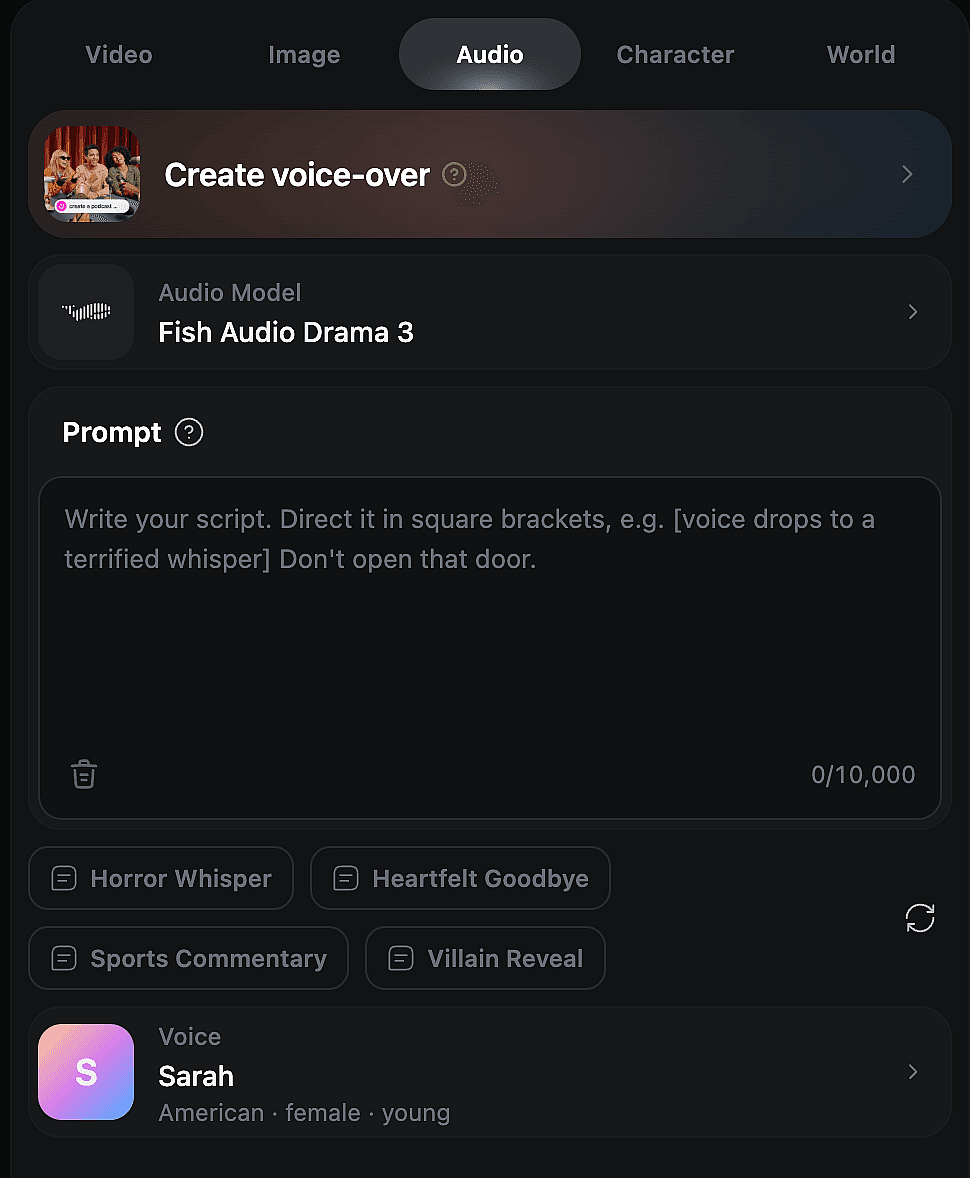
OpenArt's Create voice-over tool turns your script into audio in five steps.
- Open Create voice-over. Go to the Audio tab in OpenArt and choose Create voice-over.
- Select Fish Audio Drama 3. Pick Fish Audio Drama 3 under Audio Model.
- Choose a voice. Browse voices labeled by accent, gender, and age, like "American, male, middle-aged." You can also upload a recording of your own voice to clone it.
- Write your script. Type up to 10,000 characters in the Prompt box, with a note in square brackets wherever the mood changes. Example prompts like Horror Whisper give you a starting point.
- Generate and download. Listen to the result, change a note and try again if a line sounds off, then download your audio file.
Note: Only clone a voice that belongs to you or one you have permission to use.
How do you make AI text to speech sound natural?
AI text to speech sounds natural when you direct it like a person. Three habits make the biggest difference in Fish Audio Drama 3:
- Put each note right before the change. A note in Fish Audio Drama 3 sets the mood for the words after it. If a character panics halfway through a line, put [panicked] where the panic begins.
- Add sighs and pauses where a person would stop. Fish Audio Drama 3 places a [sigh], [laugh], [breath], or [pause] exactly where you write it. One pause before a big reveal does more than five spread across a line.
- Stress only the words that matter. Fish Audio Drama 3 can whisper, stress, soften, speed up, or slow down a few words and leave the rest alone. In an ad, stress "half price" and keep the rest friendly.
How do you voice a conversation with several characters?
Fish Audio Drama 3 can read a back-and-forth conversation in one script and shape each line to react to what was just said.
Write both sides of the conversation in one script, so each answer fits the tone of the line before it. A detective says, "You were there that night," and the suspect snaps back, [defensive] "I was home." [pause] "Asleep."
To give each character a different voice in Fish Audio Drama 3, generate each character's lines with their own voice from the Create voice-over voice list. Then put the clips in order in any audio or video editor.
Can AI text to speech make voice-overs in other languages?
Fish Audio Drama 3 speaks more than 80 languages and keeps the same voice in each one. A warm narrator on your English video sounds like the same person in Spanish, Hindi, or Japanese.
How do you add a voice-over to an AI video?
Make the visuals in OpenArt's AI video generator, or plan a longer story in Director mode. Then download the voice-over from Create voice-over and drop it onto your video in any video editor.
Pick the same voice from the Create voice-over voice list for every episode, and your main character sounds the same across the whole series.
Make your first AI voice-over on OpenArt
Write a short script, add a few notes in square brackets, and generate it with Fish Audio Drama 3 in OpenArt's Create voice-over tool. OpenArt's free trial gives you 40 credits to try it, with no credit card needed.
If you are also exploring AI sound effects, try Mirelo SFX 2.0 on OpenArt. Mirelo SFX 2.0 makes sound effects that line up with what happens in your video, like footsteps on a wet street or a door slamming shut.
FAQ
Can I use AI text to speech for free?
OpenArt's free trial gives you 40 credits over 7 days, with no credit card needed. Every model is open during the trial, so you can test Create voice-over before you pay.
How do I clone my own voice with AI text to speech?
OpenArt's Create voice-over tool lets you upload a recording of your own voice and clone it. Fish Audio Drama 3 then reads any script you write in your cloned voice, including your bracket notes. Only clone a voice that belongs to you or one you have permission to use.
Can AI text to speech do different accents?
Yes. Create voice-over on OpenArt labels every voice by accent, gender, and age, like "American, male, middle-aged." Pick the voice whose accent fits your character or audience, then give Fish Audio Drama 3 your script.
Can text to speech voice multiple speakers?
Yes. Fish Audio Drama 3 can read a whole conversation from one script and shape each line to react to the one before. For a different voice per speaker, generate each speaker's lines with their own voice from OpenArt's Create voice-over voice list, then join the clips in any editor.
How do you add pauses in text to speech?
In Fish Audio Drama 3, type [pause] in square brackets exactly where you want the voice to stop. The same works for [sigh], [breath], and [laugh], which Fish Audio Drama 3 places at the spot you write them.
Can I use AI text to speech for TikTok videos?
Yes. Fish Audio Drama 3 in OpenArt's Create voice-over tool can voice TikTok narration, story times, and short ads. A note like [excited, fast] at the start keeps the voice-over upbeat for a short video.
Can I use AI text to speech for audiobooks?
Yes. OpenArt's Create voice-over tool takes up to 10,000 characters per script, so you can voice an audiobook one chapter or scene at a time. Pick one voice from the Create voice-over voice list for the narrator and a different voice for each main character, then generate their lines separately.
Can I use AI text to speech for YouTube videos?
Yes. Fish Audio Drama 3 in OpenArt's Create voice-over tool works for narration and character voices in YouTube videos, Shorts, and faceless channels that use a text to speech voiceover. Pair the audio with clips from OpenArt's AI video generator to make the whole video on OpenArt.