


 ChatGPT
 Perplexity
 Claude
 Gemini
AI product photography prompts tell an image model four things: what the product looks like, where it sits, how the light falls, and where the camera stands. This guide gives you four prompts to copy, one each for a drink can, wireless earbuds, a women's denim jacket, and a colorful water tumbler.
Each prompt is written for Kling Image 4.0 on OpenArt. Kling Image 4.0 makes product photos at 2K, 4K, or 8K, gives you up to 8 images per prompt, and can follow up to 10 photos of your real product.
Key takeaways
- A strong product photography prompt names the product, the setting, the light, the camera, and the style.
- Write each part on its own labeled line, so you can change one part without touching the rest.
- Describe the material: glossy, matte, brushed metal, or denim twill. The material decides how the light looks.
- Pick 2K for drafts, 4K for most store and ad images, and 8K for print and close zoom.
- Upload your real product photo, tag it with @ in the prompt, and check every detail against the real product.
Why use Kling Image 4.0 for product photography?
Kling Image 4.0 is Kuaishou's newest Kling image model, and it runs inside OpenArt's AI image generator. Four features make it a good fit for product photos.
- Sizes up to 8K. An 8K product photo keeps its detail when shoppers zoom in on a store page or when you print a large poster.
- Up to 8 images per prompt. Every image follows the same prompt, so you get 8 matching takes and keep the best one.
- Up to 10 reference images. Upload photos of your real product, tag each one with @ in the prompt, and Kling Image 4.0 puts that product into a new scene.
- 8 aspect ratios. Pick 1:1 for store listings, 2:3 for tall hero shots, 16:9 for banners, 9:16 for stories, or 4:3, 3:4, 3:2, and 21:9.
How do you write an AI product photography prompt?
An AI product photography prompt works best when it covers five parts, in this order. Write each part as its own labeled line.
| Part | What to write | Example |
|---|---|---|
| PRODUCT | The product, its material, color, finish, and size | A matte lilac steel tumbler with a clear lid |
| SETTING | The surface, the background, and a few props | On a wooden picnic table, with sunglasses beside it |
| LIGHTING | Where the light comes from and how hard or soft it is | Bright sun from the upper right, crisp shadow |
| CAMERA | The angle, the lens, where the product sits in the frame, and what is in focus | Slightly above eye level, 70mm lens, sharp focus on the lid |
| STYLE | The type of photo and the mood | Bright summer lifestyle photo |
Labeled lines make a prompt easy to reuse. To move the same product to a new scene, change only the SETTING line. To test a moodier look, change only the LIGHTING line.
Two habits help with every product. First, describe the material, because glossy plastic, brushed metal, and denim each catch light in a different way. Second, say what should stay empty, such as "the right half of the frame is empty for a headline," when the photo will carry text later.
Kling Image 4.0 settings for product photos
Kling Image 4.0 in the AI image generator has three settings that matter most for product photos: aspect ratio, resolution, and the number of images.
| Where the photo goes | Aspect ratio | Resolution |
|---|---|---|
| Store listing | 1:1 | 2K or 4K |
| Tall hero shot or on-model fashion photo | 2:3 | 4K or 8K |
| Website banner or email header | 16:9 | 4K |
| Instagram or TikTok story | 9:16 | 2K or 4K |
| Print, packaging mockups, or close zoom | Any | 8K |
Start at 2K with 4 to 8 images per prompt while you test ideas. Once one image looks right, run the same prompt again at 4K or 8K for the final file.
Drink can product photography prompt
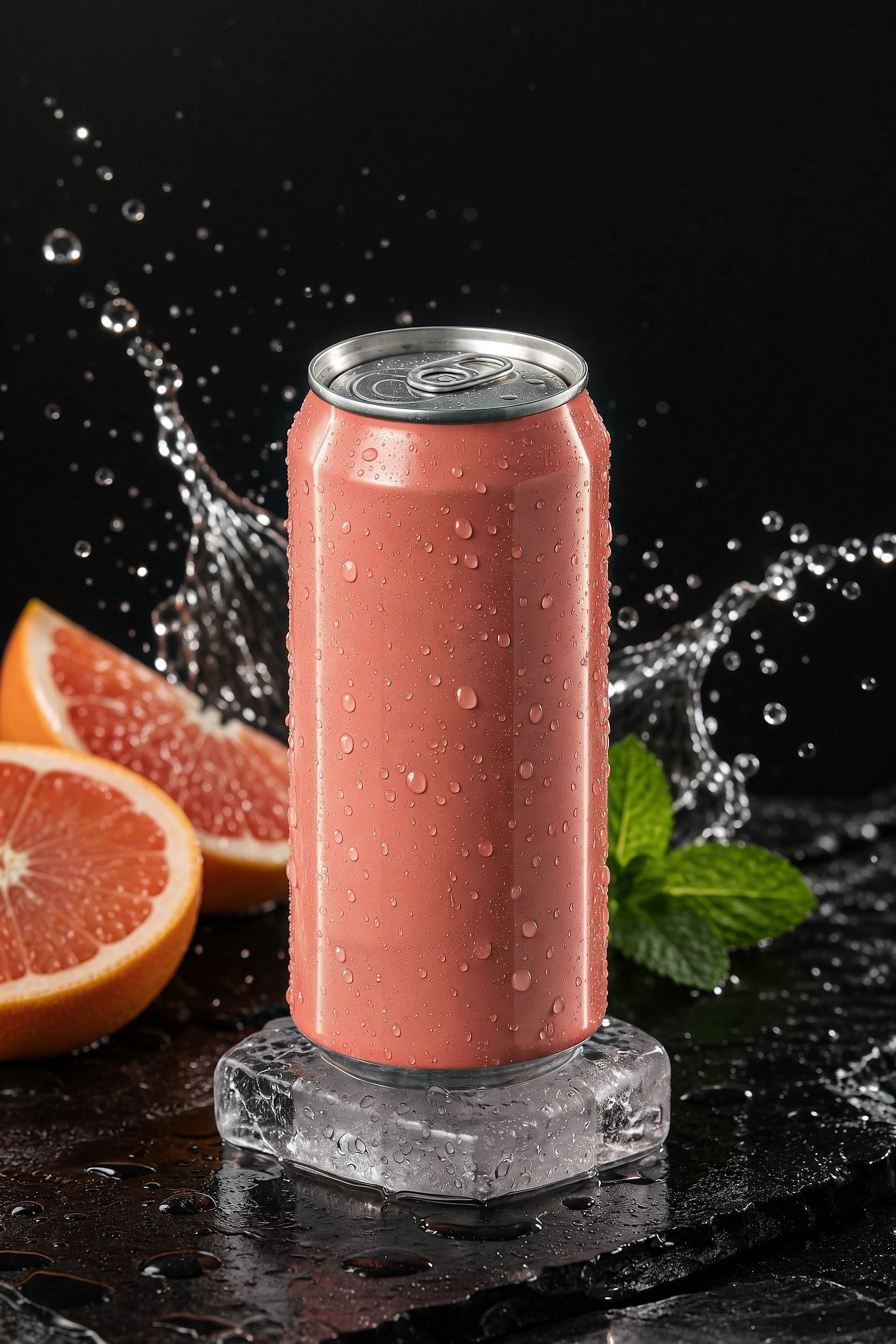
A drink can is shiny aluminum, so the light decides how good the photo looks. Cold water drops, ice, and a splash make the can feel cold, and a dark background makes the color stand out.
Prompt to try for the drink can (Kling Image 4.0, 2:3, 4K):
PRODUCT: A slim 330 ml aluminum drink can with a glossy coral-pink finish and a silver pull tab. The can has no text, no logo, and no label. Cold water drops cover the side of the can.

SETTING: The can stands on a block of clear ice on a wet black stone surface. Grapefruit halves and fresh mint leaves sit behind the can, slightly out of focus. A splash of sparkling water rises behind the can, frozen in mid-air.

LIGHTING: A hard light from the back left makes the water drops sparkle and draws a thin bright line along the edge of the can. A soft white light from the front shows the true color of the can. Dark background.

CAMERA: Eye level with the middle of the can, 100mm macro lens. The can fills the center third of the frame. Sharp focus on the water drops.

STYLE: High-end drink ad photo. Crisp, cold, and rich in color, with a clean dark background.
What makes this prompt work:
- The hard back light and the soft front light each have one job: sparkle on the drops and true color on the can.
- The grapefruit and mint tell shoppers the flavor without any words on the can.
- "No text, no logo, and no label" keeps the can plain, so you can add your real can with a reference photo.
Try a variation: For a store listing, change the SETTING line to "The can stands on a plain white surface with a soft shadow, on a pure white background," and pick 1:1.
Wireless earphones product photography prompt
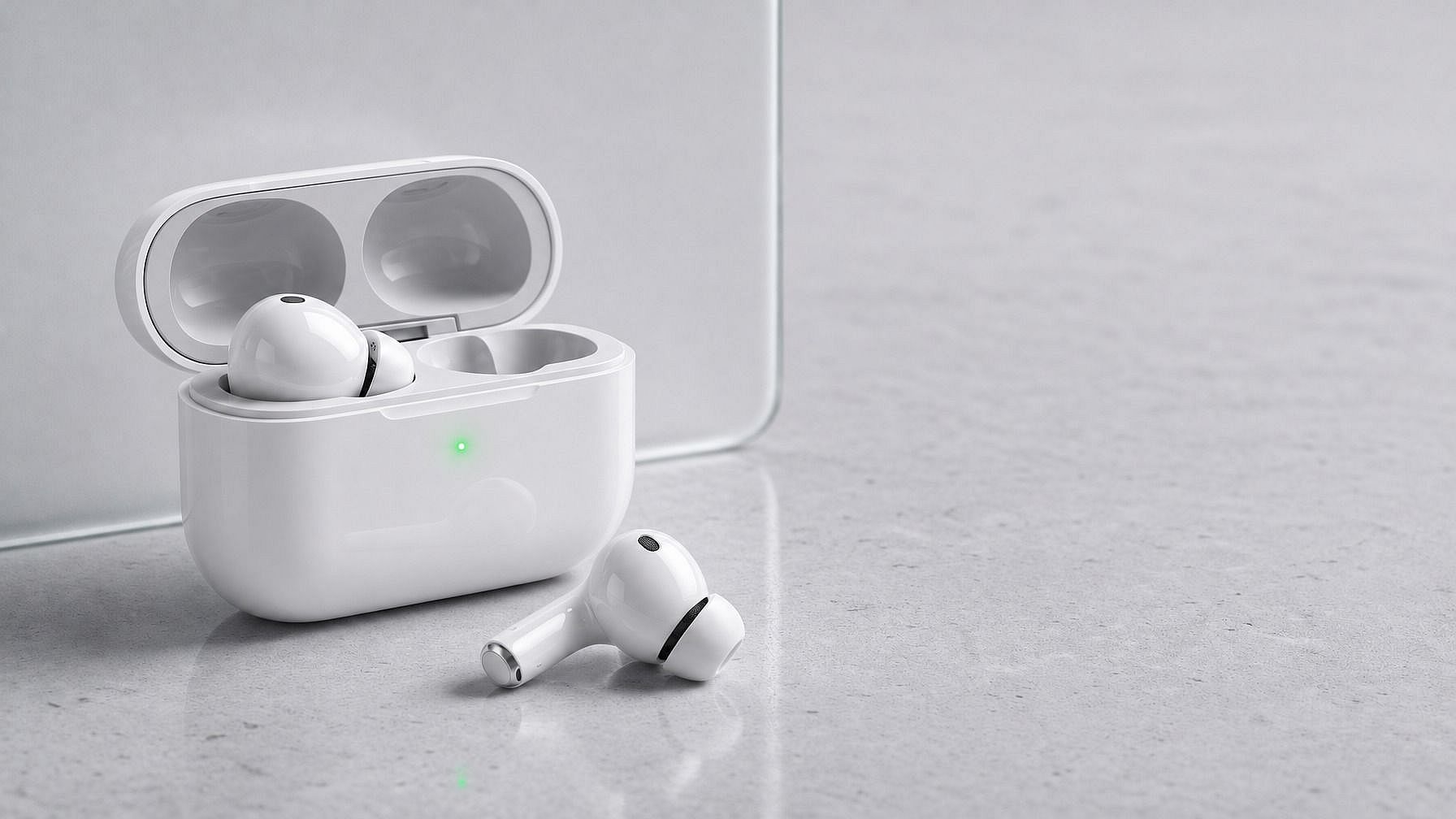
Wireless earbuds are small, glossy, and mostly white, so they can disappear into a bright background. A light-gray surface, soft light, and a low camera angle give the earbuds shape and keep the glossy plastic from glaring.
Prompt to try for the wireless earbuds (Kling Image 4.0, 16:9, 4K):
PRODUCT: A pair of white wireless earbuds with short stems and a glossy finish, next to their open white charging case. One earbud rests inside the case, and the other lies on the surface in front of it. A small green light glows on the front of the case. No logos and no text.

SETTING: A smooth light-gray stone surface. A thin sheet of frosted glass stands behind the case. The right half of the frame is empty light-gray space for a headline.

LIGHTING: Soft, even studio light from a large light above the product. Gentle reflections on the glossy plastic. Soft shadows under the case and the earbud.

CAMERA: Low angle, about 15 degrees above the surface, 85mm lens. The product sits on the left third of the frame. Sharp focus on the earbud in front.

STYLE: Clean, minimal tech product photo in cool white and gray. Calm and modern.
What makes this prompt work:
- The light-gray surface and frosted glass give white earbuds an outline, so they don't blend into the background.
- The open case and the loose earbud show two parts of the product in one photo.
- The empty right half makes the photo ready for a website banner or an ad headline.
Try a variation: For a lifestyle shot, change the SETTING line to "The case sits on a wooden desk next to a laptop and a cup of coffee, in a bright home office," and keep the LIGHTING line as it is.
Women's denim jacket product photography prompt
A denim jacket sells on fit and fabric, so shoppers want to see it on a person and up close. The prompt adds a MODEL line and asks for sharp focus on the buttons and stitching, where denim quality shows.
Prompt to try for the women's denim jacket (Kling Image 4.0, 2:3, 8K):
PRODUCT: A women's cropped denim jacket in light-wash blue denim, with brass buttons, two chest pockets with button flaps, and slightly frayed hems. The fabric shows a clear diagonal twill weave and gold-orange stitching.

MODEL: A woman in her late 20s with shoulder-length dark curly hair wears the jacket open over a white, micro crop top and high-waisted black jeans. She stands at a slight angle with one hand in her jeans pocket and looks past the camera with a relaxed smile.

SETTING: A sunny city sidewalk in the late afternoon. A cream-colored brick wall stands behind her, with soft, blurred street trees.

LIGHTING: Warm golden-hour sunlight from the side. Soft shadows across the folds of the jacket and a gentle glow on her hair.

CAMERA: Eye level, 50mm lens, framed from mid-thigh up. Sharp focus on the jacket's buttons and stitching.

STYLE: Fashion store lifestyle photo with natural colors and a true-to-life denim shade.
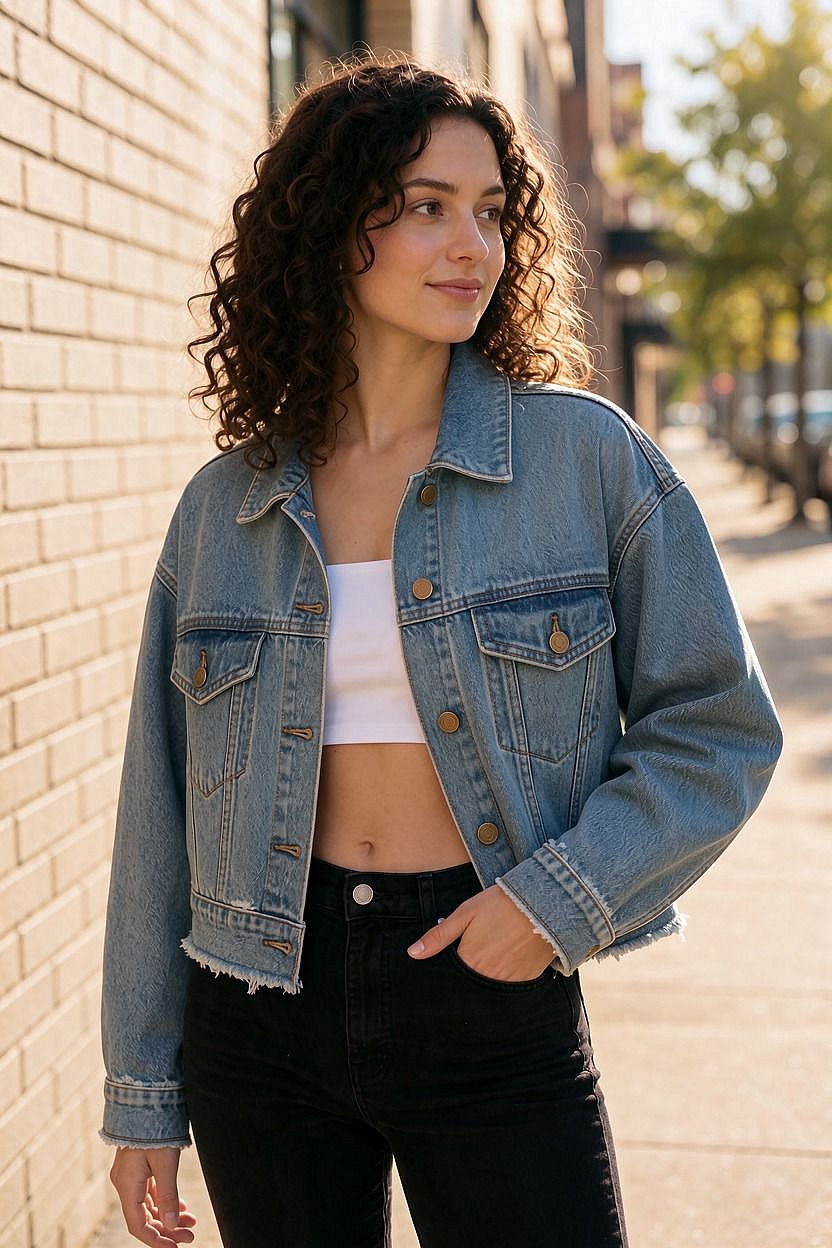
What makes this prompt work:
- The PRODUCT line lists every detail a shopper checks: the wash, the buttons, the pockets, the hems, and the stitching.
- The plain white T-shirt and black jeans keep attention on the jacket.
- 8K keeps the twill weave and stitching sharp when shoppers zoom in.
Try a variation: For a product-only shot, remove the MODEL line and change the SETTING line to "The jacket lies flat on a pale wooden floor, buttoned, with the sleeves folded in," then pick 1:1.
To show the same jacket on different people, set 4 to 8 images per prompt and change only the MODEL line between prompts.
Colorful water tumbler product photography prompt
A colorful tumbler sells on its color, so the prompt spends the most words on the finish. Bright sun and an outdoor scene show where the tumbler gets used.
Prompt to try for the colorful water tumbler (Kling Image 4.0, 16:9, 4K):
PRODUCT: A 40 oz stainless steel water tumbler with a handle, a clear lid, and a straw. The tumbler has a matte powder-coated finish that fades from turquoise at the base to lilac at the rim. Cold water drops cover the lower half. No logo and no text.

SETTING: The tumbler stands on a light wooden picnic table outdoors, next to a folded striped beach towel and a pair of sunglasses. A sunny park with green grass fills the soft background.

LIGHTING: Bright midday sun from the upper right. A crisp shadow beside the tumbler and small highlights on the straw and the lid.

CAMERA: Slightly above eye level, 70mm lens. The tumbler sits on the right third of the frame. Sharp focus on the color fade.

STYLE: Bright, cheerful summer lifestyle photo with saturated colors.
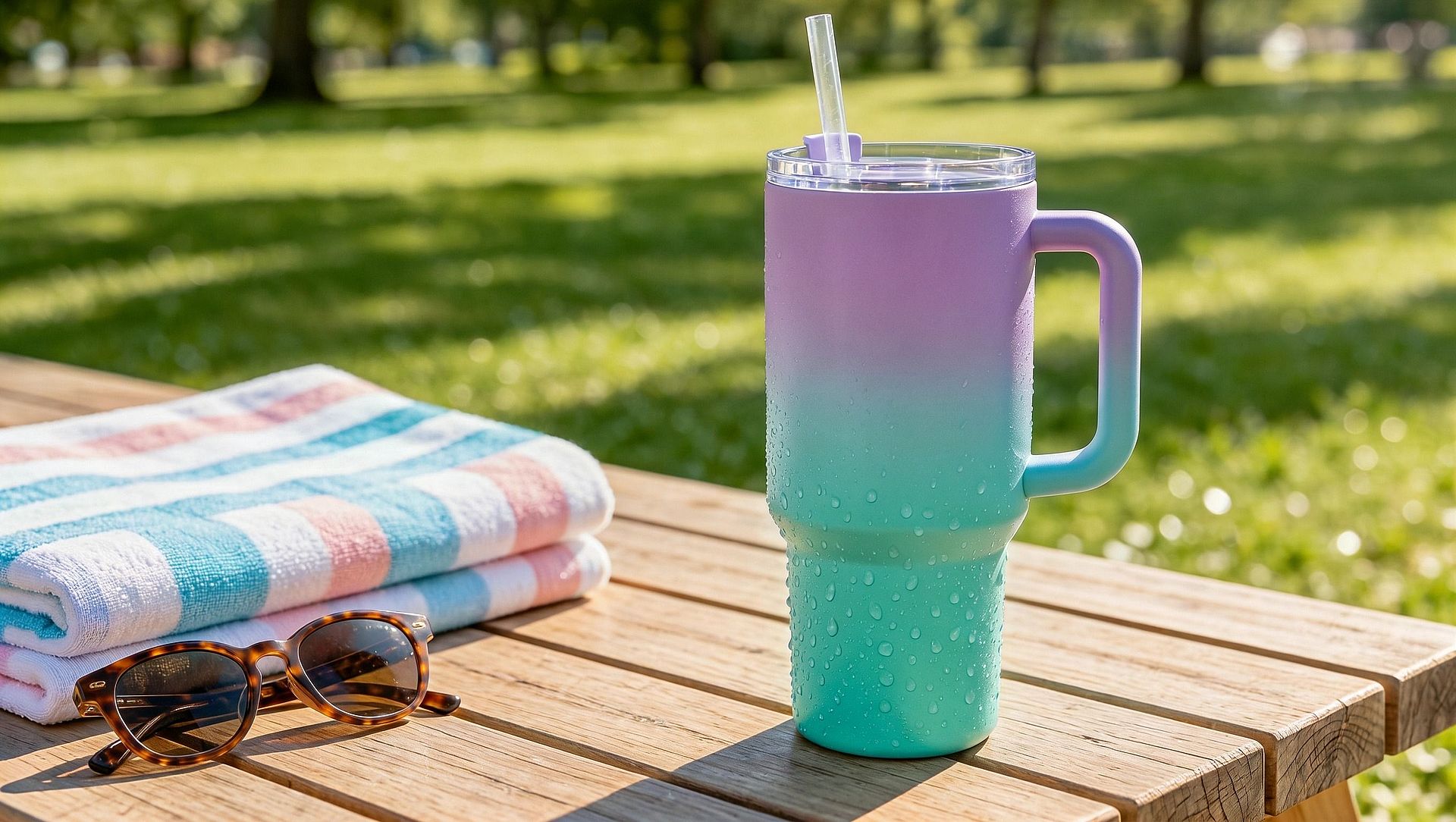
What makes this prompt work:
- "Matte powder-coated finish that fades from turquoise at the base to lilac at the rim" tells the model the exact colors and where each one sits.
- The towel and sunglasses set a summer scene in two props.
- Matte metal takes bright sun without glare, so the colors stay strong.
Try a variation: To show every color you sell, keep the prompt and change only the colors in the PRODUCT line, such as "fades from lemon yellow at the base to coral at the rim." Run each color at the same settings so the photos match on your store page.
How do you use your own product photo with Kling Image 4.0?
The four prompts above invent a plain product. To show your real product, upload a photo of it as a reference image and tag it in the prompt with @.
- Choose Kling Image 4.0. Open OpenArt's AI image generator and pick Kling Image 4.0 from the model menu.
- Upload your product photo. Use a clear, well-lit photo of the product on a plain background. Give it a short name, such as "can" or "jacket."
- Point the PRODUCT line at the photo. Change the PRODUCT line to something like "The drink can from @can. Keep its shape, color, and label the same as in @can." Keep the other four lines.
- Add more photos if you need them. Kling Image 4.0 takes up to 10 reference images. Upload the front and back of the jacket, or tag a second photo for the background, such as "the brick wall from @wall."
- Set the size and generate. Pick the aspect ratio, start at 2K with 4 to 8 images, and run the winner again at 4K or 8K.
For a full product detail page, Kling Image 4.0 Long Image turns 1 to 3 product photos into one long image with a main banner, selling points, and scenes of the product in use, at 1K or 2K.
How do you make a matching set of product photos?
A matching set of product photos uses the same light, colors, and style across every image. Kling Image 4.0 makes up to 8 images per prompt, and every image follows the same prompt.
To build a full set for one product, keep the PRODUCT, LIGHTING, and STYLE lines the same, and change only the SETTING or CAMERA line in each prompt. For the drink can, that could be a close-up of the water drops, a six-pack on a beach cooler, and a can in a hand at a summer party.
If you sell several products, write one LIGHTING line and one STYLE line and paste them into every prompt. The earbuds, the jacket, and the tumbler then look like one shoot.
OpenArt's AI product image generator has more ideas for lifestyle scenes and listing photos, and the AI product ads generator turns product photos into ads.
What should you check before you use an AI product photo?
An AI product photo has to show the product shoppers will get. Check these five things before a photo goes on a store page or in an ad.
- Shape and size: Compare the photo with the real product. Look at the lid, the buttons, the straw, and the stems.
- Color: Hold the photo next to the real product. Denim washes and color fades shift easily.
- Labels and logos: Read any text on the product. If a label looks wrong, fix it or use a plain product.
- Hands and people: On fashion photos, check the hands, the buttons, and where the jacket meets the body.
- Small fixes: Open the photo in OpenArt's AI photo editor to fix one spot, or use the AI background remover for a cutout on white. Run a final photo through the AI image upscaler if you need it even larger.
Start your product photos with Kling Image 4.0
Good AI product photography prompts name the product, the setting, the light, the camera, and the style, each on its own line. Copy one of the four prompts above, swap in your product, and run it in Kling Image 4.0 on OpenArt at 2K first, then 4K or 8K for the final photo.
Frequently asked questions: AI product photography prompts
What makes a good AI product photography prompt?
A good AI product photography prompt names the product and its material, the setting, the light, the camera angle, and the style of the photo. Writing each part on its own labeled line makes the prompt easy to edit and reuse.
What resolution should I use for AI product photos?
Use 2K to test ideas, 4K for most store listings, banners, and ads, and 8K for print or for photos shoppers will zoom into. Kling Image 4.0 makes images at all three sizes.
Can Kling Image 4.0 put my real product into a new scene?
Yes. Upload up to 10 photos of your product as reference images, tag them in the prompt with @, and describe the new scene. Check the shape, color, and label of the product against the real one before you publish.
How many product photos can I make from one prompt?
Kling Image 4.0 on OpenArt makes up to 8 images per prompt. Every image follows the same prompt and reference photos, so you can keep the best take or use several as a matching set.
Which aspect ratio is best for product photos?
Use 1:1 for store listings, 2:3 for tall hero shots and fashion photos, 16:9 for website banners, and 9:16 for stories. Kling Image 4.0 also offers 4:3, 3:4, 3:2, and 21:9.
Can I use AI product photos from OpenArt for my business?
Yes. Commercial use requires the Plus plan or above, and you can compare plans on the pricing page. Make sure you hold the rights to any product photo, logo, or person you upload.
Can I make AI product photos for free?
You can try some image features for free. New accounts get 40 free credits, no credit card required. Every generation uses credits, and the exact cost shows before you click Generate. To keep creating, choose a paid plan. You can compare plans, prices and billing options on the pricing page. Full billing, cancellation and refund details are in our Help Center.