


 ChatGPT
 Perplexity
 Claude
 Gemini
A Black Friday poster, banner, or flyer tells shoppers three things fast: what is on sale, how much they save, and when the sale ends. This guide gives small business owners and brand designers 16 design ideas and four prompts to copy.
GPT Image 2.6 is the go-to model on OpenArt for Black Friday graphics. Type your offer, put the exact words in quotes, and get a finished poster, banner, flyer, or background.
Key takeaways
- A good Black Friday graphic shows one offer, one big number, and one end date.
- GPT Image 2.6 is the go-to model on OpenArt for Black Friday posters, banners, and flyers.
- Put the exact words in quotes and say where each line goes.
- Brand Kit keeps every graphic in your logo, colors, and fonts.
- Choose 4K for print, and read every word and date before you publish.
What goes on a Black Friday poster, banner, or flyer?
A Black Friday poster, banner, or flyer needs one offer, one big number, and one end date. Add your logo and one product, and leave empty space around the words so shoppers can read them from far away.
| Graphic | Where it goes | Shape to pick | What to put on it |
|---|---|---|---|
| Black Friday poster | Shop window, wall, or counter | Tall, 2:3 | A big headline, the discount, and the sale dates |
| Black Friday banner | Website, email, or ad | Wide, 16:9 | A short headline, one product, and a Shop Now button |
| Black Friday flyer | Handouts, shopping bags, and mailers | Tall, 2:3 | Store name, offer, date, hours, and address |
| Black Friday background | Behind your own words and products | Any shape | No words, with empty space in the middle |
How do you make a Black Friday poster or flyer with AI?
An AI poster generator or AI flyer generator turns a typed description into a finished design. On OpenArt, four steps make any Black Friday graphic.
- Pick GPT Image 2.6. Open OpenArt's AI poster maker and choose GPT Image 2.6. Use Flare mode for quick drafts and Sunburst mode for the final design.
- Describe the design. Say what the graphic is for, then type each line of text in quotes and say where it goes. Upload your product photo or logo as a reference image.
- Set the shape and size. Pick the aspect ratio, choose 4K for print, and set quality to high for designs with a lot of text. Ask for up to 8 versions at once.
- Check and fix. Read every word. To fix one detail, open the design in the AI photo editor, circle the area, and type the change.
Black Friday poster ideas
A Black Friday poster has to be readable from across the street. Thick letters, one bright color, and one big number do most of the work.
- Big type poster: Fill the poster with the words "BLACK FRIDAY" in thick letters on one bright color.
- One-product poster: Put your best seller in the middle, with the regular price crossed out and the sale price beside it.
- Countdown poster: Print one poster for each of the last three days: 3 days left, 2 days left, and last day.
- Neon sign poster: Write the offer as a glowing neon sign on a dark brick wall for a late-night shopping look.
Prompt to try for the big type poster (GPT Image 2.6 Sunburst, 2:3, 4K, high quality):
A bold Black Friday sale poster for a shop window. Bright yellow background. Huge black capital letters in a thick, condensed style fill the top two thirds and read "BLACK FRIDAY" on two lines. Below them, a wide black rectangle holds white text that reads "UP TO 50% OFF". At the bottom, small black text reads "NOV 27 TO NOV 30" and, on the next line, "IN STORE AND ONLINE". Flat graphic design with clean edges and strong contrast. No photos, no logos, no other text.
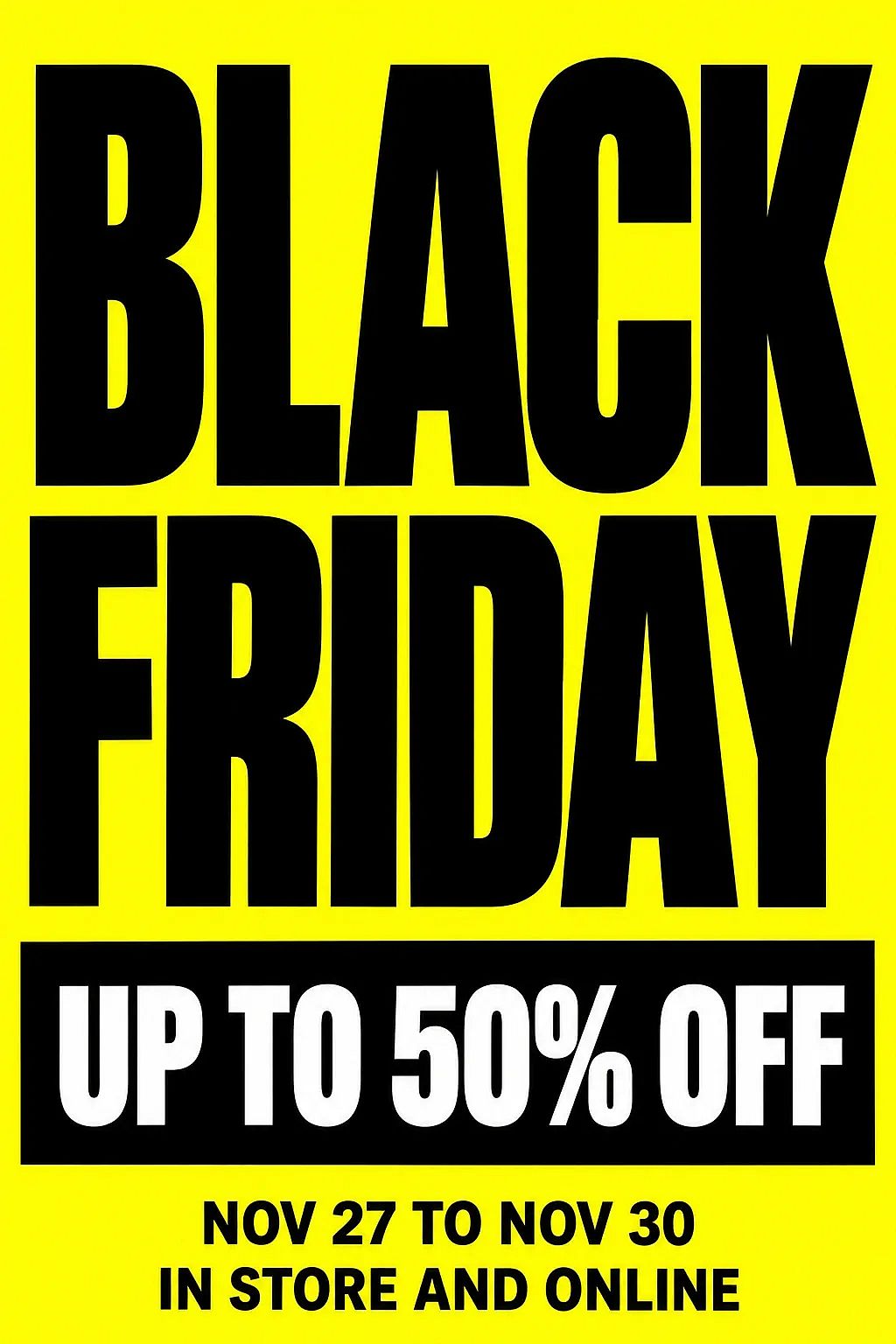
Swap the yellow for your brand color, and change the words in quotes to your own offer and dates.
Black Friday banner ideas
A Black Friday sale banner sits at the top of a website, an email, or an ad, so it has to work in a wide, short space. Keep the words on one side and the product on the other.
- Split banner: Put the product on the right, the offer on the left, and a Shop Now button under the offer.
- Category banner: Make one banner for each part of your store, such as "Kitchen deals" or "Gifts under $50".
- Email header: Use a matching wide design with the offer and the end date at the top of every sale email.
- Last-day banner: Reuse the same banner on the final day with the words changed to "ENDS TONIGHT".
Prompt to try for the split banner (GPT Image 2.6 Sunburst, 16:9, 2K, high quality):
A wide Black Friday banner for the top of an online store, with space for text on the left. On the right, a glossy red stand mixer sits on a matte black surface under soft studio light. The background is solid black. On the left, large white bold capital letters read "BLACK FRIDAY". Under that, smaller red text reads "30% OFF EVERYTHING". Under that, a small white rounded button holds black text that reads "SHOP NOW". Clean, modern online store design. No other text.
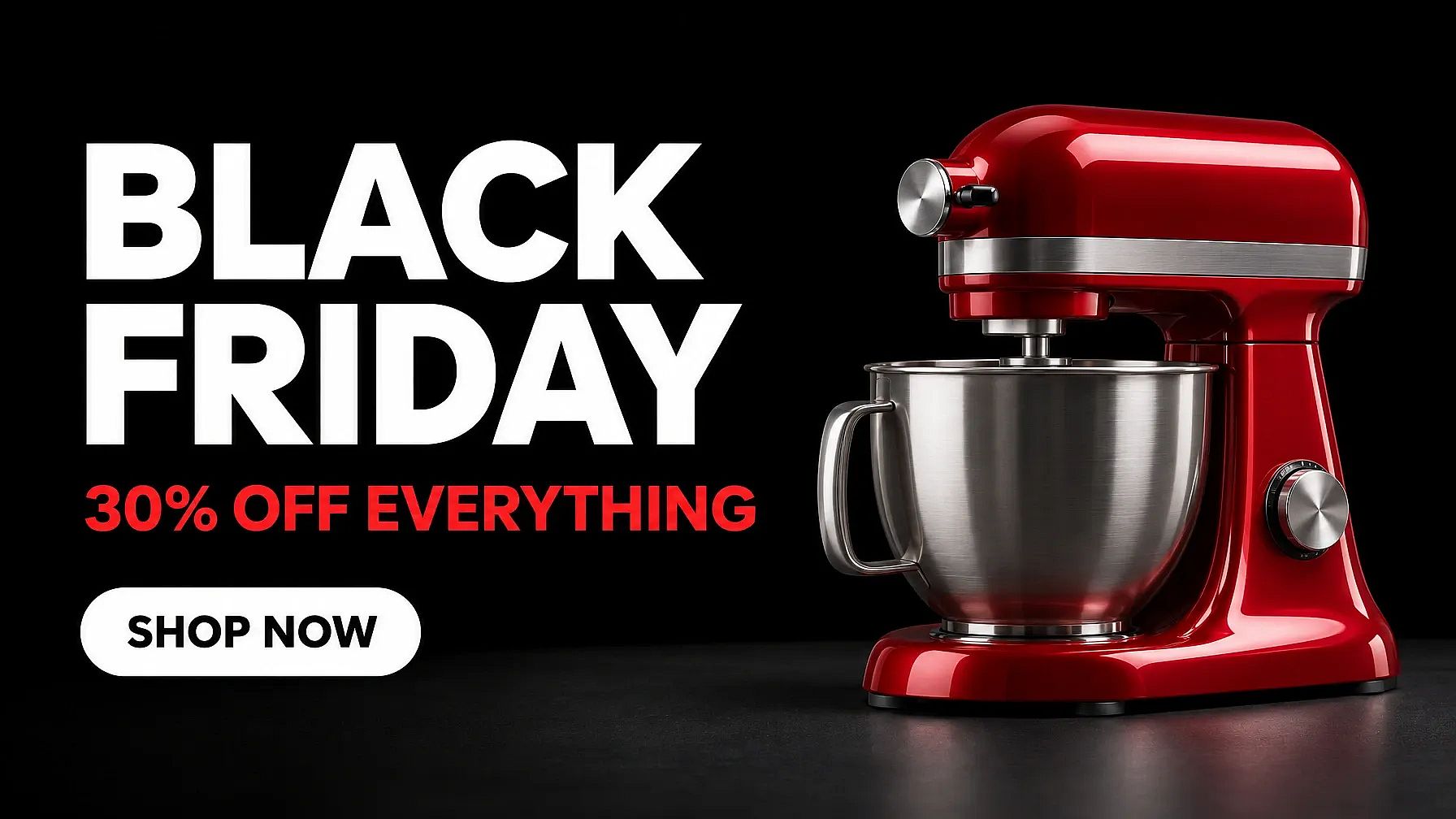
To show your own product, upload its photo as a reference image and change "a glossy red stand mixer" to "the product from the reference photo".
For Cyber Monday, open the banner in the AI photo editor, circle the headline, and ask for the words "CYBER MONDAY".
Black Friday flyer ideas
A Black Friday sale flyer goes into shoppers' hands, bags, and mailboxes, so it can hold more detail than a poster. Give the flyer your store name, the offer, the date, your hours, and your address.
- Store sale flyer: Put one big offer in the middle, with the date, hours, and address underneath.
- Deal list flyer: List three to five deals with prices, which suits salons, gyms, and restaurants.
- Coupon flyer: Add a coupon box with a dashed border at the bottom for shoppers to cut out and bring in.
- Bag flyer: Slip a small flyer into every order that invites buyers back for Cyber Monday.
Prompt to try for the store sale flyer (GPT Image 2.6 Sunburst, 2:3, 4K, high quality):
A printable Black Friday flyer for a local plant shop. Pale pink paper background with hand-drawn green houseplant illustrations in the four corners. At the top, bold dark green serif capital letters read "BLACK FRIDAY PLANT SALE". In the center, a large dark green circle holds white text that reads "25% OFF ALL HOUSEPLANTS". Below the circle, dark green text reads "Friday, Nov 27, 8 AM to 6 PM". At the bottom, smaller dark green text reads "The Corner Plant Shop, 12 Main Street". Friendly, tidy layout with wide margins. No other text.
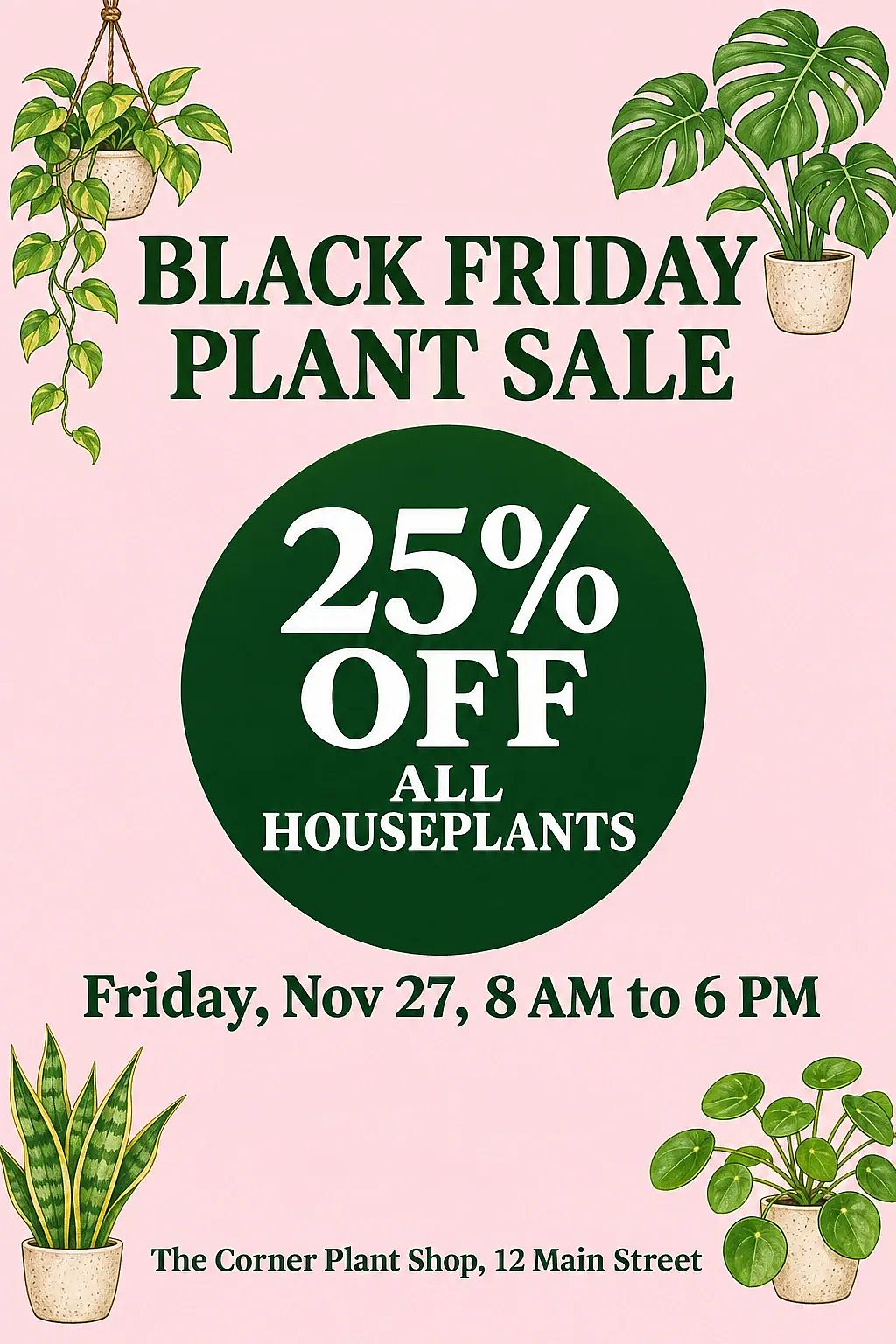
A light background like the pale pink paper in this flyer uses less ink when you print at home or at a copy shop.
Black Friday background ideas
A Black Friday background is a picture with no words on it. Upload the background to OpenArt as a reference image and ask for your headline on top, or add your own text in any design tool.
- Black and gold: Frame the edges with black balloons and gold confetti, and leave the middle empty for a headline.
- Product stage: Show an empty round stand under a spotlight, ready for your product photo.
- Torn paper: Tear black paper open to show a bright color underneath.
- Brand color glow: Fade from black into your brand color with a soft glow.
Prompt to try for the black and gold background (GPT Image 2.6 Sunburst, 16:9, 2K, high quality):
A wide Black Friday background with no words. Glossy black balloons, matte black shopping bags, and gold ribbon sit along the left and right edges on a shiny black floor. Fine gold confetti falls through the air. Soft warm light from above. The center of the image is empty dark space for a headline. No text, no letters, no numbers, no logos.

GPT Image 2.6 also makes images with a transparent background. Ask for a round "50% OFF" sale badge with nothing behind it, and place the badge on any product photo.
How do you turn one design into a Black Friday template?
A Black Friday template is a design you reuse with different words. On OpenArt, the prompt is the template: keep the layout sentences, and change the product and the words in quotes.
To keep the same look, upload your finished design as a reference image with the next prompt. To make another size, keep the prompt, pick a different aspect ratio, and generate again.
Brand Kit saves your logo, exact colors, and fonts once, and GPT Image 2.6 applies them to every graphic in the project. In Chat Mode, one message can ask for the poster, the banner, and the flyer together.
Brand and creative teams can keep one OpenArt project for each client. Each project has its own Brand Kit, so one client's colors and logo stay out of another client's graphics.
OpenArt's GPT Image 2.6 prompt guide has more tips for writing text, edits, and long prompts.
What should you check before you print or post?
Five quick checks catch most problems before a Black Friday graphic goes to print or goes live.
- Words and numbers: Read every word, price, and date on the design out loud.
- End date: Print the last day of the sale on every poster, banner, and flyer.
- Print size: A 2:3 design fits 24 x 36 inch posters and 4 x 6 inch flyers. Choose 4K, then run large posters through the AI image upscaler, which has a Text and Shapes preset.
- Phone view: Open each banner on a phone and make sure the smallest line is easy to read.
- Logos and faces: OpenArt's AI Copyright and IP Check flags look-alikes of famous logos and faces before you publish.
Make your Black Friday graphics on OpenArt
A Black Friday poster, banner, flyer, and background all start from one clear offer and one prompt. Pick GPT Image 2.6 in OpenArt's AI image generator, paste one of the four prompts, and swap in your own words.
For the full sale plan, read OpenArt's Black Friday marketing ideas for 2026.
Frequently asked questions: Black Friday posters, banners, and flyers
What size should a Black Friday banner be?
A Black Friday banner for a website or an email is wide, so pick the 16:9 aspect ratio. Pick 1:1 for a square social post and 9:16 for a story.
What should a Black Friday poster say?
A Black Friday poster should say the words Black Friday, the discount, and the sale dates. Add your store name or logo, and leave the rest of the poster empty.
Which AI model is best for Black Friday posters and flyers?
GPT Image 2.6 is the go-to model on OpenArt for Black Friday posters, banners, and flyers. GPT Image 2.6 makes 4K images, has a high quality setting for designs with a lot of text, and works with Brand Kit.
OpenArt's AI image generator also includes Nano Banana Pro and Seedream 5.0 Pro, so you can run the same prompt on another model and pick the look you like.
Can AI make a Black Friday flyer with my logo and product?
Yes. Upload your logo and your product photo as reference images, and say in the prompt where each one goes. Check that the logo and the product match the real ones before you print.
Can I make a Black Friday poster with AI for free?
You can try some image features for free. New accounts get 40 free credits, no credit card required. Every generation uses credits, and the exact cost shows before you click Generate. To keep creating, choose a paid plan. You can compare plans, prices and annual billing options on the pricing page. Commercial use requires the Plus plan or above.