

 ChatGPT
 Perplexity
 Claude
 Gemini
Which AI Image Model Gets Faces and Hands Right? We Checked the Scores
Seven image models sit on OpenArt Arena's image boards, and picking between them for human subjects usually comes down to guesswork. We pulled the published criterion scores, including the ones the summary rankings hide, and lined them up against what each model actually costs and how fast it runs.
- Default pick for people: Seedream 5.0 Pro. Leads Overall at 1,051 and Film at 1,074, and holds the top Reference Adherence score at 1,037, which is what keeps a face recognizable from shot to shot.
- Most photoreal: Nano Banana Pro. Scores 1,184 on the Film board's Realism criterion, the highest published number of the seven.
- Best for repairing a bad hand: GPT Image 2. Leads Image Editing at 1,045, costs the least at $0.057 per image, and accepts 16 reference images.
How the Seven Models Compare
Arena runs blind head-to-head votes and reports Elo-style scores. Grok Imagine 2.0 sits at 1,000 as the fixed anchor, so every number below reads as better or worse than Grok. Scores compare only within a column.
| Model | Overall | Film | Realism | Editing | Ref. adherence | Price | Best for |
|---|---|---|---|---|---|---|---|
| Seedream 5.0 Pro | 1,051 | 1,074 | 1,142 | 1,037 | 1,037 | $0.09 | Default pick for people |
| GPT Image 2 | 1,047 | 1,058 | 1,058 | 1,045 | 1,035 | $0.057 | Repairing a hand or face |
| Nano Banana Pro | 1,008 | 1,059 | 1,184 | 1,035 | 1,002 | $0.134 | Most photoreal skin |
| Grok Imagine 2.0 | 1,000 | 1,000 | 1,000 | 1,000 | 1,000 | $0.06 | Benchmark anchor |
| Nano Banana 2 | 985 | 998 | 1,064 | 1,032 | 991 | $0.101 | Fast 4K drafts |
| Qwen Image 3.0 | 966 | 964 | 975 | 992 | 973 | $0.075 | Style variety |
| Flux.2 Pro | 927 | 978 | 1,022 | 955 | 881 | $0.08 | Weakest on identity |
Source: OpenArt's Arena leaderboard, image boards, v1.0.
One note on what these scores do and do not cover, and then we move on. Arena scores realism, identity consistency and editing precision. It does not run a separate anatomy test, so nothing here counts fingers for you. Realism is the closest published proxy, and the gap between Nano Banana Pro at 1,184 and Qwen Image 3.0 at 975 is wide enough to be useful. Treat models with overlapping confidence intervals as a tie.
Which Models Are Best for Human Subjects
Seedream 5.0 Pro
The safest default. It leads Overall and Film, takes the top Creativity score at 1,103, and its 1,037 on Reference Adherence means a face you feed it tends to come back looking like the same person. It also supports transparent backgrounds, which only GPT Image 2 matches.
The catch is speed and headroom. It caps at 2K, takes 10 reference images, and runs 88.9 seconds for a 1K image. It also drops to 975 on Graphic Design, so if your image needs clean typography, generate the person here and set the type elsewhere. Full specs are on the Seedream 5.0 Pro model page.
GPT Image 2
The repair tool. It leads Image Editing at 1,045, and also quietly leads Prompt Adherence at 1,041, which matters when you are specifying exactly which hand holds what. It outputs 4K, accepts 16 references, takes a 32,000 character prompt, and runs 44.8 seconds.
Its weak spot is aesthetics relative to the top of the board: 1,030 on Subjective Aesthetics against Seedream's 1,043, and 1,058 on Realism against Nano Banana Pro's 1,184. Generate elsewhere, fix here. The GPT Image 2 model page lists the editing modes.
Nano Banana Pro
The realism leader, by a margin. 1,184 on Realism and 1,059 on Film, at 4K with 14 references and a fast 39.9 seconds.
Two things hold it back. At $0.134 per image it is the most expensive of the seven, roughly 2.4 times GPT Image 2. And it scores 981 on Subjective Aesthetics and 952 on Graphic Design, below the anchor on both, so it reads as technically convincing more often than it reads as beautiful.
Nano Banana 2
The draft model. Google documents it as Gemini 3.1 Flash Image. At 18.1 seconds and 4K with 14 references, it is the fastest way to find a composition you like before you commit to a slower model. Realism holds up at 1,064. Overall sits at 985, so treat its output as a sketch. Specs and samples are on the Nano Banana 2 model page.
Which Models to Avoid for Human Subjects
Flux.2 Pro scores 881 on Reference Adherence, the lowest of the seven, which rules it out for character work. Qwen Image 3.0 scores 915 on Prompt Adherence, so a specific pose such as "left hand only, gripping the handle" is more likely to come back wrong, and at 99.1 seconds it is the slowest model on the board. Grok Imagine 2.0 is the anchor, useful as a reference point and cheap at $0.06, but not a recommendation.
What Reference Adherence Means for Character Consistency
Reference Adherence is the least intuitive number in the table. Arena runs the same brief through all seven models: one man in three candid street shots, walking, leaning against a wall and crossing the road, with the same face, hairstyle and outfit in all three.
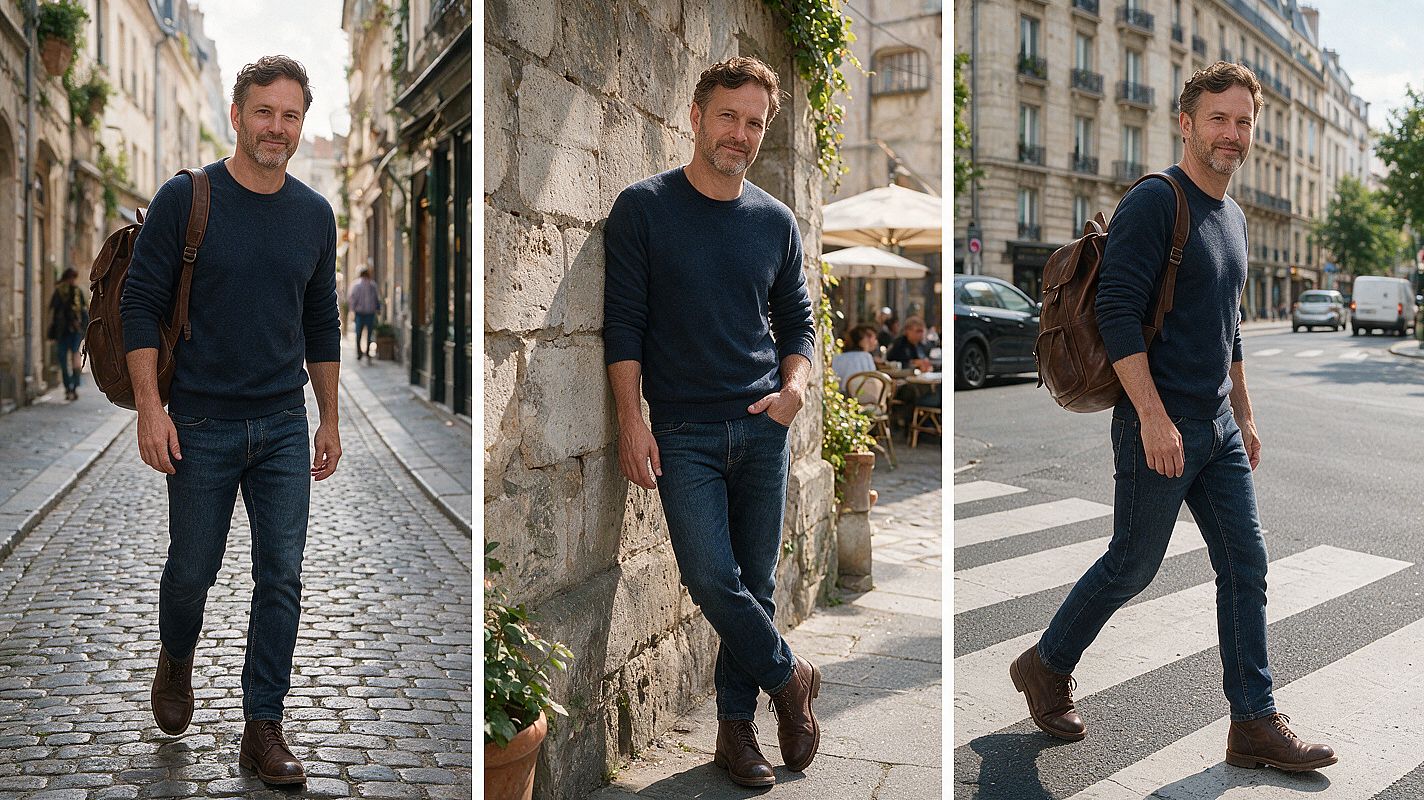
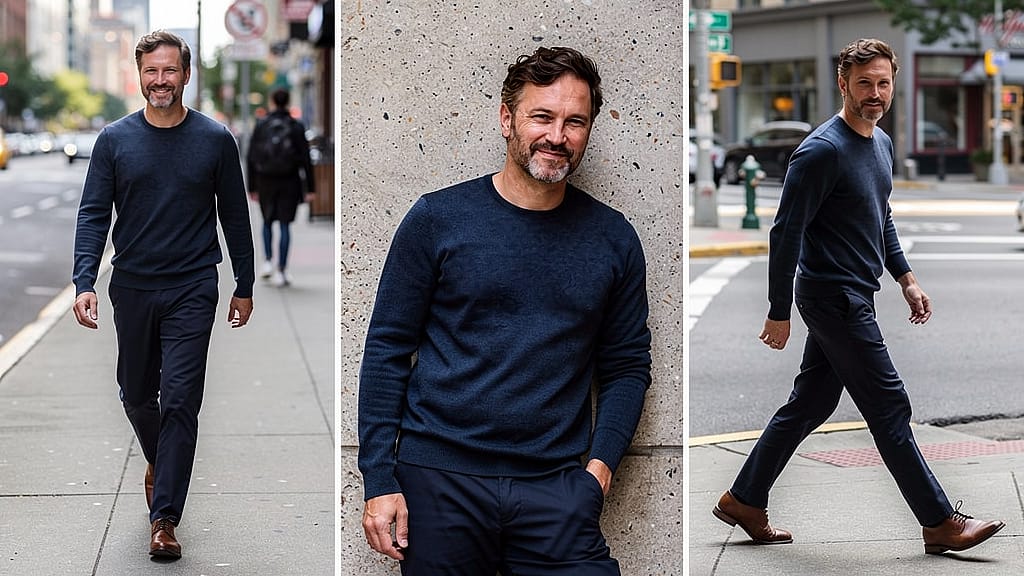
Arena scores these against a reference image it does not publish, so the score is the verdict rather than your eye. What you can see is how much of the brief survives the trip. All seven outputs sit on the Arena leaderboard under Reference Adherence, and if your work involves a recurring character, a brand ambassador or an AI persona, this column matters more than the Overall ranking.
Why AI Still Gets Hands Wrong in 2026
A hand has sixteen joints that move independently, and in most shots several of them are hidden behind each other or behind an object. The model has to infer anatomy it cannot see, from a region that may occupy a few hundred pixels.
Research from March 2025 put numbers on it. A team including researchers at Peking University built a 500 prompt human benchmark and found that close to half of generated images contained some distortion. Their companion dataset, Distortion-5K, annotated 4,700 images, and most flawed regions took up only a small share of the frame, which is why defects survive a quick glance. That study tested an older generation of models, so read it as evidence that the problem is real and hard to spot, not as a ranking of the seven models here.
What changed since then is where the failures live. A centered portrait or an open palm usually comes out fine now. The errors moved to harder places: fingers wrapped around a cup handle, two people holding hands, a hand near a face, a foreshortened arm, and the small faces standing behind your subject.
How to Test AI Image Models for Faces and Hands
Scores narrow the field. Your own prompts decide it. This takes about two hours.
Set it up. Pick three models from the table and run them in the AI Image Generator, where all seven load from the same prompt box. Give each one identical prompts, references, aspect ratio and resolution. Generate four images per prompt. Retry only on service errors, never because you disliked a result, or you are scoring your own patience instead of the model.
Use prompts that break things. Six cover most of it:
- A hand gripping an object by its handle
- Two people holding hands
- A hand raised near the face
- A left-handed action
- A foreshortened arm reaching toward camera
- A group of five with faces in the background
Add one identity test: the same reference image across all three models.
Score it blind. Hide the model names. Open every image at full resolution, because a defect that is invisible in a feed is obvious at 100 percent. On hands, check finger count, separation, thumb placement, wrist continuity, joint direction, and whether the grip actually touches the object. On faces, check gaze, teeth, ears, profile geometry and unintended asymmetry. Count every visible person, including the small ones at the back.
Report two numbers per model: the pass rate on first outputs, and the pass rate across all four. A model that lands it once in four creates more work than its average suggests.
How to Fix AI Hands and Faces Without Changing the Image
Say how many hands appear and what each one does. "One visible left hand holding a coffee cup by the handle" gives the model far more to work with than "a person with coffee." Keep the first generation simple. Crossed arms, overlapping fingers, three props and four people in one prompt is where things fall apart.
Frame for the anatomy you care about. A face that occupies 40 pixels has 40 pixels of detail to work with, no matter which model you pick. If the background faces matter, crop tighter or push the resolution up.
When something fails, mask only the defective region and ask for one specific correction. A narrow mask gives the model less room to redraw the person. Then compare the repair against the original at full resolution, and look at the boundary: sleeves, jewelry, shadows and contact points are where a local edit quietly stops being local.
How to Pick the Right Model for Your Work
Arena re-runs these comparisons as new models ship, so the ranking you plan around today is not necessarily the one that holds next quarter. Seedream 5.0 Pro and GPT Image 2 sit four points apart on Overall, close enough that a single release can reorder them.
Before you standardise on one model for human subjects, check the current numbers on the four boards that matter here: Overall, Film, Image Editing, and the Realism criterion inside Film. New accounts get 40 free credits, no credit card required, which is enough to run the six prompt test across three models.
Frequently Asked Questions
Which model is best for realistic faces?
Nano Banana Pro scores highest on Arena's Realism criterion at 1,184, ahead of Seedream 5.0 Pro at 1,142. For faces that need to stay consistent across several images, Seedream is the better pick because it also leads Reference Adherence at 1,037.
Which model is best for hands?
No board scores hands on their own. Seedream 5.0 Pro and Nano Banana Pro lead the realism and film metrics that come closest, and GPT Image 2 is the strongest choice for repairing a hand after the fact. Run the six prompt test above on your own briefs before committing.
Do current models still add extra fingers?
Yes, though far less often on simple poses. Failures now cluster around held objects, crossed fingers, occlusion and small background hands. A 2025 study of an earlier model generation found close to half of its 500 prompt human benchmark contained distortions.
How do I fix an AI hand without changing the face?
Mask only the hand and the area where it touches an object, then request one specific correction such as natural thumb placement. GPT Image 2 leads Arena's Image Editing board at 1,045 for this kind of work. Check the edit boundary afterward for altered sleeves, shadows and jewelry.
Which model is cheapest for this work?
GPT Image 2 at $0.057 per image, followed by Grok Imagine 2.0 at $0.06 and Qwen Image 3.0 at $0.075. Nano Banana Pro is the most expensive at $0.134.
Which model is fastest?
Nano Banana 2 at 18.1 seconds and Grok Imagine 2.0 at 18.3 seconds. Qwen Image 3.0 is slowest at 99.1 seconds, with Seedream 5.0 Pro close behind at 88.9 seconds.
Do reference images fix identity drift?
They reduce it. A clear reference at a similar angle gives the model evidence for facial proportions and distinctive features. Identity can still shift across poses and edits, so compare hairline, skin texture and proportions between outputs rather than assuming the reference held.
Does a high Overall score mean better anatomy?
Not on its own. Overall averages four broad criteria at equal weight. Use Realism and Reference Adherence for human subjects, and Editing for repair work.