

 ChatGPT
 Perplexity
 Claude
 Gemini
FLUX is a family of AI image models from Black Forest Labs, a German AI lab. Black Forest Labs has released three FLUX generations: FLUX.1 in 2024, FLUX.2 in 2025, and FLUX 3 in 2026. Each FLUX generation comes in several versions, so picking one can feel confusing.
FLUX 3 Image is the best FLUX model for most people today. FLUX 3 Image makes sharp 4K pictures, writes clear text, and blends up to 10 reference images into one scene. FLUX.2 and FLUX.1 still make sense for fast drafts, big batches, and open models you run on your own computer. But they do not hold up to the quality standards of most latest image models.
Which FLUX model should you use?
The right FLUX model depends on what you are making.
- Best for most people: FLUX 3 Image. FLUX 3 Image gives you the sharpest pictures, the clearest text, and the most control over edits in the FLUX family.
- Best for fast, low-cost drafts: FLUX.2 [klein]. FLUX.2 [klein] makes a picture in under a second, so you can test many ideas quickly.
- Best for big batches of production images: FLUX.2 [pro]. FLUX.2 [pro] makes high-quality pictures in under 10 seconds each.
- Best for fine control over text and detail: FLUX.2 [flex]. FLUX.2 [flex] lets you trade speed for more detail, which helps with posters and lettering.
- Best for running on your own computer: FLUX.2 [klein] 4B or FLUX.1 [schnell]. Both FLUX models are open and allow commercial use under the Apache 2.0 license.
- Best for video: FLUX 3 Video. FLUX 3 Video makes 5 to 20 second clips with sound.
What is FLUX, and how has it changed?
FLUX is the image model family from Black Forest Labs, a lab started by researchers who helped build Stable Diffusion. Every new FLUX generation makes bigger pictures, writes better text, and takes more reference images than the one before it. The FLUX family grew in six steps:
- August 2024: FLUX.1 launches with three versions: [pro], [dev], and [schnell].
- Late 2024: FLUX1.1 [pro] arrives, and its Ultra mode makes pictures up to 4 megapixels.
- May 2025: FLUX.1 Kontext lets you edit a picture by typing the change.
- November 2025: FLUX.2 launches with up to 10 reference images and exact brand colors.
- July 2026: Black Forest Labs announces FLUX 3, starting with video.
- October 2026: FLUX 3 Image arrives and goes live on OpenArt on October 1.
What is FLUX.1 good at?
FLUX.1 is the first FLUX generation, and it made Black Forest Labs famous for realistic photos and natural-looking hands. FLUX.1 follows a prompt closely and handles short words, like a one-word sign or a logo. FLUX.1 comes in several versions:
- FLUX.1 [pro] and FLUX1.1 [pro]: the top-quality FLUX.1 models. FLUX1.1 [pro] is faster, and its Ultra mode makes pictures up to 4 megapixels.
- FLUX.1 [dev]: an open FLUX.1 model that is free for non-commercial use. FLUX.1 [dev] is popular for LoRAs, which are small add-on files that teach a model one style or one face.
- FLUX.1 [schnell]: the fastest FLUX.1 model. FLUX.1 [schnell] makes a picture in 1 to 4 steps and is open for commercial use.
- FLUX.1 Kontext: a FLUX.1 model for editing. Upload a picture, type a change like "make the car red," and FLUX.1 Kontext changes only that part.
FLUX.1 still makes sense when your team has built a style on it, since thousands of community LoRAs run on FLUX.1 [dev]. For long text or several references, move up to FLUX.2 or FLUX 3 Image.
What does FLUX.2 add?
FLUX.2 is the second FLUX generation, released in November 2025. FLUX.2 makes pictures up to 4 megapixels, takes up to 10 reference images, and writes clearer text than FLUX.1. FLUX.2 also matches exact brand colors when you type a hex code like #FF5733. FLUX.2 comes in five versions:
- FLUX.2 [pro]: the everyday production model. FLUX.2 [pro] makes high-quality pictures in under 10 seconds, so it suits big batches.
- FLUX.2 [max]: the highest-quality FLUX.2 model. FLUX.2 [max] can also look up current information on the web before it makes a picture.
- FLUX.2 [flex]: the FLUX.2 model for fine control. FLUX.2 [flex] lets you add more steps for extra detail, which helps most with text and typography.
- FLUX.2 [dev]: the open FLUX.2 model, free for non-commercial use and research.
- FLUX.2 [klein]: the smallest and fastest FLUX.2 model. FLUX.2 [klein] makes a picture in under a second. The 4B version runs on a home graphics card and allows commercial use.
What makes FLUX 3 Image the strongest FLUX model?
FLUX 3 Image is the image model in Black Forest Labs' FLUX 3 family, and it is the most capable FLUX model for still pictures. FLUX 3 Image follows long, detailed prompts better than earlier FLUX models. FLUX 3 Image gives you:
- Native 2K and 4K pictures. FLUX 3 Image keeps faces, fabric, and small labels sharp when you zoom in or print big.
- Clear text in many languages. Type the exact headline in quotation marks, and FLUX 3 Image writes it on the sign, poster, or package.
- Up to 10 reference images. Call them "Image 1," "Image 2," and so on in your prompt, and FLUX 3 Image puts each one where you say.
- Precise edits. FLUX 3 Image adds, replaces, or removes one thing, restyles a whole picture, or copies the style of a reference image.
- The same face or product in every scene. FLUX 3 Image keeps a character or product looking the same across a set of pictures.
FLUX 3 is also bigger than one image model. FLUX 3 Video makes 5 to 20 second clips with sound, and Black Forest Labs lists a smaller FLUX 3 Image Klein for developers. Black Forest Labs has also announced an open FLUX 3 Dev model for later.
On OpenArt, FLUX 3 Image lets you choose 1K, 2K, or 4K for each picture. Reference images add no extra credits on OpenArt, so you can use all 10 at no extra cost. Draft at 1K, then make your favorite at 4K when it is ready to use.
FLUX.1 vs FLUX.2 vs FLUX 3 Image side by side
| FLUX.1 | FLUX.2 | FLUX 3 Image | |
|---|---|---|---|
| Released | FLUX.1 launched in August 2024 | FLUX.2 launched in November 2025 | FLUX 3 Image launched in October 2026 |
| Best for | FLUX.1 suits custom LoRA styles and older workflows | FLUX.2 suits big batches, brand colors, and fast drafts | FLUX 3 Image suits final pictures, text, and edits with many references |
| Largest picture | FLUX.1 goes up to 4 megapixels with FLUX1.1 [pro] Ultra | FLUX.2 goes up to 4 megapixels | FLUX 3 Image goes up to native 4K |
| Reference images | FLUX.1 uses one picture at a time through Kontext | FLUX.2 takes up to 10 reference images | FLUX 3 Image takes up to 10 reference images, called by number |
| Text in pictures | FLUX.1 handles short words and simple logos | FLUX.2 writes clear headlines and labels | FLUX 3 Image writes accurate text in many languages |
| Editing by typing | FLUX.1 edits through the separate Kontext models | FLUX.2 edits with reference images | FLUX 3 Image adds, replaces, removes, and restyles |
| Open models | FLUX.1 [dev] (non-commercial) and FLUX.1 [schnell] (commercial use allowed) | FLUX.2 [dev] (non-commercial) and FLUX.2 [klein] 4B (commercial use allowed) | FLUX 3 Dev is announced and coming later |
How do FLUX.1, FLUX.2, and FLUX 3 compare on the same prompt?
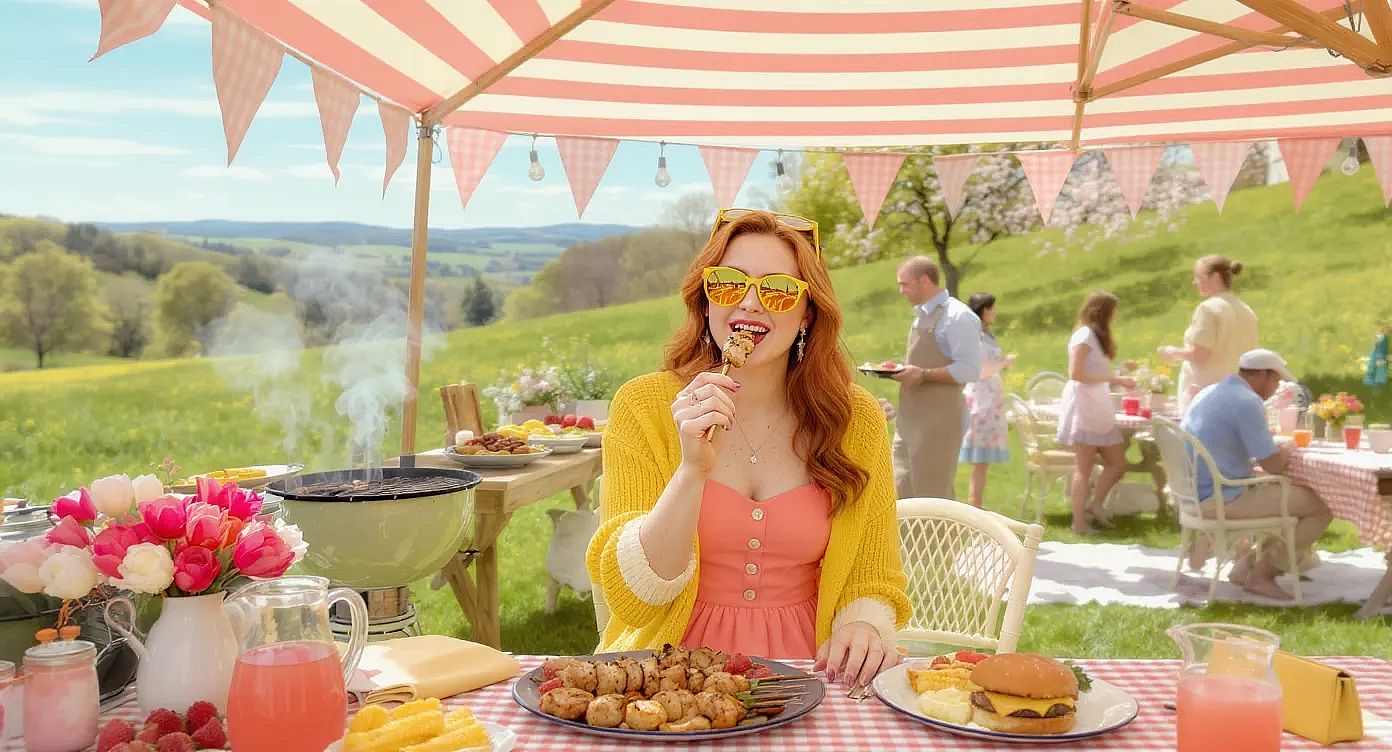
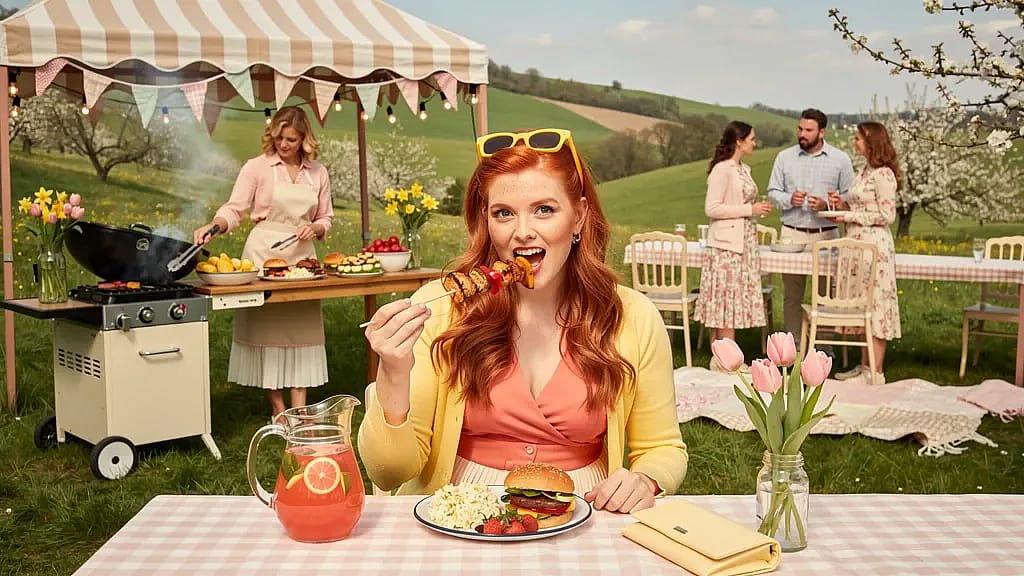
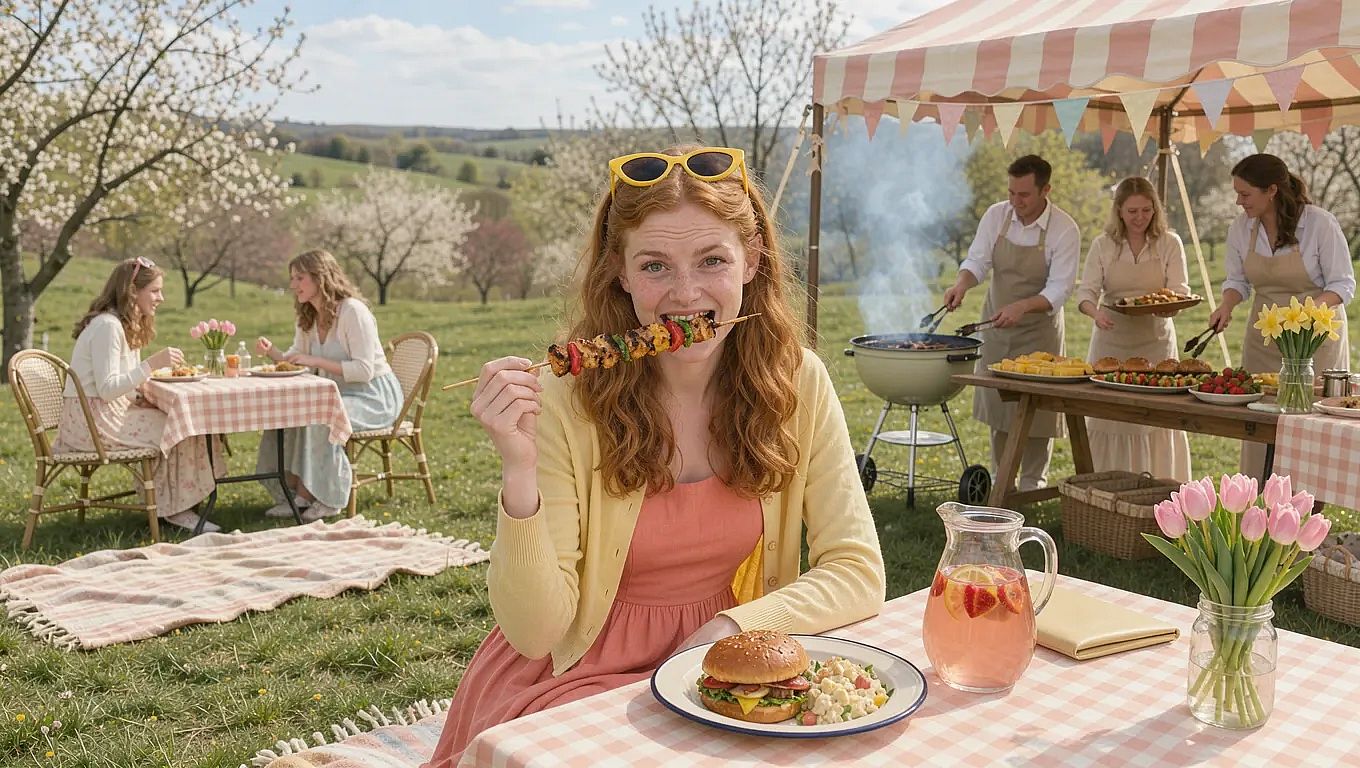
The best way to see the gap between FLUX generations is to run one prompt on all three. The spring picnic scene prompt below tests the generation quality difference in the FLUX models.
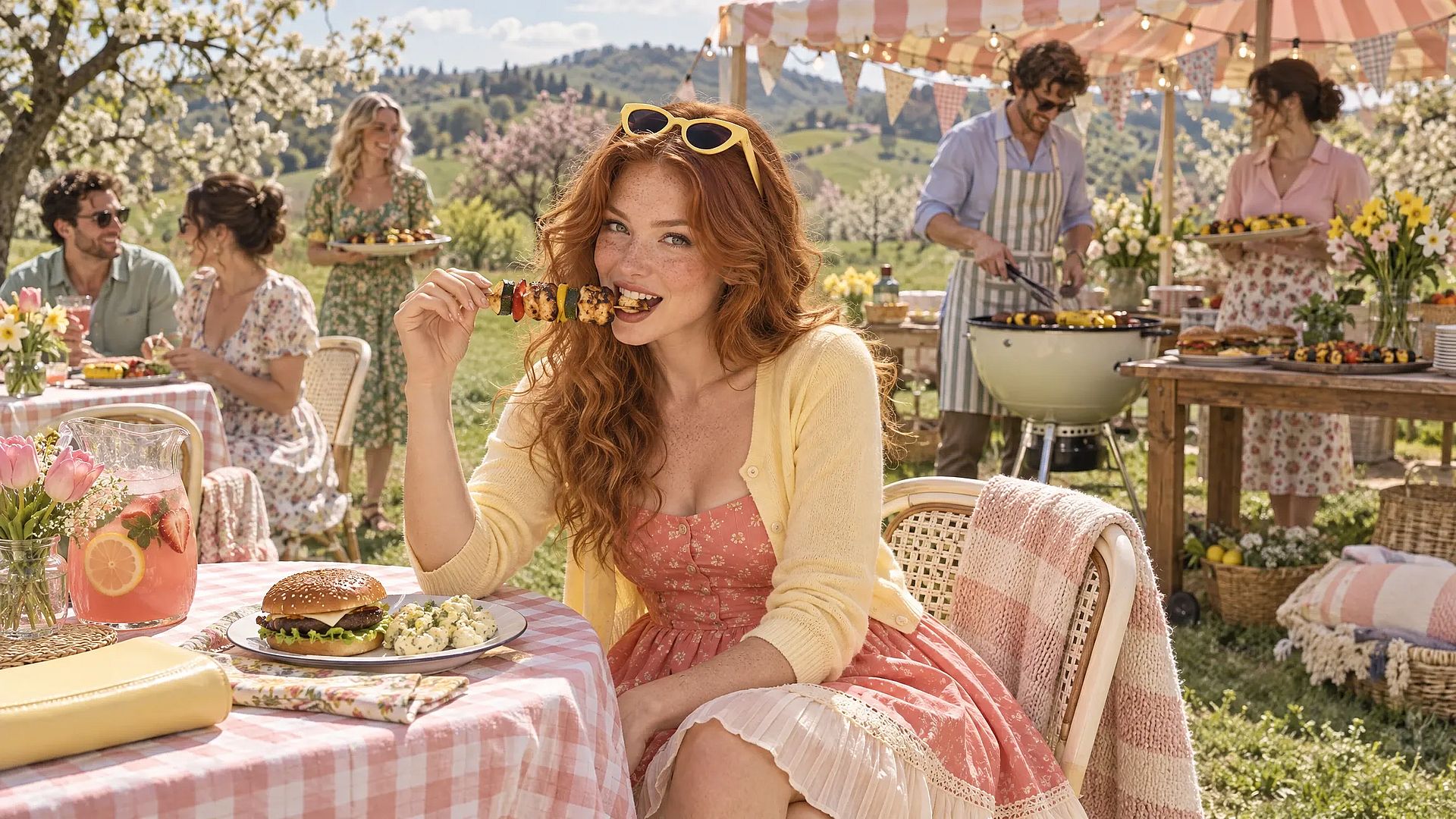
SCENE: Sunlit spring hillside meadow, rolling green hills dotted with blossoming cherry and apple trees, soft blue sky with light clouds. Mid-ground: a vintage cream-and-sage charcoal kettle grill and a long wooden prep table under a blush-and-cream striped canopy tent, strung with bistro lights and bunting in pastel fabric (no lettering). Soft wisps of smoke rise from the grill. The prep table holds platters of grilled corn, skewers of peppers and zucchini, burgers, a bowl of strawberries, and jars of tulips and daffodils. Two hosts tend the grill with tongs and an apron. Long picnic tables with gingham tablecloths, cream bistro chairs, and a few woven blankets spread on the lawn.

SUBJECT: Foreground: young woman, long wavy copper hair, freckles, yellow cat-eye sunglasses on her head, lightweight butter-yellow cardigan over a coral tea dress with a cream pleated hem. She sits at a gingham-covered table, holding a grilled corn cob or a skewer mid-bite, smiling and looking straight at camera. Beside her: a glass pitcher of strawberry lemonade, an enamel plate with a burger and potato salad, a small jar of pink tulips, and a pale yellow clutch. Background: four guests in pastel spring clothing (light knits, floral midi dresses, linen shirts), some seated with plates, some standing chatting near the grill, one carrying a tray of food.

ART STYLE: High-end fashion editorial photography, retro 1950s Americana with modern polish. 50mm lens, sharp foreground, softly blurred background. Bright late-morning spring light with gentle warmth, pastel palette of coral, butter yellow, mint, blush, cream, and fresh spring green. Wide cinematic framing.

CONSTRAINTS: No ice cream, milkshakes, whipped cream, or dessert glassware. No large open flames or heavy smoke obscuring faces. No text, logos, or readable signage. No buildings, cars, or bikes. No raw meat on display. Natural hands, natural eating poses, and correct anatomy.
FLUX.1 [pro] result
FLUX.2 [pro] result
FLUX 3 Image result
If you feel that the FLUX image models don’t live up to the quality you want, OpenArt’s AI image generator also offers a range of other leading image models, like GPT Image 2.5 and Google’s Nano Banana 2.1.
Here is the result of the same prompt from GPT Image 2.5 (Sunburst mode):
Which FLUX model fits your work?
Marketing and ad teams: FLUX 3 Image is the best FLUX model for finished ads, because it writes the headline and price right on the picture. Use FLUX.2 [pro] to create many quick versions of one idea using much less credits.
Brand and design teams: FLUX 3 Image keeps your product, mascot, or spokesperson looking the same across a whole campaign. FLUX.2 might be a good pick when exact hex colors matter most.
Ecommerce, fashion, and beauty teams: FLUX 3 Image puts real products into new scenes without a photo shoot. Upload a shoe, a bag, and a model photo, and FLUX 3 Image builds one 4K lifestyle picture from all three.
Filmmakers and storytellers: FLUX 3 Image keeps a character the same from frame to frame, which helps with storyboards and mood boards. When you are ready for motion, FLUX 3 Video turns a still frame into a 5 to 20 second clip with sound.
Developers and hobbyists: FLUX.2 [klein] 4B and FLUX.1 [schnell] are the FLUX models to run locally on your own computer, and both allow commercial use.
Can you use FLUX images for commercial work?
Commercial use of a FLUX model depends on where you run it. The open FLUX models come with their own licenses. FLUX.1 [schnell] and FLUX.2 [klein] 4B use the Apache 2.0 license, which allows commercial use. FLUX.1 [dev], FLUX.2 [dev], and FLUX.2 [klein] 9B are free for non-commercial use only, and Black Forest Labs sells a separate license for business use.
FLUX models on OpenArt follow OpenArt's plan terms. Content you make on OpenArt can be used in client campaigns, paid ads, and products you sell, and commercial rights apply on eligible paid plans. Check the OpenArt pricing page to see which plan fits your work.
How to use FLUX 3 Image on OpenArt
- Open OpenArt's Create Image tool, and pick FLUX 3 Image from the models menu.
- Upload your reference images and say what each one is for, such as "Image 1 is the jacket."
- Type your prompt, including any words that go in the picture in quotation marks.
- Choose 1K, 2K, or 4K and your aspect ratio, then generate.
- Type one change at a time until the picture is right, then download it.
Try every FLUX image model on OpenArt
OpenArt brings FLUX image models from every generation into one place, next to GPT Image 2.5, Nano Banana Pro, and other leading image models. Run the same prompt on the models of your choice, then keep the picture you like best, all from one dashboard.
Start with FLUX 3 Image for sharp 4K pictures, clear text, and up to 10 reference images.
FAQs
What is the latest FLUX model?
FLUX 3 is the latest FLUX generation from Black Forest Labs. The FLUX 3 family includes FLUX 3 Image for still pictures and FLUX 3 Video for clips with sound. FLUX 3 Image went live on OpenArt on October 1, 2026, and makes native 2K and 4K pictures with up to 10 reference images.
Is FLUX 3 better than FLUX.2?
FLUX 3 Image is the stronger FLUX model for final pictures. FLUX 3 Image makes native 4K pictures, follows long prompts more closely, and writes text in many languages. FLUX.2 is still a good choice for fast drafts, big low-cost batches, and open models like FLUX.2 [klein] 4B that run on your own computer.
Is FLUX 3 a video model?
FLUX 3 is a family with both an image model and a video model. FLUX 3 Image makes and edits still pictures up to 4K. FLUX 3 Video makes 5 to 20 second clips with sound from a text prompt or a starting picture. Both FLUX 3 models are available on OpenArt.
What is the difference between FLUX.2 [pro], [flex], and [max]?
FLUX.2 [pro] is the fast, everyday FLUX.2 model for big batches, with pictures in under 10 seconds. FLUX.2 [flex] lets you add steps for more detail, which helps with text and typography. FLUX.2 [max] gives the highest FLUX.2 quality and can look up current information on the web before it makes a picture.
What is the difference between FLUX.1 [schnell] and FLUX.1 [dev]?
FLUX.1 [schnell] is the fastest FLUX.1 model and makes a picture in 1 to 4 steps. FLUX.1 [schnell] uses the Apache 2.0 license, so commercial use is allowed. FLUX.1 [dev] gives higher quality and works with thousands of community LoRAs, but its license allows free use for non-commercial work only.
Can I try FLUX models for free?
Yes. Every new OpenArt account starts with 40 free credits, so you can try the product right away. When you're ready to create more, paid plans add monthly credits and watermark-free downloads. See current plans on the OpenArt pricing page.