

 ChatGPT
 Perplexity
 Claude
 Gemini
The best AI image generator for quotes does more than place attractive words over a background. Whether you search for this as a quote image generator or an ai quote generator, the real job is the same: it needs to spell the quote correctly, keep the style recognizable across a series, fit the destination format, and let you fix small errors without rebuilding the entire image.
For most creators who want model choice, editing, and reusable visual styles in one workflow, OpenArt is the best overall option. Ideogram is a strong specialist when short text must be part of the generated scene. Canva and Adobe Express are better when every word must remain editable as a real text layer.
Create your first quote image with OpenArt, or use the guide below to choose the right tool for social posts, quote posters, brand campaigns, print products, and daily quote accounts.
Quick answer: Choose OpenArt for an end-to-end creative workflow, Ideogram for short in-image typography, Canva for templates and bulk social production, Adobe Express for editable branded layouts, ChatGPT with GPT Image 2 for conversational iteration, Midjourney for background art, Leonardo for free experimentation, and Stable Diffusion for a self-hosted custom workflow.
How We Compared the Best AI Image Generators for Quotes
This is a research based comparison, not a claim that every tool was tested in a controlled lab. We reviewed current product pages, official documentation, pricing, licensing terms, public text rendering evidence, and creator discussions. Each tool was judged against the work a quote graphic actually requires:
- Text reliability: Can it render a short quote without missing, changing, or repeating letters?
- Editing: Can you fix one word, change a background, or adjust the layout without starting again?
- Style consistency: Can a daily account or brand keep the same visual language over time?
- Format control: Does it support square, portrait, story, landscape, and print friendly layouts?
- Production fit: Is it better for one graphic, a recurring series, bulk social content, or print work?
- Commercial terms: Does the relevant plan allow the intended business use, and who controls public or private outputs?
Text accuracy is a real production issue, not just an inconvenience reported in forums. The peer reviewed Type-R paper presented at CVPR 2025 treats typo detection and correction as a separate step after image generation. This supports a cautious workflow: generate, inspect, then correct or replace the text layer.
Text rendering has improved dramatically heading into 2026 — in a recent benchmark of 18 image models, top performers like Seedream 4.5, GPT Image 1.5, and FLUX.2 Pro handled short phrases and signage reliably. Still, no model guarantees perfect spelling: accuracy drops noticeably beyond roughly 30 characters, and stylized typography and non-Latin scripts remain the weakest spots. Short quoted text, large type, strong contrast, and a clean layout improve the odds. If a price, product name, attribution, or legal line must be exact, add it as an editable text layer after creating the visual.
Best AI Image Generators for Quotes at a Glance
| Tool | Best For | Text Workflow | Consistency | Main Limitation |
|---|---|---|---|---|
| OpenArt | Best overall quote image workflow | Access text capable models, then edit or refine in one workspace | Custom style training and reusable references | Commercial use starts on the Plus plan |
| Ideogram | Short text inside the generated image | Strong focus on typography and text rendering | Saved styles and reference features | Long or curved copy can still need correction |
| Canva | Templates and bulk social content | Real, editable text over templates or generated backgrounds | Brand tools and reusable templates | Generated visuals can feel template led |
| Adobe Express | Branded quote posters | Editable type, templates, and Firefly assisted assets | Brand controls and Creative Cloud workflow | Best value is tied to the Adobe workflow |
| ChatGPT with GPT Image 2 | Conversational iteration | Describe the quote, layout, and revisions in natural language | Strong within an iterative conversation | Not a full production design system |
| Midjourney | Stylized background art | Best used for the background, with type added later | Style references support visual direction | Exact text is not its safest use case |
| Leonardo AI | Free experimentation and model variety | Model dependent, with canvas tools for refinement | Presets, references, and paid privacy options | Free outputs are public under Leonardo's current terms |
| Stable Diffusion | Technical, custom, self-hosted workflows | Depends on model, LoRA, ControlNet, and post production | Deep control for advanced users | Setup, hardware, and licensing require more work |
Krea and Magnific are useful after generation, especially for enlargement, but they are not the strongest primary answer to a search for a quote image generator. They belong in the finishing workflow rather than the main ranking.
Compare models, keep editing and upscaling in one place, and you'll spend less time rebuilding a graphic just to fix one word.
1. OpenArt: Best Overall for Recurring Quote Content
OpenArt fits creators who need more than one attractive quote card. Its current paid plans include access to more than 100 image, video, and audio models, plus an image editing suite. For quote work, the practical advantage is model choice. You can use a text capable model such as GPT Image 2 for a poster with words inside the scene, then edit it or create controlled image variations before upscaling the approved result.
The workflow also supports repeat production. If a quote account, coach, or small brand needs the same color treatment, illustration style, or visual texture every week, OpenArt lets you train a custom style from a set of reference images. Teams that already have fixed logos, colors, fonts, and brand rules can instead store them in an AI Brand Kit. Both options are more reliable than trying to recreate a house style from memory in every prompt.
OpenArt is strongest when you need:
- Several model options for typography, photography, illustration, and editing
- A repeatable style for a series rather than a single graphic
- Image editing and upscaling in the same broader workflow
- One workspace for quote graphics and the other campaign visuals built around them
The main limitation is commercial use. The Starter plan begins at $14 per month, or $12.60 per seat per month when billed annually, but commercial use rights are listed from the Plus plan. Check the current OpenArt pricing page before publishing paid client work or merchandise.
Best fit: Daily, motivational, and inspirational quote accounts, lean social teams, coaches, creators with a recurring visual identity, and sellers who also need editing or print preparation.
Not the best fit: Someone who only wants to type a quote into a fixed template and download it once.
Try the AI Poster Maker for a ready-made quote layout, or start from a blank canvas if you want more control.
2. Ideogram: Best for Short In-Image Typography
Ideogram is built around text rendering and structured design. It is a good choice when the words need to feel physically part of the image, such as painted lettering on a wall, a retro sign, a book cover, or a poster headline.
Its official text and typography guidance recommends placing the exact text in quotation marks and describing the typography, position, and visual hierarchy. That makes it a natural fit for short, high contrast quote cards. Current Ideogram features also include editable text layers, styles, and print on demand workflows.
The limitation is the same one that applies to every generated text workflow: accuracy drops as the copy becomes longer, smaller, curved, multilingual, or surrounded by a busy scene. Ideogram can reduce correction work, but it does not remove the need to inspect every letter.
Best fit: Posters, signs, covers, and short quote cards where the type belongs inside the generated visual.
Use another workflow when: The quote is long, a brand font must match exactly, or an attribution line cannot change.
3. Canva: Best for Templates and Bulk Social Production
Canva is the most practical choice when the quote must stay editable. Start with a quote graphic template or generate a background, then place the text as a real layer. That gives you reliable spelling, font control, alignment, and reusable layouts.
For a social team, Canva's value sits around the image rather than inside the model. Brand tools help keep fonts and colors consistent. Magic Switch can adapt one design to several channel formats, and Bulk Create can populate repeated designs from structured data. This suits a month of testimonial cards or daily quotes better than generating each composition from zero.
The tradeoff is originality. A template led workflow can look familiar unless you bring in custom art, photography, or a distinctive layout system. One strong approach is to create the background in OpenArt, then place exact typography in Canva.
Best fit: Social managers, content calendars, testimonial cards, and teams that need editable copy and many channel sizes.
4. Adobe Express: Best for Editable Brand Layouts
Adobe Express also treats typography as an editable design element. Its quote poster workflow combines templates, font controls, image assets, and Firefly assisted creation. It works well for teams already storing brand assets or finishing work in Creative Cloud.
Adobe community discussions still show why this distinction matters. Users report misspelled words in generated imagery, while community experts often recommend correcting text in an editable layer. For brand names, offer prices, event dates, and long quotes, that remains the more dependable production method.
Best fit: Marketing teams, Adobe users, and quote posters that need exact brand typography.
Main limitation: It is less compelling if you do not need the surrounding Adobe design workflow.
5. ChatGPT with GPT Image 2: Best for Conversational Iteration
GPT Image 2 is useful when the quote graphic changes through a conversation. You can ask for a stronger hierarchy, more negative space, a new background, or a corrected word without rewriting the complete brief each time. OpenAI's official image generation prompting guide recommends specifying the asset type, composition, subject, key details, constraints, and output format instead of relying on a loose style description.
It is particularly useful for concept work, comics, posters, and scenes that contain short readable text. Community feedback also highlights a remaining edge case: longer text and non English characters can still require correction. Review the final file at full size before it goes live.
Best fit: Iterative concept development and creators who prefer conversational editing.
Main limitation: ChatGPT is not a template library, bulk publishing system, or complete print production tool.
6. Midjourney: Best for Quote Background Art
Midjourney remains useful when the background carries most of the visual impact. It can produce atmospheric photography, painterly scenes, editorial textures, and stylized compositions that give a quote card a distinctive mood.
Treat the text as a separate production step. Generate the visual with deliberate negative space, then add the quote in Canva, Adobe Express, Figma, or another layout tool. That method gives you Midjourney's visual character without risking a misspelled headline.
Midjourney has no permanent free plan. Its current Basic plan is $10 per month. General commercial terms apply to paid plans, with separate requirements for companies above the revenue threshold stated in its terms.
Best fit: Art directed backgrounds and designers who already use a second tool for type.
7. Leonardo AI: Best for Free Experimentation
Leonardo gives new users room to explore different looks and models before committing to a paid workflow. It also includes canvas and editing tools that can help refine a generated background or composition.
Commercial permission and ownership are not the same. Leonardo's current guidance says free users can use outputs commercially, but free outputs are public and Leonardo owns them as between the user and the platform. Paid subscribers can create private assets and own those assets as between themselves and Leonardo. That distinction matters for client work, exclusive merchandise, and a recognizable brand system.
Best fit: Early concept testing and creators comparing several visual directions.
Main limitation: Free output privacy and ownership terms may not fit exclusive commercial work.
8. Stable Diffusion: Best for Technical Control
Stable Diffusion is a model family rather than a single consumer quote maker. A local or managed workflow can combine LoRA training, ControlNet, inpainting, and custom pipelines. That gives advanced users deep control over composition and recurring style.
The cost is setup. You may need compatible hardware, a hosted interface, model selection, and a separate text composition tool. Licensing also varies by model and use, so check the current Stability AI license and the license attached to any community checkpoint.
Best fit: Technical creators who need customization, privacy, or automation and can maintain the workflow.
Main limitation: It is much more work than a browser based quote graphic tool.
Which AI Quote Image Generator Should You Choose?
| Your Job | Best Starting Point | Why |
|---|---|---|
| Publish a recurring daily, motivational, or inspirational quote series | OpenArt | Model choice, reusable style, editing, and upscaling support repeat production |
| Put a short quote inside the generated scene | Ideogram | Typography is central to the product |
| Produce a month of editable social cards | Canva | Templates, bulk creation, and multi format resizing |
| Keep brand fonts and Adobe assets in the workflow | Adobe Express | Editable type and Creative Cloud fit |
| Develop the design through conversation | ChatGPT with GPT Image 2 | Natural language iteration and image editing |
| Create distinctive background art | Midjourney | Strong visual direction when type is added later |
| Explore at low cost | Leonardo AI | Free public experimentation with several creative tools |
| Build a private custom pipeline | Stable Diffusion | Self hosting and technical control |
The safest production rule is simple: if the words are the product, keep them editable. Use generated text for short integrated lettering and visual experiments. Use a real text layer for prices, names, attributions, long quotes, and brand critical copy.
How to Create a Quote Image in OpenArt
- Define the destination and layout. Choose the final ratio before you create. Use 1:1 or 4:5 for feed posts, 9:16 for stories, 2:3 for Pinterest or many print layouts, and 16:9 for landscape banners.
- Describe the quote and visual system. Put the exact quote in quotation marks. Specify the type category, case, placement, contrast, background, and negative space. Select a text capable model such as GPT Image 2 when the words must appear inside the image.
- Inspect, correct, and finish. Check every letter at full size. Use a targeted edit for a small visual issue. If the exact wording still fails, create a text free background and add the quote as a real text layer. Use the 4K Image Upscaler only after the composition and spelling are approved.
Create a quote image in OpenArt and test the workflow with one of the prompts below.
Copy Ready Prompts for Quote Images
For more visual directions beyond quote cards, use OpenArt's collection of AI image prompt examples as a starting point, then keep the exact quote, hierarchy, and output ratio specific to your project.
Minimalist Instagram Quote Card
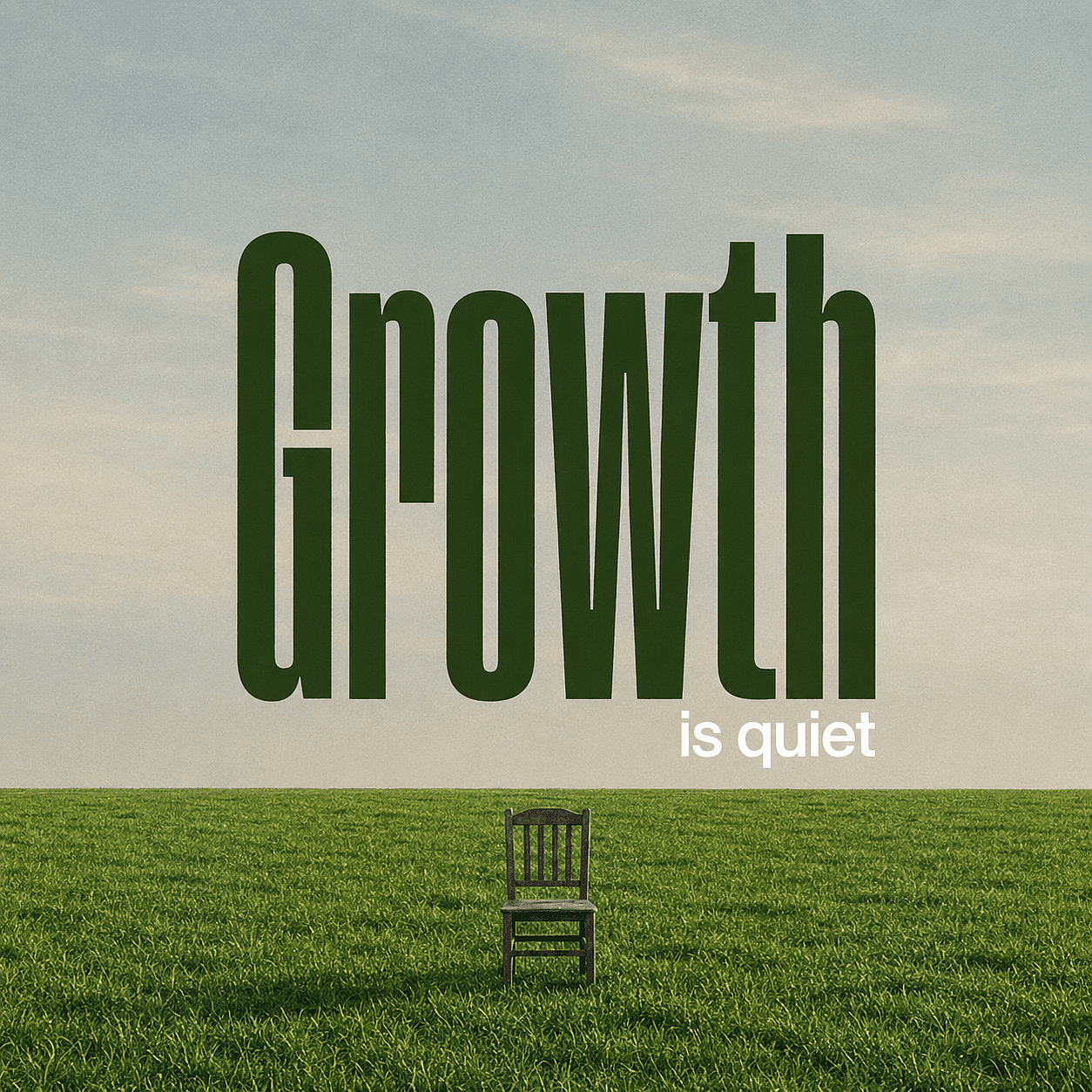
Minimalist poster of a flat green grass field under a pale blue sky. A single weathered wooden chair sits centered in the grass.
Massive dark green text "Growth" dominates the sky. Smaller white text "is quiet" sits below it. Soft natural lighting, peaceful atmosphere, slight vintage film grain, lower-third horizon line.
The quote is short and placed in quotation marks. The prompt defines the type category, location, contrast, background, and ratio without asking the model to solve too many competing elements.
Personal Brand Quote Post
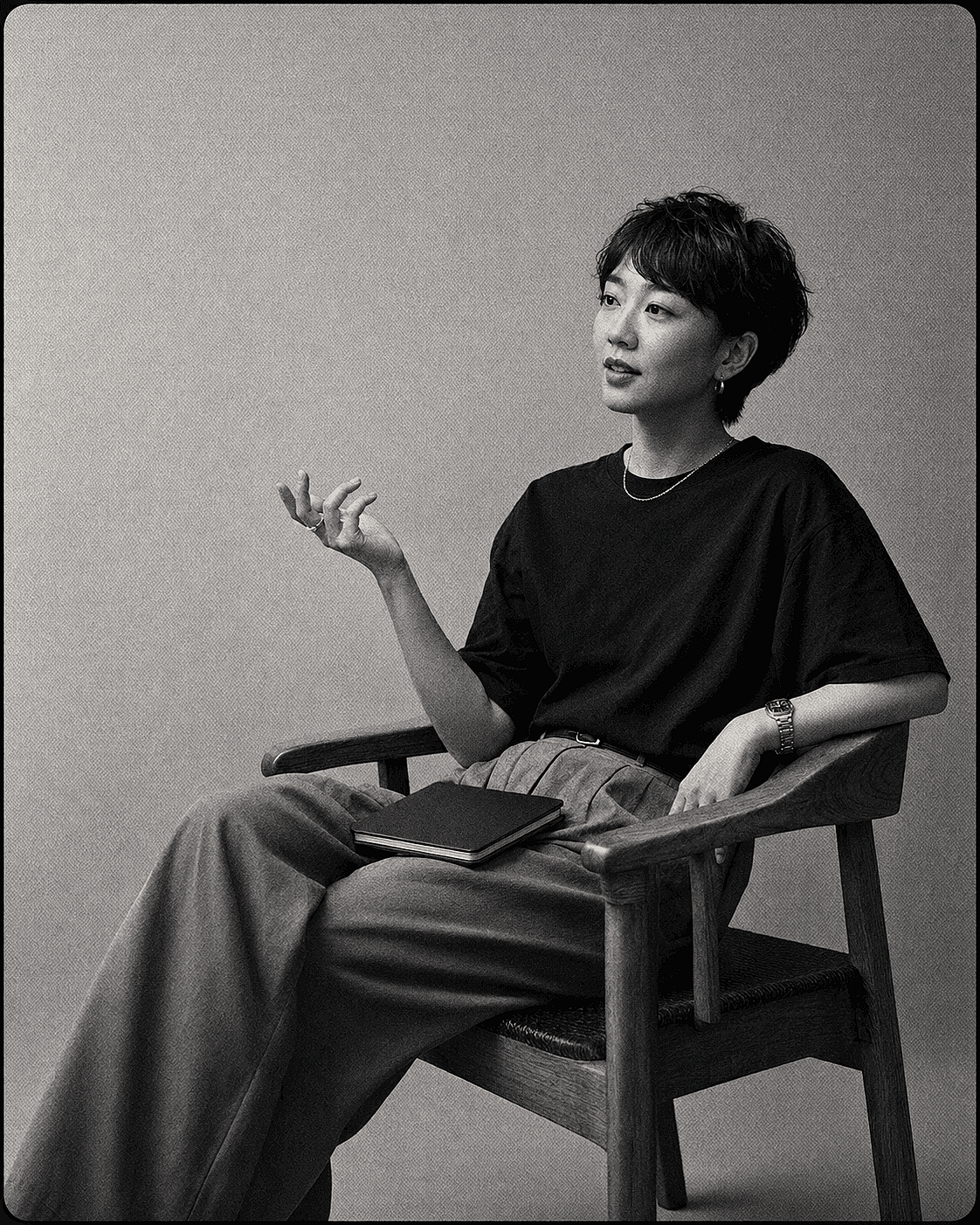
Black and white portrait of an Asian woman with short hair sitting in a wooden armchair. She wears a dark t-shirt and high-waisted trousers,
gesturing with one hand while a notebook rests on her lap. Plain textured studio background. 35mm film, heavy grain, soft diffused lighting, medium shot, cinematic composition.
Add the exact quote in your design tool. This is the better prompt when a brand font, speaker name, or long attribution must remain editable.
Retro Quote Poster
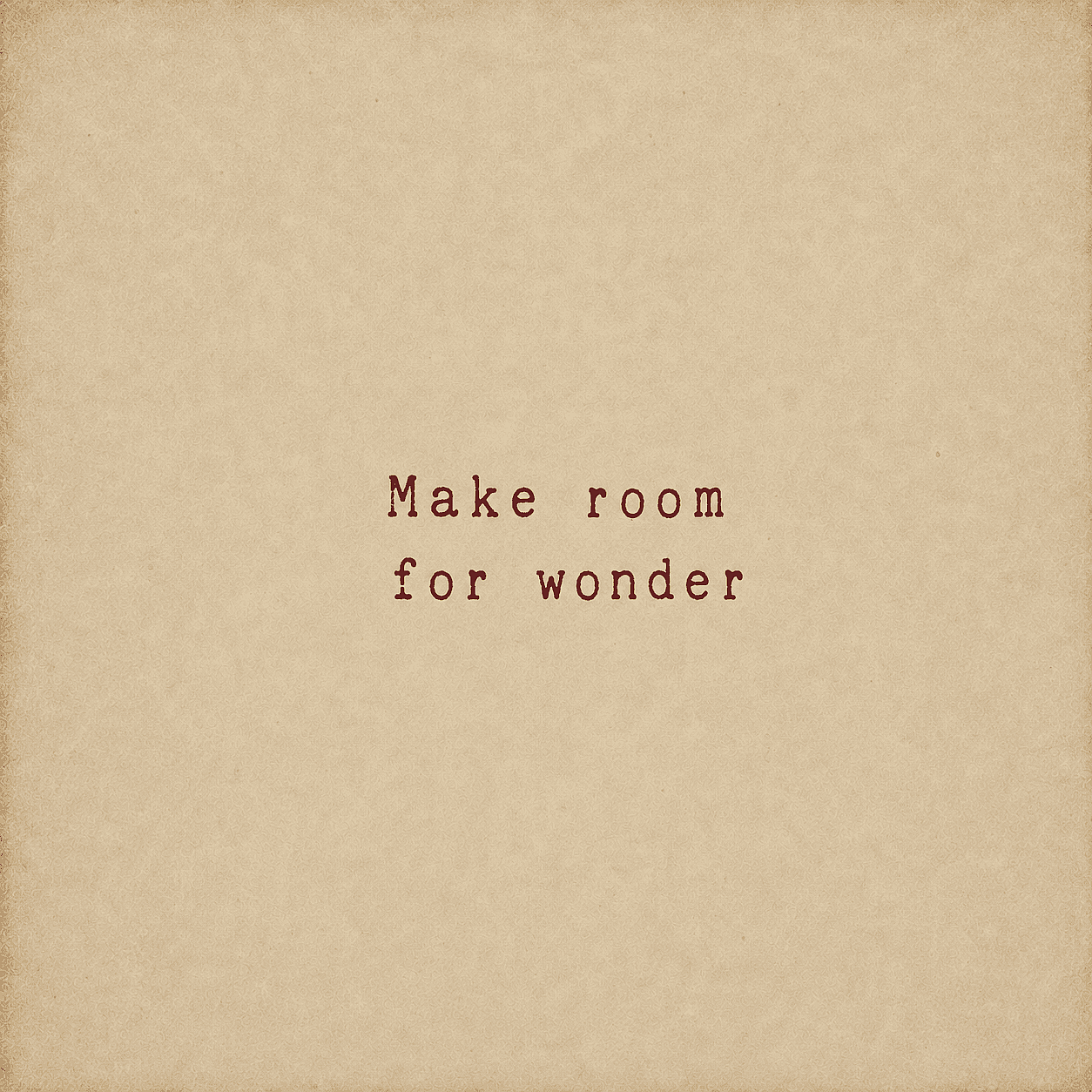
Minimalist typography featuring the text 'Make room for wonder' in a faded red vintage typewriter font. Centered on aged,
textured parchment paper with a warm beige tone and subtle edge vignetting. Rustic, nostalgic, and simple aesthetic.
To adapt it, change one variable at a time: type style, color palette, background material, or ratio. Keeping the structure stable makes comparisons between models more useful.
For web graphics, readability should be checked separately from visual style. The WCAG 2.2 contrast guidance from W3C uses a minimum contrast ratio of 4.5:1 for normal text and 3:1 for large text. These ratios are useful baselines for quote graphics, especially when text sits over photography or gradients.
Expert Insight: Generated Type and Real Type Solve Different Problems
The most important decision is not which model has the highest text score. It is whether the lettering should behave like part of the picture or like editable information.
Generated type is useful for a painted sign, embroidered phrase, neon lettering, or stylized poster where the words and image share one texture. Real type is better for a product price, event date, legal line, attribution, or campaign headline that must stay exact across versions.
This distinction also improves efficiency. A creator can spend ten generations trying to fix one letter, or keep the approved background and correct the copy in seconds. Community discussions across Adobe and OpenAI repeatedly surface the same concern: text generation has improved, but longer strings and non English characters still need inspection.
Commercial Use and Copyright: Check Both
A platform can permit commercial use without guaranteeing that an output is copyrightable or exclusive. Plan terms answer whether the service allows your intended use. Copyright law asks a different question about human authorship and protectable expression.
The U.S. Copyright Office report on AI copyrightability states that purely AI generated material is not protected by copyright, while human selection, arrangement, and creative modification may be protected case by case. For a quote product, original typography, layout decisions, editing, illustration, and arrangement can therefore matter beyond the initial generation.
The quote itself requires a separate check. U.S. rules list words, names, titles, slogans, and other short phrases among material that is not subject to copyright, but that does not mean every passage found online is free to reuse. Longer excerpts, translations, source artwork, trademarks, publicity rights, and inaccurate attribution can create different issues. The Copyright Office's rule on short phrases is a starting point, not a universal clearance test.
This is general information, not legal advice. Review the current platform terms, the rights to the quote itself, the source image rights, and the law in your market. OpenArt's guide to AI image copyright and IP risk provides a practical next step.
FAQ
What is the best AI image generator for quotes?
OpenArt is the best overall option for creators who want model choice, editing, reusable styles, and upscaling in one workflow. Ideogram is a strong choice for short text inside the image. Canva or Adobe Express is safer when every word must remain editable.
What's the difference between an AI quote generator and an AI image generator for quotes?
An AI quote generator or quote image generator usually means a single tool that turns typed text into a finished graphic in one step, similar to a template. An AI image generator used for quotes, like the tools compared in this guide, gives you more control over visual style, model choice, and editing, but usually requires writing a short prompt. Both approaches can produce the same result: a shareable image with a quote on it.
Which AI image generator spells words correctly?
GPT Image 2 and Ideogram are designed for stronger text rendering, but no model guarantees perfect spelling in every image. Keep the quote short, put it in quotation marks, use large high contrast type, and inspect every letter. Add a real text layer when the wording must be exact.
Can I make quote images for free?
Several tools offer free access, limited trials, or free public generation. The useful limit depends on output privacy, watermarks, credits, and export quality. Check the current plan before choosing a workflow for daily content or commercial products.
How do I keep quote graphics visually consistent?
Use a fixed layout system, color palette, type hierarchy, and ratio. Save reference images or train a custom style when the platform supports it. For production at scale, create a reusable template after approving the first visual direction.
Should I generate the quote inside the image or add it later?
Generate it inside the image when the lettering is part of the scene and the phrase is short. Add it later when spelling, font choice, attribution, localization, prices, or brand rules must be exact.
Can I sell AI generated quote prints?
It depends on the platform terms, your plan, the quote, the inputs, the output, and local law. Commercial permission does not automatically create copyright or exclusivity. Confirm the current terms and avoid protected passages, logos, characters, or source images you do not have the right to use. If you sell on Etsy, its current Creativity Standards allow seller prompted AI creations under "designed by a seller," but require disclosure in the listing description.
What size should a quote image be?
Use the ratio required by the destination. Common starting points are 1:1 and 4:5 for social feeds, 9:16 for stories, 2:3 for Pinterest and many prints, and 16:9 for landscape banners. Check the destination's current specifications before export.
Can I upscale a quote image for print?
Yes, but approve the spelling and layout first. Upscaling can enlarge the file, but it does not turn misspelled generated letters into reliable typography. For print critical work, add the quote as a real vector or high resolution text layer before final export.