

 ChatGPT
 Perplexity
 Claude
 Gemini
名言に最適なAI画像ジェネレーターは、魅力的な言葉を背景に載せるだけにとどまりません。これを次のように検索する場合でも、 名言画像ジェネレーター または AI名言ジェネレーター、本質的な仕事は同じです。引用を正しく綴り、シリーズ全体でスタイルを認識できるように保ち、配信先のフォーマットに合わせ、画像全体を作り直さずに小さなミスを修正できるようにすることです。
モデルの選択、編集、再利用できるビジュアルスタイルを1つのワークフローで使いたい多くのクリエイターにとって、 OpenArtが総合的に最適な選択肢です。Ideogramは、生成シーンに短いテキストを含める必要があるときに頼れるスペシャリストです。すべての単語を実際のテキストレイヤーとして編集可能にしたい場合は、CanvaやAdobe Expressがより適しています。
OpenArtで初めての名言画像を作ろうあるいは、以下のガイドを使って、SNS投稿に適したツールを選びましょう。 名言ポスター、ブランドキャンペーン、印刷物、デイリー名言アカウント。
手っ取り早い答え: エンドツーエンドのクリエイティブワークフローならOpenArt、画像内の短いタイポグラフィならIdeogram、テンプレートやSNS向け大量制作ならCanva、編集可能なブランドレイアウトならAdobe Express、対話しながらの反復ならGPT Image 2搭載のChatGPT、背景アートならMidjourney、無料の実験ならLeonardo、セルフホスト型のカスタムワークフローならStable Diffusionを選びましょう。
名言向けAI画像ジェネレーターの比較方法
これはリサーチに基づく比較であり、すべてのツールを管理された環境でテストしたという主張ではありません。私たちは現行の製品ページ、公式ドキュメント、価格、ライセンス条件、公開されているテキスト描画の実例、クリエイターの議論をレビューしました。各ツールは、引用グラフィックが実際に必要とする要素に照らして評価しています。
- テキストの信頼性: 文字を欠かさず、変えず、重複させずに短い引用文をレンダリングできますか?
- 編集: 1つの単語を直したり、背景を変えたり、レイアウトを調整したりを、やり直さずにできますか?
- スタイルの一貫性: 日常的なアカウントやブランドで、同じビジュアル言語を長期的に保てますか?
- フォーマット調整: スクエア、縦型、ストーリー、横型、印刷向けのレイアウトに対応していますか?
- 制作への適合性: 1点のグラフィック、連載シリーズ、大量のソーシャルコンテンツ、印刷物のうち、どれに向いていますか?
- 商用利用条件: 該当プランは想定するビジネス用途を許可していますか?また、公開・非公開の生成物は誰が管理しますか?
テキストの正確さは、フォーラムで報告される単なる不便さではなく、現実の制作課題です。査読済みの CVPR 2025 で発表された Type-R 論文 は、誤字の検出と修正を画像生成後の別ステップとして扱います。これは慎重なワークフロー、つまり生成してからチェックし、テキストレイヤーを修正または差し替えるという流れに対応しています。
2026年に向けてテキスト描画は劇的に進化しました。最近の 18の画像モデルのベンチマークSeedream 4.5、GPT Image 1.5、FLUX.2 Proといったトップクラスのモデルは、短いフレーズや看板を安定して処理しました。とはいえ、完璧なスペルを保証するモデルはありません。精度はおよそ30文字を超えると明らかに低下し、スタイライズされたタイポグラフィや非ラテン文字は依然として最も弱い部分です。短い引用テキスト、大きな文字、強いコントラスト、すっきりしたレイアウトが成功率を高めます。価格、製品名、クレジット表記、法的な一文を正確にしたい場合は、ビジュアルを作成した後に編集可能なテキストレイヤーとして追加しましょう。
名言に最適なAI画像ジェネレーター一覧
| ツール | おすすめの用途 | テキストワークフロー | 一貫性 | 主な制限 |
|---|---|---|---|---|
| OpenArt | 総合的に最適な引用画像ワークフロー | テキスト対応モデルを利用し、1つのワークスペースで編集・調整できます | カスタムスタイル学習と再利用可能なリファレンス | 商用利用はPlusプランから可能です |
| Ideogram | 生成画像内の短いテキスト | タイポグラフィとテキスト描写に強くこだわる | 保存したスタイルと参照機能 | 長いテキストや曲線のテキストは修正が必要な場合があります |
| Canva | テンプレートと大量のSNSコンテンツ | テンプレートや生成背景の上に、本物の編集可能なテキストを | ブランドツールと再利用可能なテンプレート | 生成されたビジュアルがテンプレートっぽく感じることも |
| Adobe Express | ブランド入りの名言ポスター | 編集可能な文字、テンプレート、Firefly 支援アセット | ブランドコントロールとCreative Cloudワークフロー | Adobeワークフローと組み合わせると最もお得 |
| GPT Image 2搭載のChatGPT | 会話しながら仕上げる | 引用文、レイアウト、修正内容を自然な言葉で説明しましょう | 反復的な対話の中では強力 | 本格的なプロダクションデザインシステムではありません |
| Midjourney | スタイライズされた背景アート | 背景に最適。文字は後から追加 | スタイル参照がビジュアルの方向性をサポート | 正確なテキストは、最も安全な用途ではありません |
| Leonardo AI | 自由な試行錯誤と豊富なモデルの選択肢 | モデル依存、微調整用のキャンバスツールあり | プリセット、リファレンス、有料のプライバシーオプション | 無料の出力はLeonardoの現行規約のもと公開されます |
| Stable Diffusion | 技術的でカスタマイズ可能な、セルフホスト型のワークフロー | モデル、LoRA、ControlNet、後処理によって異なります | 上級ユーザー向けの高度なコントロール | セットアップ、ハードウェア、ライセンスにより多くの手間がかかる |
KreaやMagnificは生成後、特に拡大に便利ですが、引用画像ジェネレーターを探す検索への答えとしては最有力ではありません。メインのランキングよりも、仕上げのワークフローに位置づけられます。
モデルを比較し、編集とアップスケールを一箇所で完結させれば、1つの単語を直すためだけにグラフィックを作り直す時間が減ります。
1. OpenArt:継続的な名言コンテンツに最適な総合1位
OpenArtは、見栄えの良い引用カードを1枚作るだけでは足りないクリエイターに最適です。現行の有料プランには、100を超える画像・動画・音声モデルへのアクセスに加え、画像編集スイートが含まれます。引用カード制作での実用的な利点はモデルの選択肢です。次のようなテキスト対応モデルを使えます GPT Image 2 シーン内に文字が入ったポスター用に、その後編集するか、または 制御された画像バリエーションを作成 承認された結果をアップスケールする前に。
このワークフローは繰り返しの制作にも対応します。名言アカウントやコーチ、小規模ブランドが毎週同じカラー処理、イラストスタイル、ビジュアルテクスチャを必要とする場合、OpenArtなら一連の参照画像からカスタムスタイルを学習できます。すでにロゴ、カラー、フォント、ブランドルールが決まっているチームは、代わりにそれらを次の場所に保存できます: AIブランドキット。どちらの方法も、毎回promptでハウススタイルを記憶から再現しようとするより確実です。
OpenArtが真価を発揮するのは、こんなときです。
- タイポグラフィ、写真、イラスト、編集に対応した複数のモデルオプション
- 1枚のグラフィックではなく、シリーズ全体で再現できるスタイル
- 同じ大きなワークフロー内での画像編集とアップスケール
- 一方のワークスペースは名言グラフィック用、もう一方はそれを軸にしたキャンペーンビジュアル用
主な制約は商用利用です。Starter プランは月額 $14 から、年払いなら1シートあたり月額 $12.60 ですが、商用利用の権利は Plus プランからとなっています。以下をご確認ください 現在の OpenArt 料金ページ 有料のクライアント案件やグッズを公開する前に。
最適な用途: 日々のモチベーション・インスピレーション系の名言アカウント、少人数のSNSチーム、コーチ、一貫したビジュアルアイデンティティを持つクリエイター、そして編集や印刷準備も必要な出品者に。
向いていない用途: 決まったテンプレートに引用文を入力して一度ダウンロードするだけでよい方。
AIポスターメーカーを試す すぐ使える引用レイアウトを選ぶか、より自由に作りたいなら空白のキャンバスから始めましょう。
2. Ideogram:短い画像内タイポグラフィに最適
Ideogramはテキストレンダリングと構造化されたデザインを軸に作られています。壁のペイント文字、レトロな看板、書籍の表紙、ポスターの見出しなど、文字が画像の一部として物理的に溶け込んでほしいときに最適な選択肢です。
公式リリース テキストとタイポグラフィのガイダンス は、テキストを引用符で正確に囲み、タイポグラフィ・配置・視覚的な階層を説明することを推奨しています。そのため、短くコントラストの効いた引用カードにぴったりです。現在のIdeogramには、編集可能なテキストレイヤー、スタイル、オンデマンド印刷ワークフローも含まれています。
制約は、あらゆるテキスト生成ワークフローに共通するものと同じです。コピーが長く、小さく、曲線的で、多言語だったり、賑やかなシーンに囲まれたりするほど精度は落ちます。Ideogramは修正作業を減らせますが、すべての文字を確認する必要をなくすわけではありません。
最適な用途: 文字が生成ビジュアルの内側に入るポスター、看板、カバー、短い名言カードなど。
別のワークフローを使う場合: 引用文が長い、ブランドフォントを正確に一致させる必要がある、またはクレジット表記を変更できない場合。
3. Canva:テンプレートとSNS向けの大量制作に最適
名言を編集可能なまま残したいなら、Canvaが最も実用的な選択肢です。名言グラフィックのテンプレートから始めるか背景を生成し、テキストを本物のレイヤーとして配置します。これにより、正確なスペル、フォントの制御、配置の調整、そして再利用できるレイアウトが手に入ります。
ソーシャルチームにとって、Canvaの価値はモデルの内側というより画像まわりにあります。ブランドツールがフォントやカラーの一貫性を保ち、Magic Switchは1つのデザインを複数のチャンネル形式に展開でき、Bulk Createは構造化データから繰り返しデザインを一括生成できます。毎回ゼロから作るより、1か月分の推薦カードや日替わりの名言づくりに向いています。
トレードオフはオリジナリティです。テンプレート主導のワークフローは、カスタムアート、写真、独自のレイアウトシステムを取り入れない限り、ありきたりに見えることがあります。有効な方法の一つは、OpenArtで背景を作り、Canvaで正確なタイポグラフィを配置することです。
最適な用途: ソーシャル担当者、コンテンツカレンダー、お客様の声カード、そして編集可能なコピーと複数のチャンネルサイズを必要とするチームに。
4. Adobe Express:編集可能なブランドレイアウトに最適
Adobe Expressも、タイポグラフィを編集可能なデザイン要素として扱います。名言ポスターのワークフローは、テンプレート、フォント設定、画像素材、Firefly支援による制作を組み合わせたもの。すでにCreative Cloudでブランド素材を管理していたり、作業を仕上げているチームに適しています。
Adobeコミュニティの議論からも、この違いがなぜ重要かが今なお見て取れます。ユーザーは生成画像にスペルミスがあると報告し、コミュニティの専門家は編集可能なレイヤーでテキストを修正することをよく勧めます。ブランド名、価格、イベント日、長い引用文については、これが依然としてより信頼できる制作方法です。
最適な用途: 正確なブランドタイポグラフィが必要なマーケティングチーム、Adobeユーザー、名言ポスター制作者向け。
主な制限: 周辺のAdobeデザインワークフローが不要なら、魅力は薄れます。
5. ChatGPT × GPT Image 2:対話しながらの反復に最適
GPT Image 2は、会話を通じて引用グラフィックが変化していく場面で役立ちます。毎回すべてのブリーフを書き直すことなく、より強い階層構造や余白の追加、新しい背景、単語の修正などを指示できます。OpenAI公式の 画像生成プロンプトガイド では、あいまいなスタイル説明に頼るのではなく、アセットの種類・構図・被写体・重要なディテール・制約・出力フォーマットを明確に指定することをおすすめしています。
コンセプトワーク、コミック、ポスター、短い読みやすいテキストを含むシーンに特に役立ちます。コミュニティのフィードバックでは、残された課題も指摘されています。長めのテキストや非英語文字は、まだ修正が必要になることがあります。公開前に、必ずフルサイズで最終ファイルを確認してください。
最適な用途: コンセプトを繰り返し練り上げていく開発や、会話形式の編集を好むクリエイターに。
主な制限: ChatGPTはテンプレートライブラリでも、一括公開システムでも、本格的な印刷制作ツールでもありません。
6. Midjourney:名言の背景アートに最適
Midjourneyは、背景が視覚的インパクトの大半を担う場面で今なお役立ちます。雰囲気のある写真、絵画的なシーン、エディトリアルな質感、スタイライズされた構図を生み出し、引用カードに独特のムードを添えてくれます。
テキストは別の制作ステップとして扱いましょう。あえて余白を残してビジュアルを生成し、Canva、Adobe Express、Figmaなどのレイアウトツールで引用文を追加します。この方法なら、見出しのスペルミスを心配することなく、Midjourneyならではのビジュアルの魅力を活かせます。
Midjourney に永続的な無料プランはありません。現在の Basic プランは月額 10 ドルです。有料プランには一般的な商用利用規約が適用され、規約に定められた収益しきい値を超える企業には別途の要件が課されます。
最適な用途: アートディレクションされた背景と、文字組みに別ツールをすでに使っているデザイナー向け。
7. Leonardo AI:無料で試すのに最適
Leonardoは、有料ワークフローに移行する前に、新規ユーザーがさまざまなルックやモデルを試せる余裕を与えてくれます。また、生成した背景や構図を仕上げるのに役立つキャンバスや編集ツールも備えています。
商用利用の許可と所有権は別物です。Leonardoの現在のガイダンスでは、無料ユーザーは出力を商用利用できますが、無料の出力は公開され、ユーザーとプラットフォームの関係においてはLeonardoが所有します。有料サブスクライバーは非公開アセットを作成でき、自身とLeonardoの関係においてそのアセットを所有します。この違いは、クライアントワーク、限定グッズ、認知度のあるブランドシステムにとって重要です。
最適な用途: 初期のコンセプトテストや、複数のビジュアル方向性を比較したいクリエイター向け。
主な制限: 無料版の出力のプライバシーや所有権に関する条件は、独占的な商用制作には合わない場合があります。
8. Stable Diffusion:技術的なコントロールに最適
Stable Diffusionは、単一のコンシューマー向けツールではなくモデルファミリーです。ローカルまたはマネージドのワークフローで、LoRAトレーニング、ControlNet、インペインティング、カスタムパイプラインを組み合わせられます。これにより上級ユーザーは、構図や繰り返し使うスタイルを細かくコントロールできます。
コストはセットアップにかかります。互換性のあるハードウェア、ホスティングされたインターフェース、モデルの選定、そして別途テキスト合成ツールが必要になる場合があります。ライセンスもモデルや用途によって異なるため、最新のStability AIライセンスと、利用するコミュニティチェックポイントに付随するライセンスを確認してください。
最適な用途: カスタマイズ、プライバシー、自動化を必要とし、ワークフローを維持できる技術系クリエイター向け。
主な制限: ブラウザベースの引用グラフィックツールに比べると、かなり手間がかかります。
どのAI名言画像ジェネレーターを選ぶべき?
| あなたの役割 | おすすめのスタート地点 | なぜ |
|---|---|---|
| 日替わり・モチベーション・インスピレーションを与える名言シリーズを継続的に投稿する | OpenArt | モデル選択、再利用可能なスタイル、編集、アップスケールで制作を効率化 |
| 生成したシーンに短い引用を入れる | Ideogram | タイポグラフィはこの製品の中核です |
| 1か月分の編集可能な SNS カードを作成 | Canva | テンプレート、一括作成、マルチフォーマットのリサイズ |
| ブランドフォントやAdobeアセットをワークフローで維持 | Adobe Express | 編集可能な書体とCreative Cloudとの相性 |
| 会話でデザインを練り上げる | GPT Image 2搭載のChatGPT | 自然言語での反復と画像編集 |
| 個性的な背景アートを制作 | Midjourney | 後からテキストを加えたときも力強いビジュアル表現を実現 |
| 低コストで試す | Leonardo AI | 複数のクリエイティブツールを無料で自由に試せる |
| 専用のカスタムパイプラインを構築 | Stable Diffusion | セルフホスティングと技術的なコントロール |
最も安全な制作ルールはシンプルです。文字そのものが成果物なら、編集可能なままにしておくこと。短い一体型レタリングやビジュアル実験には生成テキストを使いましょう。価格、名前、クレジット表記、長い引用、そしてブランドに欠かせないコピーには実際のテキストレイヤーを使いましょう。
OpenArt で名言画像を作る方法
- 行き先とレイアウトを決めましょう。 作成前に最終的な比率を選びましょう。フィード投稿には1:1または4:5、ストーリーズには9:16、Pinterestや多くのプリントレイアウトには2:3、横長バナーには16:9を使用します。
- 引用文とビジュアルシステムを描写する。 入れたい文言を引用符で囲みましょう。書体のカテゴリ、大文字・小文字、配置、コントラスト、背景、余白を指定します。文字を画像内に表示させたい場合は、GPT Image 2のような文字対応モデルを選びましょう。
- チェックして、修正して、仕上げる。 すべての文字を原寸で確認しましょう。細かな見た目の問題にはピンポイントの編集を使います。それでも正確な文言が出せない場合は、テキストのない背景を作り、引用文を本物のテキストレイヤーとして追加しましょう。以下を使ってください: 4K画像アップスケーラー 構図とスペルが承認された後にのみ。
OpenArtで名言画像を作成 以下のプロンプトのひとつでワークフローを試してみましょう。
名言画像にすぐ使える prompt をコピー
引用カード以外のビジュアル方向性については、OpenArtの AI画像プロンプトの例 を出発点にして、プロジェクトに合わせて名言・階層構成・出力比率をそのまま維持できます。
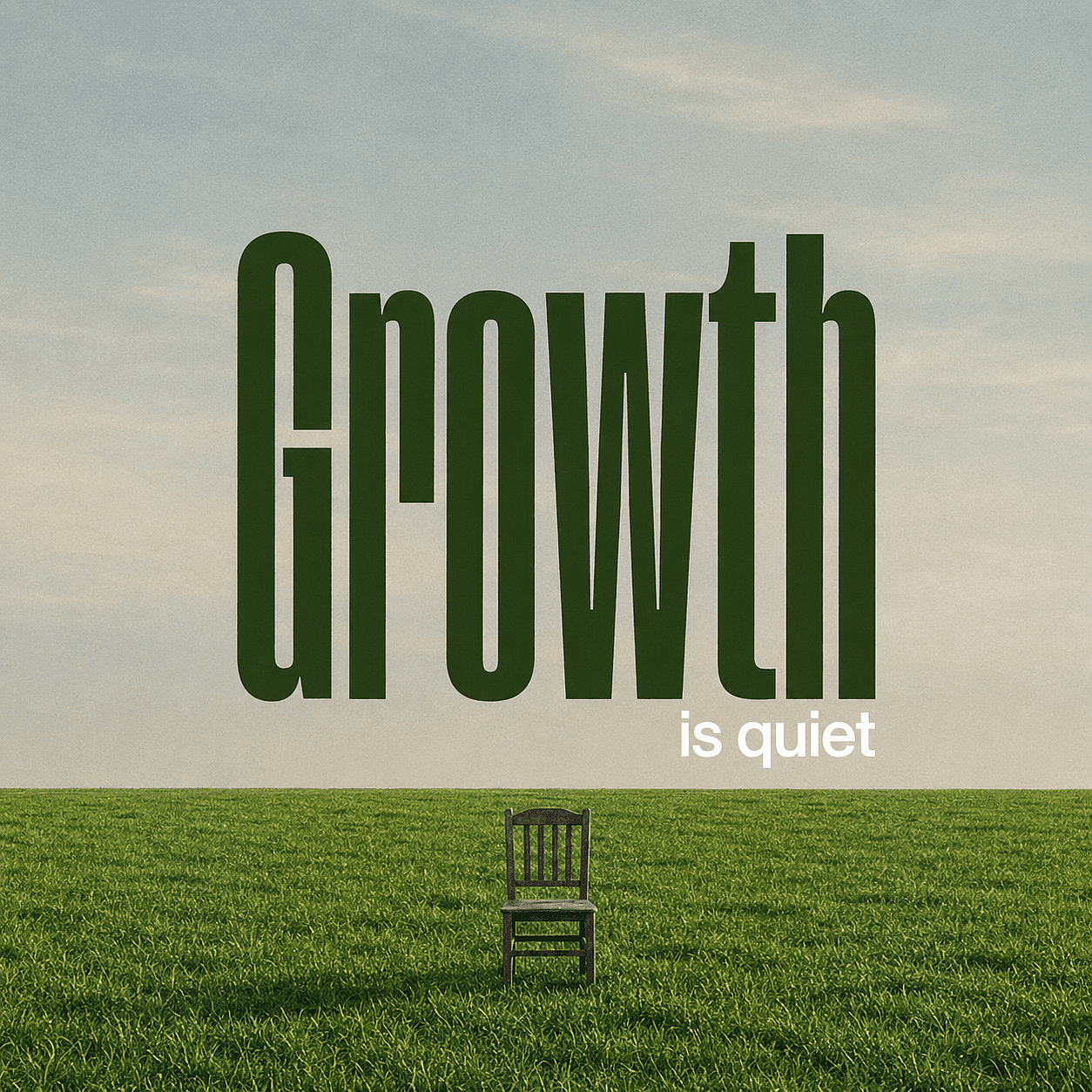
ミニマルなInstagram引用カード
淡い青空の下に広がる平らな緑の草原を描いたミニマルなポスター。使い込まれた1脚の木の椅子が草原の中央に置かれている。
巨大なダークグリーンのテキスト「Growth」が空を覆う。その下に小さめの白いテキスト「is quiet」が配置される。やわらかな自然光、穏やかな雰囲気、わずかにヴィンテージ調のフィルムグレイン、下三分の一に水平線。
引用文は短く、引用符で囲まれています。このプロンプトはタイプカテゴリ、場所、コントラスト、背景、比率を定義しており、モデルに競合する要素を同時に処理させすぎることはありません。
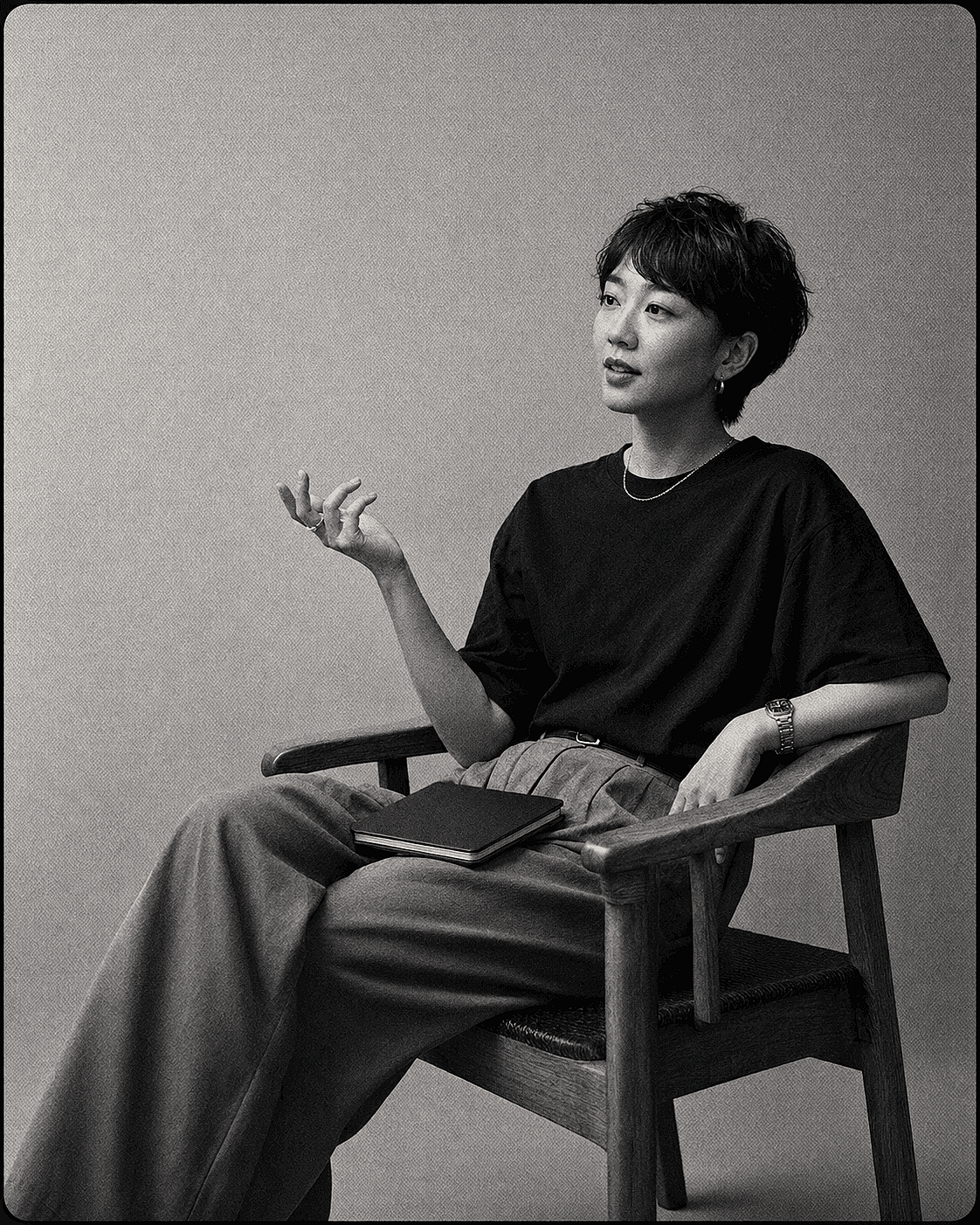
パーソナルブランドの名言投稿
ショートヘアのアジア系女性が木製のアームチェアに座るモノクロポートレート。ダークなTシャツとハイウエストのパンツを着用し、
片手でジェスチャーをしながら、膝の上にノートを置いている。無地の質感あるスタジオ背景。35mmフィルム、強いグレイン、柔らかく拡散した照明、ミディアムショット、映画のような構図。
引用文はデザインツールで正確に入力しましょう。ブランドフォント、話者名、長い出典表記を編集可能なまま残したい場合は、このほうが良いプロンプトになります。
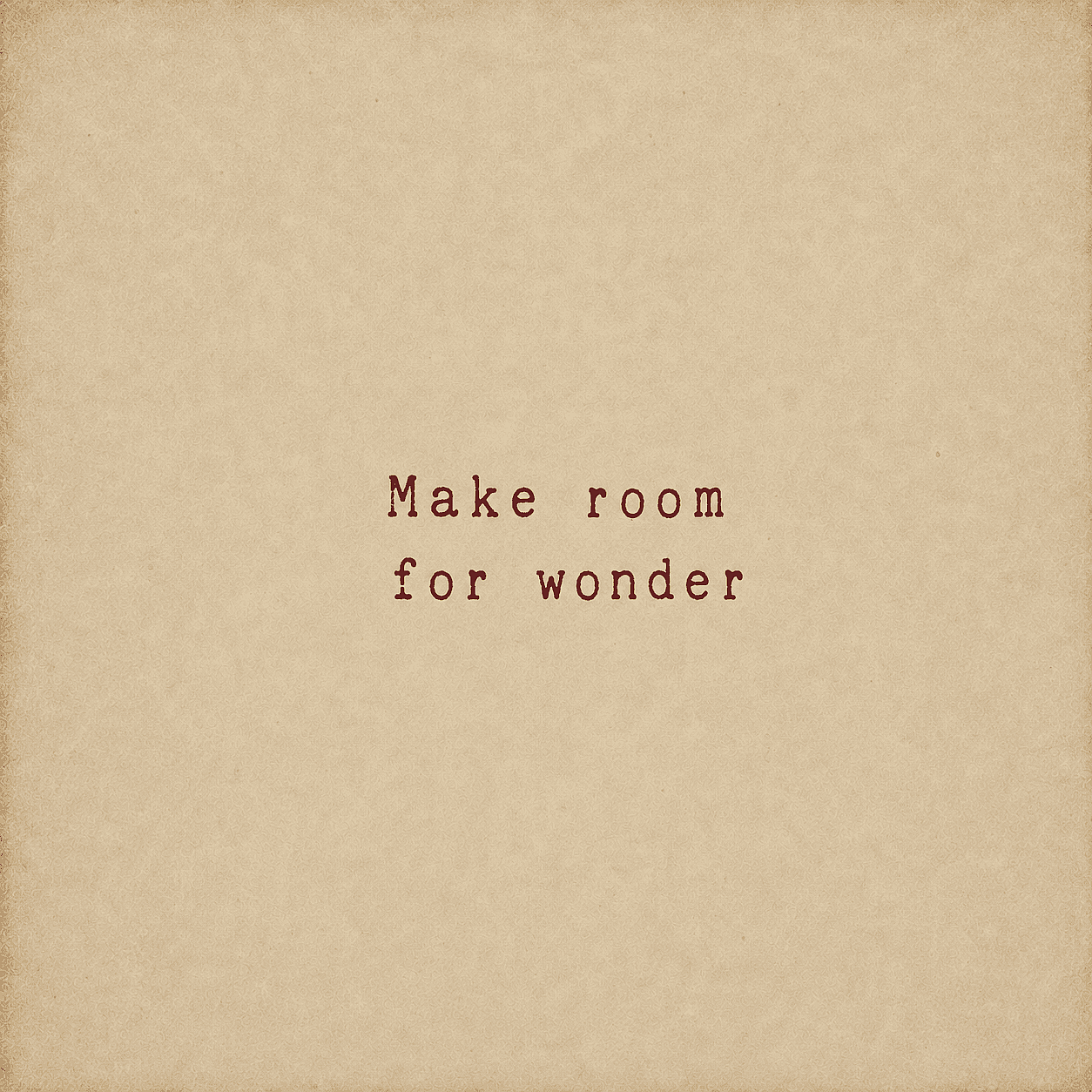
レトロ調の名言ポスター
色あせた赤のヴィンテージタイプライターフォントで「Make room for wonder」というテキストを配したミニマルなタイポグラフィ。古びた紙の上に中央配置され、
温かみのあるベージュ色と、さりげない縁のビネットが施された、質感のある羊皮紙。素朴でノスタルジック、シンプルな美しさ。
これをアレンジするには、一度に1つの変数だけを変えましょう。文字のスタイル、カラーパレット、背景の素材、比率などです。構造を安定させておくと、モデル同士の比較がより有意義になります。
Webグラフィックでは、可読性はビジュアルスタイルとは別にチェックすべきです。 W3CによるWCAG 2.2のコントラストガイダンス 通常テキストで4.5:1、大きなテキストで3:1の最小コントラスト比を使用します。これらの比率は、特に写真やグラデーションの上にテキストを配置する引用グラフィックにおいて、役立つ基準となります。
専門家の視点:生成された文字と実際の文字は異なる課題を解決する
最も重要な判断は、どのモデルが最高のテキストスコアを持つかではありません。文字を画像の一部のように振る舞わせるか、それとも編集可能な情報として扱うか、という点です。
生成テキストは、言葉と画像が同じ質感を共有する、描かれた看板、刺繍の文字、ネオンサイン、スタイリッシュなポスターなどに便利です。実テキストは、バージョンをまたいで正確さを保つ必要がある、商品価格、イベント日程、法的表記、クレジット、キャンペーンの見出しなどに適しています。
この区別は効率も高めます。クリエイターは1文字を修正するために10回もの生成を費やすこともあれば、承認済みの背景を保ったままコピーを数秒で修正することもできます。AdobeやOpenAIのコミュニティでの議論では、同じ懸念が繰り返し浮上します。テキスト生成は向上したものの、長い文字列や非英語の文字はいまだに確認が必要だという点です。
商用利用と著作権:両方を確認
プラットフォームが商用利用を許可していても、出力物が著作権保護の対象になることや独占的であることが保証されるわけではありません。プランの規約は、サービスがあなたの意図する用途を許可するかどうかを示します。著作権法は、人間による創作性や保護可能な表現について、まったく別の問いを投げかけます。
the AIの著作権適格性に関する米国著作権局のレポート は、純粋にAIが生成した素材は著作権で保護されないが、人間による選択・配置・創造的な改変はケースバイケースで保護され得る、と述べています。名言系プロダクトなら、オリジナルのタイポグラフィ、レイアウトの判断、編集、イラスト、配置は、最初の生成を超えて意味を持ち得ます。
引用そのものについては、別途チェックが必要です。米国のルールでは、単語、名称、タイトル、スローガンなどの短いフレーズは著作権の対象外とされていますが、だからといってオンラインで見つけたすべての文章を自由に再利用できるわけではありません。長い抜粋、翻訳、元となるアートワーク、商標、パブリシティ権、不正確な帰属表示は、それぞれ別の問題を引き起こす可能性があります。 著作権局の短いフレーズに関する規定 はあくまで出発点であり、万能の確認テストではありません。
これは一般的な情報であり、法的アドバイスではありません。最新のプラットフォーム規約、引用文そのものの権利、元画像の権利、そしてあなたの市場の法律を確認してください。OpenArtのガイド AI画像の著作権とIPリスク 次に取るべき実践的なステップを紹介します。
よくある質問
引用文に最適なAI画像生成ツールは?
OpenArtは、モデルの選択肢、編集、再利用可能なスタイル、アップスケールを一つのワークフローで求めるクリエイターに総合的にベストな選択肢です。画像内の短いテキストにはIdeogramが有力です。すべての語句を編集可能に保つ必要があるなら、CanvaやAdobe Expressの方が安心です。
AI名言ジェネレーターと、名言用のAI画像ジェネレーターの違いは何ですか?
AI名言ジェネレーターや引用画像ジェネレーターは通常、入力したテキストをテンプレートのように一発で仕上がったグラフィックに変換する単一のツールを指します。一方、このガイドで比較しているような名言作成に使うAI画像ジェネレーターは、ビジュアルスタイルやモデル選択、編集をより細かくコントロールできますが、通常は短いプロンプトを書く必要があります。どちらのアプローチでも同じ結果、つまり名言入りのシェアしやすい画像を作れます。
文字を正しく綴れるAI画像ジェネレーターはどれ?
GPT Image 2とIdeogramはより高精度なテキスト描画を目的に設計されていますが、すべての画像で完璧なスペルを保証するモデルはありません。引用文は短くまとめ、引用符で囲み、大きく高コントラストの書体を使い、一文字ずつ確認しましょう。文言を正確にする必要があるときは、本物のテキストレイヤーを追加してください。
引用文画像を無料で作れますか?
多くのツールが無料アクセス、期間限定トライアル、または無料の公開生成を提供しています。実用上の制限は、出力のプライバシー、透かし、クレジット、書き出し品質によって変わります。日々のコンテンツや商用製品のワークフローを選ぶ前に、最新のプランを確認しましょう。
引用文グラフィックのビジュアルの統一感を保つには?
レイアウト、カラーパレット、タイポグラフィの階層、比率を固定して使いましょう。プラットフォームが対応していれば、参照画像を保存したりカスタムスタイルを学習させたりできます。大規模な制作では、最初のビジュアル方向性が承認された時点で再利用可能なテンプレートを作りましょう。
引用文は画像内で生成すべき?それとも後から追加すべき?
文字がシーンの一部でフレーズが短い場合は、画像の中に生成しましょう。スペル、フォント選び、クレジット表記、ローカライズ、価格、ブランドルールを正確にする必要があるときは、後から追加しましょう。
AI生成の引用文プリントを販売できますか?
それはプラットフォームの規約、あなたのプラン、引用文、入力素材、出力、そして現地の法律によって変わります。商用利用の許可があっても、自動的に著作権や独占権が生じるわけではありません。最新の規約を確認し、使用権のない保護された一節、ロゴ、キャラクター、元画像は避けましょう。Etsyで販売する場合は、その最新の クリエイティビティ基準 「販売者によるデザイン」として販売者がプロンプトを与えたAI制作物を認めていますが、出品説明での開示が必須です。
引用画像のサイズはどれくらいがいい?
配信先で求められる比率を使いましょう。よくある出発点は、SNSフィードには1:1と4:5、ストーリーズには9:16、Pinterestや多くの印刷物には2:3、横長バナーには16:9です。書き出し前に配信先の最新仕様を確認してください。
引用文画像を印刷用にアップスケールできますか?
はい、ただしまずスペルとレイアウトを確認しましょう。アップスケールでファイルを拡大できますが、生成された誤字を信頼できるタイポグラフィに変えてくれるわけではありません。印刷用の重要な制作物では、最終書き出し前に本物のベクターまたは高解像度のテキストレイヤーとして引用文を追加してください。