

 ChatGPT
 Perplexity
 Claude
 Gemini
These floor plan prompts help you sketch out a home before anyone draws a line. You can make a clean 2D plan or a 3D floor plan you can almost walk through, and can turn either one into a floor plan render to show a client.
Every prompt here is written for a real kind of home. Copy one and change the details to fit your space and then paste it into OpenArt's AI floor plan generator. Every example image on this page was made on OpenArt.
The floor plan prompt formula:
[The kind of plan (2D, 3D or render)] + [home type and size] + [the rooms] + [the style] + [how you want it labeled].
You can use this like a simple floor plan prompt generator: keep the order and swap in your own details.
Key takeaways
- Put "2D," "3D" or "render" at the start of the prompt so the AI knows which kind of plan to make.
- "Top-down view" and "black line drawing" keep a 2D plan clean and easy to read.
- A plot size and room count, like "30x40 ft" or "3BHK," gives you a far more useful layout.
- You can upload your own 2D plan and turn it into 3D while the layout stays the same.
- AI floor plans are great for ideas and renders. Have an architect check the measurements before you build.
For prompts in other styles, see our guide to the best AI image generator prompts.
2D Floor Plan Prompts
A 2D floor plan is the flat, top-down drawing usually created and presented by a builder or an architect. Ask for a black line drawing and labeled rooms, and the plan stays easy to read.
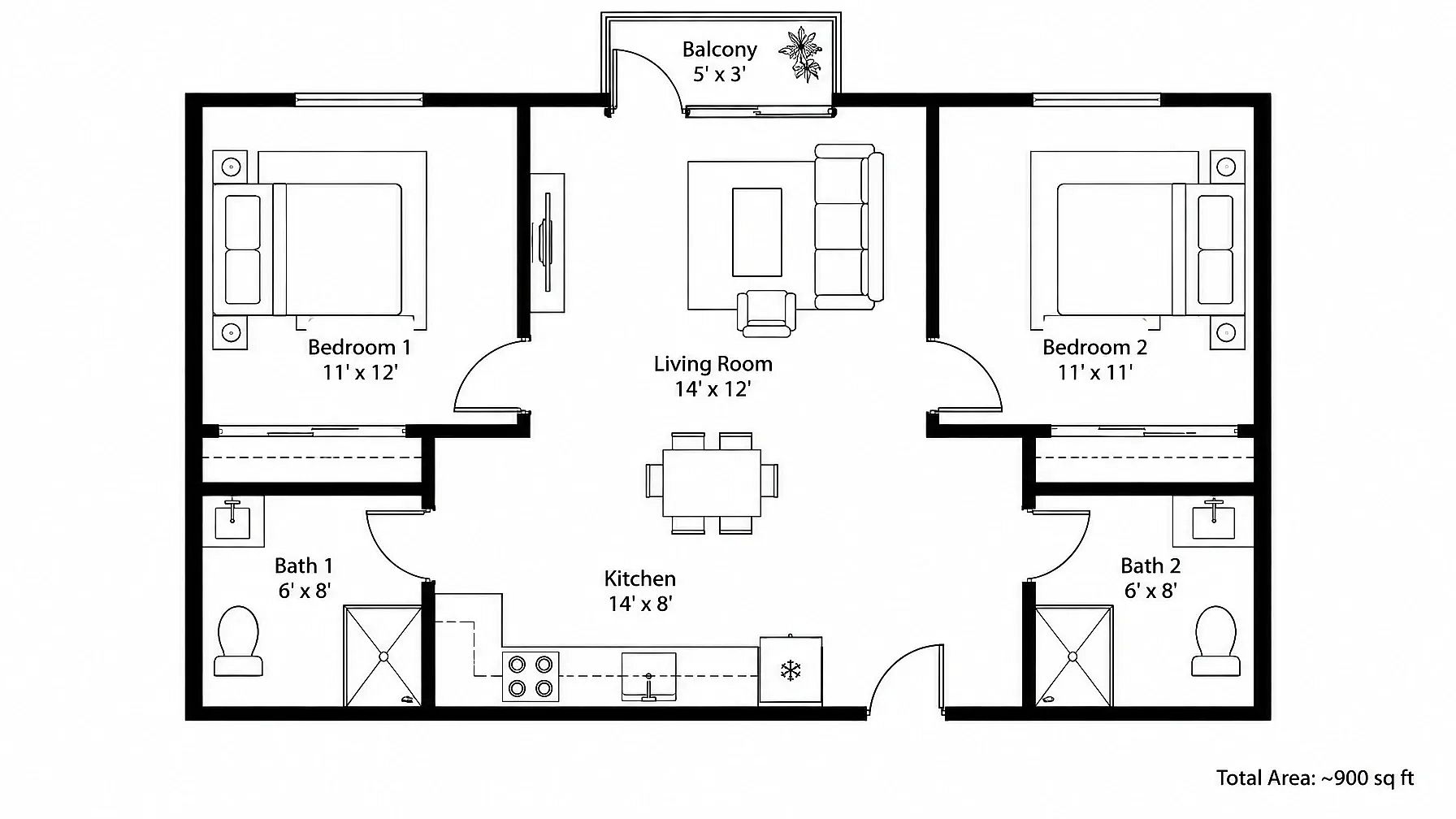
1. 2BHK apartment plan with labeled rooms
A 2BHK is a simple layout to start with, and it's easy to change into a 1BHK or 3BHK.
2D floor plan of a 2BHK apartment, about 900 sq ft. Open kitchen and living room, two bedrooms with attached bathrooms, a small balcony off the living room. Top-down view, black line drawing on white, door swings shown, each room labeled with its size in feet.
2. 30x40 ft house plan with a vastu-friendly layout
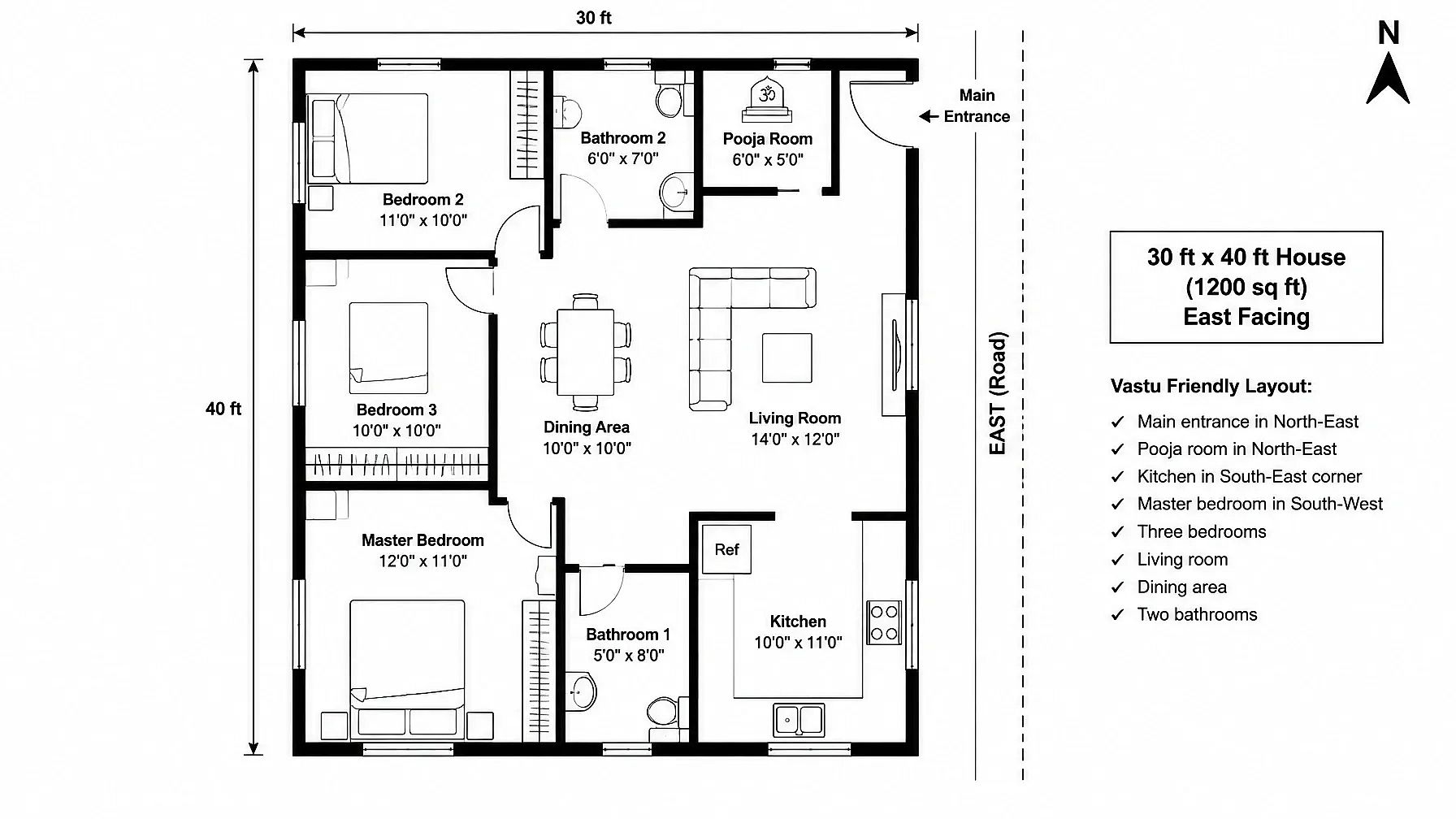
If you follow vastu, name where each room should sit, and the AI will place it there.
2D floor plan of an east-facing 30x40 ft house with a vastu-friendly layout. Main entrance in the north-east, kitchen in the south-east corner, master bedroom in the south-west, pooja room in the north-east. Three bedrooms, living room, dining area and two bathrooms. Top-down view, black line drawing, rooms labeled, north arrow in the corner.
3. Tiny house floor plan
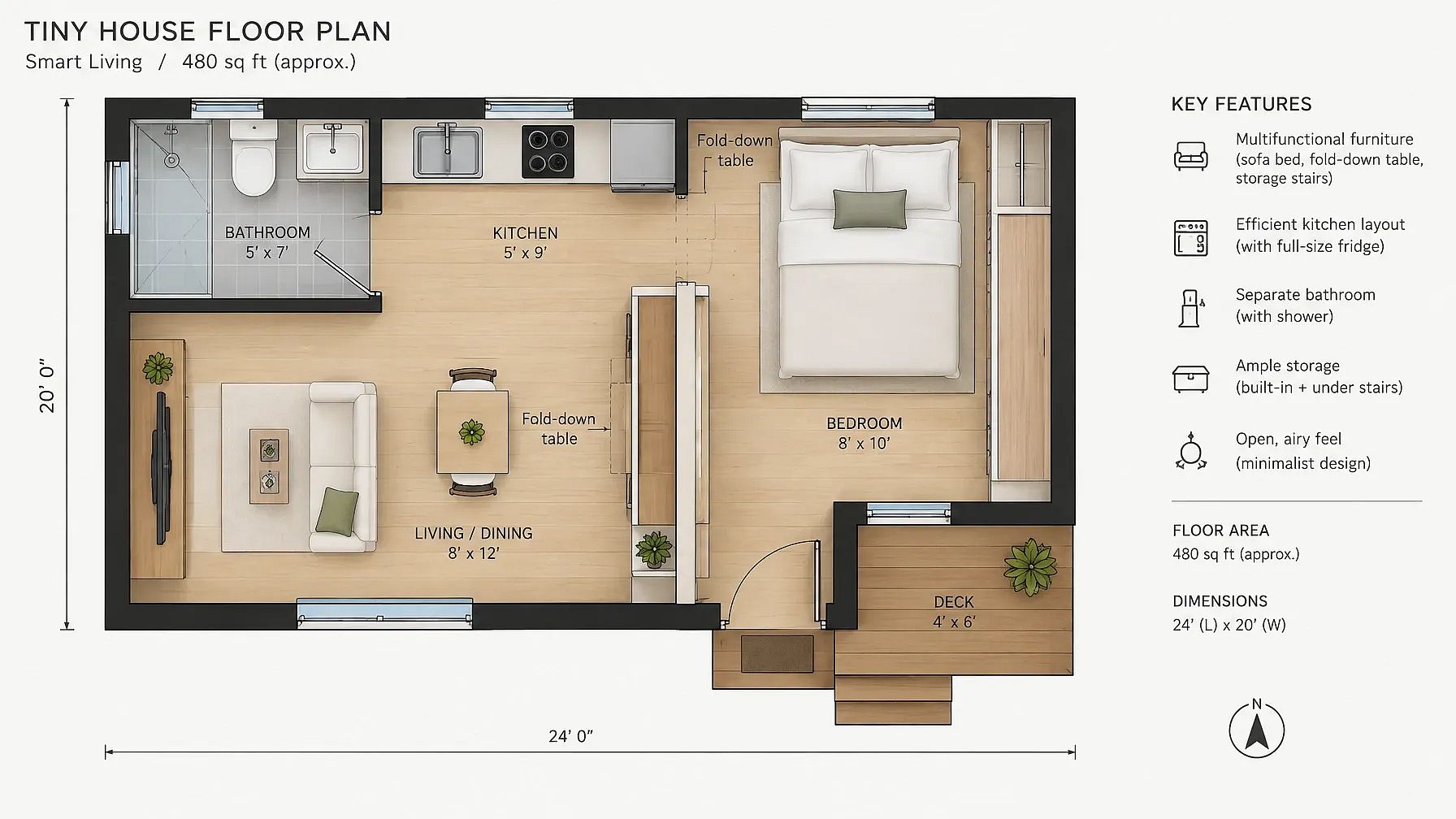
Small homes need every corner to work hard, so ask for furniture that does two jobs.
Tiny house 2D floor plan, top-down view, showcasing efficient use of space, multifunctional furniture, and a minimalist design.
3D Floor Plan Prompt
A 3D floor plan shows the same layout with the walls and furniture in place. It helps people picture how the home will feel and look once furnished.
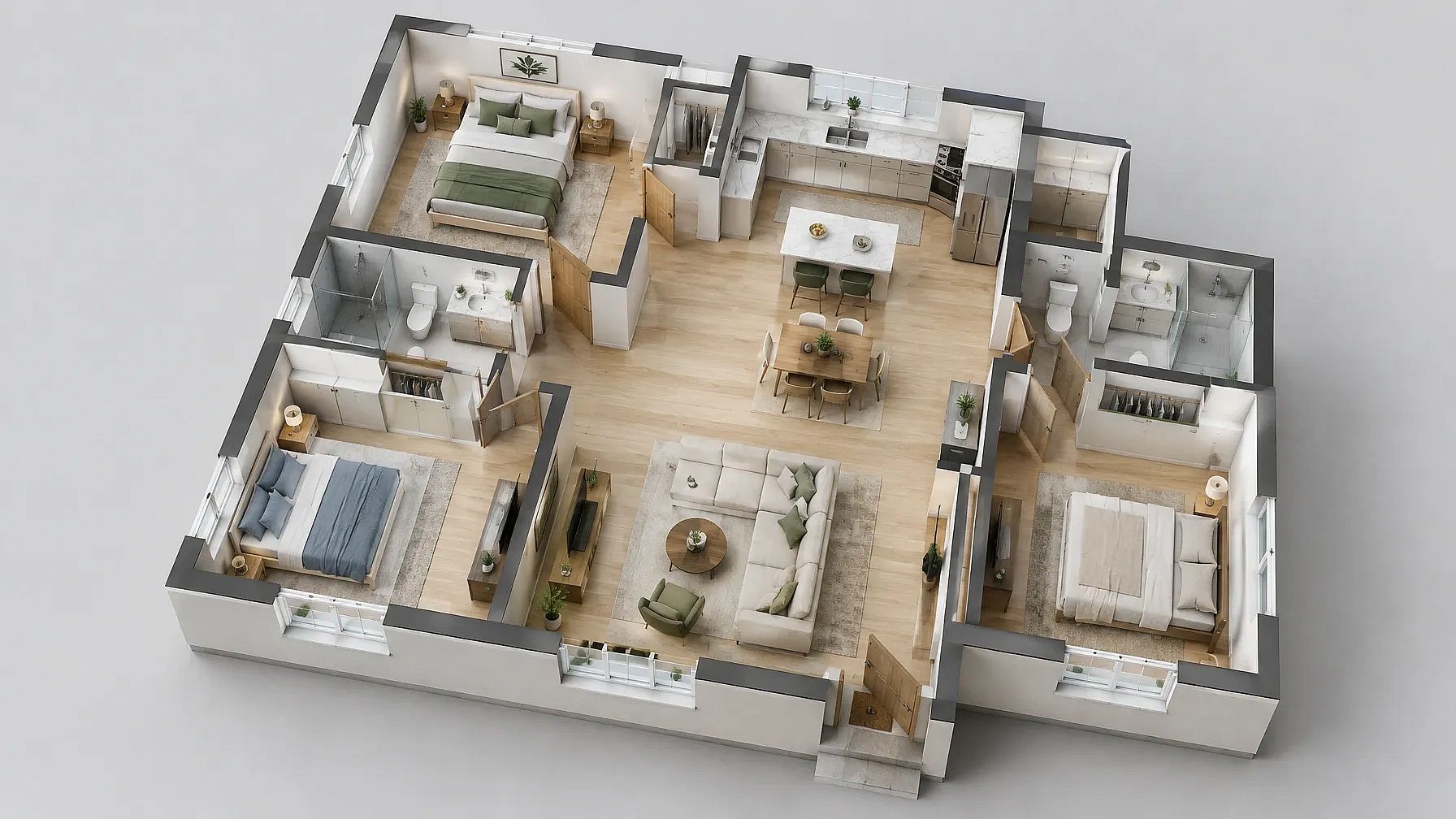
4. 3D dollhouse cutaway of a 3BHK home
The roof comes off, and you look down into every room like a dollhouse.
3D floor plan of a 3BHK home, dollhouse cutaway view from above at a 45-degree angle, roof removed. Furnished living room, kitchen, three bedrooms and two bathrooms. Light wood floors, white walls, soft daylight, clean and realistic.
5. Isometric 3D floor plan
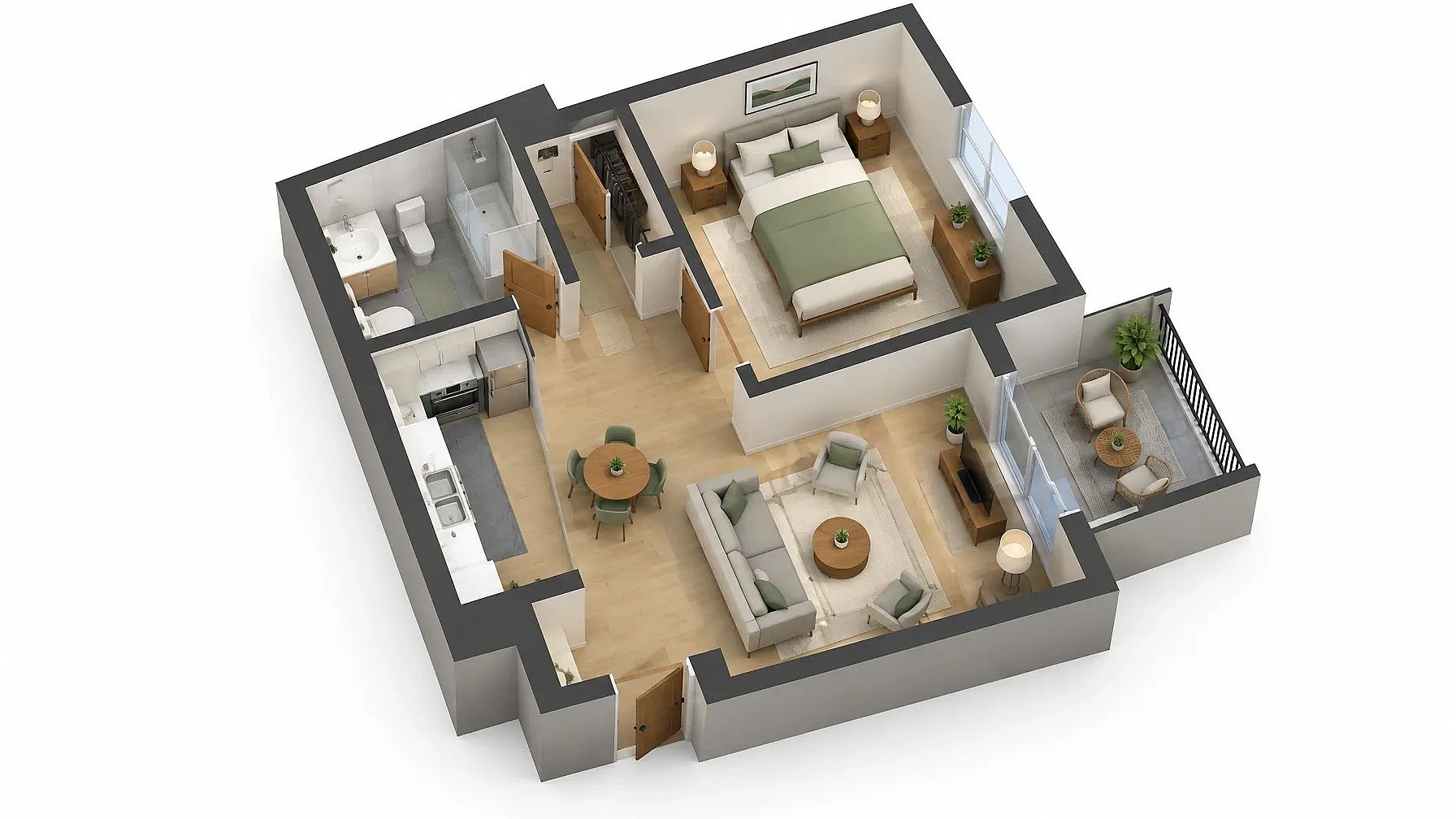
Isometric plans look neat and simple, so they work well on websites and in presentations.
Isometric 3D floor plan of a one-bedroom apartment, clean flat colors, soft shadows, white background, furniture in every room, no text.
6. Turn your 2D plan into 3D
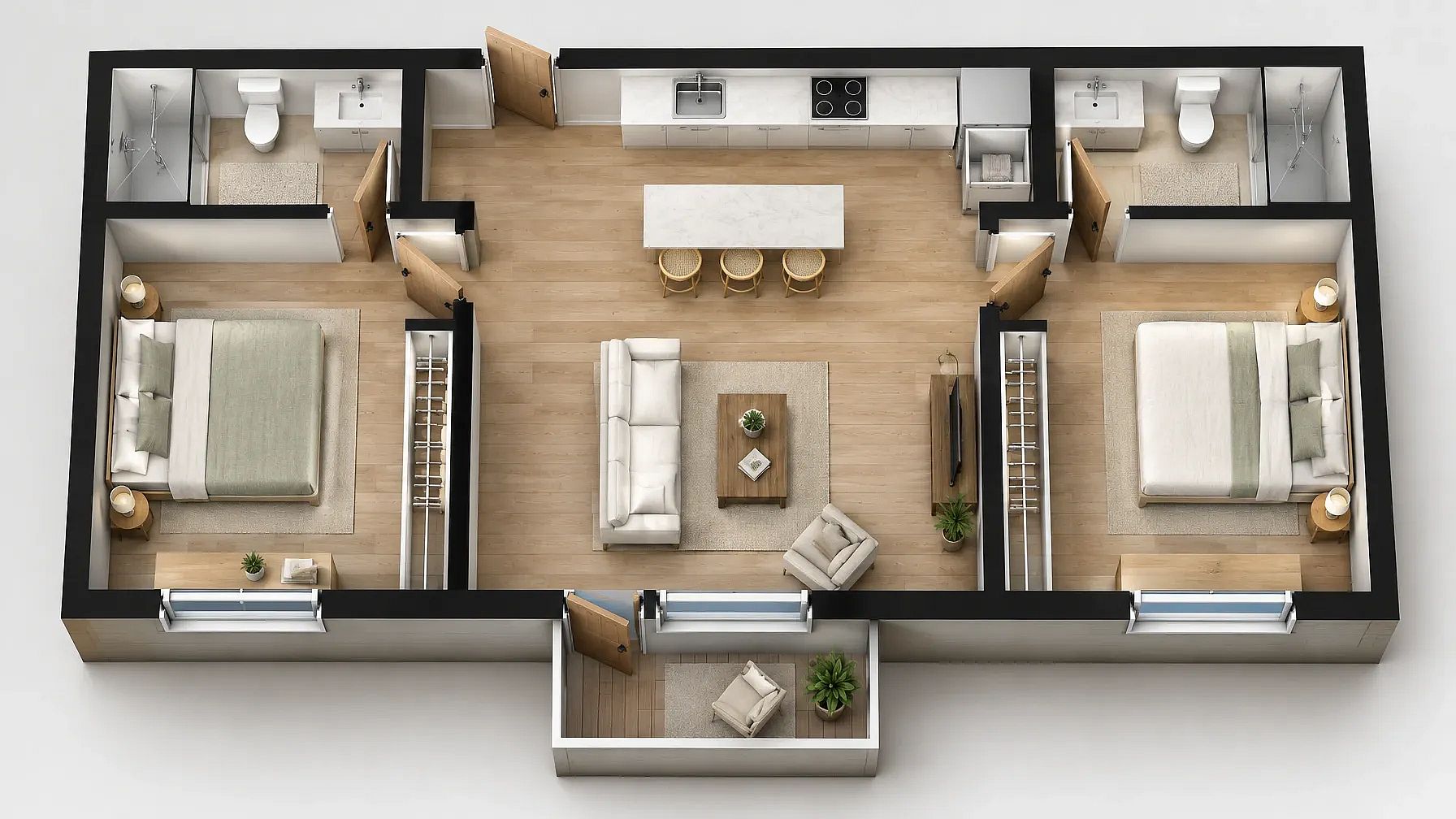
Upload your own 2D floor plan and paste this. The first line tells the AI floor plan generator to keep your layout exactly the same.
This was the 2D floor plan we used as reference to turn it into 3D plan:
Keep the walls, doors, windows and room positions exactly the same as this plan. Turn this 2D floor plan into a 3D floor plan with a dollhouse view from above. Add furniture that fits each room, wood floors and soft daylight.
Floor Plan Render Prompts
A floor plan render is the polished version usually presented to a client or uploaded in a listing. It adds color and real materials to the layout, so people can see the finished home.
7. Colored presentation render
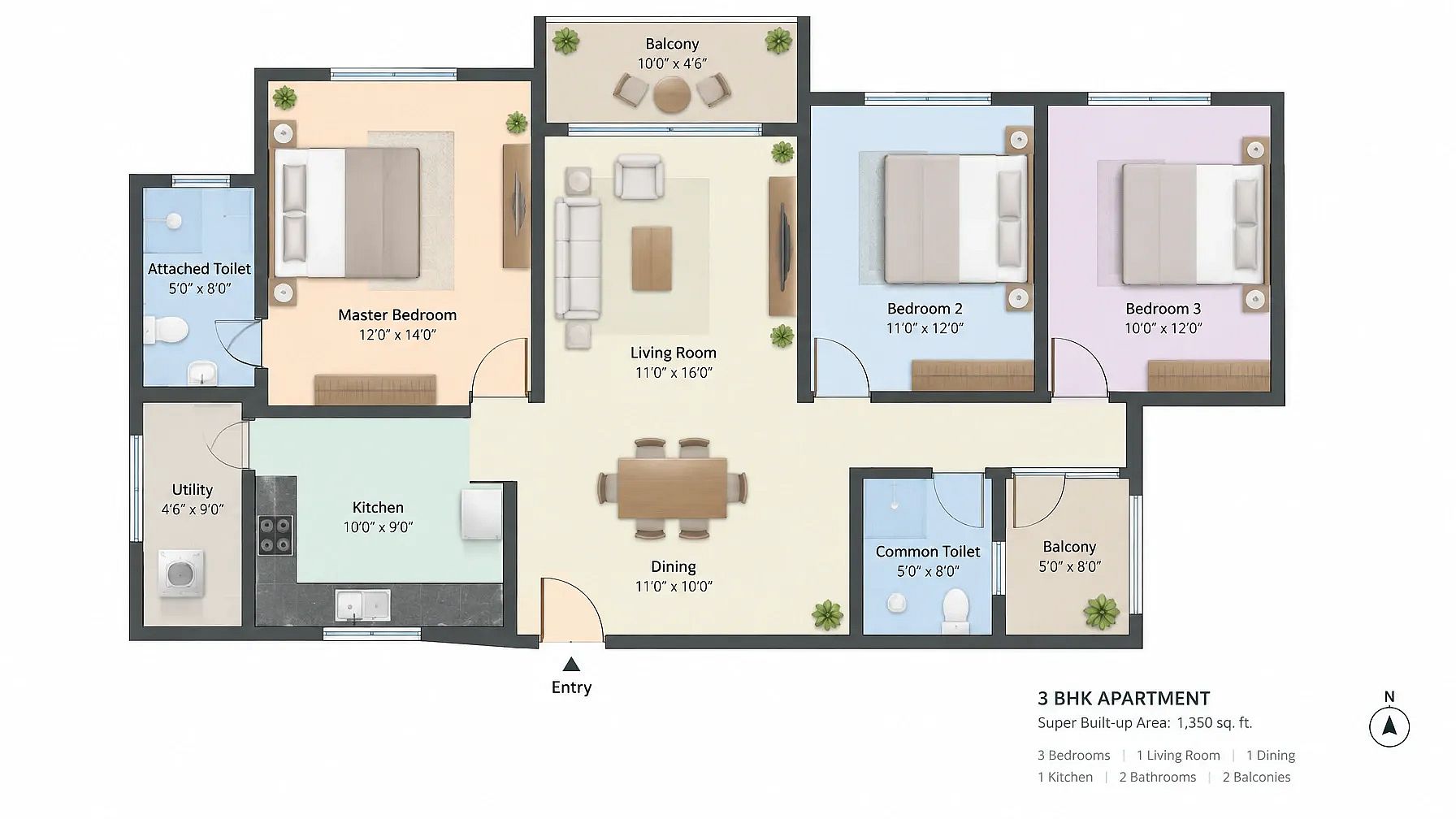
Color-coded rooms make a plan easy to read on a client board or a brochure.
Floor plan render of a modern 3BHK apartment, top-down view, each room shown in a soft pastel color, furniture drawn in simple shapes, room names and sizes labeled, white background, clean presentation style.
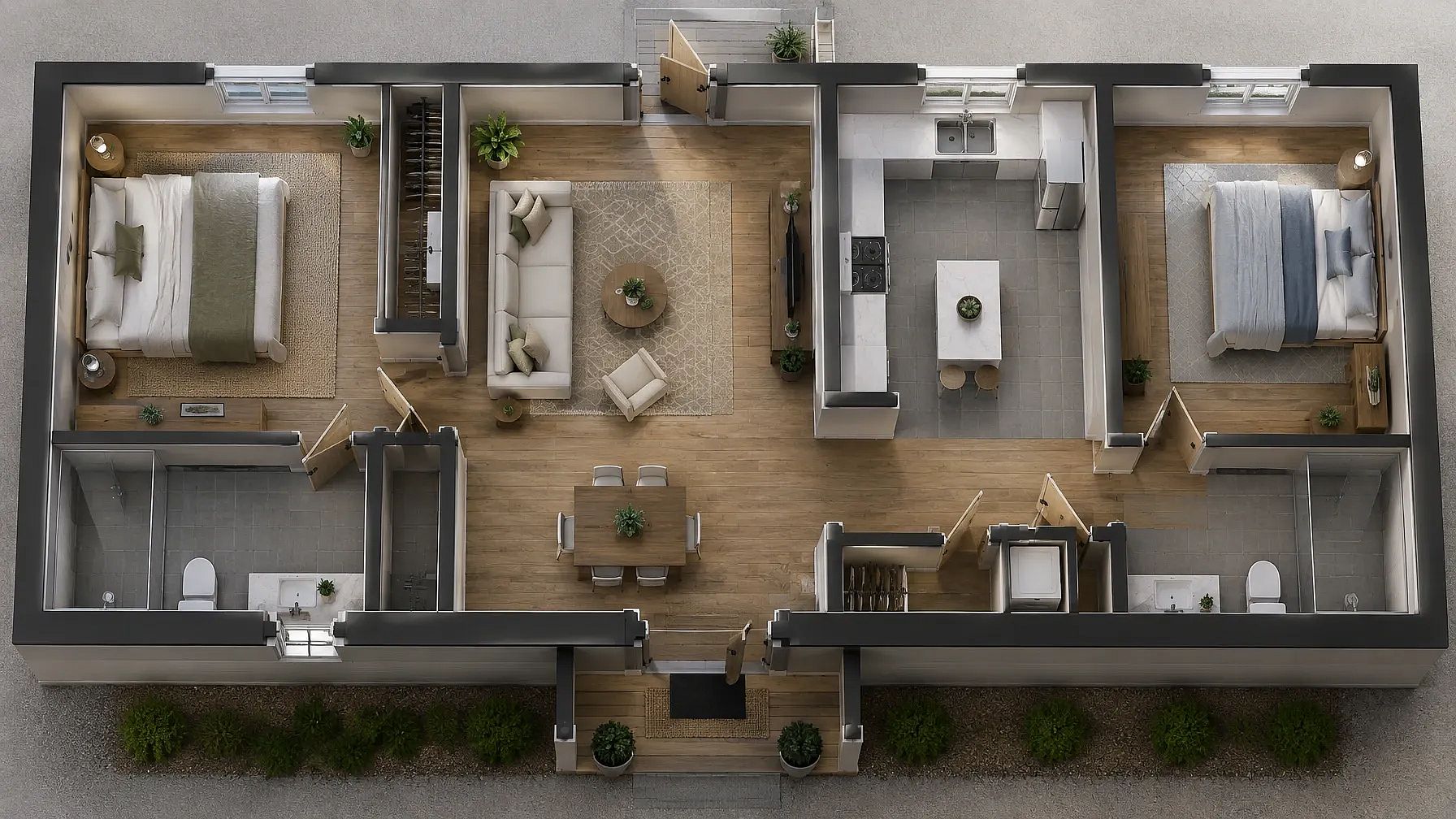
8. Photoreal top-down render
This one looks like a photo taken from the ceiling, with real floors and furniture.
Photorealistic top-down floor plan render of a two-bedroom house, oak wood floors, gray tile in the kitchen and bathrooms, rugs, sofas and beds in place, soft daylight with gentle shadows from the walls.
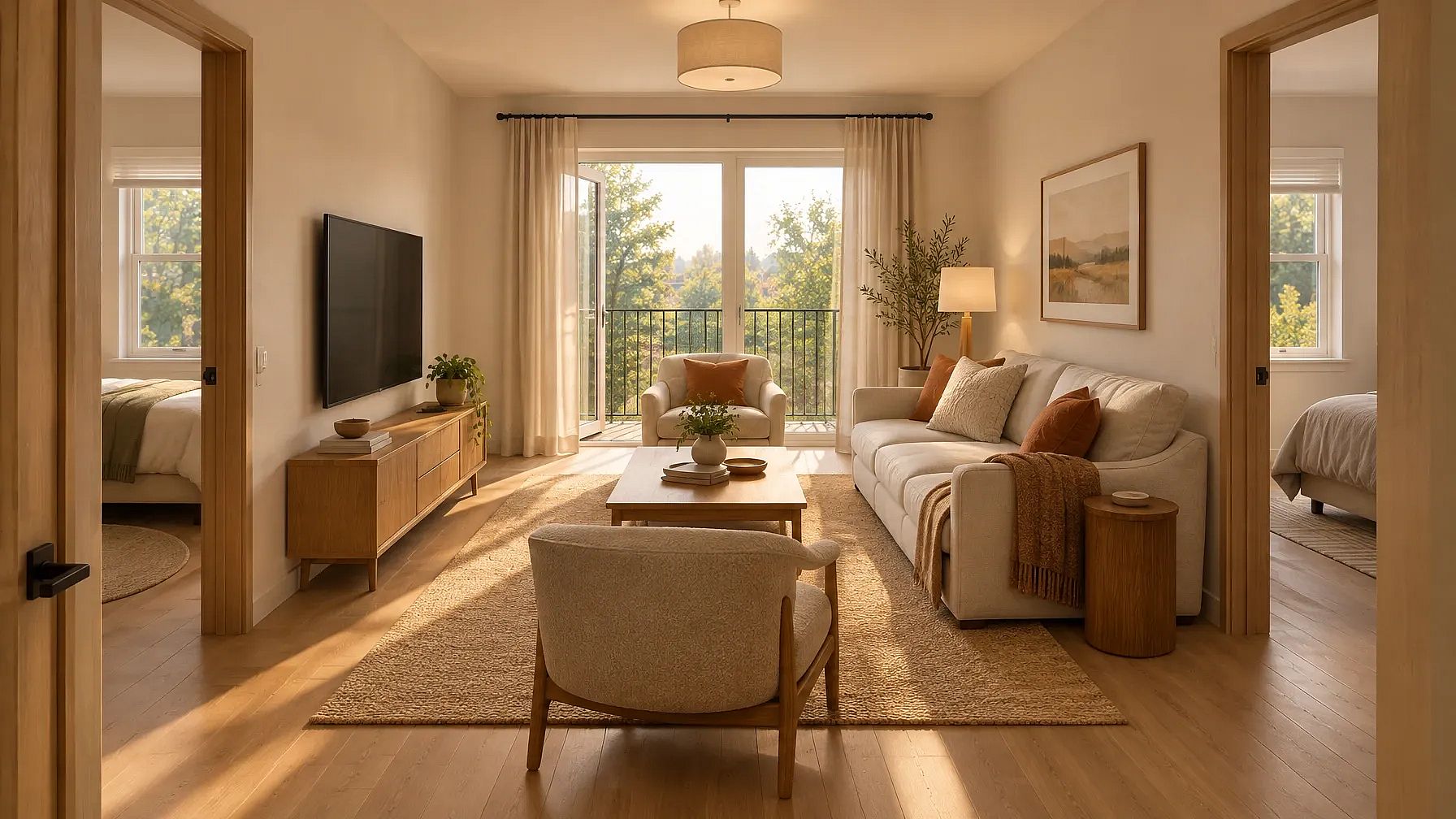
9. Living room view from your plan
Upload your floor plan and ask for one room view at eye level. It's a quick way to show what a room will feel and look like.
Use the layout in this floor plan. Create a photorealistic eye-level render of the living room, looking toward the windows. Keep the room size, the window positions and the door to the kitchen the same. Warm modern style, soft afternoon light.
House Plan and House Design Prompts
A house plan prompt covers the whole home, sometimes across more than one floor. Pair it with an outside view, and you've got the start of a full house design.
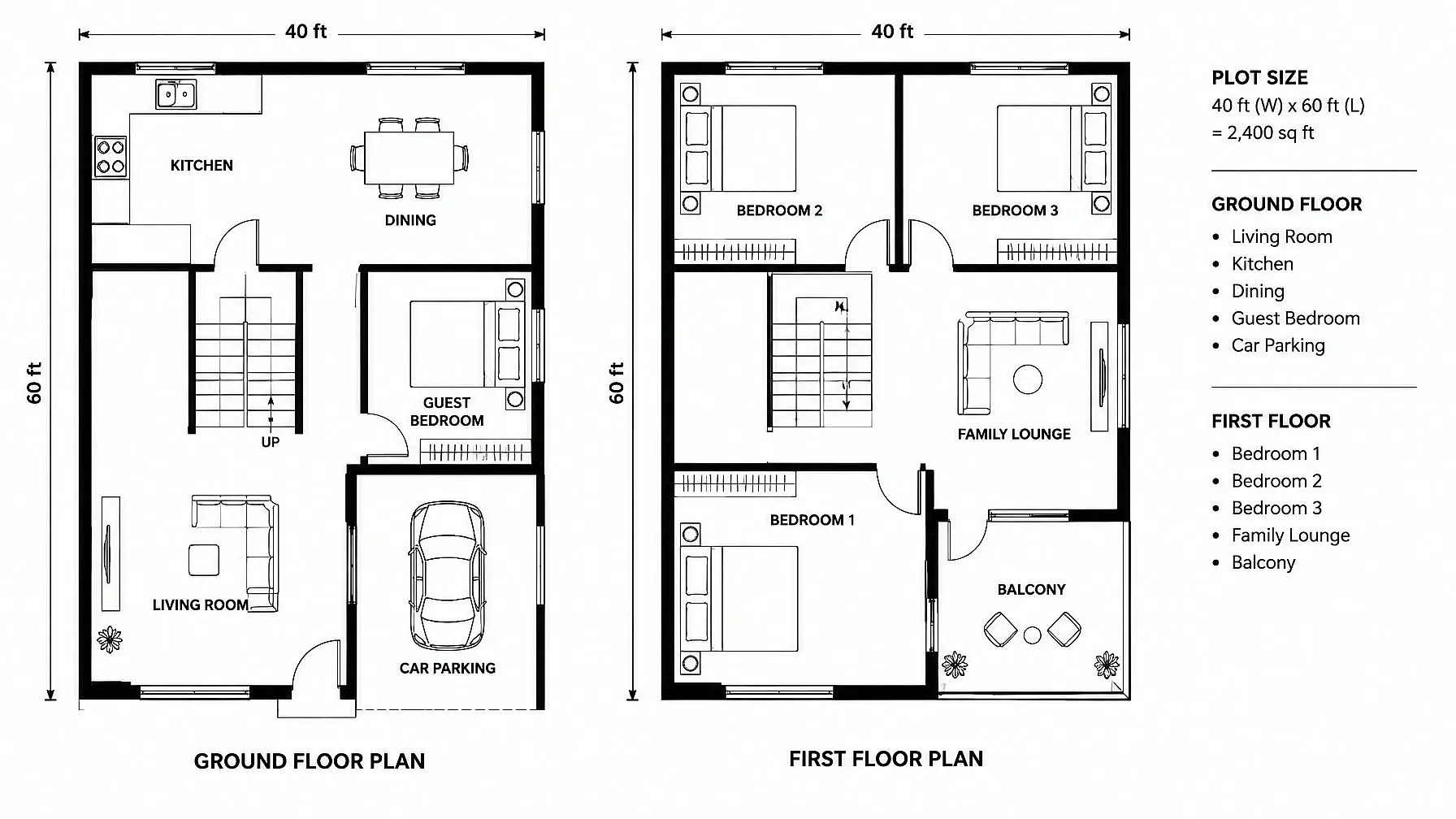
10. Modern 2-storey house plan
Ask for both floors side by side so you can see how the stairs line up.
2D house plan of a modern 2-storey home on a 40x60 ft plot, ground floor and first floor shown side by side. Ground floor: living room, kitchen, dining, guest bedroom, car parking. First floor: three bedrooms, family lounge, balcony. Staircase in the same spot on both floors, rooms labeled, black line drawing.
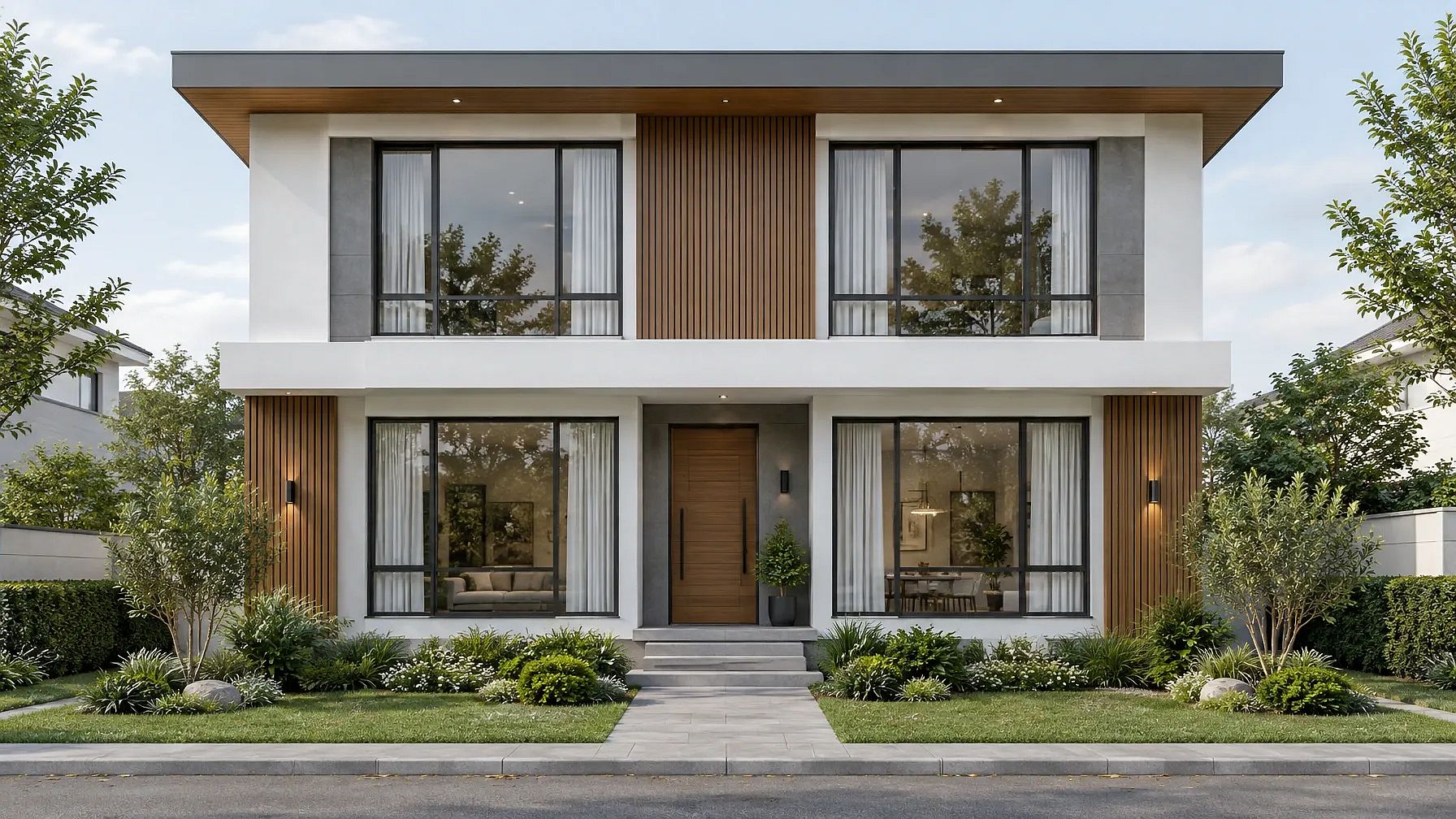
11. Front elevation from your plan
Once the plan works, this shows what the house looks like from the street.
Front elevation of a modern 2-storey house, straight-on view, white and gray walls with wood panels, large windows lined up on both floors, flat roof, a small garden in front, soft daylight, photorealistic.
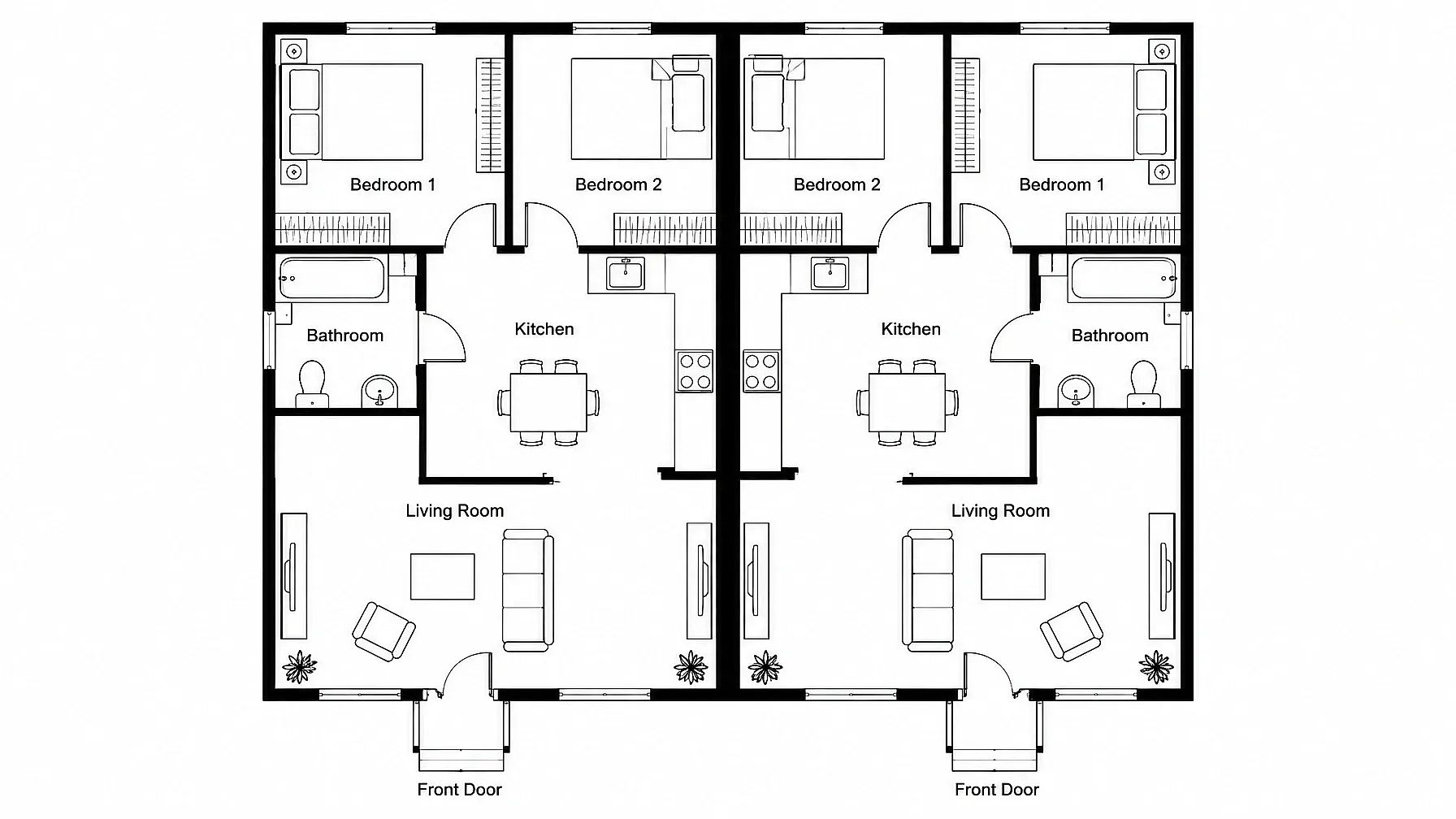
12. Duplex house plan
A duplex has two homes that share one wall, so ask for a mirrored layout.
2D floor plan of a duplex house, two mirrored units sharing one central wall, each with a living room, kitchen, two bedrooms and a bathroom, separate front doors, top-down view, rooms labeled, black line drawing.
Floor Plan Prompts by Style
Style changes more than the look. It changes how rooms connect and how open the whole plan feels.
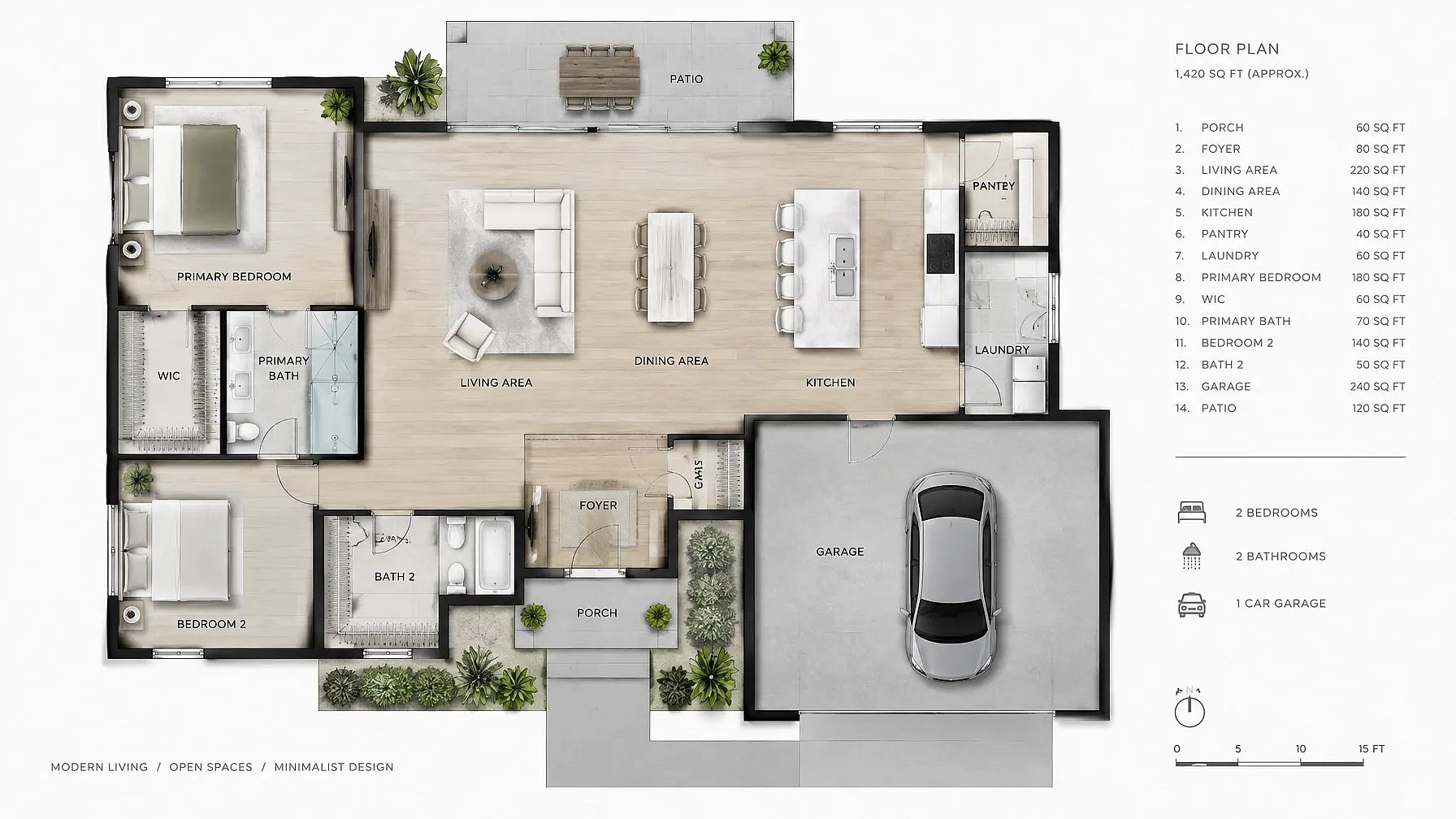
13. Modern open-concept floor plan
One big open space for living and dining, with very few walls.
Detailed floor plan in modern architectural style, showcasing a spacious open-concept living area with minimalist design.
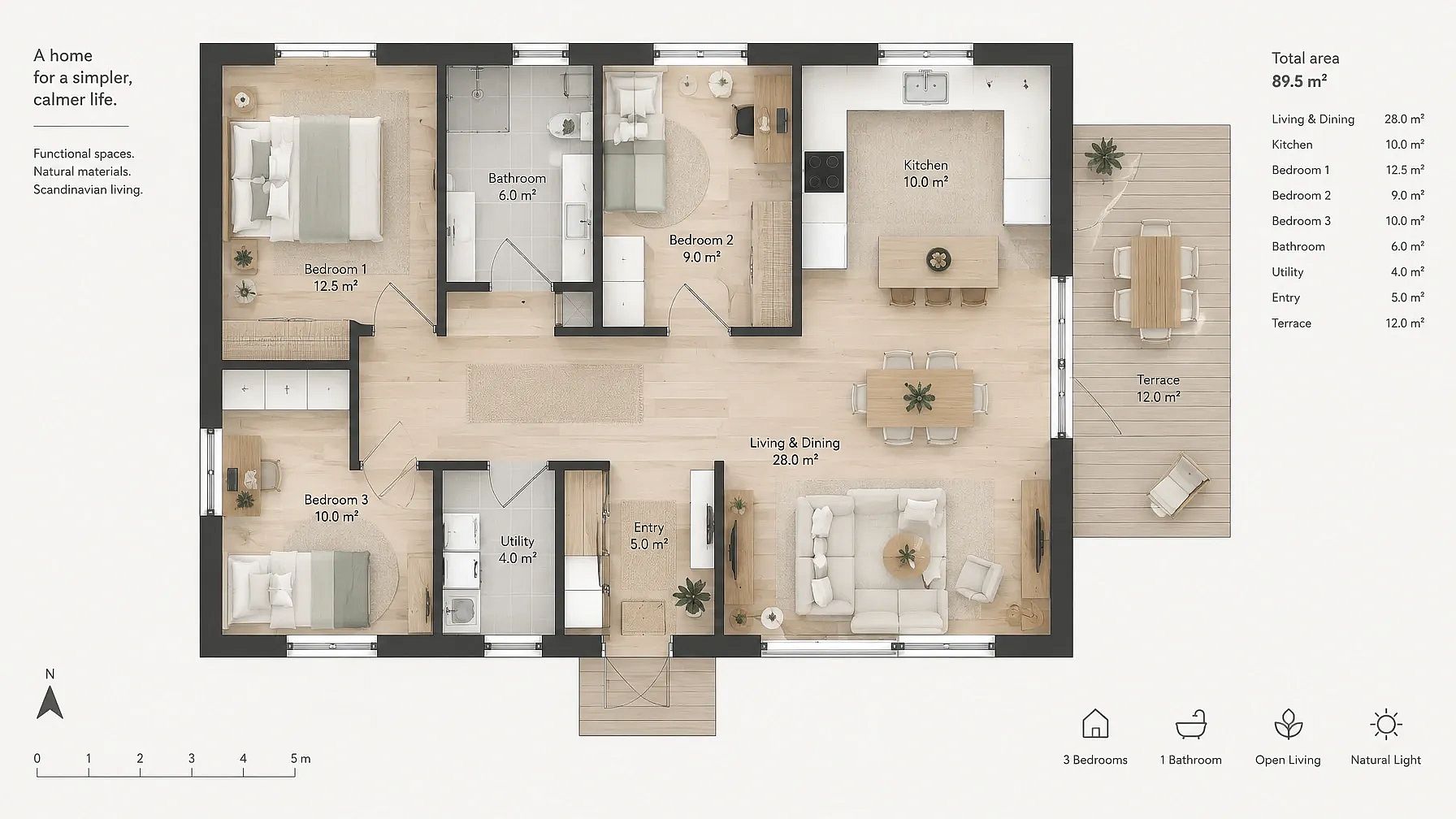
14. Scandinavian floor plan
Simple, bright rooms that feel calm and lived in.
Floor plan in Scandinavian style, featuring clean lines, natural light, and functional spaces with a cozy atmosphere.
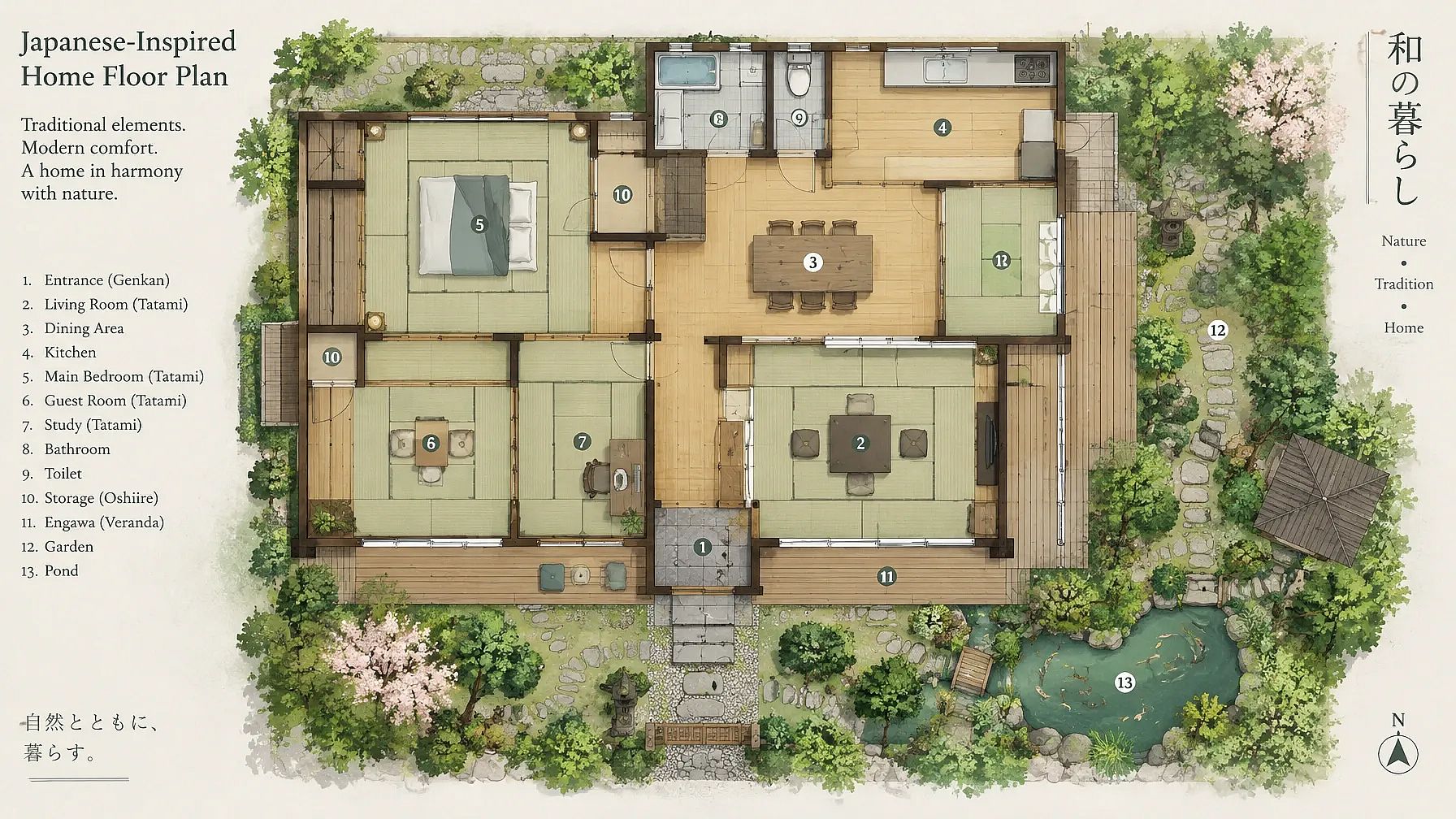
15. Japanese-inspired floor plan
Sliding doors and tatami rooms let spaces open up or close off as you need.
Japanese-inspired floor plan, featuring tatami rooms, sliding doors, and a harmonious connection with nature.
Swap the style name for farmhouse or Mediterranean to try a different floor plan style, while keeping the rest of the prompt as it is.
Plan Your Layout First with ChatGPT or Gemini
Before you make an image, it helps to work out the layout in words. ChatGPT and Gemini are good at this part. Fill in the brackets and paste this into either one:
I'm planning a [home type, such as a 3BHK house] on a [plot size, such as 30x40 ft] plot. I need [list every room]. My must-haves are [such as vastu, a home office or car parking]. Tell me which rooms should sit next to each other and why. Then give me a table of room sizes in feet that fits the plot. Keep it short.
Once you like the layout, copy the room list and sizes into any prompt above. The image comes out much closer to what you had in mind.
Floor Plan Prompt Tips
The words you use decide whether you get a plan or a pretty picture of a house. Use the left column for plans and save the right one for renders.
| Words that keep a plan clear | Words that turn it into a picture |
|---|---|
| top-down view, orthographic | perspective view, wide angle |
| black line drawing on white | cinematic, moody |
| rooms labeled with sizes | dramatic lighting |
| door swings, wall thickness | depth of field |
| north arrow, scale bar | aerial photo |
Use a negative prompt. If your tool has a negative prompt box, paste this:
perspective view, blurry text, extra doors, overlapping walls, rooms with no doors
In Midjourney, add --no perspective view at the end of your prompt.
Need cleaner technical lines? The AI CAD drawing generator is made for that kind of drawing.
Common floor plan prompt mistakes
- Leaving out the plot size, so the rooms come out in random sizes.
- Asking for too many rooms in one prompt. Start with the main floor, then add the rest.
- Mixing 2D and 3D words in one prompt, which confuses the AI and results in a messy floor plan design.
- Expecting exact measurements. Treat the numbers on an AI plan as a rough guide.
- Forgetting to say where the doors go, so a few rooms in your floor plan end up with no entrances.
What AI Floor Plans Are Good For
AI floor plans are great for the early stage, when you're still figuring out what you want. Here's where they help the most:
- Trying out layout ideas before you meet an architect or a builder.
- Making a mood board to show a client the direction you have in mind.
- Turning a rough plan into a 3D view or a render for a listing or a pitch.
- Comparing two versions of the same home side by side.
How to Make a Floor Plan on OpenArt
You can turn any prompt on this page into a floor plan in three steps.
- Open the generator. Go to OpenArt's AI floor plan generator and click Start Creating.
- Paste a prompt and pick your settings. Choose a model and an aspect ratio, then generate. A square or 4:3 ratio works well for most plans.
- Refine and download. Change a detail in the prompt if something looks off, and generate again. Download the plan you like.
New accounts get 40 free trial credits, so you can try a few plans before you pay anything.
Turn your sketch or 2D plan into a render
Already have a plan or a hand sketch? Upload it to Edit Image on OpenArt and use prompt 6 or prompt 9 above. For a pencil sketch, sketch to image turns your drawing into a clean render. Want to see a render from another side? Camera Angle Control gives you a new angle of the same image, and Multi-View makes nine angles at once.
Floor Plan Prompt FAQ
What is the best prompt for a floor plan render?
A good floor plan render prompt names the view and the kind of home, then adds a finish. For example: "Floor plan render of a modern 3BHK apartment, top-down view, each room in a soft pastel color, rooms labeled." For a more lifelike look, swap the pastel colors for real materials like oak floors and gray tile.
Can AI make an accurate floor plan?
AI is very good at layout ideas and renders, and it gets the general shape of a home right. The measurements on an AI plan are a rough guide, so have an architect check them before you build. Giving the plot size and room sizes in your prompt gets you much closer.
How do I turn a 2D floor plan into 3D with AI?
Upload your 2D plan to Edit Image on OpenArt. Start your prompt with "Keep the walls, doors, windows and room positions exactly the same," then ask for a 3D dollhouse view. Prompt 6 on this page is ready to copy.
Can ChatGPT or Gemini make a house plan?
ChatGPT and Gemini are great for planning the layout in words. They can suggest which rooms go together and give you a table of room sizes. Then paste that into an image prompt to see the plan drawn out.
What is the difference between a 2D and a 3D floor plan?
A 2D floor plan is a flat drawing from above that shows the walls and room sizes. A 3D floor plan shows the same layout with furniture and height, so it's easier to picture the space. Most people start with 2D and move to 3D once the layout feels right.
How do I make a vastu-friendly house plan with AI?
Name the direction your house faces and where you want each room. For example, "kitchen in the south-east corner" or "master bedroom in the south-west." The AI places the rooms where you ask, so it's worth checking the plan with someone who knows vastu well.
Is there a free AI floor plan generator?
Yes. OpenArt's AI floor plan generator gives new accounts 40 free trial credits, so you can make a few plans for free. Every prompt on this page is also free to copy and use.
What should a house design prompt include?
Start with the plot size and the number of floors. Then list the rooms on each floor and add the style you want. If you also want the outside, ask for a front elevation in the same style.