

 ChatGPT
 Perplexity
 Claude
 Gemini
TL;DR
- Choose GPT Image 2 when accurate text, structured layouts, and detailed instruction following drive the project. A hands-on test from Decrypt found GPT Image 2 delivered near-perfect text recall on dense, multi-element scenes, and on OpenArt Arena's blind Overall image board it leads every tested model on Prompt Adherence and outscores Nano Banana 2 on all four general criteria.
- Choose Nano Banana 2 when generation speed matters more than the top quality score, or you need Google's built-in multi-character consistency (up to five characters, 14 objects). It generates a 1K image in well under half the time GPT Image 2 takes on Arena's own benchmark (18.1s vs. 44.8s), even though it currently ranks lower on Arena's blind Overall board.
- Neither model wins every prompt, and rankings shift as new models join Arena's leaderboard — check the current standings before locking in a choice for a large production run.
- The comparison table below maps common projects to each model. You can test both through OpenArt's AI Image Generator without committing to one model.
Quick-Answer Comparison Table
These picks combine official descriptions from OpenAI and Google with independent side-by-side tests and OpenArt Arena's blind leaderboard data. The methodology note below explains the source criteria.
| Use case | GPT Image 2 | Nano Banana 2 |
|---|---|---|
| Photorealistic portraits | Leads OpenArt Arena's general aesthetics score (1,030 vs. 1,000) | Won Decrypt's cinematic portrait test — evidence is mixed, test both |
| Product shots | Leads Arena's E-commerce board overall (1,023 vs. 1,014) and on Brand Consistency (1,020) | Recommended — leads Arena's E-commerce board on Realism (1,020) and Text/Logo Accuracy (1,093) |
| Text and memes | Recommended — leads Arena's Graphic Design board on Text Accuracy (1,120) and spells text correctly | Can look cleaner, but less reliable on exact wording |
| Logos and wordmarks | Recommended — leads Arena's Graphic Design board overall (1,051) and on Layout (1,085) and Style Adherence (1,050) | Not the safer choice when spelling must be exact |
| UI mockups | Recommended — leads Arena's Graphic Design board on Layout (1,085), the closest published proxy for interface structure | Better when the screen sits inside a photorealistic device shot |
| Batch edits | Leads Arena's Image Editing board overall (1,045) and on Reference Adherence (1,035 vs. 991) | Recommended — leads Arena's Image Editing board on Style Adaptation (1,065) |
| Architecture | Recommended — leads Arena's Film board on Film Texture (1,089) and Scene & Lighting (1,042) | Trails GPT Image 2 on Arena's Film board (998 vs. 1,058) — test both for atmosphere-heavy scenes |
How we compared these models
We compared the models using OpenAI's documentation and Google's official positioning, alongside independent hands-on reviews from Decrypt and TechRadar. We also reviewed the highest-viewed YouTube head-to-heads, including Nuno Silva's architecture test. You can try both models yourself on OpenArt's GPT Image 2 and Nano Banana 2 model pages, or reach for the faster Nano Banana 2 Lite when speed matters more than the extra fidelity.
The recommendations reflect patterns across those sources rather than one benchmark score. Prompts and editing workflows can change the outcome, so later verdicts use terms such as "usually" and "tends to" where the evidence remains mixed.
We also checked our conclusions against OpenArt Arena, whose published methodology is unusually transparent for a model leaderboard. Judges compare two anonymized outputs at a time — model identity hidden, left/right position randomized to remove bias — and vote on one specific criterion per comparison. For images that means Prompt Adherence, Subjective Aesthetics, Reference Adherence, and Creativity/Variation, with general criteria typically making up about 30% of a board's score and the rest split across measures specific to that board. A Creative Expert Council carries three times the voting weight of the broader "tastemaker" judge pool, and every model runs on the same prompts — pulled from real creative use cases in a mix of professional and amateur styles, with one output per model selected by fixed rules rather than hand-picked. Scores are calculated with a Bradley-Terry estimator, the same Elo-like method used to rank competitive game players, anchored to one reference model per board, with 95% confidence intervals published from bootstrap resampling; cost, speed, and resolution are tracked separately and never factor into the score.
Here's how the two models in this guide placed on Arena's Overall image board (General Capabilities), out of the 7 models Arena tracks there, at our latest check:
| Model | Rank of 7 | Overall score | Prompt adherence | Subjective aesthetics | Reference adherence | Creativity | Generation time (1K) | List price (2K) |
|---|---|---|---|---|---|---|---|---|
| GPT Image 2 (OpenAI) | #2 | 1,047 | 1,041 | 1,030 | 1,035 | 1,082 | 44.8s | $0.057 (medium) |
| Nano Banana 2 (Google) | #5 | 985 | 977 | 1,000 | 991 | 973 | 18.1s | $0.101/image |
Source: OpenArt Arena, Image → Overall board (General Capabilities). Scores are a snapshot and update as new models join — see the live leaderboard for current numbers.
GPT Image 2 currently outscores Nano Banana 2 on all four general criteria here, and leads every tested model on Prompt Adherence specifically — which lines up with what independent reviews found for text-heavy and layout-driven work below. Nano Banana 2's clearest edge on this data is speed: it generates a 1K image in well under half the time of GPT Image 2 (18.1s vs. 44.8s), even though Arena's own pricing data lists it as the pricier of the two per image ($0.101 vs. $0.057). Because Arena is a living leaderboard covering general use cases rather than portraits or product shots specifically, check its current standings before locking in a model for a large production run.
Arena runs four more boards beyond Overall, each adding its own specialized criteria on top of the four general ones. Here's how GPT Image 2 and Nano Banana 2 compare across all five:
| Arena image board | GPT Image 2 | Nano Banana 2 | Nano Banana 2's board-specific win |
|---|---|---|---|
| Overall (General Capabilities) | #2 · 1,047 | #5 · 985 | — |
| E-commerce | #2 · 1,023 | #3 · 1,014 | Realism (1,020), Text/Logo Accuracy (1,093) |
| Film | #3 · 1,058 | #5 · 998 | — |
| Graphic Design | #1 · 1,051 | #5 (tied) · 952 | — |
| Image Editing | #1 · 1,045 | #4 · 1,032 | Style Adaptation (1,065) |
Source: OpenArt Arena, board scores and board-specific criteria as tested. Rankings are a snapshot and change as new models join.
GPT Image 2's composite score leads or ties for the runner-up spot on every one of Arena's five image boards, including an outright #1 on both Graphic Design (1,051, with the biggest margin coming from Text Accuracy at 1,120) and Image Editing (1,045). Nano Banana 2's real, blind-judged wins are narrower but genuine: it leads Realism and Text/Logo Accuracy on the E-commerce board, and Style Adaptation on the Image Editing board — all specialized criteria rather than the composite score.
Where GPT Image 2 leads
GPT Image 2 usually leads when your prompt specifies exact wording, placement, and visual relationships. OpenAI gives the model its highest performance rating and describes improved text rendering, multilingual support, and instruction following in its April 2026 announcement. Those strengths suit posters, labeled diagrams, multi-panel comics, UI concepts, and other images that must communicate information through a planned composition.
OpenArt Arena's blind testing backs this up at a broader scale. GPT Image 2 posts the highest Prompt Adherence score of the seven models tested on the Overall board (1,041) and out-scores Nano Banana 2 on every one of Arena's four general criteria there. It goes further on the boards built for this exact kind of work: GPT Image 2 leads the Graphic Design board outright (1,051), including the biggest margin of any criterion on Text Accuracy (1,120), and leads the Image Editing board too (1,045).
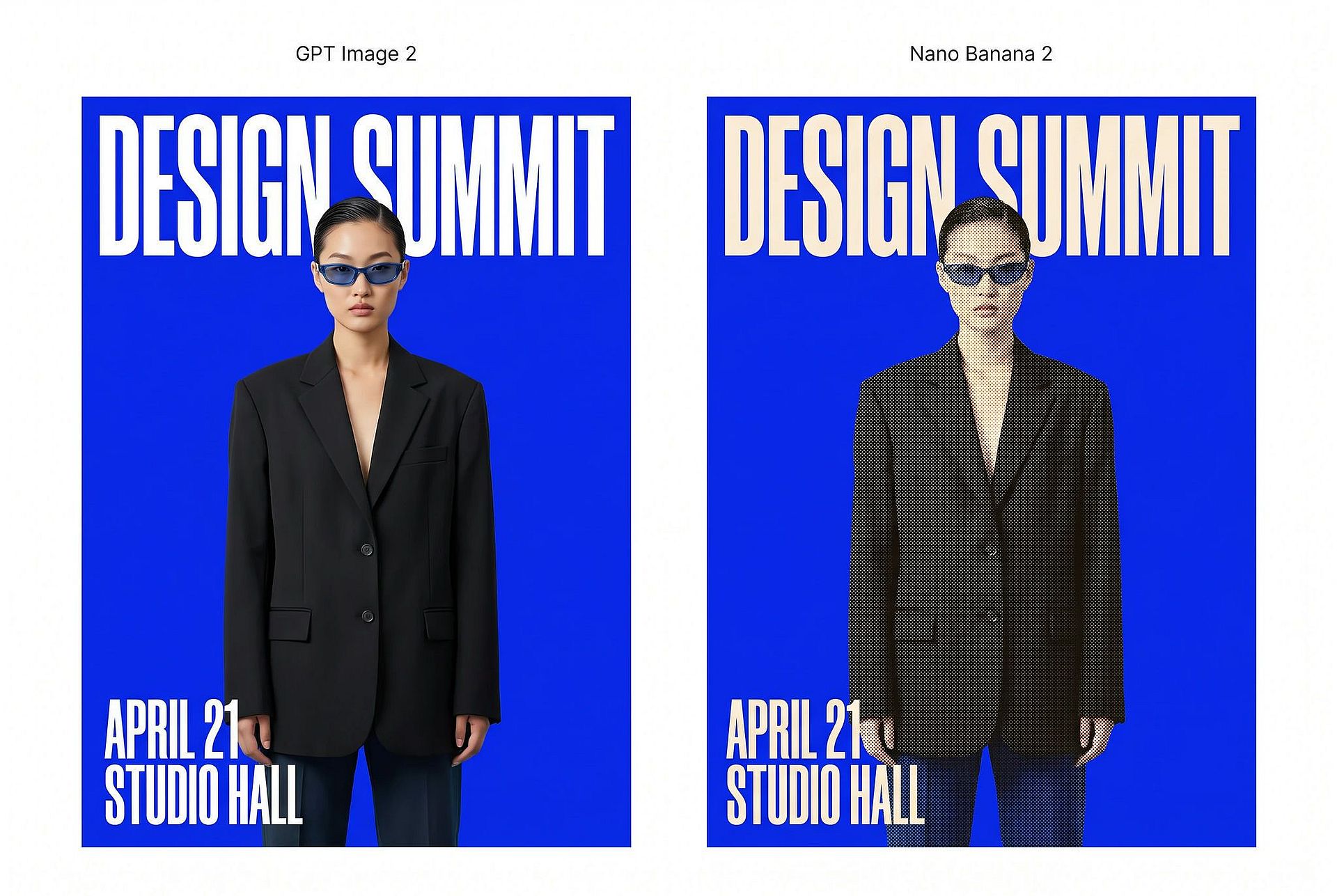
Independent testing backs that up too. In Decrypt's seven-category evaluation, GPT Image 2 delivered "near-perfect element recall" on a punishing dense-text street scene, correctly rendering every sign, sticker, and storefront label in the prompt. It also won Decrypt's signature-lettering test "by a large margin," while Nano Banana 2 lost legibility trying to match the same ornate reference style. A separate Isa does AI comparison favored GPT Image 2 for complex text and prompt adherence.
GPT Image 2 also handles detailed edits well when you need to preserve an input image while changing a defined element. High-fidelity image input lets you provide a reference, then request a new label, altered object, or revised composition. Version pinning through the dated gpt-image-2-2026-04-21 snapshot can help you keep behavior more consistent in repeatable production workflows.
Results still vary by prompt and model update. On Reddit, a 130-comment thread in r/ChatGPT describes a recurring problem: generations coming out with an unwanted "tiling texture/noise" layer over the whole image. The complaint resurfaces in several follow-up threads over the following months, so it's not a one-off. OpenAI forum users have also reported occasional regressions involving prompt adherence, faces, and anatomy. GPT Image 2 remains the stronger default for structured visual communication, but test critical prompts before you assume a generation will hold up.
Where Nano Banana 2 leads
Nano Banana 2's clearest, most verifiable edge is speed. Google positions Gemini 3.1 Flash Image as a faster model that carries forward many capabilities associated with Nano Banana Pro, and OpenArt Arena's own benchmark confirms it: Nano Banana 2 generates a 1K image in 18.1 seconds, versus 44.8 seconds for GPT Image 2 — well under half the time, even though Arena's pricing data lists it as the more expensive of the two per image ($0.101 vs. $0.057). In practice, that speed lets you test more camera angles, lighting choices, and prompt variations within the same session.
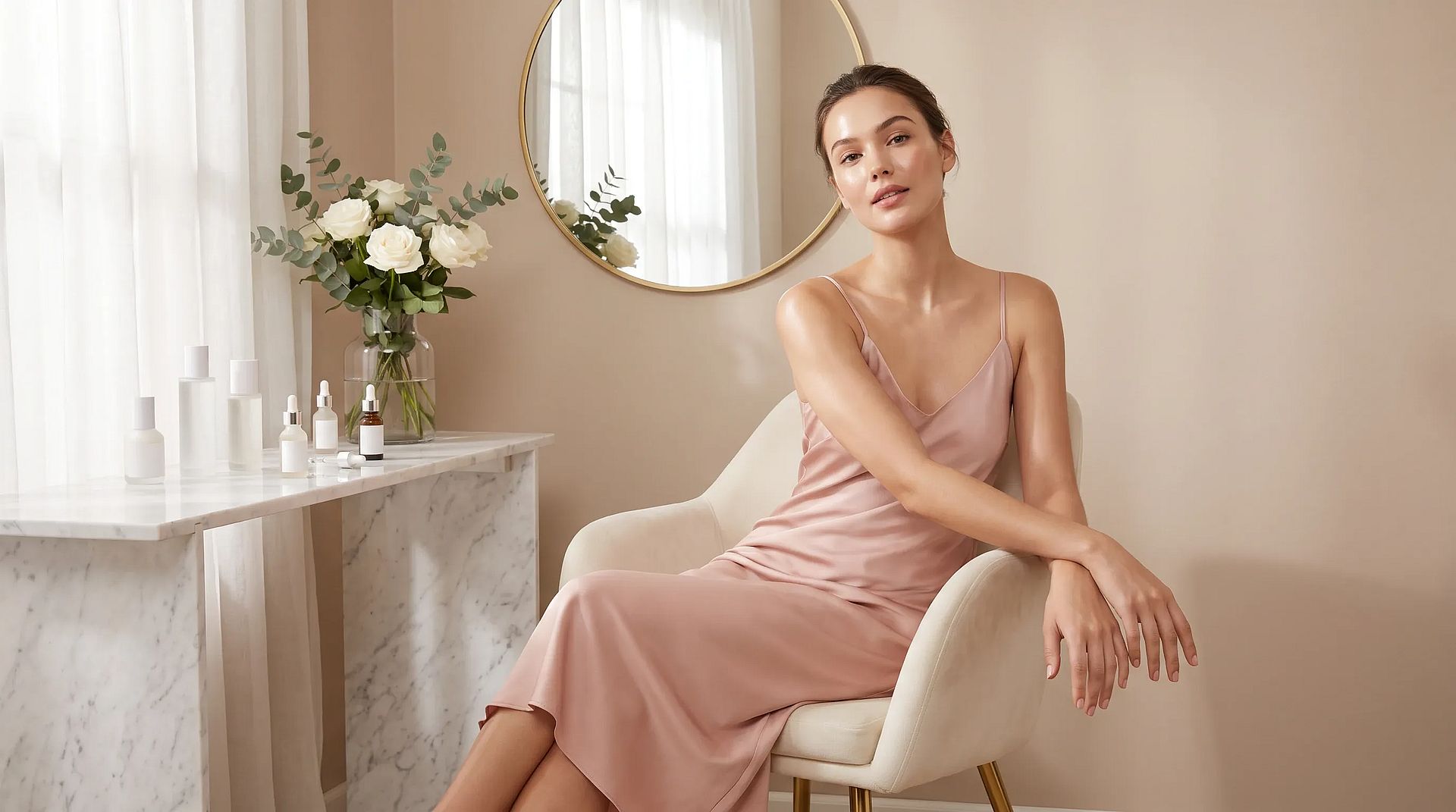
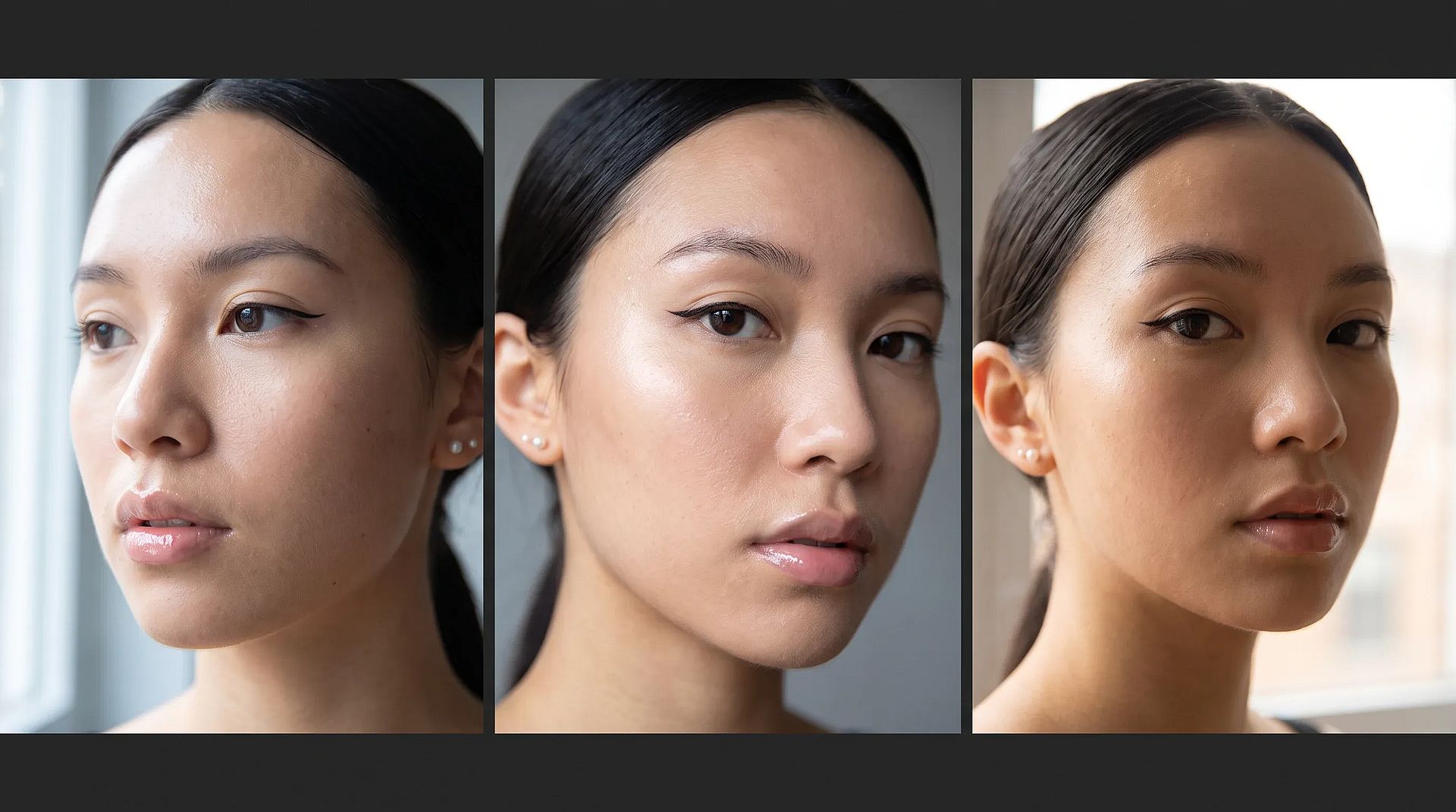
Independent testing also favors Nano Banana 2 for some photorealism work. In a cinematic portrait test with tight constraints on lighting, coat color, and depth of field, Decrypt scored Nano Banana 2 the winner, noting its skin texture looked natural for the resolution and its subject read as more genuine. On Reddit, one user comparing the same prompt across both models summed up the difference: Nano Banana 2 reads like a "phone-photo," while GPT Image 2 comes out cleaner but more "staged." Not everyone agrees, and it's worth noting that on OpenArt Arena's blind Overall board, which judges a mix of use cases rather than portraits specifically, GPT Image 2 currently scores higher on Subjective Aesthetics (1,030 vs. 1,000). Treat photorealism as a use-case-specific edge worth testing on your own references, not a blanket rule.
Google says Nano Banana 2 can preserve the resemblance of up to five characters and maintain fidelity for up to 14 objects within one workflow, the same subject-locking approach behind OpenArt's consistent character tools. A separate character consistency comparison found Nano Banana 2 more stable in facial features than GPT Image 2. That claim is harder to square with Arena's Overall-board data, though: GPT Image 2 actually leads the Reference Adherence criterion there (1,035 vs. 991) — the closest published proxy for staying faithful to a supplied subject. Nano Banana 2 does have a genuine, blind-judged win in a related spot: it leads the Style Adaptation criterion on Arena's Image Editing board (1,065), where the job is adapting an image to a new look while keeping everything else intact. If a production run depends on keeping one character or product consistent across many frames, test both models on your own subject before you commit.
Nano Banana 2's strongest and most consistent showing across every board Arena publishes is on the E-commerce board, where it leads both Realism (1,020) and Text/Logo Accuracy (1,093) — the two criteria built specifically to test product photography and packaging fidelity.
Google also connects Nano Banana 2 to Gemini's world knowledge and real-time search grounding. The model can use current context when producing diagrams, infographics, or location-specific scenes, although you should still verify any generated facts before publishing. Support for flexible aspect ratios and resolutions between 512 pixels and 4K makes the model practical for quick drafts and higher-resolution exports.
Nano Banana 2 and Nano Banana Pro remain separate models. Google reserves Nano Banana Pro for maximum-fidelity work, while Nano Banana 2 prioritizes speed, iteration, and general-purpose production — see the section below for how the two compare.
Which model to use for each project type
Photorealistic portraits
Independent hands-on testing is split here. Decrypt's cinematic portrait test favored Nano Banana 2, and a character consistency comparison found it held facial features more reliably across frames. But on OpenArt Arena's blind Overall image board, GPT Image 2 currently scores higher on Subjective Aesthetics (1,030) than Nano Banana 2 (1,000) — the opposite of what those specific portrait tests suggest. Arena's aesthetics score covers a mix of use cases rather than portraits alone, so treat it as a broader quality signal, not a portrait-specific verdict: run both models on your own reference photos, including through OpenArt's professional AI headshots tool, before committing to one for a shoot.
Product shots
OpenArt Arena's dedicated E-commerce board — which adds Brand Consistency, Realism, and Text/Logo Accuracy to the four general criteria — gives Nano Banana 2 its clearest win in this guide: it leads the board on both Realism (1,020) and Text/Logo Accuracy (1,093), the two criteria that matter most for keeping packaging and printed branding intact. GPT Image 2 still edges out the composite board score (1,023 vs. 1,014) on the strength of its Brand Consistency (1,020) and Prompt Adherence (1,041) scores, so it's worth testing if your shots depend on following a detailed art-direction brief rather than just rendering the product faithfully. For high-volume catalogue work, that's a genuine trade-off rather than a clear winner — test both on your actual product and packaging.
Text-heavy graphics and memes
Choose GPT Image 2 when readers need to understand the words on the first attempt. It handles captions, labels, comic panels, and infographic structure more reliably than Nano Banana 2 across the tests referenced above, and on OpenArt Arena's dedicated Graphic Design board it leads Text Accuracy by the widest margin of any criterion on that board (1,120). The same strength applies to layout-driven formats such as OpenArt's posters and YouTube thumbnails, where one misplaced word breaks the asset. Nano Banana 2 can produce a cleaner-looking composition in some cases, but GPT Image 2 remains the safer starting point when one misspelled phrase makes the asset unusable.
Logos and wordmarks
Choose GPT Image 2 for early logo concepts that include a brand name. On Arena's Graphic Design board it leads the composite score outright (1,051) and tops Layout (1,085) and Style Adherence (1,050) too, so its stronger text rendering gives wordmarks a better chance of preserving the requested spelling and letter order. OpenArt's dedicated AI logo generator is a faster starting point when you only need mark concepts. Neither model replaces final vector work, kerning adjustments, or a trademark search, so treat the output as a concept rather than finished identity files.
UI mockups
Choose GPT Image 2 for dashboards, app screens, and landing-page concepts. Interface work depends on readable labels and a clear hierarchy, and that's where its layout strengths show up most — Arena's Graphic Design board, the closest published proxy for structured composition, has GPT Image 2 leading Layout at 1,085. Nano Banana 2 makes more sense when the screen appears inside a photorealistic device shot and the surrounding scene matters more than exact interface copy.
Batch and iterative edits
Google specifies support for maintaining resemblance across up to five characters and fidelity across up to 14 objects in Nano Banana 2, and expects that to help when you revise wardrobe, framing, or lighting while keeping a cast recognizable. Arena's dedicated Image Editing board gives a more mixed picture: GPT Image 2 leads the board overall (1,045) and its board-specific Prompt Adherence criterion (1,073), while Nano Banana 2 leads the Style Adaptation criterion specifically (1,065) — the closest published proxy for restyling an image while keeping its other elements intact. Which one wins depends on whether your batch job is about following detailed edit instructions or adapting a look, so test both models on your own subject before a high-volume run, then take the winning frames into OpenArt's AI photo editor for final cleanup.
Architecture and interior visualization
Hands-on comparisons are mixed here, and Nuno Silva's ten-round architecture comparison found no single winner across camera changes, furniture replacement, mood lighting, and floor-plan generation. OpenArt Arena's Film board — the closest published proxy for atmosphere and lighting — actually favors GPT Image 2: it leads the board on both Film Texture (1,089) and Scene & Lighting (1,042), and its composite Film board score (1,058) comfortably outranks Nano Banana 2's (998). If atmosphere and lighting quality matter most for an exterior or interior render, that data points toward testing GPT Image 2 first rather than defaulting to Nano Banana 2. GPT Image 2 also remains the safer pick for floor plans and other scene changes that depend on exact instructions.
Is Nano Banana 2 the same as Nano Banana Pro?
Nano Banana 2 and Nano Banana Pro are different models built for different jobs. Google positions Nano Banana 2 as the faster, general-purpose option for rapid generation, precise instruction following, and image-search grounding. Nano Banana Pro remains its choice for high-fidelity work that requires maximum factual accuracy — and on OpenArt Arena's Overall board, Nano Banana Pro's 1,008 score does outrank Nano Banana 2's 985, in line with that positioning.
Choose Nano Banana 2 when you expect to generate several versions, revise prompts quickly, or localize graphics with in-image text. Choose Nano Banana Pro when factual precision and maximum fidelity outweigh generation speed.
The distinction also changes the comparison you are making. A GPT Image 2 vs Nano Banana 2 decision focuses on GPT Image 2's structured image creation against Google's faster iteration model. A GPT Image 2 vs Nano Banana Pro comparison puts OpenAI's model against Google's fidelity-focused option.
Frequently asked questions
Is GPT Image 2 better than Nano Banana 2?
On OpenArt Arena's composite scores, yes, across all five of its image boards: GPT Image 2 leads or is the runner-up on Overall, E-commerce, Film, Graphic Design, and Image Editing, including outright #1 finishes on Graphic Design and Image Editing. But Nano Banana 2 isn't without genuine wins — it leads specific, blind-judged criteria on two boards: Realism and Text/Logo Accuracy on E-commerce, and Style Adaptation on Image Editing. It also generates faster and Google claims stronger built-in multi-character consistency, which Arena doesn't directly test. Choose based on the output you need, and check Arena's live standings since new model releases can shift them.
Does GPT Image 2 cost more than Nano Banana 2?
Not necessarily. On OpenArt Arena's published 2K-class price comparison, GPT Image 2 actually lists cheaper per image ($0.057, medium quality tier) than Nano Banana 2 ($0.101) — the opposite of what some anecdotal creator comparisons claim. Pricing still depends on the platform, resolution, and quality tier you choose, so check each model's current credit cost on OpenArt before starting a large batch.
Are GPT Image 2 and Nano Banana 2 images watermarked?
Google adds an invisible SynthID watermark to every Nano Banana 2 image and supports C2PA Content Credentials, according to Google's model announcement. OpenAI supports C2PA provenance for generated images, though visible watermarks and retained metadata can vary by product and export workflow. Provenance records help platforms and viewers identify AI-generated media, but file conversion or metadata removal can affect detection.