

 ChatGPT
 Perplexity
 Claude
 Gemini
OpenAI launched GPT Image 2 back in April, 2026, and it became the model most people reached for when a picture required detailed backgrounds or accurate in-image text. GPT Image 2.5 arrived on September 8, 2026, and it improves on all of Image 2's capabilities.
The newer model arrives as two modes: Flare for speed, and Sunburst for quality and depth. Let's look at what got upgraded in the new version, and how to pick between them for the task at hand.
Key takeaways
- GPT Image 2.5 is the model to use now, in two modes: Flare for everyday work and Sunburst for your most detailed jobs.
- OpenAI reports Flare makes better images than GPT Image 2 in half the time.
- GPT Image 2.5 saves images with a clear background, ready to drop onto any color.
- An edit changes the precise part you asked about and leaves the rest of the picture alone.
- You can stack several edits in a row and the earlier ones stay put and consistent.
GPT Image 2 vs GPT Image 2.5 at a glance
| GPT Image 2 | GPT Image 2.5 | |
|---|---|---|
| Released | April 21, 2026 | September 8, 2026 |
| Modes | One model, one speed | Flare and Sunburst |
| Maximum resolution | 3840 x 2160, marked experimental above 2560 x 1440 | 3840 x 2160 |
| Clear background | Cut it out yourself afterward | Built in, saved as PNG or WebP |
| Words in the picture | Strong | Strong, and now charts, diagrams, and labels too |
One model becomes two modes
GPT Image 2 gave you one model and one speed. GPT Image 2.5 gives you a choice before you hit generate.
Flare is the fast mode for everyday creating and editing. OpenAI reports that Flare makes higher-quality images than GPT Image 2 and takes half as long to do it. Use it while you are still trying ideas.
Sunburst is the top quality mode, and it runs at a medium speed. Pick it for the jobs where fine detail and careful editing matter most.
The habit worth building is simple. Draft in Flare, then run your favorite prompt again in Sunburst for the final image.
Clear backgrounds come built in
GPT Image 2.5 can save your picture with a clear background as a PNG or a WebP file.
So a sticker, a logo mark, a product cutout, or an app icon comes out ready to drop onto any color you want. With GPT Image 2 you saved the picture first, then cut the background out yourself in another app.
That one change removes a step from most packaging, merch, and ad work.
Edits stay where you put them
This is the biggest upgrade for anyone who works on an image after the first try.
Ask GPT Image 2.5 for a blue jacket in the edited image and you get a blue jacket. The face, the pose, the lighting, and the background all stay as they were. You can also mark the exact spot you want replaced and leave everything outside that spot untouched.
Then keep going. Change the sky, change the shirt, add a coffee cup, and the first two changes are still there on the third pass.
Older models tended to redraw a little more of the picture with every request. Holding the frame steady is what lets you fix one small thing without starting over.
Your reference photo survives the trip
GPT Image 2.5 does a better job of keeping the person or the product from your reference photo recognizable in the new image.
That matters for a founder headshot placed in five settings, or one sneaker photographed once and then shown on a beach, a city street, and a studio backdrop. The subject still looks like the same subject.
Text, charts, and labels
GPT Image 2 was already the safe pick for a poster or a sale banner because it spelled words correctly.
GPT Image 2.5 keeps that and adds real-world information you can read: chart labels, a diagram, a price list, a nutrition panel. Read the words in your image before you publish it, and fix anything that came out wrong with a follow-up edit.
Sample generations
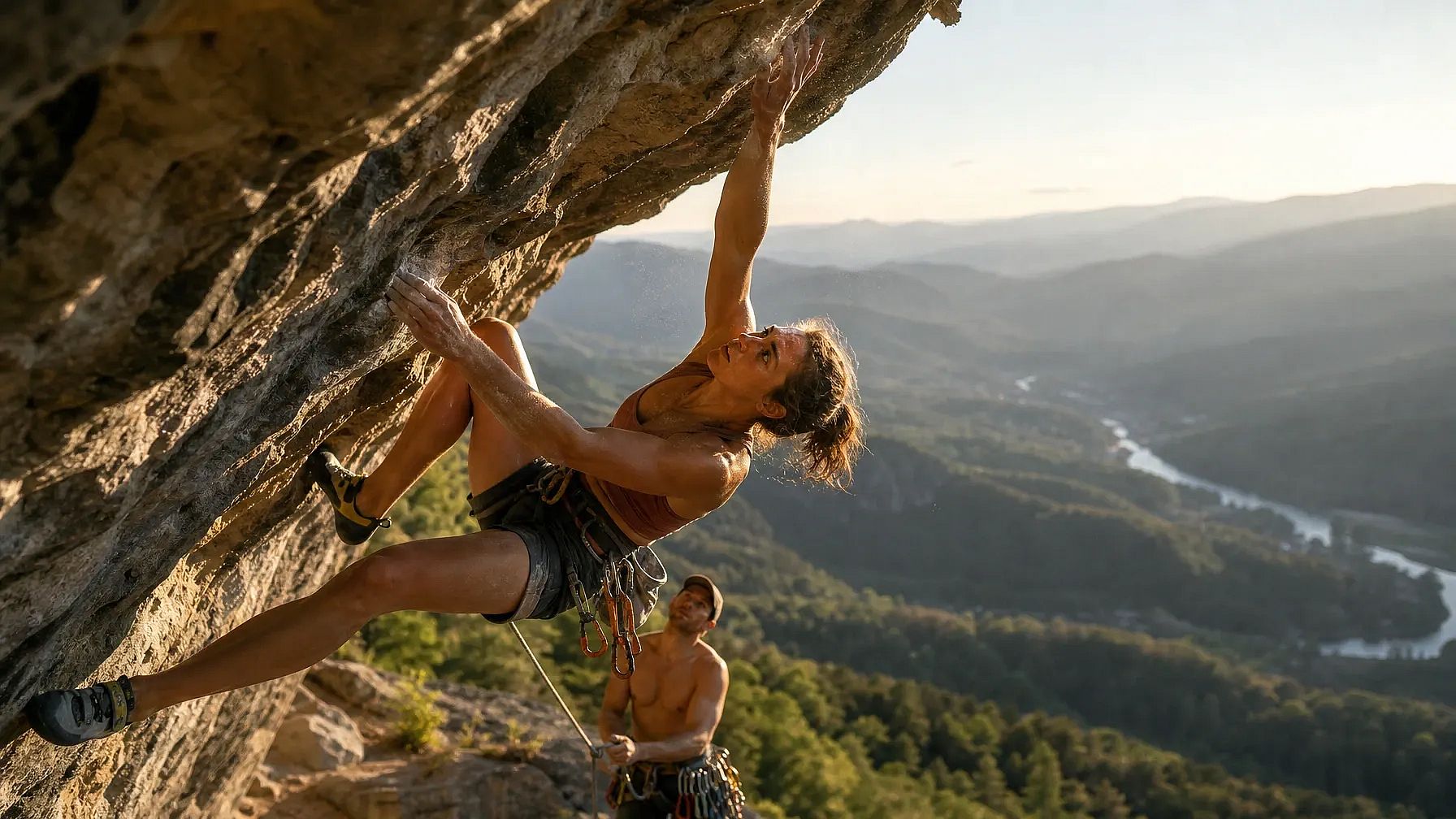
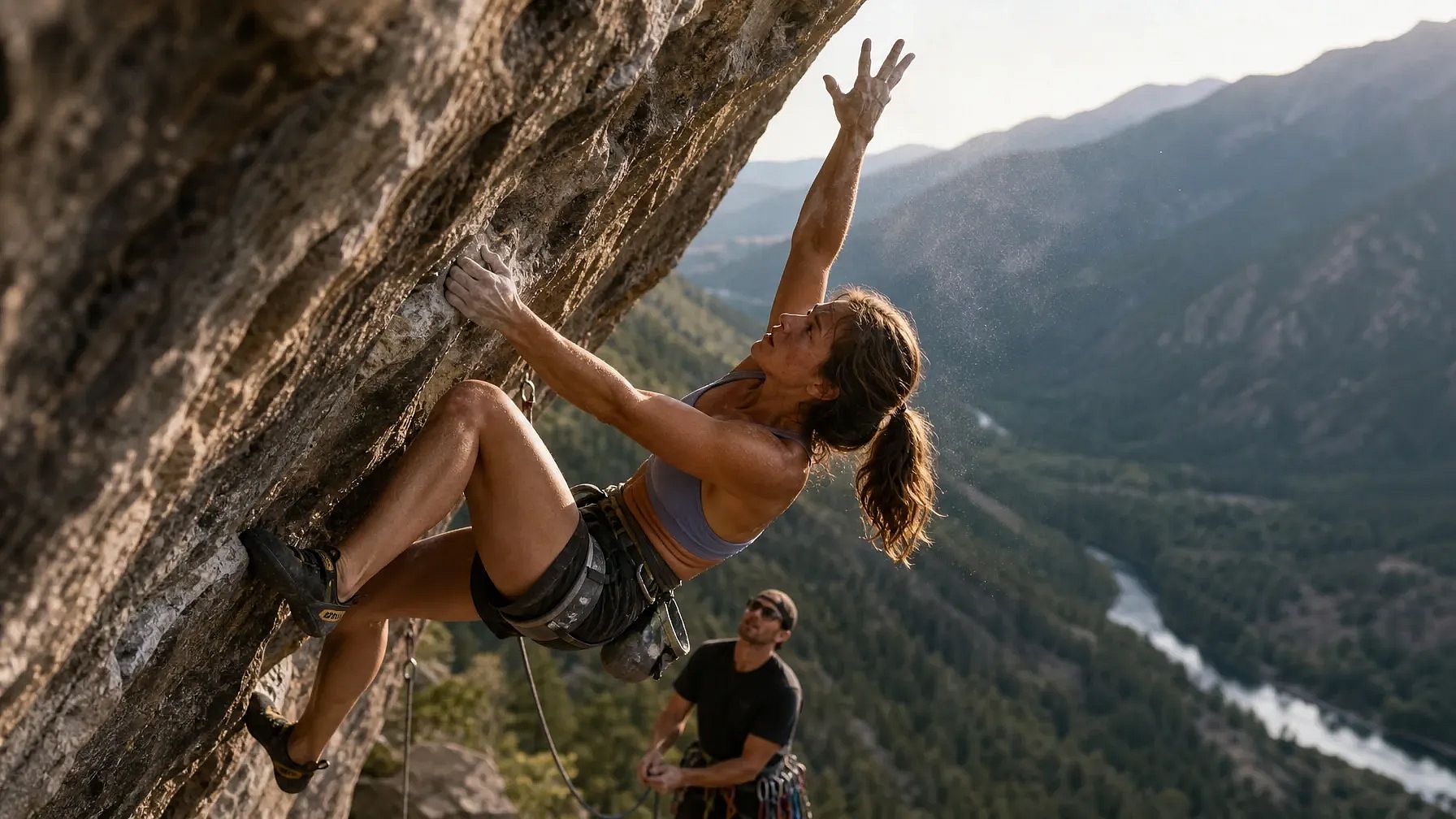
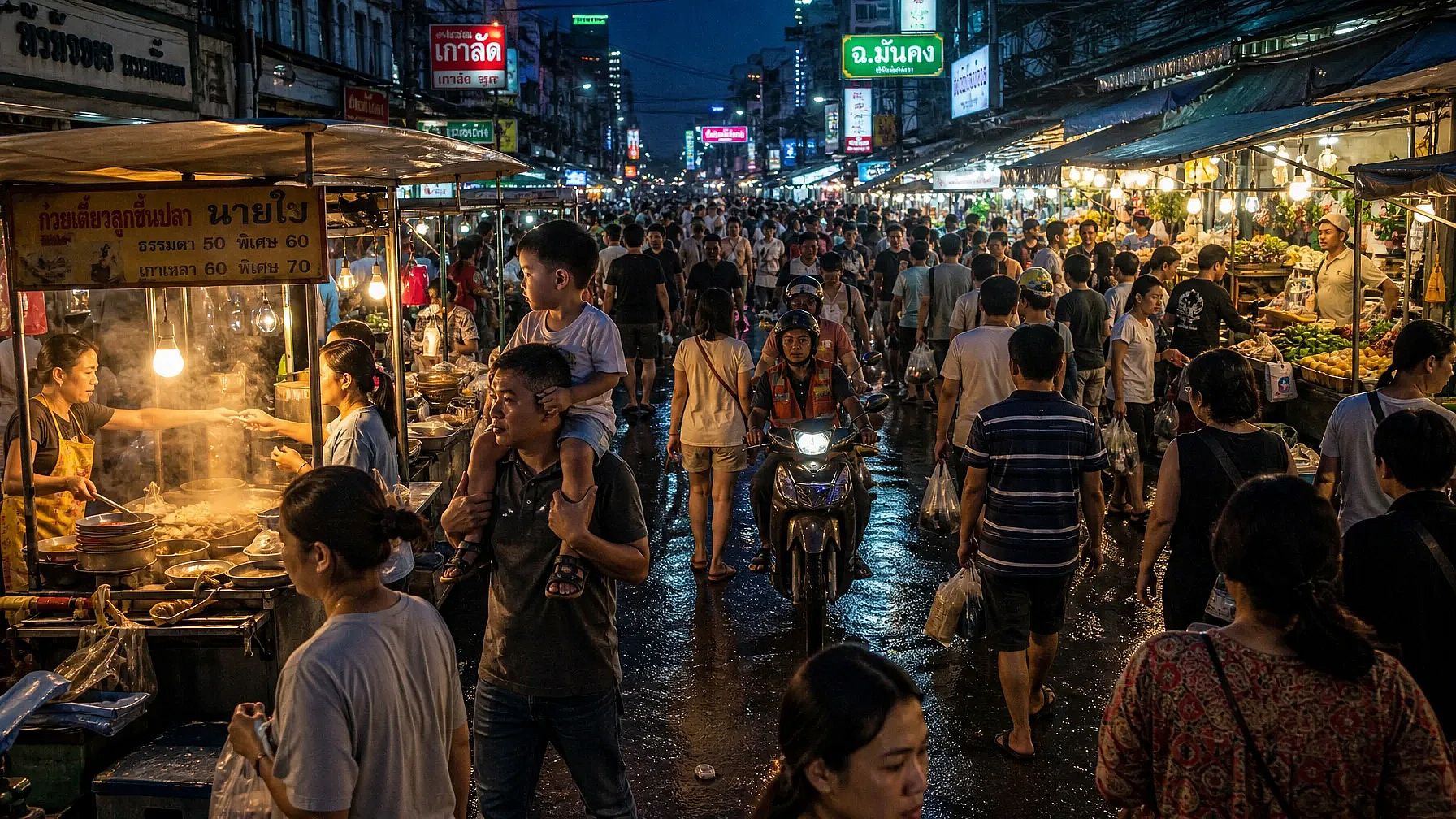
Let's look at the results of three different prompts, run on both GPT Image 2 and GPT Image 2.5 (Sunburst), to compare them for photorealism, the human body, and complex backgrounds.
Prompt 1: Multi-figure action, complex anatomy under motion
A photorealistic action shot of a professional rock climber mid-dynamic-move on an overhanging cliff face, one hand gripping a small hold and the other reaching upward, fingers splayed and tendons visible under strain. Her body is twisted in a diagonal torque, left leg bent with the knee driving toward the wall while the right leg extends outward for balance. Chalk dust drifts off her hands, caught in a shaft of late-afternoon sunlight. Below her, a belayer looks upward, rope taut, with a cluttered gear rack of carabiners and cams clipped to his harness. The background shows a sprawling valley with layered mountain ridges fading into haze, a river winding through a forest far below. Skin texture should show sweat, sun exposure, and fine hair on the forearms. Shadows fall correctly across the rock's uneven texture, matching the sun's low angle. Capture this on a 35mm lens, shallow depth of field on the climber, sharp foreground rock texture, natural film grain.
GPT Image 2 result:
GPT Image 2.5 result:
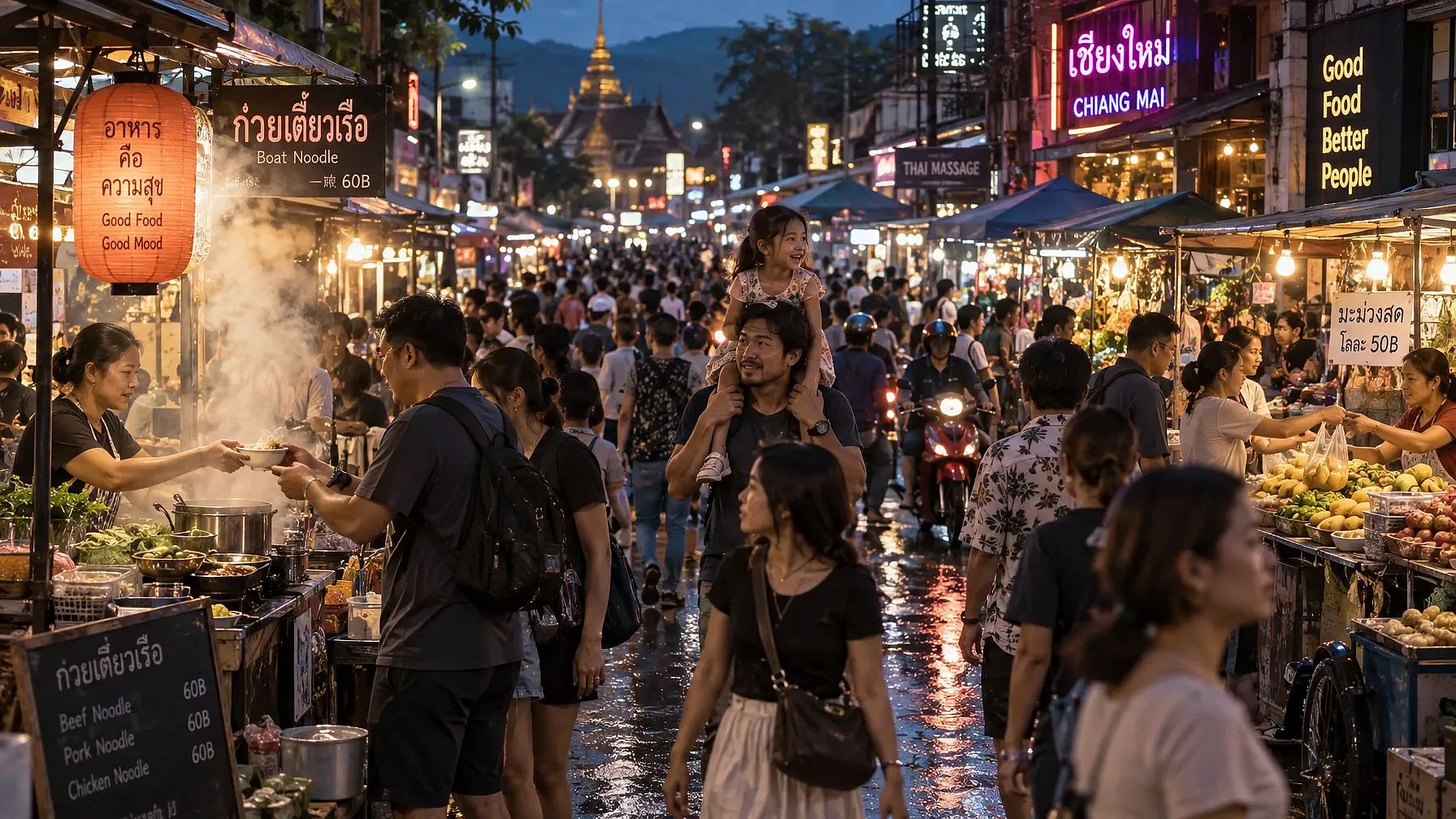
Prompt 2: Dense crowd scene, repeated human forms
A photorealistic wide shot of a crowded night market street in Southeast Asia, packed with dozens of people walking in different directions, each with distinct clothing, height, and posture. Vendors lean over stalls stacked with produce and lit by strings of warm bulbs, their hands mid-gesture as they hand items to customers. In the foreground, a child sits on a parent's shoulders, both faces lit by the glow of a nearby food cart's steam. Reflections of neon signage ripple across wet pavement from a recent rain. Steam rises from a noodle stall, partially obscuring two figures mid-conversation. Background stalls recede into a blur of motion and color, with motorbikes weaving through gaps in the crowd. Every visible hand and face should maintain correct proportions even at a small scale. Lighting is mixed, warm tungsten stalls against cool blue ambient dusk light, creating complex color temperature interplay across skin tones.
GPT Image 2 result:
GPT Image 2.5 result:
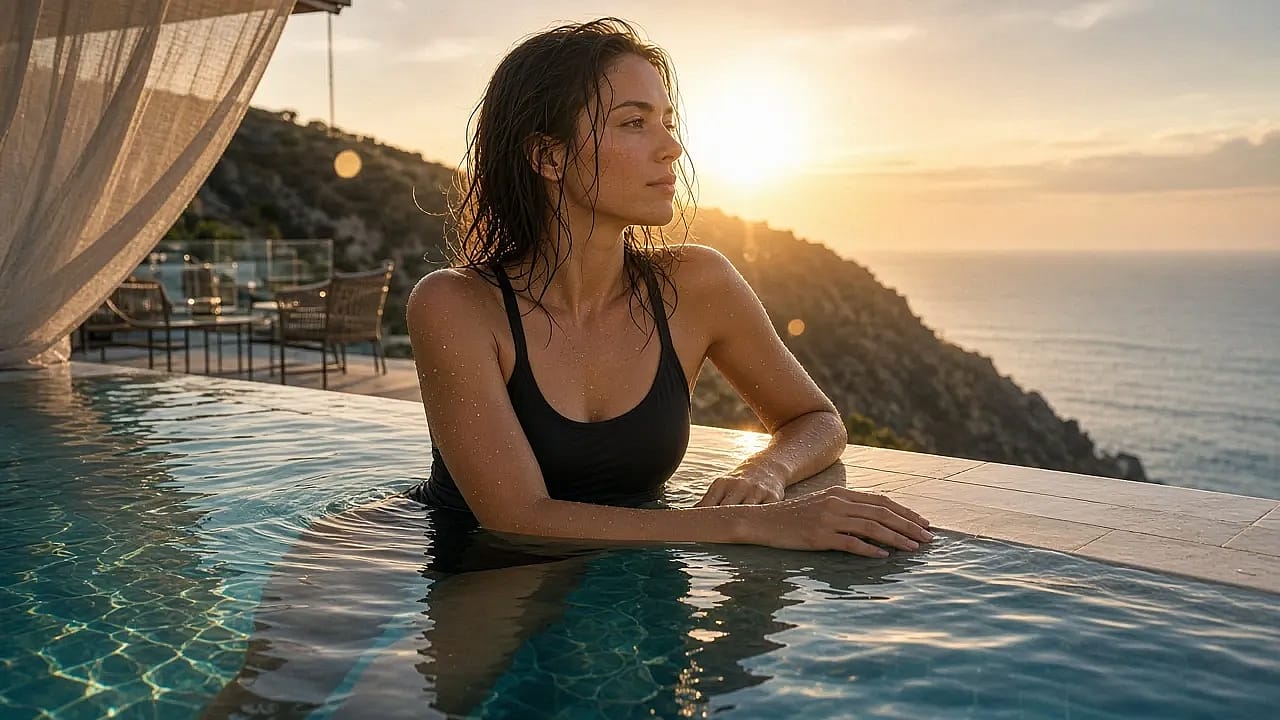
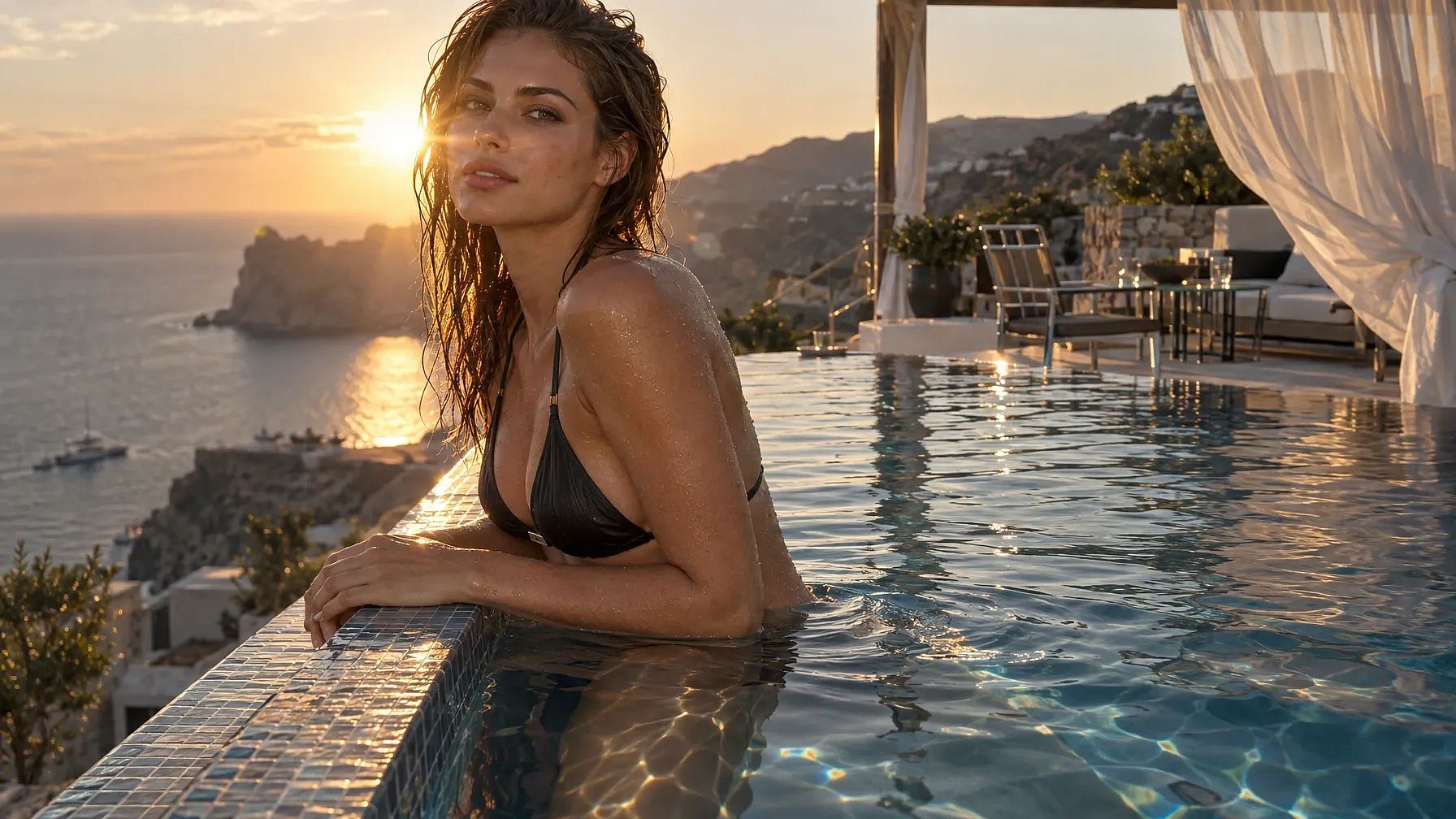
Prompt 3: Reflective and transparent surfaces with a single figure
A photorealistic portrait of a swimmer standing waist-deep at the edge of an infinity pool overlooking a coastal cliffside at golden hour, water dripping down her arms and shoulders with individually visible droplets. Her reflection appears distorted but physically accurate in the pool's rippling surface, and a faint refraction line is visible where her legs submerge into the water. Behind her, the pool's edge blends into the ocean horizon, with a lounge area of glass tables and metal chairs catching scattered sun glare. A gauzy curtain from a nearby cabana billows in the wind, partially translucent with visible weave texture. Wet hair clings unevenly to her collarbone and neck, individual strands catching backlight. Her hands rest on the pool's tiled edge, fingers naturally relaxed, nails and knuckle creases rendered accurately. The sun sits low behind her, producing lens flare and a rim-light halo along her shoulders. Overall color grading should favor warm highlights against cool shadow tones, with accurate caustic light patterns dancing on the underwater tile.
GPT Image 2 result:
GPT Image 2.5 result:
GPT Image 2.5 vs 2.0: which one should you use?
Make GPT Image 2.5 your default. It is quicker than GPT Image 2 in Flare mode, the pictures come out better, and every upgrade above sits on top of that.
Pick Flare for your everyday work: social posts, quick concepts, a batch of ad sizes, anything you plan to look at and try again.
Pick Sunburst when the image goes in front of a customer, when you need a clear background, or when you plan to edit the same picture several times.
That covers almost every job. Start in Flare, finish in Sunburst, and reach for GPT Image 2 only if you have an old prompt you have not moved over yet.
FAQ
What is the difference between GPT Image 2 and GPT Image 2.5?
GPT Image 2.5 comes in two modes, Flare and Sunburst, while GPT Image 2 has one model and one speed. GPT Image 2.5 also adds built-in clear backgrounds, keeps edits in place across several rounds, holds the subject of a reference photo more closely, and handles charts, diagrams, and labels as well as regular text.
When were GPT Image 2 and GPT Image 2.5 released?
OpenAI released GPT Image 2 on April 21, 2026, and GPT Image 2.5 on September 8, 2026.
What is the difference between Flare and Sunburst?
Flare is the fast mode for everyday creating and editing. OpenAI reports that it makes higher-quality images than GPT Image 2 in half the time. Sunburst is the top quality mode and runs at a medium speed, so it suits final images, detailed work, and images you plan to edit several times.
Can GPT Image 2.5 make images with a transparent background?
Yes. GPT Image 2.5 can save an image with a clear background as a PNG or WebP file. With GPT Image 2, you had to remove the background yourself in another app.
Can I try GPT Image 2 and GPT Image 2.5 on OpenArt?
Yes. Both models are in the model menu on OpenArt's AI image generator, so you can run the same prompt through each one and compare the results.
Try both on OpenArt
Both models sit in the model menu on OpenArt's AI image generator, so you can run the same prompt through each one and keep the picture you like. You can also bring in your saved colors and fonts from Brand Kit and reuse a face you have saved in OpenArt Characters.