

 ChatGPT
 Perplexity
 Claude
 Gemini
トレンドのポートレートに使えるGemini AIおすすめプロンプト集
41個のプロンプト。この記事の中身はそれです。Gemini AI の写真プロンプトをコピーして貼り付け、完成したポートレートを手に入れたいだけなら、下のライブラリへ直行してください。なぜ一部のプロンプトはプロ級の仕上がりになり、他のプロンプトはのっぺりした別人を返してくるのかを理解したいなら、ライブラリの前にあるフラッグシップの解説とホリデーのセクションが、プロンプトの各行が実際に何をしているかを教えてくれます。
ホリデー関連のセクションでは、よく検索される季節の編集を扱います。ハロウィンのコスチュームセルフィーやVHSホラー風トレンド、感謝祭の家族ディナー写真、そしてギフトボックスのポートレートからお揃いパジャマの家族ショットまでのAIクリスマス撮影。
ここにあるすべては Google の Gemini 画像モデルで動作しており、 OpenArt では、GPT Image 2.5、Seedream、そして本格的な写真エディターとともに Nano Banana の名で使えます。読み込みから完成写真まで、約2分。
Gemini AIの写真プロンプトとは?
Gemini AI写真プロンプトとは、GoogleのGemini画像モデルに与える平易な言葉の指示で、新しい写真を生成したり、手持ちの写真を編集したりするためのものです。Geminiの画像側には、おそらく見たことのある愛称があります。Nano Bananaです。Googleは今やこの名前を公に使っており、最も高性能なバージョンであるNano Banana Proこそ、人々が「Gemini AI写真」と言うときに指しているモデルです。
こうしたプロンプトは、2つのうちどちらかを行います。生成:シネマティックなストリートポートレートやオーラファーム風のショットなど、テキストの説明からまったく新しい写真を作ります。あるいは編集:実際の写真から始めて、指示した箇所だけを変更し、残りはそのまま保ちます。たとえば「顔はそのままに、90年代のフィルムポートレート風に変えて」といった具合です。編集こそGeminiが最も得意とするもので、トレンドのポートレートブームがまさにこのモデルで火がついた理由でもあります。
OpenArtでGemini風のプロンプトを実行する
ここは正直に。大事なことだからです。OpenArt は Gemini ではありませんし、Google 製でもありません。OpenArt が提供するのは、Gemini 画像モデルへの直接アクセスです。Nano Banana 2.1、Nano Banana Pro、Nano Banana 2 Lite がすべてワークスペースに揃っています。「Gemini AI 写真」向けに書かれたどんなプロンプトも、OpenArt 内の同じモデルで動きます。
選択 Nano Banana 2 Lite 素早い下書きに、 Nano Banana 2.1 画像内の文字がよりくっきりする安定した日常用途には、そして最も洗練された、同一性の保たれた仕上がりには Nano Banana Pro を。 GPT Image 2.5, Seedream 5.0 Pro、さらに充実の AI画像編集 それらと並べて配置します。
Geminiの写真プロンプトがバズる理由
Geminiの画像モデルに関する初期の報道の多くは生成、つまり説明を入力して新しい画像を得ることに注目していました。しかし実際に広まったフォーマットは、コピーされることを前提に作られていたのです。
バズるGeminiの写真プロンプトには特定の型があります。被写体、スタイル、ライティング、ムード、アスペクト比を指定し、変えてはいけない部分を明確に区切ります。このレシピは十分に完成されているため、ある人のプロンプトが、1000人の異なる人がアップロードした1000枚の異なる写真に対して機能するのです。
パーソナルなフィードでは、生成よりも編集が勝ちます。理由はシンプル。他人の生成画像はスクロールで流されますが、編集された画像は違います。 あなた ソフトグラムなポートレート、カフェのゴールデンアワーショット、修復した思い出の一枚など、保存やシェアしたくなる仕上がりに。
編集はさらに難しい作業です。説得力のある編集をするには、モデルがあなたの実際の顔をそのままに、スタイルや服装、設定を完全に変える必要があります。性能の低いツールはこの後半で失敗し、似ているだけの別人を返してきます。Geminiの画像モデルは大幅なリスタイルを通しても本人らしさを保ち、話題のポートレートはまさにこの点にかかっています。
純粋な生成機能をお求めなら、 おすすめのNano Bananaプロンプト ガイドでは、ゼロからバズる画像を作る方法を解説しています。この記事では両方を扱い、特に今みんながマネしているトレンドのポートレート編集に重点を置いています。
OpenArtでこれらを実行する方法
技術的な知識は一切不要。写真をアップロードし、Gemini モデルを選び、プロンプトを貼り付けて生成するだけです。
プロンプトを編集するには、次を開きます 画像生成 または 画像を作成 ワークスペース内で。promptボックスの横にある画像アップロードボタンで元の写真を追加します。このアップロードのステップが最も重要です。モデルはあなたが渡した画像を編集するため、明るくはっきりしたソースほどきれいな結果になります。
プロンプトボックスのモデル名をクリックして、日常的な作業ならNano Banana 2.1、最も一貫した結果が欲しいならNano Banana Proを選びましょう。下のプロンプトを貼り付けて生成するだけです。そこからエディターで微調整もできます。 印刷用に4Kへアップスケール、または背景を差し替えましょう。新規アカウントは無料のクレジット付きで始められるので、プランを選ぶ前にいくつか試せます。
純粋に生成したいだけなら、アップロードはスキップして、生成用のプロンプトをそのまま貼り付けてください。
話題の女の子ポートレート
いま最もマネされているGeminiの写真フォーマット。フィードを埋め尽くす「コピペ流行りの女の子」検索にそのまま対応します。ふだんの自撮りを、ソフトなハイライト、みずみずしい肌、あたたかなバタフライグロー、プロの撮影のように見えるおしゃれな仕上げで、洗練されたソフトグラム・ポートレートにリスタイルします。
High-fidelity studio portrait of a young Asian woman with pastel pink
hair in a side braid. She wears a cream polka-dot lace top under a pink
knit cardigan, accessorized with layered gold necklaces. Soft rosy
makeup, glossy lips, direct gaze. Pure white background, high-key
diffuse lighting, hyper-realistic fashion photography, 8k resolution.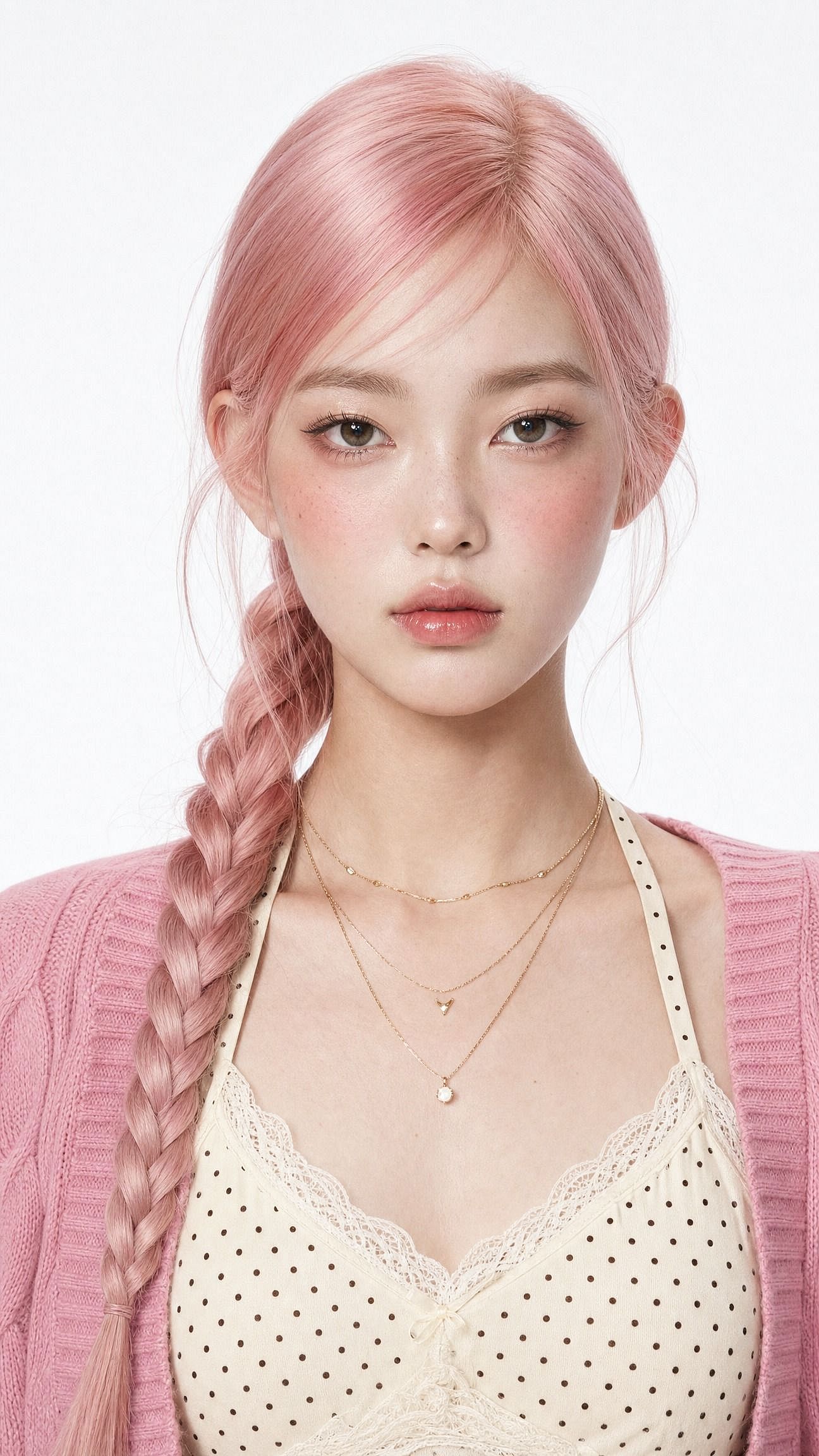
一語変えるだけで全体の雰囲気を切り替えられます。「ソフトグラム」を「サリーのエスニックな上品さ」に替えれば伝統的なセットに、「クリーンなInstagramのプロフィール写真、ミニマルなスタジオ背景」に替えればプロフィール画像になります。
肝心なのは最初の一文です。同じ顔を保ち、元のアイデンティティを維持すること。これがないと、モデルは他の要素と一緒に顔まで作り変えてしまい、より美しくなった自分ではなく、見知らぬ美人ができあがってしまいます。
シネマティックな少年のポートレート
このトレンドの男性版は、みんなが繰り返し真似する2つのルックに分かれます。映画のようなストリートスタイルと、Pinterest風のカフェ・ゴールデンアワーショットです。このpromptはストリート版を作ります。
Edit the uploaded photo. Keep the same face, features, and expression
exactly, preserve the original identity. Restyle into a cinematic urban
street portrait: moody overcast light, teal-and-orange color grade,
blurred city street background, confident casual streetwear, shallow
depth of field, film-still mood, vertical 4:5 frame. Keep skin texture
natural and true to life.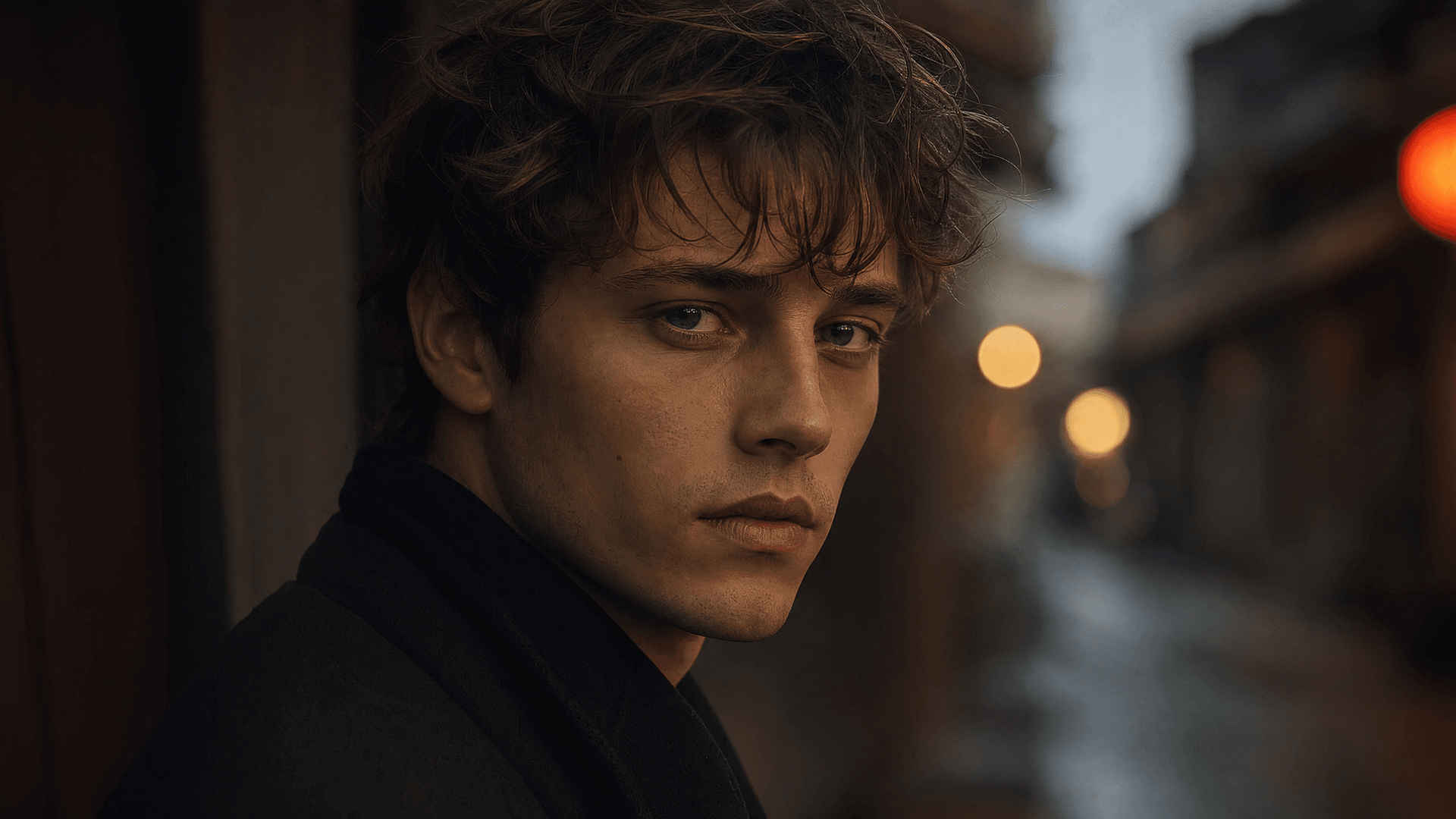
シネマティックなカップル
カップルの編集は最大のサブトレンドの1つであり、最も難しいものです。モデルは2つの顔を同時に守らなければなりません。
2人が写った普通のスマホ写真をアップロードするだけで、プロのフォトグラファーがスタイリングしたようなセットが手に入ります:
Edit the uploaded photo of two people. Keep both faces, skin tones, and
expressions exactly as they are, preserve both identities. Do not merge
or alter their features. Restyle into a cinematic couple portrait:
coordinated neutral-tone outfits, soft directional lighting, a blurred
city-evening background, natural closeness, warm film color grade,
shallow depth of field, magazine-cover quality.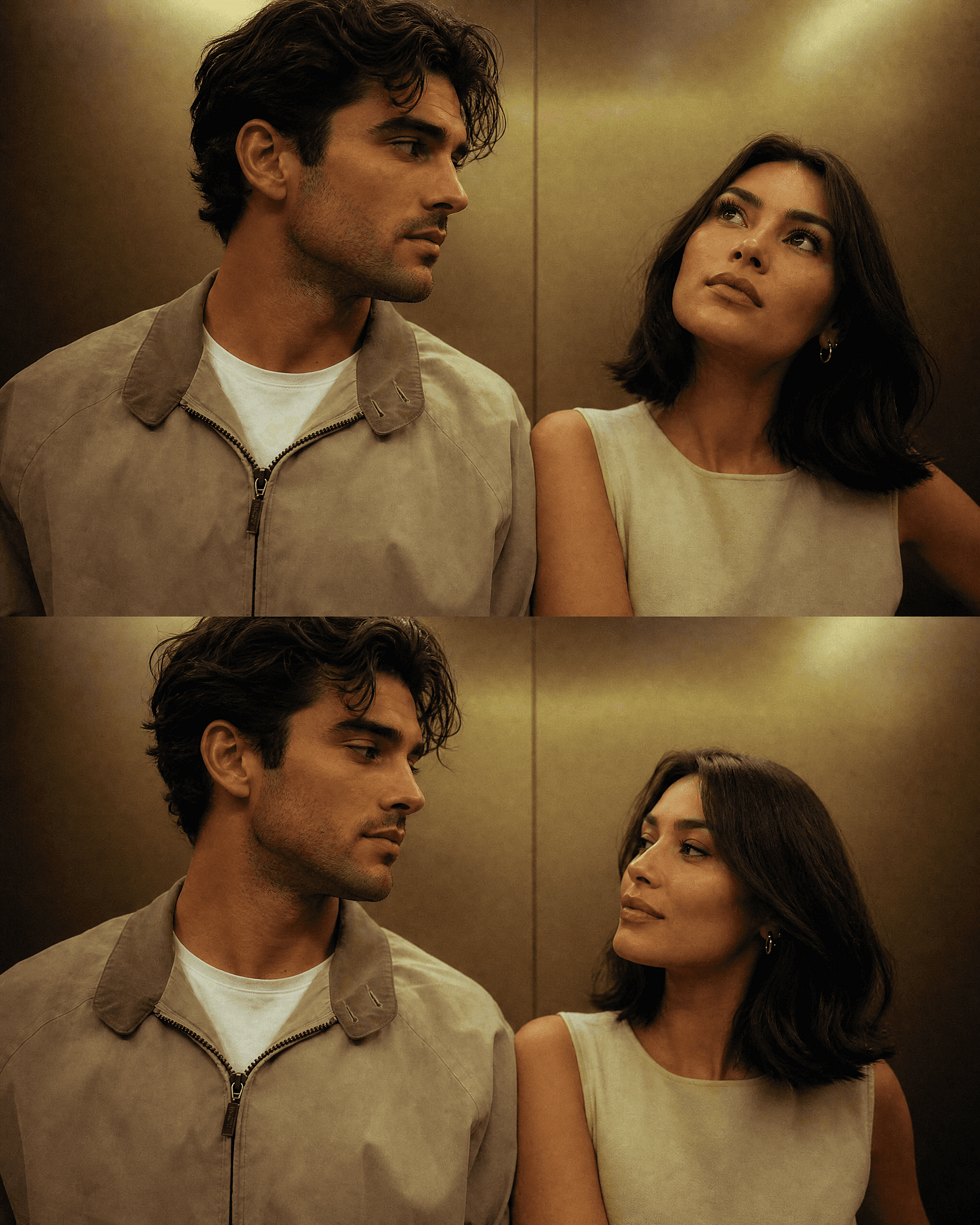
季節版なら、2人の顔はそのままに、背景だけを変えましょう。下のハロウィンとクリスマスのセクションには、すぐ使えるカップル向けプロンプトが含まれており、同じ元写真から走らせるどんな背景でも、2人とも見分けがつきます。
3Dフィギュア
このトレンド全体を一気に主流へ押し上げたフォーマットで、今も高いパフォーマンスを発揮します。実在の人物が、デスクの上や小売パッケージの中の小さなコレクター向けフィギュアに変身。「知っている人」と「棚の上のおもちゃ」というコントラストそのものが目を引くので、フィードで一瞬にして伝わります。
Edit the uploaded photo. Turn the person into a realistic 3D collectible
figure standing on a wooden desk next to a keyboard and a coffee mug for
scale. Keep their face, hairstyle, and outfit recognizable. Add a subtle
plastic-model texture, detailed base, soft desk lighting, shallow depth
of field, believable miniature scale, vertical 4:5 social frame.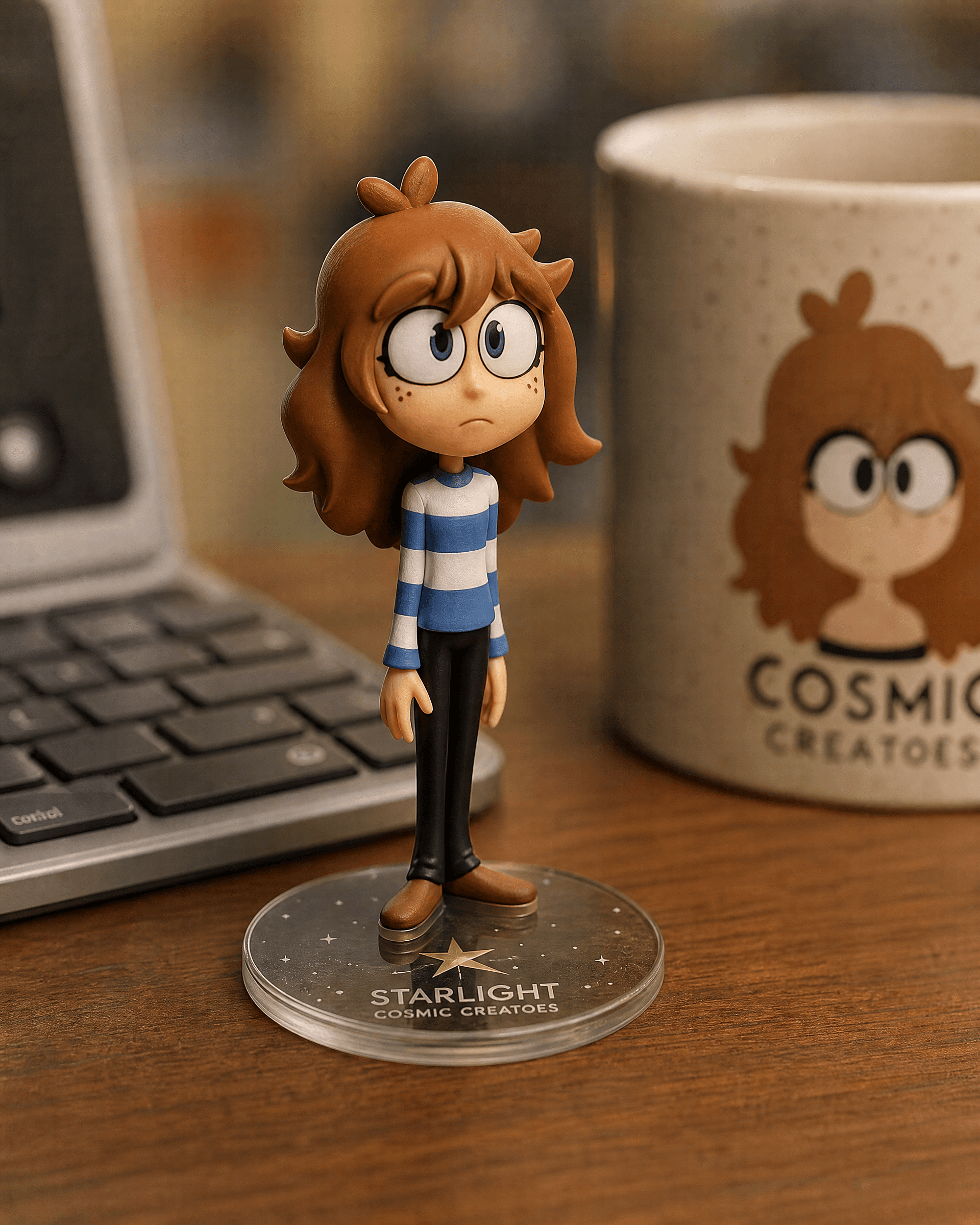
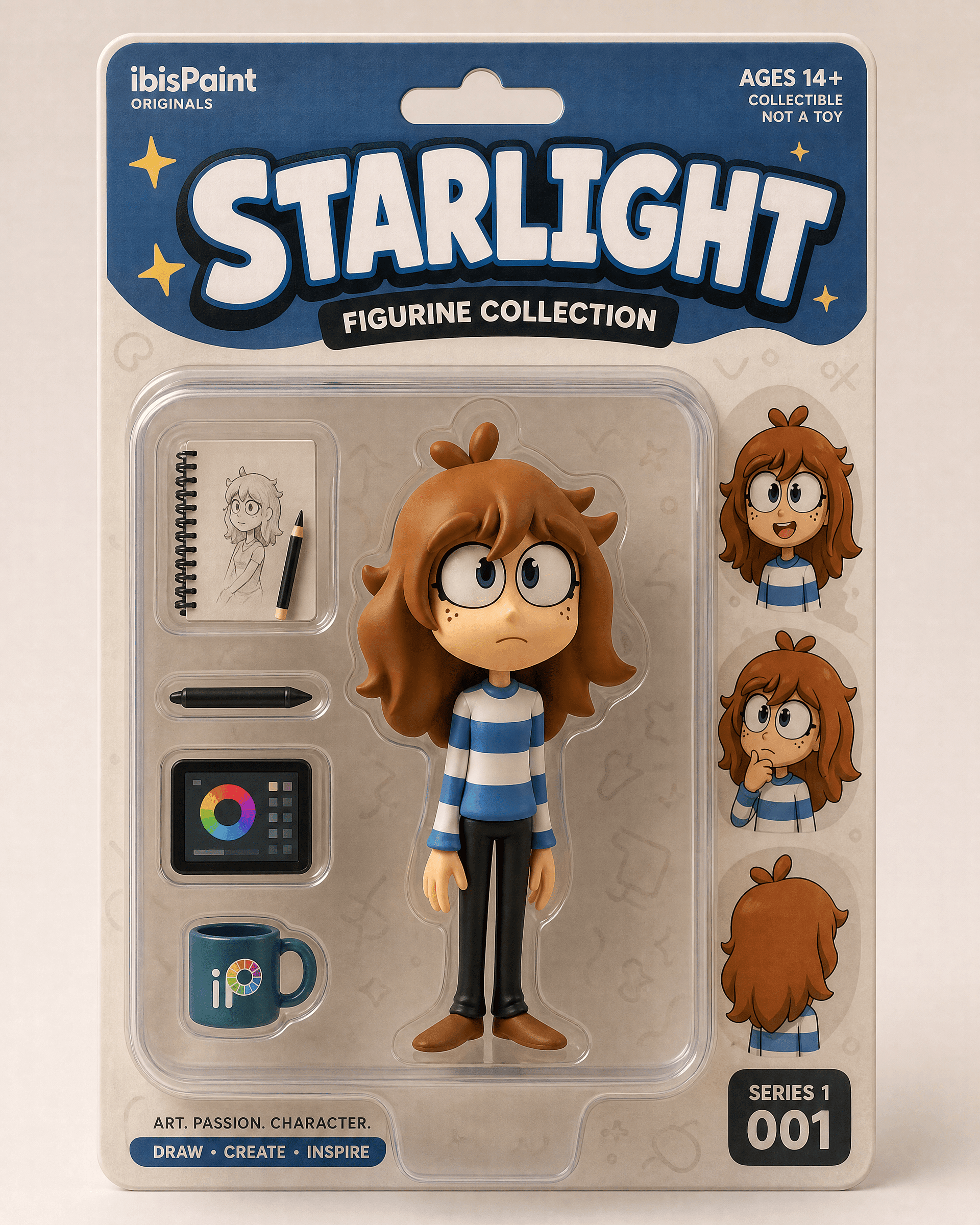
小売パッケージのお披露目には箱入りバージョンを:
Edit the uploaded photo into a boxed action figure. Keep the person's
face and style recognizable. Place the figure inside a clear blister
package with a printed backing card, bold product name at the top, small
accessory icons, realistic toy photography, studio lighting, collectible
designer-toy aesthetic.
はっきりと写った全身または上半身の写真から始めましょう。デスク版は静かで自然な編集に見え、箱入り版は「お披露目」のような演出になります。
古い写真の修復・カラー化の編集
復元は、これらのモデルができることの中で最も便利で、最も奇をてらわない機能の一つです。傷を修正し、色あせたスキャンをシャープにし、白黒写真をカラー化します。多くの人が最初にGeminiエディターを開いたのは、まさにこのためで、たいていは家族のプロジェクトや記念日の贈り物のためでした。
Edit the uploaded old photo. Restore it: remove scratches, dust,
creases, and water damage, repair torn areas, sharpen soft details, and
correct fading. Keep every face and feature true to the original, no
reinvented details. Preserve the original composition and era-accurate
clothing. Natural, archival-quality restoration.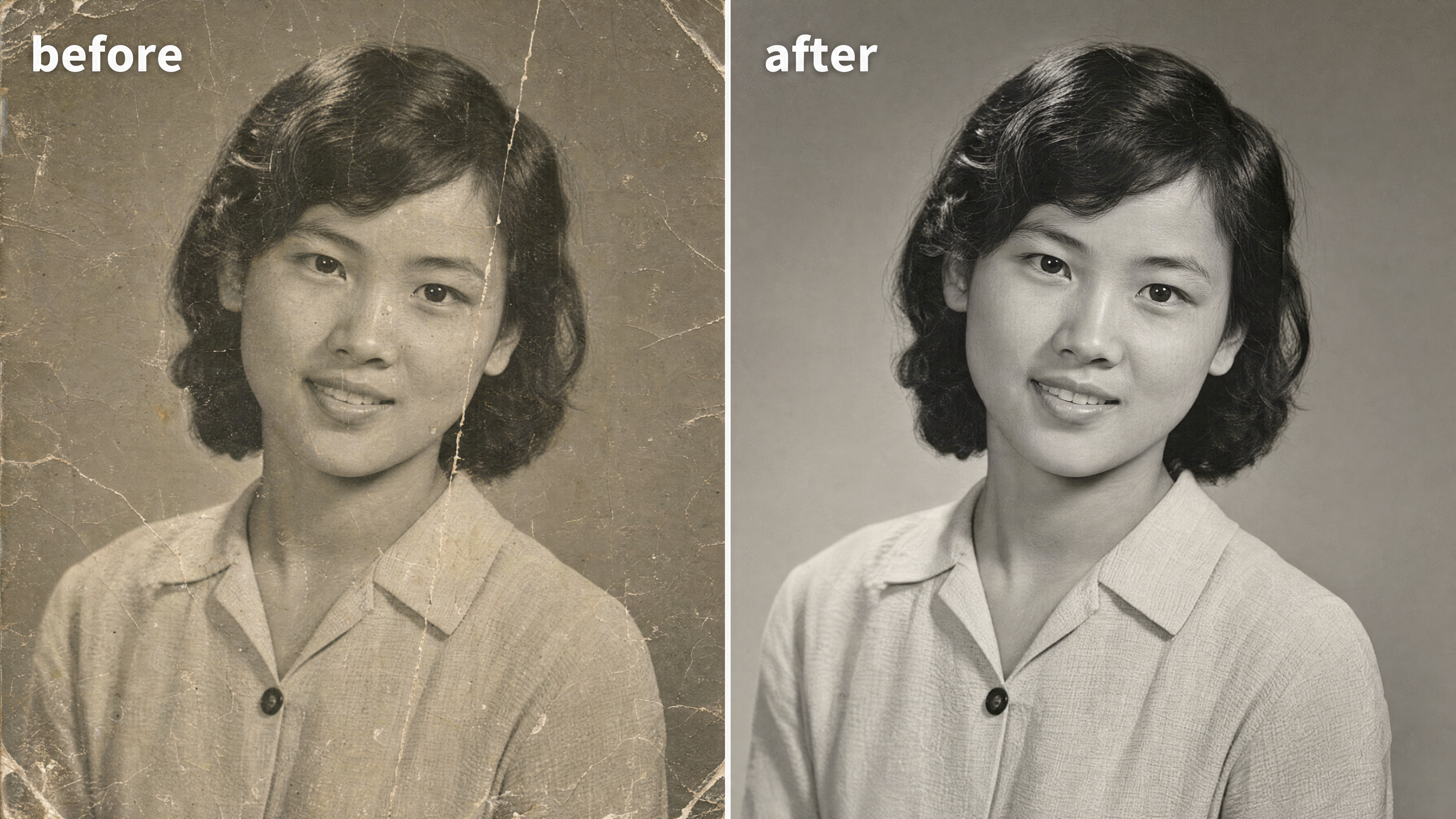
白黒写真をカラー化するには、次の一文を追加します:
After restoring the photo, add realistic, natural color: era-accurate
skin tones, believable fabric colors, soft natural lighting. Keep it
subtle and true to life, not oversaturated. Do not change any faces or
features.
この編集を支えるキーワードは「オリジナルに忠実」です。復元は、ぼやけた親戚の顔をモデルが勝手に作り出したときにうまくいかなくなります。あなたは フォトエディターで結果を復元・クリーンアップ その後、それから 印刷解像度にアップスケールする 構図を整えるため。
Y2K スタイル
Y2K風フラッシュルック は今月、レトロ系の人気を牽引しています。きつい直射フラッシュ、少し色あせた発色、2000年代初頭のデジカメ風ノイズ、パーティー写真のノリ。ひと目でノスタルジックに見えます。1枚のポートレートでも集合写真でも効果を発揮します。
Edit the uploaded photo. Keep the same face, features, and expression
exactly, preserve the original identity. Restyle into a Y2K early-2000s
digital-camera look: harsh direct on-camera flash, slightly washed cool
color, fine digital noise, candid party-photo framing, low-fi nostalgic
mood, authentic 2003 point-and-shoot aesthetic. Keep skin texture
natural.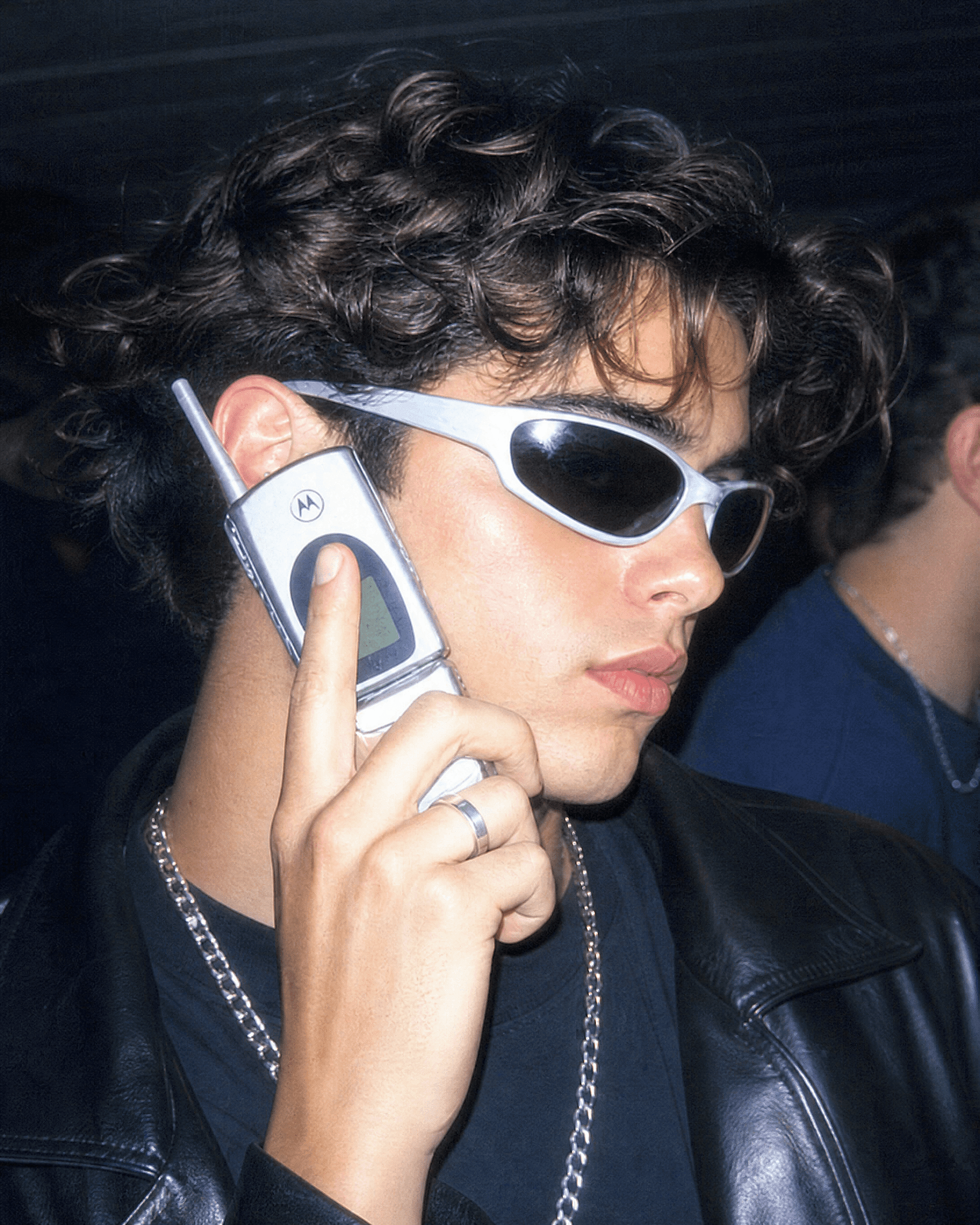
年代を指定すればさらに追い込めます。「1990年代フィルムカメラのポートレート、温かみのある粒子感、柔らかなフラッシュ」なら、しっとりとしたレトロ調に。「90年代シットコムのポスター、明るいスタジオライト、上部に大きなタイトル文字」なら、テレビキャストの集合写真のような仕上がりになります。
オーラ全開のポートレート
Aura-farmingは、このクラスターで最も新しい美学です。ドラマチックな逆光、色付きの光が縁取るグロー、自信に満ちたローアングルのポーズ、ムーディで雰囲気のある背景。シネマティックで少し実物以上に映えるポートレートを求めるときに選ばれるスタイルです。
Edit the uploaded photo. Keep the same face and identity exactly.
Restyle into an aura-farm aesthetic portrait: dramatic colored rim light
glowing around the subject, moody dark atmospheric background, soft
volumetric haze, confident low-angle framing, rich cinematic color
grade, subtle particles in the air, high-detail vertical portrait. Keep
skin texture natural and true to life.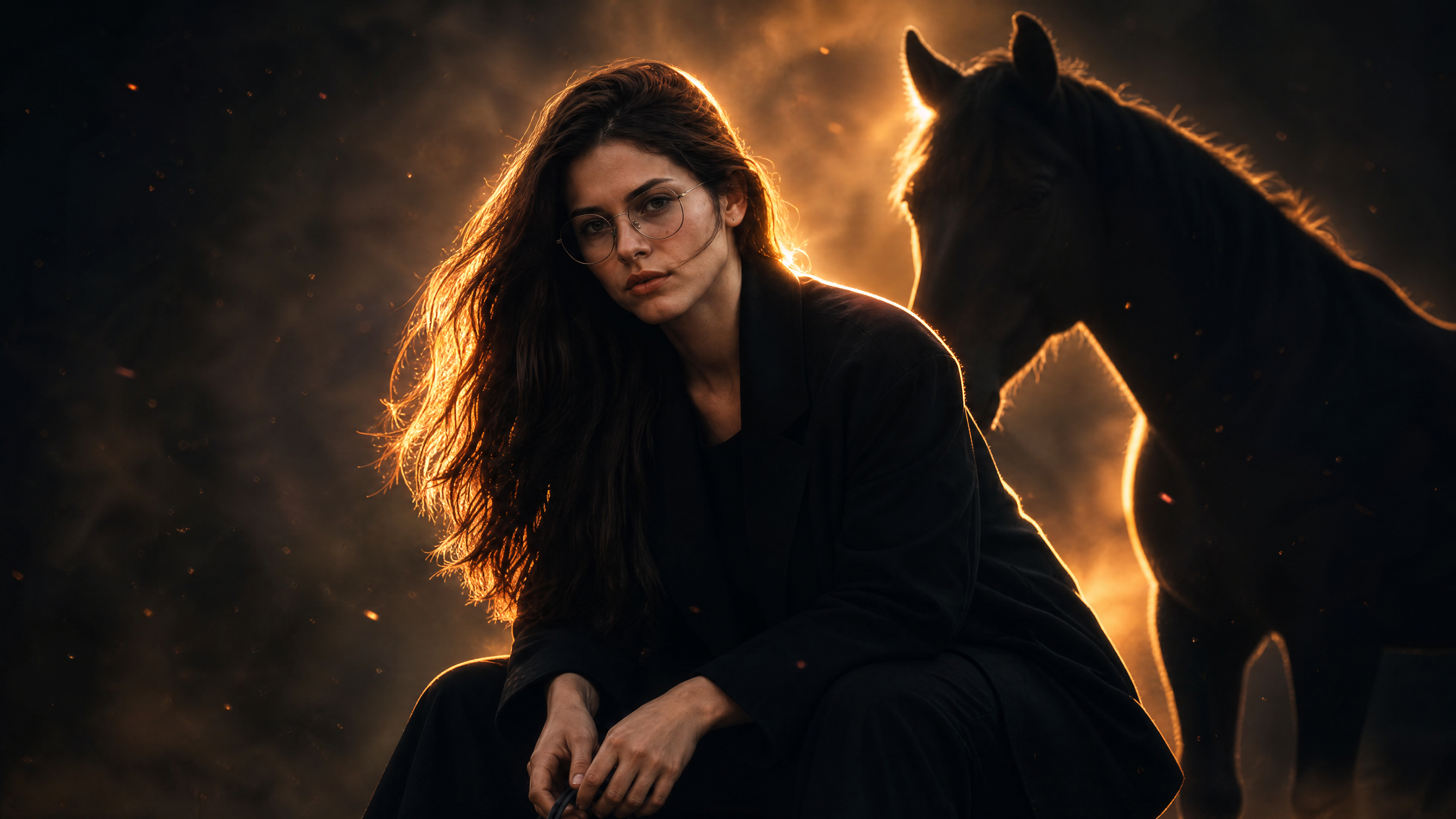
リムライトの色を変えて雰囲気を演出。落ち着いたミステリアスにはクールなブルー、ヒロイックには温かみのあるアンバー、ハイファッションにはマゼンタを。
ハロウィン写真プロンプト
毎年10月になると、AIハロウィンのトレンドがフィードを席巻します。セルフィーをアップロードするだけで、コスチューム姿のポートレートや、カップルのフォトシュート、自分が主役のファウンドフッテージ風ホラー画像が返ってくるのです。アイデアはシンプル。実際の顔はそのままに、衣装やメイク、背景だけを差し替えます。衣装やシーンをまるごと変えても、あなた自身は見分けがつく——これはまさにGeminiの画像モデルが得意とするところです。
ハロウィンコスチュームのセルフィー
このトレンドの基本フォーマットで、多くの人が最初に検索するもの。セルフィーをアップロードし、コスチュームを指定すれば、スタイリングされたハロウィン写真撮影のようなポートレートが手に入ります。
Edit the uploaded photo. Keep the same face, features, and expression
exactly, preserve the original identity. Restyle into an elegant vampire
Halloween portrait: deep burgundy velvet outfit with a high lace collar,
dark berry lips, subtle pale makeup, candlelit gothic interior, cool
moonlight from an arched window, faint mist, carved pumpkins softly
blurred in the background, cinematic color grade, vertical 4:5 frame.
Keep skin texture natural and true to life.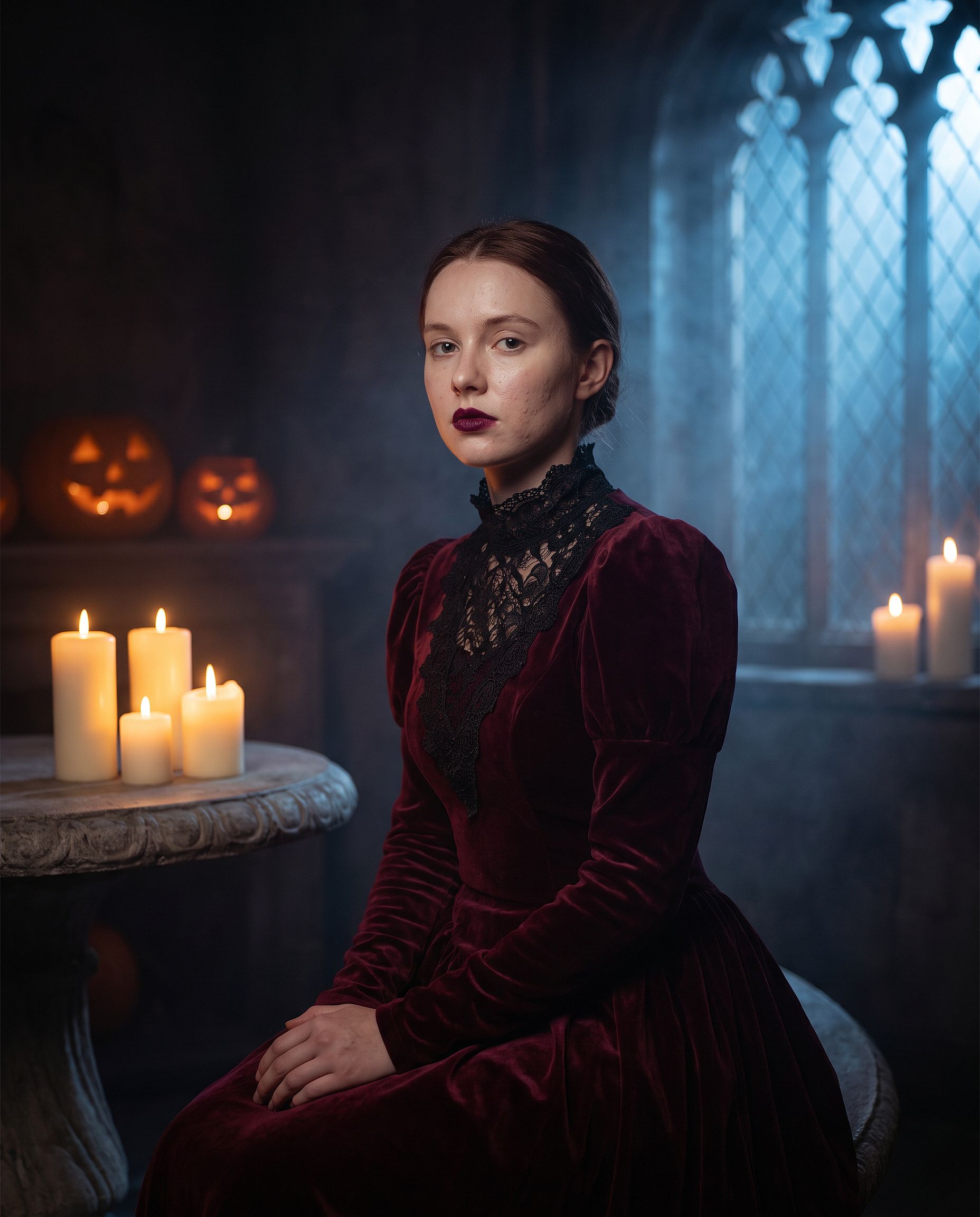
「エレガントな吸血鬼」を好きな衣装に差し替えましょう。魔女、ゾンビ、幽霊の花嫁、骸骨、あるいは定番の映画モンスターなど。最初の2行はそのままにしてください。衣装メイクはプロンプトがあいまいだとモデルが顔全体を描き直してしまう部分なので、他のどの編集よりもアイデンティティの指定が重要になります。
VHSハロウィントレンド
最もコピーされているハロウィンAIトレンドの形式。あなたの写真が、スラッシャー映画の90年代ビデオカメラ風のざらついた1コマに変わり、背景には影の人物が潜みます。テープのノイズやタイムスタンプがほとんどの演出をこなしてくれます。
Edit the uploaded photo. Keep the same face and identity exactly.
Restyle into a 1990s VHS camcorder still from a found-footage horror
movie: dim bedroom at night, harsh on-camera light, scan lines, chroma
bleed, slight tracking distortion, washed-out colors, a faint shadowy
hooded figure standing in the dark doorway behind the subject, timestamp
"OCT 31 1996 11:47 PM" in the bottom corner, 4:3 frame.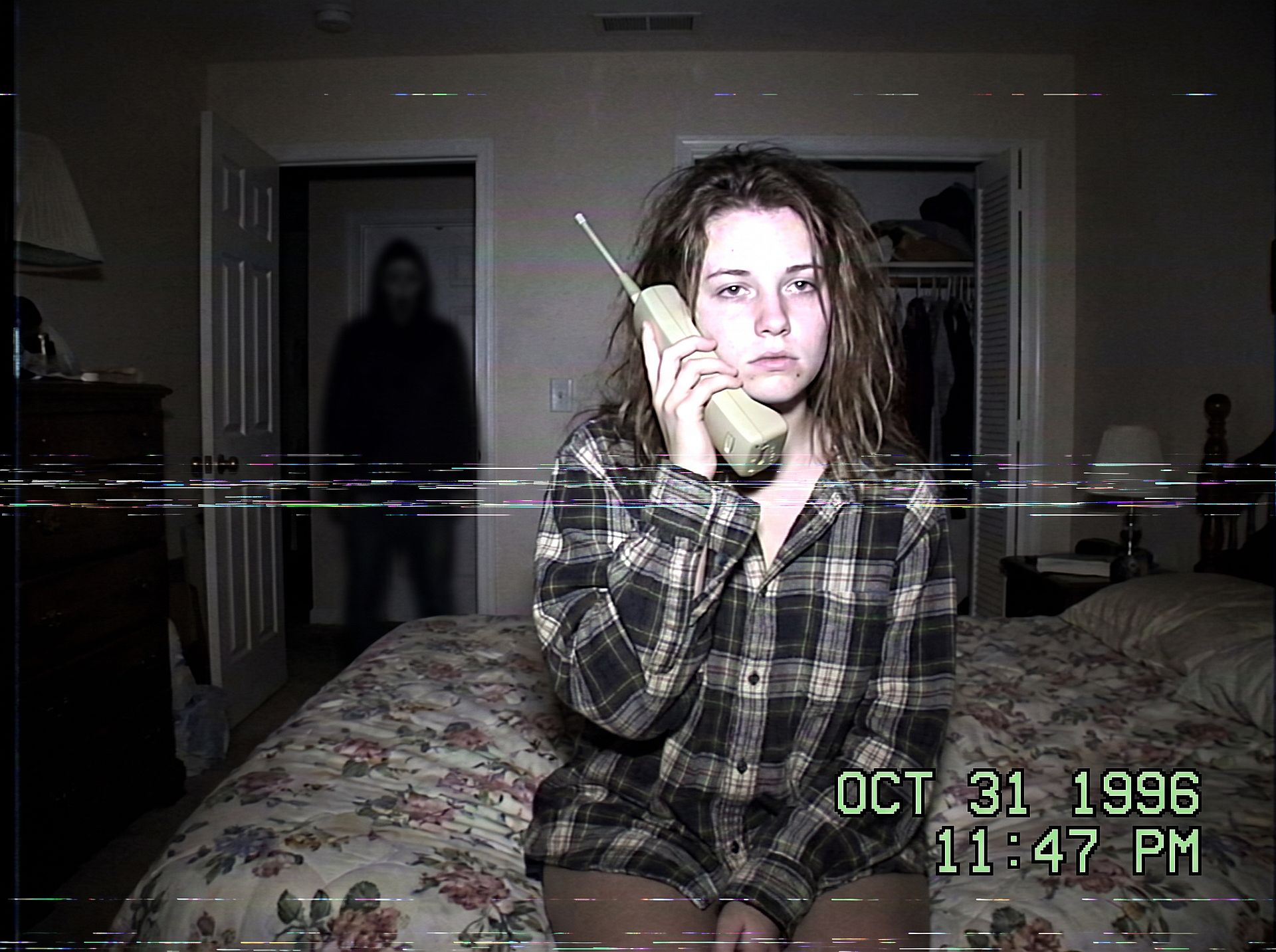
舞台を変えれば怖さも変わります。真夜中のキッチン、暗い廊下、後部座席で後ろの窓に映る人影など。人影は小さく影の中に収めて、グロテスクではなく不気味な雰囲気を保ちましょう。
ハロウィンのカップル撮影
カップルコスチュームはハロウィン撮影の検索で最大のシェアを占めます。両方の顔を守りつつ、ペアで着飾りましょう。
Edit the uploaded couple photo. Keep both faces, skin tones, and
expressions exactly, do not merge or alter their features. Dress them in
coordinated Halloween costumes, a classic vampire and a witch, standing
close on an autumn porch at dusk: glowing jack-o'-lanterns, warm string
lights, fallen leaves, soft fog, warm film color grade, shallow depth of
field.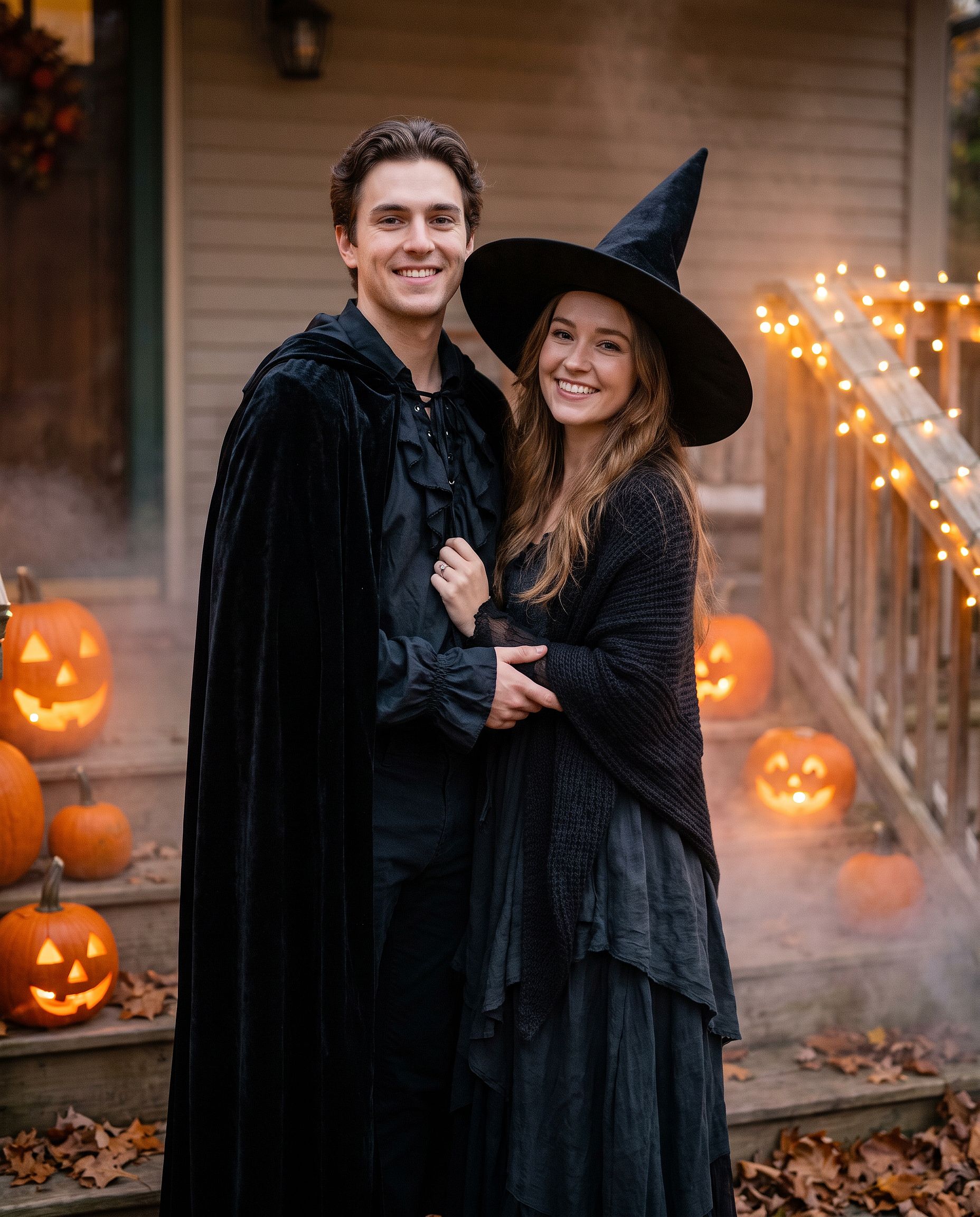
同じプロンプトは親友同士や家族写真でも使えます。「カップル」を「4人グループ」に変えて、左から右の順に各自の衣装を挙げてください。
シュガースカルメイクのルック
フルコスチュームではなくメイクのルックが欲しい場合:
Edit the uploaded photo. Keep the face shape, eyes, and identity
recognizable. Add half-face sugar-skull makeup: white base, black eye
sockets, and delicate floral linework on one side, the other half left
natural. Dark suit with a marigold flower, candlelit background with
orange marigold petals, dramatic side lighting, rich cinematic color.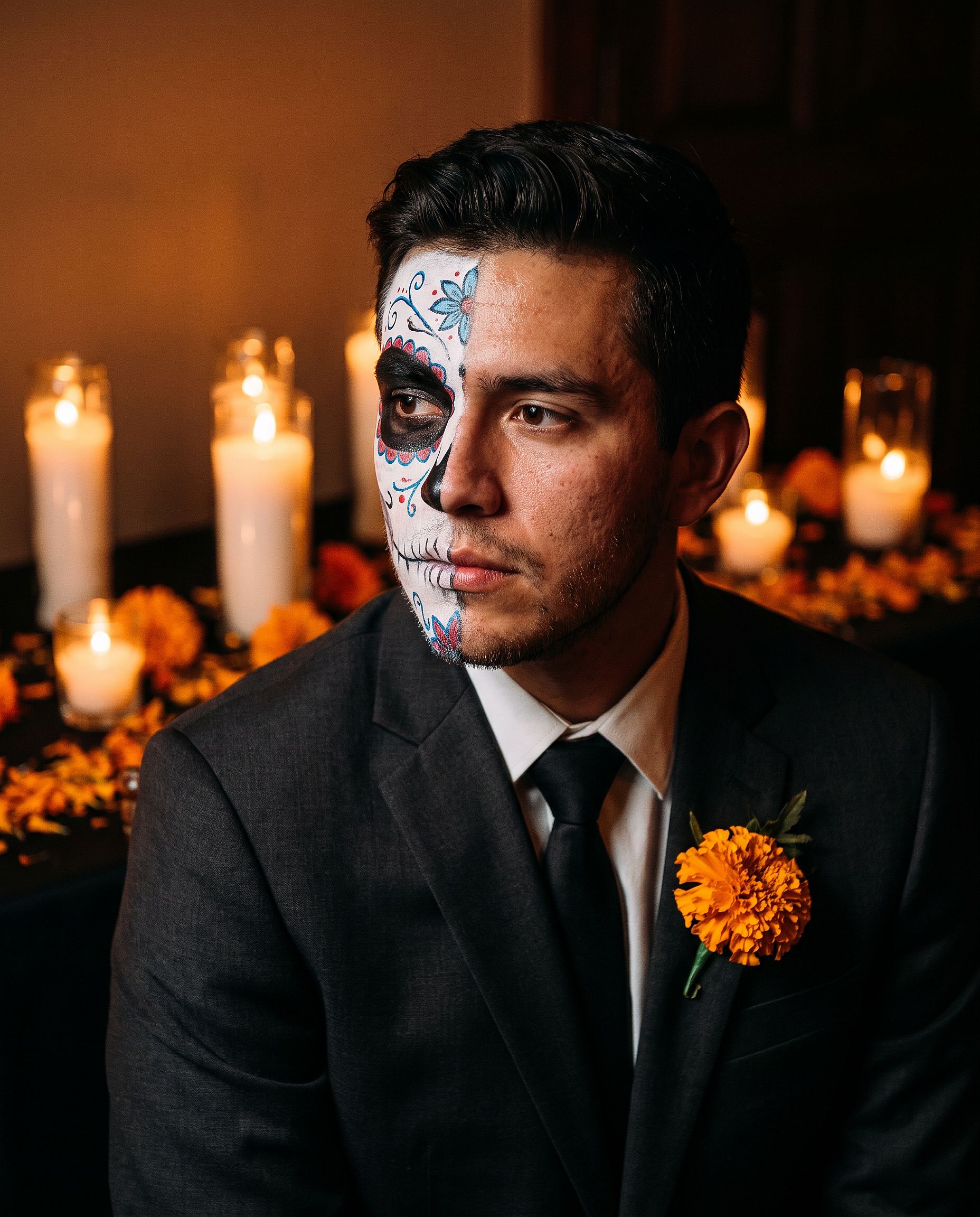
顔半分のメイクなら本人が見分けやすいので、顔全体のデザインよりプロフィール写真に向いています。
ペットのコスチューム
Edit the uploaded pet photo. Keep the pet's face, fur pattern, and eye
color exactly. Add a small witch hat and a tiny black cape, seated next
to a glowing jack-o'-lantern, cozy autumn lighting, shallow depth of
field, playful but realistic.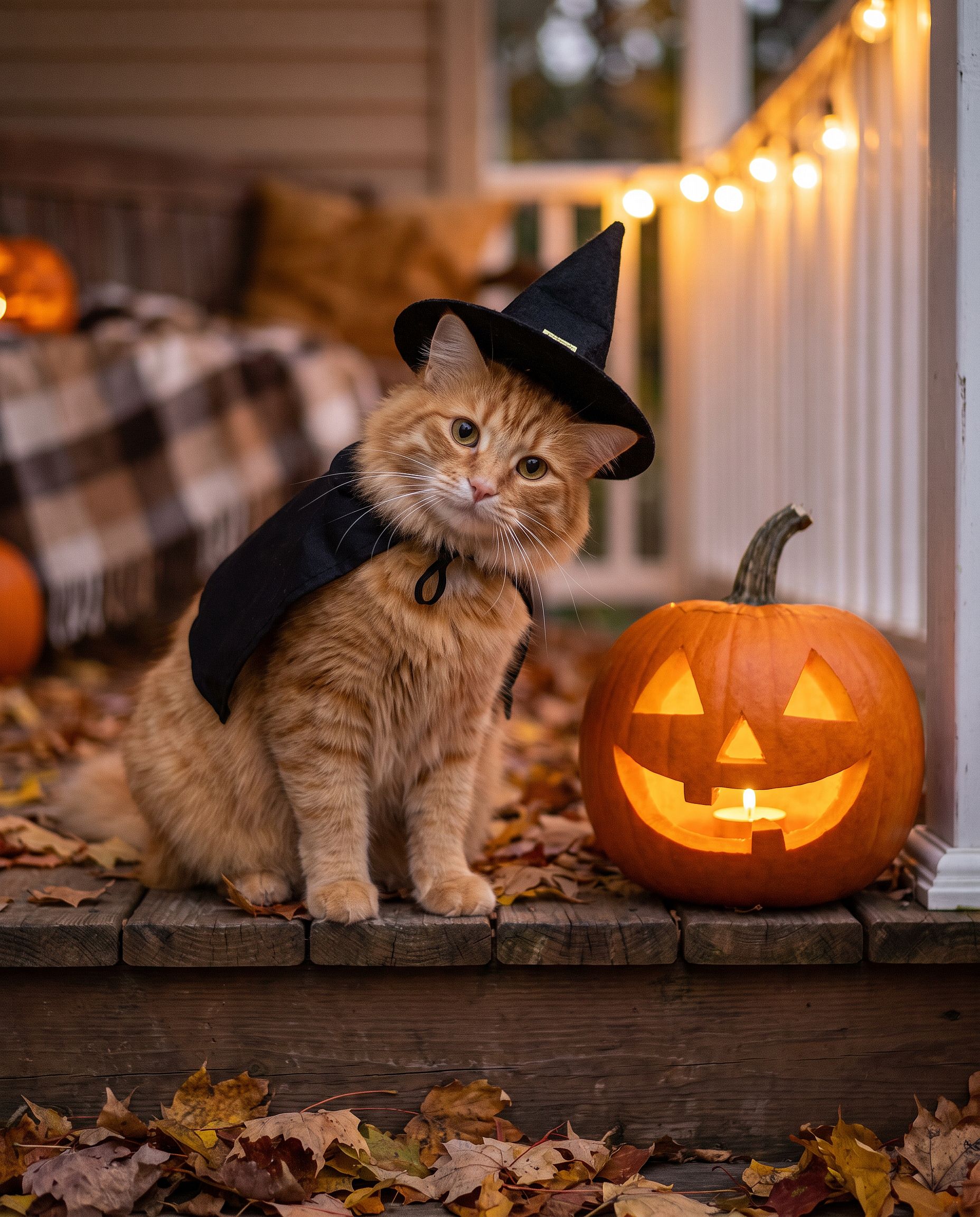
プロンプトを書くのを省きたいなら、 AIハロウィンジェネレーター はまさにこのために作られています。写真をアップロードして、ハロウィンのコスチュームポートレートに変えましょう。
感謝祭の写真プロンプト
感謝祭の写真はコスチュームよりもテーブルが主役。家族ディナーの一枚、ホリデーカード用の秋のポートレート、その週みんなのカバー写真になる一枚。コツはどんなグループ編集とも同じ。すべての顔を固定し、照明、衣装、舞台を変えるだけです。
感謝祭の家族ディナー写真
家族ディナーの写真はたいてい、スマホに一番近い人が暗い照明で撮ったもの。このプロンプトは、そんなスナップを実際にプリントしたくなる一枚に変えます。
Edit the uploaded family photo. Keep every face, skin tone, and
expression exactly, preserve all identities, do not merge features.
Restyle into a warm Thanksgiving dinner photo: long wooden table with a
roast turkey, pumpkin pie, candles, small pumpkins and autumn leaves,
golden late-afternoon window light, cozy knitwear in rust, cream, and
olive tones, natural candid closeness, vertical 4:5 frame.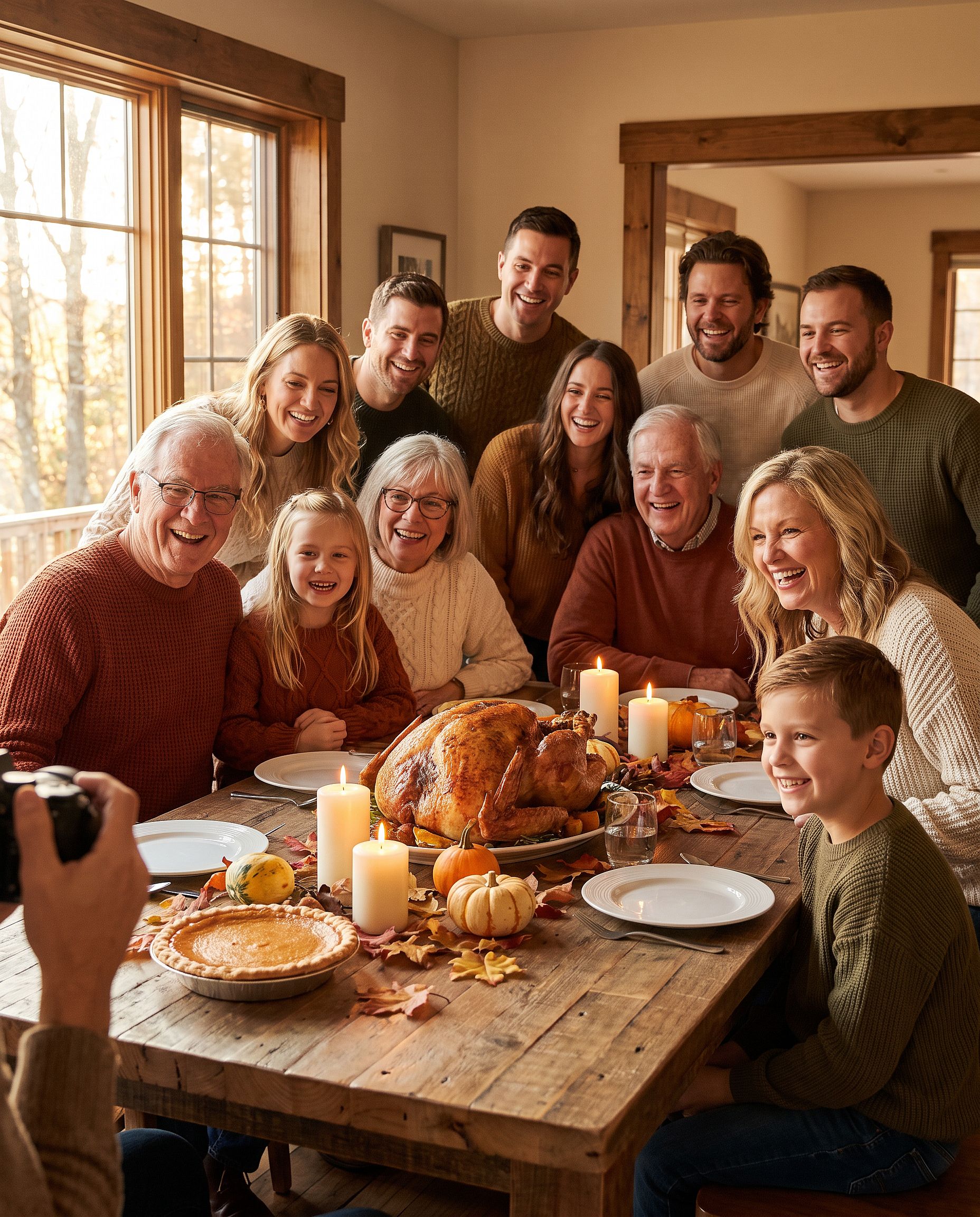
5人以上の場合は、写真に何人いるか(「6人家族」など)を明記して、モデルが誰かを減らしたり増やしたりしないようにしましょう。
秋の感謝祭ポートレート
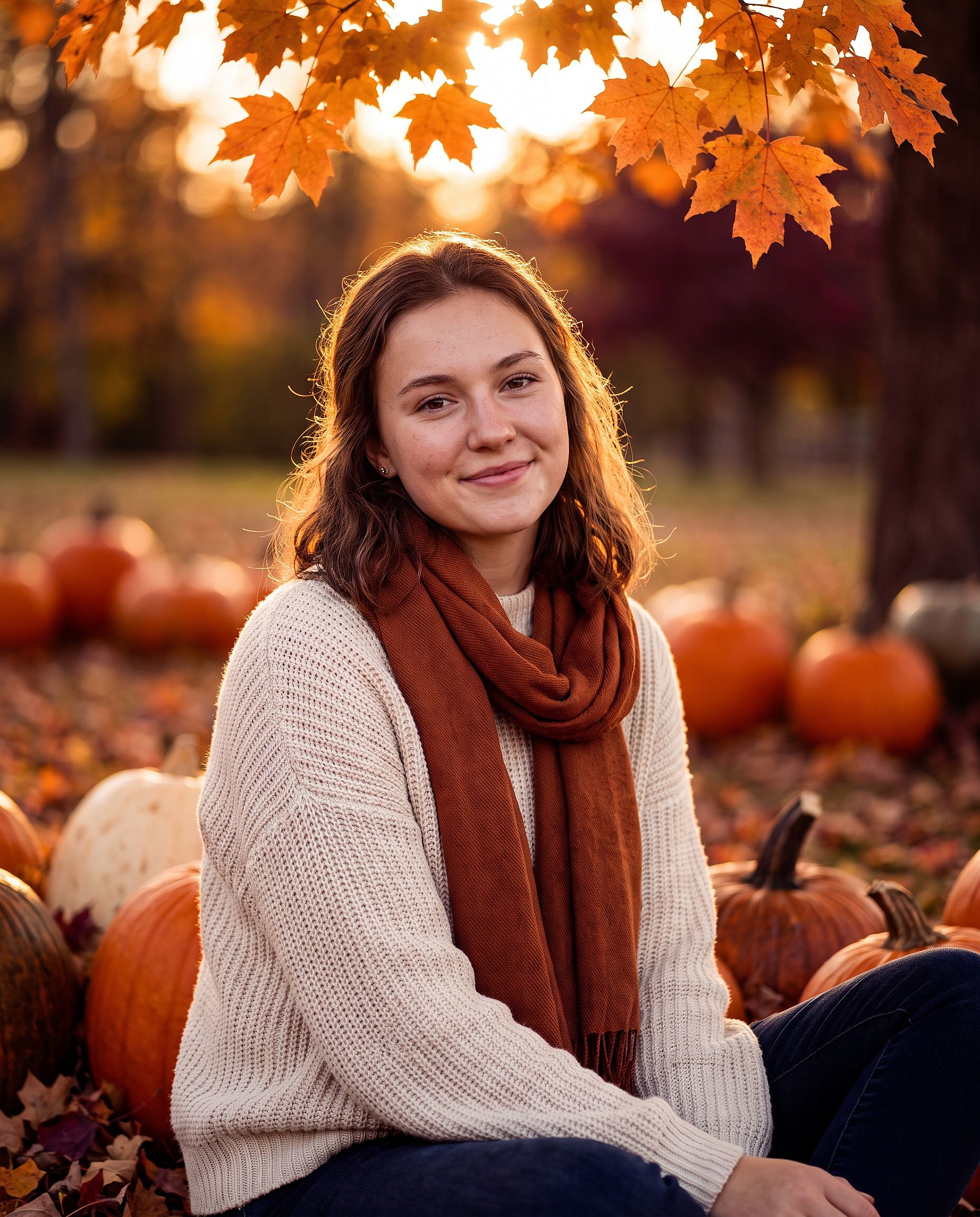
一人のポートレート、カップルショット、感謝祭の写真カードには:
Edit the uploaded photo. Keep the same face and identity exactly.
Restyle into an autumn Thanksgiving portrait: outdoors in a pumpkin
patch at golden hour, chunky knit sweater and scarf, warm amber and
burgundy tones, soft backlight through orange leaves, shallow depth of
field, holiday photo card quality. Keep skin texture natural.
写真をカードに使うなら「上部に挨拶文を入れる余白を残す」と加えてください。
クリスマス写真プロンプト
AIクリスマス写真は、一年で最大の季節編集です。12月は、スタジオを予約せずに家族写真を撮りたい、カメラマンなしでホリデーカードを作りたい、パーティーの前にお祭り気分のプロフィール写真が欲しい、そんな時期。以下のどのフォーマットも、普通の写真から始められます。
クリスマスボックス撮影
被写体が巨大な開いたギフトボックスの中に座る、スタジオ風トレンド。自宅でセットするのは難しくても、編集なら簡単にできます。
Edit the uploaded photo. Keep the same face, features, and expression
exactly, preserve the original identity. Place the person sitting
inside a large open white gift box with a red satin ribbon, surrounded
by wrapped presents, warm fairy lights, and a softly blurred decorated
Christmas tree. Red knit sweater, bright clean studio lighting, cream
and red palette, professional holiday portrait, vertical 4:5 frame.
ボックスの色をブランドやカードのデザインに合わせて変えましょう。ゴールドと黒は高級感、パステルピンクは柔らかく遊び心のある印象になります。
家族のクリスマスフォトシュート
ツリーの前でお揃いのパジャマ。どの家族も年に一度は撮りたくなる一枚です。ここではペットも家族の一員。
Edit the uploaded family photo. Keep every face, skin tone, and
expression exactly, preserve all identities, do not merge features.
Dress everyone, including the dog, in matching red plaid pajamas, the
dog in a small Santa hat. Seat them together on a rug in front of a
decorated Christmas tree and a lit fireplace with stockings, warm cozy
lighting, soft bokeh from the tree lights, holiday card quality.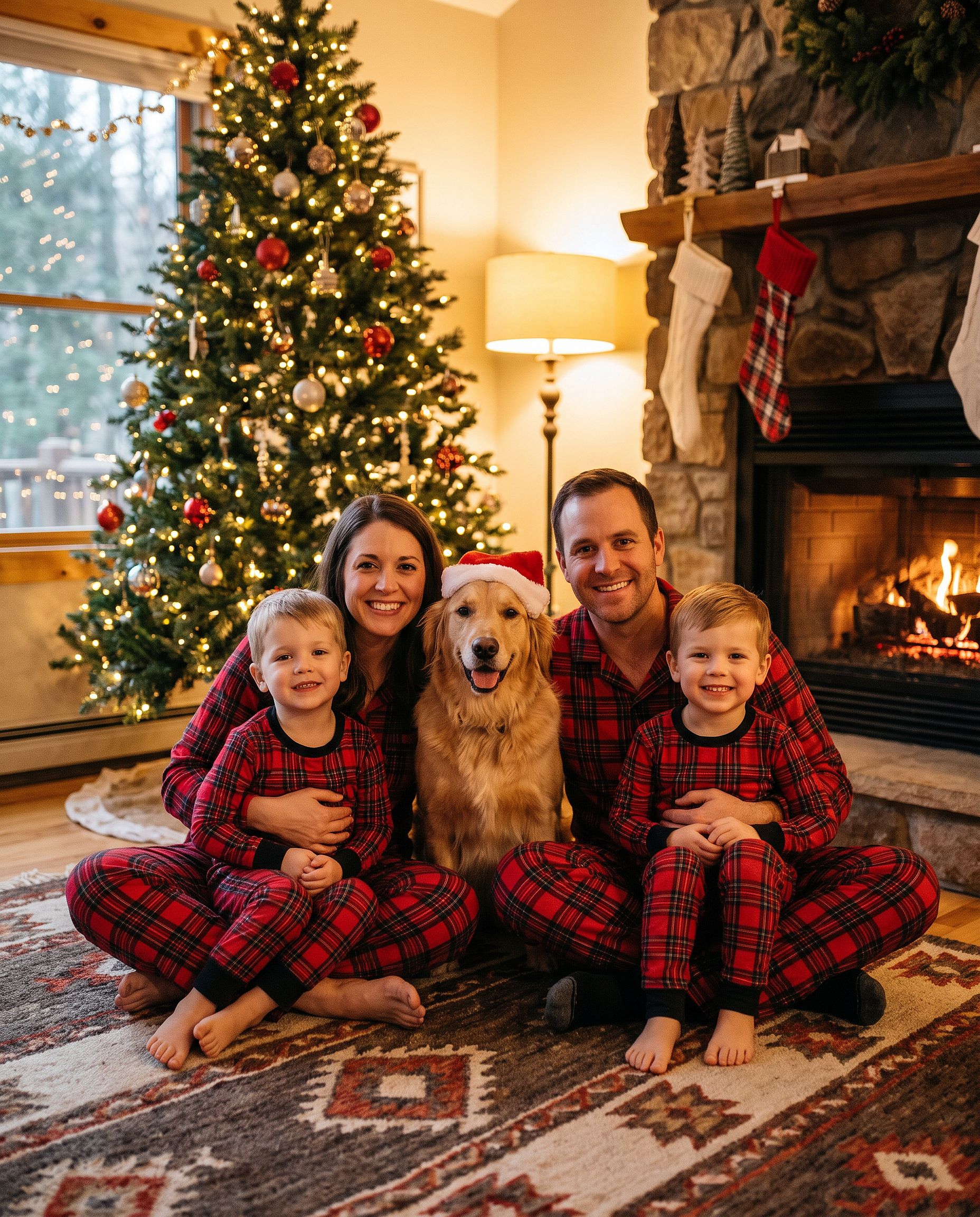
帽子だけが欲しいなら、 写真にサンタ帽を追加 ツールがまさにそれをやってくれます。さらに クリスマス背景ツール は人物をそのままに舞台だけを入れ替えます。
屋外のクリスマスツリー農園写真
Edit the uploaded photo. Keep the same face and identity exactly.
Restyle into an outdoor Christmas tree farm photo: rows of snowy pine
trees, light snowfall, a freshly cut tree on a sled, plaid coat and
knit hat, soft overcast winter light, warm breath in the cold air,
natural skin texture, vertical 4:5 frame.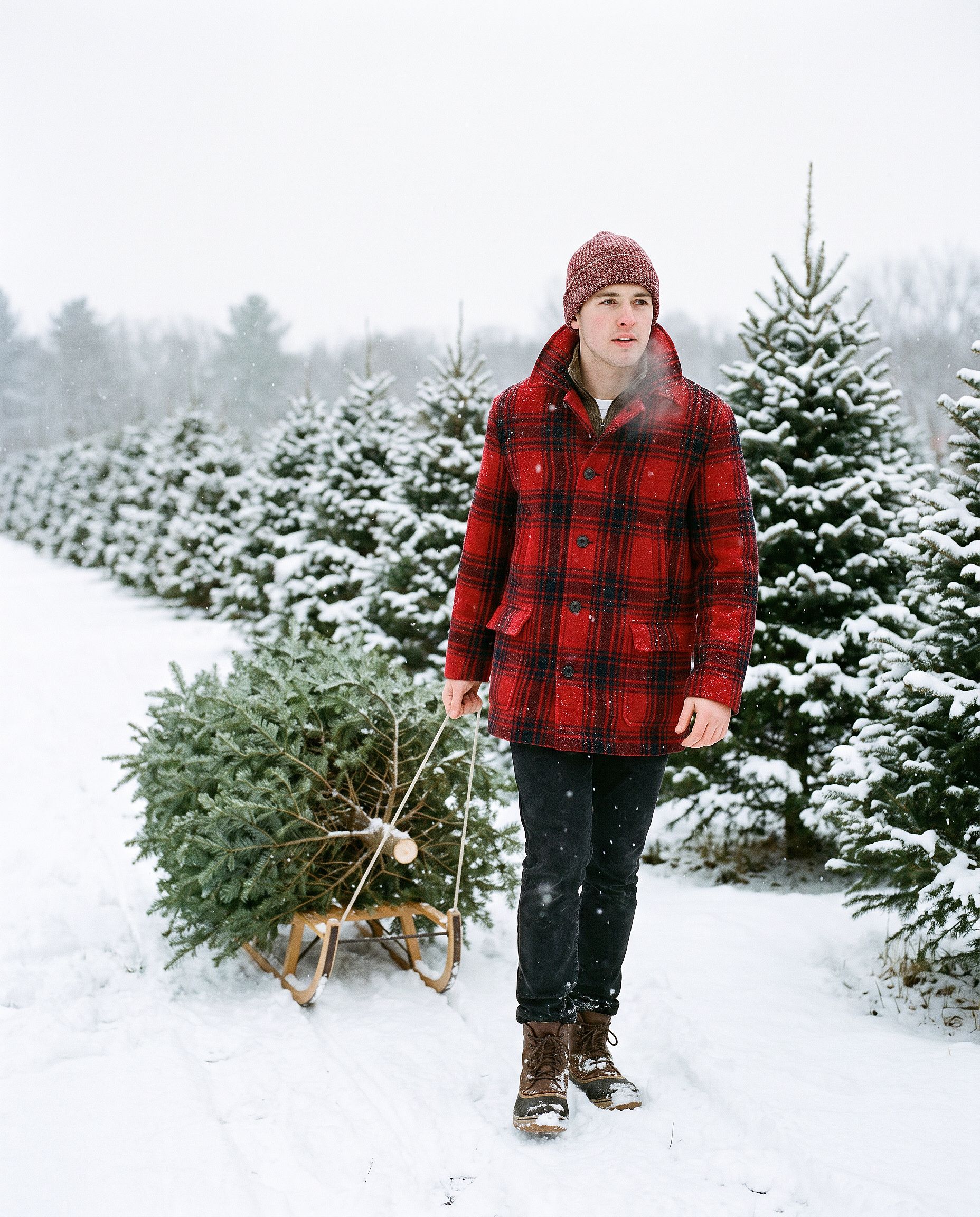
AIクリスマスカード
Turn the uploaded photo into a luxury printed Christmas card. Keep every
face exactly. Place the people in a snowy cabin doorway with evergreen
garland and warm window light, set inside a thin gold foil border on
heavy cream cardstock. Add "Merry Christmas" in gold foil calligraphy
above the photo and "from the Parkers" in small serif capitals below,
embossed holly in the corners. Show the card flat on white linen with
pine sprigs, a red velvet ribbon, and a gold wax seal.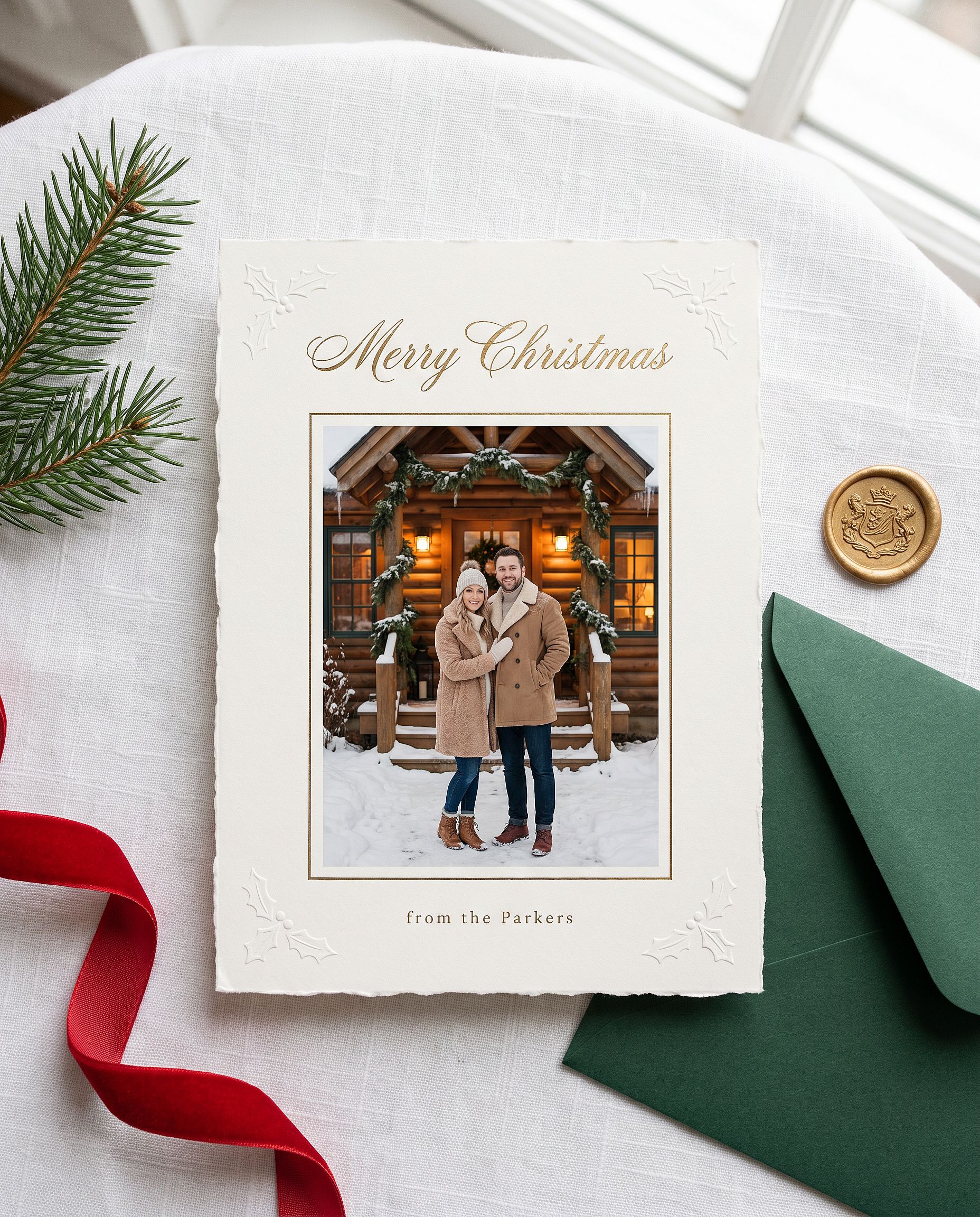
引用符内の名前をご自分のものに置き換えてください。Nano Banana Pro は画像内の短い文字をうまく扱えるので、挨拶文はたいてい一度目で正しく綴られます。
アニメ風クリスマスポートレート
Restyle the uploaded photo into a Japanese anime film still on
Christmas Eve. Keep the person's hairstyle, outfit colors, and overall
look recognizable. Standing at a snowy railroad crossing in a quiet
residential town at blue hour, duffle coat and long red scarf, breath
visible in the cold, warm house windows, a lit Christmas tree outside a
corner shop, glowing vending machines, power lines overhead, soft
falling snow, hand-painted anime background art, delicate cel shading.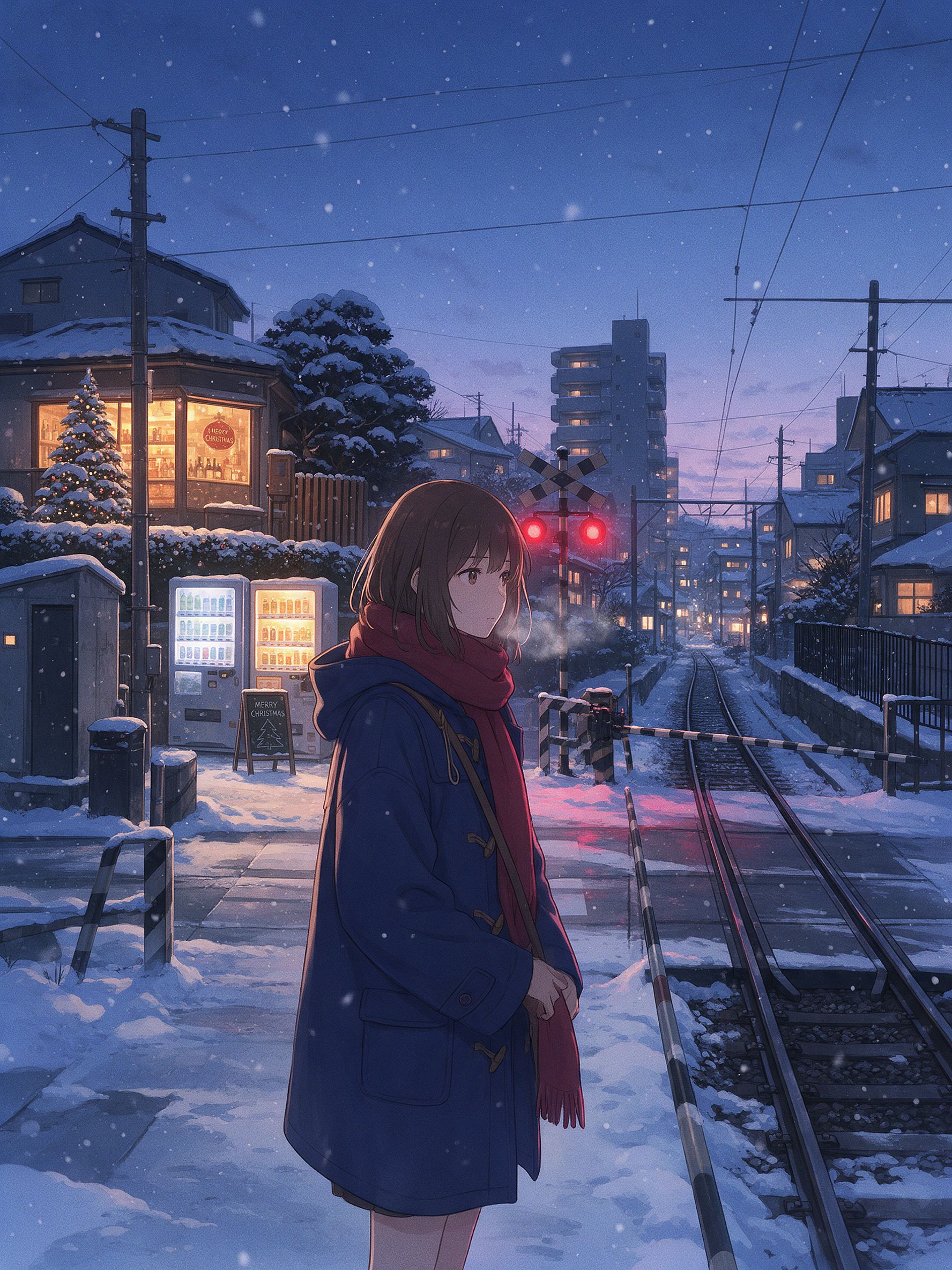
日本のアニメ風冬景色に見せるのは細部の積み重ねです。踏切、自販機、電線、そして温かい窓明かりに映えるブルーアワーの光。この雰囲気には、Nano Banana Pro よりも Seedream 5.0 Pro や Nano Banana 2 Lite の方がすっきりした2Dスタイルになることが多いです。モデルを切り替えて同じプロンプトを実行してみてください。
Geminiフォトプロンプトの完全ライブラリ
上のセクションは詳しい解説です。下は手早く使えるライブラリで、作りたいものごとに分類した、コピペで使える短いプロンプト集です。多くは写真を先にアップロードする前提ですが、美的・映画的なグループは純粋な生成としても使えます。カテゴリーを選んで、1行を取り出し、貼り付けるだけです。
トレンドの女の子ポートレート
Edit the uploaded photo into a soft-glam aesthetic selfie: dewy glow,
warm highlight, subtle butterfly light, pastel background. Keep the same
face and identity exactly, natural skin texture.
Restyle the uploaded photo into an elegant saree ethnic portrait: rich
traditional outfit, soft gold jewelry, warm bokeh lighting, graceful
pose. Keep the face and identity unchanged.Edit the uploaded selfie into a clean Instagram DP: minimalist studio
backdrop, soft even light, tasteful modern styling, crisp detail. Keep
the same face exactly, no heavy smoothing.Restyle the uploaded photo into a dreamy pastel aesthetic portrait: airy
glow, muted soft colors, gentle wind in the hair, natural skin. Keep the
face recognizable and identity intact.Restyle the uploaded photo into a golden-hour outdoor girl portrait:
warm backlight, soft lens flare, blurred natural background, flowing
outfit. Keep the face and identity unchanged.人気の男性・カップルポートレート
Restyle the uploaded photo into a café golden-hour boy portrait: soft
window backlight, cozy neutral outfit, gentle flare, Pinterest fashion
mood. Keep the face unchanged.
Restyle the uploaded couple photo into a warm café date-night scene:
cozy lighting, soft bokeh, relaxed poses. Keep both faces unchanged.Edit the uploaded couple photo into a vintage 1970s film look: warm
faded tones, retro wardrobe, soft grain. Preserve both faces and
expressions exactly.編集とリスタイル
Edit the uploaded photo. Keep the face and pose exactly. Replace the
outfit with a clean, well-fitted business-casual look and the background
with a softly blurred modern office, matched lighting, professional
headshot quality.
プロンプトを一切書かずに洗練されたヘッドショットが欲しいなら、 AIヘッドショットジェネレーター はまさにそのために作られています。一連のビジネス向けルックの中でも、あなたの顔を一貫して保ちます。
Edit the uploaded photo into a black-and-white fine-art portrait:
dramatic side lighting, deep contrast, film grain, timeless studio look.
Keep the face exactly the same.
Edit the uploaded photo into a double-exposure portrait: the subject
blended with a soft city skyline, moody tones, artistic overlay. Keep
the primary face clear and recognizable.Edit the uploaded photo into an AI hairstyle try-on: keep the face and
identity exactly, change only the hairstyle to a modern layered cut,
natural color and texture, realistic result.修復と画質向上
Edit the uploaded blurry photo: sharpen details, reduce noise, recover
texture in hair and skin. Keep the face identical, natural skin, no
plastic smoothing.
Edit the uploaded photo to a high-resolution 4K glow-up: sharpen fine
detail, reduce noise, improve color balance, recover hair and skin
texture. Keep the face and expression identical, no plastic smoothing.季節・フェスティバル
カレンダーの残りのイベント向けのお手軽ワンライナー集。ハロウィン、感謝祭、クリスマスは上に例付きの詳しいセクションがあります。
Edit the uploaded photo into a Diwali celebration: warm diya lamp light,
elegant traditional outfit, soft bokeh of string lights, rich jewel
tones. Keep the face unchanged.
Edit the uploaded photo into a spring cherry-blossom scene: soft pink
petals, gentle daylight, fresh pastel palette. Keep the person exactly
the same.Edit the uploaded couple photo into a Valentine's scene: soft warm
light, tasteful red accents, romantic bokeh. Keep both faces unchanged.Edit the uploaded photo into a New Year scene: elegant evening styling,
soft golden fireworks bokeh, celebratory mood. Keep the person
recognizable.美しくシネマティック
Edit the uploaded photo into a burning-newspaper portrait: the subject
framed by a vintage newspaper with glowing burning edges, warm ember
light, dramatic dark background, cinematic mood. Keep the face exactly
the same.
Edit the uploaded photo into a moody neon-noir portrait: rain-slick city
street, pink and blue neon reflections, cinematic contrast, shallow
depth of field. Keep the face and identity unchanged.自分だけのGemini写真プロンプトの書き方
上記のプロンプトはすべて同じ骨格に従っています:
Edit the uploaded photo.
Keep [the face / both faces / the pose / the composition] exactly the same and preserve the original identity.
Change only [outfit / background / era / color / scene].
Add [style, lighting, mood, aspect ratio].
Keep [skin texture / features] natural and true to life.
一行ずつ見ていきましょう。「アップロードした写真を編集する」は、新しい画像を作るのではなく、あなたの画像をベースに作業するようモデルに伝えます。「まったく同じに保ち、元のアイデンティティを維持する」は、見分けがつく部分を守ります。「〜だけを変更する」で編集範囲を限定します。そして最後に自然な肌や本物らしいディテールに触れる一文を添えれば、AIっぽさが目立つ加工過多の仕上がりを防げます。
純粋な生成には、「編集する」「同じに保つ」といった指示は外しましょう。被写体、スタイル、照明、雰囲気を直接記述してください。
生成前の5秒チェック:写真をアップロードしたか、残したいものを伝えたか、変えたいものを伝えたか、スタイルを指定したか、自然なディテールを求めたか。Googleの Geminiサポートドキュメント 基本的な編集フローを紹介します。
写真向けのGemini(Nano Banana)vs GPT Image 2 vs Seedream
すべての写真で勝てる万能なモデルはありません。ここでは各モデルが得意な点と苦手な点を紹介します:
| Nano Banana Pro | Nano Banana 2 Lite | GPT Image 2 | Seedream 5.0 Pro | |
|---|---|---|---|---|
| 大胆なリスタイルでも同一性を保持 | 最強 | 強 | 強 | 普通 |
| 画像内の読める文字(見出し、ラベル、メニュー) | 強 | 強 | 最優秀(マイクロテキストとUIアイコンの精度) | 普通 |
| フォトリアリズム(肌、ライティング、テクスチャ) | 最高品質(ネイティブ4K、ハイパーリアル) | 強 | 最高(ファッション品質・超リアル) | 普通 |
| アニメ/アジア風/2Dスタイライズ | 限定 | 最高(アニメ・アニメーションに最適) | 普通 | 最適(雰囲気のあるアニメ背景) |
| 編集とレイヤー分離 | 反復メモリ(書き直さずに編集) | 反復メモリ | メモリなし | レイヤー分離と自由な編集を標準搭載 |
| 多言語テキスト(漫画、広告、ポスター) | 強 | 普通 | ベスト | 普通 |
| おすすめの用途 | トレンドのポートレート編集、人物の一貫性を保ったセット、4K出力 | 高速ドラフト、アニメ風リスタイル、ECのヒーロー画像 | ハイエンドなファッションビジュアル、テキスト入り画像、ポスターやパッケージ | キャラクターの美しさ、アニメシーン、レイヤーを使った編集ワークフロー |
4つすべてが1つのOpenArtワークスペースに揃っています。モデルを切り替えて比較するのはワンクリック、新しいサブスクリプションは不要です。トレンドセット全体で1つの顔を安定して保つことが目的なら、 AIキャラクター 機能がアイデンティティを固定するので、どのpromptでも同じ人物が返ってきます。
よくある質問
Gemini AIを写真に使うには?
Gemini の画像ツールを開き、欲しいものを説明して生成します。既存の写真を編集するには、まずアップロードして、何を残し何を変えるかをモデルに伝えます。OpenArt なら、本格的なエディターと並んで同じ Gemini モデル(Nano Banana 2.1 と Nano Banana Pro)が使えます。開くには AI画像ジェネレーター、モデルを選んで、promptを貼り付けます。
Gemini AIで写真を編集するには?
写真をアップロードし、残す要素と変える要素を分ける指示を書きましょう。「顔とアイデンティティはそのまま、ソフトグラム風のポートレートに」といった具合です。アップロードが重要なのは、モデルが似た人物をゼロから作るのではなく、あなたが渡した画像を編集するからです。仕上げに自然な肌の質感をリクエストする一文を加えると、加工しすぎた印象を避けられます。
Gemini AI の写真 prompt はどう作ればいい?
上記のスケルトンに沿って進めましょう。被写体を指定し、残すものを述べ、変えるものを述べ、スタイル・ライティング・アスペクト比を加え、最後に自然なディテールの一文で締めます。この記事のプロンプトをコピーして、スタイルの言葉を自分好みに差し替えてください。
女性向けのおすすめGemini AI写真プロンプトは?
人気なのは、ソフトグラム系のおしゃれな自撮り、サリーや民族衣装のポートレート、洗練された Instagram のプロフィール写真、ゴールデンアワーの屋外ポートレート。この4つはすべて上の「人気の女性ポートレート」セクションにあり、そのまま貼り付けて使えます。
ハロウィン写真に最適な Gemini AI プロンプトは?
本物の顔を保ったままのコスチュームポートレート。エレガントなヴァンパイアや魔女のセルフィー、VHSホラーのカムコーダー風、おそろいのカップルコスチューム、顔半分のシュガースカルメイクなど。どのハロウィンプロンプトも、顔と同一性を固定する一行から始め、それからコスチューム、メイク、舞台を描写します。5つすべて上のハロウィンセクションにあります。
AIハロウィントレンドはどうやるの?
鮮明なセルフィーを Nano Banana Pro などの Gemini 画像モデルにアップロードし、上記のハロウィンプロンプトのいずれかを貼り付けて生成します。プロンプトを一切使いたくないなら、OpenArt の AIハロウィンジェネレーターが写真をワンステップでコスチュームポートレートに変えます。
AIクリスマス写真はどう作る?
鮮明な写真をアップロードし、Nano Banana Pro を選んで、上記のクリスマスプロンプト(クリスマスボックス撮影や家族パジャマショットなど)のいずれかを貼り付けます。すべての顔を固定する行は必ず残してください。プロンプト不要のワンクリック版なら、OpenArt のクリスマスフィルターが普通の写真をお祭り気分の一枚に変えます。
AIで感謝祭の家族写真は作れますか?
はい。グループ写真をアップロードし、すべての顔を保ち特徴を混ぜ合わせないようモデルに伝えてから、ディナーテーブル、照明、衣装を描写します。写真に何人いるかを明記すれば、誰かが抜けたり増えたりしません。
Nano BananaはGeminiと同じものですか?
Nano Bananaは、GoogleのGemini画像モデルの愛称です。「Gemini AI写真」と言うとき、たいていはNano Banana 2.1かNano Banana Proを指しています。OpenArtなら、これらのモデルに直接アクセスできます。
Geminiは古い写真の復元やカラー化ができますか?
はい。損傷を取り除き、元の特徴を忠実に保つよう指示し、モノクロ写真には着色の一文を加えましょう。信じられる仕上がりにするには色味は控えめに。印刷予定なら、その後にアップスケールしましょう。
これらのGemini写真プロンプトは無料ですか?
プロンプトは自由にコピーしてお使いください。OpenArtでの実行は無料クレジットから始められます。