
 ChatGPT
 Perplexity
 Claude
 Gemini
AI生成画像には落とし穴があります。意図せず、答える必要も正当化する必要もなかった法的問題を引き起こすことがあるのです。AIモデルは何百万もの画像で学習されているため、見覚えのあるロゴや有名人の顔が、AI生成の動画や画像に紛れ込むことは簡単に起こり得ます。意図的にコピーしたわけではなくても、権利者にとって意図はほとんど問題にならないのです。
同じ3枚の画像を3つのAI著作権チェッカーツールで検証し、短いAI動画をOpenArtでテストし、さらにベンダーの資料をもとに7つのツールを比較しました。以下に結果、比較表、そしてどのツールがあなたのワークフローに合うかのアドバイスをまとめています。
開示: OpenArtはこのリストのツールの1つを提供しています。その長所とともに弱点も報告します。
比較方法:
2026年11月2日、OpenArt、Media.io、123RFで3枚のテスト画像を検証しました:
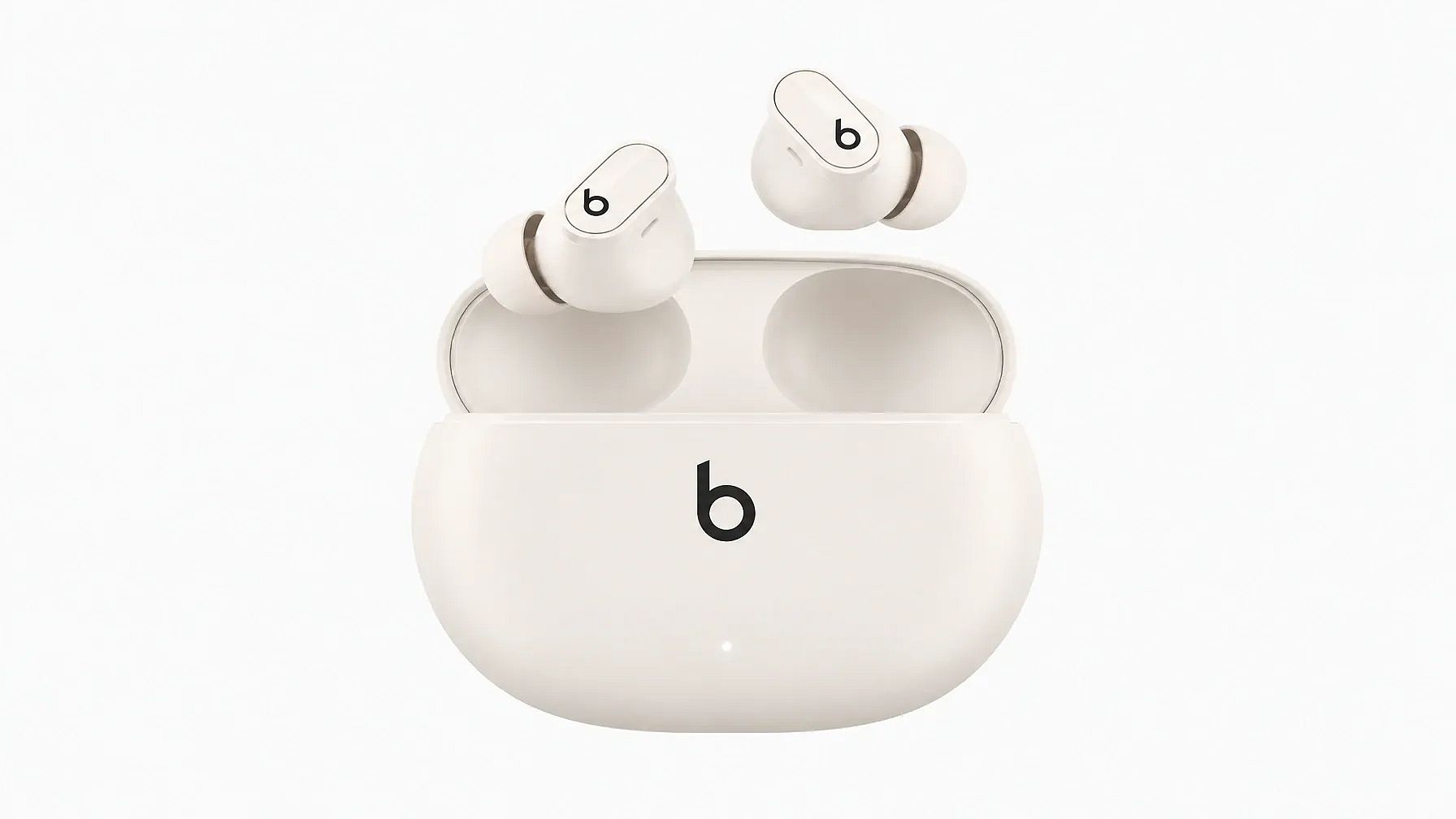
- Beatsイヤホンの公式製品写真
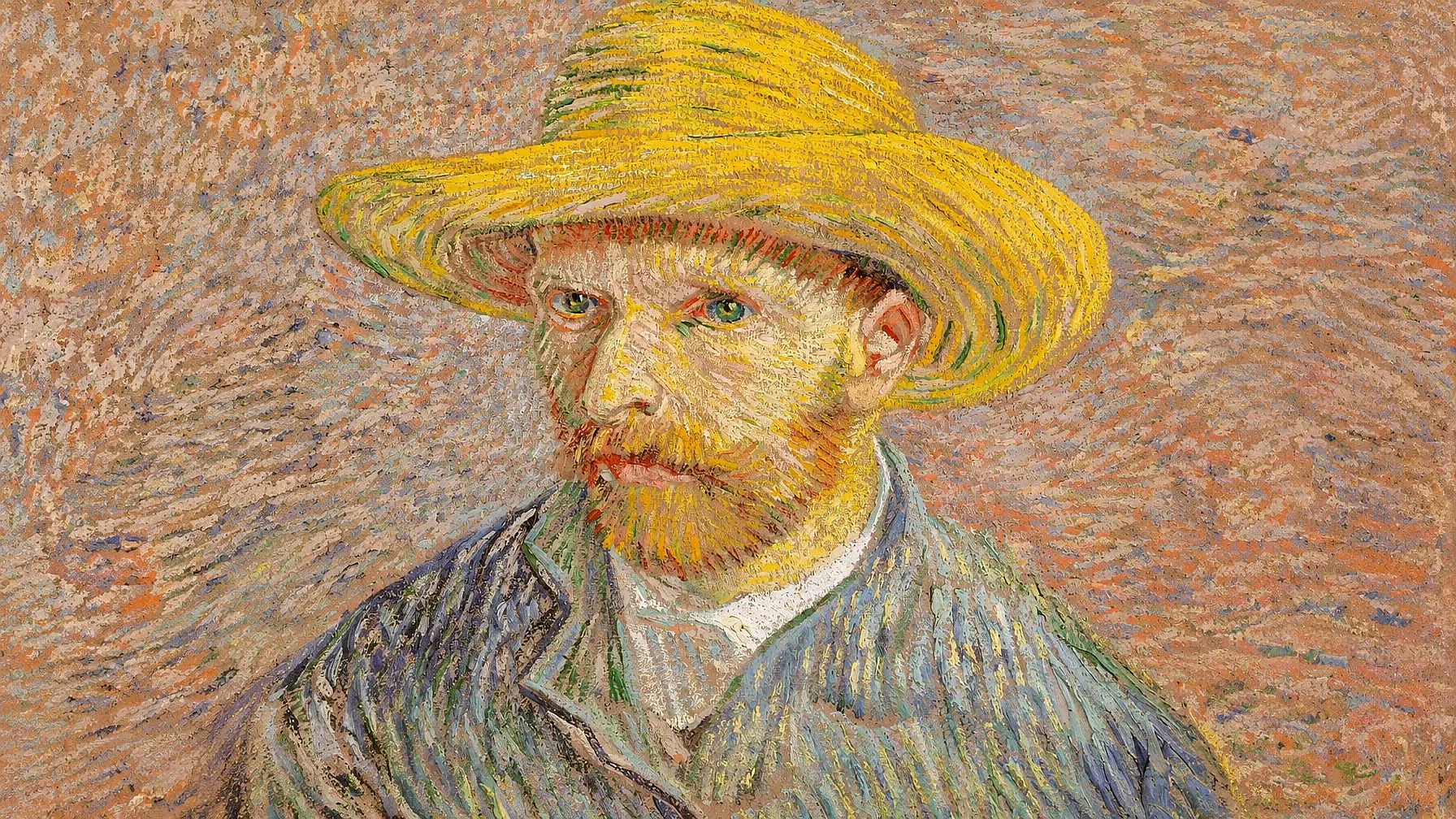
- ゴッホの 麦わら帽子の自画像 (1887年、パブリックドメイン)
- 保護されたIPを含まないAI生成のリビングルーム。
使用した画像:

さらに、20秒のAI生成テニス動画をOpenArtにかけました。3つのうち動画をスキャンできるのはOpenArtだけです。他のツールはベンダーのドキュメントをもとに比較しており、順位付けはしていません。
AI著作権チェッカーとは?
AI著作権チェッカーは、画像・音声・テキスト・動画をスキャンし、ロゴ、製品デザイン、著作物、商標、有名人の顔、アートワークなど、保護された知的財産と一致する要素を検出するツールです。リスクスコアや一致レポートを返すので、公開・販売・クライアントへの納品前にファイルを修正できます。
AI著作権チェッカーとAI検出ツール:どちらが必要?
著作権チェッカーとAI検出ツールは、それぞれ異なる問いに答えます。多くの人が、本当に必要なツールとは別のものを探してしまいがちです。
| ツールの種類 | 答える質問 | 例 | こんなときに使う |
|---|---|---|---|
| 著作権チェッカー | このファイルは他者の知的財産に似ていませんか? | OpenArt、Media.io、123RF、Hive | 広告、グッズ、ストック素材、クライアント作品を公開する前に |
| AI検出ツール | このファイルはAIで作成または編集されたものですか? | Copyleaks AI Image Detector、Google SynthID Detector | 画像の出所を確認する必要があるとき |
画像がAI検出器をすり抜けても、商標を侵害している可能性があります。AIラベルにも独自の信頼性の問題があり、それについては以下で解説します AIラベルが信頼を失う理由.
著作権チェッカーが画像・動画で検出する内容
優れたAI著作権検出ツールは、権利者が主張しうるあらゆる要素を探します。主なカテゴリは次のとおりです:
- ロゴと商標: ブランドマーク、ワードマーク、類似シンボル
- 製品とブランドのデザイン: 象徴的な形状やパッケージ。トレードドレスとも呼ばれます
- 有名人の顔: 肖像権やパブリシティ権に関わる有名人や著名人
- キャラクターとアートワーク: 有名な絵画、イラスト、架空のキャラクター
- ランドマークとウォーターマーク: 保護された建造物や残存したストック写真のマーク
使う予定だったロゴがチェッカーで検出された場合は、こちらでオリジナルのマークを作成しましょう AIロゴジェネレーター を代わりに使いましょう。
おすすめのAI著作権チェッカー一覧
| ツール | 画像 | 動画 | 警告される対象 | 無料オプション | 評価の方法 | おすすめの用途 |
|---|---|---|---|---|---|---|
| OpenArt AI著作権チェック | はい | はい | ロゴ、ブランドデザイン、有名人の顔、アートワーク | お試しクレジット40 | スポットチェック | AI画像・動画の権利をクリアにするクリエイターやチーム |
| Media.io IP著作権リスクチェック | はい | いいえ | 商標、トレードドレス、アートワーク | 無料アカウントで1日3回チェック | スポットチェック | 単一画像のクイックリスクスコア |
| 123RF AI Image Checker | はい | いいえ | ブランド、アートワーク、人物、ランドマーク、コンテンツの安全性 | 無料・登録不要 | スポットチェック | ストック投稿と無料スクリーニング |
| Hive | はい | はい | 有名人、キャラクター、アートワーク、映画・テレビコンテンツ | 従量課金制の利用料金 | ベンダー資料 | 大規模にスキャンするプラットフォーム |
| Mixpeek | はい | はい | 顔、ロゴ、音声 | 従量課金制 | ベンダー資料 | 開発者向けパイプライン |
| CopySight | はい | はい | キャラクター、ブランド、アートワーク | 月額20ドルから | ベンダー資料 | 生成AIのコンプライアンスチーム |
| PicDefense | はい | いいえ | サイト画像の著作権リスク | 100クレジットで$20 | ベンダー資料 | ウェブサイトの画像ライブラリの監査 |
| TinEye | はい | いいえ | ネット上の完全一致・編集済みコピー | API:月額200ドル〜 | ベンダー資料 | 画像がすでに存在する場所を見つける |
| YouTube StudioとContent ID | いいえ | はい | 一致した音声・動画・顔 | 無料 | ベンダー資料 | YouTubeクリエイター |
| Pex | いいえ | はい | 音声・動画のマッチング | クリエイター向けに無料 | ベンダー資料 | 音楽と動画の権利 |
スポットチェックで試したおすすめAI著作権チェッカー
3つのAI著作権チェッカーはすべてBeatsのロゴを検出しました。しかしゴッホの絵画とクリーンな対照画像では判定が分かれ、その違いが各ツールの仕組みの差を物語っています。
| テスト画像 | OpenArt | Media.io | 123RF |
|---|---|---|---|
| Beatsイヤホン | 検出結果: 2件の一致(BeatsロゴとStudio Budsのデザイン)、所有者 Apple Inc.、類似度100% | 重大リスク、90:イヤホンとロゴで合計1件の一致、権利者はBeats Electronics/Apple Inc. | 再販不可:イヤホンとケースのロゴ、および保護された製品デザイン |
| ゴッホの絵画 | 検出結果:タイトルと作者が正確に一致、所有者はパブリックドメインと記載、類似度99% | 低リスク、25:絵画を特定し、パブリックドメインと記載 | 編集用途のみ:絵画を特定し、パブリックドメインであることを記載、美術館の写真権について警告 |
| AIリビングルーム | 未検出、一致0件 | 低リスク、5、一致0件 | 壁のアートを検出し、プロパティリリースを提案しました |
| 3枚すべてで正解 | はい | はい | 一部正しい |
動画テスト(OpenArtのみ): 20秒のAIテニス動画で、OpenArtは0:09(62%)と0:13(85%)に一部隠れたWilsonのラケットロゴを、さらに0:17に実在の女優との30%の顔の類似を検出し、ファイルを「警告」とラベル付けしました。
動画の著作権についての手順ガイドは、ブログ[アップロード前に動画の著作権を確認する方法]をご覧ください。
1. OpenArt AI著作権チェック:画像・動画向けの最適なAI著作権チェッカー
判定: 試した中で最も詳細なAI著作権チェッカーで、3つの中で唯一動画をスキャンできます。
OpenArt AI著作権チェッカー はCopySightのIPデータベースで動作します。画像や動画からロゴ、ブランドデザイン、有名人の顔をスキャンし、各ファイルを「検出」「警告」「未検出」に分類して、一致ごとに類似度スコアを表示します。
スポットチェックの結果:
Beatsの画像を2つの一致要素に分けます。ロゴ(商標)とStudio Budsの製品デザインです。ロゴだけをスキャンすると、2つ目のリスクを見逃してしまいます。
該当するゴッホの絵画、作者、所有者を正確に特定し、パブリックドメインとして記載しました。
きれいなリビングルームはそのままで、誤検出は一切ありませんでした。
各ファイルごとに1ページのPDFを生成し、画像上に番号付きのボックスを描画して、IPカテゴリ、作者、権利者、類似度を表示しました。
20秒のAIテニス動画では、0:09と0:13で一部隠れたラケットのロゴ(Wilson、親会社Amer Sports)を62%と85%の類似度で検出しました。さらに0:17では、AI生成の選手の顔を実在の女優と低い類似度(30%)で一致と判定しました。この動画には警告ラベルが付き、一致した各フレームがレポートに表示されました。
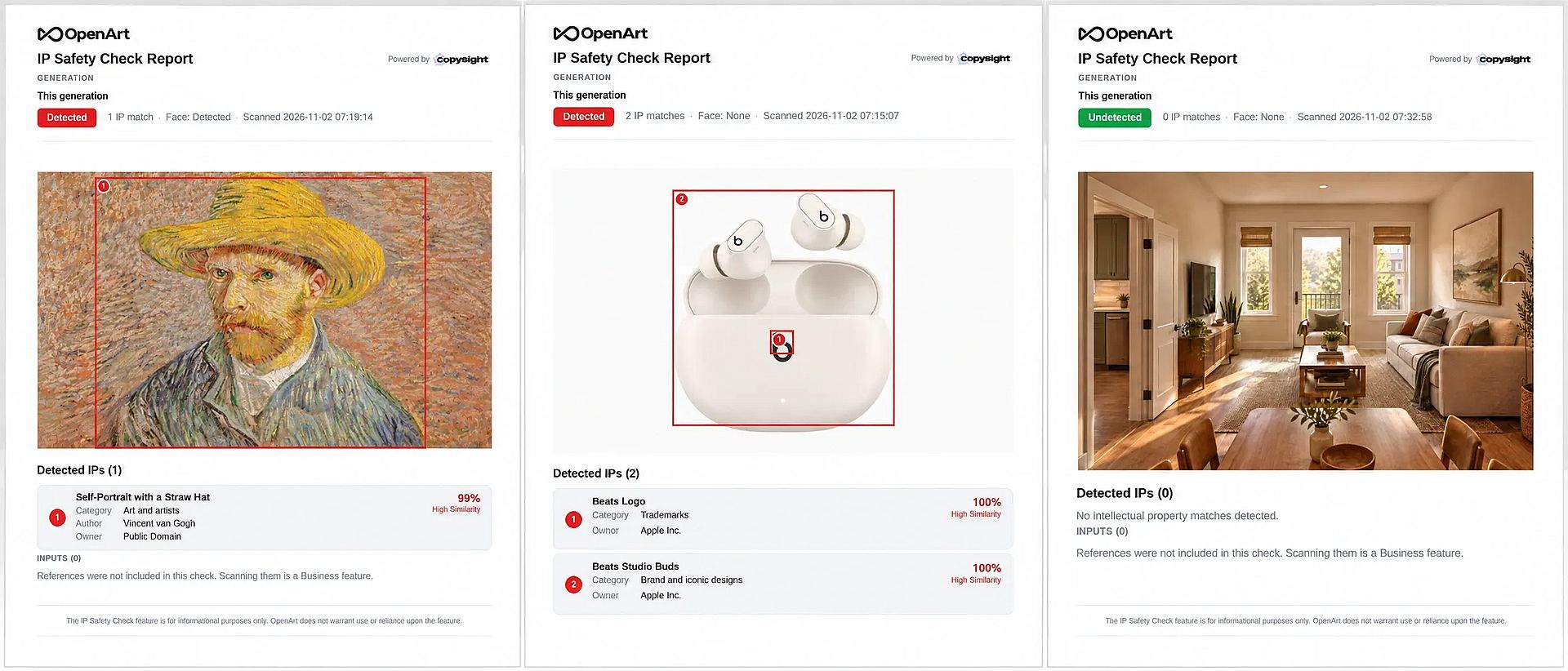
制限と料金:
- 今回のテストでは1枚の画像チェックに20クレジットかかりました。OpenArtは画像サイズによってスキャン料金を設定しているため、大きなファイルほど費用がかかる場合があります。
- 赤い「検出」ラベルはパブリックドメインの一致にも表示されます。慌てる前に所有者の行を読んでください。
- ゴッホの肖像画では「顔:検出」と警告しましたが、人物名は特定しませんでした。ただし動画テストでは、似ている有名人の名前を特定しました。
ファイル制限: 1回のチェックで最大32ファイルまで。画像はJPEG、PNG、WEBP形式で50MBまで。動画はMP4またはMOV形式で200MBまでで、動画レポートには一致した各フレームがタイムコード付きで表示されます。OpenArt以外で作成したファイルも受け付けます。
おすすめ用途: コンテンツを制作するクリエイターやマーケティングチームの対象は AI画像ジェネレーター または AI動画ジェネレーター 同じワークスペースで権利関係をクリアにしたい方へ。
2. Media.io IP著作権リスクチェック
判定: 3枚すべてで正確に判定し、リスクスコアも最もわかりやすいものの、無料利用に制限があり、視覚的なハイライト表示はありません。
Media.ioのAI著作権チェッカーは、各画像に0〜100のリスクスコアと、Low(低)やCritical(重大)などのラベルを付け、検出した知的財産をカテゴリと権利者とともに一覧表示します。
スポットチェックの結果:
- Beatsの画像を「重大(90)」と評価し、権利者としてBeats ElectronicsとAppleを特定しました。トレードドレスやグッズ化の権利についても警告しました。
- ゴッホの作品を低(25)とスコア化し、絵画を特定したうえでパブリックドメインであることを明記しました。これにより、レッドフラグよりも使用判断がしやすくなります。
- クリーンな画像を「低(5)」と評価し、一致なしとしました。
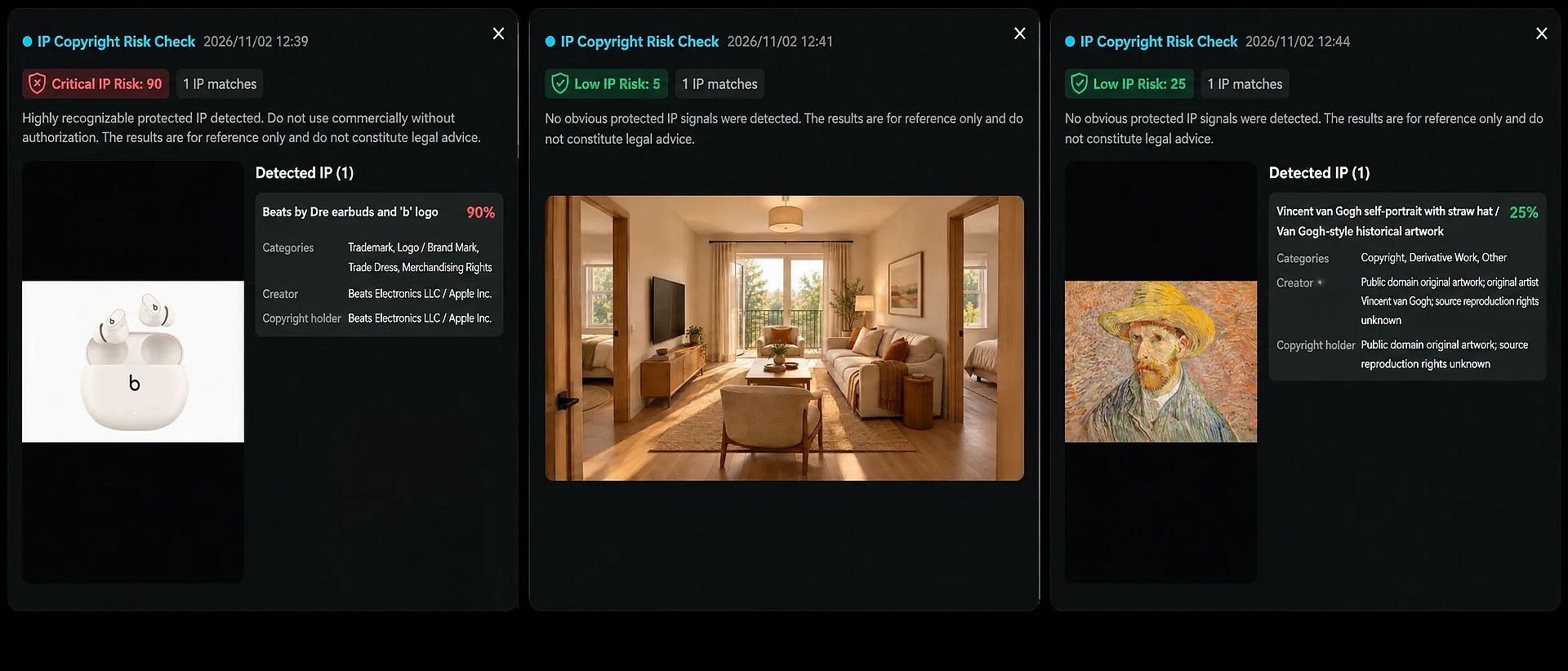
制限と料金:
- 各一致に表示されるパーセンテージは、全体のリスクスコアを表します。これは視覚的な類似度ではなくリスクを測るものなので、OpenArtの類似度パーセンテージと直接比較しないでください。
- ロゴと製品デザインを1つのマッチとしてまとめて検出した。
- 画像上にボックスは表示されず、結果は画面上にのみ表示されます。
- チェックできるのは1枚ずつで、JPG、PNG、WebP形式、最大20MB、幅または高さが300px以上のものに対応しています。
- 1回のチェックにつき1クレジットかかります。無料アカウントでは1日3クレジット利用できます。
おすすめ用途: 1日に数枚の画像について、すばやく読みやすいリスクスコアが必要なフリーランサー向け。
3. 123RF AI Image Checker:最もおすすめの無料著作権チェッカー
判定: 最も手軽に試せる無料の画像著作権チェッカーですが、ストックエージェンシーのように画像を審査するため、余分な警告が出やすくなります。
123RFの無料AI著作権チェッカーはアカウント不要です。わかりやすい要約、著作権と再販に関する判定、そしてNSFW・不適切・年齢制限コンテンツのセーフティチェックを返します。
スポットチェックの結果:
- Beatsの画像に「再販売の対象外」とマークし、両方のイヤホンとケースのロゴ、さらに保護された製品デザインを指摘しました。
- ゴッホの作品と認識し、パブリックドメインであることを指摘したうえで、美術館の写真権の確認を条件に編集目的での使用を推奨しました。
- きれいなリビングの画像を、ありふれた壁アートを理由にフラグ付けし、プロパティリリースを推奨しました。これはストック投稿では一般的なアドバイスですが、IP一致の観点では誤検出に該当します。
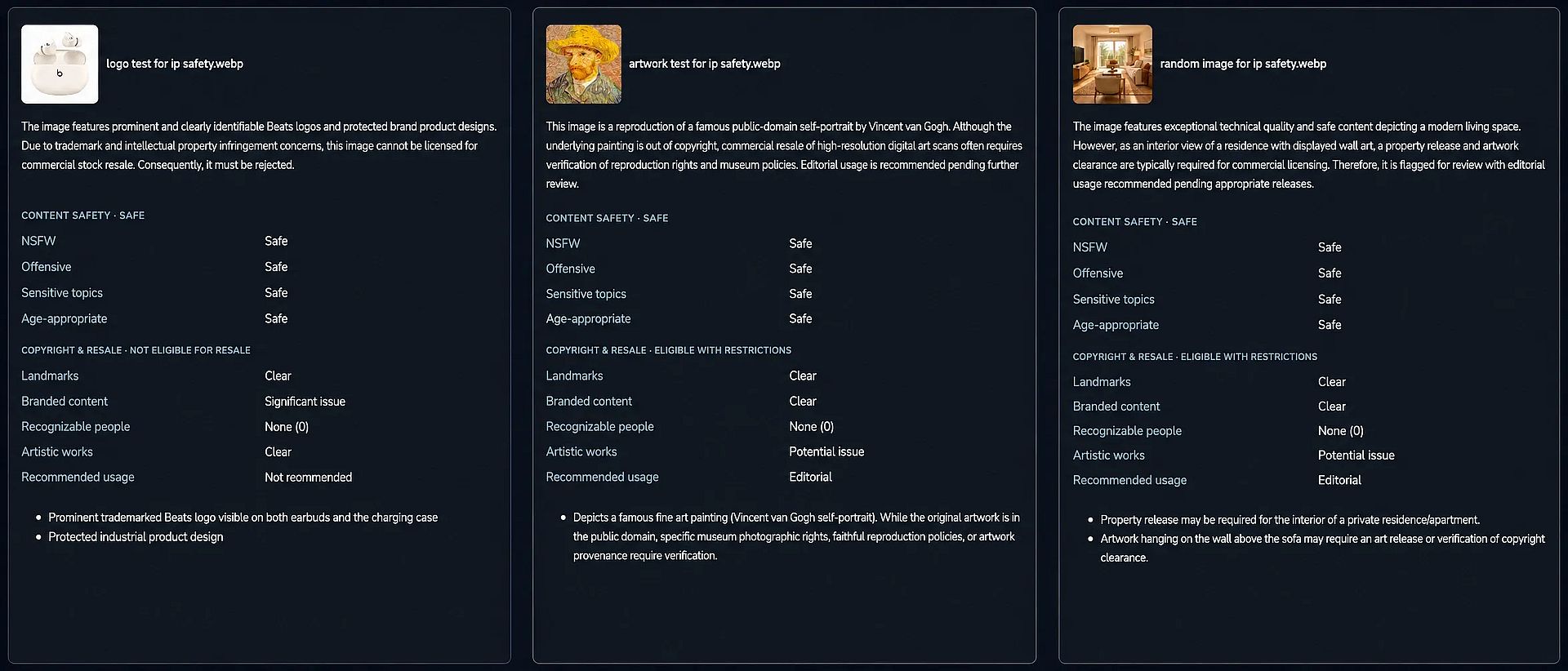
制限と料金:
- 権利者名は表示されず、スコアも出ません。
- JPEG、PNG、WebP形式のファイル(最大4MB)を、アップロード1回につき5枚までチェックできます。
- It does not scan video.
おすすめ用途: Stock contributors and anyone who wants a free first pass with a content safety check included.
用途別のその他のAI著作権チェッカー
We didn't run these AI copyright checkers through our spot check, so they aren't ranked. The details below come from each vendor's documentation.
For Platforms and Developers
- Hive: Offers APIs for celebrity recognition in images and video, likeness detection for popular characters and artworks, and media search that matches movie and TV content. Logo detection is a separate API. Pricing comes through sales.
- Mixpeek: Combines face recognition, logo detection and audio fingerprinting in one API call and handles video natively. Its own roundup ranks it first, so weigh that list with care.
- CopySight: The engine behind OpenArt's checker. It scores generative AI output for similarity to protected characters, brands and artwork, and suits companies building their own compliance flow.
For Website Audits and Copies Online
- PicDefense: Scans the images already on your website for copyright risk. It offers a WordPress plugin plus Zapier and Make integrations.
- TinEye: A reverse image search engine that finds where an image, or an edited copy of it, already appears online. It finds copies, not lookalikes, so it won't flag an AI image that only resembles a brand. Read our guide on checking image copyright.
Choosing an AI Copyright Checker for YouTube and Video*
Video brings audio and moving footage into play, so a YouTube copyright checker works differently from an image tool.
- YouTube Studio checks: When you upload, YouTube Studio's Checks step scans the video against Content ID before you publish. Upload as private to see claims first.
- YouTube likeness detection: Free for creators 18 and older since May 2026. It flags AI-altered versions of your face in YouTube uploads, but it doesn't scan other platforms.
- Pex: Matches audio and video against a large reference database and connects rights holders with licensing.
For logos that appear for a few seconds in a clip, OpenArt's report shows exactly where each match sits. In our tennis video, it pinned a partly hidden racket logo to 0:09 and 0:13. You can then remove it with AI video inpainting.
For Checking Whether Content Is AI-Generated
These tools detect AI origin, not copyright risk:
- Google SynthID Detector: Opened to the public on October 7, 2026. It checks images, video and audio for SynthID watermarks from Google and partners, with a limit of about 10 checks a day.
- Adobe Content Authenticity: Reads Content Credentials (C2PA) attached to a file to show how it was made and edited.
- Copyleaks AI Image Detector: Labels images as human or AI, including partly AI-edited photos.
最適なAI著作権チェッカーの選び方
Match the tool to the job rather than the longest feature list.
- Solo creators and freelancers: Start with 123RF for free screening. Move to Media.io or OpenArt when you need rights-holder names and scores.
- Marketing teams and agencies: Batch uploads and PDF reports matter for client sign-off. OpenArt handles both, and pairs well with an AIブランドキット that keeps your own logos and colors on file. See how one team ran an AI fashion ad campaign with OpenArt.
- Studios in pre-production: Build IP checks into storyboards and character sheets early. Our guide to IP checks in enterprise previs では、そのワークフローを解説しています。
- Platforms and developers: Use an API like Hive or Mixpeek for volume.
- YouTube creators: Combine YouTube Studio checks for audio with a frame-level scan for logos.
公開前にAI画像・動画の著作権チェックを行う方法
Running an AI copyright checker takes a few minutes and fits right before export:
- Generate or upload your file. Use the final version, since edits after the check can add new risks.
- Run the scan. Upload the image or video to your AI copyright checker and wait for the report.
- Review each match. Read the category, owner and score. A public domain match usually needs no change.
- Fix what's flagged. Remove a flagged logo from a photo, regenerate a lookalike face or swap licensed music.
- Re-scan and save the report. Keep the clean report with your project files as a record of your check.
For a full walkthrough with screenshots, see how to check AI images and videos for copyright infringement.
AI著作権チェッカーの精度はどのくらい?
An AI copyright checker gives you a probability, not a guarantee. Every tool we tried states that its results are for reference only and aren't legal advice.
Our spot check showed why the score type matters. OpenArt gave the Van Gogh a 99% similarity score because the image is the painting. Media.io gave the same file a 25 because the painting is in the public domain, so the risk is low. Both answers are correct. They measure different things.
Treat results like this:
- High score or Detected: Change the asset or get permission before commercial use.
- Low score with a public domain owner: Usually safe, but confirm the source photo's license.
- 未検出: No known match, which is good news but not clearance for niche IP missing from the database.
- High-stakes projects: For broadcast, packaging or large paid campaigns, add a legal review.
What AI Copyright Checkers Can't Catch
An AI copyright checker only knows the IP in its database, so some risks slip past:
- Art style imitation: A painting in a living artist's style may not match any single work.
- New or niche IP: Recent characters, indie brands and regional logos may be missing.
- Slogans and text: Trademarked phrases inside an image often go unflagged.
- Music in video: Image tools ignore audio entirely.
- Contracts and licenses: No scanner knows your agreement with a client or model.
The safest fix is to design original assets from the start, such as characters you build in the AIキャラクタージェネレーター instead of prompting for famous ones.
まとめ
OpenArt is the strongest pick for creators and teams who need to clear both images and video, with the most detailed reports in our spot check. Media.io is a solid choice for a few quick risk scores a day, and 123RF is the best free starting point. Developers should look at Hive or Mixpeek, and YouTube creators should pair YouTube Studio checks with a frame-level scan.
If you're producing paid creative, start with the best AI video models for commercial creative, then run every final file through OpenArt's IP Safety Check before it goes live.
よくある質問
What is the best AI copyright checker for images?
In our spot check, OpenArt was the best AI copyright checker for images. It named exact matches and rights owners, drew boxes on each match and produced no false positives. Media.io was also accurate and gives a clearer risk score, while 123RF is the best free option.
Is there a free AI copyright checker?
Yes. 123RF's AI Image Checker is free with no sign-up and checks up to five images per upload. Media.io gives free accounts 3 checks a day. OpenArt charges credits per check, about 20 per image in our test.
Can an AI copyright checker scan videos?
Some can. OpenArt scans MP4 and MOV files up to 200 MB and lists every matched frame with its timecode. In our test, it found a racket logo at two timestamps and a celebrity lookalike face in a 20-second clip. Media.io and 123RF check images only. For YouTube uploads, YouTube Studio's Checks step scans for Content ID matches before you publish.
画像が著作権で保護されているかどうかを確認するには?
Run a reverse image search on TinEye to see if the image already exists online and who posted it. Then run an IP checker like OpenArt or Media.io to catch logos, designs or artwork inside the image. Check the license or metadata if you got the image from a stock site.
How do I check if a video is copyrighted before posting on YouTube?
Upload the video as private and wait for YouTube Studio's Checks step, which flags Content ID claims. For logos or faces in the footage, scan the file with a video copyright checker like OpenArt first.
Is an AI image detector the same as a copyright checker?
No. An AI image detector tells you whether AI made a file. A copyright checker tells you whether the file resembles protected IP. You may need both for high-stakes work.
Does an AI copyright checker work on images made outside the tool?
Yes. OpenArt accepts files made anywhere, up to 32 per check. Media.io and 123RF also accept any image you upload within their file limits.
Is a "safe" result from a copyright checker legally binding?
No. Every AI copyright checker we reviewed describes its results as informational, not legal advice. A clean result lowers your risk, but it doesn't protect you if a rights holder makes a claim.