

 ChatGPT
 Perplexity
 Claude
 Gemini
Realism is the hardest thing to get out of an AI image generator. Plenty of tools produce a striking picture, but far fewer produce a picture that survives a second look at full zoom.
This guide compares the generators that actually pass for real photographs in 2026, based on how each one handles skin, light, and small detail. We start with our top pick and then go model by model.
Key takeaways
- OpenArt is our top pick because it runs the leading realism models in one workspace.
- Nano Banana Pro leads on micro-detail portraits, with pores, catchlights, and hair strands.
- Seedream 4.5 is the strongest choice for commercial and product realism at 4K.
- FLUX.2 Pro gives the most technical control, and Midjourney V8.1 the most cinematic look.
- Plastic skin is the biggest realism tell, so plan for a skin and detail pass.
What actually makes an AI photo look real
Most AI images fail realism in the same three places, and knowing them makes this comparison easier to read.
Skin is the first: too smooth, too even, and no pores, which registers as "plastic" within a second of looking at a face.
Lighting is the second. Real photos have uneven light, blown highlights, and shadows that fall from a single source, while AI images tend toward a flat, evenly lit look with no direction.
Composition is the third, since AI defaults to unnaturally centered framing and that tidiness reads as computer-generated.
If an AI image generator can get all three of those right, this is the kind of hyper-real image you can generate:
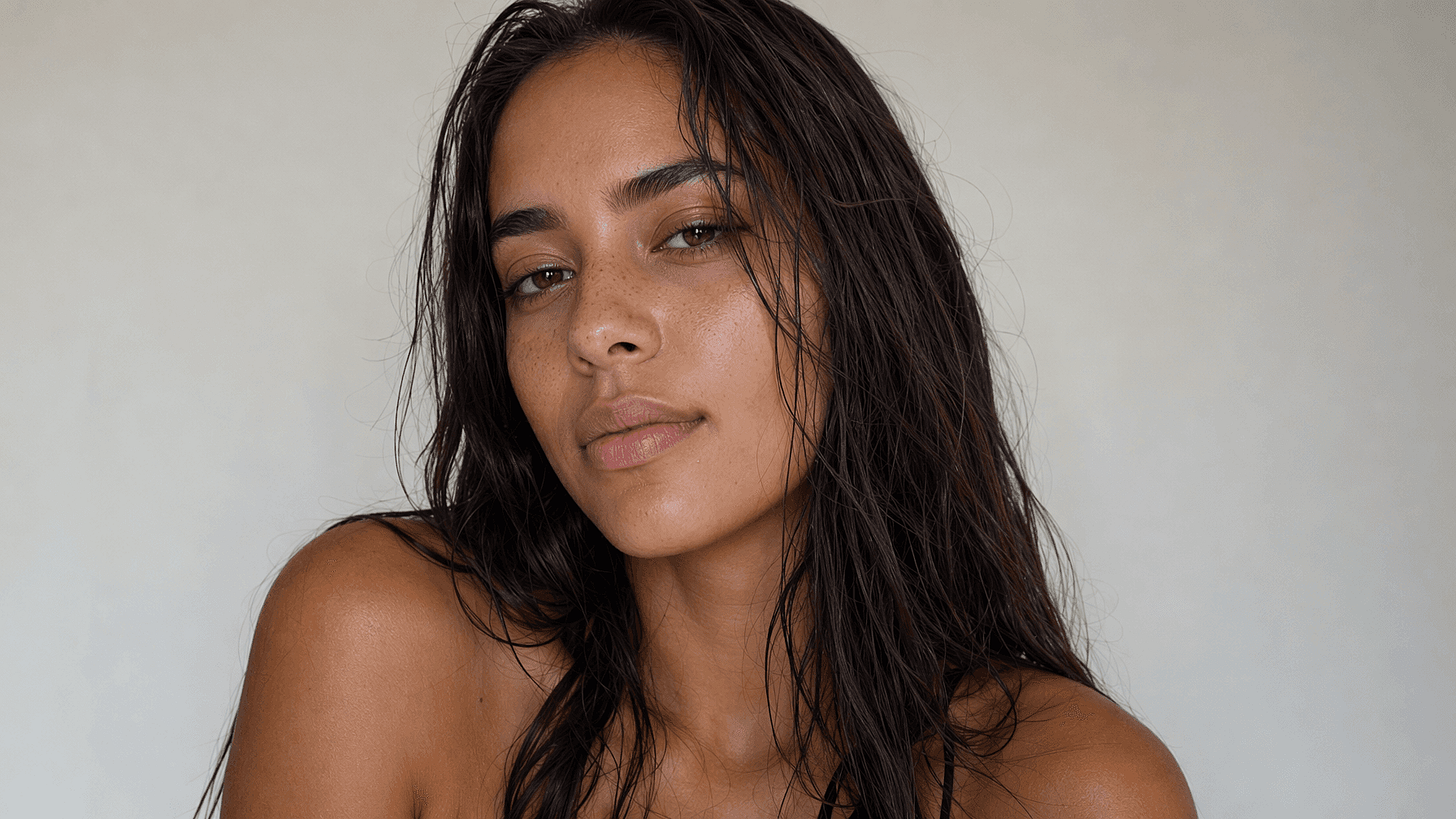
The prompt used for this image was: "Ultra-realistic beauty portrait of a young woman with wet, slicked-back dark brown hair falling over bare shoulders, natural freckled skin showing visible pores, fine peach fuzz, and subtle sheen on the cheekbones and nose; no makeup, no retouching, slightly damp complexion. Soft diffused daylight from the front-left creating gentle shadow under the jaw, flat off-white studio backdrop, head tilted slightly with a calm direct gaze into the lens, tight horizontal crop from mid-chest up with the face positioned right of center, shot on 85mm at f/2.0, shallow depth of field."
Not all AI image generators can pull off the same result from that prompt, so let's dive into our detailed comparison of the best ones for generating realistic photos.
The best AI image generators for realistic photos at a glance
| Tool | Best for | Standout realism strength |
|---|---|---|
| OpenArt | Realistic photos end to end | Top realism models plus a skin and upscale pass |
| Nano Banana Pro | Portraits and micro-detail | Pores, catchlights, hair strands, native 4K |
| Seedream 4.5 | Commercial and product shots | Photoreal 4K with controllable editing |
| FLUX.2 Pro | Technical control | Complex multi-subject scenes, accurate text |
| Midjourney V8.1 | Cinematic realism | Film-still lighting and texture |
| GPT Image 2 | Everyday all-round realism | Correct anatomy and believable light |
| Adobe Firefly Image Model 5 | Commercially safe realism | Licensed training data, IP indemnity |
| Krea | Fast visual iteration | Real-time canvas generation |
1. OpenArt
Best for: realistic photos from first prompt to final file
Realism is rarely one generation. It is picking a model that renders skin and light well, then fixing what that model missed, and OpenArt’s AI image generator is built for the full pass rather than a single roll of the dice.
The model access matters most here. OpenArt gives you Nano Banana Pro, Seedream 5.0 Pro & Lite, GPT Image 2, Recraft V4, Grok Imagine, and more under one subscription, so you can send a portrait to the model with the best skin rendering and a product shot to the model with the best 4K commercial output, and keep a person consistent across a set with OpenArt Characters.
The finishing tools are what separate a "good enough" generation from a photo that's indistinguishable from reality. The Skin Enhancer targets the plastic-skin problem directly, letting you set skin texture on a slider and export at 2K, 4K, or 8K, and Image Upscale rebuilds detail with Precise, Refined, or Creative modes.
2. Google Nano Banana Pro
Best for: portraits and micro-detail
Nano Banana Pro is the current benchmark for photorealistic detail. Reviewers consistently single out its rendering of skin texture, pores, catchlights in the eyes, and individual hair strands, which puts it close to professional portrait photography.
It generates native 4K quickly, handles multilingual text inside images, and shows a physics-aware sense of how light and materials behave.
3. Seedream 4.5
Best for: commercial and product realism
Seedream 4.5 from ByteDance is the pick for work that has to look like a paid shoot. It outputs native 4K and blends photorealism with cinematic styling, which suits advertising, packaging, and catalog imagery.
Its other strength is control. Seedream handles multi-image consistency and editable output well, so a product stays identical across a set of shots instead of being regenerated from scratch each time.
4. FLUX.2 Pro
Best for: technical control over complex scenes
FLUX.2 Pro from Black Forest Labs replaced FLUX.1 as the flagship and is widely ranked among the most realistic generators of 2026. It handles complex scenes with several subjects better than most rivals and renders text noticeably more accurately.
Reviewers point to its improved world knowledge and texture quality as the reason it holds up in commercial work. It rewards precise prompting, so it suits people who want to dial in a specific result.
5. Midjourney V8.1
Best for: cinematic realism
Midjourney built its reputation on images that look shot rather than generated, and V8.1, released in April 2026, continues that. It leans toward bright, richly textured frames with the feel of a film still or a professional editorial shot.
The update adds faster generation, better prompt understanding, stronger small-detail retention, HD 2K output, and Raw mode. Plans run from $10 to $120 a month, with Relax Mode for unlimited slower generation from the Standard tier up.
6. GPT Image 2
Best for: everyday all-round realism
GPT Image 2 scores as the strongest all-rounder in several 2026 realism benchmarks, and it is the easiest of these models to use conversationally. It gets human anatomy right more often than earlier generations and produces believable lighting without much prompt engineering.
It is a sensible default when you want a realistic image quickly and do not need peak detail, and the conversational workflow makes iterating on a near-miss easy.
7. Adobe Firefly Image Model 5
Best for: commercially safe realism
Firefly is the choice when licensing matters more than winning a quality shootout. Adobe trains it on Adobe Stock, public domain, and openly licensed material, and backs enterprise output with IP indemnity that no other major generator offers.
Image Model 5 sharpened its photorealism considerably, improved in-image text, and added finer control over lighting, camera angle, and depth of field. It sits inside Photoshop and the wider Creative Cloud workflow, which suits teams already there.
8. Krea
Best for: fast visual iteration
Krea's distinguishing feature is real-time generation. You sketch shapes on a canvas, the AI renders a detailed image as you work, and you can move elements or change colors and watch the result update immediately.
That makes it strong for finding a composition rather than polishing a final frame. It also aggregates many models across image, video, and upscaling, with a basic tier around $5 a month on annual billing.
Also worth a look
Three more tools fit narrower jobs. Magnific, the brand Freepik rebranded to in April 2026, pairs many image models with a very large stock library, and Leonardo AI, from $12 a month, specializes in training a custom model on your own visual identity.
Ideogram, from $15 a month on its Plus tier, remains the pick when legible text inside the image is the priority.
How to pick one for realistic photos
Start with your subject, because the leaders differ by category. Faces point toward Nano Banana Pro, products and 4K commercial work toward Seedream 4.5, crowded multi-subject scenes toward FLUX.2 Pro, and cinematic mood toward Midjourney.
Then check the finishing path. A model that caps your resolution or leaves skin looking waxy leaves you a step short, so confirm the tool includes upscaling and skin work.
Last, prompt like a photographer rather than an artist. Naming lighting conditions, lens and f-stop, and specific textures moves output toward documentary realism faster than anything else you can change.
The bottom line
There is no single most realistic AI image generator in 2026, because Nano Banana Pro, Seedream 4.5, FLUX.2 Pro, and Midjourney each lead on a different kind of shot. The practical question is which one fits the photo in front of you, and whether you can finish that photo without switching tools.
That is why OpenArt is our top pick. Shortlist two or three options here, run the same prompt through each, and judge the results at full zoom rather than at thumbnail size.