

 ChatGPT
 Perplexity
 Claude
 Gemini
Los mejores prompts de fotos con Gemini AI para retratos de moda
Cuarenta y un prompts. Eso es lo que es este post. Si has venido a copiar un prompt de foto de Gemini AI, pegarlo y salir con un retrato terminado, pasa directamente a la biblioteca de abajo. Si quieres entender por qué algunos prompts dan una edición de aspecto profesional y otros te sueltan a un desconocido con cara de plástico, los análisis estrella y las secciones festivas antes de la biblioteca te mostrarán qué hace realmente cada línea de un prompt.
Las secciones festivas cubren las ediciones de temporada que más se buscan: selfies de disfraces de Halloween y la tendencia de terror VHS, fotos de cenas familiares de Acción de Gracias y sesiones navideñas con IA, desde el retrato de la caja de regalo hasta la foto familiar con pijamas a juego.
Todo aquí funciona con los modelos de imagen Gemini de Google, que OpenArt te ofrece bajo el nombre de Nano Banana junto a GPT Image 2.5, Seedream y un editor de fotos completo en un solo espacio de trabajo. Desde que lees hasta que tienes la foto lista, unos dos minutos.
¿Qué es un prompt de foto de Gemini AI?
Un prompt para fotos de Gemini AI es una instrucción en lenguaje natural que das a los modelos de imagen de Gemini de Google para generar una foto nueva o editar una que ya tienes. La parte de imagen de Gemini se conoce por un apodo que seguramente has visto: Nano Banana. Google usa ese nombre abiertamente ahora, y la versión más potente, Nano Banana Pro, es el modelo al que se refiere la gente cuando dice "foto de Gemini AI".
Uno de estos prompts hace una de dos cosas. Puede generar: crear una foto totalmente nueva a partir de una descripción de texto, como un retrato callejero cinematográfico o una toma con estética aura-farm. O puede editar: partir de una foto real y cambiar lo que le indiques manteniendo el resto, como «conserva la cara tal cual, reestiliza como un retrato de película de los 90». Editar es lo que mejor hace Gemini, y es la razón por la que la ola de retratos de moda despegó precisamente en este modelo.
Ejecutar prompts al estilo Gemini en OpenArt
Aquí viene la parte honesta, porque importa. OpenArt no es Gemini, y no lo hace Google. Lo que OpenArt te ofrece es acceso directo a los modelos de imagen de Gemini: Nano Banana 2.1, Nano Banana Pro y Nano Banana 2 Lite viven todos en el espacio de trabajo. Cualquier prompt escrito para «foto de Gemini AI» se ejecuta en esos mismos modelos dentro de OpenArt.
Elegir Nano Banana 2 Lite para borradores rápidos, Nano Banana 2.1 para el trabajo diario estable con texto más nítido en la imagen, y Nano Banana Pro para los resultados más pulidos y con identidad estable. GPT Image 2.5, Seedream 5.0 Pro, y un completo editor de fotos con IA colócalos junto a ellos.
Por qué se hacen virales los prompts de fotos de Gemini
La mayor parte de la cobertura inicial de los modelos de imagen de Gemini se centró en la generación: escribes una descripción y obtienes una imagen nueva. Pero los formatos que de verdad se difundieron fueron los diseñados para copiarse.
Un prompt viral de foto con Gemini tiene una forma concreta. Nombra el sujeto, el estilo, la iluminación, el ambiente y la relación de aspecto, y acota lo que debe mantenerse igual. Esa receta es lo bastante completa como para que el prompt de una persona funcione para mil fotos distintas subidas por mil personas distintas.
La edición gana a la generación en los feeds personales por una razón sencilla. Una imagen generada de un desconocido se pasa de largo. Una imagen editada de tú como un retrato de soft glam, una foto de café a la hora dorada o una foto de la infancia restaurada, gana un guardado y un compartido.
Editar también es lo más difícil. Para editar de forma creíble, el modelo tiene que cambiar por completo el estilo, el vestuario o el entorno sin tocar tu cara real. Las herramientas más flojas fallan en esta segunda parte y te devuelven un doble parecido. Los modelos de imagen de Gemini mantienen la identidad incluso con un cambio de estilo radical, y los retratos de moda dependen precisamente de eso.
Si quieres la parte de generación pura, nuestra mejores prompts de Nano Banana la guía explica cómo crear imágenes virales desde cero. Este artículo cubre ambos aspectos, con especial atención a las ediciones de retratos en tendencia que la gente está copiando hoy.
Cómo ejecutar esto en OpenArt
No necesitas nada técnico. Sube tu foto, elige un modelo Gemini, pega un prompt y genera.
Para editar prompts, abre Generación de imágenes o Crear imagen dentro de tu espacio de trabajo. Usa el botón para subir imágenes junto al cuadro de prompt para añadir tu foto original. Este paso es el más importante: el modelo edita la imagen que le das, así que una fuente clara y bien iluminada da un resultado más limpio.
Haz clic en el nombre del modelo en el cuadro de prompt y elige Nano Banana 2.1 para el trabajo diario o Nano Banana Pro para los resultados más consistentes. Pega cualquier prompt de abajo y genera. A partir de ahí puedes afinar en el editor, amplía a 4K para impresión, o cambia el fondo. Las cuentas nuevas empiezan gratis con créditos, así que puedes probar unas cuantas antes de elegir un plan.
Para pura generación, sáltate la subida y pega directamente un prompt de estilo generación.
El retrato de chica que está de moda
El formato de foto de Gemini más copiado en este momento. Encaja directamente con las búsquedas de "copy paste trending girl" que llenan el feed: coge un selfie cotidiano y transfórmalo en un retrato pulido y suave-glam, con luces delicadas, piel radiante, un cálido brillo mariposa y un estilo estético que parece una sesión profesional.
High-fidelity studio portrait of a young Asian woman with pastel pink
hair in a side braid. She wears a cream polka-dot lace top under a pink
knit cardigan, accessorized with layered gold necklaces. Soft rosy
makeup, glossy lips, direct gaze. Pure white background, high-key
diffuse lighting, hyper-realistic fashion photography, 8k resolution.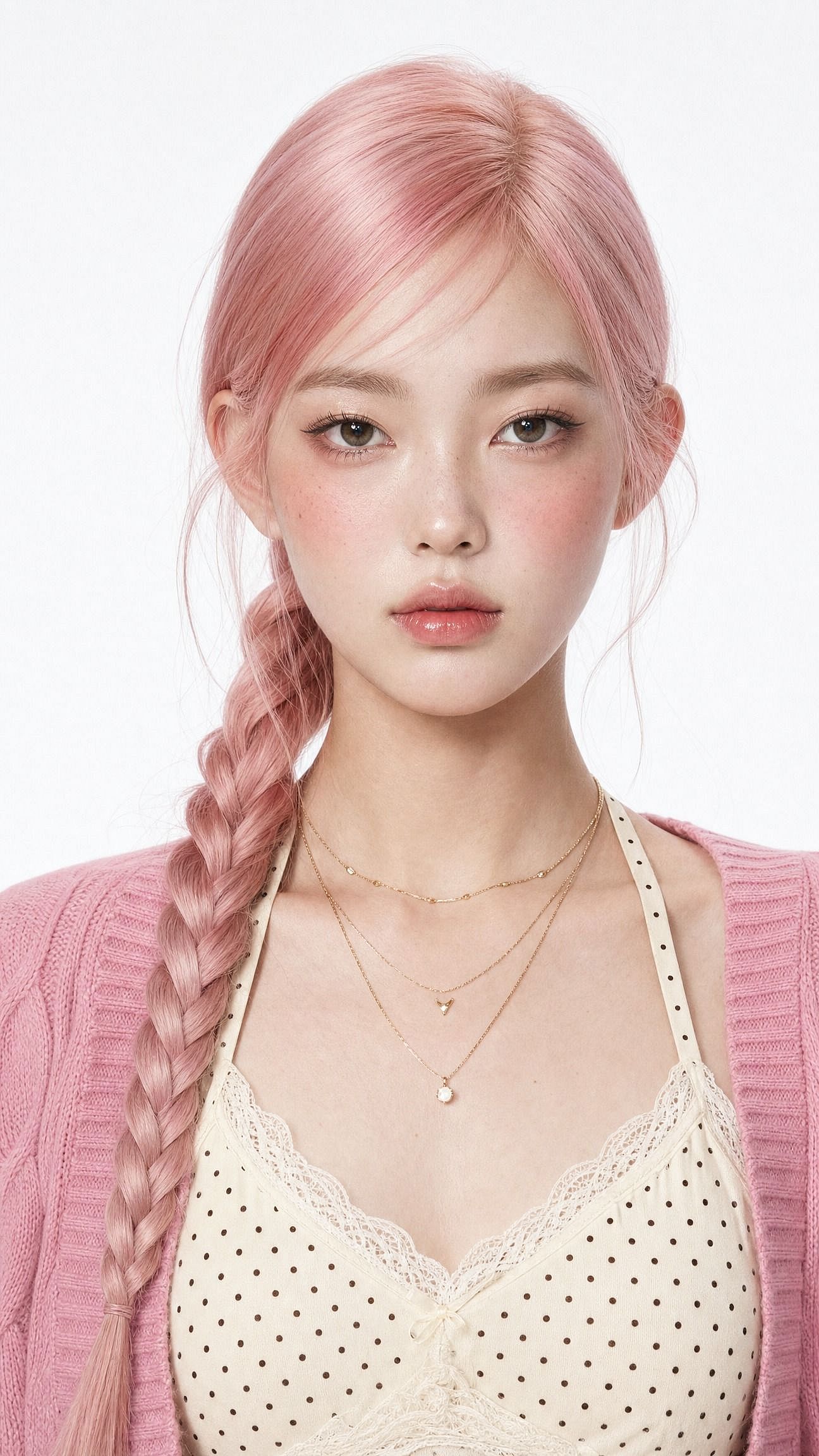
Cambia una palabra para transformar todo el look. Sustituye «soft-glam» por «elegancia étnica de sari» para un set tradicional, o «foto de perfil de Instagram limpia, fondo de estudio minimalista» para una imagen de perfil.
La frase que hace el trabajo pesado es la primera: mantén la misma cara y conserva la identidad original. Sin ella, el modelo reestiliza la cara junto con todo lo demás, y acabas con un desconocido guapo en lugar de una versión más guapa de ti.
El retrato cinematográfico del chico
La versión masculina de la tendencia se divide en dos looks que la gente copia una y otra vez: estilo urbano cinematográfico y una foto en una cafetería a la hora dorada con rollo Pinterest. Este prompt hace la versión urbana.
Edit the uploaded photo. Keep the same face, features, and expression
exactly, preserve the original identity. Restyle into a cinematic urban
street portrait: moody overcast light, teal-and-orange color grade,
blurred city street background, confident casual streetwear, shallow
depth of field, film-still mood, vertical 4:5 frame. Keep skin texture
natural and true to life.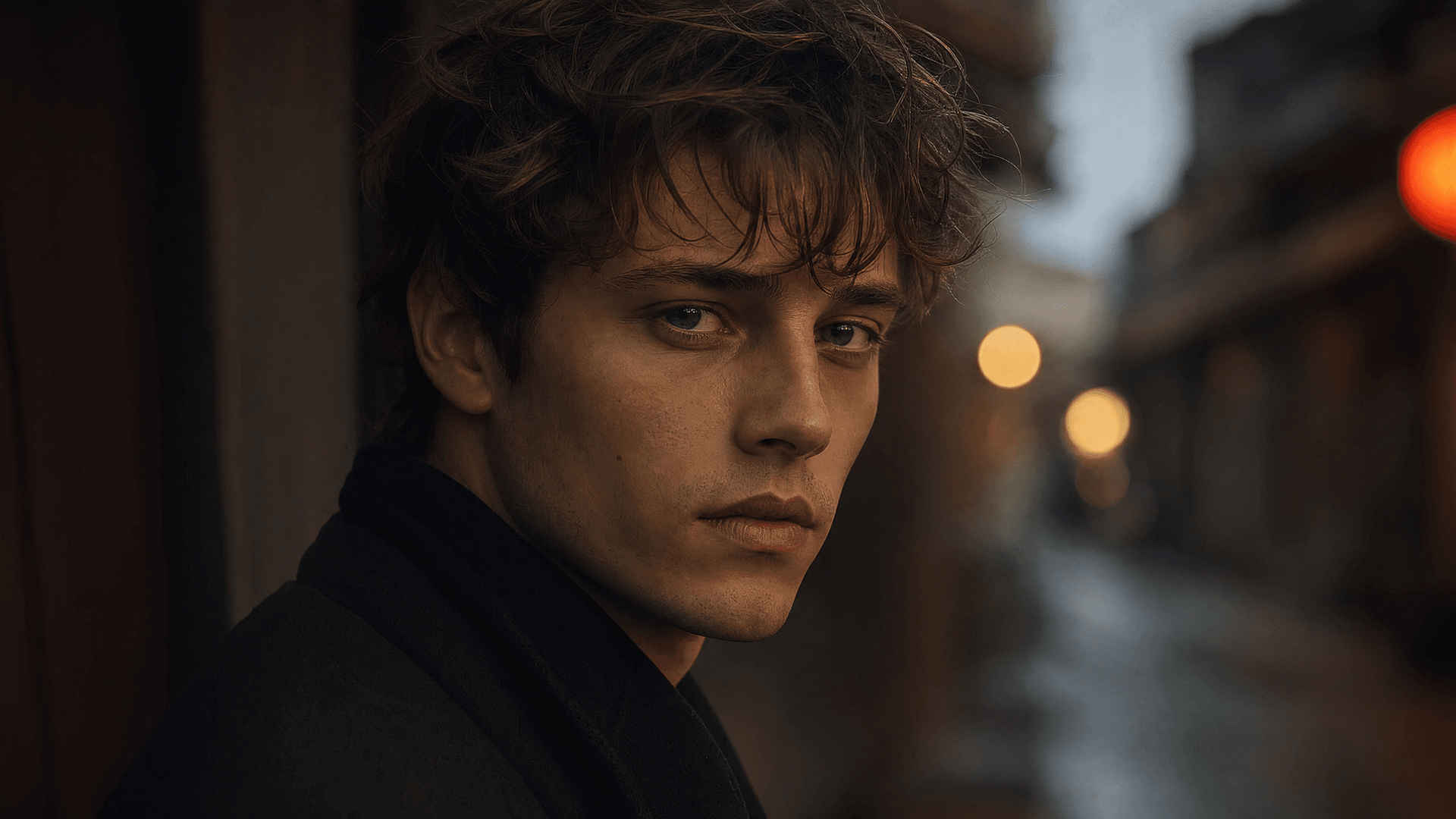
La pareja cinematográfica
Las ediciones de parejas son una de las mayores subtendencias, y la más difícil. El modelo tiene que proteger dos caras a la vez.
Sube una foto normal de móvil de dos personas y obtienes un set que parece hecho por un fotógrafo:
Edit the uploaded photo of two people. Keep both faces, skin tones, and
expressions exactly as they are, preserve both identities. Do not merge
or alter their features. Restyle into a cinematic couple portrait:
coordinated neutral-tone outfits, soft directional lighting, a blurred
city-evening background, natural closeness, warm film color grade,
shallow depth of field, magazine-cover quality.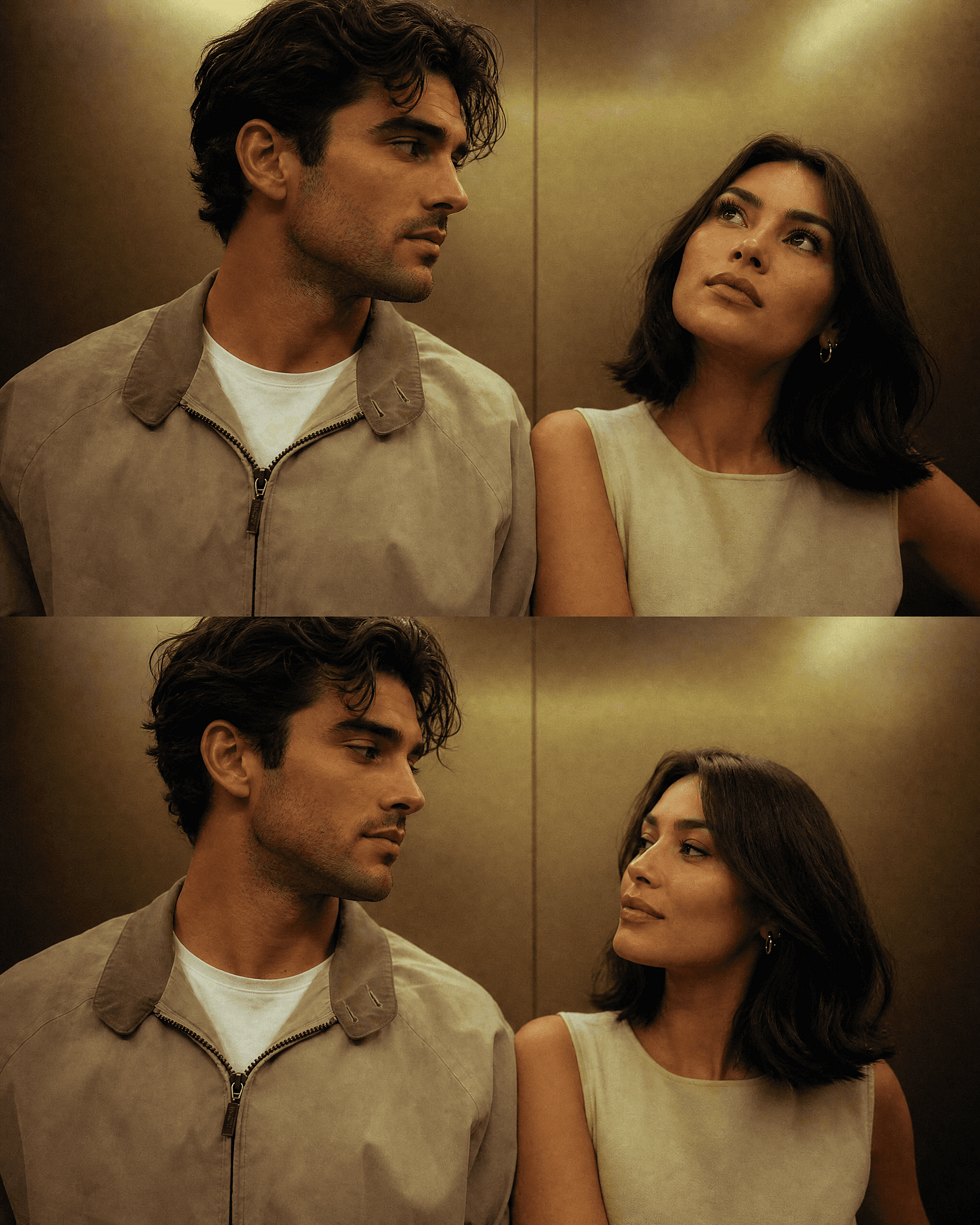
Para una versión de temporada, mantén ambas caras y cambia solo el entorno. Las secciones de Halloween y Navidad de abajo incluyen prompts de pareja listos para usar, y ambas personas siguen siendo reconocibles en todos los escenarios que generes desde la misma foto de origen.
La figura 3D
El formato que catapultó toda la tendencia al mainstream, y que sigue funcionando. Una persona real se convierte en una pequeña figura de colección sobre un escritorio o dentro de un envase de tienda. Se entiende al instante en un feed porque el contraste entre «persona que conozco» y «juguete en una estantería» capta la atención por sí solo.
Edit the uploaded photo. Turn the person into a realistic 3D collectible
figure standing on a wooden desk next to a keyboard and a coffee mug for
scale. Keep their face, hairstyle, and outfit recognizable. Add a subtle
plastic-model texture, detailed base, soft desk lighting, shallow depth
of field, believable miniature scale, vertical 4:5 social frame.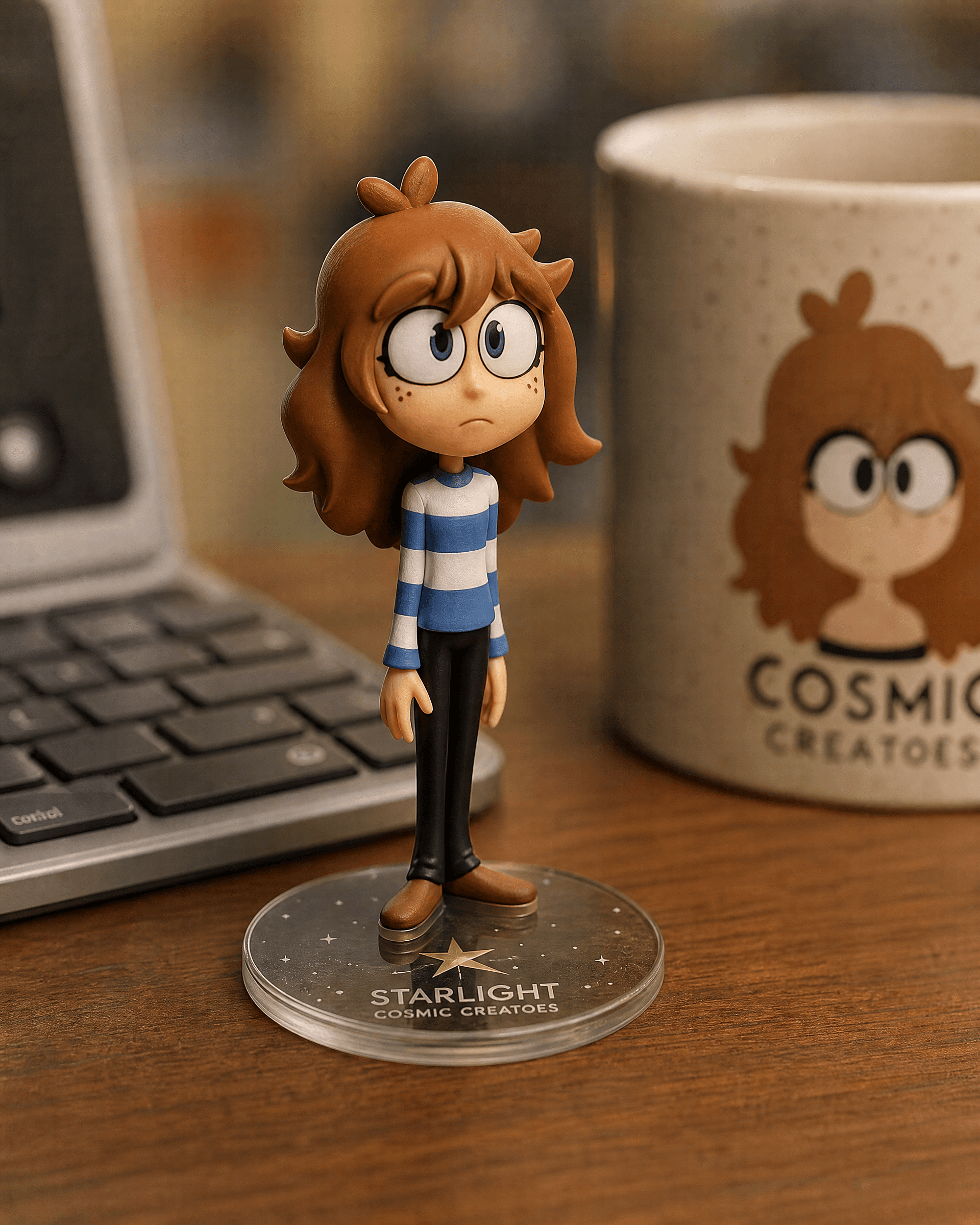
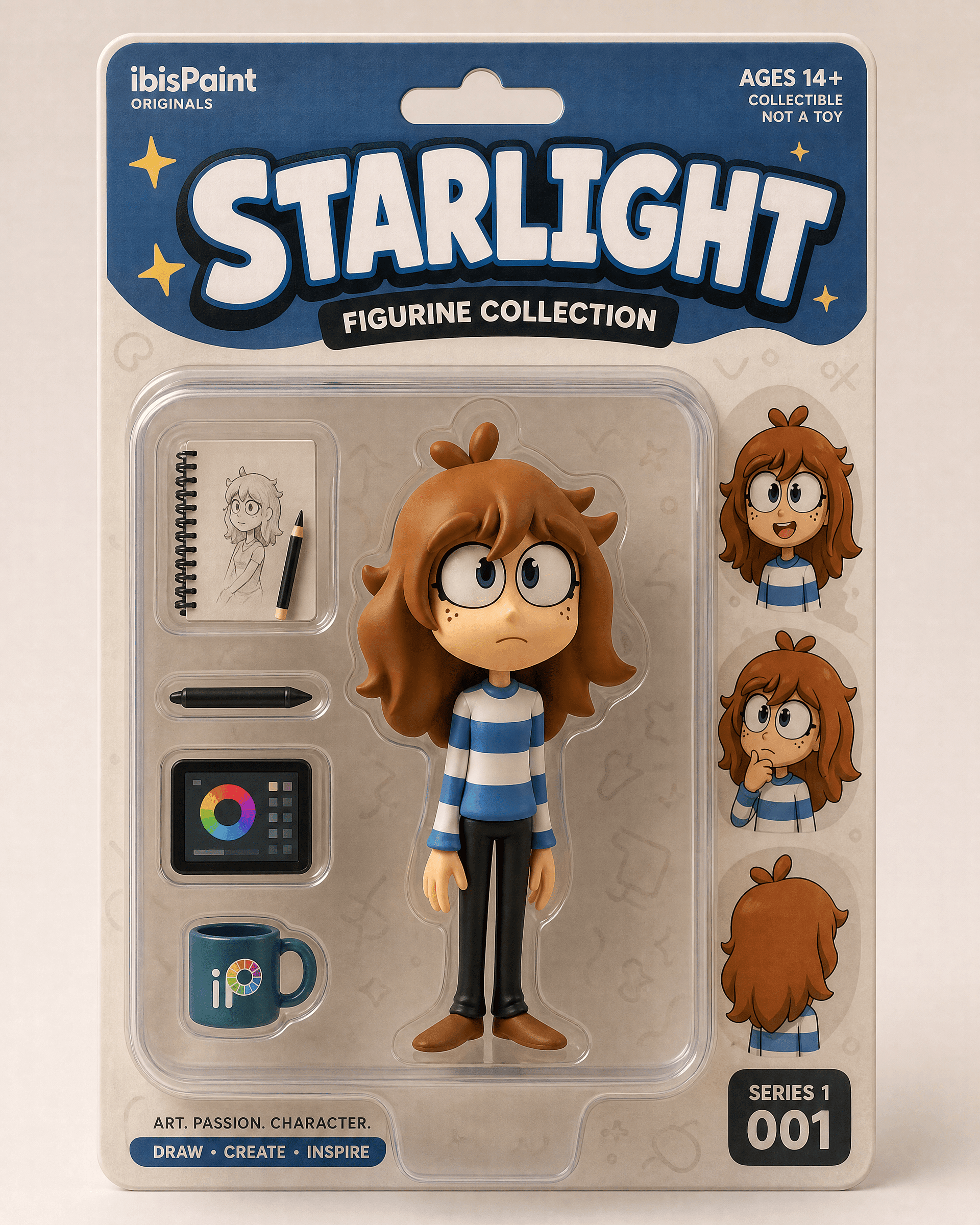
La versión en caja para un reveal de packaging comercial:
Edit the uploaded photo into a boxed action figure. Keep the person's
face and style recognizable. Place the figure inside a clear blister
package with a printed backing card, bold product name at the top, small
accessory icons, realistic toy photography, studio lighting, collectible
designer-toy aesthetic.
Empieza con una foto clara de cuerpo entero o de medio cuerpo. La versión de escritorio parece una edición discreta y creíble. La versión en caja parece una revelación.
La antigua edición de restauración y coloreado de fotos
La restauración es una de las cosas más útiles y menos artificiosas que hacen estos modelos. Arregla arañazos, da nitidez a un escaneo descolorido y colorea fotos en blanco y negro. Mucha gente abrió por primera vez un editor de Gemini justo para esto, normalmente para un proyecto familiar o un regalo de aniversario.
Edit the uploaded old photo. Restore it: remove scratches, dust,
creases, and water damage, repair torn areas, sharpen soft details, and
correct fading. Keep every face and feature true to the original, no
reinvented details. Preserve the original composition and era-accurate
clothing. Natural, archival-quality restoration.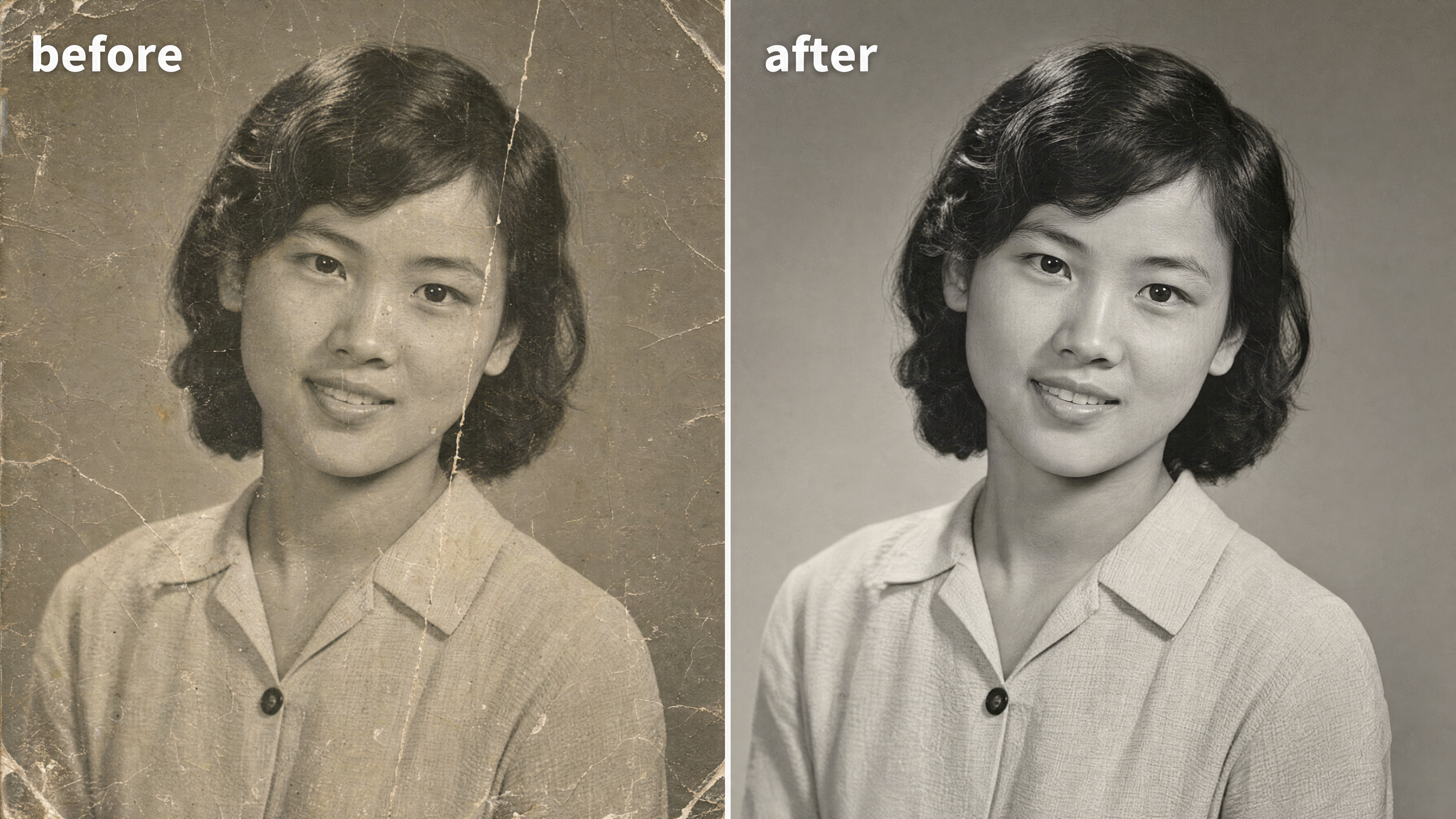
Para colorear una foto en blanco y negro, añade una línea:
After restoring the photo, add realistic, natural color: era-accurate
skin tones, believable fabric colors, soft natural lighting. Keep it
subtle and true to life, not oversaturated. Do not change any faces or
features.
La frase clave de esta edición es «fiel al original». La restauración falla cuando un modelo se inventa una cara nueva para un familiar borroso. Puedes restaura y limpia el resultado en el editor de fotos después, entonces amplíala a resolución de impresión para el encuadre.
El estilo Y2K
El look flash del Y2K lleva la voz cantante del grupo retro este mes: flash directo y duro, color un poco lavado, grano de cámara digital de principios de los 2000, energía de foto de fiesta. Se lee al instante como nostálgico. Funciona en un retrato individual o en grupo.
Edit the uploaded photo. Keep the same face, features, and expression
exactly, preserve the original identity. Restyle into a Y2K early-2000s
digital-camera look: harsh direct on-camera flash, slightly washed cool
color, fine digital noise, candid party-photo framing, low-fi nostalgic
mood, authentic 2003 point-and-shoot aesthetic. Keep skin texture
natural.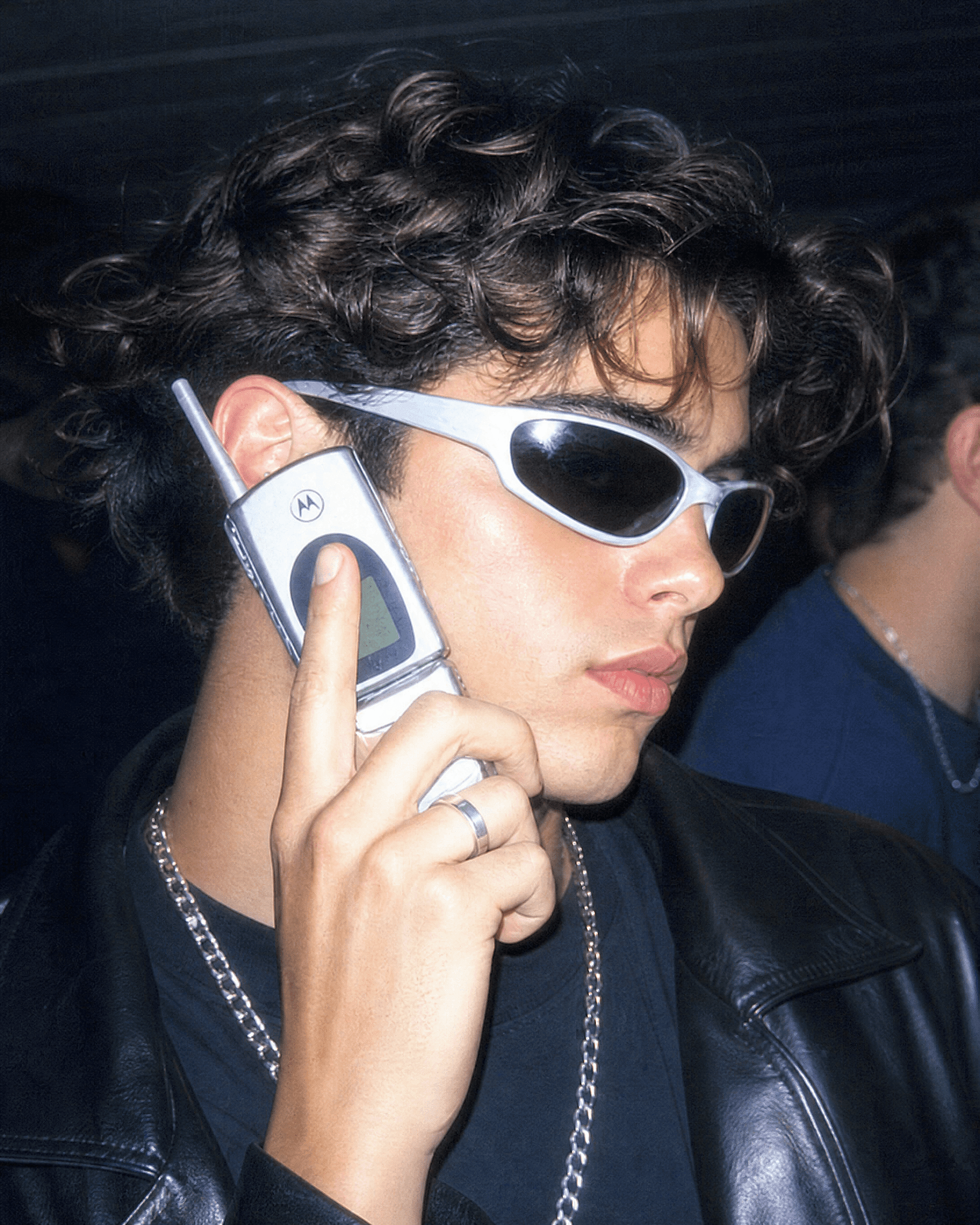
Ve más allá nombrando la década. "Retrato con cámara de cine de los años 90, grano cálido, flash suave" da un aire retro más suave. "Póster de comedia de los 90, luz de estudio brillante, título en negrita arriba" da esa versión de foto de grupo que la gente enmarca como el reparto de una serie de televisión.
El retrato estético con aura
El «aura-farming» es la estética más nueva del panorama. Contraluz dramático, un halo brillante de luz de color, una pose segura desde un ángulo bajo y un fondo atmosférico y evocador. La que la gente elige cuando quiere un retrato cinematográfico y un poco más grande que la vida real.
Edit the uploaded photo. Keep the same face and identity exactly.
Restyle into an aura-farm aesthetic portrait: dramatic colored rim light
glowing around the subject, moody dark atmospheric background, soft
volumetric haze, confident low-angle framing, rich cinematic color
grade, subtle particles in the air, high-detail vertical portrait. Keep
skin texture natural and true to life.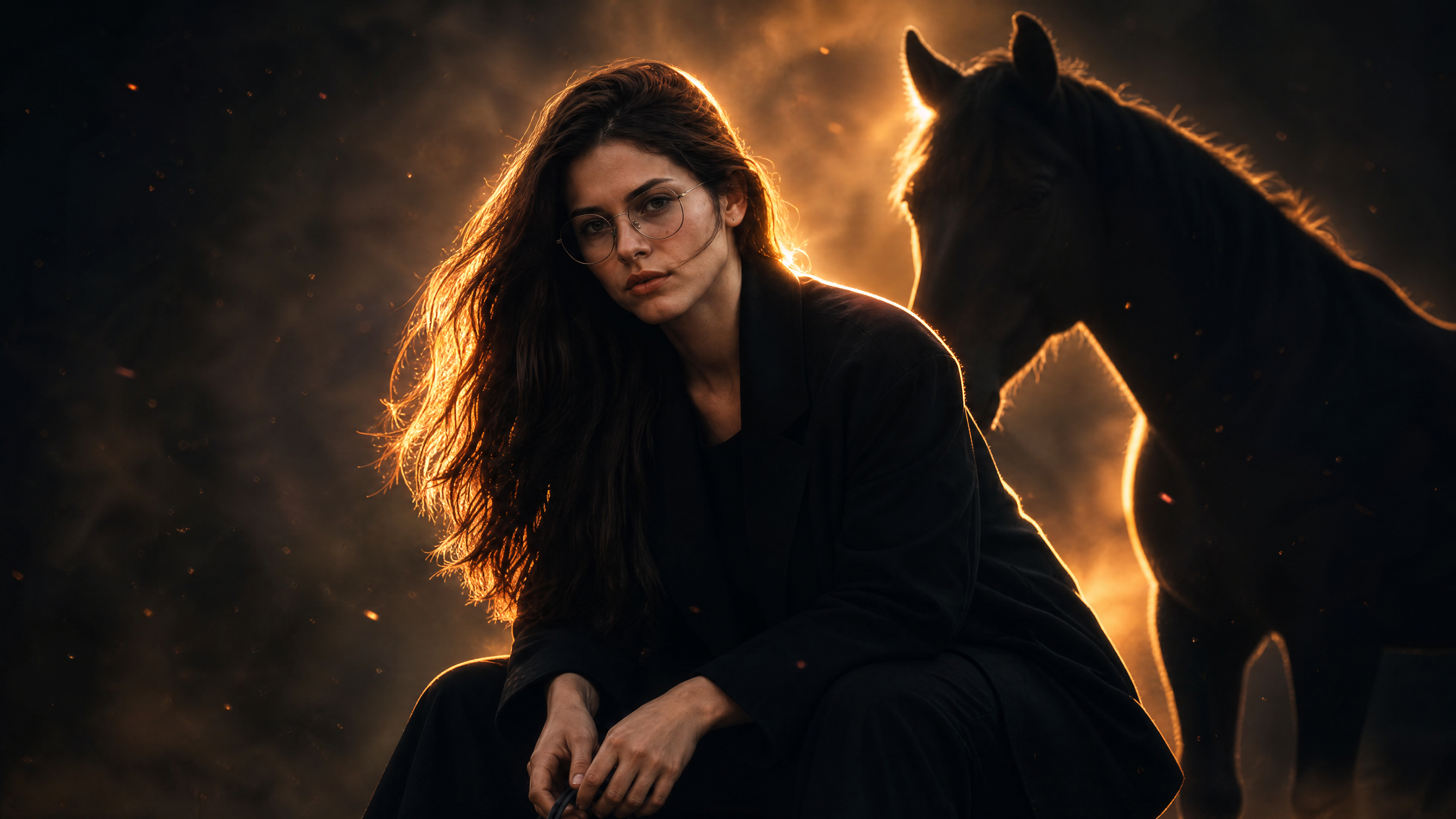
Cambia el color de la luz de contorno para cambiar el ambiente. Azul frío para algo tranquilo y misterioso, ámbar cálido para lo heroico, magenta para alta costura.
Prompts para fotos de Halloween
Cada octubre, la tendencia de Halloween con IA se apodera del feed: la gente sube un selfi y recibe a cambio un retrato disfrazado, una sesión de fotos en pareja o un fotograma de terror de metraje encontrado con ellos mismos de protagonistas. La idea es sencilla. Mantén tu cara real y cambia el disfraz, el maquillaje y el entorno. Encaja justo con lo que mejor hacen los modelos de imagen de Gemini, porque la ropa y la escena pueden cambiar por completo mientras tú sigues siendo reconocible.
El selfi disfrazado de Halloween
El formato base de la tendencia, y el que la mayoría busca primero. Sube un selfie, nombra un disfraz y consigue un retrato que parece una sesión de Halloween con estilo.
Edit the uploaded photo. Keep the same face, features, and expression
exactly, preserve the original identity. Restyle into an elegant vampire
Halloween portrait: deep burgundy velvet outfit with a high lace collar,
dark berry lips, subtle pale makeup, candlelit gothic interior, cool
moonlight from an arched window, faint mist, carved pumpkins softly
blurred in the background, cinematic color grade, vertical 4:5 frame.
Keep skin texture natural and true to life.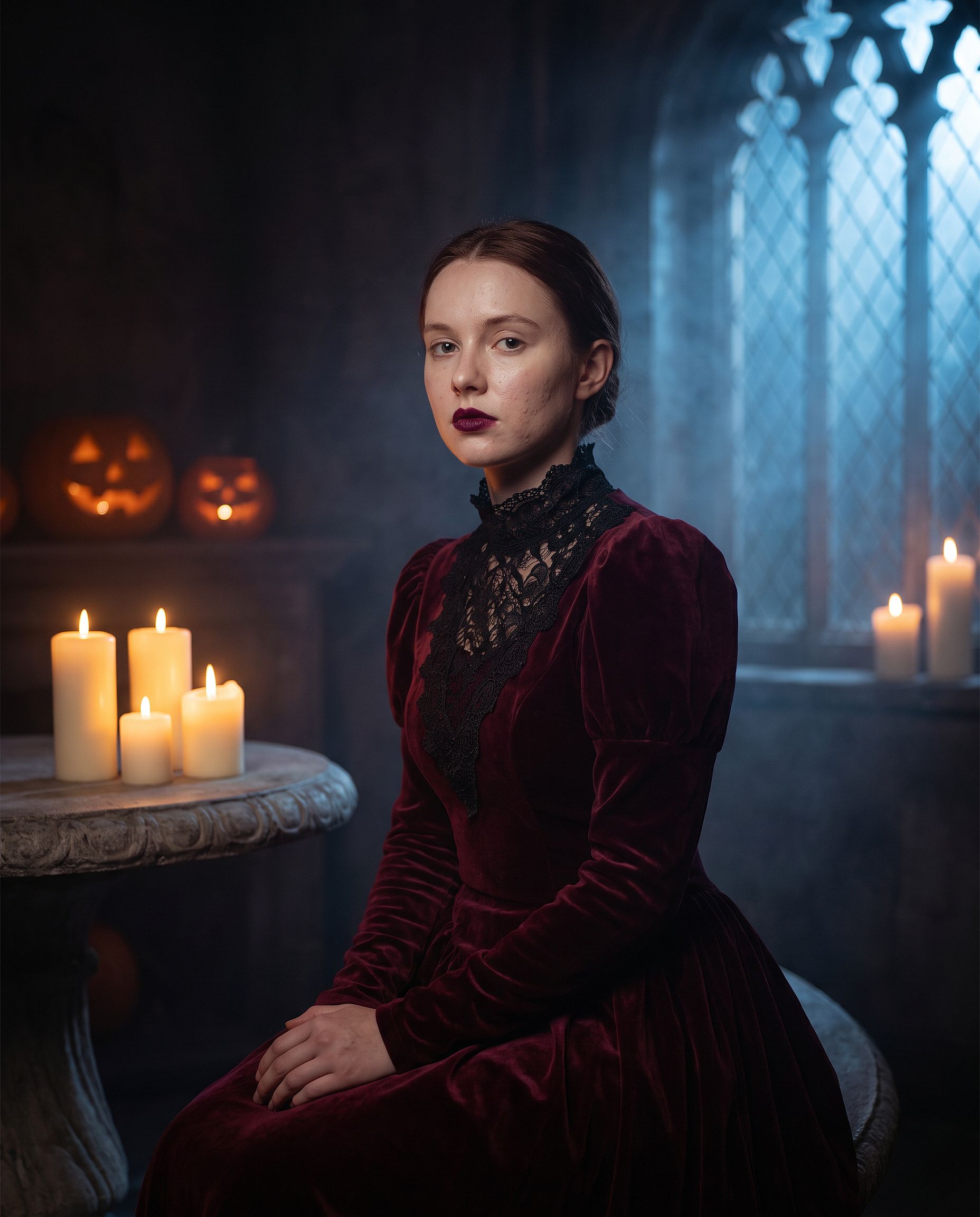
Sustituye "vampiro elegante" por cualquier disfraz: bruja, zombi, novia fantasma, esqueleto o un clásico monstruo de película. Deja las dos primeras líneas intactas. El maquillaje de disfraz es donde un prompt poco preciso permite que el modelo redibuje toda la cara, así que la línea de identidad importa más aquí que en cualquier otra edición.
La tendencia de Halloween en VHS
El formato de tendencia de Halloween con IA más copiado: tu foto convertida en un fotograma granulado de videocámara de los 90 de una película slasher, con una figura sombría acechando al fondo. Los artefactos de la cinta y la marca de tiempo hacen casi todo el trabajo.
Edit the uploaded photo. Keep the same face and identity exactly.
Restyle into a 1990s VHS camcorder still from a found-footage horror
movie: dim bedroom at night, harsh on-camera light, scan lines, chroma
bleed, slight tracking distortion, washed-out colors, a faint shadowy
hooded figure standing in the dark doorway behind the subject, timestamp
"OCT 31 1996 11:47 PM" in the bottom corner, 4:3 frame.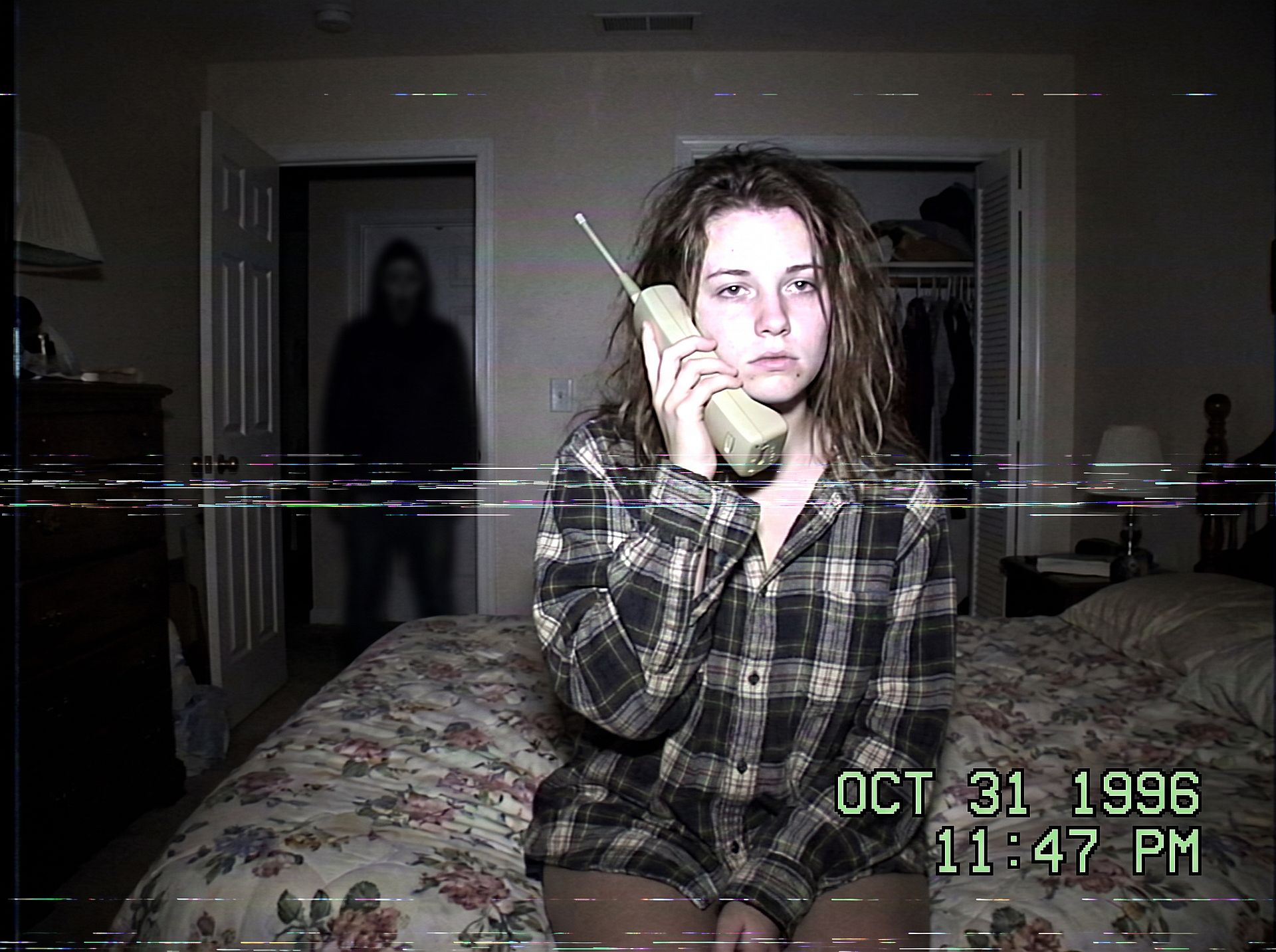
Cambia el escenario para cambiar el susto: una cocina a medianoche, un pasillo oscuro o el asiento trasero con la figura en la ventana de atrás. Mantén la figura pequeña y en la sombra para que la foto siga siendo inquietante en lugar de sangrienta.
La sesión de pareja de Halloween
Los disfraces de pareja son la mayor parte de las búsquedas de sesiones de Halloween. Protege ambas caras y vístelos como pareja:
Edit the uploaded couple photo. Keep both faces, skin tones, and
expressions exactly, do not merge or alter their features. Dress them in
coordinated Halloween costumes, a classic vampire and a witch, standing
close on an autumn porch at dusk: glowing jack-o'-lanterns, warm string
lights, fallen leaves, soft fog, warm film color grade, shallow depth of
field.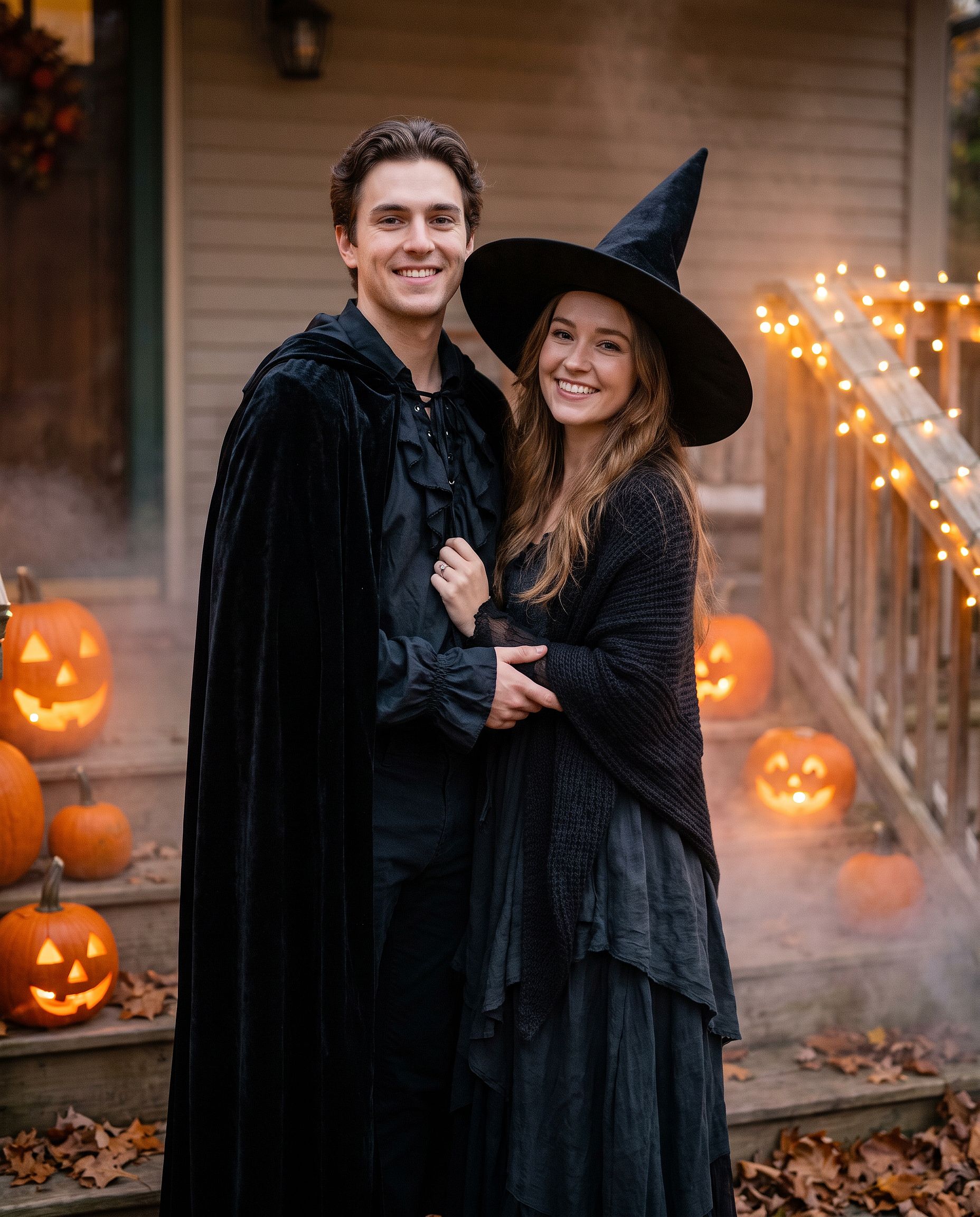
El mismo prompt funciona para mejores amigos o para una foto de familia. Cambia "pareja" por "grupo de cuatro" y enumera cada disfraz en orden, de izquierda a derecha.
El look de maquillaje de calavera mexicana
Para un look de maquillaje en lugar de un disfraz completo:
Edit the uploaded photo. Keep the face shape, eyes, and identity
recognizable. Add half-face sugar-skull makeup: white base, black eye
sockets, and delicate floral linework on one side, the other half left
natural. Dark suit with a marigold flower, candlelit background with
orange marigold petals, dramatic side lighting, rich cinematic color.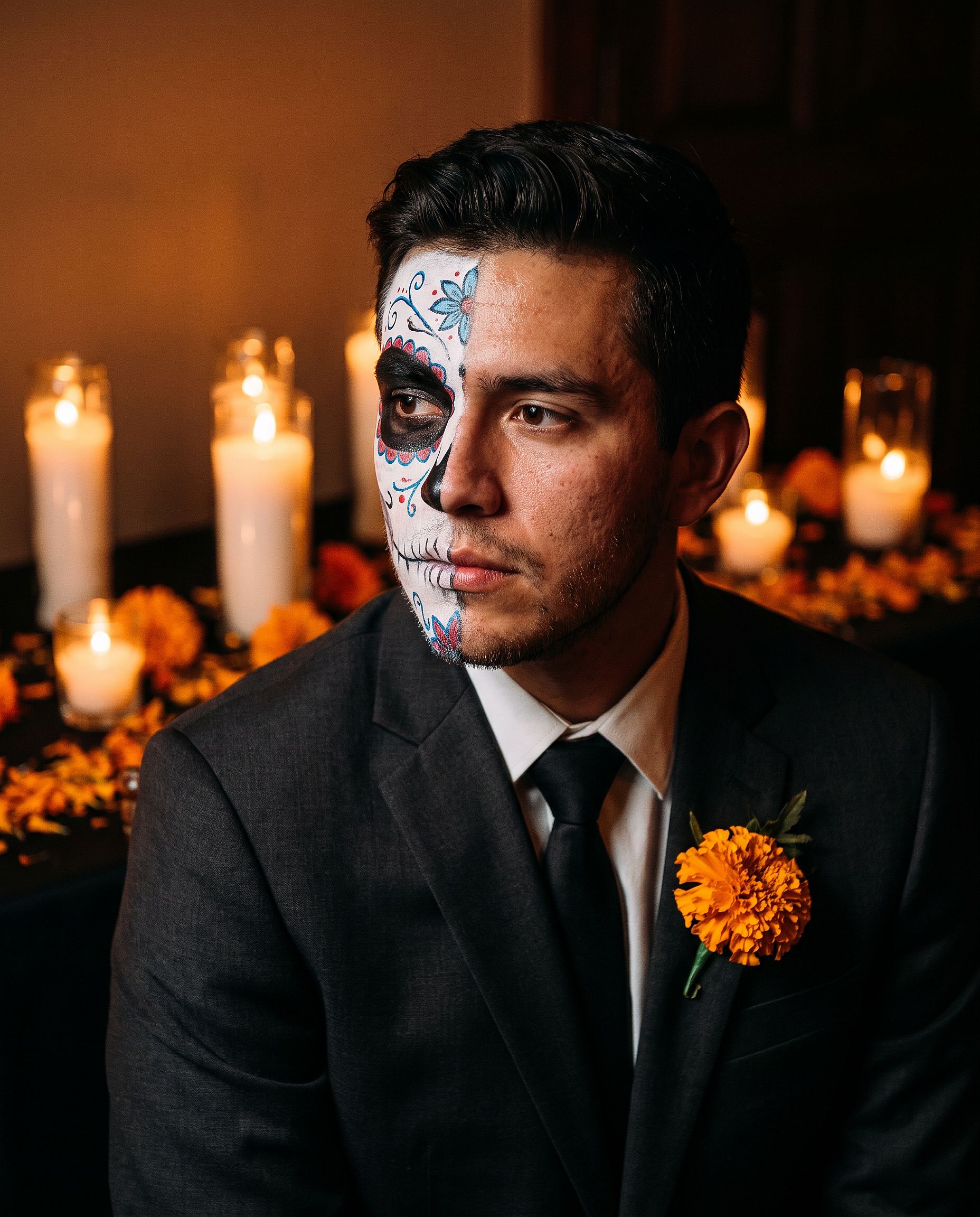
El maquillaje a media cara mantiene a la persona fácil de reconocer, lo que lo convierte en mejor foto de perfil que un diseño de cara completa.
El disfraz para mascotas
Edit the uploaded pet photo. Keep the pet's face, fur pattern, and eye
color exactly. Add a small witch hat and a tiny black cape, seated next
to a glowing jack-o'-lantern, cozy autumn lighting, shallow depth of
field, playful but realistic.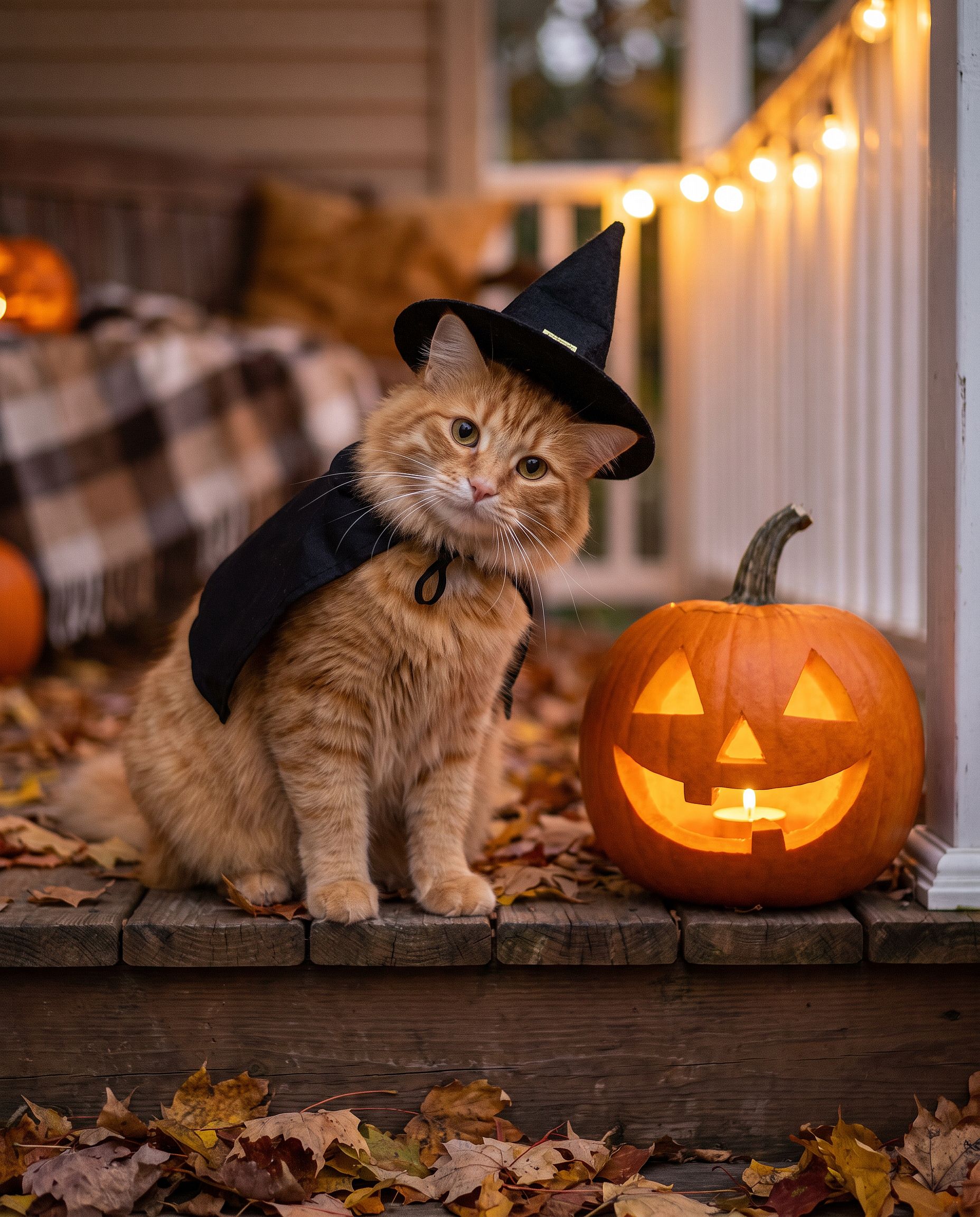
Si prefieres saltarte la escritura de prompts, la Generador de Halloween con IA está hecho justo para esto: sube una foto y conviértela en un retrato con disfraz de Halloween.
Prompts de fotos de Acción de Gracias
Las fotos de Acción de Gracias tienen menos que ver con los disfraces y más con la mesa: la foto de la cena familiar, el retrato otoñal para la tarjeta navideña, la imagen que acaba siendo la foto de portada de todos durante la semana. El truco es el mismo que en cualquier edición de grupo. Fija cada cara y luego cambia la luz, la ropa y el escenario.
La foto de la cena familiar de Acción de Gracias
La mayoría de las fotos de cenas familiares se toman con mala luz por quien tiene el móvil más cerca. Este prompt convierte esa instantánea en la foto que de verdad imprimirías.
Edit the uploaded family photo. Keep every face, skin tone, and
expression exactly, preserve all identities, do not merge features.
Restyle into a warm Thanksgiving dinner photo: long wooden table with a
roast turkey, pumpkin pie, candles, small pumpkins and autumn leaves,
golden late-afternoon window light, cozy knitwear in rust, cream, and
olive tones, natural candid closeness, vertical 4:5 frame.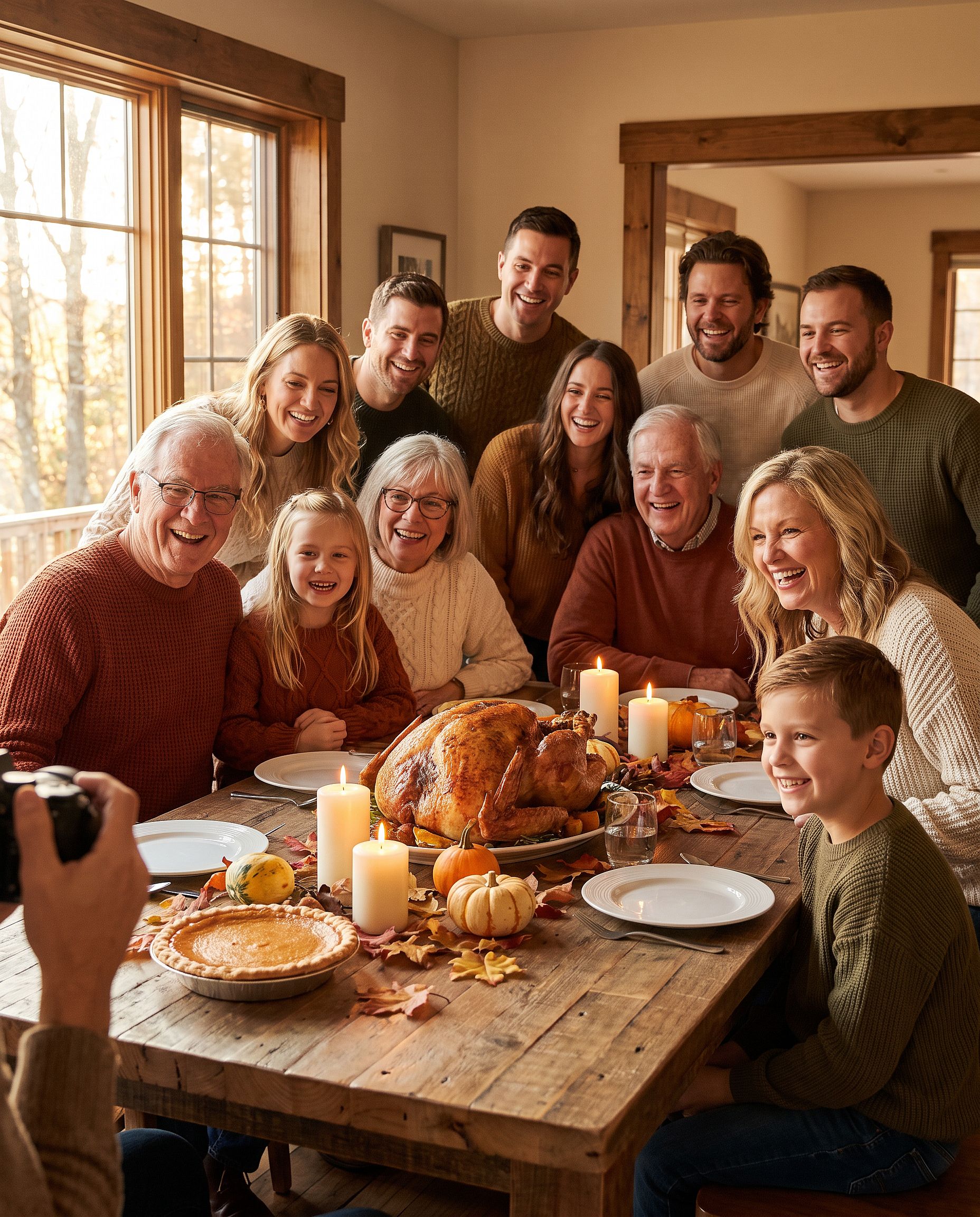
Para más de cuatro personas, indica cuántas aparecen en la foto («una familia de seis») para que el modelo no elimine ni añada a nadie.
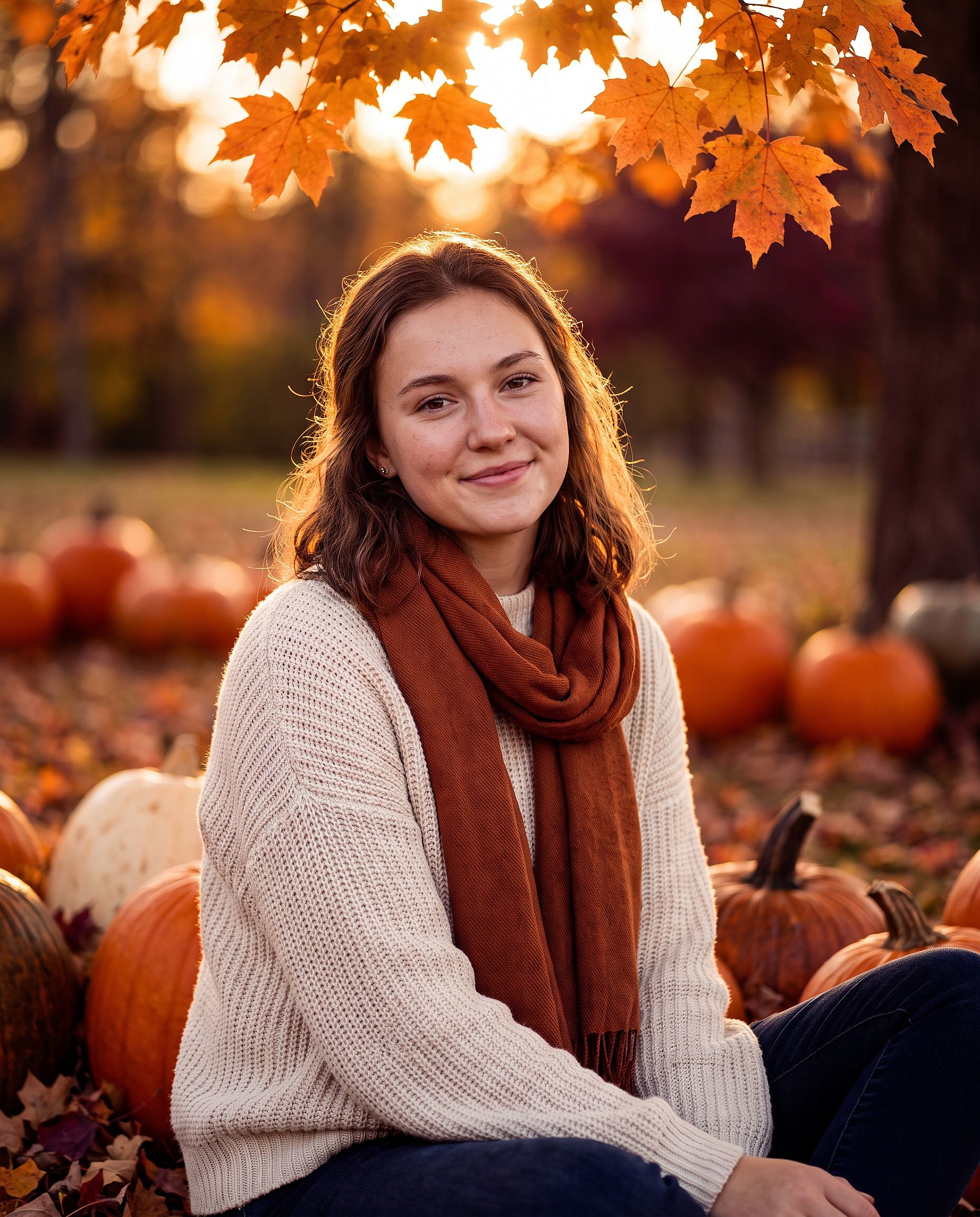
El retrato otoñal de Acción de Gracias
Para un retrato individual, una foto de pareja o una tarjeta de Acción de Gracias:
Edit the uploaded photo. Keep the same face and identity exactly.
Restyle into an autumn Thanksgiving portrait: outdoors in a pumpkin
patch at golden hour, chunky knit sweater and scarf, warm amber and
burgundy tones, soft backlight through orange leaves, shallow depth of
field, holiday photo card quality. Keep skin texture natural.
Añade «deja espacio libre en la parte superior para un saludo» si la foto va a ir en una tarjeta.
Prompts para fotos navideñas
La foto navideña con IA es la edición de temporada más grande del año. Diciembre es cuando la gente quiere una sesión familiar sin reservar estudio, una tarjeta navideña sin fotógrafo y una foto de perfil festiva antes de cada fiesta. Cada formato de abajo parte de una foto corriente.
La sesión de la caja navideña
La tendencia de estudio en la que el sujeto se sienta dentro de una gigantesca caja de regalo abierta. Es difícil de montar en casa y fácil de hacer como edición.
Edit the uploaded photo. Keep the same face, features, and expression
exactly, preserve the original identity. Place the person sitting
inside a large open white gift box with a red satin ribbon, surrounded
by wrapped presents, warm fairy lights, and a softly blurred decorated
Christmas tree. Red knit sweater, bright clean studio lighting, cream
and red palette, professional holiday portrait, vertical 4:5 frame.
Cambia el color de la caja para que combine con una marca o un diseño de tarjeta. El dorado y negro resulta lujoso; el rosa pastel, suave y desenfadado.
La sesión de fotos familiar de Navidad
Pijamas a juego frente al árbol, la foto que toda familia intenta conseguir una vez al año. Aquí las mascotas también cuentan como familia.
Edit the uploaded family photo. Keep every face, skin tone, and
expression exactly, preserve all identities, do not merge features.
Dress everyone, including the dog, in matching red plaid pajamas, the
dog in a small Santa hat. Seat them together on a rug in front of a
decorated Christmas tree and a lit fireplace with stockings, warm cozy
lighting, soft bokeh from the tree lights, holiday card quality.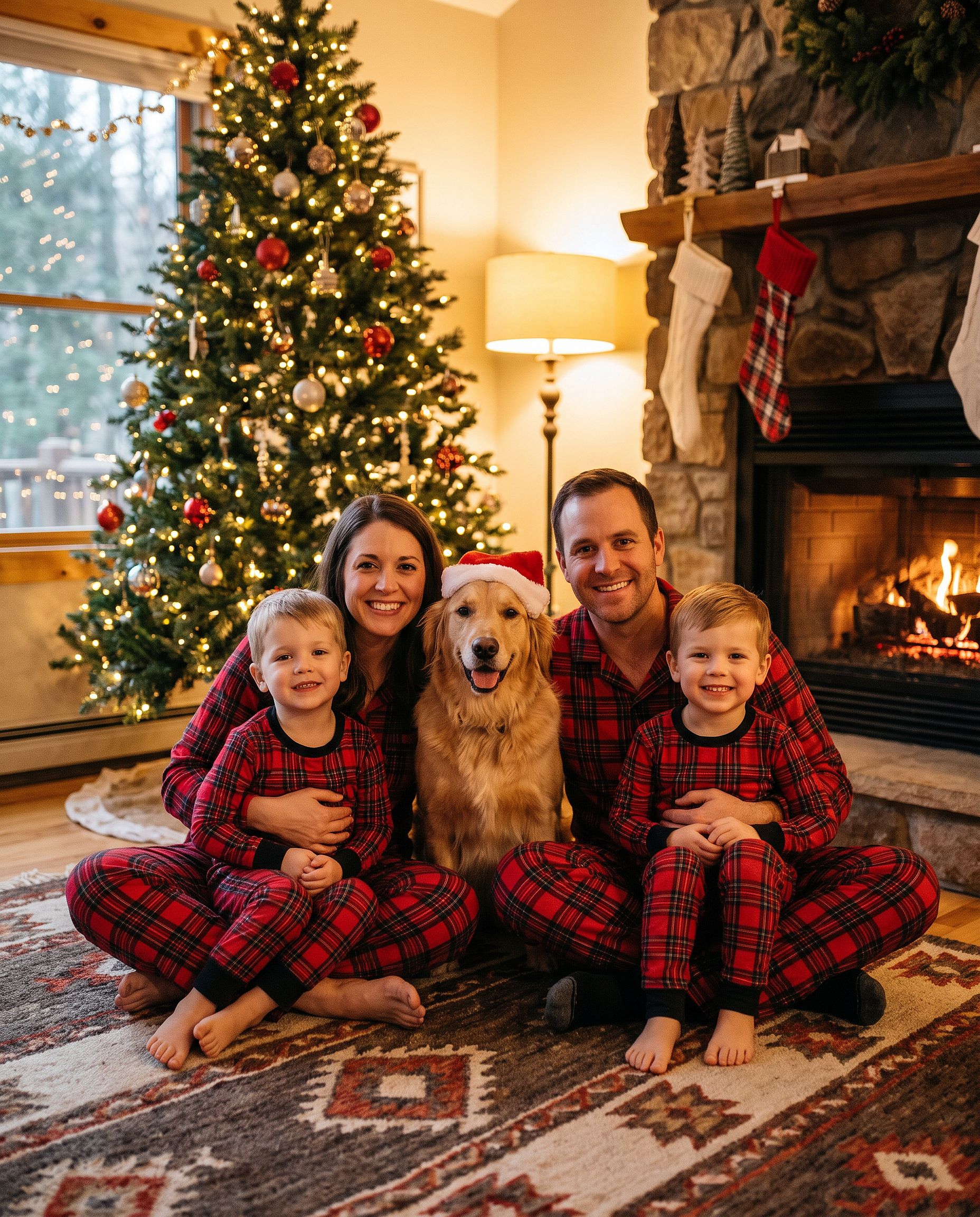
Si solo quieres el gorro, el añadir gorro de Papá Noel a la foto herramienta hace justo eso, y la Herramienta de fondos navideños cambia el escenario sin tocar a las personas.
La foto al aire libre en el vivero de árboles de Navidad
Edit the uploaded photo. Keep the same face and identity exactly.
Restyle into an outdoor Christmas tree farm photo: rows of snowy pine
trees, light snowfall, a freshly cut tree on a sled, plaid coat and
knit hat, soft overcast winter light, warm breath in the cold air,
natural skin texture, vertical 4:5 frame.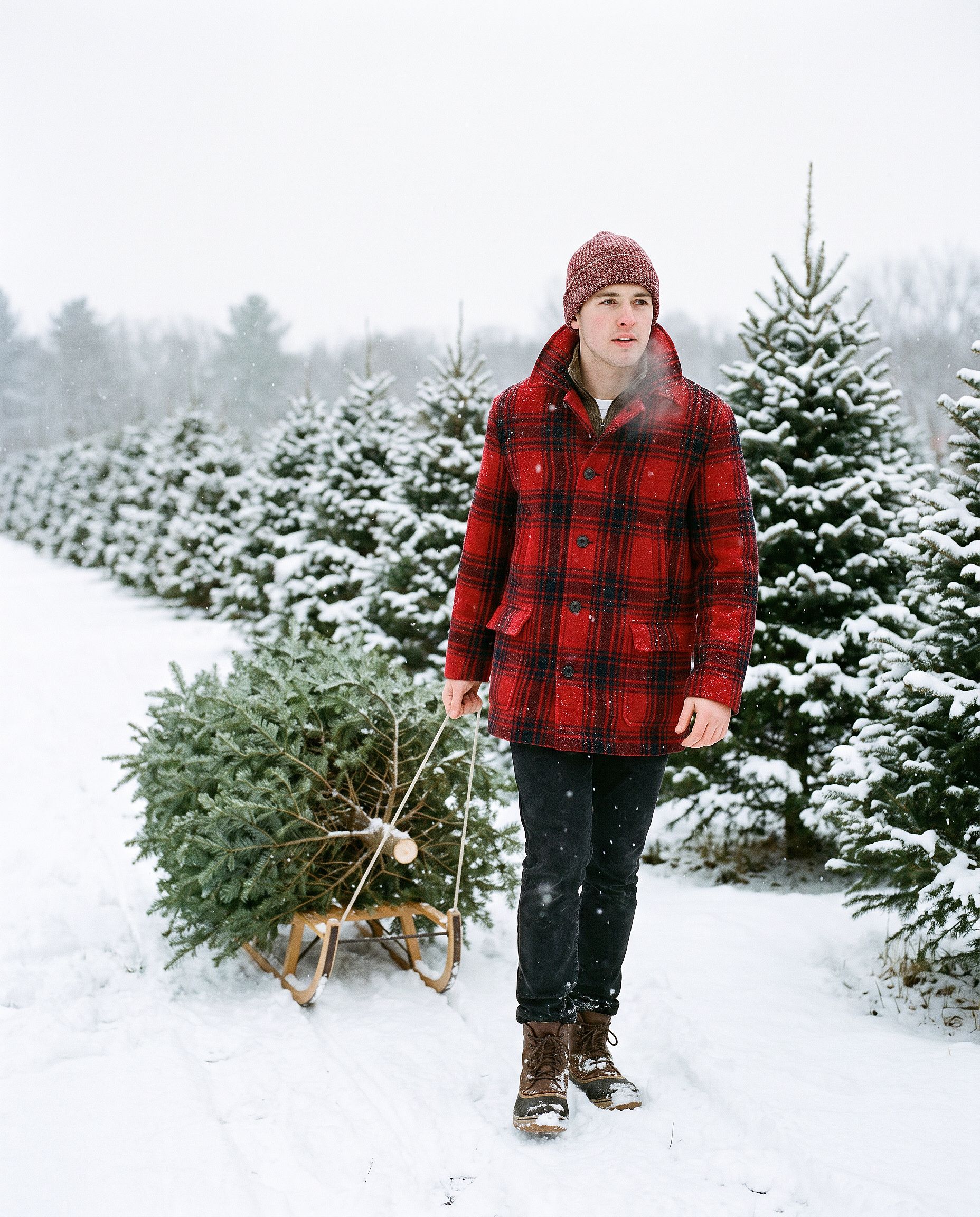
La felicitación navideña con IA
Turn the uploaded photo into a luxury printed Christmas card. Keep every
face exactly. Place the people in a snowy cabin doorway with evergreen
garland and warm window light, set inside a thin gold foil border on
heavy cream cardstock. Add "Merry Christmas" in gold foil calligraphy
above the photo and "from the Parkers" in small serif capitals below,
embossed holly in the corners. Show the card flat on white linen with
pine sprigs, a red velvet ribbon, and a gold wax seal.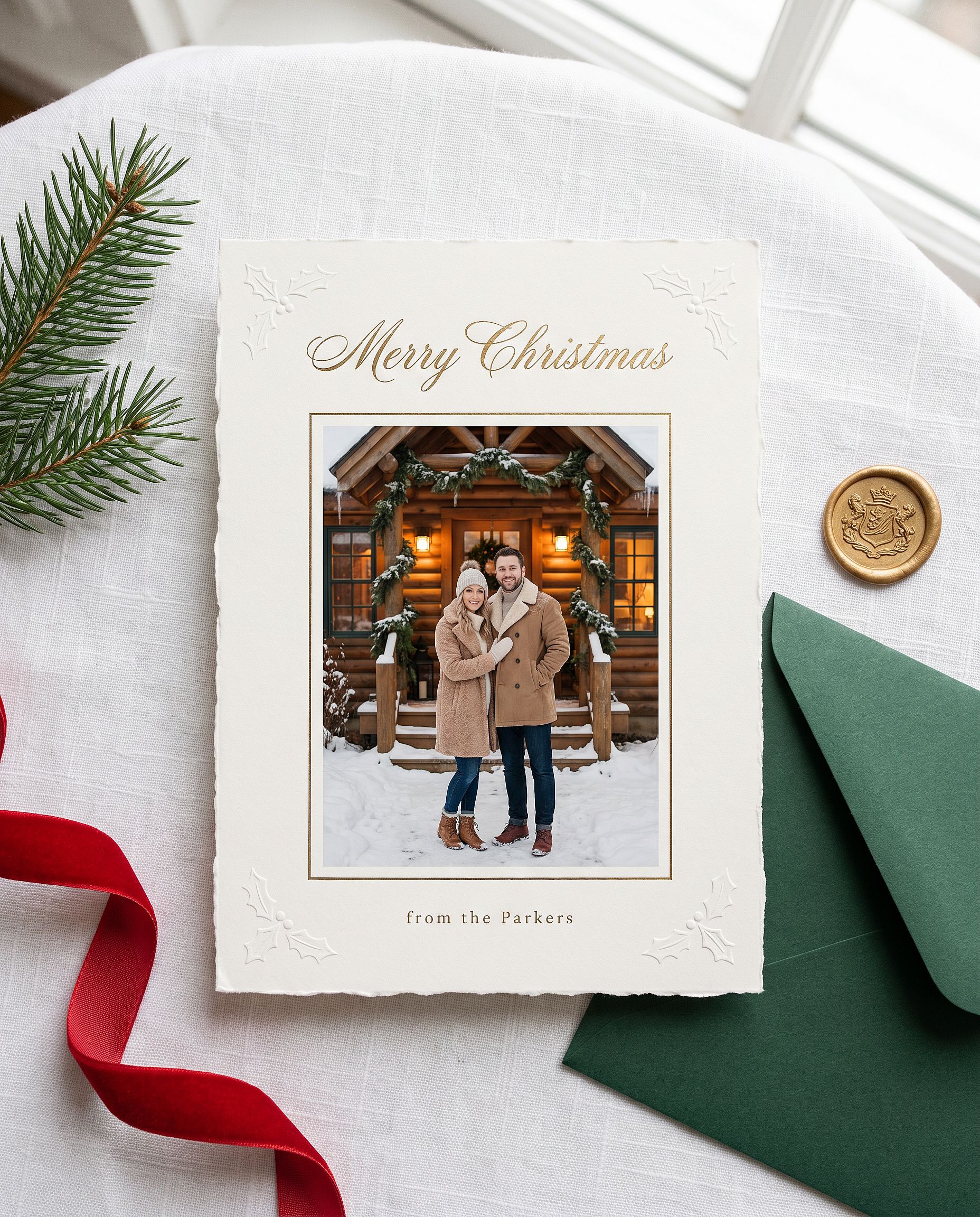
Sustituye el nombre entre comillas por el tuyo. Nano Banana Pro gestiona bien el texto corto en la imagen, así que el saludo suele salir bien escrito al primer intento.
El retrato navideño de anime
Restyle the uploaded photo into a Japanese anime film still on
Christmas Eve. Keep the person's hairstyle, outfit colors, and overall
look recognizable. Standing at a snowy railroad crossing in a quiet
residential town at blue hour, duffle coat and long red scarf, breath
visible in the cold, warm house windows, a lit Christmas tree outside a
corner shop, glowing vending machines, power lines overhead, soft
falling snow, hand-painted anime background art, delicate cel shading.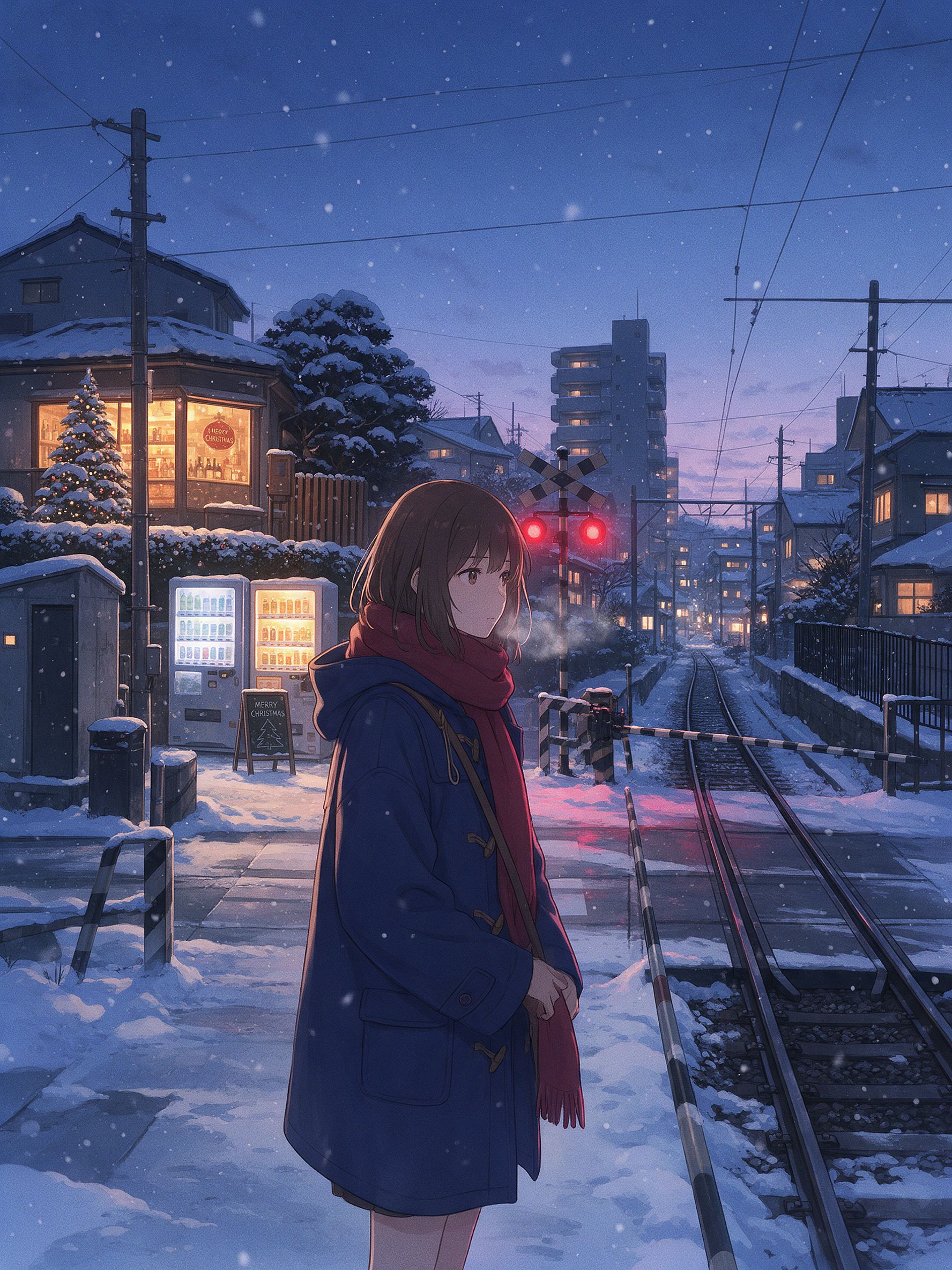
Los pequeños detalles son los que hacen que se lea como una escena invernal de anime japonés: el paso a nivel, las máquinas expendedoras, los cables eléctricos y la luz de la hora azul contra las ventanas cálidas. Para este estilo, Seedream 5.0 Pro o Nano Banana 2 Lite suelen dar un estilo 2D más limpio que Nano Banana Pro. Cambia de modelo y ejecuta el mismo prompt.
La biblioteca completa de prompts de fotos de Gemini
Las secciones de arriba son los análisis a fondo. Abajo tienes la biblioteca rápida: prompts cortos para copiar y pegar, agrupados por lo que quieras crear. La mayoría da por hecho que subes una foto primero. El grupo estético y cinematográfico también funciona como generación pura. Elige una categoría, coge una línea y pégala.
Retratos de chicas en tendencia
Edit the uploaded photo into a soft-glam aesthetic selfie: dewy glow,
warm highlight, subtle butterfly light, pastel background. Keep the same
face and identity exactly, natural skin texture.
Restyle the uploaded photo into an elegant saree ethnic portrait: rich
traditional outfit, soft gold jewelry, warm bokeh lighting, graceful
pose. Keep the face and identity unchanged.Edit the uploaded selfie into a clean Instagram DP: minimalist studio
backdrop, soft even light, tasteful modern styling, crisp detail. Keep
the same face exactly, no heavy smoothing.Restyle the uploaded photo into a dreamy pastel aesthetic portrait: airy
glow, muted soft colors, gentle wind in the hair, natural skin. Keep the
face recognizable and identity intact.Restyle the uploaded photo into a golden-hour outdoor girl portrait:
warm backlight, soft lens flare, blurred natural background, flowing
outfit. Keep the face and identity unchanged.Retratos de chicos y parejas en tendencia
Restyle the uploaded photo into a café golden-hour boy portrait: soft
window backlight, cozy neutral outfit, gentle flare, Pinterest fashion
mood. Keep the face unchanged.
Restyle the uploaded couple photo into a warm café date-night scene:
cozy lighting, soft bokeh, relaxed poses. Keep both faces unchanged.Edit the uploaded couple photo into a vintage 1970s film look: warm
faded tones, retro wardrobe, soft grain. Preserve both faces and
expressions exactly.Edición y cambio de estilo
Edit the uploaded photo. Keep the face and pose exactly. Replace the
outfit with a clean, well-fitted business-casual look and the background
with a softly blurred modern office, matched lighting, professional
headshot quality.
Si quieres un retrato profesional pulido sin escribir ni un solo prompt, el Generador de retratos con IA está hecho justo para eso. Mantiene tu cara consistente en un conjunto de looks profesionales.
Edit the uploaded photo into a black-and-white fine-art portrait:
dramatic side lighting, deep contrast, film grain, timeless studio look.
Keep the face exactly the same.
Edit the uploaded photo into a double-exposure portrait: the subject
blended with a soft city skyline, moody tones, artistic overlay. Keep
the primary face clear and recognizable.Edit the uploaded photo into an AI hairstyle try-on: keep the face and
identity exactly, change only the hairstyle to a modern layered cut,
natural color and texture, realistic result.Reparación y mejora de calidad
Edit the uploaded blurry photo: sharpen details, reduce noise, recover
texture in hair and skin. Keep the face identical, natural skin, no
plastic smoothing.
Edit the uploaded photo to a high-resolution 4K glow-up: sharpen fine
detail, reduce noise, improve color balance, recover hair and skin
texture. Keep the face and expression identical, no plastic smoothing.De temporada y festivos
Frases rápidas para el resto del calendario. Halloween, Acción de Gracias y Navidad tienen secciones completas con ejemplos más arriba.
Edit the uploaded photo into a Diwali celebration: warm diya lamp light,
elegant traditional outfit, soft bokeh of string lights, rich jewel
tones. Keep the face unchanged.
Edit the uploaded photo into a spring cherry-blossom scene: soft pink
petals, gentle daylight, fresh pastel palette. Keep the person exactly
the same.Edit the uploaded couple photo into a Valentine's scene: soft warm
light, tasteful red accents, romantic bokeh. Keep both faces unchanged.Edit the uploaded photo into a New Year scene: elegant evening styling,
soft golden fireworks bokeh, celebratory mood. Keep the person
recognizable.Estético y cinematográfico
Edit the uploaded photo into a burning-newspaper portrait: the subject
framed by a vintage newspaper with glowing burning edges, warm ember
light, dramatic dark background, cinematic mood. Keep the face exactly
the same.
Edit the uploaded photo into a moody neon-noir portrait: rain-slick city
street, pink and blue neon reflections, cinematic contrast, shallow
depth of field. Keep the face and identity unchanged.Cómo escribir tu propio prompt de fotos de Gemini
Todos los prompts anteriores siguen el mismo esqueleto:
Edit the uploaded photo.
Keep [the face / both faces / the pose / the composition] exactly the same and preserve the original identity.
Change only [outfit / background / era / color / scene].
Add [style, lighting, mood, aspect ratio].
Keep [skin texture / features] natural and true to life.
Línea a línea: «Edita la foto subida» le dice al modelo que trabaje con tu imagen en lugar de inventar una nueva. «Mantén todo exactamente igual y conserva la identidad original» protege las partes que la hacen reconocible. «Cambia solo» acota la edición. Una línea final sobre piel natural o detalles realistas evita ese aspecto sobreprocesado que grita IA.
Para generación pura, elimina las frases de «editar» y «mantener igual». Describe directamente el sujeto, el estilo, la iluminación y el ambiente.
Comprobación de cinco segundos antes de generar: foto subida, indicado qué mantener, indicado qué cambiar, nombrado un estilo, pedido detalle natural. El de Google Documentación de soporte de Gemini cubren el flujo básico de edición.
Gemini (Nano Banana) vs GPT Image 2 vs Seedream para fotos
Ningún modelo gana en todas las fotos. Aquí es donde destaca cada uno y dónde se queda corto:
| Nano Banana Pro | Nano Banana 2 Lite | GPT Image 2 | Seedream 5.0 Pro | |
|---|---|---|---|---|
| Conservación de la identidad con un reestilizado radical | Más potente | Fuerte | Fuerte | Moderado |
| Texto legible en la imagen (titulares, etiquetas, menús) | Fuerte | Fuerte | Óptimo (precisión en microtexto e iconos de interfaz) | Moderado |
| Fotorrealismo (piel, iluminación, textura) | Lo mejor (4K nativo, hiperrealista) | Fuerte | Best (calidad de moda, hiperrealista) | Moderado |
| Anime / estilo asiático / estilización 2D | Limitado | Mejor (la opción ideal para anime y animación) | Moderado | Mejor (entornos anime atmosféricos) |
| Edición y separación de capas | Memoria iterativa (edita sin reescribir) | Memoria iterativa | Sin memoria | Separación de capas integrada y edición gratuita |
| Texto multilingüe (cómics, anuncios, pósteres) | Fuerte | Moderado | Mejor | Moderado |
| Ideal para | Ediciones de retrato de tendencia, sets con identidad estable, salida en 4K | Borradores rápidos, remodelados anime, imágenes principales para e-commerce | Imágenes de moda de alta gama, cualquier imagen con texto, pósteres y packaging | Estética de personajes, escenas de anime, flujos de edición con capas |
Los cuatro conviven en un mismo espacio de trabajo de OpenArt. Cambiar de modelo para comparar cuesta un clic, no una nueva suscripción. Cuando el objetivo es mantener una misma cara estable en todo un set de tendencias, el Personaje con IA bloquea la identidad para que cada prompt devuelva a la misma persona.
Preguntas frecuentes
¿Cómo uso Gemini AI para fotos?
Abre una herramienta de imágenes de Gemini, describe lo que quieres y genera. Para editar una foto existente, súbela primero e indícale al modelo qué conservar y qué cambiar. En OpenArt tienes los mismos modelos de Gemini (Nano Banana 2.1 y Nano Banana Pro) junto a un editor completo. Abre el Generador de imágenes con IA, elige un modelo y pega un prompt.
¿Cómo edito una foto en Gemini AI?
Sube tu foto y luego escribe una instrucción que separe lo que se mantiene de lo que cambia: «mantén la cara y la identidad exactamente iguales, reestiliza en un retrato soft-glam». La subida importa porque el modelo edita la imagen que le das en lugar de inventar un parecido. Añade una línea final pidiendo textura de piel natural para evitar el aspecto demasiado suavizado.
¿Cómo hago un prompt de foto con Gemini AI?
Sigue el esquema de arriba: nombra el sujeto, di qué mantener, di qué cambiar, añade el estilo, la iluminación y la relación de aspecto, y termina con una línea de detalle natural. Copia cualquier prompt de este post y cambia las palabras de estilo por las tuyas.
¿Cuáles son los mejores prompts de fotos con Gemini AI para chicas?
Las que son tendencia: selfies con estética soft-glam, retratos con saree y étnicos, fotos de perfil de Instagram limpias, retratos de exterior a la hora dorada. Los cuatro están en la sección de retratos de chica en tendencia de arriba, listos para pegar.
¿Cuáles son los mejores prompts de Gemini AI para fotos de Halloween?
Retratos con disfraz que mantienen tu cara real: un selfie elegante de vampiro o bruja, el look de cámara de terror VHS, un disfraz coordinado de pareja o maquillaje de calavera de azúcar a media cara. Empieza cada prompt de Halloween con una línea que fije la cara y la identidad, y luego describe el disfraz, el maquillaje y el escenario. Los cinco están en la sección de Halloween de arriba.
¿Cómo hago la tendencia de Halloween con IA?
Sube un selfie nítido a un modelo de imagen de Gemini como Nano Banana Pro, pega uno de los prompts de Halloween de arriba y genera. Para saltarte el prompt por completo, el generador de Halloween con IA de OpenArt convierte una foto en un retrato con disfraz en un solo paso.
¿Cómo hago una foto navideña con IA?
Sube una foto nítida, elige Nano Banana Pro y pega uno de los prompts de Navidad de arriba, como la sesión de la caja navideña o la foto familiar en pijama. Mantén siempre la línea que fija cada cara. Para una versión con un solo clic y sin prompt, el filtro de Navidad de OpenArt convierte una foto normal en una festiva.
¿Puedo hacer una foto familiar de Acción de Gracias con IA?
Sí. Sube la foto de grupo, indícale al modelo que mantenga cada cara y no fusione rasgos, y luego describe la mesa de la cena, la luz y la ropa. Indica cuántas personas hay en la foto para que no se elimine ni añada a nadie.
¿Nano Banana es lo mismo que Gemini?
Nano Banana es el apodo de los modelos de imagen de Gemini de Google. Cuando la gente dice "foto de Gemini AI", normalmente se refiere a Nano Banana 2.1 o Nano Banana Pro. OpenArt te da acceso directo a esos modelos.
¿Puede Gemini restaurar y colorear fotos antiguas?
Sí. Pídele que elimine los daños y conserve cada rasgo fiel al original, y luego añade una línea de colorización para fotos en blanco y negro. Mantén el color sutil para un resultado creíble, y aplica un escalado después si vas a imprimir.
¿Son gratis estos prompts de fotos de Gemini?
Los prompts son tuyos para copiarlos. Ejecutarlos en OpenArt empieza gratis con créditos.