

Cambiador de fondo de vídeo
El cambiador de fondo de vídeo detecta tu sujeto automáticamente y cambia el fondo. Solo tienes que subir el vídeo, elegir o describir un nuevo fondo, y estará listo en minutos.
Ventajas clave del cambiador de fondo de vídeo



Sin croma
OpenArt aísla tu sujeto y reemplaza todo el fondo automáticamente, sin necesidad de edición manual ni keying.



Tres fuentes de fondo
Elige un preajuste de la biblioteca, sube tu propia imagen de referencia o genera una escena totalmente nueva con IA. El entorno que tienes detrás lo defines tú.
Una sesión, muchas escenas
Aplica un fondo distinto a la misma grabación tantas veces como quieras, convirtiendo una sola toma en toda una biblioteca de variaciones de contenido.
Creaciones de la comunidad
Descubre cómo creadores, podcasters y marcas regraban sus vídeos donde quieren, todo con el Cambiador de Fondo de Vídeo de OpenArt.
Funciones clave del cambiador de fondos de vídeo
La herramienta Cambiador de fondo de vídeo, parte de OpenArt VFX, aísla automáticamente tu sujeto fotograma a fotograma y reemplaza todo el fondo por cualquier escena que elijas.
Sin pantallas verdes ni edición manual
Un pipeline tradicional de pantalla verde requiere conseguir y montar la pantalla, controlar la iluminación para evitar reflejos de color, grabar en condiciones precisas y luego eliminar manualmente el fondo con software de edición. Todo el proceso puede llevar horas antes de que un solo segundo de metraje sea utilizable. OpenArt se salta todo eso. Una subida, sin montaje físico, sin flujo de edición, y el fondo se cambia en minutos.
Elimina los costes de estudio y producción
Alquilar un estudio profesional por un día cuesta de cientos a miles de dólares según la ubicación y el montaje. El equipo de croma, los sistemas de iluminación profesional y el software de edición necesario para incrustar correctamente el metraje añaden aún más coste. El Cambiador de fondo de vídeo de OpenArt elimina esos costes de la ecuación. Cualquier espacio se convierte en una localización de rodaje válida.
Resultados profesionales y completos
La mayoría de creadores que graban contenido de tipo talking-head, tutoriales o vídeos para redes trabajan desde entornos imperfectos: despachos en casa, dormitorios, cocinas, sin iluminación ni equipo de nivel estudio. A diferencia de la edición de vídeo tradicional, que exige aprender técnicas de keying, máscaras y corrección de color, la herramienta de sustitución de fondo de vídeo de OpenArt no requiere nada de eso y aun así ofrece resultados con calidad de estudio.
Variaciones infinitas a partir de una sola sesión
En lugar de volver a grabar la misma actuación en distintos entornos, los creadores y las marcas pueden filmar una vez y aplicar varios fondos de IA al mismo metraje. El resultado es una biblioteca de variaciones de contenido a partir de una sola sesión de grabación, sin tiempo de cámara adicional, sin montaje adicional y sin coste de edición extra.
Colócate donde quieras
La ubicación física de una grabación no debería determinar la historia visual que se cuenta. Con OpenArt, cada creador y cada marca tienen control total sobre el entorno detrás de su sujeto. Un reseñador de productos no está limitado a su apartamento. Un creador no tiene que elegir entre buena iluminación y un buen fondo.
Cómo usan los creadores el cambiador de fondos de vídeo
Desde youtubers caseros hasta marcas de comercio electrónico, así usan los creadores el cambiador de fondo de vídeo con IA de OpenArt.
YouTubers y creadores de vídeo
Los youtubers, canales de tutoriales, creadores de reseñas y creadores de vídeo de formato largo pueden transformar imágenes grabadas en el despacho o el dormitorio en un plano de estudio profesional, una ciudad con luces de neón o un exterior a la hora dorada. Graba donde sea y aparenta haber grabado en todas partes. La IA te mantiene nítido en cámara mientras reconstruye el mundo a tu alrededor, para que cada subida se sienta intencionada y fiel a tu marca.
Pruébalo ahoraCreadores de TikTok y Reels
Los creadores de contenido corto graban y publican el mismo día. Necesitan visuales que detengan el scroll sin alquilar un estudio ni aprender posproducción. Con el Cambiador de Fondos de Vídeo con IA de OpenArt, te colocas en cualquier entorno en minutos: el mismo tú, un fondo nuevo, un solo clic. Es la forma más rápida de darle a un Reel o a un TikTok una firma visual única sin cambiar tu manera de grabar.
Pruébalo ahoraPodcasters y creadores de vídeos con presentador
Podcasters en solitario, programas de entrevistas y educadores online graban desde habitaciones libres y despachos en casa donde el fondo es la parte más floja del encuadre. Sustitúyelo por un estudio de emisión profesional, un entorno con tu marca que encaje con tu programa o cualquier ambiente que combine con el tema. Tu habitación ya no tiene por qué limitar el valor de tu producción.
Pruébalo ahoraPropietarios de productos y marcas de comercio electrónico
Las marcas DTC, los vendedores de Shopify y Amazon y los responsables de marketing de producto pueden grabar una reseña o un unboxing una sola vez y colocarlo en cualquier entorno de marca, acorde a la estética de una campaña, una temporada o una plataforma concreta, todo con una única sesión de grabación. Sin regrabaciones, sin alquiler de localización, sin presupuesto de estudio. Un unboxing se convierte en diez.
Pruébalo ahoraEquipos de empresa y profesionales en remoto
Los coaches online, los equipos de vídeo corporativo y los teletrabajadores que graban presentaciones necesitan un fondo limpio y acorde a su marca cada vez que le dan a grabar. Sustituye cualquier fondo por un entorno profesional y coherente y deja de preocuparte por lo que hay detrás de ti. Cada grabación con un fondo profesional, sin necesidad de configuración.
Pruébalo ahoraCómo usar el editor de fondos de vídeo
Tres sencillos pasos para cambiar el fondo de tu vídeo con IA.
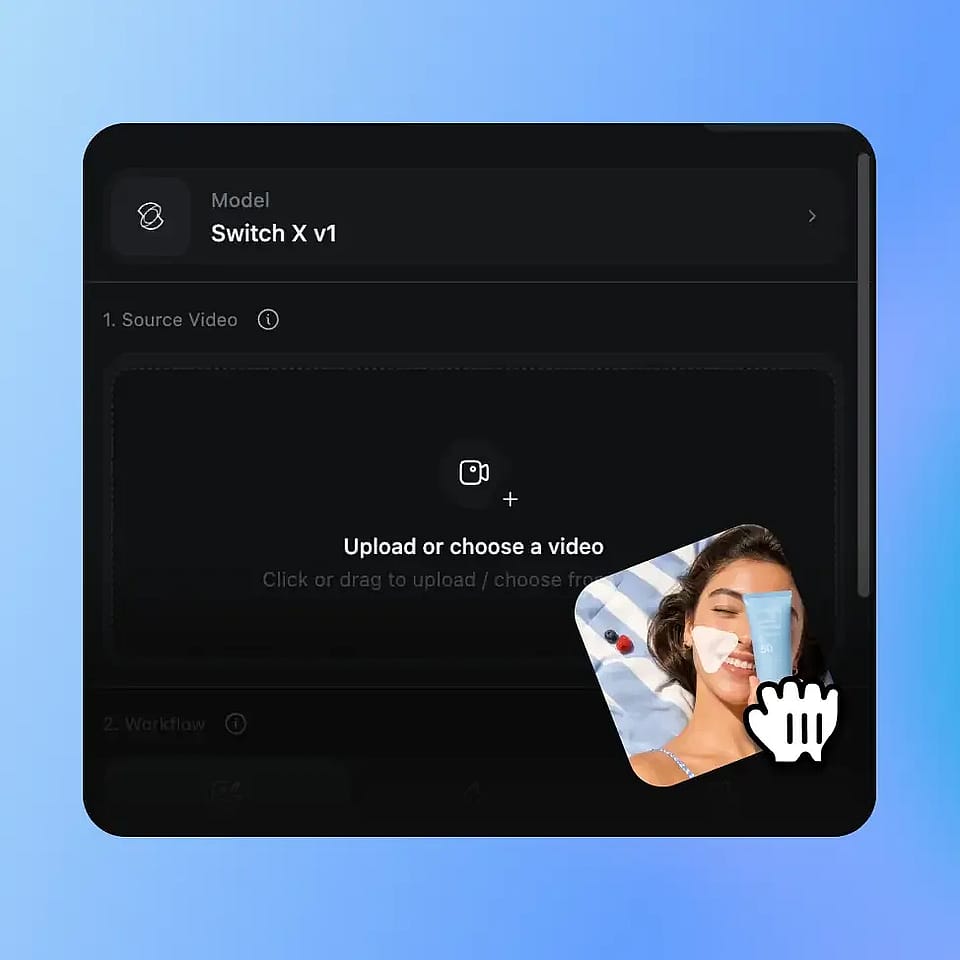
Sube tu vídeo
Sube cualquier clip de vídeo en formato MP4 o MOV. La herramienta funciona con material grabado en cualquier lugar, sin croma, sin iluminación especial y sin necesidad de un estudio.
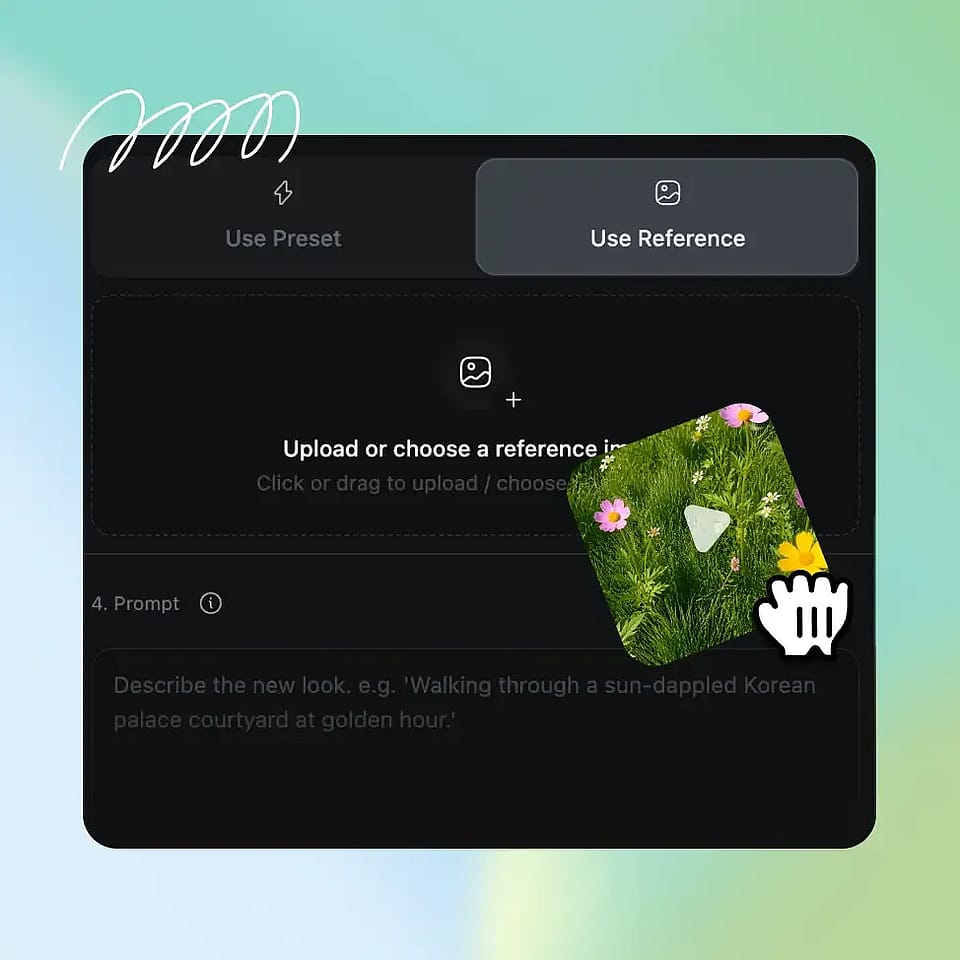
Elige o genera tu nuevo fondo
Elige un preajuste de la biblioteca de fondos seleccionada de OpenArt, sube tu propia imagen de referencia o genera una escena totalmente nueva con el generador de imágenes con IA de OpenArt. Añade un prompt de texto opcional si quieres afinar el resultado.

La IA construye el nuevo mundo detrás de ti
La IA de OpenArt aísla automáticamente tu sujeto y reemplaza todo el fondo por el entorno que elijas. El resultado está listo en minutos, sin edición, sin máscaras y sin trabajo fotograma a fotograma.
Preguntas frecuentes Preguntas
Un cambiador de fondo de vídeo es un software que elimina el fondo de un vídeo analizando el contenido y sustituyéndolo por una escena diferente sin necesidad de un croma, un estudio o edición de vídeo. El Cambiador de Fondo de Vídeo con IA de OpenArt analiza cada fotograma de tu vídeo en tiempo real, garantizando que el fondo se adapte a la perfección a los movimientos del sujeto.
No necesitas croma, iluminación especial ni siquiera un estudio. La IA distingue el sujeto principal del fondo existente, ya sea un dormitorio, una oficina en casa, una cocina o un almacén, y reemplaza el fondo automáticamente. Es un auténtico croma con IA para cualquier creador, en cualquier lugar.
La mayoría de las tareas terminan en un par de minutos. OpenArt procesa tu material automáticamente para aislar al sujeto y recrear el fondo detrás de él, sin edición manual, máscaras ni trabajo fotograma a fotograma. Cuando una tarea se completa, puedes previsualizar los resultados, cambiar el fondo o descargar el clip terminado como MP4.
Sí. Cualquier contenido generado por el Cambiador de Fondos de Vídeo con IA de OpenArt puede utilizarse con fines comerciales, como anuncios de pago en redes sociales, marketing de marca, creación de vídeos de producto, monetización de contenido de YouTube y producción para clientes. Consulta los términos de servicio de OpenArt para conocer las condiciones más recientes sobre el uso comercial de tu plan.
Sí. El cambiador de fondos de vídeo con IA de OpenArt está diseñado para material de vídeo. Sube cualquier clip y la IA identificará y aislará a tu sujeto fotograma a fotograma, y sustituirá todo el fondo por uno nuevo, desde un estudio profesional hasta una escena en exteriores, un entorno de producto con tu marca o incluso una imagen personalizada que subas. Esta herramienta procesa el vídeo completo, mientras que los cambiadores de fondo de imagen solo funcionan sobre un único fotograma.
Hay tres opciones. Primera, elige de la biblioteca de fondos prediseñados de OpenArt, que van desde estudios profesionales hasta sets de rodaje y escenarios exteriores. Segunda, sube tu propia imagen de referencia para usarla como nuevo fondo. Tercera, crea una escena nueva con el generador de imágenes con IA de OpenArt y ponla como fondo de tu vídeo. OpenArt no es una herramienta que solo tenga entornos predefinidos, sino una que te permite crear tú mismo el entorno.
El sujeto se mantiene natural. El cambiador de fondos de vídeo con IA de OpenArt utiliza el modelo SwitchX de Beeble, diseñado específicamente para lograr el aislamiento de sujetos en vídeo con la máxima fidelidad en cada fotograma. Tu interpretación, movimiento y expresión se conservan, y el nuevo entorno aparece detrás de ti, integrándose limpiamente en la toma.
El proceso típico de producción con croma implica montaje físico, iluminación precisa, un keying manual en el software de edición, limpieza del reflejo de color y horas de posproducción. Nada de eso hace falta con el Cambiador de Fondo de Vídeo con IA de OpenArt. Sube el clip que ya has grabado, en la sala donde ya lo grabaste, y la IA te da un clip terminado en minutos. Misma capacidad, a una mínima fracción del coste y el tiempo.