

 ChatGPT
 Perplexity
 Claude
 Gemini
デザイナー向けベストAI画像ジェネレーター:実務のデザイン作業で比較
デザイナーにとって最高のAI画像ジェネレーターは、必ずしも最初に最も美しい画像を作るものとは限りません。デザイナーが必要とするのは、レイアウトに従い、リファレンスから作業し、キャンペーン全体でビジュアルシステムを一貫させ、何度もの編集を耐え抜けるツールです。このガイドでは、生成後に発生する作業、つまりアートディレクション、修正、タイポグラフィ、リサイズ、権利確認、本番への引き渡しといった観点から、主要な選択肢を比較します。
ほとんどの混合デザインワークフローでは、 OpenArt AI画像ジェネレーター は総合的に最もおすすめの選択肢です。GPT Image 2のような主要な画像モデルを搭載しています。 Nano Banana 2 Lite, Seedream 5.0 Pro、そして Grok Imagine を1つのワークスペースにまとめ、選んだ結果を編集・拡張・スタイル変更・背景除去・アップスケールできます。Midjourneyはビジュアル探求に強力な選択肢であり続けています。Adobe FireflyはすでにCreative Cloudで作業しているチームに最適です。Ideogramは目に見えるテキストが画像の中心となる場合に便利です。
ひとことレビュー
| ツール | おすすめの用途 | 主な強み | 主な制限 |
|---|---|---|---|
| OpenArt | マルチモデルのデザインワークフローに総合的にベスト | 主要モデルを複数、編集機能まで1つのプラットフォームで | モデルの幅を活かすには少し試行が必要 |
| Adobe Firefly | Creative Cloudプロダクション | Photoshop や Adobe ワークフローとの統合 | 最適な選択はAdobeの環境とクレジットプランによって異なることが多いです |
| Midjourney | アートディレクションとビジュアル探索 | 個性的な美学とスタイルコントロール | 最終的な仕上げ作業は別のデザインアプリで行われることが多い |
| Ideogram | ポスターやテキスト主体のコンセプト | 優れたテキスト描画とグラフィック構成 | エンドツーエンドのデザインワークスペースとしては完成度がやや低い |
| ChatGPT Images | 会話形式の指示と修正 | 優れた指示追従性と自然言語での編集 | 選択範囲ベースの編集は、マスク外の領域にも影響することがあります |
| Canva AI | スピーディーなSNS・マーケティング用レイアウト | 生成されたビジュアルはテンプレートエディター内に配置されます | 細かなアートディレクションの制御はやや弱め |
| Stable Diffusion | カスタム&テクニカルワークフロー | 高度なコントロールと、ローカルまたはカスタムのデプロイオプション | セットアップ、モデル選び、品質管理により多くの手間がかかります |
デザインタスク別のおすすめ
- OpenArtを選ぶ 複数の画像モデル、リファレンス主導の作成、編集、リスタイル、アップスケールを1つのワークフローで行いたいときに。
- Adobe Firefly を選ぶ PhotoshopとCreative Cloudがすでに制作の基盤になっている場合。
- Midjourneyを選択 最終的なレイアウト制御よりも、ビジュアルの探求とアート面のディレクションが重視される場合に。
- Ideogramを選ぶ ポスターやパッケージのコンセプト内にテキストを表示させたいとき。
- ChatGPT Imagesを選ぶ ブリーフや修正を会話で説明する方が簡単なときに。
- Canva AIを選ぶ 最終的なアセットをソーシャルやマーケティングのテンプレート内で仕上げる場合。
- Stable Diffusionを選ぶ カスタムの技術パイプラインが、そのセットアップと保守の手間に見合うのはどんなときか。
すべてのデザイン作業に通用する万能な勝者は存在しません。最も優れた選択肢とは、使えるバリエーションを生み出し、細かな修正に対応でき、最小限の手直しで最終レイアウトにたどり着けるものです。
なぜ今、この比較が重要なのか
AIによる画像制作は、たまの実験から日常的なクリエイティブ作業へと移り変わってきましたが、デザイナーが1つの万能ツールに落ち着くことはありません。 Adobe「2026 Creators' Toolkit Report」は2026年6月に公開され、8か国16,000人以上のクリエイターを対象に調査しました。その結果、87%が「生成AIによってビジネスやオーディエンスの成長が加速した」と回答し、75%が今では仕事に「不可欠、あるいは統合されている」と評価しています。同レポートでは、57%が「AIの出力は共有できる状態にするまで中程度から大幅な編集が必要」と答えました。
この編集面のギャップこそ、デザイナー向けの比較が生成品質だけを見ていてはいけない本当の理由です。ツールがどれだけ印象的な最初の画像を作れても、修正が難しかったり、ブランドイメージを保ちにくかったり、クライアント利用の条件が不明瞭だったりすれば、プロのワークフローでは通用しません。
Figmaの2026年AIレポート adds a product-design perspective, drawing on three years of data and 8,403 survey responses across ten markets. Its clearest finding cuts against the idea that AI shrinks the designer's role: 90% of respondents say design is at least as important as it was before AI, and nearly 6 in 10 say it is actually more important. Among developers, 65% say design is at least as important as before. The useful question is no longer whether designers will try AI, but where it belongs in research, exploration, production, and review.
デザイナーがAI画像ジェネレーターに求めるべきこと
グラフィックデザイナー向けのAI画像ジェネレーターは、デザインの判断を奪うことなく試行錯誤の時間を削減すべきです。仕上がりには、階層構造、使える焦点、コピーを入れる余白、そして修正に対応できる十分なコントロールが依然として必要です。
1. 構図のコントロール
デザイナーが必要とするのは、単に「美しい画像」ではありません。左側に十分な余白のある横長のヒーロー画像、被写体が中央に配置された正方形の商品ビジュアル、見出しを載せられる縦長のクロップなどが必要なのです。アスペクト比の調整は便利ですが、参照画像と明確な空間指示のほうがもっと重要です。
2. 編集できる仕上がり
最初の結果はあくまでスタート地点です。優れたツールなら、オブジェクトを消したり、背景を差し替えたり、キャンバスを拡張したり、シーンの一部を調整したり、構図を保ったまま画像をスタイル変更したりできるはずです。変更のたびに一からやり直しを強いられるようでは、ツールが減らすはずの確認作業をかえって増やしてしまいます。
3. テキストレンダリング
画像内の文字は、ポスターやパッケージのコンセプト、雑誌の表紙、看板、SNS用グラフィックで重要な役割を果たします。優れたモデルでもスペルや間隔のミスは起こり得るため、デザイナーは生成された文字を下書きとして扱い、公開前にすべての単語を確認しましょう。
4. 参照素材とブランドの一貫性
目を引く1枚の成果物だけでは、キャンペーンにはなりません。ブランド制作では、ジェネレーターがカラーパレット、ライティング、製品の形状、キャラクターのアイデンティティ、イラストスタイルといった参照に応えられる必要があります。さらに、ビジュアルの方向性を損なうことなく、関連する複数のアセットを実用的に作成できることも重要です。専用の ブランドキット それらの参照を一度ロックして、アセットごとにゼロからブリーフィングし直すことなく、キャンペーン全体で再利用しやすくなります。
5. 制作現場での適合性
最適なツールは、あなたのワークフローの残りにスムーズに引き継げるものです。OpenArtでコンセプトを作り、書体をFigmaで仕上げる、Photoshop内で写真を拡張する、Canvaでソーシャル向けレイアウトを組む、といった具合です。生成画面だけでなく、ブリーフから納品までの全体の流れで判断しましょう。
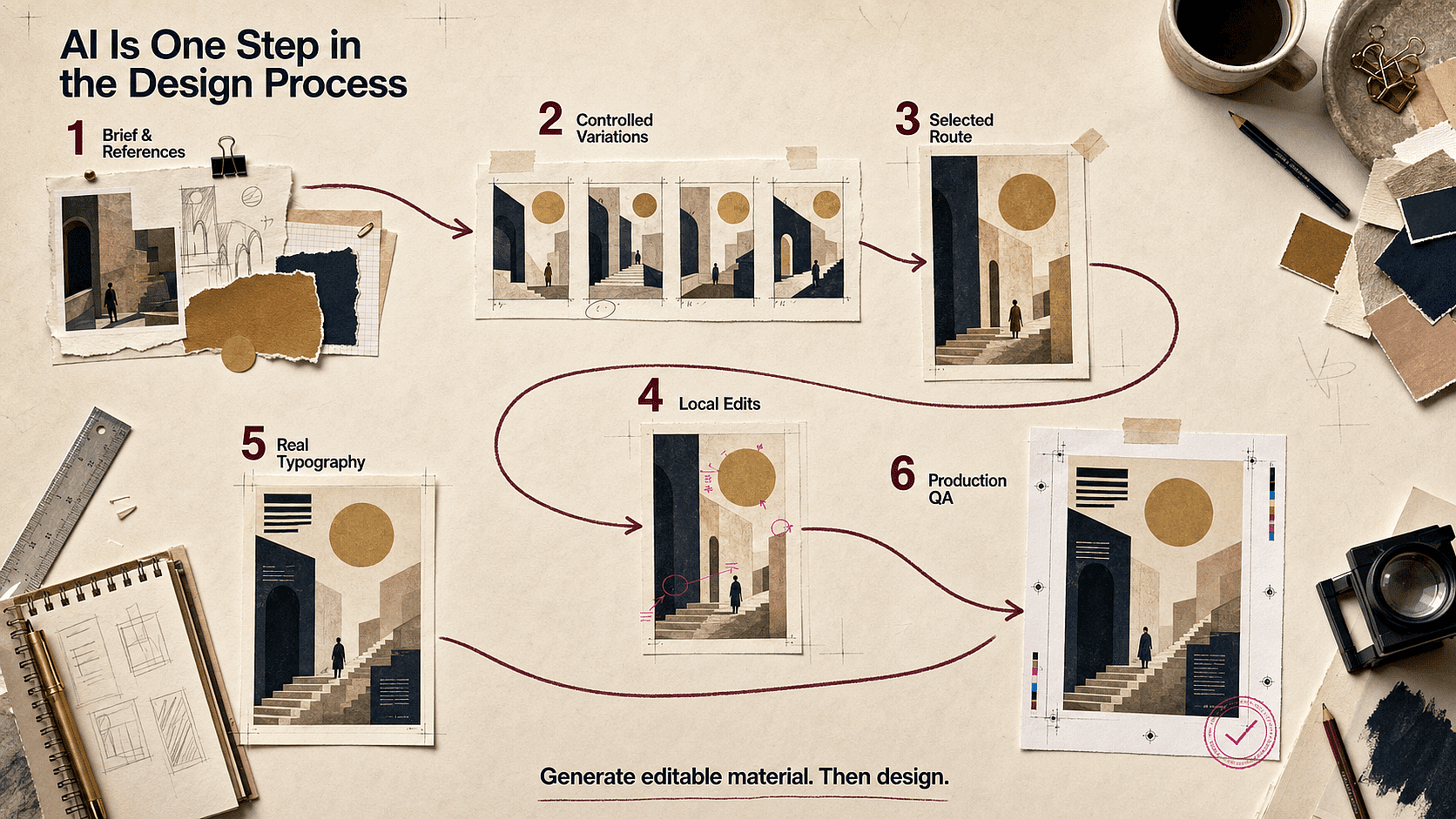
典型的なフローは、ブリーフとリファレンスから始まり、制御された画像バリエーション、選定したルート、ローカル編集、本物のタイポグラフィ、そして制作段階のQAへと進みます。画像ジェネレーターはそのフローの中で編集可能なビジュアル素材を提供するものであり、デザインプロセス全体を担うわけではありません。
AI画像だけではまだ解決できない6つのデザイン課題
デザイナー同士の議論で繰り返し挙がる悩みは、画像が足りないことではありません。デザインアセットとしての画像をコントロールできないことです。この6つの課題こそ、プロのワークフローがその価値を発揮する場面です。
課題1:画像は良いのに、レイアウトが使えない
AIモデルは被写体を中央に寄せたり、空いたスペースをディテールで埋め尽くしたりしがちです。単体の画像なら問題ありませんが、見出し、CTA、ナビゲーション、商品メッセージを置く余地がなくなります。中央に被写体があり背景がごちゃついたヒーローショットは、どれだけ光が良く見えても使い物になりません。クライアント本来のメッセージを載せる場所が残らないからです。
コピーを載せる安全なスペースは、後から直すのではなく、最初からブリーフに組み込みましょう。どの側にどのくらいの領域が必要かを明記し、たとえば「左40%は視覚的に静かに保つ」のように指定して、その範囲内にコントラストの強い被写体・顔・くっきりした輪郭が入らないようにします。そして構図を確定する前に、プレースホルダーではなく実際の見出しで画像をテストしてください。
OpenArtでは、空間的な指示を実際にきちんと反映するモデルを選び、それでもコピー領域が狭すぎる場合は選択した画像を拡張・リフレームすることを意味します。同じ指示に対して2~3個のモデルを比較する方が、複数のサブスクを横断して一から書き直すよりも効果的です。
お悩み2:キャンペーン内の画像がバラバラで統一感がない
プロンプトを繰り返すだけではデザインシステムはできません。色、ライティング、カメラの高さ、商品のスケール、顔の特徴、イラストのディテールは、生成ごとにブレる可能性があります。
デザインガイドライン: シリーズを作る前に、小さなビジュアル仕様書を作成しましょう:
- 3〜5色の固定パレットカラー
- 1つのライティング方向とコントラストレベル
- カメラの高さを揃えるルール
- 素材や質感の統一された表現
- 商品・キャラクター・背景をまとめた1つのリファレンスセット
- 変更してはならない要素のリスト
承認済みの画像を次のアセットのリファレンスとしてロックします。ビジュアル仕様を安定させたまま、チャンネル比率やシーンを変更できます。
OpenArtのワークフロー: リファレンス主導の制作、画像編集、キャラクター作業を、ひとつのビジュアルワークスペースにまとめられます。各出力をバラバラの運試しのように扱うより、キャンペーンにはずっと役立ちます。
課題3:わずかな修正が承認済みの部分を壊す
デザイナーはよく、ピンポイントの変更を必要とします。小道具を1つ動かす、反射を抑える、壁の色を変える、あるいは商品の上に余白をもう少し作る、といった具合です。全体を再生成すると、クライアントがすでに承認した被写体やカメラ、スタイリングが変わってしまう可能性があります。
デザインガイドライン: 大きなところから小さなところへと直していきましょう。まず構図と被写体を固め、次に商品やキャラクターの正確さを整え、それから素材・照明・背景のディテールを編集します。無関係な5つの変更を1つの指示にまとめないこと。何が悪化の原因かを特定しにくくなるからです。
OpenArtのワークフロー: 選んだアセットに対して、消去、背景置き換え、拡張、リスタイル、または画像から画像への変換コントロールを使いましょう。承認済みのパスごとにチェックポイントを残しておきます。
課題4:生成されたテキストは惜しいけれど、公開できるレベルではない
特にデザイン素材向けに作られたモデルでは、テキスト描画は大きく進化しました。とはいえ、文字が一つでも間違っていればポスターやパッケージは使い物になりませんし、見た目に説得力のある文字と編集可能なタイポグラフィは別物です。プレビューでは「$9.99」なのに拡大すると「$9.98」になっている値札は、丸め誤差ではなく刷り直し案件です。
生成された文字は最終素材ではなく、あくまで試作素材として扱いましょう。テクスチャや構成に溶け込むディスプレイアート、あるいは見出しが構図にどう収まるかのテストに使い、実際の見出し・価格・法的表記・日付・UIラベルは本物のフォントで設定してください。スペル、カーニング、コントラスト、読み順、ローカライズはそれぞれ個別のチェックが必要です。画像全体だけを見るデザインレビューでは、まさにこの種のディテールを見落としがちだからです。
GPT Image 2などの適切なモデルでコンセプトの大部分は形にできますが、きれいなビジュアルも最終的なタイポグラフィのためにはFigma、Photoshop、Illustratorへ移す必要があります。ここでのOpenArtはビジュアル制作のレイヤーであり、タイポグラフィの制御を代替するものではありません。
課題5:画像がマルチフォーマットのキャンペーンに耐えられない
正方形の画像は、16:9のヒーロー画像や9:16のストーリー向けに切り抜くと崩れてしまうことがあります。被写体が大きくなりすぎたり、手や商品が見切れたり、コピーを入れるスペースが消えたりします。
デザインガイドライン: クロップの余裕を考えたマスターコンポジションを計画しましょう。重要なディテールは端から離し、被写体の周囲に十分な余白を作ります。ビジュアルの方向性を承認する前に、少なくとも1:1、16:9、4:5、9:16でテストしましょう。
OpenArtのワークフロー: 同じ平坦化された画像を引き伸ばすのではなく、選択したソースから別のアスペクト比を作成・拡張できます。
課題6:画像の出所をチームが説明できない
クライアントと働くデザイナーは、モデル、素材元、編集履歴、利用条件を把握しておく必要があります。これは法的な問題であると同時に、プロセスの問題でもあります。
デザインガイドライン: モデル、日付、プロンプトやブリーフ、アップロードした参照素材、許諾状況、重要な人手による編集など、軽量な来歴記録を残しておきましょう。無許可のブランド素材、著作権のあるキャラクター、存命アーティストの名前をアートディレクションの近道に使うのは避けてください。
the 米国著作権局2025年1月報告書 米国では、純粋にAIが生成した素材は著作権で保護されない一方、人間が生み出した表現、創造的な選択や配置、創造的な改変は保護される可能性がある、と述べています。また、現在一般に利用可能な技術では、promptだけでは十分なコントロールを提供しないとしています。これは法的助言ではありませんが、デザインチームが人間によるアートディレクションや最終的な制作作業を記録しておくべき実務的な理由になります。
デザインワークフロー別・最適なAI画像ジェネレーター
1. OpenArt:モデルの選択肢と編集機能を求めるデザイナーに総合力No.1
コンセプトアート、キャンペーン画像、商品シーン、イラスト、画像編集など、幅広い作業を行き来するなら、OpenArtは総合力で最も頼れる選択肢です。デザイナーを1つのモデルに縛るのではなく、同じプラットフォーム内で現行の複数の画像モデルにアクセスできます。あらゆるデザイン作業に万能なモデルは存在しないからこそ、これが重要なのです。
GPT Image 2 は、テキスト中心のビジュアル、インフォグラフィック、デザイン素材、そして緻密な指示への忠実さを求める場面に最適な選択肢です。 Nano Banana 2 Lite は自然言語での編集や参考画像を軸にした変更に適しています。 Seedream 5.0 Pro は、細部までこだわった構図や精密なビジュアルブリーフに向いています。あるモデルで方向性をテストし、最も優れた結果を選んで、他の場所でワークフローを組み直すことなく磨き上げられます。
OpenArtは生成を一般的な制作作業ともつなげます。デザイナーは次のことができます: 要素の消去や置き換え、構図を拡張し、 背景を差し替える, リスタイル 画像、そして アップスケール 選択したアセット。これにより、アイデア出しの最中だけでなく、その後でも役立ちます。
おすすめ用途: ブランドキャンペーンの検討、SNSコンセプト、商品シーン、エディトリアルビジュアル、キャラクター主導のプロジェクト、そして一つのサブスクで複数モデルを使いたいデザイナーに。
覚えておきたいこと: モデル選びが結果を左右します。フルセットを作る前に、あなたの被写体、タイプ、参照スタイルにどのモデルが最も適しているかを、小さなテストブリーフで見極めましょう。モデルではなく価格でプラットフォームを比較しているなら、こちらの 料金と1生成あたりのコスト比較 トップクラスのAI画像・動画・音声ジェネレーターを横断して見る方が、より正確な手がかりになります。
2. Adobe Firefly:PhotoshopやCreative Cloudのワークフローに最適
Adobe Firefly は、制作ファイルがすでに Photoshop、Illustrator、Express など Creative Cloud ツール内にあるデザイナーに最適です。その価値はテキストから画像を生成するだけにとどまりません。生成塗りつぶし、生成拡張、ボード、連携編集ツールが、確立された制作フローの中にそのまま組み込めます。
Fireflyは、生成された画像がより大きなデザインファイルの一部となる場合に特に役立ちます。デザイナーは新しいトリミングに合わせて写真を拡張したり、不要な要素を削除したり、背景を探ったりしながら、使い慣れたマスク、レイヤー、テキスト、カラーツールで作業を続けられます。
Adobeも自社のFireflyモデルを商用クリエイティブ向けに位置づけています。それでもチームは、使用したモデル、プラン規約、クライアントのポリシー、最新の利用ルールを確認すべきです。特にFireflyがサードパーティモデルへのアクセスを提供している場合は注意が必要です。
おすすめ用途: Adobe中心のチーム、写真合成、キャンペーン用のリサイズ、制作編集、エンタープライズ向けワークフロー向け。
覚えておきたいこと: Fireflyは幅広いスイートのため、コストや利用可否はプラン、生成クレジット、選択したモデルによって異なります。
3. Midjourney:アートディレクションとインパクト重視の探求に最適
Midjourneyは、ビジュアルのムードを素早く見つけるための最も強力なツールの1つであり続けています。Personalizationプロファイルとムードボードがデザイナーの美的方向づけを助け、スタイルコントロールが幅広い探索を支えます。ジェネレーターを開く前にその参照ボードを作りたいなら、OpenArtの ムードボードメーカー は、まずビジュアルの方向性を集めて整理するのに最適な方法です。WebエディターにはインペイントやパンとズームSmart Select、レイヤー、Retextureが加わります。
プロジェクトの初期段階でよく機能します。キービジュアルの検討、ファッションの方向性、シネマティックなリファレンス、エディトリアルなコンセプト、スタイルフレームなどです。最終的な成果物に正確なタイポグラフィ、再利用可能なコンポーネント、厳密に管理された製品ディテールが必要な場合、デザイナーは従来のデザインアプリで仕上げることが多いです。
おすすめ用途: ムードの構築、ビジュアルの方向性、キーアート、エディトリアルイメージ、美的探求。
覚えておきたいこと: Midjourney の現行 Editor ドキュメントによると、最新の生成画像は Editor に取り込めますが、一部の編集機能は旧バージョンのモデルを使用しています。ステップ間の厳密な一貫性に頼る前に、現在のワークフローを確認してください。
4. Ideogram:テキスト主体のポスターやグラフィックコンセプトに最適
画像内に文字を表示させる必要があるとき、Ideogramはデザイナーの候補リストに入れる価値があります。次のような用途に便利です: ポスターのコンセプト、タイトル処理、パッケージ検討、看板、ステッカー、文字とビジュアルが1つの構図として一体に感じられるべきSNSグラフィックに。
Canvasツールには塗りつぶし機能や拡張機能があり、1回の生成にとどまらないワークフローが可能です。とはいえ、生成された文字が最終的な組版の代わりになるわけではありません。納品前に、レイアウトツールでスペル、カーニング、ブランドフォント、アクセシビリティ、法的表記を必ず確認してください。
おすすめ用途: ポスターの探索、装飾的なレタリング、パッケージコンセプト、タイトルカード、テキスト主体のSNSグラフィック。
覚えておきたいこと: きれいな文字表示は、実制作で使えるタイポグラフィシステムとは別物です。生成された文字はビジュアル素材として使い、重要なコピーは本物のフォントで作り直しましょう。
5. ChatGPT Images:会話形式のブリーフと反復的な変更に最適
デザインの要望を会話で説明する方が伝えやすいときは、ChatGPT Imagesが役立ちます。画像を作成したり、既存の素材をアップロードして変更を依頼したり、テキストを追加したり、背景を透過にしたり、アスペクト比を変更したりできます。
これは、平易な言葉でフィードバックをくれる関係者に役立ちます。「製品とライティングはそのままで、花を消して、被写体の上にもっと余白を空けて」といった具合です。公式エディターは選択範囲の変更に対応していますが、OpenAIは編集がハイライト範囲を超えて及ぶ場合があると注記しています。製品の形やブランドのディテールを正確に保つ必要がある場合、デザイナーは修正版を慎重に比較すべきです。
おすすめ用途: 文章によるブリーフをビジュアルに変換したり、コンセプトを繰り返し変更したり、透過アセットを作成したり、関係者の意見をもとにすばやく修正したりできます。
覚えておきたいこと: 会話による操作は強力ですが、レイヤーベースの制作ファイルではありません。
6. Canva AI:スピーディなマーケティング&ソーシャルレイアウトに最適
最終的な成果物がテンプレートから作るソーシャル投稿、プレゼン用グラフィック、チラシ、マーケティング素材である場合、Canvaは最適です。Magic Mediaで元となるビジュアルを作成し、残りの素材制作はCanvaのレイアウト、ブランド、公開ツールが担います。
最大の強みは、画像から完成レイアウトまでのスピードです。緻密な画像構築、精密なマスク、複雑なコンポジット、高度にカスタマイズした制作パイプラインが必要なデザイナーには向きません。
おすすめ用途: ソーシャルチーム、スピーディーなキャンペーンのバリエーション、プレゼン用素材、テンプレートベースの制作。
覚えておきたいこと: 手軽さは仕上がりをありきたりに見せてしまうことがあります。デフォルトのレイアウトを置き換え、余白を整え、明確なブランドシステムを適用しましょう。
7. Stable Diffusion:カスタマイズと技術的な制御に最適
Stable Diffusionは、ひとつに固定された製品体験ではありません。ローカルインターフェイスやホスト型サービス、カスタムワークフロー、専用ツールを通じて使われるモデルファミリーです。技術に自信のあるデザイナーやスタジオにとって、この柔軟性はカスタムモデル、再現可能なパイプライン、細かな制御、プライベートなインフラを支えます。
トレードオフは運用の手間です。チェックポイント、アドオン、インターフェース、ハードウェア、設定の選択が、それ自体で1つの専門分野になり得ます。カスタマイズが必須要件のときは有力な選択肢ですが、すべてのデザインチームにとって最速の手段とは限りません。
おすすめ用途: カスタムパイプライン、技術系アートチーム、ローカルワークフロー、専門的なスタイル制御。
覚えておきたいこと: ライセンスや許可される用途は、モデル・チェックポイント・サービスによって異なります。利用するものに付随する正確な規約を確認してください。
デザイナーのように AI 画像ジェネレーターを比較する方法
多くの公開比較は、見栄えの良い1枚の出力を高く評価します。しかしデザイン業務ではそれだけでは不十分です。最初の画像が出た後に何が起きるかで各ツールを比較するため、次の基準を使いましょう:
- 指示への忠実度: このツールは被写体、設定、階層、クロップ、パレット、ネガティブ制約に従えますか?
- 参照コントロール: デザイナーは、構図・スタイル・アイデンティティ・製品の見た目をビジュアル入力で指定できますか?
- 修正クオリティ: 一部だけを、他を壊さずに変更できますか?
- グラフィックデザインとの相性: テキスト、余白(ネガティブスペース)、シリーズの一貫性、透過素材、一般的なアスペクト比に対応していますか?
- ワークフローの継続性: その結果を実際のデザイン・キャンペーン・コンテンツ制作に組み込めますか?
- 商用利用の明確さ: モデルのアイデンティティと利用規約は、チームでレビューできるほど明確ですか?
ひとつのバズった作例だけでツールを評価してはいけません。画像モデルは急速に進化し、結果はブリーフによって変わります。役立つのは小さなデザインシステムでのテストです。ヒーロー画像1枚、スクエアクロップ1枚、テキスト主体のアセット1枚、そして同じビジュアル方針からのリビジョン1枚を試してみましょう。
再現可能な4アセットテスト
ツールが許す限り、同じモデル設定、参照セット、ブリーフを使いましょう。製品の機能は変わるので、モデルとテスト日を記録しておきましょう。
- 16:9のキャンペーンヒーローを作成。 被写体を固定した位置に配置し、コピー用に少なくとも40%の余白を確保する必要があります。
- 1:1のコンパニオン素材を作成しましょう。 メインビジュアルのパレット、ライティング、被写体のアイデンティティ、素材感をそのまま維持します。
- テキスト主体のコンセプトを1つ作成します。 短くて確認しやすいフレーズを使い、スペル・階層・画像とのなじみ具合をチェックしましょう。
- 修正は1か所ずつ、狭い範囲で依頼しましょう。 被写体、構図、スタイリング、ライティングを保ったまま、背景色を変えたり小道具を1つ取り除いたりできます。
各ツールを、ブリーフへの忠実さ、リファレンスの再現性、編集の制御性、シリーズの一貫性、テキストの正確さ、そして使える最終アセットに至るまでの時間について1~5点で採点しましょう。目的は万能なベンチマークを作ることではありません。あなたのデザイン業務で最も手直しの少ないツールを見極めることです。
| テストエリア | 確認すべきポイント | 失敗のサイン |
|---|---|---|
| ブリーフへの忠実度 | 被写体の位置・トリミング・配色・除外要素 | レイアウトを無視した魅力的な画像 |
| リファレンスの忠実度 | 製品・顔・スタイル・素材のディテール | アセットごとに方向性がぶれてしまう |
| 編集範囲の限定 | 承認済みの領域はそのまま維持 | ちょっとした編集で画像全体を作り直し |
| シリーズの一貫性 | 素材がひとつのキャンペーンとして統一感を持つ | 各画像には異なるビジュアル言語がある |
| テキストの正確さ | スペル、順序、可読性 | 正しそうに見えて使えない文字 |
| 制作の手間 | レイアウト前の所要時間と修正パス | 高速生成のあとに大がかりなクリーンアップ |
グラフィックデザイナー向けのより優れたAI画像ワークフロー
ステップ1:スタイルワードの寄せ集めではなく、デザインブリーフを書く
アセット・オーディエンス・メッセージ・サブジェクト・視覚的な優先順位・構図・パレット・素材・ライティング・納品比率を定義しましょう。コピー用に空けておくべき箇所を明記します。ビジュアルの正確さが重要な場合は、1〜2点のリファレンスを追加します。
ステップ2:磨き込む前に方向性を探る
ほぼ同じものを20個作るのではなく、意味のある違いを持つルートをいくつか作りましょう。まずは構図とアイデアを比較してください。小さなテクスチャの誤りは、弱いコンセプトよりも修正が簡単です。
ステップ3:選んだルートを段階的に仕上げる
大きな決定をロックしてから、1つずつ問題を編集しましょう。ディテールに入る前に、被写体と構図を固めます。最終的なタイポグラフィ、ロゴ、規制対象のコピー、ピクセル単位の調整は、いつものデザインツールで加えましょう。
食品製品ビジュアルのプロンプト例
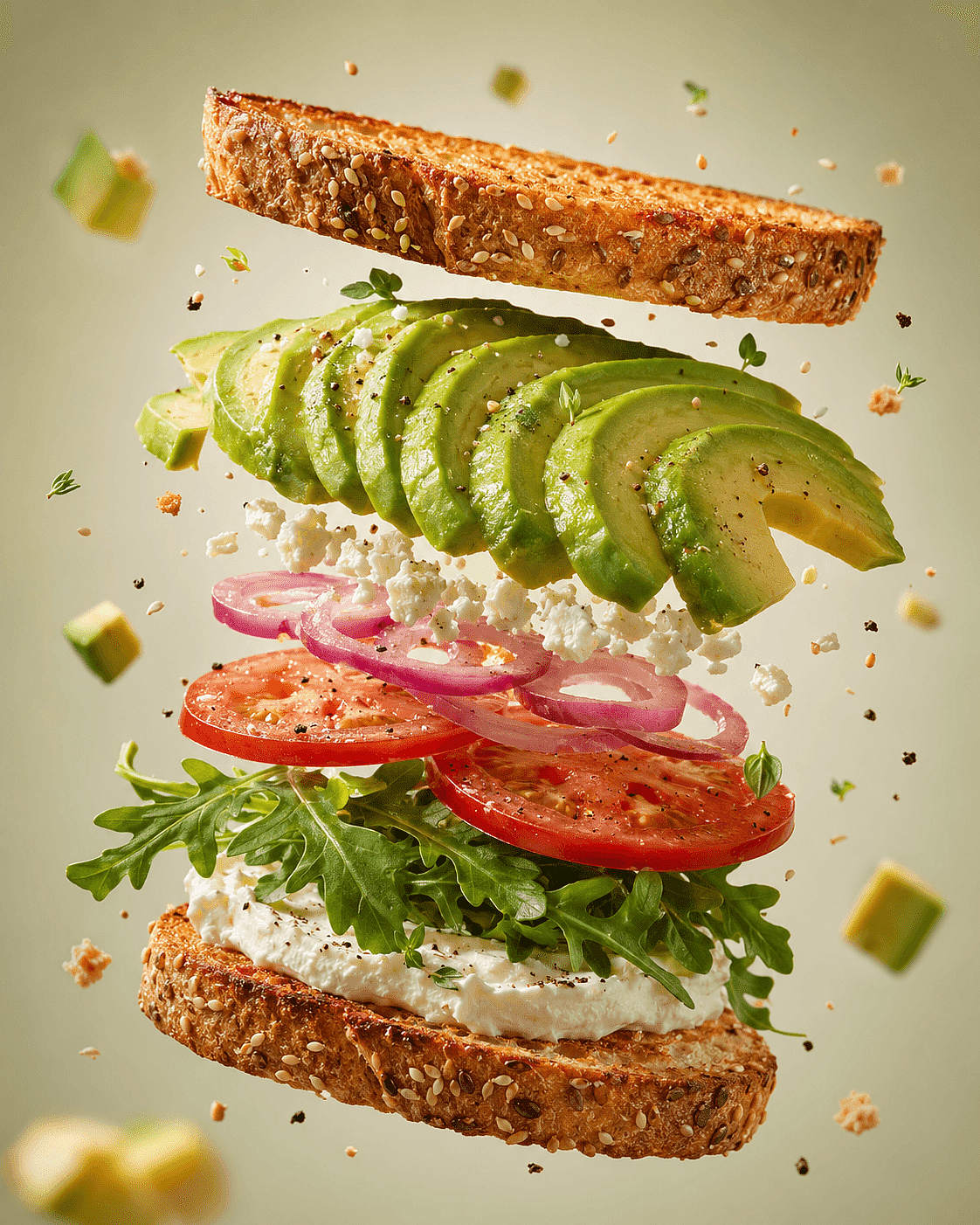
[PRODUCT]、空中でパーツが分解したビュー、周囲に[INGREDIENTS]が浮遊、クリーンな[BACKGROUND]スタジオ背景、商用フードフォトグラフィー、柔らかな指向性ライティング、浅い被写界深度、超精細なテクスチャ、フォトリアル、テキストなし、ロゴなし。
角括弧の部分を、自分の製品・材料・背景色に置き換えてください。このプロンプトが機能するのは、被写体、構図(分解図)、写真スタイル、ライティング、そしてテキストなし・ロゴなしといった明確な除外事項を定義しているからです。2つ目のキャンペーンルートを作るには、材料や背景を変更し、残りのプロンプトは固定したままにすることで、シリーズの統一感を保てます。
最高の成果は、あなたがアートディレクションできる成果である理由
AIツールを評価するデザイナーは、素材となる画像の品質に注目しがちです。しかしクライアントワークでは、通常は修正コストのほうがより鋭い判断基準になります。フィードバック後に製品・レイアウト・キャラクターを保てない美しい成果物は、ややインパクトに欠けても方向づけできる画像より使い勝手が悪いのです。
グラフィックデザイナーのコミュニティでの議論でも、繰り返し見られる分断があります。クライアントはAIで作ったラフなコンセプトを持ち込むことがありますが、タイポグラフィやレイアウト、印刷の細部、ブランドとの整合性、仕上がりの品質を詰めるには、やはりデザイナーが必要です。つまりAI画像生成は、デザインプロセスを置き換えるものではなく、その中で使う素材として最も役立つのです。
Redditのデザイナーが本当に心配していること
Redditの議論はあくまで逸話的なので、代表的な調査として読むべきではありません。それでも、洗練された製品ページでは省かれがちな言葉や状況を浮き彫りにしてくれる点で役立ちます。
「クライアントがAIで何か作って、それを仕上げてほしいと言ってきた」
2026年のr/graphic_designの議論、後に Creative Bloqが取り上げたでは、AIで作ったロゴやSNSグラフィックが最終利用に耐えないクライアントから仕事を受けるデザイナーの様子が語られました。返信は、依然として専門的なデザイン作業を必要とするディテール、つまり印刷設定・レイアウト・正確な書体・管理された修正に焦点を当てていました。
対処方法: AI画像は、完成したアイデンティティシステムではなく素材として扱いましょう。ロゴをベクターで作り直し、生成された書体はすべて差し替え、余白のルールを設定し、小さいサイズや単色でもマークが機能するかを確認しましょう。
OpenArtが役立つ場面: それはビジュアルの探索と画像の修正を短縮しながら、アイデンティティシステムと最終ファイルの主導権はデザイナーに委ねます。
「いい画像が1枚できても、変更を頼むと台無しになる」
AIアートやMidjourneyの議論では、編集を通してもサブジェクト・顔・スタイルの一貫性を保つ方法をユーザーが繰り返し尋ねています。これが「生成して祈る」やり方の実際のコストです。優れた成果物でも再利用できないことがあるのです。
対処方法: 承認したバージョンはすべて保存し、変数は一度に一つずつ変更し、リファレンス主導またはローカル編集のワークフローに頼りましょう。繰り返し登場する人物やマスコットの場合は、ポーズ・衣装・背景とは別にアイデンティティを定義しましょう。
OpenArtが役立つ場面: デザイナーはモデルを選び、編集・リファレンス画像を使い、そして キャラクタービルダー 各画像を新しいプロジェクトとして扱うことなく進めるワークフロー。
「どのツールにお金を払うべき?」
ツール選びのスレッドはよくモデル論争に発展しますが、デザイナーが必要とするのはたいてい複数の異なる機能です。アイデア出し、正確なテキスト、参照編集、アップスケール、背景処理、比率変更など。Adobeの2026年調査で、クリエイティブAIを導入して以来58%のクリエイターが大規模チームとより張り合えると感じている理由の一つがこれです。強みはひとつのモデルに全賭けするのではなく、機能を積み重ねることから生まれます。
対処方法: 単一のプロンプトではなく、小規模な実際のキャンペーンで各ツールをテストしましょう。使える成果物がいくつあるか、何回の修正パスが必要か、セット全体の統一感はどうか、最終レイアウトに到達するまでどれくらいかかるかを記録しましょう。
OpenArtが役立つ場面: その最大の強みは、幅広いワークフローと多彩なモデルを一か所で使えること。どれか1つのモデルがあらゆるタスクで勝つという主張ではありません。
「これをクライアント向けに安心して使えますか?」
商用利用に関するRedditの質問は、プラットフォームの許諾・著作権の帰属・商標リスク・リファレンス画像の権利・クライアントのポリシーをひとまとめにしがちです。これらは別々に確認すべき項目です。
対処方法: 使用するモデルの正確な利用規約を確認し、アップロードした素材の許諾記録を残し、誤解を招く模倣を避け、人間が加えた変更を文書化し、クライアントの承認ルールに従いましょう。商用利用の許可があっても、生成物が著作権で保護されることや第三者の権利を侵害していないことが保証されるわけではありません。
OpenArtが役立つ場面: モデルの選択と編集を一つのワークフローで見える化しつつ、承認プロセスはデザイナーとクライアントが握ったままにできます。
納品前に使える実践的なデザインQAチェックリスト
画像を選んだ後、最終書き出しの前にこのチェックリストを使いましょう。
構図
- フォーカルポイントはメッセージを支えていますか?
- 本文コピーを入れる余白は十分ありますか?
- 意図したクロップでもレイアウトは成立しますか?
- 視覚的な強弱と読ませる順序は意図どおりですか?
ブランドの一貫性
- パレット、ライティング、質感、カメラのルールは承認済みの方向性と一致していますか?
- 商品・キャラクター・ロゴの形は正確ですか?
- このアセットは他と同じキャンペーンに属していますか?
タイポグラフィと情報
- 重要な生成テキストはすべて差し替えまたは確認済みですか?
- 階層、コントラスト、行の長さ、余白は読みやすいですか?
- 日付、価格、主張、法的な記載は正しいですか?
画像の一貫性
- 手、反射、輪郭、影、繰り返しのオブジェクト、背景の形状をチェックしましょう。
- 画像を100%表示と最終的な表示サイズの両方で確認しましょう。
- アップスケール後に目立ってしまう視覚的なアーティファクトを除去します。
権利と受け渡し
- モデルとソース参照を記録します。
- アップロードしたアセットの利用許可を確認しましょう。
- 編集可能なレイアウトと、画像のみのクリーンな書き出しを維持します。
- 必要に応じて、人間による選択・配置・加工の内容を記録しましょう。
あなたのデザインワークフローに最適なAI画像ジェネレーターは?
選択 OpenArt 複数の主要モデルと編集ツールを一か所でまとめて使いたいなら。選ぶなら Adobe Firefly PhotoshopとCreative Cloudがすでに制作の中心なら最適。選ぶなら Midjourney インパクトのあるビジュアル探索に。選択: Ideogram 組み込まれた文字やタイトル表現がコンセプトを牽引する場合。選ぶなら Canva テンプレートで素早く仕上げたいなら。選ぶなら Stable Diffusion 技術的なカスタム制御が、手間をかける価値があるとき。
迷ったら、同じ実際のブリーフを2つのツールで試してみましょう。リファレンス、必須のクロップ、目立つ余白、編集リクエスト1件、同じ方向性の2つ目のアセットを含めます。この一連の流れを最も少ない手直しでこなせたツールが勝者です。
よくある質問
2026年、デザイナーに最適なAI画像生成ツールは?
OpenArtは、複数の主要画像モデルと編集ツールを一つのワークフローで使いたいデザイナーにとって総合的にベストな選択肢です。Adobe中心の制作にはAdobe Fireflyが向いており、Midjourneyはビジュアルの探索に、Ideogramはテキスト主体のコンセプトに特に強みがあります。
グラフィックデザイナーに最適なAI画像生成ツールは?
最適な選択肢はタスクによって変わります。幅広いグラフィックデザイン業務なら、リファレンス制御、余白を活かした構図、部分編集、テキスト処理、そしてFigma・Photoshop・Illustratorへのスムーズな受け渡しを重視しましょう。OpenArtは、最も幅広い生成モデルと画像編集タスクを一つのプラットフォームでカバーします。
AI画像ジェネレーターで制作レベルのグラフィックデザインは作れる?
優れた元画像や初期のデザイン方向性を生み出せますが、ほとんどの最終アセットにはデザイナーのチェックが必要です。重要なタイポグラフィを作り直し、ロゴや製品の詳細を確認し、出力サイズと色の要件を確定させ、法的・規制対象のコピーをすべて見直しましょう。
画像内のテキストに最適なAI画像ジェネレーターはどれ?
IdeogramとGPT Imageモデルは、テキスト主体の画像コンセプトに強い選択肢です。ただし、言葉がブランド、法的、アクセシビリティの要件を担う場合は、校正とプロによる組版が依然として必要です。
デザイナーにはMidjourneyとOpenArtのどちらが向いている?
Midjourneyは美的表現、ムードボード、ビジュアル探索に強い専門ツールです。OpenArtは複数のモデルを比較し、同じプラットフォーム内で編集、背景変更、リスタイル、アップスケールまで進めたいデザイナーにとって、より柔軟な選択肢です。
Adobe Fireflyは商用デザイン制作に使っても安全ですか?
Adobeは自社のFireflyモデルの出力を商用利用可能なものとして提供していますが、デザイナーは正確なモデル、最新の利用規約、クライアントの要件、プランの条件を確認する必要があります。プラットフォーム経由でアクセスするサードパーティ製モデルには異なる規約が適用される場合があります。
AI生成画像をクライアントワークに使えますか?
多くの場合は問題ありませんが、常に許可されているわけではありません。ツールとモデルの利用規約、クライアントのポリシー、アップロードした参照素材の権利、市場ごとのルールを確認しましょう。ツールを使えるからといって著作権保護や商標クリアランスが保証されるとは考えないでください。
デザイナーはAI生成ビジュアルの一貫性をどう保っているのですか?
同じ参照セット、モデル、カラーパレット、ライティングのルール、構図システム、ネガティブ制約を使いましょう。承認済みの出力は後のアセット用に参照素材として保存します。変数は一度に一つだけ変更し、最終的なタイポグラフィとレイアウトは管理されたデザインファイル内で仕上げましょう。