

 ChatGPT
 Perplexity
 Claude
 Gemini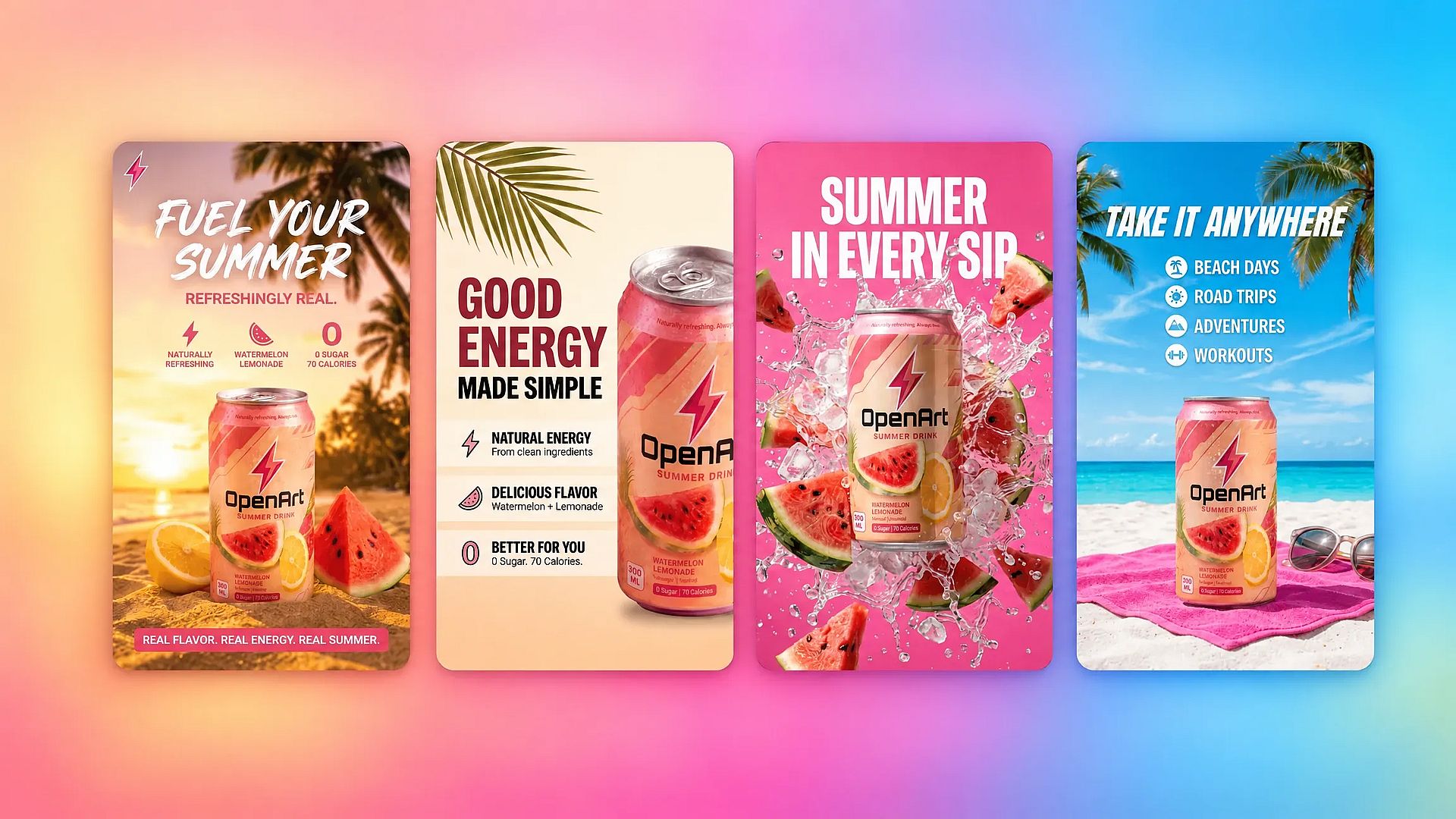
En bref
- OpenArt est le mieux placé pour transformer une photo produit en une campagne cohérente, images fixes et vidéo comprises, sur plusieurs modèles. Les nouveaux comptes reçoivent 40 crédits gratuits pour l'essayer, sans carte bancaire. Les droits d'usage commercial démarrent avec l'offre Plus.
- Canva fonctionne bien pour des bannières rapides dans des modèles. Canva Free inclut un petit quota mensuel d'utilisations IA qui se réinitialise le 1er de chaque mois.
- Adobe Firefly convient aux campagnes de marque qui privilégient un entraînement sûr sur le plan commercial. Le forfait gratuit inclut des générations quotidiennes pour l'image, la vidéo et l'audio, avec des limites qui se réinitialisent chaque jour.
- Freepik te donne des visuels publicitaires variés plus des ressources stock. Les comptes gratuits ont environ 20 générations d'images par jour, mais les sorties gratuites sont réservées à l'usage personnel avec attribution.
- Fotor propose un workflow de photo produit dédié. Ses crédits de départ ne suffisent pas à couvrir une génération de Product Shot, et les exports gratuits portent un filigrane.
Les cinq outils proposent désormais une forme de vidéo IA. Ce qui distingue OpenArt, c'est que la photo produit, les réglages de marque et une variété de modèles d'image et de vidéo cohabitent dans un seul espace de travail : un même visuel validé peut ainsi devenir une image fixe, une pub redimensionnée et une courte vidéo produit, sans déplacer de fichiers d'une appli à l'autre.
Essayer le générateur d'images IA si tu as besoin d'images de campagne stylisées, et de vidéo, construites autour d'une photo produit existante.
Pourquoi c'est essentiel pour le workflow réel d'une équipe marketing, et pas seulement pour « créer une image »
Si tu gères le social payant, l'email et la landing page d'une petite marque, tu sais déjà que le job n'est pas de « faire une belle photo ». C'est de produire assez de créa alignée à la marque, dans assez de formats, assez vite pour éviter qu'une campagne ne s'essouffle — le plus souvent sans photographe, sans designer et sans personne à qui déléguer.
Two realities drive that pressure. The first is creative decay: an ad shown repeatedly to the same audience loses click-through within a week or two, so a working paid social account needs a steady pipeline of new variations, not one polished hero shot you reuse for a month. The second is format sprawl: the same underlying idea has to become a square feed post, a vertical story or reel, a landscape display banner, an email header, and a website hero, each with its own crop and sometimes its own copy treatment. Recreating that by hand for every new creative burns the one resource a lean team doesn't have, which is time, not ambition.
Voilà le vrai test d'un générateur d'images par IA gratuit : pas « peut-il faire une belle image », mais « peut-il partir d'une image phare validée et me sortir les dix variations suivantes, aux bons formats, sans s'écarter de la charte, avant que le lot de pubs actuel ne devienne obsolète ». Un outil qui ne fait que l'étape un est une démo. Un outil qui gère aussi les étapes deux à dix est un workflow.
La demande pour ces outils reflète ce changement. Le marché des générateurs d'images IA était estimé à environ 474,2 millions de dollars en 2025 et devrait atteindre 555,1 millions en 2026 et environ 1,85 milliard d'ici 2033, avec une croissance annuelle de 18,8 % de 2026 à 2033, selon Grand View Research. Les équipes marketing et e-commerce représentent une grande part de cette demande, ce qui explique aussi pourquoi les limites des offres gratuites et les petites lignes sur les droits commerciaux comptent plus qu'avant.
Chaque entrée ci-dessous se concentre sur les facteurs qui comptent pour le vrai travail marketing, pas uniquement sur la qualité d'image isolée. Les comparatifs actuels utilisent des critères comme la qualité d'image, la personnalisation, les limites de générations gratuites et les filigranes pour comparer ces outils (LinkedIn). Ce comparatif examine aussi si tu peux retoucher une photo produit existante au lieu de repartir d'un prompt vierge à chaque fois, et si un seul asset validé peut être rebriefé en nouveaux formats plutôt que régénéré de zéro. Les limites des offres gratuites changent souvent : prends donc les chiffres ci-dessous comme un instantané et vérifie la page tarifs de chaque fournisseur avant de t'engager sur un abonnement.
Pourquoi la plupart des photos produits IA ont encore l'air fausses, et ce n'est généralement pas la faute de l'outil
Avant de choisir un outil, il est utile de savoir ce qui gâche réellement un résultat. Trois erreurs reviennent sans cesse en photographie produit par IA, quel que soit le générateur montré du doigt.
Utiliser un outil qui n'a pas été conçu pour créer des images. Faire passer une photo de produit par un assistant conversationnel généraliste plutôt que par un générateur d'images dédié donne souvent des résultats qui brillent mais qui sonnent faux : des textures qui ne tiennent pas, des étiquettes qui se courbent, un éclairage qui paraît artificiel. Tu ne le remarqueras peut-être pas tout de suite. Ton client, lui, le voit en général, et classe l'image comme de mauvaise qualité sans prendre la peine d'expliquer pourquoi.
Des prompts trop compliqués. On a tendance à écrire une dissertation, en y glissant tous les détails possibles en espérant que le modèle démêle tout ça. En général, ça ne fait que l'embrouiller. Une description courte et simple du décor, de l'éclairage et de l'ambiance donne souvent de meilleurs résultats qu'un paragraphe d'instructions alambiquées.
Des images qui trahissent discrètement qu'elles sont générées par IA. Des textures trop lisses, des ombres qui n'ont aucun sens physique et un texte d'étiquette presque lisible mais pas tout à fait : ce sont ces détails qui brisent la confiance instantanément, même quand la composition d'ensemble semble séduisante. Une fois qu'un acheteur sent qu'une image fait semblant, il ne revient pas vérifier.
Rien de tout cela ne veut dire que la photo de produit générée par IA est une mauvaise idée. Ça veut dire que l'outil et le workflow comptent tous les deux. La section suivante explique ce qu'il faut vérifier dans un outil ; le tutoriel plus bas montre à quoi ressemble concrètement un workflow qui évite ces trois erreurs.
Ce qu'il faut rechercher dans un outil gratuit d'images marketing IA
Quota gratuit. Vérifie combien de générations tu reçois et si les crédits se réinitialisent chaque jour, chaque mois, ou jamais. Un gros solde de départ peut quand même décevoir si un seul workflow de photo produit consomme plusieurs crédits.
Politique de filigrane. Vérifie si les exports gratuits portent un logo visible. Les filigranes peuvent rendre des images par ailleurs utilisables inadaptées aux publicités, pages produit ou campagnes email.
Droits d'usage commercial. Lis la licence avant d'utiliser une image dans une publicité. Certains outils n'autorisent l'usage commercial que sur les forfaits payants, tandis que d'autres exigent une attribution ou restreignent certains modèles.
Limite de qualité de sortie. Compare la résolution, la précision du prompt, le détail des produits et le rendu du texte. Les grilles de comparaison actuelles évaluent généralement qualité d'image, personnalisation et limites de l'offre gratuite. Les plans gratuits peuvent aussi limiter l'accès aux modèles plus puissants ou aux exports haute résolution.
Entrée photo de produit. Choisir image-vers-image quand tu veux préserver ton article réel et remplacer son arrière-plan, l'éclairage ou le décor. Un générateur d'images IA gratuit à partir de texte peut créer de beaux concepts, mais il ne peut pas reproduire de manière fiable un produit spécifique à partir d'une description écrite.
La capacité de l'outil à rester fidèle à ton vrai produit. C'est toute la différence entre un générateur qui réinterprète ta photo produit et un autre qui invente discrètement un nouveau produit qui lui ressemble. Cherche des modèles et des workflows qui traitent ton import comme un point d'ancrage, pas seulement comme une source d'inspiration, surtout si le texte de l'étiquette ou la forme du produit doivent rester fidèles sur chaque variation.
La flexibilité des formats à partir d'un seul asset validé. Une fois l'image phare choisie, peux-tu la transformer en post carré pour le feed, en story verticale et en bannière paysage sans tout rebriefer de zéro ni changer d'outil ? C'est l'étape qui détermine vraiment combien d'emplacements tu peux couvrir avant ta prochaine deadline de campagne, et c'est le critère que la plupart des comparatifs d'outils gratuits ignorent.
Comparatif en un coup d'œil
| Outil | Idéal pour | Limites de l'offre gratuite | Qualité de sortie |
|---|---|---|---|
| OpenArt | Transformer une photo de produit en photos et vidéos de campagne cohérentes | 40 crédits gratuits pour les nouveaux comptes, sans carte bancaire | Excellent choix de modèle pour les arrière-plans stylisés, les visuels marketing sur mesure et l'image-vers-vidéo |
| Canva | Créer des bannières et des visuels pour les réseaux sociaux dans des modèles | Petit quota IA mensuel qui se réinitialise le 1er de chaque mois ; la génération de clips vidéo est réservée aux abonnés payants | Adapté aux visuels numériques, plus faible pour les photos produit studio réalistes |
| Adobe Firefly | Créer des assets de marque avec un entraînement de modèle sécurisé pour un usage commercial | Générations quotidiennes gratuites pour l'image, la vidéo et l'audio ; Adobe ne publie pas le chiffre quotidien exact | Des contrôles créatifs puissants et l'accès aux modèles d'Adobe et de ses partenaires |
| Freepik | Explorer des concepts variés avec une bibliothèque de banques d'images | Environ 20 générations d'images par jour sur le modèle maison de Freepik ; attribution obligatoire, usage personnel uniquement | Bonne variété de concepts, avec des modèles premium réservés aux offres payantes |
| Fotor | Associer des prises de vue produit guidées à la création de pubs | Six crédits de départ, tandis que Product Shot en coûte 15 ; les exports gratuits sont filigranés | Des workflows guidés efficaces, mais le solde de départ ne permet pas de tester Product Shot |
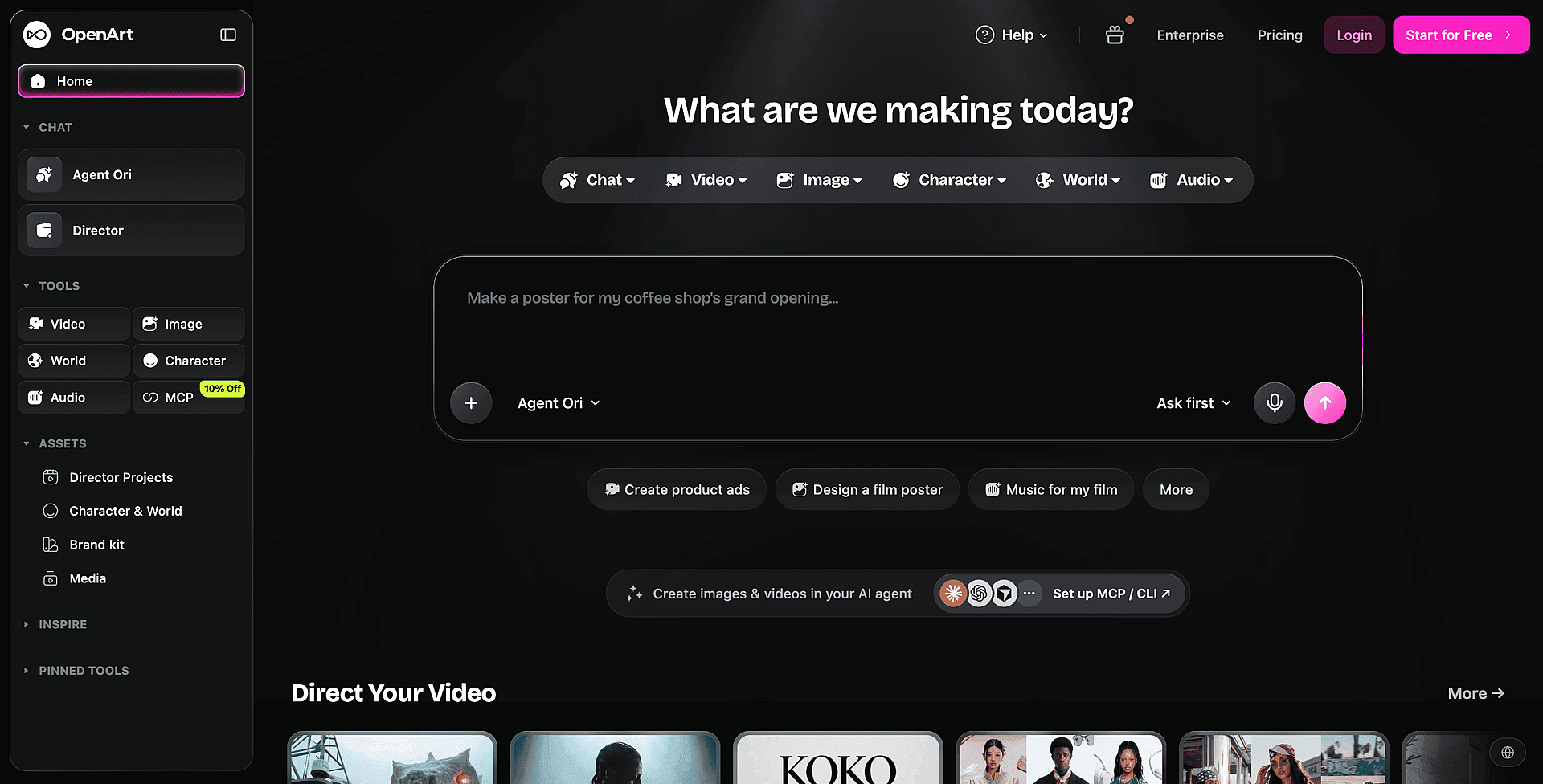
OpenArt
Idéal pour
OpenArt est fait pour toi quand tu veux transformer une seule photo de produit en une campagne cohérente, avec de nouveaux fonds, compositions, styles visuels et, si besoin, une courte vidéo produit à partir du même cliché.
La génération d'images multi-modèles te donne plusieurs façons de réinterpréter la même photo source. La sélection comprend GPT Image 2.5 pour un texte net dans l'image, Seedream 5.0 Pro pour des images éditables par calques, Nano Banana 2.1 pour des retouches par chat, et FLUX 3 Image, qui peut s'appuyer sur jusqu'à 10 références pour garder tes produits cohérents. Le Générateur d'images produit par IA te permet d'explorer des scènes studio soignées, des mises en situation lifestyle et des concepts publicitaires sans refaire la photo du produit.
Every variation stays on-brand because of a setting, not manual double-checking. OpenArt's Kit de marque IA te permet de définir ton logo, ta palette de couleurs exacte jusqu'au code hex, ta typographie et tes règles d'usage de marque une seule fois, puis les applique à chaque image et vidéo que tu génères ensuite, pas seulement à celles que tu penses à marquer à la main. Les agences ou équipes gérant plusieurs clients peuvent conserver des kits de marque distincts et isolés par projet, pour qu'un lot généré pour un client n'aille jamais chercher les couleurs ou références de style d'un autre client.
OpenArt fonctionne avec des crédits sur toutes ses offres et convient mieux à la création de campagnes ciblées qu'à la production de catalogues en masse. Un vendeur avec 500 références aurait besoin d'un workflow d'automatisation de catalogue distinct, mais l'approche par prompts répétables et guidés par références ci-dessous passe sans souci à l'échelle de quelques gammes de produits ou variantes de parfum et de couleur.
Un vrai workflow : une photo, quatre façons de vraiment l'exploiter
C'est la partie que la plupart des comparatifs zappent. Voici à quoi ressemble concrètement la transformation d'une simple photo produit en un set prêt pour une campagne.
Commence avec la photo que tu as sous la main, même médiocre. Une bougie prise devant un fond uni, visiblement détourée et collée, est un point de départ tout à fait normal, pas un critère éliminatoire. Si le fond est brouillon, fais-le passer par un suppression d'arrière-plan d'abord pour que le modèle obtienne un détourage propre.
Choisis un modèle conçu pour préserver ton produit tel quel plutôt que de le réinterpréter de zéro, et importe la photo produit comme référence. Un modèle guidé par référence comme FLUX 3 Image traite ton import comme le sujet fixe au lieu de deviner à quoi le produit devrait ressembler : c'est ce qui garde les étiquettes, la forme et les proportions cohérentes sur chaque variante que tu génères ensuite.
Garde le prompt court et concret. Nommer le décor, l'éclairage et l'ambiance suffit généralement : quel fond, une lumière douce ou dramatique, ce que le produit doit communiquer. Les prompts longs et surqualifiés tendent à embrouiller le modèle plutôt qu'à le guider. Laisse l'auto-enhance désactivé pour tout ce où la fidélité de l'étiquette compte. C'est une bonne option quand tu veux un résultat plus artistique et abstrait, mais pour les shots produit, il peut inventer des détails que tu n'as jamais demandés.
Génère un petit lot, quatre est un bon point de départ, et choisis le meilleur résultat plutôt que de t'en tenir au premier.
À partir de là, l'outil intégré d'OpenArt Éditeur photo IA gère les retouches suivantes sans quitter la plateforme. Tu décris le changement voulu, et il peut supprimer des objets indésirables en arrière-plan, remplacer des visages ou lisser la peau dans les photos lifestyle, changer l'angle de caméra, ou agrandir l'image finale en 4K. Les retouches locales sont aussi utiles quand le même produit existe en plusieurs parfums ou variantes et que tu veux qu'une seule séance couvre plusieurs références.
Mode conversation lets you keep re-briefing the same image conversationally instead of starting over. You can tell it to keep the background exactly as-is and only move the product slightly, then overlay an ingredients panel with icons and label text, or turn the same photo into a close-up, testimonial-style shot with a hand holding the product and a couple of lines of sharp, legible label text. It's the same underlying idea as several of the conversion tactics in the section below, just executed as a follow-up prompt on an image you've already approved.
Cette approche de re-briefing permet aussi de gérer la multiplication des formats sans nouvelle production. Une fois ton visuel phare validé, le Convertisseur de format d'image IA la transforme en story verticale, en bannière paysage ou en post carré pour le fil, et comble les nouveaux espaces, au lieu de relancer tout le cycle prompt-et-validation pour chaque emplacement. Ça ne remplacera pas un outil d'export par lots pour des dizaines de formats d'un coup, mais pour la poignée de formats qu'un petit compte de social paid utilise vraiment, ça t'évite un second passage par un outil de design.
Au-delà des photos : la même image en vidéo
OpenArt prend aussi en charge génération image-vers-vidéo, pour qu'une photo produit qui te plaît devienne un court visuel animé sans nouvelle séance. Le choix du modèle influence le résultat : certaines options sont pensées pour un mouvement produit naturel (une flamme de bougie qui vacille, de la fumée qui s'élève, un lent recul de caméra), d'autres pour des scènes lifestyle plus cinématographiques, y compris avec des personnages. Il vaut la peine de tester plusieurs modèles sur la même image, car chacun gère un peu différemment le mouvement et le réalisme. Pour des clips produit dédiés, le Générateur de vidéo produit IA part de la même photo importée.
Au-delà d'une simple photo : créa publicitaire et vidéo produit pensées pour un workflow marketing
The workflow above covers one hero shot. For teams that need a running supply of ad creative instead of one asset, OpenArt's IA pour créations publicitaires generates both video and static ads directly from a text prompt or an existing product photo, in 9:16, 16:9, square, or custom formats. The workflow is three steps: describe or upload, configure and generate, then finish and download. Most video ads generate in a few minutes, which is what makes it realistic to produce a full ad set, several video and static angles at once, on a weekly cadence instead of waiting on a shoot or an editor. Brand Kit settings apply automatically, so ten ad angles for a launch still read as one brand instead of ten separate experiments.
Pour les pubs qui demandent plus d'allers-retours qu'un simple prompt, le Générateur de pubs produit IA utilise une interface conversationnelle de « vibe directing » : télécharge une photo produit, décris le spot, puis affine-le en discutant, « rends-le plus doux », « renforce le CTA », plutôt que de réécrire un prompt de zéro à chaque fois. Le produit lui-même reste précis et cohérent d'une image à l'autre, et le résultat est une pub vidéo soignée et fidèle à ta marque, sans avoir besoin d'expérience en tournage ou en montage, idéale pour les spots DTC et e-commerce, les pubs façon UGC, le contenu social ou un spot de lancement de marque.
Pour les équipes qui travaillent déjà dans Claude, ChatGPT ou Cursor, l'outil d'OpenArt Intégration MCP apporte la génération d'images et de vidéos dans cette même fenêtre de chat, avec accès au catalogue complet de modèles d'OpenArt et à ta bibliothèque de projets existante, pour qu'un marketeur puisse générer ou réutiliser des ressources sans changer d'outil en cours de tâche. Les générations via MCP utilisent les mêmes crédits que la génération directe sur openart.ai.
Mis bout à bout, c'est la partie facile à manquer si tu n'évalues OpenArt que comme un générateur d'images : les contrôles de marque, la génération dédiée aux pubs et l'itération par chat sont pensés autour du rythme de production réel d'une équipe marketing, pas seulement de la qualité d'une image unique. C'est là toute la différence entre un outil qui fait une jolie image et un outil qui peut porter un cycle hebdomadaire de tests publicitaires.
Avantages
- Plusieurs modèles d'image te permettent de tester différents traitements du même produit sans passer d'un outil à l'autre.
- Les références enregistrées et les champs de marque réduisent les écarts visuels entre visuels e-mail, publicités sociales et bannières de site web.
- L'édition intégrée, le mode Chat et le changeur de format couvrent les retouches courantes sans outil de design séparé.
- Les outils image-vers-vidéo et vidéo produit transforment une photo produit validée en une courte vidéo de campagne, dans le même espace de travail.
- Ad Creative AI et le Générateur de pubs produit transforment une seule photo validée en un ensemble d'angles publicitaires vidéo et statiques prêts à diffuser, avec les règles de marque appliquées automatiquement, au lieu d'une seule image que tu dois adapter à la main.
- La génération d'images peut s'intégrer aux workflows d'agents pris en charge via OpenArt MCP.
Inconvénients
- L'accès gratuit a un plafond de crédits : 40 crédits offerts, de quoi tester le workflow, mais il faut un abonnement payant pour une production de campagne régulière.
- Le choix du modèle peut demander plus d'expérimentation qu'un outil basé sur des templates comme Canva.
- OpenArt ne cible pas la production automatisée d'images produit à l'échelle catalogue pour de très grands nombres de références.
Tarifs
OpenArt fonctionne avec des forfaits basés sur les crédits. Les nouveaux comptes reçoivent 40 crédits gratuits pour tester, sans carte bancaire. Les droits d'usage commercial démarrent avec le forfait Plus ; le forfait Starter est payant mais n'inclut pas de droits d'usage commercial. Voir Tarifs OpenArt pour les offres actuelles et les allocations de crédits.
Canva
Idéal pour : Canva t'offre le chemin le plus rapide vers des posts sociaux et des visuels de blog fidèles à ta marque, quand tu construis déjà tes campagnes dans Canva.
Ce que c'est : Le générateur d'images IA de Canva (anciennement Magic Media) crée des options d'image à partir d'un prompt texte, puis place ton choix dans l'éditeur de modèles Canva. Tu peux ajouter ton logo, les couleurs de ta marque et un texte en surimpression lisible sans déplacer de fichiers entre les outils. Canva propose aussi des outils d'édition distincts pour les images existantes.
Avantages : La bibliothèque de modèles de Canva facilite la mise en page pour les non-designers. La génération prend généralement entre 10 et 20 secondes, selon un avis tiers sur Canva. La licence Canva autorise le contenu gratuit dans des créations originales, y compris commerciales, tant que tu ne revends pas les visuels Canva tels quels.
Inconvénients : La version gratuite de Canva ne comprend qu'un petit quota mensuel d'utilisations IA, partagé entre les fonctionnalités IA et réinitialisé à minuit UTC le premier de chaque mois, selon l'analyse des tarifs de Canva AI par eesel AI. La génération de clips texte vers vidéo se trouve dans l'offre IA supérieure de Canva, uniquement payante. Un autre test tiers a attribué à Magic Media 3.0 une note de 6 sur 10 pour le rendu du texte et de 5,0 sur 10 pour les photos produit. Tu peux éviter le lettrage généré en ajoutant le texte dans Canva, mais la photographie studio réaliste reste un cas d'usage plus faible.
Tarifs : La version gratuite de Canva comprend un quota IA mensuel limité, et les offres payantes en ajoutent un plus généreux. Consulte la page tarifs de Canva pour les offres actuelles.
Adobe Firefly
Idéal pour : Adobe Firefly convient aux équipes de marque qui privilégient des politiques claires sur les données d'entraînement et la traçabilité du contenu.
Ce que c'est : Firefly est le générateur d'images marketing IA d'Adobe pour les visuels de campagne, les posts sociaux et le travail conceptuel. Tu peux ajuster la composition, l'éclairage, les couleurs et le style, puis transférer tes images vers Adobe Express ou d'autres applis Creative Cloud.
Avantages : Adobe entraîne ses modèles Firefly sur du contenu Adobe Stock sous licence et du domaine public, ce qui offre aux marques soucieuses de la propriété intellectuelle une politique de sourcing plus claire que celle de nombreux générateurs. Adobe précise que les résultats des modèles Firefly peuvent être utilisés à des fins commerciales, et ajoute des Content Credentials à chaque sortie. Ces métadonnées intégrées révèlent l'intervention de l'IA.
Firefly propose plus de 20 réglages créatifs et prend en charge les modèles partenaires en plus des modèles maison d'Adobe. Ce choix te laisse la marge pour tester différents styles visuels sans quitter l'espace de travail Adobe.
Inconvénients : Le forfait gratuit propose des « générations quotidiennes gratuites pour l'image, la vidéo et l'audio », avec des limites qui se réinitialisent chaque jour, mais Adobe ne publie pas de chiffre quotidien précis. Difficile, du coup, de planifier une production de campagne régulière avec le seul forfait gratuit. Les modèles partenaires peuvent avoir des conditions différentes de celles des modèles Firefly d'Adobe.
Tarifs : Firefly Free inclut des générations quotidiennes, et les forfaits payants ajoutent un quota mensuel de crédits génératifs. Voir la page d'Adobe page des abonnements Firefly pour les tarifs actuels.
Freepik
Idéal pour Freepik te convient si tu veux une large gamme de modèles et une grande bibliothèque de stock comme solution de repli quand les images générées ratent le brief.
Qu'est-ce que c'est Freepik combine des outils de génération et d'édition par IA avec plus de 200 millions d'assets de banque. Une analyse récente en a recensé plus de 41 modèles d'IA générative, même si les comptes gratuits ne peuvent pas en choisir la plupart directement. Freepik propose aussi l'image vers vidéo avec des modèles comme Kling.
Avantages L'accès payant te permet de choisir des modèles comme Flux et Mystic, tandis que Seedream est une autre option disponible. La plateforme inclut aussi la suppression d'arrière-plan et l'upscaling. Les tests des modèles payants ont donné d'excellents résultats sur des prompts simples, Flux.2 Pro offrant la meilleure fidélité aux instructions parmi les modèles évalués.
Inconvénients Les comptes gratuits reçoivent environ 20 générations d'images par jour sur le générateur de Freepik, et les modèles premium comme Mystic sont réservés aux abonnés payants, selon le guide Freepik de zsky.ai. Les sorties gratuites exigent une attribution à Freepik et sont sous licence pour usage personnel uniquement, elles ne conviennent donc pas aux publicités. La typographie générée peut contenir du charabia, Freepik est donc plus adapté aux visuels qu'aux bannières finies avec du texte intégré.
Tarifs Une licence commerciale commence avec les abonnements payants de Freepik, et l'utilisation des crédits varie selon le modèle et le prompt. Consulte la page tarifs de Freepik pour les abonnements actuels.
Fotor
Idéal pour Fotor convient aux vendeurs solo qui veulent des photos de produit et des pubs statiques dans un seul éditeur, au lieu de faire passer les images d'un outil à l'autre.
Fotor combine un workflow guidé de Product Shot avec un Ad Maker. Tu importes une image produit existante, tu choisis un arrière-plan généré, puis tu places le résultat dans une création promotionnelle. Son menu de modèles inclut des modèles d'images tiers, et Fotor a ajouté un générateur de vidéo IA, même si l'accès dépend de tes crédits et de ton offre.
Avantages
- Le workflow guidé simplifie la photographie de produit pour les non-designers.
- Fotor propose aussi des outils autonomes pour la suppression d'arrière-plan, l'amélioration et l'upscaling.
Inconvénients
- Fotor offre six crédits de départ aux nouveaux comptes gratuits, mais une génération Product Shot coûte 15 crédits. Ce solde de départ ne peut pas couvrir ce workflow, selon un Analyse 2026 des forfaits et outils de Fotor.
- Chaque export en offre gratuite porte un filigrane et est plafonné en dessous de la HD, les sorties gratuites ne sont donc pas prêtes pour la pub, selon l'avis sur Fotor d'AI Tools Police.
- La suppression d'arrière-plan par lot nécessite Pro+, ce qui limite l'utilité de Fotor pour les catalogues produit plus vastes.
Tarifs Fotor Basic inclut les crédits de départ et les exports avec filigrane. Les offres payantes Pro et Pro+ ajoutent plus de crédits, et Pro+ ajoute des fonctions de traitement par lots. Consulte la page tarifs de Fotor pour les offres actuelles.
Les types d'images qui convertissent vraiment, et comment briefer un outil pour chacun
Choisir un outil ne représente que la moitié de la décision. Ce que tu génères avec compte tout autant. Ces modèles reviennent sans cesse dans les images produit qui convertissent le mieux sur les marketplaces, les boutiques DTC et les publicités sociales, et chacun se traduit directement en un prompt court et précis. Recherche UX de Baymard Institute sur les pages produit en identifie plusieurs comme des catégories récurrentes et testables plutôt que de simples préférences stylistiques, ce qui vaut la peine d'être su avant d'en écarter l'une ou l'autre comme facultative.
Mets en avant ce qui fait la différence, pas la fiche technique. Si ta gourde garde les liquides chauds et froids pendant des heures, montre-la en action plutôt que d'afficher un chiffre que personne ne recherche. Un acheteur retiendra bien plus facilement « garde les boissons froides pendant 24 heures, montré en usage » qu'une spec comme « puissance d'aspiration 20 KPA » qui ne veut rien dire sans contexte.
Rends-le survolable, pas seulement lisible. Tu as quelques secondes pour capter l'attention. Un texte court associé à des visuels simples l'emporte toujours sur un paragraphe. Si tu dois choisir les fonctionnalités à mettre en avant, pose-toi deux questions : est-ce que ça intéresse vraiment les gens, et à quelle vitesse le comprendront-ils si tu le montres ?
Utilise les accessoires et le contexte lifestyle avec prudence sur les marketplaces aux règles d'image strictes. La politique d'Amazon sur l'image principale, par exemple, exige que ton produit remplisse au moins 85 % du cadre, ce qui expose les photos lifestyle très mises en scène à un risque de suppression ou de contrôle du compte. Une photo d'emballage bien conçue est généralement l'option la plus sûre quand tu veux suggérer un cas d'usage ou valoriser la qualité perçue sans enfreindre les règles d'une marketplace.
Montre tout ce qui est inclus. Si ton produit est livré avec plusieurs éléments, mets-les tous dans le cadre. Les acheteurs perçoivent plus de valeur quand ils voient tout le contenu d'un coup d'œil, et ça leur évite de fouiller dans tes autres images pour confirmer ce qu'ils obtiennent.
Fais ressortir tes autres variations. Si un acheteur qui cherche un terme large recherche en fait une couleur ou une taille précise que tu proposes, montrer ta gamme (ou le top 8 à 10 si tu en as beaucoup) dans l'image principale peut quand même attirer son attention, même si une autre variante est affichée par défaut.
Ajoute de la couleur et de la vie à tout ce qui est transparent. Le verre ou le plastique transparent rend souvent plat en photo. Une scène stylisée avec de la couleur paraît nettement plus premium pour le même produit.
Zoome sur le détail qui appuie ton argument. Si tu dis aux acheteurs qu'un produit est durable, montre la quincaillerie. Si tu prétends qu'il est étanche, montre le joint. Ça te démarque aussi discrètement des concurrents qui ne montrent le produit entier que de loin.
Réponds au point de friction avant même qu'ils aient à demander. Chaque produit a un point faible qui inquiète les acheteurs. Explorer ta propre section d'avis (ou celle d'un concurrent, ou une vue à l'échelle d'une catégorie si tu as accès à des données d'avis agrégées) pour trouver la plainte la plus fréquente te dit exactement à quoi répondre visuellement, au lieu de deviner.
Donne une référence de taille au lieu de simplement lister les dimensions. Comparer ton produit à un objet familier ou à une personne aide les acheteurs à évaluer sa taille réelle et réduit nettement les retours liés à de mauvaises estimations de dimensions. L'étude de Baymard sur les images de produit « à l'échelle » considère ça comme une bonne pratique que la plupart des pages produit sautent encore, pas comme un simple bonus.
Montre, ne raconte pas. Si c'est étanche, montre-le sous l'eau. Si c'est extra-long, montre-le utilisé là où la longueur compte. C'est le même instinct que derrière une image avant/après : une preuve visuelle concrète paraît plus crédible qu'une affirmation dans un texte.
Mets en avant le bénéfice, pas la fonctionnalité, surtout pour les produits techniques. Personne n'achète un complément à cause du nom d'un ingrédient précis ; on l'achète pour ce que cet ingrédient nous apporte. Les bénéfices émotionnels et concrets surpassent systématiquement le langage rationnel et technique.
Choisis des mannequins qui reflètent ta vraie clientèle. Un mannequin qui ressemble à ton acheteur cible en termes d'âge, de profil ou de style de vie aide les acheteurs à se projeter en train d'utiliser le produit ; Étude de Baymard sur les images produit avec mannequins humains trouve cela particulièrement pertinent pour les vêtements, accessoires et cosmétiques. Les données démographiques façon Brand Analytics (âge, genre, etc.) sont utiles pour identifier ton client principal, mais vise quand même à représenter un éventail raisonnable au sein de ton audience plutôt qu'un seul look très ciblé.
Chacune de ces idées se traduit par un prompt court : décris la scène, le contraste à mettre en avant et l'ambiance, puis laisse un modèle guidé par références (voir le workflow OpenArt ci-dessus) garder ton vrai produit cohérent tout en construisant la scène autour.
Comment choisir selon le travail que tu as réellement
Pour un décor de campagne construit autour d'une seule photo de produit, choisis OpenArt. La génération guidée par image te permet de garder le produit comme point d'ancrage visuel tout en changeant les arrière-plans, l'éclairage et le style de campagne. Génère des compositions distinctes pour les e-mails, les réseaux sociaux et le web plutôt que d'étirer une seule image sur tous les formats. Les limites de crédits comptent toujours, alors valide la direction visuelle avant de produire plusieurs variantes.
Si ton vrai goulot d'étranglement est l'usure publicitaire, le travail n'est pas « générer une image », c'est « maintenir un rythme de tests ». Valide une direction, puis utilise le workflow par référence pour produire le prochain lot de variations avant que le taux de clic de la série en cours ne commence à chuter, plutôt que d'attendre que les performances aient déjà baissé pour lancer la série suivante.
Pour une bannière promotionnelle construite avec un logo et une image produit, Canva offre le workflow le plus simple. Importe les deux assets, place-les dans un modèle, et utilise son générateur d'images IA pour les visuels d'accompagnement. Garder ton logo et ton texte promo dans l'éditeur Canva évite aussi de demander à un modèle d'image de les reproduire fidèlement. Adobe Firefly a du sens quand tu assembles déjà tes supports de campagne dans les apps Adobe.
Pour des photos produit de type studio sans séance photo, OpenArt te donne plus de contrôle sur le traitement visuel. Pars d'un détourage produit net, utilise-le comme référence d'image, et teste les modèles ou les prompts jusqu'à ce que les reflets et les proportions paraissent crédibles. Fotor propose un workflow Product Shot plus guidé, mais son solde de départ gratuit ne couvre pas cet outil précis.
Pour des publicités sociales qui ne doivent pas ressembler à des banques d'images, choisis OpenArt ou Freepik. OpenArt convient aux campagnes qui ont besoin d'un style reconnaissable sur plusieurs scènes originales. Freepik t'offre une grande variété visuelle et une bibliothèque d'images en renfort, même si le rendu gratuit est limité à un usage personnel. Adobe Firefly convient mieux quand la provenance commerciale compte plus que l'éventail stylistique.
Si tu as besoin à la fois d'images fixes et d'une pub vidéo issues de la même séance, OpenArt est le premier à essayer ici. Ses modèles d'images, ses modèles vidéo et ses réglages de marque tiennent dans un seul espace de travail, donc transformer une photo produit validée en mouvement ne demande ni seconde production ni second outil.
Comparatif côte à côte
| Outil | Générosité de l'offre gratuite | Image de produit en entrée | La vidéo depuis le même espace de travail | Plafond de qualité |
|---|---|---|---|---|
| OpenArt | ✅ 40 crédits gratuits, sans carte bancaire | ✅ Pris en charge, avec des modèles guidés par référence pour plus de cohérence | ✅ Image vers vidéo, vidéo produit et publicités vidéo | ✅ De solides options multi-modèles pour tous les styles et formats |
| Adobe Firefly | 🟡 Générations quotidiennes, nombre exact non publié | ✅ Modifie et étend les images existantes | ✅ Générations de vidéos quotidiennes gratuites | ✅ Contrôles solides et choix de modèles |
| Freepik | ✅ Environ 20 images par jour | 🟡 Outils d'édition, meilleurs modèles payants | 🟡 Image vers vidéo avec des modèles comme Kling | 🟡 Les meilleurs modèles nécessitent un accès payant |
| Canva | 🟡 Petit quota IA mensuel | 🟡 Outils d'édition séparés, le générateur fonctionne par prompt | 🟡 La génération de clips vidéo est réservée aux offres payantes | 🟡 Moins performant pour les photos produit réalistes |
| Fotor | ❌ Six crédits de départ | ✅ Workflow Product Shot | 🟡 Générateur de vidéos IA, dépendant des crédits | 🟡 Modèles puissants, accès gratuit limité |
Quel outil correspond à ta situation
- Marketeur solo qui gère la pub sur les réseaux sociaux. Choisis OpenArt quand la lassitude publicitaire t'oblige à produire un flux régulier de variations fraîches et fidèles à ta marque, pas juste un seul visuel phare. Le workflow guidé par références et le re-briefing en Chat Mode décrits ci-dessus permettent à une seule personne de tenir un rythme de tests qui nécessiterait autrement un designer disponible en permanence.
- Petite équipe qui couvre tous les canaux avec un seul asset. Choisis OpenArt quand la même photo produit doit devenir un en-tête d'e-mail, un post carré, une story verticale et une bannière paysage sans production distincte pour chacun. Ses options de modèles, dont Seedream 5.0 Pro, GPT Image 2.5 et Nano Banana 2.1, te donnent plus de contrôle sur les fonds et les styles visuels, et l'image-vers-vidéo couvre les emplacements qui demandent du mouvement.
- Vendeur e-commerce solo. Choisis Fotor quand tu veux un workflow de photo produit et de création de pub au même endroit. Les exports gratuits portent un filigrane, et le solde de crédits initial ne couvre pas son workflow de Product Shot.
- Un non-designer qui a besoin d'une bannière rapidement. Choisis Canva si tu as déjà un logo, une image produit et des couleurs de marque. Son générateur d'images IA s'intègre directement aux modèles Canva : tu peux générer une image et la placer dans une bannière finalisée sans apprendre un outil de design à part.
- Équipe de marque inquiète des risques liés à la propriété intellectuelle. Choisis Adobe Firefly quand les sources d'entraînement et la provenance du contenu guident ton processus de validation. Le positionnement orienté usage commercial d'Adobe et ses Content Credentials rendent Firefly plus facile à évaluer dans le cadre de politiques de marque strictes.
Questions fréquentes
Existe-t-il un outil d'images marketing IA vraiment gratuit ? Chaque outil ici offre un accès gratuit avec des plafonds d'utilisation. OpenArt fournit 40 crédits gratuits sans carte bancaire. Adobe Firefly renouvelle un quota quotidien, Freepik autorise environ 20 images par jour, et Canva réinitialise un petit quota mensuel. Pour une production de campagne régulière, tu auras probablement besoin d'un forfait payant.
L'IA peut-elle transformer une photo de produit en publicité ? Un Générateur d'images produit par IA peut placer un élément importé dans de nouvelles scènes et créer des variations de campagne. OpenArt peut réutiliser ton image source et tes assets de marque sur des arrière-plans stylisés et des concepts publicitaires. Tu peux produire des visuels assortis pour les réseaux sociaux, l'email et le web sans organiser une nouvelle séance photo.
Pourquoi les photos produit générées par IA ont-elles parfois un air visiblement faux ? Trois raisons reviennent souvent : utiliser un outil généraliste qui n'a pas été conçu pour la création d'images, écrire un prompt trop compliqué qui embrouille le modèle au lieu de le guider, et laisser des artefacts typiques de l'IA comme des textures trop lisses ou un texte d'étiquette légèrement incorrect. Un outil d'image dédié, un prompt court et précis, et un modèle guidé par référence qui reste fidèle à ton vrai produit aident tous à éviter ça.
Puis-je obtenir une vidéo, et pas seulement une image fixe, avec ces outils ? Oui. Les cinq outils proposent désormais une forme de vidéo IA, même si l'accès gratuit varie. Adobe Firefly inclut la vidéo dans ses générations quotidiennes gratuites, tandis que Canva réserve la génération de clips vidéo aux offres payantes. OpenArt transforme la même photo produit importée en une courte vidéo avec image-vers-vidéo génération, dans le même espace de travail que tes images et les réglages de ta marque.
Comment garder mes créas publicitaires fraîches sans équipe de design ? La vraie solution, c'est d'arrêter de traiter chaque nouvelle pub comme une nouvelle production. Valide une image phare, puis rebriefe-la (nouveau fond, nouveau cadrage, une accroche différente) au lieu de repartir d'un prompt vierge à chaque fois. C'est le workflow autour duquel OpenArt Mode conversation est conçu, et c'est bien plus proche de la façon dont un marketeur performance travaille réellement qu'un générateur en un seul coup.
Puis-je obtenir la même image dans différents formats pour différents emplacements ? Oui. OpenArt's Convertisseur de format d'image IA transforme une image validée en Story, en post carré ou en bannière large et remplit le nouvel espace, et le Extenseur d'image IA agrandit une scène quand un cadrage paraît trop serré. Les outils de redimensionnement de Canva sont une autre option quand l'asset final est une mise en page basée sur un modèle.
Quel est l'outil le plus simple pour les non-designers ? Canva offre la voie la plus simple vers une bannière finie, car ses modèles gèrent la mise en page et le placement du texte. OpenArt convient mieux quand tu veux des scènes produit personnalisées et des visuels de campagne moins « banque d'images ». Ton choix dépend de si tu as besoin d'une mise en page rapide ou de plus de contrôle sur l'image générée.
Les images de l'offre gratuite ont-elles un filigrane et des droits commerciaux ? Les règles de licence diffèrent d'une offre gratuite à l'autre, donc l'accès gratuit ne garantit pas des exports prêts pour la pub. OpenArt inclut les droits d'usage commercial à partir de l'abonnement Plus. Fotor ajoute un filigrane aux exports gratuits, Freepik exige l'attribution et limite la sortie gratuite à un usage personnel, et Canva autorise le contenu gratuit dans des créations commerciales originales. Avant de passer une image IA dans une campagne client, un vérification de droits d'auteur IA peut signaler les risques de similarité de marque ou de ressemblance.
En résumé
Choisis un générateur d'images IA gratuit selon le travail que tu dois accomplir. Le total de crédits indique combien de temps tu peux expérimenter, mais le contrôle image-vers-image, les règles de filigrane et les droits commerciaux déterminent si tu peux publier le résultat. La plupart des photos produits IA qui semblent fausses ne sont pas un problème d'outil : elles viennent du mauvais outil, d'un prompt trop compliqué ou d'un artefact IA non corrigé, autant de choses évitables une fois que tu sais les repérer.
Si tu veux transformer une seule photo de produit en un ensemble coordonné de visuels de campagne stylisés, images fixes et vidéo, commence par le générateur d'images IA. Son workflow multi-modèles te permet de tester arrière-plans et variations de campagne tout en gardant le produit source cohérent. Commence avec les crédits gratuits, vérifie les conditions d'usage commercial de ton offre, et passe à l'offre supérieure quand tu as besoin de plus de production.