

Changeur d'arrière-plan vidéo
Le changeur d'arrière-plan vidéo détecte automatiquement ton sujet et remplace le fond. Il suffit d'importer, de choisir ou de décrire un nouvel arrière-plan, et c'est prêt en quelques minutes.
Principaux avantages du changeur d'arrière-plan vidéo



Pas besoin de fond vert
OpenArt isole ton sujet et remplace tout l'arrière-plan automatiquement, sans édition manuelle ni keying.



Trois sources d'arrière-plan
Choisis un préréglage dans la bibliothèque, importe ta propre image de référence ou génère une scène inédite avec l'IA. L'environnement derrière toi, c'est toi qui le définis.
Une prise de vue, plusieurs scènes
Applique un arrière-plan différent au même enregistrement autant de fois que tu veux, et transforme une seule prise en une véritable bibliothèque de variations.
Créations de la communauté
Découvre comment les créateurs, podcasteurs et marques retournent leurs séquences où ils veulent, le tout avec le changeur d'arrière-plan vidéo d'OpenArt.
Fonctionnalités clés du changeur d'arrière-plan vidéo
L'outil Video Background Changer, qui fait partie d'OpenArt VFX, isole automatiquement ton sujet image par image et remplace tout l'arrière-plan par la scène de ton choix.
Aucun fond vert ni montage manuel
Un pipeline de fond vert traditionnel demande de trouver et d'installer l'écran, de maîtriser l'éclairage pour éviter les débordements de couleur, de filmer dans des conditions précises, puis de détourer manuellement l'arrière-plan en post-production. Tout ce processus peut prendre des heures avant qu'une seule seconde soit exploitable. OpenArt saute tout ça. Un import, aucune installation physique, aucun montage, et l'arrière-plan est changé en quelques minutes.
Élimine les coûts de studio et de production
Louer un studio professionnel pour une journée coûte de plusieurs centaines à plusieurs milliers de dollars selon l'emplacement et l'installation. Le matériel de fond vert, les rigs d'éclairage professionnels et le logiciel de montage nécessaire pour incruster correctement les images ajoutent encore des frais. Le Video Background Changer d'OpenArt élimine tous ces coûts. N'importe quel espace devient un lieu de tournage valable.
Des résultats professionnels et complets
La plupart des créateurs qui filment du contenu face caméra, des tutoriels ou des vidéos pour les réseaux travaillent dans des environnements imparfaits : bureaux à domicile, chambres, cuisines, sans éclairage ni matériel de studio. Contrairement au montage vidéo traditionnel, qui demande de maîtriser l'incrustation, le masquage et l'étalonnage, l'outil de remplacement d'arrière-plan vidéo d'OpenArt ne demande rien de tout ça, et offre quand même une qualité studio.
Des variations infinies à partir d'un seul shooting
Plutôt que de refilmer la même performance dans différents décors, créateurs et marques peuvent tourner une seule fois et appliquer plusieurs arrière-plans IA aux mêmes images. Le résultat : une bibliothèque de variations de contenu à partir d'une seule session de tournage, sans temps de caméra supplémentaire, sans réglage supplémentaire et sans coût de montage supplémentaire.
Place-toi n'importe où
Le lieu physique d'un tournage ne devrait pas déterminer l'histoire visuelle racontée. Avec OpenArt, chaque créateur et chaque marque contrôlent totalement l'environnement derrière leur sujet. Un testeur de produits n'est pas limité à son appartement. Un créateur n'a pas à choisir entre un bon éclairage et un bon décor.
Comment les créateurs utilisent le Video Background Changer
Des YouTubeurs amateurs aux marques e-commerce, voici comment les créateurs utilisent le Changeur d'arrière-plan vidéo alimenté par l'IA d'OpenArt.
YouTube et créateurs vidéo
YouTubers, chaînes de tutoriels, créateurs de critiques et vidéastes long format peuvent transformer des images tournées dans un bureau ou une chambre en un plan de studio pro, une ville aux néons ou un extérieur à l'heure dorée. Tourne n'importe où, donne l'impression d'avoir tourné partout. L'IA te garde net à l'écran tout en reconstruisant le monde autour de toi, pour que chaque publication ait l'air voulue et fidèle à ta marque.
Essaie maintenantCréateurs TikTok et Reels
Les créateurs de contenu court tournent et publient le même jour. Il leur faut des visuels qui arrêtent le scroll sans louer de studio ni apprendre la post-production. Avec le changeur d'arrière-plan vidéo IA d'OpenArt, tu te places dans n'importe quel environnement en quelques minutes : le même toi, un nouvel arrière-plan, un seul clic. C'est le moyen le plus rapide de donner une signature visuelle unique à un Reel ou un TikTok sans changer ta façon de filmer.
Essaie maintenantPodcasteurs et créateurs face caméra
Les podcasteurs solo, les émissions d'interview et les formateurs en ligne enregistrent depuis des chambres d'amis et des bureaux à domicile où l'arrière-plan est le point faible du cadre. Remplace-le par un studio de diffusion pro, un décor à ta marque adapté à ton émission, ou tout environnement qui colle au sujet. Ta pièce n'aura plus jamais à limiter la qualité de ta production.
Essaie maintenantPropriétaires de produits et marques e-commerce
Les marques DTC, les vendeurs Shopify et Amazon, et les marketeurs produits peuvent filmer un test produit ou un unboxing une seule fois et le placer dans n'importe quel environnement de marque, en accord avec l'esthétique d'une campagne, une saison ou une plateforme précise, le tout à partir d'une seule session d'enregistrement. Pas de retournage, pas de location de lieu, pas de budget studio. Un unboxing en devient dix.
Essaie maintenantÉquipes en entreprise et professionnels à distance
Coachs en ligne, équipes vidéo d'entreprise et télétravailleurs qui enregistrent des présentations ont besoin d'un arrière-plan net et cohérent avec leur image à chaque prise. Remplace n'importe quel arrière-plan par un décor professionnel uniforme et ne t'inquiète plus de ce qu'il y a derrière toi. À chaque enregistrement, un arrière-plan pro, sans aucune préparation.
Essaie maintenantComment utiliser l'éditeur d'arrière-plan vidéo
Trois étapes simples pour changer l'arrière-plan de ta vidéo avec l'IA.
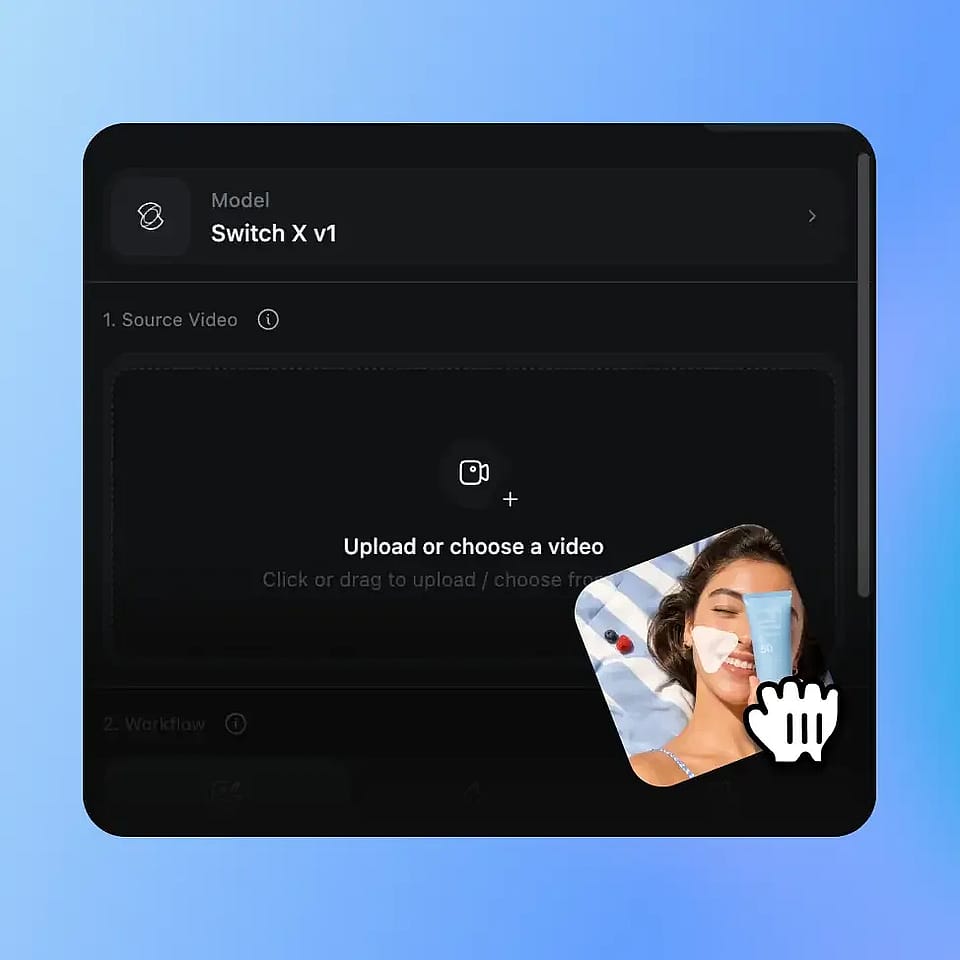
Importe ta vidéo
Importe n'importe quel clip vidéo au format MP4 ou MOV. L'outil fonctionne sur n'importe quelle vidéo, où qu'elle ait été tournée, sans fond vert, sans éclairage spécial ni installation en studio.
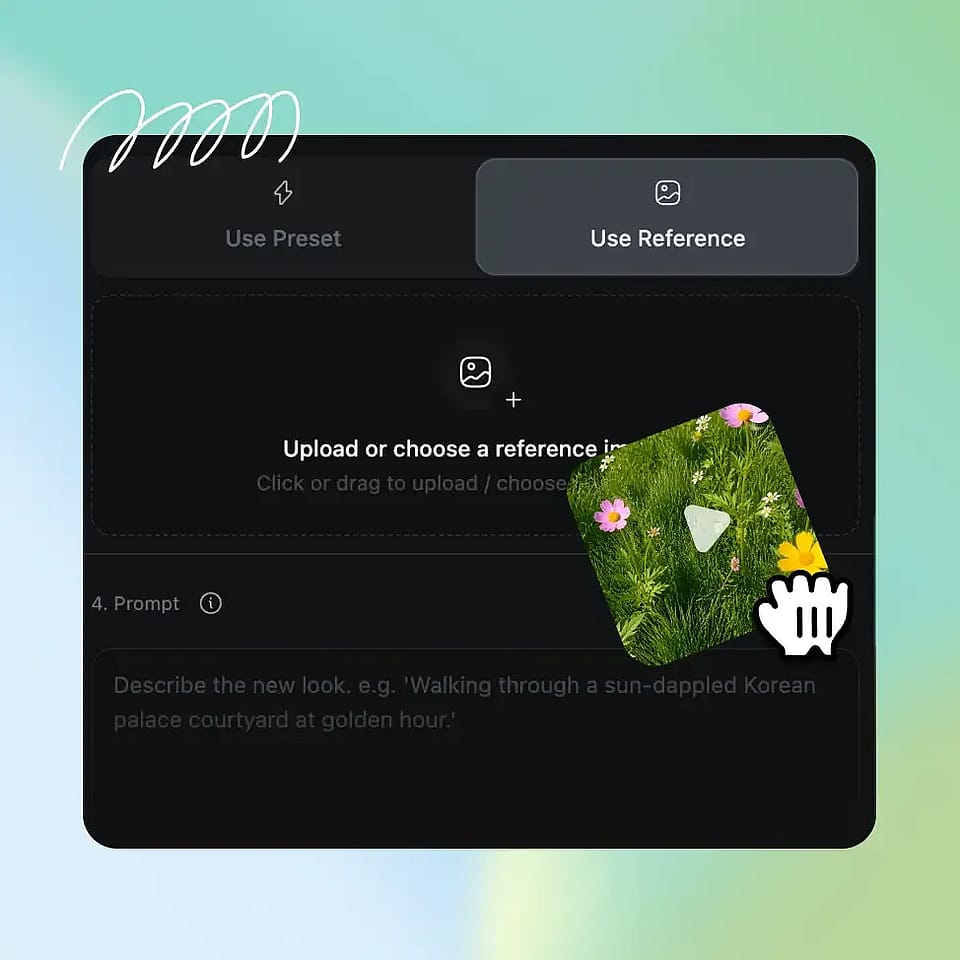
Choisis ou génère ton nouvel arrière-plan
Choisis un préréglage dans la bibliothèque d'arrière-plans sélectionnés d'OpenArt, importe ta propre image de référence, ou génère une toute nouvelle scène avec le générateur d'images IA d'OpenArt. Ajoute un prompt texte optionnel si tu veux peaufiner le rendu.

L'IA construit le nouveau monde derrière toi
L'IA d'OpenArt isole automatiquement ton sujet et remplace tout l'arrière-plan par l'environnement de ton choix. Le résultat est prêt en quelques minutes, sans retouche, sans masquage et sans travail image par image.