

 ChatGPT
 Perplexity
 Claude
 Gemini
Los mejores generadores de imágenes con IA en 2026: 10 herramientas comparadas
OpenArt es nuestra elección para equipos de marketing que comparan los mejores generadores de imágenes con IA para imágenes de producto y campañas recurrentes. Puedes elegir entre modelos de imágenes, trabajar a partir de referencias, editar los resultados y reutilizar activos guardados en la misma cuenta. Eso resulta útil cuando tu brief pide un conjunto completo de imágenes en lugar de una sola.
Otras herramientas encajan con tareas distintas. Vale la pena explorar Midjourney para un estilo visual concreto. ChatGPT Images y Google Gemini encajan con la creación y edición conversacional. Ideogram merece estar en la lista para gráficos con mucho texto, Recraft para recursos vectoriales y Canva para diseños acabados.
Esta guía compara lo que pasa después de escribir el prompt: cómo cambias una imagen, repites un estilo y pagas por el trabajo que realmente puedes usar.
Prueba el brief de tu campaña en el Generador de imágenes con IA.
Aviso: OpenArt publica esta guía y aparece en la comparativa. Las recomendaciones reflejan capacidades documentadas y encaje en el flujo de trabajo. No es un benchmark controlado de calidad de imagen.
¿Qué generador de imágenes con IA es mejor para cada caso de uso?
| Tu tarea principal | Nuestro punto de partida recomendado | ¿Por qué plantearse esta opción? | Qué comprobar |
|---|---|---|---|
| Imágenes de producto y campañas recurrentes | OpenArt | Compara modelos de imagen, edita los resultados seleccionados y reutiliza recursos de marca o de personajes en una sola cuenta | Fidelidad del producto, modelos de Brand Kit compatibles y coste en créditos a lo largo de las revisiones |
| Fotos y cambios de imagen basados en referencias | Google Gemini con Nano Banana | Referencias de imagen, combinaciones de fotos y cambios en lenguaje natural | Versión exacta del modelo y límites de la cuenta |
| Ilustración y exploración visual | Midjourney | Un flujo de trabajo centrado en crear imágenes y controles de estilo | Precisión de las referencias, texto y requisitos de privacidad |
| Imágenes y revisiones mediante conversación | Imágenes de ChatGPT | Desarrolla el brief y pide cambios en la misma conversación | Cambios no solicitados y límites de uso |
| Pósters y gráficos con palabras destacadas | Ideogram | Creación de imágenes orientada al texto y herramientas de diseño | Necesidades de ortografía, maquetación y exportación |
| Trabajo con imágenes dentro de las apps de Adobe | Adobe Firefly | Generación y edición dentro de un flujo de trabajo de Adobe ya establecido | Créditos y condiciones para los modelos de Adobe frente a los de partners |
| Ilustraciones vectoriales y activos gráficos | Recraft | Generación de imágenes y vectores, edición y flujos de exportación | Formato de salida y restricciones comerciales del plan gratuito |
| Exploración visual en directo | Krea | Generación en tiempo real mientras escribes o dibujas | Uso de cómputo y acceso a tus modelos favoritos |
| Publicaciones en redes, presentaciones y diseños terminados | Canva | Recursos visuales generados junto con plantillas y diseños editables | Límites de IA y condiciones específicas de cada recurso |
| Imágenes generadas junto a recursos de stock | Magnific | Generación, edición, mejora de calidad y una biblioteca de recursos | Costes de los modelos y activos incluidos en tu plan |
Usa esta tabla para acotar tu lista. Luego prueba los detalles de los que depende tu proyecto. Un retrato atractivo no te dice si la misma herramienta puede conservar la etiqueta de un envase o hacer una revisión precisa.
¿Deberías comparar modelos de imágenes con IA o plataformas?
Un modelo de imagen genera o edita la imagen. Una plataforma proporciona acceso a modelos, ajustes, herramientas de edición y condiciones de suscripción. Nano Banana y FLUX son familias de modelos. OpenArt, Gemini, ChatGPT y Krea son lugares donde puedes crear imágenes.
Dos plataformas pueden ofrecer el mismo modelo pero con distintos controles de referencia, resoluciones, costes de créditos o flujos de edición. Compara tanto el modelo como el lugar donde lo usas.
Para Nano Banana, anota la versión exacta. La página de imágenes de Google distingue Nano Banana 2 de Nano Banana 2.1 y describe accesos diferentes según sus planes gratuitos y de pago. Una reseña de una versión no debe aplicarse automáticamente a otra.
Con FLUX, distingue entre el acceso alojado y la ejecución de los pesos del modelo por tu cuenta. Black Forest Labs ofrece licencias distintas para cada variante. Por ejemplo, FLUX.2 [klein] 4B usa Apache 2.0, mientras que el uso comercial local de FLUX.2 [dev] requiere la licencia correspondiente. Consulta la información de licencias de Black Forest Labs.
Los 10 generadores de imágenes con IA que debes tener en cuenta
1. OpenArt: crea una campaña con varios modelos
- Ideal para: Imágenes de producto y campañas recurrentes que necesitan varios modelos de imagen, edición y recursos de marca reutilizables
- Precio (comprobado el 21 de octubre de 2026): Starter 14 $/mes (4000 créditos). El uso comercial empieza en Plus (34 $/mes)
- Comprueba antes de confirmar: Fidelidad del producto, modelos de Brand Kit compatibles y coste en créditos a lo largo de las revisiones
El lanzamiento de un producto rara vez necesita una sola imagen. Puede que necesites una escena del producto, un retrato y otra versión con espacio para un titular. OpenArt te permite probar distintos modelos de imagen para esas tareas sin tener que contratar una suscripción aparte con cada proveedor.
La selección de imágenes incluye GPT Image 2.5, Nano Banana Pro, Seedream 5.0 Pro, y FLUX 3 Image. Dale a cada modelo el mismo encargo y las mismas referencias compatibles, y luego compara los detalles que importan para tu proyecto. Puede que el modelo que acierta con la iluminación no sea el que mejor conserva la etiqueta.
Aquí tienes la misma prueba ejecutada en OpenArt con un frasco de sérum ficticio. Cada modelo recibió la misma foto de referencia y el briefing de imagen de producto de la sección de pruebas de abajo.
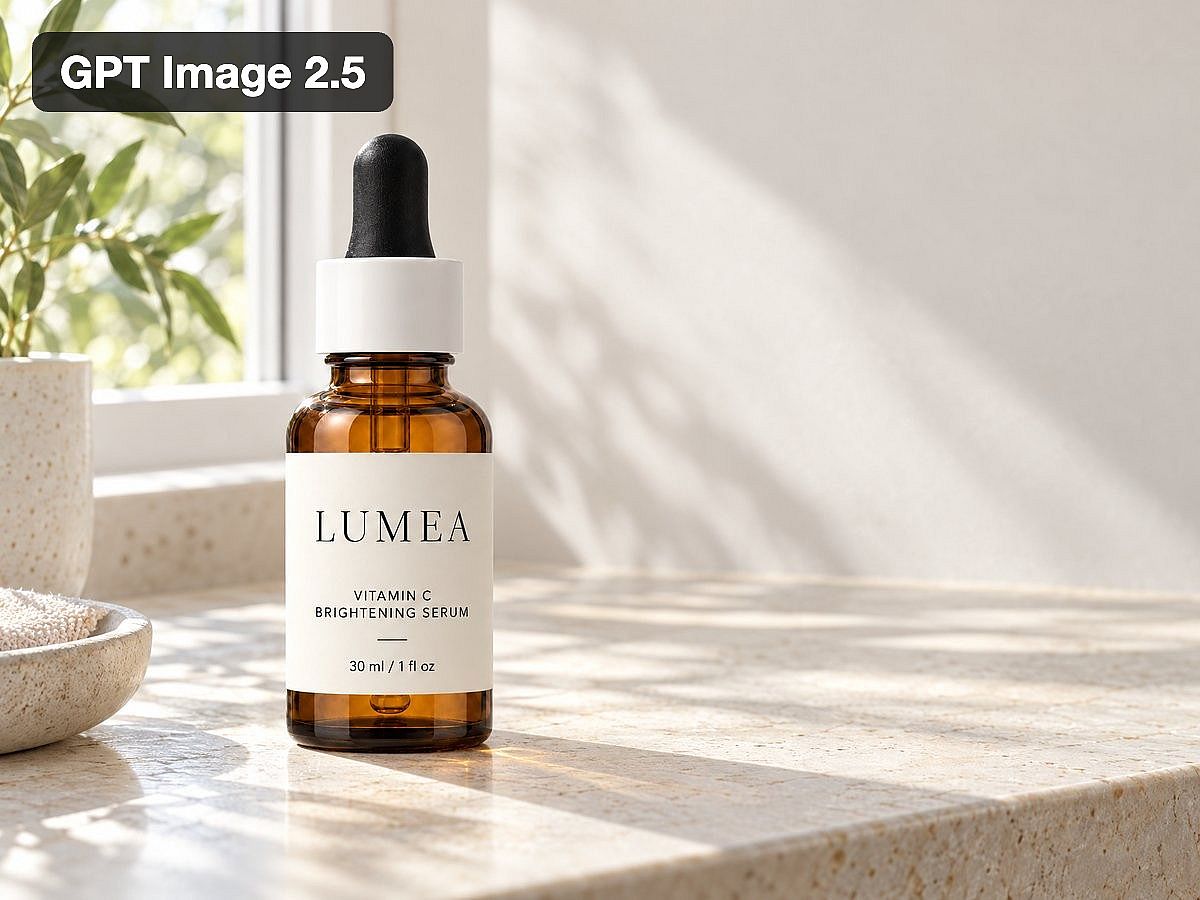
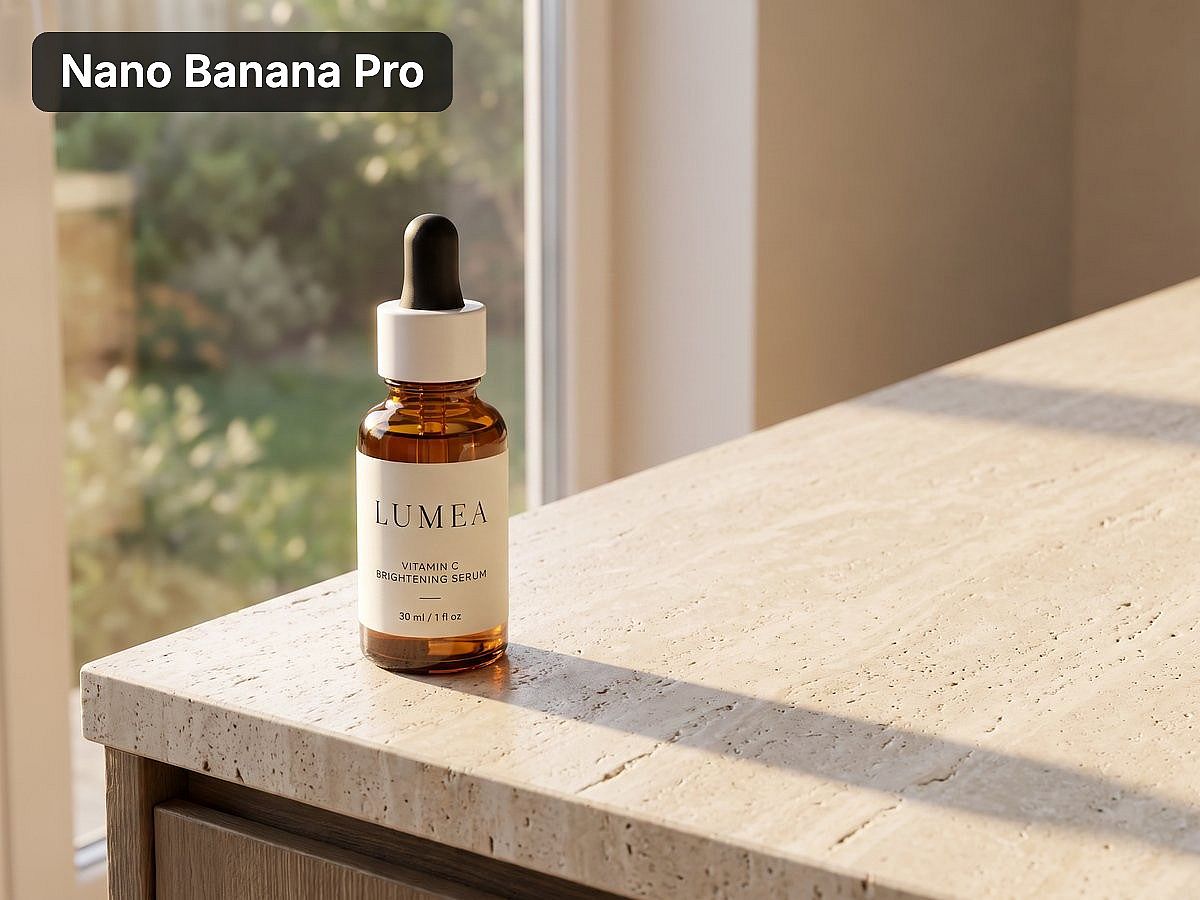
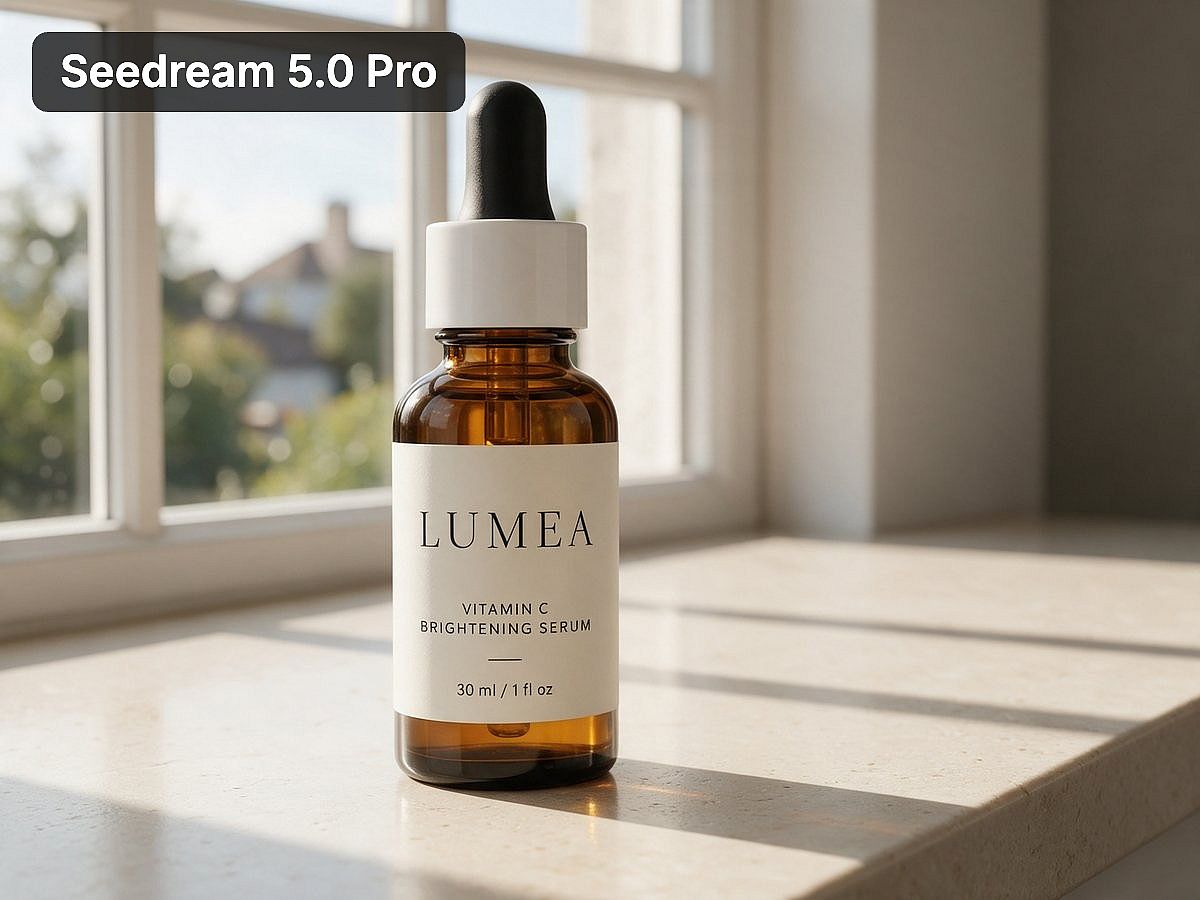
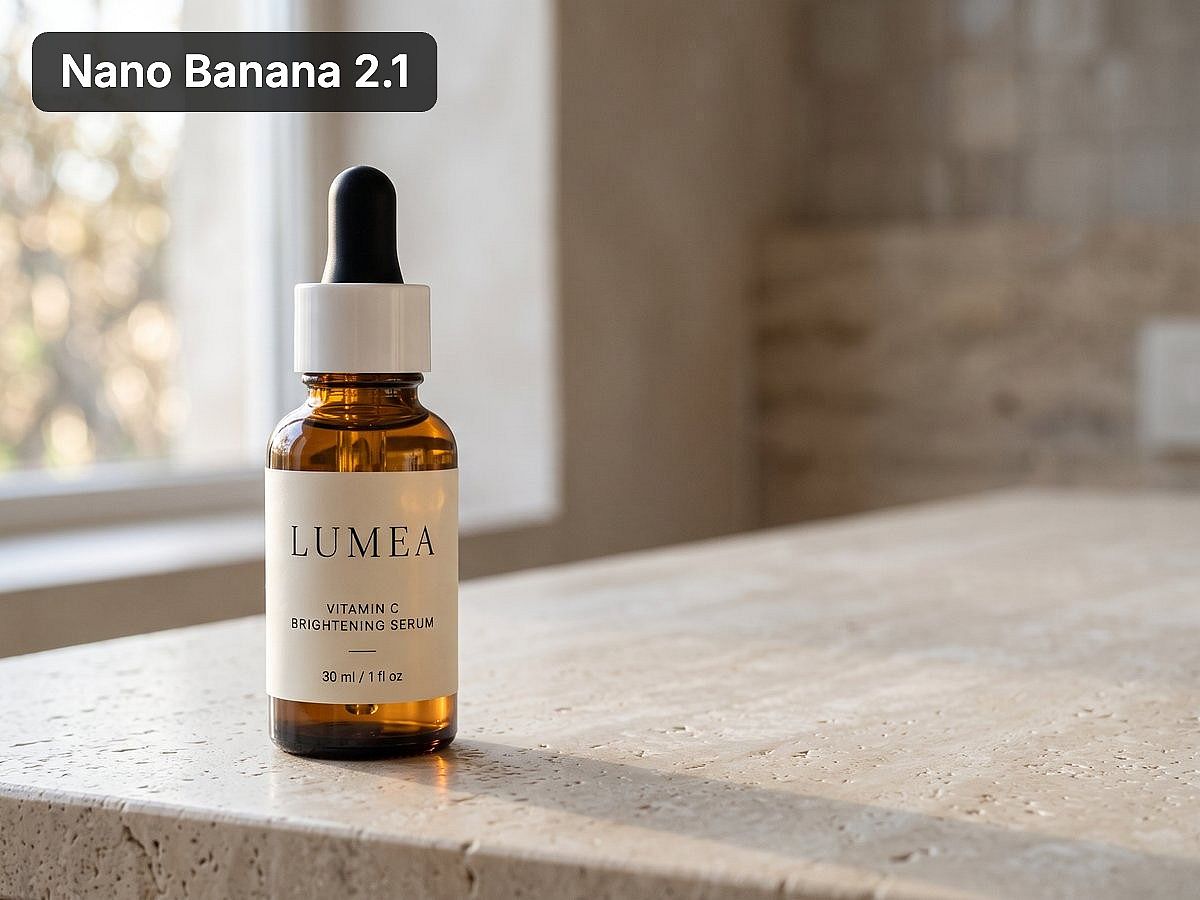
Generado en OpenArt el 21 de octubre de 2026. Intentos únicos, no un benchmark controlado. Tus resultados variarán según el producto y los ajustes.
Para el trabajo orientado a producto, el Generador de imágenes de producto con IA es un buen punto de partida para explorar escenas en torno a tu producto. Aporta una foto de referencia clara y revisa el embalaje, los materiales, los colores y la etiqueta en cada resultado.
Cuando tengas una imagen que quieras conservar, usa las herramientas de edición independientes para perfeccionarla. Editar imagen modifica una imagen existente. Expandir imagen añade espacio alrededor de una composición. Escalar imagen prepara una versión más grande. Elige la siguiente herramienta según el cambio que necesites.
Para trabajos de marca recurrentes, El Brand Kit guarda tu logo, los colores exactos, la tipografía, los recursos, las referencias de estilo y las reglas a nivel de proyecto. Para imágenes, funciona en Crear imagen con GPT Image 2 o GPT Image 2.5. OpenArt Characters te ayuda a reutilizar una persona o mascota reconocible en otras escenas.
Estas funciones son útiles a lo largo de toda una campaña: puedes explorar una dirección, desarrollar las imágenes seleccionadas y llevar los activos guardados a trabajos posteriores. OpenArt también cubre imágenes, vídeo y audio en una sola cuenta cuando tu campaña necesita algo más que imágenes fijas.
El coste depende del modelo, los ajustes y las revisiones. Haz una prueba con un grupo pequeño antes de producir una campaña completa y revisa las etiquetas, los rostros y los detalles de marca en cada imagen final.
Empieza con una foto de producto y dos ideas de campaña. Compara los resultados antes de elegir un plan para producción habitual.
2. Google Gemini: trabaja a partir de referencias con Nano Banana
- Ideal para: Fotos basadas en referencias y cambios de imagen por conversación
- Precio (comprobado el 21 de octubre de 2026): Generación de imágenes gratuita; Google AI Plus 4,99 $/mes; Pro 19,99 $/mes
- Comprueba antes de confirmar: La versión exacta de Nano Banana y los límites de tu cuenta
Gemini te da acceso a las herramientas de imagen Nano Banana de Google dentro de una interfaz conversacional. Sube una foto, pide un cambio o combina referencias para describir el resultado que quieres.
La página de imágenes de Google incluye entre las capacidades de Nano Banana la edición basada en referencias, el renderizado de texto y la coherencia de personajes. Puedes solicitar cambios en la iluminación, los ángulos de cámara o el estilo visual, lo que lo convierte en un buen punto de partida cuando ya tienes una imagen con la que trabajar.
Gemini merece la pena si los modelos de Google cubren tus necesidades y prefieres describir los cambios en una conversación. El acceso a los modelos y los límites dependen de tu cuenta, así que anota la versión usada y comprueba que las revisiones conservan los detalles que querías mantener.
3. Midjourney: explora una dirección visual
- Ideal para: Ilustración, arte conceptual y exploración visual
- Precio (comprobado el 21 de octubre de 2026): Basic 10 $/mes (3,3 horas de GPU rápida, sin modo Relax). El modo Sigiloso requiere Pro o Mega
- Comprueba antes de confirmar: Precisión de las referencias, texto y requisitos de privacidad
Merece la pena plantearse Midjourney cuando tu objetivo principal es desarrollar un estilo: una campaña ilustrada, un entorno de fantasía o una colección de conceptos visuales.
Trae referencias de tu brief real. Compara el ambiente, la composición y el tratamiento del sujeto antes de decidir si el resultado encaja en tu proyecto. Para trabajos de producto, revisa la geometría del packaging y las etiquetas por separado del atractivo visual general.
La privacidad puede influir en la suscripción que necesitas. El Modo Sigiloso está disponible en Pro y Mega, mientras que la generación ilimitada de imágenes mediante el Modo Relax empieza en Standard.
Midjourney es una buena opción para tu lista de candidatos cuando buscas exploración visual. Reserva tiempo para trabajo de diseño adicional si tu entregable final necesita texto editable, detalles precisos del producto o varios tamaños de maquetación.
4. ChatGPT Images: desarrolla imágenes a través de la conversación
- Ideal para: Crea y revisa imágenes en la misma conversación en la que explicas tu encargo
- Precio (comprobado el 21 de octubre de 2026): Acceso gratuito limitado; Plus 20 $/mes con mayor acceso a imágenes
- Comprueba antes de confirmar: Cambios no solicitados tras las revisiones y límites de uso
ChatGPT Images es ideal para quienes quieren describir una imagen, revisarla y explicar los cambios en la misma conversación. Puedes desarrollar el titular o el brief creativo que la acompaña junto con la imagen.
Por ejemplo, puedes comentar una idea de campaña, pedir una imagen y explicar qué te chirría del resultado sin cambiar a un documento de briefing aparte.
Revisa toda la imagen tras una modificación. Una instrucción para cambiar un detalle no sustituye a la comprobación de todo lo que debería permanecer igual. El acceso y los límites de generación de imágenes varían según el plan.
Si ya usas ChatGPT a diario, prueba su flujo de imágenes antes de añadir otra suscripción. Compara otra plataforma cuando necesites modelos de distintos proveedores o una forma diferente de gestionar activos reutilizables.
5. Ideogram: crea gráficos construidos en torno a las palabras
- Ideal para: Pósters, carteles y gráficos con texto destacado
- Precio (comprobado el 21 de octubre de 2026): Plus 20 $/mes (2400 créditos prioritarios y una cola lenta ilimitada)
- Comprueba antes de confirmar: Ortografía, diseño y qué funciones de edición necesitan créditos prioritarios
Ideogram es una de las mejores opciones para carteles, señales y otras imágenes donde el texto visible transmite el mensaje. Su plataforma incluye modelos de imagen, apps de edición y un flujo de trabajo con texto editable.
Usa tu titular real en la prueba. Una herramienta puede gestionar una frase de demostración corta y aun así fallar con una línea más larga, la puntuación o un nombre de marca inusual. Comprueba el resultado al tamaño en que lo verá la gente.
El acceso a la edición importa tanto como la generación inicial. Ideogram indica que algunas funciones de edición requieren créditos prioritarios y no están disponibles en la cola lenta. Incluye esos pasos al calcular cuánto trabajo de campaña cubrirá un plan.
6. Adobe Firefly: crea dentro de un flujo de trabajo de Adobe
- Ideal para: Equipos que ya diseñan y entregan en apps de Adobe
- Precio (comprobado el 21 de octubre de 2026): Standard 9,99 $/mes (2000 créditos generativos)
- Comprueba antes de confirmar: Créditos y condiciones de los modelos de Adobe frente a los modelos de socios
Firefly tiene sentido cuando tu equipo ya edita imágenes y prepara entregables en las apps de Adobe. La conexión con el trabajo de diseño que ya tienes puede importar más que añadir otro generador independiente.
Firefly ofrece modelos de Adobe y modelos de partners. Sus planes diferencian las funciones de imagen estándar de las funciones premium y del uso de modelos de partners.
Compara las funciones incluidas en tu suscripción actual de Adobe antes de comprar acceso adicional. Identifica el modelo detrás de cada generación, ya que los créditos y las condiciones aplicables pueden variar.
Para un equipo que trabaja con Adobe, Firefly merece un hueco en la prueba. Testea todo el recorrido, desde la generación hasta el archivo de diseño final que tienes que entregar.
7. Recraft: genera recursos vectoriales y gráficos
- Ideal para: Ilustraciones vectoriales y activos gráficos
- Precio (comprobado el 21 de octubre de 2026): Plan gratuito (imágenes públicas, no comerciales); Basic 12 $/mes con generación privada y derechos comerciales
- Comprueba antes de confirmar: El formato del archivo exportado en la app donde terminas el diseño
Recraft es una opción práctica cuando necesitas ilustraciones o salida vectorial. Sus herramientas abarcan generación de imágenes y vectores, edición y conversión de archivos.
Empieza por el requisito del archivo. Una imagen que parece una ilustración vectorial es distinta de un archivo vectorial editable. Comprueba el resultado exportado en la app donde vayas a terminar el diseño.
Las imágenes gratuitas de Recraft son públicas y no tienen licencia para uso comercial. Los planes de pago ofrecen generación privada y derechos comerciales para las imágenes creadas durante la suscripción.
Eso hace que el plan gratuito sea útil para explorar el flujo de trabajo, mientras que los proyectos profesionales necesitan un plan cuyas condiciones cubran el uso previsto.
8. Krea: explora imágenes en tiempo real
- Ideal para: Exploración visual en directo mientras escribes o dibujas
- Precio (comprobado el 21 de octubre de 2026): Plan gratuito con 100 unidades de cómputo al día; Básico 9 $/mes (5.000 unidades de cómputo, licencia comercial)
- Comprueba antes de confirmar: Cuántas imágenes terminadas cubre realmente tu asignación de cómputo
En Krea, la imagen cambia a medida que escribes o dibujas. Puedes mover una forma o cambiar un color y ver cómo afecta a la composición. Eso lo hace útil para explorar una idea antes de dedicar tiempo a pulirla.
Krea también ofrece otros modelos de imagen y herramientas de edición. Sus precios se basan en unidades de computación, con una asignación mensual en el plan Basic y una asignación diaria en el plan gratuito.
Prueba el modelo y los ajustes que esperas usar habitualmente. Una cuota de cómputo por sí sola no te dice cuántas imágenes acabadas vas a obtener, sobre todo cuando el flujo de trabajo incluye escalado y cambios repetidos.
9. Canva: termina el diseño alrededor de la imagen
- Ideal para: Publicaciones para redes, diapositivas y diseños finalizados con texto editable
- Precio (comprobado el 21 de octubre de 2026): Pro 144 $/año (EE. UU., facturación anual)
- Comprueba antes de confirmar: Cuotas de IA por plan y complementos de IA con coste adicional
Merece la pena plantearse Canva cuando tu entregable es una publicación para redes, una diapositiva, un folleto u otro diseño con maquetación. Su espacio de trabajo combina herramientas de imagen con plantillas, texto editable y funciones de marca.
Puede que necesites cambiar un precio, mover un titular o adaptar un diseño para otra ubicación. Mantener esos elementos editables te evita tener que regenerar una imagen entera solo para cambiar unas pocas palabras.
El uso de la IA está limitado según el plan y la función. Los precios de Canva también incluyen opciones de IA adicionales que pueden tener un coste extra.
Canva es especialmente relevante cuando la imagen generada forma parte de un diseño más amplio y tu equipo ya remata ese trabajo allí.
10. Magnific: combina la generación con activos de stock
- Ideal para: Proyectos que mezclan imágenes generadas con recursos de stock
- Precio (comprobado el 21 de octubre de 2026): Premium 16 €/mes, o 12 €/mes con facturación anual
- Comprueba antes de confirmar: Los costes de los modelos y lo que incluye tu plan para contenido de stock frente a generación con IA
Magnific, antes Freepik, combina herramientas creativas de IA con una biblioteca de recursos de stock. Su plataforma incluye generación de imágenes, edición y escalado junto a fotos, ilustraciones y otros recursos ya existentes.
Esa combinación resulta útil cuando un proyecto usa imágenes generadas y material con licencia a la vez. Puede que necesites una escena original de producto junto a fondos de stock, elementos de diseño u otros recursos complementarios.
Distingue qué incluye tu plan en cuanto a contenido de stock, generación con IA y modelos concretos. Esas cuotas cubren necesidades distintas, y una gran biblioteca de recursos no te dice cuántas generaciones te permitirá tu modelo favorito.
¿Cuánto cuestan los generadores de imágenes con IA?
Los siguientes ejemplos usan facturación mensual en dólares estadounidenses, comprobado el 21 de octubre de 2026. Comparan planes concretos, no asignaciones de imágenes equivalentes ni el nivel más bajo disponible de cada proveedor.
| Plataforma | Plan mensual seleccionado | Asignación incluida o condición importante |
|---|---|---|
| OpenArt | Starter: 14 $ | 4.000 créditos mensuales. El uso comercial empieza en Plus (34 $/mes, 12.000 créditos) |
| Google Gemini | Google AI Plus: 4,99 $; Pro: 19,99 $ | Los planes de pago amplían el acceso; los límites de imágenes y la disponibilidad de modelos dependen del plan |
| Midjourney | Basic: 10 $ | 3,3 horas de GPU rápida; sin Modo Relax en Basic |
| ChatGPT | Plus: 20 $ | Acceso ampliado a la generación de imágenes; se aplican límites de uso |
| Adobe Firefly | Standard: 9,99 $ | 2.000 créditos generativos mensuales y funciones estándar de imagen ilimitadas |
| Ideogram | Plus: 20 $ | 2.400 créditos prioritarios al mes y una cola lenta ilimitada, con restricciones de funciones |
| Recraft | Basic: 12 $ | 1.000 créditos mensuales, generación privada y derechos comerciales |
| Krea | Basic: 9 $ | 5.000 unidades de cómputo al mes y una licencia comercial |
La página de Canva en EE. UU. muestra Pro a 144 $ facturados anualmente. La página de Magnific revisada muestra Premium a 16 € con facturación mensual, o 12 € al mes con facturación anual. Estas cifras se mantienen separadas porque la base de facturación o la moneda difieren.
Fuentes de precios: OpenArt, Google, Midjourney, OpenAI, Adobe, Ideogram, Recraft, Krea, Canva, y Magnific.
Compara el coste por imagen aprovechable, incluidos los intentos y las ediciones necesarios para producirla. Los créditos de distintas plataformas no son intercambiables.
Por ejemplo, si una sesión de prueba cuesta 6 $ y produce tres imágenes que puedes usar, el coste de generación es de 2 $ por imagen aprovechable. Es un cálculo ilustrativo, no un resultado medido de ningún proveedor.
Para campañas recurrentes, registra también el tiempo de edición. Un precio de suscripción más bajo puede resultar menos útil si cada imagen de producto necesita muchos arreglos antes de su aprobación.
¿Qué generador de imágenes con IA gratuito deberías probar?
Prueba OpenArt si quieres comparar distintos modelos con tu propio brief. Gemini y ChatGPT son ideales para la creación de imágenes conversacional, mientras que Krea te deja explorar ideas en tiempo real. El acceso gratuito te ayuda a probar el flujo de trabajo antes de contratar una suscripción.
Las nuevas cuentas de OpenArt reciben 40 créditos gratis para probarlo, sin necesidad de tarjeta de crédito. El uso comercial empieza en el plan Plus.
Gemini ofrece generación y edición de imágenes gratis, con acceso ampliado a través de los planes de pago de Google AI. Krea incluye 100 unidades de cómputo al día en su plan gratuito. ChatGPT también ofrece creación de imágenes limitada en su plan gratuito.
Usa el acceso gratuito para probar la tarea por la que acabarías pagando. Para una campaña de producto, sube la referencia real de tu producto y pide una revisión. Para un personaje recurrente, prueba una segunda pose o escenario.
La generación gratuita y el permiso para publicar con fines comerciales son cuestiones distintas. Antes de usar un resultado en un anuncio o una entrega a cliente, elige un plan cuyos términos cubran ese uso.
Prueba tu primera imagen de producto en Generador de imágenes con IA.
¿Qué generador de imágenes con IA es mejor para equipos de marketing y creatividades publicitarias?
Los equipos de marketing deberían comparar la repetibilidad, el control de revisiones y el coste por imagen utilizable junto con la calidad de imagen. Una herramienta útil debe ayudarte a producir los próximos diez recursos, no solo la primera imagen bonita.
Un profesional del marketing que hablaba de herramientas de imagen en Reddit describió el problema central como el de reproducir una y otra vez un estilo de marca existente, incluso cuando las imágenes individuales quedaban bien. Eso es un requisito distinto del realismo general. Lee la conversación.
Haz estas cuatro comprobaciones:
| Requisito | Qué probar |
|---|---|
| Precisión del producto | Mantén reconocibles la forma del embalaje, la etiqueta, el logotipo y el color del producto a lo largo de las revisiones |
| Coherencia de marca | Genera varias imágenes que sigan las mismas referencias visuales y reglas de marca |
| Control de revisiones | Cambia un detalle solicitado e inspecciona las partes que deberían permanecer sin cambios |
| Coste de entrega | Registra los costes de generación, los resultados rechazados, el tiempo de edición y las imágenes finales utilizables |
Para fotografía de producto, decide si el producto puede regenerarse o no. Si el empaquetado original debe permanecer intacto, mantén la fotografía original del producto en la composición final y usa la IA para la escena que lo rodea.
Una conversación aparte sobre anuncios de producto deja esa distinción explícita: el comprador quería entornos realistas conservando el producto original, etiquetas nítidas y la geometría del embalaje. Lee la conversación.
Vale la pena probar OpenArt cuando tu campaña necesita distintos estilos de imagen y recursos reutilizables. Puedes comparar modelos para la imagen inicial, usar las herramientas de edición para los cambios e incorporar referencias guardadas en trabajos posteriores.
A nivel de proyecto Kit de marca te ayuda a aportar referencias de marca al usar un modelo de imagen compatible. Usa OpenArt Characters cuando una persona o mascota recurrente forma parte de la campaña.
Compara un brief de producto, una revisión y una segunda imagen de campaña antes de lanzarte a un lote más grande. Los resultados te mostrarán si el flujo de trabajo encaja con los estándares y plazos de tu equipo.
¿Cómo puedes comparar tú mismo los generadores de imágenes con IA?
Ejecuta las mismas tres tareas en cada herramienta preseleccionada. Mantén iguales los archivos de referencia y el tamaño de salida solicitado, y anota el modelo exacto.
-
Crea una imagen de producto basada en referencias. Sube una foto del producto. Pide un entorno realista, una buena visibilidad del producto y espacio para un titular. Revisa la etiqueta y la geometría.
-
Solicita una única revisión concreta. Pide cambiar solo el color del fondo. Compara el resultado con el original para detectar cambios no deseados.
-
Crea un segundo recurso de campaña. Pide otra composición con el mismo producto y las mismas referencias visuales. Comprueba si las dos imágenes parecen de la misma campaña.
Registra el prompt, los ajustes, la fecha, el coste de generación, el número de intentos y las ediciones finales. Guarda también los resultados fallidos. Revelan si un flujo de trabajo es lo bastante fiable para tu fecha límite.
Para la prueba de imagen de producto, puedes empezar con este briefing. Adáptalo a tu producto y usa un modelo que acepte referencias de imagen:
Crea una imagen de estilo de vida realista usando la foto de producto subida como referencia. Coloca el producto sobre una encimera de piedra clara junto a una ventana, con luz suave de la mañana y sombras naturales. Mantén la forma del producto, el color del embalaje, el logotipo y la etiqueta lo más fieles posible a la referencia. Deja espacio despejado a la derecha para un titular. No añadas texto ni productos adicionales.
Luego solicita un cambio limitado:
Cambia solo el fondo de piedra clara a azul pálido. Mantén el producto, la etiqueta, la posición de la cámara y la iluminación sin cambios.
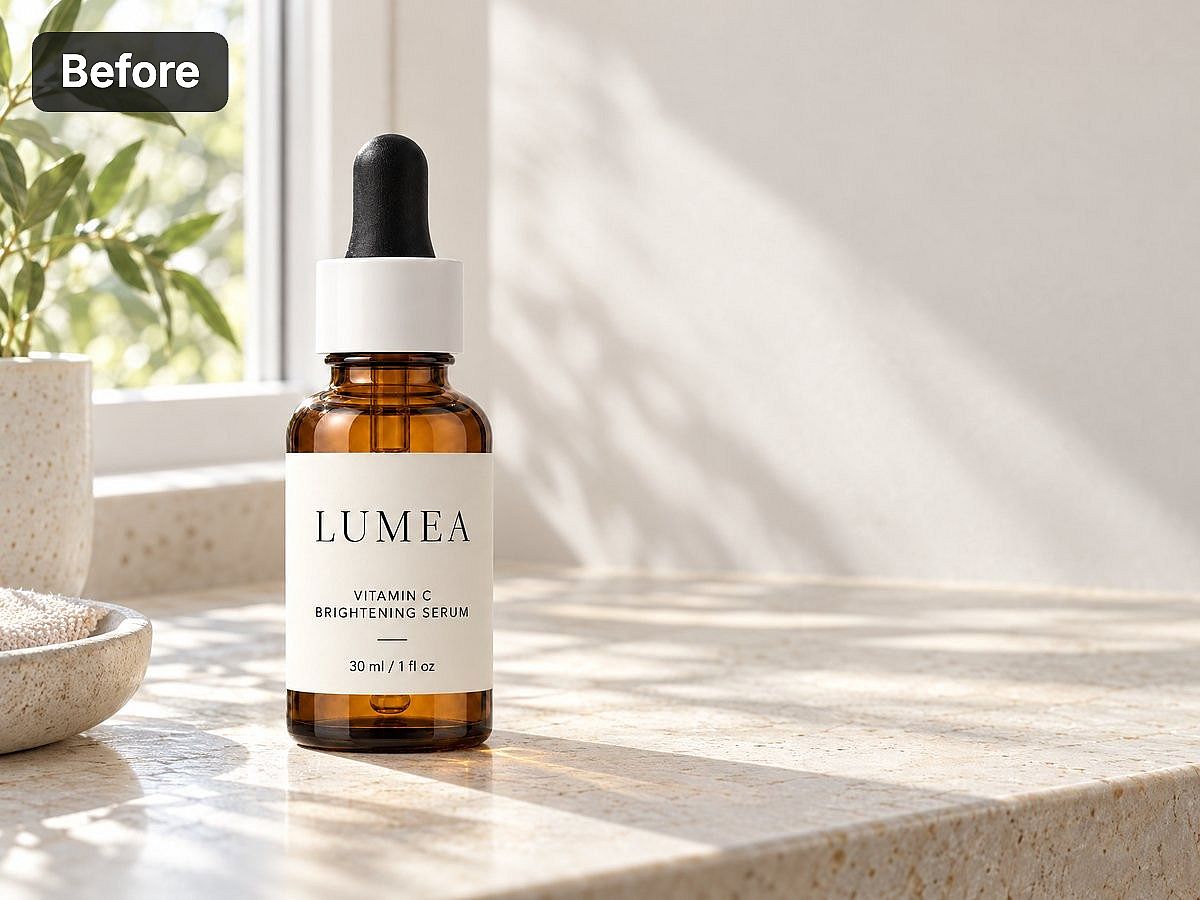
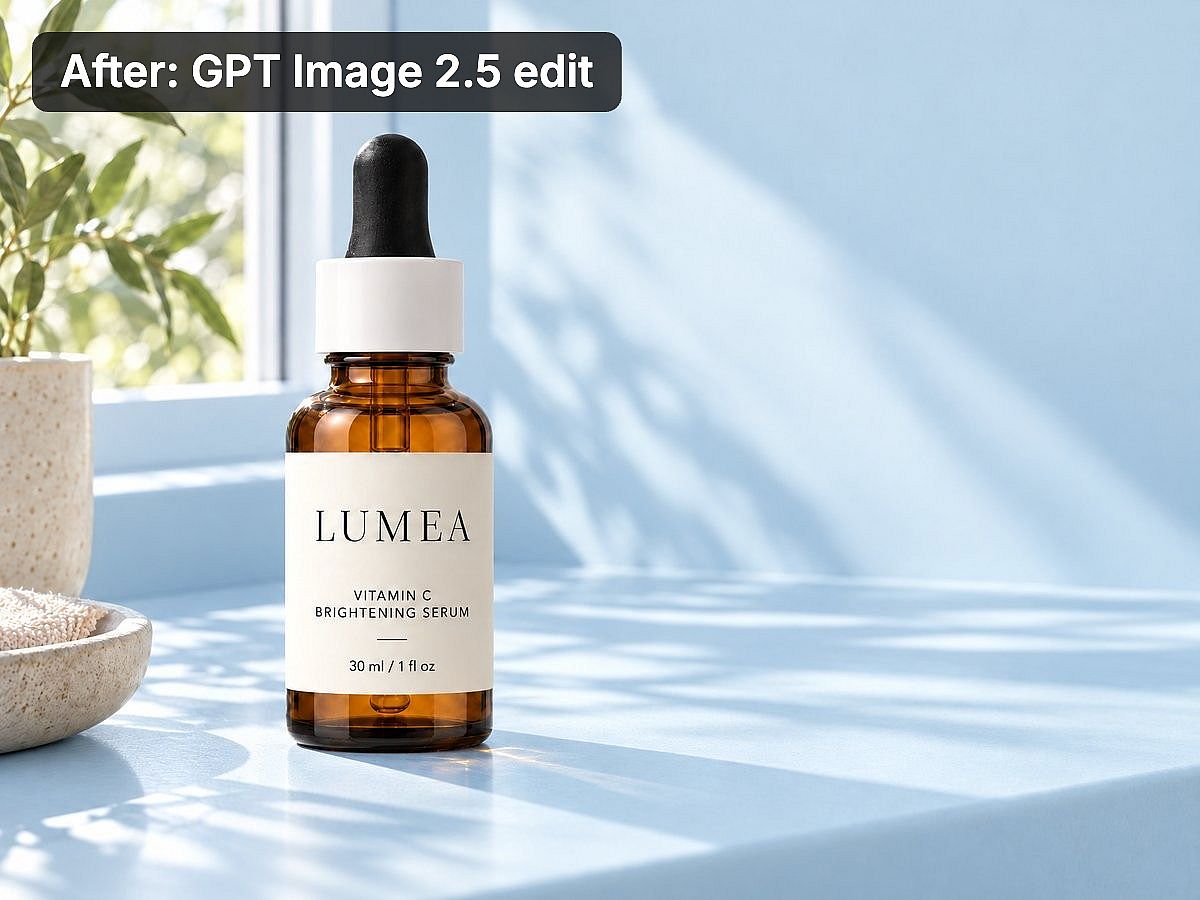
En este ejemplo, la etiqueta, la posición de la botella y la iluminación se mantuvieron cercanas al original. Compara siempre ambas versiones antes de usar la edición.
Estas instrucciones son una prueba del comportamiento del modelo, no una garantía de que todos los detalles permanezcan sin cambios. Compara el resultado con tu referencia original antes de usarlo.
Preguntas frecuentes
¿Cuál es el mejor generador de imágenes con IA para fotos realistas?
Empieza comparando los modelos Nano Banana, las herramientas de imagen de ChatGPT y los modelos relevantes disponibles en OpenArt. Usa tu sujeto y tus referencias reales. Revisa la anatomía, los reflejos, la textura y la iluminación antes de decidir qué resultado es más convincente.
Un modelo que resuelve bien los retratos puede rendir de forma distinta con joyería, embalajes transparentes o una habitación con espejos. En OpenArt puedes comparar distintos modelos para esos temas dentro de la misma cuenta.
¿Cuál es el mejor generador de imágenes con IA para texto?
Ideogram es un buen punto de partida para gráficos basados en texto. Nano Banana y los modelos de imagen de GPT también merecen una prueba con las palabras exactas de tu brief.
Para precios, avisos legales o textos que deban revisarse repetidamente, mantén el texto final editable en una herramienta de diseño. Revisa cada versión publicada.
¿Qué generador de imágenes con IA es mejor para personajes consistentes?
Vale la pena considerar OpenArt cuando quieres guardar y reutilizar una persona o mascota reconocible mediante OpenArt Characters. Los modelos basados en referencias ofrecen otra forma de guiar la apariencia.
Prueba el personaje en una pose, un atuendo y un entorno diferentes antes de producir una serie. Una sola imagen lograda no garantiza consistencia en los tres cambios.
¿Qué generador de imágenes con IA es mejor para fotografía de producto?
OpenArt es un buen punto de partida cuando quieres comparar modelos, probar distintas escenas de producto y desarrollar imágenes seleccionadas con herramientas de edición. Usa la foto real de tu producto como referencia siempre que el modelo lo permita.
Si el producto original debe quedar completamente intacto, conserva esa fotografía en la composición final. Comprueba las etiquetas, proporciones, materiales y colores antes de publicar una imagen de producto.
¿Puedo usar imágenes generadas con IA con fines comerciales?
Los permisos comerciales dependen del proveedor, el modelo, el plan y el uso previsto. En OpenArt, el uso comercial está incluido en los planes Plus y superiores. Starter no incluye uso comercial.
El acceso gratuito por sí solo no concede permiso comercial. Recraft, por ejemplo, distingue sus resultados gratuitos no comerciales de las imágenes generadas en planes de pago. Revisa los términos aplicables antes de usar una imagen en publicidad de pago, trabajo para clientes o un producto que vendas.
¿Debería elegir una plataforma multimodelo o una herramienta de un solo proveedor?
Elige una plataforma multimodelo cuando necesites comparar distintos modelos o usar modelos diferentes para tareas diferentes. Elige una herramienta especializada cuando su flujo de trabajo ya cubra tus necesidades.
Para campañas recurrentes, incluye en la decisión el coste de las ediciones y la reutilización de recursos. OpenArt combina la elección de modelos con herramientas de imagen independientes y recursos de marca o personajes reutilizables, por lo que merece la pena probarlo con un brief completo.
¿Qué generador de imágenes con IA merece la pena pagar?
Si produces imágenes de campaña con regularidad, merece la pena probar OpenArt para el trabajo entre el primer prompt y el set final. Puedes comparar modelos, desarrollar una imagen seleccionada con herramientas de edición y reutilizar recursos de marca o personajes en el siguiente proyecto.
Empieza con un briefing que ya tengas que entregar. Crea una imagen, pide un cambio concreto y genera una segunda composición. Controla los créditos y el tiempo que dedicas a pulir detalles. Eso te da una base mejor para elegir una suscripción que una galería con los mejores resultados de otra persona.
Las cuentas nuevas de OpenArt reciben 40 créditos gratis, sin necesidad de tarjeta. Úsalos para probar tu flujo de trabajo. Para anuncios publicados y entregas a clientes, el uso comercial empieza en Plus (34 $/mes).
Crea tu primera imagen de campaña con el Generador de imágenes con IA, luego comparar planes para la producción habitual.