

 ChatGPT
 Perplexity
 Claude
 Gemini
Higgsfieldは、シネマティックなAI動画やダイナミックなカメラワーク、SNS向けコンテンツを作りたいクリエイターの間で瞬く間に注目を集めています。その映像エフェクトは、短尺動画やクリエイティブな実験の定番ツールとしての地位を確立しました。
しかし、ほとんどのクリエイティブなワークフローには、シネマティックな動画だけでは足りません。最初のアイデアから完成した投稿までのどこかで、たいてい画像を生成したり、写真を編集したり、商品カットを仕上げたり、広告バリエーションを作成したりする必要があります。しかも、その多くが同じ午後のうちに。そのギャップこそが、人々がHiggsfieldの代替を探す理由です。動画のステップだけでなく、ワークフロー全体をカバーできるものを求めているのです。
このガイドでは、AI画像・動画・マーケティングコンテンツ制作に使えるHiggsfieldの代替ツールを比較します。
Higgsfieldとは?
Higgsfieldは、画像とpromptから映画のような動画を生成することを軸にしたAIクリエイティブプラットフォームです。急成長を遂げており、2026年1月には評価額13億ドルでシリーズAの追加ラウンドとして1億3,000万ドルを調達しました。 Reuters の報道によると 当時のこと、そして TechCrunchはユーザー数を1,500万人以上と報じました 同じカバレッジで。次のような点で知られています:
- AIによる画像から動画への生成
- シネマティックなカメラワーク
- SNS動画エフェクト
- クリエイティブな動画テンプレート
- バズるAI動画スタイル
静止画を動きのある動画に変えたいクリエイターにとって、Higgsfieldは見栄えのする結果をすばやく得られる手軽な選択肢です。ただ、幅広いフォーマットで制作するクリエイターは、これと併せてもっと汎用的なプラットフォームが必要になることが多いでしょう。
なぜHiggsfieldの代替を探すのか?
1. AI動画生成以上のものが必要なとき
現代のクリエイティブ制作が1つのフォーマットで完結することはめったにありません。典型的な1週間では、インスピレーションのための画像生成、既存写真の編集、商品ビジュアルの制作、SNS素材のデザイン、静止画から動画へのアニメーション化を、しかも同じキャンペーン内でこなすこともあります。画像生成と動画生成の両方をカバーするプラットフォームなら、ワークフローを圧迫するツールの切り替えを減らせます。
2. 料金と無料プランの制限
AI 制作プラットフォームの料金体系はさまざまで、目立つ数字よりも細かい部分が重要になります。Higgsfield は2025年後半に料金を再構築し、無料プランを廃止しました。そのため今から始めるには、最初から有料プラン(Starter、Plus、Ultra、あるいはシート単位の Business プラン)を選ぶ必要があります。参照: 2026年版Higgsfieldの代替ツール比較。登録時には年間請求がデフォルトになっている設定でもあり、 詳細な料金内訳を一つ 気づかずにクリックで進んでしまいやすいと指摘されています。クレジットのコストもモデルや解像度によって大きく変わります。標準モデルのクリップは数クレジットで済むこともありますが、プレミアムモデルは1回の生成で数十クレジットを消費することもあり、未使用のクレジットは繰り越されず更新時に失効します。
だからといって、適した用途にとってHiggsfieldが割に合わないわけではありません。ただ、実際のコストはプラットフォームに入り、使用量をプランと照らし合わせて初めて見えてくるということです。ツールを選ぶ前に、実際に必要な生成回数、前払いなしで試せるかどうか、画像生成と動画生成が一括請求か別々に請求されるかを確認しておく価値があります。
ツール間の料金をより詳しく見るには、こちらのガイドをご覧ください: 2026 年ベスト AI ジェネレーター:機能・料金・コスト比較.
3. 初心者には学習コストが高い
Higgsfield自身のレビュー: Trustpilot と G2 はこの点で意見が分かれています。多くのレビュアーはインターフェースを、クリーンですぐに使いこなせると評しています。一方で、同じレビュー群の中には、慣れないうちは分かりづらいと語る人もいます。特に、狙ったショットにどのモードやカメラコントロールが合うのかを見極める部分です。ならし期間をあまりかけずに新メンバーへ手渡せるツールを求めているなら、この評価のばらつきは、導入を決める前に自分のチームの経験と照らし合わせて検討する価値があります。
4. マーケティングチームには柔軟なクリエイティブツールが必要
AIは、商品広告やソーシャルキャンペーンから、プロモーション用ビジュアル、ブランドコンテンツ、マーケティング動画まで、商業コンテンツ制作に欠かせない存在になりました。優れたHiggsfield代替ツールには、クリエイティブな探求フェーズと、マーケティングチームが日々こなす制作作業の両方をサポートすることが求められます。
Higgsfieldの代替ベスト
1. OpenArt:画像・動画・音声を作れる最高のオールインワンAI制作プラットフォーム
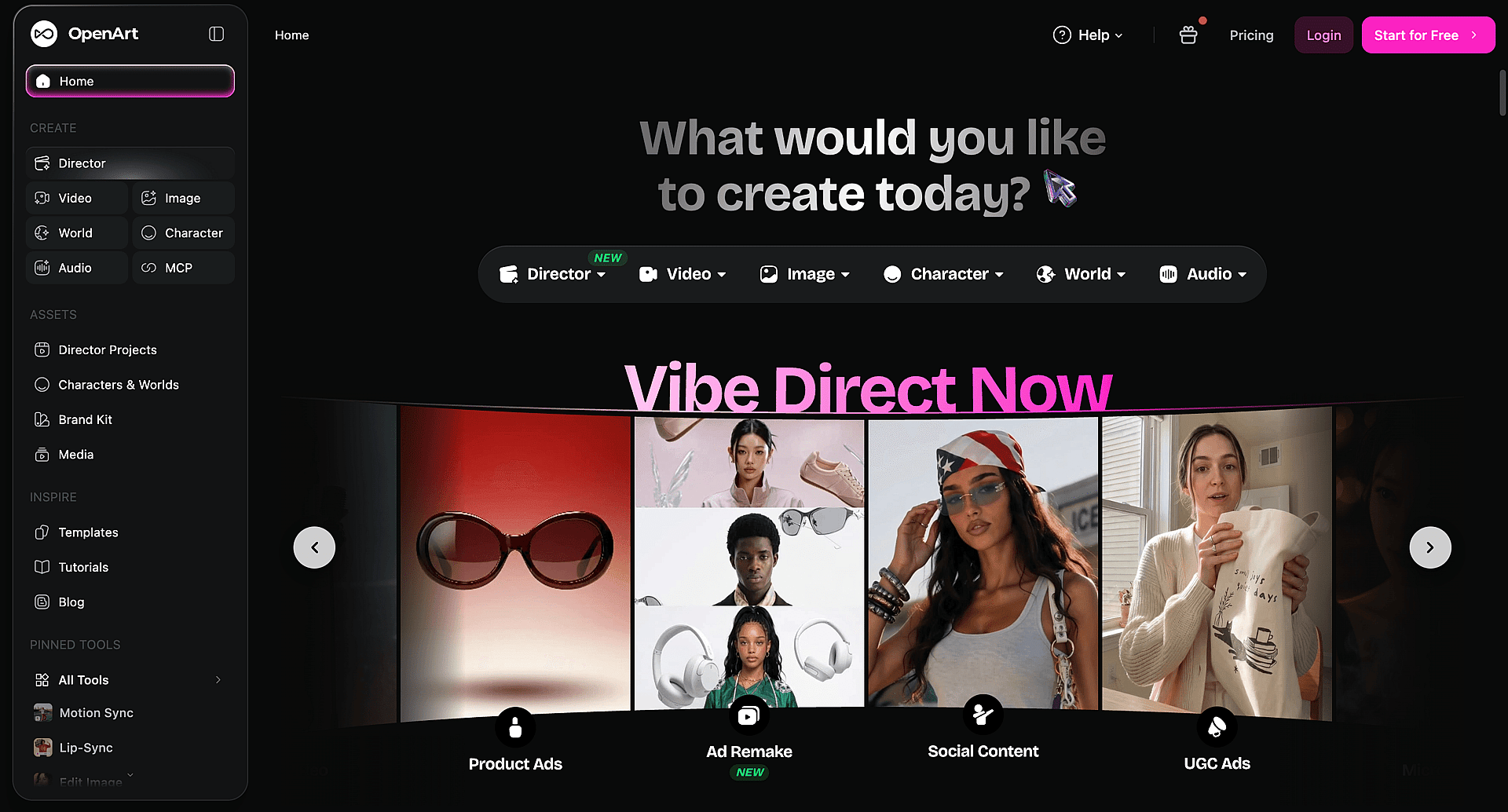
おすすめ用途: 一部の機能だけでなく、AIクリエイティブのワークフロー全体を必要とするクリエイター、マーケター、企業。
OpenArtは、AI画像生成、画像編集、動画制作をひとつのプラットフォームに統合しています。映画的な動画エフェクトだけにとどまらず、クリエイティブのプロセス全体をカバーします:
- 作成 テキストや参照画像からAI画像を生成
- 写真の編集と変換
- 生成 画像から動画へのコンテンツ
- どんな曲でも変身 同期されたAIミュージックビデオ
- シネマティックに演出 AI ビジュアルエフェクト
- 作成 一貫したキャラクターデザイン
- 制作する マーケティングビジュアル
- 横断して作業 複数のAIモデルをひとつの場所で
Higgsfieldの代替としてOpenArtを選ぶ理由
1. 画像も動画も作成できる
多くのクリエイターは、動画が必要になる前にまず画像から始めます。OpenArtならそれを一つの流れにまとめます。画像を生成またはアップロードし、編集・調整して、そのまま動画に変換。ツールを切り替えたり、再アップロードしたりする必要はありません。
2. まずは無料で開始、事前のプラン契約は不要
Higgsfieldの有料のみの登録とは違い、OpenArtではすぐに生成を始められるクレジットが付与されます。どのプランが自分の利用量に合うか決める前に、画像・動画・編集のワークフローを試せます。
3. 動画優先のツールにはできない、より深い画像編集を
基本的なレタッチにとどまらず、OpenArtの編集スイートはインペインティング、背景・オブジェクトの削除、スタイル転送、検索置換編集、マルチレイヤー合成に対応。生成して終わりではなく、じっくり画像を仕上げたい人のために作られたツールです。
4. OpenArtを普段使っているツールに取り込む
OpenArt MCPを使えば、Claude、ChatGPT、Cursorの中で直接画像や動画を生成でき、チャットを離れることなく既存のOpenArtライブラリを参照素材として引き込めます。これはHiggsfieldが現在提供していないワークフローです。
5. 描き直さずにキャラクターの一貫性を保つ
Character Builderは被写体を一度保存すれば、シーンやフォーマットをまたいで再利用できます。シリーズものコンテンツ、ブランドマスコット、同じ顔やキャラクターを複数回登場させたいプロジェクトに便利です。
6. マーケティングにそのまま使えるビジュアルコンテンツを作成
ソーシャル動画にとどまらず、OpenArtは製品画像、広告ビジュアル、ソーシャルグラフィック、キャンペーンコンセプトなど、チームが実際に世に出す必要のあるクリエイティブアセットに対応します。単なる試作用ではありません。
7. 複数のクリエイティブなワークフローを一か所で探索
画像生成、編集、動画作成にそれぞれ別のツールを使う必要はありません。OpenArtなら、この3つがすべて1つに。実際に試してみませんか? OpenArtを無料で試す → して、同じダッシュボードから画像と動画の生成を始めましょう。
2. Runway:プロ向けAI動画制作に最適
おすすめ用途: 映像作家や上級動画クリエイター向け。
Runwayはテキストから動画への生成、画像から動画への変換、AIによる動画編集、視覚効果を中心に据えた、AI動画分野で最も定評のあるサービスの一つです。プロ向けの動画制作に特化した作業がメインなら、専用ツールとして有力な選択肢です。一方で、動画と並行して本格的な画像生成のワークフローも必要なクリエイターは、オールインワンのプラットフォームを選ぶ傾向にあります。
3. Kling AI:リアルなAI動画に最適
おすすめ用途: リアルな動きと映画のようなシーン。
Kling AIは、リアルなAI動画で評判を築いてきました。自然な動き、緻密な環境、映画のような映像品質が特徴です。幅広い画像&動画ツールキットというより、ストーリーテリングや動画生成でリアルさを最優先するクリエイターにぴったりの選択肢です。
4. Pika:手軽なAI動画エフェクトに最適
おすすめ用途: SNS クリエイター向け。
Pikaはスピード重視で作られています。人気の用途は画像アニメーション、クリエイティブなエフェクト、短いバズ動画、手軽なSNSクリップなどです。急な学習曲線なしで、素早く手軽にAI動画エフェクトを使いたいクリエイターには、なかなかの選択肢です。
5. Luma AI:シネマティックな AI シーンに最適
おすすめ用途: ビジュアルストーリーテリング。
Luma AI はシネマティックなシーンの生成に注力しています。リアルな環境、カメラワーク、AI 生成の映像シーケンスなどです。ストーリー主導の動画に取り組むクリエイターは、まさにそのシネマティックな質感を求めて Luma AI を選ぶ傾向があります。
Higgsfield vs OpenArt:機能とパラメーターの比較
| カテゴリー | Higgsfield | OpenArt |
|---|---|---|
| 主なフォーカス | 映画のようなAI動画生成とカメラ操作 | AI画像・動画・音声生成をまとめて |
| 無料プラン | 2025年末の価格改定以降はなし。有料プランのみ | クレジット制の無料プランですぐに生成スタート |
| エントリー向け有料プラン | Starterプラン、月額15ドルと報告されています | スタータープランは月額$13。詳細は 現在の料金 プランの詳細はこちら |
| サインアップ時のデフォルト請求設定 | 年間請求がデフォルトで選択済み | 課金オプションについては料金ページをご覧ください |
| モデルのアプローチ | 複数のサードパーティモデルを1つのサブスクリプションに集約 | 複数のサードパーティおよび自社モデルを1つのサブスクリプションに集約 |
| AI画像生成 | 利用可能。動画に次ぐ二次機能として位置づけ | コア機能として利用可能 |
| AI画像編集 | 画像編集(ブラシによるインペインティング)、フェイススワップ、アップスケーリング | インペインティング、背景・オブジェクト削除、スタイル転写、検索・置換、マルチレイヤーブレンド |
| 画像から動画へ | 利用可能 | 利用可能 |
| テキストから動画へ | 利用可能 | 利用可能 |
| キャラクターの一貫性 | Soul ID | キャラクタービルダー |
| マーケティング/広告ワークフロー | Marketing Studio、URLから商品広告動画へ | 商品広告・マーケティングビジュアルの生成 |
| エージェント/IDE連携 | 不明 | OpenArt MCP Claude、ChatGPT、Cursor向けコネクタ |
独立系の動画比較で明らかになったこと
文章での比較には限界があります。だからこそ、まったく同じプロンプトを両方のプラットフォームで実行し、その結果を見比べてみる価値があります。ある注目を集めた 動画の並列比較、あるクリエイターがHiggsfieldとOpenArtを、出力品質・価格・インターフェース・サポートの応答速度の面で直接比較しました。
OpenArtに必ずしも有利ではないものも含め、いくつか特に触れておきたいポイントがあります:
- どちらのプラットフォームもアグリゲーターであり、モデルの所有者ではありません。 Neither Higgsfield nor OpenArt trains the underlying video and image models — both route your prompt to outside services like Seedance, Nano Banana, or GPT Image. The reviewer's point: if you only ever use one specific model, going straight to that model's own service can work out cheaper than paying a platform on top of it. The case for using a platform at all shows up when a workflow needs several models in sequence, say, one for the image, another for the video, another for the edit, without juggling separate subscriptions and browser tabs for each.
- 両プラットフォームは非常に近く、乗り換えてもメリットが出ることはほとんどありません。 レビュアーの見解では、すでにHiggsfieldやOpenArtに慣れているなら、わずかな違いだけのために移行する理由はほとんどないとのことです。
- テスト時点では価格面でOpenArtが有利でした。 同じpromptで15秒・4KのクリップをSeedance 2.0で生成したところ、レビュアーのコスト分析では、OpenArtのプランはHiggsfieldよりも明らかに安く仕上がりました。またレビュアーは、両プラットフォームともcreditの料金が時間とともに変動するため、確認するタイミングによっては差が縮まったり、逆転したりする可能性があると指摘しています。
- 最大の課題はインターフェースの複雑さでした。 レビュアーは Higgsfield のインターフェースを、初めて使う人には雑然として戸惑いやすいと評しました。OpenArt のレイアウトはより始めやすいものの、それでも独自の学習コストはあるとしています。
- 機能が重複しています レビュアーは、Higgsfieldが個別の名前を付けた機能を数多く並べているものの、それらが互いに非常に似た結果を出すことが多いと指摘し、現在利用できる他のものと比べて時代遅れに感じる機能がいくつかあると述べました。
補足として、レビュアーは両プラットフォームとアフィリエイト関係にあることを明かしており、視聴者がどちらを選んでも報酬を得られます。それでバイアスがなくなるわけではありませんが、少なくともOpenArt寄りの結論が金銭的な動機から一方に肩入れしているわけではないことを意味します。
これは上記の主要な推奨事項を変えるものではありません。ワークフローが複数のモデルやフォーマットにまたがった瞬間、プラットフォームの価値が生きてきます。今回のテストでも、コストと使いやすさの両面でOpenArtが優位でした。ただし、OpenArtを含むどのアグリゲーター型プラットフォームも、その価値は基盤技術を所有していることではなく、利便性とモデルの幅広さから生まれるという点は、公平に押さえておくべきでしょう。
どのHiggsfield代替ツールを選ぶべき?
OpenArtが向いているのはこんな方:
- AI画像と動画を1つのワークフローでまとめたい方に
- 単発のクリップではなく、マルチシーン動画をディレクター目線でコントロールしたい
- 別途VFXツールを使わずに、映画的なビジュアルエフェクトが欲しい
- 商品広告やSNS広告クリエイティブなど、マーケティング素材を定期的に制作する
- 商品ビジュアルを大量に生成
- 単機能のツールではなく、あらゆる制作に対応するクリエイティブプラットフォームが欲しい方に
- 画像・動画・音声・エフェクトを別々のアプリでつなぎ合わせるより、ひとつのすっきりしたワークフローを好む方に
次のような場合はRunwayを選びましょう:
- プロ仕様の動画編集ツールが必要
- 高度な動画プロジェクトに取り組む
- 新規生成だけでなく、すでに撮影済みの映像にAIアシスト編集を加えたい
次のような方にはKling AIがおすすめです:
- 何よりもリアルなAI生成動画を最優先する
- 長尺のシネマティックなシーンで、自然な動きと緻密な環境が必要な場合に
まとめ
Higgsfieldは、映画のようなAI動画エフェクトとダイナミックなビジュアルストーリーテリングを求めるクリエイターに人気の選択肢となっており、資金調達額とユーザー数がそれを裏付けています。しかし、クリエイティブなワークフローは動画だけで完結することはめったにありません。多くのクリエイターは、同じプロジェクトの中で画像生成、ビジュアル編集、マーケティング素材の作成、動画制作を行き来しています。
最適なHiggsfieldの代替は、あなたの作り方次第です。アイデアから完成コンテンツまでの全工程をサポートし、まず有料プランに加入せずに始められるプラットフォームが必要なら、 プランを比較して制作を始める → より柔軟なAIワークフローで。