

 ChatGPT
 Perplexity
 Claude
 Gemini
Seedance 2.0は、2026年に最も話題のAI動画ジェネレーターの1つです。ByteDanceが開発したこの先進的なAI動画モデルは、テキスト・画像・音声を映画品質の1080p動画に変換——マルチショットのストーリーテリング、キャラクターの一貫性、ネイティブな音声同期を1回の生成で実現します。
OpenArtで利用可能になったSeedance 2.0なら、プロ品質のAI動画をわずか数分で簡単に作れます。年間プランを50%OFFで手に入れて、無制限の動画制作を解放しましょう。
Seedance 2.0 とは?
Seedance 2.0は、ByteDanceのSeedチームが開発したマルチモーダルAI動画生成モデルです。テキスト・画像・動画・音声の入力に対応し、1回の生成で最大12個の参照アセットを使えるため、2026年に利用できる最も汎用性の高い動画AIモデルのひとつとなっています。
主な機能:
- テキストから動画へ:自然な言葉でシーンを説明すれば、シネマティックなクリップが手に入ります
- 画像から動画へ:どんな静止画もリアルな動きでアニメ化
- シーン構成:複数の参考アセット(画像、動画、音声)を組み合わせて、複雑なシーンを演出できます
- ネイティブ音声同期:リップシンク、効果音、BGMを動画と一緒に生成
- 720p HD出力:物理法則を意識したモーションによる高品質な解像度
- キャラクターリファレンス:参照画像を使って、生成をまたいでもキャラクターの見た目を保ちましょう
Seedance 2.0が2026年に注目される理由
Seedance 2.0 は AI クリエイターの間で急速に人気を集めています。その理由はこちら:
- ByteDance(TikTokの親会社)が支援
- 高度なマルチモーダル生成(テキスト、画像、オーディオ、動画)
- 他のAI動画モデルと比べて優れた物理リアリズム
- リップシンク対応の音声生成機能を内蔵
- 最大12個の入力アセットを使ったマルチリファレンス構成
2026年にAI動画ツールが急増する中、Seedance 2.0はトップクラスのシネマティックAI動画ジェネレーターとして際立っています。
OpenArtでSeedance 2.0を使う方法
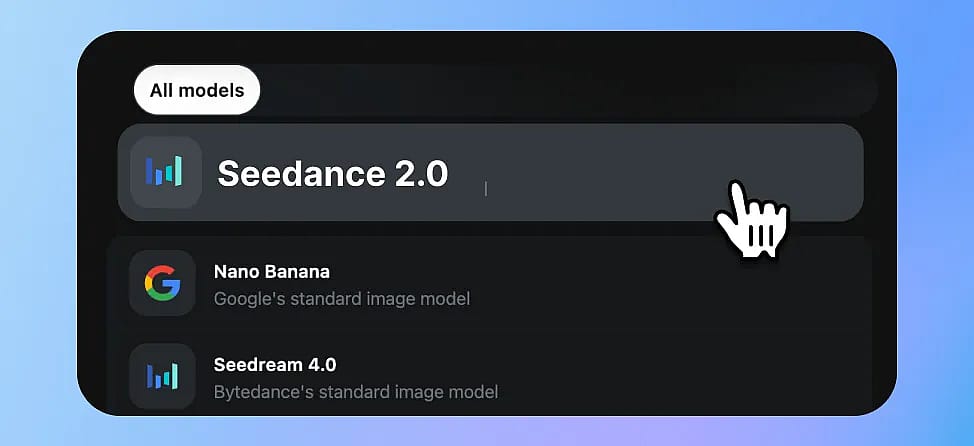
ステップ1:Seedance 2.0 モデルページへ移動
アクセス Openart 、そして「今すぐ作成」をクリックします。Seedance 2.0があらかじめ選択された生成画面に移動します。
ステップ 2: 入力モードを選択
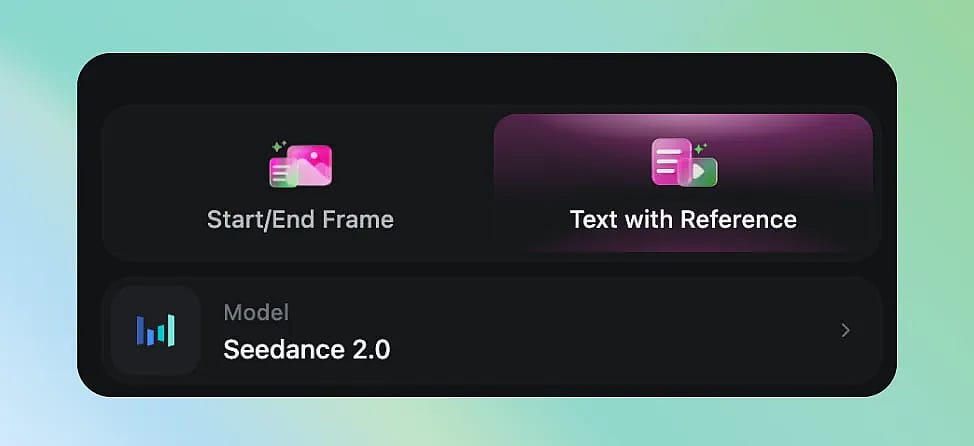
Seedance 2.0は複数の作成モードに対応:
- テキストから動画へ:promptを入力するだけ。手早くアイデアやコンセプトを試すのに最適です。
- フレームから動画へ:参照画像をアップロードして、加えたい動きを説明します。アート作品、商品ショット、ポートレートのアニメーション化に最適。
- マルチモーダル:テキスト+画像+オーディオリファレンスを組み合わせて、最大限のクリエイティブコントロールを。
ステップ3:効果的なプロンプトを書く
Seedance 2.0は、構造化された説明的なプロンプトによく反応します。効果的な公式をご紹介します。
[被写体] + [アクション] + [環境] + [カメラの動き] + [ムード/スタイル]
プロンプト例:
赤いドレスを着た若い女性が陽の差す竹林を歩き、風がやさしく髪を揺らす。ゆっくりとしたドリー前進、映画的なライティング、ゴールデンアワーの雰囲気。
木のテーブルに湯気の立つコーヒーカップのクローズアップ、その奥の窓越しに雨が見える。浅い被写界深度、心地よい秋の雰囲気、4K画質。
猫がモダンなアパートの本棚からソファへ飛び移る。サイドトラッキングショット、自然な室内光、リアルな物理挙動。
Prompt公式とコツ
- カメラの動き(ドリー、パン、トラッキング、ズーム)を具体的に指定する
- 照明の条件を書く(ゴールデンアワー、ネオン、曇り空)
- 物理的な動き(風・水・重力)を記述しましょう。Seedance 2.0はリアルな物理表現が得意です
- 複数ショットの場合:シーンを明確な切り替え(「カット:」や「次のシーン:」)で区切りましょう
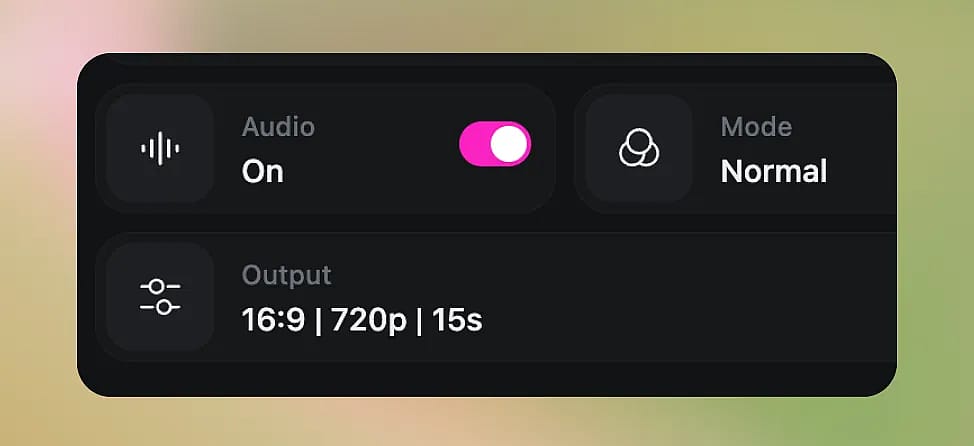
ステップ4:設定を調整する
- 長さ: 5秒と15秒のクリップから選択
- アスペクト比:16:9(横)、9:16(縦)、または1:1(正方形)
- 品質:標準またはHD——HDは時間がかかりますが、よりシャープな仕上がりになります
ステップ5:生成して繰り返す
「生成」をクリックして動画を待ちましょう。生成は通常、長さや品質設定に応じて1〜3分ほどかかります。
結果に満足できませんか?次のことができます:
- プロンプトを調整して再生成
- video-to-videoモードで、気に入ったクリップを反復して仕上げましょう
- サウンドトラックの同期精度を高めるために音声参照を追加
Seedance 2.0 の最適な活用例
| ユースケース | Seedance 2.0が優れている理由 |
|---|---|
| SNSコンテンツ | トレンドの雰囲気を取り入れた手軽な縦型動画 |
| プロダクトデモ | 商品画像にリアルな動きを加えてアニメーション化 |
| ミュージックビデオ | ネイティブ音声同期+マルチショット=完成されたシーケンス |
| ストーリーテリング/ショートフィルム | マルチショットの一貫性でキャラクターがブレない |
| マーケティング広告 | 制作予算なしで映画レベルのクオリティ |
| コンセプトの可視化 | ムードボードを動くプレビューに変える |
Seedance 2.0 vs Kling 3.0:2026年に優れているのはどっち?
最良の結果を得るには、同じプロンプトを2〜3種類のモデルで試して出力を比べてみましょう。OpenArtならアセットを再アップロードせずにモデルを簡単に切り替えられます。下の比較表では、Seedance 2.0との主な違いをわかりやすくまとめています Kling 3.0.
| 寸法 | Seedance 2.0 | Kling 3.0 |
|---|---|---|
| 最大解像度 | 1080p | 1080p |
| 動画の長さ | 5-15s | 5-15s |
| 生成スピード | 約2分 | 約1.5分 |
| 入力タイプ | テキスト+画像9枚まで+動画3本+音声3ファイル | テキスト+最大7枚の画像+動画1本+エレメントライブラリ |
| マルチショット(一度に複数シーン) | 未対応 | 対応 |
| キャラクターの一貫性 | 生成ごとに画像参照で対応 | 再利用可能なキャラクターライブラリ |
| ネイティブオーディオ(BGM+リップシンク) | デフォルトでオン+ビート同期用の音声入力 | オプション(サウンド:オン)+別途Lip Sync・TTS API |
| 物理表現のリアルさ(水・炎・重力) | 🌟🌟🌟🌟🌟とても良い | 🌟🌟🌟🌟🌟 とても良い |
| カメラコントロール | 動画リファレンスを使用 | 動画リファレンス(機能タイプ)+モーションブラシ経由 |
| 顔のクローズアップ品質 | 🌟🌟🌟🌟 良い | 🌟🌟🌟🌟 良い |
| おすすめの用途 | 短編映画、ミュージックビデオ、SNS、広告 | マルチシーンのストーリーテリング、トーキングヘッド/アバター |
| OpenArtで利用可能 | ✅ はい、無料でお試しいただけます | ✅ はい、無料でお試しいただけます |
最高の結果を得るためのヒント
- 画像から動画への変換から始めましょう
具体的なビジュアルのイメージがあるなら、テキストだけよりもSeedanceが活かせる素材が増えます - キャラクターに参照画像を使う
生成物全体で一貫性を保つために - プロンプトは200単語以内に抑える
Seedanceは、長々とした文章よりも簡潔で構造化されたpromptをうまく処理します - 「望まないもの」を指定する
ネガティブプロンプト(例:「テキストオーバーレイなし、ウォーターマークなし」)で出力を改善できます - 素早く反復
HD画質に投資する前に、まず3〜4本のドラフトをサッと生成
よくある質問
1. Seedance 2.0はOpenArtで無料で使えますか?
Seedance 2.0はOpenArtでクレジットを使って利用できます。新規ユーザーには試用できる無料クレジットが付与され、日常的に使うためのさまざまなサブスクリプションプランも用意されています。
2. Seedance 2.0の出力解像度は?
品質設定に応じて最大1080p HD。
3. Seedance 2.0を商用プロジェクトで使えますか?
はい、OpenArtで生成した動画はOpenArtの利用規約のもとで商用利用が可能です。
4. 生成される動画の長さは?
現在は1回の生成あたり5〜10秒です。より長いコンテンツには、複数のクリップを生成して編集でつなげるか、Seedance 2.0のマルチショット機能で一貫したシーケンスを作成できます。
5. Seedance 2.0は音声に対応していますか?
はい。ネイティブ音声生成に対応した数少ないモデルのひとつです。同期をより良くするために音声リファレンスをアップロードすることもできます。