

 ChatGPT
 Perplexity
 Claude
 Gemini
ほとんどのAI動画ツールは一発勝負のプロセスで動きます。1つのpromptや参照画像から生成した数秒の動画を渡すだけ。従来のAI動画生成は、より速い自動化と手早い結果に重きを置いています。しかしOpenArt Directorの仕組みは違い、最大限のコントロールを提供するために作られています。
頭の中のアイデアを言葉で伝え、自然な会話でそれを形づくり、完成したマルチシーンの動画を手にする。私たちはこれを 「バイブ・ディレクティング」。仕組みと、それで何が作れるかをご紹介します。
要約
- 動画をバイブディレクティング。アイデアを説明し、返ってきた結果に反応して、感覚で仕上げていきましょう。
- OpenArt Directorは短いクリップだけでなく、最長5分の一貫したマルチショット動画をまるごと作り上げます。
- 複雑なタイムラインも追加のソフトも不要。かんたんな会話だけで編集できます。
- ショートフィルム、広告、ミュージックビデオ、UGC、解説動画など幅広く活用できます。
OpenArt Director の仕組み
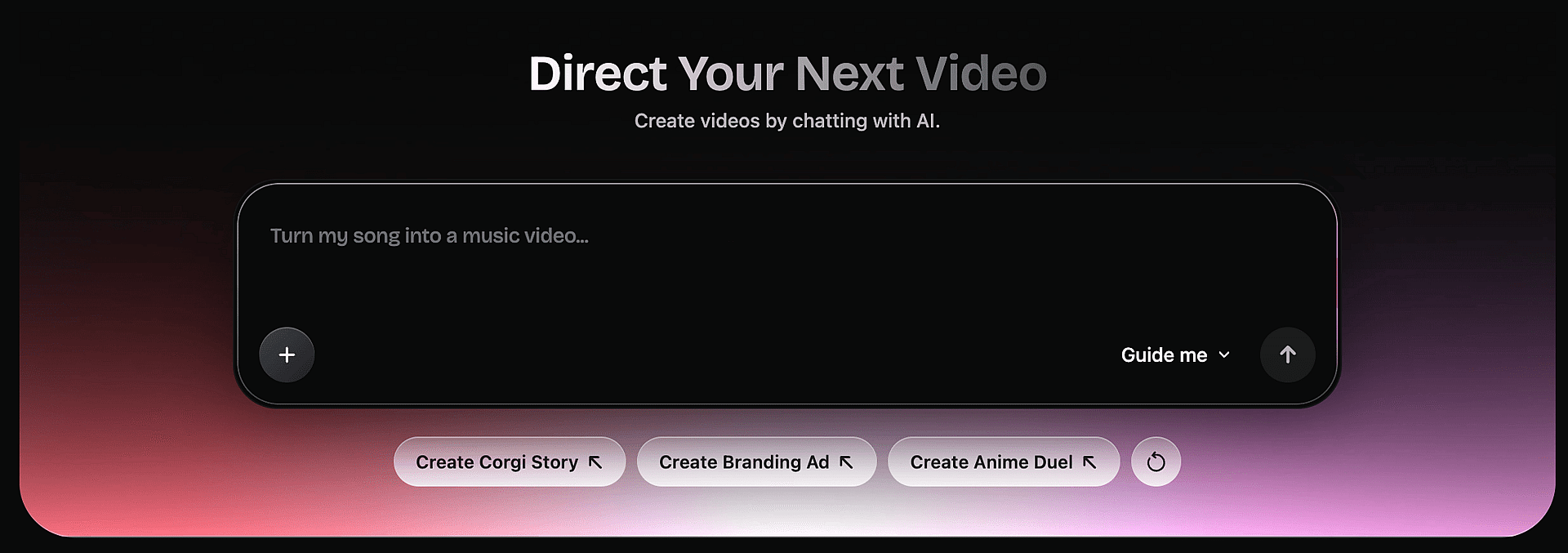
Directorは、1つのアイデアを大きく3ステップで完成した動画に仕上げます。あなたは最後まで監督として舵を取り、ツールはあなたの制作クルーとして働きます。
1. アイデアを説明する
prompt ボックスから始めて、形にしたいアイデアを入力しましょう。お好みでガイドを少し加えることもできます:見せたいシーンや人物の画像、サウンドトラック、声、さらには動画まで。
OpenArt ライブラリに保存しておいたキャラクターやワールドをタグ付けしたり、とにかく試してみたいときにランダムな prompt を呼び出したりすることもできます。
2. ディレクターの席へ
ここからは、本物のディレクターのようにチャットで方向性を形づくっていきます。各ステップでキャラクター、ストーリー、環境や風景、シーンを磨き上げましょう。
解像度・アスペクト比・トーンについていくつかの質問に答えるもよし、Directorに最適な設定を自動でお任せしてすぐ作業に取りかかるもよしです。
3. 動き出す様子を見る
Director が動画をステップごとに考え抜き、そのうえで組み立てます。あなたはストーリーボードをシーンごとに確認し、完成した映像を楽しめます。
1フレームだけ、あるいは全体が気に入りませんか?変更したい点を伝えるだけで、Directorはその部分だけを正確にやり直し、それ以外はそのまま。思い描いたイメージに合うまで、感覚のままに調整し続けられます。
Directorがテキストから動画、画像から動画のジェネレーターとどう違うのか
テキスト・トゥ・ビデオや画像・トゥ・ビデオのツールを使ったことがあるなら、OpenArt Directorは心地よく違って感じられるはずです。それらのツールは、1つのpromptや1枚の静止画から、通常わずか数秒の短いクリップを1本生成します。それより長くしようとすると、クリップを繋ぎ合わせ、別のソフトで手直しする必要があります。
Directorは動画だけでなくアイデアの段階から始まり、Oriと呼ばれるAIアシスタントを通じて脚本そのものをブラッシュアップします。ストーリーを展開し、キャラクターを作り込み、すべてのシーンで顔、声、環境、プロダクトの一貫性を保ちます。数秒ではなく、最大5分のまとまりのある動画が手に入ります。
編集もチャットで行えます。覚えるべきタイムラインも、別途開くアプリもありません。変更内容を伝えれば、Director が実行します。テキストから動画はクリップを返しますが、Director は完成した作品を返します。
Directorでできること
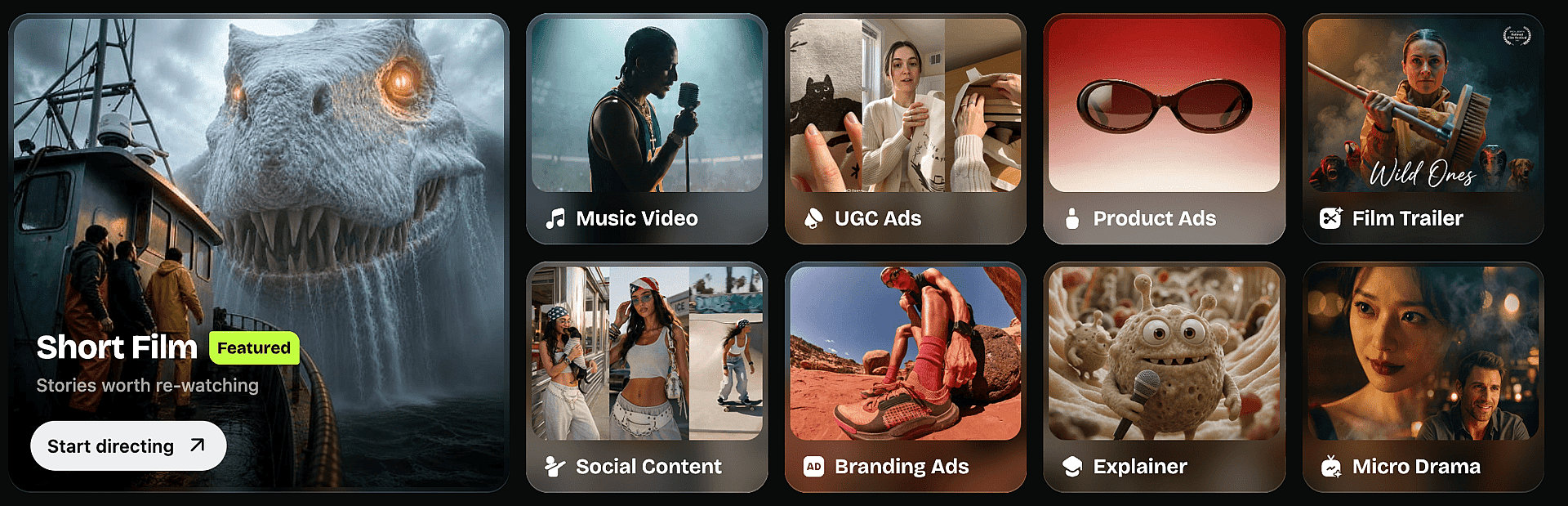
これらはvibe directできることのほんの一部です。それぞれで1冊のガイドが作れるほどなので、ここではDirectorの機能が各シーンにどう役立つかをざっと紹介します。
ショートフィルム
最長5分の一貫したアウトプットにより、最初のフレームから最後まで一つのストーリーがまとまります。つなぎ合わせも、話の脱線もありません。世界観を作り、キャラクターをキャスティングし、各シーンを感覚で演出。顔も声も設定も終始安定しているので、静かでゆっくりとしたストーリーでも一つの作品として読み取れます。
ミュージックビデオ
楽曲をアップロードして、そのムードやビートに合わせてビジュアルを演出しましょう。キャラクターや背景はショット間で一貫性を保つので、連続性を損なうことなく楽曲を軸にした完全なビジュアルストーリーを構築できます。リアルにもアブストラクトにも。同じ演出ツールがどちらにも対応します。
UGC広告
コンテンツの顔となるキャラクターを配置し、フィードにそのまま使える自然なかたちでメッセージを届けさせましょう。チャットでその場でシーンを生成することも、構造化エディターで細かく制御することもできます。本物感のあるバリエーションを大量に作るのも、撮影ではなく数分で完了します。
商品広告
商品画像を一度アップロードすれば、Directorがすべてのショットで同じ見た目を保ちます。照明、アングル、ムードを演出して、CMをプレミアムな仕上がりに。撮影の予約は不要なので、複数のバージョンをテストして、成果につながるものを配信できます。
映画予告編
映像をアップロードするか、ゼロからシーンを組み立て、ストーリーに合わせてテンポとトーンを演出しましょう。ヒーローキャラクターとビジュアルスタイルはすべてのカットで一貫しているので、予告編がひとつの洗練された作品としてまとまります。いくつかのバージョンを素早く試して、しっくりくる雰囲気を見つけましょう。
SNSコンテンツ
どんなフィードでも思わずスクロールを止めさせる短尺クリップを演出し、一文で各プラットフォームのアスペクト比に最適化しましょう。シリーズ全体で世界観やキャラクターの一貫性が保たれるので、チャンネルに統一感が生まれます。カメラを一切使わずに、安定した投稿ペースをキープできます。
ブランド広告
ロゴ、フォント、カラーを一度アップロードすれば、すべての広告が自動的にブランドに沿ったものになります。ストーリーとトーンを演出し、どのフレームでもブランドらしさを保ちましょう。バラバラのクリップの寄せ集めではなく、統一したアイデンティティを共有する関連広告のキャンペーンを構築できます。
解説動画
各ステップを指示して、メッセージをシンプルかつビジュアルに保ちましょう。プレゼンター、製品、ブランディングは最初の1秒から最後まで一貫。長尺でも一貫性が保たれるので、詳しい解説動画でもわかりやすく、追いやすい仕上がりになります。
マイクロドラマ
一気見向けに作られた、エピソード形式の縦型ストーリーを演出しましょう。各キャラクターはどの場面でも同じ顔・声・個性を保つので、クリフハンガーもその回収もしっかり決まります。最大5分の出力は、クリップをつなぎ合わせることなく1エピソードを丸ごとカバーします。
どんなフォーマットでもディレクションの仕方は同じ。言葉で説明し、感覚で調整し、完成した作品を手に入れましょう。
vibe directingを始める
誰の中にもディレクターがいます。足りなかったのはスタッフと道具だけ。今、その両方が手に入ります。
だから、大事なのはこの一点だけです。頭の中でずっと流れている動画はどんなものですか?それを言葉にして、雰囲気で形づくり、現実になる様子を見届けてください。 OpenArtでバイブディレクティングを始めましょう。