Generador de vídeo a vídeo con IA
El generador de vídeo a vídeo con IA de OpenArt remezcla y reestiliza los clips de vídeo que ya tienes. Cambia el estilo artístico a anime o claymation, o sustituye el fondo o un personaje, todo ello manteniendo intacto el movimiento original.
Ventajas clave del creador de vídeo a vídeo con IA




Conserva tu movimiento original
OpenArt cambia el estilo de tu metraje conservando el movimiento, el ritmo y la estructura del clip original. Tu sujeto se mueve igual que siempre, así que la nueva versión resulta creíble en lugar de deformarse o desviarse.




Cambia el aspecto, no la toma
Convierte grabaciones reales en anime, aplica un estilo Ghibli o Pixar, o cambia por completo el ambiente de una escena sin grabar nada nuevo. Transformas el estilo visual de un clip que ya tienes en lugar de empezar de cero.

Olvídate del nuevo rodaje
Adapta un solo clip a varios estilos para una campaña sin contratar equipo, localización ni nuevos talentos. Esto reduce el tiempo y el coste de producción manteniendo cada versión consistente con la original.
Características clave del generador de vídeo a vídeo con IA
Reestiliza cualquier clip manteniendo el movimiento
Restyle Video aplica un nuevo estilo visual al material que subes mientras conserva cada movimiento del original. Elige entre ajustes preestablecidos como anime, LEGO, Ghibli, Pixar, Rick y Morty, retro, claymation y cyberpunk, o describe tu propio estilo. El movimiento, el ritmo y la sincronización se mantienen, así que solo cambia el estilo.
Reemplaza fondos y reilumina escenas
La herramienta Replace Background cambia el escenario detrás de tu sujeto por un nuevo entorno sin tocar la acción que ocurre delante. Relight Video ajusta la iluminación de una escena para que un clip grabado con luz plana se vea cálido, atmosférico o cinematográfico. Juntas, estas funciones de nuestro Generador de vídeo con IA te permiten reiniciar todo el ambiente.
Cambia de personaje sin volver a rodar
Reemplazar personaje cambia a una persona o figura concreta de tu clip, o extrae un personaje directamente del OpenArt Characters biblioteca en la toma. El reemplazo sigue el movimiento original, así que el nuevo personaje se mueve exactamente como lo hacía el metraje.
Motion Sync, Lip Sync y añadir sonido
Motion Sync copia los movimientos y gestos de un vídeo en uno nuevo, así puedes trasladar una interpretación de un clip a otro. Lip Sync ajusta los movimientos de la boca de un vídeo al diálogo que proporcionas, y Add Sound Effect añade sonidos que describes en un prompt. Estas herramientas rematan un clip reestilizado para que la imagen y el audio encajen.
Cómo usar el creador de vídeo a vídeo con IA
Crea variaciones de vídeo a partir de un clip existente en tres pasos.
Sube tu vídeo
Abre la herramienta Restyle Video dentro del generador AI Video to Video de OpenArt y sube el clip que quieres transformar. Un vídeo de origen nítido y estable le da al modelo el máximo detalle y produce el resultado más limpio.
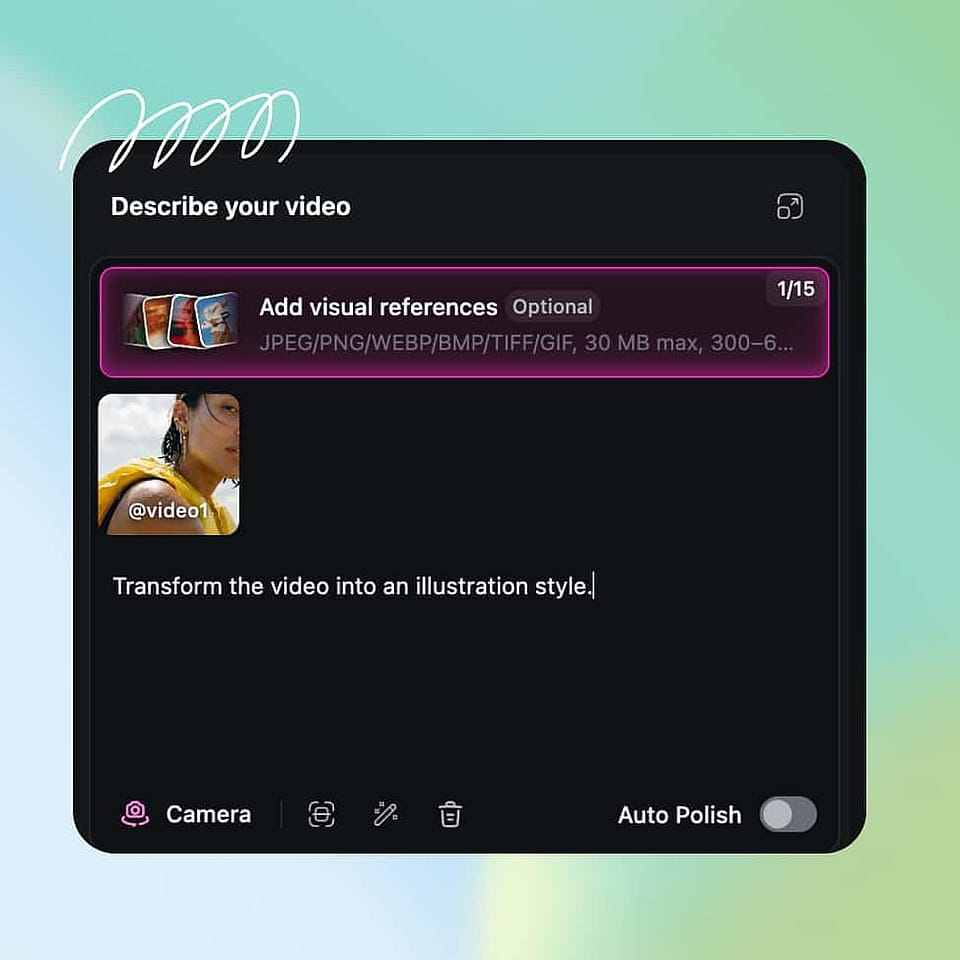
Describe tus nuevos cambios
Elige un preajuste como anime, Ghibli, Pixar o cyberpunk, o escribe un prompt corto describiendo el estilo que quieres. Configura tus opciones de salida, incluyendo la resolución y la calidad de exportación, antes de generar.
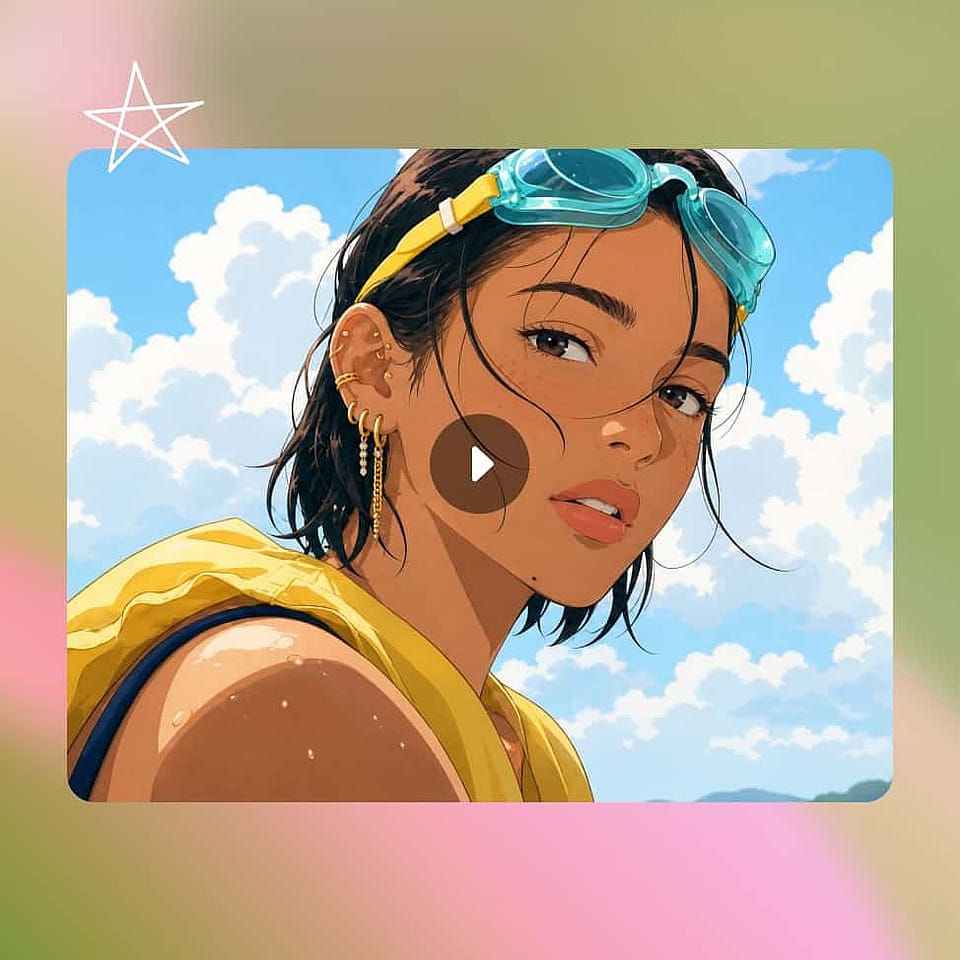
Generar y descargar
Genera el clip con el nuevo estilo y comprueba que el look se mantiene en todo el vídeo. Ajusta el estilo o el prompt si quieres un resultado distinto, y luego mejora la resolución de la versión final y expórtala para tu plataforma.
Mejores usos del generador de vídeo a vídeo con IA
El generador de vídeo a vídeo con IA encaja con una amplia variedad de creadores y equipos.
Reestiliza tu material para campañas en redes sociales
Los creadores de contenido pueden coger un clip y convertirlo en varias versiones con estilo para TikTok, Reels y Shorts. Una sola toma se convierte en variaciones anime, retro o cyberpunk que parecen hechas para cada plataforma, lo que mantiene tu feed fresco sin grabar de nuevo. Puedes publicar más a menudo grabando mucho menos.
Pruébalo ahoraDale un nuevo aspecto a tus vídeos de marca
Las agencias y equipos de marca pueden adaptar material de marca existente a nuevas direcciones visuales para distintos públicos o temporadas. Como el movimiento y el producto se mantienen intactos, los clips reestilizados siguen siendo fieles a la marca mientras evoluciona su aspecto. Esto hace viable renovar una campaña sin un nuevo presupuesto de producción.
Pruébalo ahoraConvierte grabaciones reales en anime o dibujos animados
Los fans y creadores pueden convertir vídeo real en estilos anime, dibujos animados o ilustración manteniendo la interpretación original. La IA reestiliza los fotogramas y conserva el movimiento, así que un clip real se convierte en una escena estilizada que sigue pareciendo natural. Pasar de imagen real a animación es el caso de uso de vídeo a vídeo más solicitado.
Pruébalo ahoraRenueva material antiguo sin volver a rodar
Any team sitting on a library of older clips can relight, restyle, or rebuild the background to make that footage usable again. Instead of filming replacements, you update the look of what you already own. Pair it with OpenArt's IA de imagen a vídeo generador cuando necesites nuevo movimiento a partir de fotos fijas para rellenar los huecos.
Pruébalo ahoraPreguntas frecuentes Preguntas
El vídeo a vídeo con IA es un flujo de trabajo sencillo para transformar material que ya tienes en lugar de generar una escena desde cero. La IA lee tu clip original y cambia su estilo, fondo, iluminación o personajes conservando el movimiento, el ritmo y la estructura del vídeo de origen.
Sí. Restyle Video incluye un preajuste de anime junto con estilos como Ghibli, Pixar y claymation, para que puedas convertir grabaciones reales en animación. Como la herramienta conserva el movimiento original, el clip convertido sigue la misma acción que el original.
Puedes trabajar con clips de hasta 15 segundos en la mayoría de modelos y hasta 30 segundos en algunos más recientes, y Extender Vídeo puede continuar un plano hasta 10 segundos más cuando necesitas una secuencia más larga. Eso cubre la mayoría de publicaciones en redes, anuncios y escenas cortas.
Puedes exportar en todas las relaciones de aspecto estándar y hasta resolución 4K en los modelos compatibles, con 1080p como opción predeterminada. Upscale Video puede afinar un clip terminado a 4K y limpiar el desenfoque o la pixelación.
Sube tu clip al generador de Vídeo a Vídeo con IA de OpenArt, abre Reestilizar Vídeo y elige un estilo predefinido o describe el aspecto que quieres y genéralo. La IA aplica el nuevo estilo a todo el clip manteniendo intacto el movimiento original.
Sí. El generador de vídeo a vídeo con IA está diseñado para mantener el movimiento, el ritmo y el timing de tu clip original mientras solo cambia el aspecto. Eso es lo que hace que un vídeo con estilo cambiado o con personaje sustituido resulte creíble en lugar de distorsionado.
Sí. Reemplazar fondo cambia el escenario que hay detrás de tu sujeto, y Reemplazar personaje cambia a una persona o figura del clip o incorpora una de la biblioteca de Personajes de OpenArt. Ambos siguen el movimiento original para que el cambio se vea natural.
Sí. En OpenArt, Seedance 2.5, Wan 3.0 y MiniMax H3 admiten clips de vídeo cortos como referencia junto a tu prompt. La IA mantiene el sujeto de tu clip de referencia, como un producto o una persona, y lo coloca en una escena nueva que describas.
Consigue consejos de expertos en el blog
Consigue la información que necesitas. Nuestros expertos comparten trucos prácticos, analizan los temas más candentes y ofrecen guías esenciales para ayudarte a crear, optimizar y escalar.
Leer más