

 ChatGPT
 Perplexity
 Claude
 Gemini
打造热门人像的最佳 Gemini AI 照片 prompt
四十一条 prompt,这就是本文的全部内容。如果你是来复制一条 Gemini AI 照片 prompt、粘贴后就带走成片人像的,直接跳到下面的 prompt 库。如果你想弄明白为什么有些 prompt 能生成专业级修图,而有些却只给你一个塑料脸的陌生人,那么 prompt 库前面的旗舰拆解和节日板块会告诉你,prompt 里的每一行到底起什么作用。
节日板块涵盖了大家搜索最多的季节性修图:万圣节服装自拍和 VHS 恐怖潮流、感恩节家庭聚餐照片,以及 AI 圣诞写真——从礼盒人像到全家同款睡衣合影。
这里的一切都基于 Google 的 Gemini 图像模型运行,它 OpenArt 在 Nano Banana 名下,与 GPT Image 2.5、Seedream 以及完整的照片编辑器一同集成在同一个工作区里。从上传到成片,大约两分钟。
什么是 Gemini AI 照片 prompt?
Gemini AI 照片 prompt 就是你用大白话向 Google 的 Gemini 图像模型下的指令,用来生成新照片或编辑已有的照片。Gemini 的图像能力有个你大概见过的昵称:Nano Banana。如今 Google 也公开使用这个名字,而最强大的版本 Nano Banana Pro,正是人们说「Gemini AI 照片」时所指的模型。
这类提示会做两件事之一。它可以生成:根据文字描述创作一张全新照片,比如一张电影感街头人像或“灵气栽培”美学写真。它也可以编辑:从一张真实照片出发,按你的要求改动指定部分而保留其余,比如“完全保留人脸,改成 90 年代胶片人像风”。编辑正是 Gemini 最擅长的,也正是热门人像浪潮偏偏在这个模型上爆火的原因。
在 OpenArt 上运行 Gemini 风格的 prompt
下面是实话,因为这很重要。OpenArt 不是 Gemini,也不是 Google 开发的。OpenArt 为你提供的是直接访问 Gemini 图像模型的途径:Nano Banana 2.1、Nano Banana Pro 和 Nano Banana 2 Lite 都在工作区里。任何为"Gemini AI 照片"写的 prompt,都能在 OpenArt 里用这些相同的模型运行。
选择 Nano Banana 2 Lite 用于快速草稿, Nano Banana 2.1 适合日常稳定使用,图内文字更清晰;Nano Banana Pro 则能带来最精致、面部一致性最强的效果。 GPT Image 2.5, Seedream 5.0 Pro,以及一整套 AI 照片编辑器 与它们并列。
为什么 Gemini 照片 prompt 能爆火
早期关于 Gemini 图像模型的报道大多聚焦于生成:输入描述,得到一张全新图片。但真正传播开来的格式,是为便于复刻而设计的。
一条能爆火的 Gemini 照片 prompt 有固定的结构。它会指明主体、风格、光线、氛围和画面比例,并锁定必须保持不变的部分。这套配方足够完整,因此一个人的 prompt 能适用于一千个不同的人上传的一千张不同照片。
在个人动态里,编辑胜过生成,原因很简单:一张陌生人的生成图会被人划走,而一张经过编辑的 你 无论是柔美光感人像、咖啡馆黄金时刻的照片,还是修复的童年老照片,都能收获保存与分享。
编辑其实是更难的活儿。要想编辑得逼真,模型必须彻底改变风格、服装或场景,同时让你真实的面孔纹丝不动。较弱的工具在后半程就翻车了,只能给你一个相似的替身。Gemini 的图像模型能在大幅换装换风格时依然守住身份特征,而当下流行的那些人像作品,正是靠这一点。
如果你只想要纯粹的生成功能,我们的 最佳 Nano Banana 提示词 指南讲解如何从零开始制作爆款图片。本文两者兼顾,并重点介绍当下人们竞相模仿的热门肖像编辑玩法。
如何在 OpenArt 上运行这些模型
你不需要任何技术基础。上传照片,选一个 Gemini 模型,粘贴 prompt,生成。
要编辑 prompt,请打开 图像生成 或 生成图像 就在你的工作区里。用 prompt 输入框旁的图片上传按钮添加你的原图。这一上传步骤至关重要:模型会编辑你提供的图片,所以清晰、光线充足的原图能带来更干净的效果。
点击 prompt 框中的模型名称,日常使用选 Nano Banana 2.1,追求最稳定效果选 Nano Banana Pro。粘贴下面任意 prompt 并生成。随后你还可以在编辑器中精细调整, 放大至 4K 以供印刷,或替换背景。新账户可免费开始并附带积分,因此你可以先试用几次再选择套餐。
若只想纯生成,跳过上传,直接粘贴一条生成式 prompt 即可。
爆款女生人像
这是目前被复刻最多的 Gemini 照片格式。它精准对应了刷屏搜索里的"复制粘贴热门女孩":把一张日常自拍改造成精致柔美的人像,带有柔和高光、水润肌肤、温暖的蝶形光晕,以及媲美专业写真的美学造型。
High-fidelity studio portrait of a young Asian woman with pastel pink
hair in a side braid. She wears a cream polka-dot lace top under a pink
knit cardigan, accessorized with layered gold necklaces. Soft rosy
makeup, glossy lips, direct gaze. Pure white background, high-key
diffuse lighting, hyper-realistic fashion photography, 8k resolution.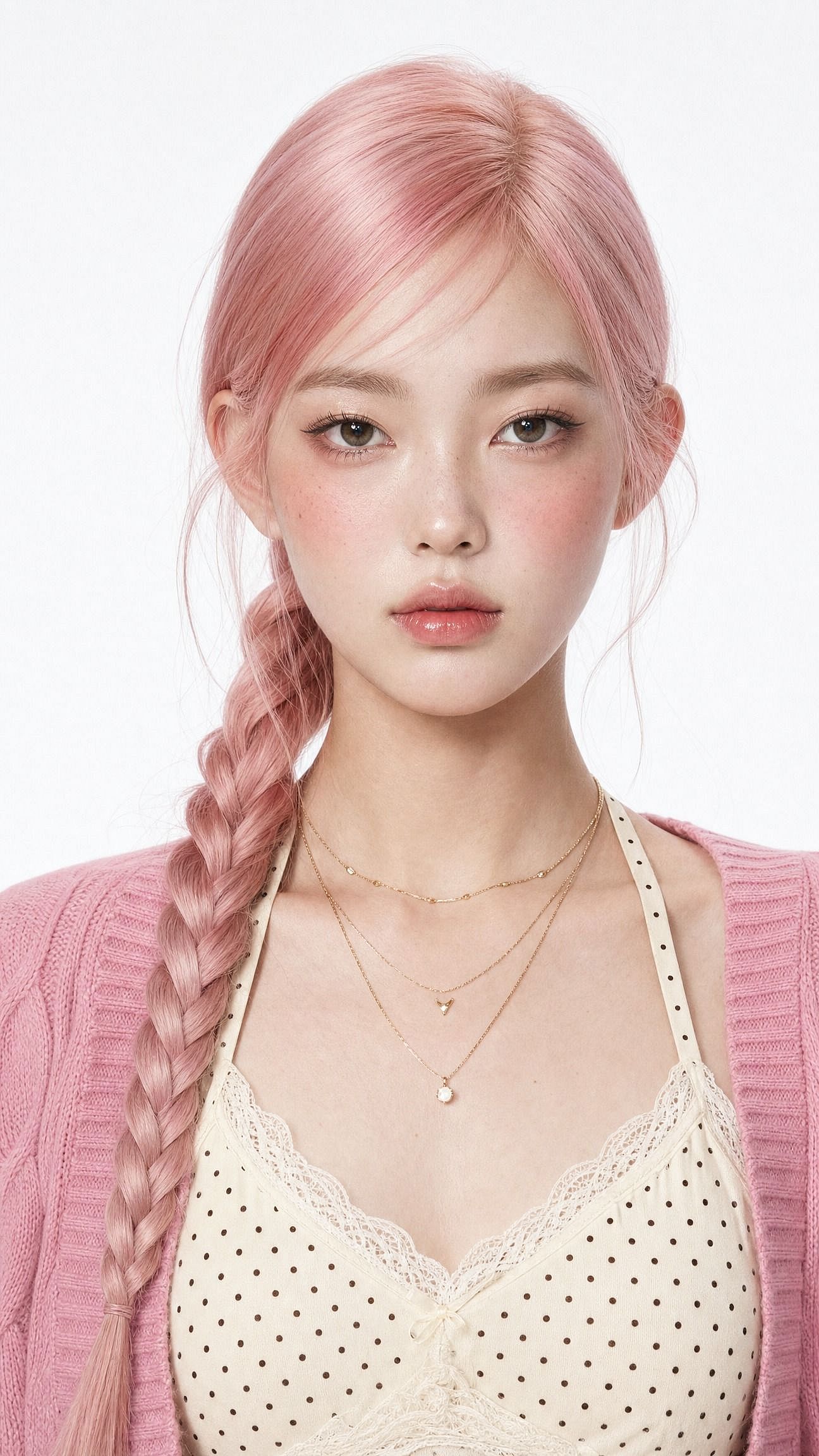
改一个词,就能彻底改变整体观感。把「柔光美妆」换成「莎丽民族典雅风」即可打造传统风格套图,或换成「清爽 Instagram 头像、极简工作室背景」来做一张个人头像。
起关键作用的是第一句话:保持同一张脸,保留原有的身份特征。没有它,模型会连同其他一切一起重塑面部,最后你得到的是一个漂亮的陌生人,而不是更漂亮的自己。
电影感男孩肖像
这波潮流的男性版本分成两种被反复模仿的造型:电影感街拍风,以及带 Pinterest 穿搭氛围的咖啡馆黄金时刻。这条 prompt 走的是街拍路线。
Edit the uploaded photo. Keep the same face, features, and expression
exactly, preserve the original identity. Restyle into a cinematic urban
street portrait: moody overcast light, teal-and-orange color grade,
blurred city street background, confident casual streetwear, shallow
depth of field, film-still mood, vertical 4:5 frame. Keep skin texture
natural and true to life.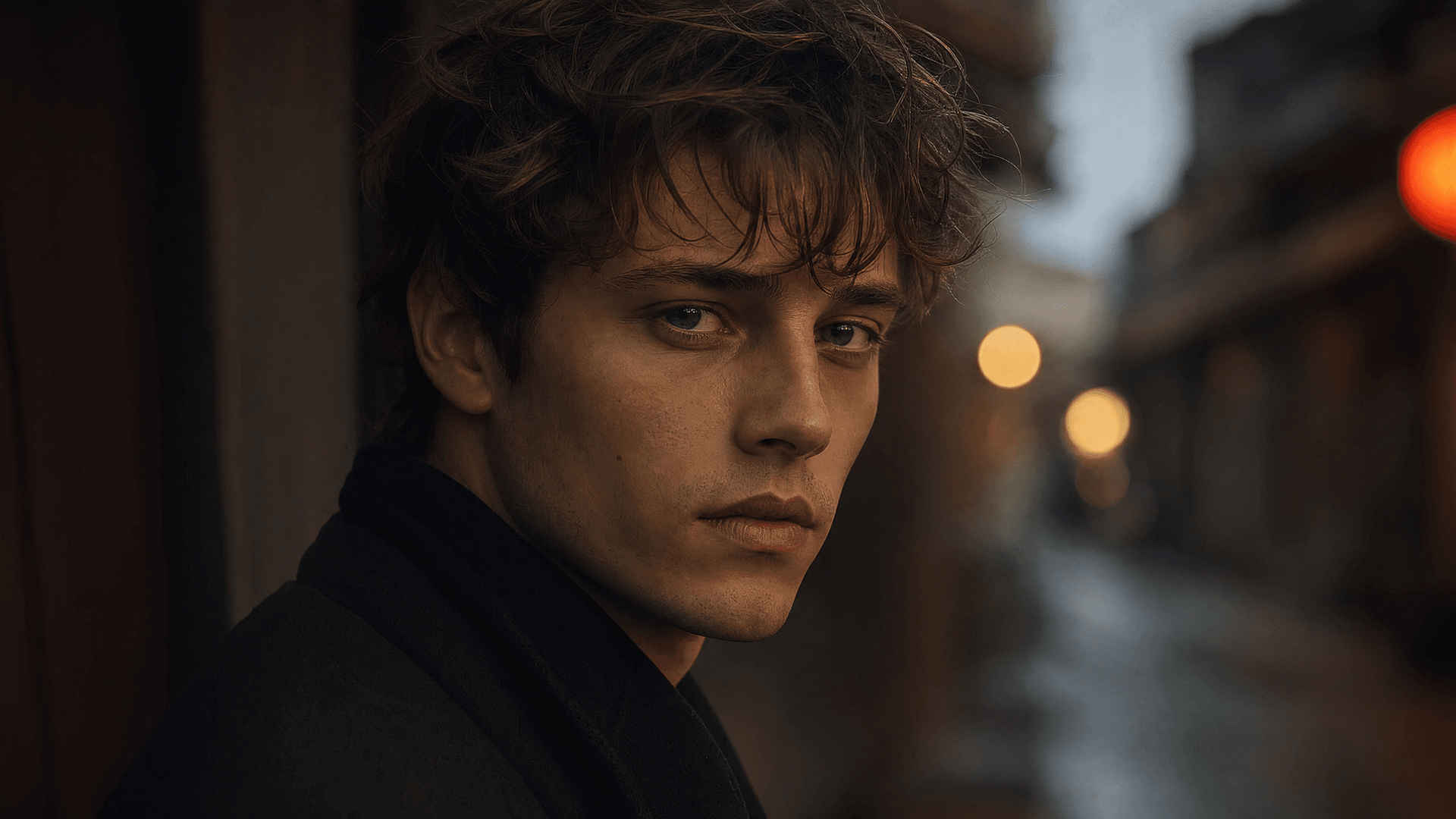
电影感情侣
双人合影的编辑是最大的子趋势之一,也是最难的一类。模型必须同时保护好两张脸。
上传一张普通的手机双人合影,你就能得到一整套宛如摄影师精心打造的写真:
Edit the uploaded photo of two people. Keep both faces, skin tones, and
expressions exactly as they are, preserve both identities. Do not merge
or alter their features. Restyle into a cinematic couple portrait:
coordinated neutral-tone outfits, soft directional lighting, a blurred
city-evening background, natural closeness, warm film color grade,
shallow depth of field, magazine-cover quality.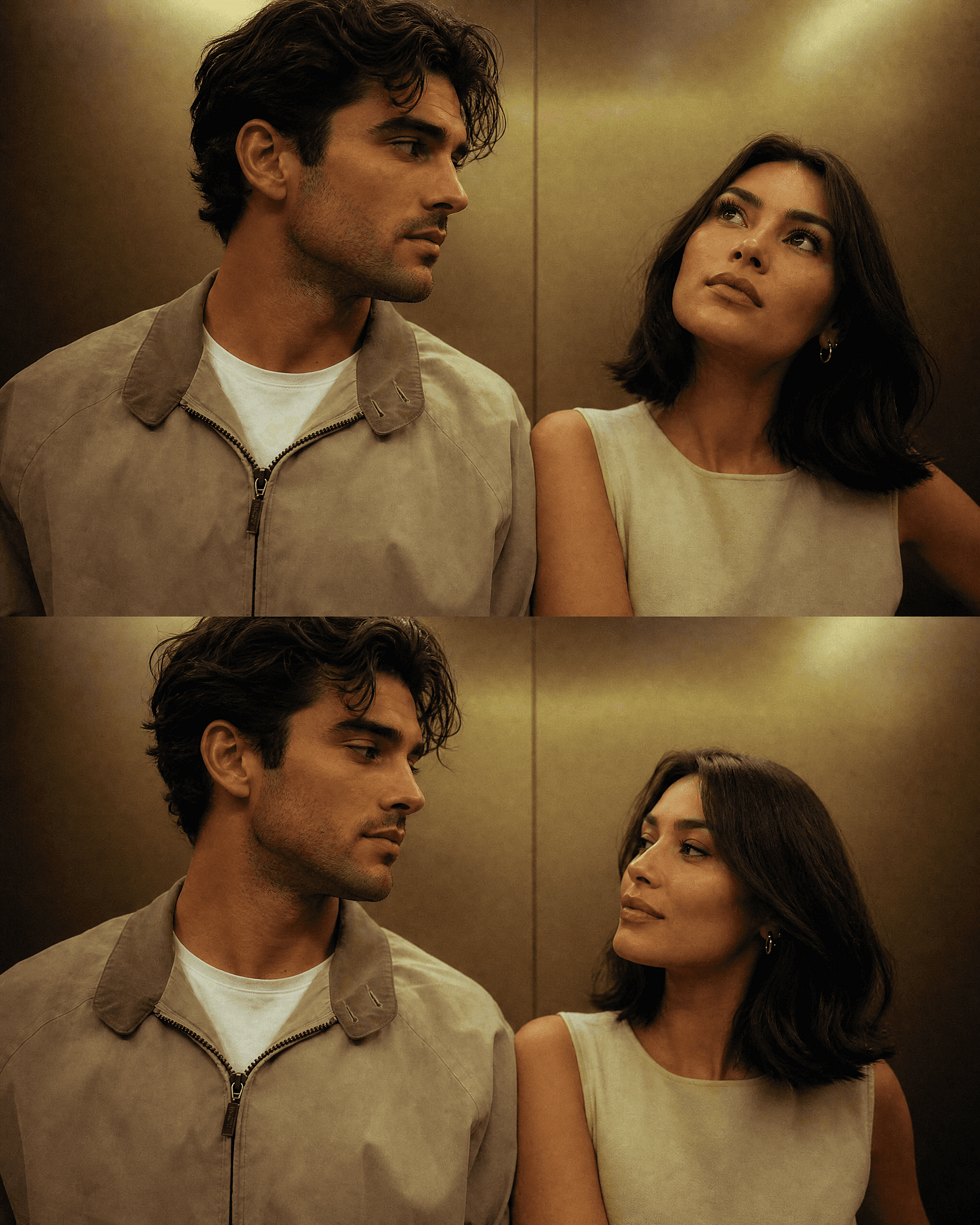
若想做节日版,保留两张脸,只改变场景。下面的万圣节和圣诞节章节都包含现成的情侣 prompt,而且无论你用同一张原图跑出多少种场景,两个人都始终清晰可辨。
3D 手办
正是这个玩法把整股潮流推向了主流,而且至今依然吸睛。一个真实的人变成书桌上或零售包装里的小手办。它在信息流中一眼就能抓住人——因为“我认识的人”和“货架上的玩具”之间的反差本身就足够吸睛。
Edit the uploaded photo. Turn the person into a realistic 3D collectible
figure standing on a wooden desk next to a keyboard and a coffee mug for
scale. Keep their face, hairstyle, and outfit recognizable. Add a subtle
plastic-model texture, detailed base, soft desk lighting, shallow depth
of field, believable miniature scale, vertical 4:5 social frame.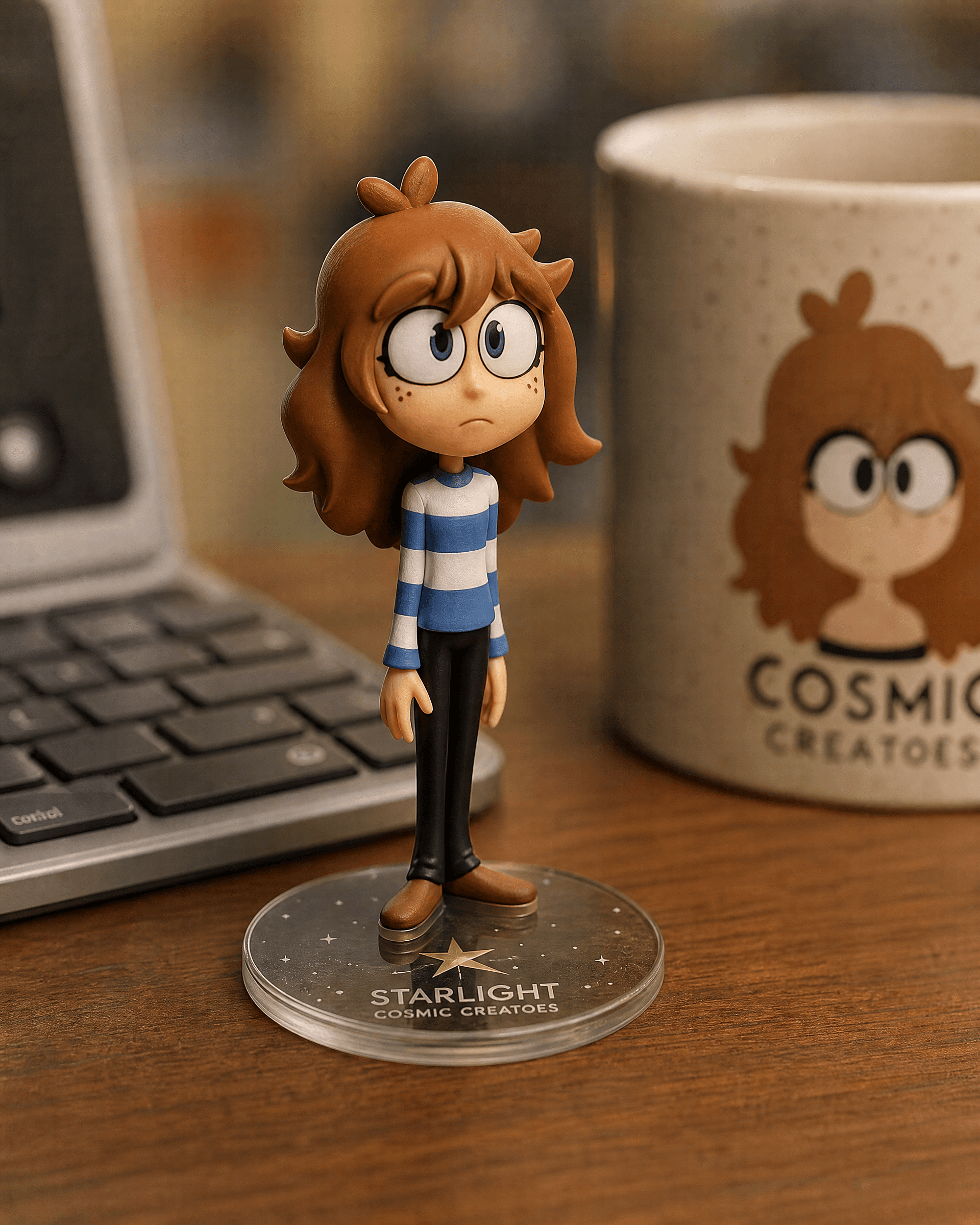
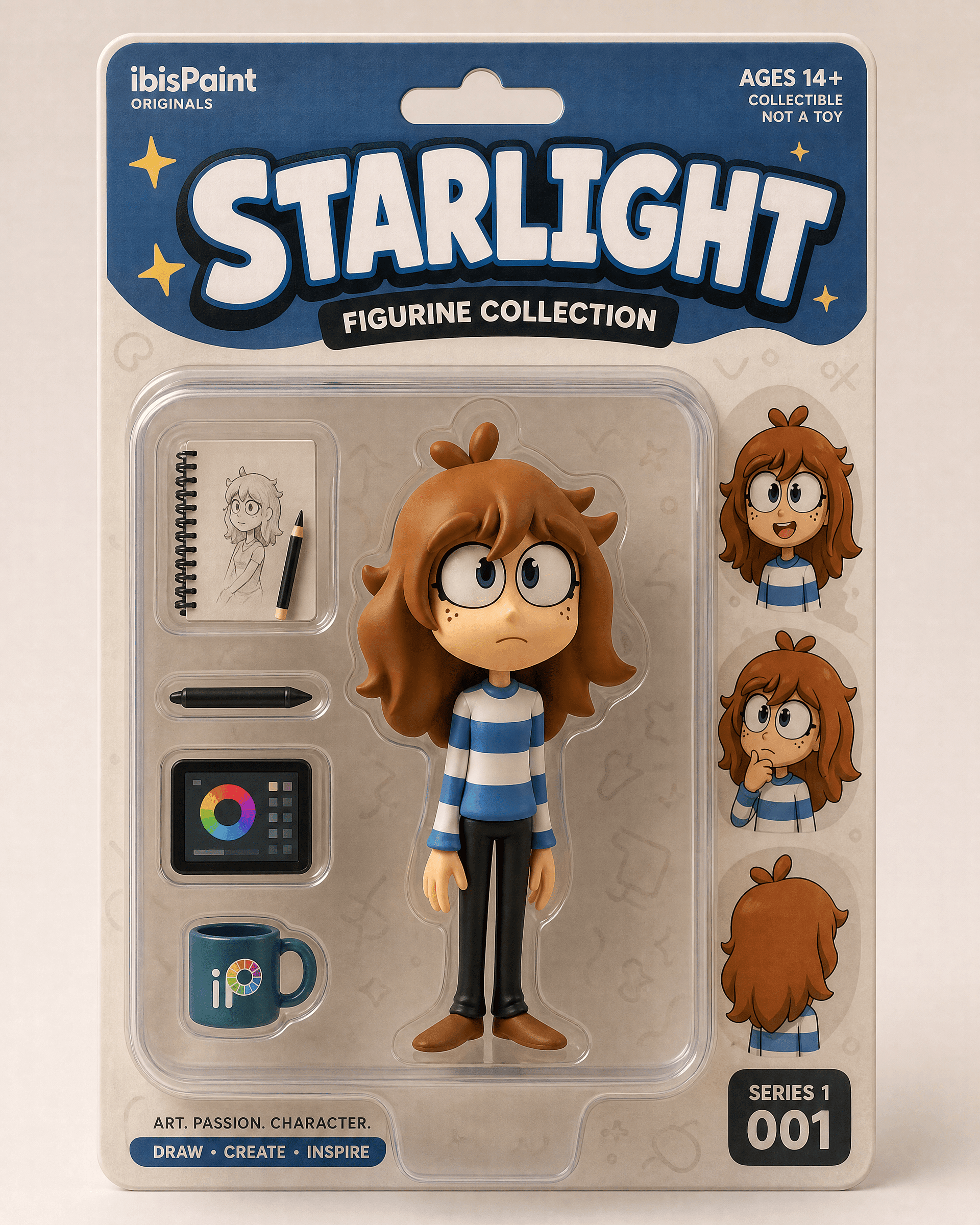
用于零售包装揭晓的盒装版本:
Edit the uploaded photo into a boxed action figure. Keep the person's
face and style recognizable. Place the figure inside a clear blister
package with a printed backing card, bold product name at the top, small
accessory icons, realistic toy photography, studio lighting, collectible
designer-toy aesthetic.
先准备一张清晰的全身或半身照。摆在书桌上的版本看起来像一次低调而可信的编辑,而装在包装盒里的版本则更像一场揭晓时刻。
经典的老照片修复与上色编辑
修复是这些模型最实用、最不花哨的功能之一。它能去除划痕、锐化褪色的扫描件,还能给黑白照片上色。很多人第一次打开 Gemini 编辑器就是为了这个,通常是为了家庭项目或纪念日礼物。
Edit the uploaded old photo. Restore it: remove scratches, dust,
creases, and water damage, repair torn areas, sharpen soft details, and
correct fading. Keep every face and feature true to the original, no
reinvented details. Preserve the original composition and era-accurate
clothing. Natural, archival-quality restoration.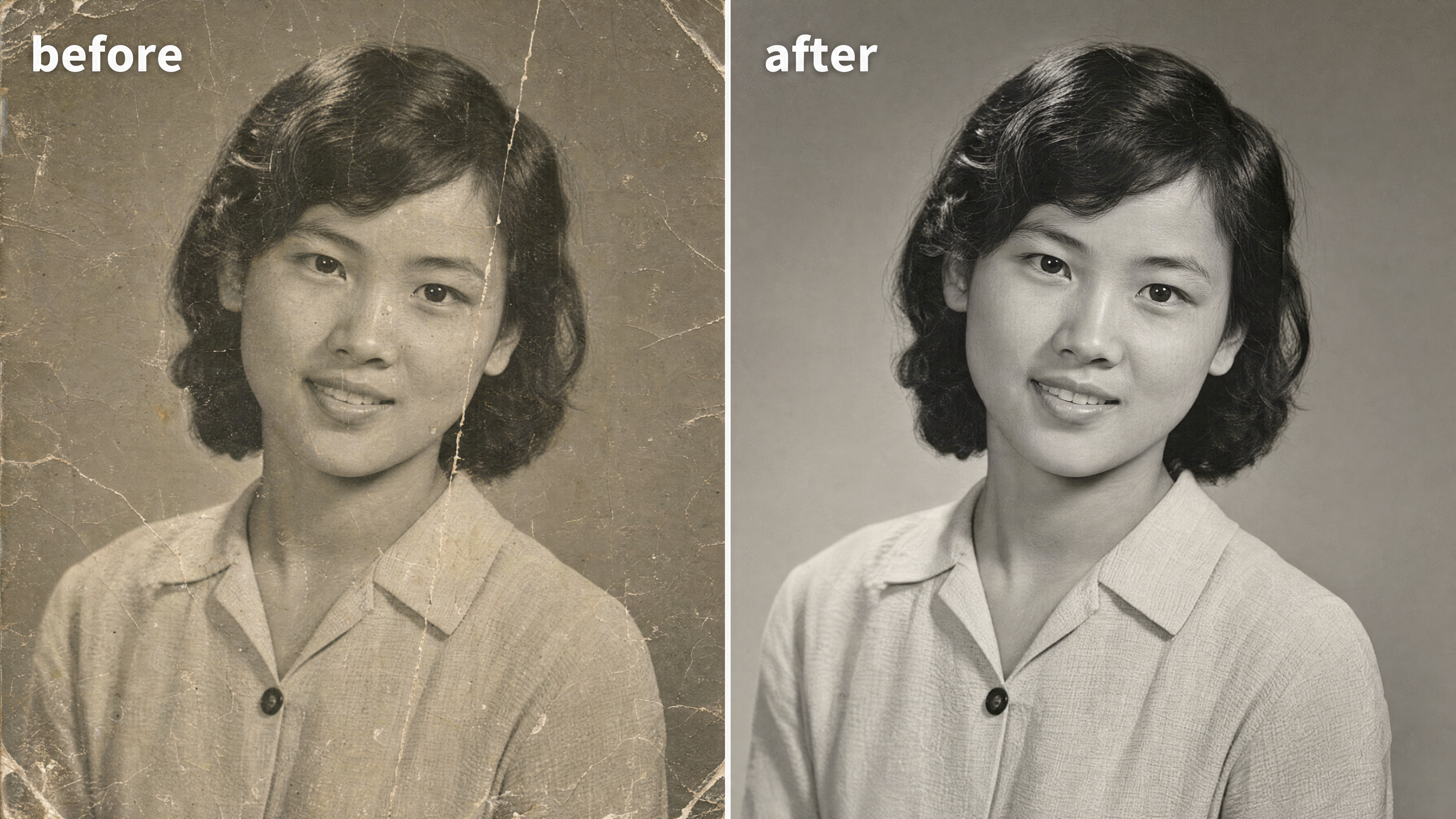
想给黑白照片上色,只需加一行:
After restoring the photo, add realistic, natural color: era-accurate
skin tones, believable fabric colors, soft natural lighting. Keep it
subtle and true to life, not oversaturated. Do not change any faces or
features.
贯穿这次修图的关键词是“忠于原作”。当模型给模糊的亲人凭空造出一张新面孔时,修复就出错了。你可以 在图片编辑器中修复并清理结果 随后,接着 将其放大到印刷分辨率 用于构图。
千禧风格
千禧年闪光复古风 本月带火了复古风潮:生硬的直射闪光、略微褪色的色彩、千禧年初数码相机的颗粒感,满满的派对照片氛围。一眼就透着怀旧感。单人肖像或合影都适用。
Edit the uploaded photo. Keep the same face, features, and expression
exactly, preserve the original identity. Restyle into a Y2K early-2000s
digital-camera look: harsh direct on-camera flash, slightly washed cool
color, fine digital noise, candid party-photo framing, low-fi nostalgic
mood, authentic 2003 point-and-shoot aesthetic. Keep skin texture
natural.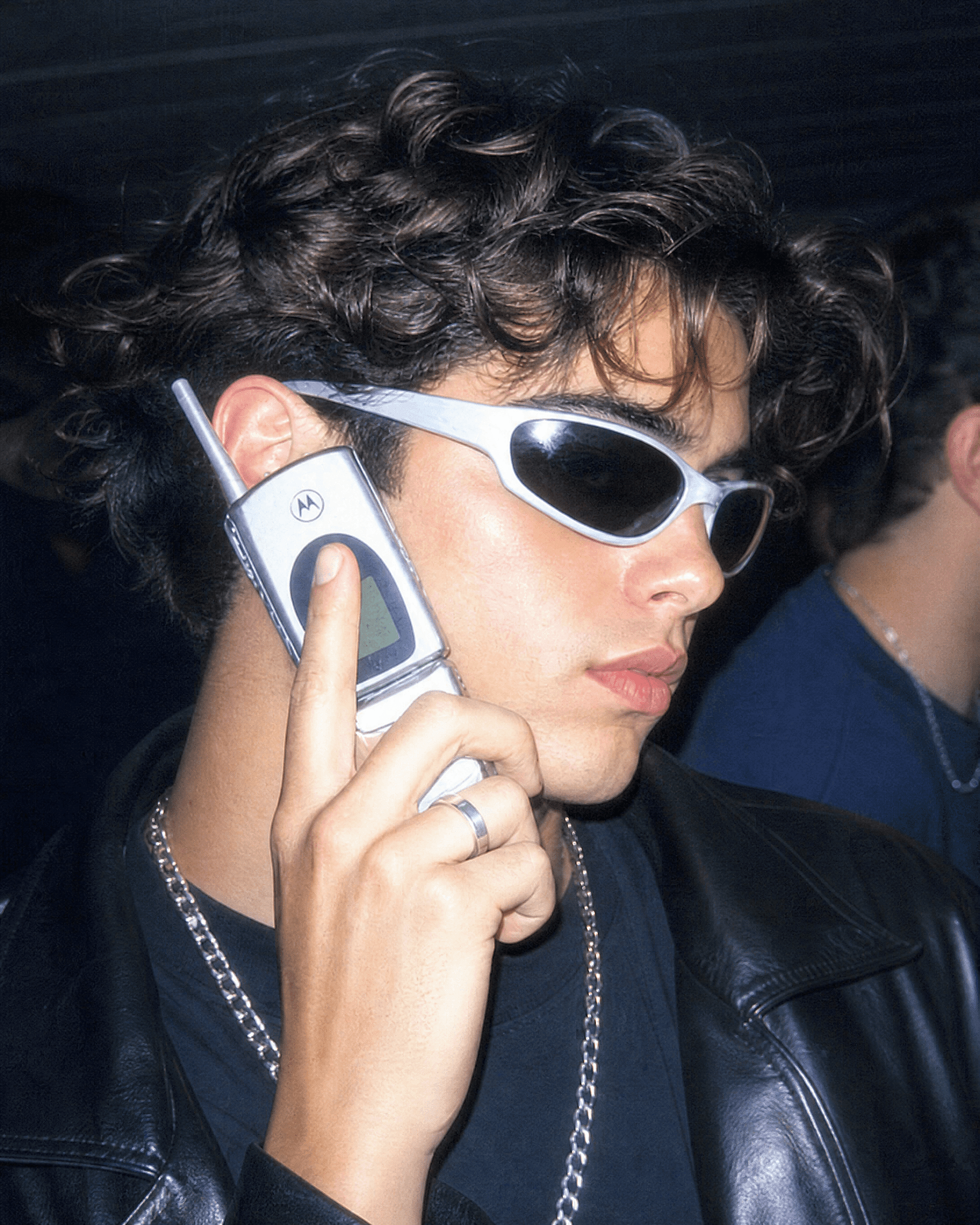
点明具体年代,让效果更进一步。「1990 年代胶片相机人像,暖色颗粒感,柔和闪光灯」呈现更柔和的复古风。「90 年代情景喜剧海报,明亮的影棚灯光,顶部醒目标题文字」则呈现那种像电视剧演员合照般、令人想裱起来的合影版本。
气场十足的美学肖像
Aura-farming 是这一风格集群中最新的审美潮流。戏剧化的逆光、一圈发亮的彩色轮廓光、自信的低角度姿态,加上情绪化的氛围背景。当人们想要一张既有电影感、又比现实更耀眼几分的肖像时,就会想到它。
Edit the uploaded photo. Keep the same face and identity exactly.
Restyle into an aura-farm aesthetic portrait: dramatic colored rim light
glowing around the subject, moody dark atmospheric background, soft
volumetric haze, confident low-angle framing, rich cinematic color
grade, subtle particles in the air, high-detail vertical portrait. Keep
skin texture natural and true to life.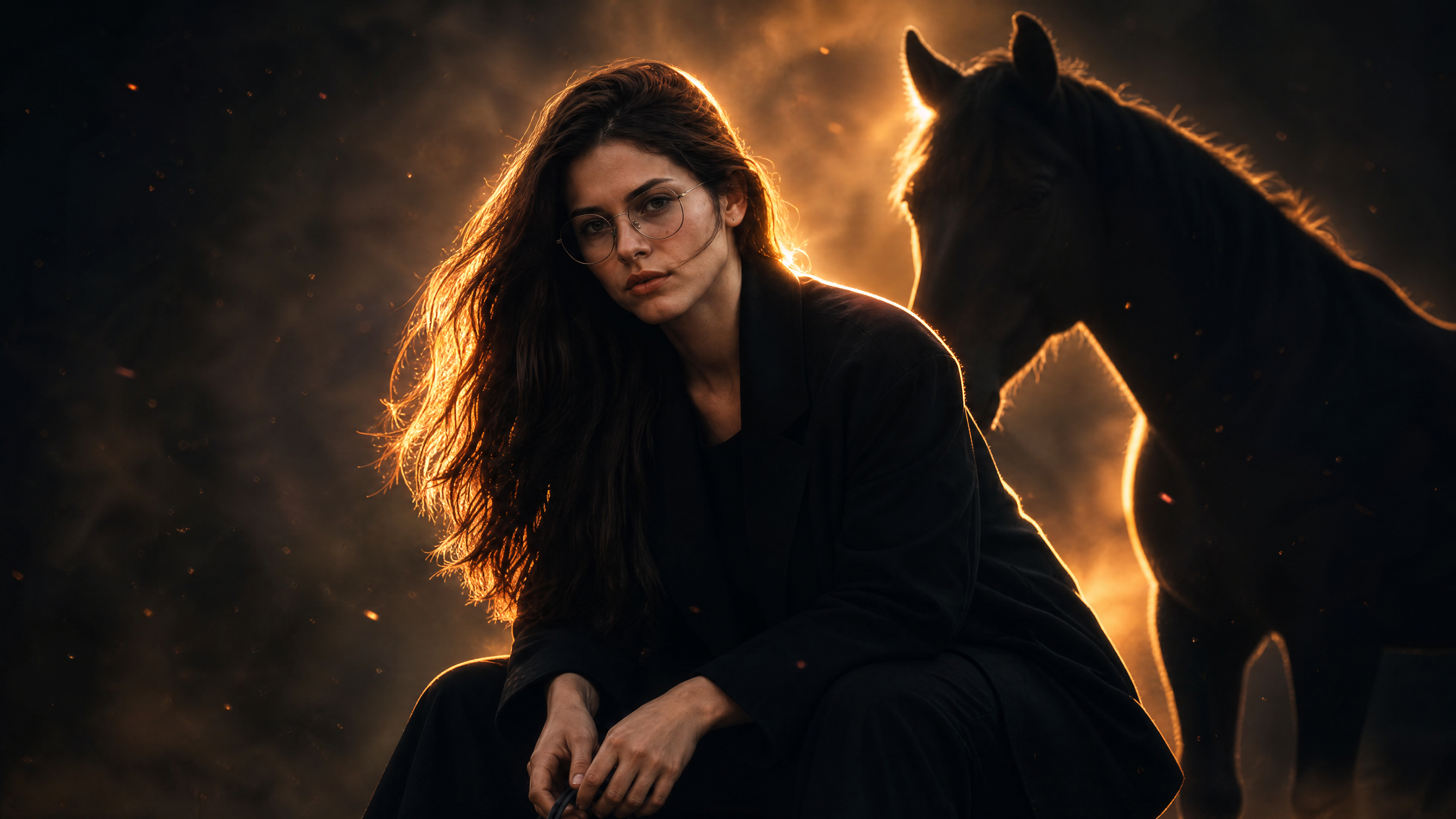
更改轮廓光的颜色来改变氛围。冷蓝色营造平静神秘感,暖琥珀色显得英勇,品红则充满高级时尚感。
万圣节照片 prompt
每年十月,AI 万圣节潮流都会刷屏:大家上传一张自拍,就能获得一张变装肖像、情侣写真,或是以自己为主角的伪纪录片恐怖剧照。思路很简单:保留你真实的脸,替换掉服装、妆容和场景。这恰好是 Gemini 图像模型的拿手好戏,因为服装和场景可以彻底改变,而你依然清晰可辨。
万圣节变装自拍
这是该潮流的基础玩法,也是大多数人最先搜索的款式。上传一张自拍,指定一套服装,就能得到一张宛如精修万圣节写真的人像。
Edit the uploaded photo. Keep the same face, features, and expression
exactly, preserve the original identity. Restyle into an elegant vampire
Halloween portrait: deep burgundy velvet outfit with a high lace collar,
dark berry lips, subtle pale makeup, candlelit gothic interior, cool
moonlight from an arched window, faint mist, carved pumpkins softly
blurred in the background, cinematic color grade, vertical 4:5 frame.
Keep skin texture natural and true to life.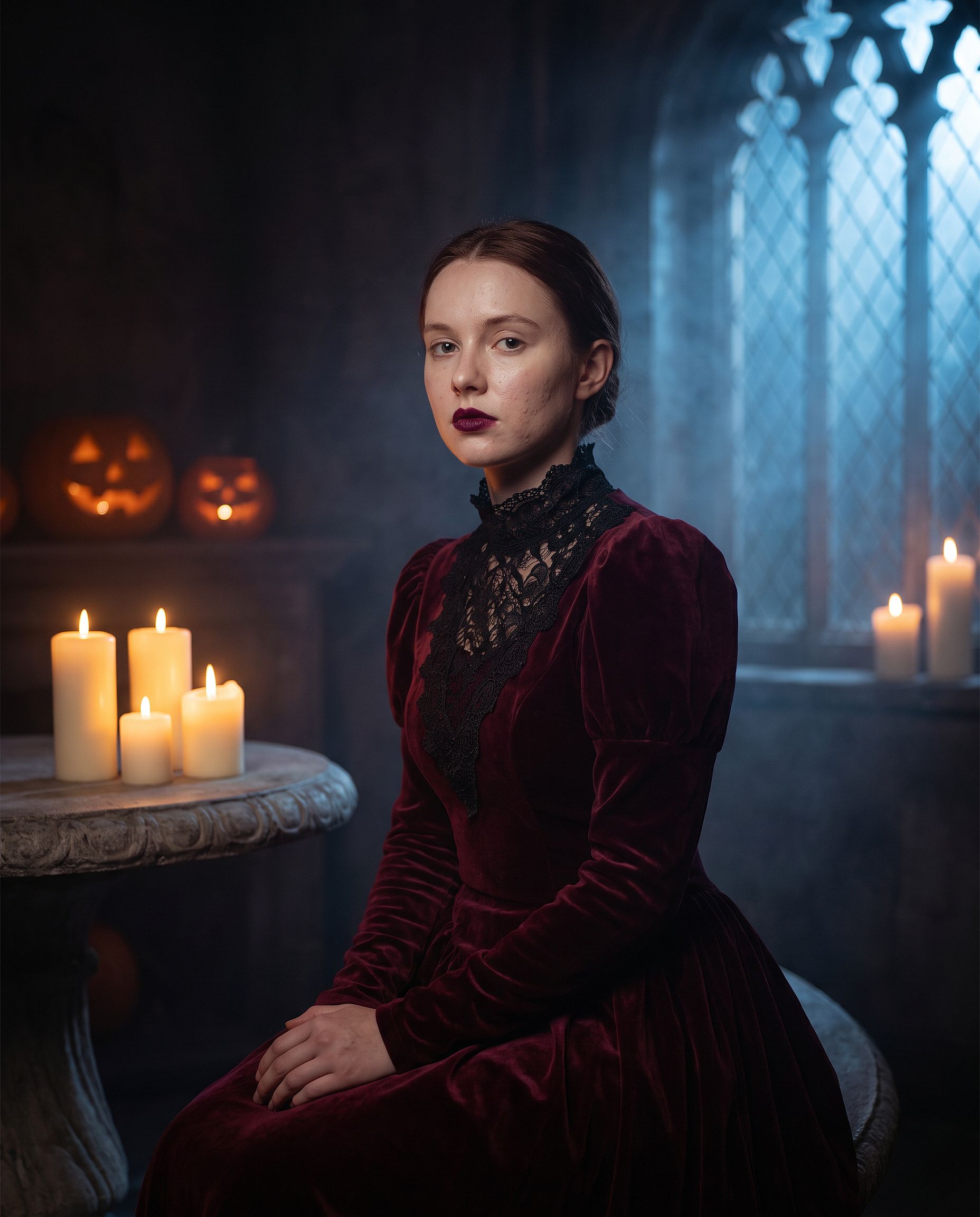
把「elegant vampire」换成任意服装:女巫、僵尸、幽灵新娘、骷髅,或经典电影怪物都行。前两行保持不变。变装妆容最容易让宽松的 prompt 把整张脸重画一遍,所以这里的身份描述行比任何其他编辑都更关键。
VHS 万圣节潮流
这是被模仿最多的万圣节 AI 潮流格式:把你的照片变成一帧带颗粒质感的 90 年代摄像机静帧,仿佛来自某部砍杀电影,背景里潜伏着一个阴影人影。磁带噪点和时间戳就能营造出大半的氛围。
Edit the uploaded photo. Keep the same face and identity exactly.
Restyle into a 1990s VHS camcorder still from a found-footage horror
movie: dim bedroom at night, harsh on-camera light, scan lines, chroma
bleed, slight tracking distortion, washed-out colors, a faint shadowy
hooded figure standing in the dark doorway behind the subject, timestamp
"OCT 31 1996 11:47 PM" in the bottom corner, 4:3 frame.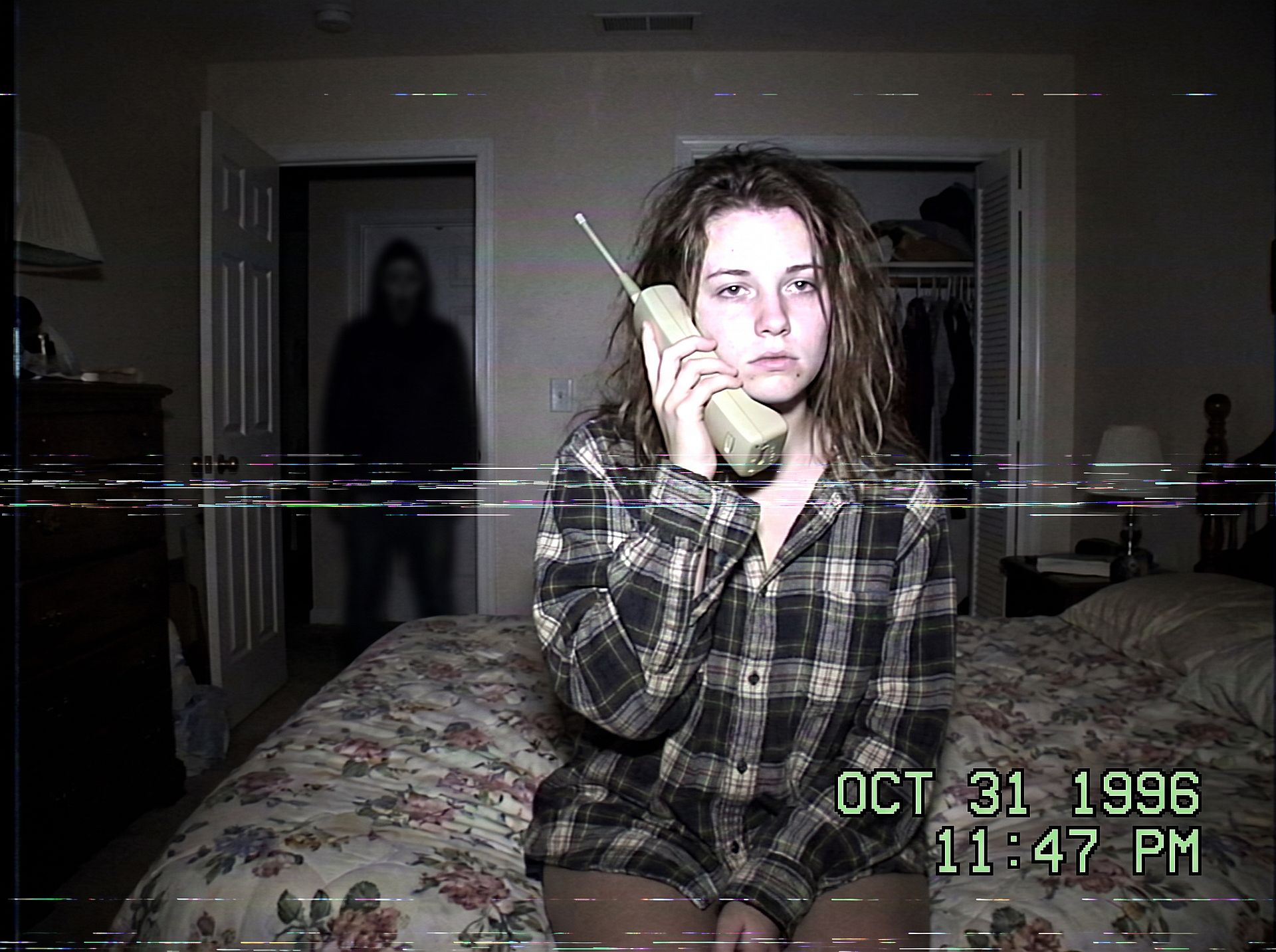
换个场景就能换种惊吓感:午夜的厨房、漆黑的走廊,或是后车窗里有人影的后座。让人影保持小而隐于阴影,照片才会透着诡异而非血腥。
万圣节情侣写真
情侣装扮在万圣节写真搜索中占比最大。保护两张脸,让他们成对装扮:
Edit the uploaded couple photo. Keep both faces, skin tones, and
expressions exactly, do not merge or alter their features. Dress them in
coordinated Halloween costumes, a classic vampire and a witch, standing
close on an autumn porch at dusk: glowing jack-o'-lanterns, warm string
lights, fallen leaves, soft fog, warm film color grade, shallow depth of
field.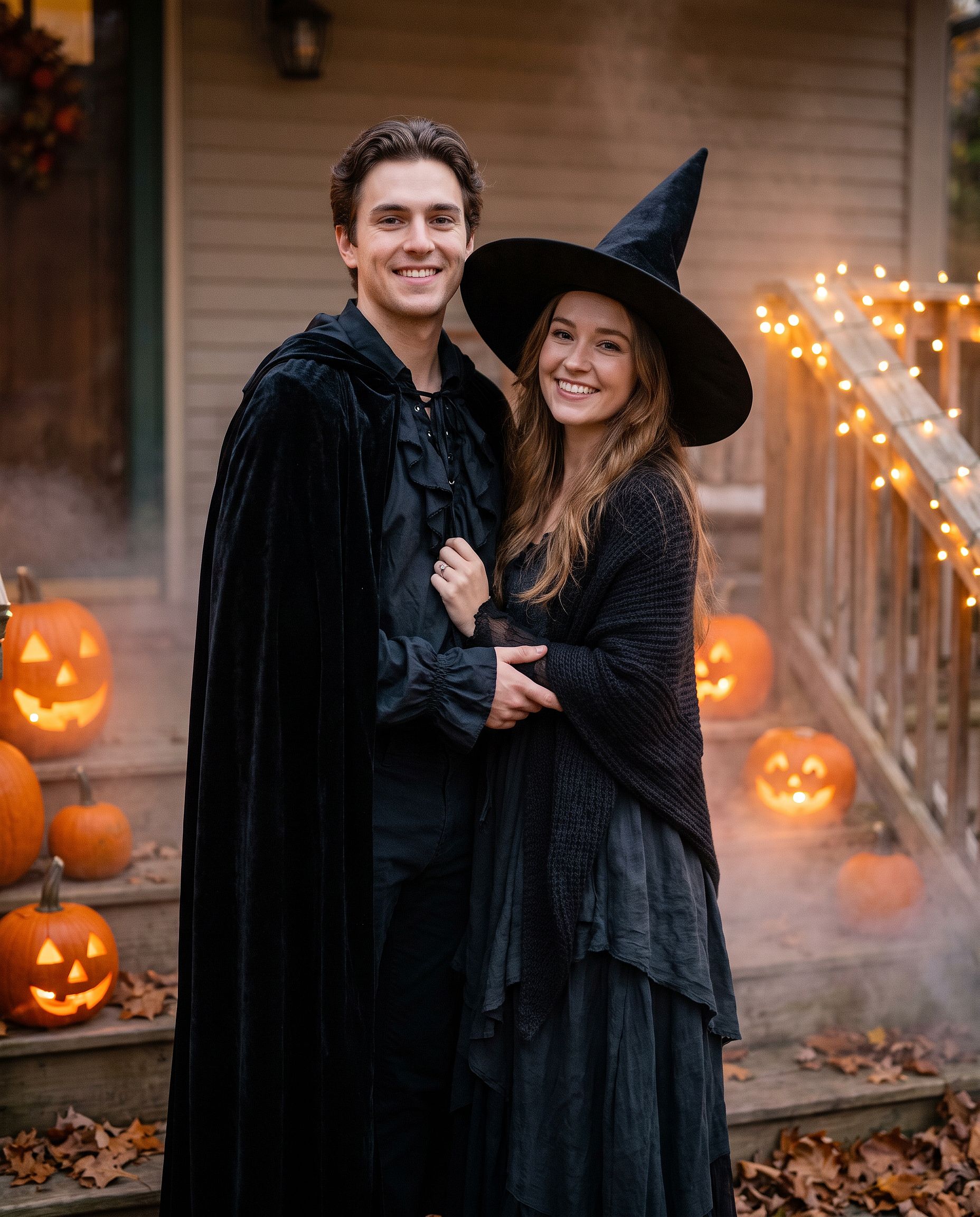
同一个 prompt 也适用于好友合影或全家福。把「couple」改成「group of four」,然后从左到右依次列出每个人的服装。
糖骷髅妆容造型
若想只做妆容而非整套服装:
Edit the uploaded photo. Keep the face shape, eyes, and identity
recognizable. Add half-face sugar-skull makeup: white base, black eye
sockets, and delicate floral linework on one side, the other half left
natural. Dark suit with a marigold flower, candlelit background with
orange marigold petals, dramatic side lighting, rich cinematic color.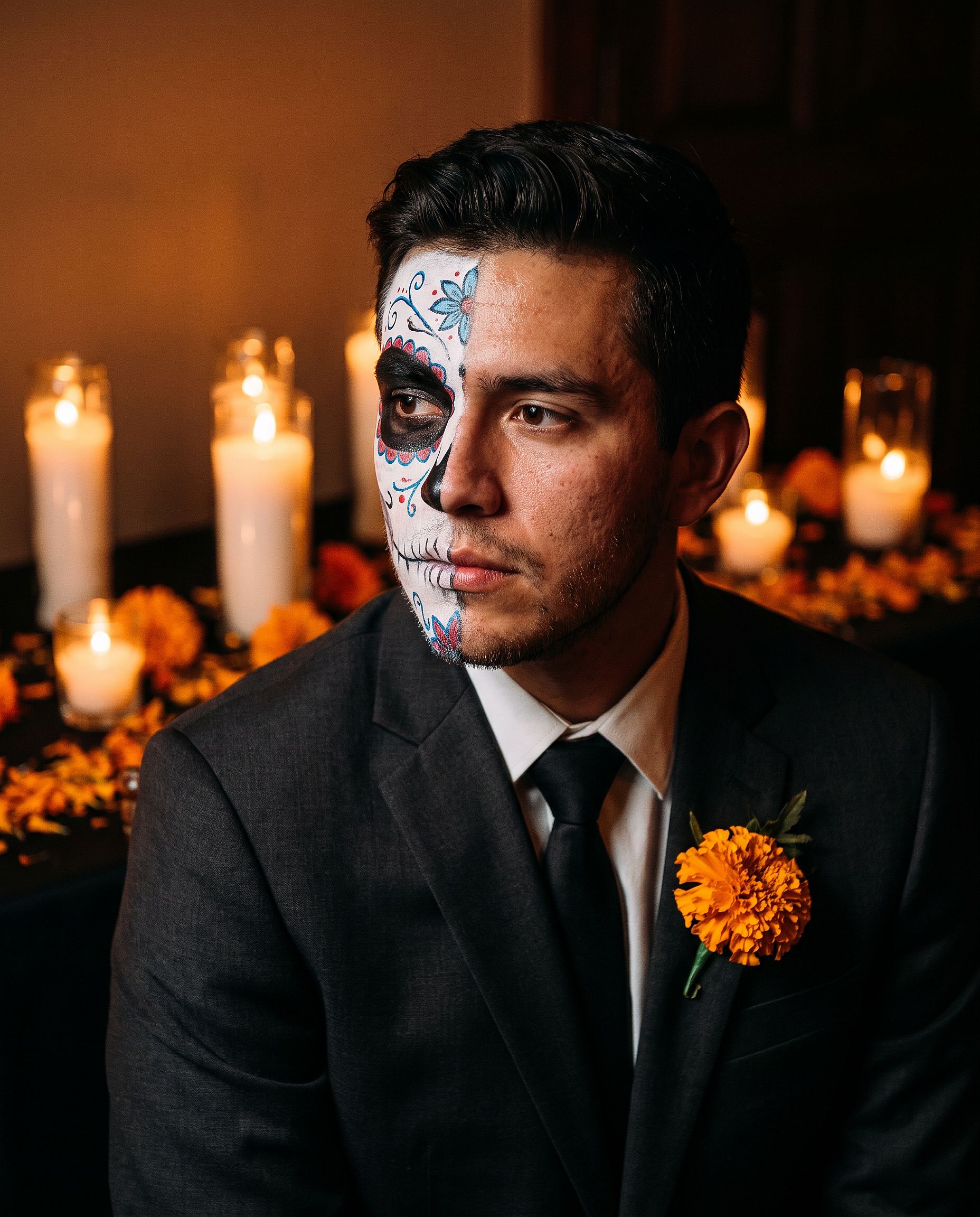
半脸妆让人物更容易辨认,因此比全脸设计更适合用作头像。
宠物变装
Edit the uploaded pet photo. Keep the pet's face, fur pattern, and eye
color exactly. Add a small witch hat and a tiny black cape, seated next
to a glowing jack-o'-lantern, cozy autumn lighting, shallow depth of
field, playful but realistic.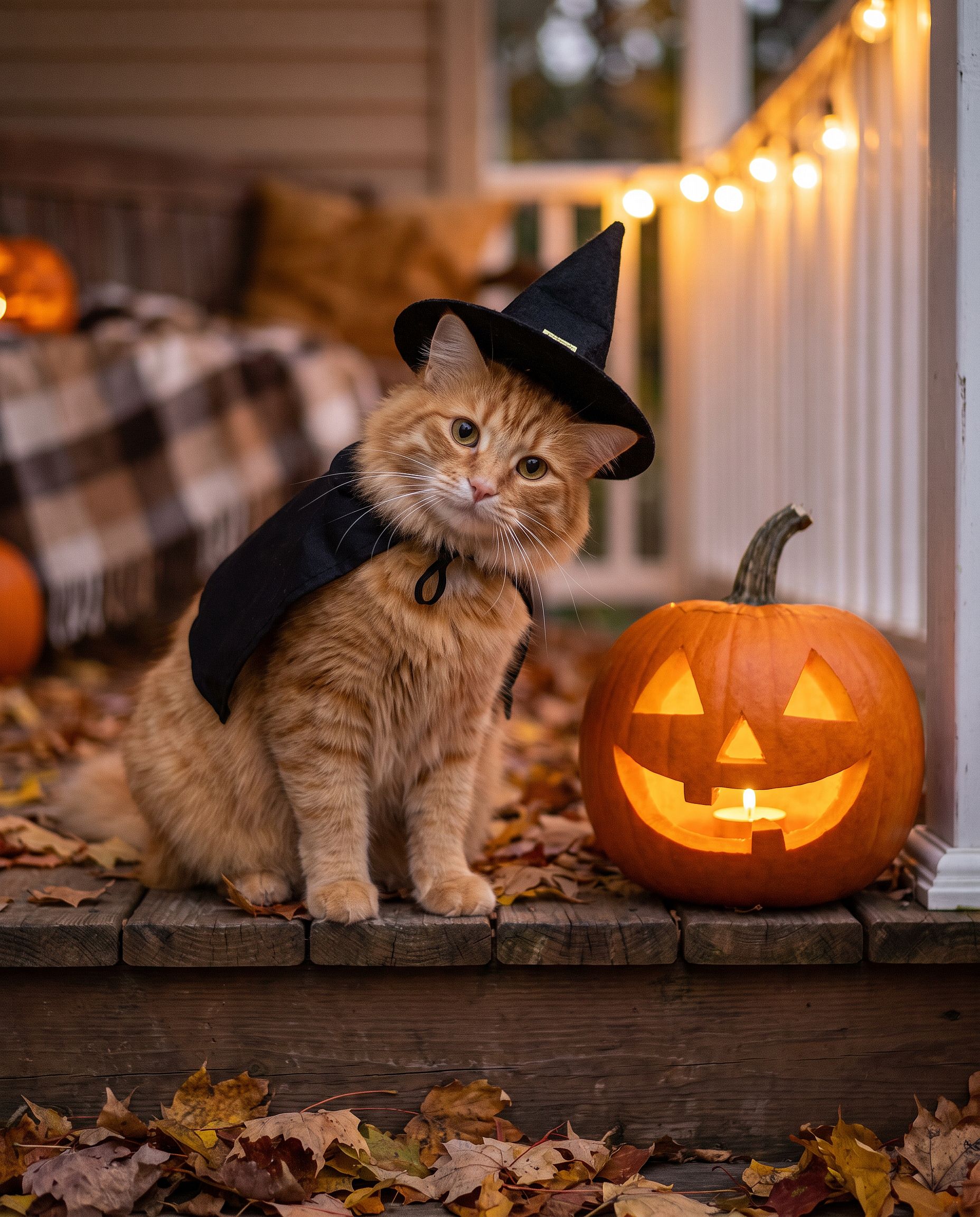
如果你不想自己写 prompt, AI 万圣节生成器 正是为此而生:上传一张照片,把它变成万圣节服装人像。
感恩节照片 prompt
感恩节照片的重点不在服装,而在餐桌:家庭聚餐合影、用于节日贺卡的秋日人像,还有那张会成为全家一周头像的照片。诀窍和任何群体修图都一样——锁定每张脸,然后改变光线、服装和场景。
感恩节家庭聚餐照片
大多数家庭聚餐照片都是在糟糕的光线下,由离手机最近的人随手拍下的。这个 prompt 能把那样的快照,变成你真正愿意打印出来的那张照片。
Edit the uploaded family photo. Keep every face, skin tone, and
expression exactly, preserve all identities, do not merge features.
Restyle into a warm Thanksgiving dinner photo: long wooden table with a
roast turkey, pumpkin pie, candles, small pumpkins and autumn leaves,
golden late-afternoon window light, cozy knitwear in rust, cream, and
olive tones, natural candid closeness, vertical 4:5 frame.
如果超过四个人,请写明照片里有几个人(比如"一家六口"),这样模型就不会漏掉或多加人。
秋日感恩节肖像
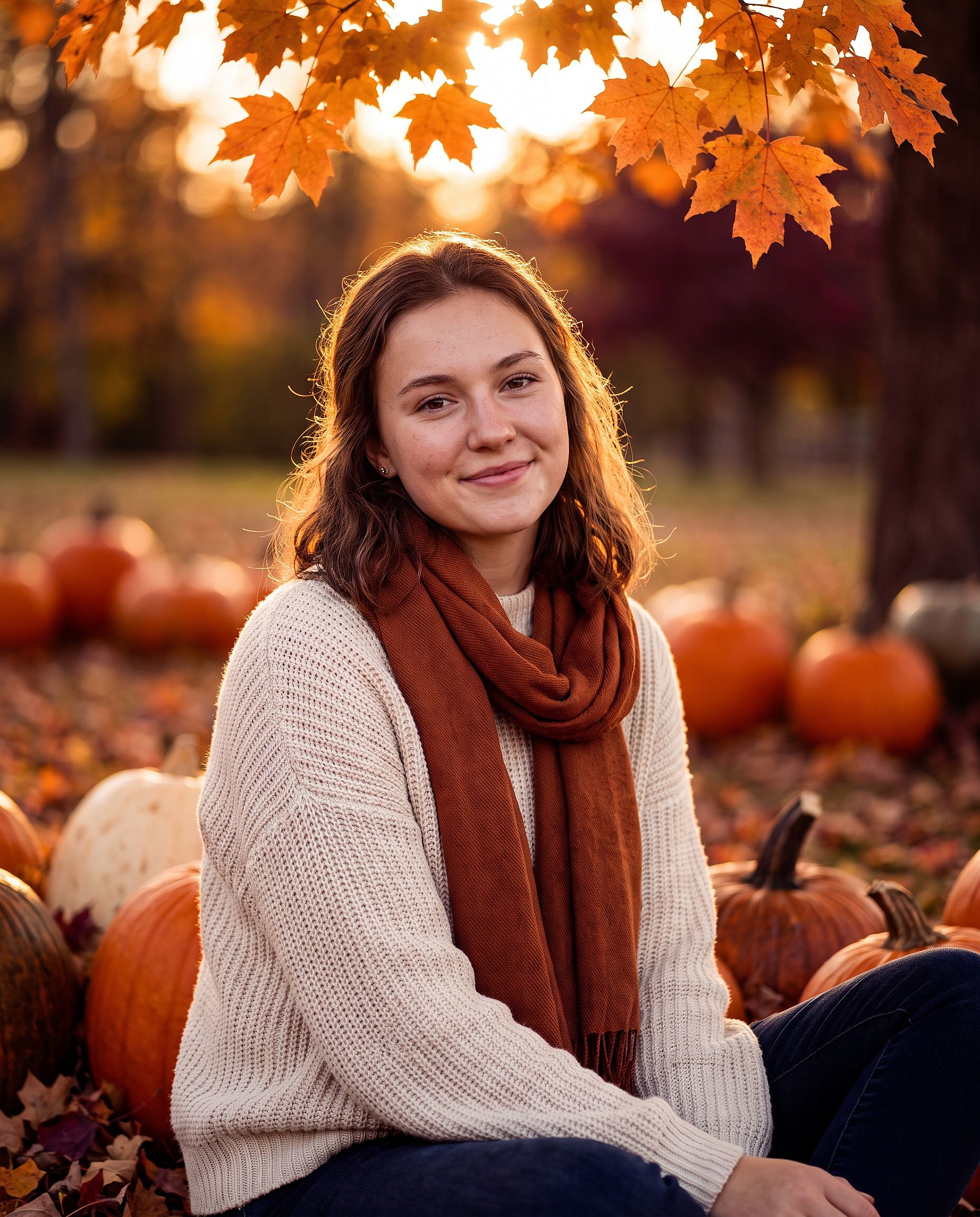
适用于单人人像、情侣合影或感恩节照片贺卡:
Edit the uploaded photo. Keep the same face and identity exactly.
Restyle into an autumn Thanksgiving portrait: outdoors in a pumpkin
patch at golden hour, chunky knit sweater and scarf, warm amber and
burgundy tones, soft backlight through orange leaves, shallow depth of
field, holiday photo card quality. Keep skin texture natural.
如果照片要做成贺卡,可以加一句"在顶部留出放祝福语的空白"。
圣诞照片 prompt
AI 圣诞照片是一年中最火爆的季节性修图。到了十二月,人们想要无需预约影楼的全家写真、无需摄影师的节日贺卡,以及每场派对前的节日头像。下面每种款式都从一张普通照片开始。
圣诞礼盒写真
这是一种工作室风潮流:主角坐在一个巨大的敞口礼盒里。现实中很难布置,但作为编辑却轻而易举。
Edit the uploaded photo. Keep the same face, features, and expression
exactly, preserve the original identity. Place the person sitting
inside a large open white gift box with a red satin ribbon, surrounded
by wrapped presents, warm fairy lights, and a softly blurred decorated
Christmas tree. Red knit sweater, bright clean studio lighting, cream
and red palette, professional holiday portrait, vertical 4:5 frame.
更换礼盒颜色,以契合品牌或贺卡设计。金配黑显奢华,淡粉则柔和俏皮。
圣诞全家福写真
在圣诞树前穿着同款睡衣,这是每个家庭一年都想拍一次的合影。这里宠物也算家庭成员。
Edit the uploaded family photo. Keep every face, skin tone, and
expression exactly, preserve all identities, do not merge features.
Dress everyone, including the dog, in matching red plaid pajamas, the
dog in a small Santa hat. Seat them together on a rug in front of a
decorated Christmas tree and a lit fireplace with stockings, warm cozy
lighting, soft bokeh from the tree lights, holiday card quality.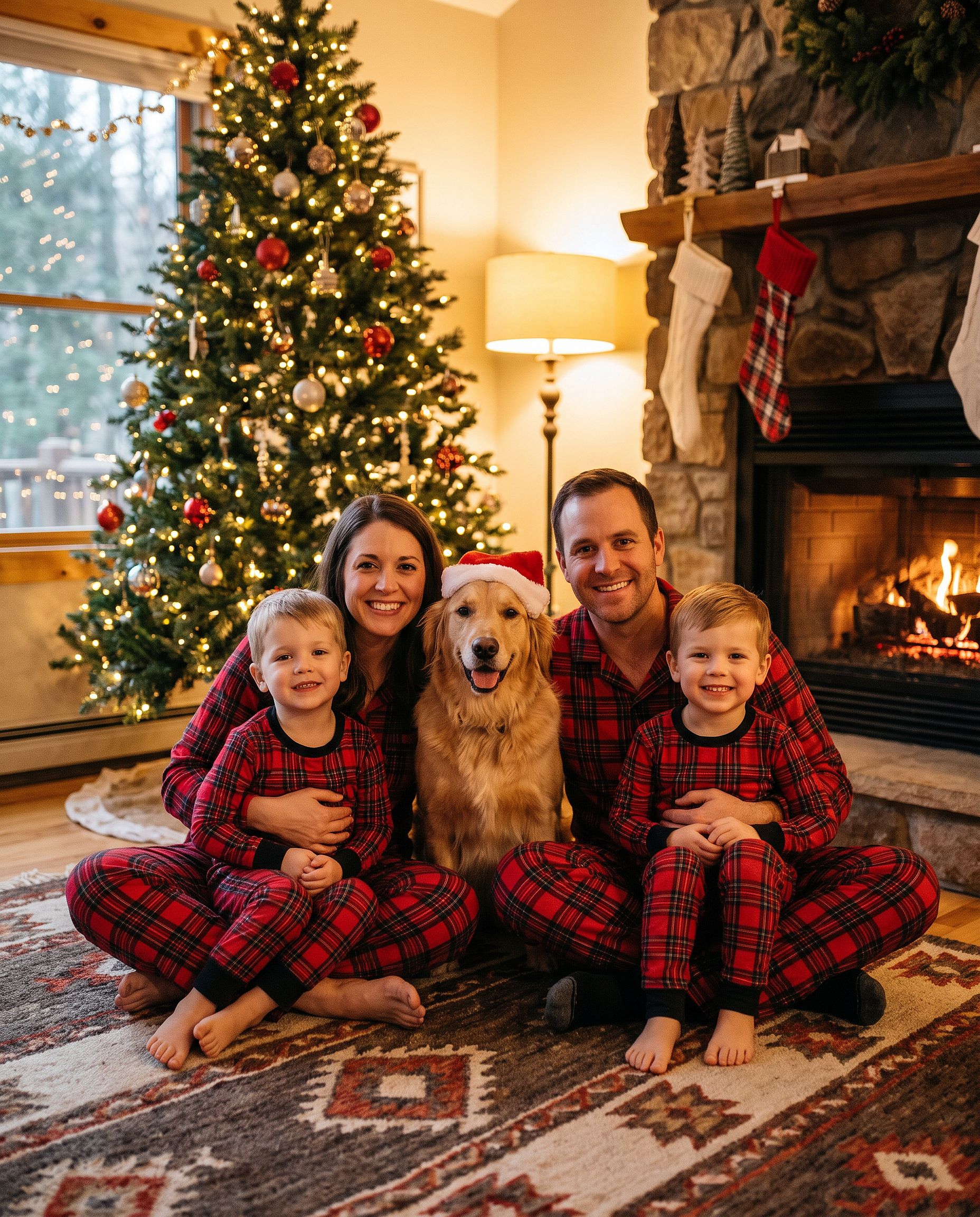
如果你只想要那顶帽子, 为照片添加圣诞帽 工具正好能帮你搞定,而 圣诞背景工具 在不改动人物的前提下替换场景。
户外圣诞树农场照片
Edit the uploaded photo. Keep the same face and identity exactly.
Restyle into an outdoor Christmas tree farm photo: rows of snowy pine
trees, light snowfall, a freshly cut tree on a sled, plaid coat and
knit hat, soft overcast winter light, warm breath in the cold air,
natural skin texture, vertical 4:5 frame.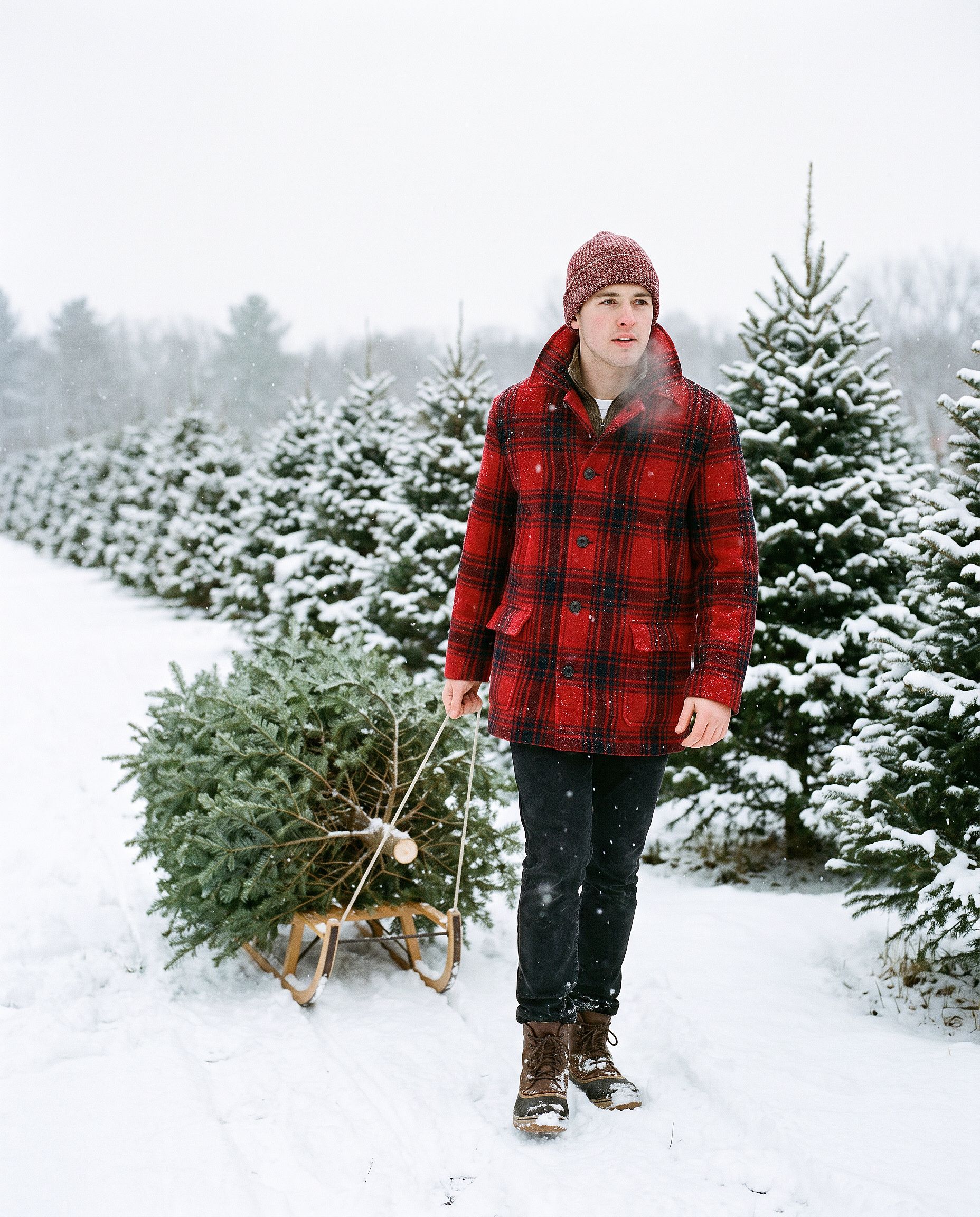
AI 圣诞贺卡
Turn the uploaded photo into a luxury printed Christmas card. Keep every
face exactly. Place the people in a snowy cabin doorway with evergreen
garland and warm window light, set inside a thin gold foil border on
heavy cream cardstock. Add "Merry Christmas" in gold foil calligraphy
above the photo and "from the Parkers" in small serif capitals below,
embossed holly in the corners. Show the card flat on white linen with
pine sprigs, a red velvet ribbon, and a gold wax seal.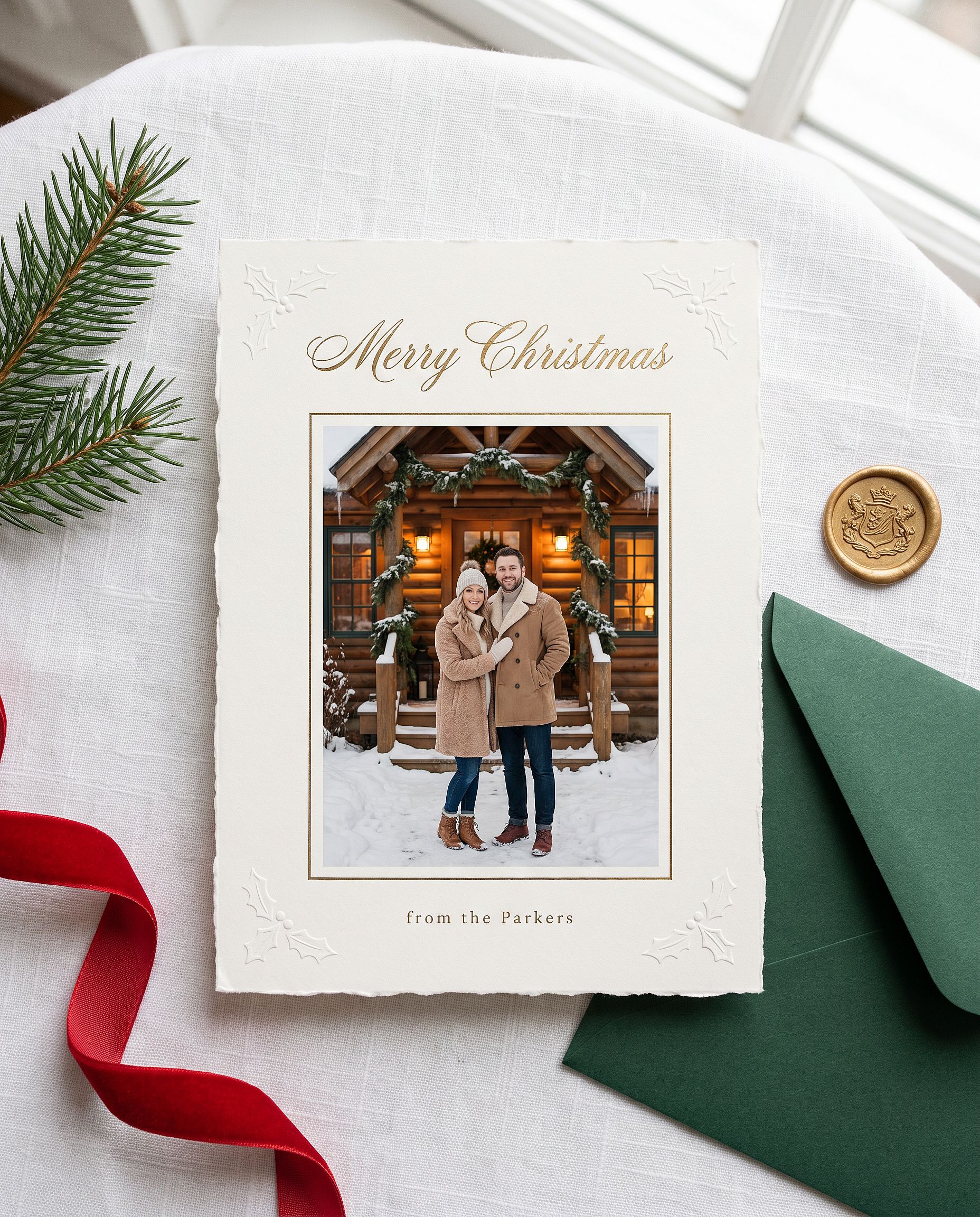
把引号里的名字换成你自己的。Nano Banana Pro 擅长处理简短的图内文字,所以祝福语通常第一次就能拼写正确。
动漫圣诞人像
Restyle the uploaded photo into a Japanese anime film still on
Christmas Eve. Keep the person's hairstyle, outfit colors, and overall
look recognizable. Standing at a snowy railroad crossing in a quiet
residential town at blue hour, duffle coat and long red scarf, breath
visible in the cold, warm house windows, a lit Christmas tree outside a
corner shop, glowing vending machines, power lines overhead, soft
falling snow, hand-painted anime background art, delicate cel shading.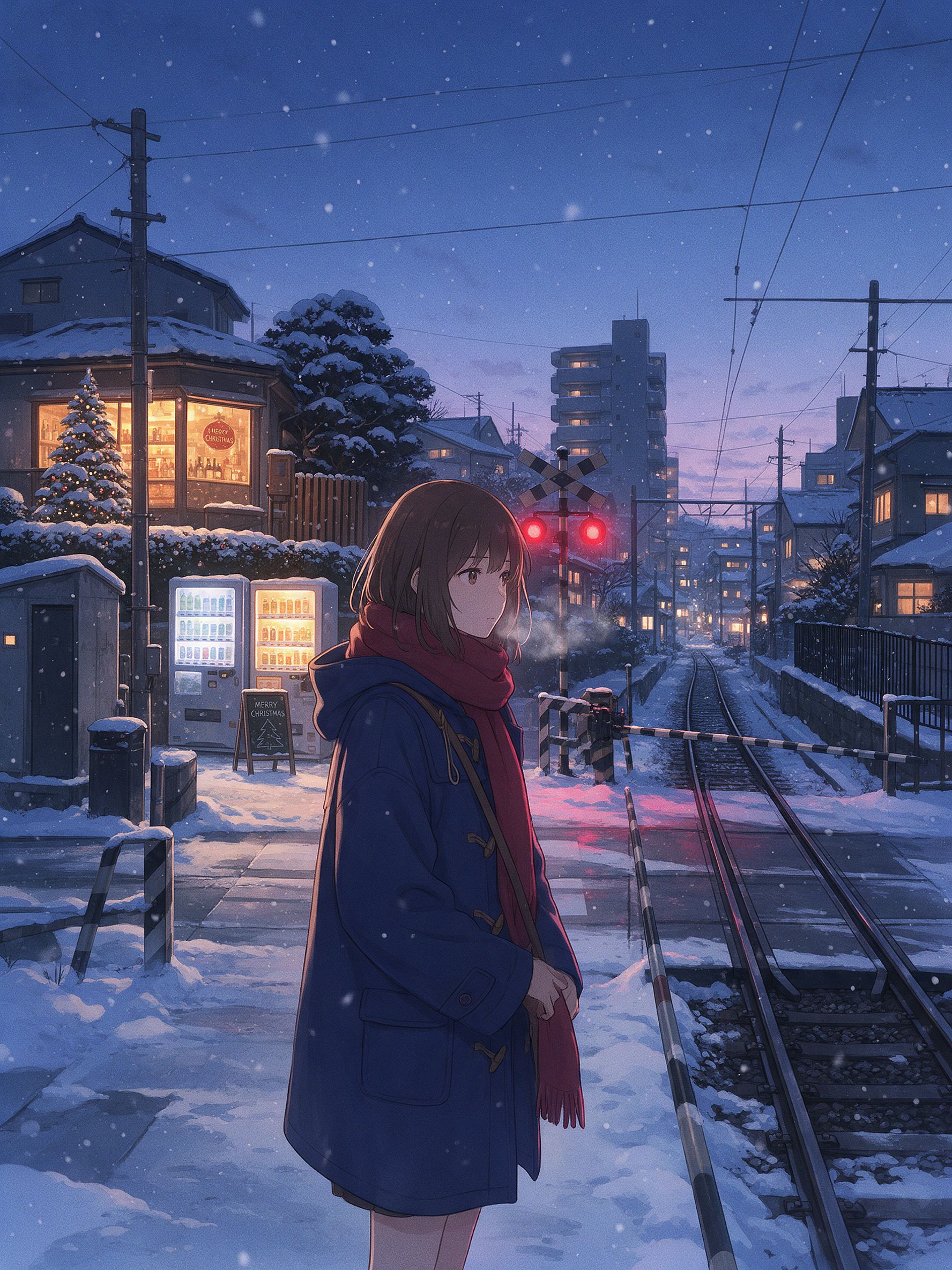
正是这些小细节让它看起来像一幅日本动漫风的冬日场景:铁道口、自动售货机、电线,还有蓝调时刻的光线映衬着温暖的窗户。要实现这种效果,Seedream 5.0 Pro 或 Nano Banana 2 Lite 往往能比 Nano Banana Pro 呈现更干净的 2D 风格。换个模型,跑同一条 prompt。
完整的 Gemini 照片 prompt 库
以上是深度讲解,下面是快速素材库:按你想制作的内容分类,可直接复制粘贴的简短 prompt。大多数都需要你先上传一张照片。美学与电影感这组也可用于纯生成。选一个类别,挑一句,粘贴进去即可。
热门女生肖像
Edit the uploaded photo into a soft-glam aesthetic selfie: dewy glow,
warm highlight, subtle butterfly light, pastel background. Keep the same
face and identity exactly, natural skin texture.
Restyle the uploaded photo into an elegant saree ethnic portrait: rich
traditional outfit, soft gold jewelry, warm bokeh lighting, graceful
pose. Keep the face and identity unchanged.Edit the uploaded selfie into a clean Instagram DP: minimalist studio
backdrop, soft even light, tasteful modern styling, crisp detail. Keep
the same face exactly, no heavy smoothing.Restyle the uploaded photo into a dreamy pastel aesthetic portrait: airy
glow, muted soft colors, gentle wind in the hair, natural skin. Keep the
face recognizable and identity intact.Restyle the uploaded photo into a golden-hour outdoor girl portrait:
warm backlight, soft lens flare, blurred natural background, flowing
outfit. Keep the face and identity unchanged.热门男生与情侣人像
Restyle the uploaded photo into a café golden-hour boy portrait: soft
window backlight, cozy neutral outfit, gentle flare, Pinterest fashion
mood. Keep the face unchanged.
Restyle the uploaded couple photo into a warm café date-night scene:
cozy lighting, soft bokeh, relaxed poses. Keep both faces unchanged.Edit the uploaded couple photo into a vintage 1970s film look: warm
faded tones, retro wardrobe, soft grain. Preserve both faces and
expressions exactly.编辑与重塑风格
Edit the uploaded photo. Keep the face and pose exactly. Replace the
outfit with a clean, well-fitted business-casual look and the background
with a softly blurred modern office, matched lighting, professional
headshot quality.
如果你想完全不写提示就获得一张精致的头像照, AI 头像生成器 正是为此而生。它能在整套商务造型中保持你面部的一致性。
Edit the uploaded photo into a black-and-white fine-art portrait:
dramatic side lighting, deep contrast, film grain, timeless studio look.
Keep the face exactly the same.
Edit the uploaded photo into a double-exposure portrait: the subject
blended with a soft city skyline, moody tones, artistic overlay. Keep
the primary face clear and recognizable.Edit the uploaded photo into an AI hairstyle try-on: keep the face and
identity exactly, change only the hairstyle to a modern layered cut,
natural color and texture, realistic result.修复与画质提升
Edit the uploaded blurry photo: sharpen details, reduce noise, recover
texture in hair and skin. Keep the face identical, natural skin, no
plastic smoothing.
Edit the uploaded photo to a high-resolution 4K glow-up: sharpen fine
detail, reduce noise, improve color balance, recover hair and skin
texture. Keep the face and expression identical, no plastic smoothing.节庆与节日
涵盖全年其余节日的快捷短句。万圣节、感恩节和圣诞节在上文都有完整章节和示例。
Edit the uploaded photo into a Diwali celebration: warm diya lamp light,
elegant traditional outfit, soft bokeh of string lights, rich jewel
tones. Keep the face unchanged.
Edit the uploaded photo into a spring cherry-blossom scene: soft pink
petals, gentle daylight, fresh pastel palette. Keep the person exactly
the same.Edit the uploaded couple photo into a Valentine's scene: soft warm
light, tasteful red accents, romantic bokeh. Keep both faces unchanged.Edit the uploaded photo into a New Year scene: elegant evening styling,
soft golden fireworks bokeh, celebratory mood. Keep the person
recognizable.唯美又具电影感
Edit the uploaded photo into a burning-newspaper portrait: the subject
framed by a vintage newspaper with glowing burning edges, warm ember
light, dramatic dark background, cinematic mood. Keep the face exactly
the same.
Edit the uploaded photo into a moody neon-noir portrait: rain-slick city
street, pink and blue neon reflections, cinematic contrast, shallow
depth of field. Keep the face and identity unchanged.如何编写你自己的 Gemini 照片 prompt
以上每条 prompt 都遵循同样的骨架:
Edit the uploaded photo.
Keep [the face / both faces / the pose / the composition] exactly the same and preserve the original identity.
Change only [outfit / background / era / color / scene].
Add [style, lighting, mood, aspect ratio].
Keep [skin texture / features] natural and true to life.
逐句拆解:「编辑上传的照片」告诉模型基于你的图片操作,而不是凭空生成新图。「完全保持一致,保留原始身份」保护那些让照片可辨识的部分。「仅更改」圈定了编辑范围。结尾关于自然肤质或真实细节的一句,能避免那种一看就是 AI 的过度处理感。
若只是纯粹生成,去掉「edit」和「keep the same」这类语句,直接描述主体、风格、光线和氛围即可。
生成前五秒自查:照片已上传、说了要保留什么、说了要改什么、指定了风格、要求了自然细节。谷歌的 Gemini 支持文档 介绍基本的编辑流程。
Gemini(Nano Banana)vs GPT Image 2 vs Seedream 照片对比
没有哪一个模型能在所有照片上都胜出。以下是每个模型的强项与短板所在:
| Nano Banana Pro | Nano Banana 2 Lite | GPT Image 2 | Seedream 5.0 Pro | |
|---|---|---|---|---|
| 重度风格化改造下仍保持身份一致 | 最强 | 强 | 强 | 适中 |
| 图中可读文字(标题、标签、菜单) | 强 | 强 | 最佳(微文字与 UI 图标精度) | 适中 |
| 照片级真实感(皮肤、光影、质感) | 最佳(原生 4K,超写实) | 强 | 最佳(时尚级、超写实) | 适中 |
| 动漫 / 亚洲风 / 2D 风格化 | 有限 | 最佳(动漫与动画首选) | 适中 | 最佳(氛围感动漫场景) |
| 编辑与图层分离 | 迭代记忆(无需重写即可编辑) | 迭代记忆 | 无记忆 | 内置图层分离,自由编辑 |
| 多语言文字(漫画、广告、海报) | 强 | 适中 | 最佳 | 适中 |
| 适合 | 热门人像编辑、身份一致的成套图、4K 输出 | 快速草稿、动漫风格重绘、电商主图 | 高端时尚视觉、任何带文字的图像、海报和包装 | 角色美学、动漫场景、带图层的编辑工作流 |
这四款模型都集中在同一个 OpenArt 工作区里。切换模型对比只需一键,无需重新订阅。当你的目标是让同一张脸贯穿整套潮流内容时, AI 角色 功能可锁定身份,让每个 prompt 都生成同一个人物。
常见问题
如何用 Gemini AI 处理照片?
打开一个 Gemini 图像工具,描述你想要的内容,然后生成。要编辑现有照片,先上传它,再告诉模型哪些保留、哪些改变。在 OpenArt 上,你可以在完整编辑器旁边用到相同的 Gemini 模型(Nano Banana 2.1 和 Nano Banana Pro)。打开 AI 图像生成器,选择一个模型,然后粘贴 prompt。
如何在 Gemini AI 中编辑照片?
上传你的照片,然后写一条指令,明确区分哪些保留、哪些改变:"保持面部与身份完全不变,改造成柔美精致的人像风格。"上传很关键,因为模型编辑的是你给出的图片,而不是凭空造出一个相似的人。最后再加一句,要求呈现自然的肌肤质感,避免过度磨皮的效果。
如何编写 Gemini AI 照片 prompt?
遵循上面的框架:指明主体、说明要保留什么、说明要改变什么、加上风格、光线和画幅比例,最后以一句自然细节收尾。复制本文中的任意 prompt,把风格词换成你自己的即可。
适合女生的 Gemini AI 照片 prompt 有哪些?
热门风格:柔美时尚自拍、纱丽与民族风肖像、简洁的 Instagram 头像、黄金时刻户外肖像。这四种都在上方的热门女性肖像板块中,随时可粘贴使用。
万圣节照片最好用的 Gemini AI prompt 有哪些?
保留你真实面容的服装人像:优雅的吸血鬼或女巫自拍、VHS 恐怖摄像机风格、情侣协调装扮,或是半脸糖果骷髅妆。每条万圣节 prompt 都要以锁定面部和身份的一行开头,再描述服装、妆容和场景。这五款都在上面的万圣节板块里。
我该怎么玩 AI 万圣节潮流?
上传一张清晰的自拍到 Gemini 图像模型(如 Nano Banana Pro),粘贴上面任意一条万圣节 prompt,然后生成。想完全跳过 prompt,OpenArt 上的 AI 万圣节生成器一步就能把照片变成服装人像。
我该如何制作 AI 圣诞照片?
上传一张清晰的照片,选择 Nano Banana Pro,粘贴上面任意一条圣诞 prompt,比如圣诞礼盒写真或全家睡衣合影。务必保留锁定每张脸的那一行。如果想要无需 prompt 的一键版本,OpenArt 的圣诞滤镜能把普通照片变成节日氛围照。
我能用 AI 制作感恩节全家福吗?
可以。上传合影,告诉模型保留每张脸、不要融合五官,然后描述餐桌、光线和服装。写明照片里有多少人,这样就不会漏掉或多加任何人。
Nano Banana 和 Gemini 是一回事吗?
Nano Banana 是 Google Gemini 图像模型的昵称。人们说「Gemini AI 照片」时,通常指的就是 Nano Banana 2.1 或 Nano Banana Pro。OpenArt 让你直接使用这些模型。
Gemini 能修复并为老照片上色吗?
可以。让它去除破损、忠实保留每一处原始特征,再为黑白照片加上上色指令。颜色保持淡雅,效果才更真实可信;如果打算打印,之后再做一次放大。
这些 Gemini 照片提示词免费吗?
这些 prompt 你尽管复制使用。在 OpenArt 上运行它们可以用积分免费起步。