

 ChatGPT
 Perplexity
 Claude
 Gemini
Les meilleurs prompts photo Gemini AI pour des portraits tendance
Quarante et un prompts. C'est tout ce qu'est cet article. Si tu es venu copier un prompt photo Gemini AI, le coller et repartir avec un portrait fini, passe directement à la bibliothèque ci-dessous. Si tu veux comprendre pourquoi certains prompts produisent une retouche d'aspect professionnel et d'autres te renvoient un inconnu au visage en plastique, les décryptages phares et les sections fêtes avant la bibliothèque te montreront ce que chaque ligne d'un prompt fait réellement.
Les sections fêtes couvrent les retouches saisonnières les plus recherchées : les selfies en costume d'Halloween et la tendance horreur VHS, les photos de repas de famille de Thanksgiving et les séances photo de Noël AI, du portrait en boîte cadeau à la photo de famille en pyjamas assortis.
Tout ici tourne sur les modèles d'image Gemini de Google, qui OpenArt te propose sous le nom Nano Banana aux côtés de GPT Image 2.5, Seedream et d'un éditeur photo complet dans un seul espace de travail. De la lecture à la photo finie, environ deux minutes.
Qu'est-ce qu'un prompt photo Gemini AI ?
Un prompt photo Gemini AI est une instruction en langage courant que tu donnes aux modèles d'image Gemini de Google pour générer une nouvelle photo ou en retoucher une que tu as déjà. Le côté image de Gemini porte un surnom que tu as sans doute déjà vu : Nano Banana. Google utilise ce nom ouvertement désormais, et la version la plus performante, Nano Banana Pro, c'est le modèle que les gens désignent quand ils parlent de « photo Gemini AI ».
L'un de ces prompts fait l'une de deux choses. Il peut générer : créer une toute nouvelle photo à partir d'une description texte, comme un portrait de rue cinématographique ou un cliché à l'esthétique aura-farm. Ou il peut modifier : partir d'une vraie photo et changer ce que tu indiques tout en gardant le reste, comme « garde le visage exactement, transforme en portrait de film des années 90 ». La retouche est ce que Gemini fait de mieux, et c'est la raison pour laquelle la vague de portraits tendance a explosé avec ce modèle en particulier.
Lancer des prompts façon Gemini sur OpenArt
Voici la partie honnête, parce qu'elle compte. OpenArt n'est pas Gemini, et n'est pas conçu par Google. Ce qu'OpenArt t'offre, c'est un accès direct aux modèles d'images Gemini : Nano Banana 2.1, Nano Banana Pro et Nano Banana 2 Lite vivent tous dans l'espace de travail. Tout prompt écrit pour une « photo Gemini AI » tourne sur ces mêmes modèles au sein d'OpenArt.
Choisir Nano Banana 2 Lite pour des brouillons rapides, Nano Banana 2.1 pour un travail stable au quotidien avec un texte plus net dans l'image, et Nano Banana Pro pour les résultats les plus soignés et les plus fidèles à l'identité. GPT Image 2.5, Seedream 5.0 Pro, et un(e) complet(ète) Éditeur photo IA à leurs côtés.
Pourquoi les prompts photo Gemini deviennent viraux
La plupart des premières couvertures des modèles d'image de Gemini se concentraient sur la génération : tape une description, obtiens une image inédite. Mais les formats qui se sont réellement propagés étaient conçus pour être copiés.
Un prompt photo Gemini viral suit une structure précise. Il nomme le sujet, le style, l'éclairage, l'ambiance et le format, et il délimite ce qui doit rester inchangé. Cette recette est assez complète pour que le prompt d'une seule personne fonctionne sur mille photos différentes importées par mille personnes différentes.
L'édition l'emporte sur la génération dans les fils personnels pour une raison simple. Une image générée d'un inconnu se fait scroller. Une image éditée de toi — portrait soft glam, cliché en golden hour au café ou photo d'enfance restaurée : ça mérite une sauvegarde et un partage.
L'édition est aussi la tâche la plus difficile. Pour éditer de façon crédible, le modèle doit changer complètement le style, la tenue ou le décor tout en laissant ton visage intact. Les outils plus faibles échouent sur la seconde moitié et te renvoient un sosie. Les modèles d'image de Gemini préservent l'identité même à travers un restyling important, et les portraits tendance en dépendent précisément.
Si tu veux uniquement la partie génération, notre meilleurs prompts Nano Banana guide explique comment créer des images virales à partir de zéro. Cet article couvre les deux, en mettant l'accent sur les retouches de portraits tendance que tout le monde copie en ce moment.
Comment les utiliser sur OpenArt
Aucune compétence technique n'est nécessaire. Charge ta photo, choisis un modèle Gemini, colle un prompt, génère.
Pour les prompts de retouche, ouvre Génération d'images ou Créer une image dans ton espace de travail. Utilise le bouton de téléversement d'image à côté de la zone de prompt pour ajouter ta photo originale. Cette étape de téléversement est la plus importante : le modèle édite l'image que tu lui donnes, donc une source claire et bien éclairée donne un résultat plus net.
Clique sur le nom du modèle dans la zone de prompt et choisis Nano Banana 2.1 pour le travail quotidien ou Nano Banana Pro pour les résultats les plus cohérents. Colle n'importe quel prompt ci-dessous et génère. De là, tu peux affiner dans l'éditeur, upscale en 4K pour l'impression, ou remplacer l'arrière-plan. Les nouveaux comptes démarrent gratuitement avec des crédits, pour que tu puisses en tester quelques-uns avant de choisir un forfait.
Pour de la génération pure, saute l'import et colle directement un prompt de génération.
Le portrait de fille tendance
Le format photo Gemini le plus copié en ce moment. Il colle parfaitement aux recherches « copier-coller trending girl » qui inondent le fil : prends un selfie du quotidien et transforme-le en un portrait soft-glam soigné, avec un léger rehaut, une peau lumineuse, un halo chaud façon papillon et un stylisme esthétique digne d'un shooting pro.
High-fidelity studio portrait of a young Asian woman with pastel pink
hair in a side braid. She wears a cream polka-dot lace top under a pink
knit cardigan, accessorized with layered gold necklaces. Soft rosy
makeup, glossy lips, direct gaze. Pure white background, high-key
diffuse lighting, hyper-realistic fashion photography, 8k resolution.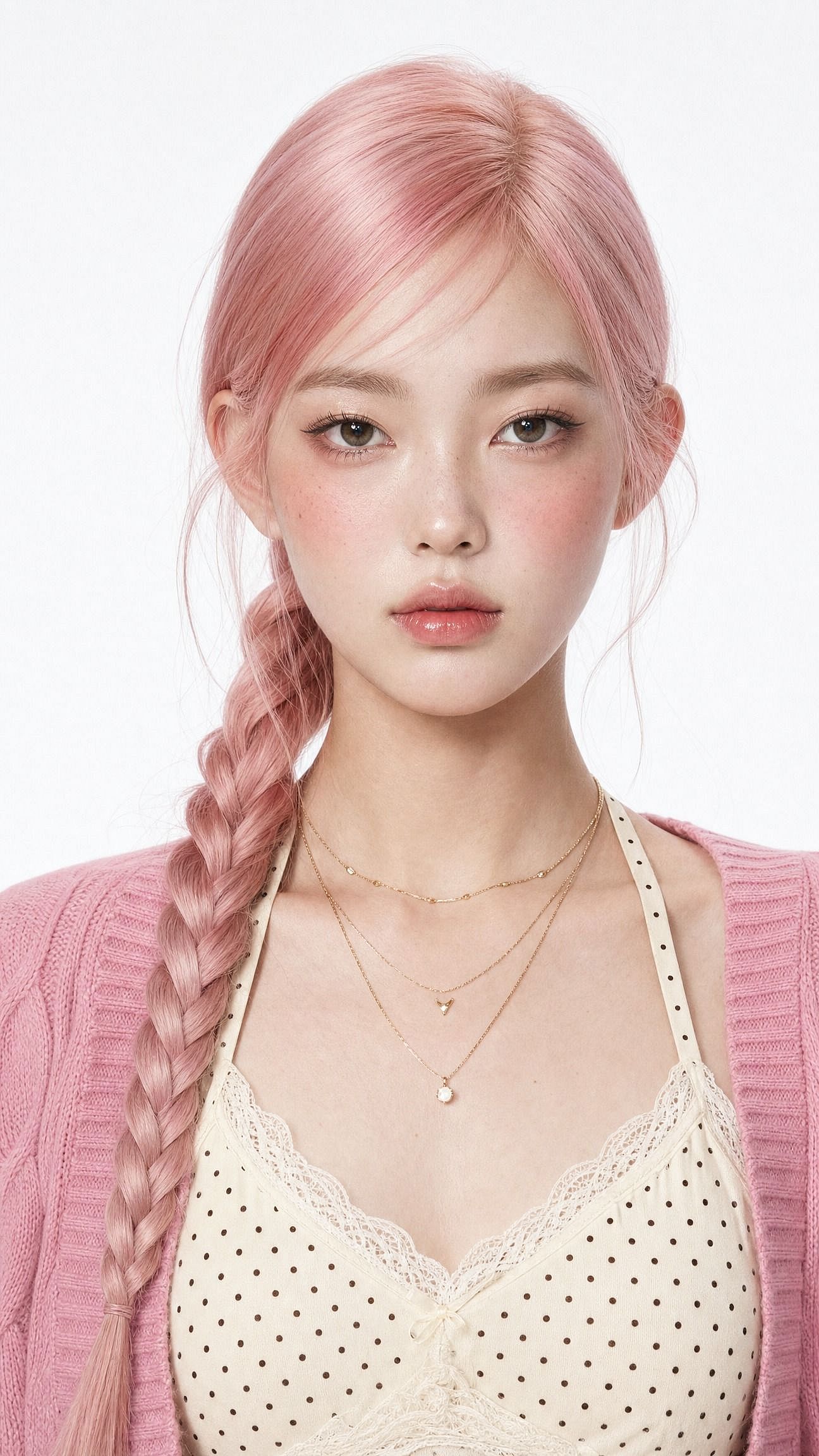
Change un seul mot pour transformer tout le rendu. Remplace « soft-glam » par « élégance ethnique en saree » pour un look traditionnel, ou « photo de profil Instagram épurée, décor de studio minimaliste » pour une photo de profil.
La phrase la plus importante est la première : garde le même visage et préserve l'identité d'origine. Sans elle, le modèle restyle le visage comme tout le reste, et tu obtiens un joli inconnu au lieu d'une version plus belle de toi.
Le portrait cinématographique du garçon
Le versant masculin de la tendance se divise en deux looks que les gens copient sans cesse : un style de rue cinématographique et un cliché à l'heure dorée en café avec un vibe Pinterest. Ce prompt fait la version street.
Edit the uploaded photo. Keep the same face, features, and expression
exactly, preserve the original identity. Restyle into a cinematic urban
street portrait: moody overcast light, teal-and-orange color grade,
blurred city street background, confident casual streetwear, shallow
depth of field, film-still mood, vertical 4:5 frame. Keep skin texture
natural and true to life.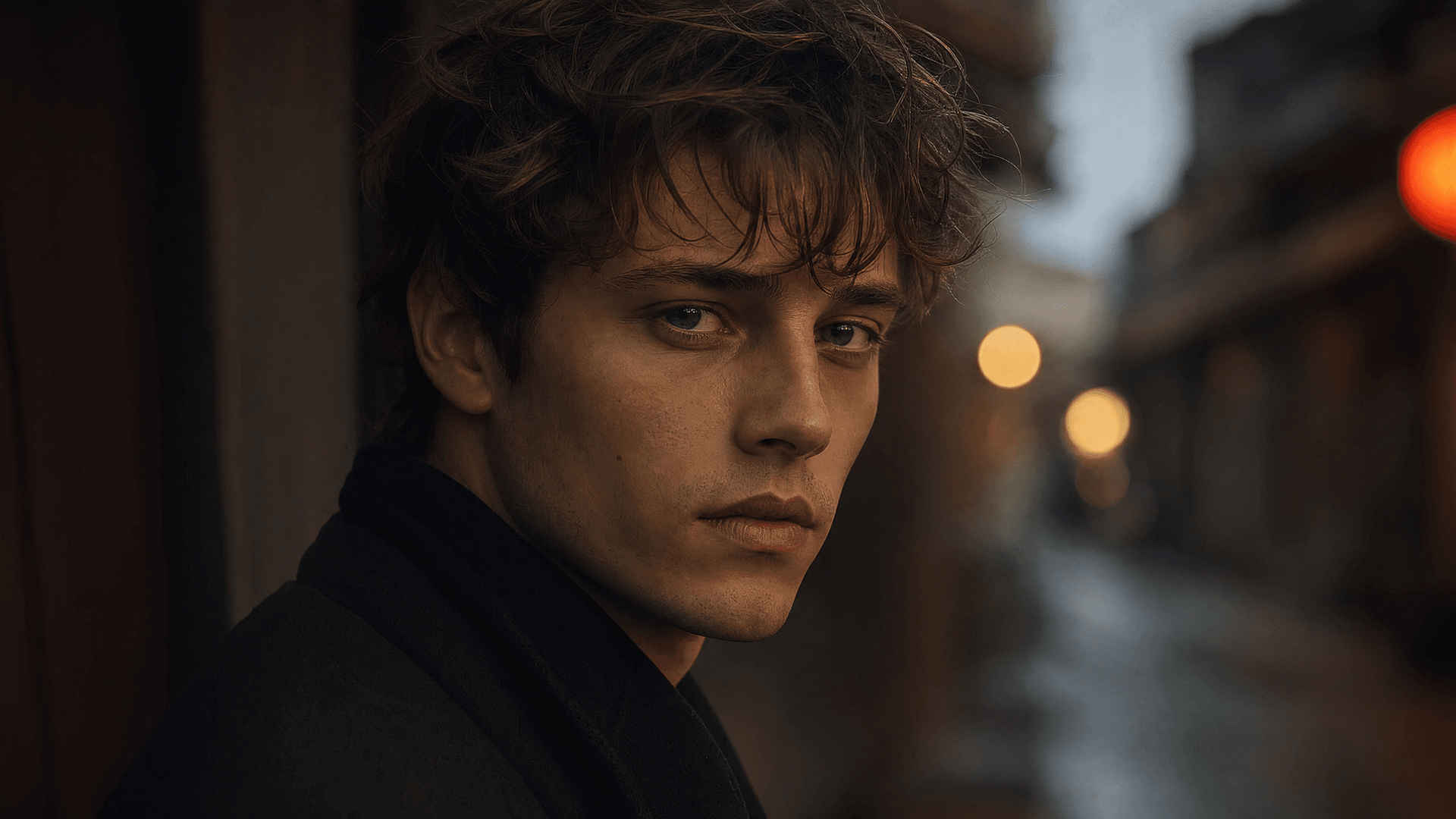
Le couple cinématographique
Les retouches de couple font partie des plus grandes sous-tendances, et ce sont les plus difficiles. Le modèle doit protéger deux visages à la fois.
Importe une simple photo de deux personnes prise au téléphone et obtiens une série qui semble mise en scène par un photographe :
Edit the uploaded photo of two people. Keep both faces, skin tones, and
expressions exactly as they are, preserve both identities. Do not merge
or alter their features. Restyle into a cinematic couple portrait:
coordinated neutral-tone outfits, soft directional lighting, a blurred
city-evening background, natural closeness, warm film color grade,
shallow depth of field, magazine-cover quality.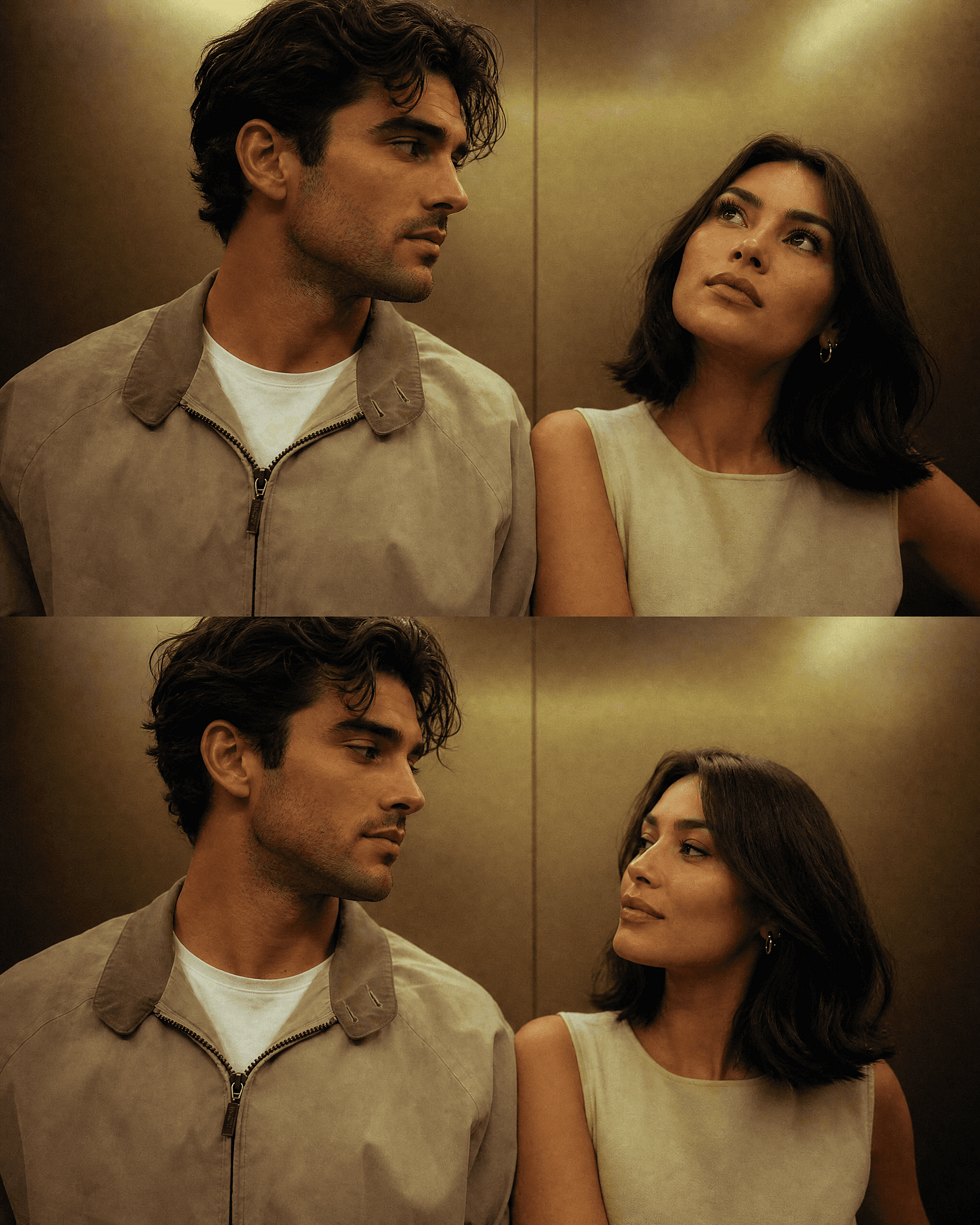
Pour une version saisonnière, garde les deux visages et change seulement le décor. Les sections Halloween et Noël ci-dessous incluent des prompts de couple prêts à l'emploi, et les deux personnes restent reconnaissables dans chaque décor généré à partir de la même photo source.
La figurine 3D
Le format qui a propulsé toute la tendance dans le grand public, et qui fonctionne toujours. Une personne réelle devient une petite figurine de collection sur un bureau ou dans un emballage de vente. Ça saute aux yeux dans un fil d'actualité car le contraste entre « la personne que je connais » et « le jouet sur une étagère » attire l'attention à lui seul.
Edit the uploaded photo. Turn the person into a realistic 3D collectible
figure standing on a wooden desk next to a keyboard and a coffee mug for
scale. Keep their face, hairstyle, and outfit recognizable. Add a subtle
plastic-model texture, detailed base, soft desk lighting, shallow depth
of field, believable miniature scale, vertical 4:5 social frame.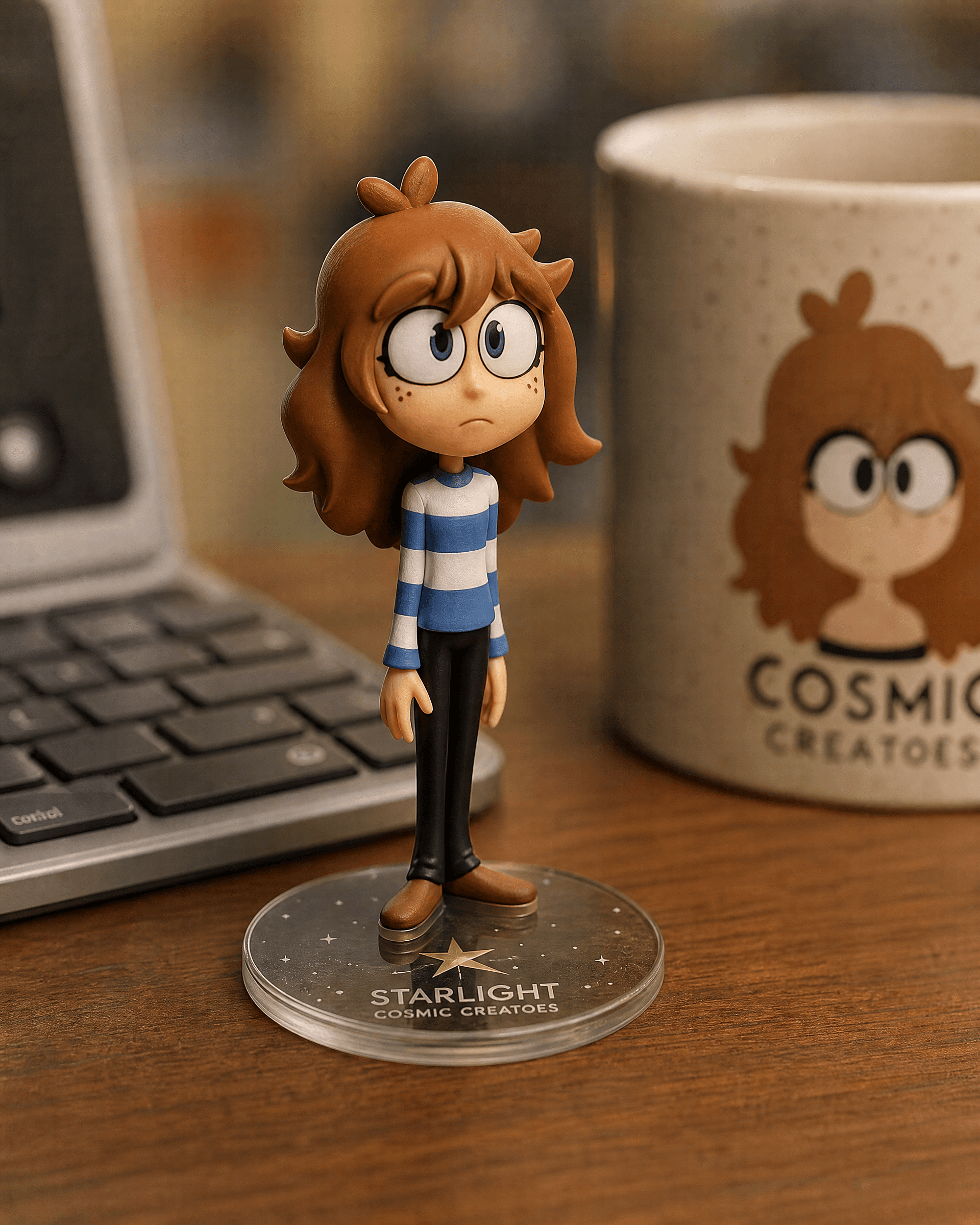
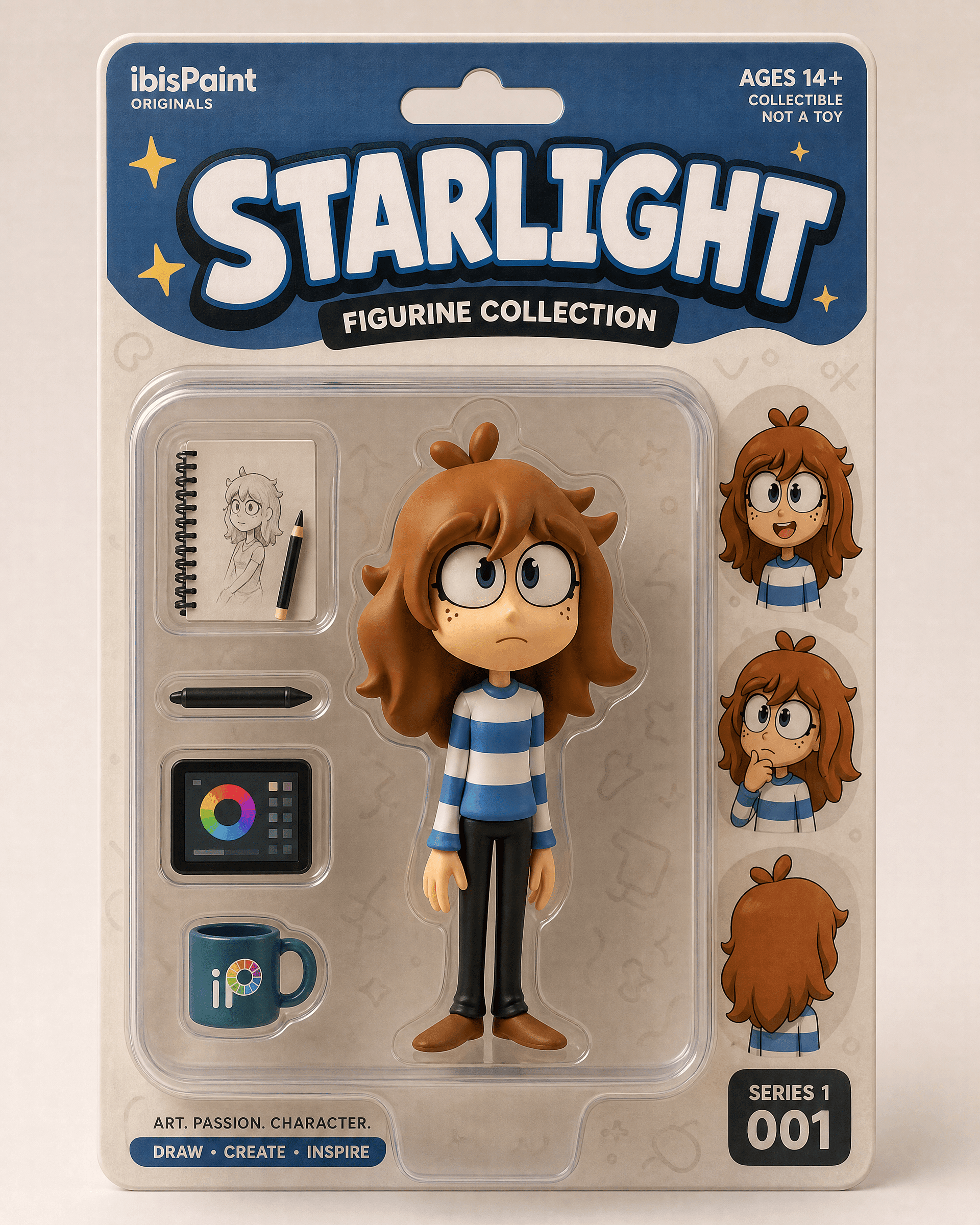
La version en boîte pour révéler un packaging retail :
Edit the uploaded photo into a boxed action figure. Keep the person's
face and style recognizable. Place the figure inside a clear blister
package with a printed backing card, bold product name at the top, small
accessory icons, realistic toy photography, studio lighting, collectible
designer-toy aesthetic.
Commence avec une photo nette en pied ou en buste. La version bureau donne un montage discret et crédible. La version en boîte donne un effet de révélation.
L'ancienne retouche de restauration et colorisation de photos
La restauration est l'une des fonctions les plus utiles et les moins gadget de ces modèles. Elle corrige les rayures, ravive un scan délavé et colorise les photos en noir et blanc. Beaucoup de gens ont ouvert un éditeur Gemini pour la première fois précisément pour ça, souvent pour un projet de famille ou un cadeau d'anniversaire.
Edit the uploaded old photo. Restore it: remove scratches, dust,
creases, and water damage, repair torn areas, sharpen soft details, and
correct fading. Keep every face and feature true to the original, no
reinvented details. Preserve the original composition and era-accurate
clothing. Natural, archival-quality restoration.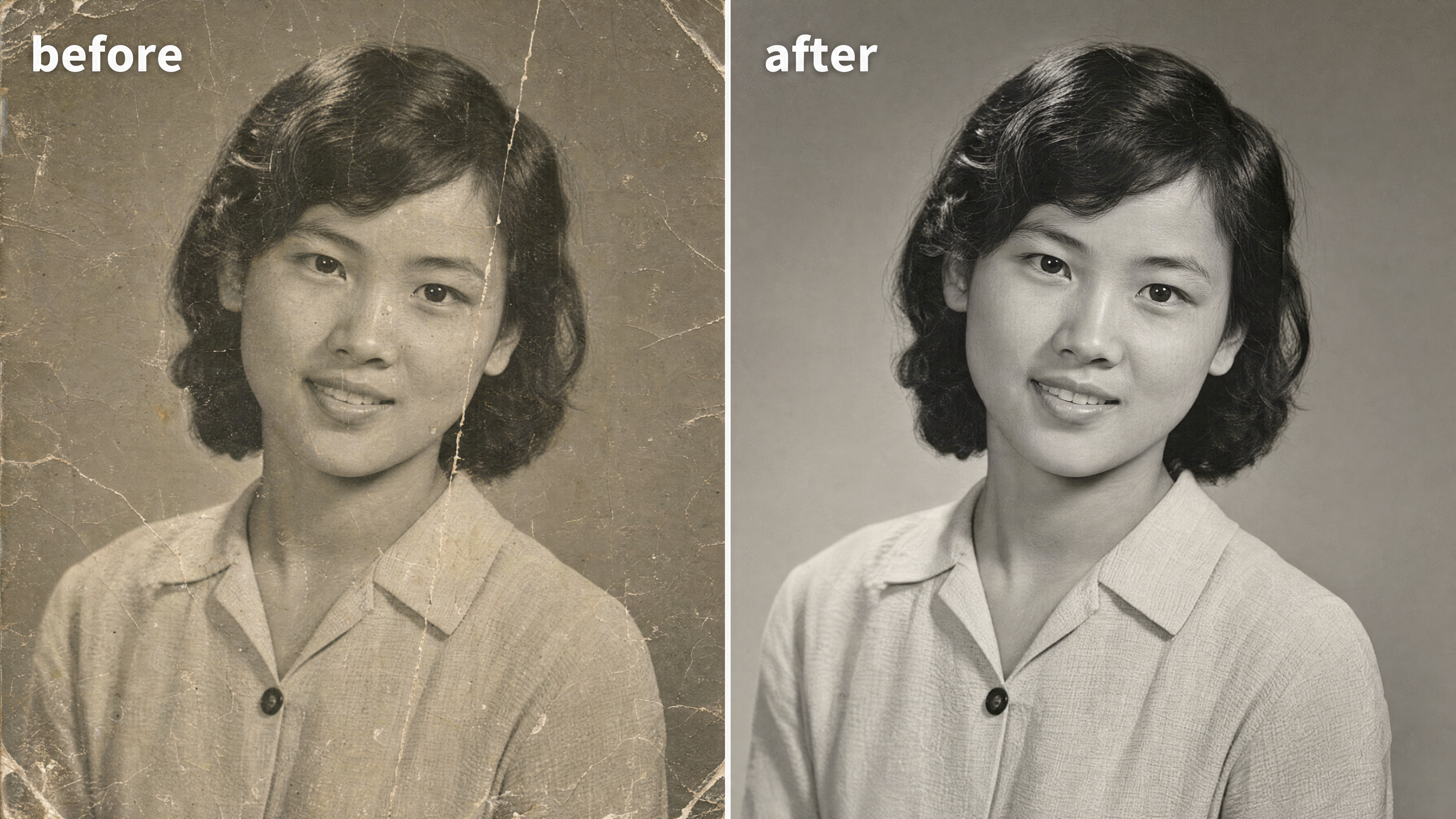
Pour coloriser une photo en noir et blanc, ajoute une ligne :
After restoring the photo, add realistic, natural color: era-accurate
skin tones, believable fabric colors, soft natural lighting. Keep it
subtle and true to life, not oversaturated. Do not change any faces or
features.
Le maître mot de cette retouche est « fidèle à l'original ». La restauration dérape quand un modèle invente un nouveau visage pour un proche flou. Tu peux restaure et nettoie le résultat dans l'éditeur photo ensuite, puis passe-la en haute résolution pour l'impression pour le cadrage.
Le style Y2K
Le look flash Y2K porte le cluster rétro ce mois-ci : flash direct dur, couleurs légèrement délavées, grain d'appareil photo numérique du début des années 2000, énergie de photo de soirée. Se lit instantanément comme nostalgique. Fonctionne sur un portrait seul ou en groupe.
Edit the uploaded photo. Keep the same face, features, and expression
exactly, preserve the original identity. Restyle into a Y2K early-2000s
digital-camera look: harsh direct on-camera flash, slightly washed cool
color, fine digital noise, candid party-photo framing, low-fi nostalgic
mood, authentic 2003 point-and-shoot aesthetic. Keep skin texture
natural.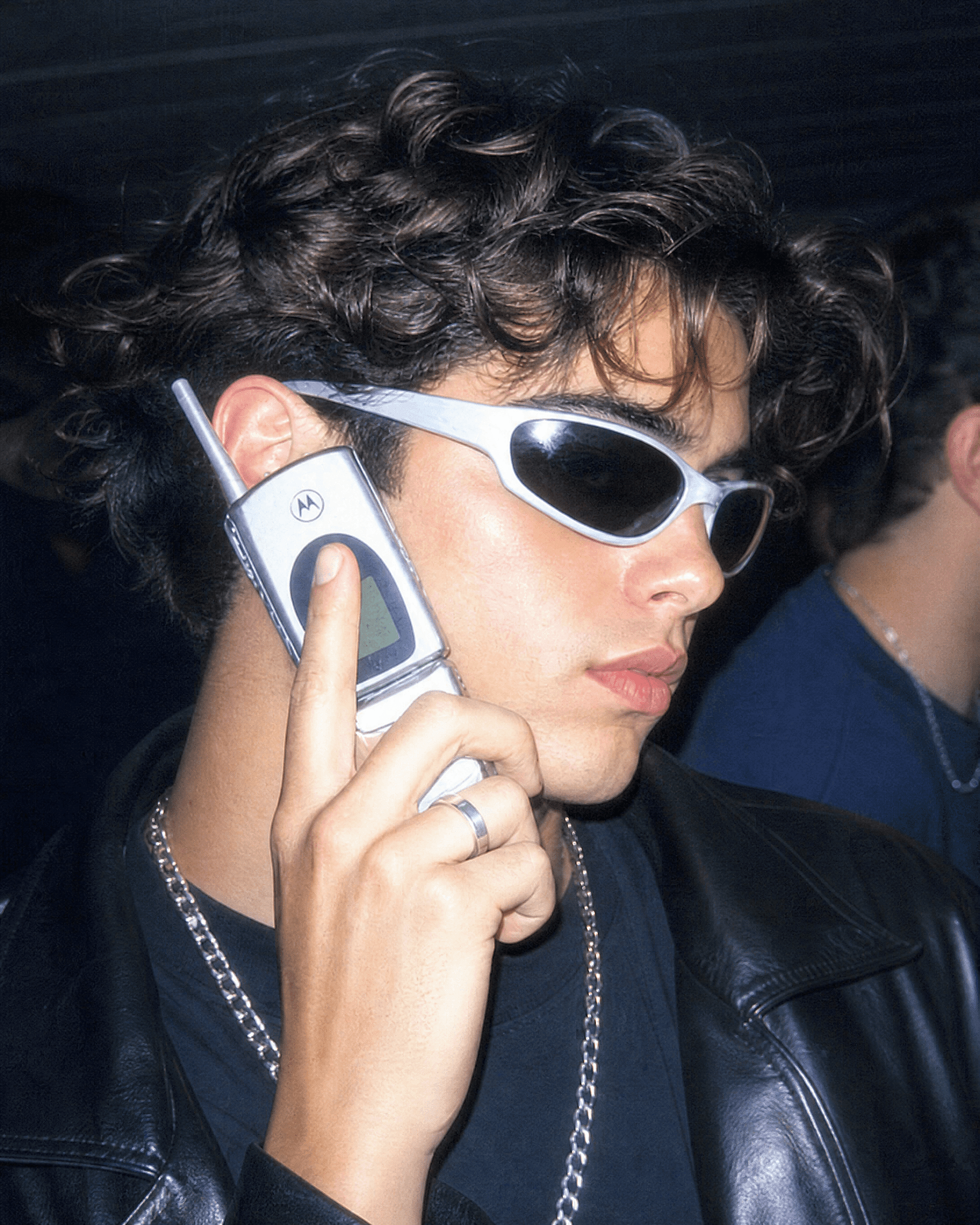
Va plus loin en nommant la décennie. « Portrait argentique des années 1990, grain chaud, flash doux » donne un rétro plus adouci. « Affiche de sitcom des années 90, lumière de studio vive, titre en gros en haut » donne cette version photo de groupe que les gens encadrent comme un cliché de casting télé.
Le portrait esthétique aura-farm
L'aura-farming est la toute dernière esthétique du groupe. Contre-jour dramatique, un halo lumineux de lumière colorée, une pose assurée en contre-plongée, un arrière-plan atmosphérique et sombre. Celle vers laquelle on se tourne quand on veut un portrait cinématographique et un peu plus grand que nature.
Edit the uploaded photo. Keep the same face and identity exactly.
Restyle into an aura-farm aesthetic portrait: dramatic colored rim light
glowing around the subject, moody dark atmospheric background, soft
volumetric haze, confident low-angle framing, rich cinematic color
grade, subtle particles in the air, high-detail vertical portrait. Keep
skin texture natural and true to life.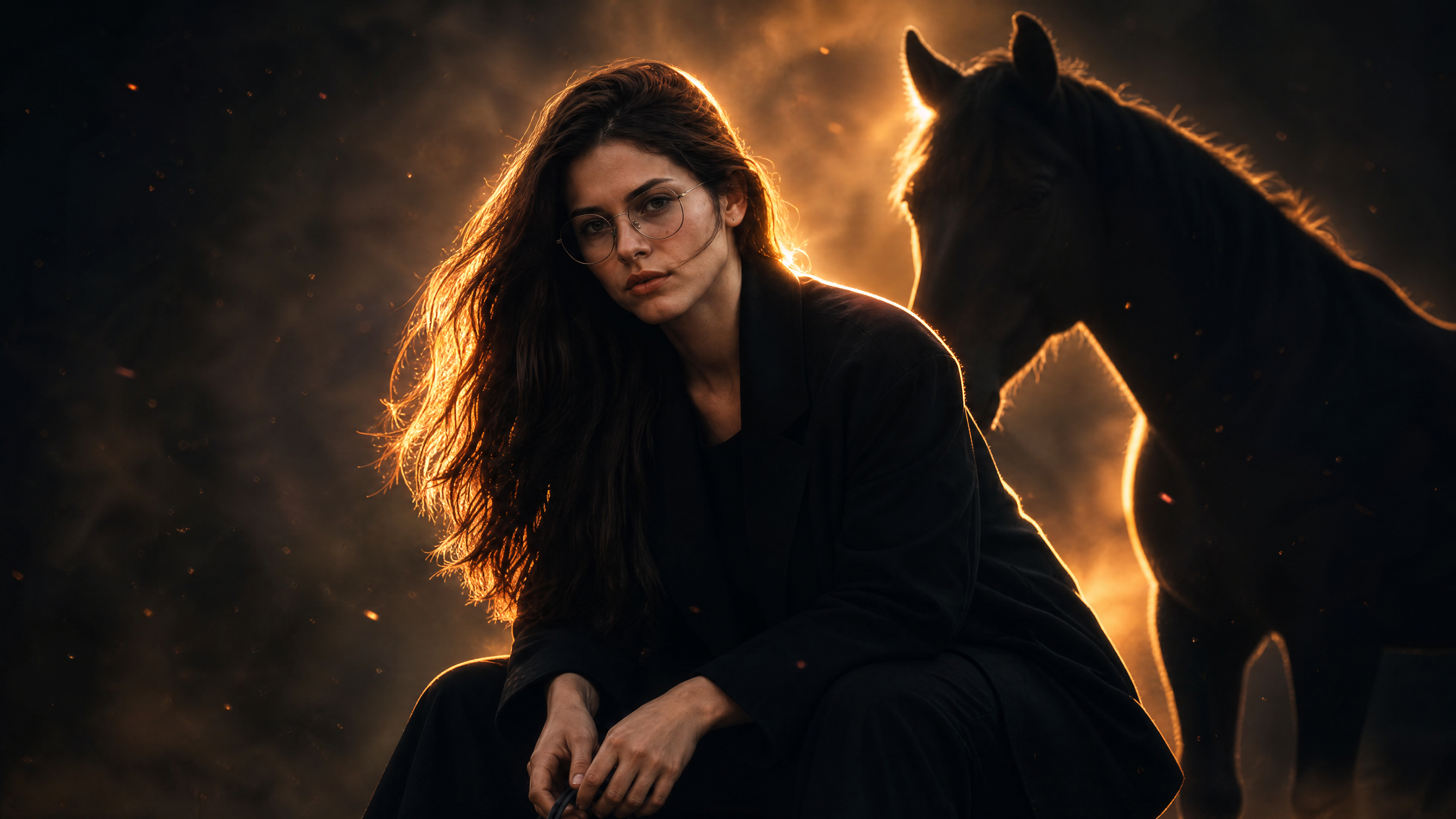
Change la couleur du contre-jour pour changer l'ambiance. Bleu froid pour le calme et le mystère, ambre chaud pour l'héroïque, magenta pour la haute couture.
Prompts photo d'Halloween
Chaque mois d'octobre, la tendance IA Halloween envahit le fil : les gens importent un selfie et récupèrent un portrait costumé, une séance photo de couple ou une image d'horreur en found-footage avec eux en vedette. L'idée est simple. Garde ton vrai visage, et change le costume, le maquillage et le décor. Ça correspond exactement à ce que les modèles d'images de Gemini font bien, car la tenue et la scène peuvent changer complètement tout en te gardant reconnaissable.
Le selfie en costume d'Halloween
Le format de base de la tendance, et celui que la plupart des gens cherchent en premier. Importe un selfie, nomme un costume et obtiens un portrait qui ressemble à une séance photo d'Halloween stylée.
Edit the uploaded photo. Keep the same face, features, and expression
exactly, preserve the original identity. Restyle into an elegant vampire
Halloween portrait: deep burgundy velvet outfit with a high lace collar,
dark berry lips, subtle pale makeup, candlelit gothic interior, cool
moonlight from an arched window, faint mist, carved pumpkins softly
blurred in the background, cinematic color grade, vertical 4:5 frame.
Keep skin texture natural and true to life.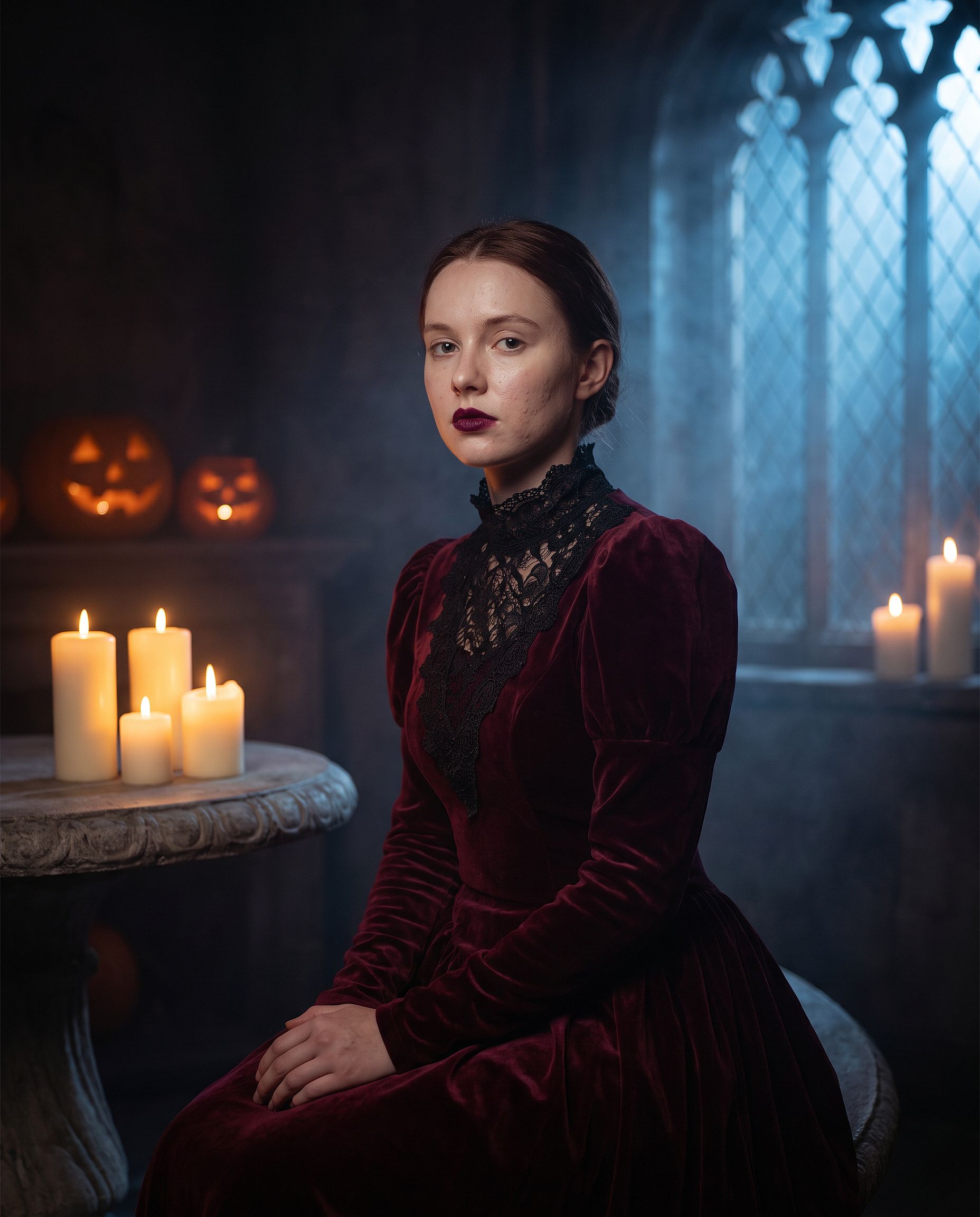
Remplace « vampire élégant » par n'importe quel costume : sorcière, zombie, mariée fantôme, squelette ou un monstre classique de cinéma. Laisse les deux premières lignes intactes. Le maquillage de costume, c'est là qu'un prompt vague laisse le modèle redessiner tout le visage, donc la ligne d'identité compte encore plus ici que dans n'importe quelle autre retouche.
La tendance Halloween VHS
Le format de tendance IA d'Halloween le plus copié : ta photo transformée en image granuleuse de caméscope des années 90, façon film d'horreur, avec une silhouette menaçante tapie en arrière-plan. Les artefacts de la bande et l'horodatage font tout le travail.
Edit the uploaded photo. Keep the same face and identity exactly.
Restyle into a 1990s VHS camcorder still from a found-footage horror
movie: dim bedroom at night, harsh on-camera light, scan lines, chroma
bleed, slight tracking distortion, washed-out colors, a faint shadowy
hooded figure standing in the dark doorway behind the subject, timestamp
"OCT 31 1996 11:47 PM" in the bottom corner, 4:3 frame.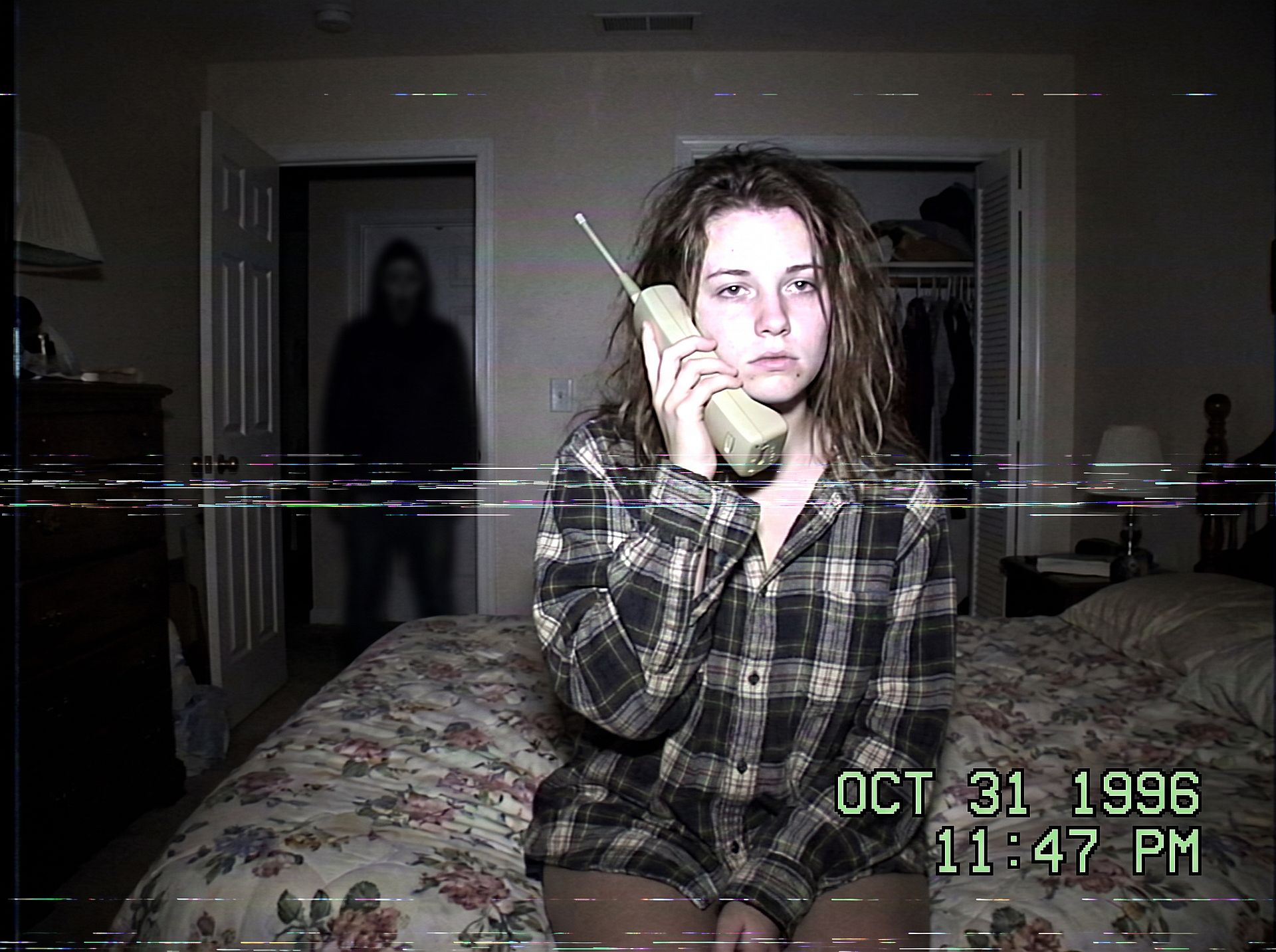
Change le décor pour changer la peur : une cuisine à minuit, un couloir sombre ou une banquette arrière avec la silhouette dans la lunette arrière. Garde la silhouette petite et dans l'ombre pour que la photo reste flippante plutôt que sanglante.
La séance photo de couple pour Halloween
Les costumes de couple représentent la plus grande part des recherches de séances photo d'Halloween. Protège les deux visages et habille-les en duo :
Edit the uploaded couple photo. Keep both faces, skin tones, and
expressions exactly, do not merge or alter their features. Dress them in
coordinated Halloween costumes, a classic vampire and a witch, standing
close on an autumn porch at dusk: glowing jack-o'-lanterns, warm string
lights, fallen leaves, soft fog, warm film color grade, shallow depth of
field.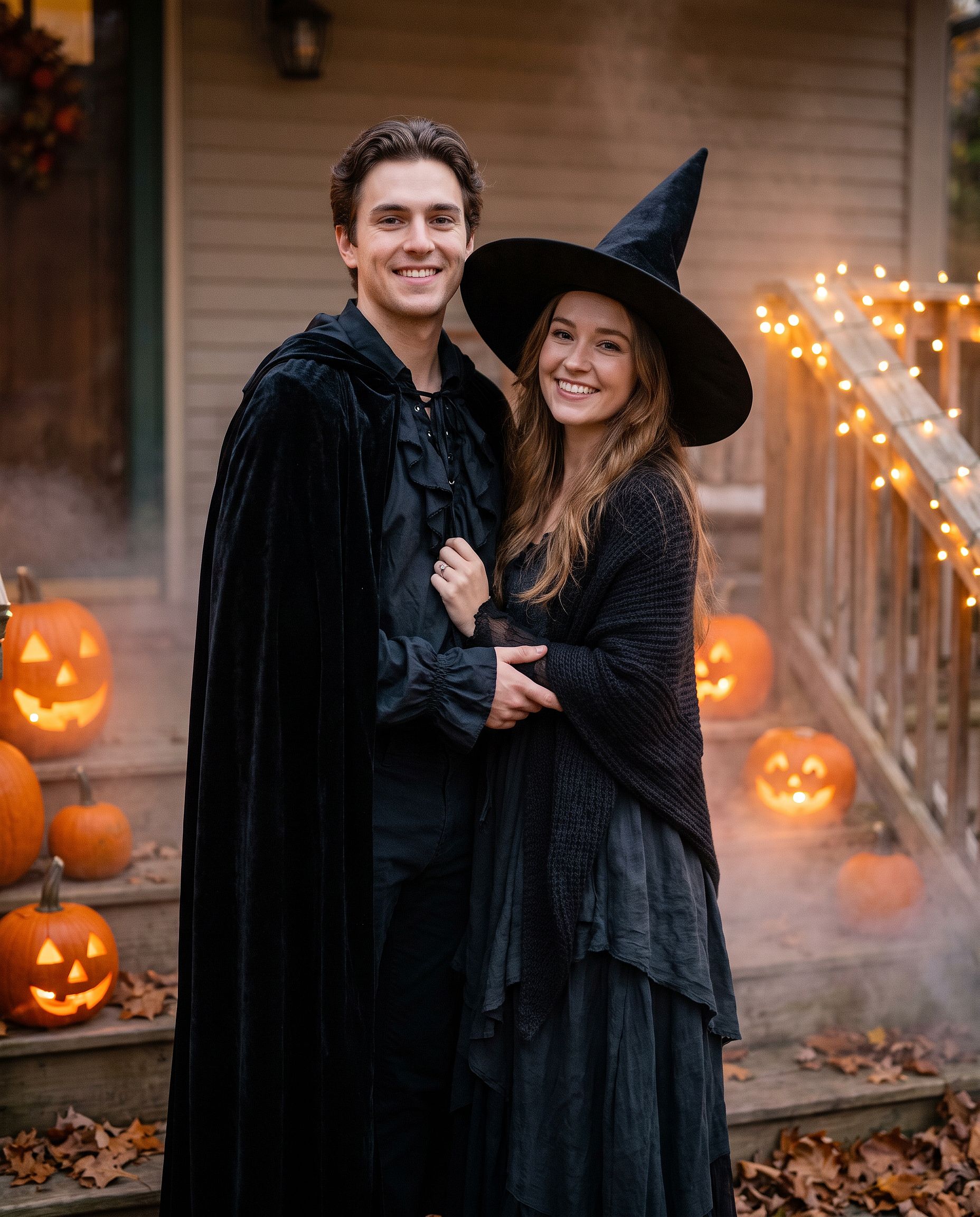
Le même prompt fonctionne pour des meilleurs amis ou une photo de famille. Remplace « couple » par « groupe de quatre » et liste chaque costume dans l'ordre, de gauche à droite.
Le maquillage calavera
Pour un maquillage plutôt qu'un costume complet :
Edit the uploaded photo. Keep the face shape, eyes, and identity
recognizable. Add half-face sugar-skull makeup: white base, black eye
sockets, and delicate floral linework on one side, the other half left
natural. Dark suit with a marigold flower, candlelit background with
orange marigold petals, dramatic side lighting, rich cinematic color.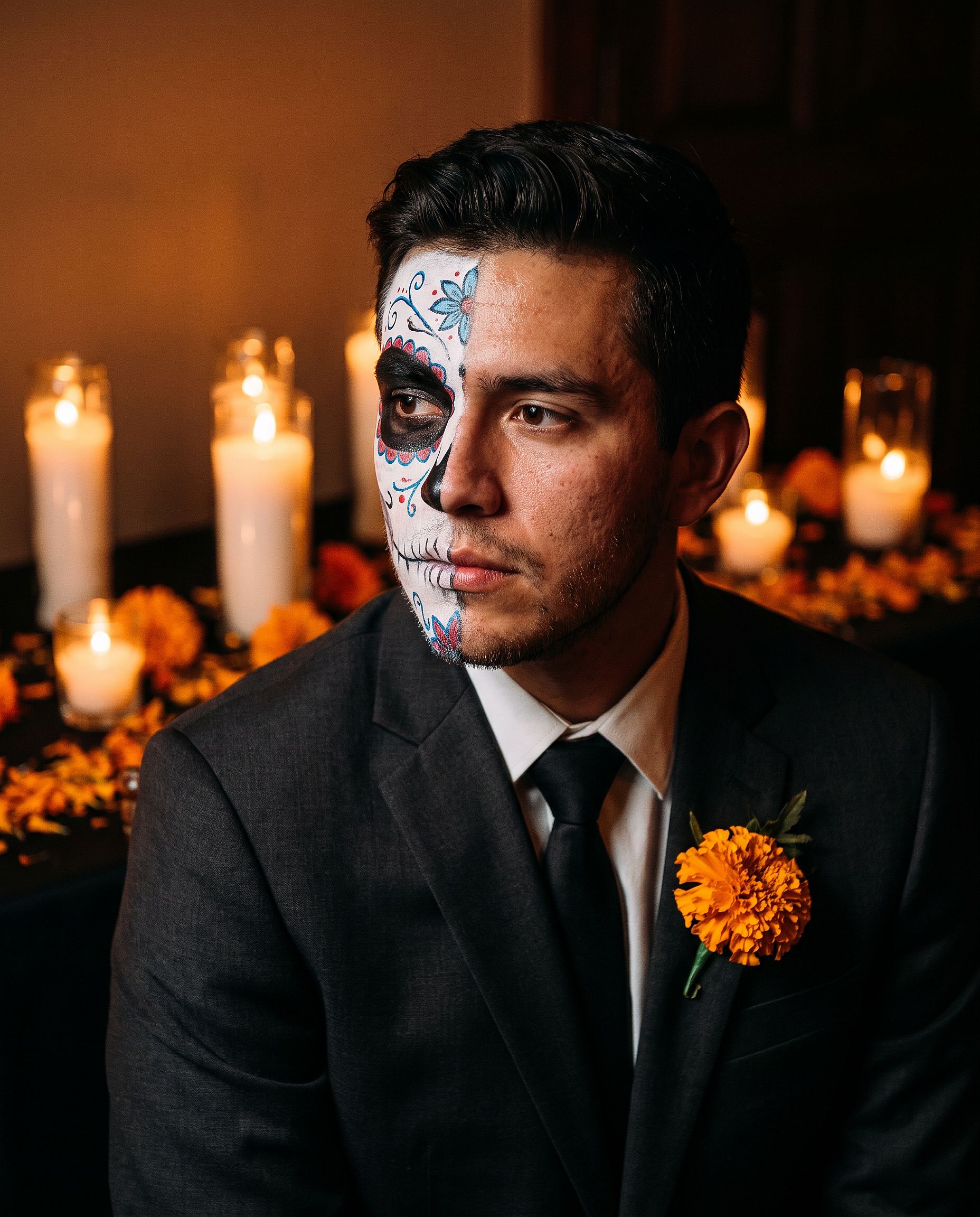
Le maquillage sur une moitié du visage garde la personne facile à reconnaître, ce qui en fait une meilleure photo de profil qu'un design sur tout le visage.
Le costume pour animal
Edit the uploaded pet photo. Keep the pet's face, fur pattern, and eye
color exactly. Add a small witch hat and a tiny black cape, seated next
to a glowing jack-o'-lantern, cozy autumn lighting, shallow depth of
field, playful but realistic.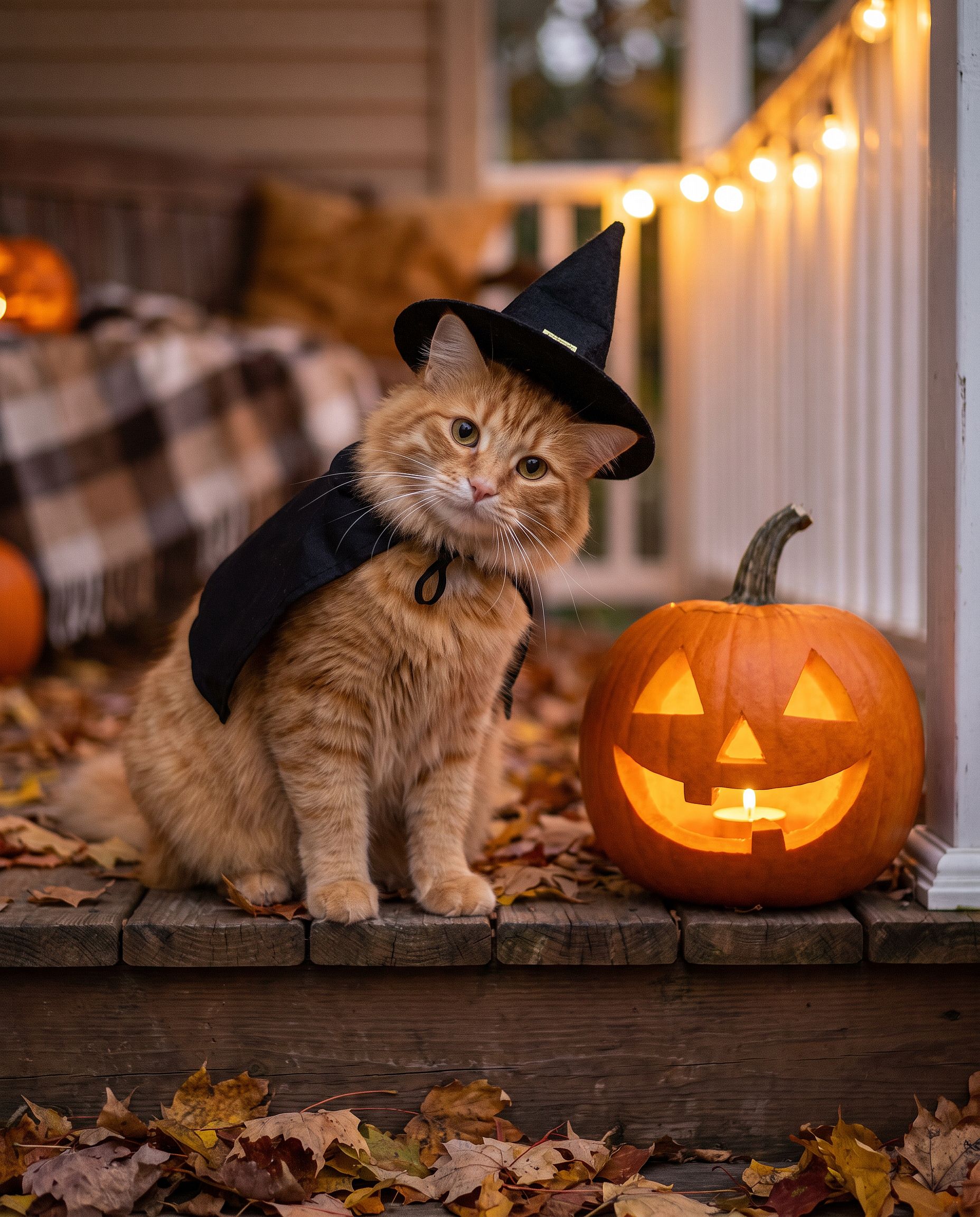
Si tu préfères éviter d'écrire des prompts, le Générateur Halloween AI est fait pour ça : téléverse une photo et transforme-la en portrait costumé d'Halloween.
Prompts photo de Thanksgiving
Les photos de Thanksgiving concernent moins les costumes que la table : la photo du repas de famille, le portrait automnal pour une carte de vœux, l'image qui finit en photo de couverture de tout le monde pour la semaine. L'astuce est la même que pour toute retouche de groupe. Verrouille chaque visage, puis change la lumière, les tenues et le décor.
La photo du repas de Thanksgiving en famille
La plupart des photos de repas de famille sont prises sous un mauvais éclairage par celui ou celle qui est le plus près du téléphone. Ce prompt transforme ce cliché en l'image que tu imprimerais vraiment.
Edit the uploaded family photo. Keep every face, skin tone, and
expression exactly, preserve all identities, do not merge features.
Restyle into a warm Thanksgiving dinner photo: long wooden table with a
roast turkey, pumpkin pie, candles, small pumpkins and autumn leaves,
golden late-afternoon window light, cozy knitwear in rust, cream, and
olive tones, natural candid closeness, vertical 4:5 frame.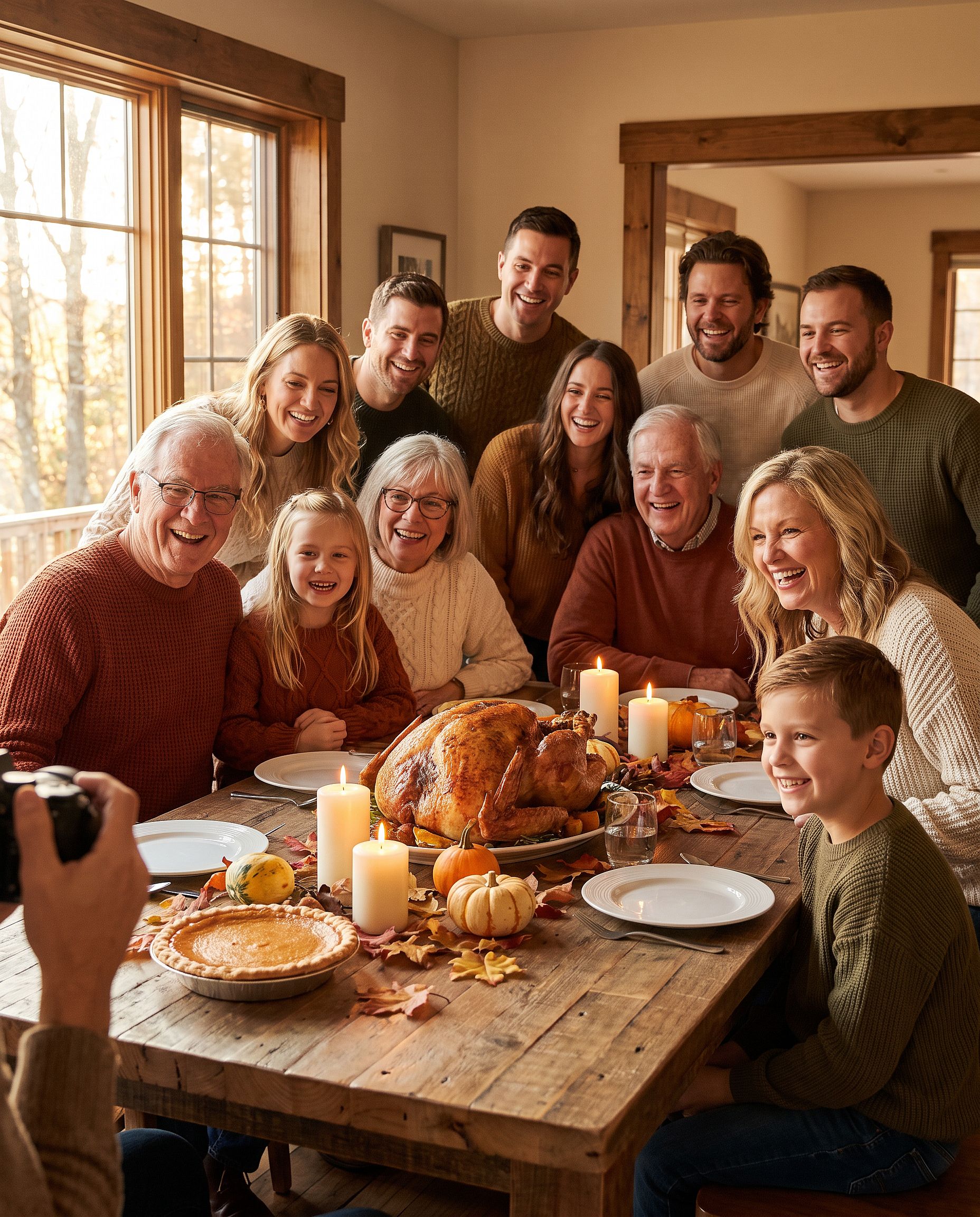
Pour plus de quatre personnes, précise combien il y en a sur la photo (« une famille de six ») pour que le modèle n'en oublie ni n'en ajoute aucune.
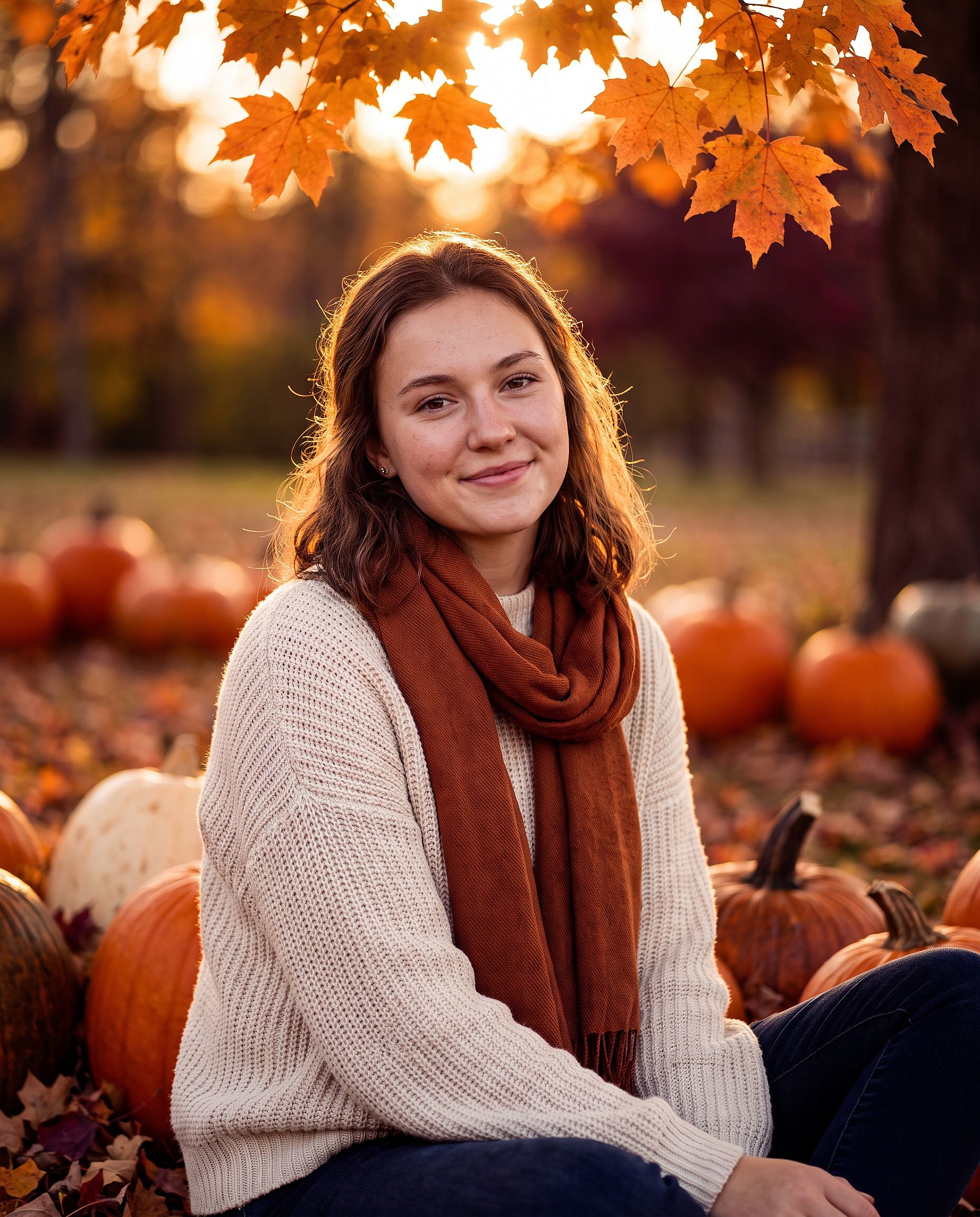
Le portrait automnal de Thanksgiving
Pour un portrait seul, une photo de couple ou une carte photo de Thanksgiving :
Edit the uploaded photo. Keep the same face and identity exactly.
Restyle into an autumn Thanksgiving portrait: outdoors in a pumpkin
patch at golden hour, chunky knit sweater and scarf, warm amber and
burgundy tones, soft backlight through orange leaves, shallow depth of
field, holiday photo card quality. Keep skin texture natural.
Ajoute « laisse un espace libre en haut pour un message » si la photo va sur une carte.
Prompts photo de Noël
La photo de Noël générée par IA est la plus grande retouche saisonnière de l'année. En décembre, les gens veulent un shooting de famille sans réserver de studio, une carte de vœux sans photographe et une photo de profil festive avant chaque fête. Chaque format ci-dessous part d'une photo ordinaire.
Le shooting photo en boîte de Noël
La tendance en studio où le sujet est assis à l'intérieur d'une immense boîte cadeau ouverte. Difficile à mettre en scène chez soi, mais facile à réaliser en retouche.
Edit the uploaded photo. Keep the same face, features, and expression
exactly, preserve the original identity. Place the person sitting
inside a large open white gift box with a red satin ribbon, surrounded
by wrapped presents, warm fairy lights, and a softly blurred decorated
Christmas tree. Red knit sweater, bright clean studio lighting, cream
and red palette, professional holiday portrait, vertical 4:5 frame.
Change la couleur de la boîte pour qu'elle corresponde à une marque ou au design d'une carte. L'or et le noir font luxe, le rose pastel fait doux et ludique.
La séance photo de Noël en famille
Pyjamas assortis devant le sapin, le cliché que chaque famille essaie d'obtenir une fois par an. Les animaux de compagnie comptent aussi comme de la famille ici.
Edit the uploaded family photo. Keep every face, skin tone, and
expression exactly, preserve all identities, do not merge features.
Dress everyone, including the dog, in matching red plaid pajamas, the
dog in a small Santa hat. Seat them together on a rug in front of a
decorated Christmas tree and a lit fireplace with stockings, warm cozy
lighting, soft bokeh from the tree lights, holiday card quality.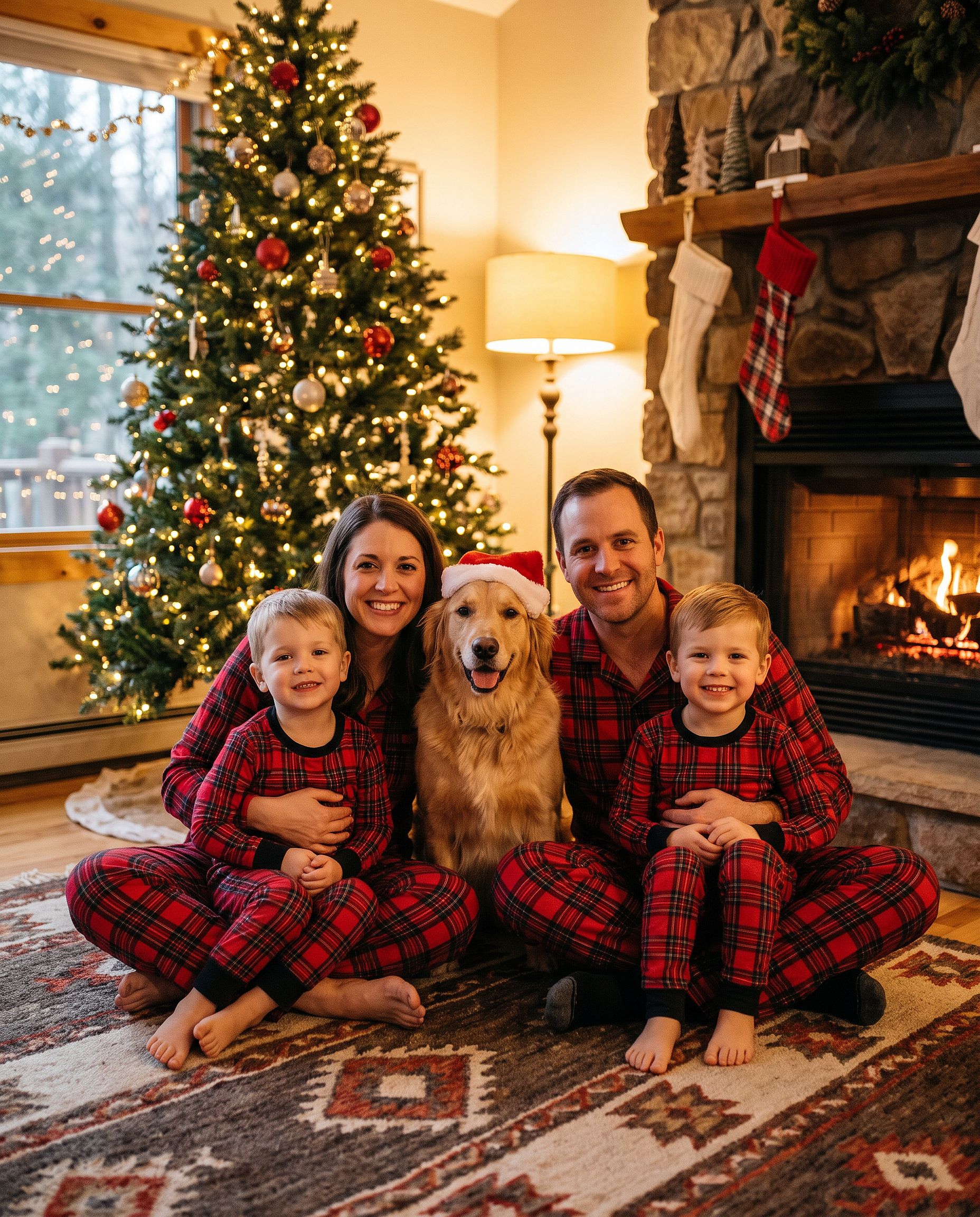
Si tu ne veux que le chapeau, le ajouter un bonnet de Père Noël à une photo fait exactement ça, et le Outil d'arrière-plan de Noël change le décor tout en laissant les personnes intactes.
La photo en extérieur dans une plantation de sapins de Noël
Edit the uploaded photo. Keep the same face and identity exactly.
Restyle into an outdoor Christmas tree farm photo: rows of snowy pine
trees, light snowfall, a freshly cut tree on a sled, plaid coat and
knit hat, soft overcast winter light, warm breath in the cold air,
natural skin texture, vertical 4:5 frame.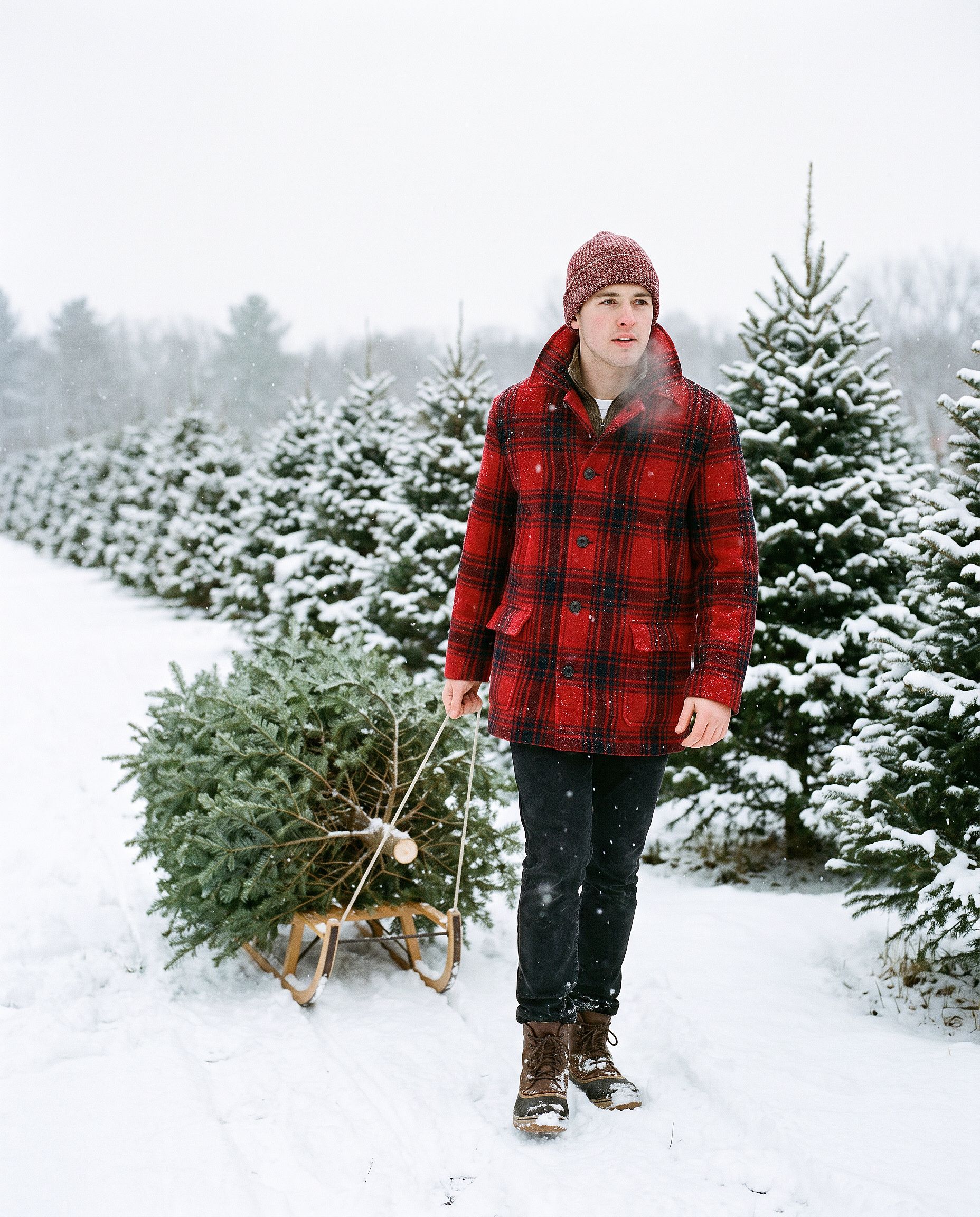
La carte de Noël IA
Turn the uploaded photo into a luxury printed Christmas card. Keep every
face exactly. Place the people in a snowy cabin doorway with evergreen
garland and warm window light, set inside a thin gold foil border on
heavy cream cardstock. Add "Merry Christmas" in gold foil calligraphy
above the photo and "from the Parkers" in small serif capitals below,
embossed holly in the corners. Show the card flat on white linen with
pine sprigs, a red velvet ribbon, and a gold wax seal.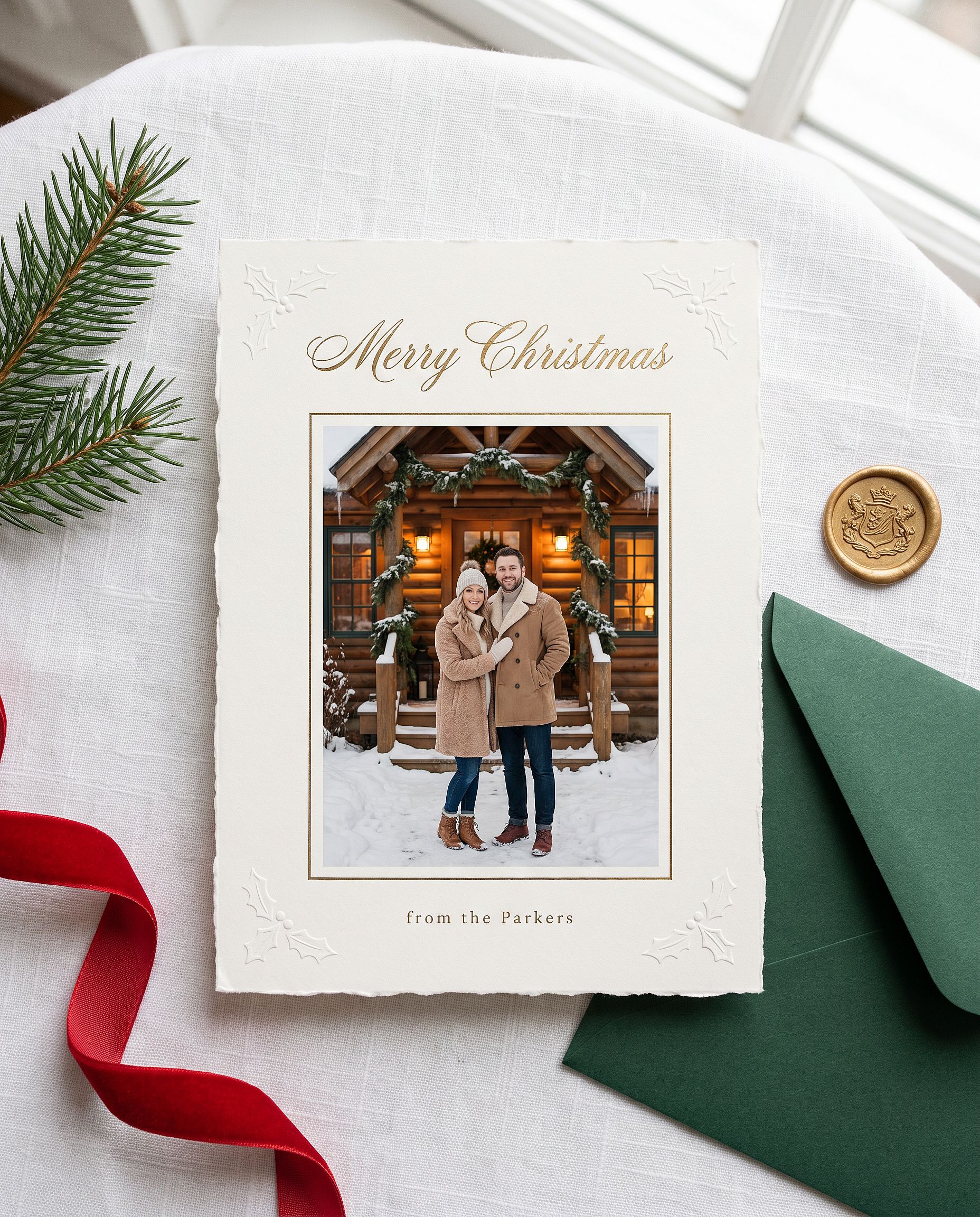
Remplace le nom entre guillemets par le tien. Nano Banana Pro gère bien le texte court dans l'image, donc le message est généralement bien orthographié dès le premier essai.
Le portrait de Noël en anime
Restyle the uploaded photo into a Japanese anime film still on
Christmas Eve. Keep the person's hairstyle, outfit colors, and overall
look recognizable. Standing at a snowy railroad crossing in a quiet
residential town at blue hour, duffle coat and long red scarf, breath
visible in the cold, warm house windows, a lit Christmas tree outside a
corner shop, glowing vending machines, power lines overhead, soft
falling snow, hand-painted anime background art, delicate cel shading.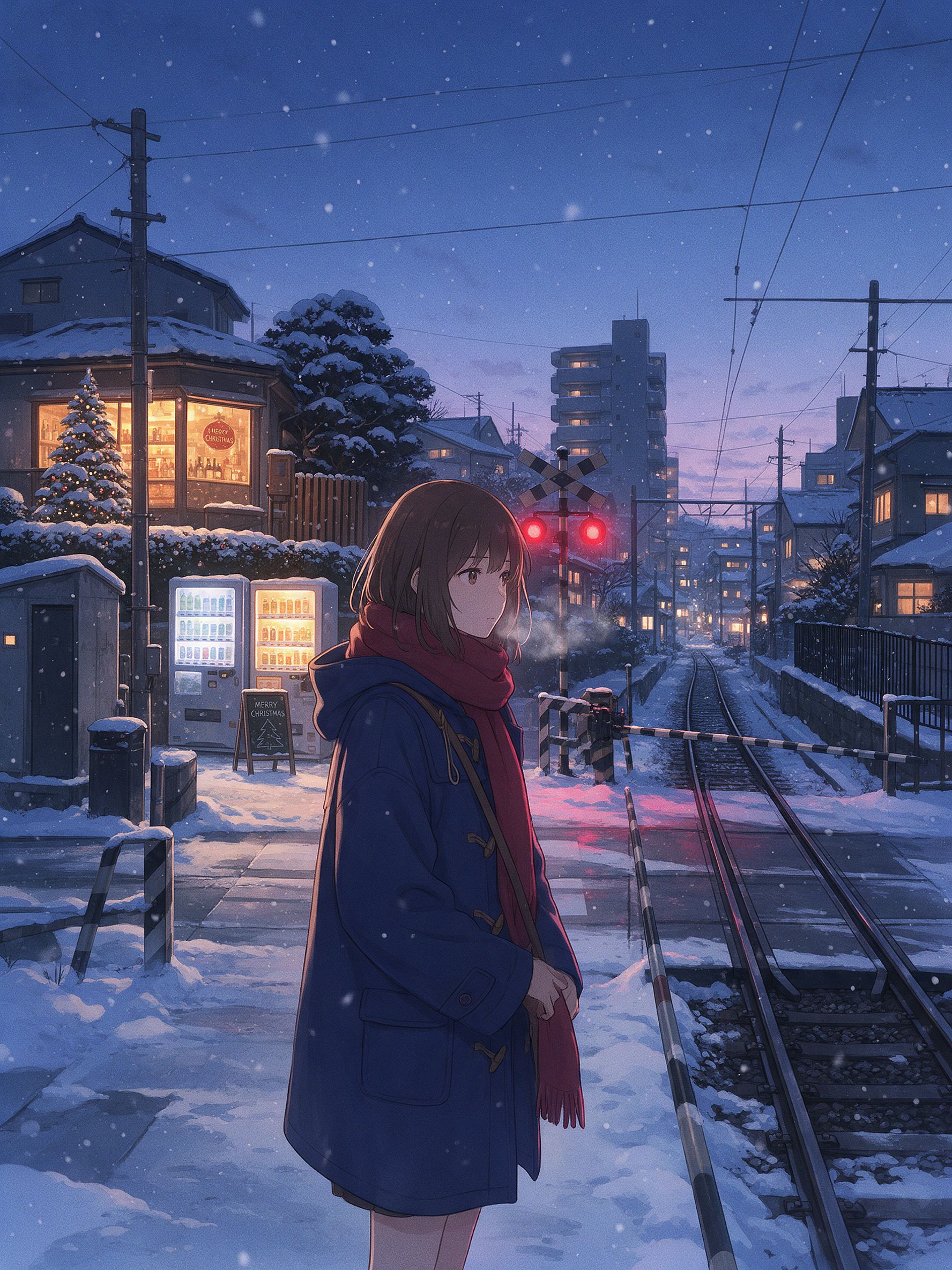
Ce sont les petits détails qui donnent cette ambiance de scène d'hiver d'anime japonais : le passage à niveau, les distributeurs automatiques, les lignes électriques et la lumière de l'heure bleue contre des fenêtres chaleureuses. Pour ce rendu, Seedream 5.0 Pro ou Nano Banana 2 Lite donnent souvent un style 2D plus net que Nano Banana Pro. Change de modèle et lance le même prompt.
La bibliothèque complète de prompts photo Gemini
Les sections ci-dessus, ce sont les plongées en profondeur. Ci-dessous, la bibliothèque express : des prompts courts à copier-coller, regroupés par ce que tu veux créer. La plupart supposent que tu importes d'abord une photo. Le groupe esthétique et cinématographique fonctionne aussi en pure génération. Choisis une catégorie, prends une ligne, colle-la.
Portraits de filles tendance
Edit the uploaded photo into a soft-glam aesthetic selfie: dewy glow,
warm highlight, subtle butterfly light, pastel background. Keep the same
face and identity exactly, natural skin texture.
Restyle the uploaded photo into an elegant saree ethnic portrait: rich
traditional outfit, soft gold jewelry, warm bokeh lighting, graceful
pose. Keep the face and identity unchanged.Edit the uploaded selfie into a clean Instagram DP: minimalist studio
backdrop, soft even light, tasteful modern styling, crisp detail. Keep
the same face exactly, no heavy smoothing.Restyle the uploaded photo into a dreamy pastel aesthetic portrait: airy
glow, muted soft colors, gentle wind in the hair, natural skin. Keep the
face recognizable and identity intact.Restyle the uploaded photo into a golden-hour outdoor girl portrait:
warm backlight, soft lens flare, blurred natural background, flowing
outfit. Keep the face and identity unchanged.Portraits tendance de garçons et de couples
Restyle the uploaded photo into a café golden-hour boy portrait: soft
window backlight, cozy neutral outfit, gentle flare, Pinterest fashion
mood. Keep the face unchanged.
Restyle the uploaded couple photo into a warm café date-night scene:
cozy lighting, soft bokeh, relaxed poses. Keep both faces unchanged.Edit the uploaded couple photo into a vintage 1970s film look: warm
faded tones, retro wardrobe, soft grain. Preserve both faces and
expressions exactly.Édition et changement de style
Edit the uploaded photo. Keep the face and pose exactly. Replace the
outfit with a clean, well-fitted business-casual look and the background
with a softly blurred modern office, matched lighting, professional
headshot quality.
Si tu veux un portrait soigné sans écrire aucun prompt, le Générateur de portraits IA est conçu exactement pour ça. Il garde ton visage cohérent sur toute une série de looks professionnels.
Edit the uploaded photo into a black-and-white fine-art portrait:
dramatic side lighting, deep contrast, film grain, timeless studio look.
Keep the face exactly the same.
Edit the uploaded photo into a double-exposure portrait: the subject
blended with a soft city skyline, moody tones, artistic overlay. Keep
the primary face clear and recognizable.Edit the uploaded photo into an AI hairstyle try-on: keep the face and
identity exactly, change only the hairstyle to a modern layered cut,
natural color and texture, realistic result.Réparation et amélioration de la qualité
Edit the uploaded blurry photo: sharpen details, reduce noise, recover
texture in hair and skin. Keep the face identical, natural skin, no
plastic smoothing.
Edit the uploaded photo to a high-resolution 4K glow-up: sharpen fine
detail, reduce noise, improve color balance, recover hair and skin
texture. Keep the face and expression identical, no plastic smoothing.Saisonnier et festif
Des formules express pour le reste du calendrier. Halloween, Thanksgiving et Noël ont des sections complètes avec des exemples ci-dessus.
Edit the uploaded photo into a Diwali celebration: warm diya lamp light,
elegant traditional outfit, soft bokeh of string lights, rich jewel
tones. Keep the face unchanged.
Edit the uploaded photo into a spring cherry-blossom scene: soft pink
petals, gentle daylight, fresh pastel palette. Keep the person exactly
the same.Edit the uploaded couple photo into a Valentine's scene: soft warm
light, tasteful red accents, romantic bokeh. Keep both faces unchanged.Edit the uploaded photo into a New Year scene: elegant evening styling,
soft golden fireworks bokeh, celebratory mood. Keep the person
recognizable.Esthétique et cinématographique
Edit the uploaded photo into a burning-newspaper portrait: the subject
framed by a vintage newspaper with glowing burning edges, warm ember
light, dramatic dark background, cinematic mood. Keep the face exactly
the same.
Edit the uploaded photo into a moody neon-noir portrait: rain-slick city
street, pink and blue neon reflections, cinematic contrast, shallow
depth of field. Keep the face and identity unchanged.Comment écrire ton propre prompt photo Gemini
Chaque prompt ci-dessus suit la même structure :
Edit the uploaded photo.
Keep [the face / both faces / the pose / the composition] exactly the same and preserve the original identity.
Change only [outfit / background / era / color / scene].
Add [style, lighting, mood, aspect ratio].
Keep [skin texture / features] natural and true to life.
Ligne par ligne : « Edit the uploaded photo » indique au modèle de partir de ton image plutôt que d'en inventer une nouvelle. « Keep exactly the same and preserve the original identity » protège les éléments qui la rendent reconnaissable. « Change only » délimite la retouche. Une dernière ligne sur une peau naturelle ou un détail réaliste évite le rendu sur-traité qui crie « IA ».
Pour de la génération pure, supprime les mentions « edit » et « keep the same ». Décris directement le sujet, le style, l'éclairage et l'ambiance.
Vérification en cinq secondes avant de générer : photo importée, ce qu'il faut garder précisé, ce qu'il faut changer précisé, un style nommé, un détail naturel demandé. Les Docs d'assistance Gemini couvrent le flux d'édition de base.
Gemini (Nano Banana) vs GPT Image 2 vs Seedream pour les photos
Aucun modèle ne l'emporte sur toutes les photos. Voici où chacun excelle et où il montre ses limites :
| Nano Banana Pro | Nano Banana 2 Lite | GPT Image 2 | Seedream 5.0 Pro | |
|---|---|---|---|---|
| Préservation de l'identité malgré un fort restylage | Le plus puissant | Fort | Fort | Modéré |
| Texte lisible dans l'image (titres, libellés, menus) | Fort | Fort | Meilleur (précision du micro-texte et des icônes d'interface) | Modéré |
| Photoréalisme (peau, éclairage, texture) | Meilleur (4K natif, hyperréaliste) | Fort | Best (qualité mode, hyperréaliste) | Modéré |
| Anime / style asiatique / stylisation 2D | Limité | Meilleur (premier choix pour l'anime et l'animation) | Modéré | Idéal (environnements anime atmosphériques) |
| Édition et séparation des calques | Mémoire itérative (modifier sans tout réécrire) | Mémoire itérative | Pas de mémoire | Séparation des calques intégrée et édition libre |
| Texte multilingue (BD, pubs, affiches) | Fort | Modéré | Meilleur | Modéré |
| Idéal pour | Retouches portrait tendance, sets à identité stable, sortie 4K | Brouillons rapides, restylisations anime, images phares e-commerce | Visuels de mode haut de gamme, toute image avec du texte, affiches et packaging | Esthétiques de personnages, scènes d'anime, workflows d'édition avec calques |
Les quatre tiennent dans un seul espace de travail OpenArt. Changer de modèle pour comparer coûte un clic, pas un nouvel abonnement. Quand l'objectif est de garder un même visage stable sur toute une série de tendances, le Personnage IA verrouille l'identité pour que chaque prompt renvoie la même personne.
FAQ
Comment utiliser Gemini AI pour les photos ?
Ouvre un outil d'image Gemini, décris ce que tu veux et génère. Pour retoucher une photo existante, importe-la d'abord et indique au modèle ce qu'il faut garder et ce qu'il faut changer. Sur OpenArt, tu retrouves les mêmes modèles Gemini (Nano Banana 2.1 et Nano Banana Pro) aux côtés d'un éditeur complet. Ouvre le Générateur d'images IA, choisis un modèle et colle un prompt.
Comment retoucher une photo dans Gemini AI ?
Importe ta photo, puis écris une instruction qui distingue ce qui reste de ce qui change : « garde le visage et l'identité exactement identiques, restyle en portrait soft-glam ». L'import est important car le modèle édite l'image que tu fournis plutôt que d'inventer un sosie. Ajoute une dernière phrase demandant une texture de peau naturelle pour éviter le rendu trop lissé.
Comment créer un prompt photo pour Gemini AI ?
Suis la trame ci-dessus : nomme le sujet, dis ce qu'il faut garder, dis ce qu'il faut changer, ajoute le style, l'éclairage et le ratio, et termine par une ligne de détail naturel. Copie n'importe quel prompt de cet article et remplace les mots de style par les tiens.
Quels sont les meilleurs prompts photo Gemini IA pour les filles ?
Les tendances du moment : selfies au style soft-glam, portraits en saree et tenues ethniques, photos de profil Instagram épurées, portraits en extérieur à l'heure dorée. Les quatre se trouvent dans la section Portraits de filles tendance ci-dessus, prêts à coller.
Quels sont les meilleurs prompts Gemini AI pour les photos d'Halloween ?
Des portraits costumés qui gardent ton vrai visage : un selfie élégant de vampire ou de sorcière, le look caméscope d'horreur VHS, un costume de couple coordonné ou un maquillage de crâne en sucre sur une moitié du visage. Commence chaque prompt d'Halloween par une ligne qui verrouille le visage et l'identité, puis décris le costume, le maquillage et le décor. Les cinq sont dans la section Halloween ci-dessus.
Comment reproduire la tendance Halloween IA ?
Importe un selfie net dans un modèle d'image Gemini comme Nano Banana Pro, colle l'un des prompts Halloween ci-dessus et génère. Pour te passer complètement du prompt, le générateur Halloween IA d'OpenArt transforme une photo en portrait costumé en une seule étape.
Comment créer une photo de Noël avec l'IA ?
Téléverse une photo nette, choisis Nano Banana Pro et colle l'un des prompts de Noël ci-dessus, comme le shooting photo en boîte de Noël ou le cliché en pyjama de famille. Garde toujours la ligne qui verrouille chaque visage. Pour une version en un clic sans prompt, le filtre de Noël d'OpenArt transforme une photo ordinaire en photo festive.
Puis-je créer une photo de famille de Thanksgiving avec l'IA ?
Oui. Importe la photo de groupe, demande au modèle de conserver tous les visages sans fusionner les traits, puis décris la table du dîner, la lumière et les tenues. Indique combien de personnes figurent sur la photo pour que personne ne soit retiré ou ajouté.
Nano Banana est-il la même chose que Gemini ?
Nano Banana, c'est le surnom des modèles d'image Gemini de Google. Quand les gens parlent de « photo Gemini AI », ils désignent généralement Nano Banana 2.1 ou Nano Banana Pro. OpenArt te donne un accès direct à ces modèles.
Gemini peut-il restaurer et coloriser de vieilles photos ?
Oui. Demande-lui de supprimer les dommages et de préserver fidèlement chaque détail de l'original, puis ajoute une consigne de colorisation pour les photos en noir et blanc. Garde les couleurs subtiles pour un rendu crédible, et augmente la résolution ensuite si tu prévois d'imprimer.
Ces prompts photo Gemini sont-ils gratuits ?
Les prompts sont à toi, à copier librement. Les lancer sur OpenArt commence gratuitement avec des crédits.