

 ChatGPT
 Perplexity
 Claude
 Gemini
Le meilleur générateur d'images IA pour les citations fait bien plus que poser de jolis mots sur un fond. Que tu cherches cela sous la forme d'un générateur d'images de citations ou un générateur de citations IA, le vrai travail reste le même : il faut orthographier la citation correctement, garder un style reconnaissable sur toute une série, respecter le format de destination et te permettre de corriger de petites erreurs sans refaire toute l'image.
Pour la plupart des créateurs qui veulent le choix des modèles, le montage et des styles visuels réutilisables dans un seul workflow, OpenArt est la meilleure option globale. Ideogram est un excellent spécialiste quand un texte court doit faire partie de la scène générée. Canva et Adobe Express sont préférables quand chaque mot doit rester modifiable en tant que vrai calque de texte.
Crée ta première image de citation avec OpenArt, ou utilise le guide ci-dessous pour choisir le bon outil pour les publications sociales, affiches à citations, campagnes de marque, produits imprimés et comptes de citations quotidiennes.
Réponse rapide : Choisis OpenArt pour un workflow créatif de bout en bout, Ideogram pour la typographie courte dans l'image, Canva pour les modèles et la production sociale en masse, Adobe Express pour les mises en page de marque modifiables, ChatGPT avec GPT Image 2 pour l'itération conversationnelle, Midjourney pour les décors, Leonardo pour l'expérimentation gratuite et Stable Diffusion pour un workflow personnalisé auto-hébergé.
Comment nous avons comparé les meilleurs générateurs d'images IA pour les citations
Il s'agit d'une comparaison basée sur la recherche, pas d'une affirmation selon laquelle chaque outil aurait été testé dans un labo contrôlé. Nous avons examiné les pages produit actuelles, la documentation officielle, les tarifs, les conditions de licence, les preuves publiques de rendu de texte et les discussions entre créateurs. Chaque outil a été jugé au regard du travail qu'exige réellement un visuel de citation :
- Fiabilité du texte : Peut-il afficher une courte citation sans oublier, modifier ni répéter de lettres ?
- Édition : Peux-tu corriger un mot, changer un arrière-plan ou ajuster la mise en page sans tout recommencer ?
- Cohérence du style : Un compte ou une marque au quotidien peut-il conserver le même langage visuel dans le temps ?
- Contrôle du format : Prend-il en charge les formats carré, portrait, story, paysage et imprimable ?
- Adaptation à la production : Est-ce mieux pour un seul visuel, une série récurrente, du contenu social en masse ou de l'impression ?
- Conditions commerciales : L'offre concernée autorise-t-elle l'usage professionnel prévu, et qui contrôle les résultats publics ou privés ?
La précision du texte est un vrai enjeu de production, pas juste un désagrément signalé sur les forums. L'étude évaluée par les pairs Article Type-R présenté à la CVPR 2025 traite la détection et la correction des fautes de frappe comme une étape distincte après la génération d'image. Cela permet un workflow prudent : générer, inspecter, puis corriger ou remplacer le calque de texte.
Le rendu du texte s'est nettement amélioré à l'approche de 2026 — lors d'un récent benchmark de 18 modèles d'image, les meilleurs modèles comme Seedream 4.5, GPT Image 1.5 et FLUX.2 Pro géraient les phrases courtes et la signalétique de façon fiable. Malgré tout, aucun modèle ne garantit une orthographe parfaite : la précision chute nettement au-delà d'environ 30 caractères, et la typographie stylisée ainsi que les écritures non latines restent les points faibles. Un texte court entre guillemets, de grands caractères, un fort contraste et une mise en page épurée améliorent tes chances. Si un prix, un nom de produit, une attribution ou une mention légale doit être exact, ajoute-le sous forme de calque de texte modifiable après avoir créé le visuel.
Les meilleurs générateurs d'images IA pour les citations en un coup d'œil
| Outil | Idéal pour | Workflow texte | Cohérence | Principale limite |
|---|---|---|---|---|
| OpenArt | Meilleur workflow global pour les images de citations | Accède aux modèles capables de gérer le texte, puis édite ou affine dans un seul espace de travail | Entraînement de style personnalisé et références réutilisables | L'usage commercial démarre avec le plan Plus |
| Ideogram | Texte court à l'intérieur de l'image générée | Fort accent sur la typographie et le rendu du texte | Styles enregistrés et fonctionnalités de référence | Un texte long ou courbé peut encore nécessiter une correction |
| Canva | Templates et contenu social en masse | Du vrai texte modifiable par-dessus des modèles ou des arrière-plans générés | Outils de marque et templates réutilisables | Les visuels générés peuvent sembler trop basés sur des templates |
| Adobe Express | Affiches de citations aux couleurs de la marque | Texte éditable, modèles et assets assistés par Firefly | Contrôles de marque et workflow Creative Cloud | Le meilleur rapport qualité-prix est lié au workflow Adobe |
| ChatGPT avec GPT Image 2 | Itération conversationnelle | Décris la citation, la mise en page et les révisions en langage naturel | Efficace dans une conversation itérative | Pas un vrai système de design de production |
| Midjourney | Illustration d'arrière-plan stylisée | Idéal en arrière-plan, avec le texte ajouté ensuite | Les références de style guident la direction visuelle | Le texte exact n'est pas son usage le plus sûr |
| Leonardo AI | Expérimentation libre et variété de modèles | Dépend du modèle, avec des outils de canvas pour peaufiner | Presets, références et options de confidentialité payantes | Les créations gratuites sont publiques selon les conditions actuelles de Leonardo |
| Stable Diffusion | Workflows techniques, personnalisés et auto-hébergés | Dépend du modèle, du LoRA, du ControlNet et de la post-production | Contrôle avancé pour les utilisateurs expérimentés | L'installation, le matériel et les licences demandent plus de travail |
Krea et Magnific sont utiles après la génération, surtout pour l'agrandissement, mais ce ne sont pas les meilleures réponses à une recherche de générateur d'images de citations. Ils relèvent du workflow de finition plutôt que du classement principal.
Compare les modèles, garde l'édition et l'upscaling au même endroit, et tu passeras moins de temps à refaire un visuel juste pour corriger un mot.
1. OpenArt : le meilleur choix global pour le contenu de citations récurrent
OpenArt convient aux créateurs qui ont besoin de plus qu'une jolie carte de citation. Ses formules payantes actuelles incluent l'accès à plus de 100 modèles d'image, de vidéo et d'audio, plus une suite d'édition d'images. Pour le travail sur les citations, l'avantage concret est le choix de modèles. Tu peux utiliser un modèle capable de gérer le texte comme GPT Image 2 pour une affiche avec du texte intégré à la scène, puis modifie-la ou créer des variations d'image contrôlées avant d'upscaler le résultat validé.
Le workflow prend aussi en charge la production répétée. Si un compte de citations, un coach ou une petite marque a besoin chaque semaine du même traitement de couleur, style d'illustration ou texture visuelle, OpenArt te permet d'entraîner un style personnalisé à partir d'un ensemble d'images de référence. Les équipes qui ont déjà des logos, couleurs, polices et règles de marque figés peuvent au contraire les stocker dans un Kit de marque IA. Les deux options sont plus fiables que d'essayer de recréer un style maison de mémoire à chaque prompt.
OpenArt est au top quand tu as besoin de :
- Plusieurs options de modèles pour la typographie, la photographie, l'illustration et l'édition
- Un style reproductible pour une série plutôt qu'un seul visuel
- L'édition et l'upscaling d'images dans un même workflow global
- Un seul espace de travail pour les visuels de citations et les autres visuels de campagne qui gravitent autour
La principale limite concerne l'usage commercial. Le forfait Starter démarre à 14 $ par mois, ou 12,60 $ par siège et par mois avec une facturation annuelle, mais les droits d'usage commercial sont indiqués à partir du forfait Plus. Consulte les page de tarifs actuelle d'OpenArt avant de publier un travail client rémunéré ou des produits dérivés.
Idéal pour : Comptes de citations quotidiennes, motivantes et inspirantes, petites équipes social media, coachs, créateurs avec une identité visuelle récurrente et vendeurs qui ont aussi besoin de retouche ou de préparation à l'impression.
Pas le meilleur choix : Quelqu'un qui veut juste taper une citation dans un modèle figé et la télécharger une fois.
Essaie le créateur d'affiches par IA pour une mise en page de citation prête à l'emploi, ou pars d'une toile vierge si tu veux plus de contrôle.
2. Ideogram : idéal pour la typographie courte intégrée à l'image
Ideogram est conçu autour du rendu de texte et du design structuré. C'est un bon choix quand les mots doivent sembler faire physiquement partie de l'image, comme un lettrage peint sur un mur, une enseigne rétro, une couverture de livre ou un titre d'affiche.
C'est officiel conseils de texte et de typographie recommande de placer le texte exact entre guillemets et de décrire la typographie, la position et la hiérarchie visuelle. Ça en fait un choix naturel pour des cartes de citations courtes et à fort contraste. Les fonctionnalités actuelles d'Ideogram incluent aussi des calques de texte modifiables, des styles et des workflows d'impression à la demande.
La limite est la même que pour tout workflow de texte généré : la précision baisse à mesure que le texte devient plus long, plus petit, courbé, multilingue ou entouré d'une scène chargée. Ideogram peut réduire le travail de correction, mais il ne supprime pas le besoin d'inspecter chaque lettre.
Idéal pour : Affiches, panneaux, couvertures et cartes de citations courtes où le texte s'intègre dans le visuel généré.
Utilise un autre workflow quand : La citation est longue, une police de marque doit correspondre exactement, ou une ligne d'attribution ne peut pas changer.
3. Canva : idéal pour les templates et la production sociale en masse
Canva est le choix le plus pratique quand la citation doit rester modifiable. Commence avec un modèle de visuel de citation ou génère un fond, puis place le texte sous forme de véritable calque. Tu obtiens ainsi une orthographe fiable, le contrôle des polices, l'alignement et des mises en page réutilisables.
Pour une équipe social media, la valeur de Canva se situe autour de l'image plutôt que dans le modèle lui-même. Les outils de marque aident à garder des polices et couleurs cohérentes. Magic Switch peut adapter un même design à plusieurs formats de canaux, et Bulk Create peut remplir des designs répétés à partir de données structurées. C'est bien plus adapté à un mois de cartes de témoignages ou de citations quotidiennes que de générer chaque composition à partir de zéro.
Le compromis, c'est l'originalité. Un workflow basé sur des modèles peut vite paraître déjà vu, sauf si tu y ajoutes des visuels sur mesure, de la photographie ou une mise en page distinctive. Une bonne approche consiste à créer l'arrière-plan dans OpenArt, puis à placer une typographie précise dans Canva.
Idéal pour : Community managers, calendriers de contenu, cartes de témoignages et équipes qui ont besoin de textes modifiables et de nombreux formats pour chaque canal.
4. Adobe Express : idéal pour les mises en page de marque éditables
Adobe Express traite lui aussi la typographie comme un élément de design modifiable. Son workflow d'affiche à citation combine modèles, contrôles de police, ressources visuelles et création assistée par Firefly. Il fonctionne bien pour les équipes qui stockent déjà leurs ressources de marque ou finalisent leur travail dans Creative Cloud.
Les discussions de la communauté Adobe montrent encore pourquoi cette distinction compte. Les utilisateurs signalent des mots mal orthographiés dans les images générées, tandis que les experts de la communauté recommandent souvent de corriger le texte dans un calque modifiable. Pour les noms de marque, les prix promotionnels, les dates d'événements et les longues citations, cela reste la méthode de production la plus fiable.
Idéal pour : Équipes marketing, utilisateurs Adobe et affiches de citations qui ont besoin d'une typographie de marque précise.
Principale limite : C'est moins convaincant si tu n'as pas besoin de tout le workflow de design Adobe autour.
5. ChatGPT avec GPT Image 2 : le meilleur pour l'itération conversationnelle
GPT Image 2 est utile quand le visuel d'une citation évolue au fil d'une conversation. Tu peux demander une hiérarchie plus marquée, plus d'espace négatif, un nouvel arrière-plan ou corriger un mot sans réécrire tout le brief à chaque fois. Officiel côté OpenAI guide de prompting pour la génération d'images recommande de préciser le type d'asset, la composition, le sujet, les détails clés, les contraintes et le format de sortie plutôt que de te fier à une vague description de style.
Il est particulièrement utile pour le travail de concept, les BD, les affiches et les scènes contenant du texte court et lisible. Les retours de la communauté soulignent aussi un cas limite persistant : les textes plus longs et les caractères non anglais peuvent encore nécessiter une correction. Vérifie le fichier final en taille réelle avant sa mise en ligne.
Idéal pour : Le développement itératif de concepts et les créateurs qui préfèrent l'édition conversationnelle.
Principale limite : ChatGPT n'est ni une bibliothèque de modèles, ni un système de publication en masse, ni un outil complet de production d'impression.
6. Midjourney : idéal pour les fonds artistiques de citations
Midjourney reste utile quand l'arrière-plan porte l'essentiel de l'impact visuel. Il peut produire de la photographie atmosphérique, des scènes picturales, des textures éditoriales et des compositions stylisées qui donnent une ambiance distinctive à une carte de citation.
Traite le texte comme une étape de production distincte. Génère le visuel avec un espace négatif volontaire, puis ajoute la citation dans Canva, Adobe Express, Figma ou un autre outil de mise en page. Cette méthode te donne le caractère visuel de Midjourney sans risquer un titre mal orthographié.
Midjourney n'a pas de plan gratuit permanent. Son plan Basic actuel coûte 10 $ par mois. Des conditions commerciales générales s'appliquent aux plans payants, avec des exigences distinctes pour les entreprises dépassant le seuil de revenus indiqué dans ses conditions.
Idéal pour : Arrière-plans dirigés artistiquement et designers qui utilisent déjà un second outil pour la typographie.
7. Leonardo AI : idéal pour expérimenter gratuitement
Leonardo laisse aux nouveaux utilisateurs la liberté d'explorer différents styles et modèles avant de s'engager dans un workflow payant. Il inclut aussi des outils de canvas et d'édition qui aident à peaufiner un arrière-plan ou une composition générés.
L'autorisation commerciale et la propriété ne sont pas la même chose. Les consignes actuelles de Leonardo indiquent que les utilisateurs gratuits peuvent exploiter leurs créations à des fins commerciales, mais les résultats gratuits sont publics et Leonardo en reste propriétaire vis-à-vis de l'utilisateur. Les abonnés payants peuvent créer des ressources privées et en devenir propriétaires vis-à-vis de Leonardo. Cette distinction compte pour le travail client, les produits dérivés exclusifs et une identité de marque reconnaissable.
Idéal pour : Tests de concepts en amont et créateurs qui comparent plusieurs directions visuelles.
Principale limite : Les conditions de confidentialité et de propriété des rendus gratuits peuvent ne pas convenir à un travail commercial exclusif.
8. Stable Diffusion : idéal pour le contrôle technique
Stable Diffusion est une famille de modèles plutôt qu'un simple créateur de citations grand public. Un workflow local ou géré peut combiner entraînement LoRA, ControlNet, inpainting et pipelines personnalisés. Les utilisateurs avancés bénéficient ainsi d'un contrôle poussé sur la composition et le style récurrent.
Le coût, c'est la configuration. Il te faut peut-être du matériel compatible, une interface hébergée, une sélection de modèle et un outil de composition de texte séparé. La licence varie aussi selon le modèle et l'usage, alors vérifie la licence actuelle de Stability AI et celle attachée à chaque checkpoint communautaire.
Idéal pour : Les créateurs techniques qui ont besoin de personnalisation, de confidentialité ou d'automatisation et qui peuvent maintenir le workflow.
Principale limite : C'est beaucoup plus de travail qu'un outil de création de citations dans le navigateur.
Quel générateur d'images de citations par IA choisir ?
| Ton rôle | Meilleur point de départ | Pourquoi |
|---|---|---|
| Publie une série de citations quotidiennes, motivantes ou inspirantes | OpenArt | Le choix du modèle, un style réutilisable, l'édition et l'upscaling facilitent la répétition en production |
| Insère une courte citation dans la scène générée | Ideogram | La typographie est au cœur du produit |
| Produis un mois de cartes sociales modifiables | Canva | Modèles, création en masse et redimensionnement multi-formats |
| Garde les polices de ta marque et les assets Adobe dans le workflow | Adobe Express | Texte éditable et compatibilité Creative Cloud |
| Développe le design au fil de la conversation | ChatGPT avec GPT Image 2 | Itération en langage naturel et édition d'images |
| Crée des décors originaux | Midjourney | Une direction visuelle forte quand le texte est ajouté ensuite |
| Explore à moindre coût | Leonardo AI | Expérimentation publique gratuite avec plusieurs outils créatifs |
| Créer un pipeline personnalisé privé | Stable Diffusion | Auto-hébergement et contrôle technique |
La règle de production la plus sûre est simple : si le texte est le produit, garde-le modifiable. Utilise du texte généré pour de courtes inscriptions intégrées et des expérimentations visuelles. Utilise un vrai calque de texte pour les prix, les noms, les crédits, les longues citations et le contenu essentiel à la marque.
Comment créer une image de citation dans OpenArt
- Définis la destination et la mise en page. Choisis le ratio final avant de créer. Utilise 1:1 ou 4:5 pour les posts de fil, 9:16 pour les stories, 2:3 pour Pinterest ou de nombreuses mises en page imprimées, et 16:9 pour les bannières paysage.
- Décris la citation et le système visuel. Mets la citation exacte entre guillemets. Précise le type de caractères, la casse, l'emplacement, le contraste, l'arrière-plan et l'espace négatif. Choisis un modèle capable de gérer le texte comme GPT Image 2 quand les mots doivent apparaître dans l'image.
- Inspecte, corrige et finalise. Vérifie chaque lettre en taille réelle. Fais une retouche ciblée pour un petit défaut visuel. Si le texte exact ne passe toujours pas, crée un arrière-plan sans texte et ajoute la citation comme un vrai calque de texte. Utilise le Agrandisseur d'image 4K seulement après validation de la composition et de l'orthographe.
Créer une image de citation dans OpenArt et teste le workflow avec l'un des prompts ci-dessous.
Prompts prêts à copier pour des images de citations
Pour d'autres directions visuelles au-delà des cartes de citation, utilise la collection d'OpenArt de Exemples de prompts pour images IA comme point de départ, puis conserve la citation exacte, la hiérarchie et le ratio de sortie propres à ton projet.
Carte de citation Instagram minimaliste
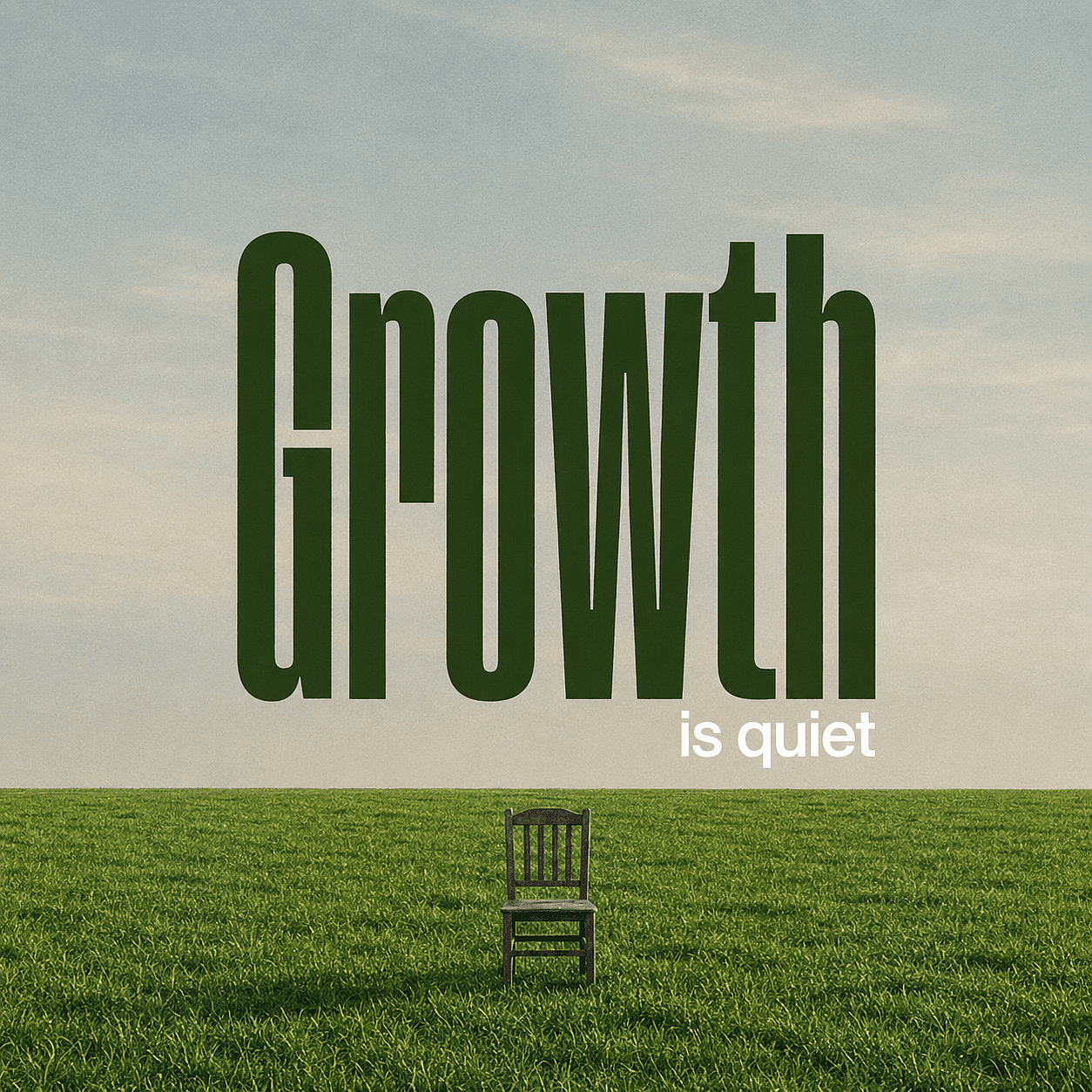
Affiche minimaliste d'un champ d'herbe verte plat sous un ciel bleu pâle. Une unique chaise en bois patiné trône au centre de l'herbe.
Un texte massif vert foncé « Growth » domine le ciel. En dessous, un texte blanc plus petit « is quiet ». Éclairage naturel doux, atmosphère paisible, léger grain de film vintage, ligne d'horizon dans le tiers inférieur.
La citation est courte et placée entre guillemets. Le prompt définit la catégorie de type, l'emplacement, le contraste, l'arrière-plan et le ratio sans demander au modèle de gérer trop d'éléments concurrents.
Publication de citation pour marque personnelle
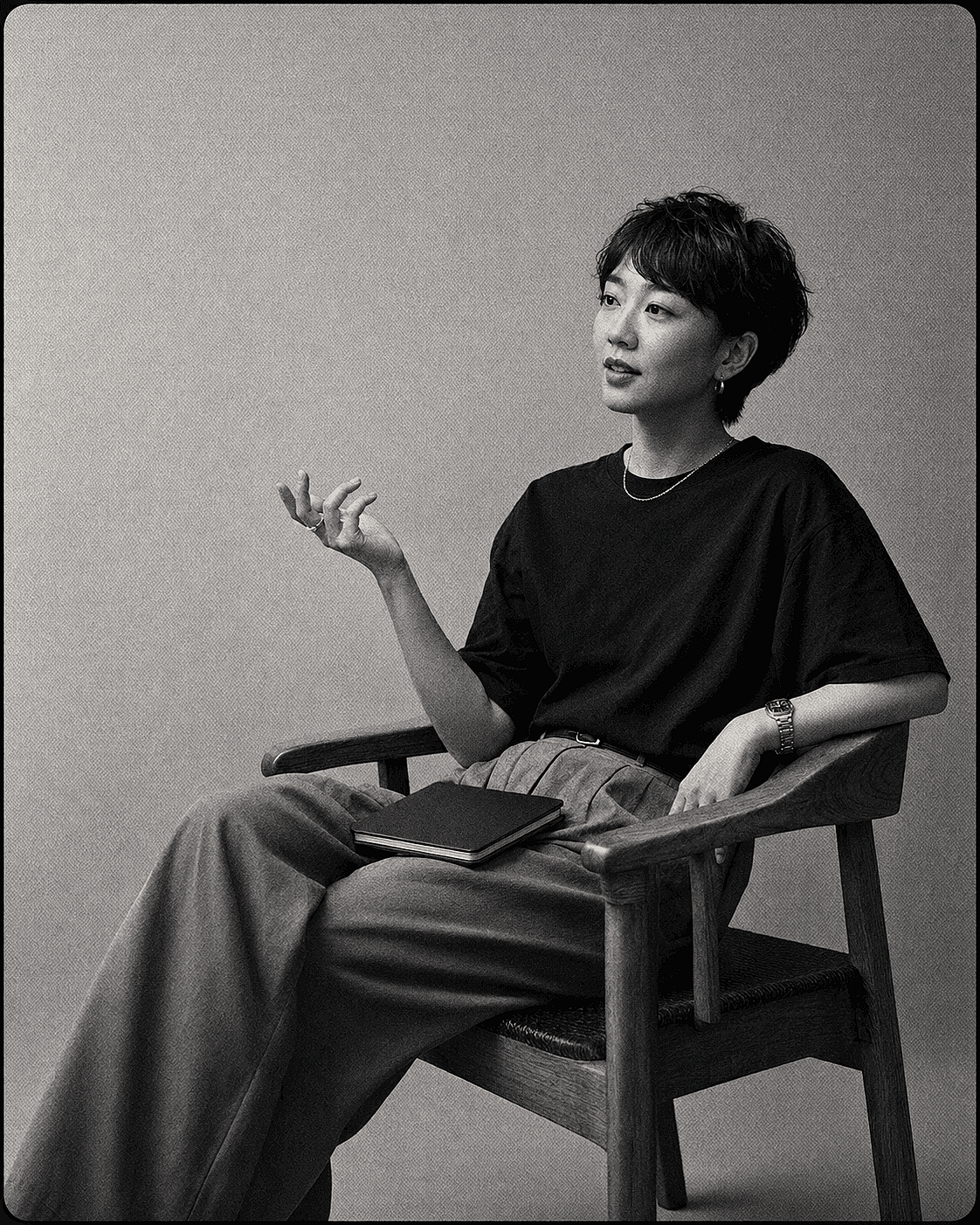
Portrait en noir et blanc d'une femme asiatique aux cheveux courts assise dans un fauteuil en bois. Elle porte un t-shirt foncé et un pantalon taille haute,
faisant un geste d'une main tandis qu'un carnet repose sur ses genoux. Fond de studio à texture unie. Film 35 mm, grain marqué, lumière douce et diffuse, plan moyen, composition cinématographique.
Ajoute la citation exacte dans ton outil de design. C'est le meilleur prompt lorsqu'une police de marque, un nom d'intervenant ou une longue attribution doit rester modifiable.
Affiche de citation rétro
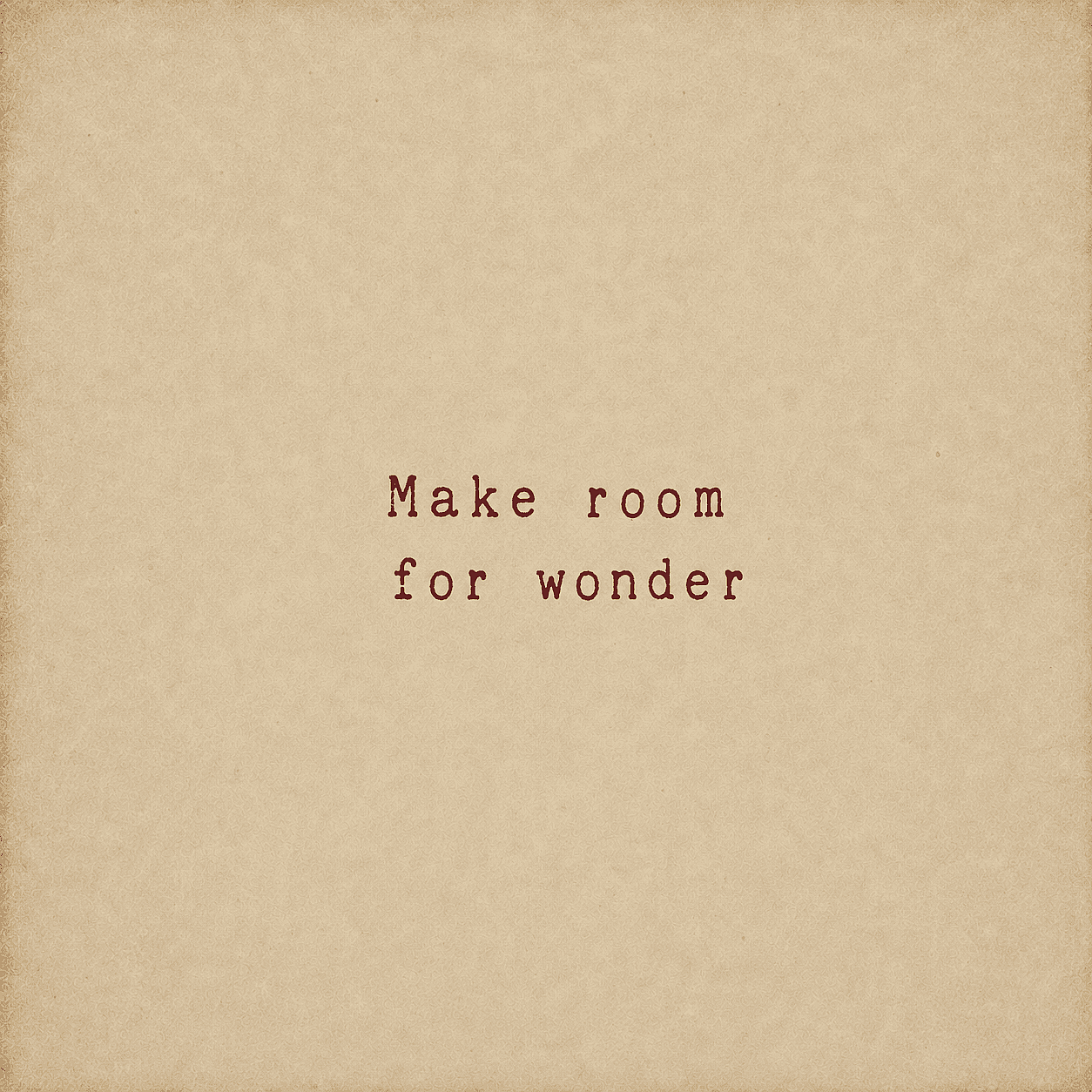
Typographie minimaliste avec le texte « Make room for wonder » dans une police de machine à écrire vintage rouge délavé. Centré sur un fond vieilli,
papier parchemin texturé aux tons beige chaud avec un léger vignettage sur les bords. Esthétique rustique, nostalgique et simple.
Pour l'adapter, change une variable à la fois : style de police, palette de couleurs, matière de l'arrière-plan ou ratio. Garder la structure stable rend les comparaisons entre modèles plus utiles.
Pour les graphiques web, la lisibilité doit être vérifiée séparément du style visuel. Le Recommandations de contraste WCAG 2.2 du W3C utilise un ratio de contraste minimal de 4,5:1 pour le texte normal et de 3:1 pour le grand texte. Ces ratios sont de bons repères pour les visuels de citation, surtout lorsque le texte se place sur une photo ou un dégradé.
Avis d'expert : le type généré et le vrai type résolvent des problèmes différents
La décision la plus importante n'est pas de savoir quel modèle a le meilleur score de texte. C'est de savoir si le lettrage doit se comporter comme une partie de l'image ou comme une information modifiable.
Le texte généré est parfait pour une enseigne peinte, une phrase brodée, un lettrage néon ou une affiche stylisée où les mots et l'image partagent la même texture. Le texte réel est préférable pour un prix produit, une date d'événement, une mention légale, une attribution ou un slogan de campagne qui doit rester exact d'une version à l'autre.
Cette distinction améliore aussi l'efficacité. Un créateur peut passer dix générations à tenter de corriger une seule lettre, ou garder l'arrière-plan validé et corriger le texte en quelques secondes. Les discussions communautaires sur Adobe et OpenAI reviennent sur la même inquiétude : la génération de texte s'est améliorée, mais les chaînes plus longues et les caractères non anglais demandent encore une vérification.
Usage commercial et droits d'auteur : vérifie les deux
Une plateforme peut autoriser un usage commercial sans garantir qu'un résultat soit protégeable ou exclusif. Les conditions du forfait indiquent si le service autorise l'usage prévu. Le droit d'auteur pose une question différente sur la paternité humaine et l'expression protégeable.
Le Rapport du U.S. Copyright Office sur la protection des œuvres générées par IA indique qu'un contenu purement généré par IA n'est pas protégé par le droit d'auteur, tandis que la sélection, l'agencement et la modification créative par un humain peuvent l'être au cas par cas. Pour un produit de citation, la typographie originale, les choix de mise en page, l'édition, l'illustration et l'agencement peuvent donc compter au-delà de la génération initiale.
La citation elle-même nécessite une vérification à part. La législation américaine classe les mots, noms, titres, slogans et autres courtes formules parmi les éléments non soumis au droit d'auteur, mais ça ne veut pas dire que tout passage trouvé en ligne est libre de réutilisation. Des extraits plus longs, des traductions, des œuvres sources, des marques déposées, des droits à l'image et des attributions inexactes peuvent poser d'autres problèmes. Le règle du Copyright Office sur les phrases courtes est un point de départ, pas un test de validation universel.
Il s'agit d'informations générales, pas de conseils juridiques. Vérifie les conditions actuelles de la plateforme, les droits sur la citation elle-même, les droits de l'image source et la loi de ton marché. Le guide d'OpenArt sur Droits d'auteur et risques liés à la propriété intellectuelle des images IA propose une étape concrète pour la suite.
FAQ
Quel est le meilleur générateur d'images IA pour les citations ?
OpenArt est la meilleure option globale pour les créateurs qui veulent le choix des modèles, l'édition, des styles réutilisables et l'upscaling dans un seul workflow. Ideogram est un excellent choix pour du texte court intégré à l'image. Canva ou Adobe Express est plus sûr quand chaque mot doit rester modifiable.
Quelle est la différence entre un générateur de citations IA et un générateur d'images IA pour les citations ?
Un générateur de citations IA ou générateur d'images de citations désigne généralement un outil unique qui transforme un texte saisi en un visuel fini en une seule étape, à la manière d'un template. Un générateur d'images IA utilisé pour les citations, comme les outils comparés dans ce guide, te donne plus de contrôle sur le style visuel, le choix du modèle et l'édition, mais nécessite en général de rédiger un court prompt. Les deux approches peuvent produire le même résultat : une image partageable avec une citation dessus.
Quel générateur d'images IA écrit correctement les mots ?
GPT Image 2 et Ideogram sont conçus pour un meilleur rendu du texte, mais aucun modèle ne garantit une orthographe parfaite sur chaque image. Garde la citation courte, mets-la entre guillemets, utilise une police grande et très contrastée, et vérifie chaque lettre. Ajoute un vrai calque de texte quand le libellé doit être exact.
Puis-je créer des images de citations gratuitement ?
Plusieurs outils offrent un accès gratuit, des essais limités ou des générations publiques gratuites. La limite utile dépend de la confidentialité des résultats, des filigranes, des crédits et de la qualité d'export. Vérifie l'offre actuelle avant de choisir un workflow pour du contenu quotidien ou des produits commerciaux.
Comment garder mes visuels de citations cohérents ?
Utilise un système de mise en page fixe, une palette de couleurs, une hiérarchie typographique et un ratio. Enregistre des images de référence ou entraîne un style personnalisé quand la plateforme le permet. Pour une production à grande échelle, crée un modèle réutilisable une fois la première direction visuelle validée.
Dois-je générer la citation dans l'image ou l'ajouter ensuite ?
Génère-le directement dans l'image quand le texte fait partie de la scène et que la phrase est courte. Ajoute-le plus tard si l'orthographe, la police, l'attribution, la localisation, les prix ou les règles de marque doivent être exacts.
Puis-je vendre des affiches de citations générées par IA ?
Cela dépend des conditions de la plateforme, de ton offre, de la citation, des éléments source, du résultat et de la loi locale. Une autorisation commerciale ne crée pas automatiquement de droit d'auteur ou d'exclusivité. Confirme les conditions actuelles et évite les passages protégés, les logos, les personnages ou les images source que tu n'as pas le droit d'utiliser. Si tu vends sur Etsy, ses conditions actuelles Standards de créativité autorisent les créations IA générées à la demande du vendeur sous la mention « conçu par un vendeur », mais exigent une divulgation dans la description de l'annonce.
Quelle taille doit avoir une image de citation ?
Utilise le ratio requis par la destination. Les points de départ courants sont 1:1 et 4:5 pour les fils sociaux, 9:16 pour les stories, 2:3 pour Pinterest et beaucoup d'impressions, et 16:9 pour les bannières paysage. Vérifie les spécifications actuelles de la destination avant l'export.
Puis-je upscaler une image de citation pour l'impression ?
Oui, mais valide d'abord l'orthographe et la mise en page. L'upscaling peut agrandir le fichier, mais il ne transforme pas des lettres mal orthographiées en typographie fiable. Pour un travail destiné à l'impression, ajoute la citation en tant que vrai calque de texte vectoriel ou haute résolution avant l'export final.