

 ChatGPT
 Perplexity
 Claude
 Gemini
Higgsfield ha ganado atención rápidamente entre los creadores que quieren generar vídeos con IA cinematográficos, movimientos de cámara dinámicos y contenido listo para redes sociales. Sus efectos visuales lo han convertido en un referente para el vídeo de formato corto y los experimentos creativos.
Pero la mayoría de los flujos de trabajo creativos necesitan algo más que vídeo cinematográfico. En algún punto entre la primera idea y la publicación final, casi siempre hay una imagen que generar, una foto que editar, una toma de producto que retocar o un conjunto de variaciones de anuncio que producir, a menudo todo la misma tarde. Ese es el hueco que lleva a la gente a buscar una alternativa a Higgsfield: algo que cubra el resto del flujo de trabajo y no solo el paso del vídeo.
Esta guía compara las mejores alternativas a Higgsfield para crear imágenes, vídeos y contenido de marketing con IA.
¿Qué es Higgsfield?
Higgsfield es una plataforma creativa de IA construida en torno a la generación de vídeos cinematográficos a partir de imágenes y prompts. Ha crecido rápido: la empresa recaudó una ampliación de su ronda Serie A de 130 M$ con una valoración de 1300 M$ en enero de 2026, como Reuters informó en su momento, y TechCrunch situó su base de usuarios en más de 15 millones en la misma cobertura. Es conocido por:
- Generación de imagen a vídeo con IA
- Movimientos de cámara cinematográficos
- Efectos de vídeo para redes sociales
- Plantillas de vídeo creativas
- Estilos virales de vídeo con IA
Para creadores que buscan principalmente convertir una imagen fija en un vídeo dinámico, Higgsfield es una forma accesible de conseguir resultados visualmente impresionantes rápido. Sin embargo, los creadores que trabajan con más formatos suelen acabar necesitando una plataforma más completa que la acompañe.
¿Por qué buscar una alternativa a Higgsfield?
1. Necesitas más que generación de vídeo con IA
El trabajo creativo moderno rara vez se limita a un solo formato. Una semana típica puede incluir generar imágenes para inspirarse, editar fotos existentes, crear visuales de producto, diseñar contenido para redes y animar una imagen fija para convertirla en vídeo, a veces para la misma campaña. Una plataforma que abarca tanto la generación de imágenes como de vídeo reduce el cambio constante entre herramientas que se come ese flujo de trabajo.
2. Precios y límites del plan gratuito
Las plataformas de creación con IA fijan sus precios de forma distinta, y los detalles importan más que la cifra del titular. Higgsfield reestructuró sus precios a finales de 2025 y eliminó su plan gratuito, así que empezar ahora significa elegir un plan de pago desde el principio: Starter, Plus, Ultra o una modalidad Business por puesto, por una comparación de alternativas a Higgsfield en 2026. La facturación anual también es la opción por defecto al registrarte, una configuración un desglose de precios detallado marcado como fácil de aceptar sin darse cuenta. El coste en créditos también varía mucho según el modelo y la resolución: un clip en un modelo estándar puede costar unos pocos créditos, los modelos premium pueden consumir decenas por generación, y los créditos no usados caducan en la renovación en lugar de acumularse.
Nada de esto hace que Higgsfield sea una mala opción para el caso de uso adecuado. Solo significa que el coste real no queda claro hasta que estás dentro de la plataforma comparando el uso con tu plan. Antes de elegir una herramienta, conviene comprobar cuántas generaciones necesitas realmente, si puedes probarla sin pagar por adelantado y si la creación de imágenes y vídeos se factura junta o por separado.
Para ver más de cerca los precios entre herramientas, consulta nuestra guía: Los mejores generadores de IA en 2026: funciones, precios y comparativa de costes.
3. Una curva de aprendizaje pronunciada para los novatos
Las propias reseñas de Higgsfield en Trustpilot y G2 están divididos en este punto. Muchos reseñadores describen la interfaz como limpia y fácil de aprender. Otros, dentro de ese mismo grupo de reseñas, la describen como confusa al principio, sobre todo a la hora de averiguar qué modo o control de cámara encaja con la toma que intentan conseguir. Si quieres una herramienta que puedas dar a un nuevo miembro del equipo sin mucho periodo de adaptación, merece la pena sopesar ese historial dispar frente a la experiencia de tu propio equipo antes de decidirte.
4. Los equipos de marketing necesitan herramientas creativas flexibles
La IA se ha convertido en una parte habitual de la producción de contenido comercial, desde anuncios de productos y campañas en redes hasta visuales promocionales, contenido de marca y vídeo de marketing. Una buena alternativa a Higgsfield debe apoyar tanto la fase de exploración creativa como el trabajo diario de producción que realmente mueve a los equipos de marketing.
Las mejores alternativas a Higgsfield
1. OpenArt: La mejor plataforma todo en uno para crear imágenes, vídeo y audio con IA
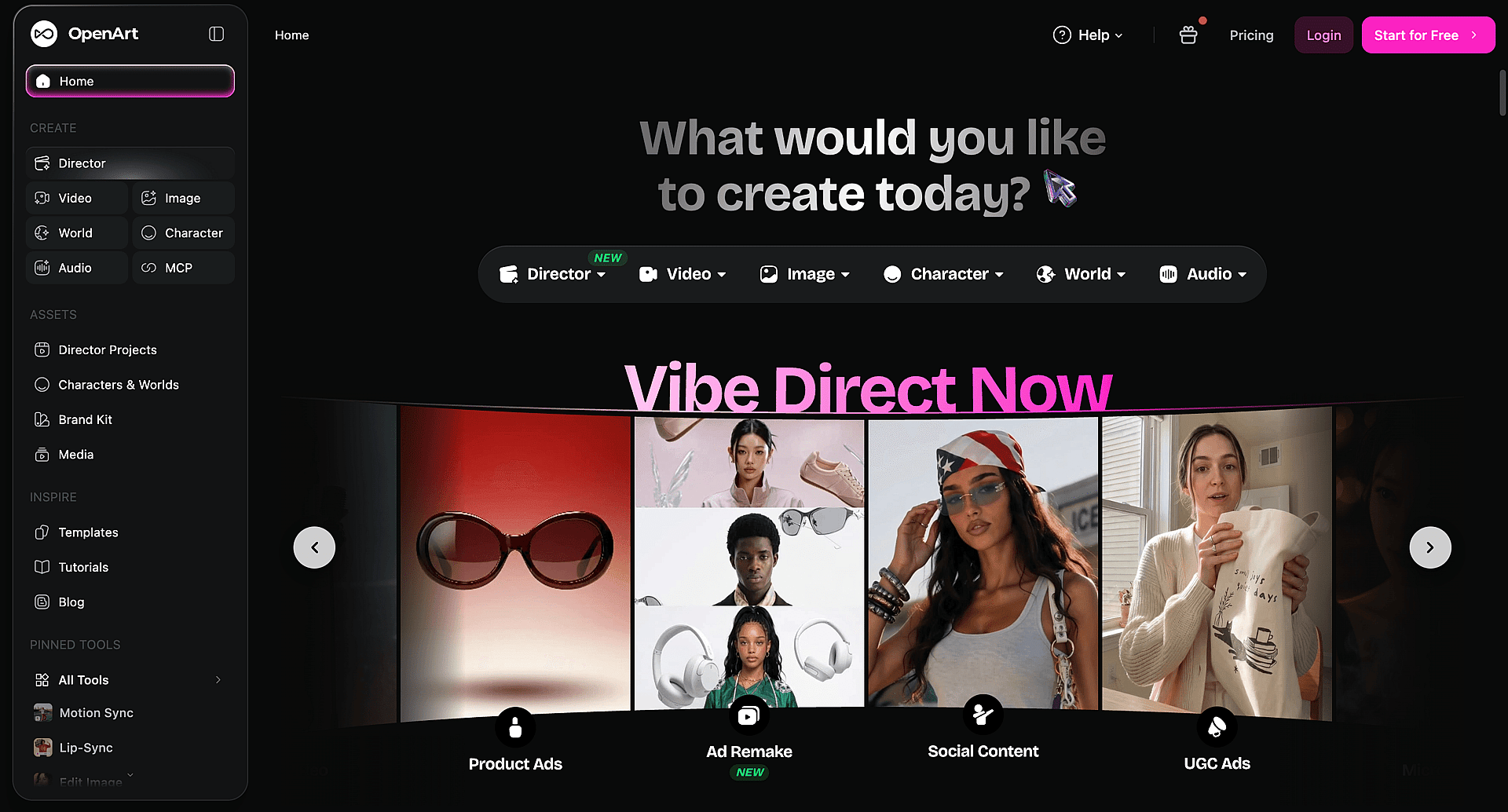
Ideal para: creadores, profesionales del marketing y empresas que necesitan un flujo creativo con IA completo, no solo una parte de él.
OpenArt combina la generación de imágenes con IA, la edición de imágenes y la creación de vídeo en una sola plataforma. En lugar de centrarse solo en efectos de vídeo cinematográficos, cubre todo el proceso creativo:
- Crear Imágenes con IA a partir de texto o imágenes de referencia
- Edita y transforma fotos
- Generar contenido de imagen a vídeo
- Convierte cualquier pista en un vídeo musical con IA sincronizado
- Añadir cinematográfico Efectos visuales con IA
- Crear diseños de personajes consistentes
- Producir contenido visual de marketing
- Trabaja en varios modelos de IA en un solo lugar
¿Por qué elegir OpenArt como alternativa a Higgsfield?
1. Crea imágenes y vídeos
La mayoría de los creadores empiezan con una imagen antes de necesitar un vídeo. OpenArt lo mantiene todo en un solo flujo: genera o sube una imagen, edítala y perfecciónala, y luego conviértela en vídeo sin cambiar de herramienta ni volver a subir nada.
2. Empieza gratis, sin necesidad de plan por adelantado
A diferencia del registro de pago exclusivo de Higgsfield, OpenArt te da créditos para empezar a generar de inmediato. Puedes probar los flujos de trabajo de imagen, vídeo y edición antes de decidir qué plan se ajusta a tu volumen.
3. Profundiza en la edición de imágenes más de lo que puede una herramienta centrada en el vídeo
Más allá de los retoques básicos, la suite de edición de OpenArt cubre inpainting, eliminación de fondo y objetos, transferencia de estilo, ediciones de buscar y reemplazar y fusión de varias capas: herramientas creadas para quienes dedican tiempo de verdad a perfeccionar imágenes, no solo a generar y seguir adelante.
4. Lleva OpenArt a las herramientas que ya usas
A través de OpenArt MCP, puedes generar imágenes y vídeo directamente dentro de Claude, ChatGPT o Cursor, y usar tu biblioteca de OpenArt existente como referencia sin salir del chat. Es un flujo de trabajo que Higgsfield no ofrece actualmente.
5. Mantén personajes consistentes sin volver a dibujarlos
Character Builder guarda un sujeto una vez y lo reutiliza en distintas escenas y formatos, ideal para contenido en serie, mascotas de marca o cualquier proyecto que necesite que la misma cara o personaje aparezca más de una vez.
6. Crea contenido visual listo para marketing
Más allá del vídeo para redes, OpenArt gestiona imágenes de producto, visuales publicitarios, gráficos para redes, conceptos de campaña y otros recursos creativos que los equipos necesitan de verdad para publicar, no solo para experimentar.
7. Explora múltiples flujos de trabajo creativos en un solo lugar
En lugar de hacer malabares con herramientas separadas para generar imágenes, editar y crear vídeo, OpenArt lo reúne todo en un solo lugar. ¿Quieres verlo por ti mismo? Prueba OpenArt gratis → y empieza a generar imágenes y vídeo desde el mismo panel.
2. Runway: la mejor para producción profesional de vídeo con IA
Ideal para: cineastas y creadores de vídeo avanzados.
Runway es uno de los nombres más consolidados del vídeo con IA, centrado en la generación de texto a vídeo, imagen a vídeo, edición de vídeo asistida por IA y efectos visuales. Si tu trabajo gira en torno a la producción de vídeo profesional en concreto, es una opción especializada muy sólida. Los creadores que también necesitan un flujo de trabajo serio de generación de imágenes junto al vídeo suelen decantarse por una plataforma todo en uno.
3. Kling AI: la mejor para vídeos realistas con IA
Ideal para: movimiento realista y escenas cinematográficas.
Kling AI se ha ganado su reputación con vídeo IA realista: movimiento natural, entornos detallados y calidad visual cinematográfica. Es una opción sólida para creadores cuya prioridad es el realismo en la narración y la generación de vídeo en concreto, más que un conjunto de herramientas más amplio de imagen y vídeo.
4. Pika: la mejor para efectos de vídeo rápidos con IA
Ideal para: creadores de redes sociales.
Pika está diseñado para la velocidad. Sus usos más habituales incluyen la animación de imágenes, efectos creativos, vídeos virales cortos y clips rápidos para redes sociales. Para quienes buscan efectos de vídeo con IA rápidos y accesibles sin una curva de aprendizaje pronunciada, es una buena opción.
5. Luma AI: la mejor para escenas cinematográficas con IA
Ideal para: narrativa visual.
Luma AI se centra en generar escenas cinematográficas: entornos realistas, movimiento de cámara y secuencias de vídeo generadas por IA. Los creadores que trabajan en vídeo narrativo suelen recurrir a él precisamente por esa calidad cinematográfica.
Higgsfield vs OpenArt: comparativa de funciones y parámetros
| Categoría | Higgsfield | OpenArt |
|---|---|---|
| Enfoque principal | Generación de vídeo con IA cinematográfica y control de cámara | Generación combinada de imagen, vídeo y audio con IA |
| Nivel gratuito | Ninguno desde su reestructuración de precios de finales de 2025; solo planes de pago | Nivel gratuito basado en créditos para empezar a generar |
| Plan de pago básico | Plan Starter, reportado en 15 $/mes | Plan Starter por 13 $/mes. Ver precios actuales para ver los detalles del plan |
| Facturación predeterminada al registrarse | Facturación anual seleccionada por defecto | Consulta la página de precios para ver las opciones de facturación |
| Enfoque del modelo | Agrupa varios modelos de terceros bajo una sola suscripción | Reúne varios modelos propios y de terceros en una sola suscripción |
| Generación de imágenes con IA | Disponible, planteado como una función secundaria al vídeo | Disponible como función principal |
| Edición de imágenes con IA | Editar imagen (inpainting con pincel), Face Swap, escalado | Inpainting, eliminación de fondo/objetos, transferencia de estilo, buscar y reemplazar, mezcla multicapa |
| Imagen a vídeo | Disponible | Disponible |
| Texto a vídeo | Disponible | Disponible |
| Consistencia de personajes | Soul ID | Creador de personajes |
| Flujo de trabajo de marketing/publicidad | Marketing Studio, de URL a vídeo para anuncios de productos | Generación de anuncios de producto y visuales de marketing |
| Integración con agentes/IDE | desconocido | OpenArt MCP conector para Claude, ChatGPT y Cursor |
Lo que reveló una comparativa de vídeo independiente
Las comparativas por escrito solo llegan hasta cierto punto, así que merece la pena ver qué pasa cuando alguien pasa exactamente el mismo prompt por ambas plataformas y compara los resultados. En un muy visto comparación de vídeo en paralelo, un creador comparó Higgsfield y OpenArt cara a cara en calidad de salida, precios, interfaz y tiempos de respuesta del soporte.
Vale la pena mencionar directamente algunas conclusiones, incluidas las que no favorecen exclusivamente a OpenArt:
- Ambas plataformas son agregadores, no propietarias de los modelos. Neither Higgsfield nor OpenArt trains the underlying video and image models — both route your prompt to outside services like Seedance, Nano Banana, or GPT Image. The reviewer's point: if you only ever use one specific model, going straight to that model's own service can work out cheaper than paying a platform on top of it. The case for using a platform at all shows up when a workflow needs several models in sequence, say, one for the image, another for the video, another for the edit, without juggling separate subscriptions and browser tabs for each.
- Las dos plataformas están tan igualadas que cambiar rara vez merece la pena. La opinión del crítico era que si ya te manejas bien en Higgsfield o ya te manejas bien en OpenArt, hay pocas razones para migrar solo por pequeñas diferencias.
- El precio favorecía a OpenArt en el momento de las pruebas. Al ejecutar un prompt idéntico, un clip de 15 segundos en 4K generado con Seedance 2.0 salió notablemente más barato en el plan de OpenArt que en el de Higgsfield, según el desglose de costes del analista. El analista también señaló que el precio de los créditos en ambas plataformas cambia con el tiempo, así que la diferencia puede reducirse, o incluso invertirse, según cuándo lo consultes.
- La complejidad de la interfaz fue la mayor carencia. El reseñador describió la interfaz de Higgsfield como recargada y desorientadora para un usuario primerizo, y consideró el diseño de OpenArt más fácil para empezar, aunque tampoco esté exento de su propia curva de aprendizaje.
- Solapamiento de funciones. El crítico señaló que Higgsfield enumera un gran número de funciones con nombres distintos que a menudo producen resultados muy parecidos entre sí, y dijo que varias parecían anticuadas comparadas con lo que hay disponible actualmente.
Vale la pena señalarlo: el reseñador revela una relación de afiliación con ambas plataformas, lo que significa que gana una comisión sin importar cuál elija el espectador. Eso no elimina el sesgo, pero sí significa que el veredicto favorable a OpenArt no proviene de un incentivo económico para favorecer a una sobre la otra.
Nada de esto cambia la recomendación principal anterior: en cuanto un flujo de trabajo toca más de un modelo o formato, una plataforma justifica su valor, y en coste y facilidad de uso, OpenArt salió ganando en esta prueba. Pero es un recordatorio justo de que el valor de cualquier plataforma agregadora, OpenArt incluida, viene de la comodidad y la variedad de modelos, no de ser dueña de la tecnología subyacente.
¿Qué alternativa a Higgsfield deberías elegir?
Elige OpenArt si:
- Necesitas imágenes y vídeos de IA en un mismo flujo de trabajo
- Quieres control a nivel de director sobre vídeos de varias escenas en vez de clips sueltos
- Necesitas efectos visuales cinematográficos sin usar una herramienta de VFX aparte
- Creas materiales de marketing con regularidad, incluidos anuncios de producto y creatividades para anuncios en redes
- Genera visuales de producto a gran escala
- Quieres una plataforma creativa completa en lugar de una herramienta de un solo propósito
- Prefieres un único flujo de trabajo limpio en lugar de combinar apps distintas para imagen, vídeo, audio y efectos
Elige Runway si:
- Necesitas herramientas profesionales de edición de vídeo
- Trabaja en proyectos de vídeo avanzados
- Necesitas edición asistida por IA sobre metraje que ya has grabado, no solo generaciones nuevas
Elige Kling AI si:
- Prioriza el vídeo realista generado con IA por encima de todo
- Necesitas movimiento natural y entornos detallados en escenas cinematográficas más largas
Reflexiones finales
Higgsfield se ha convertido en una opción popular entre creadores que buscan efectos de vídeo con IA cinematográficos y narrativa visual dinámica, y sus cifras de financiación y usuarios lo respaldan. Pero los flujos de trabajo creativos rara vez se quedan en el vídeo. Muchos creadores alternan entre generar imágenes, editar visuales, crear recursos de marketing y producir vídeos dentro del mismo proyecto.
La alternativa a Higgsfield adecuada depende de cómo crees. Si necesitas una plataforma que cubra todo el recorrido desde la idea hasta el contenido acabado, y que te deje empezar sin comprometerte antes con un plan de pago, compara los planes y empieza a crear → con un flujo de trabajo de IA más flexible.