


 ChatGPT
 Perplexity
 Claude
 Gemini

Seedream est la famille de modèles d'images IA de ByteDance, l'entreprise derrière TikTok. La famille Seedream comprend Seedream 5.5, Seedream 5.0 Pro, Seedream 5.0 Flash, Seedream 5.0 Lite et Seedream 4.5, et chaque modèle est adapté à un usage différent.
Seedream 5.5 est le dernier modèle Seedream et celui par lequel commencer pour la plupart des travaux. La génération Seedream 5.0, souvent abrégée en « Seedream 5 », compte trois modèles : Seedream 5.0 Pro pour le design, plus les modèles plus abordables Seedream 5.0 Lite et Seedream 5.0 Flash.
All five Seedream models run in OpenArt's Générateur d'images IA. Tu peux lancer un prompt sur chaque modèle et garder l'image que tu préfères.
Points clés à retenir
- Seedream 5.5 is the best Seedream model for editing one picture many times and for transparent backgrounds.
- Seedream 5.0 Pro is the design model for infographics, posters, and edits on one marked area.
- Seedream 5.0 Flash est le modèle Seedream 5.0 rapide et économique, idéal pour les brouillons et les visuels percutants.
- Seedream 5.0 Lite crée des images en 2K et 3K à partir de jusqu'à 14 images de référence sur OpenArt.
- Seedream 4.5 est le modèle Seedream à choisir pour les images 4K, l'anime et l'art 2D.
Qu'est-ce que Seedream, et que signifie « Seedream 5 » ?
Seedream est la famille de modèles d'images de ByteDance Seed, l'équipe de recherche en IA de ByteDance. Chaque modèle Seedream crée des images à partir d'un prompt et retouche les images que tu importes.
"Seedream 5" and "Seedream 5.0" are two names for one generation of Seedream models. ByteDance released the Seedream 5.0 generation as three models: Seedream 5.0 Lite, Seedream 5.0 Pro, and Seedream 5.0 Flash. "Seedream 5 Pro" is a short name for Seedream 5.0 Pro.
« Seedream 5 » sans autre mot désigne généralement Seedream 5.0 Lite, le premier modèle de la génération. L'identifiant de modèle de ByteDance pour Seedream 5.0 Lite commence par « seedream-5-0 », sans « lite » dans le nom.
Six releases shaped the Seedream family:
- Septembre 2025 : Seedream 4.0 puts making and editing pictures into one model and raises the top size to 4K.
- December 2025: Seedream 4.5 improves reference matching, poster layouts, and small text.
- Février 2026 : Seedream 5.0 Lite arrives with stronger reasoning for short and tricky prompts.
- July 8, 2026: ByteDance launches Seedream 5.0 Pro, the design model with marked-area edits and layers.
- Septembre 2026 : Seedream 5.0 Flash arrive comme le modèle Seedream 5.0 plus rapide et moins cher.
- November 9, 2026: ByteDance launches Seedream 5.5 with 100-round editing and transparent backgrounds.
Comment comparer les modèles Seedream en un coup d'œil ?
The five Seedream models on OpenArt differ most in what each model does best and how big a picture each model makes.
| Modèle | Publié | Ce que le modèle fait le mieux | Sizes on OpenArt |
|---|---|---|---|
| Seedream 5.5 | Novembre 2026 | Seedream 5.5 suits long editing sessions, transparent backgrounds, small text, and realistic people and products. | 1K, 1.5K, 2K |
| Seedream 5.0 Pro | Juillet 2026 | Seedream 5.0 Pro convient aux infographies, affiches, éditions d'une zone sélectionnée et travail sur les calques. | 1K, 2K |
| Seedream 5.0 Flash | Septembre 2026 | Seedream 5.0 Flash suits fast, low-cost drafts and bright, bold graphics. | 1K, 1.5K, 2K |
| Seedream 5.0 Lite | Février 2026 | Seedream 5.0 Lite suits low-cost 2K and 3K pictures built from many reference images. | 2K, 3K |
| Seedream 4.5 | Décembre 2025 | Seedream 4.5 est parfait pour les images 4K, l'anime et l'art 2D, ainsi que les mises en page d'affiches et de logos. | 2K, 4K |
Dans quoi Seedream 5.5 excelle-t-il ?
Seedream 5.5 is ByteDance's newest Seedream model, released on November 9, 2026. Seedream 5.5 is built for editing: you change one thing at a time, and the rest of the picture stays the same.
- Des retouches qui tiennent sur 100 tours. ByteDance affirme que Seedream 5.5 maintient une image stable sur 100 tours de retouche. Tu peux changer la couleur d'une veste pendant que le visage et l'arrière-plan restent exactement identiques.
- Transparent backgrounds from a prompt. Seedream 5.5 crée des images avec un arrière-plan totalement ou partiellement transparent, à partir d'un prompt ou d'images de référence. Logos, stickers et découpes de produits sont prêts à être intégrés dans n'importe quel design.
- More natural light and skin. Seedream 5.5 shows light, materials, and skin with less shine and glare, so people and products look closer to real photos.
- Small text that stays readable. Seedream 5.5 writes small, crowded text on labels, menus, and posters. ByteDance reports a 0.4% rate of serious text errors and a 1.7% rate of small text errors in its Chinese and English tests.
- Up to 100 layers. Seedream 5.5 peut découper une image en une image de base plus jusqu'à 99 calques, et il lit les mots sur les calques de texte. Sur OpenArt, l'outil Extraire les calques fait ce travail avec Seedream 5.0 Pro.
Sur OpenArt, Seedream 5.5 crée des images en 1K, 1,5K ou 2K, accepte jusqu'à 10 images de référence et coûte moins de crédits que Seedream 5.0 Pro. Un réglage Arrière-plan te permet de choisir Auto, Transparent ou Opaque avant de générer.
Seedream 5.5 is also the default model in OpenArt's Éditeur photo IA. Importe une image, tape une modification, et continue tour après tour. Le Guide des prompts Seedream 5.5 shows how to write each edit.
What does Seedream 5.0 Pro do best?
Seedream 5.0 Pro is the top model of the Seedream 5.0 generation, released by ByteDance on July 8, 2026. ByteDance built Seedream 5.0 Pro for design work, so the model plans the layout of a picture before it draws.
- Des mises en page denses d'un seul coup. Seedream 5.0 Pro turns data, ideas, and long text into infographics, charts, flowcharts, slides, and posters, and it keeps small labels readable.
- Edits on one marked area. Mark a point, draw a box, or sketch on the picture, describe the change, and Seedream 5.0 Pro changes only that part. You can also swap a color with a hex code like #7BA05B or swap one material for another.
- Layers you can move. Seedream 5.0 Pro splits a picture into a base image plus up to 16 layers, such as the headline, the person, the product, and the background.
- Personnes et produits réalistes. Seedream 5.0 Pro restitue la texture réelle de la peau, la lumière naturelle et les reflets, pour des portraits et des photos de produits dignes de vraies photos.
- Du texte dans de nombreuses langues. Seedream 5.0 Pro writes Chinese and English plus 14 more languages, including Arabic, Japanese, Korean, Spanish, French, German, and Thai.
Sur OpenArt, Seedream 5.0 Pro makes pictures at 1K or 2K and takes up to 10 reference images. OpenArt's Extraire les calques fonctionne avec Seedream 5.0 Pro et transforme une image en calques PNG transparents, avec un maximum que tu définis entre 2 et 16.
Vérifie les très petits textes avant de publier une image Seedream 5.0 Pro. ByteDance note que les textes minuscules et les retouches précises peuvent encore s'améliorer dans Seedream 5.0 Pro, et Seedream 5.5 améliore les deux.
Qu'est-ce que Seedream 5 ? Seedream 5.0 Lite et Seedream 5.0 Flash expliqués
Seedream 5.0 Lite et Seedream 5.0 Flash sont les deux modèles plus abordables de la génération Seedream 5.0. Les deux sont disponibles sur OpenArt aux côtés de Seedream 5.0 Pro.
Seedream 5.0 Lite
Seedream 5.0 Lite est le premier modèle Seedream 5.0, sorti en février 2026. ByteDance a conçu Seedream 5.0 Lite pour réfléchir à un prompt avant de dessiner, si bien que le modèle gère très bien les instructions courtes, vagues ou en plusieurs étapes.
- Bigger pictures: On OpenArt, Seedream 5.0 Lite makes pictures at 2K or 3K, and both sizes cost the same credits.
- More reference images: Seedream 5.0 Lite takes up to 14 reference images on OpenArt, the most of the three Seedream 5.0 models.
- Diagrams and explainers: Seedream 5.0 Lite utilise son raisonnement pour dessiner des diagrammes, des graphiques et des explications étape par étape.
Seedream 5.0 Pro and Seedream 5.5 are the stronger picks for final pictures of people and products. ByteDance describes Seedream 5.0 Lite as a smaller model with room to grow in realism.
Seedream 5.0 Flash
Seedream 5.0 Flash est le modèle rapide et économique de la génération Seedream 5.0, lancé en septembre 2026. ByteDance décrit Seedream 5.0 Flash comme la version plus rapide et moins coûteuse de Seedream 5.0 Pro, et Seedream 5.0 Pro comme le modèle offrant une meilleure qualité d'image.
- Vitesse et coût : Seedream 5.0 Flash finishes faster and uses fewer credits than Seedream 5.0 Pro, so you can make many versions of one idea.
- Bright, bold graphics: Seedream 5.0 Flash gives you brighter colors, more font variety, and strong layouts for posters, menus, and social graphics.
- Correspondance des couleurs plus fidèle : Seedream 5.0 Flash keeps colors closer to your reference images and adds less gray or yellow tint than Seedream 5.0 Pro.
- Trois tailles : On OpenArt, Seedream 5.0 Flash makes pictures at 1K, 1.5K, or 2K and takes up to 10 reference images.
Seedream 5.0 Pro et Seedream 5.5 rendent la peau, le métal, le verre et les scènes sombres avec plus de réalisme que Seedream 5.0 Flash. Crée un brouillon sur Seedream 5.0 Flash, puis fais l'image finale sur Seedream 5.5 ou Seedream 5.0 Pro.
Seedream 4.5 est-il toujours utile ?
Oui. Seedream 4.5 est le seul des cinq modèles à créer des images 4K sur OpenArt, et une image 4K coûte autant de crédits qu'une image 2K.
Seedream 4.5 accepte jusqu'à 14 images de référence et garde les visages, la lumière et les couleurs fidèles à ces références. Seedream 4.5 a aussi un style anime et art 2D très marqué, et gère parfaitement les mises en page d'affiches, les logos et les petits textes.
Seedream 4.5 is the right pick for three jobs:
- 4K files: Seedream 4.5 crée des images 4K pour l'impression, les grands écrans et les larges bannières.
- Anime et art 2D : Seedream 4.5 convient aux styles anime, cartoon et illustration.
- Plusieurs références : Seedream 4.5 fusionne jusqu'à 14 images de référence en une seule image.
Passe à Seedream 5.5 ou Seedream 5.0 Pro pour éditer une zone sélectionnée, gérer les calques, les fonds transparents et le texte dans 14 langues supplémentaires. ByteDance a lancé Seedream 4.5 en décembre 2025, et les modèles Seedream 5.0 ainsi que Seedream 5.5 suivent les prompts et les consignes d'édition de plus près.
Seedream 5.5 vs Seedream 5.0 Pro: what is different?
Seedream 5.5 et Seedream 5.0 Pro partagent la même limite de références et les mêmes tailles dans les specs de ByteDance. Seedream 5.5 va plus loin sur les longues sessions de retouche, les arrière-plans transparents et les calques, et coûte moins de crédits sur OpenArt.
| Seedream 5.5 | Seedream 5.0 Pro | |
|---|---|---|
| Édition | Seedream 5.5 modifie une zone marquée et maintient une image stable sur 100 tours de retouche, selon ByteDance. | Seedream 5.0 Pro édite une zone sélectionnée et garde le reste de l'image inchangé. |
| Arrière-plans transparents | Seedream 5.5 makes a transparent background from a prompt or from reference images. | Seedream 5.0 Pro makes a transparent picture from one PNG reference that is already transparent. |
| Calques | Seedream 5.5 décompose une image en une image de base plus jusqu'à 99 calques et lit les mots sur les calques de texte. | Seedream 5.0 Pro découpe une image en une image de base plus jusqu'à 16 calques. |
| Crédits sur OpenArt | Seedream 5.5 coûte moins de crédits par image, et chaque image de référence ajoute des crédits. | Seedream 5.0 Pro costs more credits per picture, and 2K costs twice as much as 1K. |
Commence par Seedream 5.5 pour la plupart des images. Lance le même prompt sur Seedream 5.0 Pro quand une mise en page dense compte, et garde le résultat que tu préfères.
What are the tech specs of each Seedream model?
ByteDance's developer documentation lists these specs for Seedream 5.5, Seedream 5.0 Pro, Seedream 5.0 Flash, Seedream 5.0 Lite, and Seedream 4.5, as checked on November 22, 2026.
| Spéc | Seedream 5.5 | Seedream 5.0 Pro | Seedream 5.0 Flash | Seedream 5.0 Lite | Seedream 4.5 |
|---|---|---|---|---|---|
| Size options | 1K, 1.5K, 2K | 1K, 1.5K, 2K | 1K, 1.5K, 2K | 2K, 3K, 4K | 2K, 4K |
| Image la plus grande | About 4.6 megapixels, such as 2816 × 1584 at 16:9 | Environ 4,6 mégapixels | Environ 4,6 mégapixels | About 16.8 megapixels, such as 4096 × 4096 | Environ 16,8 mégapixels |
| Images de référence | Jusqu'à 10 | Jusqu'à 10 | Jusqu'à 10 | Up to 14 | Up to 14 |
| Arrière-plans transparents | Oui, à partir d'un prompt ou de références | Only from one transparent PNG reference | Only from one transparent PNG reference | Non | Non |
| Séparation des calques | 1 base image plus up to 99 layers | 1 image de base plus jusqu'à 16 calques | 1 image de base plus jusqu'à 16 calques | Non | Non |
| Lit le texte sur les calques | Oui | Non | Non | Non | Non |
| Édition d'une zone sélectionnée | Oui | Oui | Oui | Non | Non |
| Sets of related pictures in one request | Non | Non | Non | Oui, jusqu'à 15 images en comptant les images de référence | Oui, jusqu'à 15 images en comptant les images de référence |
| Recherche web | Non | Non | Non | Oui | Non |
| Type de fichier | PNG or JPEG | JPEG ou PNG | JPEG ou PNG | JPEG ou PNG | JPEG |
| Langues des prompts | Chinese, English, and 14 more | Chinese, English, and 14 more | Chinese, English, and 14 more | Chinese and English | Chinese and English |
Seedream 5.5, Seedream 5.0 Pro, and Seedream 5.0 Flash read prompts in Chinese and English plus Russian, Arabic, Filipino, Thai, Turkish, Korean, Malay, Spanish, Portuguese, Indonesian, French, German, Vietnamese, and Japanese. ByteDance suggests keeping a prompt to 600 English words or fewer on every Seedream model.
How do the Seedream models differ on OpenArt?
All five Seedream models run in OpenArt's AI image generator with the same eight aspect ratios, from 9:16 to 21:9, and up to 8 pictures per run. The five models differ in picture size, reference images, background settings, and credit cost.
| On OpenArt | Seedream 5.5 | Seedream 5.0 Pro | Seedream 5.0 Flash | Seedream 5.0 Lite | Seedream 4.5 |
|---|---|---|---|---|---|
| Picture sizes | 1K, 1.5K, 2K | 1K, 2K | 1K, 1.5K, 2K | 2K, 3K | 2K, 4K |
| Images de référence | Up to 10, 30 MB each | Up to 10, 30 MB each | Up to 10, 30 MB each | Up to 14, 10 MB each | Up to 14, 10 MB each |
| Transparent background setting | Oui | Non | Non | Non | Non |
| Credit cost | Fewer credits than Seedream 5.0 Pro | The most credits of the five | Fewer credits than Seedream 5.0 Pro | Same credits at 2K and 3K | Same credits at 2K and 4K |
OpenArt's size options for a Seedream model can differ from ByteDance's full list. OpenArt settings checked on November 22, 2026.
Two OpenArt tools pick a Seedream model for you. The AI photo editor starts on Seedream 5.5, and Extract Layers runs on Seedream 5.0 Pro.
For a bigger file, run any Seedream picture through OpenArt's Upscaler d'images IA.
Comment les modèles Seedream 5 se comparent-ils sur un même prompt ?
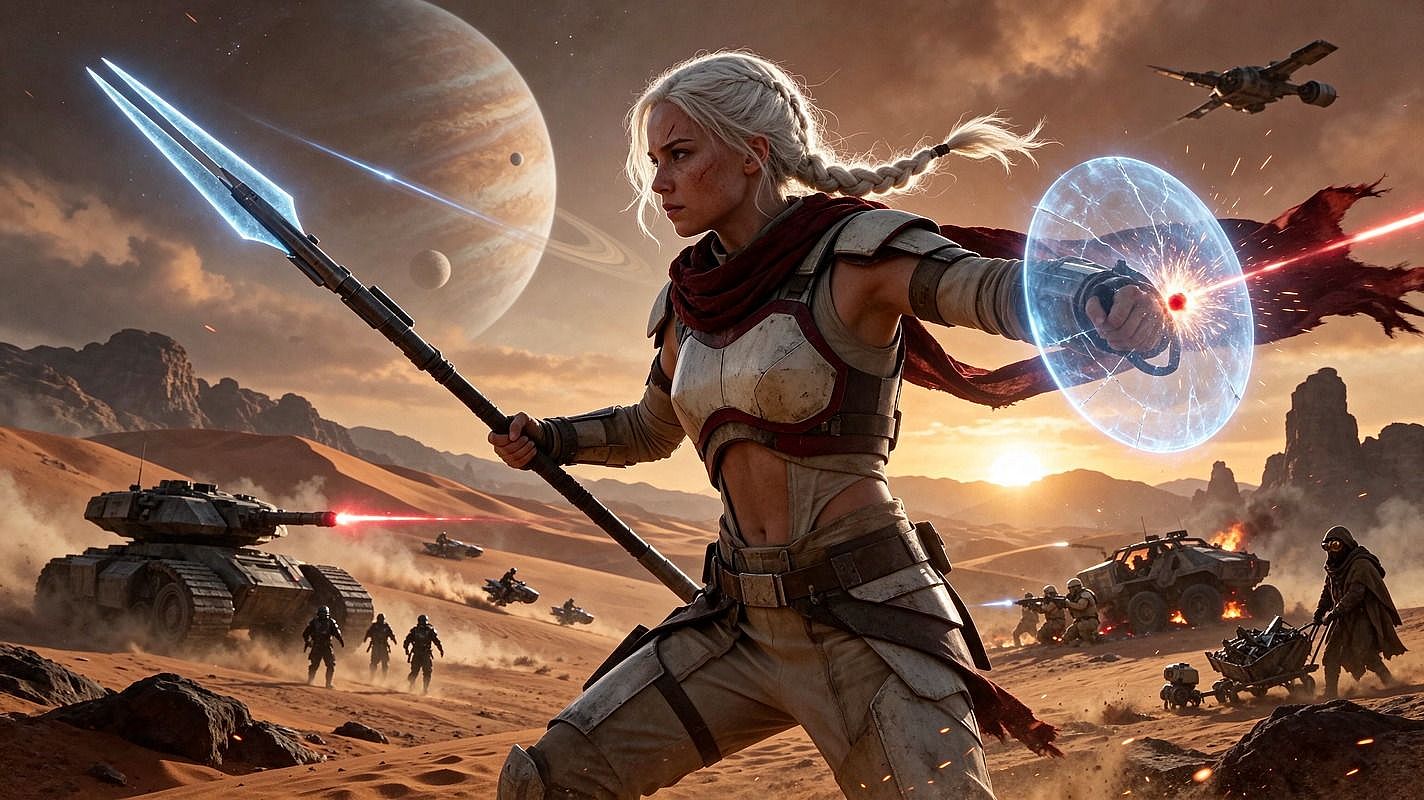
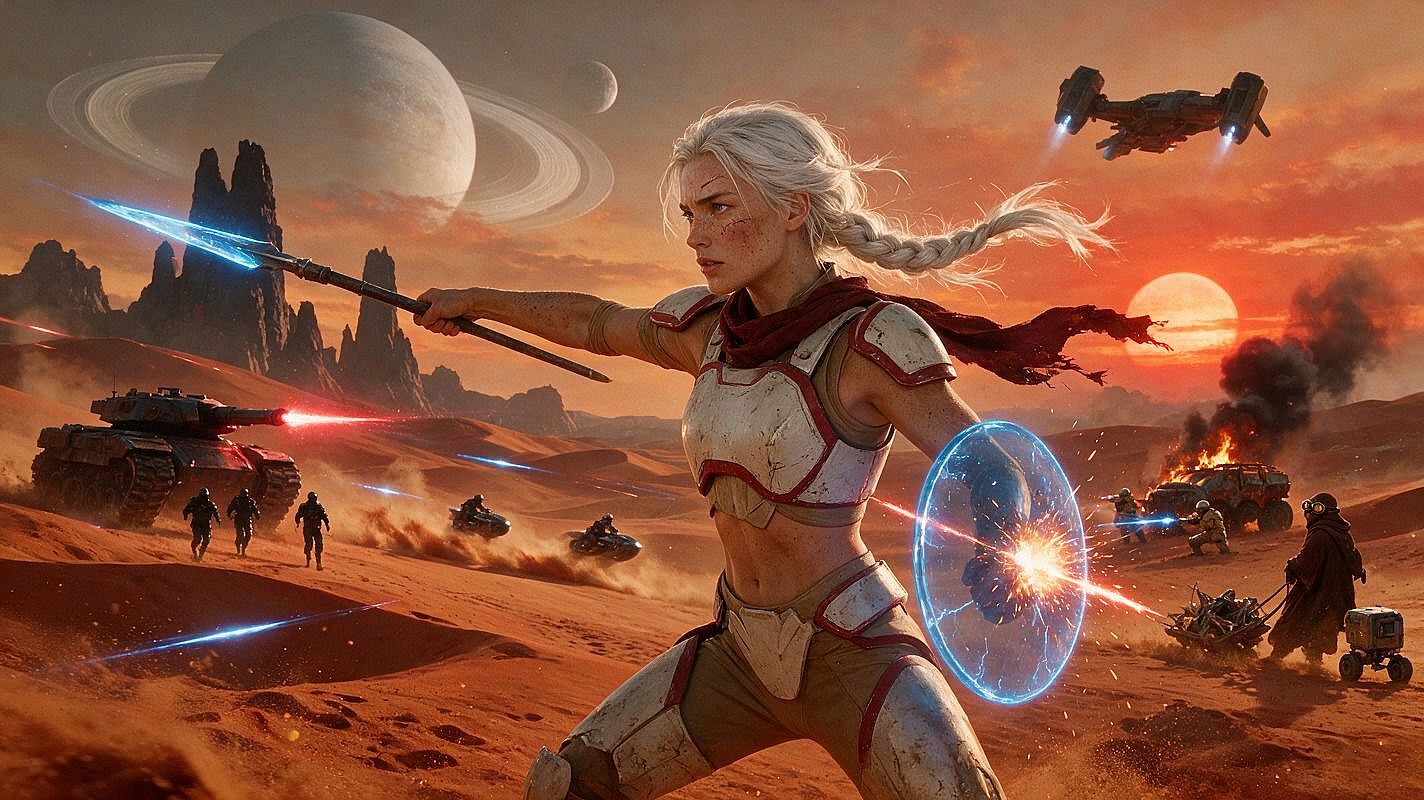
One prompt on all four models is the fastest way to see how Seedream 5.5, Seedream 5.0 Pro, Seedream 5.0 Flash, and Seedream 5.0 Lite differ. The desert battle prompt below asks for one detailed hero, five vehicles, ten smaller people, and one robot, each in a set place.
Run the prompt on each of the four Seedream models with the same settings: 16:9, 2K, Auto Polish off, and the first result with no edits. 2K is the one size all four models share on OpenArt.
SCENE: A battle on a desert planet at sunset. Rust-red sand dunes roll toward tall black rock spires on the horizon. One swollen red sun sits low on the right. A huge pale ringed planet fills the upper left of the sky, with one small moon beside it. Dust and smoke drift across the dunes, and blue and red energy bolts streak through the air.

SUBJECT: A woman warrior in the foreground, just right of center, shown from the thighs up in a low fighting stance and facing left. She is a Caucasian woman in her mid-twenties, with fair, sun-touched skin, light freckles across her nose, a thin scar through her left eyebrow, dust on her cheeks, and a long silver-white braid whipping in the wind. Her eyes are locked on a target to the left. She wears light, form-fitting armor: a cropped bone-white chest plate with crimson edges, small plated pauldrons, and armored bracers and greaves over a fitted sand-colored bodysuit cut away at the shoulders and upper arms. The armor is scratched and battle-worn but practical, built for speed. A torn dark red scarf blows behind her. Her right hand grips a long spear with a glowing blue blade. A round, see-through blue energy shield on her left forearm blocks a red bolt in a burst of sparks.

BACKGROUND: Left midground: a huge armored tank on tall treads fires a red beam from its cannon, and four soldiers in black armor walk in front of it. Center distance: two hover bikes race between the dunes, each with one rider, leaving long trails of sand. Right midground: three soldiers in tan armor crouch behind a burning six-wheeled rover and fire blue bolts to the left. Upper right sky: one dropship with two tilted engines flies low. Far right edge: a robed scavenger in brass goggles drags a sled of scrap metal away from the fight, followed by a small three-wheeled cargo robot.

ART STYLE: Photorealistic cinematic film still, like a big-budget science fiction movie. Wide 16:9 shot with the camera at chest height. The warrior is in sharp focus, and the background is slightly soft from dust and distance. Warm red-orange backlight from the low sun, a thin rim of light on her hair, bare shoulders, and arms, and a cool blue glow from the spear and shield on her face and armor. Visible skin texture, dents and scratches in the armor, and grains of sand in the air. Colors: rust red, amber, bone white, crimson, and electric blue.

CONSTRAINTS: Exactly one woman in the foreground. Exactly one tank, four soldiers in black armor, two hover bikes with one rider each, three soldiers in tan armor, one burning rover, one dropship, one scavenger, and one small robot. Exactly one sun, one ringed planet, and one moon. Every person has correct anatomy and five fingers on each hand. She holds the spear and shield naturally. No text, logos, or watermark.
Check four things in each picture: the hero character's skin and hands, the count of eleven people and five vehicles, the place of each vehicle, and the blue glow on her weapons.
Seedream 5.5 result
Seedream 5.0 Pro result
Seedream 5.0 Flash result
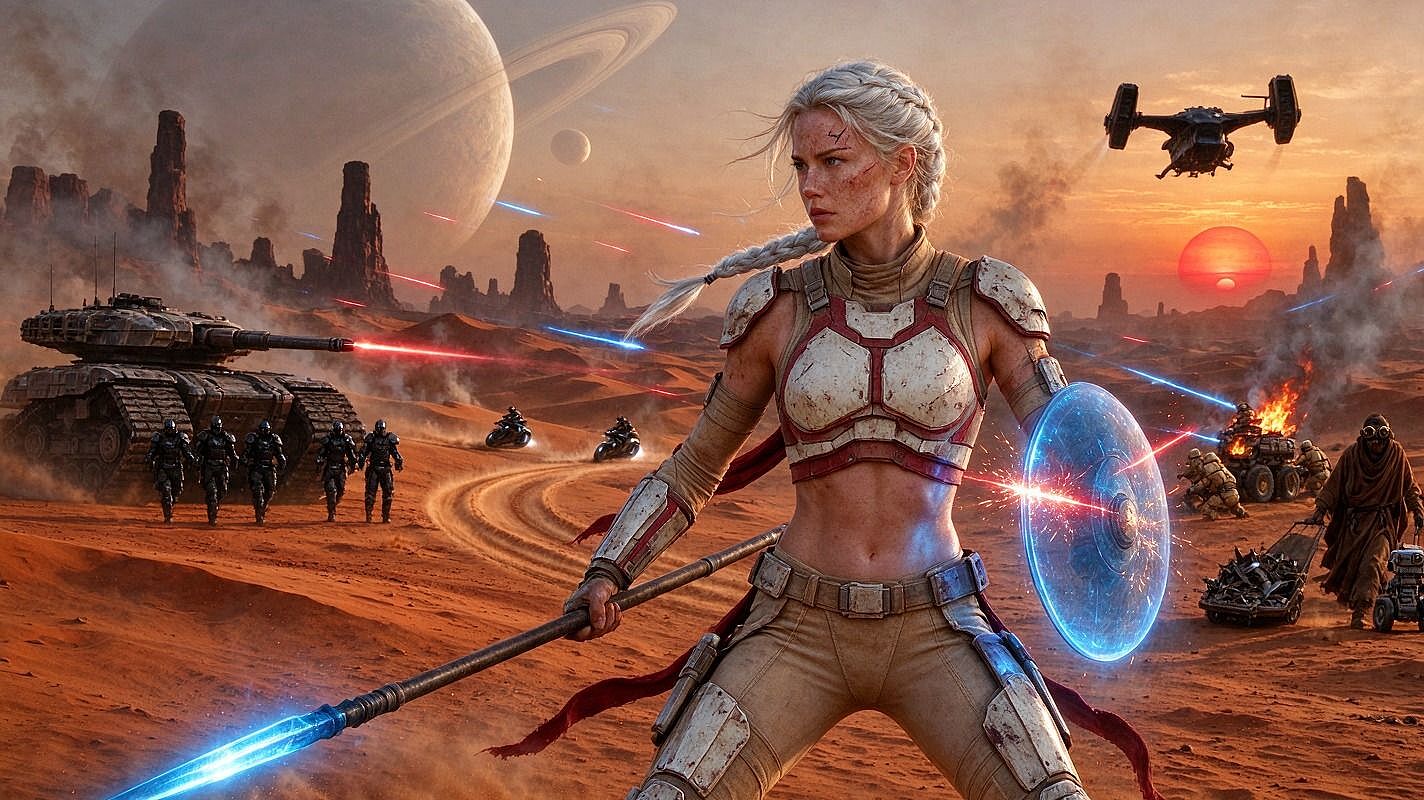
Seedream 5.0 Lite result
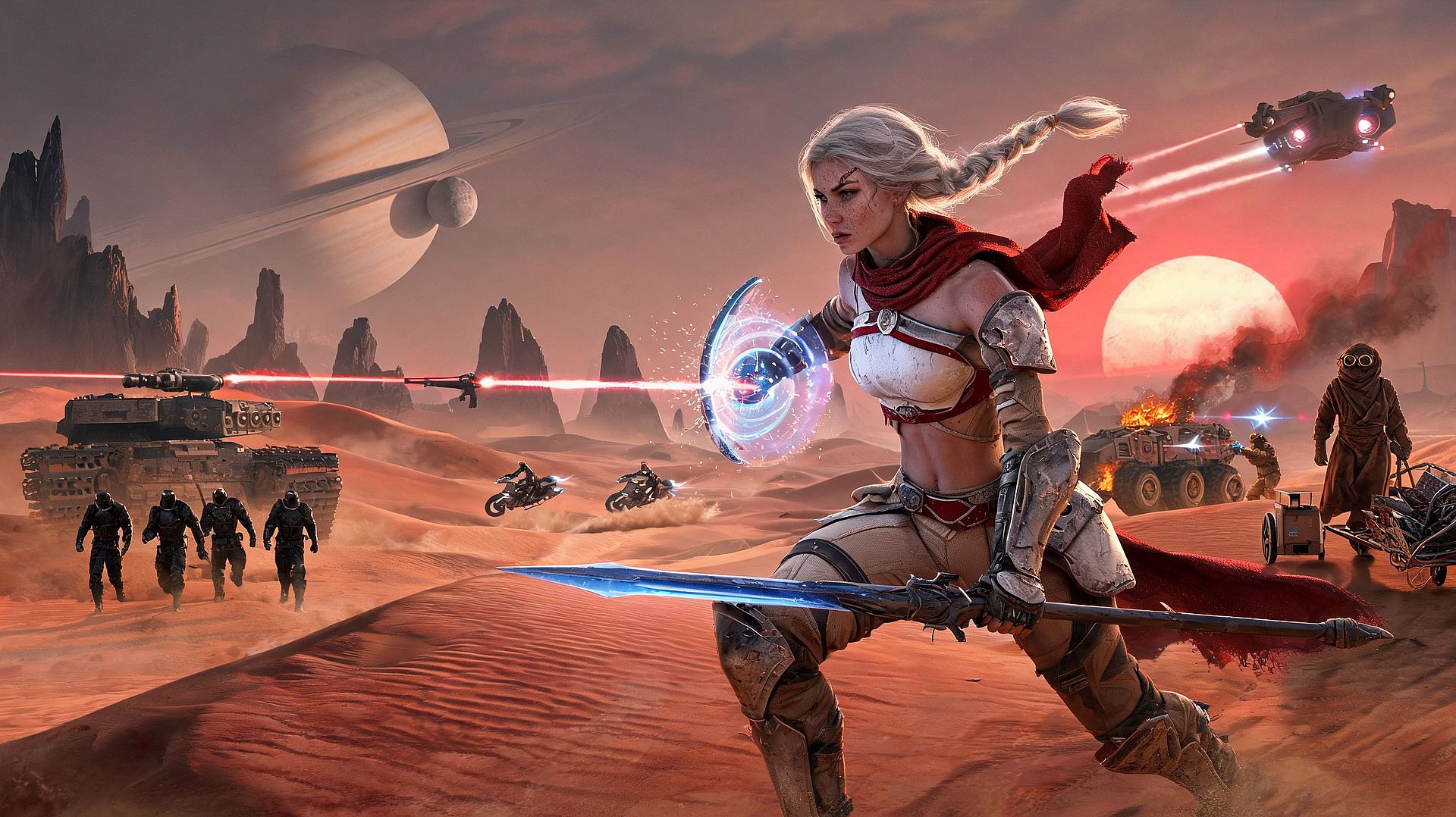
Quel modèle Seedream convient à ton travail ?
Performance marketers and ad designers: Seedream 5.5 turns one approved ad into many versions to compare. Change the background, the product color, or the headline one at a time, and the person and the product stay the same. Seedream 5.0 Flash makes low-cost first drafts.
Équipes de marque et de design : Seedream 5.0 Pro lays out dense posters and infographics, and Extract Layers splits a finished poster so you can move the headline or swap the background. Seedream 5.5 makes logos, stickers, and title text on a transparent background, and it writes poster text in Chinese, English, and 14 more languages.
Propriétaires de petites entreprises : Seedream 5.5 places your product photo in a new scene, then makes the same product as a cutout for your store page. Seedream 4.5 gives you a 4K file for a printed poster or flyer.
Filmmakers and storyboard artists: Seedream 5.5 makes realistic still frames and character sheets, and it changes the time of day or one prop while the set stays the same. Seedream 4.5 suits anime and 2D styles and makes 4K frames.
Comment utiliser les modèles Seedream sur OpenArt
- Pick a Seedream model. Open OpenArt's Générateur d'images IA and choose a Seedream model from the model menu. Select up to four models to compare them on one prompt using the "Multi-Select" feature.
- Write your prompt and add references. Describe the picture, and put any words that go in the picture in quotation marks. Upload reference images and say what each one is for, such as "Image 1 is the bottle."
- Set the size and shape. Open Output, then pick an aspect ratio and a size. On Seedream 5.5, set Background to Transparent when you want a cutout.
- Générer. Choose up to 8 pictures per run, then generate.
- Edit one change at a time. Open your favorite picture in the Éditeur photo IA, type one change, and repeat until the picture is right.
Try every Seedream model on OpenArt
One OpenArt account runs Seedream 5.5, Seedream 5.0 Pro, Seedream 5.0 Flash, Seedream 5.0 Lite, and Seedream 4.5, next to GPT Image 2.6, Nano Banana 2.1, and other leading image models. Run one prompt on different models at once, and keep the picture you like best.
Start with Seedream 5.5 for edits, transparent backgrounds, and realistic pictures. Switch to Seedream 5.0 Flash for low-cost drafts, Seedream 5.0 Pro for layer work, and Seedream 4.5 for 4K.
For tips and techniques on how to write the best, detailed prompts for Seedream, check out the Seedream 5.5 Prompt Guide.
Frequently asked questions: Seedream models
What is the latest Seedream model?
Seedream 5.5 is the latest Seedream model. ByteDance released Seedream 5.5 on November 9, 2026, with steadier multi-round editing, transparent backgrounds, and more natural light and skin. Seedream 5.5 is available on OpenArt.
Is Seedream 5.5 better than Seedream 5.0 Pro?
Seedream 5.5 is the stronger pick for most work. Seedream 5.5 holds a picture steady across 100 rounds of edits and makes transparent backgrounds from a prompt. Seedream 5.5 also costs fewer credits on OpenArt. Seedream 5.0 Pro is the model behind OpenArt's Extract Layers tool.
What is the difference between Seedream 5 and Seedream 5 Pro?
"Seedream 5" usually means Seedream 5.0 Lite, the first and lower-cost model of the Seedream 5.0 generation. Seedream 5.0 Pro is the top model of that generation, with edits on one marked area, layer splitting, and text in 14 more languages. On OpenArt, Seedream 5.0 Lite makes 2K and 3K pictures from up to 14 reference images. Seedream 5.0 Pro makes 1K and 2K pictures from up to 10 reference images.
Is Seedream 5.0 Flash the same as Seedream 5.0 Lite?
Seedream 5.0 Flash and Seedream 5.0 Lite are two separate models. Seedream 5.0 Lite arrived in February 2026 and makes 2K and 3K pictures on OpenArt. Seedream 5.0 Flash arrived in September 2026 as the fast, low-cost sibling of Seedream 5.0 Pro and makes 1K, 1.5K, and 2K pictures.
What is the biggest picture each Seedream model makes on OpenArt?
Seedream 4.5 makes the biggest pictures of the five Seedream models on OpenArt, at 4K. Seedream 5.0 Lite goes up to 3K, and Seedream 5.5, Seedream 5.0 Pro, and Seedream 5.0 Flash go up to 2K. OpenArt's Upscaler d'images IA makes a bigger file from any Seedream picture.
Can Seedream split an image into layers?
Yes. Seedream 5.5 splits a picture into a base image plus up to 99 layers. Seedream 5.0 Pro and Seedream 5.0 Flash split a picture into a base image plus up to 16 layers. On OpenArt, the Extraire les calques tool runs on Seedream 5.0 Pro and saves each layer as a transparent PNG.
Is there a Seedream 5.5 Pro?
ByteDance says a Pro version of the Seedream 5.5 series will follow. ByteDance has shared no release date or specs for Seedream 5.5 Pro.
Can you use Seedream images for commercial work?
Seedream images you make on OpenArt follow OpenArt's plan terms. Content you make on OpenArt can be used in client campaigns, paid ads, and products you sell, and commercial rights apply on eligible paid plans. Check the page des tarifs OpenArt pour voir quel forfait correspond à ton travail.
Can I try Seedream models for free?
You can try some features for free. New accounts get 40 free credits, no credit card required. Every generation uses credits, and the exact cost shows before you click Generate. To keep creating, choose a paid plan. You can compare plans, prices and annual billing options on the page tarifaire. L'usage commercial nécessite le forfait Plus ou supérieur. Les forfaits se renouvellent automatiquement, les crédits mensuels ne sont pas reportés et les crédits supplémentaires ne sont vendus que comme options d'un forfait payant. Tu peux annuler à tout moment depuis Profil, puis Abonnements. Annule au moins 5 jours avant la date de renouvellement pour éviter le prochain prélèvement, et tu gardes l'accès jusqu'à la fin de la période de facturation. Les générations terminées et les périodes d'abonnement en cours ne sont généralement pas remboursables. Tous les détails sur la facturation, l'annulation et les remboursements figurent dans les Centre d'aide.