

Inpainting de vídeo con IA
El inpainting de vídeo con IA transforma tu vídeo mientras protege lo que enmascaras. Pinta lo que debe quedarse, describe lo que debe cambiar y la IA se encarga de cada fotograma. Parte de OpenArt VFX, con la tecnología de SwitchX de Beeble.
Ventajas del inpainting de vídeo con IA



Control fotograma a fotograma
Pinta una máscara para fijar lo que se mantiene, escribe un prompt y la IA transforma todo lo que queda fuera de la máscara en cada fotograma.



Permanencia de objetos brillante
Todo lo que enmascares se mantiene exactamente como lo grabaste, fotograma a fotograma.
Sin compositor, sin pipeline
Consigue transformaciones de nivel profesional de composición desde el navegador, en minutos y sin usar Nuke ni After Effects.
Creaciones de la comunidad
Descubre cómo los creadores están cambiando atrezo, modificando vestuarios y sustituyendo elementos de escena con el AI Video Inpainting.
Control a nivel de fotograma. Lo que enmascaras se mantiene intacto.
Pinta una máscara sobre lo que debe permanecer, escribe un prompt y todo lo que quede fuera de la máscara se transforma en cada fotograma.
Conserva lo que quieres. Transforma el resto.
El modo VFX te da control a nivel de fotograma. Pinta una máscara en el primer fotograma sobre lo que debe permanecer, como una cara, un accesorio o un intérprete. La IA rastrea esa zona en cada fotograma y transforma todo lo demás, conservando el color, la iluminación y el movimiento del área protegida.
Mantén la interpretación. Cambia el mundo.
Enmascara al actor y deja que el entorno se transforme a su alrededor. Protege un objeto en la mano mientras el fondo se convierte en algo nuevo. Bloquea un elemento del vestuario y reestiliza el resto de la toma. Añade una imagen de referencia para una dirección más precisa.
Transforma todo excepto la región que protejas.
El inpainting de vídeo con IA gestiona cambios demasiado amplios para un simple intercambio de objetos. Reestiliza toda la escena alrededor de un sujeto protegido, coloca a un intérprete en un nuevo entorno o cambia todo el fondo mientras la región enmascarada queda exactamente como se grabó.
Precisión de compositor. Sin compositor.
Los VFX profesionales siempre han exigido precisión: una máscara limpia, una intención clara y control sobre dónde se aplica el cambio. El inpainting de vídeo con IA lo logra sin Nuke, After Effects ni rotoscopia. La IA rastrea automáticamente tu máscara del primer fotograma a lo largo de todos los fotogramas.
Cómo usar el inpainting de vídeo con IA
Tres pasos, desde la subida hasta una transformación con máscara terminada.
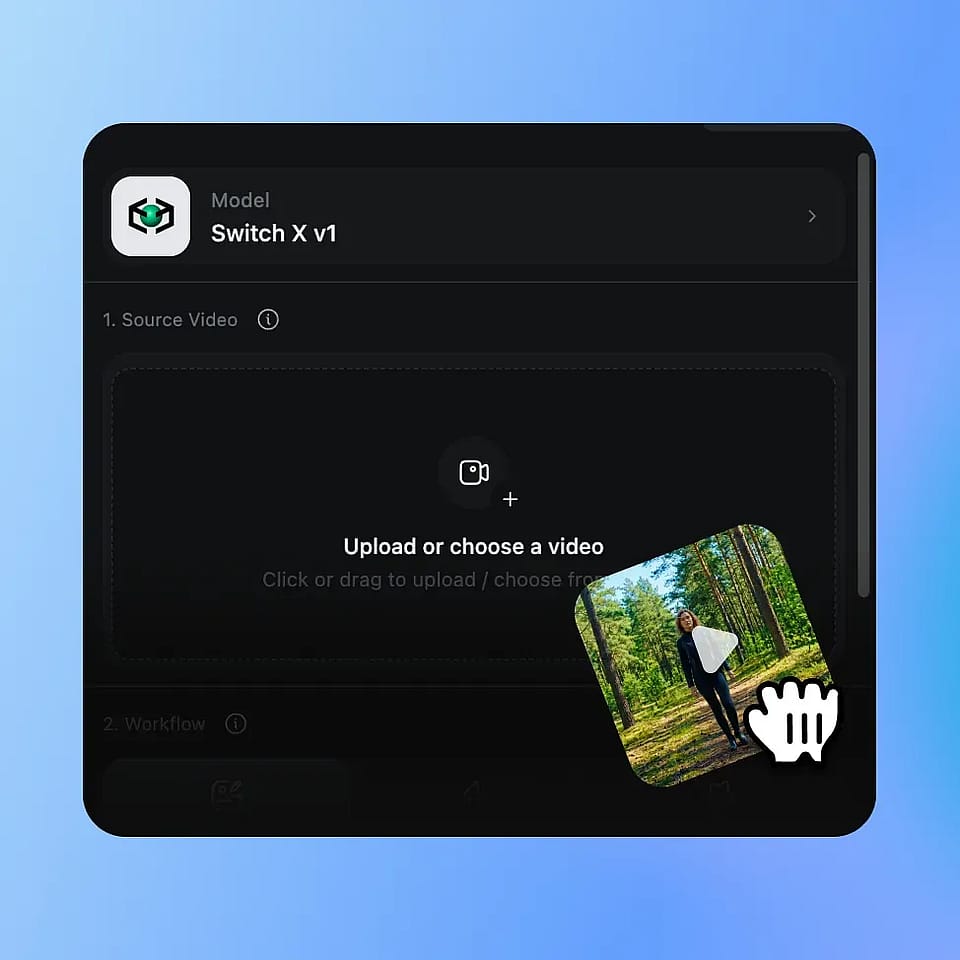
Sube tu vídeo
Sube cualquier clip MP4 o MOV. El inpainting de vídeo con IA funciona con cualquier metraje en el que quieras transformar la toma protegiendo una región concreta.
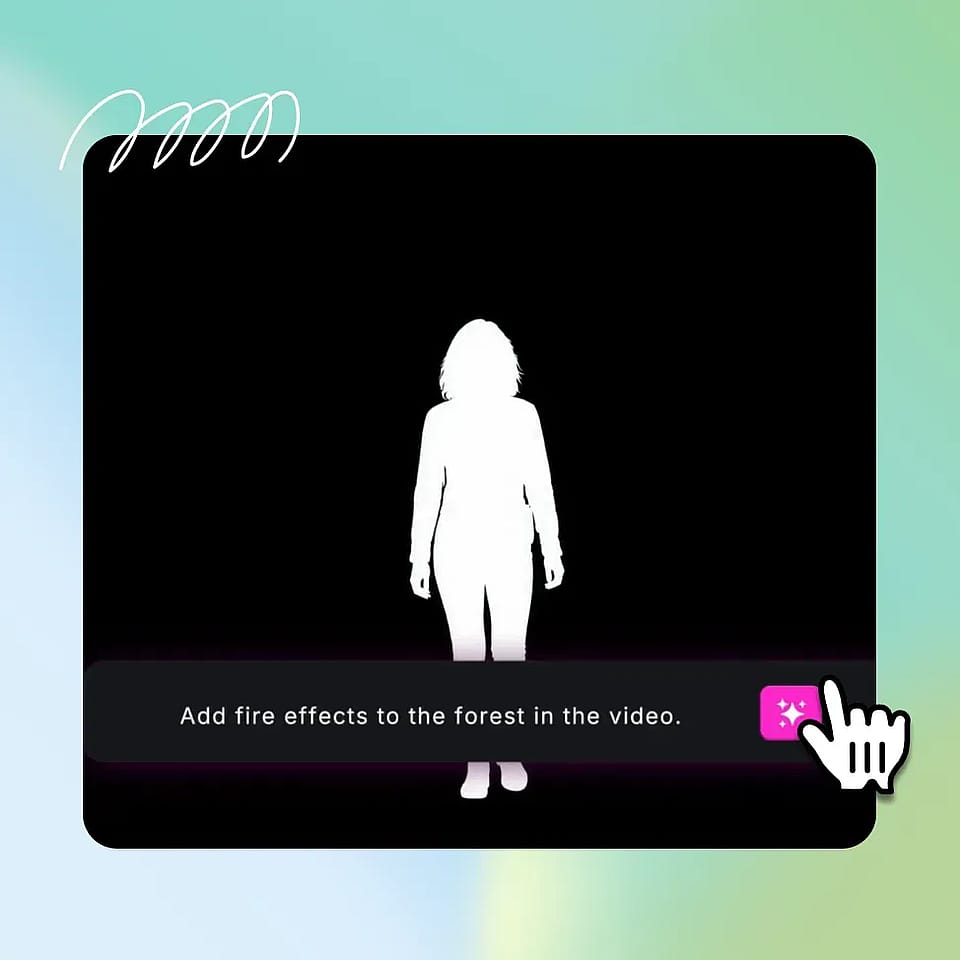
Pinta la máscara, escribe el prompt
Usa el pincel para pintar una máscara en el primer fotograma, cubriendo exactamente la región que quieres conservar. Escribe un prompt que describa lo que debe aparecer en el resto del fotograma y, opcionalmente, sube una imagen de referencia.
Genera y compara
El sistema de IA genera el cambio en cada fotograma, siguiendo automáticamente la región enmascarada. Previsualiza el resultado, ajusta la máscara o el prompt si hace falta y descarga el clip final en MP4.
Diseñado para trabajo de vídeo de precisión
Desde cineastas independientes hasta equipos de marca, así es como los creadores usan el inpainting de vídeo con IA.
Para cineastas y directores independientes
El modo al que recurres cuando la actuación es la buena pero el mundo que la rodea no lo es. Protege al actor y transforma el entorno. Fija el atrezo protagonista y reestiliza la escena. Las regrabaciones y las pasadas de composición se convierten en un pincel y un prompt.
Pruébalo ahoraPara creadores de contenido avanzados
Los youtubers que hacen tutoriales, reseñas y formatos largos pueden usar el AI Video Inpainting para reestilizar escenas sin tocar al presentador que sale en cámara. Cambia el fondo para un nuevo segmento patrocinado. Reestiliza la sala sin volver a grabar. Repetible y limpio.
Pruébalo ahoraPara creadores con curiosidad por los VFX
Los creadores que siguen contenido de VFX y quieren hacer el suyo propio pueden usar el AI Video Inpainting como una entrada real a un trabajo que antes requería años de composición. El pincel es sencillo. El resultado son efectos de vídeo auténticos y listos para compartir.
Pruébalo ahoraPara equipos de vídeo de marca y producto
Las agencias y los equipos de producto pueden proteger el producto o talento protagonista y transformar la escena que lo rodea. Reutiliza un mismo material grabado en distintos mercados cambiando el estilo del entorno. Un rodaje se convierte en muchos cortes de campaña, cada uno con el elemento protegido intacto.
Pruébalo ahoraPreguntas frecuentes Preguntas
El inpainting de vídeo con IA te permite transformar tu vídeo protegiendo una zona concreta tal y como la grabaste. Pintas una máscara sobre el área que quieres conservar, escribes un prompt describiendo lo que debe aparecer en el resto y la IA genera el cambio en cada fotograma. En OpenArt, el inpainting de vídeo con IA forma parte de la suite OpenArt VFX y funciona con el modelo SwitchX de Beeble.
Sí. Solo necesitas pintar la máscara en el primer fotograma. La IA rastrea la región protegida en cada fotograma posterior de forma automática, así que se mantiene fija mientras el sujeto o la cámara se mueven. No hace falta keyframing ni rotoscopia manual.
Sí. Además del prompt de texto, puedes subir una imagen de referencia para guiar el aspecto de lo que aparece fuera de la región enmascarada. La referencia resulta especialmente útil cuando quieres un estilo visual, color o entorno concretos en lugar de depender solo del prompt.
Sí, cuando la máscara se pinta con cuidado en el primer fotograma. SwitchX, el modelo de IA que impulsa el inpainting de vídeo con IA, produce bordes limpios alrededor de la región protegida y compone la transformación circundante de forma nítida frente a ella. Los resultados más limpios vienen de un enmascarado claro y deliberado en el fotograma uno.
Los VFX tradicionales requieren rotoscopiar la zona protegida fotograma a fotograma, componer el nuevo contenido cuidando la iluminación y el color, y renderizar con software especializado. El inpainting de vídeo con IA se encarga del enmascarado, el seguimiento y la generación en una sola pasada.
Con la precisión con la que puedas pintarlo. La herramienta de pincel te da un control minucioso sobre la región protegida del primer fotograma, incluidos bordes duros, bordes suaves y pequeñas zonas de detalle. SwitchX usa la máscara de tu primer fotograma como límite, así que cuanto más precisa sea la máscara, con más limpieza se mantendrá la región protegida.
Proteger a un actor mientras cambias el estilo de la escena, fijar un atrezo protagonista mientras cambias el entorno, mantener intacta una prenda del vestuario mientras transformas el resto del plano, o conservar un sujeto en primer plano mientras reemplazas el fondo por completo.
La mayoría de los trabajos se completan en unos minutos. La generación se ejecuta de forma asíncrona con progreso en vivo, así que puedes salir de la pestaña y volver cuando el resultado esté listo.
Sí. El resultado se puede usar en proyectos comerciales, como publicidad social de pago, campañas de marca, marketing de producto, vídeos monetizados y trabajos para clientes. Consulta los términos de servicio de OpenArt para conocer los últimos detalles sobre el uso comercial de tu plan.