

 ChatGPT
 Perplexity
 Claude
 Gemini
Seedance 2.0 es uno de los generadores de vídeo con IA de los que más se habla en 2026. Desarrollado por ByteDance, este avanzado modelo de vídeo con IA convierte texto, imágenes y audio en vídeos cinematográficos en 1080p, con narrativa multiplano, consistencia de personajes y sincronización de audio nativa en una sola generación.
Ya disponible en OpenArt, Seedance 2.0 facilita crear vídeos con IA de calidad profesional en minutos. Consigue un 50 % de descuento en el plan anual y desbloquea la creación ilimitada de vídeos.
¿Qué es Seedance 2.0?
Seedance 2.0 es un modelo multimodal de generación de vídeo con IA desarrollado por el equipo Seed de ByteDance. Admite entradas de texto, imagen, vídeo y audio —hasta 12 recursos de referencia en una sola generación—, lo que lo convierte en uno de los modelos de IA de vídeo más versátiles disponibles en 2026.
Funciones clave:
- Texto a vídeo: describe una escena en lenguaje natural y consigue un clip cinematográfico
- Imagen a vídeo: Anima cualquier imagen fija con movimiento realista
- Composición de escena: Combina varios recursos de referencia (imágenes, vídeos, audio) para dirigir escenas complejas
- Sincronización de audio nativa: sincronización labial, efectos de sonido y música de fondo generados junto al vídeo
- Salida en HD 720p: Resolución de alta calidad con movimiento consciente de la física
- Referencia de personaje: Usa imágenes de referencia para mantener la apariencia del personaje entre generaciones
Por qué Seedance 2.0 es tendencia en 2026
Seedance 2.0 está ganando popularidad rápidamente entre los creadores de IA, y aquí tienes el porqué:
- Respaldado por ByteDance (la empresa matriz de TikTok)
- Generación multimodal avanzada (texto, imagen, audio, vídeo)
- Gran realismo físico en comparación con otros modelos de vídeo con IA
- Generación de audio integrada con soporte de sincronización labial
- Composición multirreferencia con hasta 12 recursos de entrada
Con la explosión de herramientas de vídeo con IA en 2026, Seedance 2.0 destaca como un generador de vídeo con IA cinematográfico de primer nivel.
Cómo usar Seedance 2.0 en OpenArt
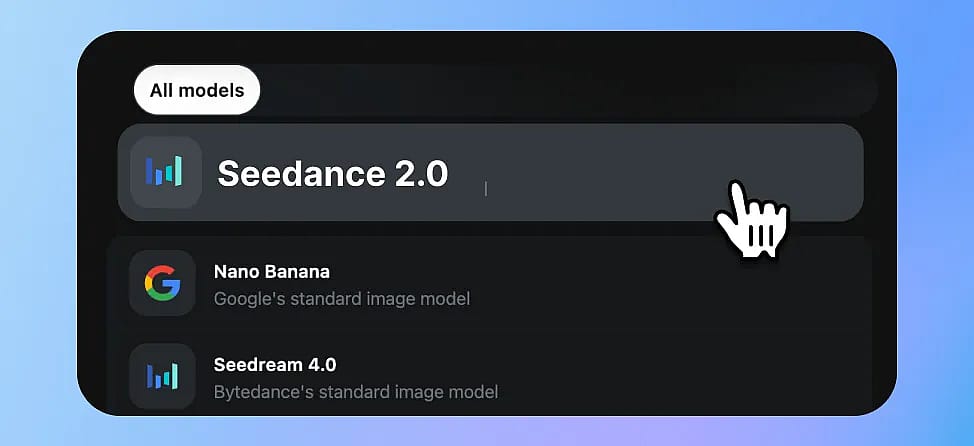
Paso 1: Ve a la página del modelo Seedance 2.0
Visitar OpenArt y haz clic en Crear ahora. Irás a la interfaz de generación con Seedance 2.0 preseleccionado.
Paso 2: Elige tu modo de entrada
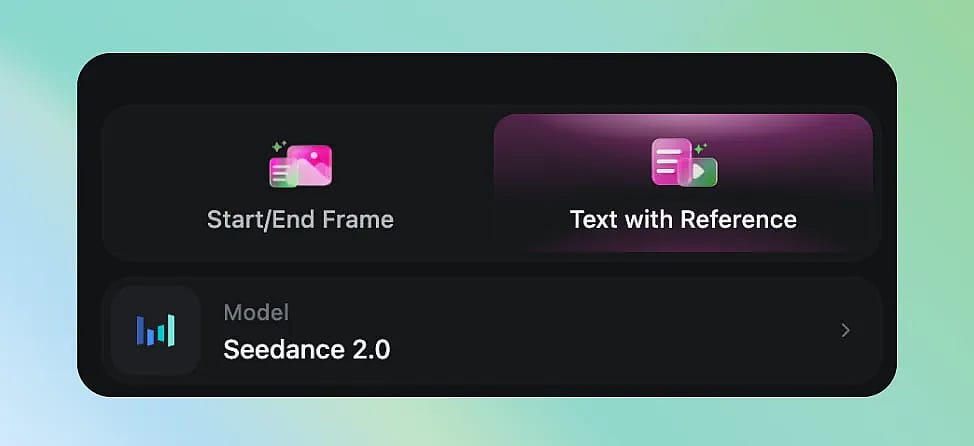
Seedance 2.0 admite varios modos de creación:
- Texto a vídeo: simplemente escribe tu prompt. Ideal para ideas rápidas y exploración de conceptos.
- De fotograma a vídeo: Sube una imagen de referencia y describe el movimiento que quieres. Perfecto para animar ilustraciones, fotos de producto o retratos.
- Multimodal: combina texto + imágenes + referencias de audio para tener el máximo control creativo.
Paso 3: Escribe un prompt eficaz
Seedance 2.0 responde bien a prompts estructurados y descriptivos. Esta es una fórmula que funciona:
[Sujeto] + [Acción] + [Entorno] + [Movimiento de cámara] + [Ambiente/Estilo]
Prompts de ejemplo:
Una joven con un vestido rojo camina por un bosque de bambú iluminado por el sol, el viento mueve suavemente su pelo. Travelling lento hacia delante, iluminación cinematográfica, ambiente de hora dorada.
Primer plano de una taza de café humeante sobre una mesa de madera, con lluvia visible por la ventana detrás. Poca profundidad de campo, ambiente otoñal acogedor, calidad 4K.
Un gato salta de una estantería a un sofá en un apartamento moderno. Toma con travelling lateral, iluminación interior natural, física realista.
Fórmula del prompt y consejos
- Sé específico con el movimiento de cámara (dolly, panorámica, seguimiento, zoom)
- Menciona las condiciones de luz (hora dorada, neón, cielo nublado)
- Describe interacciones físicas (viento, agua, gravedad): Seedance 2.0 destaca en física realista
- Para varias tomas: separa las escenas con transiciones claras («Corte a...» o «Escena siguiente:»)
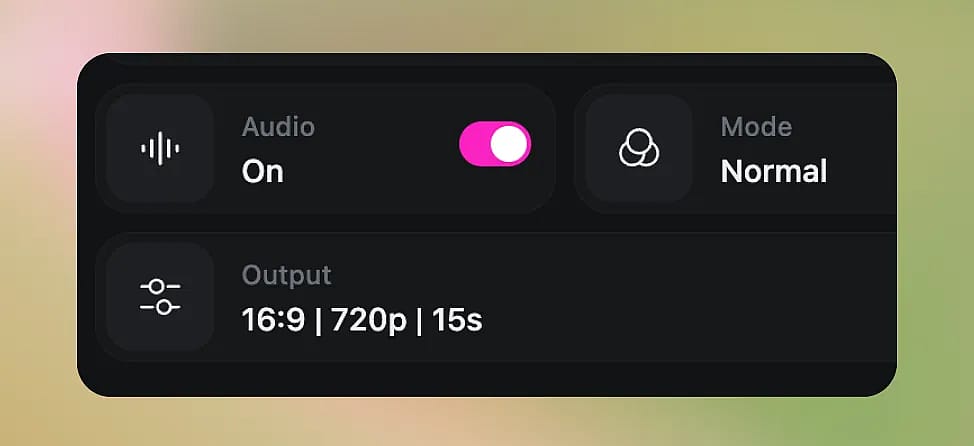
Paso 4: Ajusta la configuración
- Duración: Elige entre clips de 5 o 15 segundos
- Relación de aspecto: 16:9 (horizontal), 9:16 (vertical) o 1:1 (cuadrado)
- Calidad: Estándar o HD — el HD tarda más pero ofrece resultados más nítidos
Paso 5: Genera e itera
Haz clic en Generar y espera tu vídeo. La generación suele tardar entre 1 y 3 minutos según la duración y los ajustes de calidad.
¿No te convence el resultado? Puedes:
- Refina tu prompt y vuelve a generar
- Usa el modo de vídeo a vídeo para iterar sobre un clip que te guste
- Añade referencias de audio para una mejor sincronización de la banda sonora
Mejores casos de uso de Seedance 2.0
| Caso de uso | Por qué Seedance 2.0 destaca |
|---|---|
| Contenido para redes sociales | Vídeos verticales rápidos con estéticas de moda |
| Demos de producto | Anima imágenes de producto con movimiento realista |
| Videoclips musicales | Sincronización de audio nativa + multiplano = secuencias completas |
| Narrativa / cortometrajes | La coherencia multitoma mantiene a los personajes uniformes |
| Anuncios de marketing | Calidad cinematográfica sin presupuesto de producción |
| Visualización de conceptos | Convierte moodboards en previsualizaciones en movimiento |
Seedance 2.0 vs Kling 3.0: ¿cuál es mejor en 2026?
Para obtener los mejores resultados, prueba el mismo prompt en 2 o 3 modelos y compara los resultados. OpenArt facilita cambiar de modelo sin volver a subir los recursos, y la tabla comparativa de abajo resalta las diferencias clave entre Seedance 2.0 y Kling 3.0.
| Dimensión | Seedance 2.0 | Kling 3.0 |
|---|---|---|
| Resolución máxima | 1080p | 1080p |
| Duración del vídeo | 5-15s | 5-15s |
| Velocidad de generación | ~2 min | ~1,5 min |
| Tipos de entrada | Texto + hasta 9 imágenes + 3 vídeos + 3 archivos de audio | Texto + hasta 7 imágenes + 1 vídeo + biblioteca de elementos |
| Multitoma (varias escenas de una vez) | No compatible | Compatible |
| Consistencia de personajes | Mediante referencia de imagen por generación | Biblioteca de personajes reutilizables |
| Audio nativo (música de fondo + sincronización labial) | Activado por defecto + entrada de audio para sincronizar con el ritmo | Opcional (sonido: activado) + APIs independientes de Lip Sync y TTS |
| Realismo físico (agua, fuego, gravedad) | 🌟🌟🌟🌟🌟Muy bueno | 🌟🌟🌟🌟🌟 Muy bueno |
| Control de cámara | Mediante referencia de vídeo | Mediante referencia de vídeo (tipo de función) + Motion Brush |
| Calidad del primer plano facial | 🌟🌟🌟🌟 Bien | 🌟🌟🌟🌟 Bien |
| Ideal para | Cortometrajes, videoclips, redes sociales, anuncios | Narrativa multiescena, talking head / avatar |
| Disponible en OpenArt | ✅ Sí, y gratis para probar | ✅ Sí, y gratis para probar |
Consejos para obtener los mejores resultados
- Empieza con imagen a vídeo
si tienes una imagen concreta en mente, le das a Seedance más material con el que trabajar que solo con texto - Usa imágenes de referencia para los personajes
para mantener la coherencia entre generaciones - Mantén los prompts por debajo de 200 palabras
Seedance funciona mejor con prompts concisos y estructurados que con muros de texto - Especifica lo que NO quieres
los prompts negativos (por ejemplo, «sin superposiciones de texto, sin marca de agua») pueden mejorar el resultado - Itera rápido
genera 3-4 borradores rápidos antes de invertir en calidad HD
Preguntas frecuentes
1. ¿Seedance 2.0 es gratis en OpenArt?
Seedance 2.0 está disponible en OpenArt con créditos. Los nuevos usuarios reciben créditos gratis para probarlo, y hay varios planes de suscripción disponibles para un uso habitual.
2. ¿Qué resolución produce Seedance 2.0?
Hasta 1080p HD, según tus ajustes de calidad.
3. ¿Puedo usar Seedance 2.0 para proyectos comerciales?
Sí, los vídeos generados en OpenArt pueden usarse con fines comerciales según los términos de servicio de OpenArt.
4. ¿Cuánto duran los vídeos generados?
Actualmente entre 5 y 10 segundos por generación. Para contenido más largo, puedes generar varios clips y montarlos juntos, o usar la función multiplano de Seedance 2.0 para conseguir secuencias coherentes.
5. ¿Seedance 2.0 admite audio?
Sí, es uno de los pocos modelos con generación de audio nativa. También puedes subir referencias de audio para una mejor sincronización.