

Generador de vídeo con IA Veo 3
Convierte un prompt o una imagen en vídeo cinematográfico con audio sincronizado, hasta 4K nativo y movimiento realista con el generador de vídeo con IA Veo 3 de OpenArt.
Creaciones de la comunidad
Descubre cómo los creadores hacen cortometrajes, anuncios de producto, videoclips y clips para redes con diálogos sincronizados, iluminación cinematográfica y un movimiento realista.
Características principales del generador de vídeo con IA Veo 3
Veo 3 y Veo 3.1 están hechos para contar escenas completas, generando imagen y sonido a la vez, así que puedes compararlos codo con codo con otros modelos de vídeo de primer nivel mientras trabajas.
Resolución 4K nativa
Veo 3.1 genera 4K nativo, mientras que Veo 3 se queda en 1080p, con una profundidad de campo, iluminación y desenfoque de movimiento precisos. Ese nivel de detalle hace que el metraje sea difícil de distinguir de una grabación real.
Pruébalo ahoraAudio sincronizado
Veo 3 genera vídeo y sonido en una sola pasada, incluyendo diálogos, efectos de sonido y ruido ambiente en estéreo a 48 kHz. Los pasos suenan al mismo tiempo que se dan y el habla se sincroniza con el movimiento de los labios, así que el clip es visible en cuanto termina, sin necesidad de una pasada de audio aparte.
Pruébalo ahoraMovimiento y física realistas
Veo 3.1 mejora la predicción de movimiento en torno a un 35 % en los tests de física, con una mejor comprensión del peso, el impulso y las colisiones. El movimiento se percibe físicamente creíble en lugar de flotante, y aguanta incluso en tomas de mucha acción.
Pruébalo ahoraConsistencia de personajes
Veo 3.1 mantiene estable la identidad de un sujeto entre escenas, y las imágenes de referencia te permiten anclar un aspecto concreto. Un personaje puede conservar el mismo rostro y estilo de toma en toma, lo que resulta clave para el trabajo de marca y de narrativa.
Pruébalo ahoraCompatibilidad con fotograma inicial y final
Veo 3.1 te permite fijar tanto el primer como el último fotograma, y luego genera toda la transición entre ambos con movimiento natural, movimiento de cámara y audio sincronizado. Tú defines exactamente dónde empieza y termina un plano, y un prompt de texto puede guiar el camino intermedio.
Pruébalo ahoraCómo usar Veo 3 en OpenArt
Tres pasos te llevan de la idea al clip terminado.
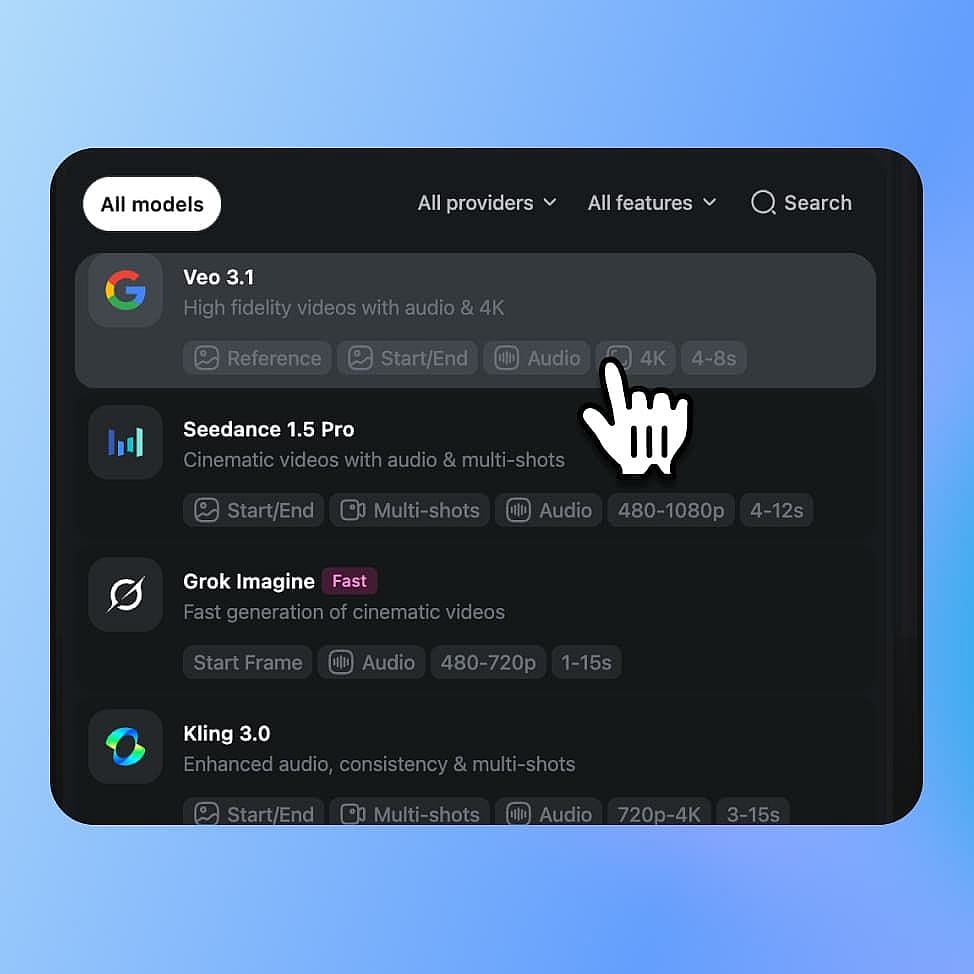
Elige tu modelo
Abre las herramientas de vídeo de OpenArt y selecciona Veo 3 en el menú de modelos. Elige Veo 3.1 para 4K y las funciones más recientes, o Veo 3 para clips rápidos con sonido, y luego escoge texto a vídeo o imagen a vídeo.
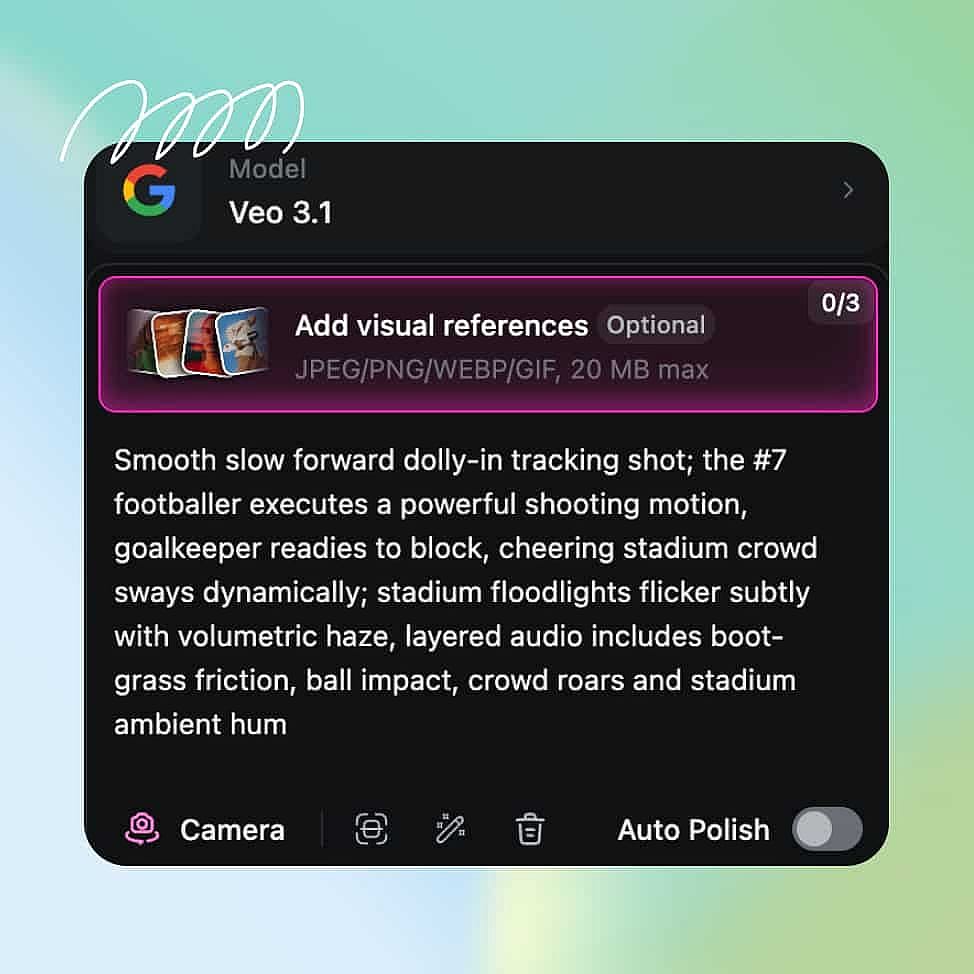
Escribe un prompt y añade referencias
Describe el sujeto, la acción, el movimiento de cámara y la iluminación, y detalla los diálogos y el sonido que quieras, ya que Veo 3 también genera audio. También puedes subir una imagen de referencia para definir el estilo.
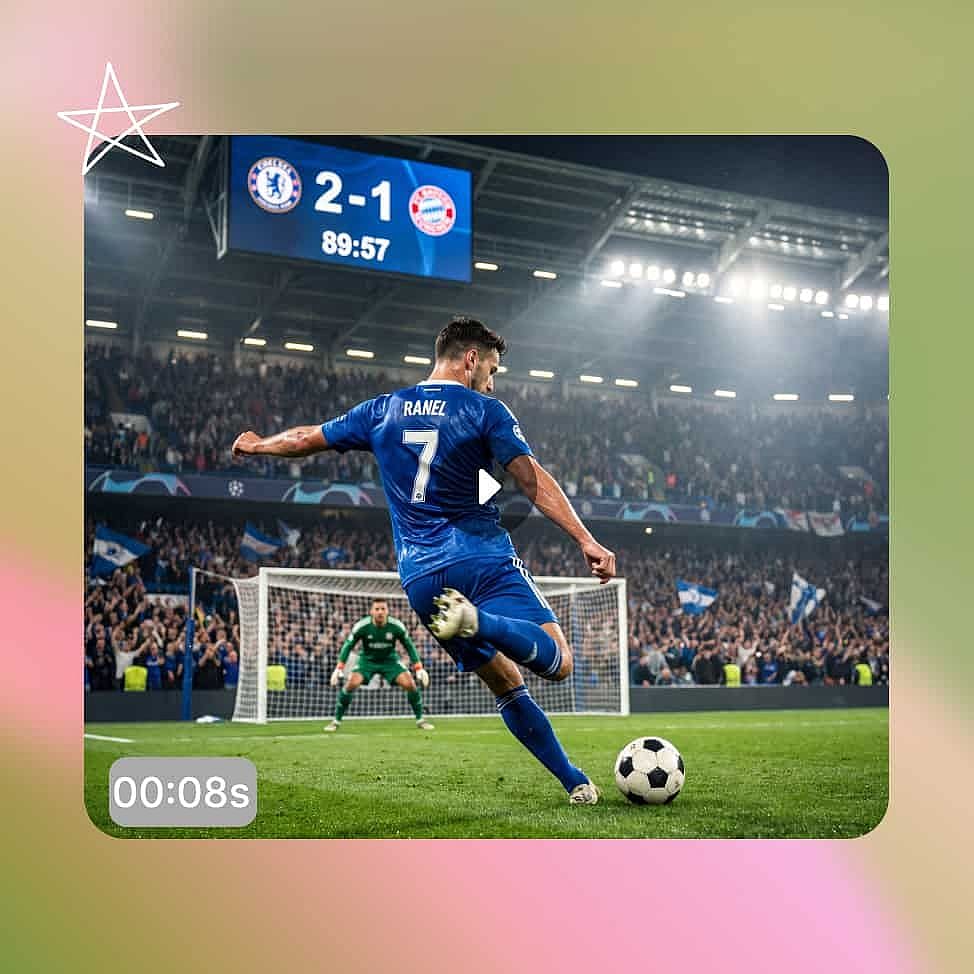
Genera y perfecciona
Configura la resolución y la relación de aspecto, luego genera y revisa el clip con el sonido activado. Ajusta el prompt o los ajustes y vuelve a generar, usando Auto Polish para pulir descripciones flojas.
Mejores usos del generador de vídeo Veo 3 y Veo 3.1
Los modelos Veo 3 aportan el máximo valor cuando un proyecto necesita imagen y sonido juntos en una sola generación.
Cortometrajes y escenas narrativas
Veo 3 combina diálogo sincronizado con una identidad de personaje estable, de modo que una escena se reproduce como un momento acabado en lugar de una prueba muda. Un intercambio entre dos personajes puede mantener cada rostro a lo largo de los cortes mientras las voces se sincronizan con los labios. También puedes fijar el primer y el último fotograma de un plano para controlar exactamente cómo empieza y cómo termina.
Pruébalo ahoraAnuncios cinematográficos y spots de producto
Veo 3 produce planos protagonistas con sonido, iluminación cinematográfica y movimiento limpio en una sola pasada. Un anuncio de producto puede abrir con un plano general revelador, acercarse a medida que el objeto se mueve y llevar una voz en off y una base ambiental sin una edición de audio aparte. Eso convierte todo un ciclo de rodaje y mezcla en un solo prompt.
Pruébalo ahoraVídeos musicales y clips estilizados
Los planos con mucho movimiento y cargados de efectos se mantienen gracias a la física mejorada de Veo 3.1 y a su salida nativa en 4K. Puedes perseguir un ambiente concreto mediante la iluminación y el color mientras el movimiento al ritmo del beat sigue resultando creíble. El resultado es un clip pulido y listo para pantalla, no un borrador.
Pruébalo ahoraContenido social y UGC
Veo 3 genera vídeo vertical 9:16 de forma nativa, con sonido integrado para TikTok, Reels y YT Shorts. Puedes producir un clip con sonido que funciona en cuanto aparece en el feed y, después, crear variantes para distintos ganchos. Así mantienes un calendario de publicación ágil sin convertirlo en un ciclo de producción completo.
Pruébalo ahoraConsejos para obtener los mejores resultados

Describe también el audio
Describe el diálogo, los efectos y el ambiente que quieres oír, no solo lo que quieres ver. Como Veo 3 genera el audio en la misma pasada, la dirección de sonido moldea el clip final tanto como las imágenes.

Dirige como un director de fotografía
Define el plano, el movimiento de cámara, la lente y la iluminación. Veo 3 lee este lenguaje cinematográfico a partir de texto plano y lo convierte en metraje más intencionado.

Empieza con una imagen potente
En imagen a vídeo, el fotograma de entrada define el aspecto y la identidad de todo el clip. Empieza con una imagen limpia y bien compuesta y Veo 3 mantendrá esa calidad a lo largo del movimiento.

Refina con Auto Polish
Itera en pasos pequeños en lugar de reescribirlo todo de golpe. Usa el interruptor Auto Polish para afinar las descripciones vagas de tus prompts.
Adorado por los creadores
He probado muchas plataformas de IA... pero OpenArt sigue siendo la mejor para crear personajes, por la calidad de imagen a vídeo y por la variedad de modelos disponibles.
OpenArt ofrece una excelente variedad de herramientas de IA... una vez que aprendes las funciones, las posibilidades creativas son increíbles, y su equipo de soporte es excepcional.
OpenArt es una plataforma de IA muy versátil con muchos modelos de imagen y vídeo, creación de personajes consistentes y potentes herramientas de edición.
Herramientas útiles de IA en un solo lugar: generación de imágenes y vídeo, edición y mucho más... sin necesidad de varias suscripciones.
El servicio de atención al cliente siempre es rápido y útil... y la plataforma no deja de mejorar con nuevas funciones y herramientas.
He probado muchas plataformas de IA... pero OpenArt sigue siendo la mejor para crear personajes, por la calidad de imagen a vídeo y por la variedad de modelos disponibles.
OpenArt ofrece una excelente variedad de herramientas de IA... una vez que aprendes las funciones, las posibilidades creativas son increíbles, y su equipo de soporte es excepcional.
OpenArt es una plataforma de IA muy versátil con muchos modelos de imagen y vídeo, creación de personajes consistentes y potentes herramientas de edición.
Herramientas útiles de IA en un solo lugar: generación de imágenes y vídeo, edición y mucho más... sin necesidad de varias suscripciones.
El servicio de atención al cliente siempre es rápido y útil... y la plataforma no deja de mejorar con nuevas funciones y herramientas.
He probado muchas plataformas de IA... pero OpenArt sigue siendo la mejor para crear personajes, por la calidad de imagen a vídeo y por la variedad de modelos disponibles.
OpenArt ofrece una excelente variedad de herramientas de IA... una vez que aprendes las funciones, las posibilidades creativas son increíbles, y su equipo de soporte es excepcional.
OpenArt es una plataforma de IA muy versátil con muchos modelos de imagen y vídeo, creación de personajes consistentes y potentes herramientas de edición.
Herramientas útiles de IA en un solo lugar: generación de imágenes y vídeo, edición y mucho más... sin necesidad de varias suscripciones.
El servicio de atención al cliente siempre es rápido y útil... y la plataforma no deja de mejorar con nuevas funciones y herramientas.
Con tantas plataformas de IA por ahí, OpenArt destacó como una opción excelente; se la recomendaría a cualquier creador.
Esta plataforma incluye todo lo que necesitas para crear contenido con IA: imágenes, vídeo, personajes, audio y múltiples modelos de IA en un solo lugar.
OpenArt está superando los límites de la creación de vídeo con IA... y está claro que el equipo se compromete a mejorar la experiencia de los creadores.
Hice mi primer videoclip musical con IA con OpenArt... y su equipo de soporte fue la mejor ayuda que he tenido nunca.
Estoy muy contento con el soporte: mi problema se resolvió rápido y el equipo hizo que todo fuera fácil.
Con tantas plataformas de IA por ahí, OpenArt destacó como una opción excelente; se la recomendaría a cualquier creador.
Esta plataforma incluye todo lo que necesitas para crear contenido con IA: imágenes, vídeo, personajes, audio y múltiples modelos de IA en un solo lugar.
OpenArt está superando los límites de la creación de vídeo con IA... y está claro que el equipo se compromete a mejorar la experiencia de los creadores.
Hice mi primer videoclip musical con IA con OpenArt... y su equipo de soporte fue la mejor ayuda que he tenido nunca.
Estoy muy contento con el soporte: mi problema se resolvió rápido y el equipo hizo que todo fuera fácil.
Con tantas plataformas de IA por ahí, OpenArt destacó como una opción excelente; se la recomendaría a cualquier creador.
Esta plataforma incluye todo lo que necesitas para crear contenido con IA: imágenes, vídeo, personajes, audio y múltiples modelos de IA en un solo lugar.
OpenArt está superando los límites de la creación de vídeo con IA... y está claro que el equipo se compromete a mejorar la experiencia de los creadores.
Hice mi primer videoclip musical con IA con OpenArt... y su equipo de soporte fue la mejor ayuda que he tenido nunca.
Estoy muy contento con el soporte: mi problema se resolvió rápido y el equipo hizo que todo fuera fácil.
Preguntas frecuentes Preguntas
Veo 3 es un modelo de vídeo con IA de Google DeepMind, disponible en OpenArt, que convierte prompts de texto o imágenes en clips cinematográficos con sonido sincronizado. OpenArt ofrece tanto Veo 3 como el más reciente Veo 3.1.
Sí. Veo 3 genera vídeo y audio juntos en una sola pasada, incluyendo diálogos, efectos de sonido y ruido ambiente, con el habla sincronizada con el movimiento de los labios. No hay un paso de audio aparte.
Sí. Tanto Veo 3 como Veo 3.1 aceptan un prompt escrito o una imagen de referencia, así que puedes empezar desde una escena descrita o animar un fotograma existente.
Veo 3 genera vídeo con sonido de hasta 1080p en clips de 4 a 8 segundos. Veo 3.1 añade 4K nativo, mayor calidad de movimiento y física, mejor coherencia de personajes y control de fotogramas de inicio y fin, manteniendo el audio sincronizado por el que Veo 3 es conocido.
Veo 3 admite 720p y 1080p, y Veo 3.1 añade 4K nativo. Los clips duran entre 4 y 8 segundos, con formatos 16:9 y 9:16.
Veo 3 destaca en la sincronización audiovisual y, con Veo 3.1, es la opción sobresaliente para 4K nativo con sonido integrado. Otros modelos pueden superarlo en ciertos estilos cinematográficos, pero para clips terminados con sonido en una sola generación, Veo 3 es una de las opciones más potentes de OpenArt.