

FLUX 3 — Modelo de generación de vídeo
El modelo de vídeo con IA FLUX 3 crea clips en 1080p de cualquier duración, de 5 a 20 segundos, con diálogos y efectos de sonido generados junto a la imagen. Genera rápido, mejora la toma que más te guste y anima tus propias imágenes, todo en OpenArt.

Características principales de FLUX 3
Elige cualquier duración de 5 a 20 segundos
FLUX 3 te permite hacer vídeos de entre 5 y 20 segundos de duración. Los modelos de IA más antiguos suelen empezar a fallar después de 10 segundos, pero FLUX 3 mantiene el vídeo con un aspecto genial hasta el final. Incluso añade líneas de voz, efectos de sonido y ruido de fondo automáticamente, dándote un vídeo completo con audio listo para usar.
Pruébalo ahoraEsboza rápido y mejora tu mejor versión
Haz vídeos de prueba rápidos y económicos para ver si tus ideas, movimientos de cámara o acciones quedan bien. Cuando encuentres una versión que te guste, puedes mejorarla a calidad completa. El vídeo mejorado mantiene exactamente el mismo plano y movimiento que elegiste, así que solo pagas por vídeo de alta calidad cuando ya sabes que queda bien.
Pruébalo ahoraConvierte imágenes fijas en vídeos a juego
Sube una imagen y FLUX 3 hará que se mueva de forma natural manteniendo a la persona, la iluminación y los detalles originales. Por ejemplo, la foto de una cascada se convierte en un vídeo con agua que corre de verdad. El Generador de vídeo con IA también puede ampliar ese clip hasta una escena completa que coincida con tu foto original.
Pruébalo ahoraCambia fondos, personajes y estilos
FLUX 3 incluye edición de vídeo integrada, así que no necesitas software adicional. Puedes cambiar un fondo, sustituir un personaje o darle al clip un nuevo estilo artístico. Solo tienes que escribir lo que quieres cambiar y la IA edita el vídeo sin que tengas que empezar de cero.
Pruébalo ahoraCómo usar FLUX 3 en OpenArt
Tres pasos te llevan de un prompt en blanco a un clip terminado con sonido.
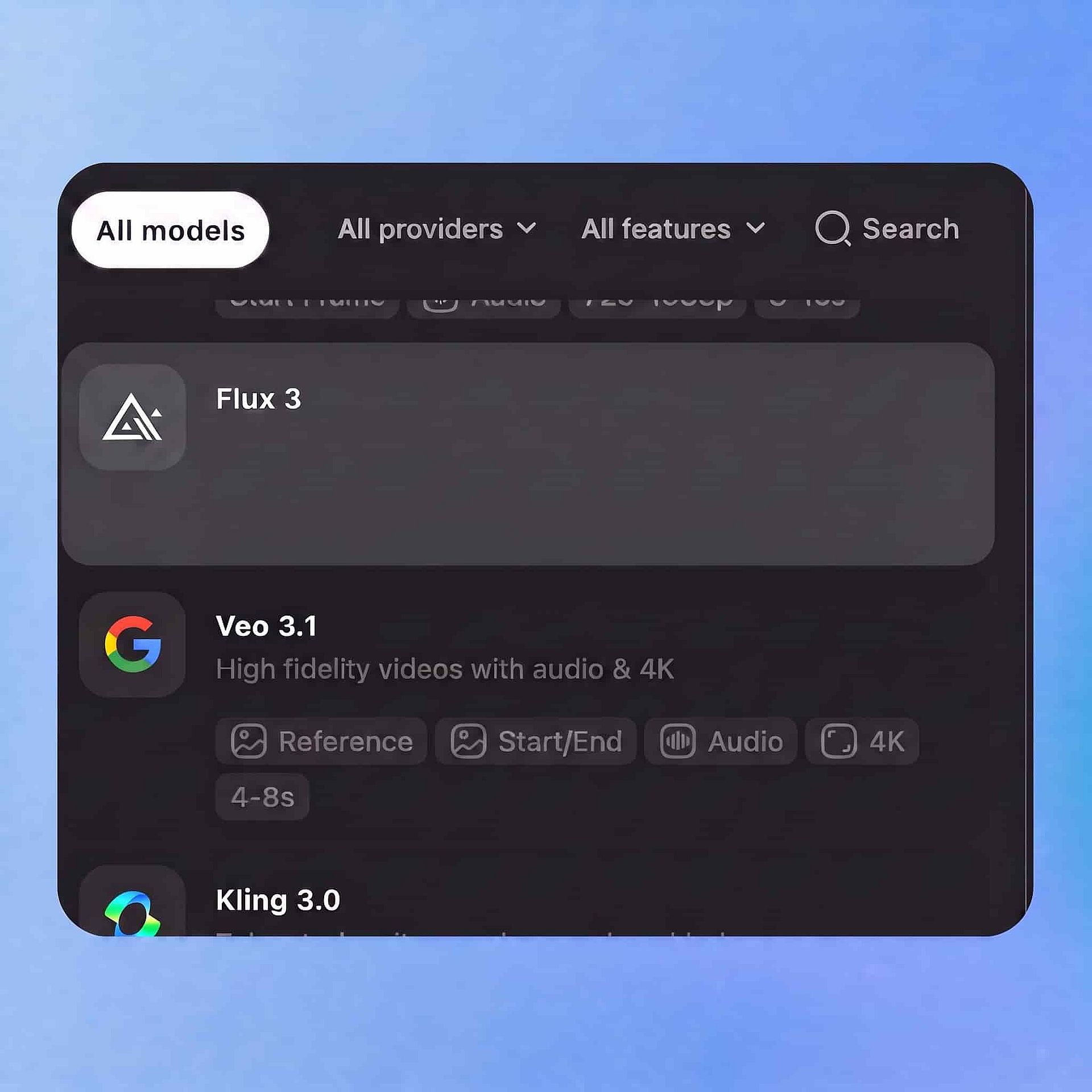
Elige tu modelo
Abre la herramienta de vídeo de OpenArt, selecciona FLUX 3 en el panel de modelos y elige tu entrada: un prompt escrito, una imagen o un clip existente.
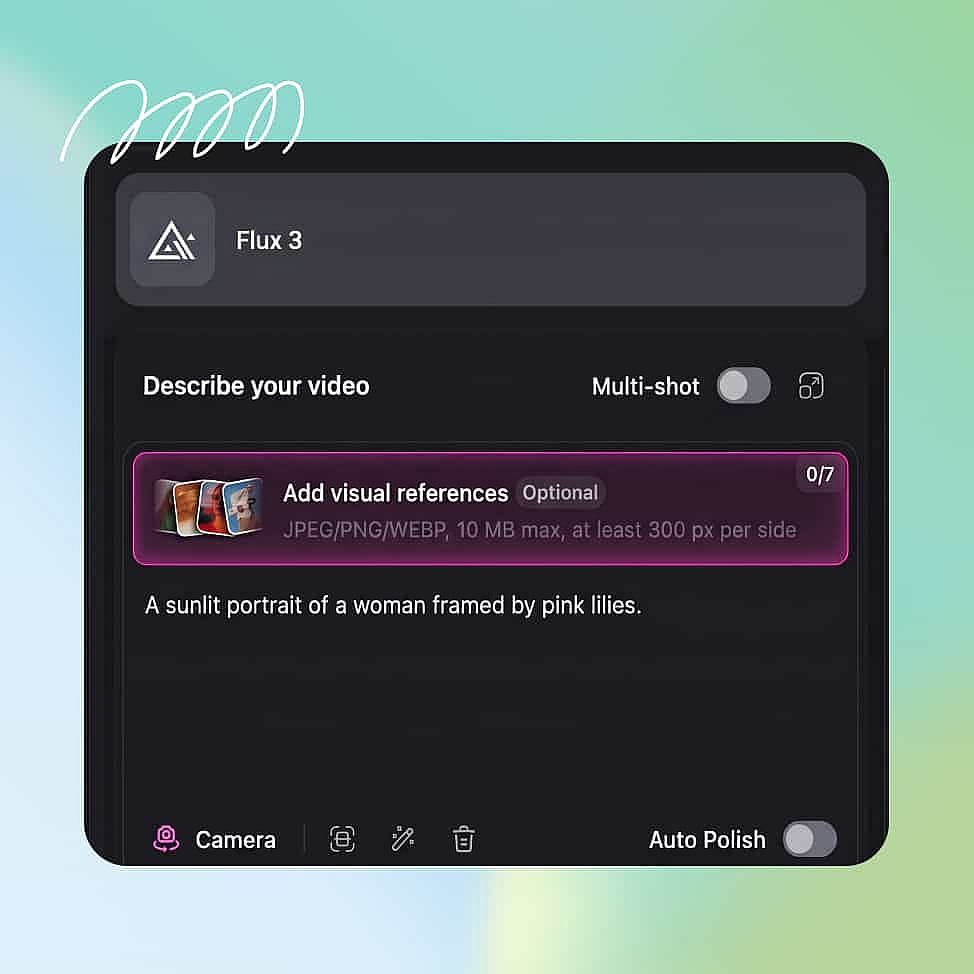
Escribe el prompt y añade referencias
Describe la acción, el movimiento de cámara y el sonido que quieres, escribe cualquier diálogo y luego fija la duración entre 5 y 20 segundos junto con la resolución y la relación de aspecto.
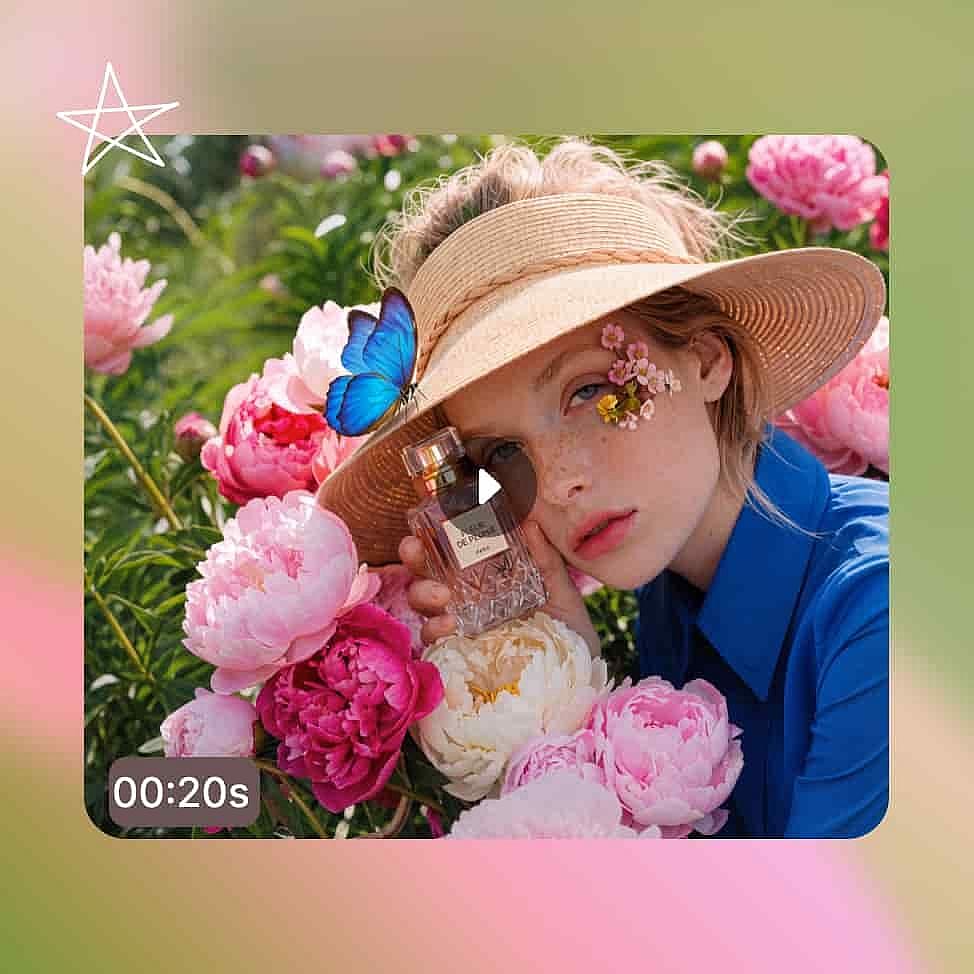
Genera y exporta
Genera primero un borrador, ajusta tu prompt si la toma no cuadra, luego mejora la versión que te guste y descarga el MP4 con su pista de audio.
Mejores usos de FLUX 3
Creadores que usan herramientas de IA de vanguardia
Si ya usas herramientas como Sora, Runway o FLUX para imágenes, seguro que quieres probar los modelos más nuevos el mismo día que salen. FLUX 3 es el primer creador de vídeo de Black Forest Labs, y genera imagen y sonido al mismo tiempo. Probar borradores rápidos sale barato, así que puedes experimentar con lo que la herramienta puede hacer antes de decidir el aspecto final.
Pruébalo ahoraCineastas y creadores de vídeo
Un vídeo solo parece una película de verdad cuando la interpretación, el ritmo y el sonido encajan. Veinte segundos son suficientes para mostrar un momento completo con un final claro. Como genera el sonido junto con el vídeo, puedes comprobar el tono y el ritmo de una sola vez.
Pruébalo ahoraProfesionales del marketing y del vídeo
Tienes plazos ajustados y las sesiones extra hacen perder tiempo y dinero. Puedes probar varias ideas en una sola mañana, elegir la mejor para mejorarla y cambiar fácilmente personajes o fondos para crear distintas versiones para redes sociales sin empezar de cero.
Pruébalo ahoraPequeños empresarios y creadores de contenido
No necesitas un equipo de rodaje ni un plató; basta con tus propias fotos de producto o imágenes del móvil. Sube una imagen y FLUX 3 la convertirá en un breve clip de vídeo con sonido. Así puedes transformar simples fotos de producto en publicaciones en vídeo geniales para tu tienda o tus redes sin escribir prompts complicados.
Pruébalo ahoraConsejos para obtener los mejores resultados

Escribe los sonidos exactos que quieres
Describe el audio igual que describes la imagen. Por ejemplo, escribe «el tañido de una campana» o «lluvia contra una ventana, sin música». Las escenas tranquilas suelen quedarse sin ningún sonido, así que en esos casos lo que más importa es indicarle a la IA qué quieres que cree.

Empieza con pruebas cortas
Prueba tu idea primero con un vídeo de 5 segundos, porque se genera mucho más rápido. Ajusta el ángulo de cámara, el movimiento y el estilo, y luego hazlo más largo cuando sepas que tu idea funciona.

Centra cada vídeo en una acción principal
FLUX 3 funciona mejor cuando una cosa sencilla ocurre tras otra. Intentar mostrar demasiadas cosas a la vez, como una gran multitud moviéndose de distintas maneras, es más difícil de resolver para la IA. Divide esos grandes momentos en clips separados y más cortos.
Adorado por los creadores
He probado muchas plataformas de IA... pero OpenArt sigue siendo la mejor para crear personajes, por la calidad de imagen a vídeo y por la variedad de modelos disponibles.
OpenArt ofrece una excelente variedad de herramientas de IA... una vez que aprendes las funciones, las posibilidades creativas son increíbles, y su equipo de soporte es excepcional.
OpenArt es una plataforma de IA muy versátil con muchos modelos de imagen y vídeo, creación de personajes consistentes y potentes herramientas de edición.
Herramientas útiles de IA en un solo lugar: generación de imágenes y vídeo, edición y mucho más... sin necesidad de varias suscripciones.
El servicio de atención al cliente siempre es rápido y útil... y la plataforma no deja de mejorar con nuevas funciones y herramientas.
He probado muchas plataformas de IA... pero OpenArt sigue siendo la mejor para crear personajes, por la calidad de imagen a vídeo y por la variedad de modelos disponibles.
OpenArt ofrece una excelente variedad de herramientas de IA... una vez que aprendes las funciones, las posibilidades creativas son increíbles, y su equipo de soporte es excepcional.
OpenArt es una plataforma de IA muy versátil con muchos modelos de imagen y vídeo, creación de personajes consistentes y potentes herramientas de edición.
Herramientas útiles de IA en un solo lugar: generación de imágenes y vídeo, edición y mucho más... sin necesidad de varias suscripciones.
El servicio de atención al cliente siempre es rápido y útil... y la plataforma no deja de mejorar con nuevas funciones y herramientas.
He probado muchas plataformas de IA... pero OpenArt sigue siendo la mejor para crear personajes, por la calidad de imagen a vídeo y por la variedad de modelos disponibles.
OpenArt ofrece una excelente variedad de herramientas de IA... una vez que aprendes las funciones, las posibilidades creativas son increíbles, y su equipo de soporte es excepcional.
OpenArt es una plataforma de IA muy versátil con muchos modelos de imagen y vídeo, creación de personajes consistentes y potentes herramientas de edición.
Herramientas útiles de IA en un solo lugar: generación de imágenes y vídeo, edición y mucho más... sin necesidad de varias suscripciones.
El servicio de atención al cliente siempre es rápido y útil... y la plataforma no deja de mejorar con nuevas funciones y herramientas.
Con tantas plataformas de IA por ahí, OpenArt destacó como una opción excelente; se la recomendaría a cualquier creador.
Esta plataforma incluye todo lo que necesitas para crear contenido con IA: imágenes, vídeo, personajes, audio y múltiples modelos de IA en un solo lugar.
OpenArt está superando los límites de la creación de vídeo con IA... y está claro que el equipo se compromete a mejorar la experiencia de los creadores.
Hice mi primer videoclip musical con IA con OpenArt... y su equipo de soporte fue la mejor ayuda que he tenido nunca.
Estoy muy contento con el soporte: mi problema se resolvió rápido y el equipo hizo que todo fuera fácil.
Con tantas plataformas de IA por ahí, OpenArt destacó como una opción excelente; se la recomendaría a cualquier creador.
Esta plataforma incluye todo lo que necesitas para crear contenido con IA: imágenes, vídeo, personajes, audio y múltiples modelos de IA en un solo lugar.
OpenArt está superando los límites de la creación de vídeo con IA... y está claro que el equipo se compromete a mejorar la experiencia de los creadores.
Hice mi primer videoclip musical con IA con OpenArt... y su equipo de soporte fue la mejor ayuda que he tenido nunca.
Estoy muy contento con el soporte: mi problema se resolvió rápido y el equipo hizo que todo fuera fácil.
Con tantas plataformas de IA por ahí, OpenArt destacó como una opción excelente; se la recomendaría a cualquier creador.
Esta plataforma incluye todo lo que necesitas para crear contenido con IA: imágenes, vídeo, personajes, audio y múltiples modelos de IA en un solo lugar.
OpenArt está superando los límites de la creación de vídeo con IA... y está claro que el equipo se compromete a mejorar la experiencia de los creadores.
Hice mi primer videoclip musical con IA con OpenArt... y su equipo de soporte fue la mejor ayuda que he tenido nunca.
Estoy muy contento con el soporte: mi problema se resolvió rápido y el equipo hizo que todo fuera fácil.
Preguntas frecuentes Preguntas
FLUX 3 es un modelo de IA de Black Forest Labs, y es el primer modelo FLUX capaz de hacer vídeo. Maneja imágenes, vídeo y audio a la vez. Esto es lo que le permite crear un vídeo de hasta 20 segundos con sonido acorde en un solo intento.
FLUX 3 puede crear vídeos de entre 5 y 20 segundos. Mantiene la calidad nítida y estable hasta el final, en lugar de volverse un lío. Si necesitas un clip más largo, la herramienta Extender Vídeo de OpenArt puede añadir hasta 10 segundos más a cualquier toma.
Sí. Puedes subir una foto y FLUX 3 la convertirá en un vídeo en movimiento manteniendo el sujeto principal y la iluminación. También puede estirar una imagen para crear un clip de vídeo más largo que encaje con tu foto original.
Black Forest Labs ha anunciado una versión gratuita y abierta llamada FLUX 3 Dev, pero aún no está disponible. Si usas OpenArt, de todos modos no necesitas descargar nada, porque FLUX 3 funciona directamente en tu navegador web sin necesidad de una configuración especial en el ordenador.
FLUX 2 solo crea imágenes. FLUX 3 sigue creando imágenes, pero además añade vídeo y audio a la misma herramienta. Esto significa que puede convertir texto en vídeo, convertir fotos en vídeo, editar clips y alargar vídeos, todo con sonido a juego integrado directamente.
Sí. Genera palabras habladas, efectos de sonido, música y ruido de fondo al mismo tiempo que el vídeo, en sintonía con lo que ocurre en pantalla. Detallar en el prompt los sonidos concretos que quieres te dará los mejores resultados.
Sí. FLUX 3 te permite cambiar fondos, sustituir personajes o aplicar un nuevo estilo artístico a clips de vídeo existentes. Puedes modificar solo una parte de un clip escribiendo lo que quieres, en lugar de rehacer todo el vídeo desde cero.