

 ChatGPT
 Perplexity
 Claude
 Gemini
In February 2026, ByteDance dropped Seedance 2.0. Within 24 hours it was everywhere, because a filmmaker generated a Hollywood-quality fight scene with a two-line prompt. The Deadpool screenwriter saw it and publicly posted that it was likely over for screenwriters. Elon Musk replied. The Motion Picture Association issued a formal statement the same day. ByteDance pulled the ability to generate real celebrity likenesses, tightened the guardrails, and the internet held its breath wondering if the model had been gutted in the process.
事实并非如此。底层能力、动作、物理效果、运动以及情感表演,全部完整保留了下来。老实说,这些讨论确实有必要。生成式 AI 的发展速度超过了任何法律框架所能跟上的节奏,而行业如何应对至关重要。但那是另一个视频的话题了。我们能告诉你的是:Seedance 2.0 是目前市面上最强大的视频模型,而它已经在 OpenArt 上线了。
我们的内容媒体与教育负责人 Ermin Monzon 从技术层面剖析了这个模型为何重要。我们的内部创作者 Bob 把他能想到的每一种参考类型都做了压力测试。合作者 Mia Meow 则基于数周测试总结出一份 10 条技巧的工作流指南。本手册汇集了三人最精华的内容,为你呈现一幅完整图景。
Seedance 2.0 能做什么 → Ermin 的概览
在进入工作流技巧之前,值得先弄清楚这个模型为何能引发如此反响。Ermin 演示了一系列 demo,展示 Seedance 2.0 在哪些方面把市面上其他产品远远甩在身后。
The fight scene that broke the internet is the obvious headline, but the demo that surprised Ermin more was a dancer with neon light trails sweeping around them in orbital arcs. It looks like a Nike commercial or a music video with a serious production budget. The reason this is technically significant is that the light trails are not composited over the dancer. The model generated both simultaneously. The motion and the effect interact with each other: the trails bend around the dancer's body, and the lighting from the trails actually reflects on the floor beneath them. That is called coherent VFX generation. The model understands that light behaves physically. It does not just paint glowing lines on top of video. For anyone doing music video content, UGC ads, or anything with a visual effects component, this is where Seedance 2.0 stands apart.
还有一段值得一看的演示:一名滑雪者从山坡腾空而起,背景是连绵的阿尔卑斯山脉。雪花飞溅的物理效果、身体的旋转、落地的瞬间——全部由 AI 生成,且都符合物理规律。这款模型在动作与运动表现上的水准,是目前其他任何公开可用工具都难以企及的。
文生视频:单镜头 prompt 结构 → Mia 视频 0:50 处
你在 Mia 文生视频演示中听到的一切——音频、环境声——都是与视频同时生成的。一个 prompt,一次成片。其他模型很难在一次生成中兼顾这么多细节。而 Seedance 2.0 真的会照你给的内容来做。
Mia 的一镜到底 prompt 结构非常简单。开头写"continuous single take"加上你的运镜动作,然后描述镜头移动时所看到的画面,最后加上控制和风格关键词:no cuts、seamless transition、cinematic、high definition。光是这套公式就能带来出色的效果。
对于更复杂的场景,比如 2:13 处的打斗场面, Mia recommends starting with a clear beginning and end state. Describe the fight scene, describe how it ends (everyone on the ground, for example), and let the model fill the middle. She also found that describing specific camera angles creates a more cinematic feel, and adding a film genre reference to the end of the prompt helps set the visual tone. One thing she discovered through iteration: if you describe your characters physically in the prompt rather than leaving it vague, the model does a better job designing the scene and keeping characters visually distinct.
Mia 关于 prompt 的关键心得:模型对电影语言训练得很充分。像“跟拍镜头”“升降镜头”“甩镜”这样的术语,以及“粗粝的战争片”或“新黑色悬疑片”这类风格提示,都能带来很大帮助。
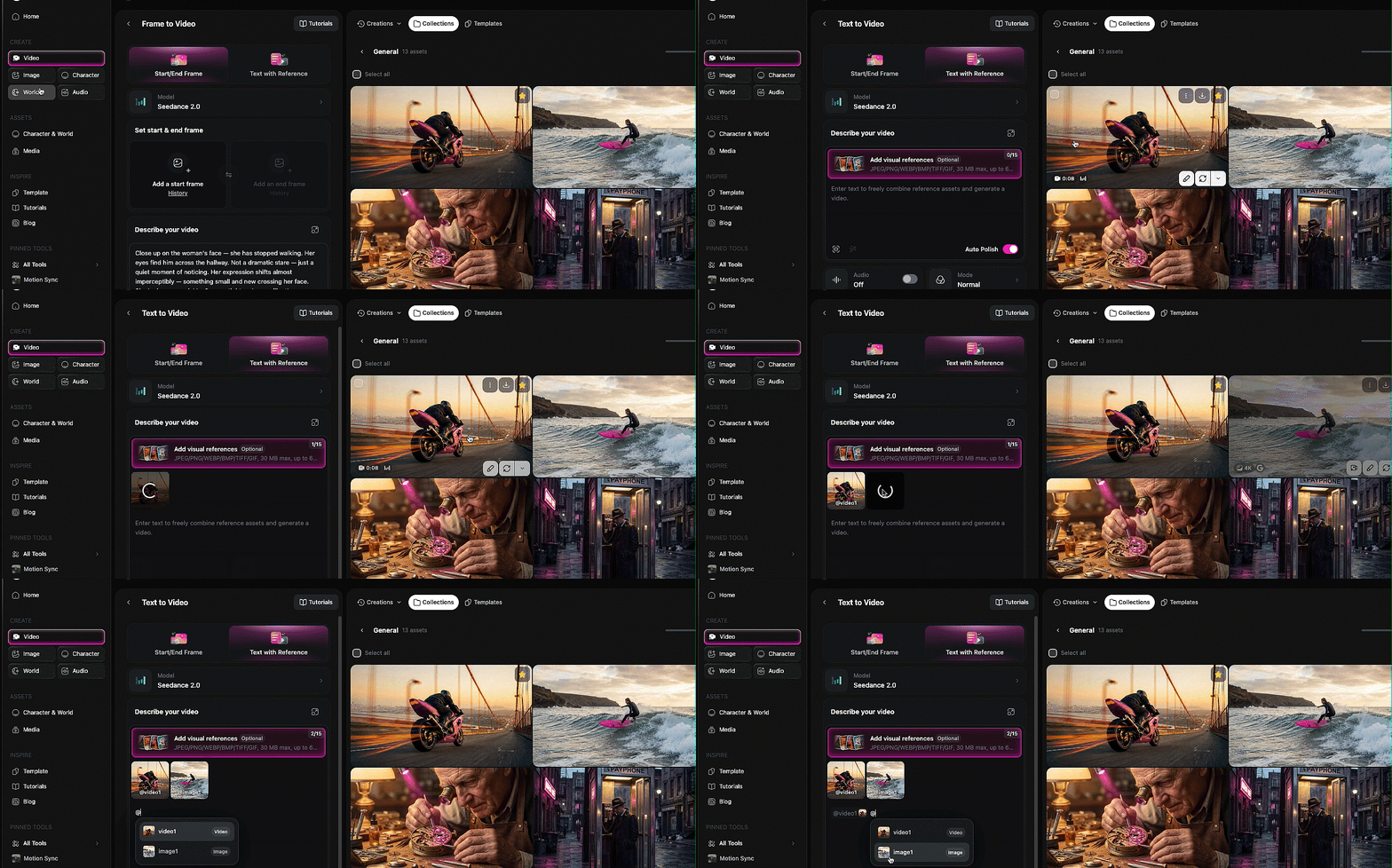
Mia 的完整教程涵盖了她全部 10 条工作流程技巧,其中一些已在本手册中提炼呈现。可以边看边学,也可以稍后再回来观看。
参考系统:将图像、视频和音频标记到你的 prompt 中 → Mia 视频中的 4:27 · → Bob 的参考图深度解析
这是驱动 OpenArt 上 Seedance 2.0 一切功能的核心机制,一旦你理解了它,后面的每个部分都会豁然开朗。
思路很简单:你可以上传图片、视频和音频文件作为参考,然后用 @ 符号在文字 prompt 中直接标记它们。输入 @ 即可选择要引用的已上传文件。接着,你只需告诉模型如何处理每个文件。用图片一里的人脸。用视频一里的镜头运动。对准音频一做口型同步。模型会读取你的 prompt,查看被标记的文件,并将所有内容融合成一次生成。
Mia 的 4:27 处的多模态操作演示 把这套玩法讲得最清楚。她上传了一段舞蹈视频、两张角色图片和一首歌,然后让模型把视频用作镜头运动参考,图一作为左边的舞者,图二作为右边的舞者,音频作为背景音乐。全部用 @ 标记,全部写在一个 prompt 里。
Bob pushed this further. In one of his demos, he referenced four different files in a single prompt: the face from image one, the overalls from image three, the shirt from image four, and a location from a reference video. The prompt was: the man in image one is walking down the street from the video wearing the overalls from image three and carrying the shirt from image four, talking to the camera. The model held consistency across every element. That is a remarkable amount of compositing happening from a single text prompt.
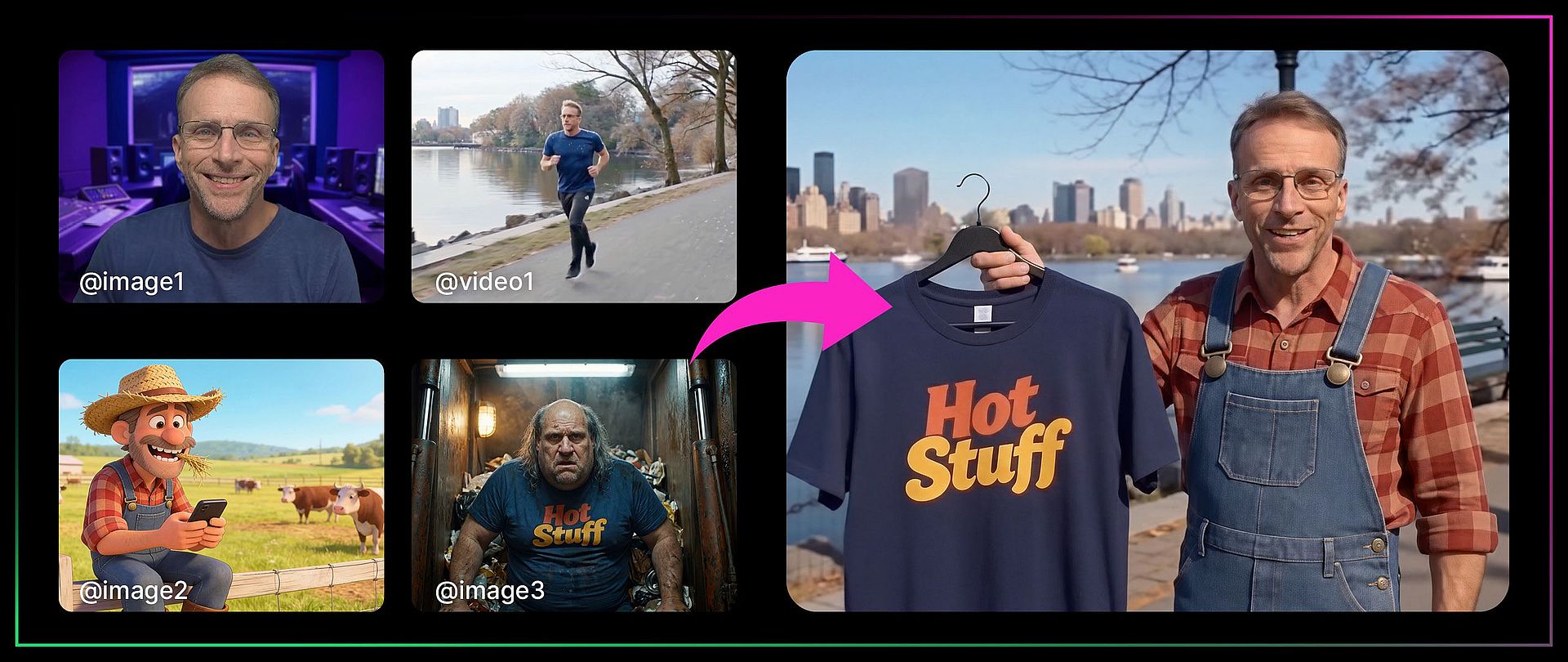
关于参考素材的行为方式,两位创作者都总结出了几点:
如果你的参考视频自带音频,同时你又单独标记了一个音频文件, 模型往往会更倾向于视频原有的音频,而不是你上传的音轨。Mia 的变通办法:如果你想让自己的音乐或旁白优先,就上传不带音频的视频。
参考对象并不局限于具体的元素。 你也可以指向一段视频说“我只想要它看起来像这样”,而不复制其他任何内容。Bob 用这种方式把一段视频的视觉风格(鱼眼镜头、闪烁光效)迁移到了一个全新的场景中。
你不必一次性用上所有参考类型。 在文本 prompt 中只用一张角色图片,同样是这套系统完全有效的用法。你叠加的元素越多,威力越大,但在任何复杂程度下它都运作得很好。
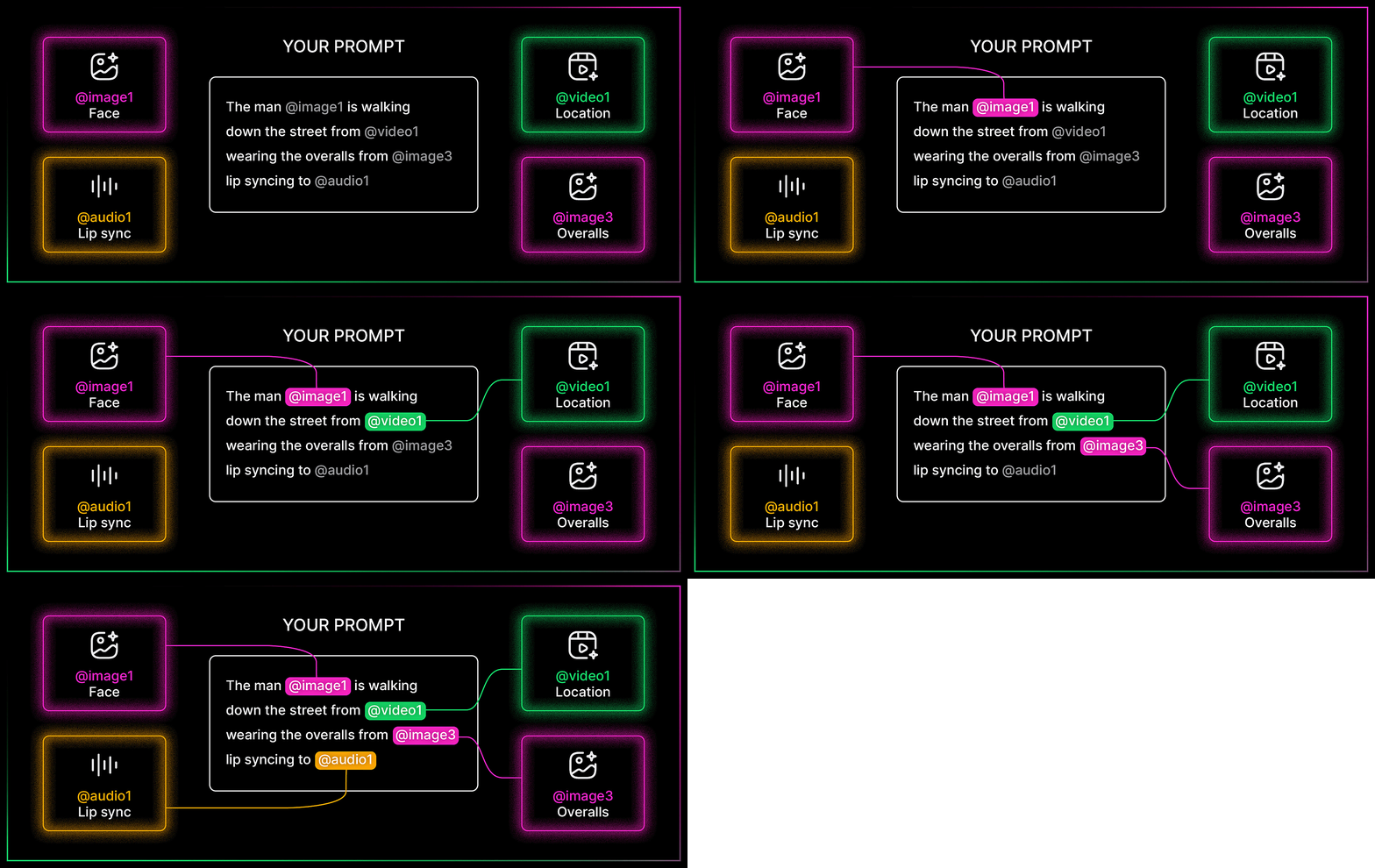
对口型、配音与表演 → Mia 视频 7:57 处 · → Bob 的音频深度解析
Bob 的完整视频深入讲解了图片、音频和视频中的各类参考素材,其中口型同步和声音克隆部分尤为出彩。
这是技巧最多、参与创作者也最多的一节,而且理由充分。Seedance 2.0 的音频能力,正是它区别于目前市面上其他一切产品的关键。
Bob 的文本转录小技巧
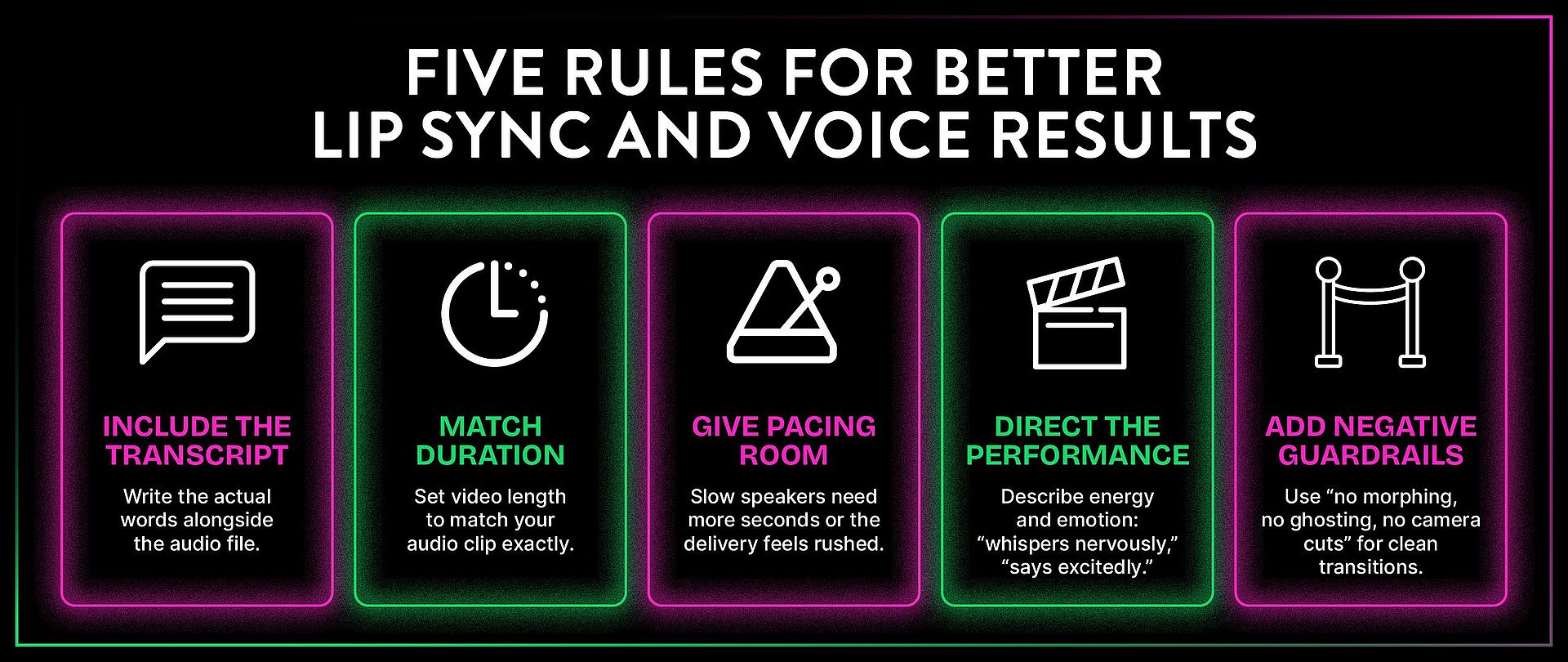
这是三个视频里最实用的一条技巧。当你用音频参考做对口型时,请在 prompt 中把台词的实际文本转录连同音频文件一起附上。原因如下。
Bob tested this with a clip of himself talking to camera. In his first attempt, he tagged the audio file and described the scene but did not include the exact words being spoken. The model listened to the audio and tried to replicate it, but got details wrong ("CGI 2.0" instead of "Seedance 2.0"). When he modified the prompt to explicitly spell out the words being said, the audio file combined with the written transcript produced dramatically better results. The lip sync was tighter, the words were accurate, and the overall performance was more convincing.
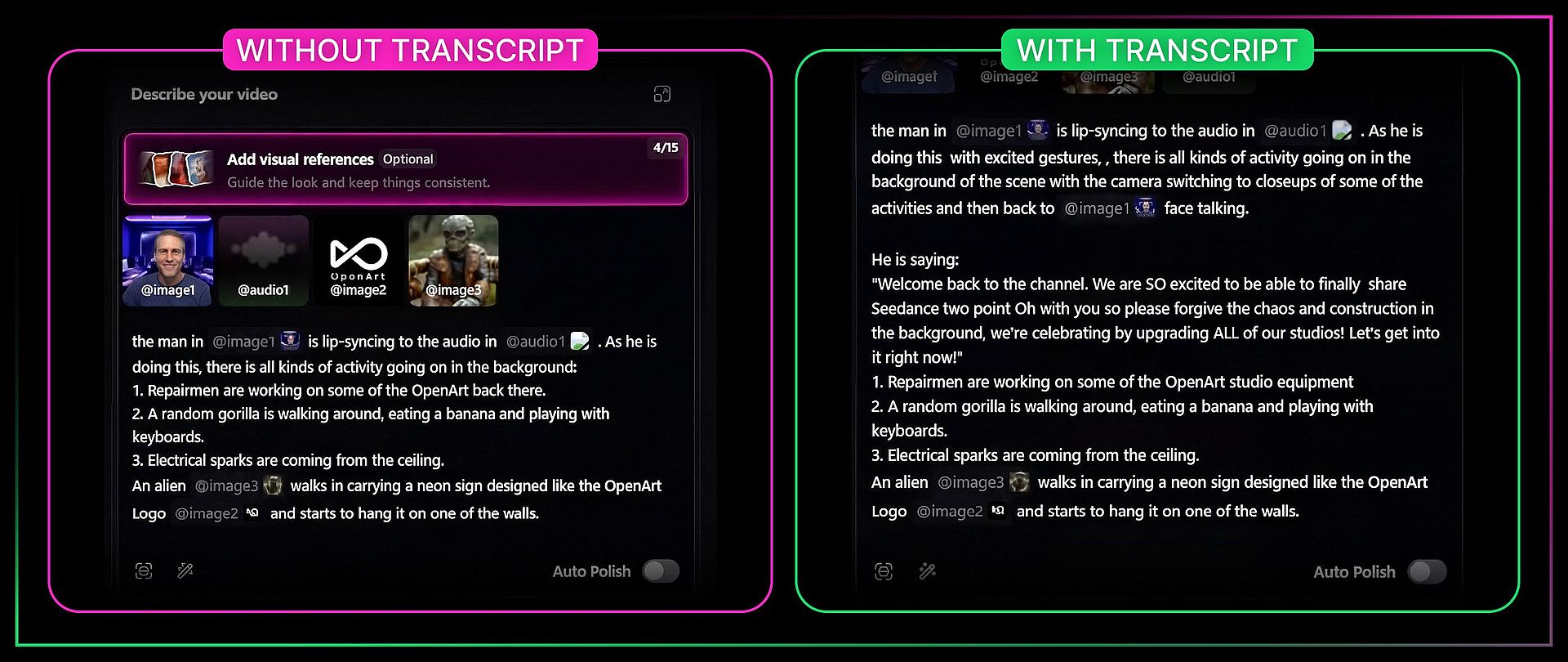
关键要点:只要做口型同步,就务必把实际的文字稿连同音频文件一起提供。这样几乎一定能得到更好的效果。
让音频时长与视频时长匹配
Mia 就是吃了这个亏才明白的。如果你的音频参考只有 11 秒,却把视频设成 15 秒,模型就不得不拉伸或压缩音频来匹配,几乎一定会破坏节奏。请始终让时长设置与音频文件的实际长度保持一致。
声音克隆
Bob 用一段 15 秒的 Ermin 声音片段(也就是 OpenArt 办公室里的 Monz 大叔)演示了声音克隆。做法是:录制约 15 秒的声音,尽量捕捉你想要复刻的音色特质。把这段音频标记为声音参考,而不是对口型的素材。然后在 prompt 中写下实际的台词,模型就会用那个声音生成全新的语音。
第一次尝试对 Ermin 自然的语速来说太快了。Bob 给了模型整整 14 秒,而不是 9 秒,结果听起来更接近 Ermin 真实说话的样子。这告诉我们:节奏和音色样本同样重要。给模型足够的时间,让它以适合该音色的语速把话说完。
你可以在多个视频中重复使用同一段语音参考,让角色的嗓音保持一致。
Mia 的表演指导技巧 → Mia 视频 12:20 处
Mia 发现,你可以通过 prompt 本身来指导角色的情感表演和状态。你写下的文字会影响角色如何演绎台词,而不只是说什么。如果你写“他兴奋地说”,角色的肢体语言和声音能量都会随之变化。如果你写“她紧张地低声说”,整个表演都会随之改变。
这同样适用于同一场景中的多个角色。在 Mia 视频 11:10 处,她演示了如何在一条 prompt 中赋予两个角色不同的声线个性和情绪状态,而模型能让两者始终保持区分。
Mia 的负向约束技巧
当你想要场景之间干净利落的过渡、而不希望它们相互变形融合时(例如为四张不同的图像做旁白叙述),Mia 学会了在 prompt 中加入否定式护栏:"no morphing, no ghosting, no camera cuts"。没有这些,模型有时会把场景混在一起,看起来像画面故障。加上护栏后,你就能获得从一个场景到下一个场景的清晰过渡。
进阶参考:运动、分镜与风格 → Mia 视频 13:22 处 · → Bob 的视频参考
了解了参考系统对人脸和声音的运作方式后,下面看看你还能用它来参考哪些内容。
动作与运镜迁移
如果你有一个很喜欢镜头运动方式的画面,你可以把那段镜头运动迁移到一个全新的场景中。Bob 用一段视频演示了这一点:一只狗上下跳跃,镜头绕着它推移。他把那段视频作为参考,并说“把这段视频作为镜头和角色运动的参考,来引导一个稻草人在蹦床上跳跃”。结果镜头推移和跳跃动作都被迁移到了新角色和新场景上。
他还用真实素材演示了运动迁移。使用一个 19:15 处 Emily 奔跑的片段,他说“把视频一里的女人换成图片一里的男人,并且正在下雪。”模型换掉了角色,加上了冬季天气,同时完整保留了奔跑动作。部分背景细节有所变化(整体氛围转为灰蒙蒙的冬日感),但核心动作依旧保持稳定。
Character Swap Split Screen LRB.mp4
故事板转视频 → Mia 视频 13:22 处
你可以上传漫画分格式的网格图或故事板,模型会尝试逐格演绎动画。Mia 用一张手绘网格图做了测试,发现模型确实按顺序跟随各个分格,但仅凭画面本身,模型并不总能理清各格之间的方向逻辑。
有两个技巧能让效果更好。第一,在 prompt 中描述画面之间的叙事逻辑。模型需要理解故事的推进,而不只是视觉序列。第二,如果你的分镜上有文字或字幕,请在 prompt 中加上“text overlay no captions on screen”,以防止文字渗入生成的视频中。
Mia 还提到,你可以直接用真实的漫画书页面来做这件事,但涉及现有 IP 的内容要格外小心。
风格参考与模板复刻 → Mia 视频中的 14:45 处
Mia's template replication tip is a practical one for anyone producing content at volume. If you have a video with a visual style you like, you can reference it and tell the model to replicate just the style, not the content. She tested this by pointing to a video and saying she only wanted the fisheye lens effect and the flickering double-exposure look, then combined it with character images and outfit references to create a fashion sequence. The model picked up the abstract visual qualities without copying the specific content of the reference video.
这对于在一系列视频中保持一致的视觉识别非常有用。先创作一个你满意的视频,然后在后续每次生成时都参考它的风格。
生成后处理:延长与编辑 → Mia 视频 16:06 处
视频生成完成后并不代表就此结束。Seedance 2.0 让你在生成之后继续延长、编辑和重写。
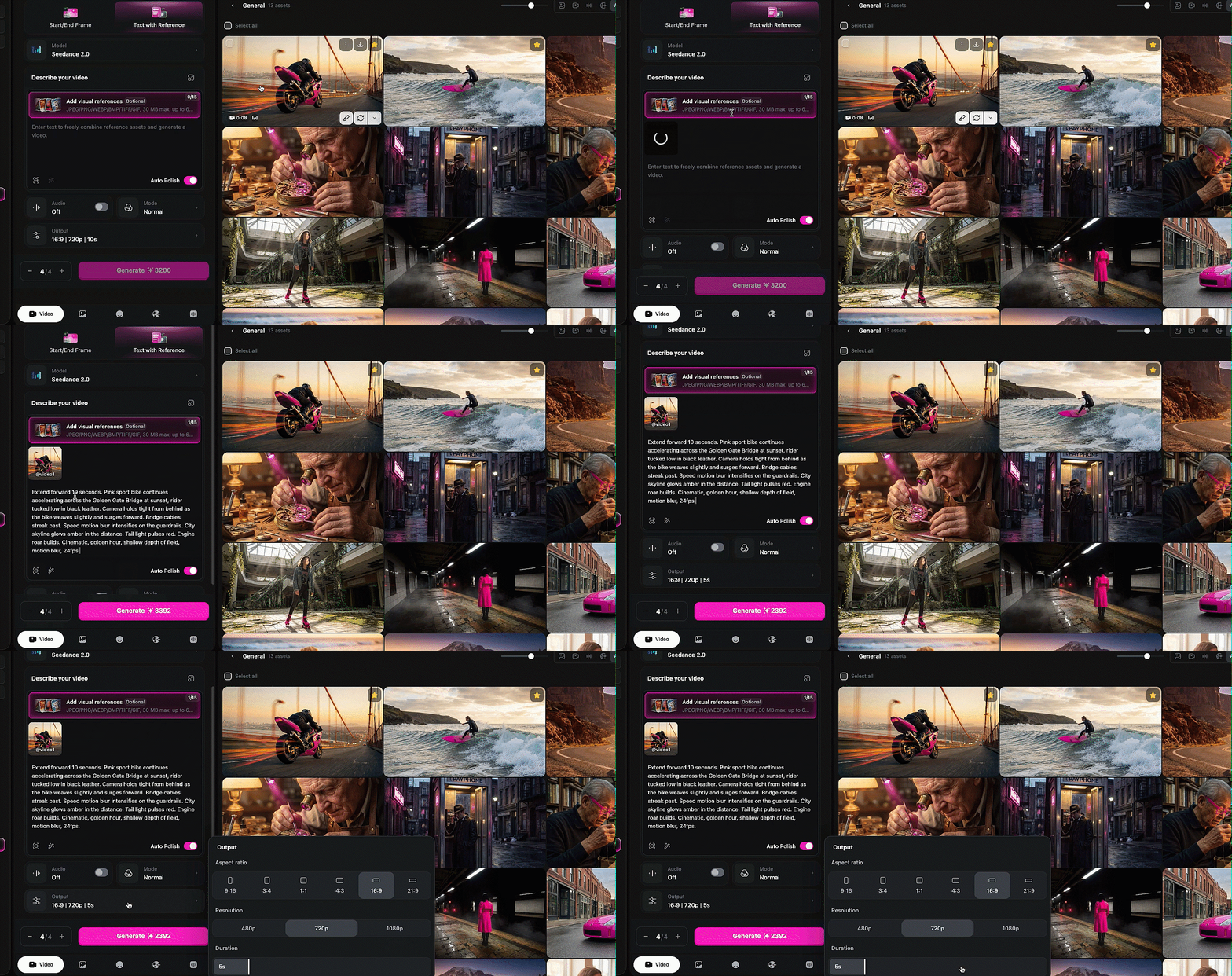
扩展。 上传一段想要续接的视频,选择向前(或向后)延展,指定延展的秒数,将时长设置调整到匹配,然后描述新片段中你想要发生的画面。Mia 先把视频向前延展了 10 秒,再向后延展 10 秒,把它们拼成了一个超过 15 秒生成上限的无缝场景。这是真正的突破。过去 15 秒是无法逾越的硬上限,如今你可以不断构建更长的无缝场景,全程没有剪切。
Edit。 如果你想改动已生成视频中已经发生的画面,可以就现有视频与模型对话,告诉它要修改什么。这与 Wan 2.7 的视频转视频编辑类似,但 Seedance 2.0 对画面内容的理解更强。
总结
Seedance 2.0 is the most capable video model available on OpenArt right now, and the reference system is the reason to pay attention. The ability to tag images, video, and audio into a single prompt and have the model hold consistency across all of them is not something any other model is doing at this level. The lip sync is strong. The voice cloning works. The motion transfer is clean. The coherent VFX generation, where lighting and effects actually interact with the scene physically, is new territory entirely.
三位创作者、三支视频,得出了同一个一致的结论:这个模型真的会「听话」。它比市面上任何工具都更能贯彻复杂的多元素 prompt。你最该做的就是直接上手,向它提出你想要的一切,因为它拥有惊人的想象力。这是 Bob 的原话,他说得没错。