

 ChatGPT
 Perplexity
 Claude
 Gemini
OpenAI 于 2026 年 4 月推出了 GPT Image 2,当图片需要精细背景或准确的图内文字时,它成了大多数人的首选模型。GPT Image 2.5 于 2026 年 9 月 8 日问世,全面提升了 Image 2 的各项能力。
新版模型分为两种模式:主打速度的 Flare,以及主打质量与细节的 Sunburst。下面我们来看看新版本升级了哪些内容,以及如何根据手头任务在两者之间做选择。
要点总结
- 现在推荐使用 GPT Image 2.5,它提供两种模式:Flare 适合日常工作,Sunburst 适合最精细的任务。
- 据 OpenAI 称,Flare 生成图片的效果优于 GPT Image 2,用时却只有一半。
- GPT Image 2.5 保存图片时会带透明背景,可随时叠加到任何颜色上。
- 编辑只会改动你指定的那一处,画面其余部分保持不变。
- 你可以连续叠加多次编辑,先前的改动会保持不变、始终一致。
GPT Image 2 与 GPT Image 2.5 速览
| GPT Image 2 | GPT Image 2.5 | |
|---|---|---|
| 已发布 | April 21, 2026 | September 8, 2026 |
| 模式 | 一个模型,一种速度 | Flare 与 Sunburst |
| 最高分辨率 | 3840 x 2160,超过 2560 x 1440 时标记为实验性 | 3840 x 2160 |
| 透明背景 | 之后自己再抠出来 | 内置支持,保存为 PNG 或 WebP |
| 图片中的文字 | 强 | 表现出色,如今还能处理图表、示意图和标签 |
一个模型,变身两种模式
GPT Image 2 只给你一种模型、一种速度。GPT Image 2.5 则让你在点击生成前先做选择。
Flare 是适合日常创作与编辑的快速模式。据 OpenAI 介绍,Flare 生成的图像质量高于 GPT Image 2,用时却只需一半。在你还在尝试各种创意时用它最合适。
Sunburst 是最高质量模式,运行速度中等。当细节精度和精细编辑最为重要时,选它准没错。
值得养成的习惯很简单:先在 Flare 中起草,然后在 Sunburst 中再跑一遍你最满意的 prompt,得到最终成图。
内置透明背景功能
GPT Image 2.5 可将透明背景的图片保存为 PNG 或 WebP 文件。
因此,贴纸、Logo 标志、产品抠图或应用图标生成后即可直接放到任何你想要的颜色上。而用 GPT Image 2 时,你得先保存图片,再到其他应用里自己抠掉背景。
这一处改动为大多数包装、周边和广告工作省去了一个步骤。
编辑效果精准锁定在你指定的位置
对于任何在初次生成后还要继续加工图片的人来说,这是最大的升级。
让 GPT Image 2.5 在编辑后的图片中把外套改成蓝色,它就会给你蓝色外套,而面部、姿势、光线和背景都保持原样。你还可以标出想要替换的具体位置,标记之外的一切都不会被改动。
然后继续往下改。换掉天空、换掉衬衫、加上一个咖啡杯,到第三次调整时,前两处改动依然还在。
旧模型往往每次请求都会多重绘一点画面。而保持画面稳定不变,正是让你能修好一个小细节而无需从头再来的关键。
你的参考照片一路无损保留
GPT Image 2.5 能更好地在新图片中保留参考照片里人物或产品的辨识度。
这对于要放进五种场景的创始人头像,或是拍一次后要展示在沙滩、城市街道和影棚背景中的一双运动鞋来说尤为重要。主体看起来始终是同一个主体。
文字、图表与标签
GPT Image 2 一直是制作海报或促销横幅的稳妥之选,因为它能正确拼写文字。
GPT Image 2.5 保留了这一点,还加入了可读的真实信息:图表标签、示意图、价目表、营养成分表。发布前先读一读图片中的文字,如有出错,再用一次跟进编辑修正即可。
示例生成
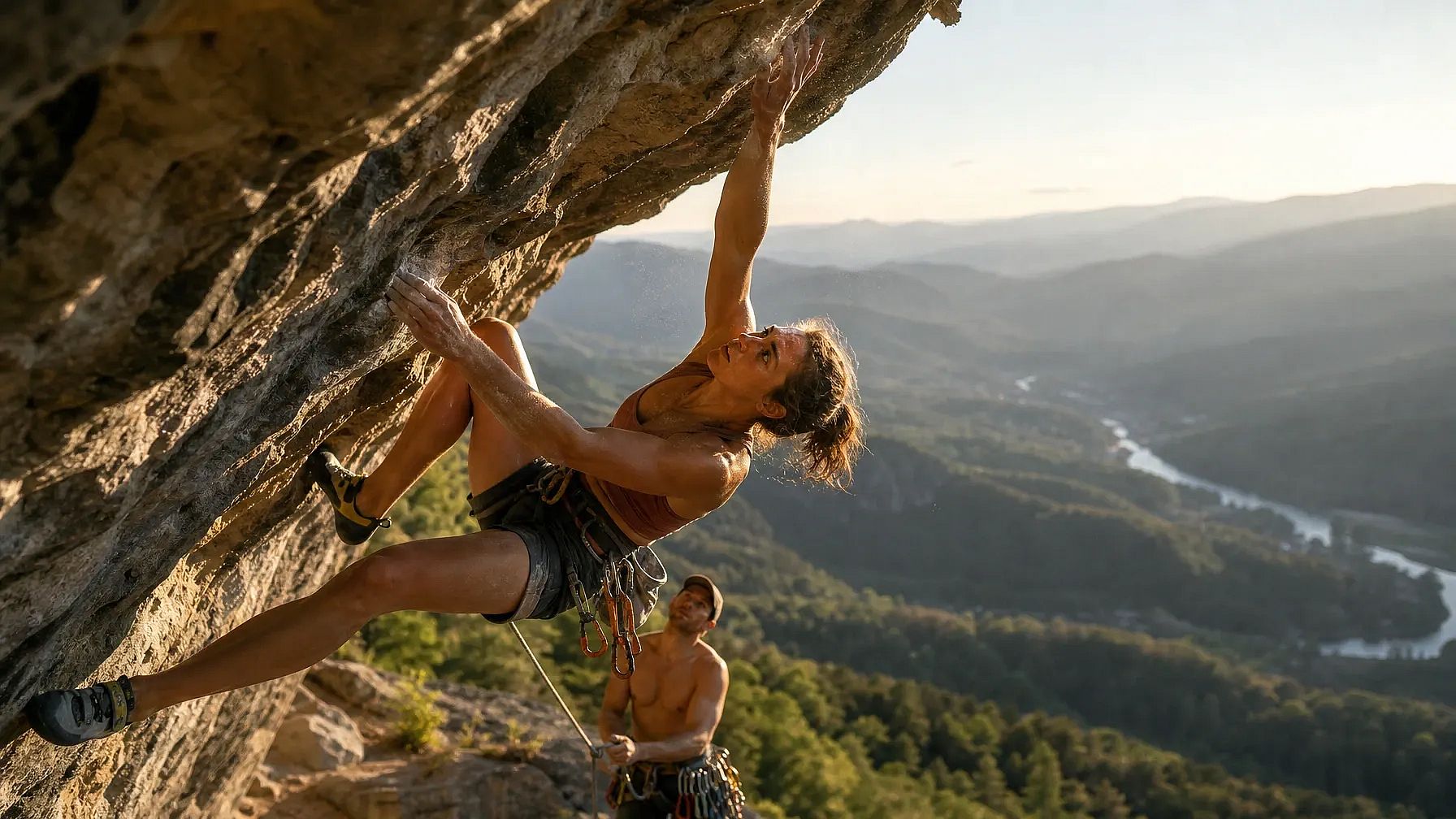
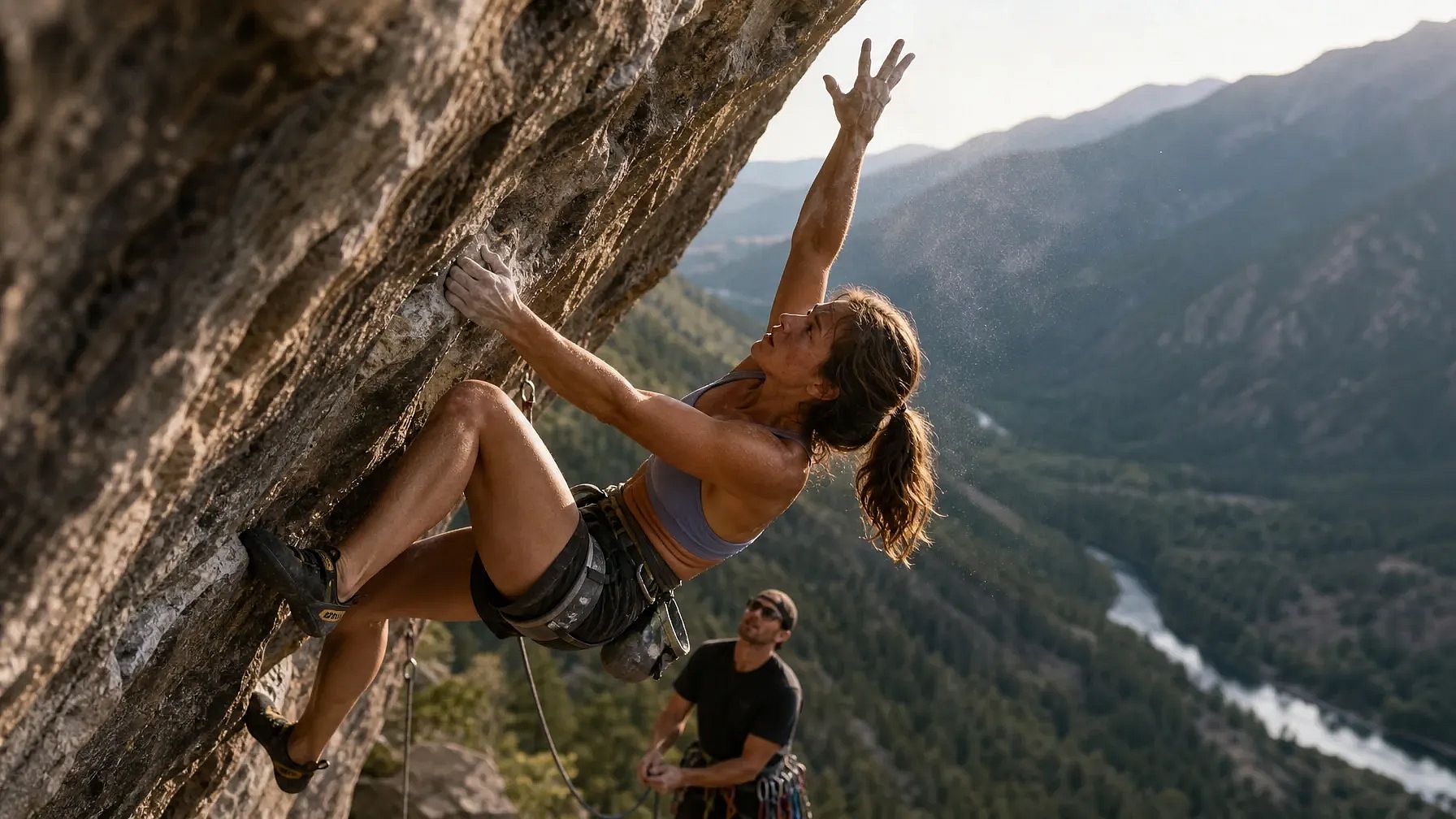
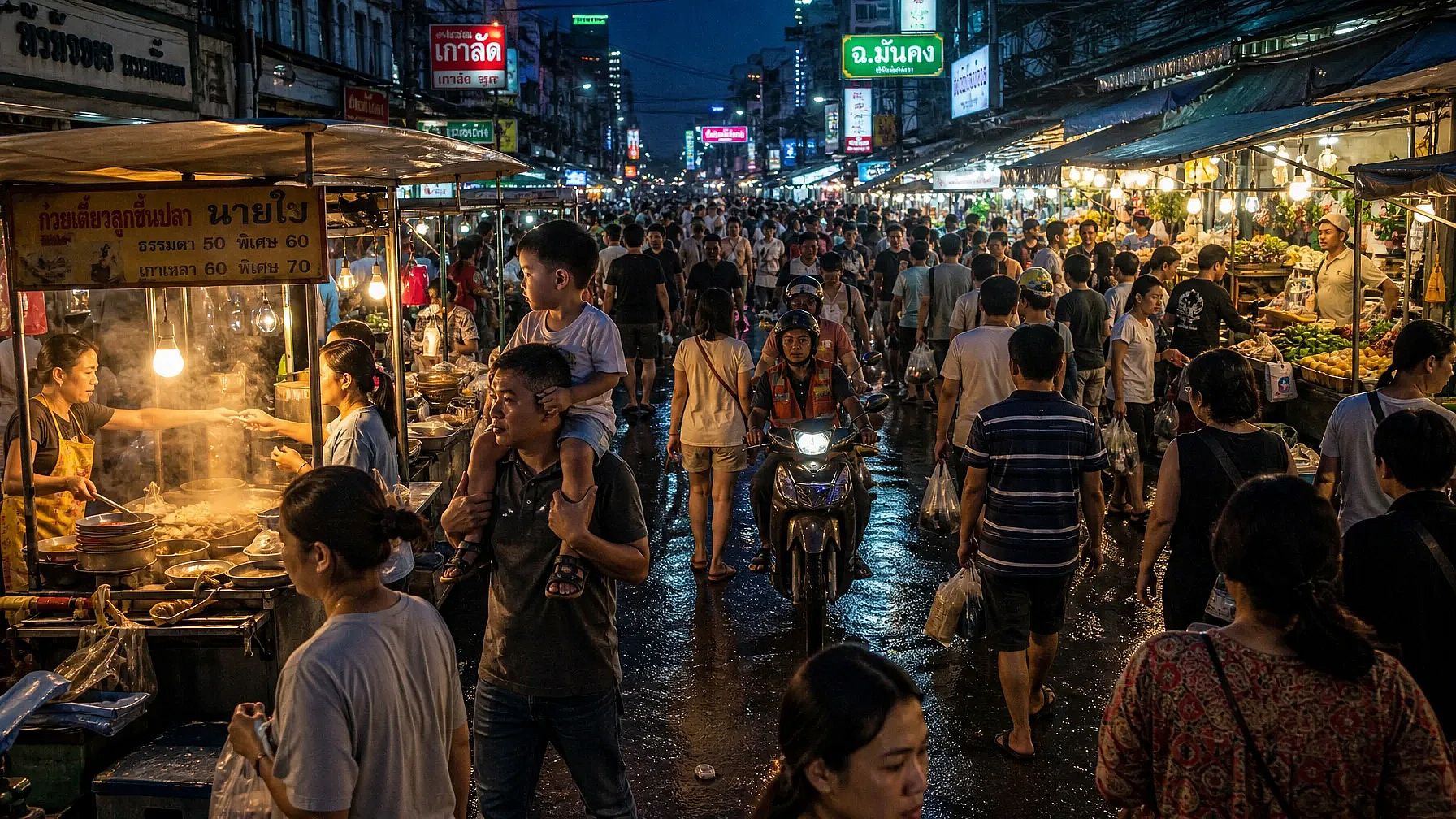
让我们分别用 GPT Image 2 和 GPT Image 2.5(Sunburst)运行三个不同的 prompt,比较它们在真实感、人体表现和复杂背景方面的效果。
Prompt 1:多人物动作,运动中的复杂人体结构
A photorealistic action shot of a professional rock climber mid-dynamic-move on an overhanging cliff face, one hand gripping a small hold and the other reaching upward, fingers splayed and tendons visible under strain. Her body is twisted in a diagonal torque, left leg bent with the knee driving toward the wall while the right leg extends outward for balance. Chalk dust drifts off her hands, caught in a shaft of late-afternoon sunlight. Below her, a belayer looks upward, rope taut, with a cluttered gear rack of carabiners and cams clipped to his harness. The background shows a sprawling valley with layered mountain ridges fading into haze, a river winding through a forest far below. Skin texture should show sweat, sun exposure, and fine hair on the forearms. Shadows fall correctly across the rock's uneven texture, matching the sun's low angle. Capture this on a 35mm lens, shallow depth of field on the climber, sharp foreground rock texture, natural film grain.
GPT Image 2 结果:
GPT Image 2.5 结果:
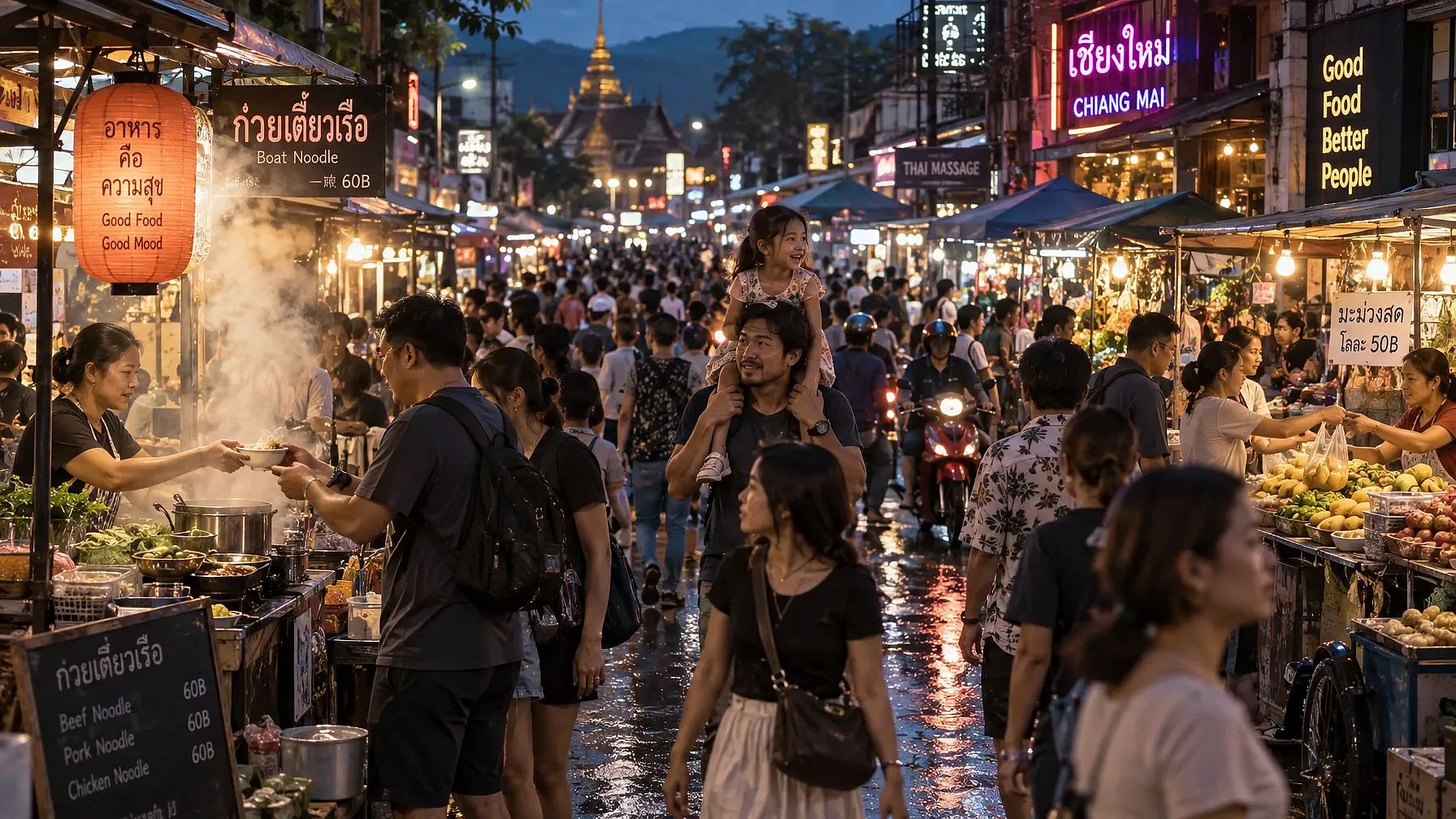
Prompt 2:密集人群场景,重复的人物形态
A photorealistic wide shot of a crowded night market street in Southeast Asia, packed with dozens of people walking in different directions, each with distinct clothing, height, and posture. Vendors lean over stalls stacked with produce and lit by strings of warm bulbs, their hands mid-gesture as they hand items to customers. In the foreground, a child sits on a parent's shoulders, both faces lit by the glow of a nearby food cart's steam. Reflections of neon signage ripple across wet pavement from a recent rain. Steam rises from a noodle stall, partially obscuring two figures mid-conversation. Background stalls recede into a blur of motion and color, with motorbikes weaving through gaps in the crowd. Every visible hand and face should maintain correct proportions even at a small scale. Lighting is mixed, warm tungsten stalls against cool blue ambient dusk light, creating complex color temperature interplay across skin tones.
GPT Image 2 结果:
GPT Image 2.5 结果:
Prompt 3:带有单个人物的反光和透明表面
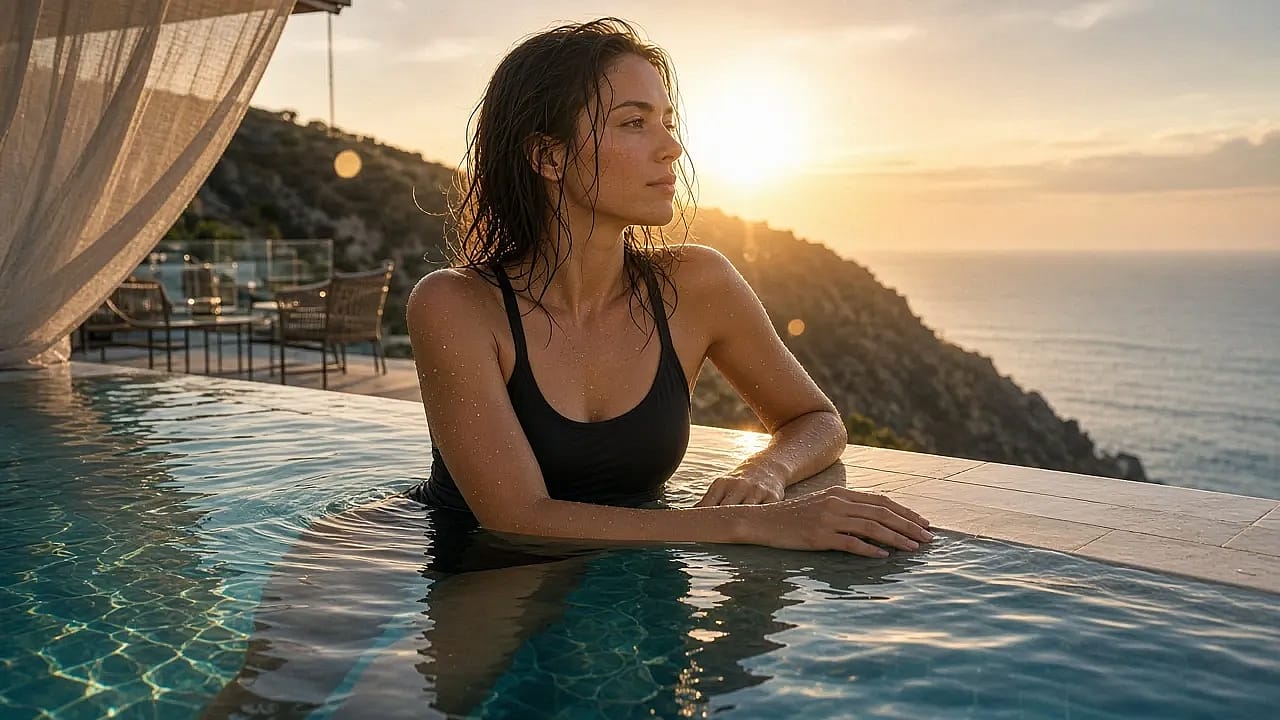
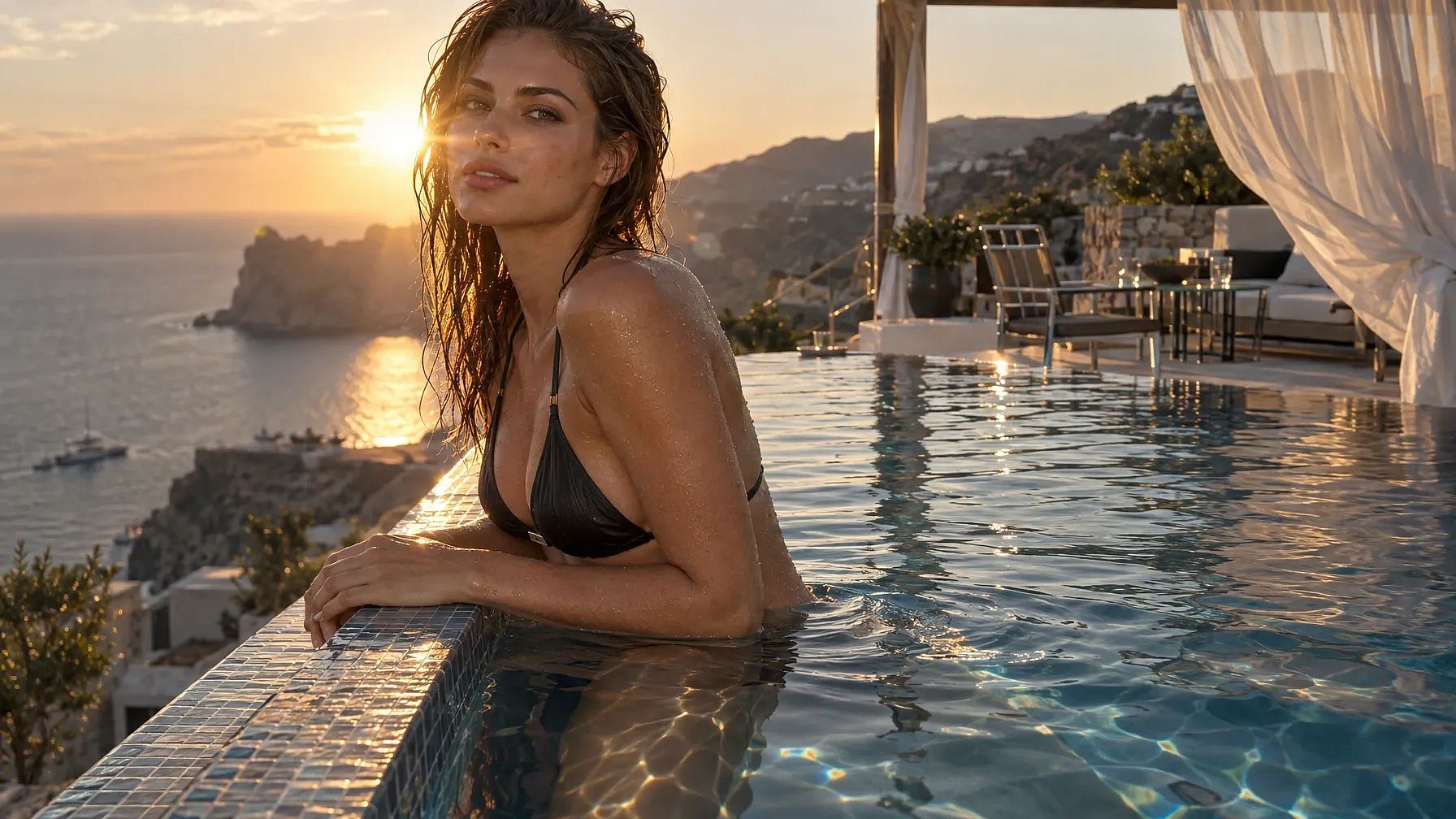
A photorealistic portrait of a swimmer standing waist-deep at the edge of an infinity pool overlooking a coastal cliffside at golden hour, water dripping down her arms and shoulders with individually visible droplets. Her reflection appears distorted but physically accurate in the pool's rippling surface, and a faint refraction line is visible where her legs submerge into the water. Behind her, the pool's edge blends into the ocean horizon, with a lounge area of glass tables and metal chairs catching scattered sun glare. A gauzy curtain from a nearby cabana billows in the wind, partially translucent with visible weave texture. Wet hair clings unevenly to her collarbone and neck, individual strands catching backlight. Her hands rest on the pool's tiled edge, fingers naturally relaxed, nails and knuckle creases rendered accurately. The sun sits low behind her, producing lens flare and a rim-light halo along her shoulders. Overall color grading should favor warm highlights against cool shadow tones, with accurate caustic light patterns dancing on the underwater tile.
GPT Image 2 结果:
GPT Image 2.5 结果:
GPT Image 2.5 对比 2.0:你该选哪一个?
把 GPT Image 2.5 设为你的默认模型。在 Flare 模式下它比 GPT Image 2 更快,成图效果更好,而上面提到的每项升级都建立在这个基础之上。
选择 Flare 用于你的日常工作:社交帖子、快速构思、一批广告尺寸,以及任何你打算先看看再重试的内容。
选择 Sunburst 当图片要呈现给客户时、当你需要透明背景时,或当你打算对同一张图片多次编辑时。
这几乎涵盖了所有需求。在 Flare 中起步,在 Sunburst 中收尾,只有当你有尚未迁移过来的旧 prompt 时,才需要用到 GPT Image 2。
常见问题
GPT Image 2 和 GPT Image 2.5 有什么区别?
GPT Image 2.5 提供 Flare 和 Sunburst 两种模式,而 GPT Image 2 只有一个模型和一种速度。GPT Image 2.5 还新增了内置透明背景功能,能在多轮编辑中保持画面不变,更贴近还原参考照片中的主体,并且像处理普通文本一样处理图表、示意图和标签。
GPT Image 2 和 GPT Image 2.5 分别是什么时候发布的?
OpenAI 于 2026 年 4 月 21 日发布了 GPT Image 2,并于 2026 年 9 月 8 日发布了 GPT Image 2.5。
Flare 和 Sunburst 有什么区别?
Flare 是适合日常创作和编辑的快速模式。OpenAI 表示,它能以一半的时间生成比 GPT Image 2 质量更高的图像。Sunburst 是顶级质量模式,运行速度中等,因此适合成品图像、精细化处理以及你打算多次编辑的图像。
GPT Image 2.5 能生成透明背景的图像吗?
可以。GPT Image 2.5 能将透明背景的图像保存为 PNG 或 WebP 文件。而使用 GPT Image 2 时,你得自己在另一个应用中去除背景。
我可以在 OpenArt 上试用 GPT Image 2 和 GPT Image 2.5 吗?
可以。这两个模型都在 OpenArt AI 图像生成器的模型菜单中,所以你可以用同一个 prompt 分别运行每个模型并对比结果。
在 OpenArt 上两个都试试
两种模型都在模型菜单中,位于 OpenArt 的 AI 图像生成器,因此你可以用同一个 prompt 分别跑一遍,留下你喜欢的那张图片。你还可以导入你保存好的配色和字体,来自 品牌套件 并复用你保存在其中的人脸 OpenArt 角色.