

Générateur de vidéos IA HappyHorse
Crée des vidéos cinématographiques avec audio synchronisé, mouvements réalistes et génération rapide grâce à HappyHorse AI sur OpenArt.

Créations de la communauté
Découvre comment les créateurs génèrent des scènes cinématographiques, des avatars parlants et des vidéos produit avec des mouvements fluides, un audio naturel et des visuels cohérents.
Principales fonctionnalités du générateur de vidéos IA HappyHorse
HappyHorse est un modèle vidéo IA de nouvelle génération disponible sur OpenArt, conçu pour générer des scènes complètes avec mouvement, son et rythme en une seule passe.
Génération native audio + vidéo
HappyHorse generates visuals and audio together instead of treating them as separate steps. Dialogue, sound effects, and motion are created in sync, which means lip movements match speech naturally and scenes feel cohesive without extra editing. For example, a talking character will not just move their lips randomly; the timing aligns with the generated voice. This removes the need for external voiceover tools or manual syncing, making it possible to create complete video clips directly from a single prompt.
Essaie maintenantGénération vidéo ultra-rapide
HappyHorse AI significantly reduces generation time compared to traditional video models. Short clips can be generated in seconds, and even high-quality videos render quickly enough to support rapid iteration. This allows you to test multiple ideas without waiting through long processing times. Instead of committing to one version, you can explore variations of the same scene, adjust motion or pacing, and refine outputs quickly. The speed makes it practical for workflows where multiple drafts are needed in a short time.
Essaie maintenantMouvement réaliste et cohérence temporelle
L'un des plus grands défis de la vidéo IA est de maintenir la cohérence d'une image à l'autre. HappyHorse produit un mouvement fluide où les personnages, les objets et les mouvements de caméra restent stables dans le temps. Les cheveux, les tissus et les éléments d'environnement bougent naturellement au lieu de scintiller ou de se déformer. Les mouvements de caméra comme les panoramiques, les zooms ou les lents rapprochements semblent continus plutôt qu'assemblés. Les scènes ressemblent ainsi à de vraies prises de vue plutôt qu'à une suite d'images vaguement reliées.
Essaie maintenantComment utiliser le générateur de vidéos HappyHorse AI
Génère des vidéos complètes avec mouvement et son dans un workflow simple.
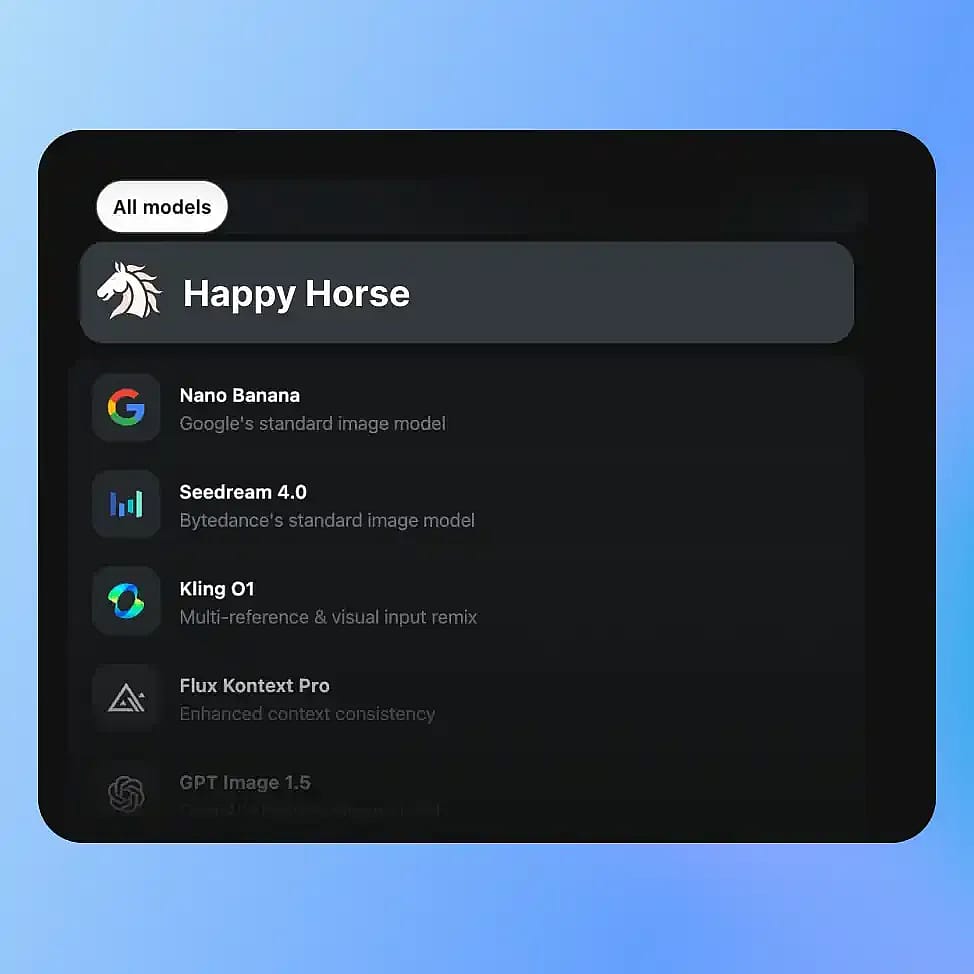
Choisis ton modèle
Va dans les outils Vidéo d'OpenArt et sélectionne ton mode : Texte-vers-Vidéo ou Image-vers-Vidéo, puis choisis HappyHorse parmi les modèles disponibles.
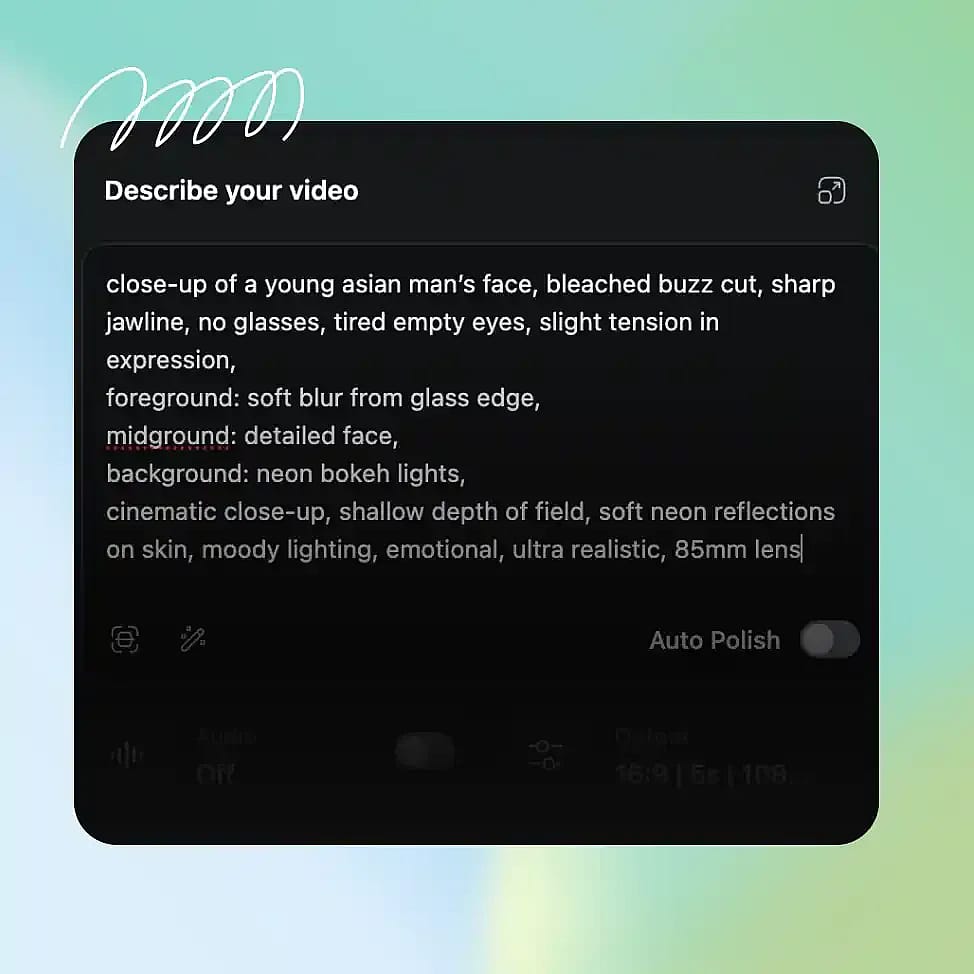
Décris ta scène
Rédige un prompt clair décrivant le sujet, l'environnement, le mouvement et tout dialogue ou son. Tu peux inclure des détails comme le mouvement de caméra ou l'ambiance pour guider le résultat.
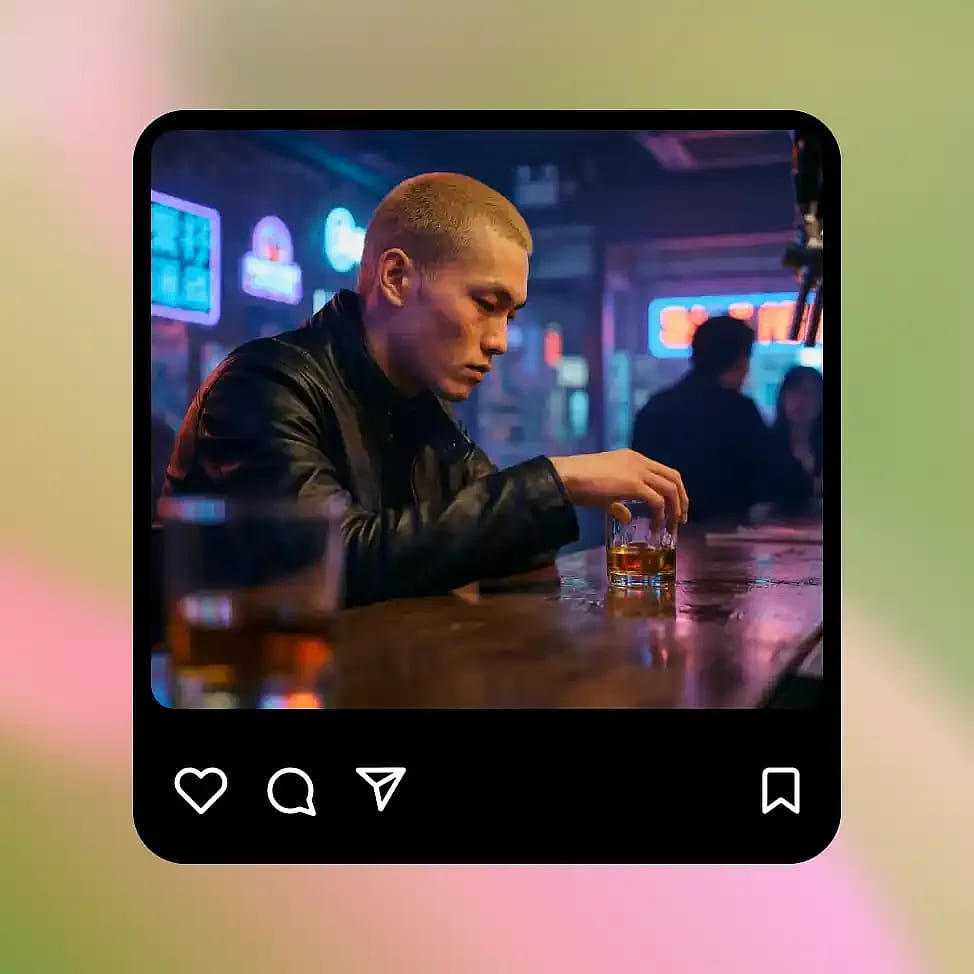
Générer et affiner
Génère ta vidéo et examine le mouvement, le timing et l'audio. Ajuste le prompt pour affiner des éléments précis comme le rythme, les mouvements de caméra ou la composition des scènes.
HappyHorse est conçu pour la création de vidéos cinématiques — plus rapide et plus complet
Crée des scènes narratives, des vidéos parlantes, des animations de produit et des concepts visuels avec un audio synchronisé, un mouvement réaliste et une itération rapide.
Génération de scènes réalistes et cinématographiques
HappyHorse is especially strong at generating short cinematic sequences with clear direction and movement. You can describe a scene like a character walking through a city at night with a slow camera push, and the model will produce motion that feels continuous and intentional. Lighting, camera movement, and pacing work together instead of feeling random. This makes it useful for creating short films, story moments, or visual narratives without needing traditional video production tools or editing timelines.
Essaie maintenantPersonnages et avatars parlants
You can generate videos of characters speaking with synchronized lip movement and matching audio. Instead of adding voice separately, HappyHorse produces speech and facial motion together, so the result feels more natural. This works well for explainer videos, presentations, or simple talking avatars. You can control tone and pacing through your prompt, and refine the output by adjusting dialogue or delivery style. Because everything is generated together, the final video does not require extra syncing or post-processing.
Essaie maintenantAnimation image-vers-vidéo
HappyHorse peut animer des images fixes ou des cadres pour en faire des scènes en mouvement tout en gardant le sujet ultra cohérent. Par exemple, tu peux prendre une image de produit ou un portrait de personnage et la transformer en une courte vidéo avec du mouvement, des déplacements de caméra et des effets d'environnement. La structure et l'identité d'origine restent stables, si bien que le sujet ne dérive ni ne se déforme d'un cadre à l'autre. C'est donc idéal pour transformer des assets statiques en contenu captivant sans les recréer de zéro ni les animer manuellement.
Essaie maintenantContenu vidéo produit et social
Tu peux créer de courtes vidéos produit ou des clips pour les réseaux sociaux en décrivant la scène et le mouvement souhaité. Par exemple, un produit posé sur une table avec un éclairage doux et une lente rotation peut être généré comme une vidéo complète à l'ambiance assortie. Comme la génération est rapide, tu peux tester plusieurs styles, angles et ambiances sans longs cycles de production. Il devient ainsi plus facile de produire un contenu vidéo cohérent pour tes campagnes ou tes plateformes sociales sans filmer chaque variante.
Essaie maintenantConseils pour de meilleurs résultats

Décris clairement le mouvement
Précise comment les sujets bougent ou comment la caméra se comporte pour obtenir des résultats plus maîtrisés et réalistes.

Précise l'intention audio dans tes prompts
Décris les dialogues ou le son pour que l'image et l'audio s'accordent naturellement dans le résultat.

Garde des scènes ciblées
Des scènes plus simples avec des sujets clairs produisent un mouvement plus stable et cohérent.

Itère par petites modifications
Ajuste un élément à la fois, comme le mouvement de caméra ou le rythme, pour affiner le résultat sans bouleverser toute la scène.
Décris clairement le mouvement
Précise comment les sujets bougent ou comment la caméra se comporte pour obtenir des résultats plus maîtrisés et réalistes.
Précise l'intention audio dans tes prompts
Décris les dialogues ou le son pour que l'image et l'audio s'accordent naturellement dans le résultat.
Garde des scènes ciblées
Des scènes plus simples avec des sujets clairs produisent un mouvement plus stable et cohérent.
Itère par petites modifications
Ajuste un élément à la fois, comme le mouvement de caméra ou le rythme, pour affiner le résultat sans bouleverser toute la scène.
Questions fréquentes Questions
Découvre les conseils d'experts sur le blog
Obtiens les insights dont tu as besoin. Nos experts partagent des astuces concrètes, décryptent les sujets brûlants et proposent des guides pratiques essentiels pour t'aider à créer, optimiser et passer à l'échelle.
En savoir plus
Construire des mondes par IA pour les créateurs de contenu : une approche plus cohérente du contenu IA
Comment créer des influenceurs IA qui deviennent viraux sur les réseaux sociaux
Comment créer des vidéos IA cinématiques multi-plans qui ressemblent à de vraies scènes
Adoré par les créateurs
J'ai essayé plein de plateformes IA... mais OpenArt reste le meilleur pour la création de personnages, la qualité image-vers-vidéo et la variété de modèles disponibles.
OpenArt propose une superbe palette d'outils IA... une fois que tu maîtrises les fonctionnalités, les possibilités créatives sont incroyables — et leur équipe d'assistance est exceptionnelle.
OpenArt est une plateforme IA très polyvalente avec de nombreux modèles d'image et de vidéo, une création de personnages cohérente et de puissants outils d'édition.
Des outils IA utiles réunis au même endroit — génération d'images et de vidéos, édition et bien plus… sans avoir besoin de plusieurs abonnements.
Le service client est toujours rapide et serviable... et la plateforme ne cesse de s'améliorer avec de nouvelles fonctionnalités et de nouveaux outils.
J'ai essayé plein de plateformes IA... mais OpenArt reste le meilleur pour la création de personnages, la qualité image-vers-vidéo et la variété de modèles disponibles.
OpenArt propose une superbe palette d'outils IA... une fois que tu maîtrises les fonctionnalités, les possibilités créatives sont incroyables — et leur équipe d'assistance est exceptionnelle.
OpenArt est une plateforme IA très polyvalente avec de nombreux modèles d'image et de vidéo, une création de personnages cohérente et de puissants outils d'édition.
Des outils IA utiles réunis au même endroit — génération d'images et de vidéos, édition et bien plus… sans avoir besoin de plusieurs abonnements.
Le service client est toujours rapide et serviable... et la plateforme ne cesse de s'améliorer avec de nouvelles fonctionnalités et de nouveaux outils.
J'ai essayé plein de plateformes IA... mais OpenArt reste le meilleur pour la création de personnages, la qualité image-vers-vidéo et la variété de modèles disponibles.
OpenArt propose une superbe palette d'outils IA... une fois que tu maîtrises les fonctionnalités, les possibilités créatives sont incroyables — et leur équipe d'assistance est exceptionnelle.
OpenArt est une plateforme IA très polyvalente avec de nombreux modèles d'image et de vidéo, une création de personnages cohérente et de puissants outils d'édition.
Des outils IA utiles réunis au même endroit — génération d'images et de vidéos, édition et bien plus… sans avoir besoin de plusieurs abonnements.
Le service client est toujours rapide et serviable... et la plateforme ne cesse de s'améliorer avec de nouvelles fonctionnalités et de nouveaux outils.
Avec autant de plateformes IA disponibles, OpenArt s'est démarqué comme un choix exceptionnel — je le recommanderais à tous les créateurs.
Cette plateforme réunit tout ce dont tu as besoin pour créer du contenu avec l'IA : images, vidéos, personnages, audio et plusieurs modèles d'IA au même endroit.
OpenArt repousse les limites de la création vidéo par IA... et il est clair que l'équipe est déterminée à améliorer l'expérience des créateurs.
J'ai réalisé mon premier clip musical IA avec OpenArt... et leur équipe support a été la meilleure aide que j'aie jamais connue.
Je suis très satisfait du support : mon problème a été résolu rapidement et l'équipe a rendu tout le processus facile.
Avec autant de plateformes IA disponibles, OpenArt s'est démarqué comme un choix exceptionnel — je le recommanderais à tous les créateurs.
Cette plateforme réunit tout ce dont tu as besoin pour créer du contenu avec l'IA : images, vidéos, personnages, audio et plusieurs modèles d'IA au même endroit.
OpenArt repousse les limites de la création vidéo par IA... et il est clair que l'équipe est déterminée à améliorer l'expérience des créateurs.
J'ai réalisé mon premier clip musical IA avec OpenArt... et leur équipe support a été la meilleure aide que j'aie jamais connue.
Je suis très satisfait du support : mon problème a été résolu rapidement et l'équipe a rendu tout le processus facile.
Avec autant de plateformes IA disponibles, OpenArt s'est démarqué comme un choix exceptionnel — je le recommanderais à tous les créateurs.
Cette plateforme réunit tout ce dont tu as besoin pour créer du contenu avec l'IA : images, vidéos, personnages, audio et plusieurs modèles d'IA au même endroit.
OpenArt repousse les limites de la création vidéo par IA... et il est clair que l'équipe est déterminée à améliorer l'expérience des créateurs.
J'ai réalisé mon premier clip musical IA avec OpenArt... et leur équipe support a été la meilleure aide que j'aie jamais connue.
Je suis très satisfait du support : mon problème a été résolu rapidement et l'équipe a rendu tout le processus facile.
Crée sans limites
Rejoins des milliers de créateurs qui utilisent OpenArt pour générer des images, des vidéos et bien plus — le tout sur une seule plateforme.
Commence gratuitement →