

 ChatGPT
 Perplexity
 Claude
 Gemini
트렌디한 인물 사진을 위한 최고의 Gemini AI 포토 프롬프트
프롬프트 41개. 이 글은 그게 전부입니다. Gemini AI 사진 프롬프트를 복사해 붙여넣고 완성된 인물 사진을 얻으러 왔다면 아래 라이브러리로 바로 넘어가세요. 어떤 프롬프트는 프로 같은 편집을 만들고 어떤 프롬프트는 플라스틱 같은 낯선 얼굴을 주는 이유가 궁금하다면, 라이브러리 앞의 대표 분석과 시즌별 섹션에서 프롬프트의 각 줄이 실제로 무엇을 하는지 보여드립니다.
시즌별 섹션은 사람들이 가장 많이 찾는 계절 편집을 다룹니다: 할로윈 코스튬 셀피와 VHS 호러 트렌드, 추수감사절 가족 식사 사진, 그리고 선물 상자 인물 사진부터 커플룩 잠옷 가족 사진까지 AI 크리스마스 포토슈팅.
여기 모든 기능은 구글의 Gemini 이미지 모델로 구동되며, 다음과 같은 특징이 있습니다 OpenArt GPT Image 2.5, Seedream, 그리고 완전한 사진 편집기를 하나의 작업 공간에서 Nano Banana라는 이름으로 제공합니다. 읽기 시작부터 완성된 사진까지 약 2분.
Gemini AI 사진 프롬프트란 무엇인가요?
Gemini AI 사진 프롬프트는 Google의 Gemini 이미지 모델에 새 사진을 생성하거나 기존 사진을 편집하도록 주는 일상 언어 지시문입니다. Gemini의 이미지 쪽은 아마 한 번쯤 봤을 별명으로 통합니다. 바로 Nano Banana입니다. Google은 이제 이 이름을 공개적으로 쓰고 있으며, 가장 뛰어난 버전인 Nano Banana Pro가 사람들이 "Gemini AI 사진"이라고 말할 때 떠올리는 모델입니다.
이런 프롬프트는 두 가지 중 하나를 합니다. 생성: 텍스트 설명에서 완전히 새로운 사진을 만들어냅니다. 시네마틱 거리 인물 사진이나 아우라 팜 감성 샷처럼요. 또는 편집: 실제 사진에서 시작해 나머지는 그대로 두고 원하는 부분만 바꿉니다. 예를 들어 "얼굴은 정확히 유지하고 90년대 필름 인물 사진 스타일로 리스타일링"처럼요. 편집은 Gemini가 가장 잘하는 영역이며, 유행하던 인물 사진 열풍이 바로 이 모델에서 시작된 이유이기도 합니다.
OpenArt에서 Gemini 스타일 프롬프트 실행하기
중요한 부분이니 솔직하게 말씀드립니다. OpenArt는 Gemini가 아니며 Google이 만든 것도 아닙니다. OpenArt가 제공하는 것은 Gemini 이미지 모델에 대한 직접 접근입니다: Nano Banana 2.1, Nano Banana Pro, Nano Banana 2 Lite가 모두 작업 공간에 있습니다. "Gemini AI 사진"용으로 작성된 어떤 프롬프트든 OpenArt 안의 바로 그 모델에서 실행됩니다.
선택 Nano Banana 2 Lite 빠른 초안용, Nano Banana 2.1 더 선명한 이미지 내 텍스트로 안정적인 일상 작업을 원한다면, 가장 깔끔하고 정체성이 일관된 결과를 원한다면 Nano Banana Pro를 사용하세요. GPT Image 2.5, Seedream 5.0 Pro, 그리고 완전한 AI 사진 편집기 그 옆에 나란히 놓입니다.
Gemini 사진 프롬프트가 입소문을 타는 이유
Gemini 이미지 모델에 대한 초기 보도는 대부분 생성에 초점을 맞췄습니다. 설명을 입력하면 새 이미지를 얻는 방식이죠. 하지만 실제로 퍼져나간 포맷은 복사할 수 있도록 만들어진 것들이었습니다.
입소문을 타는 Gemini 사진 프롬프트에는 특정한 형태가 있습니다. 피사체, 스타일, 조명, 무드, 화면 비율을 명시하고, 반드시 유지해야 할 요소를 고정해 둡니다. 이 레시피는 충분히 완성도가 높아서, 한 사람의 프롬프트가 서로 다른 천 명이 올린 천 장의 사진에 그대로 통합니다.
개인 피드에서는 생성보다 편집이 이기는데, 이유는 간단합니다. 모르는 사람의 생성 이미지는 그냥 스크롤을 넘기게 되지만, 편집된 이미지는 당신 소프트 글램 인물 사진, 카페의 골든아워 샷, 복원된 어린 시절 사진 등으로 만들면 저장하고 공유하고 싶어집니다.
편집은 더 까다로운 작업입니다. 자연스럽게 편집하려면 실제 얼굴은 그대로 두면서 스타일, 의상, 배경을 완전히 바꿔야 합니다. 성능이 떨어지는 도구는 이 후반 작업에서 실패해 닮은 사람만 만들어냅니다. Gemini의 이미지 모델은 과감한 리스타일링에도 아이덴티티를 유지하며, 화제가 된 인물 사진들은 바로 이 능력에 달려 있습니다.
순수한 생성 기능만 원한다면, 저희의 최고의 Nano Banana 프롬프트 가이드에서는 이미지를 처음부터 만들어 바이럴로 만드는 방법을 다룹니다. 이 글에서는 두 가지 모두를 다루되, 요즘 사람들이 따라 하고 있는 인기 인물 사진 편집에 초점을 맞춥니다.
OpenArt에서 실행하는 방법
기술적인 지식은 전혀 필요 없어요. 사진을 업로드하고, Gemini 모델을 고르고, 프롬프트를 붙여넣고, 생성하세요.
프롬프트를 편집하려면 여세요 이미지 생성 또는 이미지 만들기 워크스페이스 안에서 진행하세요. prompt 입력창 옆의 이미지 업로드 버튼으로 원본 사진을 추가하면 됩니다. 이 업로드 단계가 가장 중요합니다. 모델은 여러분이 제공한 사진을 편집하기 때문에, 선명하고 조명이 잘 든 원본일수록 더 깔끔한 결과가 나옵니다.
프롬프트 박스에서 모델 이름을 클릭하고, 일상 작업에는 Nano Banana 2.1을, 가장 일관된 결과에는 Nano Banana Pro를 선택하세요. 아래 프롬프트를 붙여넣고 생성하면 됩니다. 그다음 에디터에서 세밀하게 다듬을 수 있습니다, 인쇄용 4K로 업스케일, 또는 배경을 교체하세요. 신규 계정은 크레딧과 함께 무료로 시작하므로, 플랜을 고르기 전에 몇 가지를 먼저 테스트해 볼 수 있습니다.
순수 생성 작업이라면 업로드는 건너뛰고 생성용 prompt를 바로 붙여넣으세요.
인기 소녀 인물 사진
지금 가장 많이 따라 하는 Gemini 사진 포맷입니다. 피드를 가득 채운 "트렌디한 소녀 따라 하기" 검색과도 딱 맞아떨어집니다. 평범한 셀카를 부드러운 하이라이트, 촉촉한 피부, 따뜻한 버터플라이 글로우, 감각적인 스타일링으로 프로 촬영처럼 세련된 소프트 글램 포트레이트로 재탄생시켜 보세요.
High-fidelity studio portrait of a young Asian woman with pastel pink
hair in a side braid. She wears a cream polka-dot lace top under a pink
knit cardigan, accessorized with layered gold necklaces. Soft rosy
makeup, glossy lips, direct gaze. Pure white background, high-key
diffuse lighting, hyper-realistic fashion photography, 8k resolution.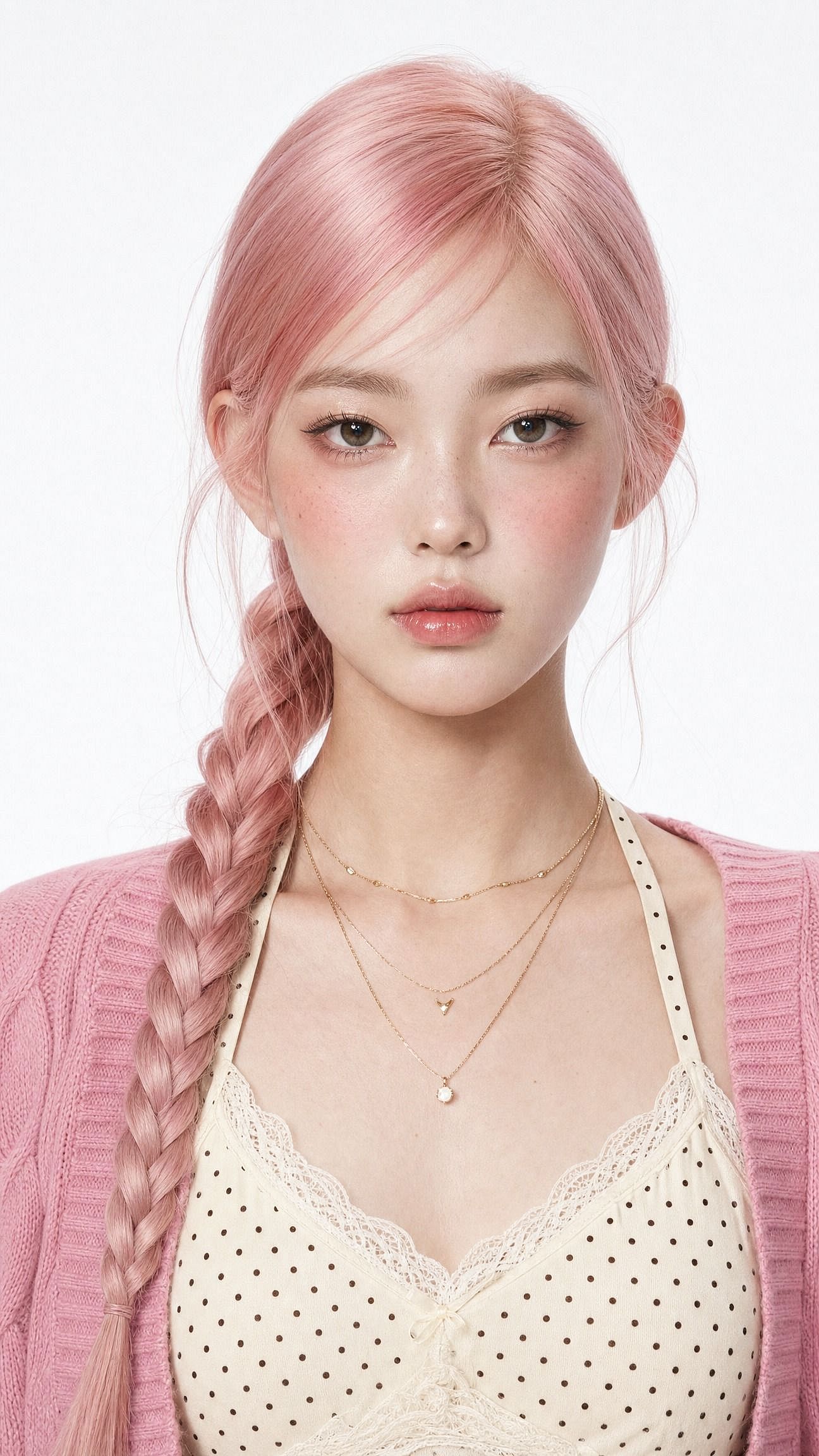
단어 하나만 바꿔도 전체 느낌이 달라집니다. "soft-glam"을 "saree ethnic elegance"로 바꾸면 전통 룩이, "clean Instagram DP, minimalist studio backdrop"으로 바꾸면 프로필 사진이 됩니다.
핵심 역할을 하는 문장은 첫 번째입니다: 같은 얼굴을 유지하고 원래의 정체성을 보존할 것. 이게 없으면 모델이 얼굴까지 나머지 전부와 함께 새로 그려버려서, 예뻐진 당신이 아니라 예쁜 낯선 사람이 나오게 됩니다.
시네마틱 소년 인물 사진
이 트렌드의 남성 버전은 사람들이 반복해서 따라 하는 두 가지 룩으로 나뉩니다. 영화 같은 스트리트 스타일과 핀터레스트 감성의 카페 골든아워 샷이죠. 이 prompt는 스트리트 버전을 담았습니다.
Edit the uploaded photo. Keep the same face, features, and expression
exactly, preserve the original identity. Restyle into a cinematic urban
street portrait: moody overcast light, teal-and-orange color grade,
blurred city street background, confident casual streetwear, shallow
depth of field, film-still mood, vertical 4:5 frame. Keep skin texture
natural and true to life.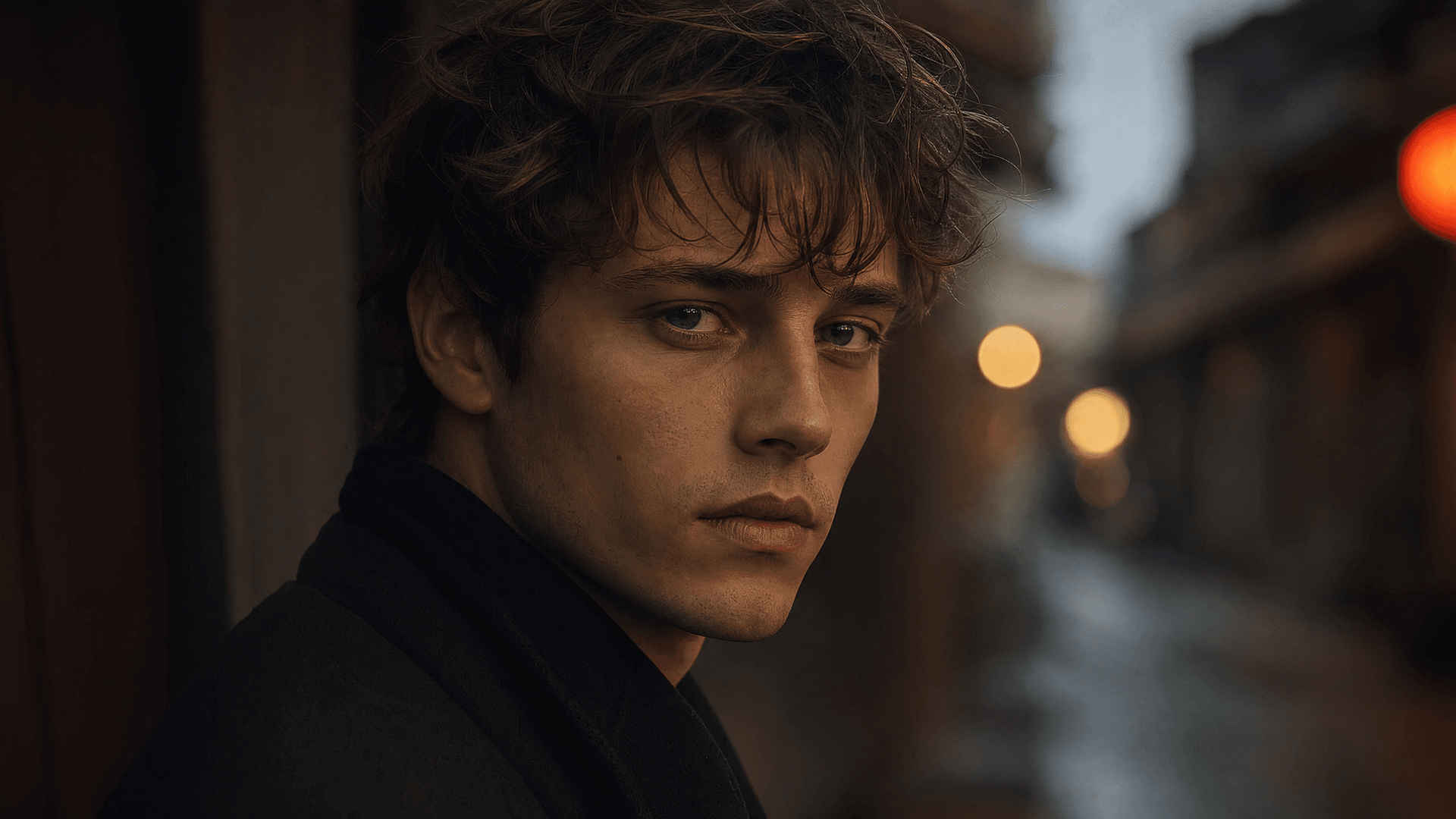
시네마틱 커플
커플 편집은 가장 큰 하위 트렌드 중 하나이자, 가장 어려운 작업입니다. 모델이 두 얼굴을 동시에 지켜내야 하기 때문이죠.
두 사람의 평범한 휴대폰 사진을 업로드하면 사진작가가 연출한 듯한 세트를 얻을 수 있습니다:
Edit the uploaded photo of two people. Keep both faces, skin tones, and
expressions exactly as they are, preserve both identities. Do not merge
or alter their features. Restyle into a cinematic couple portrait:
coordinated neutral-tone outfits, soft directional lighting, a blurred
city-evening background, natural closeness, warm film color grade,
shallow depth of field, magazine-cover quality.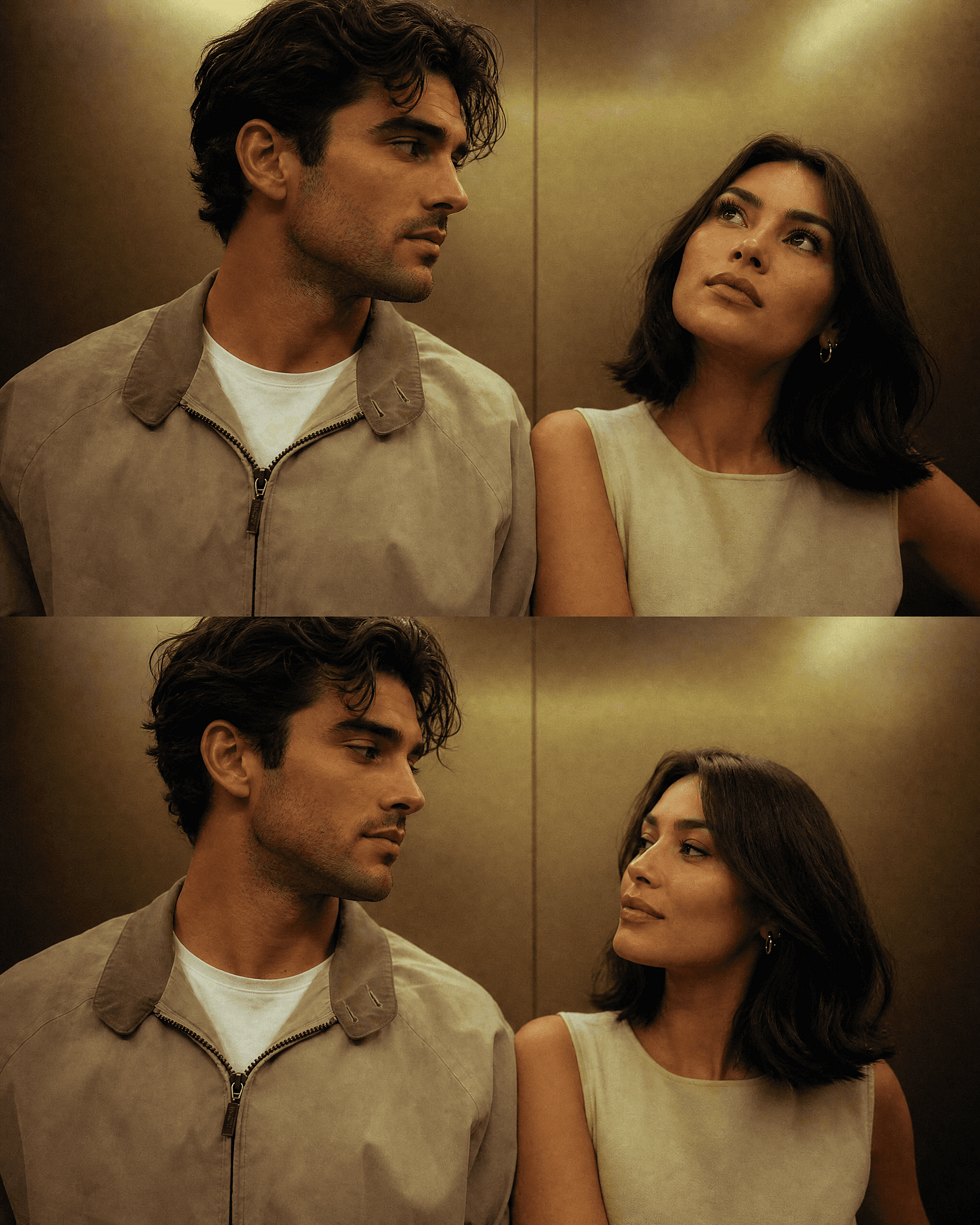
시즌 버전을 원한다면 두 사람의 얼굴은 그대로 두고 배경만 바꾸세요. 아래 할로윈과 크리스마스 섹션에는 바로 쓸 수 있는 커플 프롬프트가 있으며, 같은 원본 사진으로 어떤 배경을 돌려도 두 사람 모두 알아볼 수 있게 유지됩니다.
3D 피규어
이 트렌드를 주류로 끌어올린 포맷으로, 지금도 여전히 잘 통합니다. 실제 인물이 책상 위나 소매 포장 안의 작은 수집용 피규어로 변신하는 방식이죠. '내가 아는 사람'과 '선반 위 장난감'의 대비가 그 자체로 시선을 끌기 때문에 피드에서 즉시 눈에 띕니다.
Edit the uploaded photo. Turn the person into a realistic 3D collectible
figure standing on a wooden desk next to a keyboard and a coffee mug for
scale. Keep their face, hairstyle, and outfit recognizable. Add a subtle
plastic-model texture, detailed base, soft desk lighting, shallow depth
of field, believable miniature scale, vertical 4:5 social frame.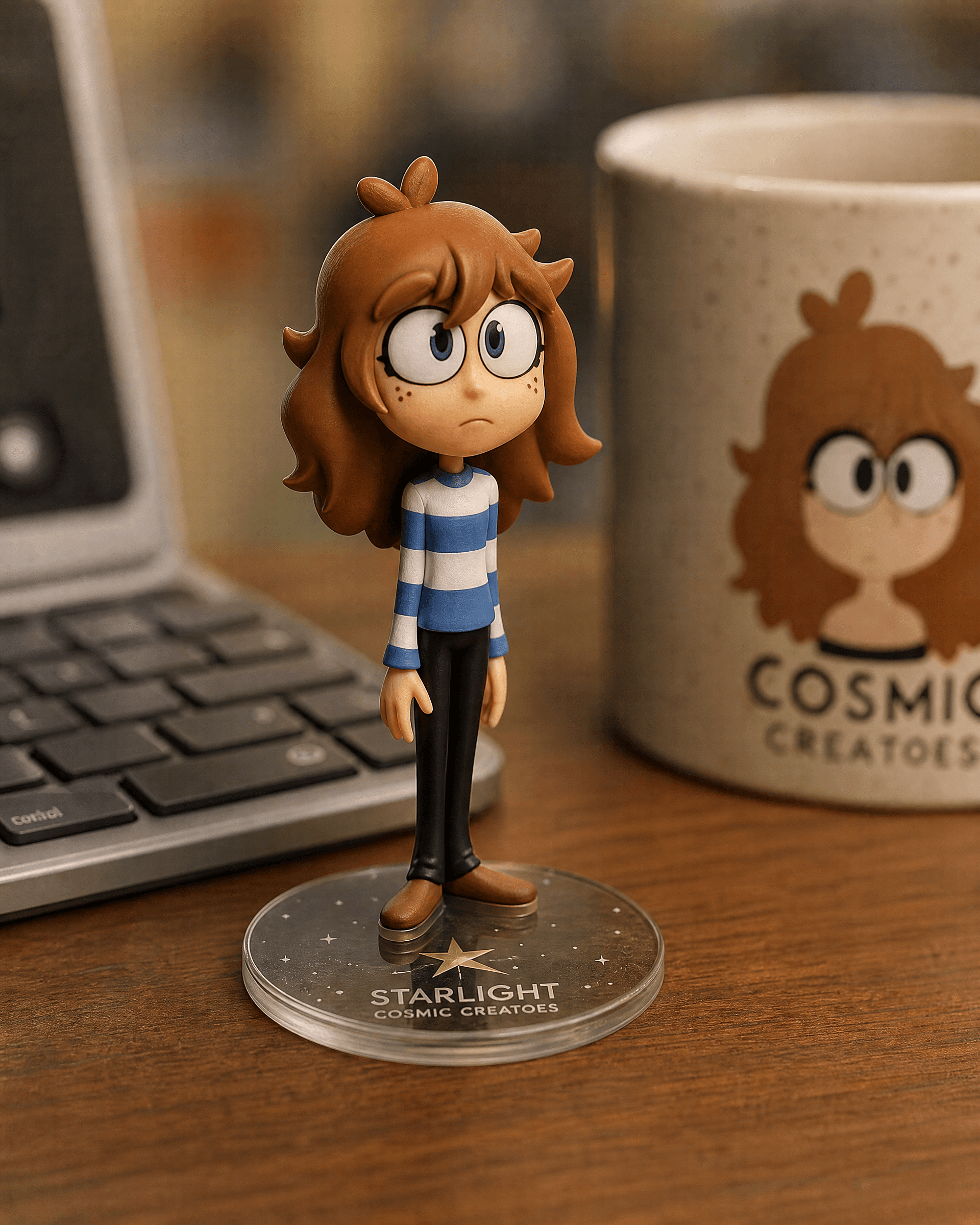
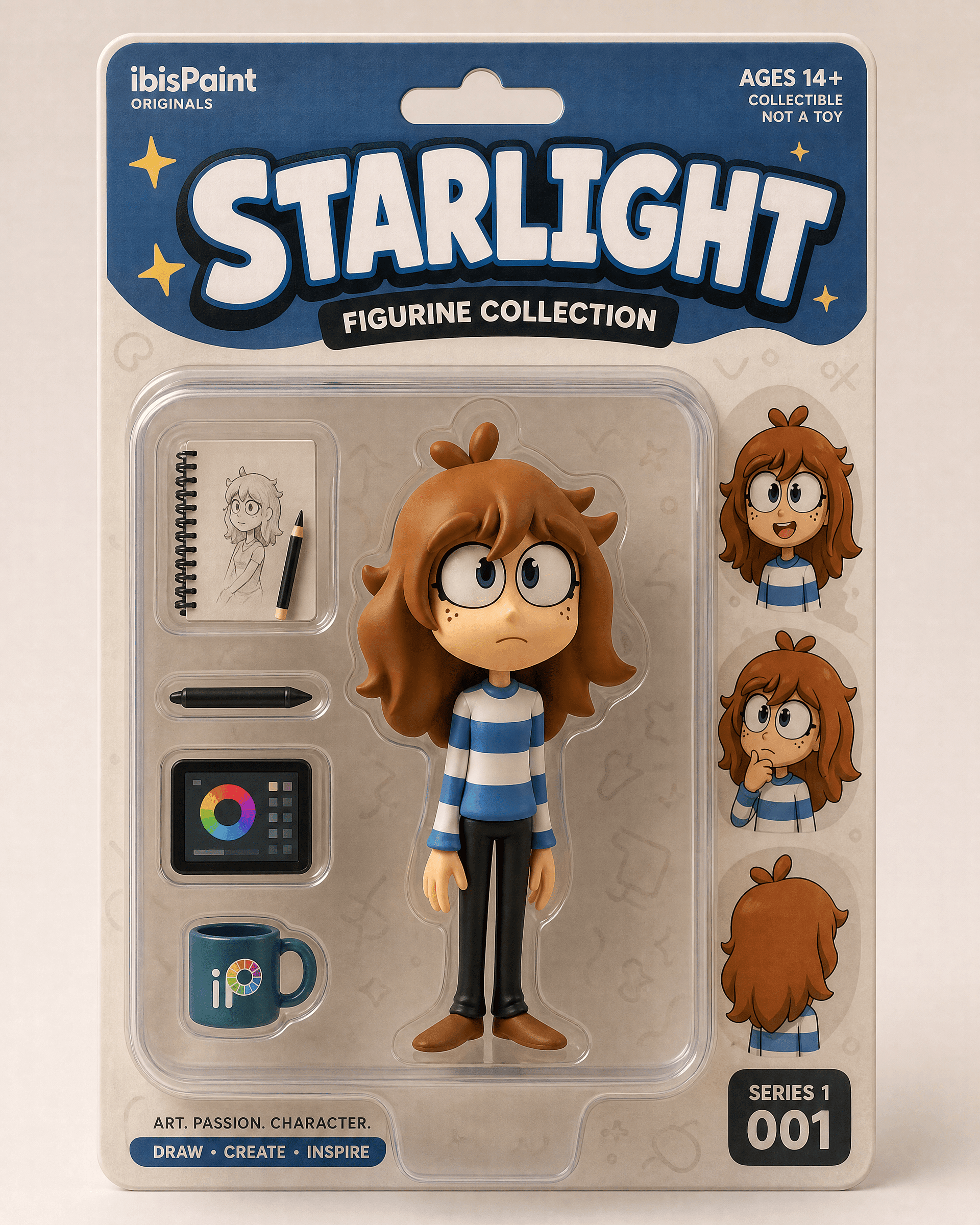
리테일 패키지 공개용 박스 버전:
Edit the uploaded photo into a boxed action figure. Keep the person's
face and style recognizable. Place the figure inside a clear blister
package with a printed backing card, bold product name at the top, small
accessory icons, realistic toy photography, studio lighting, collectible
designer-toy aesthetic.
선명한 전신 또는 상반신 사진으로 시작하세요. 책상 버전은 조용하고 그럴듯한 편집처럼 보이고, 박스 버전은 공개하는 듯한 느낌을 줍니다.
오래된 사진 복원 및 컬러화 편집
복원은 이 모델들이 하는 일 중 가장 유용하면서도 가장 잔재주 같지 않은 작업입니다. 스크래치를 없애고, 바랜 스캔을 선명하게 하며, 흑백 사진에 색을 입혀 줍니다. 많은 사람들이 바로 이 작업을 위해, 대개 가족 프로젝트나 기념일 선물용으로 Gemini 편집기를 처음 열어 봅니다.
Edit the uploaded old photo. Restore it: remove scratches, dust,
creases, and water damage, repair torn areas, sharpen soft details, and
correct fading. Keep every face and feature true to the original, no
reinvented details. Preserve the original composition and era-accurate
clothing. Natural, archival-quality restoration.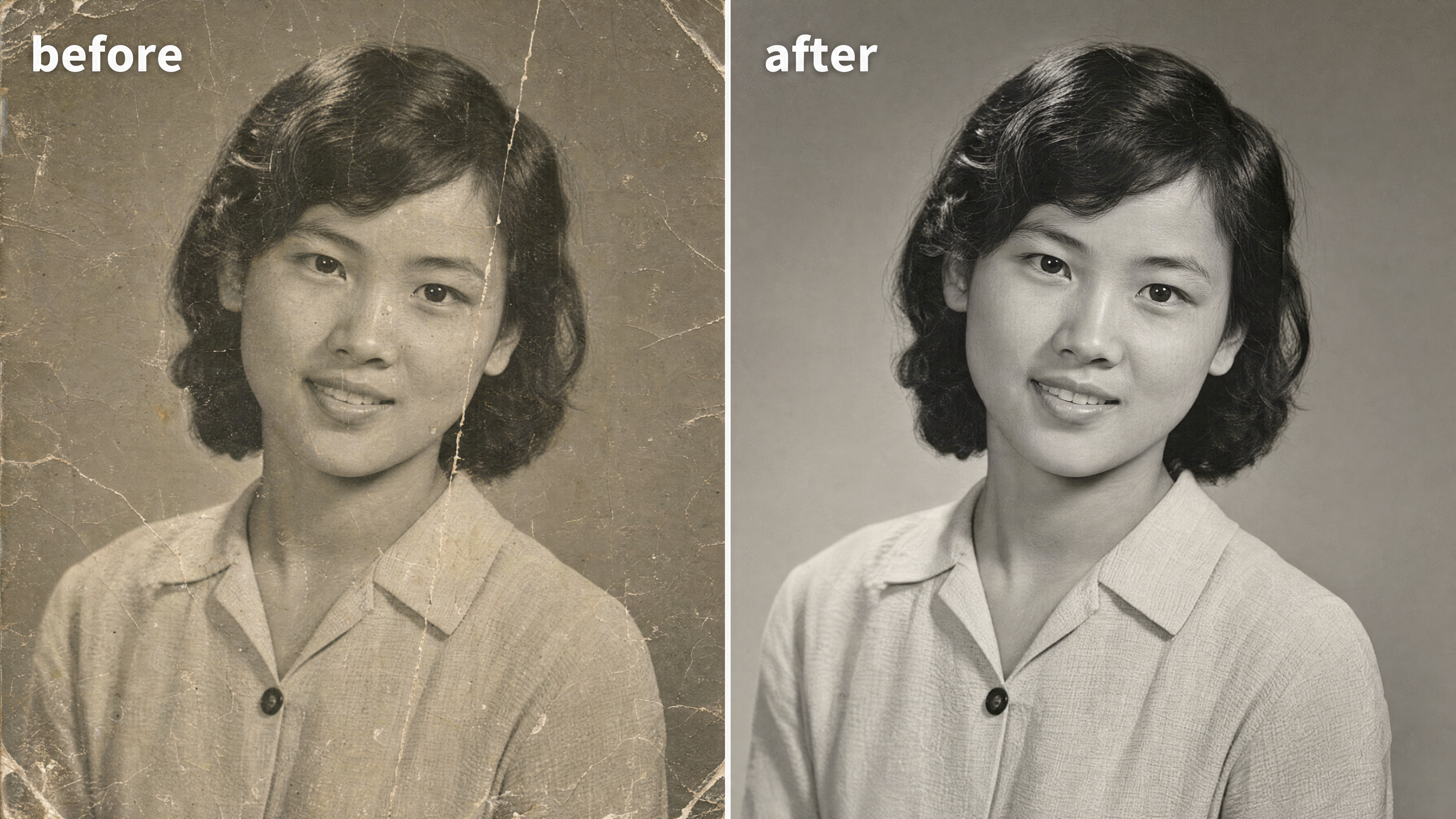
흑백 사진을 컬러로 바꾸려면 한 줄만 추가하세요:
After restoring the photo, add realistic, natural color: era-accurate
skin tones, believable fabric colors, soft natural lighting. Keep it
subtle and true to life, not oversaturated. Do not change any faces or
features.
이 편집의 핵심은 "원본에 충실하게"입니다. 흐릿한 친척 사진에 모델이 새로운 얼굴을 지어내면 복원은 실패합니다. 여러분은 포토 에디터에서 결과물을 복원하고 다듬기 그런 다음, 이후에 인쇄 해상도로 업스케일 프레이밍용.
Y2K 스타일
Y2K 플래시 룩 은(는) 이번 달 레트로 트렌드를 이끌고 있습니다: 강한 직사광 플래시, 살짝 바랜 색감, 2000년대 초 디지털 카메라 특유의 그레인, 파티 스냅 같은 분위기. 곧바로 노스탤지어가 느껴집니다. 단독 인물 사진이든 단체 사진이든 잘 어울립니다.
Edit the uploaded photo. Keep the same face, features, and expression
exactly, preserve the original identity. Restyle into a Y2K early-2000s
digital-camera look: harsh direct on-camera flash, slightly washed cool
color, fine digital noise, candid party-photo framing, low-fi nostalgic
mood, authentic 2003 point-and-shoot aesthetic. Keep skin texture
natural.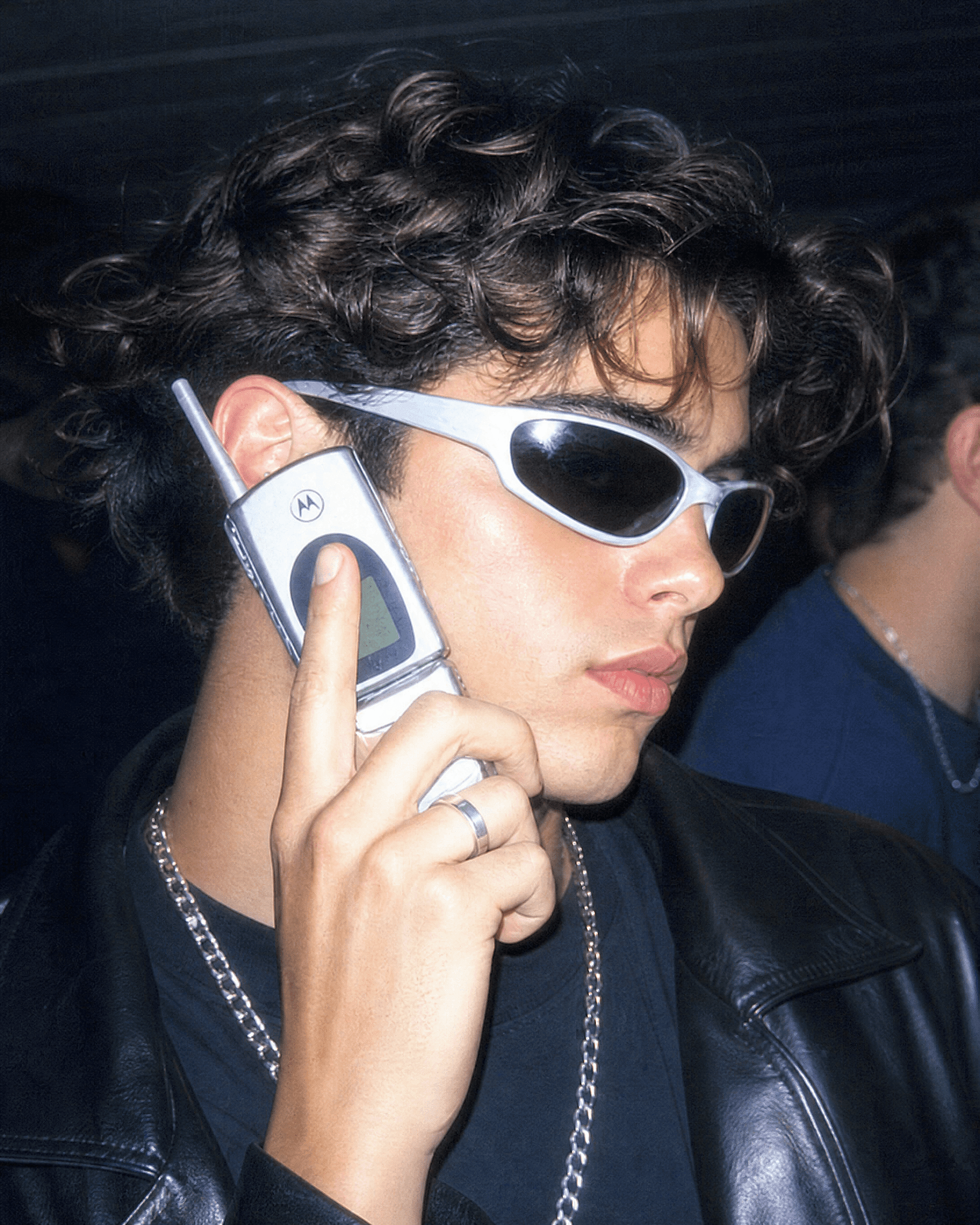
연대를 지정하면 더 강력해집니다. "1990년대 필름 카메라 인물 사진, 따뜻한 그레인, 부드러운 플래시"는 한층 부드러운 레트로 느낌을 줍니다. "90년대 시트콤 포스터, 밝은 스튜디오 조명, 상단의 굵은 타이틀 텍스트"는 사람들이 TV 출연진 사진처럼 액자에 넣는 단체 사진 버전을 만들어 줍니다.
아우라 팜 감성의 인물 사진
오라 파밍(Aura-farming)은 요즘 커뮤니티에서 가장 핫한 감성입니다. 극적인 역광, 컬러 조명이 감싸는 은은한 테두리 빛, 자신감 넘치는 로우 앵글 포즈, 무드 가득한 분위기의 배경. 영화 같으면서도 조금은 실물보다 웅장하게 느껴지는 인물 사진을 원할 때 찾게 되는 스타일이죠.
Edit the uploaded photo. Keep the same face and identity exactly.
Restyle into an aura-farm aesthetic portrait: dramatic colored rim light
glowing around the subject, moody dark atmospheric background, soft
volumetric haze, confident low-angle framing, rich cinematic color
grade, subtle particles in the air, high-detail vertical portrait. Keep
skin texture natural and true to life.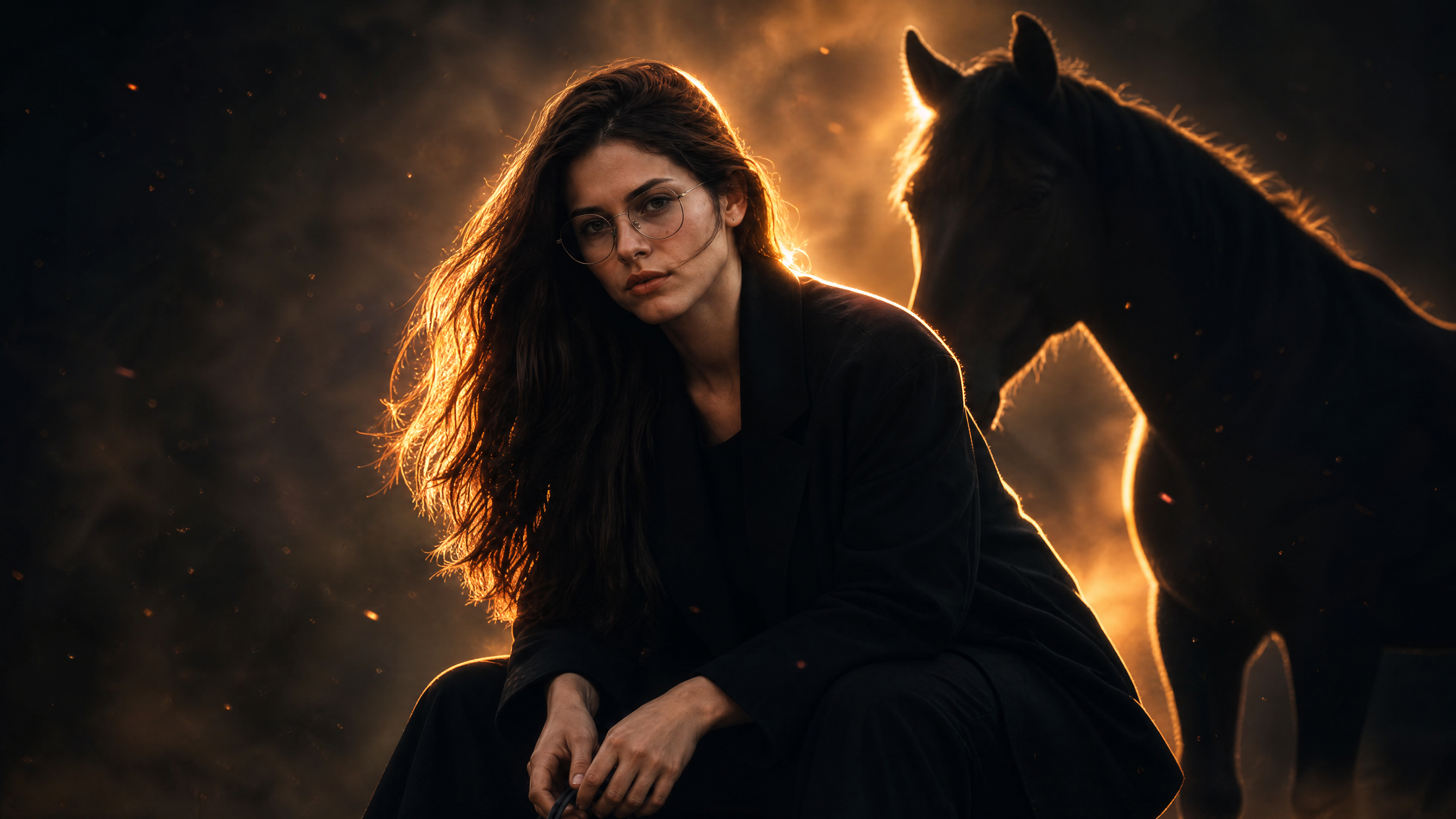
림 라이트 색상을 바꿔 분위기를 연출하세요. 차분하고 신비로운 느낌엔 쿨한 블루, 영웅적인 느낌엔 따뜻한 앰버, 하이패션 느낌엔 마젠타를 활용하세요.
할로윈 사진 프롬프트
매년 10월이면 AI 할로윈 트렌드가 피드를 점령합니다. 사람들은 셀카 한 장을 올려 코스튬 인물 사진, 커플 화보, 혹은 자신이 주인공인 파운드 푸티지 호러 스틸컷을 받아봅니다. 아이디어는 간단합니다. 진짜 얼굴은 그대로 두고 코스튬, 메이크업, 배경만 바꾸는 것이죠. 의상과 장면은 완전히 달라져도 알아볼 수 있는 모습은 유지되기 때문에, 바로 Gemini의 이미지 모델이 가장 잘하는 작업에 딱 맞습니다.
할로윈 코스튬 셀카
이 트렌드의 기본 형식이자 대부분이 가장 먼저 찾는 것입니다. 셀피를 업로드하고 코스튬을 지정하면 스타일링된 할로윈 포토슈팅 같은 인물 사진이 나옵니다.
Edit the uploaded photo. Keep the same face, features, and expression
exactly, preserve the original identity. Restyle into an elegant vampire
Halloween portrait: deep burgundy velvet outfit with a high lace collar,
dark berry lips, subtle pale makeup, candlelit gothic interior, cool
moonlight from an arched window, faint mist, carved pumpkins softly
blurred in the background, cinematic color grade, vertical 4:5 frame.
Keep skin texture natural and true to life.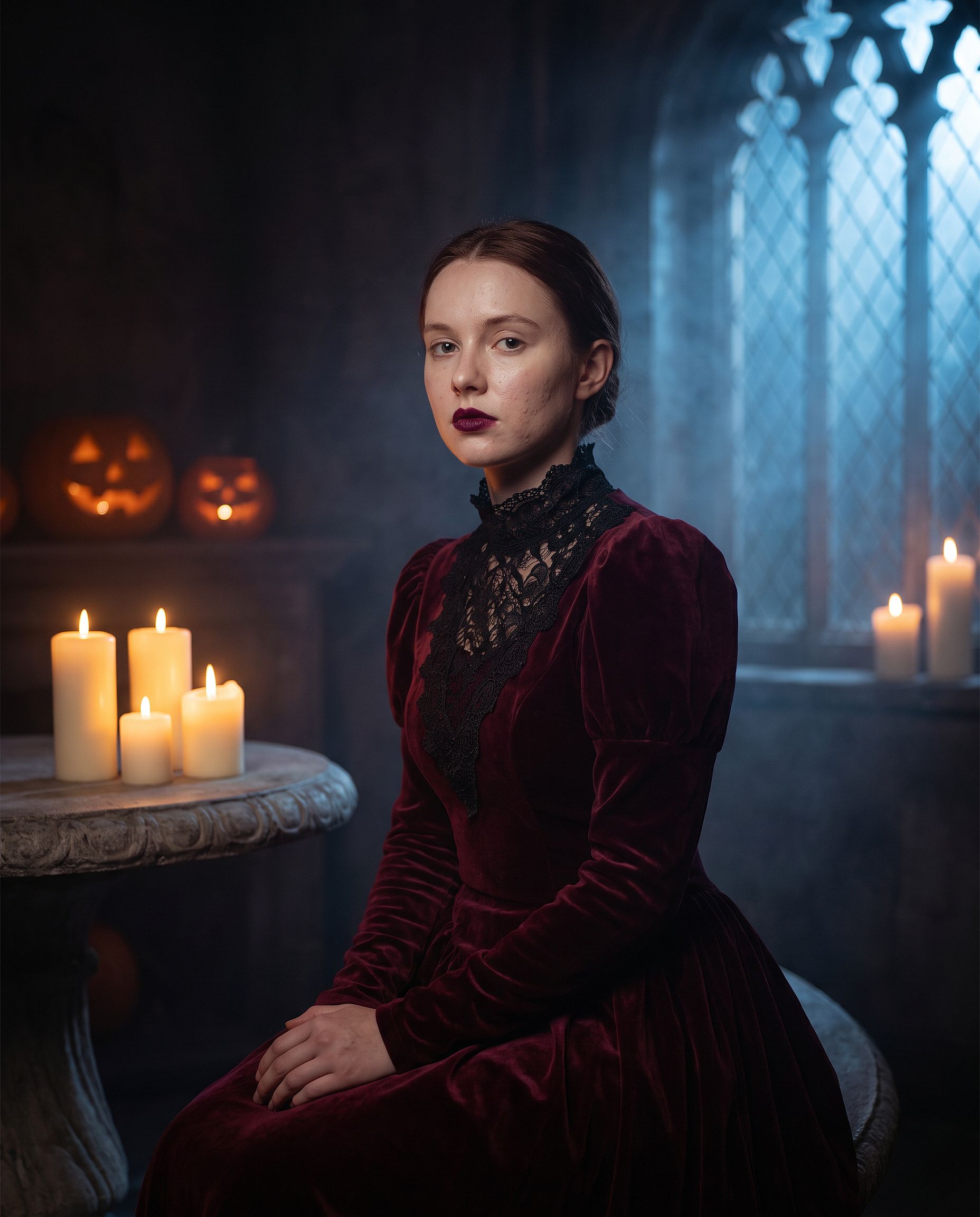
"elegant vampire"를 원하는 어떤 코스튬으로든 바꿔보세요. 마녀, 좀비, 유령 신부, 해골, 혹은 고전 영화 속 괴물까지. 처음 두 줄은 그대로 두세요. 코스튬 메이크업은 프롬프트가 느슨하면 모델이 얼굴 전체를 다시 그리게 되는 지점이라, 다른 어떤 편집보다 정체성을 지정하는 문장이 더 중요합니다.
VHS 할로윈 트렌드
가장 많이 따라 하는 할로윈 AI 트렌드 포맷입니다. 당신의 사진을 90년대 거친 캠코더로 찍은 슬래셔 영화 스틸컷으로 바꾸고, 배경에는 그림자 같은 형체가 숨어 있습니다. 테이프 노이즈와 타임스탬프가 대부분의 분위기를 완성해 줍니다.
Edit the uploaded photo. Keep the same face and identity exactly.
Restyle into a 1990s VHS camcorder still from a found-footage horror
movie: dim bedroom at night, harsh on-camera light, scan lines, chroma
bleed, slight tracking distortion, washed-out colors, a faint shadowy
hooded figure standing in the dark doorway behind the subject, timestamp
"OCT 31 1996 11:47 PM" in the bottom corner, 4:3 frame.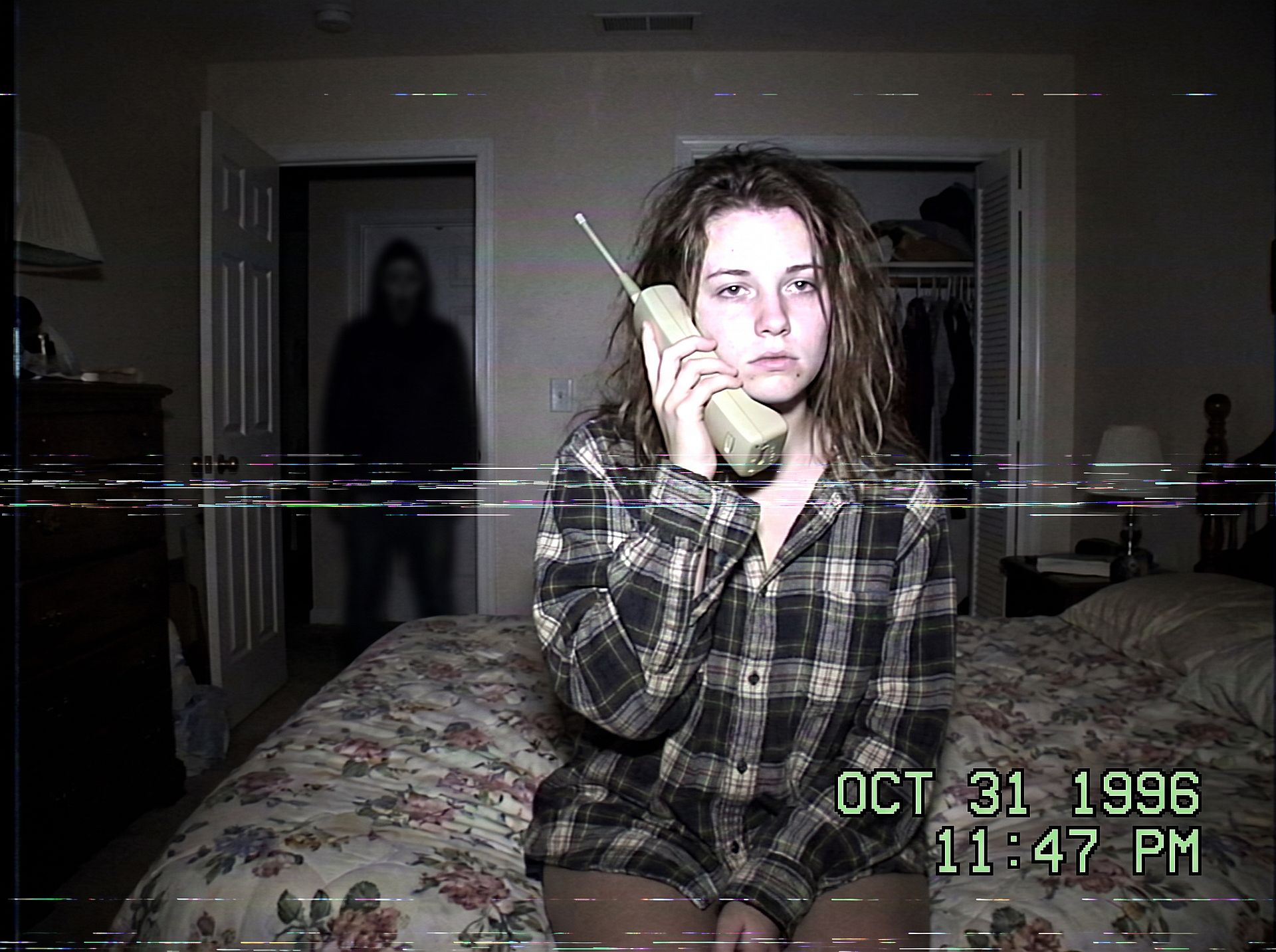
배경을 바꾸면 공포의 느낌도 달라집니다: 자정의 주방, 어두운 복도, 혹은 뒷좌석 뒷유리에 비친 형체. 형체를 작고 그림자 속에 두면 사진이 잔혹하기보다 으스스하게 유지됩니다.
할로윈 커플 포토슈팅
커플 코스튬은 할로윈 포토슈팅 검색에서 가장 큰 비중을 차지합니다. 두 얼굴을 모두 보호하고 한 쌍으로 꾸며보세요:
Edit the uploaded couple photo. Keep both faces, skin tones, and
expressions exactly, do not merge or alter their features. Dress them in
coordinated Halloween costumes, a classic vampire and a witch, standing
close on an autumn porch at dusk: glowing jack-o'-lanterns, warm string
lights, fallen leaves, soft fog, warm film color grade, shallow depth of
field.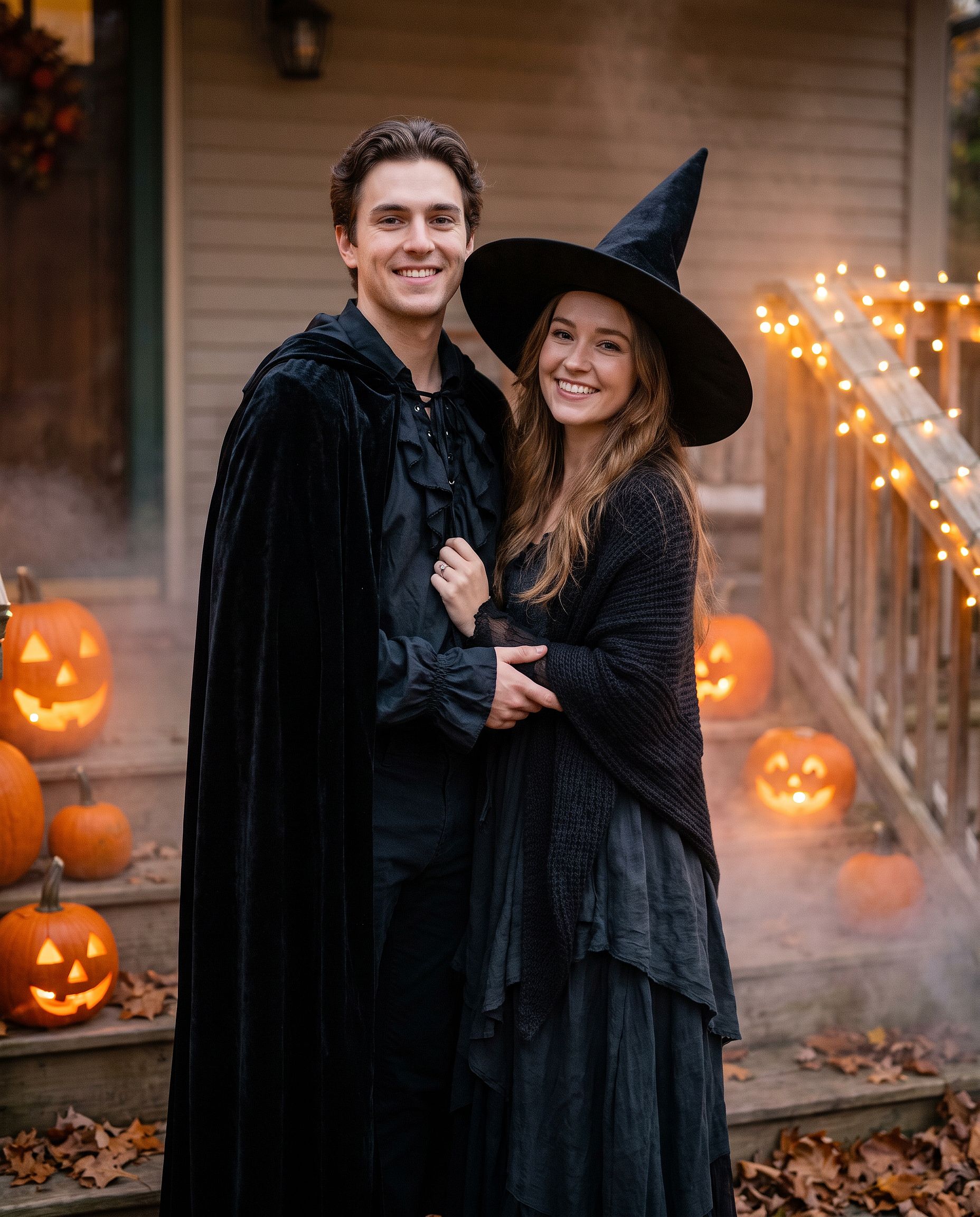
같은 프롬프트는 절친이나 가족 사진에도 똑같이 적용됩니다. "couple"을 "group of four"로 바꾸고 왼쪽부터 오른쪽 순서로 각 코스튬을 나열하세요.
슈가 스컬 메이크업 룩
풀 코스튬 대신 메이크업 룩만 원할 때:
Edit the uploaded photo. Keep the face shape, eyes, and identity
recognizable. Add half-face sugar-skull makeup: white base, black eye
sockets, and delicate floral linework on one side, the other half left
natural. Dark suit with a marigold flower, candlelit background with
orange marigold petals, dramatic side lighting, rich cinematic color.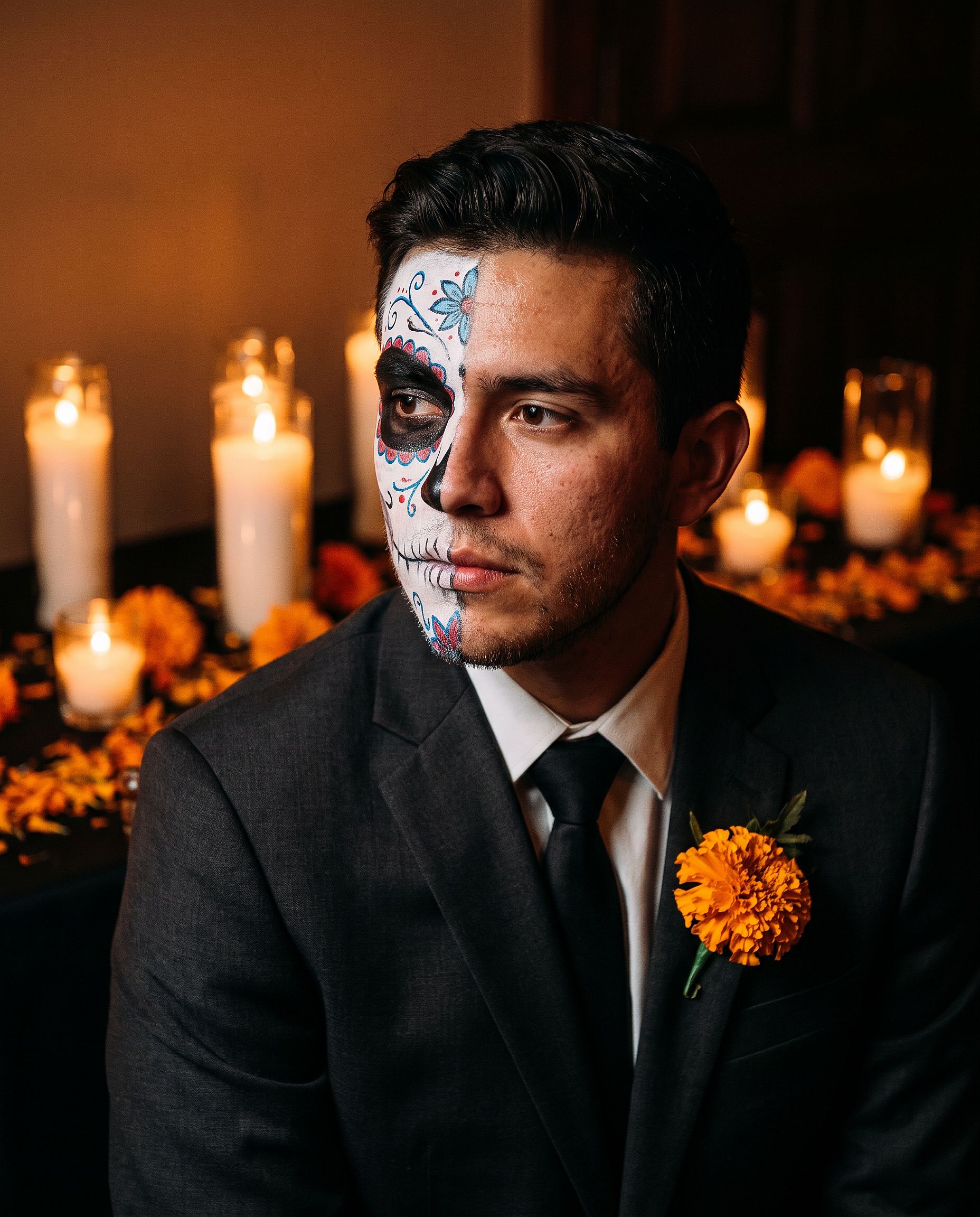
반쪽 메이크업은 사람을 알아보기 쉽게 유지하므로 풀페이스 디자인보다 프로필 사진에 더 적합합니다.
반려동물 코스튬
Edit the uploaded pet photo. Keep the pet's face, fur pattern, and eye
color exactly. Add a small witch hat and a tiny black cape, seated next
to a glowing jack-o'-lantern, cozy autumn lighting, shallow depth of
field, playful but realistic.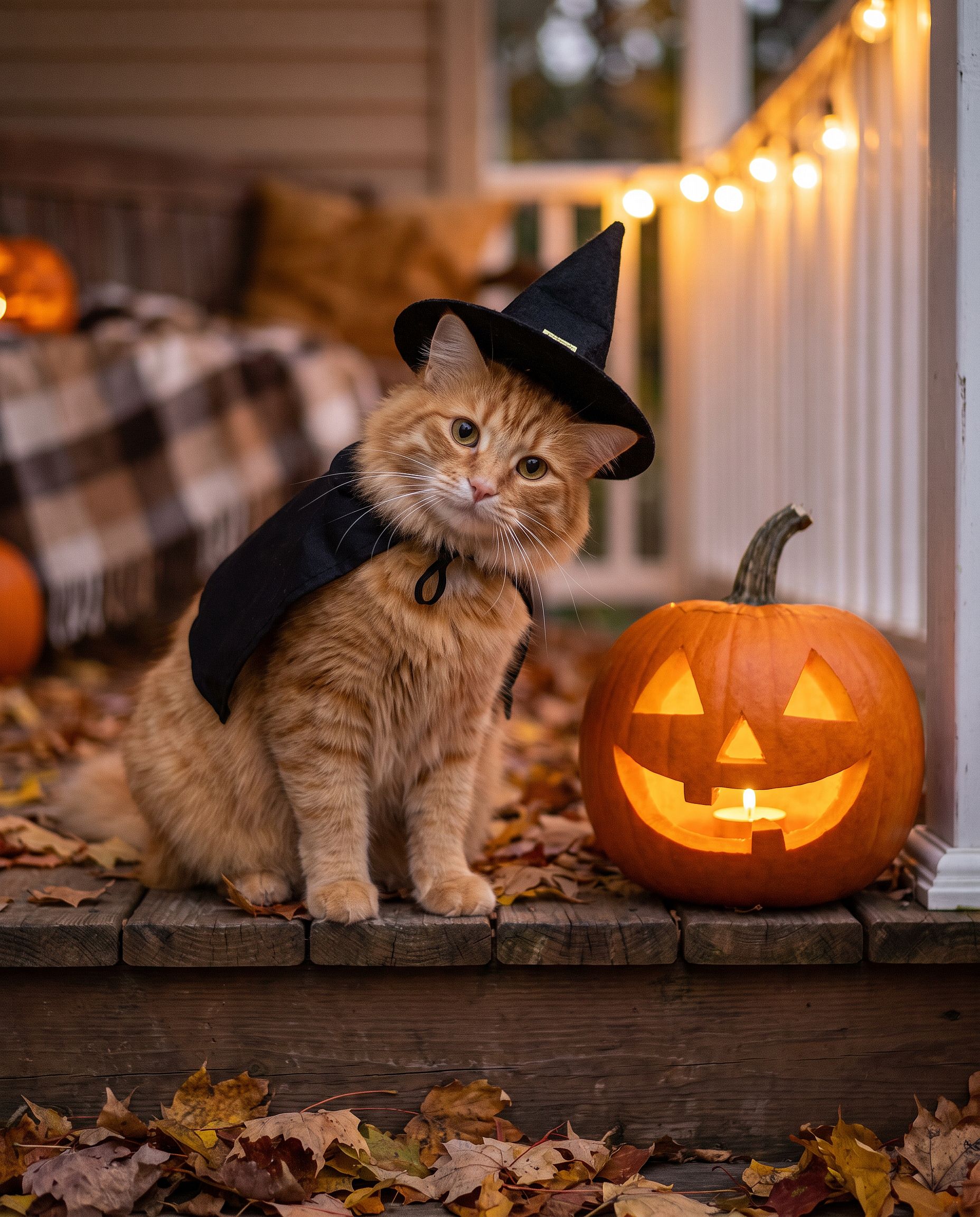
프롬프트 작성을 건너뛰고 싶다면, AI 할로윈 생성기 바로 이를 위해 만들어졌습니다: 사진을 업로드하고 할로윈 코스튬 인물 사진으로 바꿔보세요.
추수감사절 사진 프롬프트
추수감사절 사진은 코스튬보다 식탁이 중심입니다: 가족 식사 사진, 연말 카드용 가을 인물 사진, 그 주 모두의 커버 사진이 될 한 장. 요령은 다른 단체 편집과 같습니다. 모든 얼굴을 고정한 다음 조명, 의상, 배경을 바꾸세요.
추수감사절 가족 식사 사진
대부분의 가족 식사 사진은 폰과 가장 가까운 사람이 열악한 조명에서 찍습니다. 이 프롬프트는 그 스냅샷을 실제로 인쇄하고 싶어질 사진으로 바꿔줍니다.
Edit the uploaded family photo. Keep every face, skin tone, and
expression exactly, preserve all identities, do not merge features.
Restyle into a warm Thanksgiving dinner photo: long wooden table with a
roast turkey, pumpkin pie, candles, small pumpkins and autumn leaves,
golden late-afternoon window light, cozy knitwear in rust, cream, and
olive tones, natural candid closeness, vertical 4:5 frame.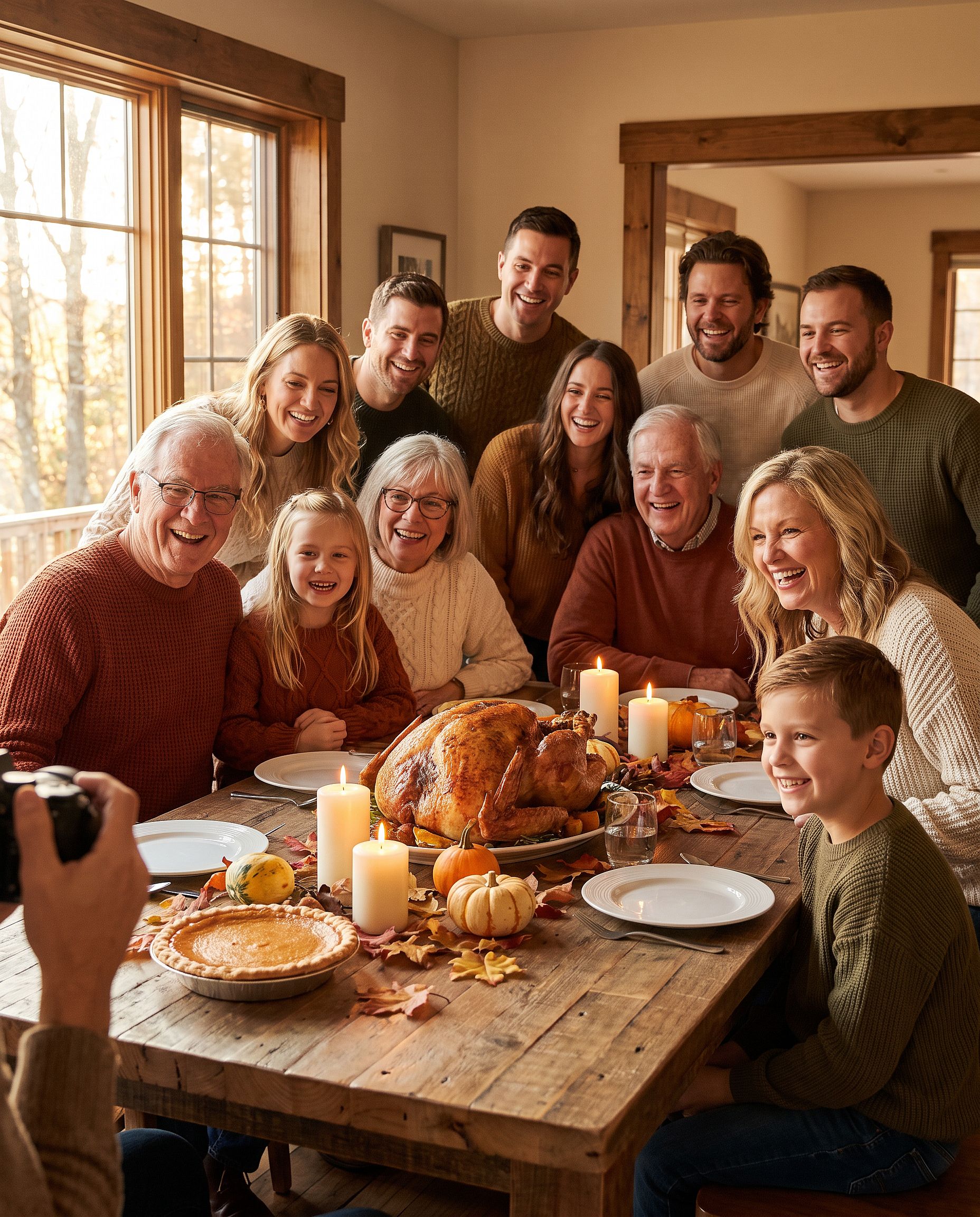
4명 이상이면 사진 속 인원 수를 명시하세요("6인 가족"처럼). 그래야 모델이 누군가를 빼거나 더하지 않습니다.
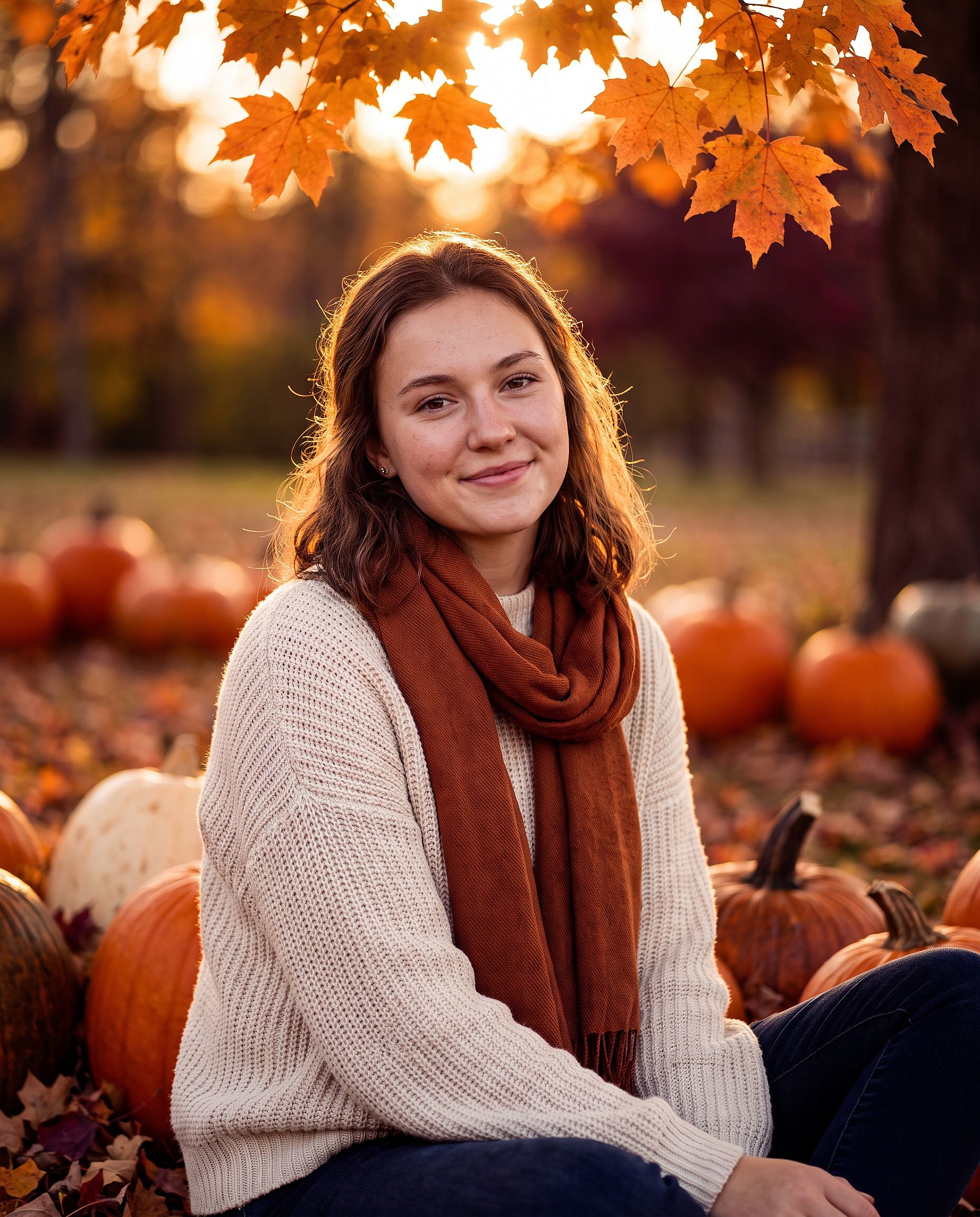
가을 추수감사절 인물 사진
단독 인물 사진, 커플 샷, 추수감사절 포토 카드를 만들 때:
Edit the uploaded photo. Keep the same face and identity exactly.
Restyle into an autumn Thanksgiving portrait: outdoors in a pumpkin
patch at golden hour, chunky knit sweater and scarf, warm amber and
burgundy tones, soft backlight through orange leaves, shallow depth of
field, holiday photo card quality. Keep skin texture natural.
사진을 카드에 넣을 거라면 "상단에 인사말을 넣을 여백을 남겨줘"를 추가하세요.
크리스마스 사진 프롬프트
AI 크리스마스 사진은 그 해 가장 큰 시즌 편집입니다. 12월은 스튜디오 예약 없이 가족 포토슈팅을, 사진작가 없이 연말 카드를, 모든 파티 전에 축제 분위기의 프로필 사진을 원하는 시기입니다. 아래 각 형식은 평범한 사진에서 시작합니다.
크리스마스 상자 포토슈팅
피사체가 거대한 열린 선물 상자 안에 앉아 있는 스튜디오 트렌드입니다. 집에서 연출하기는 어렵지만 편집으로는 손쉽게 만들 수 있습니다.
Edit the uploaded photo. Keep the same face, features, and expression
exactly, preserve the original identity. Place the person sitting
inside a large open white gift box with a red satin ribbon, surrounded
by wrapped presents, warm fairy lights, and a softly blurred decorated
Christmas tree. Red knit sweater, bright clean studio lighting, cream
and red palette, professional holiday portrait, vertical 4:5 frame.
브랜드나 카드 디자인에 맞게 상자 색상을 바꾸세요. 금색과 검은색은 고급스럽게, 파스텔 핑크는 부드럽고 경쾌하게 보입니다.
가족 크리스마스 화보
트리 앞에서 커플룩 잠옷, 모든 가족이 1년에 한 번은 찍으려 하는 사진. 여기서는 반려동물도 가족에 포함됩니다.
Edit the uploaded family photo. Keep every face, skin tone, and
expression exactly, preserve all identities, do not merge features.
Dress everyone, including the dog, in matching red plaid pajamas, the
dog in a small Santa hat. Seat them together on a rug in front of a
decorated Christmas tree and a lit fireplace with stockings, warm cozy
lighting, soft bokeh from the tree lights, holiday card quality.
모자만 원한다면 사진에 산타 모자 추가 도구가 바로 그 역할을 해주며, 크리스마스 배경 도구 사람은 그대로 두고 배경만 바꿉니다.
야외 크리스마스 트리 농장 사진
Edit the uploaded photo. Keep the same face and identity exactly.
Restyle into an outdoor Christmas tree farm photo: rows of snowy pine
trees, light snowfall, a freshly cut tree on a sled, plaid coat and
knit hat, soft overcast winter light, warm breath in the cold air,
natural skin texture, vertical 4:5 frame.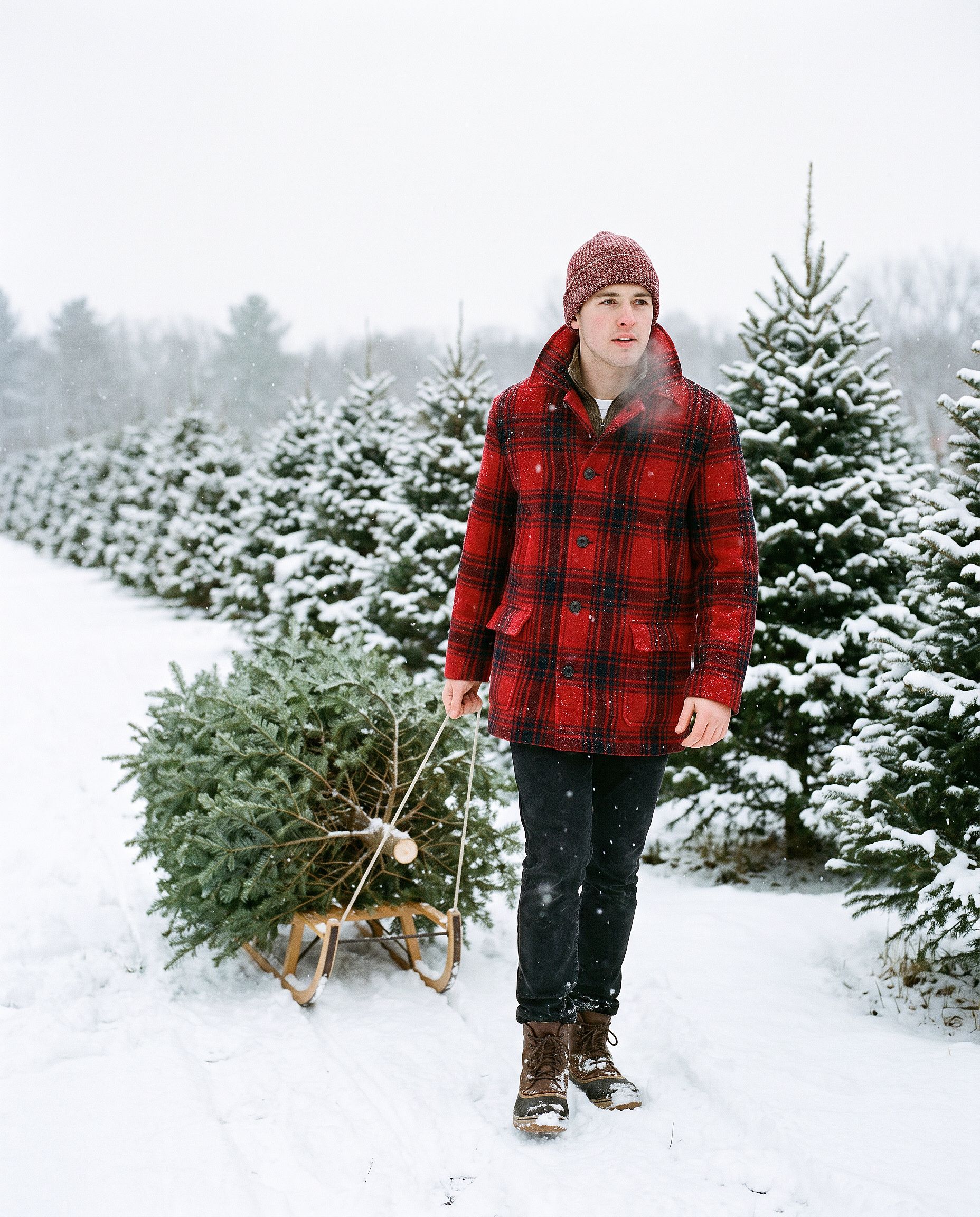
AI 크리스마스 카드
Turn the uploaded photo into a luxury printed Christmas card. Keep every
face exactly. Place the people in a snowy cabin doorway with evergreen
garland and warm window light, set inside a thin gold foil border on
heavy cream cardstock. Add "Merry Christmas" in gold foil calligraphy
above the photo and "from the Parkers" in small serif capitals below,
embossed holly in the corners. Show the card flat on white linen with
pine sprigs, a red velvet ribbon, and a gold wax seal.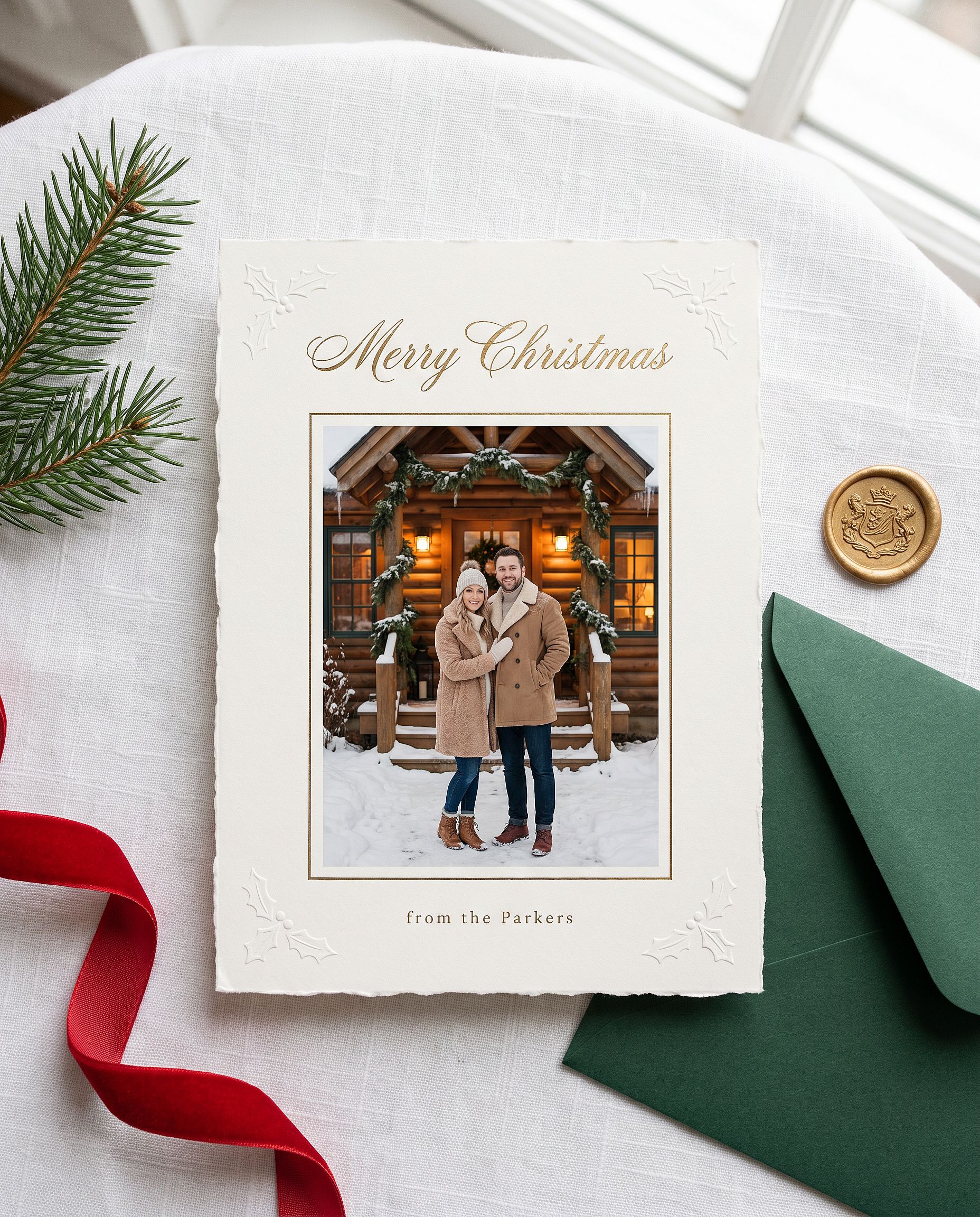
따옴표 안의 이름을 원하는 이름으로 바꾸세요. Nano Banana Pro는 짧은 이미지 내 텍스트를 잘 처리하므로 인사말이 보통 첫 시도에 올바르게 나옵니다.
애니메이션 크리스마스 인물 사진
Restyle the uploaded photo into a Japanese anime film still on
Christmas Eve. Keep the person's hairstyle, outfit colors, and overall
look recognizable. Standing at a snowy railroad crossing in a quiet
residential town at blue hour, duffle coat and long red scarf, breath
visible in the cold, warm house windows, a lit Christmas tree outside a
corner shop, glowing vending machines, power lines overhead, soft
falling snow, hand-painted anime background art, delicate cel shading.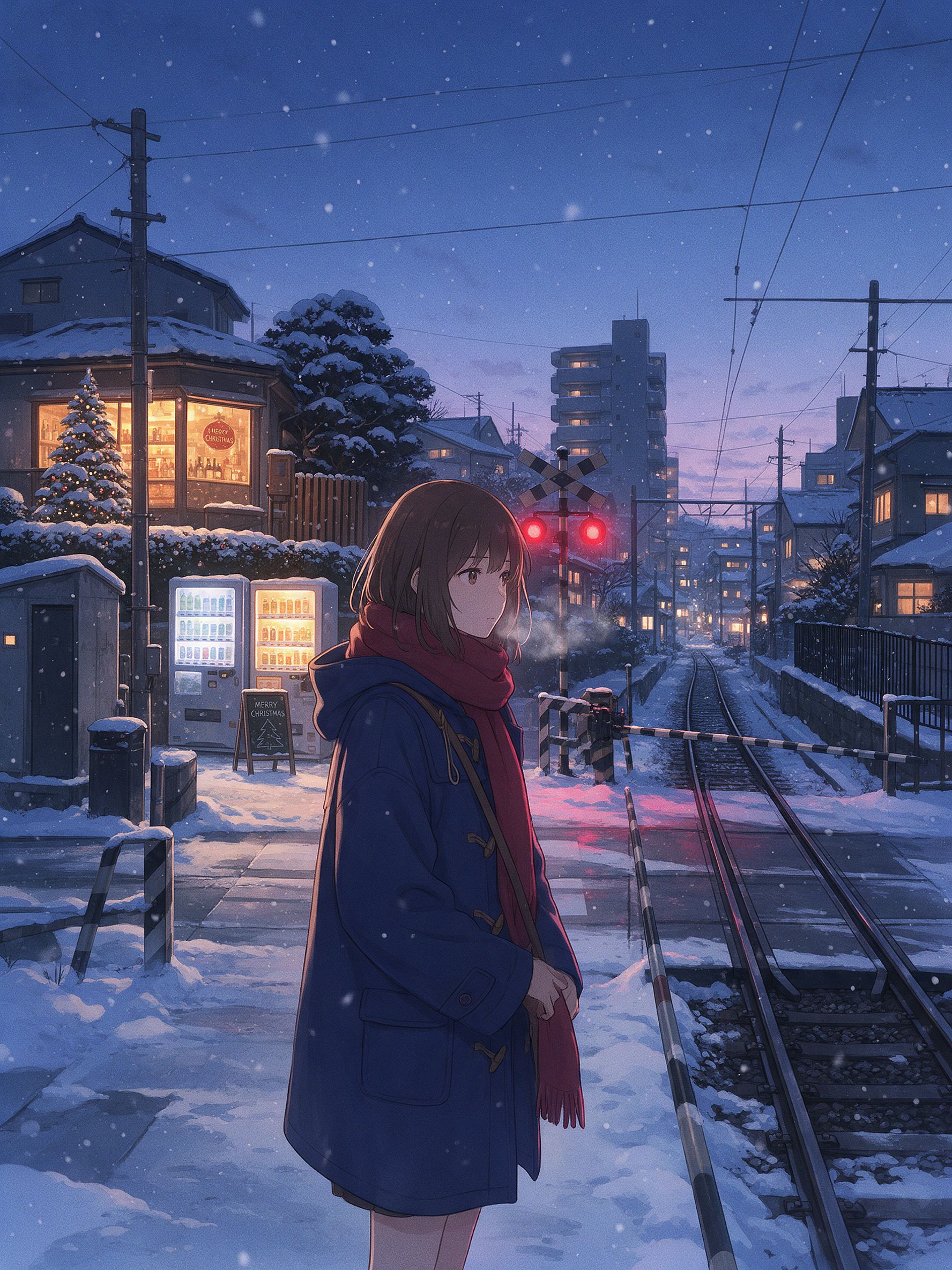
일본 애니메이션 겨울 장면처럼 보이게 하는 건 작은 디테일들입니다: 철길 건널목, 자판기, 전선, 그리고 따뜻한 창문과 대비되는 블루아워 빛. 이 느낌에는 Seedream 5.0 Pro나 Nano Banana 2 Lite가 Nano Banana Pro보다 더 깔끔한 2D 스타일을 줄 때가 많습니다. 모델을 바꿔 같은 프롬프트를 실행해 보세요.
전체 Gemini 사진 prompt 라이브러리
위 섹션은 심화 가이드입니다. 아래는 빠른 라이브러리로, 만들고 싶은 것별로 묶은 짧은 복사·붙여넣기용 프롬프트입니다. 대부분은 먼저 사진을 올렸다고 가정합니다. 감성·시네마틱 묶음은 순수 생성용으로도 쓸 수 있습니다. 카테고리를 고르고 문장을 집어 붙여넣기만 하세요.
인기 급상승 여성 인물 사진
Edit the uploaded photo into a soft-glam aesthetic selfie: dewy glow,
warm highlight, subtle butterfly light, pastel background. Keep the same
face and identity exactly, natural skin texture.
Restyle the uploaded photo into an elegant saree ethnic portrait: rich
traditional outfit, soft gold jewelry, warm bokeh lighting, graceful
pose. Keep the face and identity unchanged.Edit the uploaded selfie into a clean Instagram DP: minimalist studio
backdrop, soft even light, tasteful modern styling, crisp detail. Keep
the same face exactly, no heavy smoothing.Restyle the uploaded photo into a dreamy pastel aesthetic portrait: airy
glow, muted soft colors, gentle wind in the hair, natural skin. Keep the
face recognizable and identity intact.Restyle the uploaded photo into a golden-hour outdoor girl portrait:
warm backlight, soft lens flare, blurred natural background, flowing
outfit. Keep the face and identity unchanged.인기 있는 소년 및 커플 포트레이트
Restyle the uploaded photo into a café golden-hour boy portrait: soft
window backlight, cozy neutral outfit, gentle flare, Pinterest fashion
mood. Keep the face unchanged.
Restyle the uploaded couple photo into a warm café date-night scene:
cozy lighting, soft bokeh, relaxed poses. Keep both faces unchanged.Edit the uploaded couple photo into a vintage 1970s film look: warm
faded tones, retro wardrobe, soft grain. Preserve both faces and
expressions exactly.편집 및 리스타일
Edit the uploaded photo. Keep the face and pose exactly. Replace the
outfit with a clean, well-fitted business-casual look and the background
with a softly blurred modern office, matched lighting, professional
headshot quality.
프롬프트를 전혀 쓰지 않고도 세련된 프로필 사진을 원한다면 AI 헤드샷 생성기 이런 용도에 딱 맞게 만들어졌습니다. 다양한 비즈니스 룩에서도 얼굴을 일관되게 유지해 줍니다.
Edit the uploaded photo into a black-and-white fine-art portrait:
dramatic side lighting, deep contrast, film grain, timeless studio look.
Keep the face exactly the same.
Edit the uploaded photo into a double-exposure portrait: the subject
blended with a soft city skyline, moody tones, artistic overlay. Keep
the primary face clear and recognizable.Edit the uploaded photo into an AI hairstyle try-on: keep the face and
identity exactly, change only the hairstyle to a modern layered cut,
natural color and texture, realistic result.복원 및 화질 향상
Edit the uploaded blurry photo: sharpen details, reduce noise, recover
texture in hair and skin. Keep the face identical, natural skin, no
plastic smoothing.
Edit the uploaded photo to a high-resolution 4K glow-up: sharpen fine
detail, reduce noise, improve color balance, recover hair and skin
texture. Keep the face and expression identical, no plastic smoothing.시즌 및 축제
나머지 일정에 쓸 수 있는 간단한 한 줄 프롬프트입니다. 할로윈, 추수감사절, 크리스마스는 위에 예시가 담긴 전체 섹션이 따로 있습니다.
Edit the uploaded photo into a Diwali celebration: warm diya lamp light,
elegant traditional outfit, soft bokeh of string lights, rich jewel
tones. Keep the face unchanged.
Edit the uploaded photo into a spring cherry-blossom scene: soft pink
petals, gentle daylight, fresh pastel palette. Keep the person exactly
the same.Edit the uploaded couple photo into a Valentine's scene: soft warm
light, tasteful red accents, romantic bokeh. Keep both faces unchanged.Edit the uploaded photo into a New Year scene: elegant evening styling,
soft golden fireworks bokeh, celebratory mood. Keep the person
recognizable.감각적이고 영화 같은
Edit the uploaded photo into a burning-newspaper portrait: the subject
framed by a vintage newspaper with glowing burning edges, warm ember
light, dramatic dark background, cinematic mood. Keep the face exactly
the same.
Edit the uploaded photo into a moody neon-noir portrait: rain-slick city
street, pink and blue neon reflections, cinematic contrast, shallow
depth of field. Keep the face and identity unchanged.나만의 Gemini 사진 prompt 작성법
위의 모든 prompt는 동일한 뼈대를 따릅니다:
Edit the uploaded photo.
Keep [the face / both faces / the pose / the composition] exactly the same and preserve the original identity.
Change only [outfit / background / era / color / scene].
Add [style, lighting, mood, aspect ratio].
Keep [skin texture / features] natural and true to life.
한 줄씩 살펴보면, "업로드한 사진을 편집"은 모델에게 새 이미지를 만들지 말고 당신의 이미지를 기반으로 작업하라고 지시합니다. "완전히 동일하게 유지하고 원본 정체성을 보존"은 알아볼 수 있게 만드는 요소를 지켜줍니다. "오직 변경"은 편집 범위를 제한합니다. 자연스러운 피부나 실물 같은 디테일에 관한 마지막 문장은 AI티가 확 나는 과도한 보정 느낌을 막아줍니다.
순수 생성 작업에서는 "편집"이나 "그대로 유지" 같은 표현은 빼세요. 피사체, 스타일, 조명, 분위기를 직접 묘사하면 됩니다.
생성 전 5초 체크: 사진 업로드, 유지할 것 지정, 바꿀 것 지정, 스타일 지정, 자연스러운 디테일 요청. Google의 Gemini 지원 문서 기본 편집 흐름을 다룹니다.
사진에 강한 모델: Gemini (Nano Banana) vs GPT Image 2 vs Seedream
모든 사진에서 이기는 단일 모델은 없습니다. 각 모델이 어디서 앞서고 어디서 부족한지 살펴봅니다:
| Nano Banana Pro | Nano Banana 2 Lite | GPT Image 2 | Seedream 5.0 Pro | |
|---|---|---|---|---|
| 강렬한 리스타일 속에서도 유지되는 정체성 | 가장 강력함 | 강함 | 강함 | 보통 |
| 이미지 속 읽기 쉬운 텍스트(헤드라인, 라벨, 메뉴) | 강함 | 강함 | 최고 (마이크로 텍스트와 UI 아이콘 정밀도) | 보통 |
| 포토리얼리즘 (피부, 조명, 질감) | 최고 품질 (네이티브 4K, 초사실적) | 강함 | 최고급 (패션 수준, 초현실적) | 보통 |
| 애니메이션 / 아시안 스타일 / 2D 스타일화 | 제한적 | Best (애니메이션 및 애니용 최고 선택) | 보통 | 최고 (분위기 있는 애니메이션 배경) |
| 편집 및 레이어 분리 | 반복 편집 메모리 (다시 쓰지 않고 수정) | 반복 메모리 | 기억 없음 | 내장 레이어 분리와 자유로운 편집 |
| 다국어 텍스트(만화, 광고, 포스터) | 강함 | 보통 | 최고 | 보통 |
| 추천 용도 | 트렌디한 인물 편집, 정체성 일관 세트, 4K 출력 | 빠른 초안, 애니메이션 리스타일, 이커머스 히어로 이미지 | 고급 패션 비주얼, 텍스트가 있는 모든 이미지, 포스터 및 패키징 | 캐릭터 미학, 애니메이션 장면, 레이어 기반 편집 워크플로 |
네 가지 모두 하나의 OpenArt 워크스페이스에 있습니다. 비교를 위해 모델을 바꾸는 데는 새 구독이 아니라 클릭 한 번이면 됩니다. 하나의 얼굴을 트렌드 세트 전체에 걸쳐 일관되게 유지하는 것이 목표라면, AI 캐릭터 기능이 정체성을 고정하여 모든 prompt에서 동일한 인물을 반환합니다.
자주 묻는 질문
사진에 Gemini AI를 어떻게 사용하나요?
Gemini 이미지 도구를 열고 원하는 것을 설명한 뒤 생성하세요. 기존 사진을 편집하려면 먼저 업로드한 다음 무엇을 유지하고 무엇을 바꿀지 모델에 알려주세요. OpenArt에서는 완전한 편집기 옆에서 동일한 Gemini 모델(Nano Banana 2.1과 Nano Banana Pro)을 사용할 수 있습니다. 다음을 여세요 AI 이미지 생성기, 모델을 고르고, prompt를 붙여넣으세요.
Gemini AI에서 사진을 어떻게 편집하나요?
사진을 업로드한 다음, 유지할 부분과 바꿀 부분을 구분하는 지시문을 작성하세요. 예: "얼굴과 아이덴티티는 그대로 유지하고, 소프트 글램 초상화 스타일로 바꿔 줘." 업로드가 중요한 이유는 모델이 비슷한 얼굴을 지어내는 대신 실제로 제공한 이미지를 편집하기 때문입니다. 과하게 매끈한 느낌을 피하려면 자연스러운 피부 질감을 요청하는 문장을 마지막에 덧붙이세요.
Gemini AI 사진 프롬프트는 어떻게 만드나요?
위 기본 틀을 따르세요. 피사체를 지정하고, 무엇을 유지할지, 무엇을 바꿀지 말하고, 스타일·조명·화면 비율을 더한 뒤 자연스러운 디테일 한 줄로 마무리하세요. 이 글의 프롬프트를 복사해 스타일 단어만 여러분 것으로 바꾸세요.
여성용 최고의 Gemini AI 사진 프롬프트는 무엇인가요?
요즘 뜨는 스타일: 소프트 글램 감성 셀피, 사리 및 전통 의상 포트레이트, 깔끔한 인스타그램 프로필 샷, 골든아워 야외 포트레이트. 네 가지 모두 위의 인기 여성 포트레이트 섹션에 있어 바로 붙여넣을 수 있습니다.
할로윈 사진을 위한 최고의 Gemini AI 프롬프트는 무엇인가요?
진짜 얼굴을 유지하는 코스튬 인물 사진: 우아한 뱀파이어나 마녀 셀피, VHS 호러 캠코더 룩, 커플 코스튬, 또는 반쪽 슈가 스컬 메이크업. 모든 할로윈 프롬프트는 얼굴과 정체성을 고정하는 줄로 시작한 다음 코스튬, 메이크업, 배경을 묘사하세요. 다섯 가지 모두 위의 할로윈 섹션에 있습니다.
AI 할로윈 트렌드는 어떻게 하나요?
Nano Banana Pro 같은 Gemini 이미지 모델에 선명한 셀피를 업로드하고 위의 할로윈 프롬프트 중 하나를 붙여넣은 다음 생성하세요. 프롬프트를 완전히 건너뛰려면 OpenArt의 AI 할로윈 생성기가 사진을 한 번에 코스튬 인물 사진으로 바꿔줍니다.
AI 크리스마스 사진은 어떻게 만드나요?
선명한 사진을 업로드하고 Nano Banana Pro를 선택한 다음 위의 크리스마스 프롬프트 중 하나, 예를 들어 크리스마스 상자 포토슈팅이나 가족 잠옷 사진을 붙여넣으세요. 모든 얼굴을 고정하는 줄은 항상 유지하세요. 프롬프트 없이 원클릭으로 하려면 OpenArt의 크리스마스 필터가 평범한 사진을 축제 분위기로 바꿔줍니다.
AI로 추수감사절 가족 사진을 만들 수 있나요?
네. 단체 사진을 업로드하고 모든 얼굴을 유지하며 이목구비를 섞지 말라고 모델에 지시한 다음 식탁, 조명, 의상을 묘사하세요. 사진 속 인원 수를 명시해 아무도 빠지거나 더해지지 않도록 하세요.
Nano Banana는 Gemini와 같은 건가요?
Nano Banana는 Google의 Gemini 이미지 모델을 부르는 별명입니다. 사람들이 "Gemini AI 사진"이라고 하면 보통 Nano Banana 2.1 또는 Nano Banana Pro를 뜻합니다. OpenArt는 이 모델들에 바로 접근할 수 있게 해줍니다.
Gemini로 오래된 사진을 복원하고 색을 입힐 수 있나요?
네. 손상은 제거하되 원본의 모든 특징을 그대로 살리도록 지시하고, 흑백 사진에는 컬러화 지시를 추가하세요. 색감은 은은하게 유지하면 더 자연스러운 결과가 나오며, 인쇄할 계획이라면 이후에 업스케일하세요.
이 Gemini 사진 prompt는 무료인가요?
prompt는 자유롭게 복사하세요. OpenArt에서 실행하는 것은 크레딧으로 무료로 시작할 수 있습니다.