
 ChatGPT
 Perplexity
 Claude
 Gemini
AI-generated images come with a catch: they can raise legal questions you never intended to answer or justify. AI models are trained on millions of visuals, so a familiar logo or a well-known face can easily slip into your AI-generated videos or images. You didn’t copy anything on purpose, but intent rarely matters to a rights holder.
We ran the same three images through three AI copyright checker tools, tested a short AI video on OpenArt, and compared seven more tools using vendor documentation. You'll find the results, a comparison table and advice on which tool fits your workflow below.
Disclosure: OpenArt makes one of the tools on this list. We report its weak spots alongside its strengths.
How we compared:
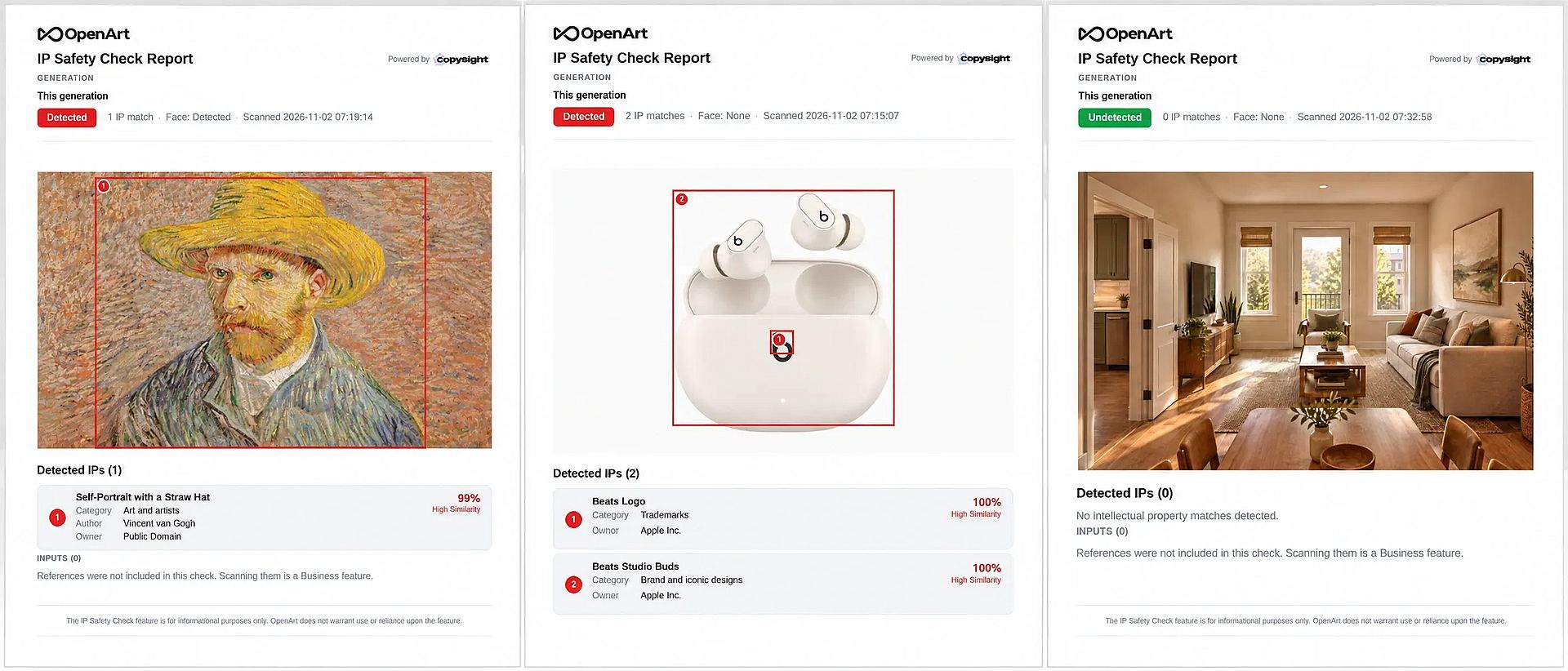
On November 2, 2026, we ran three test images through OpenArt, Media.io, and 123RF:
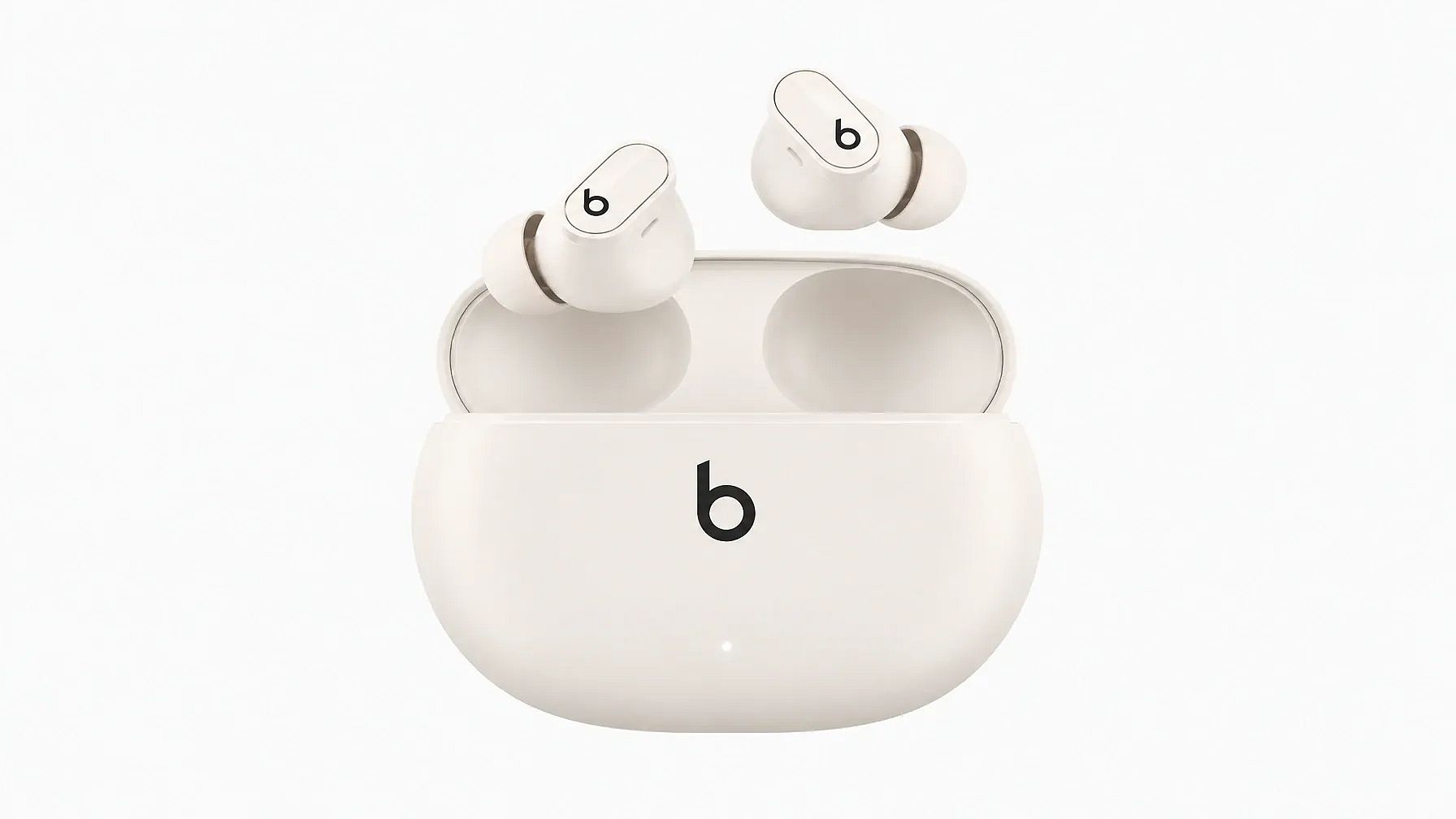
- an official Beats earbuds product photo
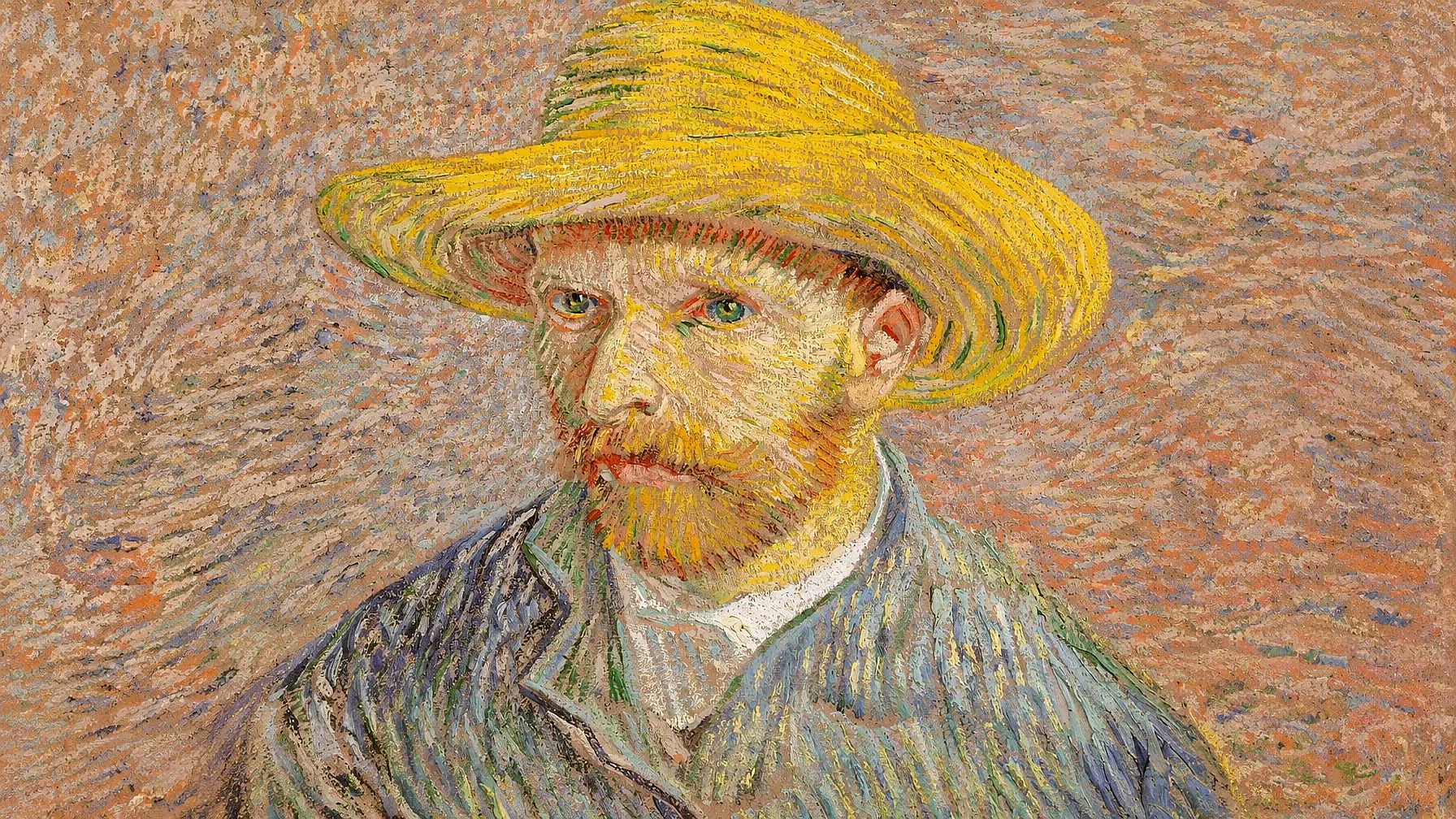
- 반 고흐의 밀짚모자를 쓴 자화상 (1887, public domain)
- an AI-generated living room with no protected IP in it.
The images we used:

We also ran a 20-second AI-generated tennis video through OpenArt, the only one of the three that scans video. The other tools are compared from vendor documentation and are not ranked.
What Is an AI Copyright Checker?
An AI copyright checker is a tool that scans an image, audio, text, or video for elements that match protected intellectual property, such as logos, product designs, copyrighted materials, trademarks, famous faces, and artwork. It returns a risk score or match report so you can fix the file before you publish, sell, or hand it to a client.
AI Copyright Checker vs AI Detector: Which One Do You Need?
A copyright checker and an AI detector answer different questions. Many people search for one when they need the other.
| Tool type | Question it answers | 예시 | 이럴 때 사용하세요 |
|---|---|---|---|
| Copyright checker | Does this file resemble someone else's IP? | OpenArt, Media.io, 123RF, Hive | Before publishing ads, merch, stock or client work |
| AI detector | Was this file made or edited with AI? | Copyleaks AI Image Detector, Google SynthID Detector | When you need to verify where an image came from |
An image can pass an AI detector and still infringe a trademark. AI labels also carry their own trust problems, which we cover in AI 라벨이 신뢰를 잃는 이유.
What a Copyright Checker Flags in Images and Videos
A good AI copyright detector looks for anything a rights holder could claim. The common categories are:
- Logos and trademarks: brand marks, wordmarks and lookalike symbols
- Product and brand designs: iconic shapes and packaging, also called trade dress
- Famous faces: celebrities and public figures, which raise likeness and publicity rights
- Characters and artwork: known paintings, illustrations and fictional characters
- Landmarks and watermarks: protected buildings and leftover stock photo marks
If a checker flags a logo you planned to use, create an original mark with the AI 로고 생성기 instead.
Best AI Copyright Checkers at a Glance
| 도구 | 이미지 | 영상 | What it flags | 무료 옵션 | How we reviewed it | 추천 용도 |
|---|---|---|---|---|---|---|
| OpenArt AI Copyright Check | 예 | 예 | Logos, brand designs, famous faces, artwork | 체험 크레딧 40개 | Spot check | Creators and teams clearing AI images and video |
| Media.io IP Copyright Risk Check | 예 | 아니요 | Trademarks, trade dress, artwork | 3 checks a day with free account | Spot check | Quick risk scores on single images |
| 123RF AI Image Checker | 예 | 아니요 | Brands, artwork, people, landmarks, content safety | 무료, 가입 불필요 | Spot check | Stock submissions and free screening |
| Hive | 예 | 예 | Celebrities, characters, artwork, movie and TV content | Pay-as-you-go usage billing | Vendor docs | Platforms scanning at scale |
| Mixpeek | 예 | 예 | Faces, logos, audio | Usage-based billing | Vendor docs | Developer pipelines |
| CopySight | 예 | 예 | Characters, brands, artwork | Starts from $20/month | Vendor docs | Generative AI compliance teams |
| PicDefense | 예 | 아니요 | Copyright risk in site images | $20 for 100 credits | Vendor docs | Auditing website image libraries |
| TinEye | 예 | 아니요 | Exact and edited copies online | API from $200/month | Vendor docs | Finding where an image already exists |
| YouTube Studio and Content ID | 아니요 | 예 | Matched audio, video and faces | 무료 | Vendor docs | YouTube creators |
| Pex | 아니요 | 예 | Audio and video matches | Free for creators | Vendor docs | Music and video rights |
Best AI Copyright Checker Tools We Ran Through a Spot Check
All three AI copyright checkers caught the Beats logo. They split on the Van Gogh painting and the clean control image, and that split shows how differently they work.
| Test image | OpenArt | Media.io | 123RF |
|---|---|---|---|
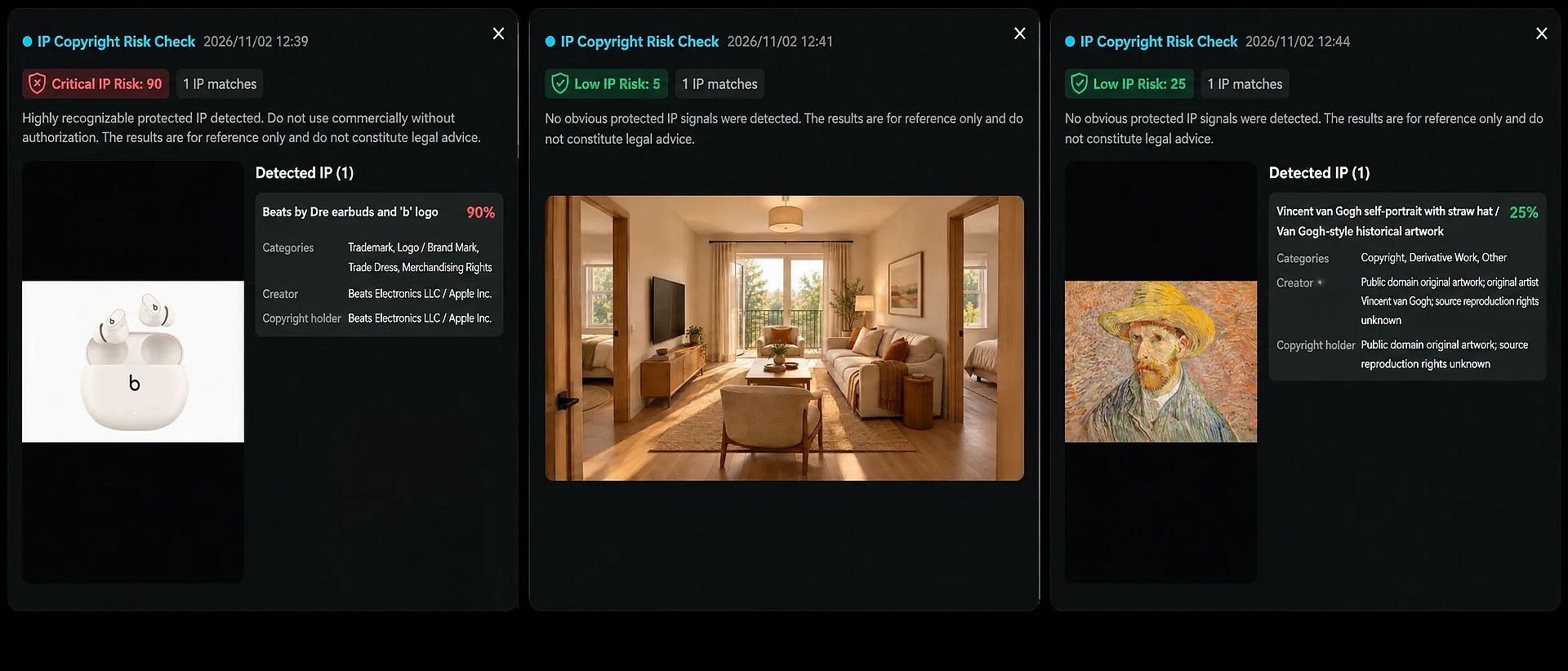
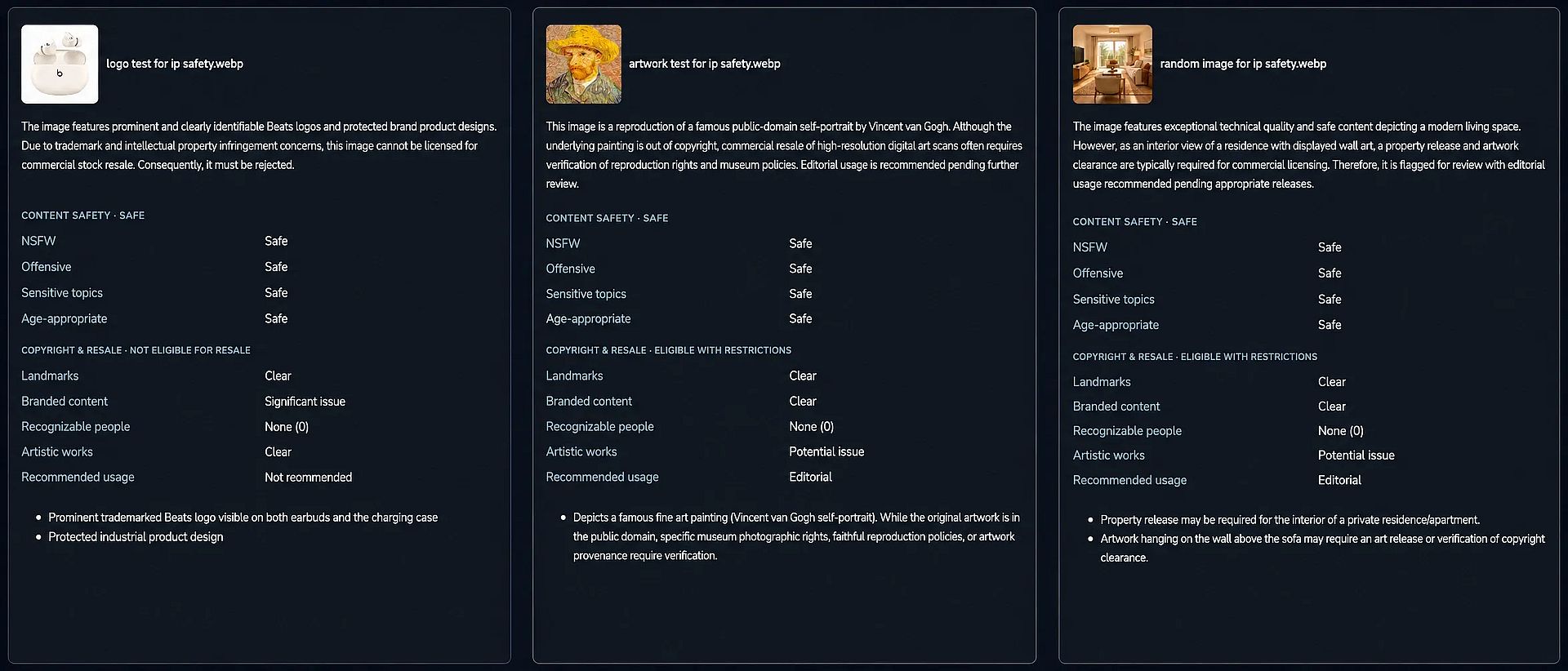
| Beats earbuds | Detected: 2 matches (Beats logo and Studio Buds design), owner Apple Inc., 100% similarity | Critical risk, 90: 1 combined match for earbuds and logo, owner Beats Electronics / Apple Inc. | Not eligible for resale: logo on earbuds and case, plus protected product design |
| Van Gogh painting | Detected: exact title and author, owner listed as Public Domain, 99% similarity | Low risk, 25: identified the painting, public domain noted | Editorial use only: identified the painting, noted public domain, warned about museum photo rights |
| AI living room | Undetected, 0 matches | Low risk, 5, 0 matches | Flagged the wall art and suggested a property release |
| Correct on all three | 예 | 예 | Partially correct |
Video test (OpenArt only): In a 20-second AI tennis clip, OpenArt flagged a partly hidden Wilson racket logo at 0:09 (62%) and 0:13 (85%), plus a 30% face resemblance to a real actress at 0:17, and labeled the file Warning.
For a step-by-step guide on video copyrights, read our blog on [how to check a video for copyright before uploading].
1. OpenArt AI Copyright Check: Best AI Copyright Checker for Images and Video
Verdict: The most detailed AI copyright checker we tried, and the only one of the three that scans video.
OpenArt AI copyright checker runs on CopySight's IP database. It scans images and videos for logos, brand designs and famous faces, then labels each file Detected, Warning or Undetected with a similarity score for every match.
What it did in our spot check:
Split the Beats image into two matches: the logo (trademark) and the Studio Buds product design. A logo-only scan would miss the second risk.
Named the exact Van Gogh painting, its author and its owner, listed as Public Domain.
Left the clean living room untouched, with no false positives.
Produced a one-page PDF for each file, with numbered boxes drawn on the image, the IP category, author, rights owner and similarity percentage.
In a 20-second AI tennis video, it caught a partly hidden racket logo (Wilson, owner Amer Sports) at 0:09 and 0:13, at 62% and 85% similarity. It also flagged the AI-generated player's face as a low-similarity (30%) match to a real actress at 0:17. The video got a Warning label, with each matched frame shown in the report.
Limits and pricing:
- Each image check cost 20 credits in our test. OpenArt prices scans by image dimensions, so larger files can cost more.
- The red Detected label also appears on public domain matches. Read the owner line before you panic.
- It flagged "Face: Detected" on the Van Gogh portrait without naming the person, though it did name the celebrity resemblance in our video test.
File limits: Up to 32 files per check. Images can be JPEG, PNG or WEBP up to 50 MB. Videos can be MP4 or MOV up to 200 MB, and video reports list each matched frame with its timecode. The tool accepts files made outside OpenArt.
적합한 용도: Creators and marketing teams who make content in the AI 이미지 생성기 또는 AI 영상 생성기 and want to clear it in the same workspace.
2. Media.io IP Copyright Risk Check
Verdict: Accurate on all three images, with the clearest risk score, but limited free use and no visual highlights.
Media.io's AI copyright checker gives each image a 0 to 100 risk score with a label, such as Low or Critical, plus a list of detected IP with categories and the rights holder.
What it did in our spot check:
- Scored the Beats image Critical (90) and named Beats Electronics and Apple as rights holders. It also flagged trade dress and merchandising rights.
- Scored the Van Gogh Low (25), identified the painting and noted its public domain status. This makes the usage call easier than a red flag does.
- Scored the clean image Low (5) with no matches.
Limits and pricing:
- The percentage on each match equals the overall risk score. It measures risk, not visual similarity, so don't compare it directly with OpenArt's similarity percentages.
- It merged the logo and the product design into one match.
- It shows no boxes on the image and gives results on screen only.
- It checks one image at a time: JPG, PNG or WebP up to 20 MB, at least 300 px wide or tall.
- Each check costs 1 credit. A free account gets 3 credits a day.
적합한 용도: Freelancers who need a quick, readable risk score on a few images a day.
3. 123RF AI Image Checker: Best Free Copyright Checker
Verdict: The easiest free image copyright checker to try, but it reviews images like a stock agency, which leads to extra flags.
123RF's free AI copyright checker needs no account. It returns a plain-English summary, a copyright and resale verdict, and a content safety check for NSFW, offensive or age-inappropriate material.
What it did in our spot check:
- Marked the Beats image "Not eligible for resale" and called out the logo on both earbuds and the case, plus the protected product design.
- Recognized the Van Gogh, noted the public domain status and recommended editorial use pending a check of museum photo rights.
- Flagged the clean living room for its generic wall art and suggested a property release. That's normal advice for stock submissions, but it counts as a false positive for IP matching.
Limits and pricing:
- It does not name rights holders or give scores.
- It checks JPEG, PNG or WebP files up to 4 MB, five images per upload.
- It does not scan video.
적합한 용도: Stock contributors and anyone who wants a free first pass with a content safety check included.
Other AI Copyright Checkers by Use Case
We didn't run these AI copyright checkers through our spot check, so they aren't ranked. The details below come from each vendor's documentation.
For Platforms and Developers
- Hive: Offers APIs for celebrity recognition in images and video, likeness detection for popular characters and artworks, and media search that matches movie and TV content. Logo detection is a separate API. Pricing comes through sales.
- Mixpeek: Combines face recognition, logo detection and audio fingerprinting in one API call and handles video natively. Its own roundup ranks it first, so weigh that list with care.
- CopySight: The engine behind OpenArt's checker. It scores generative AI output for similarity to protected characters, brands and artwork, and suits companies building their own compliance flow.
For Website Audits and Copies Online
- PicDefense: Scans the images already on your website for copyright risk. It offers a WordPress plugin plus Zapier and Make integrations.
- TinEye: A reverse image search engine that finds where an image, or an edited copy of it, already appears online. It finds copies, not lookalikes, so it won't flag an AI image that only resembles a brand. Read our guide on checking image copyright.
Choosing an AI Copyright Checker for YouTube and Video*
Video brings audio and moving footage into play, so a YouTube copyright checker works differently from an image tool.
- YouTube Studio checks: When you upload, YouTube Studio's Checks step scans the video against Content ID before you publish. Upload as private to see claims first.
- YouTube likeness detection: Free for creators 18 and older since May 2026. It flags AI-altered versions of your face in YouTube uploads, but it doesn't scan other platforms.
- Pex: Matches audio and video against a large reference database and connects rights holders with licensing.
For logos that appear for a few seconds in a clip, OpenArt's report shows exactly where each match sits. In our tennis video, it pinned a partly hidden racket logo to 0:09 and 0:13. You can then remove it with AI video inpainting.
For Checking Whether Content Is AI-Generated
These tools detect AI origin, not copyright risk:
- Google SynthID Detector: Opened to the public on October 7, 2026. It checks images, video and audio for SynthID watermarks from Google and partners, with a limit of about 10 checks a day.
- Adobe Content Authenticity: Reads Content Credentials (C2PA) attached to a file to show how it was made and edited.
- Copyleaks AI Image Detector: Labels images as human or AI, including partly AI-edited photos.
How to Choose the Right AI Copyright Checker
Match the tool to the job rather than the longest feature list.
- Solo creators and freelancers: Start with 123RF for free screening. Move to Media.io or OpenArt when you need rights-holder names and scores.
- Marketing teams and agencies: Batch uploads and PDF reports matter for client sign-off. OpenArt handles both, and pairs well with an AI 브랜드 키트 that keeps your own logos and colors on file. See how one team ran an AI fashion ad campaign with OpenArt.
- Studios in pre-production: Build IP checks into storyboards and character sheets early. Our guide to IP checks in enterprise previs 에서 그 워크플로를 단계별로 안내합니다.
- Platforms and developers: Use an API like Hive or Mixpeek for volume.
- YouTube creators: Combine YouTube Studio checks for audio with a frame-level scan for logos.
How to Run a Copyright Check on AI Images and Videos Before You Publish
Running an AI copyright checker takes a few minutes and fits right before export:
- Generate or upload your file. Use the final version, since edits after the check can add new risks.
- Run the scan. Upload the image or video to your AI copyright checker and wait for the report.
- Review each match. Read the category, owner and score. A public domain match usually needs no change.
- Fix what's flagged. Remove a flagged logo from a photo, regenerate a lookalike face or swap licensed music.
- Re-scan and save the report. Keep the clean report with your project files as a record of your check.
For a full walkthrough with screenshots, see how to check AI images and videos for copyright infringement.
How Accurate Is an AI Copyright Checker?
An AI copyright checker gives you a probability, not a guarantee. Every tool we tried states that its results are for reference only and aren't legal advice.
Our spot check showed why the score type matters. OpenArt gave the Van Gogh a 99% similarity score because the image is the painting. Media.io gave the same file a 25 because the painting is in the public domain, so the risk is low. Both answers are correct. They measure different things.
Treat results like this:
- High score or Detected: Change the asset or get permission before commercial use.
- Low score with a public domain owner: Usually safe, but confirm the source photo's license.
- 감지되지 않음: No known match, which is good news but not clearance for niche IP missing from the database.
- High-stakes projects: For broadcast, packaging or large paid campaigns, add a legal review.
What AI Copyright Checkers Can't Catch
An AI copyright checker only knows the IP in its database, so some risks slip past:
- Art style imitation: A painting in a living artist's style may not match any single work.
- New or niche IP: Recent characters, indie brands and regional logos may be missing.
- Slogans and text: Trademarked phrases inside an image often go unflagged.
- Music in video: Image tools ignore audio entirely.
- Contracts and licenses: No scanner knows your agreement with a client or model.
The safest fix is to design original assets from the start, such as characters you build in the AI 캐릭터 생성기 instead of prompting for famous ones.
마무리하며
OpenArt is the strongest pick for creators and teams who need to clear both images and video, with the most detailed reports in our spot check. Media.io is a solid choice for a few quick risk scores a day, and 123RF is the best free starting point. Developers should look at Hive or Mixpeek, and YouTube creators should pair YouTube Studio checks with a frame-level scan.
If you're producing paid creative, start with the best AI video models for commercial creative, then run every final file through OpenArt's IP Safety Check before it goes live.
자주 묻는 질문
What is the best AI copyright checker for images?
In our spot check, OpenArt was the best AI copyright checker for images. It named exact matches and rights owners, drew boxes on each match and produced no false positives. Media.io was also accurate and gives a clearer risk score, while 123RF is the best free option.
Is there a free AI copyright checker?
Yes. 123RF's AI Image Checker is free with no sign-up and checks up to five images per upload. Media.io gives free accounts 3 checks a day. OpenArt charges credits per check, about 20 per image in our test.
Can an AI copyright checker scan videos?
Some can. OpenArt scans MP4 and MOV files up to 200 MB and lists every matched frame with its timecode. In our test, it found a racket logo at two timestamps and a celebrity lookalike face in a 20-second clip. Media.io and 123RF check images only. For YouTube uploads, YouTube Studio's Checks step scans for Content ID matches before you publish.
이미지가 저작권이 있는지 어떻게 확인하나요?
Run a reverse image search on TinEye to see if the image already exists online and who posted it. Then run an IP checker like OpenArt or Media.io to catch logos, designs or artwork inside the image. Check the license or metadata if you got the image from a stock site.
How do I check if a video is copyrighted before posting on YouTube?
Upload the video as private and wait for YouTube Studio's Checks step, which flags Content ID claims. For logos or faces in the footage, scan the file with a video copyright checker like OpenArt first.
Is an AI image detector the same as a copyright checker?
No. An AI image detector tells you whether AI made a file. A copyright checker tells you whether the file resembles protected IP. You may need both for high-stakes work.
Does an AI copyright checker work on images made outside the tool?
Yes. OpenArt accepts files made anywhere, up to 32 per check. Media.io and 123RF also accept any image you upload within their file limits.
Is a "safe" result from a copyright checker legally binding?
No. Every AI copyright checker we reviewed describes its results as informational, not legal advice. A clean result lowers your risk, but it doesn't protect you if a rights holder makes a claim.