

 ChatGPT
 Perplexity
 Claude
 Gemini
أفضل prompts لتصوير Gemini AI لصور شخصية رائجة
واحد وأربعون أمراً. هذا ما تدور حوله هذه المقالة. إذا جئت هنا لنسخ أمر صورة بالذكاء الاصطناعي من Gemini، ولصقه، والخروج بصورة شخصية جاهزة، فانتقل مباشرة إلى المكتبة أدناه. وإذا أردت أن تفهم لماذا تنتج بعض الأوامر تعديلاً يبدو احترافياً بينما تمنحك أخرى غريباً بوجه بلاستيكي، فإن الشروحات الرئيسية وأقسام العطلات قبل المكتبة ستريك ما يفعله كل سطر في الأمر فعلاً.
تغطي أقسام العطلات التعديلات الموسمية الأكثر بحثاً: صور سيلفي أزياء الهالوين وترند الرعب بنمط VHS، وصور عشاء العائلة في عيد الشكر، وجلسات تصوير الكريسماس بالذكاء الاصطناعي، من صورة علبة الهدية إلى لقطة العائلة بالبيجامات المتناسقة.
كل ما هنا يعمل بنماذج صور Gemini من Google، والتي OpenArt يمنحك إياها تحت اسم Nano Banana إلى جانب GPT Image 2.5 وSeedream ومحرر صور كامل في مساحة عمل واحدة. من القراءة إلى الصورة الجاهزة، نحو دقيقتين.
ما هو prompt صور Gemini AI؟
أمر صورة Gemini AI هو تعليمة بلغة بسيطة تعطيها لنماذج صور Gemini من Google لإنشاء صورة جديدة أو تعديل صورة لديك بالفعل. ويُعرف الجانب الخاص بالصور في Gemini باسم شائع ربما رأيته: Nano Banana. تستخدم Google هذا الاسم علنًا الآن، والنسخة الأقوى، Nano Banana Pro، هي النموذج الذي يقصده الناس حين يقولون "صورة Gemini AI".
يقوم أحد هذه الـ prompts بأحد أمرين. فهو إما أن يُنشئ: صنع صورة جديدة تمامًا من وصف نصي، مثل صورة شخصية سينمائية في الشارع أو لقطة بجمالية aura-farm. أو يُحرّر: البدء بصورة حقيقية وتغيير ما تطلبه مع الحفاظ على الباقي، مثل "حافظ على الوجه تمامًا، وأعد تصميمه ليصبح صورة شخصية بأسلوب أفلام التسعينيات." التحرير هو ما يبرع فيه Gemini، وهو السبب في انطلاق موجة الصور الشخصية الرائجة على هذا النموذج تحديدًا.
تشغيل prompts بأسلوب Gemini على OpenArt
إليك الجزء الصريح، لأنه مهم. OpenArt ليست Gemini، وليست من صنع Google. ما يمنحك إياه OpenArt هو الوصول المباشر إلى نماذج صور Gemini: Nano Banana 2.1 وNano Banana Pro وNano Banana 2 Lite جميعها موجودة في مساحة العمل. أي أمر مكتوب لـ"صورة Gemini بالذكاء الاصطناعي" يعمل على النماذج نفسها داخل OpenArt.
اختر Nano Banana 2 Lite للمسودات السريعة، Nano Banana 2.1 للعمل اليومي الثابت مع نصوص أوضح داخل الصورة، وNano Banana Pro للحصول على أكثر النتائج صقلاً وثباتاً للهوية. GPT Image 2.5, Seedream 5.0 Pro، ودليل كامل محرّر الصور بالذكاء الاصطناعي تقع بجانبها.
لماذا تنتشر prompts الصور في Gemini بشكل واسع
ركّزت معظم التغطية المبكرة لنماذج صور Gemini على الإنشاء: اكتب وصفًا واحصل على صورة جديدة. لكن الصيغ التي انتشرت فعلًا كانت مصممة ليتم نسخها.
لموجّه صور Gemini الرائج شكل محدد. فهو يذكر الموضوع والأسلوب والإضاءة والمزاج ونسبة الأبعاد، ويحدّد ما يجب أن يبقى ثابتًا. تلك الوصفة كاملة بما يكفي ليعمل موجّه شخص واحد على آلاف الصور المختلفة التي يرفعها آلاف الأشخاص المختلفين.
يتفوق التحرير على التوليد في الخلاصات الشخصية لسبب بسيط. صورة مُولّدة لشخص غريب تُتجاوز بالتمرير. أما الصورة المُحرَّرة لـ أنت كصورة بورتريه ناعمة الملامح، أو لقطة في مقهى وقت الغروب، أو صورة طفولة مُرمّمة تستحق الحفظ والمشاركة.
التعديل هو المهمة الأصعب أيضاً. لتعديل الصورة بشكل مقنع، على النموذج أن يغيّر الأسلوب أو الملابس أو المشهد بالكامل مع إبقاء وجهك الحقيقي دون تغيير. تفشل الأدوات الأضعف في النصف الثاني وتمنحك شبيهاً لك. أما نماذج الصور من Gemini فتحافظ على الهوية خلال إعادة تصميم كبيرة، والصور الشخصية الرائجة تعتمد على ذلك بالضبط.
إذا كنت تريد جانب الإنشاء الخالص، فإن أفضل prompts لـ Nano Banana يغطي الدليل صناعة صور فيروسية من الصفر. يتناول هذا المنشور كليهما، مع ميل كبير نحو تعديلات البورتريه الرائجة التي يقلّدها الناس اليوم.
كيفية تشغيل هذه على OpenArt
لست بحاجة إلى أي خبرة تقنية. ارفع صورتك، واختر نموذج Gemini، والصق prompt، ثم أنشئ.
لتحرير الـ prompts، افتح توليد الصور أو إنشاء صورة داخل مساحة عملك. استخدم زر رفع الصور بجانب مربع الـ prompt لإضافة صورتك الأصلية. خطوة الرفع هذه هي الأهم: يعدّل النموذج الصورة التي تقدّمها له، لذا فإن مصدرًا واضحًا وجيد الإضاءة يمنحك نتيجة أنقى.
انقر على اسم النموذج في مربع الأمر واختر Nano Banana 2.1 للأعمال اليومية أو Nano Banana Pro للحصول على أكثر النتائج اتساقًا. الصق أي أمر أدناه وابدأ الإنشاء. ومن هناك يمكنك ضبط التفاصيل في المحرّر، ارفع الدقة إلى 4K للطباعة، أو استبدل الخلفية. تبدأ الحسابات الجديدة مجانًا مع رصيد من النقاط، فيمكنك تجربة بعضها قبل اختيار خطة.
للإنشاء الخالص، تخطَّ عملية الرفع والصق موجّهًا بأسلوب الإنشاء مباشرة.
صورة الفتاة الرائجة
تنسيق صور Gemini الأكثر نسخًا في الوقت الحالي. يتطابق مباشرةً مع عمليات البحث عن "copy paste trending girl" التي تملأ الخلاصة: التقط صورة سيلفي عادية وأعد تصميمها إلى بورتريه أنيق بلمسة جمالية ناعمة، مع إضاءة رقيقة وبشرة نضرة وتوهج دافئ وتنسيق جمالي يبدو وكأنه جلسة تصوير احترافية.
High-fidelity studio portrait of a young Asian woman with pastel pink
hair in a side braid. She wears a cream polka-dot lace top under a pink
knit cardigan, accessorized with layered gold necklaces. Soft rosy
makeup, glossy lips, direct gaze. Pure white background, high-key
diffuse lighting, hyper-realistic fashion photography, 8k resolution.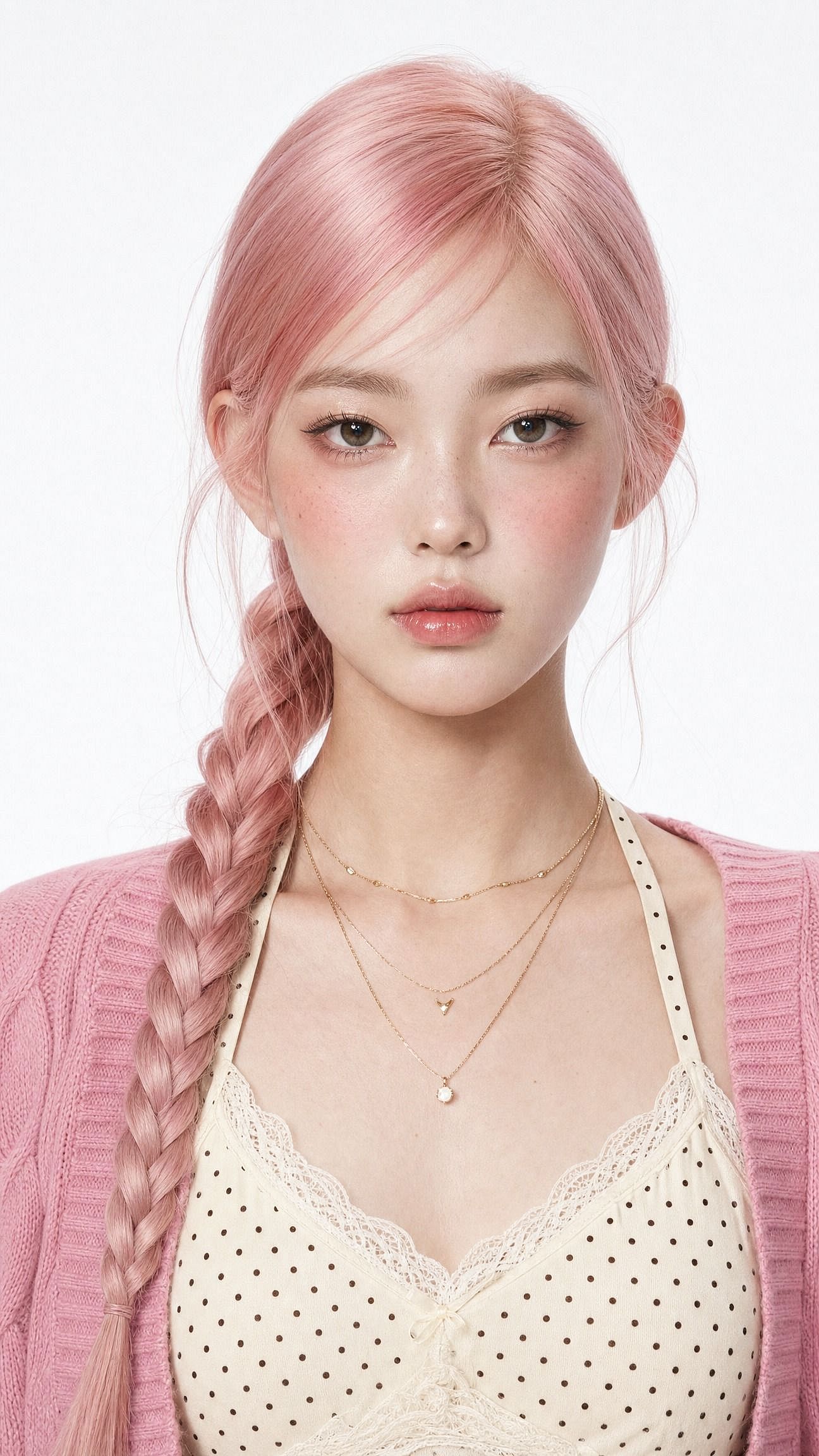
غيّر كلمة واحدة لتحويل المظهر بأكمله. استبدل "soft-glam" بـ"saree ethnic elegance" لإطلالة تقليدية، أو "clean Instagram DP, minimalist studio backdrop" لصورة ملف شخصي.
الجملة التي تحمل الثقل الأكبر هي الأولى: احتفظ بالوجه نفسه واحفظ الهوية الأصلية. بدونها، يعيد النموذج تصميم الوجه مع كل شيء آخر، فينتهي بك الأمر بغريب جميل بدلًا من نسخة أجمل منك.
البورتريه السينمائي للفتى
ينقسم الجانب الرجالي من هذا الاتجاه إلى مظهرين يعيد الناس تقليدهما مرارًا: أسلوب الشارع السينمائي، ولقطة مقهى في الساعة الذهبية بأجواء تناسب Pinterest. هذا الـ prompt ينفّذ نسخة الشارع.
Edit the uploaded photo. Keep the same face, features, and expression
exactly, preserve the original identity. Restyle into a cinematic urban
street portrait: moody overcast light, teal-and-orange color grade,
blurred city street background, confident casual streetwear, shallow
depth of field, film-still mood, vertical 4:5 frame. Keep skin texture
natural and true to life.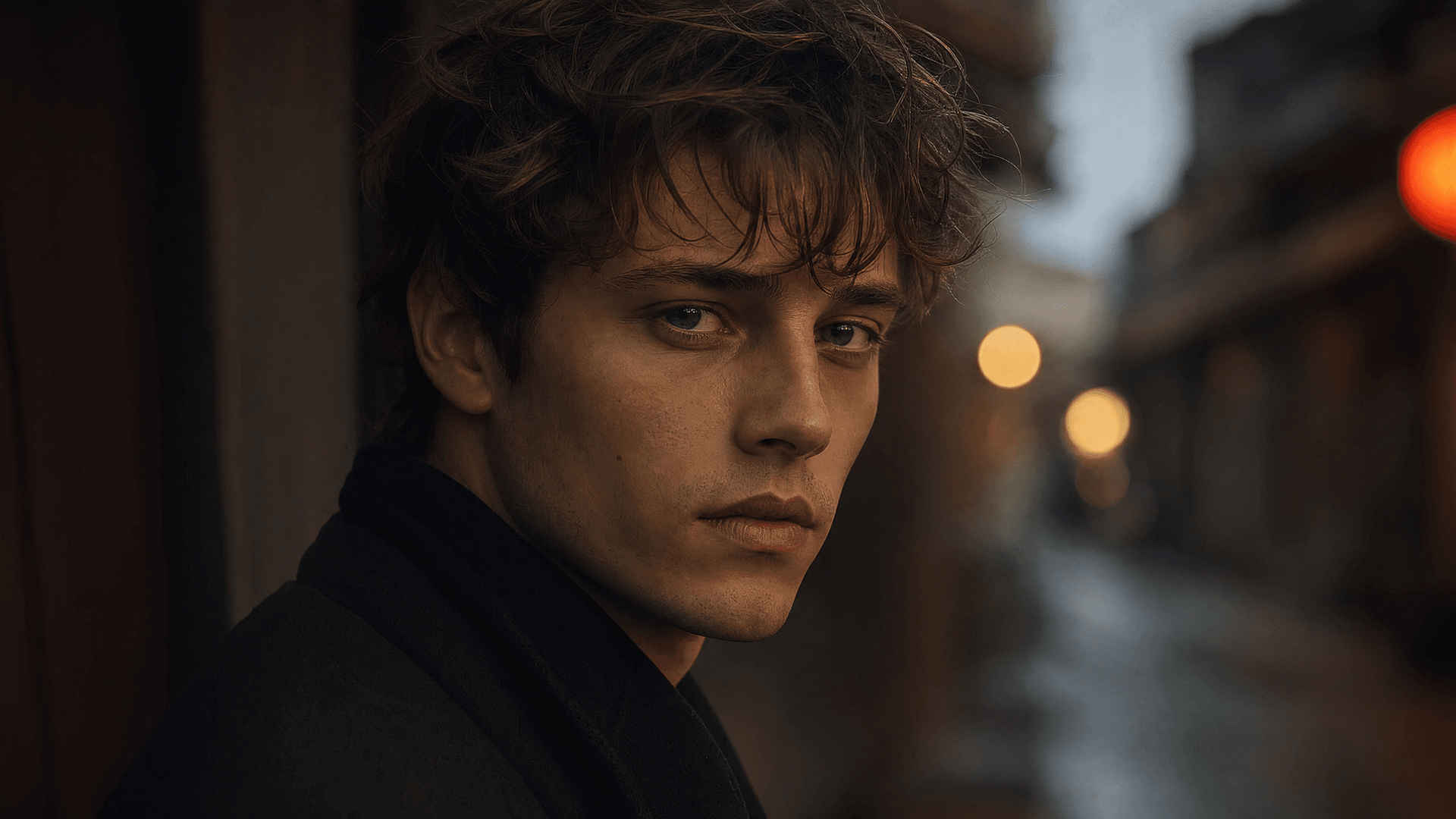
الثنائي السينمائي
تُعد تعديلات صور الأزواج من أبرز الاتجاهات الفرعية، وهي الأصعب. إذ يتعين على النموذج حماية وجهين في آنٍ واحد.
ارفع صورة عادية بالهاتف لشخصين واحصل على مجموعة تبدو وكأن مصورًا محترفًا نسّقها:
Edit the uploaded photo of two people. Keep both faces, skin tones, and
expressions exactly as they are, preserve both identities. Do not merge
or alter their features. Restyle into a cinematic couple portrait:
coordinated neutral-tone outfits, soft directional lighting, a blurred
city-evening background, natural closeness, warm film color grade,
shallow depth of field, magazine-cover quality.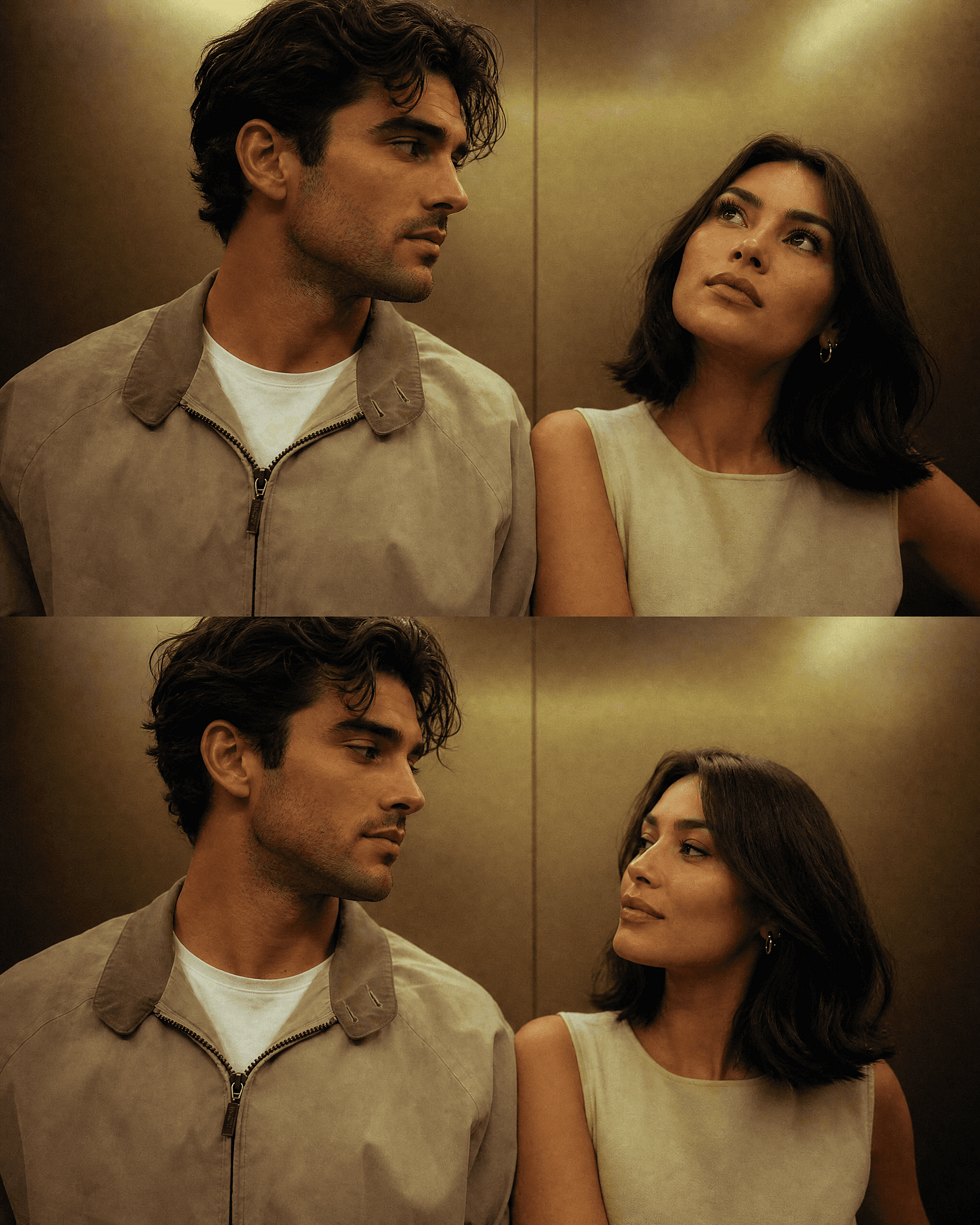
للحصول على نسخة موسمية، احتفظ بالوجهين وغيّر المكان فقط. يتضمّن قسما الهالوين وعيد الميلاد أدناه أوامر ثنائية جاهزة، ويبقى كلا الشخصين واضحي الملامح في كل مكان تنشئه من الصورة المصدر نفسها.
المجسم ثلاثي الأبعاد
الشكل الذي دفع الاتجاه بأكمله إلى الانتشار الواسع، وما زال يحقق نجاحاً. يتحول شخص حقيقي إلى مجسّم صغير قابل للاقتناء على مكتب أو داخل عبوة بيع بالتجزئة. يُقرأ فوراً في الخلاصة لأن التباين بين "شخص أعرفه" و"لعبة على رف" يجذب الانتباه بحد ذاته.
Edit the uploaded photo. Turn the person into a realistic 3D collectible
figure standing on a wooden desk next to a keyboard and a coffee mug for
scale. Keep their face, hairstyle, and outfit recognizable. Add a subtle
plastic-model texture, detailed base, soft desk lighting, shallow depth
of field, believable miniature scale, vertical 4:5 social frame.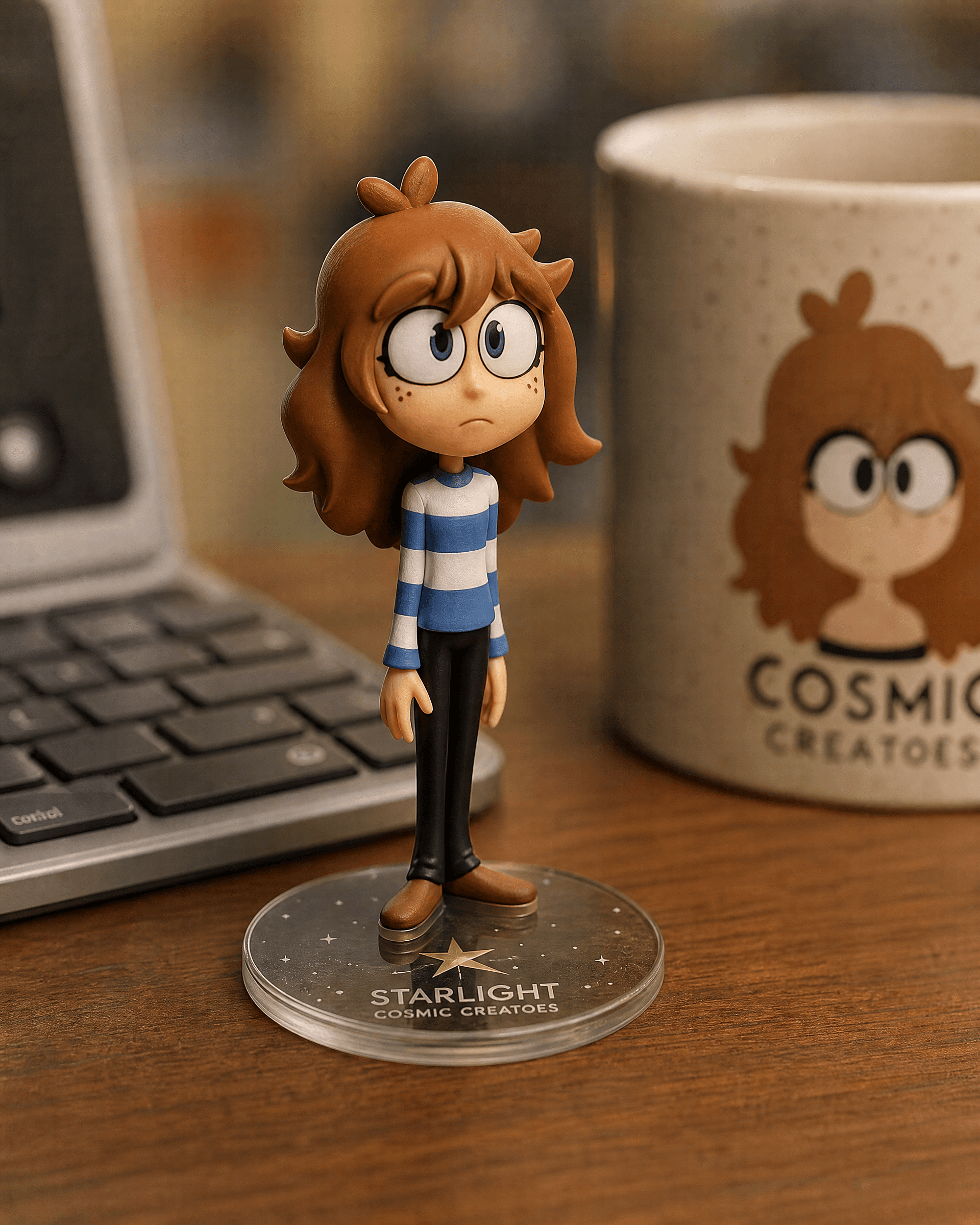
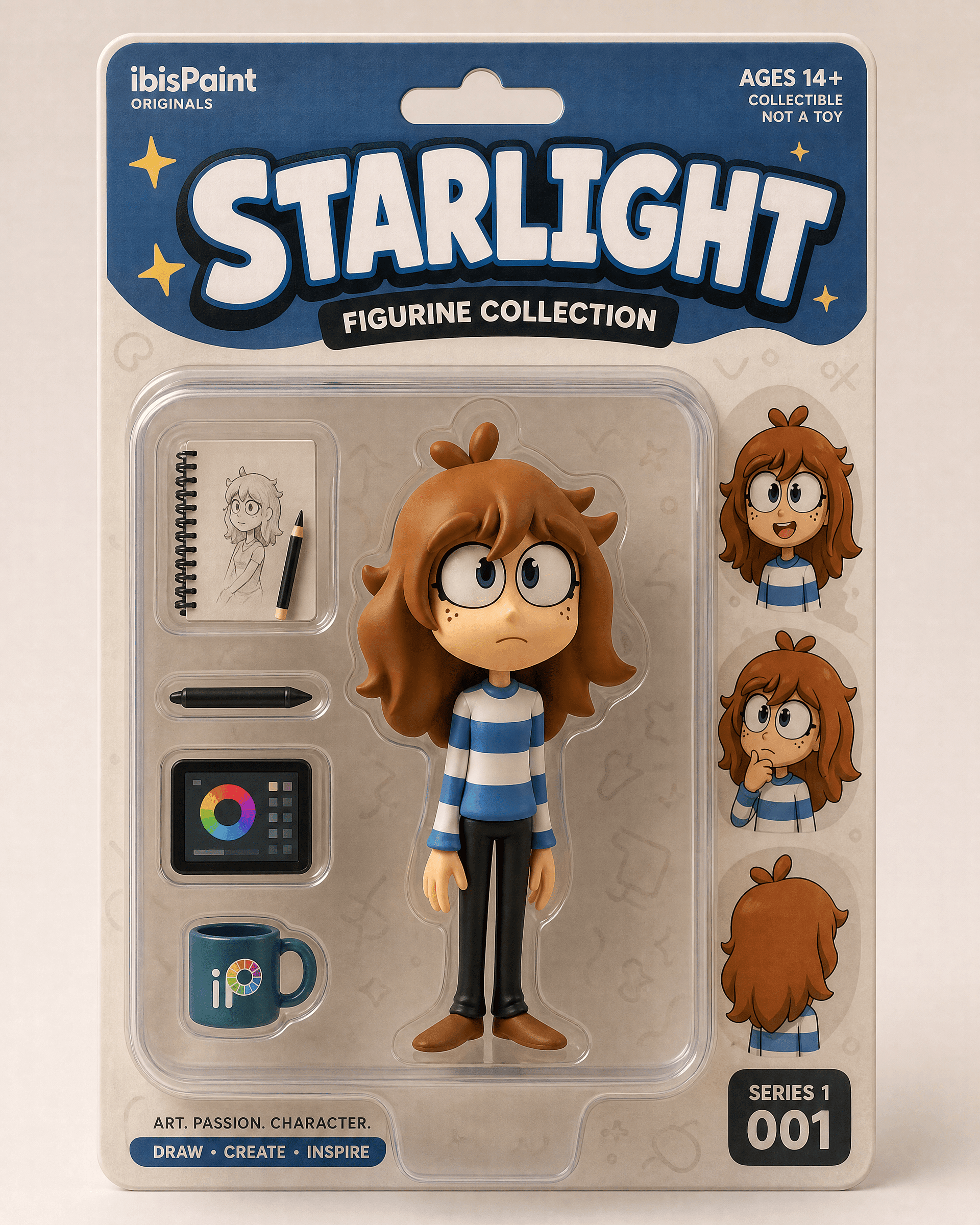
النسخة المعبّأة في صندوق للكشف عن تغليف بيع التجزئة:
Edit the uploaded photo into a boxed action figure. Keep the person's
face and style recognizable. Place the figure inside a clear blister
package with a printed backing card, bold product name at the top, small
accessory icons, realistic toy photography, studio lighting, collectible
designer-toy aesthetic.
ابدأ بصورة واضحة لكامل الجسم أو الجزء العلوي. تبدو نسخة المكتب كتعديل هادئ وقابل للتصديق. أما النسخة المعبّأة فتبدو ككشف مفاجئ.
تعديل ترميم الصور القديمة وتلوينها
الترميم من أكثر الأشياء فائدة وأقلها حيلة بين ما تقوم به هذه النماذج. فهو يصلح الخدوش، ويشحذ المسح الباهت، ويلوّن الصور بالأبيض والأسود. الكثير من الناس فتحوا محرر Gemini لأول مرة لهذا الغرض تحديدًا، عادةً لمشروع عائلي أو هدية ذكرى سنوية.
Edit the uploaded old photo. Restore it: remove scratches, dust,
creases, and water damage, repair torn areas, sharpen soft details, and
correct fading. Keep every face and feature true to the original, no
reinvented details. Preserve the original composition and era-accurate
clothing. Natural, archival-quality restoration.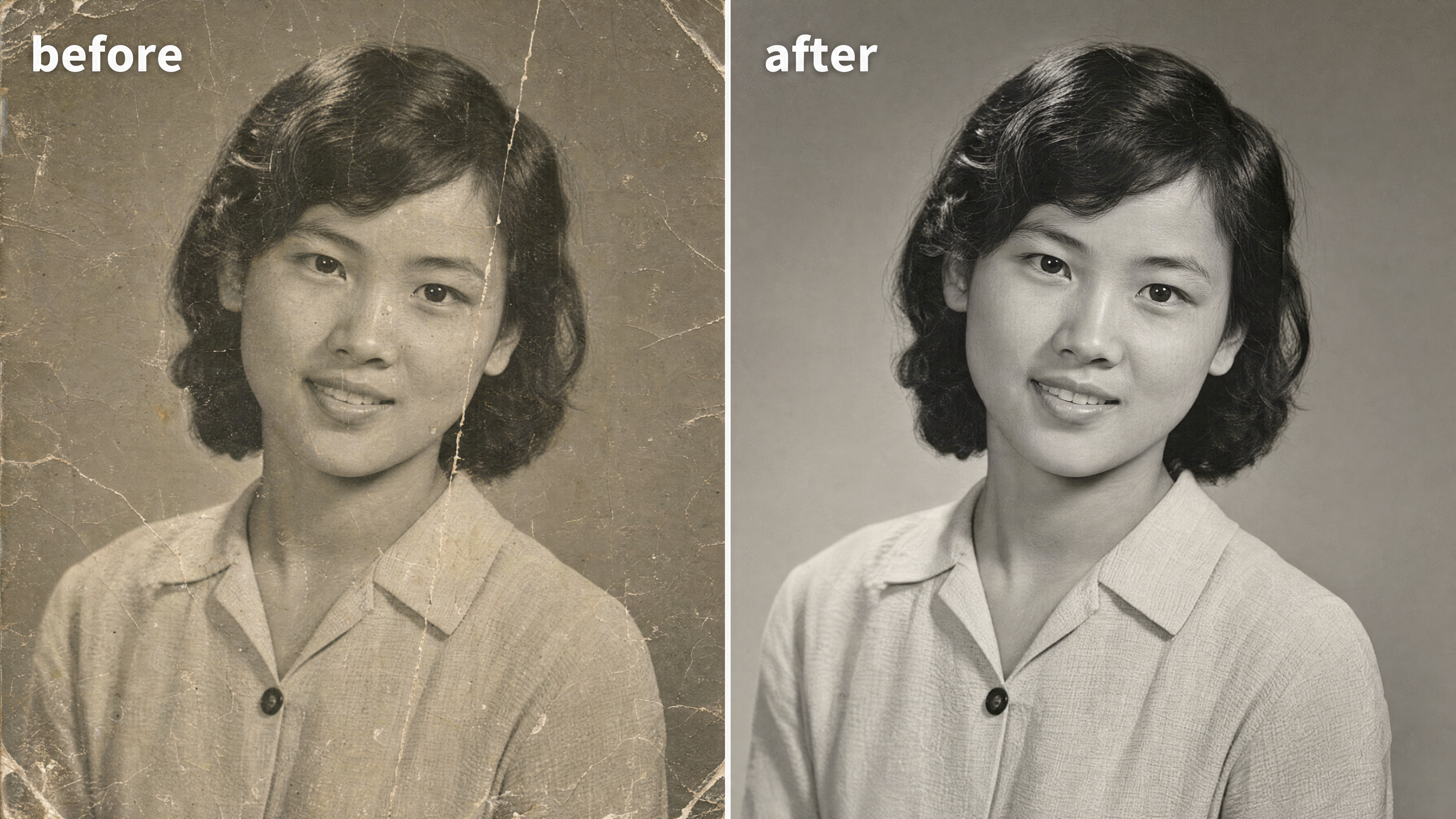
لتلوين صورة بالأبيض والأسود، أضف سطرًا واحدًا:
After restoring the photo, add realistic, natural color: era-accurate
skin tones, believable fabric colors, soft natural lighting. Keep it
subtle and true to life, not oversaturated. Do not change any faces or
features.
العبارة التي يقوم عليها هذا التعديل هي "وفياً للأصل". يخفق الترميم عندما يخترع النموذج وجهاً جديداً لقريب في صورة ضبابية. يمكنك استعد النتيجة ونظّفها في محرر الصور بعد ذلك، ثم ارفع دقتها إلى دقة الطباعة للتأطير.
أسلوب Y2K
مظهر الوميض بأسلوب Y2K يتصدّر المجموعة الرترو هذا الشهر: فلاش مباشر قاسٍ، ألوان باهتة قليلاً، حبيبات كاميرا رقمية من مطلع الألفينات، وطاقة صور الحفلات. يُقرأ فوراً على أنه حنين للماضي. يعمل على صورة شخصية واحدة أو على مجموعة.
Edit the uploaded photo. Keep the same face, features, and expression
exactly, preserve the original identity. Restyle into a Y2K early-2000s
digital-camera look: harsh direct on-camera flash, slightly washed cool
color, fine digital noise, candid party-photo framing, low-fi nostalgic
mood, authentic 2003 point-and-shoot aesthetic. Keep skin texture
natural.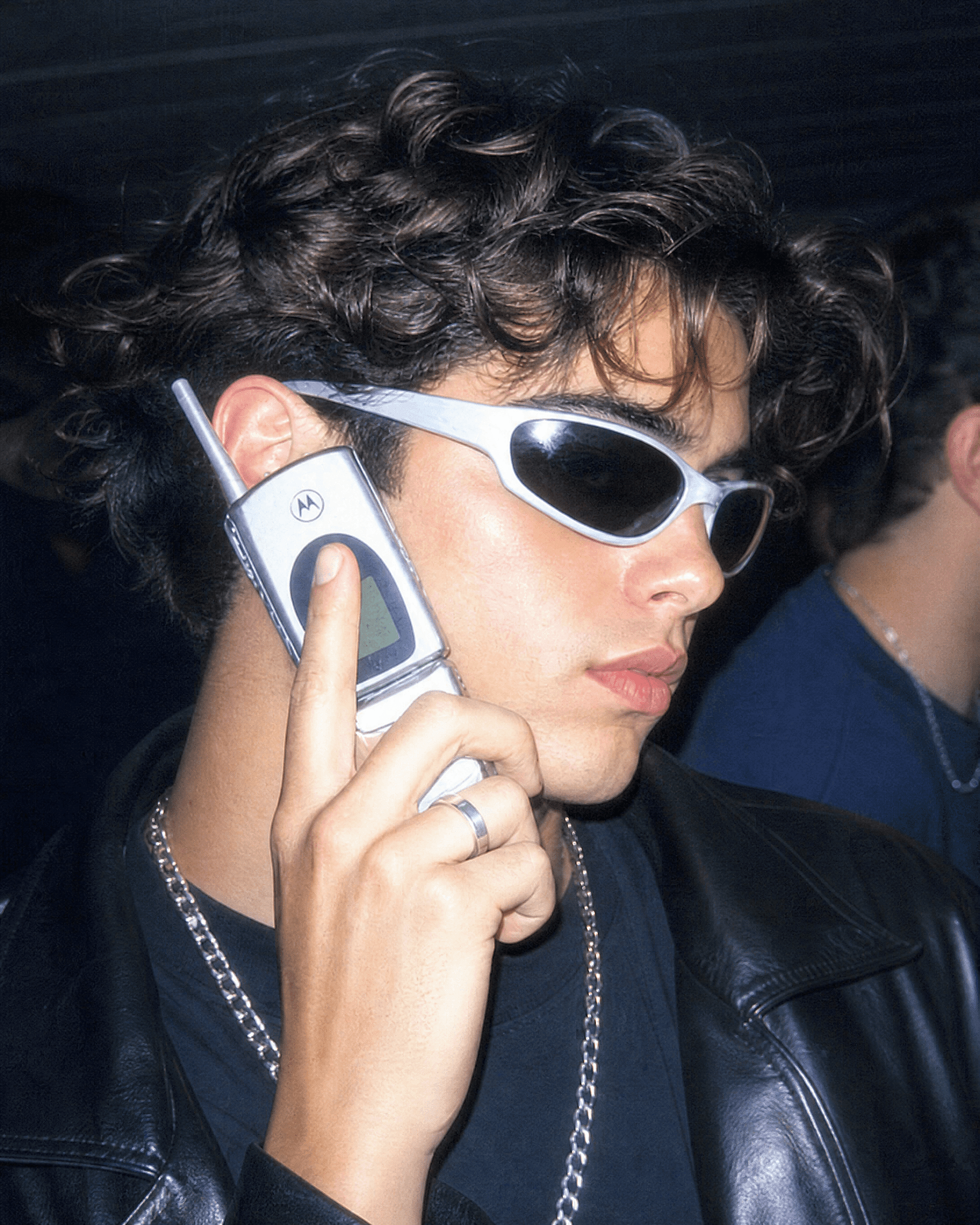
ادفعها أبعد بتحديد العقد الزمني. "بورتريه بكاميرا فيلم من التسعينيات، حبيبات دافئة، فلاش خفيف" يعطي طابعًا رجعيًا أنعم. "ملصق مسلسل كوميدي من التسعينيات، إضاءة استوديو ساطعة، نص عنوان جريء في الأعلى" يعطي نسخة الصورة الجماعية التي يؤطرها الناس كلقطة طاقم برنامج تلفزيوني.
البورتريه الجمالي بأسلوب aura-farm
أسلوب "Aura-farming" هو الأحدث في هذه المجموعة. إضاءة خلفية درامية، وحافة متوهجة من الضوء الملون، ووضعية واثقة من زاوية منخفضة، وخلفية جوّية مفعمة بالمزاج. إنه الأسلوب الذي يلجأ إليه الناس عندما يريدون صورة شخصية تبدو سينمائية وأكبر من الحياة قليلًا.
Edit the uploaded photo. Keep the same face and identity exactly.
Restyle into an aura-farm aesthetic portrait: dramatic colored rim light
glowing around the subject, moody dark atmospheric background, soft
volumetric haze, confident low-angle framing, rich cinematic color
grade, subtle particles in the air, high-detail vertical portrait. Keep
skin texture natural and true to life.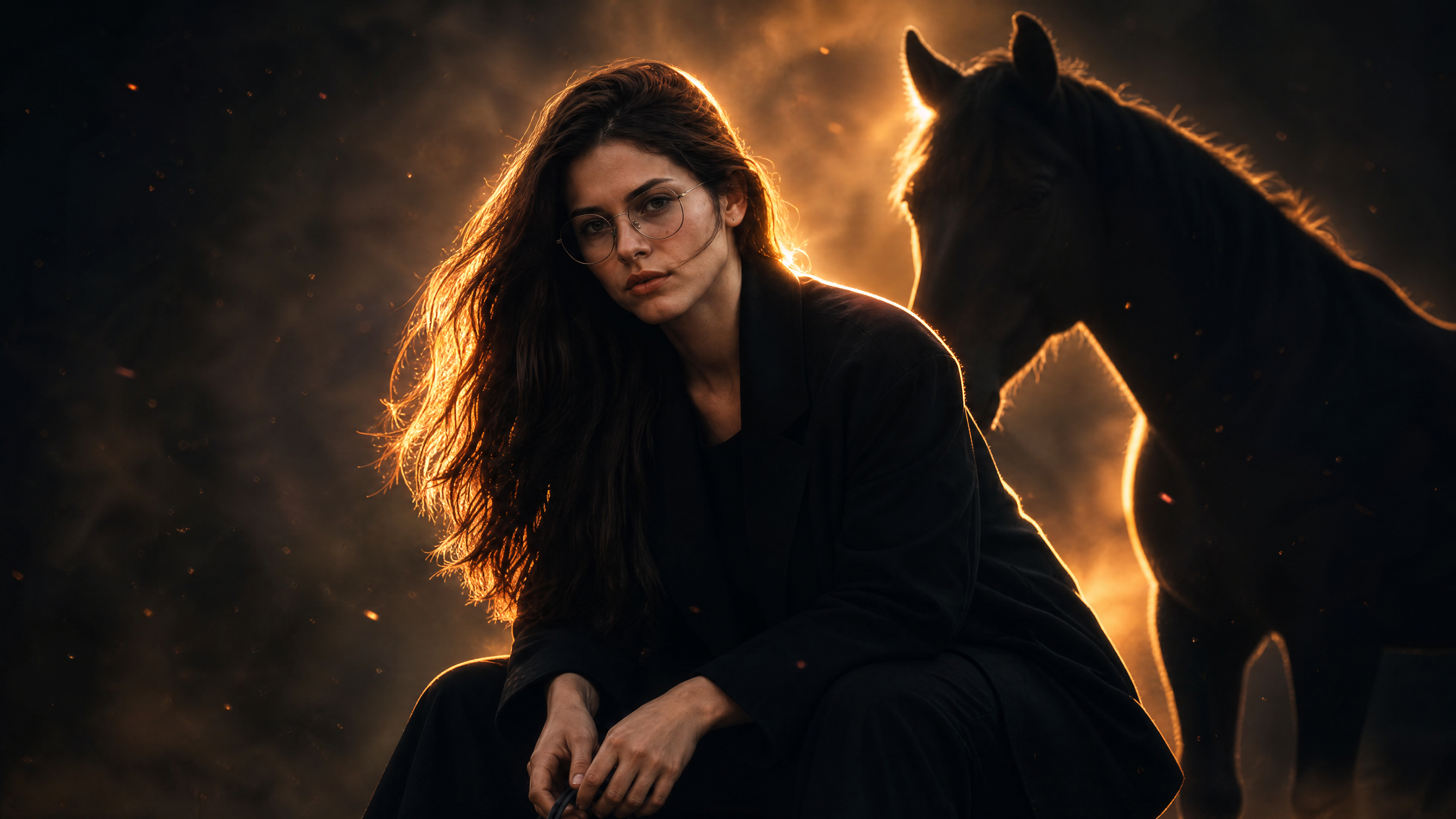
غيّر لون إضاءة الحواف لتغيير الأجواء. أزرق بارد للهدوء والغموض، وكهرماني دافئ للطابع البطولي، وأرجواني للأزياء الراقية.
أوامر صور الهالوين
في كل أكتوبر يكتسح موجز التواصل اتجاه الهالوين بالذكاء الاصطناعي: يرفع الناس صورة سيلفي ليحصلوا على بورتريه بزيّ تنكري، أو جلسة تصوير ثنائية، أو لقطة رعب بأسلوب التسجيلات القديمة يكونون هم أبطالها. الفكرة بسيطة. احتفظ بوجهك الحقيقي، واستبدل الزيّ والمكياج والمكان. وهذا يلائم تمامًا ما تبرع فيه نماذج صور Gemini، لأن الزيّ والمشهد يمكن أن يتغيّرا كليًا بينما تبقى أنت مُميّزًا وواضح الملامح.
سيلفي زيّ الهالوين
التنسيق الأساسي للترند، وهو الأكثر بحثاً لدى معظم الناس. ارفع صورة سيلفي، سمِّ الزي، واحصل على صورة شخصية تبدو كجلسة تصوير هالوين مصممة باحترافية.
Edit the uploaded photo. Keep the same face, features, and expression
exactly, preserve the original identity. Restyle into an elegant vampire
Halloween portrait: deep burgundy velvet outfit with a high lace collar,
dark berry lips, subtle pale makeup, candlelit gothic interior, cool
moonlight from an arched window, faint mist, carved pumpkins softly
blurred in the background, cinematic color grade, vertical 4:5 frame.
Keep skin texture natural and true to life.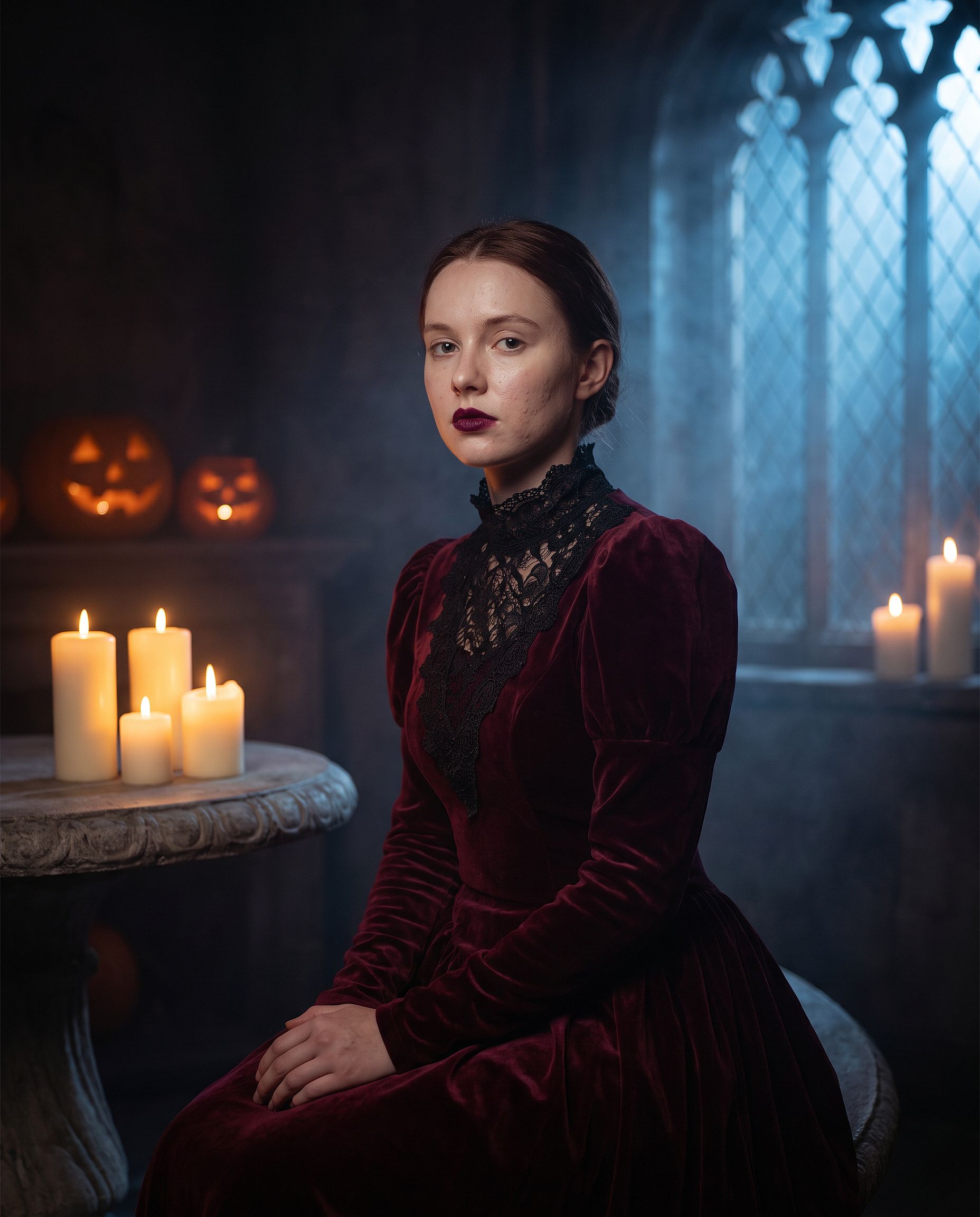
استبدل "مصاص دماء أنيق" بأي زيّ: ساحرة، زومبي، عروس شبح، هيكل عظمي، أو أحد وحوش الأفلام الكلاسيكية. اترك السطرين الأولين دون تغيير. مكياج الأزياء هو المكان الذي يسمح فيه الأمر الفضفاض للنموذج بإعادة رسم الوجه بالكامل، لذا فإن سطر الهوية أهمّ هنا من أي تعديل آخر.
ترند الهالوين بنمط VHS
صيغة اتجاه الهالوين بالذكاء الاصطناعي الأكثر نسخًا: صورتك محوّلة إلى لقطة مُحبّبة من كاميرا فيديو من التسعينيات مأخوذة من فيلم رعب، مع شخصية غامضة تتربّص في الخلفية. آثار الشريط والطابع الزمني يقومان بمعظم العمل.
Edit the uploaded photo. Keep the same face and identity exactly.
Restyle into a 1990s VHS camcorder still from a found-footage horror
movie: dim bedroom at night, harsh on-camera light, scan lines, chroma
bleed, slight tracking distortion, washed-out colors, a faint shadowy
hooded figure standing in the dark doorway behind the subject, timestamp
"OCT 31 1996 11:47 PM" in the bottom corner, 4:3 frame.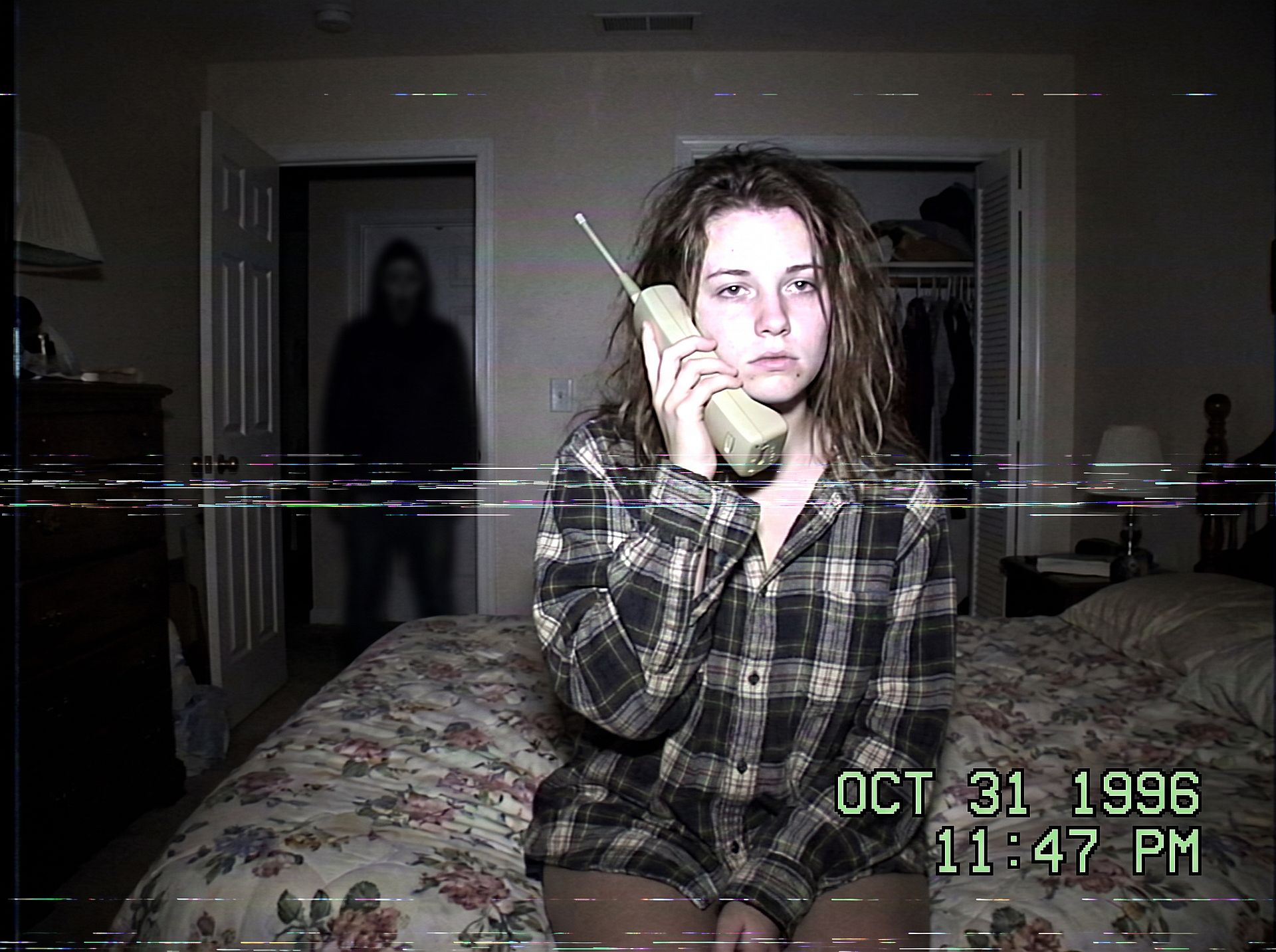
غيّر المشهد لتغيّر درجة الرعب: مطبخ في منتصف الليل، أو ممر مظلم، أو مقعد خلفي مع الشخصية في النافذة الخلفية. أبقِ الشخصية صغيرة وفي الظل لتبقى الصورة مخيفة لا دموية.
جلسة تصوير الثنائي في الهالوين
أزياء الثنائي تمثّل الحصة الأكبر من عمليات البحث عن جلسات تصوير الهالوين. احمِ كلا الوجهين وألبسهما كثنائي:
Edit the uploaded couple photo. Keep both faces, skin tones, and
expressions exactly, do not merge or alter their features. Dress them in
coordinated Halloween costumes, a classic vampire and a witch, standing
close on an autumn porch at dusk: glowing jack-o'-lanterns, warm string
lights, fallen leaves, soft fog, warm film color grade, shallow depth of
field.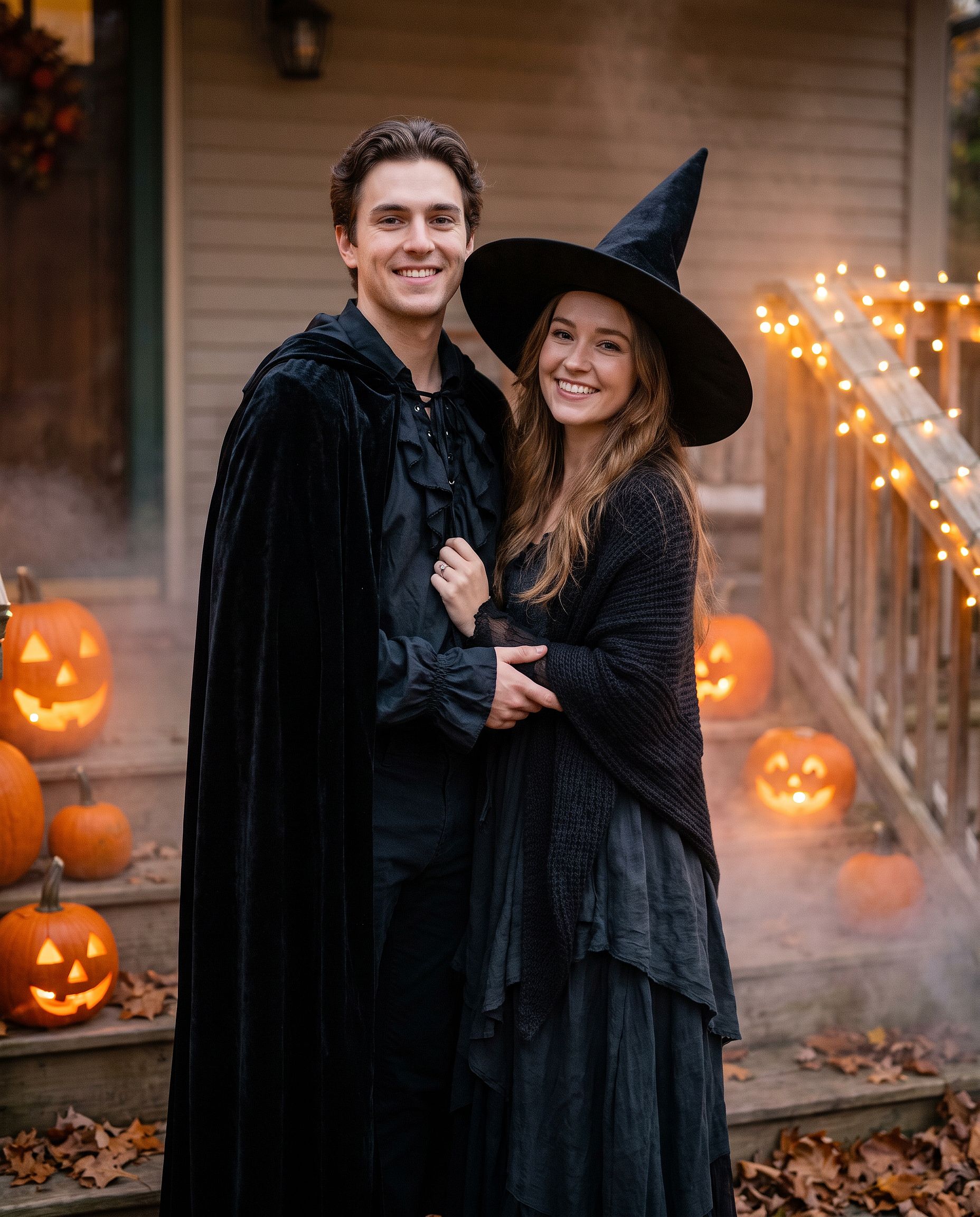
يصلح الأمر نفسه لأعزّ الأصدقاء أو لصورة عائلية. غيّر "ثنائي" إلى "مجموعة من أربعة" واذكر كل زيّ بالترتيب من اليسار إلى اليمين.
إطلالة مكياج جمجمة السكر
للحصول على إطلالة مكياج بدلًا من زيّ كامل:
Edit the uploaded photo. Keep the face shape, eyes, and identity
recognizable. Add half-face sugar-skull makeup: white base, black eye
sockets, and delicate floral linework on one side, the other half left
natural. Dark suit with a marigold flower, candlelit background with
orange marigold petals, dramatic side lighting, rich cinematic color.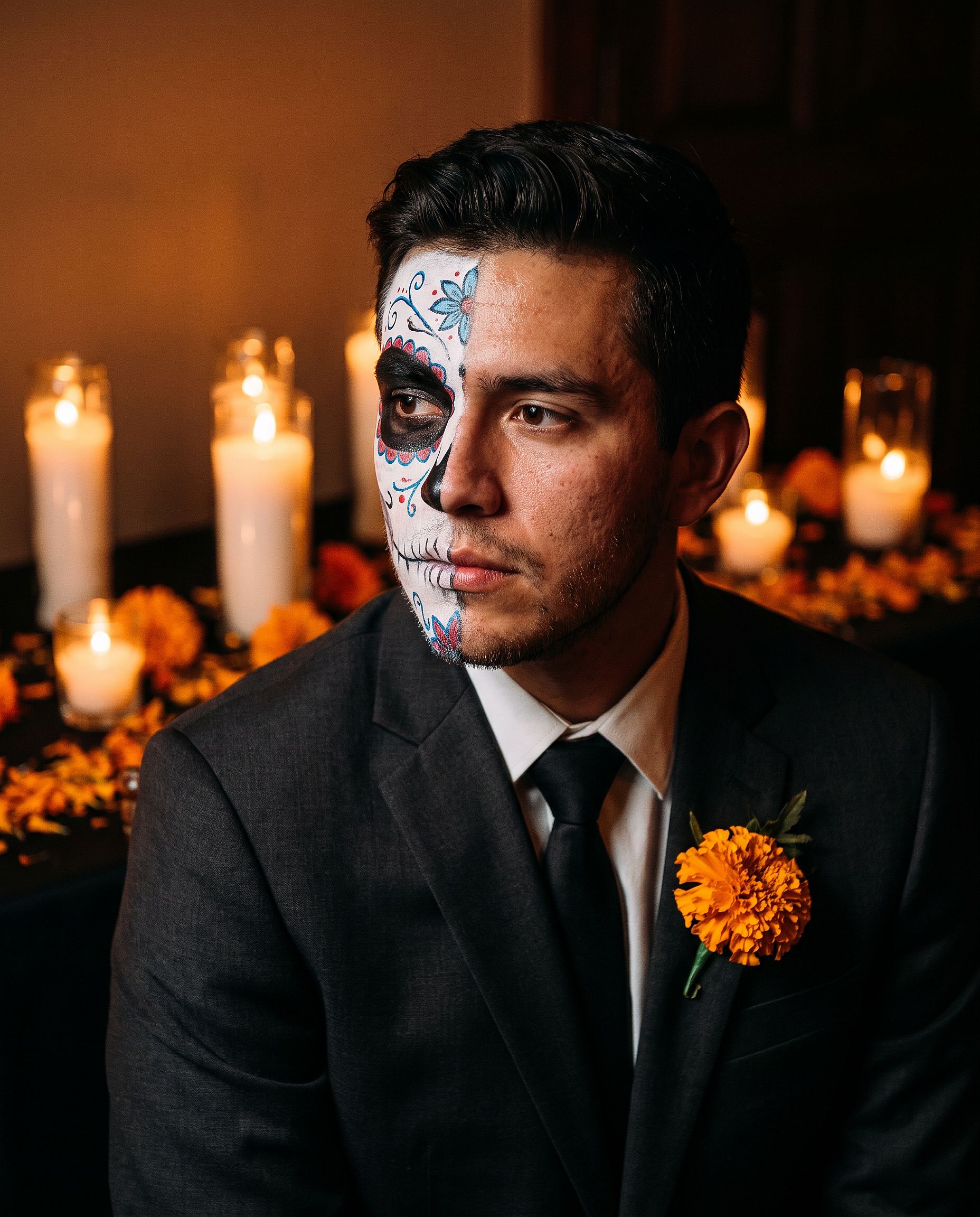
مكياج نصف الوجه يبقي الشخص سهل التعرّف عليه، ما يجعله صورة ملف شخصي أفضل من تصميم يغطي الوجه بالكامل.
زيّ الحيوان الأليف
Edit the uploaded pet photo. Keep the pet's face, fur pattern, and eye
color exactly. Add a small witch hat and a tiny black cape, seated next
to a glowing jack-o'-lantern, cozy autumn lighting, shallow depth of
field, playful but realistic.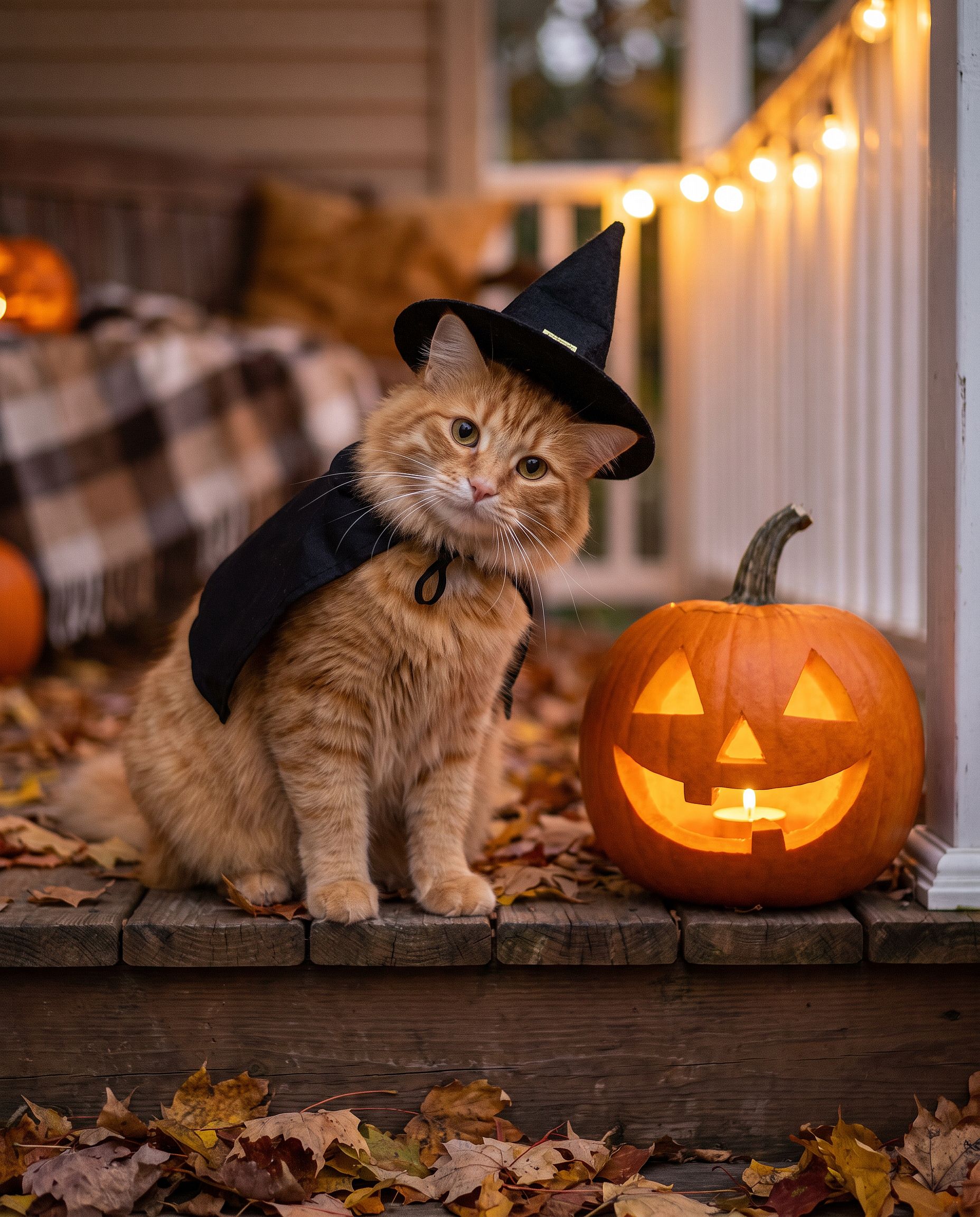
إذا كنت تفضّل تخطّي كتابة الأوامر، فإن مولّد الهالوين بالذكاء الاصطناعي مصمّم لهذا الغرض: ارفع صورة وحوّلها إلى صورة شخصية بزي هالوين.
أوامر صور عيد الشكر
صور عيد الشكر تدور حول المائدة أكثر من الأزياء: لقطة عشاء العائلة، والصورة الخريفية لبطاقة العطلة، والصورة التي تصبح غلافاً للجميع طوال الأسبوع. الحيلة هي نفسها في أي تعديل جماعي. ثبّت كل وجه، ثم غيّر الإضاءة والملابس والمشهد.
صورة عشاء العائلة في عيد الشكر
معظم صور عشاء العائلة تُلتقط في إضاءة سيئة بواسطة أقرب شخص إلى الهاتف. هذا الأمر يحوّل تلك اللقطة إلى الصورة التي قد تطبعها فعلاً.
Edit the uploaded family photo. Keep every face, skin tone, and
expression exactly, preserve all identities, do not merge features.
Restyle into a warm Thanksgiving dinner photo: long wooden table with a
roast turkey, pumpkin pie, candles, small pumpkins and autumn leaves,
golden late-afternoon window light, cozy knitwear in rust, cream, and
olive tones, natural candid closeness, vertical 4:5 frame.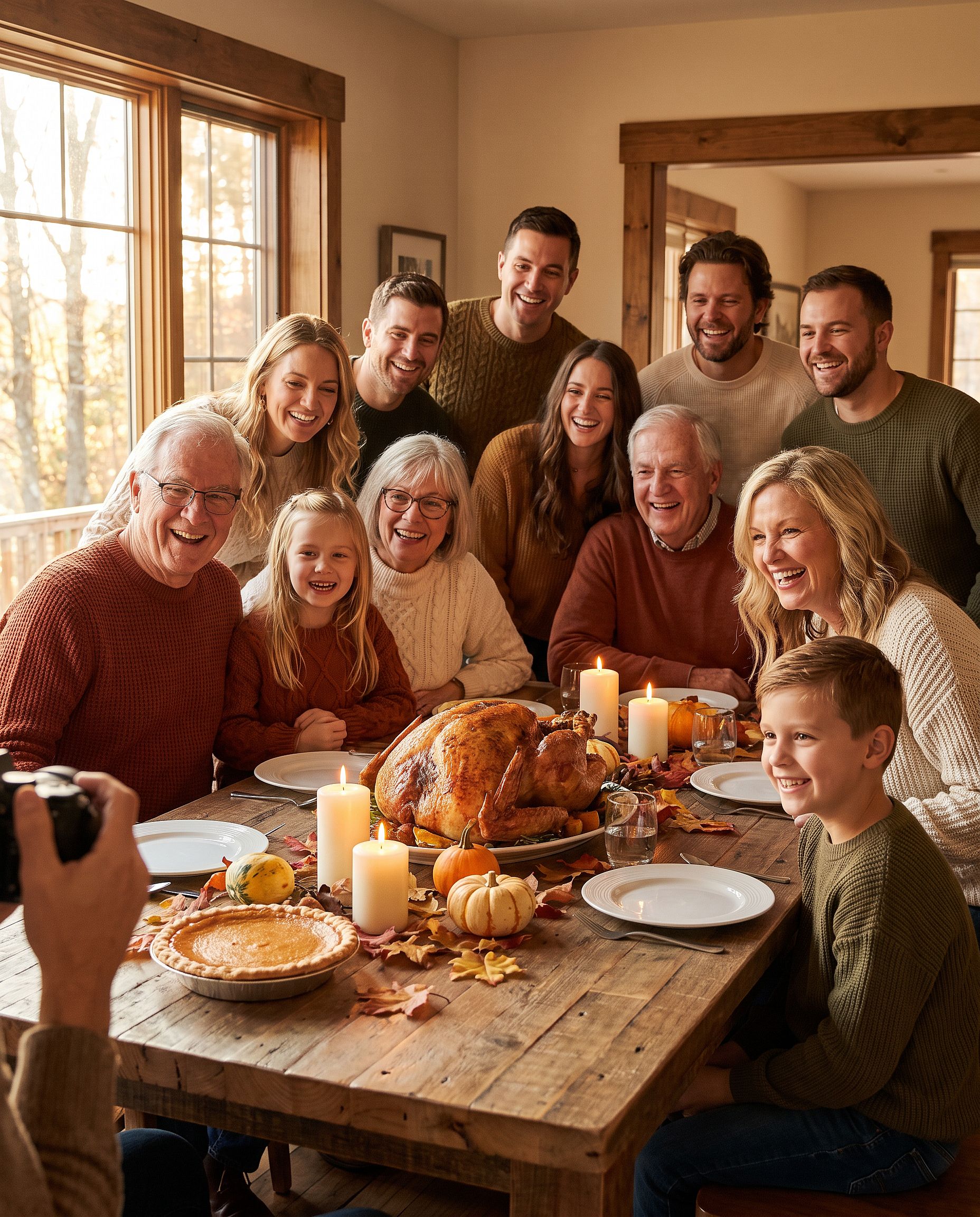
لأكثر من أربعة أشخاص، اذكر كم شخصاً في الصورة ("عائلة من ستة أفراد") حتى لا يُسقط النموذج أحداً أو يضيف شخصاً.
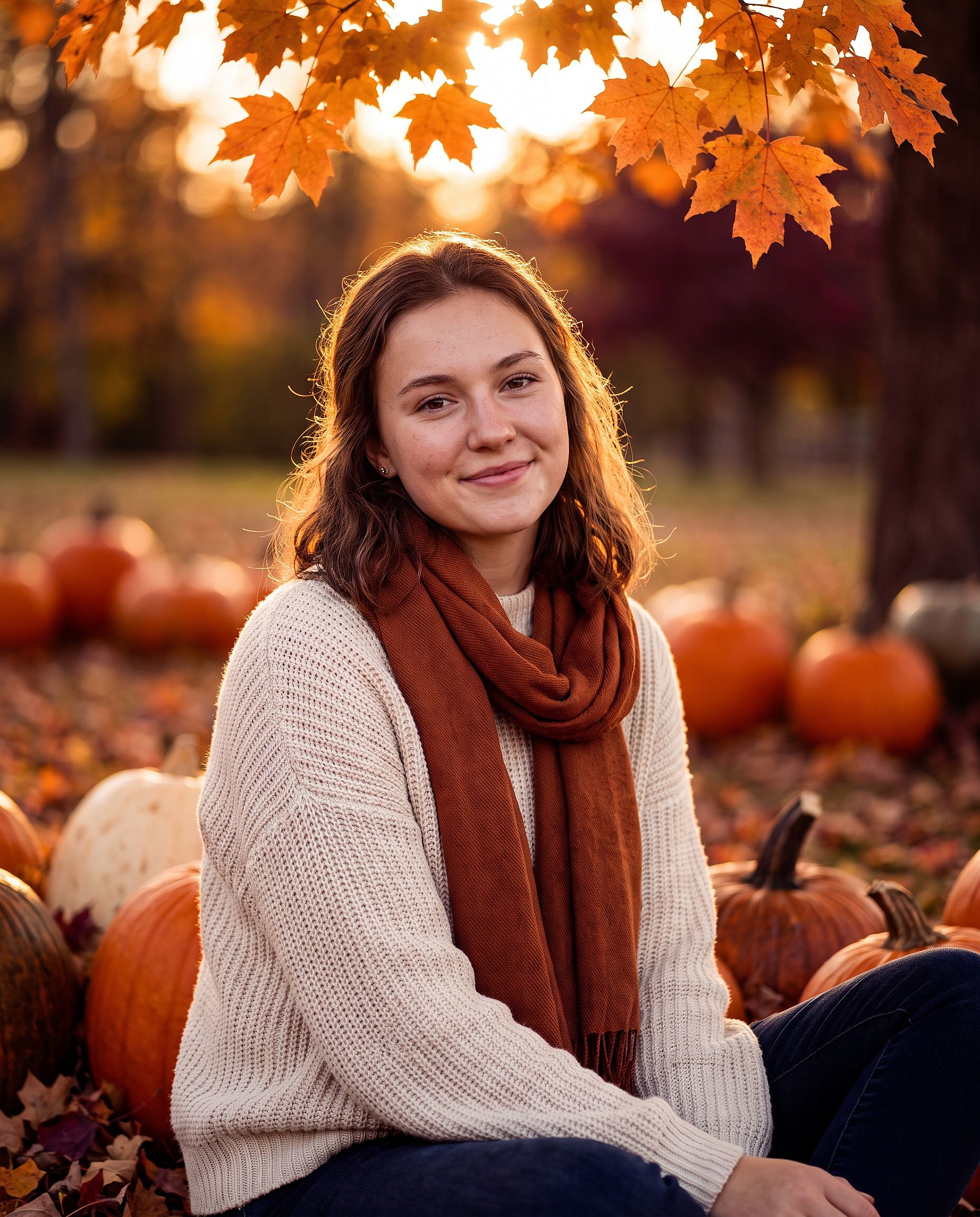
بورتريه عيد الشكر الخريفي
لصورة شخصية واحدة، أو لقطة ثنائي، أو بطاقة صورة لعيد الشكر:
Edit the uploaded photo. Keep the same face and identity exactly.
Restyle into an autumn Thanksgiving portrait: outdoors in a pumpkin
patch at golden hour, chunky knit sweater and scarf, warm amber and
burgundy tones, soft backlight through orange leaves, shallow depth of
field, holiday photo card quality. Keep skin texture natural.
أضف "اترك مساحة خالية في الأعلى للتحية" إذا كانت الصورة ستوضع على بطاقة.
أوامر صور عيد الميلاد
صورة الكريسماس بالذكاء الاصطناعي هي أكبر تعديل موسمي في العام. ديسمبر هو الوقت الذي يرغب فيه الناس بجلسة تصوير عائلية دون حجز استوديو، وبطاقة عطلة دون مصور، وصورة ملف شخصي احتفالية قبل كل حفلة. يبدأ كل تنسيق أدناه من صورة عادية.
جلسة تصوير علبة الكريسماس
الاتجاه الاستوديوي حيث يجلس الشخص داخل علبة هدية عملاقة مفتوحة. من الصعب تنفيذه في المنزل ومن السهل القيام به كتعديل.
Edit the uploaded photo. Keep the same face, features, and expression
exactly, preserve the original identity. Place the person sitting
inside a large open white gift box with a red satin ribbon, surrounded
by wrapped presents, warm fairy lights, and a softly blurred decorated
Christmas tree. Red knit sweater, bright clean studio lighting, cream
and red palette, professional holiday portrait, vertical 4:5 frame.
بدّل لون العلبة ليتناسب مع علامة تجارية أو تصميم بطاقة. الذهبي والأسود يبدوان فاخرين، والوردي الباستيل يبدو ناعماً ومرحاً.
جلسة تصوير العائلة لعيد الميلاد
بيجامات متناسقة أمام الشجرة، اللقطة التي تحاول كل عائلة التقاطها مرة كل عام. الحيوانات الأليفة تُعتبر من العائلة هنا أيضاً.
Edit the uploaded family photo. Keep every face, skin tone, and
expression exactly, preserve all identities, do not merge features.
Dress everyone, including the dog, in matching red plaid pajamas, the
dog in a small Santa hat. Seat them together on a rug in front of a
decorated Christmas tree and a lit fireplace with stockings, warm cozy
lighting, soft bokeh from the tree lights, holiday card quality.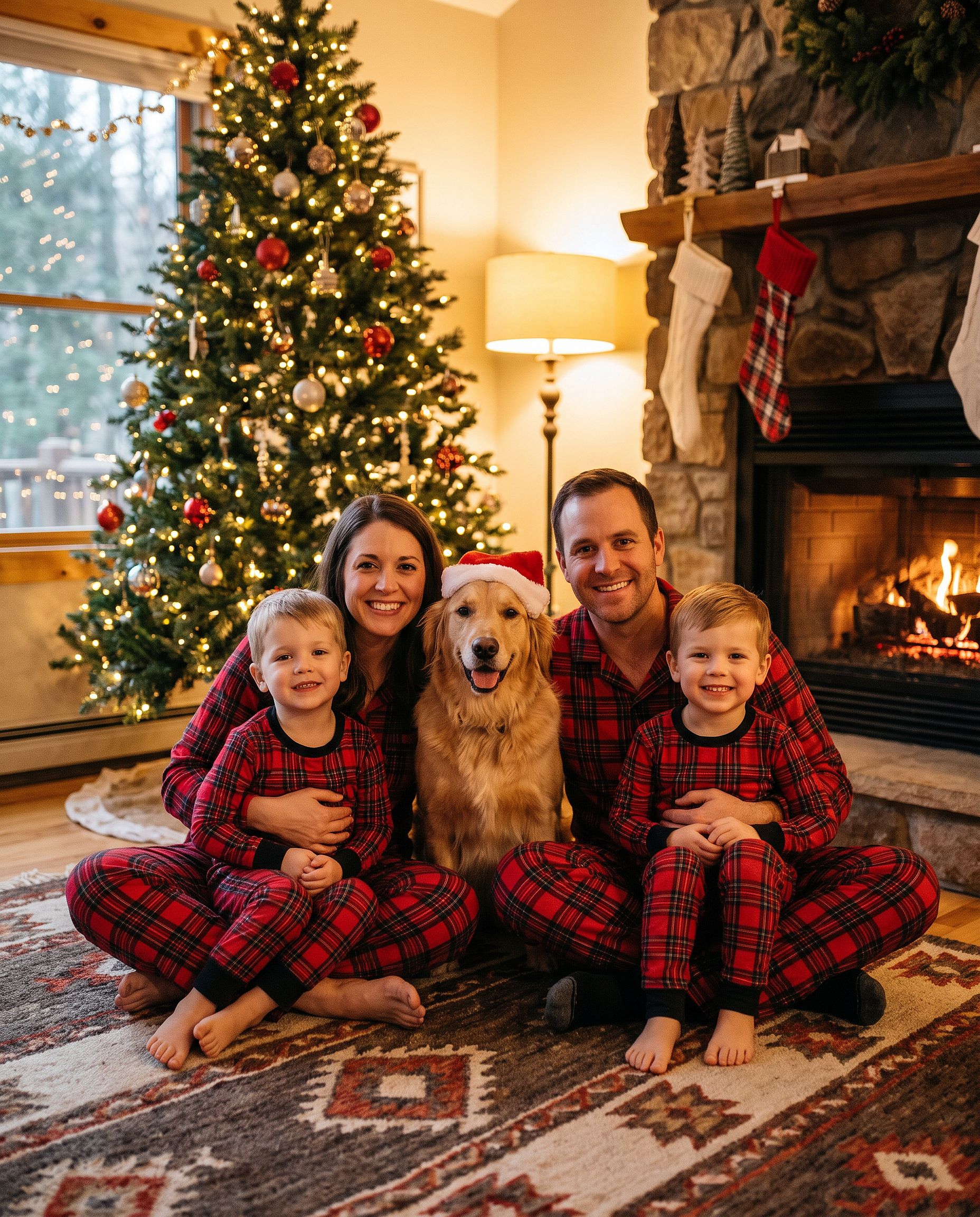
إذا كنت تريد القبعة فقط، أضف قبعة سانتا إلى الصورة الأداة تقوم بذلك تمامًا، و أداة خلفية عيد الميلاد يبدّل المشهد مع ترك الأشخاص دون تغيير.
صورة مزرعة أشجار الكريسماس في الهواء الطلق
Edit the uploaded photo. Keep the same face and identity exactly.
Restyle into an outdoor Christmas tree farm photo: rows of snowy pine
trees, light snowfall, a freshly cut tree on a sled, plaid coat and
knit hat, soft overcast winter light, warm breath in the cold air,
natural skin texture, vertical 4:5 frame.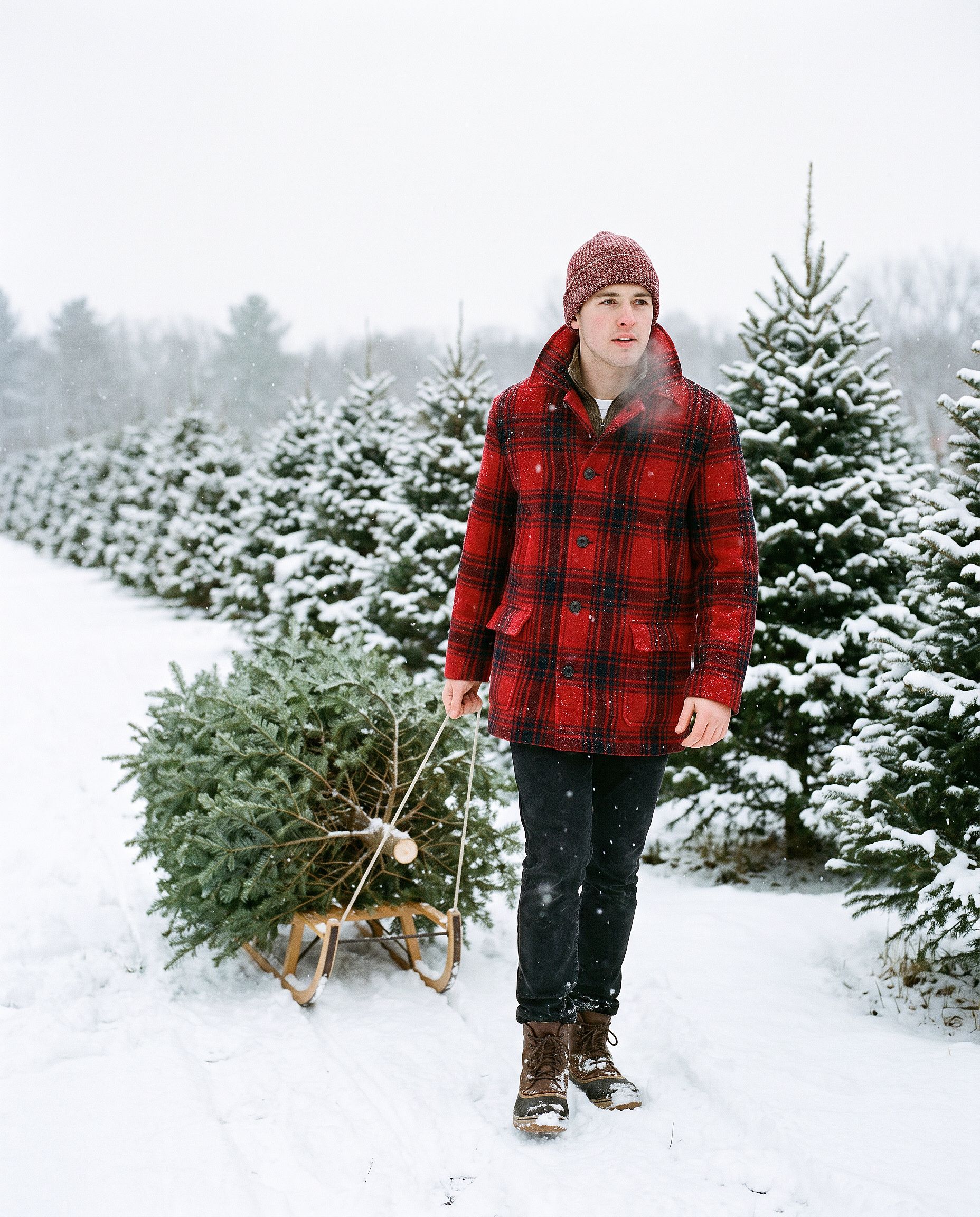
بطاقة عيد الميلاد بالذكاء الاصطناعي
Turn the uploaded photo into a luxury printed Christmas card. Keep every
face exactly. Place the people in a snowy cabin doorway with evergreen
garland and warm window light, set inside a thin gold foil border on
heavy cream cardstock. Add "Merry Christmas" in gold foil calligraphy
above the photo and "from the Parkers" in small serif capitals below,
embossed holly in the corners. Show the card flat on white linen with
pine sprigs, a red velvet ribbon, and a gold wax seal.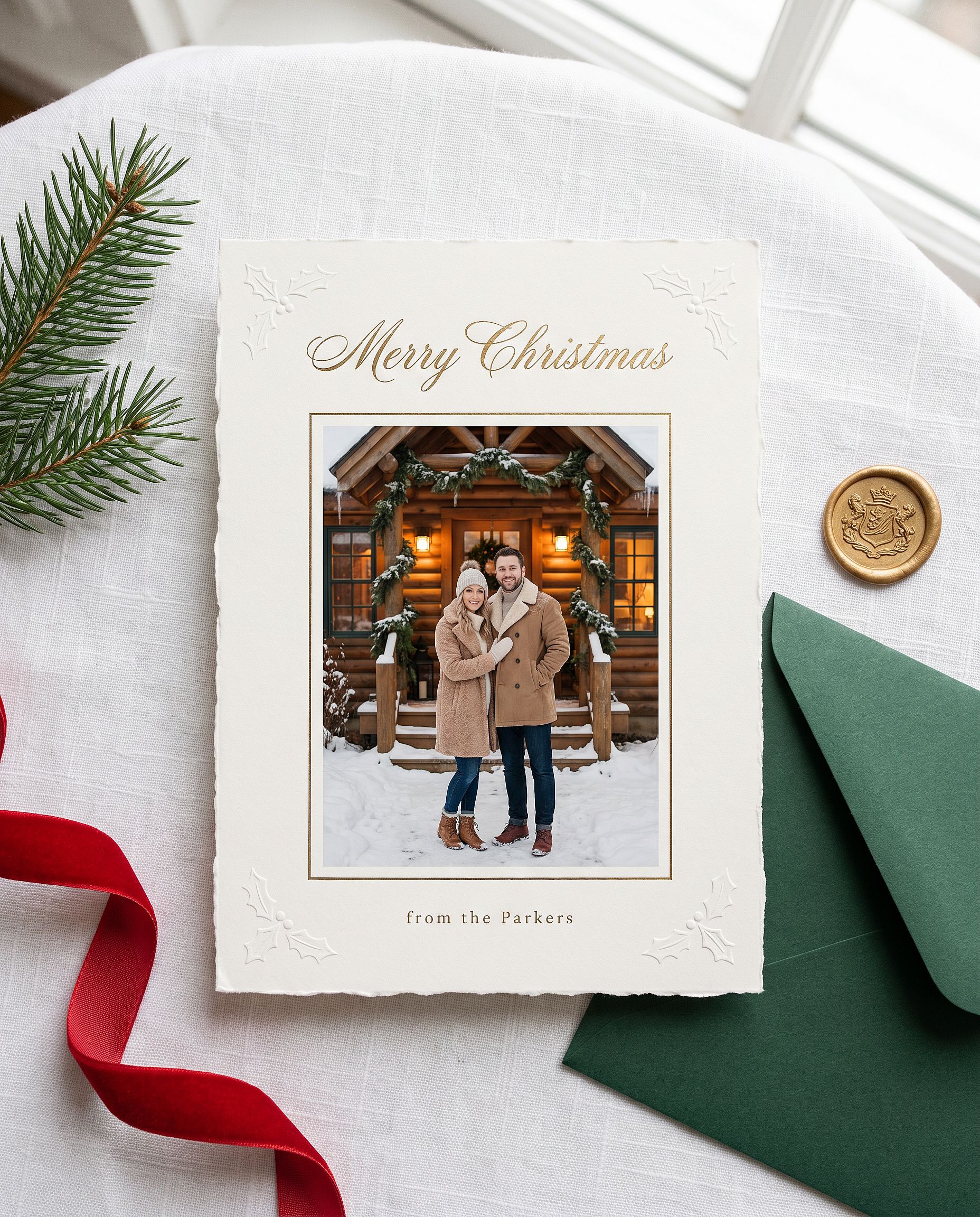
استبدل الاسم بين علامتي الاقتباس باسمك. يتعامل Nano Banana Pro مع النصوص القصيرة داخل الصورة بشكل جيد، لذا تظهر التحية غالباً مكتوبة بشكل صحيح من المحاولة الأولى.
صورة الكريسماس بنمط الأنمي
Restyle the uploaded photo into a Japanese anime film still on
Christmas Eve. Keep the person's hairstyle, outfit colors, and overall
look recognizable. Standing at a snowy railroad crossing in a quiet
residential town at blue hour, duffle coat and long red scarf, breath
visible in the cold, warm house windows, a lit Christmas tree outside a
corner shop, glowing vending machines, power lines overhead, soft
falling snow, hand-painted anime background art, delicate cel shading.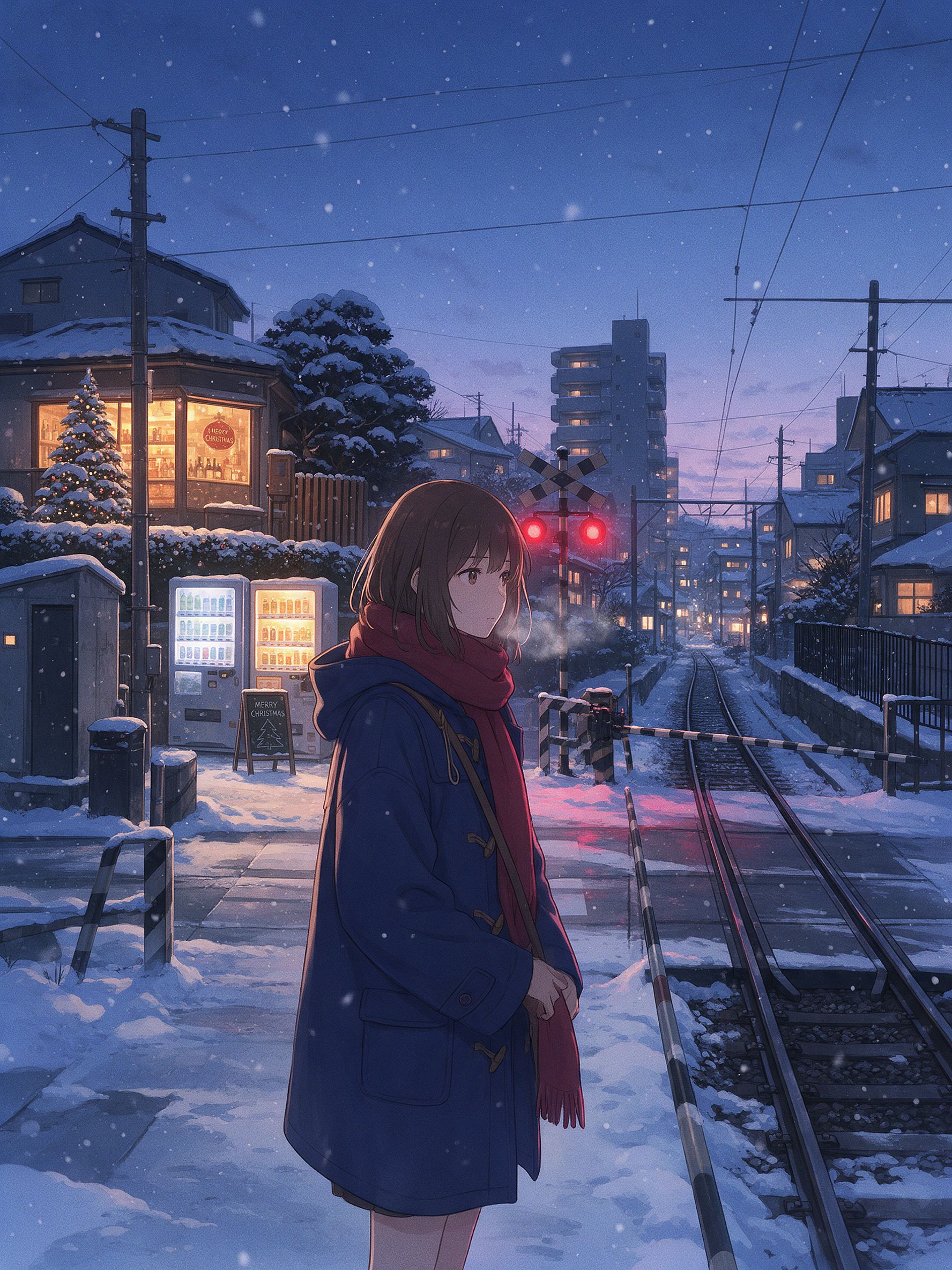
التفاصيل الصغيرة هي ما يجعلها تبدو كمشهد شتوي من أنمي ياباني: معبر السكة الحديدية، وآلات البيع، وخطوط الكهرباء، وضوء الساعة الزرقاء مقابل النوافذ الدافئة. لهذا المظهر، غالباً ما يمنح Seedream 5.0 Pro أو Nano Banana 2 Lite نمطاً ثنائي الأبعاد أنظف من Nano Banana Pro. بدّل النماذج وشغّل الأمر نفسه.
مكتبة prompts الصور الكاملة لـ Gemini
الأقسام أعلاه هي الشروحات المعمّقة. وأدناه المكتبة السريعة: أوامر قصيرة جاهزة للنسخ واللصق، مُرتّبة حسب ما تريد إنشاءه. معظمها يفترض أنك ترفع صورة أولًا. أما مجموعة اللمسة الجمالية والسينمائية فتعمل أيضًا كإنشاء خالص. اختر فئة، وخذ سطرًا، والصقه.
صور بورتريه للفتيات الرائجة
Edit the uploaded photo into a soft-glam aesthetic selfie: dewy glow,
warm highlight, subtle butterfly light, pastel background. Keep the same
face and identity exactly, natural skin texture.
Restyle the uploaded photo into an elegant saree ethnic portrait: rich
traditional outfit, soft gold jewelry, warm bokeh lighting, graceful
pose. Keep the face and identity unchanged.Edit the uploaded selfie into a clean Instagram DP: minimalist studio
backdrop, soft even light, tasteful modern styling, crisp detail. Keep
the same face exactly, no heavy smoothing.Restyle the uploaded photo into a dreamy pastel aesthetic portrait: airy
glow, muted soft colors, gentle wind in the hair, natural skin. Keep the
face recognizable and identity intact.Restyle the uploaded photo into a golden-hour outdoor girl portrait:
warm backlight, soft lens flare, blurred natural background, flowing
outfit. Keep the face and identity unchanged.صور رائجة للأولاد والأزواج
Restyle the uploaded photo into a café golden-hour boy portrait: soft
window backlight, cozy neutral outfit, gentle flare, Pinterest fashion
mood. Keep the face unchanged.
Restyle the uploaded couple photo into a warm café date-night scene:
cozy lighting, soft bokeh, relaxed poses. Keep both faces unchanged.Edit the uploaded couple photo into a vintage 1970s film look: warm
faded tones, retro wardrobe, soft grain. Preserve both faces and
expressions exactly.التحرير وإعادة التصميم
Edit the uploaded photo. Keep the face and pose exactly. Replace the
outfit with a clean, well-fitted business-casual look and the background
with a softly blurred modern office, matched lighting, professional
headshot quality.
إذا كنت تريد صورة شخصية احترافية دون كتابة أي prompt على الإطلاق، فإن مولّد الصور الشخصية بالذكاء الاصطناعي مصمم لهذا الغرض تحديدًا. فهو يحافظ على اتساق وجهك عبر مجموعة من الإطلالات المهنية.
Edit the uploaded photo into a black-and-white fine-art portrait:
dramatic side lighting, deep contrast, film grain, timeless studio look.
Keep the face exactly the same.
Edit the uploaded photo into a double-exposure portrait: the subject
blended with a soft city skyline, moody tones, artistic overlay. Keep
the primary face clear and recognizable.Edit the uploaded photo into an AI hairstyle try-on: keep the face and
identity exactly, change only the hairstyle to a modern layered cut,
natural color and texture, realistic result.الإصلاح وتعزيز الجودة
Edit the uploaded blurry photo: sharpen details, reduce noise, recover
texture in hair and skin. Keep the face identical, natural skin, no
plastic smoothing.
Edit the uploaded photo to a high-resolution 4K glow-up: sharpen fine
detail, reduce noise, improve color balance, recover hair and skin
texture. Keep the face and expression identical, no plastic smoothing.المواسم والمهرجانات
جُمل سريعة لبقية مواسم السنة. الهالوين وعيد الشكر وعيد الميلاد لها أقسام كاملة مع أمثلة أعلاه.
Edit the uploaded photo into a Diwali celebration: warm diya lamp light,
elegant traditional outfit, soft bokeh of string lights, rich jewel
tones. Keep the face unchanged.
Edit the uploaded photo into a spring cherry-blossom scene: soft pink
petals, gentle daylight, fresh pastel palette. Keep the person exactly
the same.Edit the uploaded couple photo into a Valentine's scene: soft warm
light, tasteful red accents, romantic bokeh. Keep both faces unchanged.Edit the uploaded photo into a New Year scene: elegant evening styling,
soft golden fireworks bokeh, celebratory mood. Keep the person
recognizable.جمالي وسينمائي
Edit the uploaded photo into a burning-newspaper portrait: the subject
framed by a vintage newspaper with glowing burning edges, warm ember
light, dramatic dark background, cinematic mood. Keep the face exactly
the same.
Edit the uploaded photo into a moody neon-noir portrait: rain-slick city
street, pink and blue neon reflections, cinematic contrast, shallow
depth of field. Keep the face and identity unchanged.كيف تكتب prompt خاص بك لصور Gemini
كل prompt أعلاه يتبع الهيكل نفسه:
Edit the uploaded photo.
Keep [the face / both faces / the pose / the composition] exactly the same and preserve the original identity.
Change only [outfit / background / era / color / scene].
Add [style, lighting, mood, aspect ratio].
Keep [skin texture / features] natural and true to life.
سطرًا بسطر: تخبر عبارة "عدّل الصورة المرفوعة" النموذج بالعمل من صورتك بدلًا من ابتكار صورة جديدة. تحمي عبارة "حافظ عليها تمامًا كما هي واحفظ الهوية الأصلية" الأجزاء التي تجعلها مميزة ومعروفة. تحصر عبارة "غيّر فقط" نطاق التعديل. وسطر ختامي حول البشرة الطبيعية أو التفاصيل الواقعية يمنع المظهر المفرط في المعالجة الذي يفضح الذكاء الاصطناعي.
للإنشاء الخالص، احذف عبارتَي "عدّل" و"أبقِ الأمر كما هو". صف الموضوع والأسلوب والإضاءة والمزاج مباشرة.
تحقق من خمس نقاط في خمس ثوانٍ قبل التوليد: رفعت الصورة، وحددت ما تريد الإبقاء عليه، وحددت ما تريد تغييره، وسمّيت أسلوبًا، وطلبت تفاصيل طبيعية. من Google مستندات دعم Gemini تغطي سير التحرير الأساسي.
Gemini (Nano Banana) مقابل GPT Image 2 مقابل Seedream للصور
لا يوجد نموذج واحد يفوز بكل صورة. إليك أين يتفوق كل منها وأين يقصّر:
| Nano Banana Pro | Nano Banana 2 Lite | GPT Image 2 | Seedream 5.0 Pro | |
|---|---|---|---|---|
| الحفاظ على الهوية عبر إعادة تصميم جذرية | الأقوى | قوي | قوي | متوسط |
| نص قابل للقراءة داخل الصورة (العناوين، التسميات، القوائم) | قوي | قوي | الأفضل (دقة النصوص الدقيقة وأيقونات الواجهة) | متوسط |
| الواقعية الفوتوغرافية (البشرة، الإضاءة، الملمس) | الأفضل (دقة 4K أصلية، واقعية للغاية) | قوي | الأفضل (بجودة الأزياء، وواقعية فائقة) | متوسط |
| أنمي / بأسلوب آسيوي / تصميم ثنائي الأبعاد | محدود | الأفضل (الخيار الأمثل للأنمي والرسوم المتحركة) | متوسط | الأفضل (بيئات أنمي بأجواء مميزة) |
| التحرير وفصل الطبقات | ذاكرة تكرارية (عدّل دون إعادة الكتابة) | ذاكرة تكرارية | بلا ذاكرة | فصل الطبقات المدمج وتحرير مجاني |
| نصوص متعددة اللغات (كوميكس، إعلانات، ملصقات) | قوي | متوسط | الأفضل | متوسط |
| الأفضل لـ | تعديلات بورتريه رائجة، مجموعات ثابتة الهوية، إخراج بدقة 4K | مسودات سريعة، وإعادة تصميم بأسلوب الأنمي، وصور بطولية للتجارة الإلكترونية | صور أزياء راقية، أي صورة تحتوي على نص، الملصقات والتغليف | جماليات الشخصيات، ومشاهد الأنمي، وسير عمل التحرير بالطبقات |
الأربعة جميعها في مساحة عمل واحدة داخل OpenArt. التبديل بين النماذج للمقارنة يكلّفك نقرة واحدة، لا اشتراكًا جديدًا. وعندما يكون الهدف الحفاظ على ثبات وجه واحد عبر مجموعة ترند كاملة، فإن شخصية بالذكاء الاصطناعي تثبّت الميزة الهوية بحيث يُعيد كل prompt الشخص نفسه.
الأسئلة الشائعة
كيف أستخدم Gemini AI للصور؟
افتح أداة صور Gemini، صف ما تريد، وأنشئ. لتعديل صورة موجودة، ارفعها أولاً وأخبر النموذج بما يجب الإبقاء عليه وما يجب تغييره. على OpenArt تحصل على نماذج Gemini نفسها (Nano Banana 2.1 وNano Banana Pro) إلى جانب محرر كامل. افتح مولّد صور بالذكاء الاصطناعي، اختر نموذجاً، والصق prompt.
كيف أحرّر صورة في Gemini AI؟
حمّل صورتك، ثم اكتب تعليمة تفصل بين ما يبقى وما يتغيّر: "احتفظ بالوجه والهوية كما هما تمامًا، وأعد تصميمها إلى صورة سوفت-غلام." التحميل مهم لأن النموذج يحرّر الصورة التي تقدّمها بدلًا من ابتكار شبيه لها. أضف سطرًا ختاميًا يطلب ملمس بشرة طبيعيًا لتجنّب المظهر المفرط في التنعيم.
كيف أصنع prompt صورة لـ Gemini AI؟
اتبع الهيكل أعلاه: سمِّ الموضوع، وحدد ما تريد الاحتفاظ به، وما تريد تغييره، وأضف النمط والإضاءة ونسبة العرض إلى الارتفاع، ثم اختم بسطر عن التفاصيل الطبيعية. انسخ أي prompt في هذا المنشور واستبدل كلمات النمط بكلماتك الخاصة.
ما هي أفضل prompts صور Gemini AI للفتيات؟
الأكثر رواجاً: سيلفيات ناعمة أنيقة، صور بالساري والأزياء التراثية، لقطات صور شخصية أنيقة لإنستغرام، صور شخصية خارجية في الساعة الذهبية. كل الأربعة موجودة في قسم صور البورتريه النسائية الرائجة أعلاه، جاهزة للصق.
ما هي أفضل أوامر Gemini بالذكاء الاصطناعي لصور الهالوين؟
صور شخصية بأزياء تحافظ على وجهك الحقيقي: سيلفي مصاص دماء أو ساحرة أنيقة، أو مظهر كاميرا الرعب بنمط VHS، أو زي ثنائي متناسق، أو مكياج جمجمة السكر بنصف الوجه. ابدأ كل أمر هالوين بسطر يثبّت الوجه والهوية، ثم صف الزي والمكياج والمشهد. الخمسة جميعاً في قسم الهالوين أعلاه.
كيف أنفّذ اتجاه الهالوين بالذكاء الاصطناعي؟
ارفع صورة سيلفي واضحة إلى نموذج صور Gemini مثل Nano Banana Pro، والصق أحد أوامر الهالوين أعلاه، وأنشئ. ولتخطي الأمر تماماً، يحوّل مولّد الهالوين بالذكاء الاصطناعي على OpenArt صورة إلى صورة شخصية بزي في خطوة واحدة.
كيف أصنع صورة كريسماس بالذكاء الاصطناعي؟
ارفع صورة واضحة، اختر Nano Banana Pro، والصق أحد أوامر الكريسماس أعلاه، مثل جلسة تصوير علبة الكريسماس أو لقطة العائلة بالبيجامات. احتفظ دائماً بالسطر الذي يثبّت كل وجه. وللحصول على نسخة بنقرة واحدة دون أمر، يحوّل فلتر الكريسماس من OpenArt صورة عادية إلى صورة احتفالية.
هل يمكنني إنشاء صورة عائلية لعيد الشكر بالذكاء الاصطناعي؟
نعم. ارفع صورة المجموعة، وأخبر النموذج بالإبقاء على كل وجه وعدم دمج الملامح، ثم صف مائدة العشاء والإضاءة والملابس. اذكر كم شخصاً في الصورة حتى لا يُسقط أحد أو يُضاف.
هل Nano Banana هو نفسه Gemini؟
Nano Banana هو الاسم الشائع لنماذج صور Gemini من Google. حين يقول الناس "صورة Gemini AI" فإنهم عادةً يقصدون Nano Banana 2.1 أو Nano Banana Pro. تمنحك OpenArt وصولًا مباشرًا إلى تلك النماذج.
هل يمكن لـ Gemini ترميم الصور القديمة وتلوينها؟
نعم. اطلب منه إزالة التلف مع الحفاظ على كل ميزة كما في الأصل، ثم أضف سطرًا للتلوين للصور بالأبيض والأسود. حافظ على ألوان خفيفة لنتيجة مقنعة، وارفع الدقة لاحقًا إذا كنت تنوي الطباعة.
هل موجّهات Gemini للصور هذه مجانية؟
الأوامر ملك لك لتنسخها. تشغيلها على OpenArt يبدأ مجانًا مع الرصيد.