Smart Shot – One Prompt. Multiple Cuts. Cinematic Video.
Smart Shot transforms your ideas into multi-cut cinematic videos with AI-powered shot planning, professional camera movements, and seamless visual consistency.
Multi-Shot Videos Instead of Single Clips
Most AI video tools generate one continuous shot. Smart Shot creates 3–5 distinct cuts in a single video, including wide shots, close-ups, and transitions between them. This makes your output feel like a real edited sequence rather than a static clip, giving you more dynamic and engaging results.
AI That Understands Cinematography
Smart Shot applies real camera techniques like pans, push-ins, and orbit shots automatically. Instead of guessing angles or movement, the AI plans how each shot should look and flow. This helps your video feel directed, with intentional framing and pacing.
Consistent Characters and Environments
Characters, products, and environments remain stable across all cuts. You can reuse saved characters or environments from OpenArt library, ensuring consistency across scenes without needing to rebuild assets every time.
AI Shot Planning
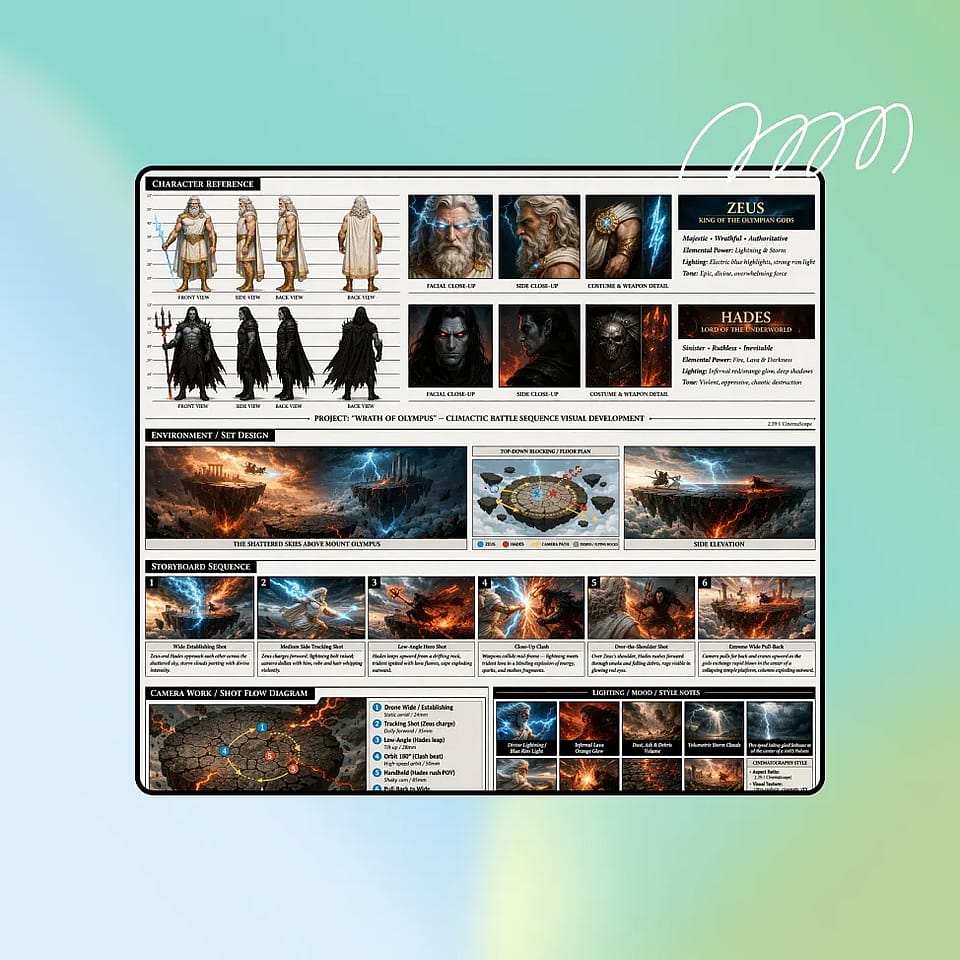
Describe your concept and Smart Shot generates a complete production plan in seconds. Including storyboards, camera positions, subject references, and shot sequences. This “Shot Plan” acts as a visual blueprint that guides the final video, making the output more structured and intentional.
Try it NowMulti-Cut Output
Unlike single-shot AI video tools, Smart Shot produces 3–5 distinct cuts with varied framing, from wide establishing shots to close-ups and transitions. This creates a natural sequence that feels like a professionally edited video rather than a single generated clip.
Try it NowProfessional Camera Work
Smart Shot applies real cinematography techniques such as orbit shots, dolly movements, push-ins, and pans. These are selected based on the scene, helping your video feel directed and visually engaging instead of random or static.
Try it NowVisual Consistency
Characters, products, and environments stay consistent across every cut. Whether you’re using saved characters from your OpenArt account or environments from OpenArt Worlds, Smart Shot maintains identity and visual continuity throughout the sequence.
Try it NowEdit Before You Generate
Preview your Shot Plan, make adjustments, and refine the sequence before generating the final video. This gives you creative control over camera angles, shot types, and structure, without needing manual editing tools.
Try it NowComplete End-to-End Cinematic Workflow
Smart Shot handles the full workflow, starting with an editable Shot Plan that includes storyboards, camera setups, and shot sequences. It then generates a 10–20 second multi-cut video with 3–5 shots, with the option to export individual frames for thumbnails, assets, or edits.
Try it NowCommunity Creations
See how creators are generating multi-cut cinematic videos with Smart Shot. From short story scenes to product videos and social content, explore how structured camera work and shot sequencing can transform a simple idea into a complete visual narrative.
How to Use Smart Shot
Create cinematic multi-shot videos in just a few steps.
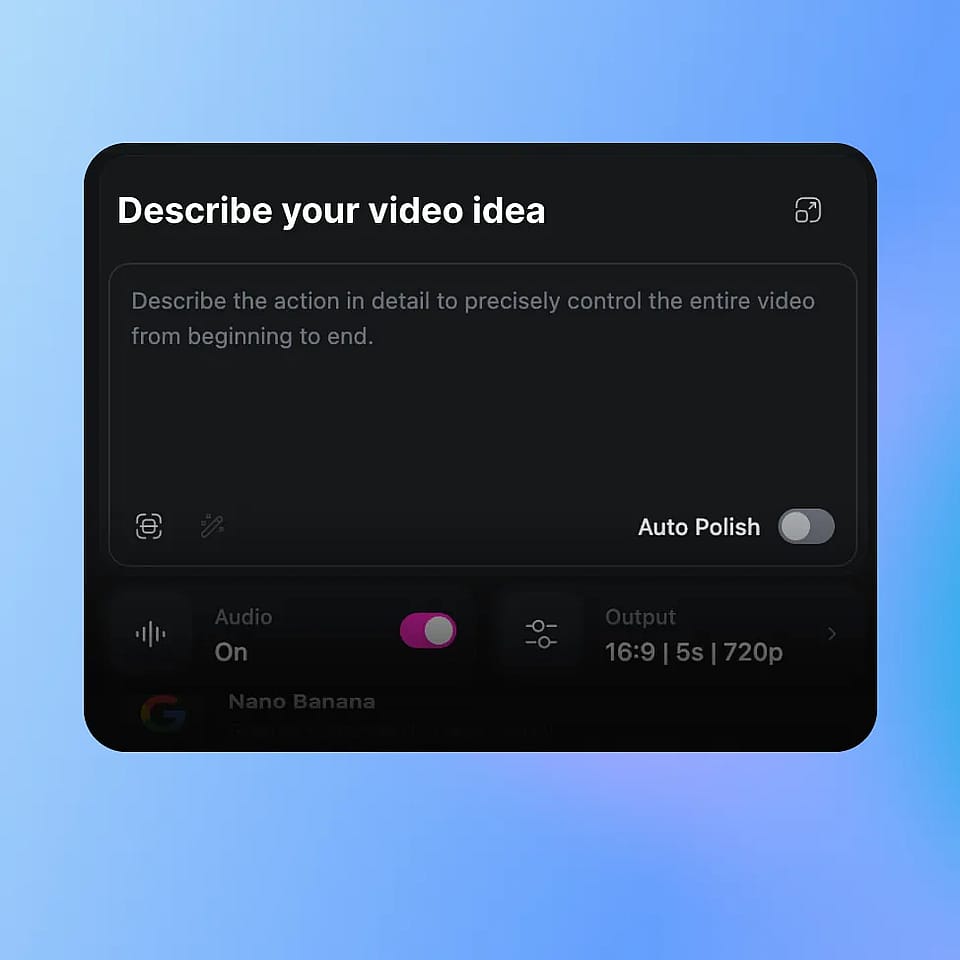
Describe Your Video Idea
Enter a prompt describing your scene, including subject, action, and environment. You can also select characters saved in your OpenArt account or use environments from OpenArt Worlds.
Review the Shot Plan
Smart Shot generates a production sheet with storyboard panels, camera setups, and shot breakdowns. Preview and refine the plan before generating.
Generate and Export
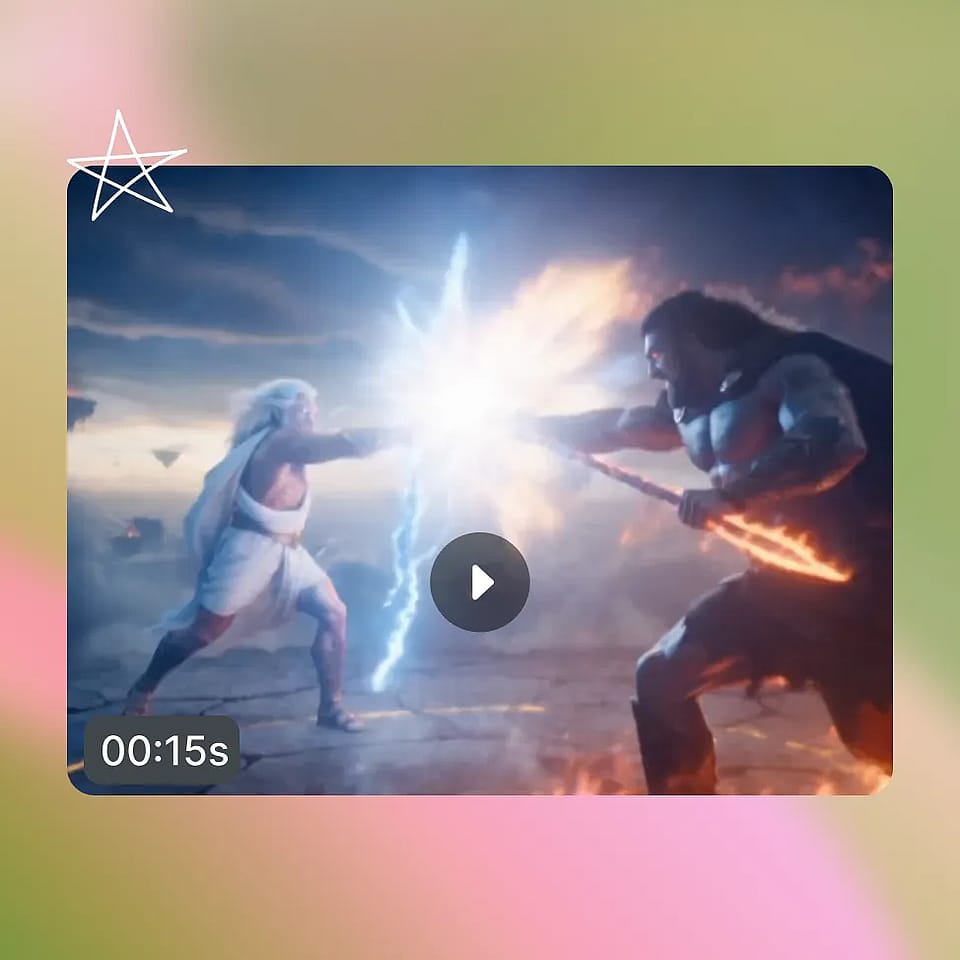
Generate your final video with multiple cuts. You can export the full sequence or download individual frames from any shot.
Built for Cinematic Content Creation and Fast Video Production
Create structured, multi-shot videos without manual editing. Smart Shot helps you move from idea to finished video quickly while maintaining quality and consistency.
Content Creators Making Engaging Videos
Create videos that feel dynamic instead of static. With multiple cuts and camera movements, your content looks more like edited footage rather than a single generated clip. This is especially useful for social media, where pacing and variation keep viewers engaged.
Try it NowFilmmakers and Pre-Visualization
Use Smart Shot to quickly visualize scenes before production. Generate shot sequences, explore camera angles, and understand how a scene plays out without setting up a real shoot. This helps with planning and creative direction.
Try it NowMarketing and Product Videos
Create product videos with multiple angles and structured shots from a single prompt. Showcase products from different perspectives without filming or editing, making it easier to produce content for ads and campaigns.
Try it NowAI Influencers and Character Content
Maintain consistent characters across multiple shots in a single video. Use saved characters from your OpenArt account and place them in different scenes while keeping identity stable, making it ideal for AI influencers and recurring content.
Try it NowStorytelling and Narrative Content
Generate short story sequences with a clear progression of shots. Instead of a single scene, you get a structured flow between moments, making it easier to tell a story visually within a short format.
Try it NowLoved by Creators Worldwide
See what our community has to say
I've tried many AI platforms… but OpenArt is still the best for character creation, image-to-video quality, and the variety of models available.
OpenArt offers an excellent array of AI tools… once you learn the features, the creative possibilities are amazing - and their support team is outstanding.
OpenArt is a very versatile AI platform with many image and video models, consistent character creation, and powerful editing tools.
Helpful AI tools all in one place - image and video generation, editing, and more… no need for multiple subscriptions.
Customer service is always quick and helpful… and the platform keeps getting better with new features and tools.
I've tried many AI platforms… but OpenArt is still the best for character creation, image-to-video quality, and the variety of models available.
OpenArt offers an excellent array of AI tools… once you learn the features, the creative possibilities are amazing - and their support team is outstanding.
OpenArt is a very versatile AI platform with many image and video models, consistent character creation, and powerful editing tools.
Helpful AI tools all in one place - image and video generation, editing, and more… no need for multiple subscriptions.
Customer service is always quick and helpful… and the platform keeps getting better with new features and tools.
I've tried many AI platforms… but OpenArt is still the best for character creation, image-to-video quality, and the variety of models available.
OpenArt offers an excellent array of AI tools… once you learn the features, the creative possibilities are amazing - and their support team is outstanding.
OpenArt is a very versatile AI platform with many image and video models, consistent character creation, and powerful editing tools.
Helpful AI tools all in one place - image and video generation, editing, and more… no need for multiple subscriptions.
Customer service is always quick and helpful… and the platform keeps getting better with new features and tools.
With so many AI platforms out there, OpenArt stood out as a stellar choice - I'd recommend it to any creator.
This platform includes everything you need for AI content creation - images, video, characters, audio, and multiple AI models in one place.
OpenArt is pushing the boundaries of AI video creation… and it's clear the team is committed to improving the creator experience.
I made my first AI music video with OpenArt… and their support team was the best help I've ever experienced.
I'm very happy with the support - my issue was resolved quickly and the team made the process easy.
With so many AI platforms out there, OpenArt stood out as a stellar choice - I'd recommend it to any creator.
This platform includes everything you need for AI content creation - images, video, characters, audio, and multiple AI models in one place.
OpenArt is pushing the boundaries of AI video creation… and it's clear the team is committed to improving the creator experience.
I made my first AI music video with OpenArt… and their support team was the best help I've ever experienced.
I'm very happy with the support - my issue was resolved quickly and the team made the process easy.
With so many AI platforms out there, OpenArt stood out as a stellar choice - I'd recommend it to any creator.
This platform includes everything you need for AI content creation - images, video, characters, audio, and multiple AI models in one place.
OpenArt is pushing the boundaries of AI video creation… and it's clear the team is committed to improving the creator experience.
I made my first AI music video with OpenArt… and their support team was the best help I've ever experienced.
I'm very happy with the support - my issue was resolved quickly and the team made the process easy.
Get Insights from Experts Blog
Get the insights you need. Our experts share actionable hacks, break down the hottest topics, and provide essential how-to guides to help you build, optimize, and scale.
Read More
Frequently Asked Questions
Create without limits
Join millions of creators using OpenArt to generate images, videos, characters, and stories - all in one platform.
Get Started for Free →