
stable zero123 and animation workflow
5.0
0 reviews

Description
What this workflow does
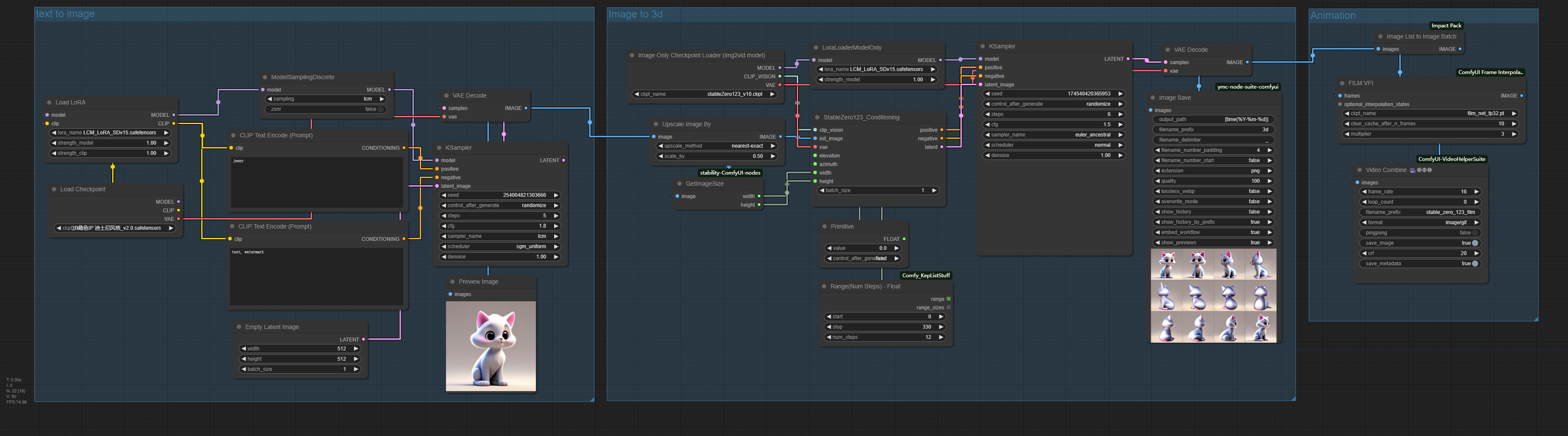
👉This workflow use lcm workflow to produce image from text and the use stable zero123 model to generate image from different angles. The generated images are animated.
How to use this workflow
👉Please use 3d model such as models for disney or PVC Figure or GarageKit for the text to image section. For animation, please use proper frame interpolation number and FPS (frame rate)
Tips about this workflow
👉 [Please add here]
🎥 Video demo link (optional)
👉English: https://www.bilibili.com/video/BV1De411i7oG/
Chinese: https://www.bilibili.com/video/BV1Dp4y197Lu/
Discussion
(No comments yet)
Loading...

Reviews
No reviews yet
Versions (1)
- latest (2 years ago)
Node Details
Primitive Nodes (1)
PrimitiveNode (1)
Custom Nodes (22)
- Range(Num Steps) - Float (1)
ComfyUI
- CLIPTextEncode (2)
- EmptyLatentImage (1)
- ModelSamplingDiscrete (1)
- KSampler (2)
- LoraLoader (1)
- VAEDecode (2)
- LoraLoaderModelOnly (1)
- StableZero123_Conditioning (1)
- ImageScaleBy (1)
- PreviewImage (1)
- CheckpointLoaderSimple (1)
- ImageOnlyCheckpointLoader (1)
- FILM VFI (1)
- ImageListToImageBatch (1)
- VHS_VideoCombine (2)
- GetImageSize (1)
- Image Save (1)
Model Details
Checkpoints (2)
3Dè§è²IP 迪士尼é£æ ¼_v2.0.safetensors
stableZero123_v10.ckpt
LoRAs (2)
LCM_LoRA_SDv15.safetensors