
IRL Me My Avatar v2.0
5.0
0 reviews
Description
What this workflow does
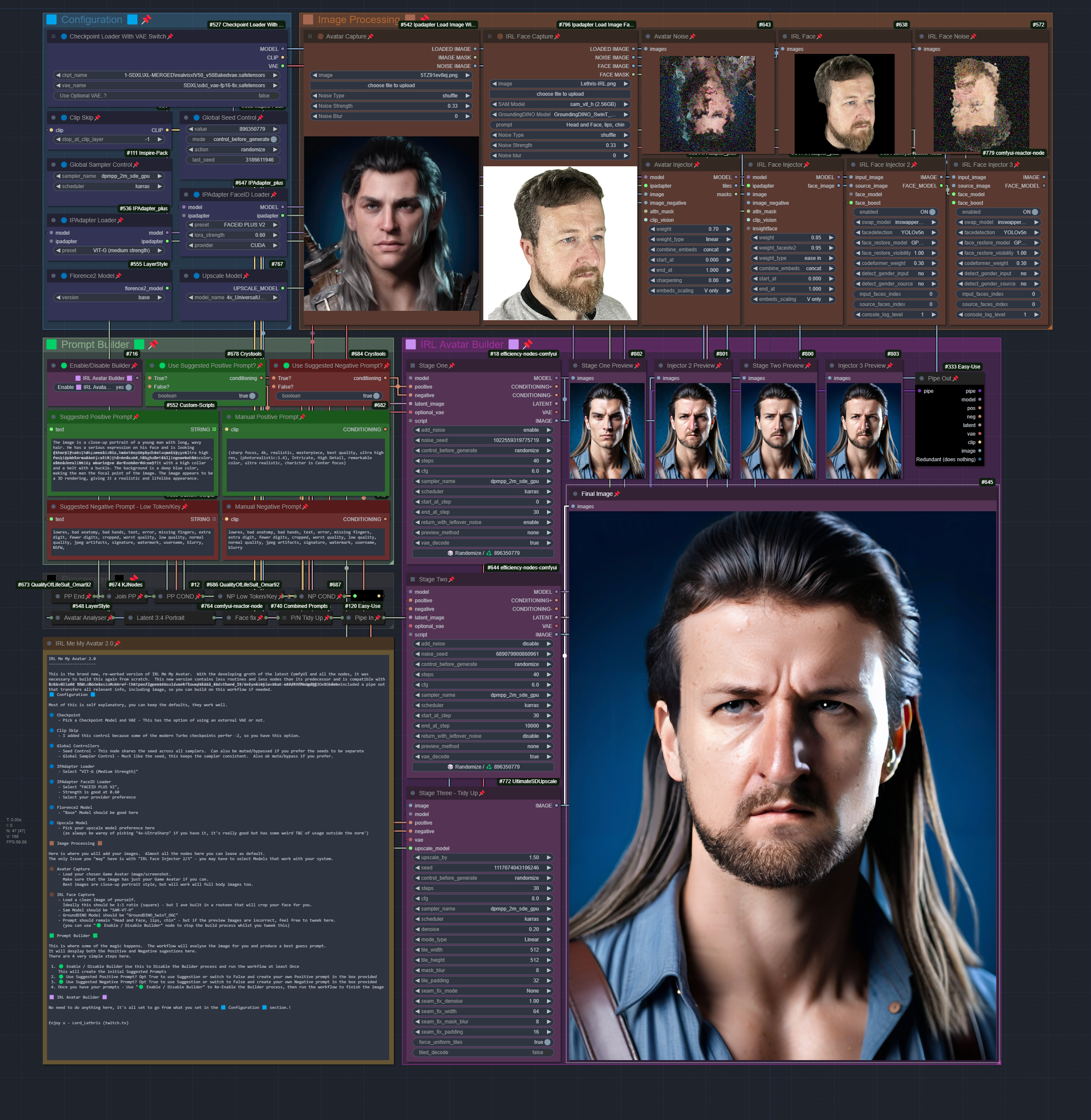
This is the brand new, re-worked version of IRL Me My Avatar. With the developing groth of the latest ComfyUI and all the nodes, it was necessary to build this again from scratch. This new version contains less routines and less nodes than its predecessor and is compatible with both SD and SDXL Models. Most of the configuration is set to optimal and there is very little that needs changing. I have included a pipe out that transfers all relevant info, including image, so you can build on this workflow if needed.
I have left the old version here - IRL Me My Avatar v1.7 - Final Release
How to use this workflow
🟦 Configuration 🟦
Most of this is self explanatory, you can keep the defaults, they work well.
🔵 Checkpoint
Pick a Checkpoint Model and VAE - This has the option of using an external VAE or not.
🔵 Clip Skip
I added this control because some of the modern Turbo checkpoints perfer -2, so you have this option.
🔵 Global Controllers
Seed Control - This node shares the seed across all samplers. Can also be muted/bypassed if you prefer the seeds to be separate
Global Sampler Control - Much like the seed, this keeps the sampler consistent. Also ok mute/bypass if you prefer.
🔵 IPAdapter Loader
Select "VIT-G (Medium Strength)"
🔵 IPAdapter FaceID Loader
Select "FACEID PLUS V2"
Strength is good at 0.60
Select your provider preference
🔵 Florence2 Model
"Base" Model should be good here
🔵 Upscale Model
Pick your upscale model preference here
(as always be warey of picking "4x-UltraSharp" if you have it, it's really good but has some weird T&C of usage outside the norm')
🟫 Image Processing 🟫
Here is where you will add your images. Almost all the nodes here you can leave as default.
The only Issue you "may" have is with "IRL Face Injector 2/3" - you may have to select Models that work with your system.
🟤 Avatar Capture
Load your chosen Game Avatar image/screenshot.
Make sure that the image has just your Game Avatar if you can.
Best images are close-up portrait style, but will work will full body images too.
🟤 IRL Face Capture
Load a clean Image of yourself.
Ideally this should be 1:1 ratio (square) - but I ave built in a routeen that will crop your face for you.
Sam Model should be "SAM-VT-H"
GroundDINO Model should be "GroundDINO_SwinT_OGC"
Prompt should remain "Head and Face, lips, chin" - but if the preview Images are incorrect, feel free to tweek here.
(you can use "🟢 Enable / Disable Builder" node to stop the build process whilst you tweek this)
🟩 Prompt Builder 🟩
This is where some of the magic happens. The workflow will analyse the image for you and produce a best guess prompt.
It will desplay both the Positive and Negative sugestions here.
There are 4 very simple steps here.
- 🟢 Enable / Disable Builder Use this to Disable the Builder process and run the workflow at least Once This will create the initial Suggested Prompts
- 🟢 Use Suggested Positive Prompt? Opt True to use Suggestion or switch to False and create your own Positive prompt in the box provided
- 🟢 Use Suggested Negative Prompt? Opt True to use Suggestion or switch to False and create your own Negative prompt in the box provided
- Once you have your prompts - Use "🟢 Enable / Disable Builder" to Re-Enable the Builder process, then run the workflow to finish the image
🟪 IRL Avatar Builder 🟪
No need to do anything here, it's all set to go from what you set in the 🟦 Configuration 🟦 section.!
Tips about this workflow
This will work with both SD and SDXL models with next to no change to the other nodes. I have not tested this with Pony or other variations, but in theory they should also work. You have a Clip Skip to play with if needed.
RL Face Capture ideally should be 1024x1024 square image, with your face in the centre. But don't worry to much as I have added a process that will detect and correct any image you place here.
Avatar Capture should be clean and clear, Best images are close-up portrait style, but will work will full body images too. As long as your avatar is clearly visible, any size image will work here - but try not to go any higher than 2048 pixel square (1080 x 2048 pixels)
Everything should work as is
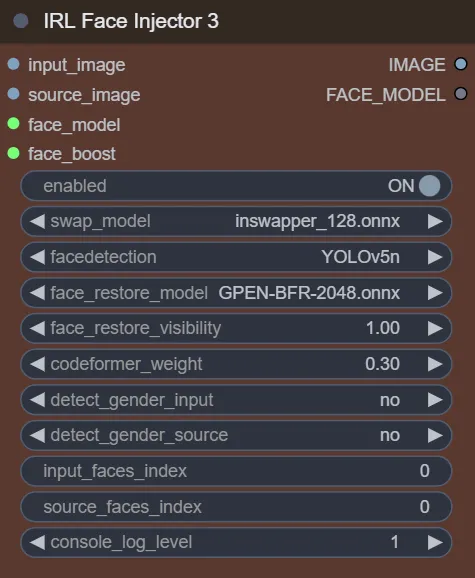
IRL Face Injector 2/3 use the following configuration (if you need to know)
I have found GPEN-BFR-1024 to work very well in both SD and SDXL - but feel free to try lower or higher models depending on your VRAM.
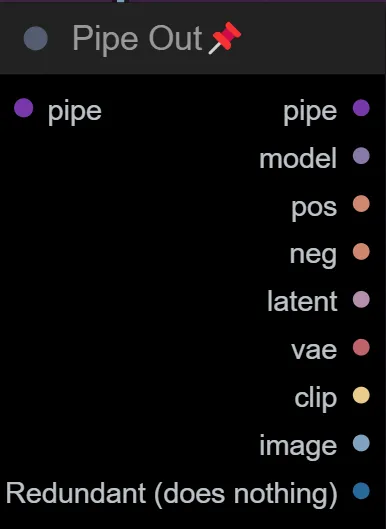
The Pipe out includes everything you need to pass this over to your own extended workflow without having to search for the nodes yourself, including the final image
Version Changes
v2.0
- Release Workflow
Discussion
(No comments yet)
Loading...

Reviews
No reviews yet
Versions (1)
- latest (a year ago)
Node Details
Primitive Nodes (13)
Fast Groups Muter (rgthree) (1)
LayerMask: LoadFlorence2Model (1)
LayerUtility: Florence2Image2Prompt (1)
Note (1)
ReActorFaceBoost (1)
Reroute (2)
Switch conditioning [Crystools] (2)
workflow/Checkpoint Loader With VAE Switch (1)
workflow/Combined Prompts (1)
workflow/Ipadapter Load Image Face Capture With Noise (1)
workflow/Ipadapter Load Image With Noise (1)
Custom Nodes (34)
ComfyUI
- CLIPTextEncode (4)
- EmptyLatentImage (1)
- VAEEncode (1)
- PreviewImage (8)
- CLIPSetLastLayer (1)
- UpscaleModelLoader (1)
- easy pipeIn (1)
- easy pipeOut (1)
- GlobalSeed //Inspire (1)
- GlobalSampler //Inspire (1)
- IPAdapterTiled (1)
- IPAdapterFaceID (1)
- IPAdapterUnifiedLoaderFaceID (1)
- IPAdapterUnifiedLoader (1)
- KSampler Adv. (Efficient) (2)
- JoinStrings (1)
- ShowText|pysssss (2)
- Text _O (2)
- ReActorFaceSwap (2)
- UltimateSDUpscale (1)
Model Details
Checkpoints (2)
1-SDXL\XL-MERGED\realvisxlV50_v50Bakedvae.safetensors
SDXL\sdxl_vae-fp16-fix.safetensors
LoRAs (0)