
[v3.0] BG Changer
5.0
0 reviews
Description
1) First Time Video Tutorial : https://www.youtube.com/watch?v=qczh3caLZ8o&ab_channel=JerryDavosAI
.
2) Raw Animation with IP and Consistent Background Documented Tutorial : https://www.patreon.com/posts/v3-0-bg-changer-96735652
.
3) Render Videos : https://www.youtube.com/@Ai_Davos/shorts
.
HOW TO USE:
Important : You need 2 Controlnet Passes From here first : https://www.patreon.com/posts/v3-0-raw-masking-96587664
1) Choose Model checkpoint you want to use
2) Enter Width and Height of your Output Image
3) Choose Positive Prompts, you want to see in the output
4) Choose Loras, (You have to experiment which looks good or not)
5) Paste the Passes Directories in ControlNets (1 and 2) Loaders and set their models and weight (See Neon Purple note) also you can use CN Mask and IP Adaptor
6) Paste The Directory where you want to save the Images in the Output Save Directory Node
7) Select Batch Range (Number of images you want to render in one Queue)
8) Choose LCM, Highres and AD Motion Settings, Default is good but experimental (See note)
9) After every batch you can increase the batch naming for organizing the batches.
10) After every queue increase the skip frames to the Total number of images rendered already.
11) After All the batches are rendered it's Ready for #3 LCM Refiner workflow
*Don't Use Overlapping Technique in this phase, Use that in the final refiner phase,
________________________________________
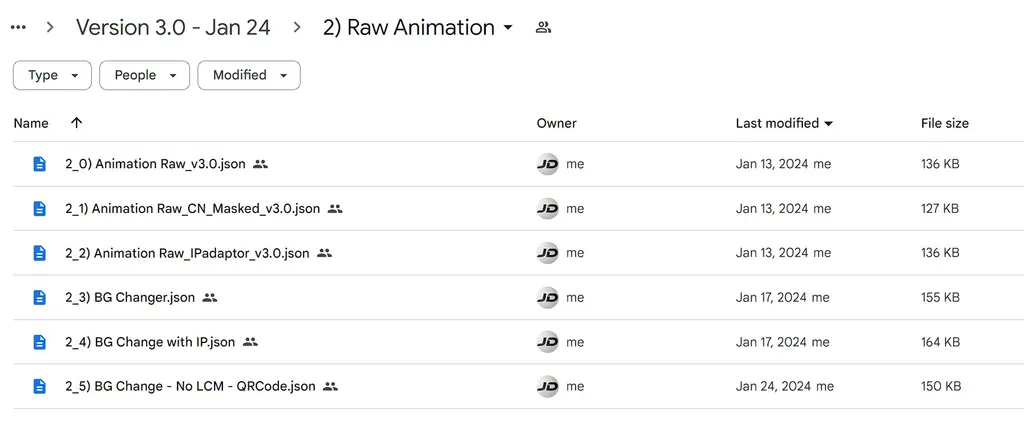
*Special Features are separated in different files due to technical limitation. All Files Download Folder Link : https://drive.google.com/drive/folders/1HoZxKUX7WAg7ObqP00R4oIv48sXCEryQ?usp=sharing
_________________________________________
My Discord Server : https://discord.gg/z9rgJyfPWJ
If you need Cloud GPU : https://www.runcomfy.com/?ref=jerrydavos
Discussion
(No comments yet)
Loading...

Reviews
No reviews yet
Versions (1)
- latest (2 years ago)
Node Details
Primitive Nodes (78)
GetNode (19)
Note (18)
PrimitiveNode (3)
Reroute (25)
SetNode (13)
Custom Nodes (89)
- ADE_AnimateDiffModelSettingsSimple (1)
- ADE_AnimateDiffUniformContextOptions (1)
- ADE_AnimateDiffLoaderWithContext (1)
- CheckpointLoaderSimpleWithNoiseSelect (1)
- CR Integer To String (1)
- CR Apply LoRA Stack (1)
- CR LoRA Stack (2)
- CR Conditioning Input Switch (2)
ComfyUI
- VAEDecode (1)
- KSamplerAdvanced (2)
- PreviewImage (5)
- LatentUpscaleBy (1)
- CLIPSetLastLayer (1)
- ModelSamplingDiscrete (1)
- FreeU_V2 (1)
- VAELoader (1)
- LoraLoader (1)
- ImageToMask (1)
- EmptyLatentImage (1)
- InvertMask (1)
- LoadImage (1)
- ImageScale (1)
- ImpactSwitch (2)
- LineArtPreprocessor (1)
- BNK_InjectNoise (1)
- TonemapNoiseWithRescaleCFG (1)
- ControlNetLoaderAdvanced (3)
- LoadImagesFromDirectory (4)
- ACN_AdvancedControlNetApply (3)
- FS: Fit Size From Image (1)
- Int (2)
- VHS_SplitImages (5)
- BatchPromptSchedule (1)
- FloatConstant (10)
- MathExpression|pysssss (3)
- Cfg Literal (3)
- Int Literal (7)
- smZ CLIPTextEncode (2)
- Image Save (1)
- Text String (1)
- Text Concatenate (1)
- Text Multiline (3)
- Logic Boolean (3)
- String to Text (1)
- Image Blank (1)
Model Details
Checkpoints (1)
imp_v10.safetensors
LoRAs (1)
lcm_pytorch_lora_weights.safetensors